 BambooForge Labs
E-Invoice Pre-Flight Checks
Run the EN 16931 rules against invoices before they leave, so a rejection arrives as a list of fields to fill in, not a code three days later.
Available for Odoo 16.0, Odoo 17.0, Odoo 18.0, Odoo 19.0, Odoo 20.0. Technical name bambooforge_einvoice.
Transcript of the walkthrough (Odoo 20)
E-Invoice Pre-Flight Checks. Run the EN 16931 rules against invoices before they leave, so a rejection arrives as a list of fields to fill in, not a code three days later. Odoo builds a technically valid UBL or CII file from whatever is on the invoice. Whether the receiving system accepts it is a different question, and the answer arrives days later as a rejection carrying a rule code and no context — usually from a customer's portal, sometimes from a tax authority.
In the next few minutes: what this is for, then the checks, then using it, then how we make sure it works, then questions people ask. Then what this app deliberately does not do, so you can tell before you buy whether it fits. Everything lives under E-Invoice Checks then E-Invoice Pre-Flight. 1.
Copy bambooforge_einvoice into your addons path and update the app list, or install the ZIP from the Odoo Apps Store. 2. Install E-Invoice Pre-Flight Checks. 3.
Open E-Invoice Checks - its menus are E-Invoice Pre-Flight. What this is for. Odoo builds a technically valid UBL or CII file from whatever is on the invoice. Whether the receiving system accepts it is a different question, and the answer arrives days later as a rejection carrying a rule code and no context — usually from a customer's portal, sometimes from a tax authority.
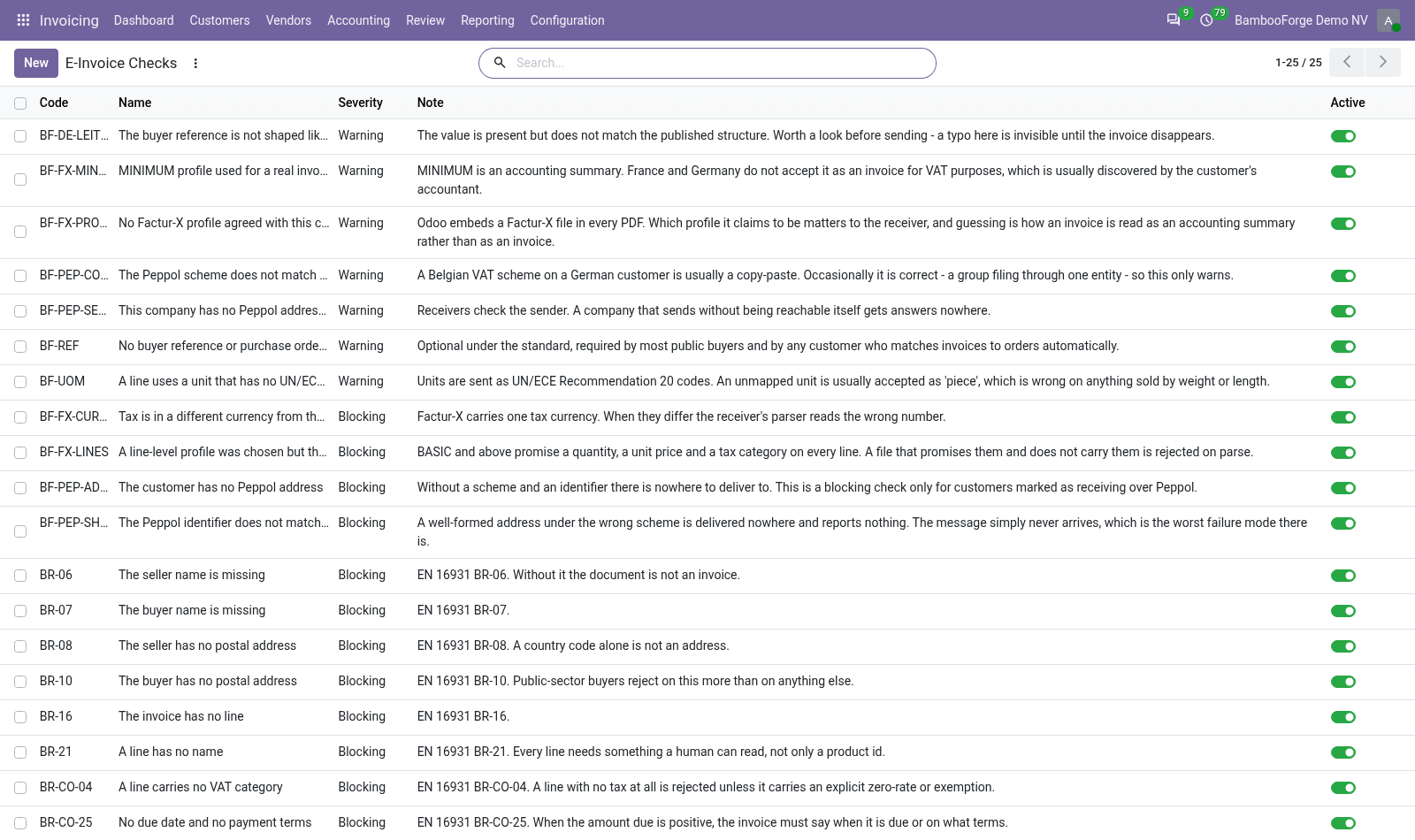
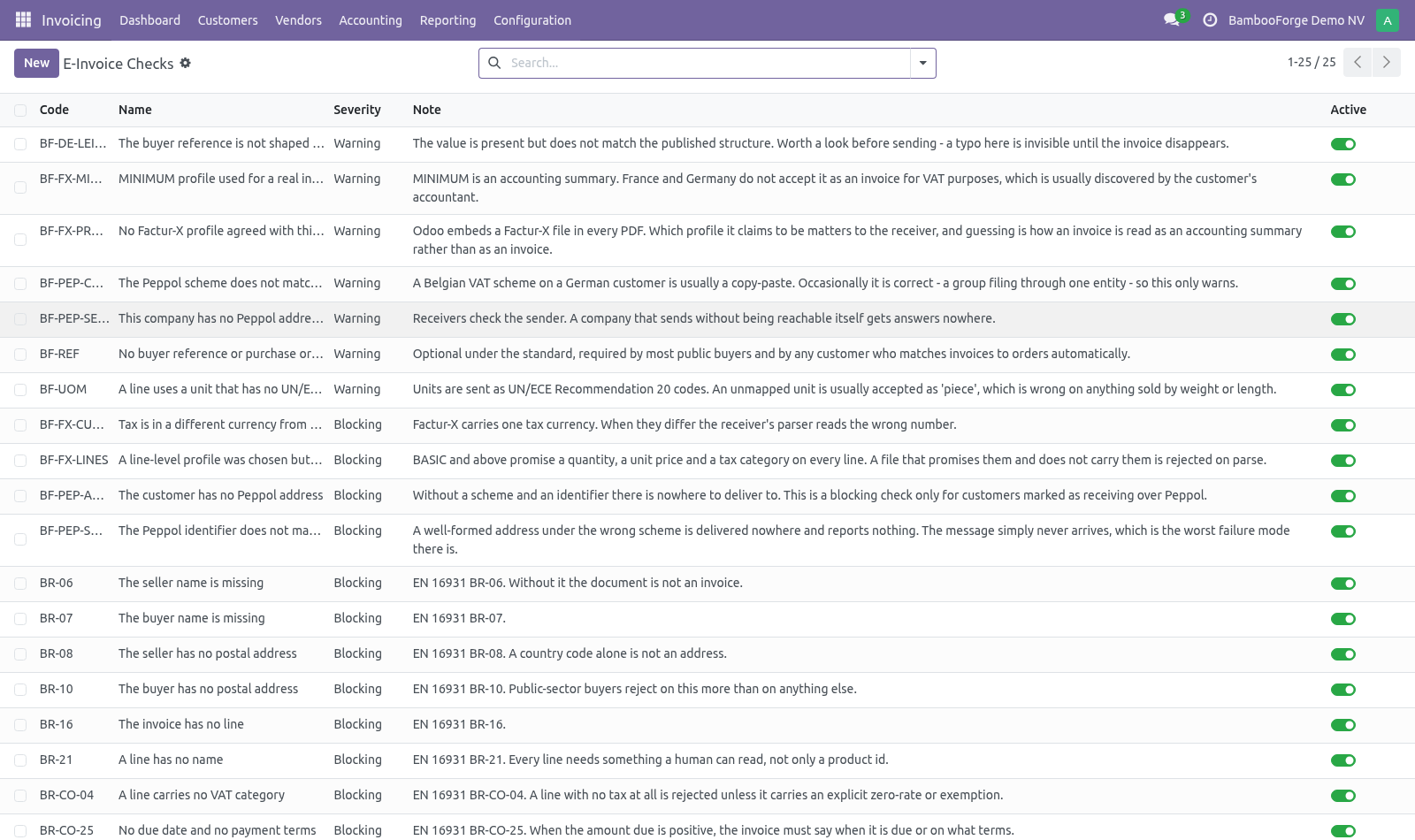
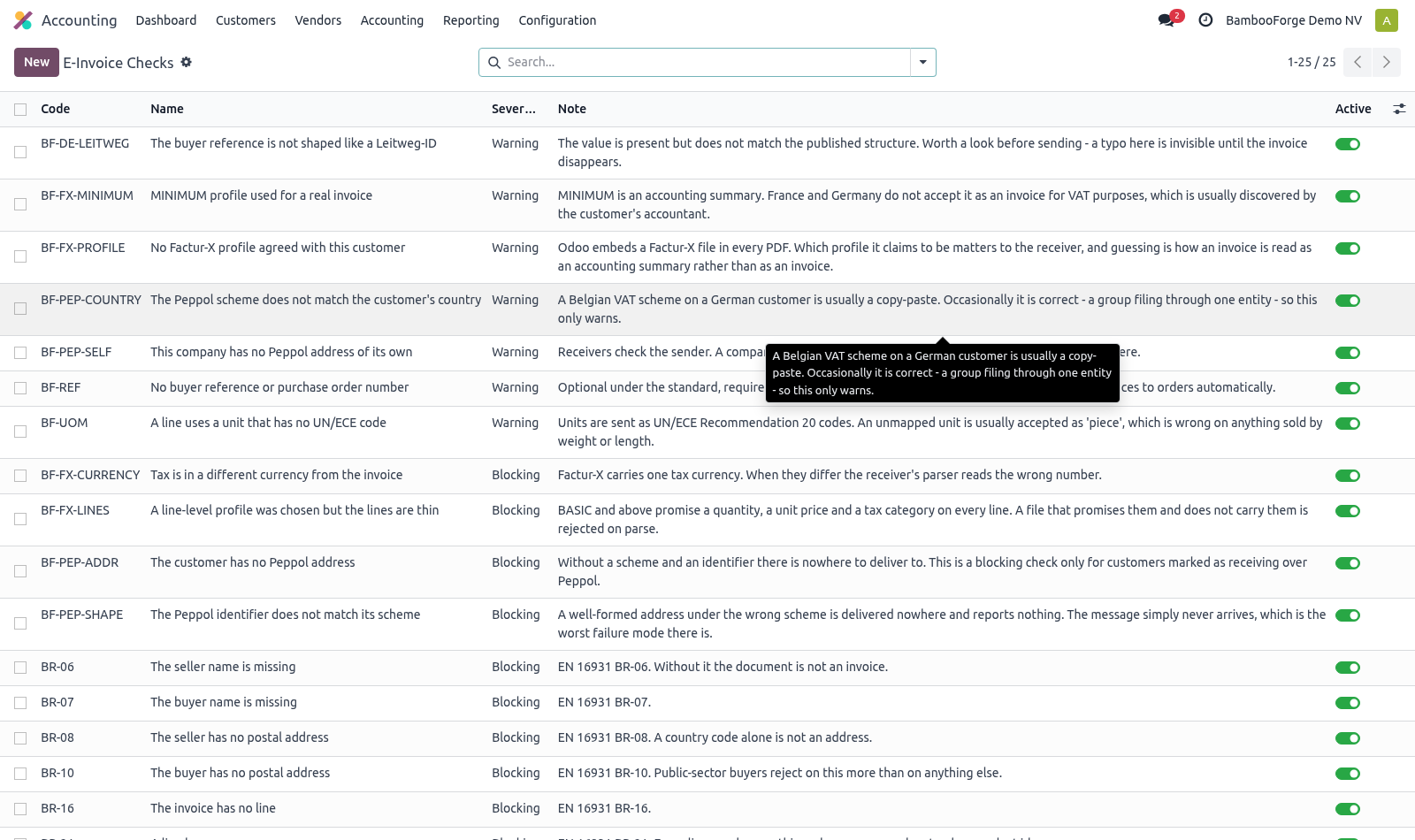
This runs the same rules before the invoice leaves. The checks. Accounting ▸ Configuration ▸ E-Invoice Checks seller and buyer name, and a real postal address for both (public-sector buyers reject on the buyer address more than on anything else); a VAT number or legal registration for the seller; a due date or payment terms when there is something to pay; at least one line, a description on every line, and a VAT category on every line. a unit of measure with no UN/ECE code.
Units travel as UN/ECE Rec. 20 codes, and an unmapped one is usually read as "piece" — wrong on anything sold by weight or length, and invisible until a customer queries the quantity; no buyer reference or order number, which every customer matching invoices to orders automatically will want. They install as records, so a company can switch off what its customers do not enforce and promote a warning to blocking once one of them has cost an invoice. Using it.
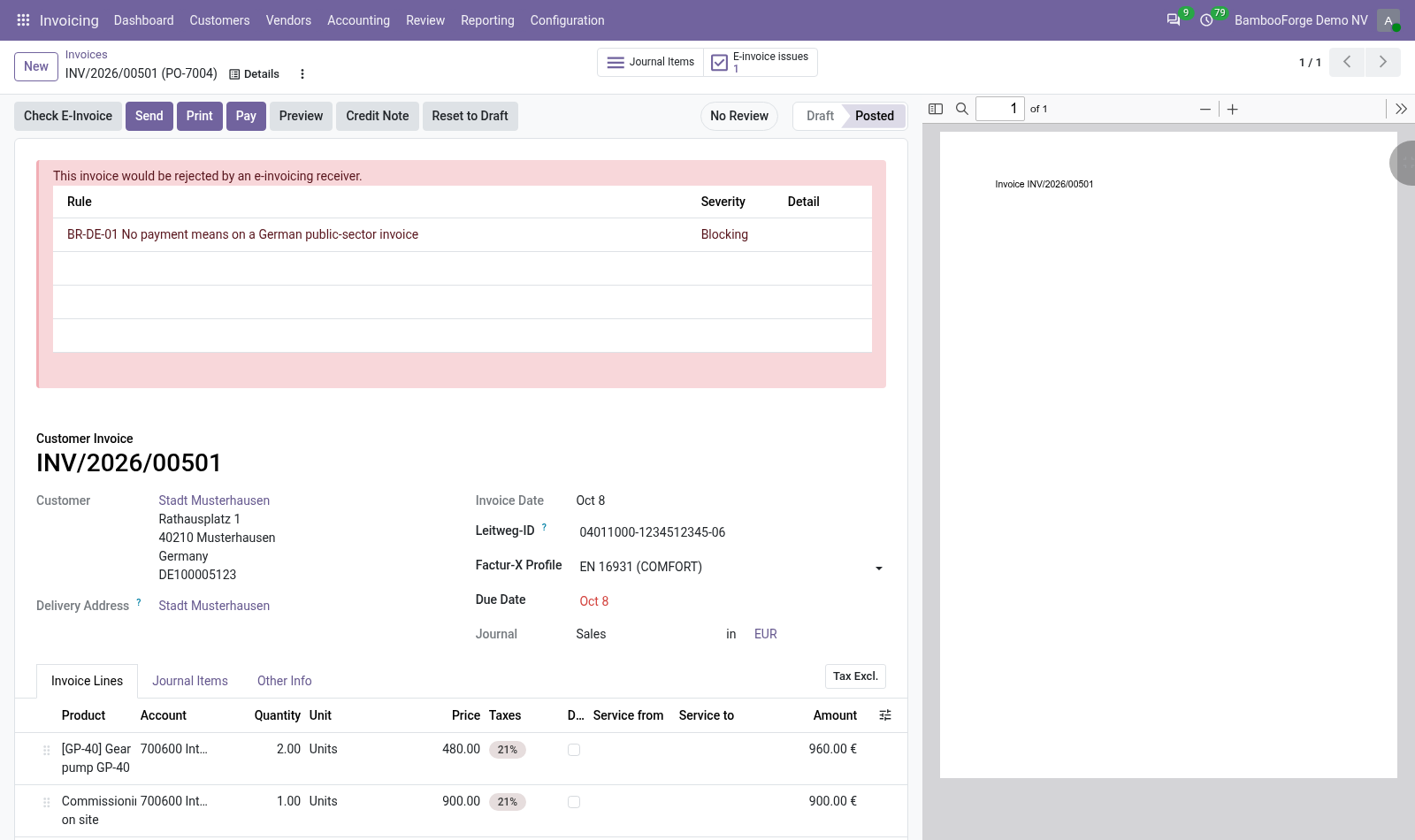
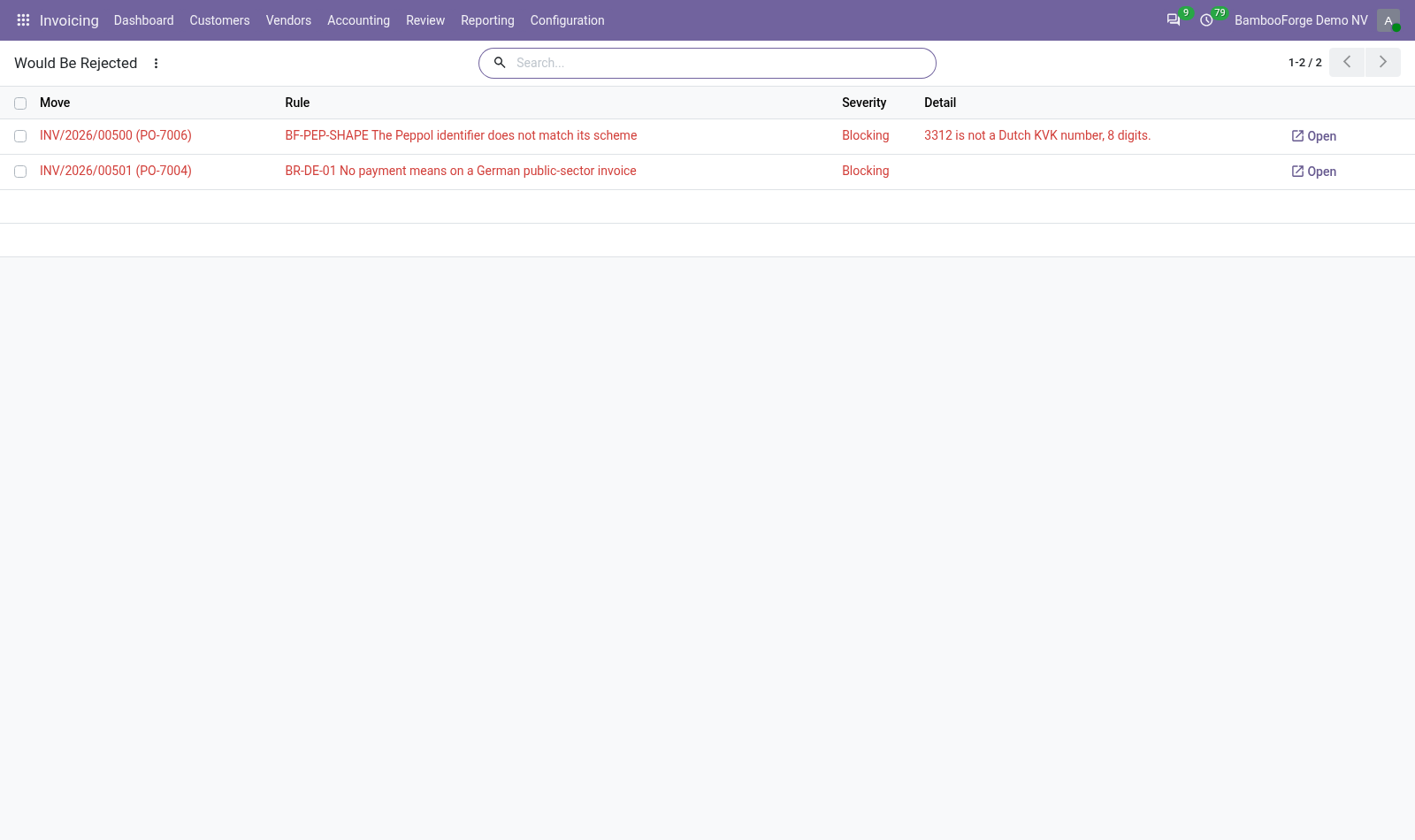
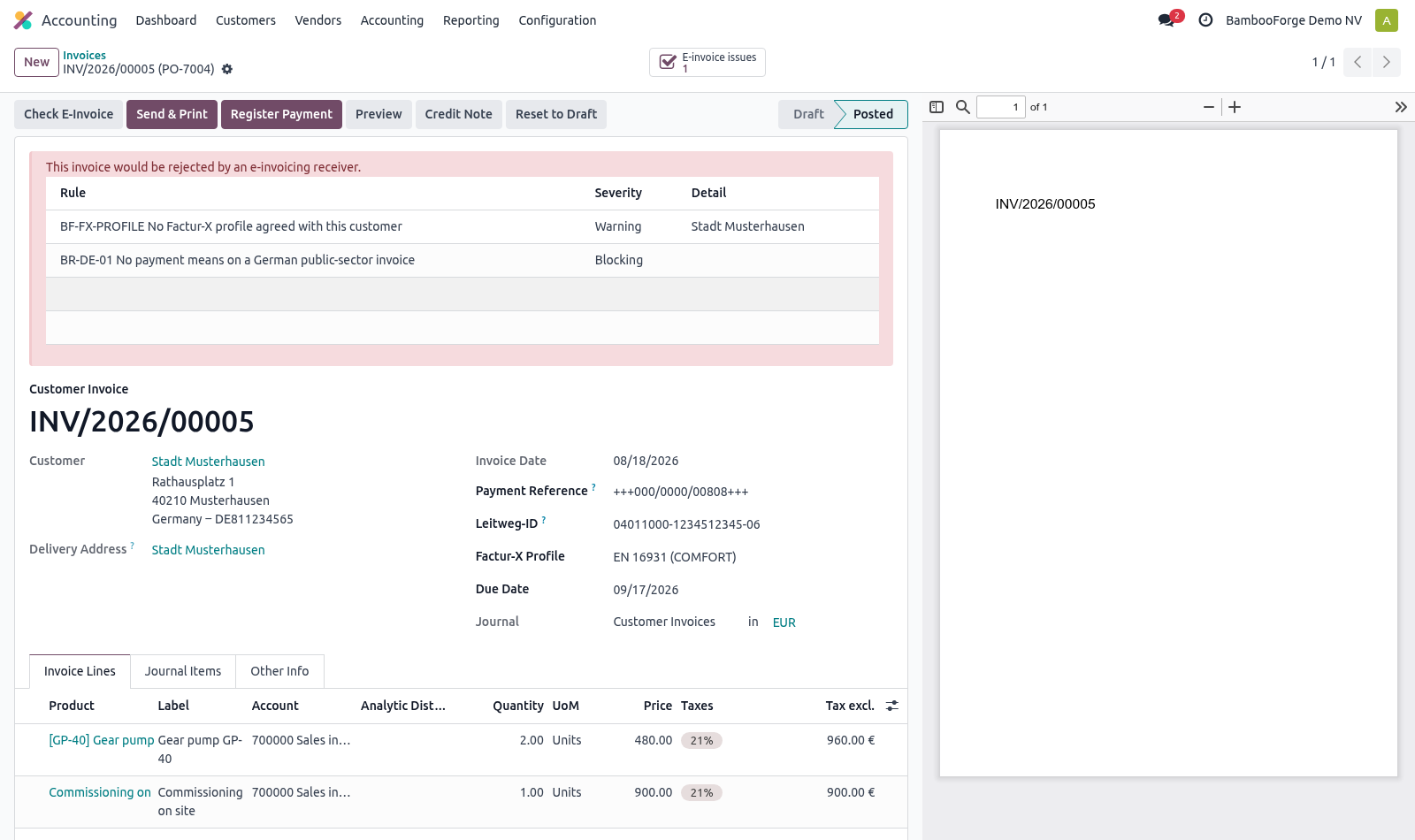
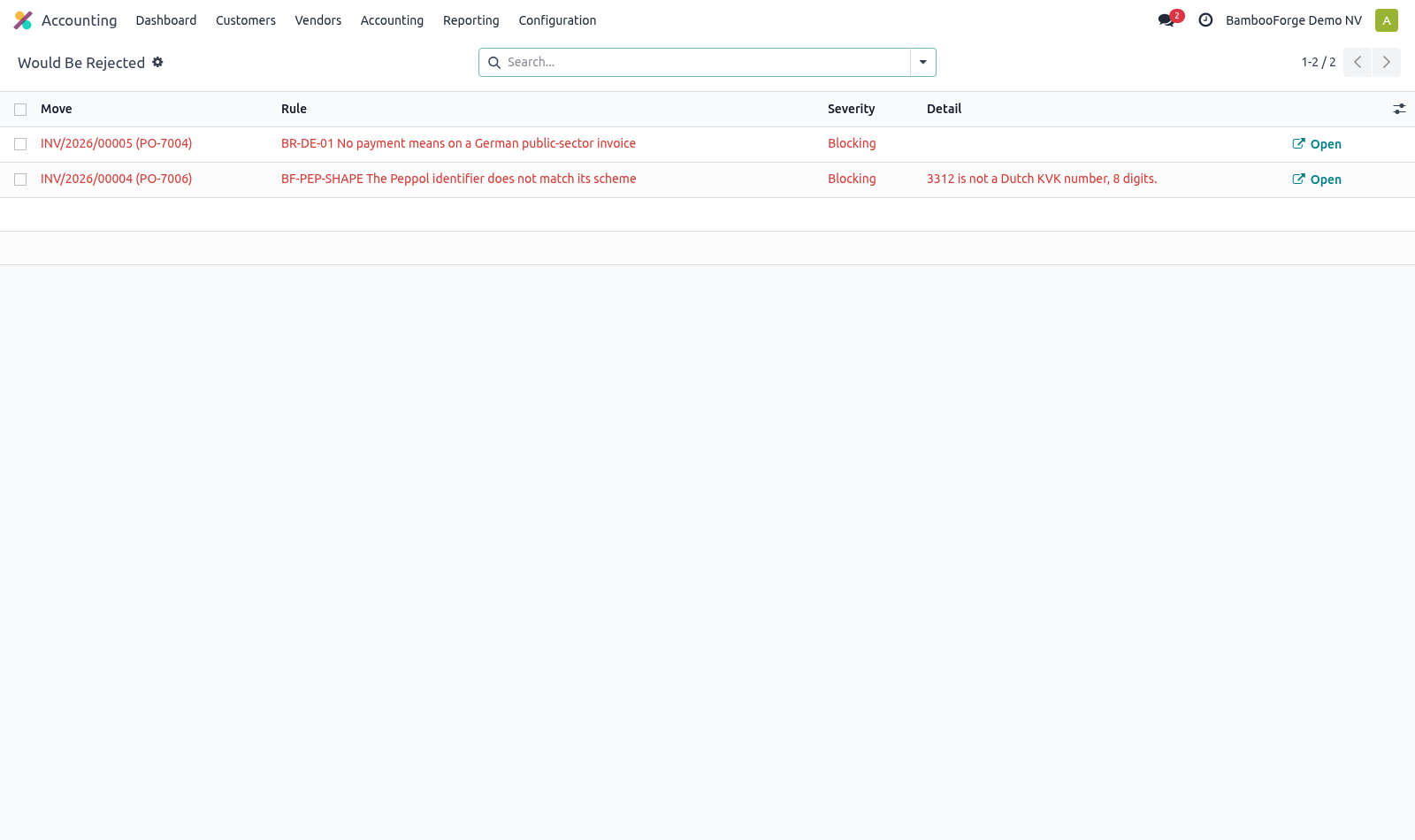
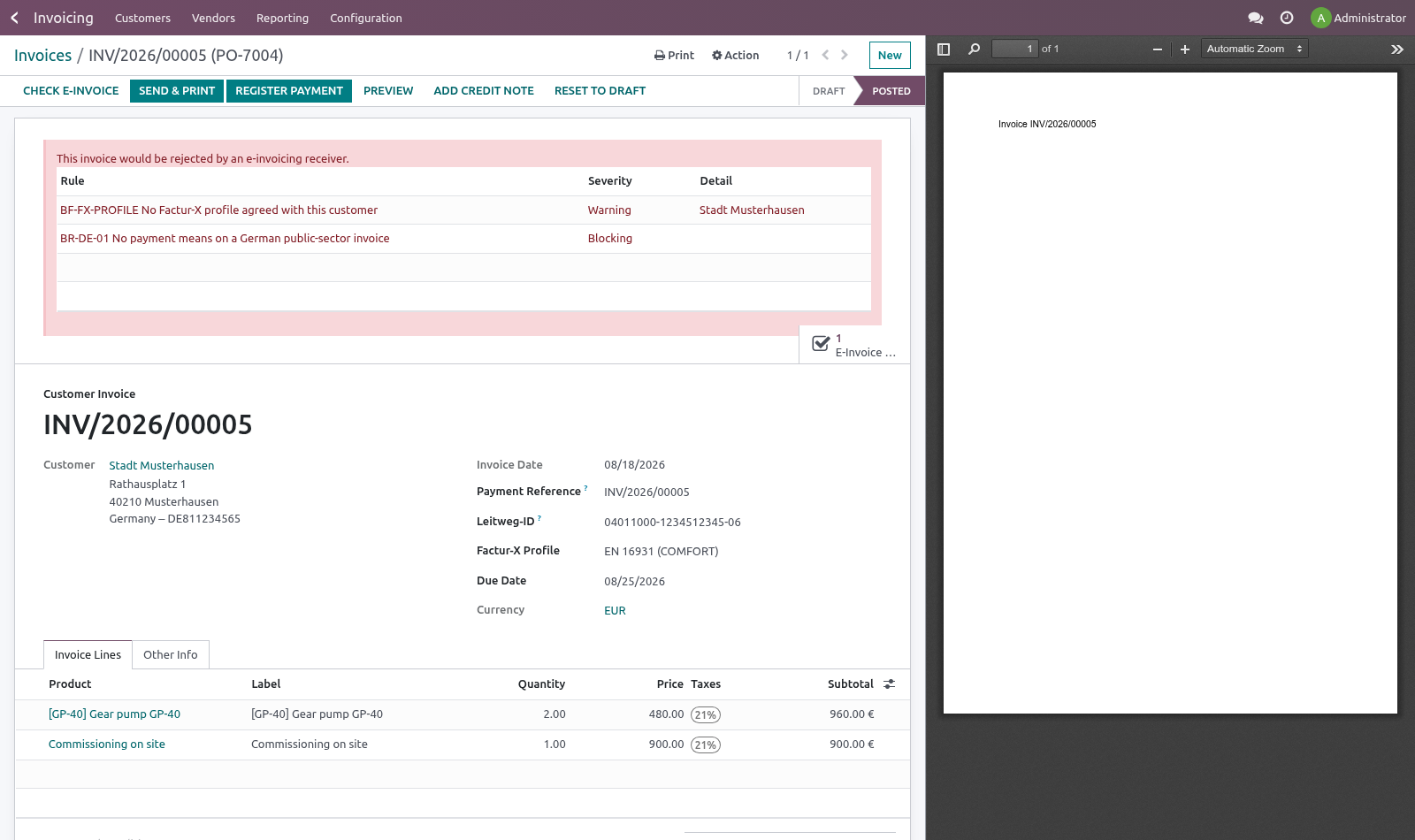
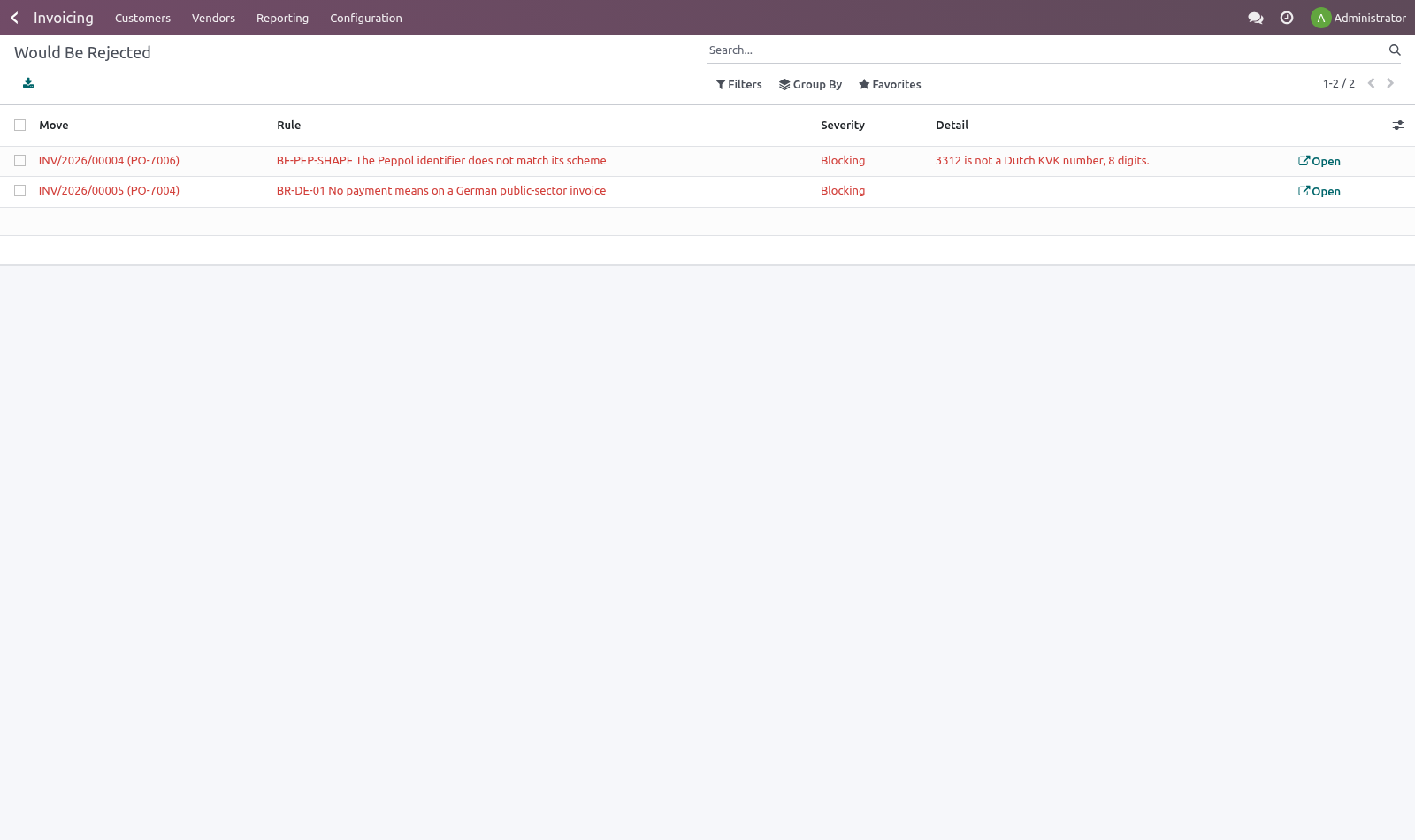
Check E-Invoice on the invoice form, or the Check for e-invoicing action on a selection in the list. Findings appear on the invoice with what to fix, and Accounting ▸ Reporting ▸ E-Invoice Pre-Flight lists everything that would be rejected across the company. A nightly pass checks posted invoices nobody has checked, so the problem surfaces the morning after posting rather than at send time. How we make sure it works.
Before every release, 21 automated checks run against this app on Odoo 16, 17, 18, 19 and 20. Among them: An unmapped unit is a warning not a block. Issue of another company is not readable. Issue of another company is not searchable.
Assert ready checks when nobody has. A line with no product and no description is blocking. The complete list is in the source you receive. Questions people ask.
Which Odoo versions does it run on? Odoo 16.0, 17.0, 18.0, 19.0, 20.0, on the series you buy it for; each series is its own listing. Community or Enterprise? Both.
It needs no Enterprise app. Now the part most videos leave out: what this does not do. These are the semantic rules of EN 16931, not a schema validation. A national profile can add its own — Leitweg-ID for German public bodies, Chorus Pro service codes in France.
The unit map covers the units that actually turn up on invoices. The point is to notice an unmapped one, not to be exhaustive. Passing every check does not guarantee acceptance. It removes the reasons that are yours to remove.
The complete manual is at docs dot bambooforge dot dev, the demo database is linked from the store page, and support answers within twenty-four hours. Links are in the description.
Transcript of the walkthrough (Odoo 19)
E-Invoice Pre-Flight Checks. Run the EN 16931 rules against invoices before they leave, so a rejection arrives as a list of fields to fill in, not a code three days later. Odoo builds a technically valid UBL or CII file from whatever is on the invoice. Whether the receiving system accepts it is a different question, and the answer arrives days later as a rejection carrying a rule code and no context — usually from a customer's portal, sometimes from a tax authority.
In the next few minutes: what this is for, then the checks, then using it. Then what this app deliberately does not do, so you can tell before you buy whether it fits. Everything lives under E-Invoice Checks then E-Invoice Pre-Flight. What this is for.
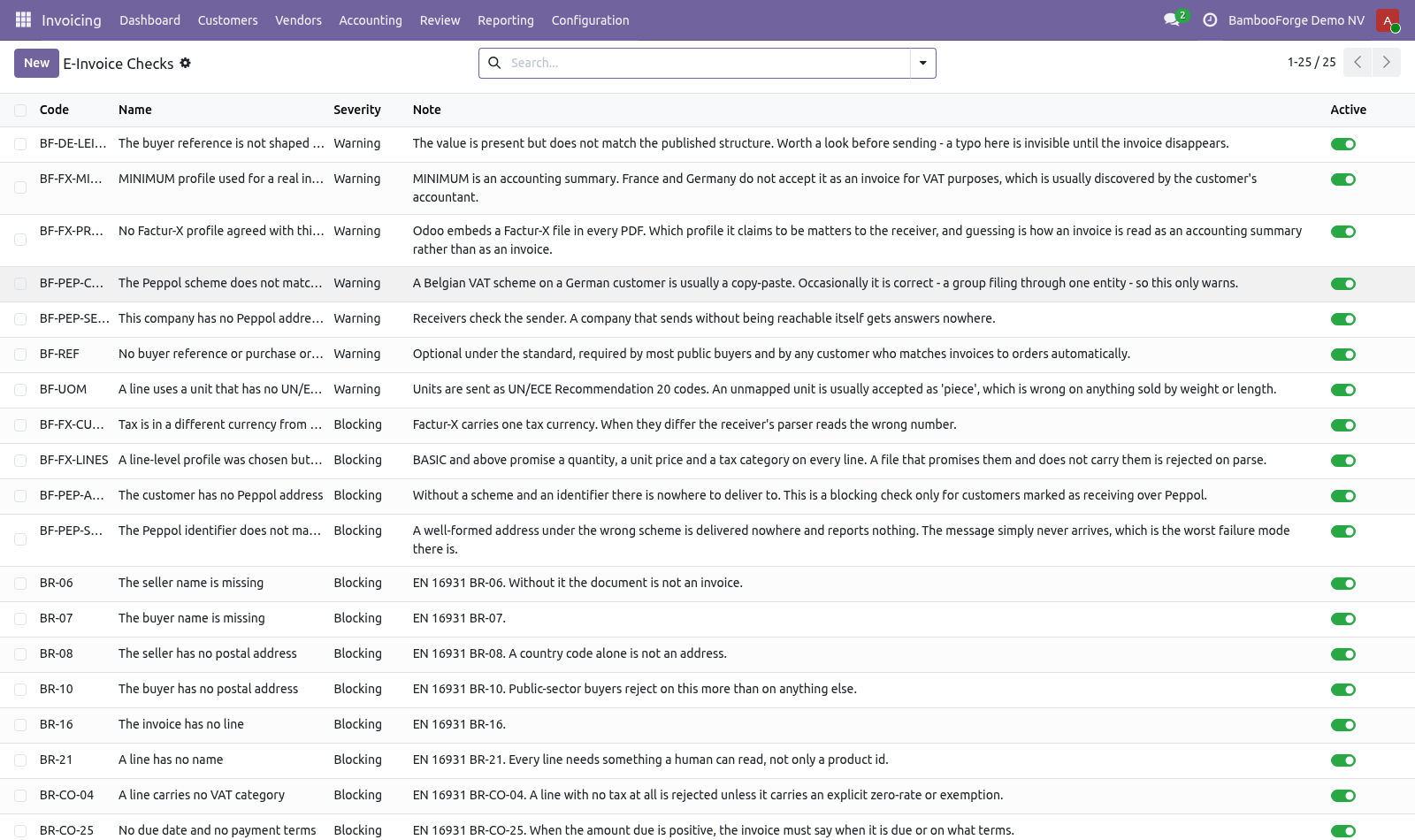
Odoo builds a technically valid UBL or CII file from whatever is on the invoice. Whether the receiving system accepts it is a different question, and the answer arrives days later as a rejection carrying a rule code and no context — usually from a customer's portal, sometimes from a tax authority. This runs the same rules before the invoice leaves. The checks.
Accounting ▸ Configuration ▸ E-Invoice Checks seller and buyer name, and a real postal address for both (public-sector buyers reject on the buyer address more than on anything else); a VAT number or legal registration for the seller; a due date or payment terms when there is something to pay; at least one line, a description on every line, and a VAT category on every line. a unit of measure with no UN/ECE code. Units travel as UN/ECE Rec. 20 codes, and an unmapped one is usually read as "piece" — wrong on anything sold by weight or length, and invisible until a customer queries the quantity; no buyer reference or order number, which every customer matching invoices to orders automatically will want.
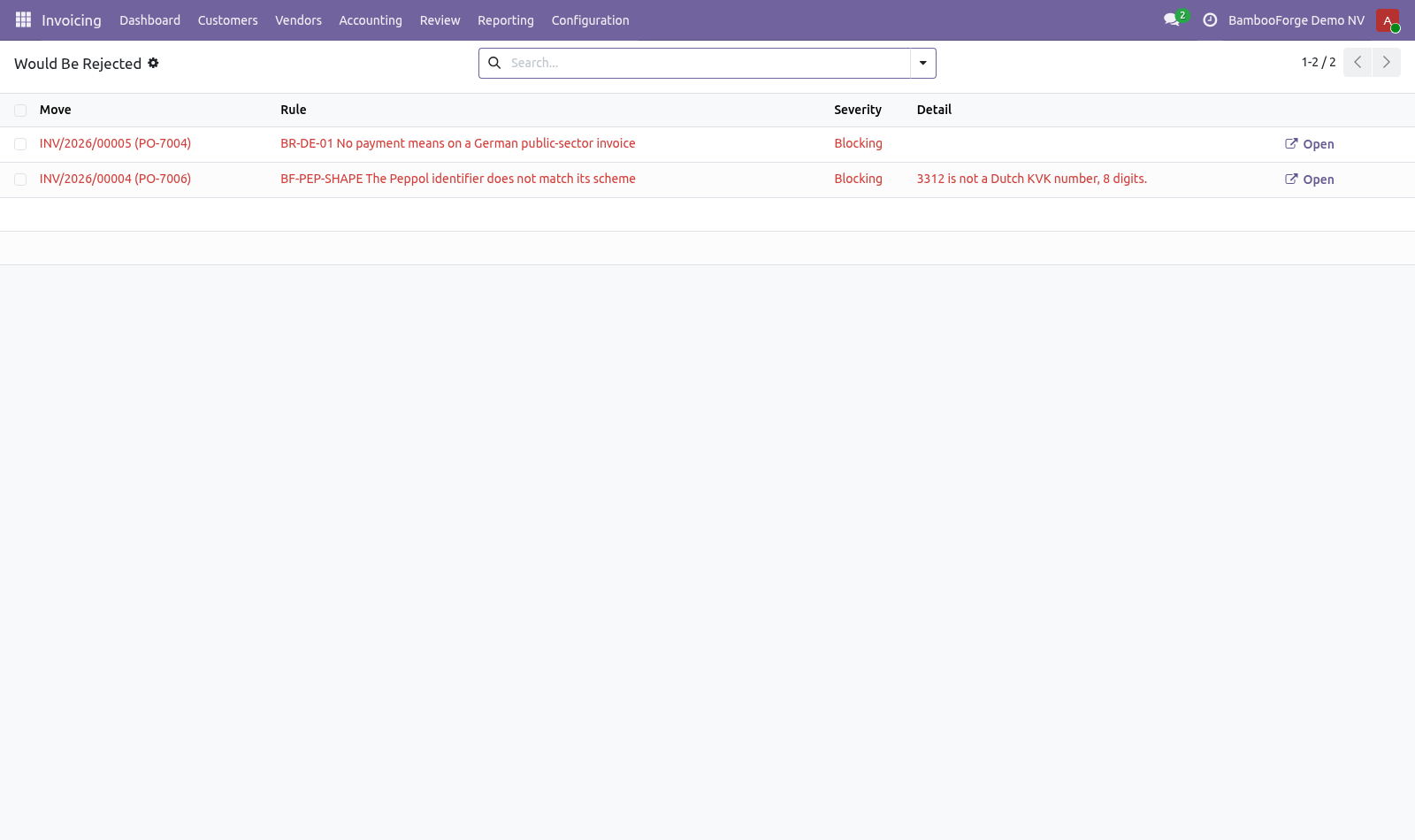
They install as records, so a company can switch off what its customers do not enforce and promote a warning to blocking once one of them has cost an invoice. Using it. Check E-Invoice on the invoice form, or the Check for e-invoicing action on a selection in the list. Findings appear on the invoice with what to fix, and Accounting ▸ Reporting ▸ E-Invoice Pre-Flight lists everything that would be rejected across the company.
A nightly pass checks posted invoices nobody has checked, so the problem surfaces the morning after posting rather than at send time. Now the part most videos leave out: what this does not do. These are the semantic rules of EN 16931, not a schema validation. A national profile can add its own — Leitweg-ID for German public bodies, Chorus Pro service codes in France.
The unit map covers the units that actually turn up on invoices. The point is to notice an unmapped one, not to be exhaustive. Passing every check does not guarantee acceptance. It removes the reasons that are yours to remove.
The complete manual is at docs dot bambooforge dot dev, the demo database is linked from the store page, and support answers within twenty-four hours. Links are in the description.
Transcript of the walkthrough (Odoo 18)
E-Invoice Pre-Flight Checks. Run the EN 16931 rules against invoices before they leave, so a rejection arrives as a list of fields to fill in, not a code three days later. Odoo builds a technically valid UBL or CII file from whatever is on the invoice. Whether the receiving system accepts it is a different question, and the answer arrives days later as a rejection carrying a rule code and no context — usually from a customer's portal, sometimes from a tax authority.
In the next few minutes: what this is for, then the checks, then using it. Then what this app deliberately does not do, so you can tell before you buy whether it fits. Everything lives under E-Invoice Checks then E-Invoice Pre-Flight. What this is for.
Odoo builds a technically valid UBL or CII file from whatever is on the invoice. Whether the receiving system accepts it is a different question, and the answer arrives days later as a rejection carrying a rule code and no context — usually from a customer's portal, sometimes from a tax authority. This runs the same rules before the invoice leaves. The checks.
Accounting ▸ Configuration ▸ E-Invoice Checks seller and buyer name, and a real postal address for both (public-sector buyers reject on the buyer address more than on anything else); a VAT number or legal registration for the seller; a due date or payment terms when there is something to pay; at least one line, a description on every line, and a VAT category on every line. a unit of measure with no UN/ECE code. Units travel as UN/ECE Rec. 20 codes, and an unmapped one is usually read as "piece" — wrong on anything sold by weight or length, and invisible until a customer queries the quantity; no buyer reference or order number, which every customer matching invoices to orders automatically will want.
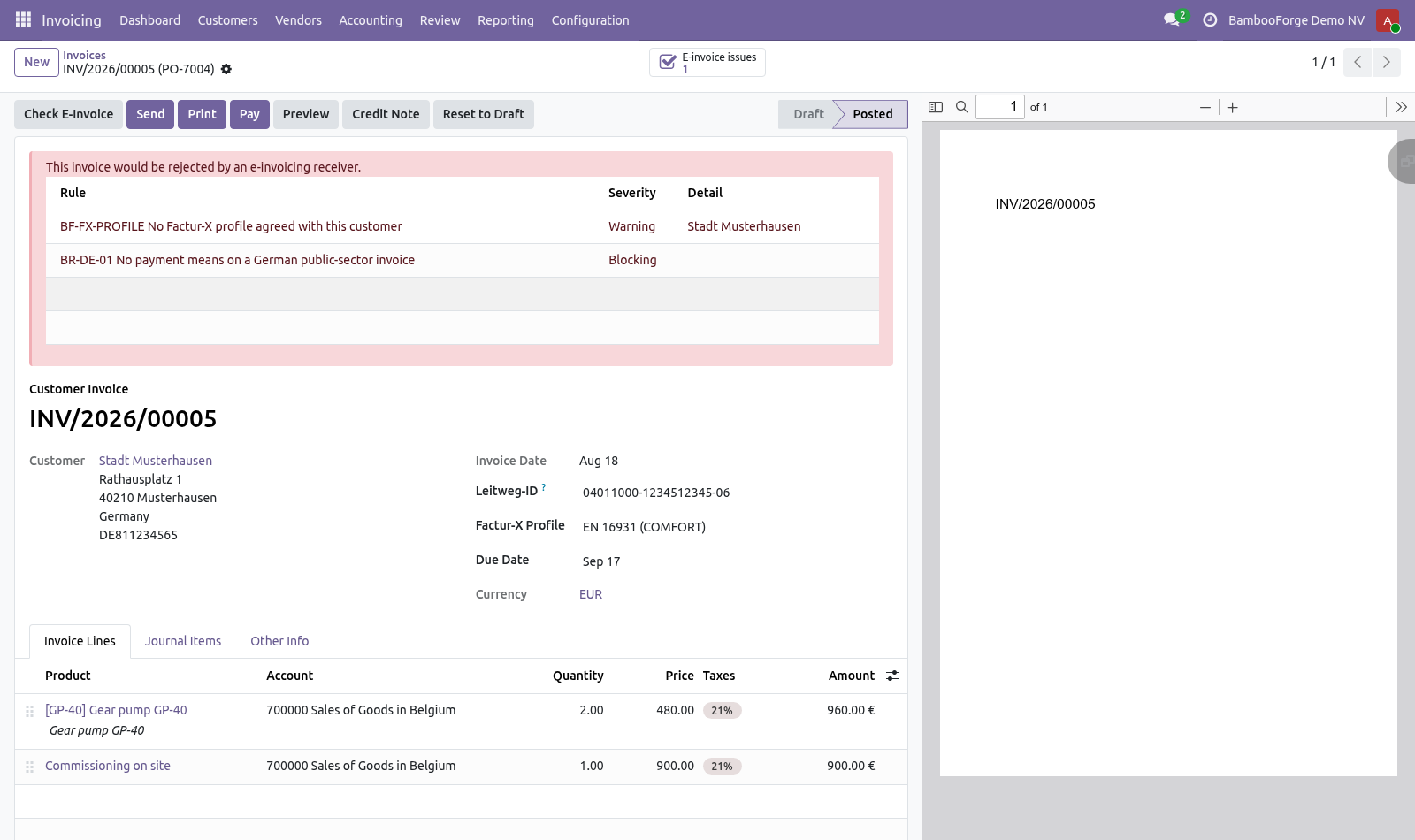
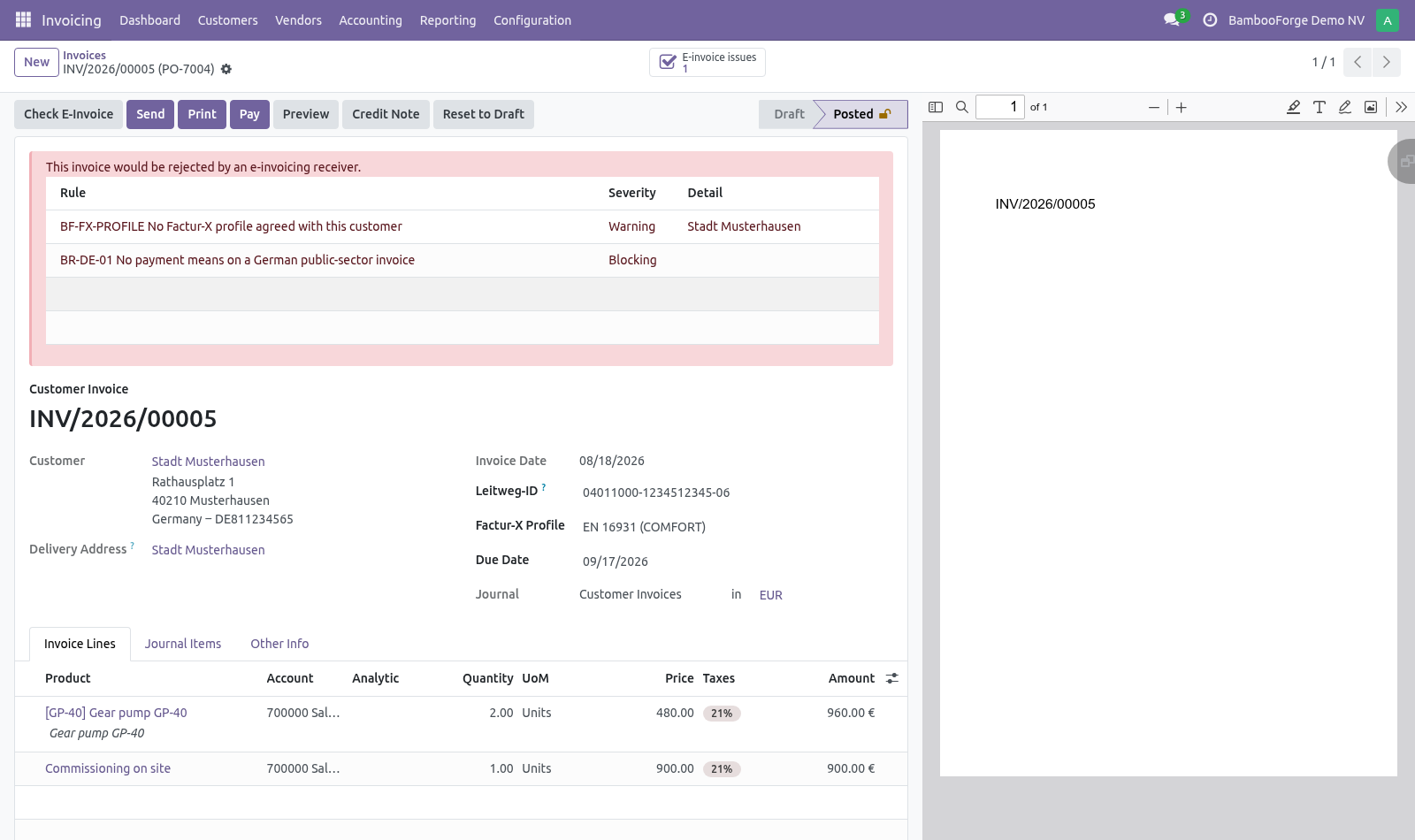
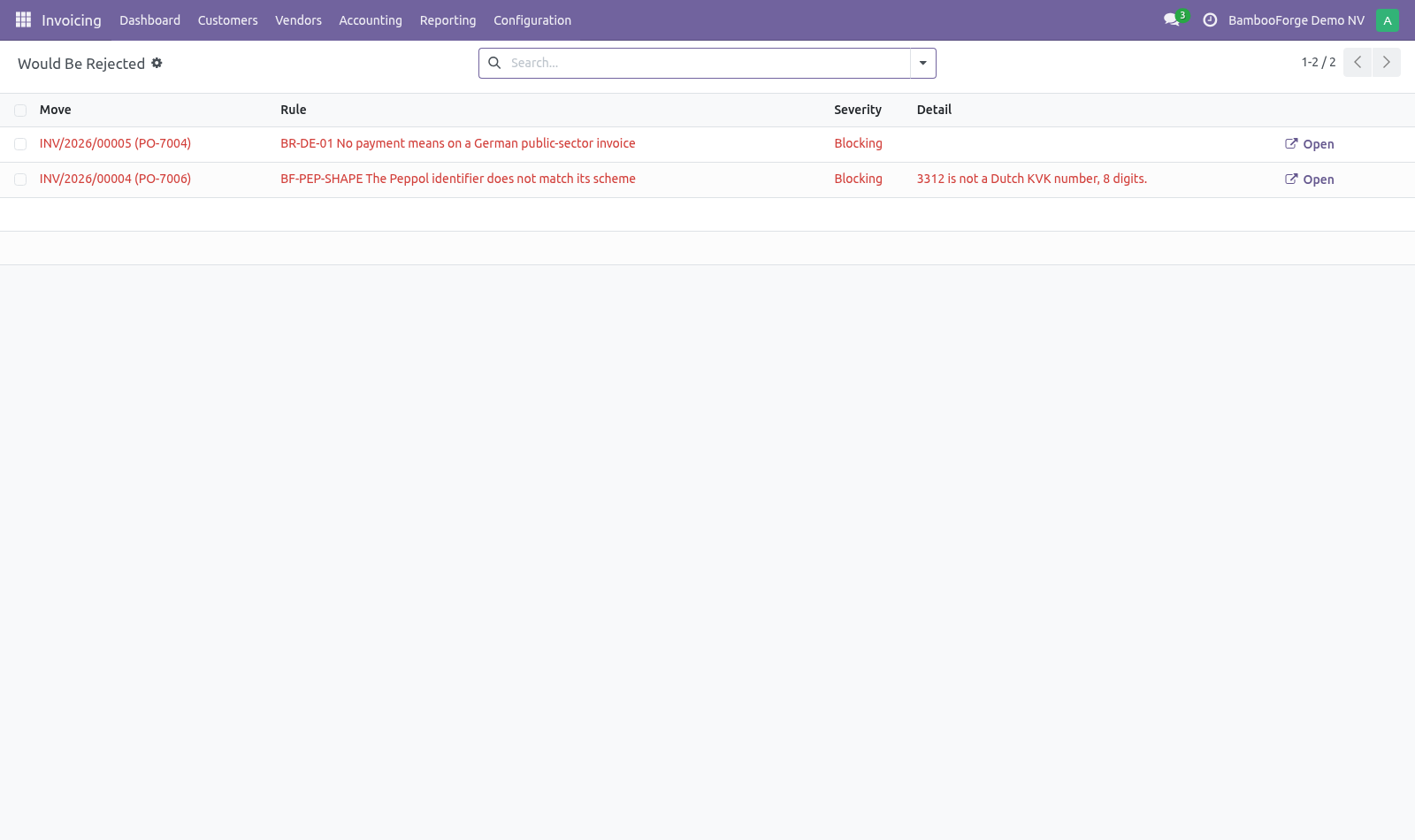
They install as records, so a company can switch off what its customers do not enforce and promote a warning to blocking once one of them has cost an invoice. Using it. Check E-Invoice on the invoice form, or the Check for e-invoicing action on a selection in the list. Findings appear on the invoice with what to fix, and Accounting ▸ Reporting ▸ E-Invoice Pre-Flight lists everything that would be rejected across the company.
A nightly pass checks posted invoices nobody has checked, so the problem surfaces the morning after posting rather than at send time. Now the part most videos leave out: what this does not do. These are the semantic rules of EN 16931, not a schema validation. A national profile can add its own — Leitweg-ID for German public bodies, Chorus Pro service codes in France.
The unit map covers the units that actually turn up on invoices. The point is to notice an unmapped one, not to be exhaustive. Passing every check does not guarantee acceptance. It removes the reasons that are yours to remove.
The complete manual is at docs dot bambooforge dot dev, the demo database is linked from the store page, and support answers within twenty-four hours. Links are in the description.
Transcript of the walkthrough (Odoo 17)
E-Invoice Pre-Flight Checks. Run the EN 16931 rules against invoices before they leave, so a rejection arrives as a list of fields to fill in, not a code three days later. Odoo builds a technically valid UBL or CII file from whatever is on the invoice. Whether the receiving system accepts it is a different question, and the answer arrives days later as a rejection carrying a rule code and no context — usually from a customer's portal, sometimes from a tax authority.
In the next few minutes: what this is for, then the checks, then using it. Then what this app deliberately does not do, so you can tell before you buy whether it fits. Everything lives under E-Invoice Checks then E-Invoice Pre-Flight. What this is for.
Odoo builds a technically valid UBL or CII file from whatever is on the invoice. Whether the receiving system accepts it is a different question, and the answer arrives days later as a rejection carrying a rule code and no context — usually from a customer's portal, sometimes from a tax authority. This runs the same rules before the invoice leaves. The checks.
Accounting ▸ Configuration ▸ E-Invoice Checks seller and buyer name, and a real postal address for both (public-sector buyers reject on the buyer address more than on anything else); a VAT number or legal registration for the seller; a due date or payment terms when there is something to pay; at least one line, a description on every line, and a VAT category on every line. a unit of measure with no UN/ECE code. Units travel as UN/ECE Rec. 20 codes, and an unmapped one is usually read as "piece" — wrong on anything sold by weight or length, and invisible until a customer queries the quantity; no buyer reference or order number, which every customer matching invoices to orders automatically will want.
They install as records, so a company can switch off what its customers do not enforce and promote a warning to blocking once one of them has cost an invoice. Using it. Check E-Invoice on the invoice form, or the Check for e-invoicing action on a selection in the list. Findings appear on the invoice with what to fix, and Accounting ▸ Reporting ▸ E-Invoice Pre-Flight lists everything that would be rejected across the company.
A nightly pass checks posted invoices nobody has checked, so the problem surfaces the morning after posting rather than at send time. Now the part most videos leave out: what this does not do. These are the semantic rules of EN 16931, not a schema validation. A national profile can add its own — Leitweg-ID for German public bodies, Chorus Pro service codes in France.
The unit map covers the units that actually turn up on invoices. The point is to notice an unmapped one, not to be exhaustive. Passing every check does not guarantee acceptance. It removes the reasons that are yours to remove.
The complete manual is at docs dot bambooforge dot dev, the demo database is linked from the store page, and support answers within twenty-four hours. Links are in the description.
Transcript of the walkthrough (Odoo 16)
E-Invoice Pre-Flight Checks. Run the EN 16931 rules against invoices before they leave, so a rejection arrives as a list of fields to fill in, not a code three days later. Odoo builds a technically valid UBL or CII file from whatever is on the invoice. Whether the receiving system accepts it is a different question, and the answer arrives days later as a rejection carrying a rule code and no context — usually from a customer's portal, sometimes from a tax authority.
In the next few minutes: what this is for, then the checks, then using it. Then what this app deliberately does not do, so you can tell before you buy whether it fits. Everything lives under E-Invoice Checks then E-Invoice Pre-Flight. What this is for.
Odoo builds a technically valid UBL or CII file from whatever is on the invoice. Whether the receiving system accepts it is a different question, and the answer arrives days later as a rejection carrying a rule code and no context — usually from a customer's portal, sometimes from a tax authority. This runs the same rules before the invoice leaves. The checks.
Accounting ▸ Configuration ▸ E-Invoice Checks seller and buyer name, and a real postal address for both (public-sector buyers reject on the buyer address more than on anything else); a VAT number or legal registration for the seller; a due date or payment terms when there is something to pay; at least one line, a description on every line, and a VAT category on every line. a unit of measure with no UN/ECE code. Units travel as UN/ECE Rec. 20 codes, and an unmapped one is usually read as "piece" — wrong on anything sold by weight or length, and invisible until a customer queries the quantity; no buyer reference or order number, which every customer matching invoices to orders automatically will want.
They install as records, so a company can switch off what its customers do not enforce and promote a warning to blocking once one of them has cost an invoice. Using it. Check E-Invoice on the invoice form, or the Check for e-invoicing action on a selection in the list. Findings appear on the invoice with what to fix, and Accounting ▸ Reporting ▸ E-Invoice Pre-Flight lists everything that would be rejected across the company.
A nightly pass checks posted invoices nobody has checked, so the problem surfaces the morning after posting rather than at send time. Now the part most videos leave out: what this does not do. These are the semantic rules of EN 16931, not a schema validation. A national profile can add its own — Leitweg-ID for German public bodies, Chorus Pro service codes in France.
The unit map covers the units that actually turn up on invoices. The point is to notice an unmapped one, not to be exhaustive. Passing every check does not guarantee acceptance. It removes the reasons that are yours to remove.
The complete manual is at docs dot bambooforge dot dev, the demo database is linked from the store page, and support answers within twenty-four hours. Links are in the description.
Key facts
- What it is
- Run the EN 16931 rules against invoices before they leave, so a rejection arrives as a list of fields to fill in, not a code three days later.
- For
- Accounting
- Odoo versions
- 16.0, 17.0, 18.0, 19.0, 20.0 - Community and Enterprise
- Runs on
- Odoo.sh or Odoo you host yourself - not Odoo Online, which accepts no third-party apps
- Price
- 249 EUR, one-time, on the Odoo Apps Store
- Technical name
- bambooforge_einvoice
- Not for
- These are the semantic rules of EN 16931, not a schema validation. A national profile can add its own — Leitweg-ID for German public bodies, Chorus Pro service codes in France.; The unit map covers the units that actually turn up on invoices. The point is to notice an unmapped one, not to be exhaustive.; Passing every check does not guarantee acceptance. It removes the reasons that are yours to remove.
- Manual last updated
- 2026-09-23
E-Invoice Pre-Flight Checks
What this is for
Odoo builds a technically valid UBL or CII file from whatever is on the invoice. Whether the receiving system accepts it is a different question, and the answer arrives days later as a rejection carrying a rule code and no context — usually from a customer's portal, sometimes from a tax authority.
This runs the same rules before the invoice leaves.
The checks
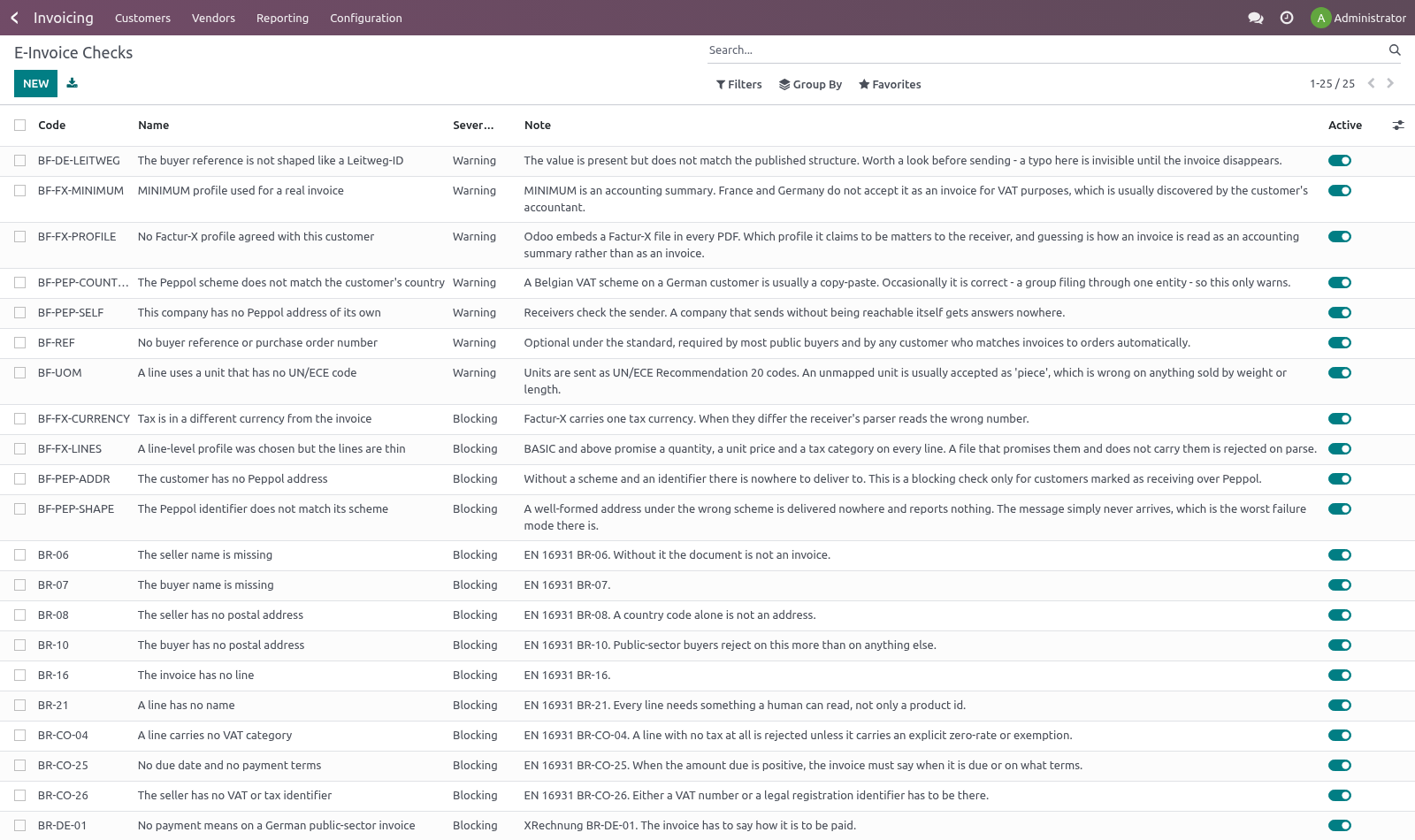
Accounting ▸ Configuration ▸ E-Invoice Checks
They install as records, so a company can switch off what its customers do not enforce and promote a warning to blocking once one of them has cost an invoice.
Blocking — these are refusals, not preferences:
seller and buyer name, and a real postal address for both (public-sector buyers reject on the buyer address more than on anything else);
a VAT number or legal registration for the seller;
a due date or payment terms when there is something to pay;
at least one line, a description on every line, and a VAT category on every line.
Warnings — accepted by most, enforced by some:
a unit of measure with no UN/ECE code. Units travel as UN/ECE Rec. 20 codes, and an unmapped one is usually read as "piece" — wrong on anything sold by weight or length, and invisible until a customer queries the quantity;
no buyer reference or order number, which every customer matching invoices to orders automatically will want.
Using it
Check E-Invoice on the invoice form, or the Check for e-invoicing action on a selection in the list. Findings appear on the invoice with what to fix, and Accounting ▸ Reporting ▸ E-Invoice Pre-Flight lists everything that would be rejected across the company.
A nightly pass checks posted invoices nobody has checked, so the problem surfaces the morning after posting rather than at send time.
For a send flow that should refuse to hand over a bad invoice, call move.bf_einvoice_assert_ready(); it checks first if nobody has.
Known limits
These are the semantic rules of EN 16931, not a schema validation. A national profile can add its own — Leitweg-ID for German public bodies, Chorus Pro service codes in France.
The unit map covers the units that actually turn up on invoices. The point is to notice an unmapped one, not to be exhaustive.
Passing every check does not guarantee acceptance. It removes the reasons that are yours to remove.
How we make sure it works
Before every release, 21 automated checks run against this app on Odoo 16, 17, 18, 19 and 20. Among them:
An unmapped unit is a warning not a block.
Issue of another company is not readable.
Issue of another company is not searchable.
Assert ready checks when nobody has.
A line with no product and no description is blocking.
The complete list is in the source you receive.
Install
Copy bambooforge_einvoice into your addons path and update the app list, or install the ZIP from the Odoo Apps Store.
Install E-Invoice Pre-Flight Checks.
Open E-Invoice Checks - its menus are E-Invoice Pre-Flight.
Questions people ask
- Which Odoo versions does it run on?
Odoo 16.0, 17.0, 18.0, 19.0, 20.0, on the series you buy it for; each series is its own listing.
- Community or Enterprise?
Both. It needs no Enterprise app.
- What does it need?
The standard Invoicing app. No extra Python package.
- Where does it show up?
Under the E-Invoice Checks menu (E-Invoice Pre-Flight).
- Does anything leave my server?
No. It makes no call outside your Odoo server: no telemetry, no licence check, no third-party service.
- What happens if I uninstall it?
Odoo drops the app's own tables and fields; the standard records it worked on (contacts, orders, products) stay as they are.