 BambooForge Labs
EDIFACT EDI: ORDERS, INVOIC and DESADV
EDIFACT EDI: turn the ORDERS files your retail customers send into sales orders, and send back INVOIC and DESADV, with the original kept.
Available for Odoo 16.0, Odoo 17.0, Odoo 18.0, Odoo 19.0, Odoo 20.0. Technical name bambooforge_edifact.
Transcript of the walkthrough (Odoo 20)
EDIFACT EDI: ORDERS, INVOIC and DESADV. EDIFACT EDI: turn the ORDERS files your retail customers send into sales orders, and send back INVOIC and DESADV, with the original kept. Retail chains do not email purchase orders. They send EDIFACT, and a supplier who cannot read it does not get listed.
Odoo has no EDIFACT support at all. Sales ▸ EDI ▸ Trading Partners In the next few minutes: what this is for, then setting up a trading partner, then receiving orders, then sending invoices and despatch advices, then the payload. Then what this app deliberately does not do, so you can tell before you buy whether it fits. Everything lives under Messages then Trading Partners then EDI.
1. Copy bambooforge_edifact into your addons path and update the app list, or install the ZIP from the Odoo Apps Store. 2. Install EDIFACT EDI: ORDERS, INVOIC and DESADV.
3. Open Messages - its menus are Trading Partners, EDI. What this is for. Retail chains do not email purchase orders.
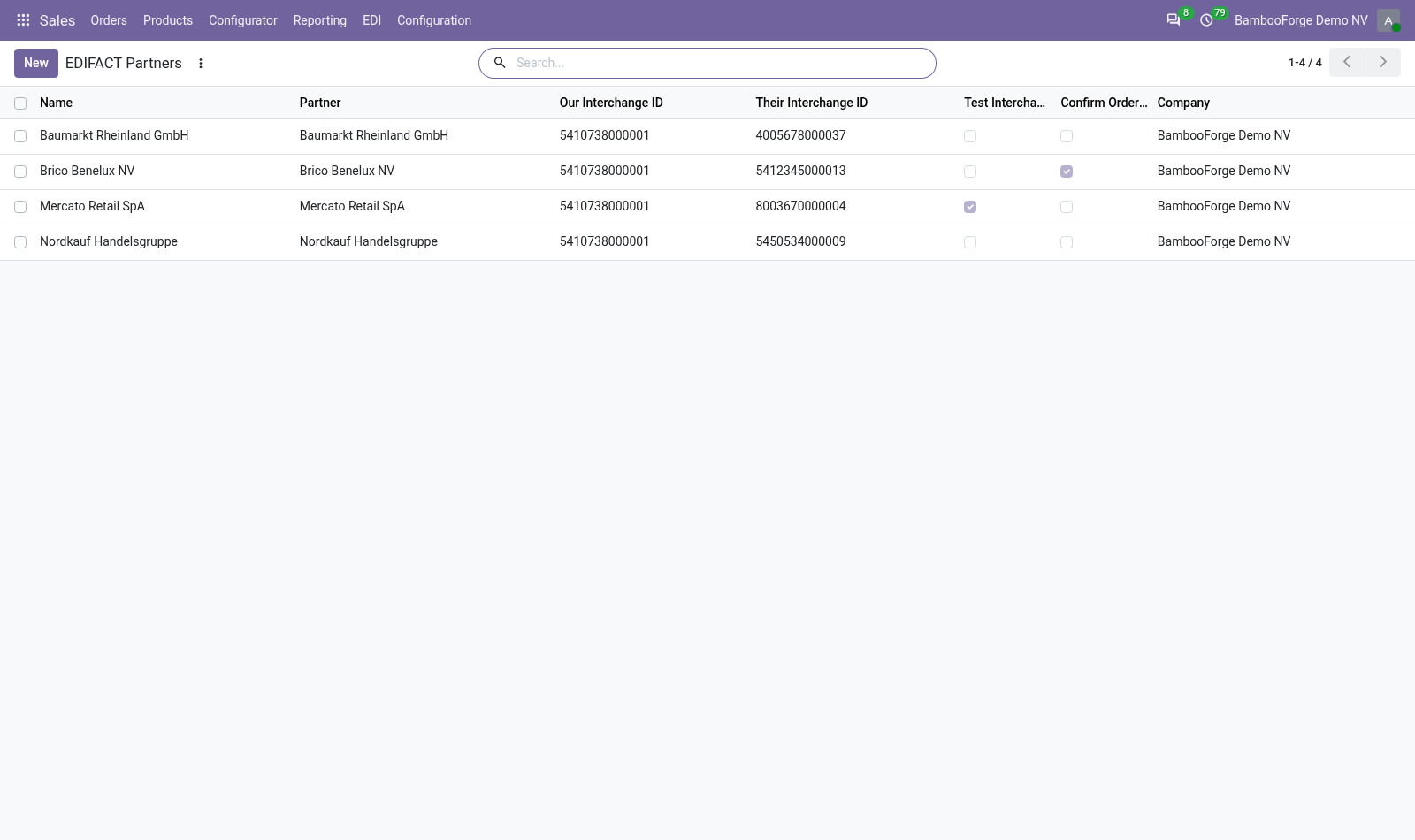
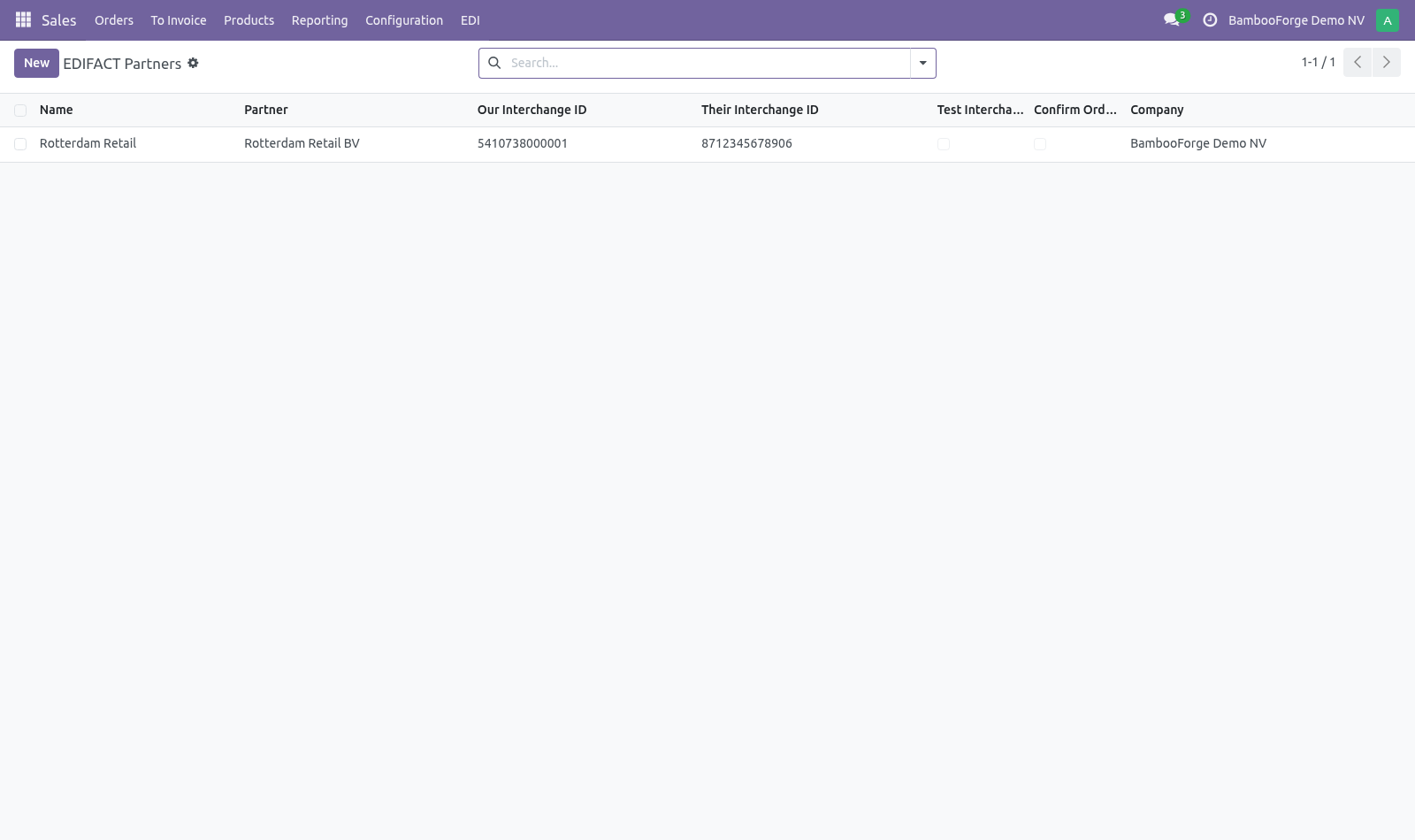
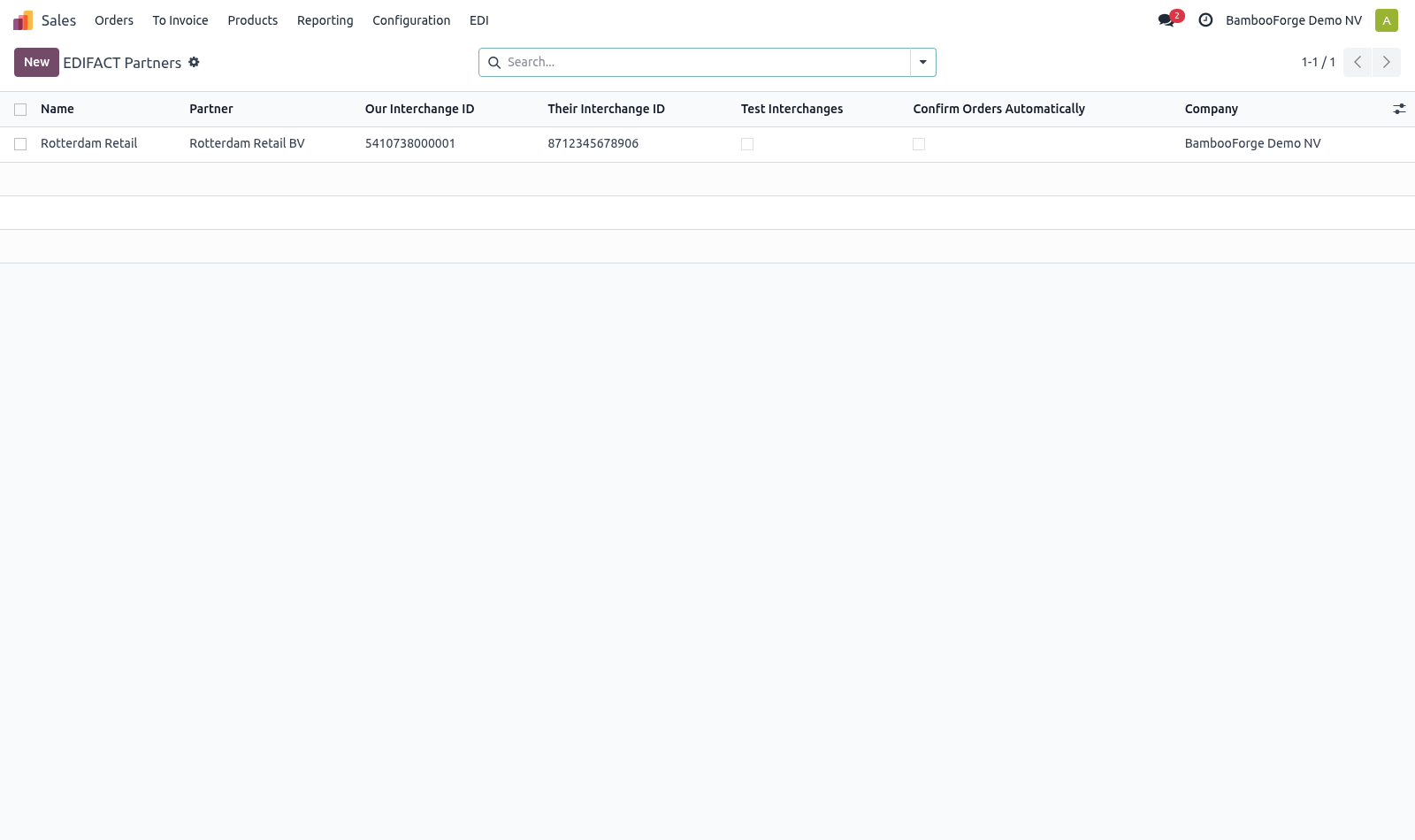
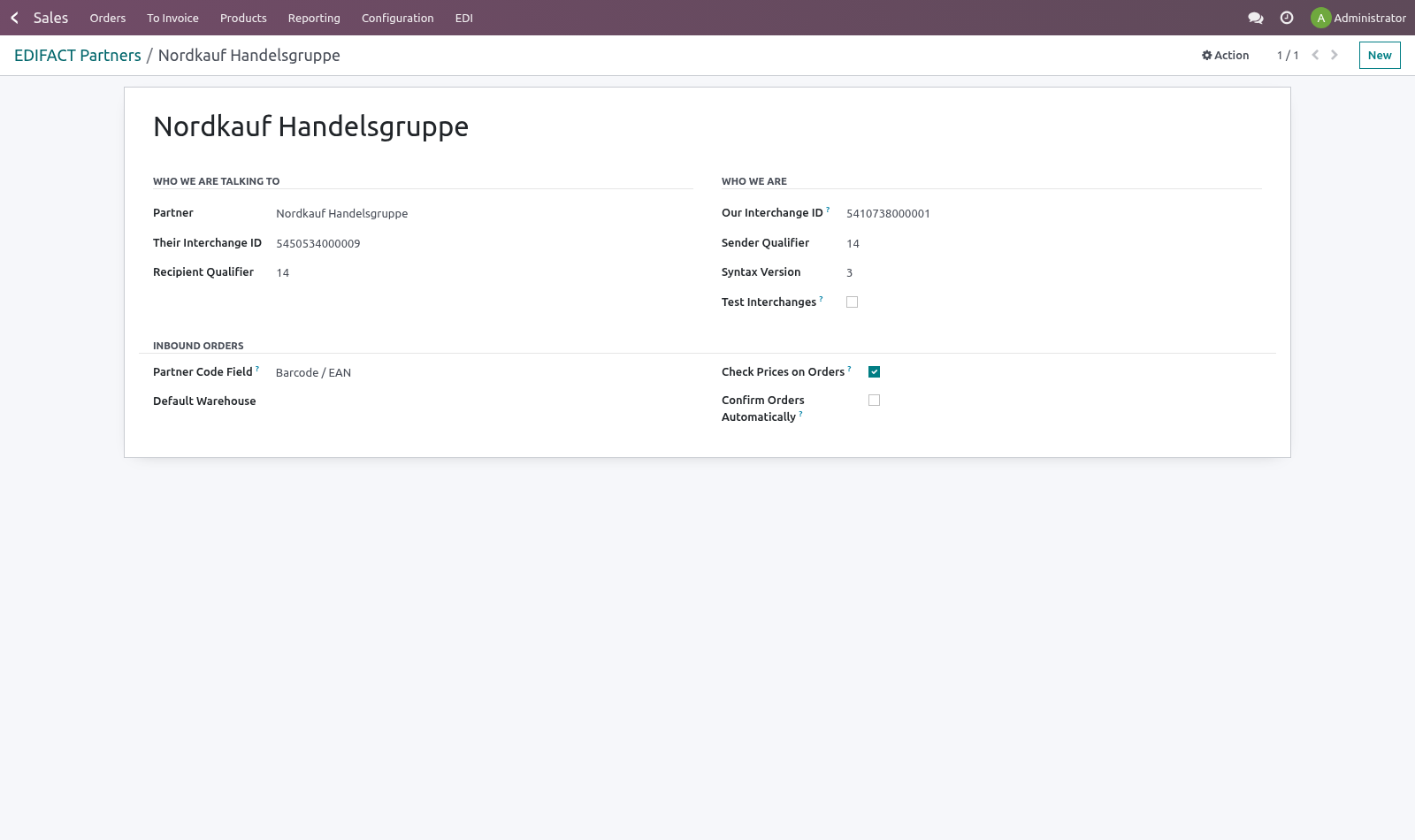
They send EDIFACT, and a supplier who cannot read it does not get listed. Odoo has no EDIFACT support at all. Setting up a trading partner. Every chain runs the same standard slightly differently, so their habits live on a profile rather than in the code: Their interchange ID and qualifier — usually a GLN with qualifier 14.
Ours — what we are called in the UNB segment. Test interchanges — partners run a test phase and reject live files during it. Leave this on until they say otherwise. Product code field — which of our fields carries the code they send in LIN.
Retail chains almost always send an EAN. Check prices on orders — compare the price on the incoming line with our own price list. Confirm orders automatically — leave off until their files have been trusted for a while. An order that confirms itself also reserves stock and can start a delivery.
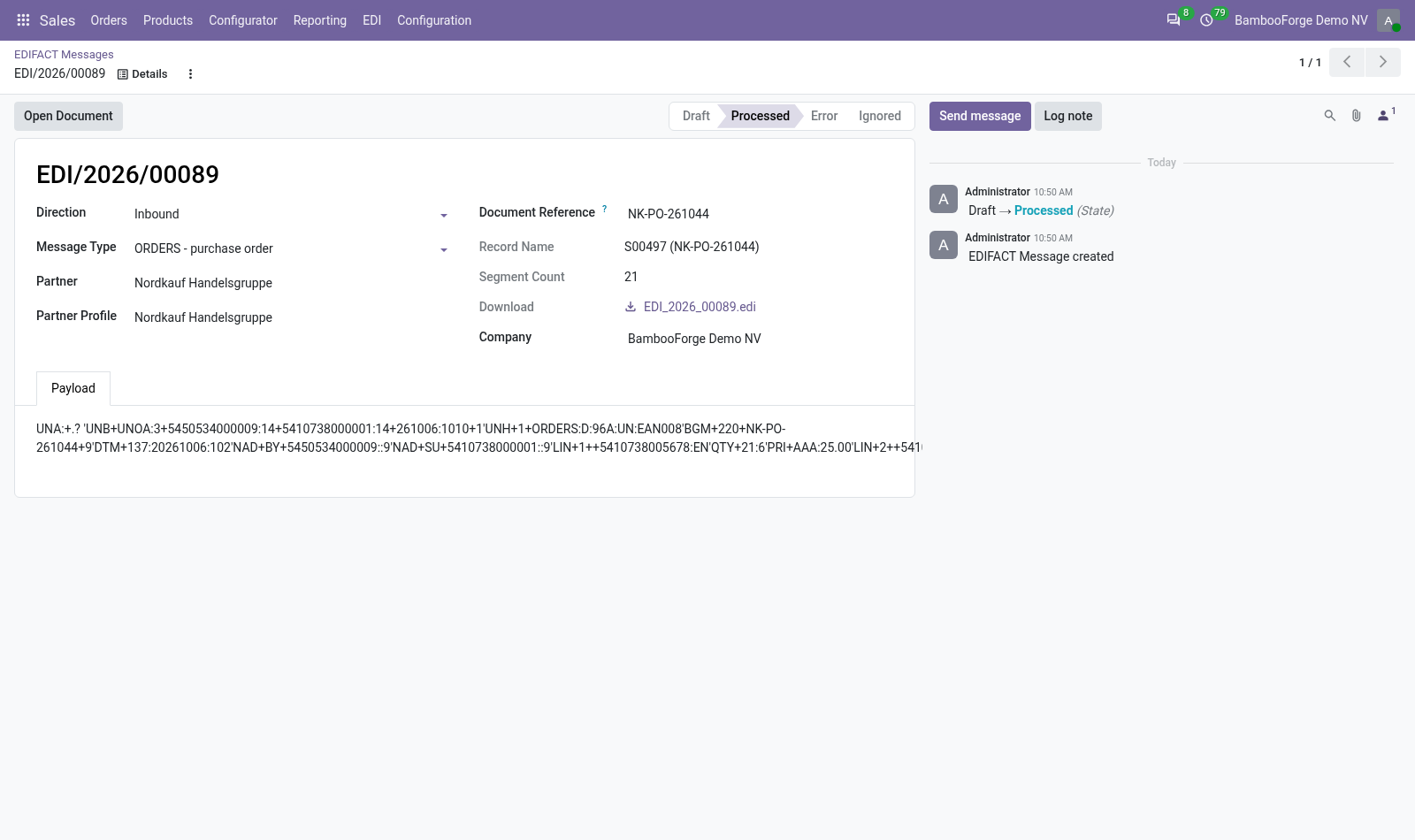
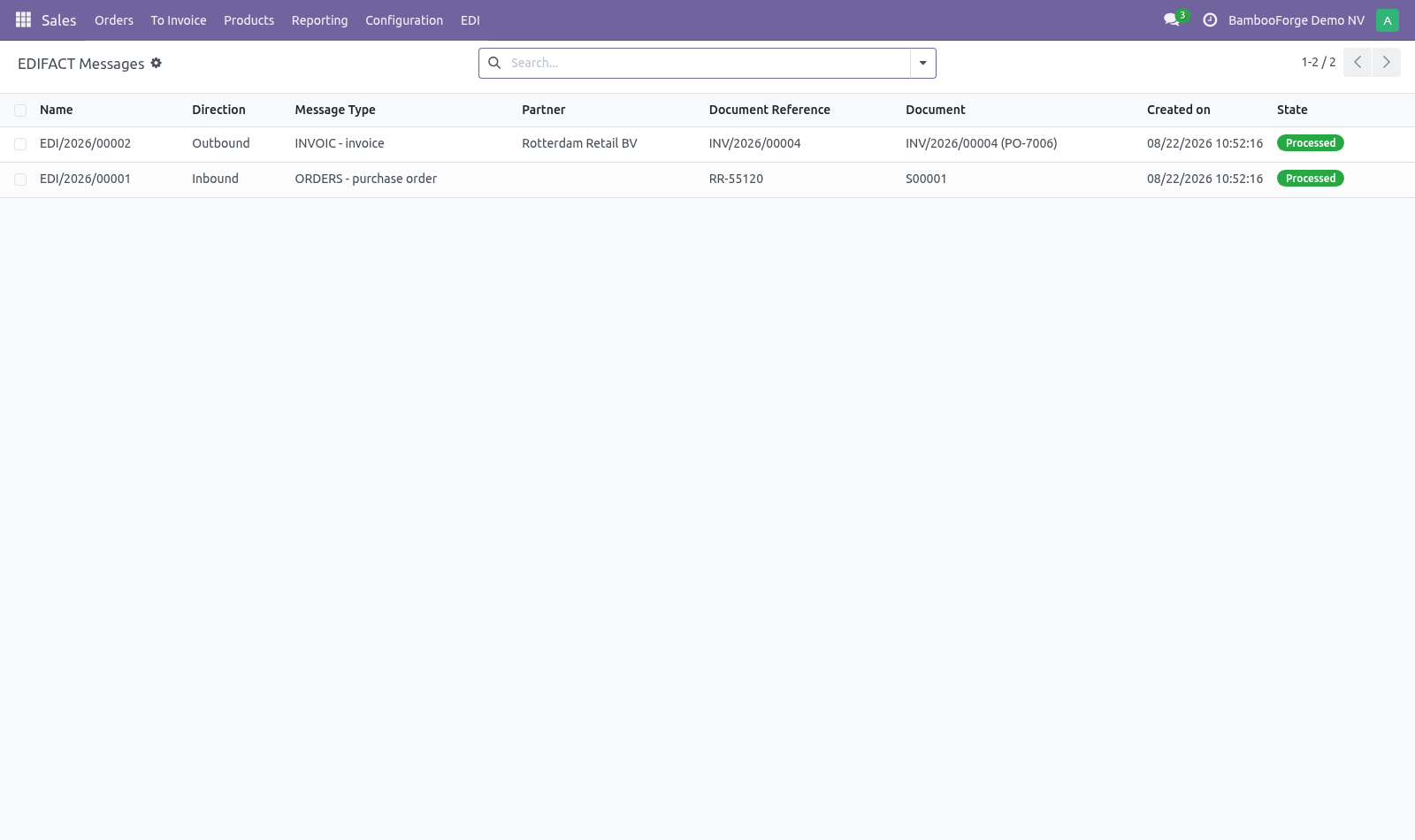
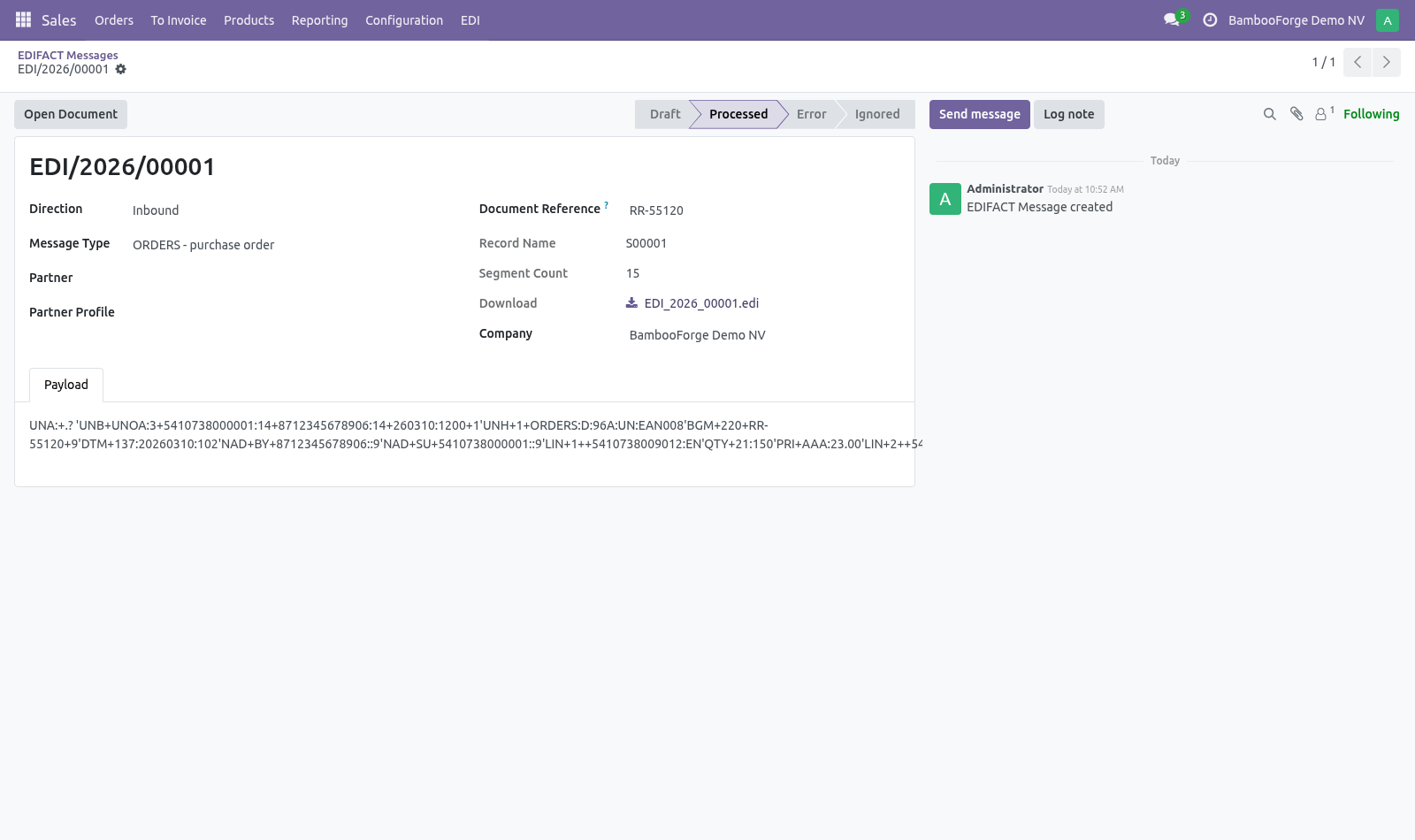
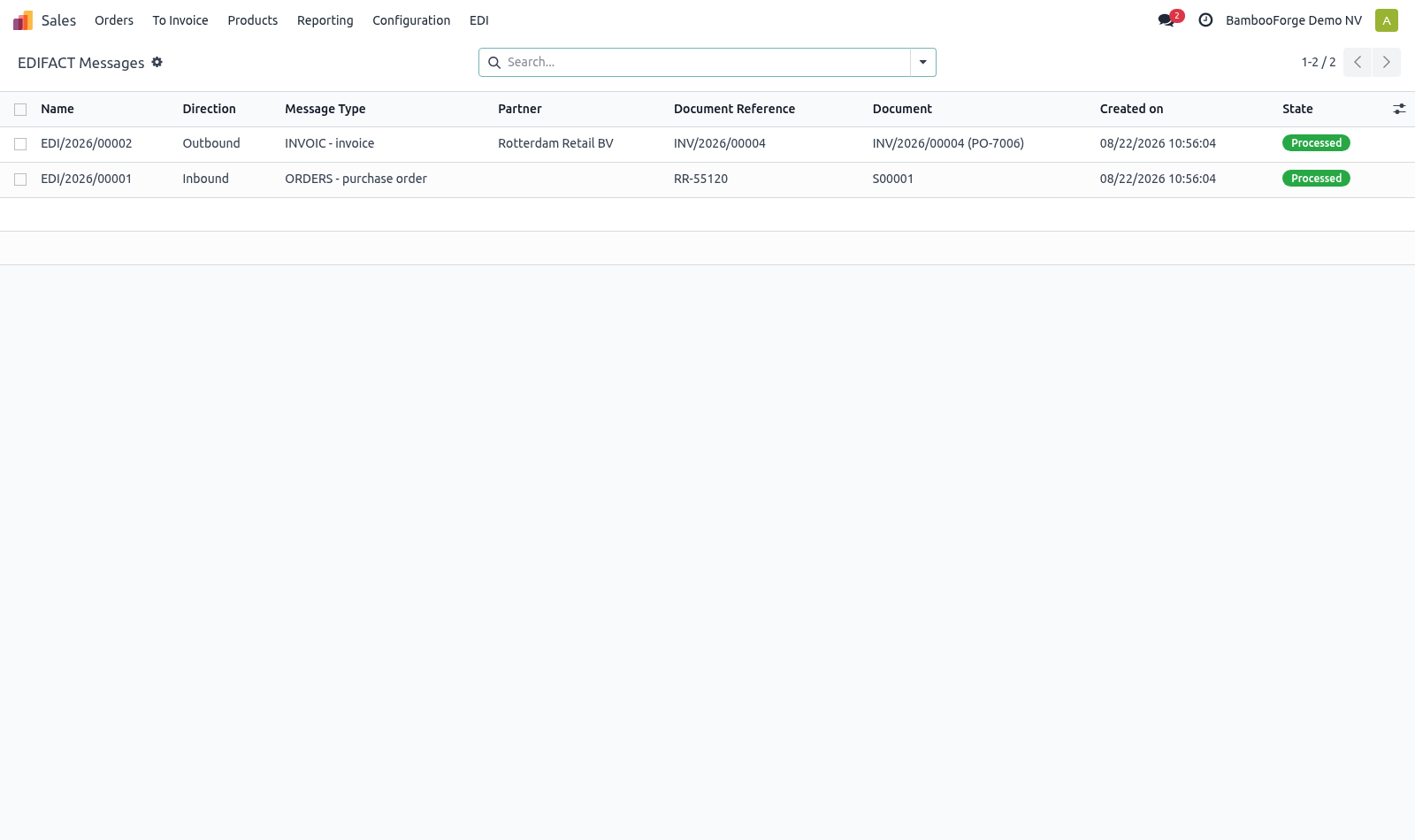
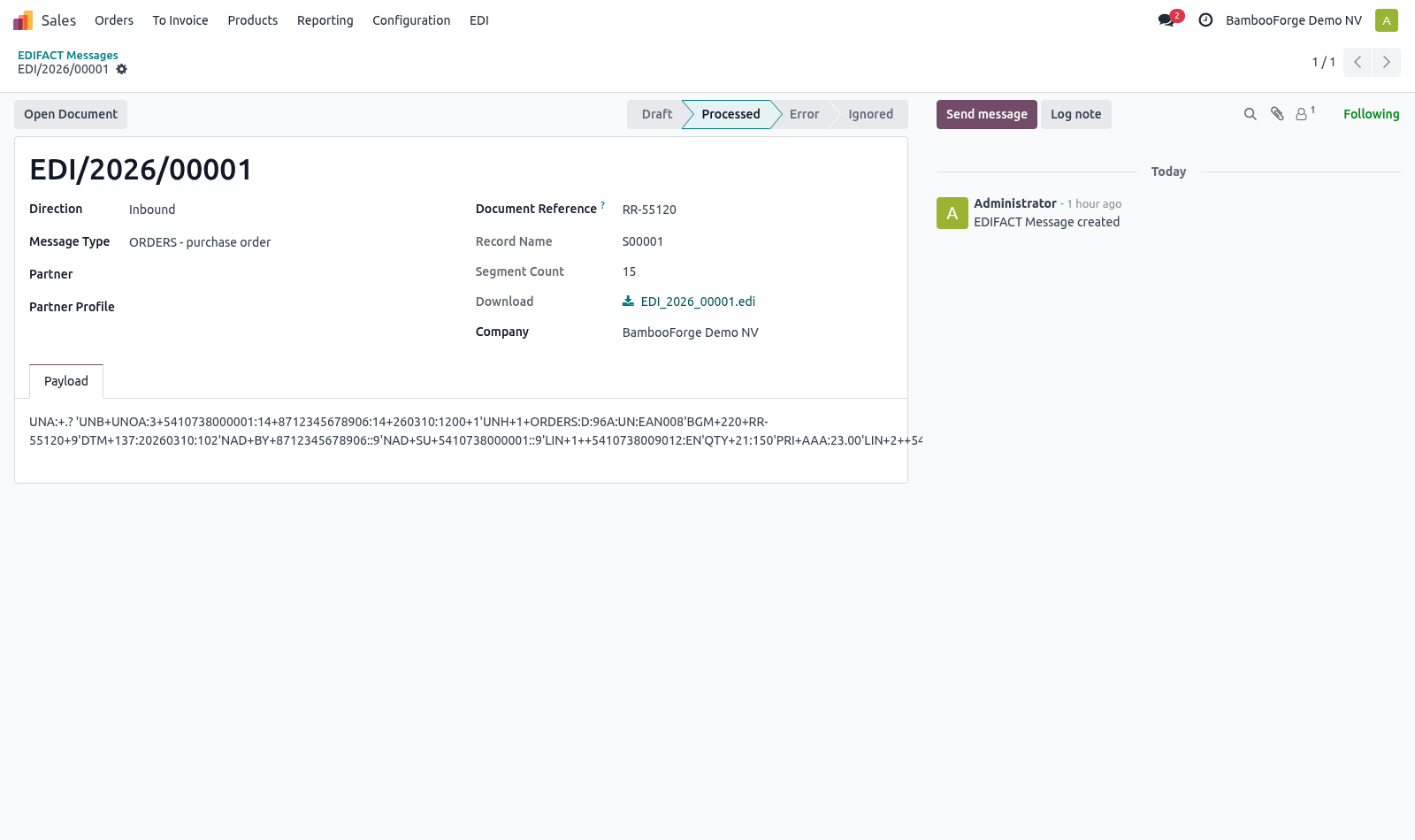
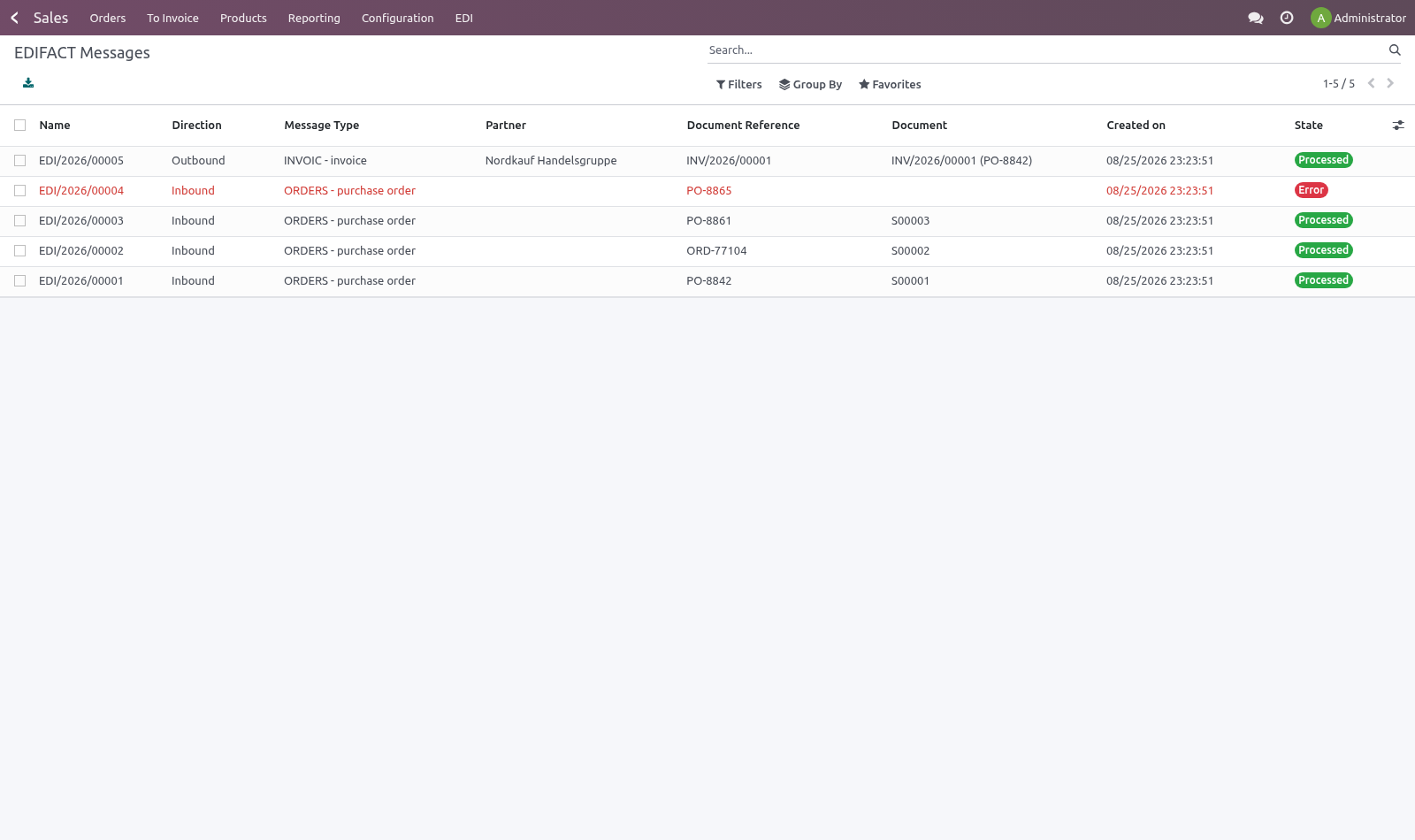
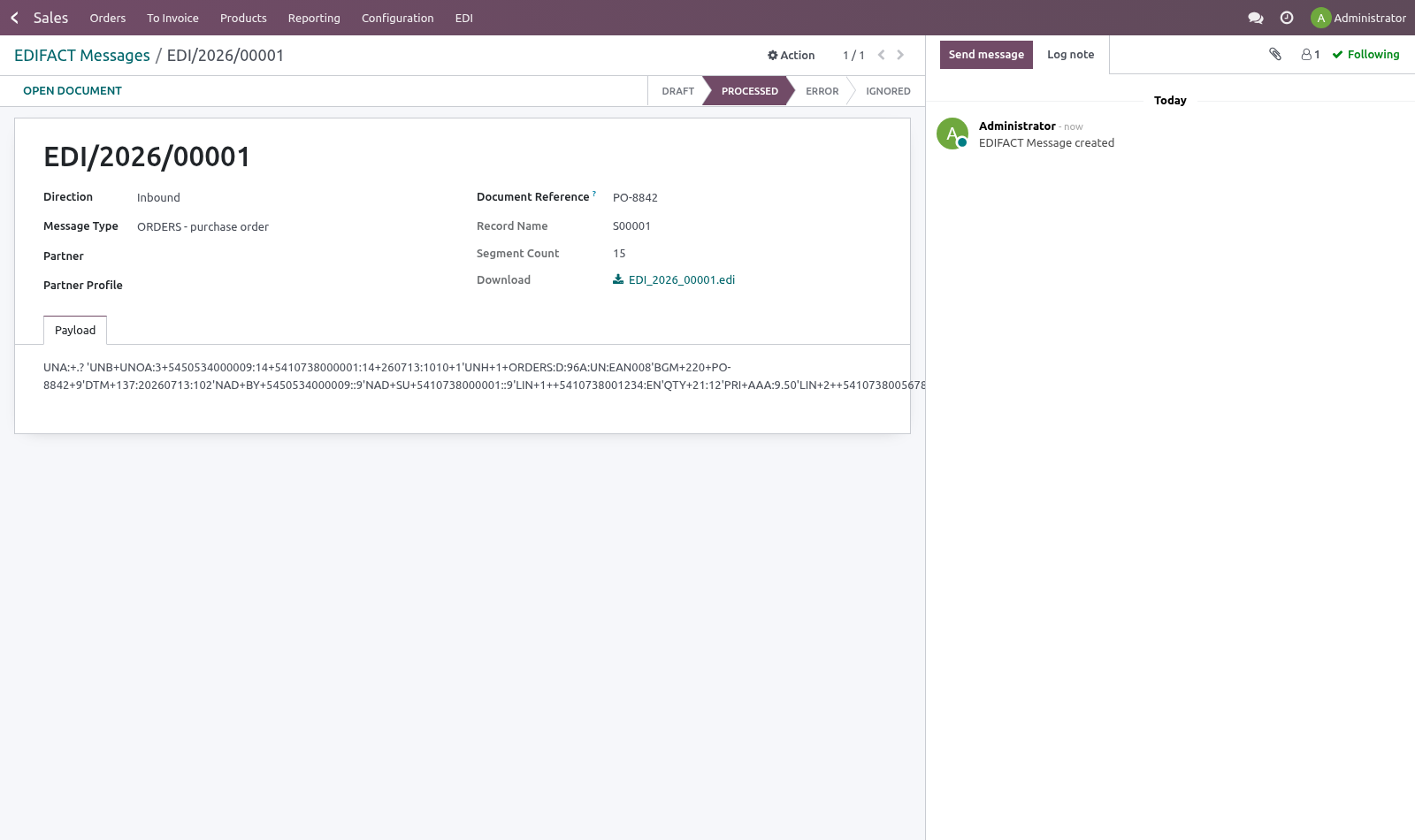
Receiving orders. An ORDERS interchange becomes a sales order: the buyer is resolved from NAD+BY by interchange identifier, products from LIN, quantities from QTY+21 and prices from PRI+AAA. A price difference does not stop the order. The order is created and the difference is written on it, listing what they say against what our price list says.
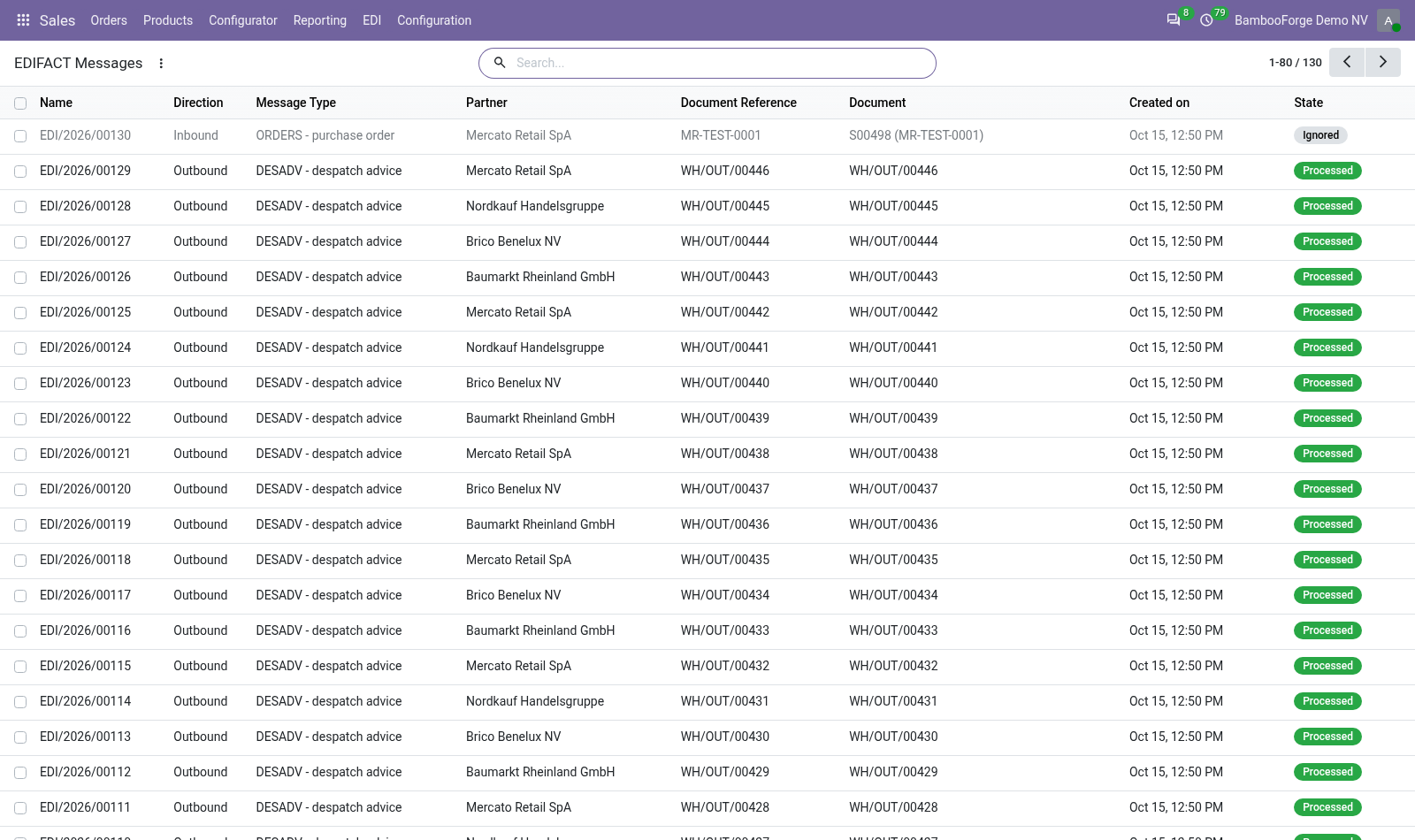
Price disputes are the expensive part of EDI trading and finding them at invoice time is too late. An unknown buyer or product code fails loudly. The message goes to Error with the identifier that could not be matched, and the payload is kept. Fix the data and press Process Again.
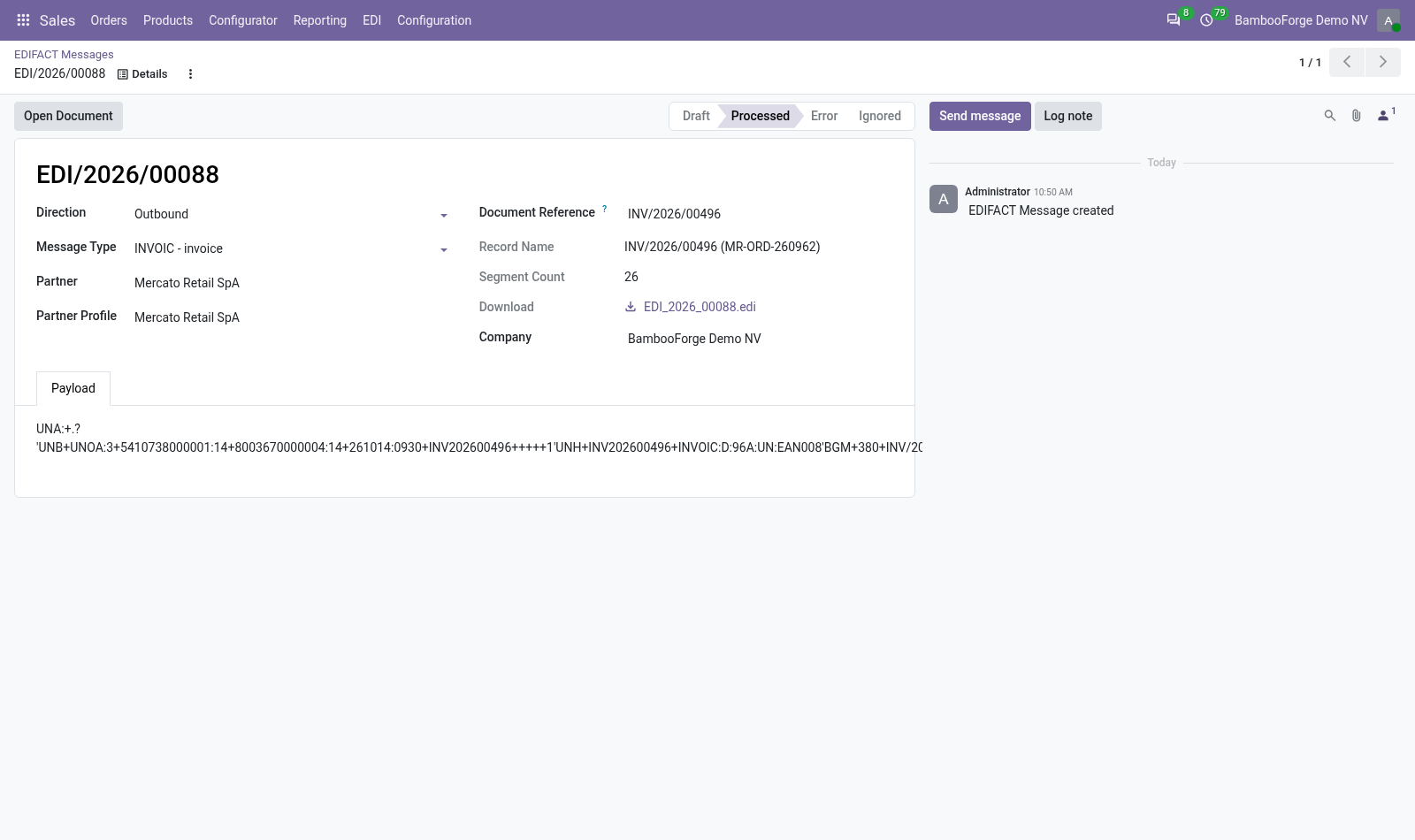
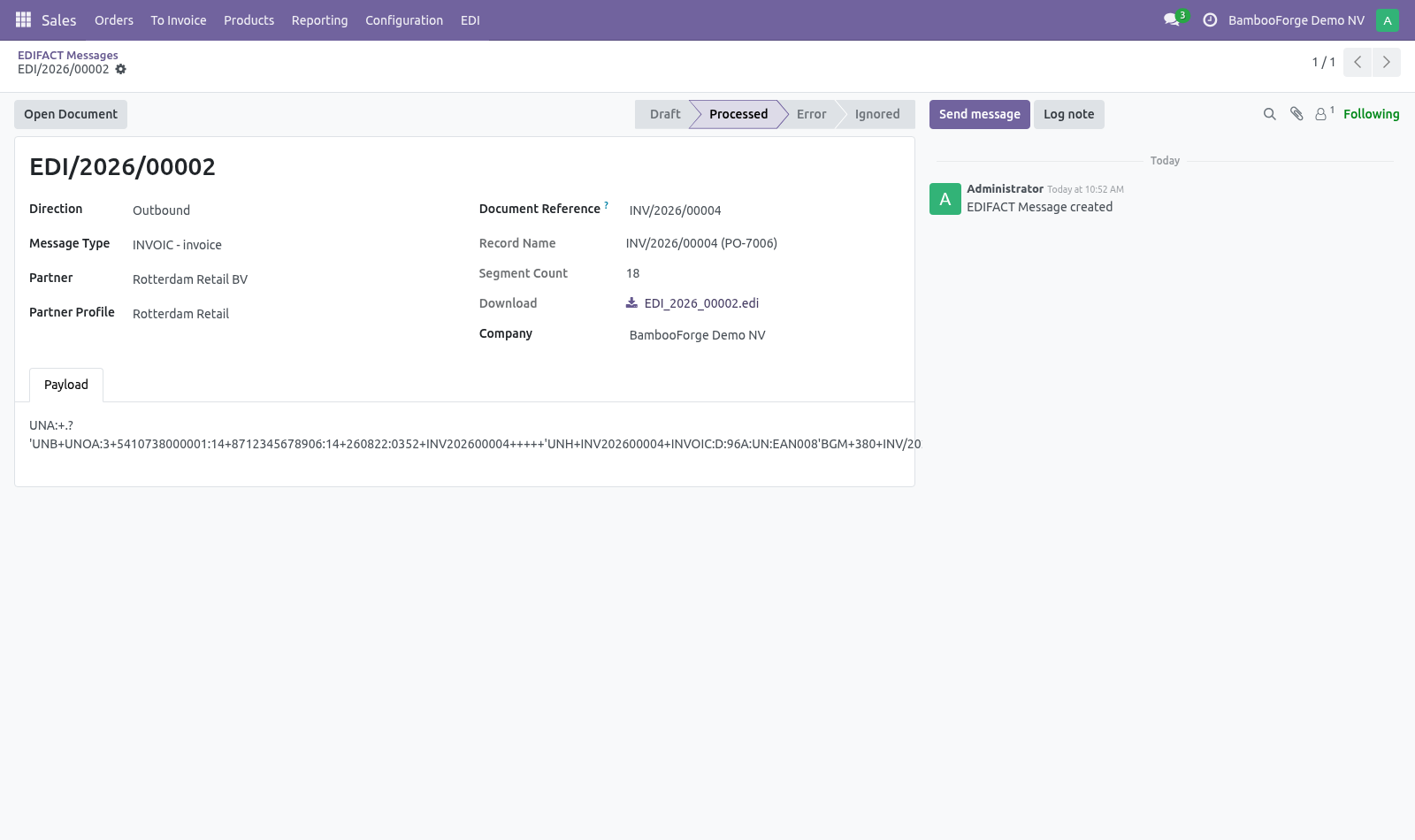
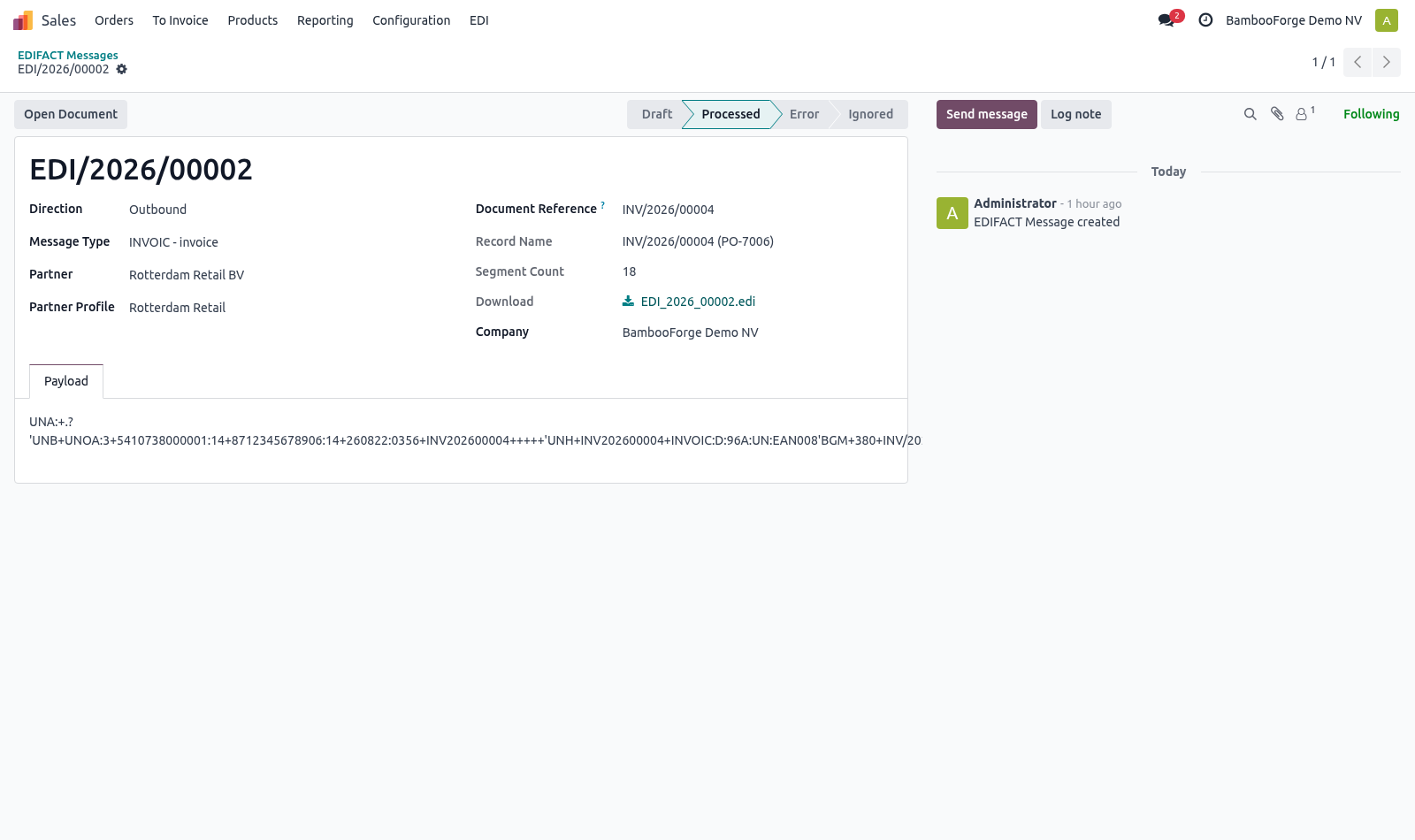
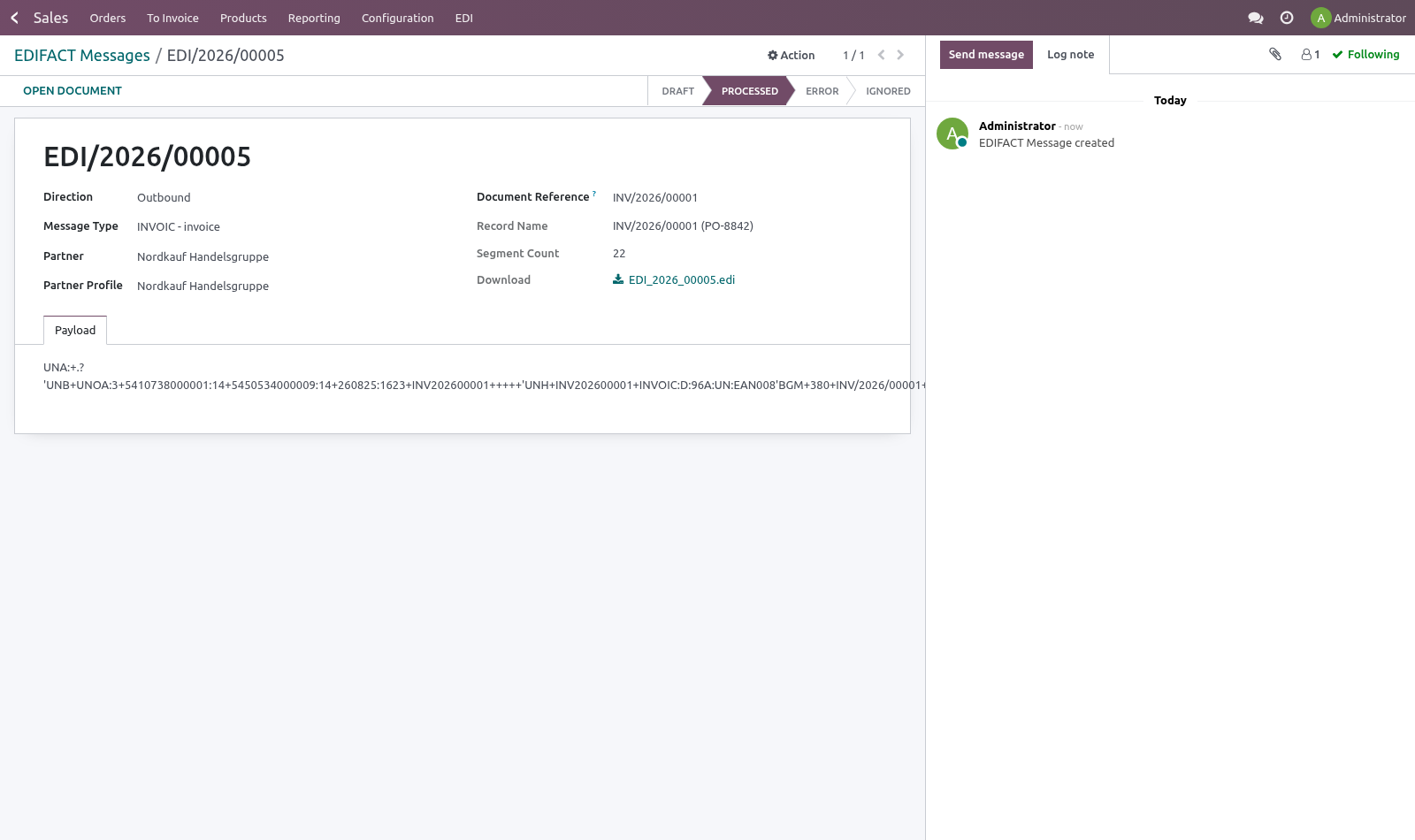
A resent interchange does not become a second order. Partners resend; a gateway that takes the same order twice ships it twice. Sending invoices and despatch advices. build_invoic on a posted customer invoice and build_desadv on a validated outgoing shipment produce the interchange.
Neither will build from a draft invoice or an unvalidated picking — a despatch advice for goods that have not left is worse than none at all. The payload. Stored exactly as sent or received, and never rewritten. When a partner disputes an order six months later, the file they actually sent is the only thing that settles it.
How we make sure it works. Before every release, 29 automated checks run against this app on Odoo 16, 17, 18, 19 and 20. Among them: The same order is not taken twice. Something that is not edifact is refused.
Orders in with a price difference is processed not error. An employee without the checkbox reads no message. A partner without a profile is refused. The complete list is in the source you receive.
Questions people ask. Which Odoo versions does it run on? Odoo 16.0, 17.0, 18.0, 19.0, 20.0, on the series you buy it for; each series is its own listing. Community or Enterprise?
Both. It needs no Enterprise app. Now the part most videos leave out: what this does not do. This module reads and writes the files.
It does not talk to a VAN or an AS2 gateway — those need credentials and a contract, and are usually a separate piece of infrastructure that drops files where Odoo can pick them up. ORDERS, INVOIC and DESADV only. ORDRSP, RECADV, IFTMIN and friends are not implemented. Syntax level A with the D96A directory, which is what the grocery trade runs on.
A partner on a different directory version may need adjustments. The complete manual is at docs dot bambooforge dot dev, the demo database is linked from the store page, and support answers within twenty-four hours. Links are in the description.
Transcript of the walkthrough (Odoo 19)
EDIFACT EDI: ORDERS, INVOIC and DESADV. EDIFACT EDI: turn the ORDERS files your retail customers send into sales orders, and send back INVOIC and DESADV, with the original kept. Retail chains do not email purchase orders. They send EDIFACT, and a supplier who cannot read it does not get listed.
Odoo has no EDIFACT support at all. Sales ▸ EDI ▸ Trading Partners In the next few minutes: what this is for, then setting up a trading partner, then receiving orders, then sending invoices and despatch advices, then the payload. Then what this app deliberately does not do, so you can tell before you buy whether it fits. Everything lives under Messages then Trading Partners then EDI.
What this is for. Retail chains do not email purchase orders. They send EDIFACT, and a supplier who cannot read it does not get listed. Odoo has no EDIFACT support at all.
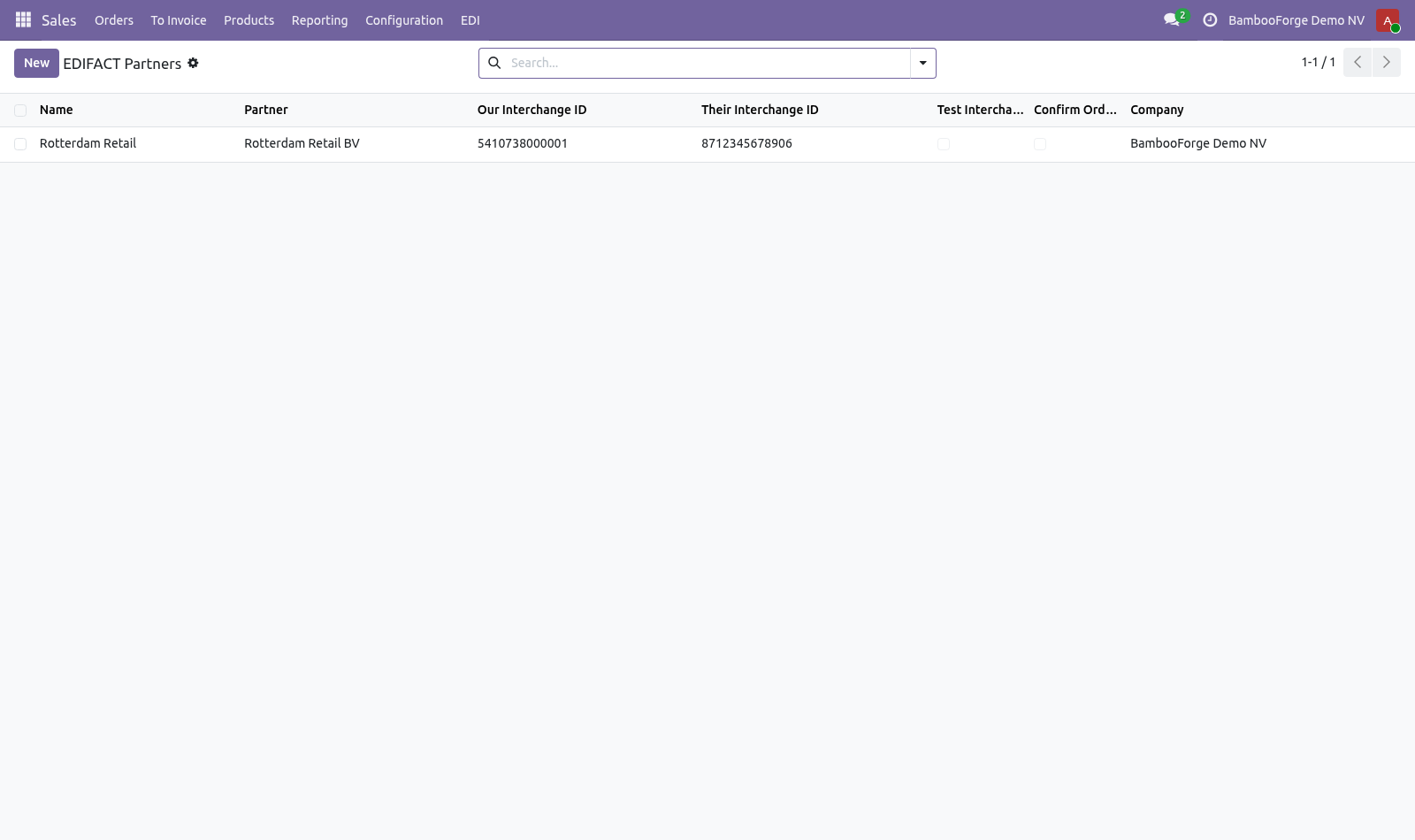
Setting up a trading partner. Every chain runs the same standard slightly differently, so their habits live on a profile rather than in the code: Their interchange ID and qualifier — usually a GLN with qualifier 14. Ours — what we are called in the UNB segment. Test interchanges — partners run a test phase and reject live files during it.
Leave this on until they say otherwise. Product code field — which of our fields carries the code they send in LIN. Retail chains almost always send an EAN. Check prices on orders — compare the price on the incoming line with our own price list.
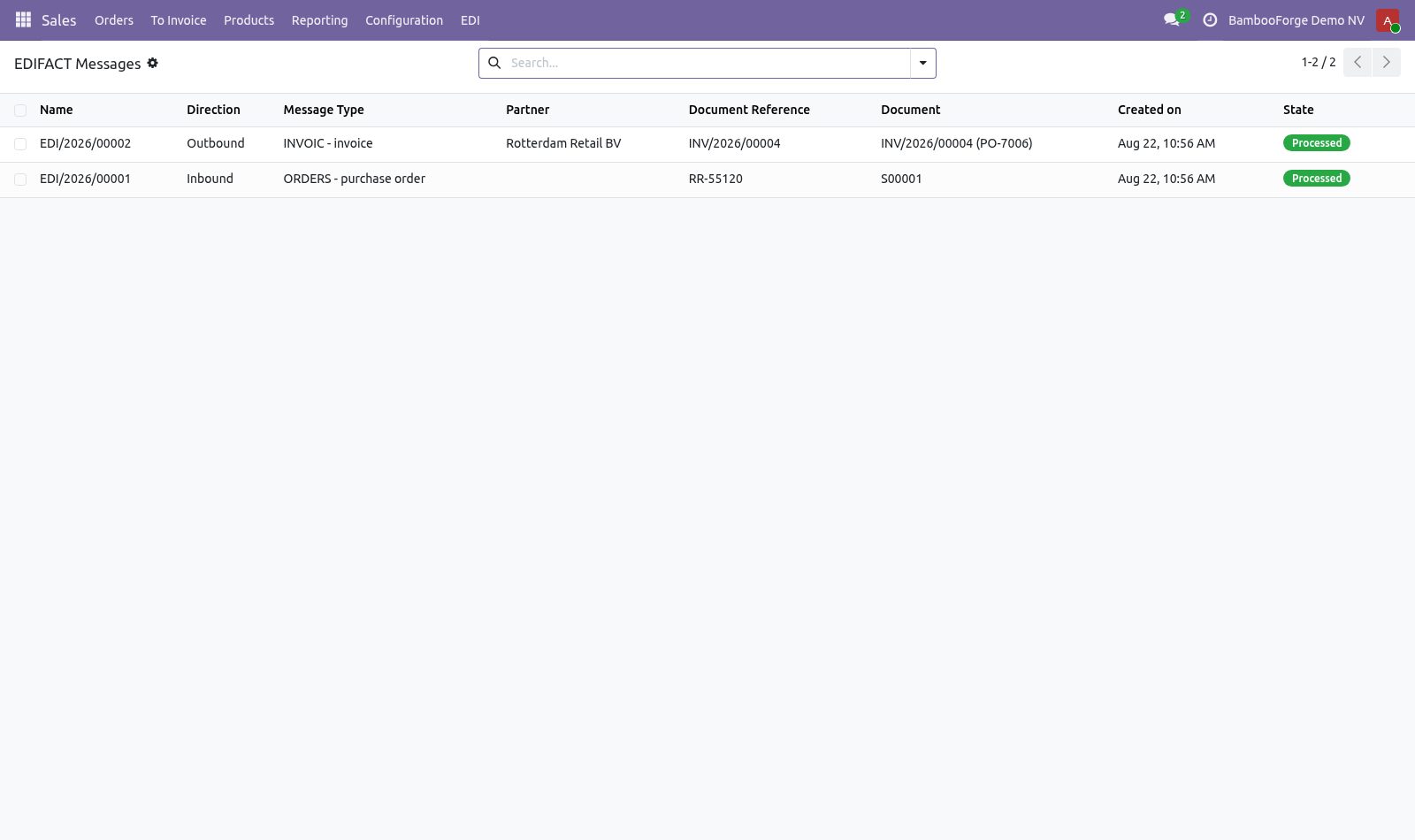
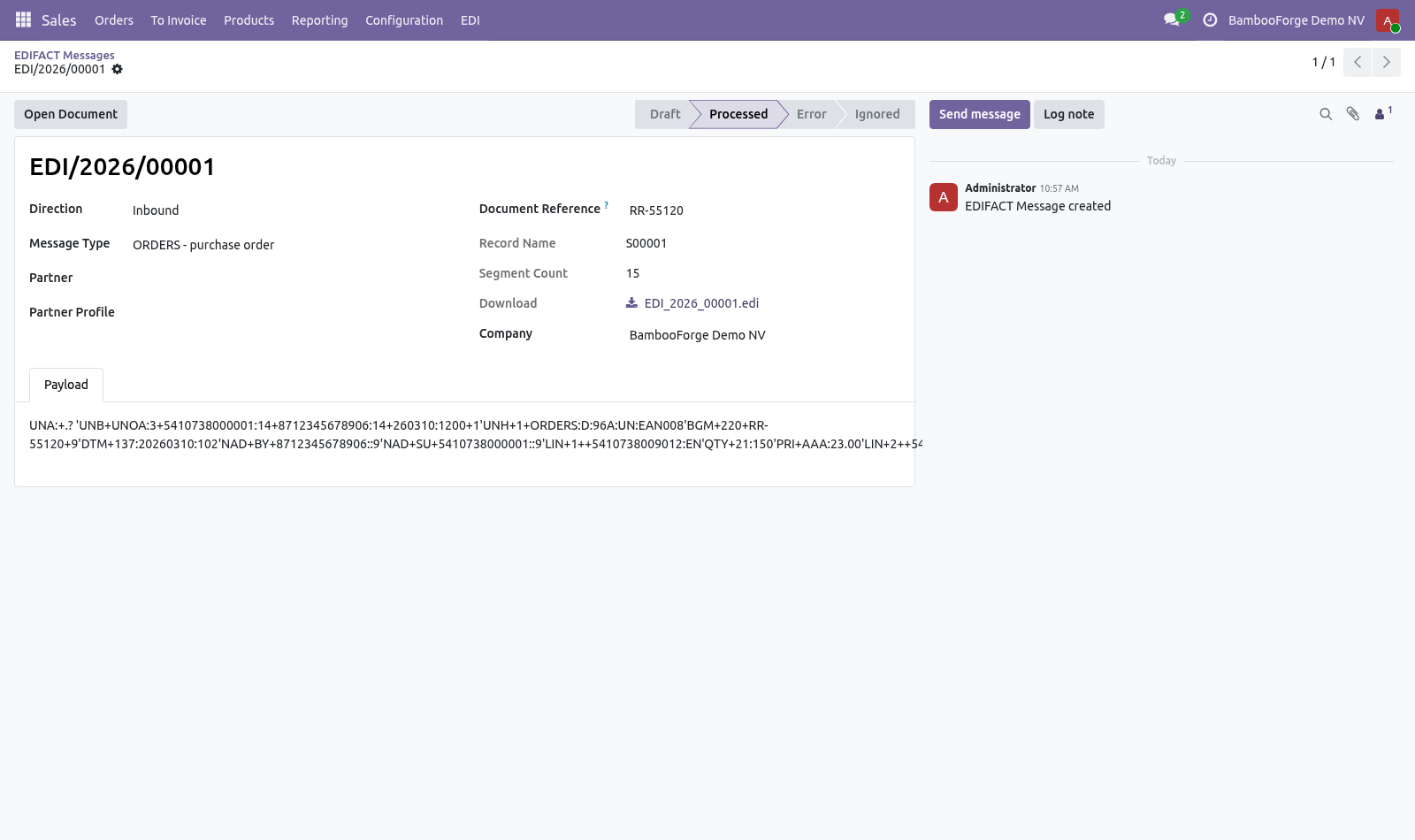
Confirm orders automatically — leave off until their files have been trusted for a while. An order that confirms itself also reserves stock and can start a delivery. Receiving orders. An ORDERS interchange becomes a sales order: the buyer is resolved from NAD+BY by interchange identifier, products from LIN, quantities from QTY+21 and prices from PRI+AAA.
A price difference does not stop the order. The order is created and the difference is written on it, listing what they say against what our price list says. Price disputes are the expensive part of EDI trading and finding them at invoice time is too late. An unknown buyer or product code fails loudly.
The message goes to Error with the identifier that could not be matched, and the payload is kept. Fix the data and press Process Again. A resent interchange does not become a second order. Partners resend; a gateway that takes the same order twice ships it twice.
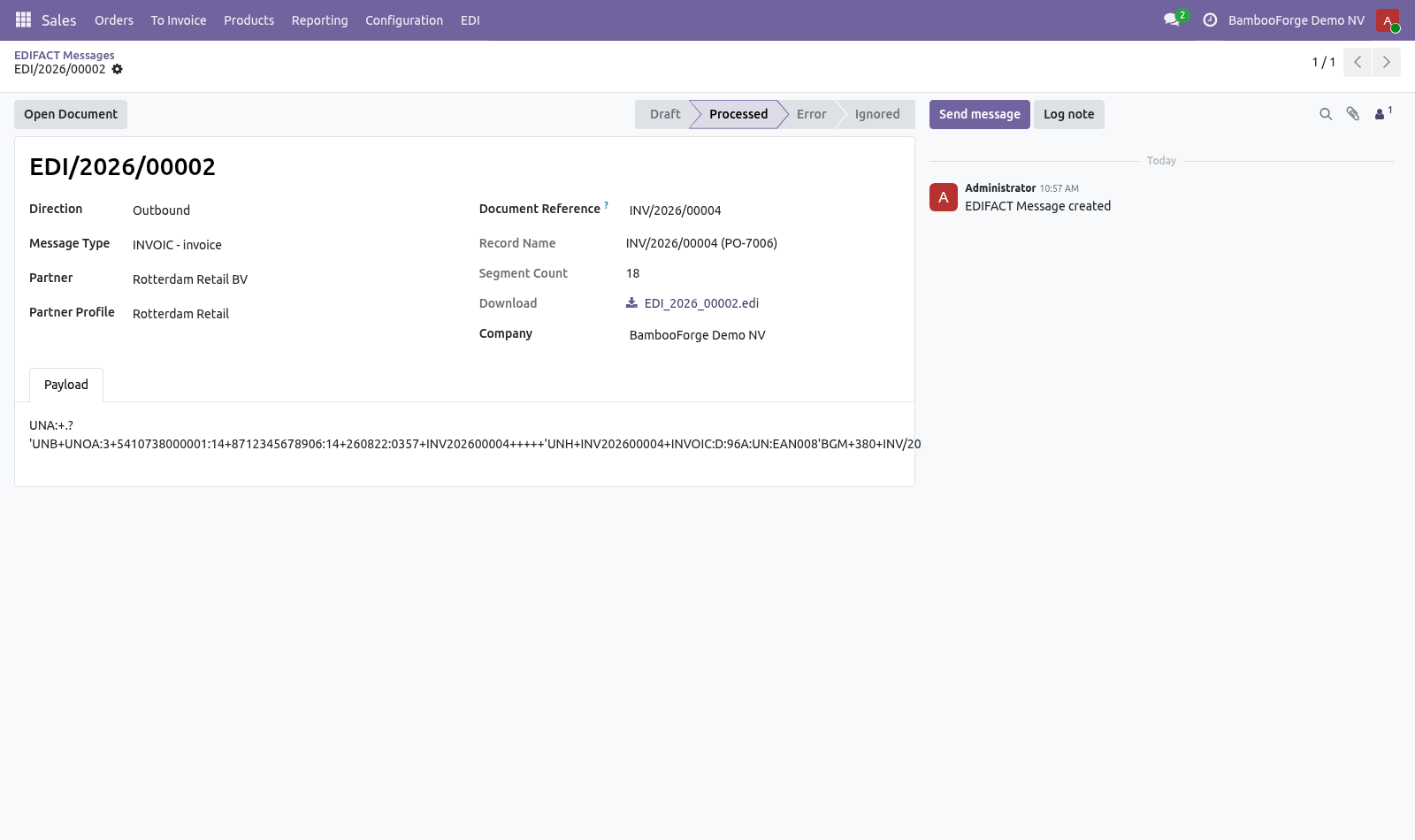
Sending invoices and despatch advices. build_invoic on a posted customer invoice and build_desadv on a validated outgoing shipment produce the interchange. Neither will build from a draft invoice or an unvalidated picking — a despatch advice for goods that have not left is worse than none at all. The payload.
Stored exactly as sent or received, and never rewritten. When a partner disputes an order six months later, the file they actually sent is the only thing that settles it. Now the part most videos leave out: what this does not do. This module reads and writes the files.
It does not talk to a VAN or an AS2 gateway — those need credentials and a contract, and are usually a separate piece of infrastructure that drops files where Odoo can pick them up. ORDERS, INVOIC and DESADV only. ORDRSP, RECADV, IFTMIN and friends are not implemented. Syntax level A with the D96A directory, which is what the grocery trade runs on.
A partner on a different directory version may need adjustments. The complete manual is at docs dot bambooforge dot dev, the demo database is linked from the store page, and support answers within twenty-four hours. Links are in the description.
Transcript of the walkthrough (Odoo 18)
EDIFACT EDI: ORDERS, INVOIC and DESADV. EDIFACT EDI: turn the ORDERS files your retail customers send into sales orders, and send back INVOIC and DESADV, with the original kept. Retail chains do not email purchase orders. They send EDIFACT, and a supplier who cannot read it does not get listed.
Odoo has no EDIFACT support at all. Sales ▸ EDI ▸ Trading Partners In the next few minutes: what this is for, then setting up a trading partner, then receiving orders, then sending invoices and despatch advices, then the payload. Then what this app deliberately does not do, so you can tell before you buy whether it fits. Everything lives under Messages then Trading Partners then EDI.
What this is for. Retail chains do not email purchase orders. They send EDIFACT, and a supplier who cannot read it does not get listed. Odoo has no EDIFACT support at all.
Setting up a trading partner. Every chain runs the same standard slightly differently, so their habits live on a profile rather than in the code: Their interchange ID and qualifier — usually a GLN with qualifier 14. Ours — what we are called in the UNB segment. Test interchanges — partners run a test phase and reject live files during it.
Leave this on until they say otherwise. Product code field — which of our fields carries the code they send in LIN. Retail chains almost always send an EAN. Check prices on orders — compare the price on the incoming line with our own price list.
Confirm orders automatically — leave off until their files have been trusted for a while. An order that confirms itself also reserves stock and can start a delivery. Receiving orders. An ORDERS interchange becomes a sales order: the buyer is resolved from NAD+BY by interchange identifier, products from LIN, quantities from QTY+21 and prices from PRI+AAA.
A price difference does not stop the order. The order is created and the difference is written on it, listing what they say against what our price list says. Price disputes are the expensive part of EDI trading and finding them at invoice time is too late. An unknown buyer or product code fails loudly.
The message goes to Error with the identifier that could not be matched, and the payload is kept. Fix the data and press Process Again. A resent interchange does not become a second order. Partners resend; a gateway that takes the same order twice ships it twice.
Sending invoices and despatch advices. build_invoic on a posted customer invoice and build_desadv on a validated outgoing shipment produce the interchange. Neither will build from a draft invoice or an unvalidated picking — a despatch advice for goods that have not left is worse than none at all. The payload.
Stored exactly as sent or received, and never rewritten. When a partner disputes an order six months later, the file they actually sent is the only thing that settles it. Now the part most videos leave out: what this does not do. This module reads and writes the files.
It does not talk to a VAN or an AS2 gateway — those need credentials and a contract, and are usually a separate piece of infrastructure that drops files where Odoo can pick them up. ORDERS, INVOIC and DESADV only. ORDRSP, RECADV, IFTMIN and friends are not implemented. Syntax level A with the D96A directory, which is what the grocery trade runs on.
A partner on a different directory version may need adjustments. The complete manual is at docs dot bambooforge dot dev, the demo database is linked from the store page, and support answers within twenty-four hours. Links are in the description.
Transcript of the walkthrough (Odoo 17)
EDIFACT EDI: ORDERS, INVOIC and DESADV. EDIFACT EDI: turn the ORDERS files your retail customers send into sales orders, and send back INVOIC and DESADV, with the original kept. Retail chains do not email purchase orders. They send EDIFACT, and a supplier who cannot read it does not get listed.
Odoo has no EDIFACT support at all. Sales ▸ EDI ▸ Trading Partners In the next few minutes: what this is for, then setting up a trading partner, then receiving orders, then sending invoices and despatch advices, then the payload. Then what this app deliberately does not do, so you can tell before you buy whether it fits. Everything lives under Messages then Trading Partners then EDI.
What this is for. Retail chains do not email purchase orders. They send EDIFACT, and a supplier who cannot read it does not get listed. Odoo has no EDIFACT support at all.
Setting up a trading partner. Every chain runs the same standard slightly differently, so their habits live on a profile rather than in the code: Their interchange ID and qualifier — usually a GLN with qualifier 14. Ours — what we are called in the UNB segment. Test interchanges — partners run a test phase and reject live files during it.
Leave this on until they say otherwise. Product code field — which of our fields carries the code they send in LIN. Retail chains almost always send an EAN. Check prices on orders — compare the price on the incoming line with our own price list.
Confirm orders automatically — leave off until their files have been trusted for a while. An order that confirms itself also reserves stock and can start a delivery. Receiving orders. An ORDERS interchange becomes a sales order: the buyer is resolved from NAD+BY by interchange identifier, products from LIN, quantities from QTY+21 and prices from PRI+AAA.
A price difference does not stop the order. The order is created and the difference is written on it, listing what they say against what our price list says. Price disputes are the expensive part of EDI trading and finding them at invoice time is too late. An unknown buyer or product code fails loudly.
The message goes to Error with the identifier that could not be matched, and the payload is kept. Fix the data and press Process Again. A resent interchange does not become a second order. Partners resend; a gateway that takes the same order twice ships it twice.
Sending invoices and despatch advices. build_invoic on a posted customer invoice and build_desadv on a validated outgoing shipment produce the interchange. Neither will build from a draft invoice or an unvalidated picking — a despatch advice for goods that have not left is worse than none at all. The payload.
Stored exactly as sent or received, and never rewritten. When a partner disputes an order six months later, the file they actually sent is the only thing that settles it. Now the part most videos leave out: what this does not do. This module reads and writes the files.
It does not talk to a VAN or an AS2 gateway — those need credentials and a contract, and are usually a separate piece of infrastructure that drops files where Odoo can pick them up. ORDERS, INVOIC and DESADV only. ORDRSP, RECADV, IFTMIN and friends are not implemented. Syntax level A with the D96A directory, which is what the grocery trade runs on.
A partner on a different directory version may need adjustments. The complete manual is at docs dot bambooforge dot dev, the demo database is linked from the store page, and support answers within twenty-four hours. Links are in the description.
Transcript of the walkthrough (Odoo 16)
EDIFACT EDI: ORDERS, INVOIC and DESADV. EDIFACT EDI: turn the ORDERS files your retail customers send into sales orders, and send back INVOIC and DESADV, with the original kept. Retail chains do not email purchase orders. They send EDIFACT, and a supplier who cannot read it does not get listed.
Odoo has no EDIFACT support at all. Sales ▸ EDI ▸ Trading Partners In the next few minutes: what this is for, then setting up a trading partner, then receiving orders, then sending invoices and despatch advices, then the payload. Then what this app deliberately does not do, so you can tell before you buy whether it fits. Everything lives under Messages then Trading Partners then EDI.
What this is for. Retail chains do not email purchase orders. They send EDIFACT, and a supplier who cannot read it does not get listed. Odoo has no EDIFACT support at all.
Setting up a trading partner. Every chain runs the same standard slightly differently, so their habits live on a profile rather than in the code: Their interchange ID and qualifier — usually a GLN with qualifier 14. Ours — what we are called in the UNB segment. Test interchanges — partners run a test phase and reject live files during it.
Leave this on until they say otherwise. Product code field — which of our fields carries the code they send in LIN. Retail chains almost always send an EAN. Check prices on orders — compare the price on the incoming line with our own price list.
Confirm orders automatically — leave off until their files have been trusted for a while. An order that confirms itself also reserves stock and can start a delivery. Receiving orders. An ORDERS interchange becomes a sales order: the buyer is resolved from NAD+BY by interchange identifier, products from LIN, quantities from QTY+21 and prices from PRI+AAA.
A price difference does not stop the order. The order is created and the difference is written on it, listing what they say against what our price list says. Price disputes are the expensive part of EDI trading and finding them at invoice time is too late. An unknown buyer or product code fails loudly.
The message goes to Error with the identifier that could not be matched, and the payload is kept. Fix the data and press Process Again. A resent interchange does not become a second order. Partners resend; a gateway that takes the same order twice ships it twice.
Sending invoices and despatch advices. build_invoic on a posted customer invoice and build_desadv on a validated outgoing shipment produce the interchange. Neither will build from a draft invoice or an unvalidated picking — a despatch advice for goods that have not left is worse than none at all. The payload.
Stored exactly as sent or received, and never rewritten. When a partner disputes an order six months later, the file they actually sent is the only thing that settles it. Now the part most videos leave out: what this does not do. This module reads and writes the files.
It does not talk to a VAN or an AS2 gateway — those need credentials and a contract, and are usually a separate piece of infrastructure that drops files where Odoo can pick them up. ORDERS, INVOIC and DESADV only. ORDRSP, RECADV, IFTMIN and friends are not implemented. Syntax level A with the D96A directory, which is what the grocery trade runs on.
A partner on a different directory version may need adjustments. The complete manual is at docs dot bambooforge dot dev, the demo database is linked from the store page, and support answers within twenty-four hours. Links are in the description.
Key facts
- What it is
- EDIFACT EDI: turn the ORDERS files your retail customers send into sales orders, and send back INVOIC and DESADV, with the original kept.
- For
- Accounting
- Odoo versions
- 16.0, 17.0, 18.0, 19.0, 20.0 - Community and Enterprise
- Runs on
- Odoo.sh or Odoo you host yourself - not Odoo Online, which accepts no third-party apps
- Price
- 249 EUR, one-time, on the Odoo Apps Store
- Technical name
- bambooforge_edifact
- Not for
- This module reads and writes the files. It does not talk to a VAN or an AS2 gateway — those need credentials and a contract, and are usually a separate piece of infrastructure that drops files where Odoo can pick them up.; ORDERS, INVOIC and DESADV only. ORDRSP, RECADV, IFTMIN and friends are not implemented.; Syntax level A with the D96A directory, which is what the grocery trade runs on. A partner on a different directory version may need adjustments.
- Manual last updated
- 2026-09-23
EDIFACT EDI: ORDERS, INVOIC and DESADV
What this is for
Retail chains do not email purchase orders. They send EDIFACT, and a supplier who cannot read it does not get listed. Odoo has no EDIFACT support at all.
Setting up a trading partner
Sales ▸ EDI ▸ Trading Partners
Every chain runs the same standard slightly differently, so their habits live on a profile rather than in the code:
Their interchange ID and qualifier — usually a GLN with qualifier 14.
Ours — what we are called in the UNB segment.
Test interchanges — partners run a test phase and reject live files during it. Leave this on until they say otherwise.
Product code field — which of our fields carries the code they send in LIN. Retail chains almost always send an EAN.
Check prices on orders — compare the price on the incoming line with our own price list.
Confirm orders automatically — leave off until their files have been trusted for a while. An order that confirms itself also reserves stock and can start a delivery.
Receiving orders
An ORDERS interchange becomes a sales order: the buyer is resolved from NAD+BY by interchange identifier, products from LIN, quantities from QTY+21 and prices from PRI+AAA.
Three behaviours are worth knowing:
A price difference does not stop the order. The order is created and the difference is written on it, listing what they say against what our price list says. Price disputes are the expensive part of EDI trading and finding them at invoice time is too late.
An unknown buyer or product code fails loudly. The message goes to Error with the identifier that could not be matched, and the payload is kept. Fix the data and press Process Again.
A resent interchange does not become a second order. Partners resend; a gateway that takes the same order twice ships it twice.
Sending invoices and despatch advices
build_invoic on a posted customer invoice and build_desadv on a validated outgoing shipment produce the interchange. Neither will build from a draft invoice or an unvalidated picking — a despatch advice for goods that have not left is worse than none at all.
The payload
Stored exactly as sent or received, and never rewritten. When a partner disputes an order six months later, the file they actually sent is the only thing that settles it.
Known limits
This module reads and writes the files. It does not talk to a VAN or an AS2 gateway — those need credentials and a contract, and are usually a separate piece of infrastructure that drops files where Odoo can pick them up.
ORDERS, INVOIC and DESADV only. ORDRSP, RECADV, IFTMIN and friends are not implemented.
Syntax level A with the D96A directory, which is what the grocery trade runs on. A partner on a different directory version may need adjustments.
How we make sure it works
Before every release, 29 automated checks run against this app on Odoo 16, 17, 18, 19 and 20. Among them:
The same order is not taken twice.
Something that is not edifact is refused.
Orders in with a price difference is processed not error.
An employee without the checkbox reads no message.
A partner without a profile is refused.
The complete list is in the source you receive.
Install
Copy bambooforge_edifact into your addons path and update the app list, or install the ZIP from the Odoo Apps Store.
Install EDIFACT EDI: ORDERS, INVOIC and DESADV.
Open Messages - its menus are Trading Partners, EDI.
Questions people ask
- Which Odoo versions does it run on?
Odoo 16.0, 17.0, 18.0, 19.0, 20.0, on the series you buy it for; each series is its own listing.
- Community or Enterprise?
Both. It needs no Enterprise app.
- What does it need?
The standard Inventory, Invoicing, Sales apps. No extra Python package.
- Where does it show up?
Under the Messages menu (Trading Partners, EDI).
- Does anything leave my server?
No. It makes no call outside your Odoo server: no telemetry, no licence check, no third-party service.
- What happens if I uninstall it?
Odoo drops the app's own tables and fields; the standard records it worked on (contacts, orders, products) stay as they are.