 BambooForge Labs
Clinic All in One for Dental Practices
Dental clinic management with a tooth chart you click, treatment plans priced per tooth with the insurer's share, and accepted work billed.
Available for Odoo 16.0, Odoo 17.0, Odoo 18.0, Odoo 19.0, Odoo 20.0. Technical name bambooforge_dental.
Transcript of the walkthrough (Odoo 20)
Clinic All in One for Dental Practices. Dental clinic management with a tooth chart you click, treatment plans priced per tooth with the insurer's share, and accepted work billed. Said before you buy, because it is the half that decides whether the app fits: In the next few minutes: what it adds, then the tooth chart, then treatment plans, then how we make sure it works, then questions people ask. Then what this app deliberately does not do, so you can tell before you buy whether it fits.
Everything lives under Accepted work not done then Treatment plans then Teeth. Requires BambooForge Clinic. Odoo Community 16.0, 17.0, 18.0 or 19.0 - no Enterprise module, no external service. What it adds.
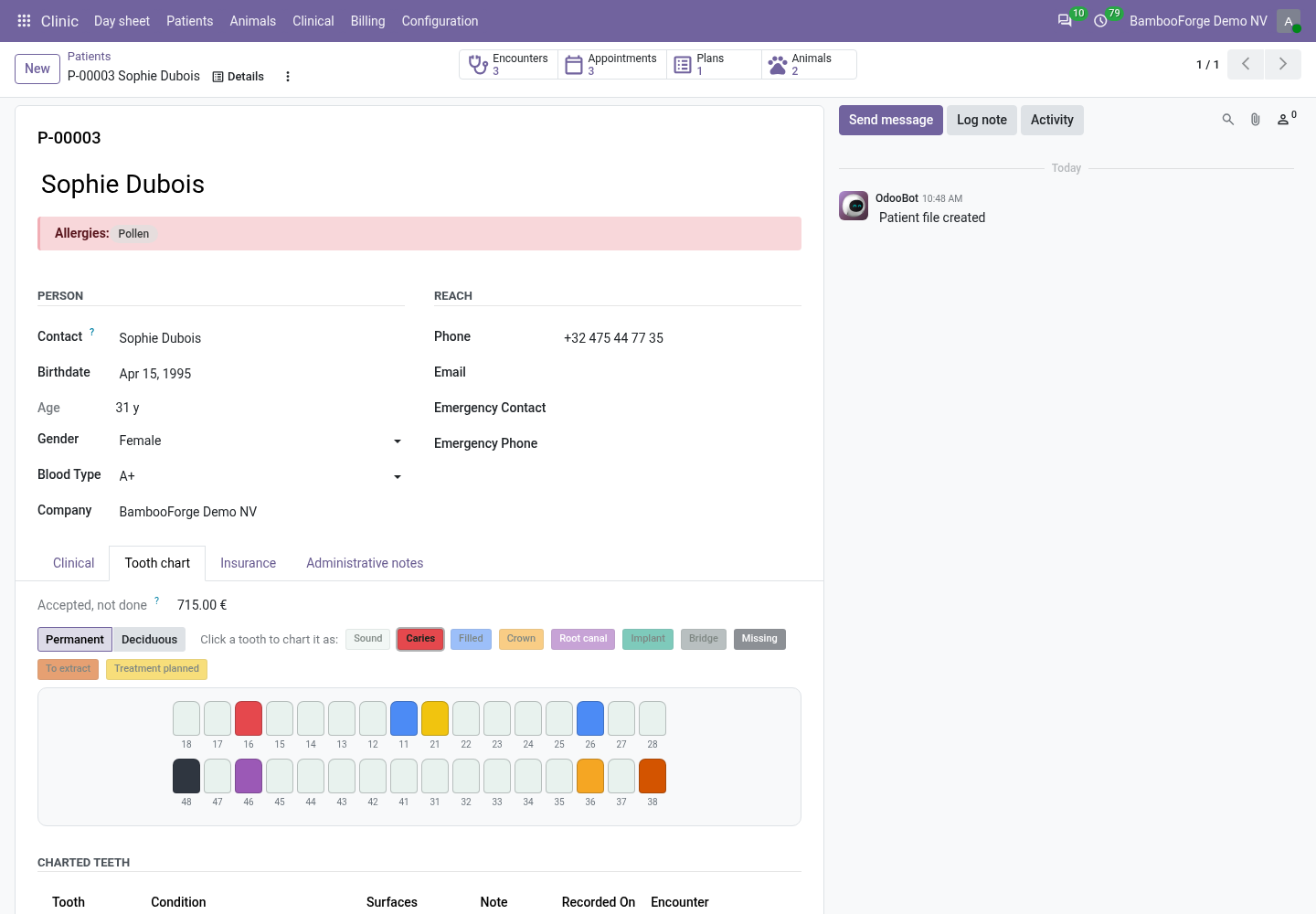
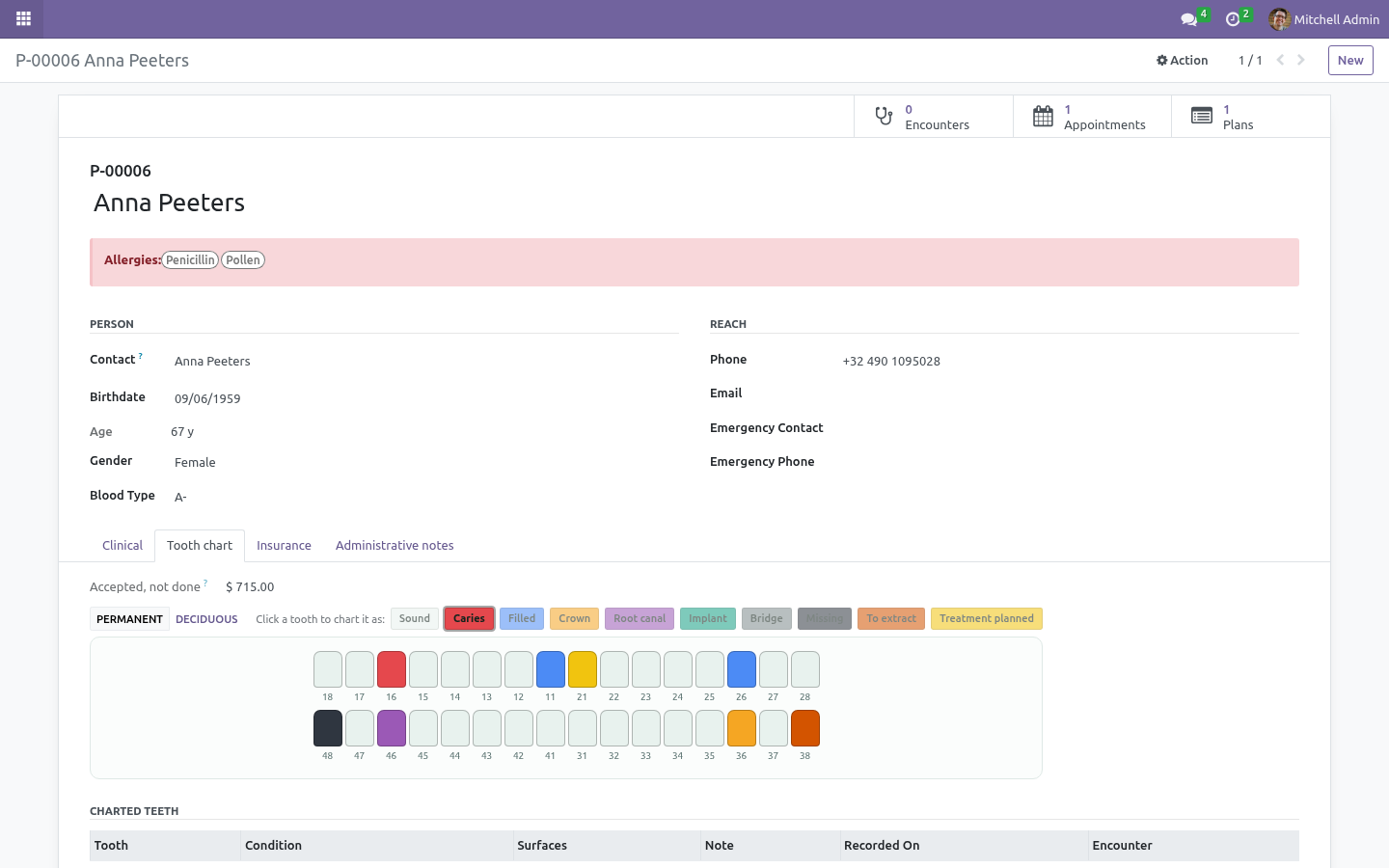
BambooForge Clinic gives a practice its patients, its day sheet and its consultations. Dentistry needs two more things, and this module is those two: a chart, and a plan people pay for. The tooth chart ISO 3950 / FDI numbering - the two-digit codes every referral, laboratory ticket and insurance claim in the world already uses. Quadrant first, then the tooth counting outwards from the midline.
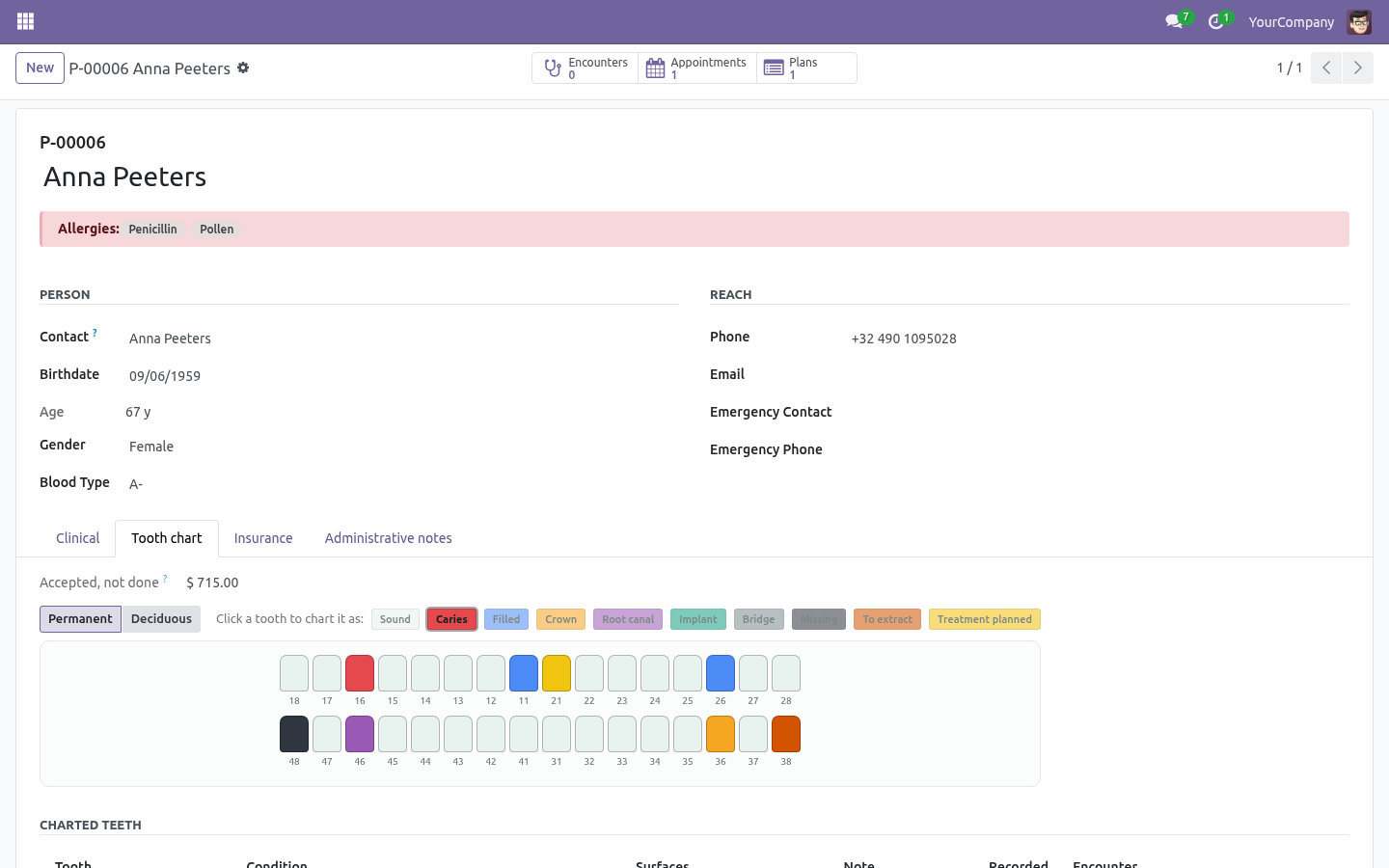
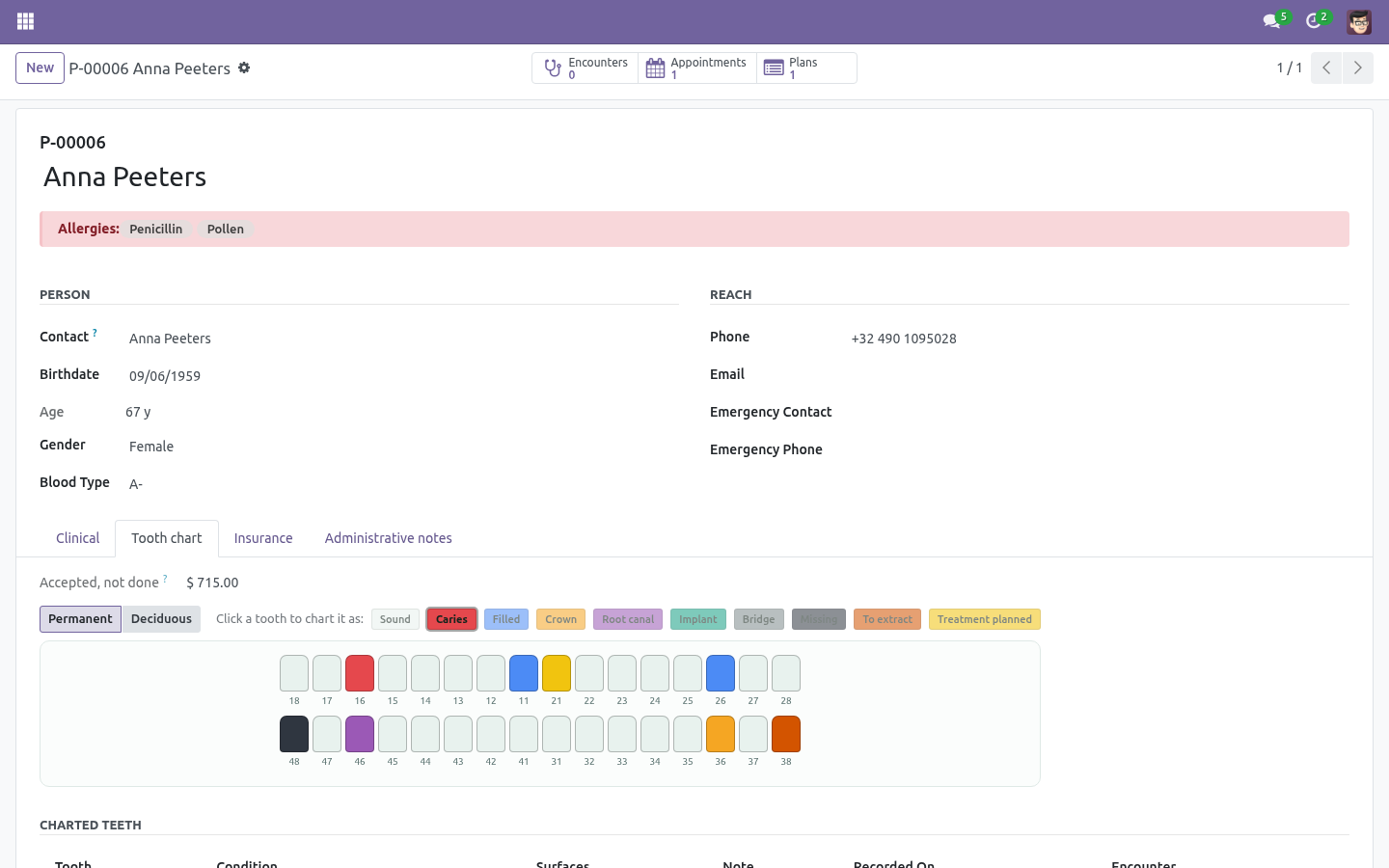
Drawn the way it hangs on the wall: upper arch on top, lower arch below, the patient's right on the viewer's left. Click a tooth to chart it. Pick the condition once - caries, filled, crown, root canal, implant, bridge, missing, to extract, treatment planned - then click your way round the mouth. A dentist has gloves on and a mouth open in front of them; that is the whole interaction.
Permanent and deciduous dentitions, both complete, so children are not an afterthought. Surfaces in the usual shorthand (MOD), validated against the real five - M, O, D, B, L. Treatment plans Priced per tooth, because nobody accepts four thousand euros of dentistry in one sentence. They accept the crown now and think about the implant.
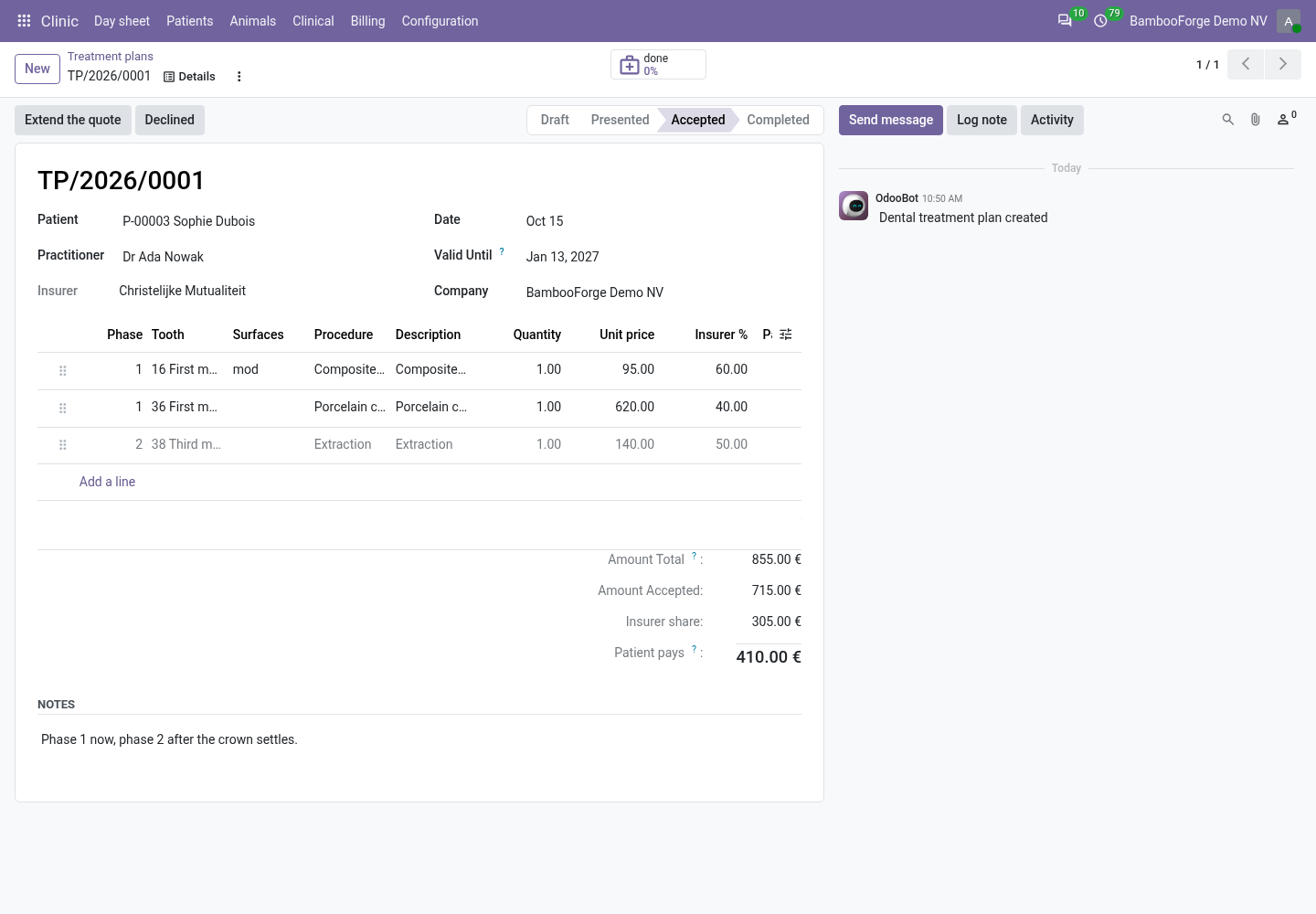
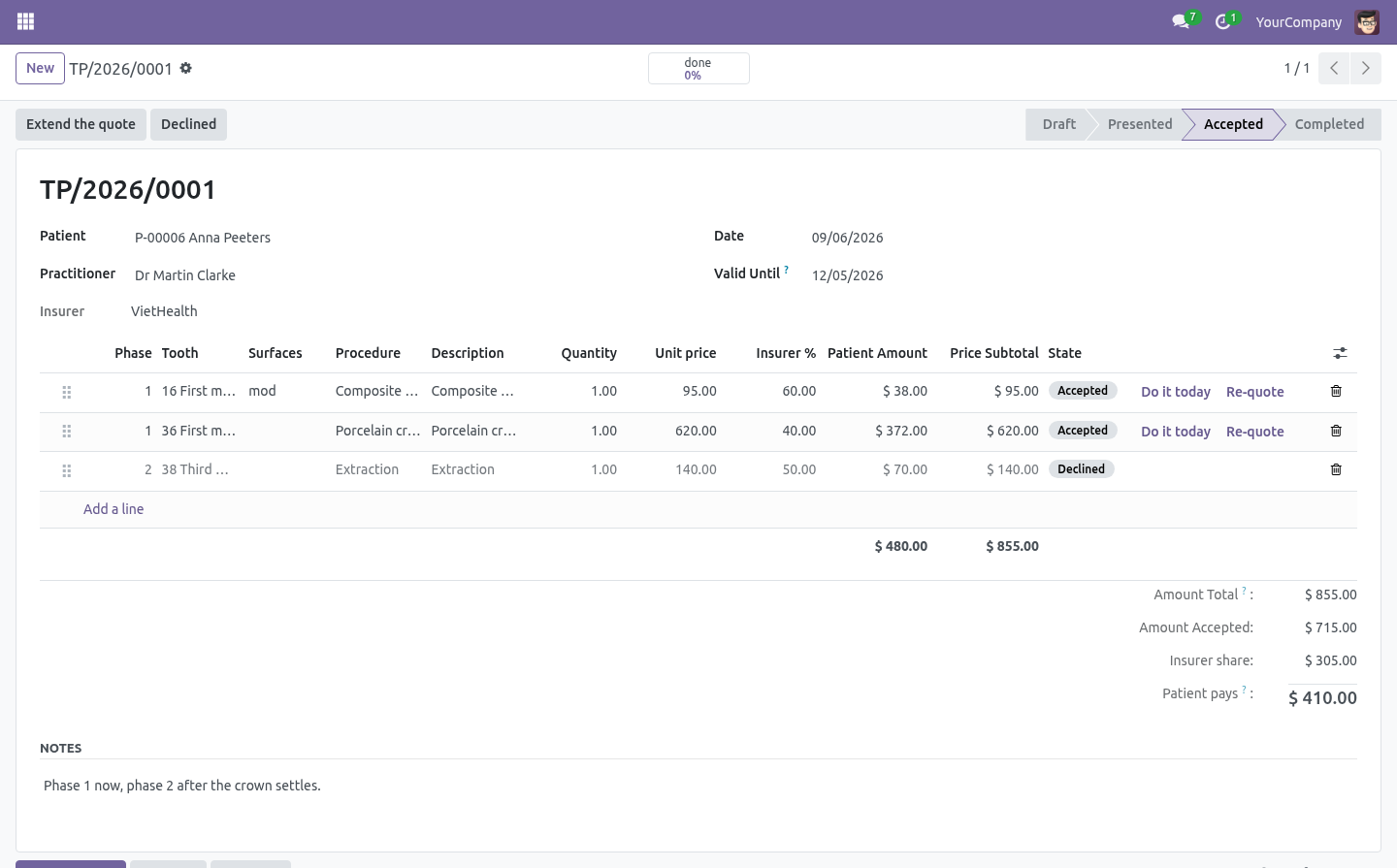
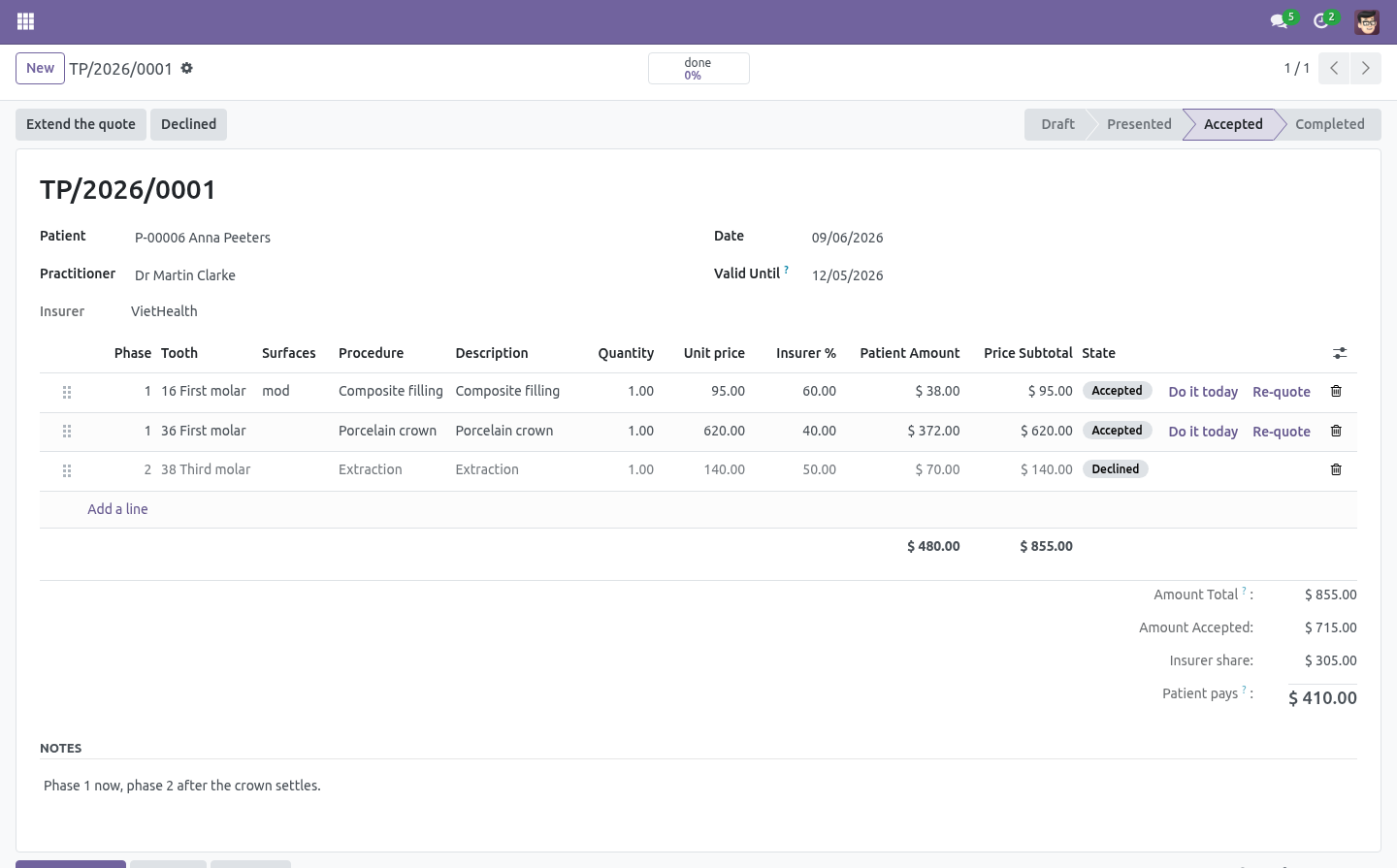
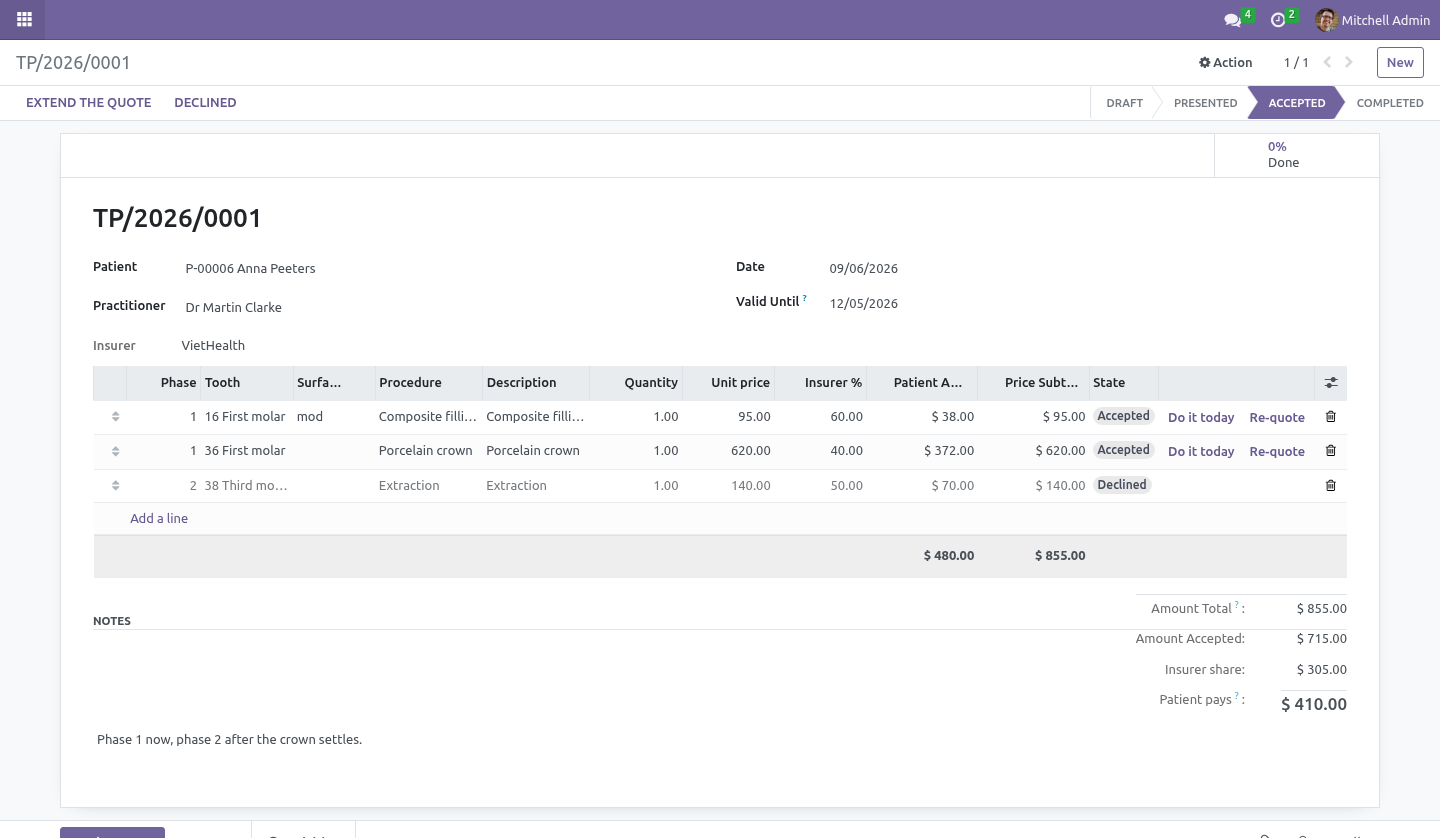
Each line carries its tooth, its surfaces, a phase (this month, next month), the price, the insurer's expected share and what the patient actually pays - the number people decide on. Partial acceptance is the normal case. Accept some lines, decline others; the plan follows along - presented, partly accepted, accepted, completed - and shows what share of the accepted work is already done. "Accepted work not done" is a menu of its own: the list to phone when the diary looks empty.
In most practices that list is the largest asset nobody is looking at. How we make sure it works. Before every release, 85 automated checks run against this app on Odoo 16, 17, 18, 19 and 20. Among them: A line cannot be marked done without carrying the work out.
Charting the same condition twice is not a change. A plan cannot be accepted without being presented. A finished line cannot be deleted out from under the invoice. Extending a quote that never expires does not give it a date.
The complete list is in the source you receive. Questions people ask. Which Odoo versions does it run on? Odoo 16.0, 17.0, 18.0, 19.0, 20.0, on the series you buy it for; each series is its own listing.
Community or Enterprise? Both. It needs no Enterprise app. Support.
support@bambooforge.dev - answered within two business days. This module is licensed OPL-1; one purchase covers one production database plus its staging copies. The complete manual is at docs dot bambooforge dot dev, the demo database is linked from the store page, and support answers within twenty-four hours. Links are in the description.
Transcript of the walkthrough (Odoo 19)
Dental Clinic Management. Dental clinic management with a tooth chart you click, treatment plans priced per tooth with the insurer's share, and accepted work billed. In the next few minutes: what it adds, then the tooth chart, then treatment plans, then support. Then what this app deliberately does not do, so you can tell before you buy whether it fits.
Everything lives under Accepted work not done then Treatment plans then Teeth. Requires BambooForge Clinic. Odoo Community 16.0, 17.0, 18.0 or 19.0 - no Enterprise module, no external service. What it adds.
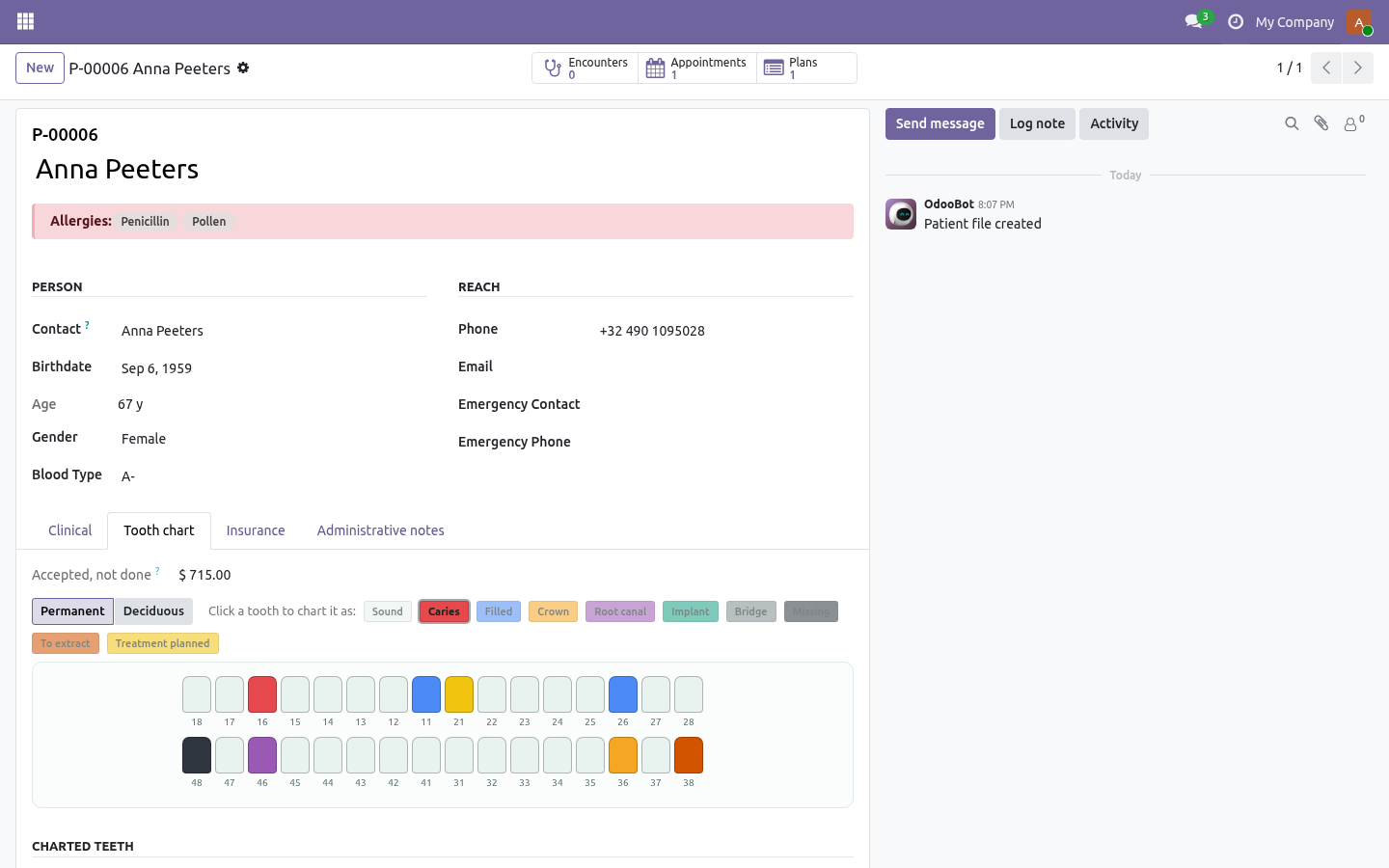
BambooForge Clinic gives a practice its patients, its day sheet and its consultations. Dentistry needs two more things, and this module is those two: a chart, and a plan people pay for. The tooth chart ISO 3950 / FDI numbering - the two-digit codes every referral, laboratory ticket and insurance claim in the world already uses. Quadrant first, then the tooth counting outwards from the midline.
Drawn the way it hangs on the wall: upper arch on top, lower arch below, the patient's right on the viewer's left. Click a tooth to chart it. Pick the condition once - caries, filled, crown, root canal, implant, bridge, missing, to extract, treatment planned - then click your way round the mouth. A dentist has gloves on and a mouth open in front of them; that is the whole interaction.
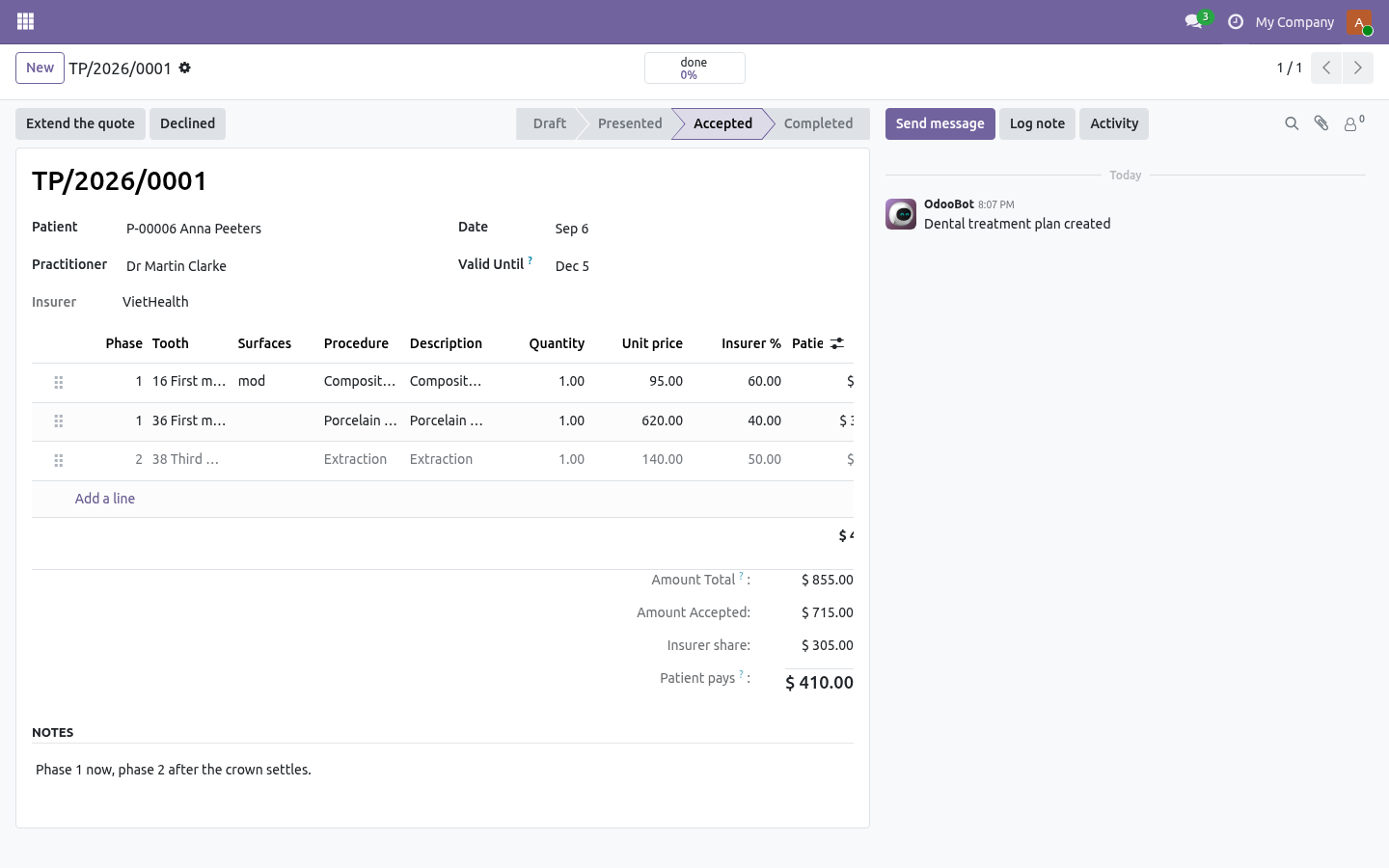
Permanent and deciduous dentitions, both complete, so children are not an afterthought. Surfaces in the usual shorthand (MOD), validated against the real five - M, O, D, B, L. Treatment plans Priced per tooth, because nobody accepts four thousand euros of dentistry in one sentence. They accept the crown now and think about the implant.
Each line carries its tooth, its surfaces, a phase (this month, next month), the price, the insurer's expected share and what the patient actually pays - the number people decide on. Partial acceptance is the normal case. Accept some lines, decline others; the plan follows along - presented, partly accepted, accepted, completed - and shows what share of the accepted work is already done. "Accepted work not done" is a menu of its own: the list to phone when the diary looks empty.
In most practices that list is the largest asset nobody is looking at. Support. support@bambooforge.dev - answered within two business days. This module is licensed OPL-1; one purchase covers one production database plus its staging copies.
The complete manual is at docs dot bambooforge dot dev, the demo database is linked from the store page, and support answers within twenty-four hours. Links are in the description.
Transcript of the walkthrough (Odoo 18)
Dental Clinic Management. Dental clinic management with a tooth chart you click, treatment plans priced per tooth with the insurer's share, and accepted work billed. In the next few minutes: what it adds, then the tooth chart, then treatment plans, then support. Then what this app deliberately does not do, so you can tell before you buy whether it fits.
Everything lives under Accepted work not done then Treatment plans then Teeth. Requires BambooForge Clinic. Odoo Community 16.0, 17.0, 18.0 or 19.0 - no Enterprise module, no external service. What it adds.
BambooForge Clinic gives a practice its patients, its day sheet and its consultations. Dentistry needs two more things, and this module is those two: a chart, and a plan people pay for. The tooth chart ISO 3950 / FDI numbering - the two-digit codes every referral, laboratory ticket and insurance claim in the world already uses. Quadrant first, then the tooth counting outwards from the midline.
Drawn the way it hangs on the wall: upper arch on top, lower arch below, the patient's right on the viewer's left. Click a tooth to chart it. Pick the condition once - caries, filled, crown, root canal, implant, bridge, missing, to extract, treatment planned - then click your way round the mouth. A dentist has gloves on and a mouth open in front of them; that is the whole interaction.
Permanent and deciduous dentitions, both complete, so children are not an afterthought. Surfaces in the usual shorthand (MOD), validated against the real five - M, O, D, B, L. Treatment plans Priced per tooth, because nobody accepts four thousand euros of dentistry in one sentence. They accept the crown now and think about the implant.
Each line carries its tooth, its surfaces, a phase (this month, next month), the price, the insurer's expected share and what the patient actually pays - the number people decide on. Partial acceptance is the normal case. Accept some lines, decline others; the plan follows along - presented, partly accepted, accepted, completed - and shows what share of the accepted work is already done. "Accepted work not done" is a menu of its own: the list to phone when the diary looks empty.
In most practices that list is the largest asset nobody is looking at. Support. support@bambooforge.dev - answered within two business days. This module is licensed OPL-1; one purchase covers one production database plus its staging copies.
The complete manual is at docs dot bambooforge dot dev, the demo database is linked from the store page, and support answers within twenty-four hours. Links are in the description.
Transcript of the walkthrough (Odoo 17)
Dental Clinic Management. Dental clinic management with a tooth chart you click, treatment plans priced per tooth with the insurer's share, and accepted work billed. In the next few minutes: what it adds, then the tooth chart, then treatment plans, then support. Then what this app deliberately does not do, so you can tell before you buy whether it fits.
Everything lives under Accepted work not done then Treatment plans then Teeth. Requires BambooForge Clinic. Odoo Community 16.0, 17.0, 18.0 or 19.0 - no Enterprise module, no external service. What it adds.
BambooForge Clinic gives a practice its patients, its day sheet and its consultations. Dentistry needs two more things, and this module is those two: a chart, and a plan people pay for. The tooth chart ISO 3950 / FDI numbering - the two-digit codes every referral, laboratory ticket and insurance claim in the world already uses. Quadrant first, then the tooth counting outwards from the midline.
Drawn the way it hangs on the wall: upper arch on top, lower arch below, the patient's right on the viewer's left. Click a tooth to chart it. Pick the condition once - caries, filled, crown, root canal, implant, bridge, missing, to extract, treatment planned - then click your way round the mouth. A dentist has gloves on and a mouth open in front of them; that is the whole interaction.
Permanent and deciduous dentitions, both complete, so children are not an afterthought. Surfaces in the usual shorthand (MOD), validated against the real five - M, O, D, B, L. Treatment plans Priced per tooth, because nobody accepts four thousand euros of dentistry in one sentence. They accept the crown now and think about the implant.
Each line carries its tooth, its surfaces, a phase (this month, next month), the price, the insurer's expected share and what the patient actually pays - the number people decide on. Partial acceptance is the normal case. Accept some lines, decline others; the plan follows along - presented, partly accepted, accepted, completed - and shows what share of the accepted work is already done. "Accepted work not done" is a menu of its own: the list to phone when the diary looks empty.
In most practices that list is the largest asset nobody is looking at. Support. support@bambooforge.dev - answered within two business days. This module is licensed OPL-1; one purchase covers one production database plus its staging copies.
The complete manual is at docs dot bambooforge dot dev, the demo database is linked from the store page, and support answers within twenty-four hours. Links are in the description.
Transcript of the walkthrough (Odoo 16)
Dental Clinic Management. Dental clinic management with a tooth chart you click, treatment plans priced per tooth with the insurer's share, and accepted work billed. In the next few minutes: what it adds, then the tooth chart, then treatment plans, then support. Then what this app deliberately does not do, so you can tell before you buy whether it fits.
Everything lives under Accepted work not done then Treatment plans then Teeth. Requires BambooForge Clinic. Odoo Community 16.0, 17.0, 18.0 or 19.0 - no Enterprise module, no external service. What it adds.
BambooForge Clinic gives a practice its patients, its day sheet and its consultations. Dentistry needs two more things, and this module is those two: a chart, and a plan people pay for. The tooth chart ISO 3950 / FDI numbering - the two-digit codes every referral, laboratory ticket and insurance claim in the world already uses. Quadrant first, then the tooth counting outwards from the midline.
Drawn the way it hangs on the wall: upper arch on top, lower arch below, the patient's right on the viewer's left. Click a tooth to chart it. Pick the condition once - caries, filled, crown, root canal, implant, bridge, missing, to extract, treatment planned - then click your way round the mouth. A dentist has gloves on and a mouth open in front of them; that is the whole interaction.
Permanent and deciduous dentitions, both complete, so children are not an afterthought. Surfaces in the usual shorthand (MOD), validated against the real five - M, O, D, B, L. Treatment plans Priced per tooth, because nobody accepts four thousand euros of dentistry in one sentence. They accept the crown now and think about the implant.
Each line carries its tooth, its surfaces, a phase (this month, next month), the price, the insurer's expected share and what the patient actually pays - the number people decide on. Partial acceptance is the normal case. Accept some lines, decline others; the plan follows along - presented, partly accepted, accepted, completed - and shows what share of the accepted work is already done. "Accepted work not done" is a menu of its own: the list to phone when the diary looks empty.
In most practices that list is the largest asset nobody is looking at. Support. support@bambooforge.dev - answered within two business days. This module is licensed OPL-1; one purchase covers one production database plus its staging copies.
The complete manual is at docs dot bambooforge dot dev, the demo database is linked from the store page, and support answers within twenty-four hours. Links are in the description.
Key facts
- What it is
- Dental clinic management with a tooth chart you click, treatment plans priced per tooth with the insurer's share, and accepted work billed.
- For
- Industries
- Odoo versions
- 16.0, 17.0, 18.0, 19.0, 20.0 - Community and Enterprise
- Runs on
- Odoo.sh or Odoo you host yourself - not Odoo Online, which accepts no third-party apps
- Price
- 268 EUR, one-time, on the Odoo Apps Store
- Technical name
- bambooforge_dental
- Not for
- Said before you buy, because it is the half that decides whether the app fits:; Prune a clinical record on a timer - nothing is ever pruned; retention is your decision against your regulator.; Carry out work that was never accepted, or without an open visit to record it against.
- Live demo
- https://demo20.bambooforge.dev/odoo/action-bambooforge_dental.action_bf_dental_plan_line_todo
- Manual last updated
- 2026-10-15
Clinic All in One for Dental Practices
What it adds
BambooForge Clinic gives a practice its patients, its day sheet and its consultations. Dentistry needs two more things, and this module is those two: a chart, and a plan people pay for.
The tooth chart
ISO 3950 / FDI numbering - the two-digit codes every referral, laboratory ticket and insurance claim in the world already uses. Quadrant first, then the tooth counting outwards from the midline.
Drawn the way it hangs on the wall: upper arch on top, lower arch below, the patient's right on the viewer's left.
Click a tooth to chart it. Pick the condition once - caries, filled, crown, root canal, implant, bridge, missing, to extract, treatment planned - then click your way round the mouth. A dentist has gloves on and a mouth open in front of them; that is the whole interaction.
Permanent and deciduous dentitions, both complete, so children are not an afterthought.
Surfaces in the usual shorthand (MOD), validated against the real five - M, O, D, B, L.
Every change keeps what was there before. The second question an insurer or a lawyer asks is what the mouth looked like in March, and a chart that overwrites itself cannot answer it. Nothing is ever pruned: how long a practice keeps a clinical record is its own decision against its own regulator - thirty years for a minor in several EU states - not a default that deletes on a timer.
Treatment plans
Priced per tooth, because nobody accepts four thousand euros of dentistry in one sentence. They accept the crown now and think about the implant.
Each line carries its tooth, its surfaces, a phase (this month, next month), the price, the insurer's expected share and what the patient actually pays - the number people decide on.
Partial acceptance is the normal case. Accept some lines, decline others; the plan follows along - presented, partly accepted, accepted, completed - and shows what share of the accepted work is already done.
Accepted work drops into the visit. One click puts a line onto the open consultation as a billable item, marks it done and charts the tooth, so the record, the chart and the invoice cannot drift apart. Work that was never accepted cannot be carried out, and work cannot be carried out without an open visit to record it against.
"Accepted work not done" is a menu of its own: the list to phone when the diary looks empty. In most practices that list is the largest asset nobody is looking at.
Requirements
Requires BambooForge Clinic. Odoo Community 16.0, 17.0, 18.0, 19.0 or 20.0 - no Enterprise module, no external service.
How we make sure it works
Before every release, 85 automated checks run against this app on Odoo 16, 17, 18, 19 and 20. Among them:
A line cannot be marked done without carrying the work out.
Charting the same condition twice is not a change.
A plan cannot be accepted without being presented.
A finished line cannot be deleted out from under the invoice.
Extending a quote that never expires does not give it a date.
The complete list is in the source you receive.
What it does not do
Said before you buy, because it is the half that decides whether the app fits:
Prune a clinical record on a timer - nothing is ever pruned; retention is your decision against your regulator.
Carry out work that was never accepted, or without an open visit to record it against.
Install
Copy bambooforge_dental into your addons path and update the app list, or install the ZIP from the Odoo Apps Store.
Install Dental Clinic Management.
Open Accepted work not done - its menus are Treatment plans, Teeth.
Questions people ask
- Which Odoo versions does it run on?
Odoo 16.0, 17.0, 18.0, 19.0, 20.0, on the series you buy it for; each series is its own listing.
- Community or Enterprise?
Both. It needs no Enterprise app.
- What does it need?
The standard Web; clinic (BambooForge) must be installed first app. No extra Python package.
- Where does it show up?
Under the Accepted work not done menu (Treatment plans, Teeth).
- Does anything leave my server?
No. It makes no call outside your Odoo server: no telemetry, no licence check, no third-party service.
- What happens if I uninstall it?
Odoo drops the app's own tables and fields; the standard records it worked on (contacts, orders, products) stay as they are.
Support
support@bambooforge.dev - answered within two business days. This module is licensed OPL-1; one purchase covers one production database plus its staging copies.