 BambooForge Labs
Customer Portal: Statement of Account & Payments
A statement of account in the customer portal: every open item, how old it is, the total owed, as a PDF - and a way to report what they paid.
Available for Odoo 16.0, Odoo 17.0, Odoo 18.0, Odoo 19.0, Odoo 20.0. Technical name bambooforge_customer_portal.
Transcript of the walkthrough (Odoo 20)
Customer Portal: Statement of Account & Payments. A statement of account in the customer portal: every open item, how old it is, the total owed, as a PDF - and a way to report what they paid. Said before you buy, because it is the half that decides whether the app fits: In the next few minutes: customer portal: statement of account & payments, then the statement, then how old it is, then as a pdf, then telling you what they paid. Then what this app deliberately does not do, so you can tell before you buy whether it fits.
Everything lives under Remittance Advices. 1. Copy bambooforge_customer_portal into your addons path and update the app list, or install the ZIP from the Odoo Apps Store. 2.
Install Customer Portal: Statement of Account & Payments. 3. Open Remittance Advices. Customer Portal: Statement of Account & Payments.
Odoo Community's portal lists a customer's invoices and lets them pay one. It never tells them what they owe altogether, never shows how old any of it is, and gives them nowhere to say we paid this on Tuesday, here is the reference. So the question that starts every collection call — what is outstanding, and what have you already sent us — gets answered by exporting a spreadsheet and attaching it to an email. The statement.
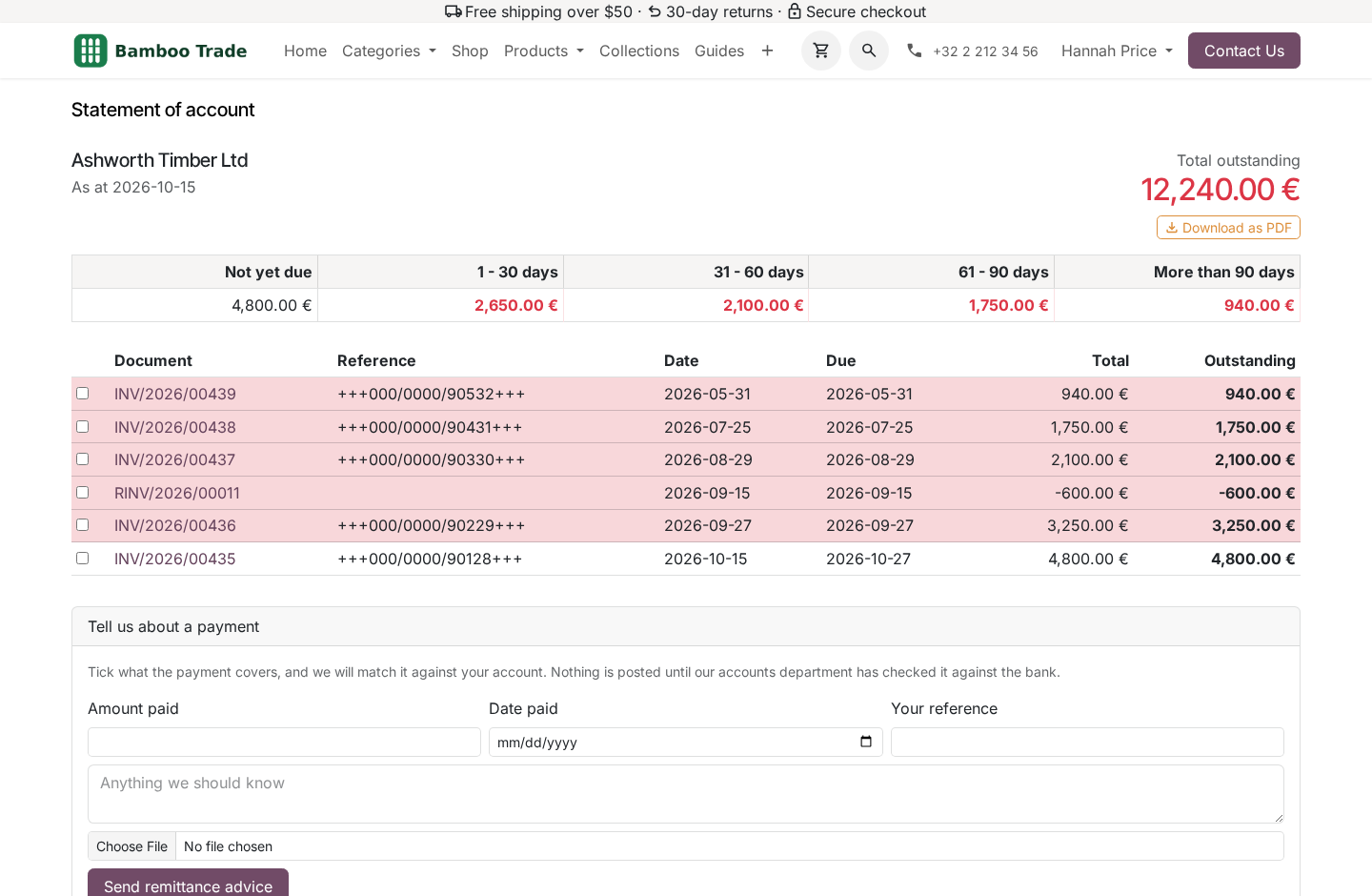
Every posted, unpaid invoice and credit note, oldest first: the document, the reference the customer's own accounts department filed it under, the dates, the original amount and what is left on it. Then a total, in one figure, at the top of the page. A credit note reduces what is owed rather than adding to it — which sounds obvious until you have seen a statement where it did the opposite. How old it is.
Five bands: not yet due, 1–30, 31–60, 61–90, and more than 90 days. Measured from the due date, not the invoice date. A document on sixty-day terms is not an overdue account in its second week, and an ageing report that says it is will be argued with rather than paid. That one decision is the difference between a statement a customer acts on and a statement a customer replies to.
As a PDF. One button on the portal page. The customer gets the same statement as a document they can file or forward, without anybody in your office producing it. Telling you what they paid.
The other half. The customer ticks which invoices a payment covers, says how much and when, gives the reference their bank will show, and attaches the remittance document. It arrives in your accounts department beside the ledger, never in it. Matching one drafts an account.payment for somebody to check against the bank before posting.
The figures came from outside; a portal that posts receipts unread is a portal that writes into your ledger. What the page will not do. The statement is scoped to the logged-in customer's own commercial partner and the contacts under it, in a company they already have posted documents in. Never a partner or a company named in the request — a page that reports on whoever the URL says is a way to read somebody else's ledger one identifier at a time.
An invoice ticked on the form is checked against that customer's own open items, in the controller and again as a database constraint. A zero or negative amount is refused. A payment dated in the future is refused, because it has not happened. Uploads are PDF, PNG or JPEG, up to 10 MB.
Series How we make sure it works. Before every release, 27 automated checks run against this app on Odoo 16, 17, 18, 19 and 20. Among them: An advice cannot be matched twice. A customer never sees another customers invoice.
A rejected advice cannot then be matched. Another customers invoice cannot be attached. Another customer never appears. The complete list is in the source you receive.
Questions people ask. Which Odoo versions does it run on? Odoo 16.0, 17.0, 18.0, 19.0, 20.0, on the series you buy it for; each series is its own listing. Community or Enterprise?
Both. It needs no Enterprise app. The complete manual is at docs dot bambooforge dot dev, the demo database is linked from the store page, and support answers within twenty-four hours. Links are in the description.
Transcript of the walkthrough (Odoo 19)
Customer Portal: Statement of Account & Payments. A statement of account in the customer portal: every open item, how old it is, the total owed, as a PDF - and a way to report what they paid. Odoo Community's portal lists a customer's invoices and lets them pay one. It never tells them what they owe altogether, never shows how old any of it is, and gives them nowhere to say we paid this on Tuesday, here is the reference.
In the next few minutes: customer portal: statement of account & payments, then the statement, then how old it is, then as a pdf, then telling you what they paid. Then what this app deliberately does not do, so you can tell before you buy whether it fits. Everything lives under Remittance Advices. Customer Portal: Statement of Account & Payments.
Odoo Community's portal lists a customer's invoices and lets them pay one. It never tells them what they owe altogether, never shows how old any of it is, and gives them nowhere to say we paid this on Tuesday, here is the reference. So the question that starts every collection call — what is outstanding, and what have you already sent us — gets answered by exporting a spreadsheet and attaching it to an email. The statement.
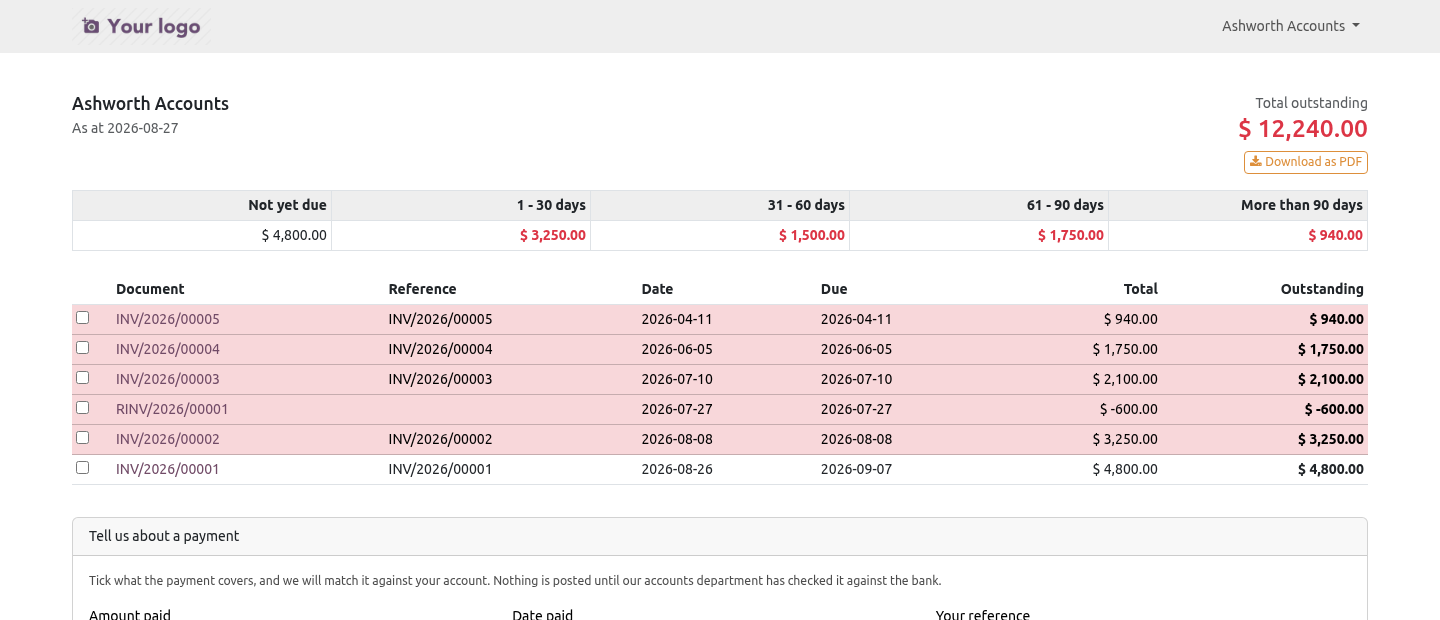
Every posted, unpaid invoice and credit note, oldest first: the document, the reference the customer's own accounts department filed it under, the dates, the original amount and what is left on it. Then a total, in one figure, at the top of the page. A credit note reduces what is owed rather than adding to it — which sounds obvious until you have seen a statement where it did the opposite. How old it is.
Five bands: not yet due, 1–30, 31–60, 61–90, and more than 90 days. Measured from the due date, not the invoice date. A document on sixty-day terms is not an overdue account in its second week, and an ageing report that says it is will be argued with rather than paid. That one decision is the difference between a statement a customer acts on and a statement a customer replies to.
As a PDF. One button on the portal page. The customer gets the same statement as a document they can file or forward, without anybody in your office producing it. Telling you what they paid.
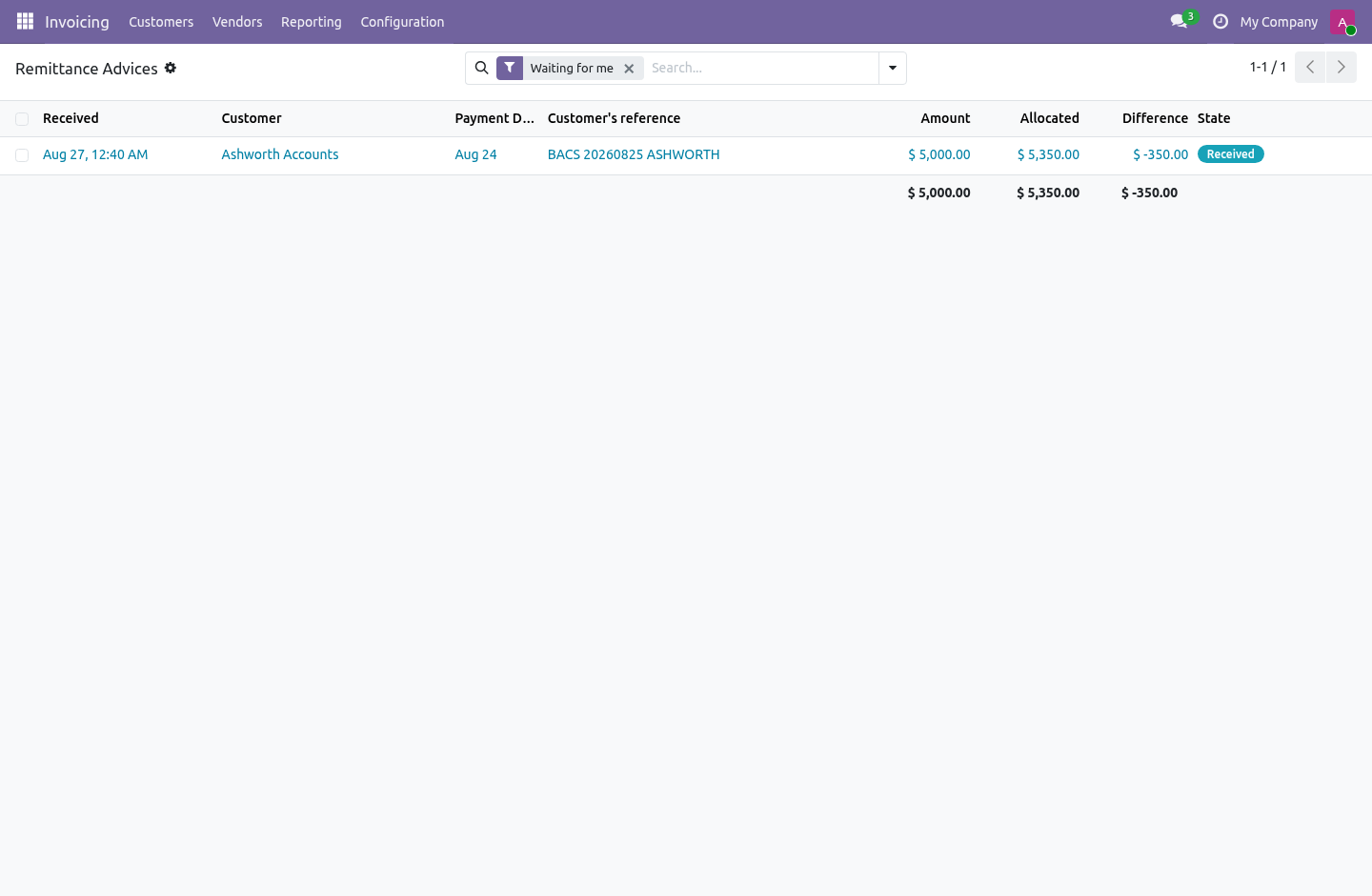
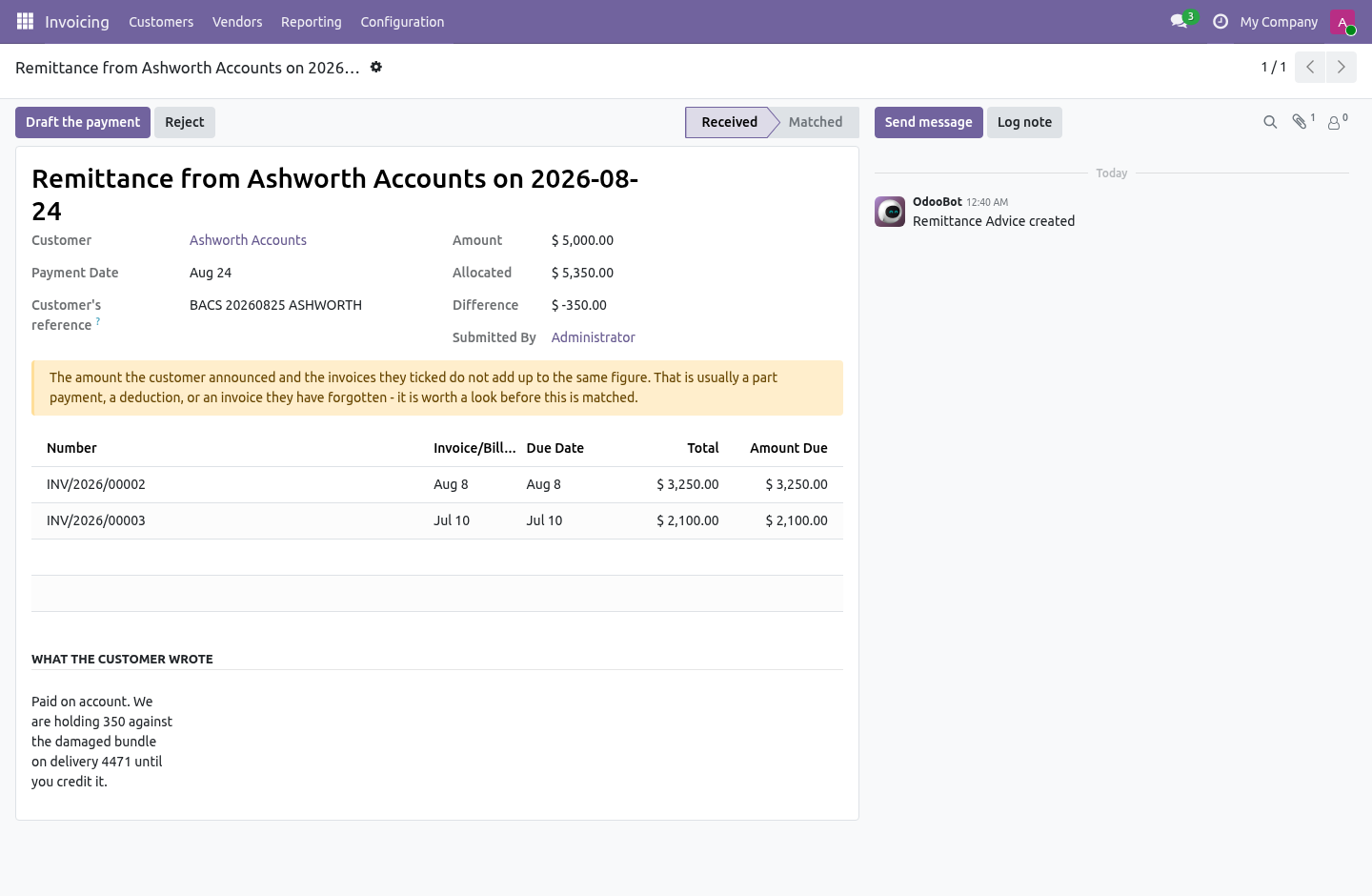
The other half. The customer ticks which invoices a payment covers, says how much and when, gives the reference their bank will show, and attaches the remittance document. It arrives in your accounts department beside the ledger, never in it. Matching one drafts an account.payment for somebody to check against the bank before posting.
The figures came from outside; a portal that posts receipts unread is a portal that writes into your ledger. What the page will not do. The statement is scoped to the logged-in customer's own commercial partner and the contacts under it, in a company they already have posted documents in. Never a partner or a company named in the request — a page that reports on whoever the URL says is a way to read somebody else's ledger one identifier at a time.
An invoice ticked on the form is checked against that customer's own open items, in the controller and again as a database constraint. A zero or negative amount is refused. A payment dated in the future is refused, because it has not happened. Uploads are PDF, PNG or JPEG, up to 10 MB.
Series The complete manual is at docs dot bambooforge dot dev, the demo database is linked from the store page, and support answers within twenty-four hours. Links are in the description.
Transcript of the walkthrough (Odoo 18)
Customer Portal: Statement of Account & Payments. A statement of account in the customer portal: every open item, how old it is, the total owed, as a PDF - and a way to report what they paid. Odoo Community's portal lists a customer's invoices and lets them pay one. It never tells them what they owe altogether, never shows how old any of it is, and gives them nowhere to say we paid this on Tuesday, here is the reference.
In the next few minutes: customer portal: statement of account & payments, then the statement, then how old it is, then as a pdf, then telling you what they paid. Then what this app deliberately does not do, so you can tell before you buy whether it fits. Everything lives under Remittance Advices. Customer Portal: Statement of Account & Payments.
Odoo Community's portal lists a customer's invoices and lets them pay one. It never tells them what they owe altogether, never shows how old any of it is, and gives them nowhere to say we paid this on Tuesday, here is the reference. So the question that starts every collection call — what is outstanding, and what have you already sent us — gets answered by exporting a spreadsheet and attaching it to an email. The statement.
Every posted, unpaid invoice and credit note, oldest first: the document, the reference the customer's own accounts department filed it under, the dates, the original amount and what is left on it. Then a total, in one figure, at the top of the page. A credit note reduces what is owed rather than adding to it — which sounds obvious until you have seen a statement where it did the opposite. How old it is.
Five bands: not yet due, 1–30, 31–60, 61–90, and more than 90 days. Measured from the due date, not the invoice date. A document on sixty-day terms is not an overdue account in its second week, and an ageing report that says it is will be argued with rather than paid. That one decision is the difference between a statement a customer acts on and a statement a customer replies to.
As a PDF. One button on the portal page. The customer gets the same statement as a document they can file or forward, without anybody in your office producing it. Telling you what they paid.
The other half. The customer ticks which invoices a payment covers, says how much and when, gives the reference their bank will show, and attaches the remittance document. It arrives in your accounts department beside the ledger, never in it. Matching one drafts an account.payment for somebody to check against the bank before posting.
The figures came from outside; a portal that posts receipts unread is a portal that writes into your ledger. What the page will not do. The statement is scoped to the logged-in customer's own commercial partner and the contacts under it, in a company they already have posted documents in. Never a partner or a company named in the request — a page that reports on whoever the URL says is a way to read somebody else's ledger one identifier at a time.
An invoice ticked on the form is checked against that customer's own open items, in the controller and again as a database constraint. A zero or negative amount is refused. A payment dated in the future is refused, because it has not happened. Uploads are PDF, PNG or JPEG, up to 10 MB.
Series The complete manual is at docs dot bambooforge dot dev, the demo database is linked from the store page, and support answers within twenty-four hours. Links are in the description.
Transcript of the walkthrough (Odoo 17)
Customer Portal: Statement of Account & Payments. A statement of account in the customer portal: every open item, how old it is, the total owed, as a PDF - and a way to report what they paid. Odoo Community's portal lists a customer's invoices and lets them pay one. It never tells them what they owe altogether, never shows how old any of it is, and gives them nowhere to say we paid this on Tuesday, here is the reference.
In the next few minutes: customer portal: statement of account & payments, then the statement, then how old it is, then as a pdf, then telling you what they paid. Then what this app deliberately does not do, so you can tell before you buy whether it fits. Everything lives under Remittance Advices. Customer Portal: Statement of Account & Payments.
Odoo Community's portal lists a customer's invoices and lets them pay one. It never tells them what they owe altogether, never shows how old any of it is, and gives them nowhere to say we paid this on Tuesday, here is the reference. So the question that starts every collection call — what is outstanding, and what have you already sent us — gets answered by exporting a spreadsheet and attaching it to an email. The statement.
Every posted, unpaid invoice and credit note, oldest first: the document, the reference the customer's own accounts department filed it under, the dates, the original amount and what is left on it. Then a total, in one figure, at the top of the page. A credit note reduces what is owed rather than adding to it — which sounds obvious until you have seen a statement where it did the opposite. How old it is.
Five bands: not yet due, 1–30, 31–60, 61–90, and more than 90 days. Measured from the due date, not the invoice date. A document on sixty-day terms is not an overdue account in its second week, and an ageing report that says it is will be argued with rather than paid. That one decision is the difference between a statement a customer acts on and a statement a customer replies to.
As a PDF. One button on the portal page. The customer gets the same statement as a document they can file or forward, without anybody in your office producing it. Telling you what they paid.
The other half. The customer ticks which invoices a payment covers, says how much and when, gives the reference their bank will show, and attaches the remittance document. It arrives in your accounts department beside the ledger, never in it. Matching one drafts an account.payment for somebody to check against the bank before posting.
The figures came from outside; a portal that posts receipts unread is a portal that writes into your ledger. What the page will not do. The statement is scoped to the logged-in customer's own commercial partner and the contacts under it, in a company they already have posted documents in. Never a partner or a company named in the request — a page that reports on whoever the URL says is a way to read somebody else's ledger one identifier at a time.
An invoice ticked on the form is checked against that customer's own open items, in the controller and again as a database constraint. A zero or negative amount is refused. A payment dated in the future is refused, because it has not happened. Uploads are PDF, PNG or JPEG, up to 10 MB.
Series The complete manual is at docs dot bambooforge dot dev, the demo database is linked from the store page, and support answers within twenty-four hours. Links are in the description.
Transcript of the walkthrough (Odoo 16)
Customer Portal: Statement of Account & Payments. A statement of account in the customer portal: every open item, how old it is, the total owed, as a PDF - and a way to report what they paid. Odoo Community's portal lists a customer's invoices and lets them pay one. It never tells them what they owe altogether, never shows how old any of it is, and gives them nowhere to say we paid this on Tuesday, here is the reference.
In the next few minutes: customer portal: statement of account & payments, then the statement, then how old it is, then as a pdf, then telling you what they paid. Then what this app deliberately does not do, so you can tell before you buy whether it fits. Everything lives under Remittance Advices. Customer Portal: Statement of Account & Payments.
Odoo Community's portal lists a customer's invoices and lets them pay one. It never tells them what they owe altogether, never shows how old any of it is, and gives them nowhere to say we paid this on Tuesday, here is the reference. So the question that starts every collection call — what is outstanding, and what have you already sent us — gets answered by exporting a spreadsheet and attaching it to an email. The statement.
Every posted, unpaid invoice and credit note, oldest first: the document, the reference the customer's own accounts department filed it under, the dates, the original amount and what is left on it. Then a total, in one figure, at the top of the page. A credit note reduces what is owed rather than adding to it — which sounds obvious until you have seen a statement where it did the opposite. How old it is.
Five bands: not yet due, 1–30, 31–60, 61–90, and more than 90 days. Measured from the due date, not the invoice date. A document on sixty-day terms is not an overdue account in its second week, and an ageing report that says it is will be argued with rather than paid. That one decision is the difference between a statement a customer acts on and a statement a customer replies to.
As a PDF. One button on the portal page. The customer gets the same statement as a document they can file or forward, without anybody in your office producing it. Telling you what they paid.
The other half. The customer ticks which invoices a payment covers, says how much and when, gives the reference their bank will show, and attaches the remittance document. It arrives in your accounts department beside the ledger, never in it. Matching one drafts an account.payment for somebody to check against the bank before posting.
The figures came from outside; a portal that posts receipts unread is a portal that writes into your ledger. What the page will not do. The statement is scoped to the logged-in customer's own commercial partner and the contacts under it, in a company they already have posted documents in. Never a partner or a company named in the request — a page that reports on whoever the URL says is a way to read somebody else's ledger one identifier at a time.
An invoice ticked on the form is checked against that customer's own open items, in the controller and again as a database constraint. A zero or negative amount is refused. A payment dated in the future is refused, because it has not happened. Uploads are PDF, PNG or JPEG, up to 10 MB.
Series The complete manual is at docs dot bambooforge dot dev, the demo database is linked from the store page, and support answers within twenty-four hours. Links are in the description.
Key facts
- What it is
- A statement of account in the customer portal: every open item, how old it is, the total owed, as a PDF - and a way to report what they paid.
- For
- Accounting
- Odoo versions
- 16.0, 17.0, 18.0, 19.0, 20.0 - Community and Enterprise
- Runs on
- Odoo.sh or Odoo you host yourself - not Odoo Online, which accepts no third-party apps
- Price
- 119 EUR, one-time, on the Odoo Apps Store
- Technical name
- bambooforge_customer_portal
- Not for
- The statement is scoped to the logged-in customer's own commercial partner and the contacts under it, in a company they already have posted documents in. Never a partner or a company named in the request — a page that reports on whoever the URL says is a way to read somebody else's ledger one identifier at a time.; An invoice ticked on the form is checked against that customer's own open items, in the controller and again as a database constraint. A zero or negative amount is refused. A payment dated in the future is refused, because it has not happened. Uploads are PDF, PNG or JPEG, up to 10 MB.; Invoices belonging to a branch of the same customer do appear, and can be ticked — a statement that shows only one contact's invoices never matches what the customer's own accounts department is looking at.
- Live demo
- https://demo20.bambooforge.dev/odoo/action-bambooforge_customer_portal.action_bf_remittance
- Manual last updated
- 2026-10-15
Customer Portal: Statement of Account & Payments
Odoo Community's portal lists a customer's invoices and lets them pay one. It never tells them what they owe altogether, never shows how old any of it is, and gives them nowhere to say we paid this on Tuesday, here is the reference.
So the question that starts every collection call — what is outstanding, and what have you already sent us — gets answered by exporting a spreadsheet and attaching it to an email.
The statement
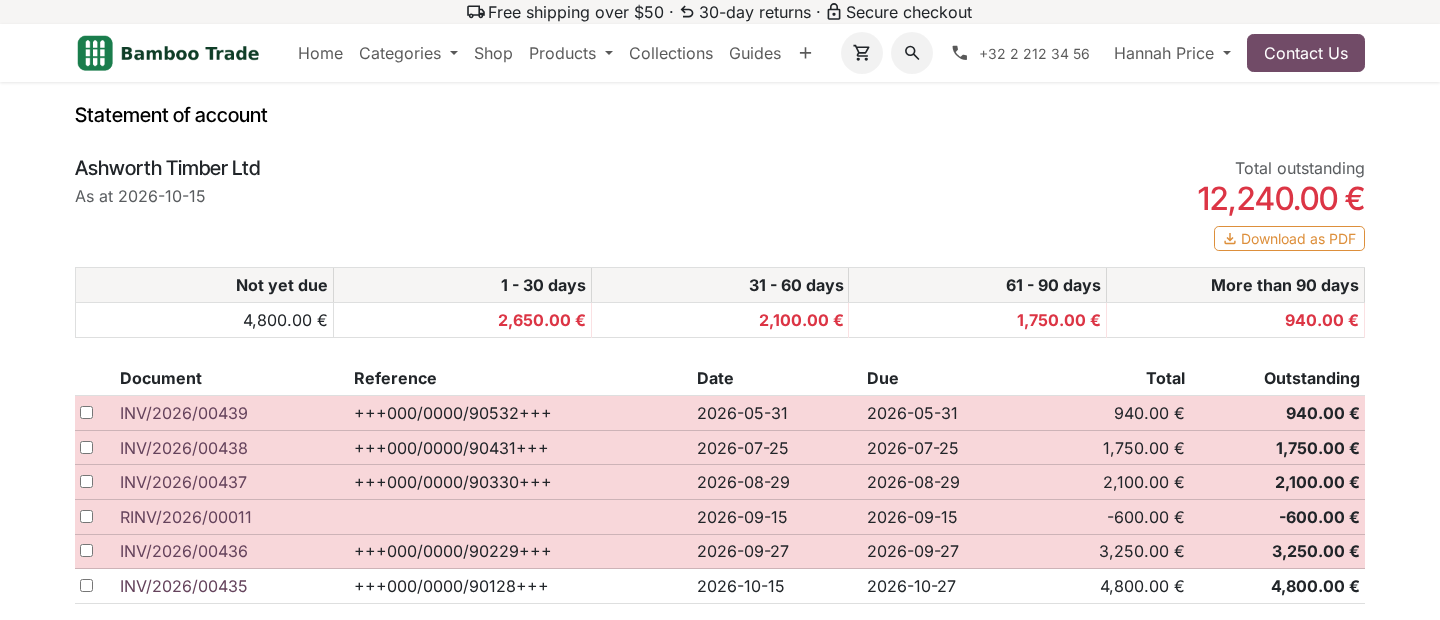
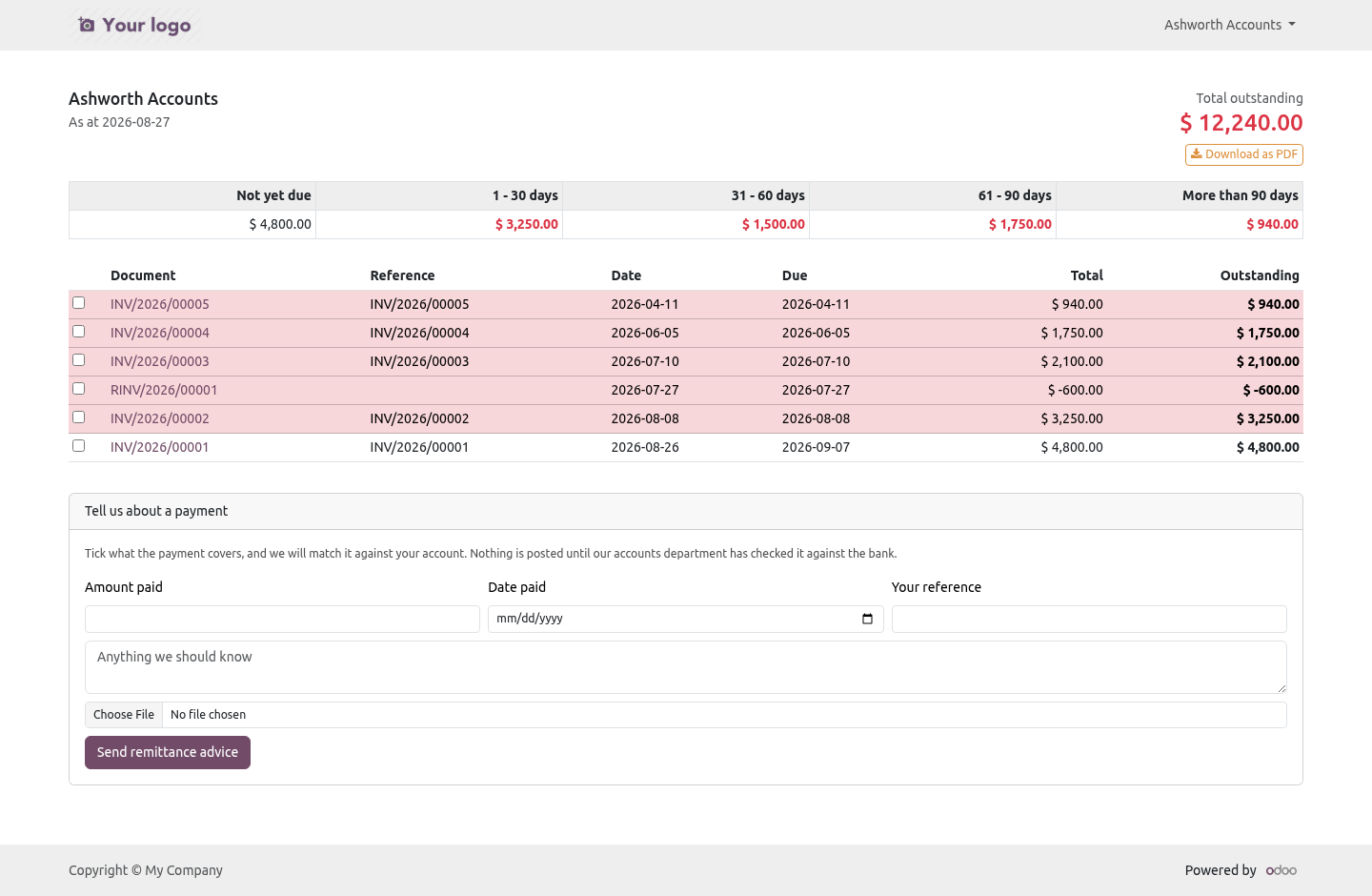
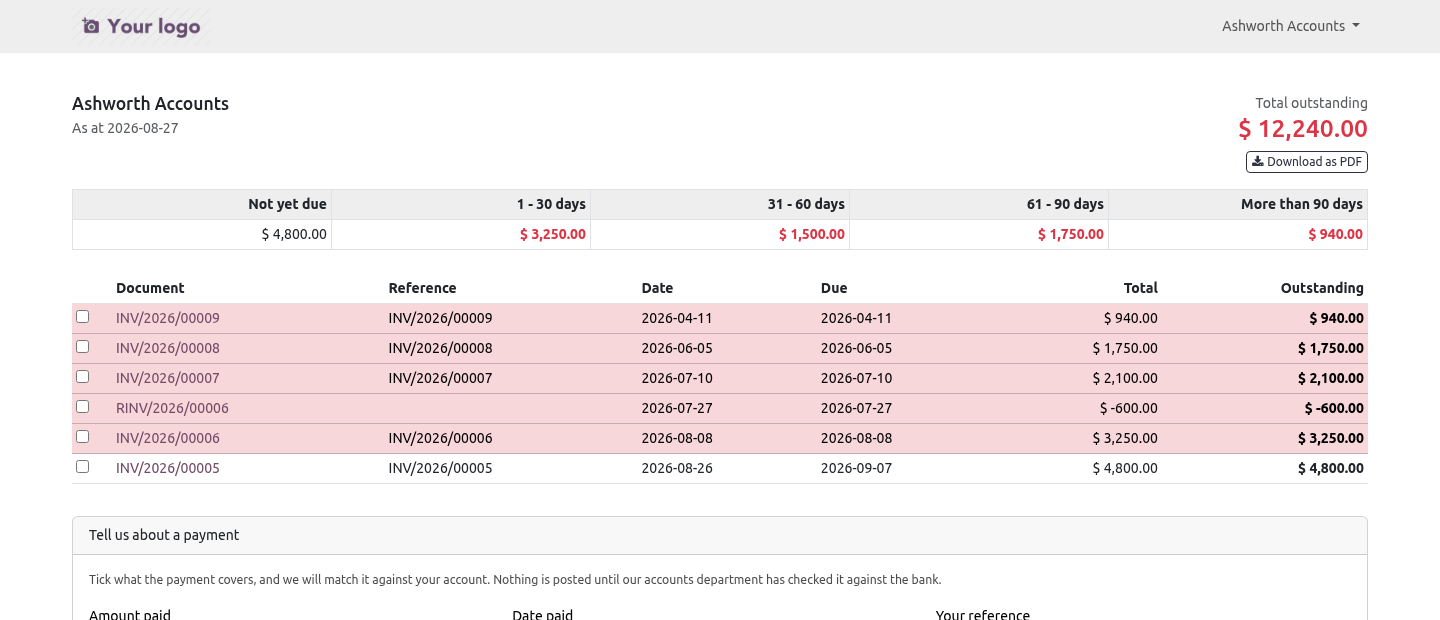
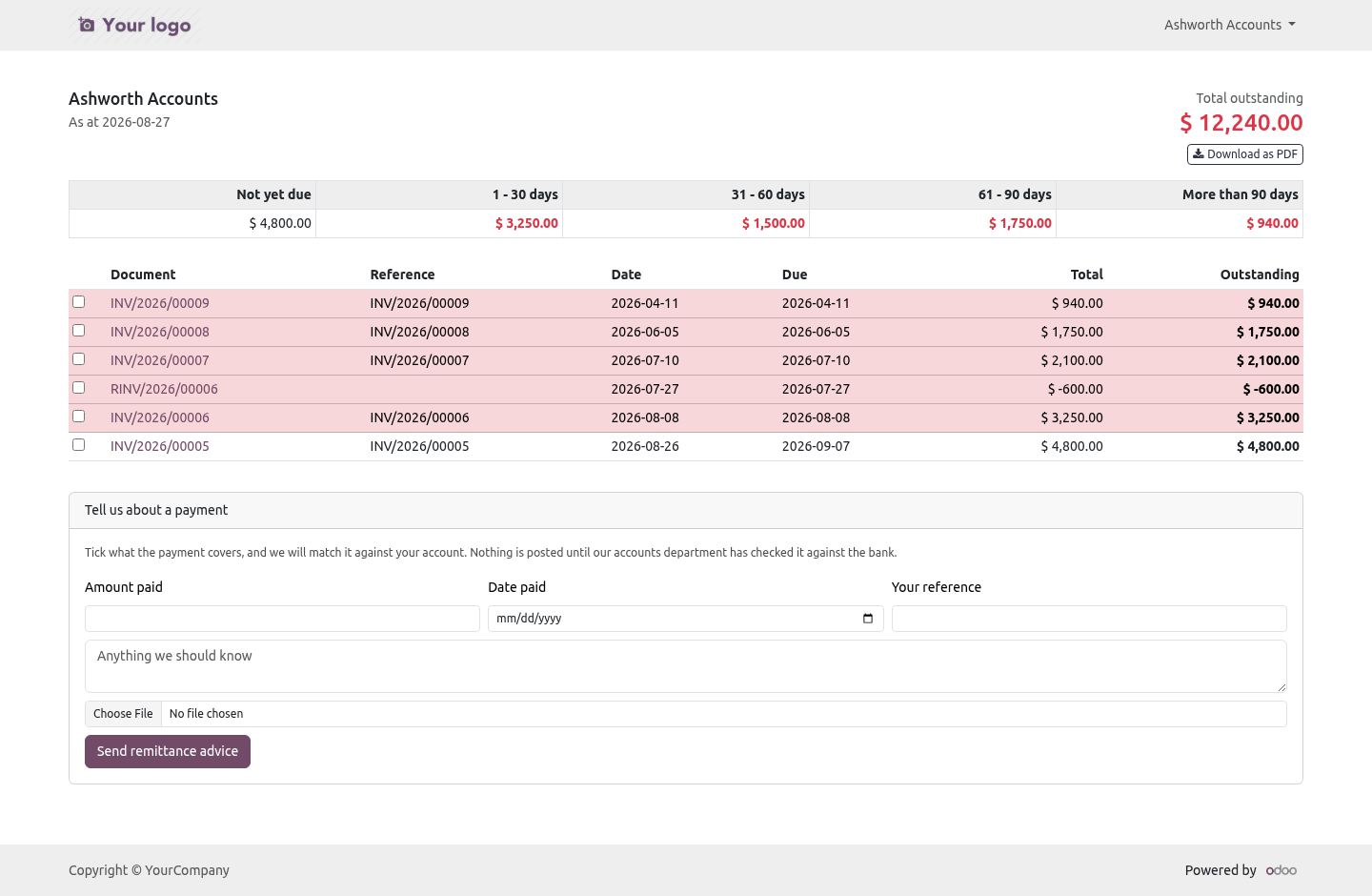
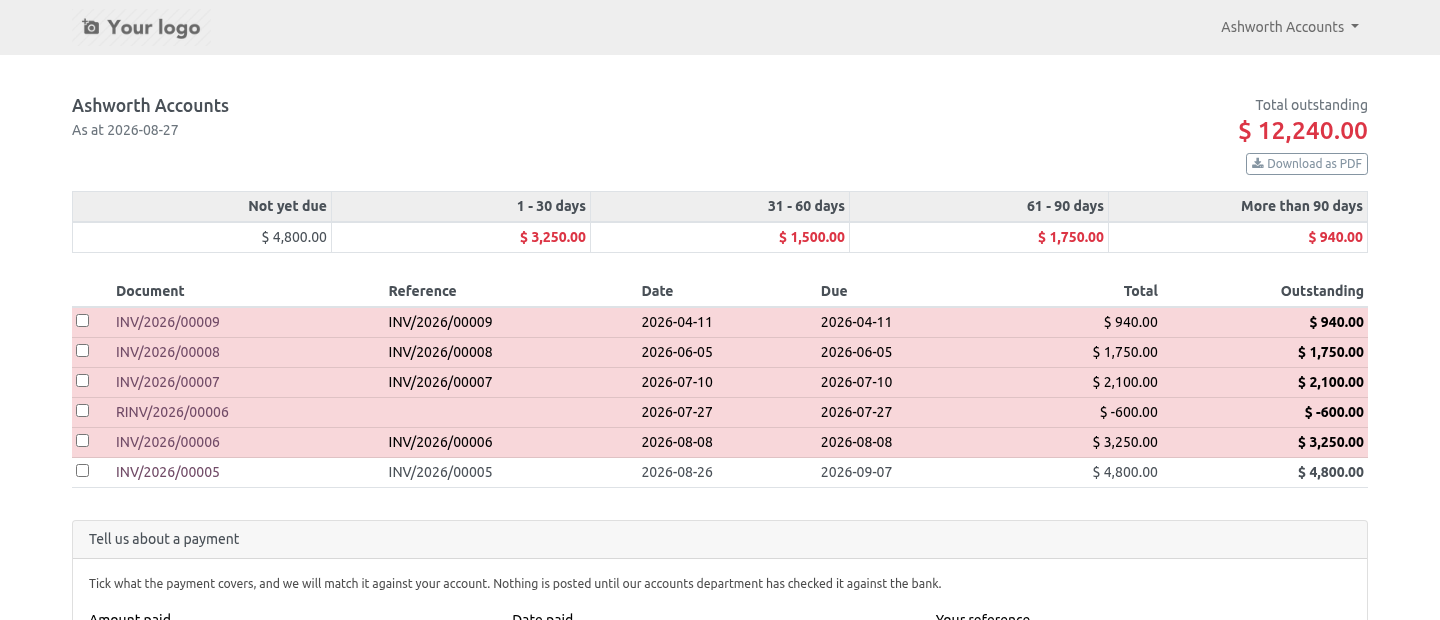
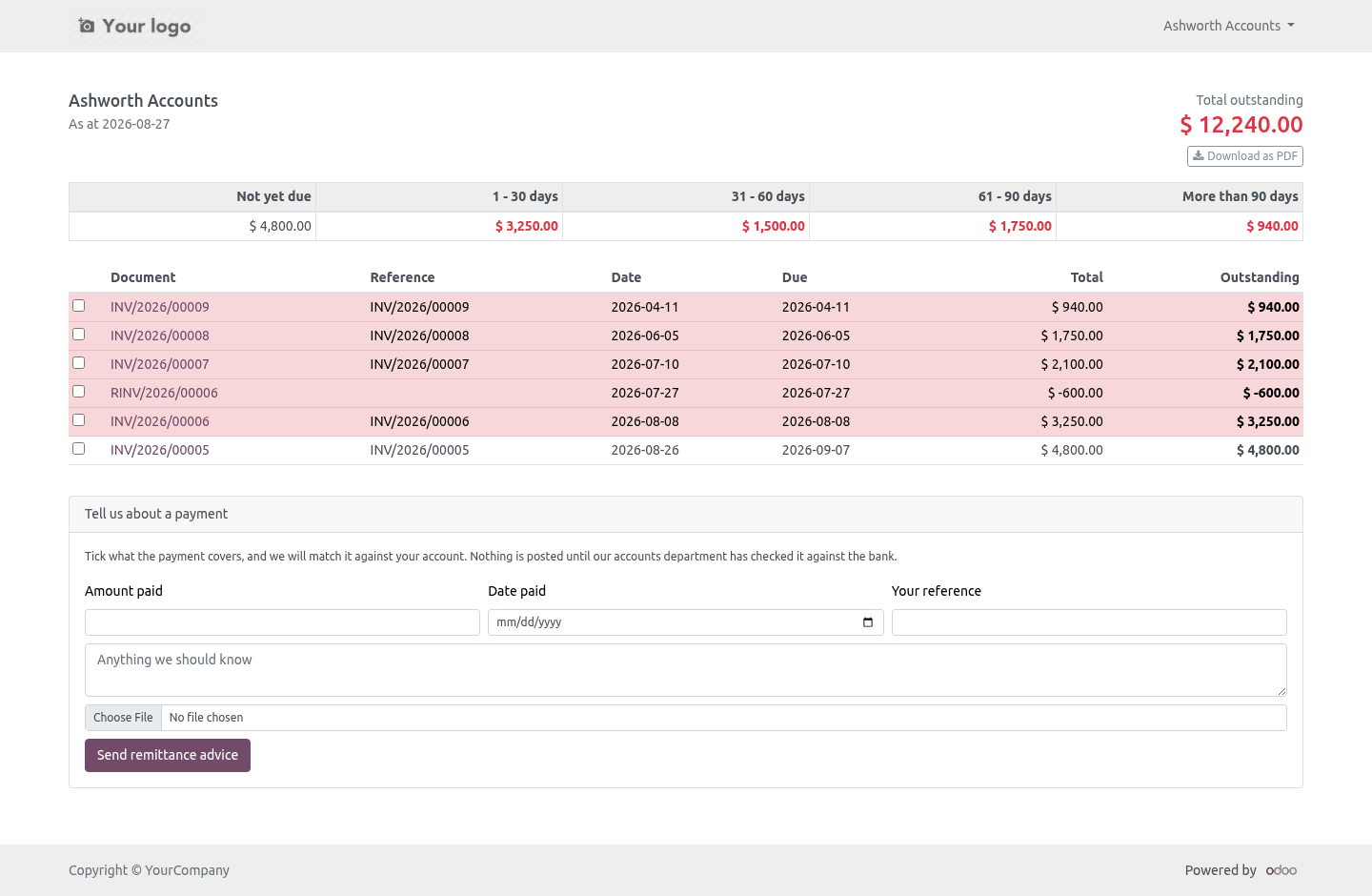
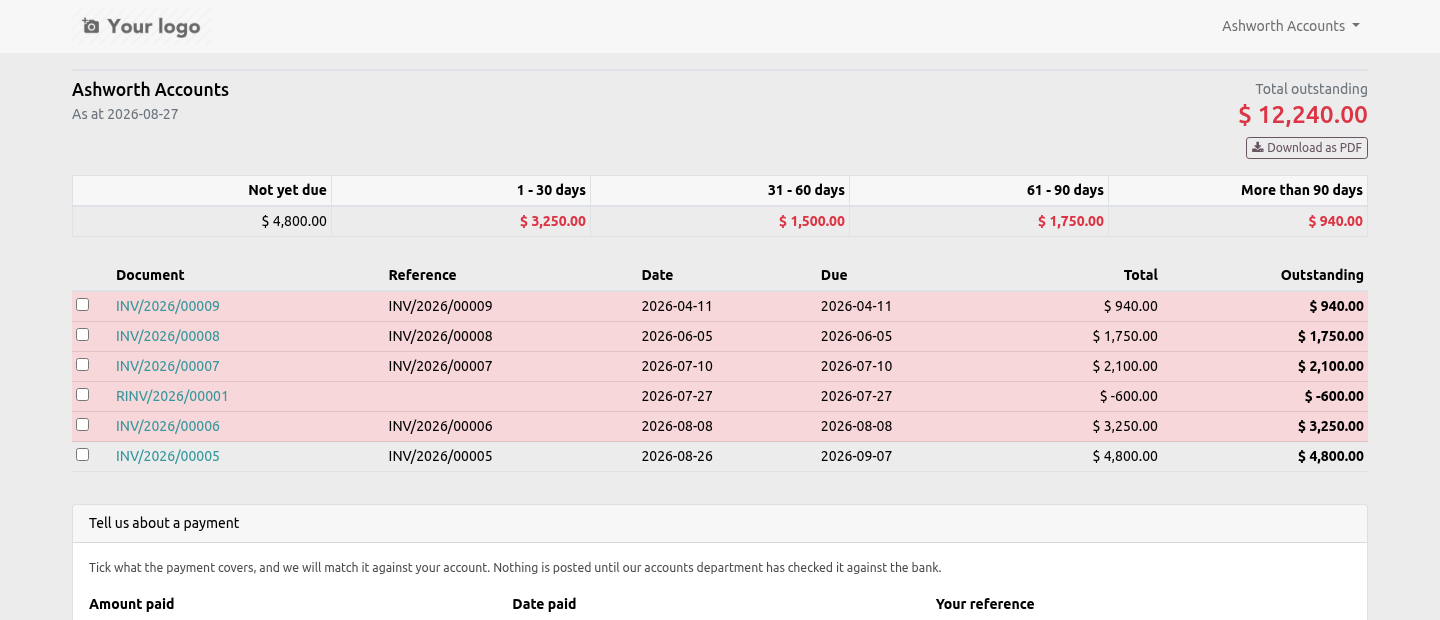
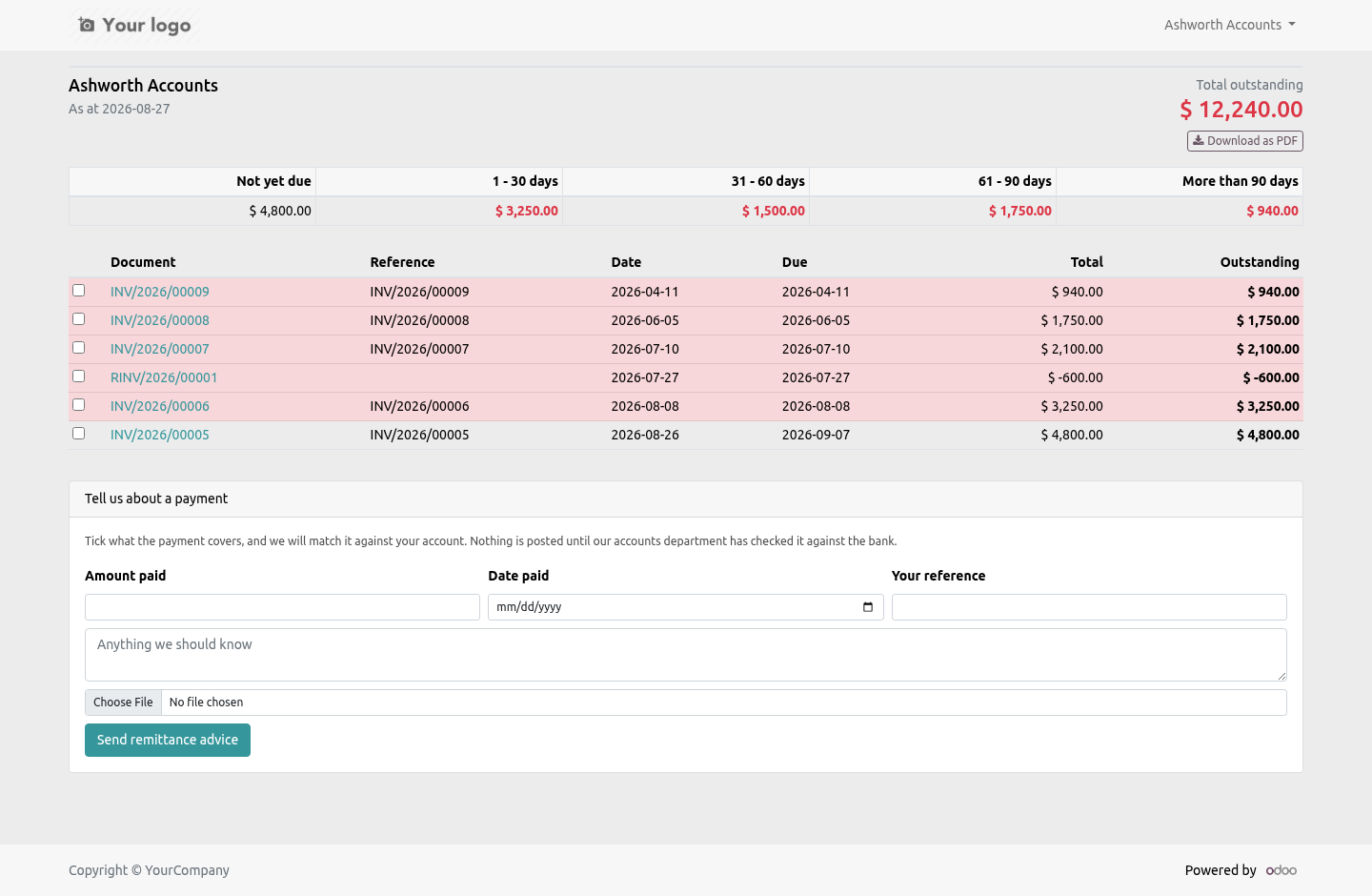
Every posted, unpaid invoice and credit note, oldest first: the document, the reference the customer's own accounts department filed it under, the dates, the original amount and what is left on it. Then a total, in one figure, at the top of the page.
A credit note reduces what is owed rather than adding to it — which sounds obvious until you have seen a statement where it did the opposite.
How old it is
Five bands: not yet due, 1–30, 31–60, 61–90, and more than 90 days.
Measured from the due date, not the invoice date. A document on sixty-day terms is not an overdue account in its second week, and an ageing report that says it is will be argued with rather than paid. That one decision is the difference between a statement a customer acts on and a statement a customer replies to.
The bands always add up to the total. There is a test that fails if they ever stop doing so.
As a PDF
One button on the portal page. The customer gets the same statement as a document they can file or forward, without anybody in your office producing it.
Telling you what they paid
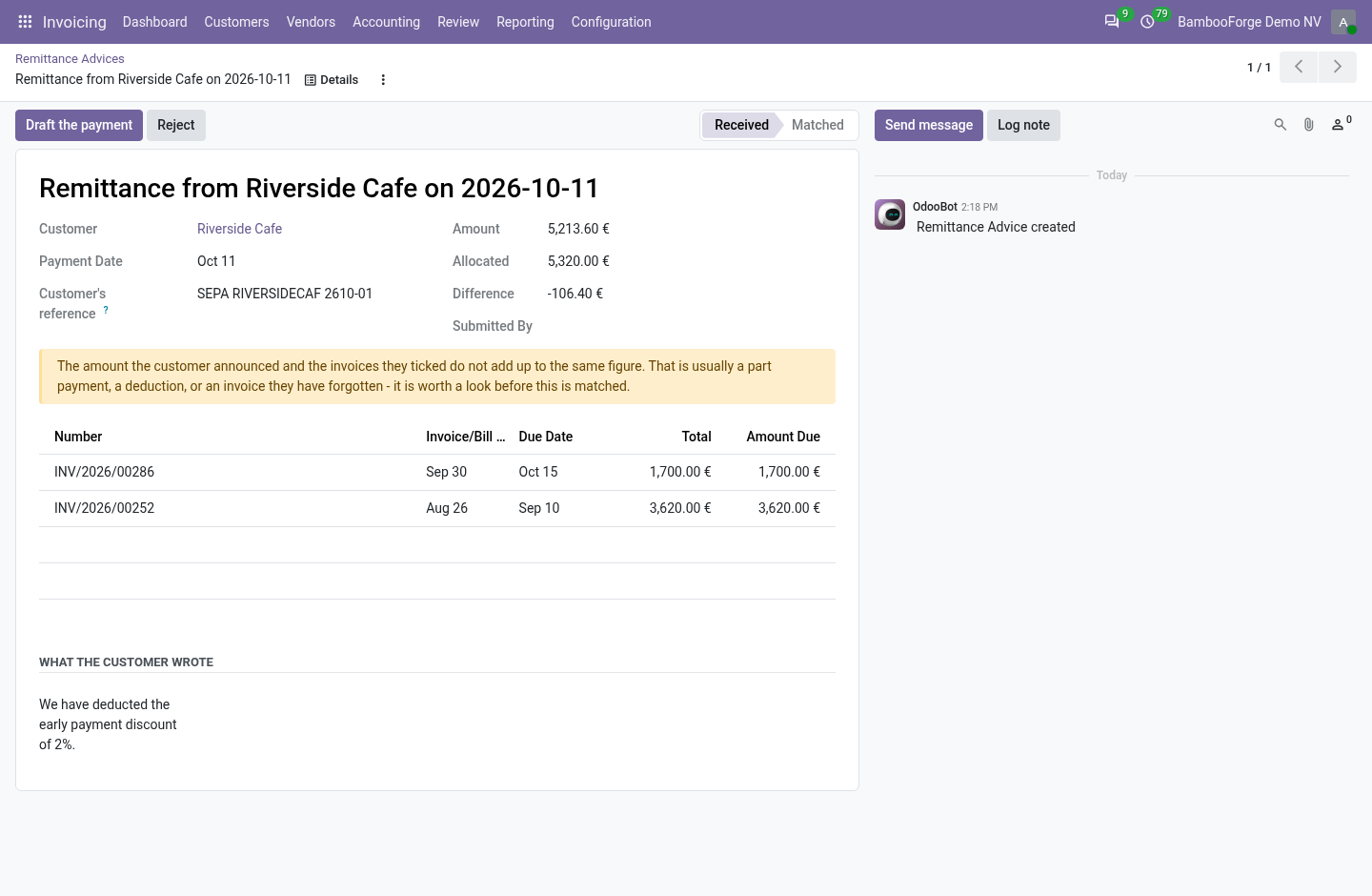
The other half. The customer ticks which invoices a payment covers, says how much and when, gives the reference their bank will show, and attaches the remittance document.
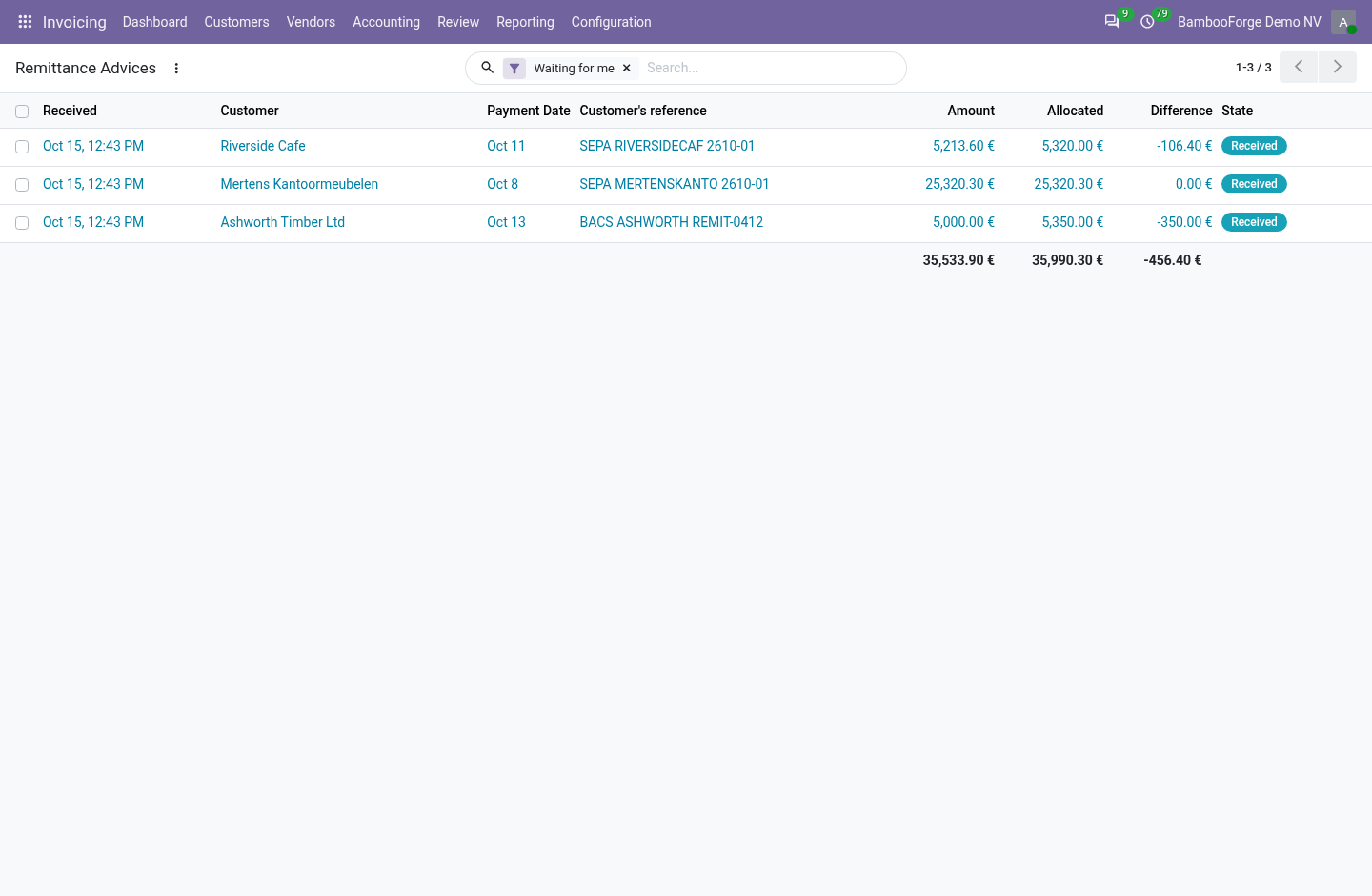
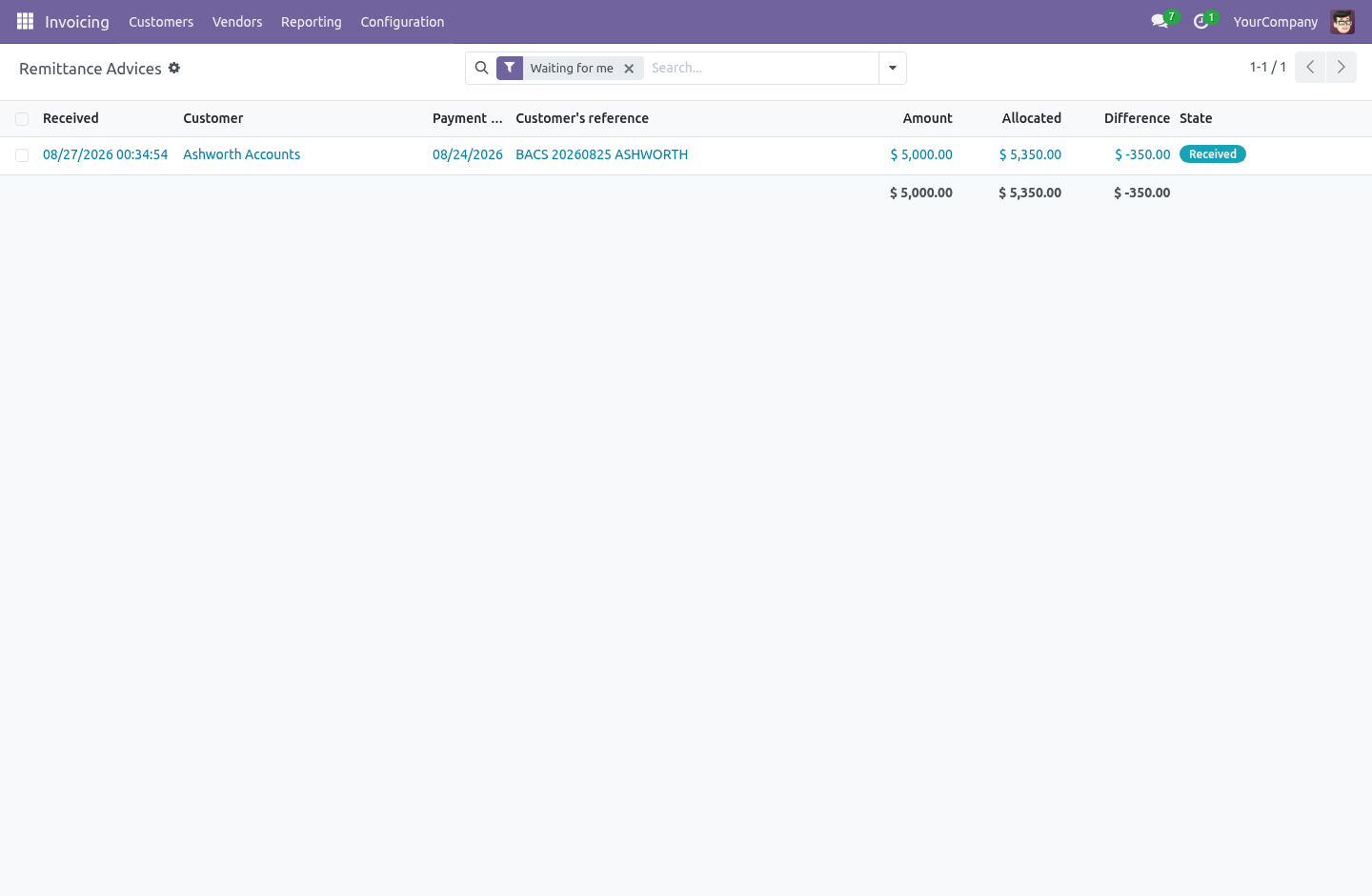
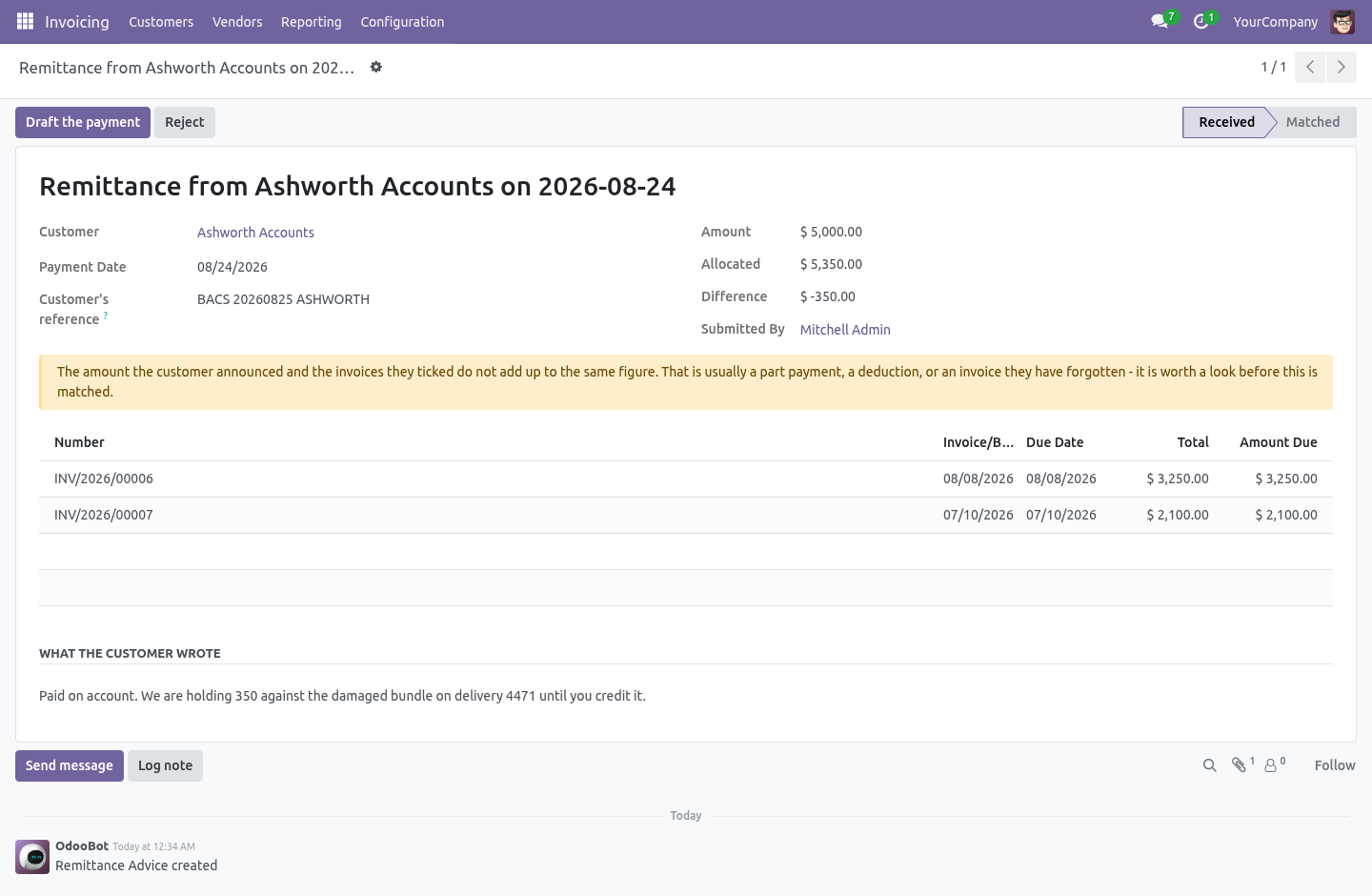
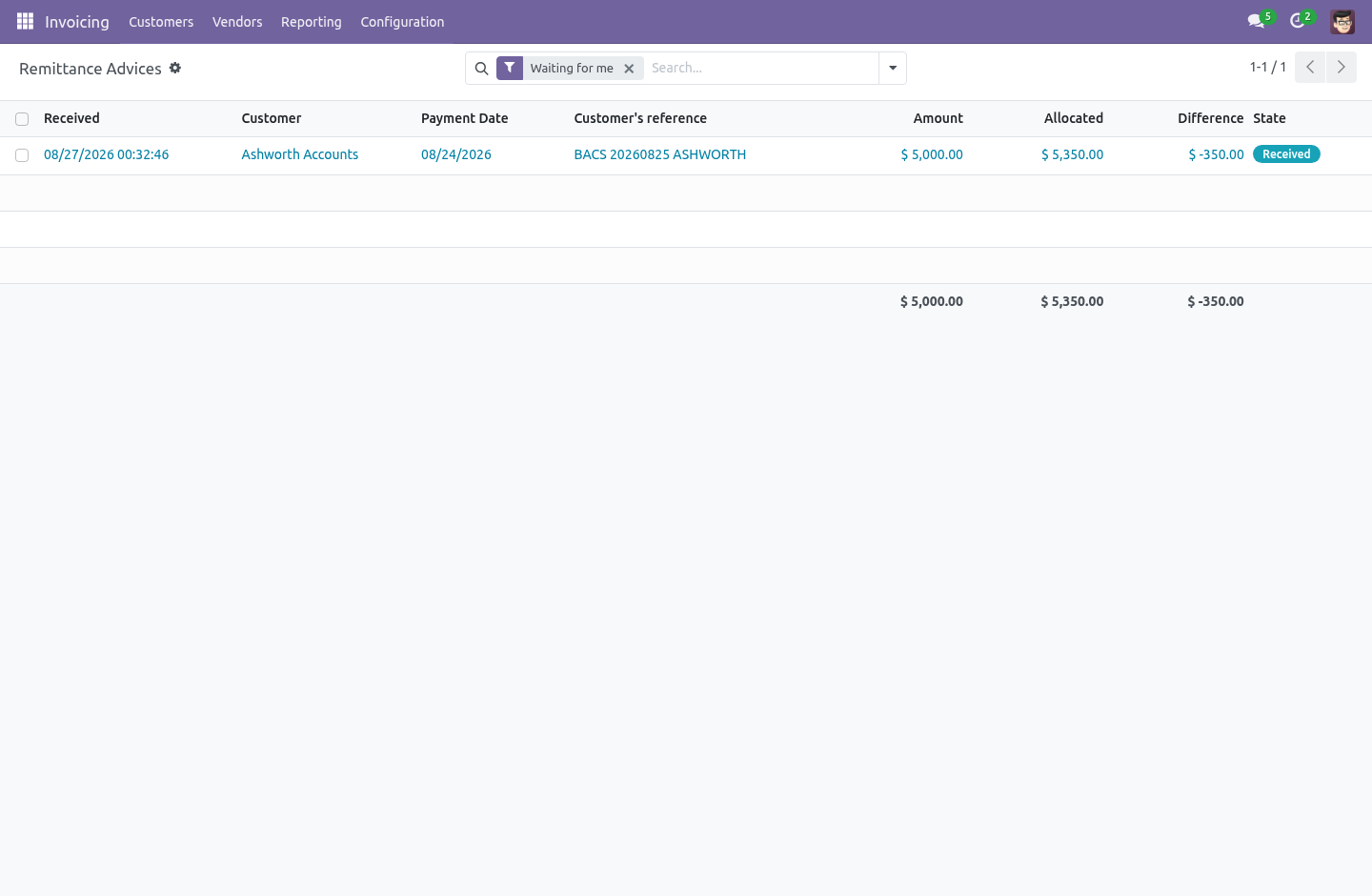
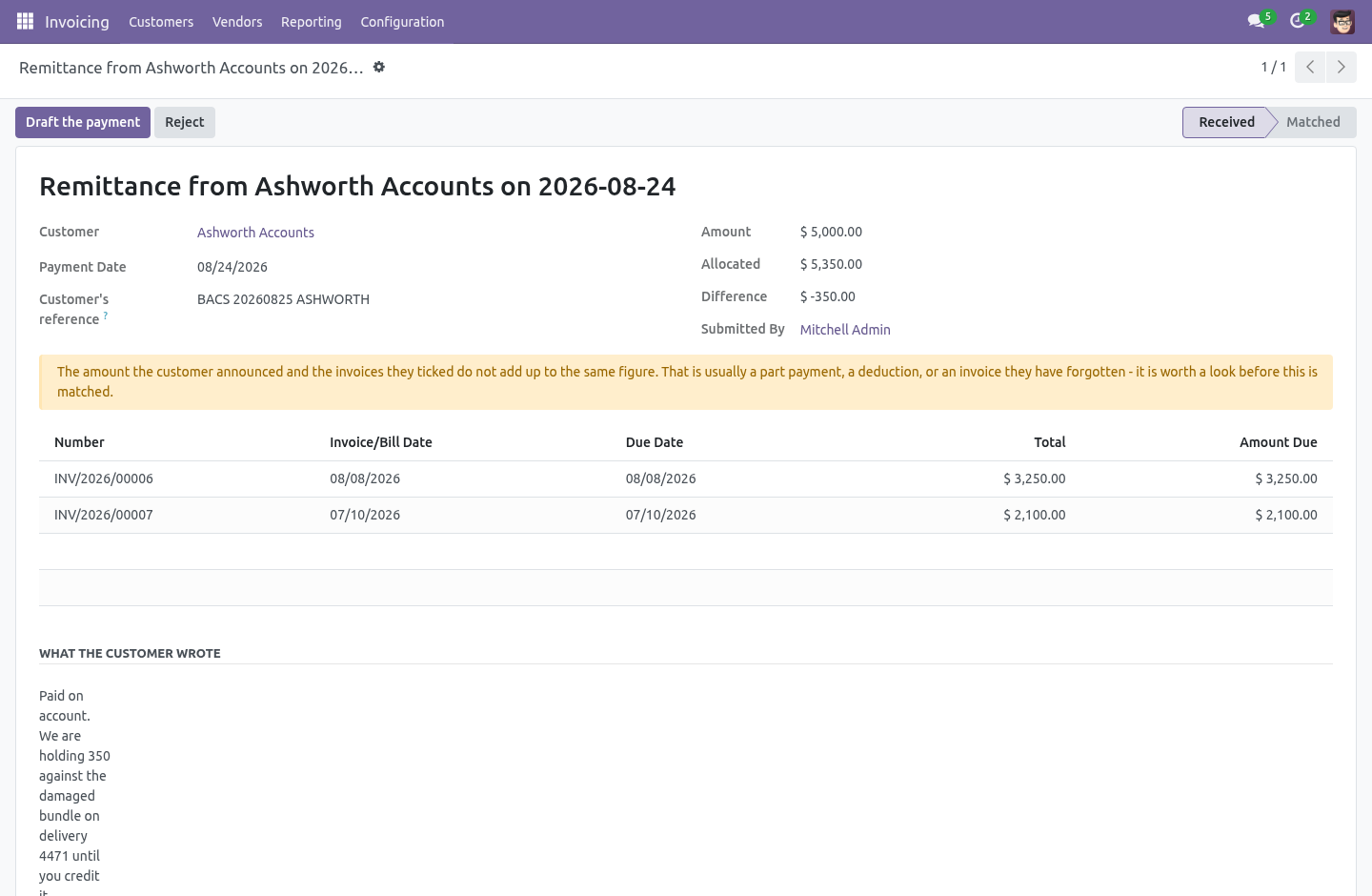
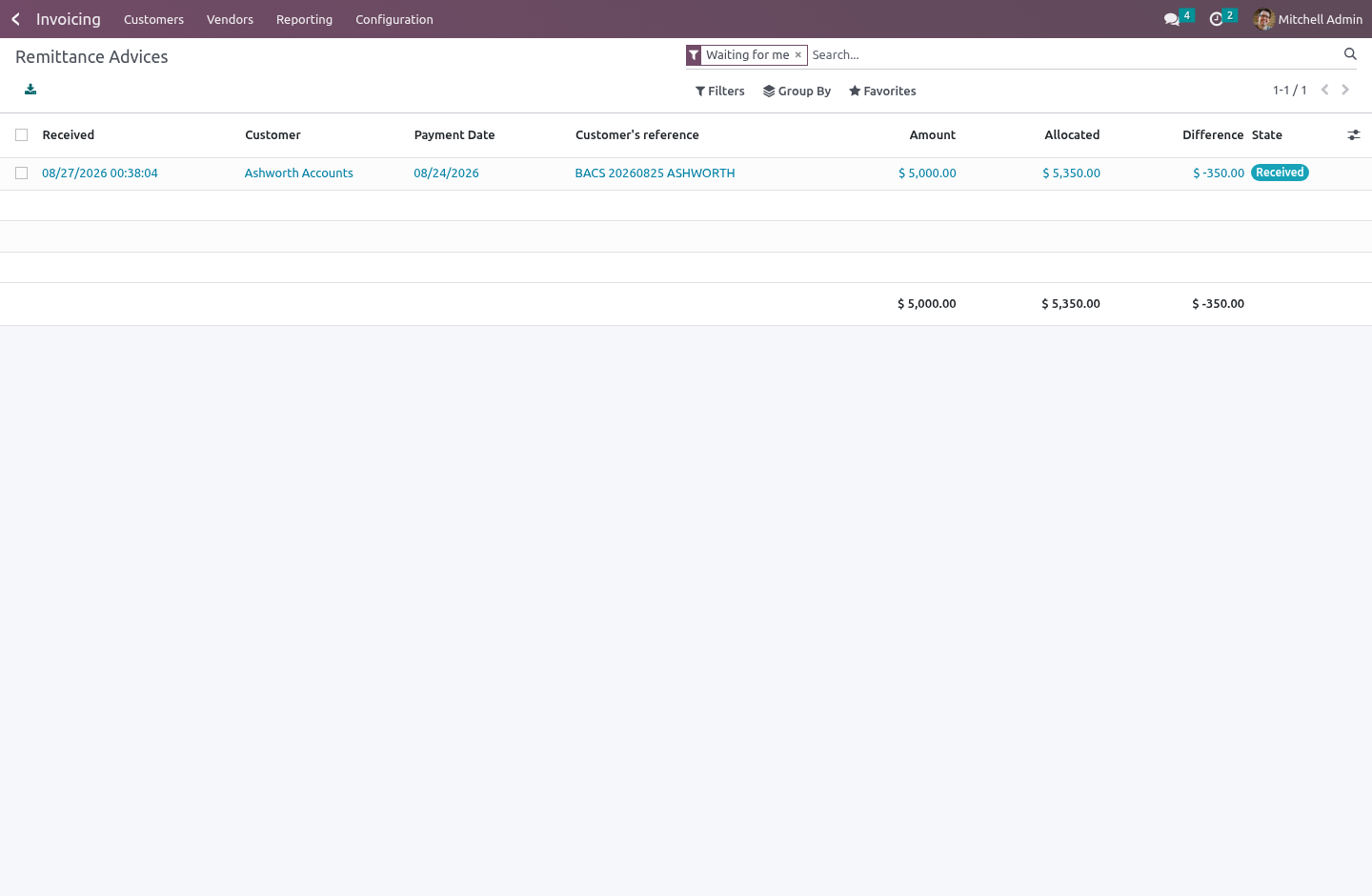
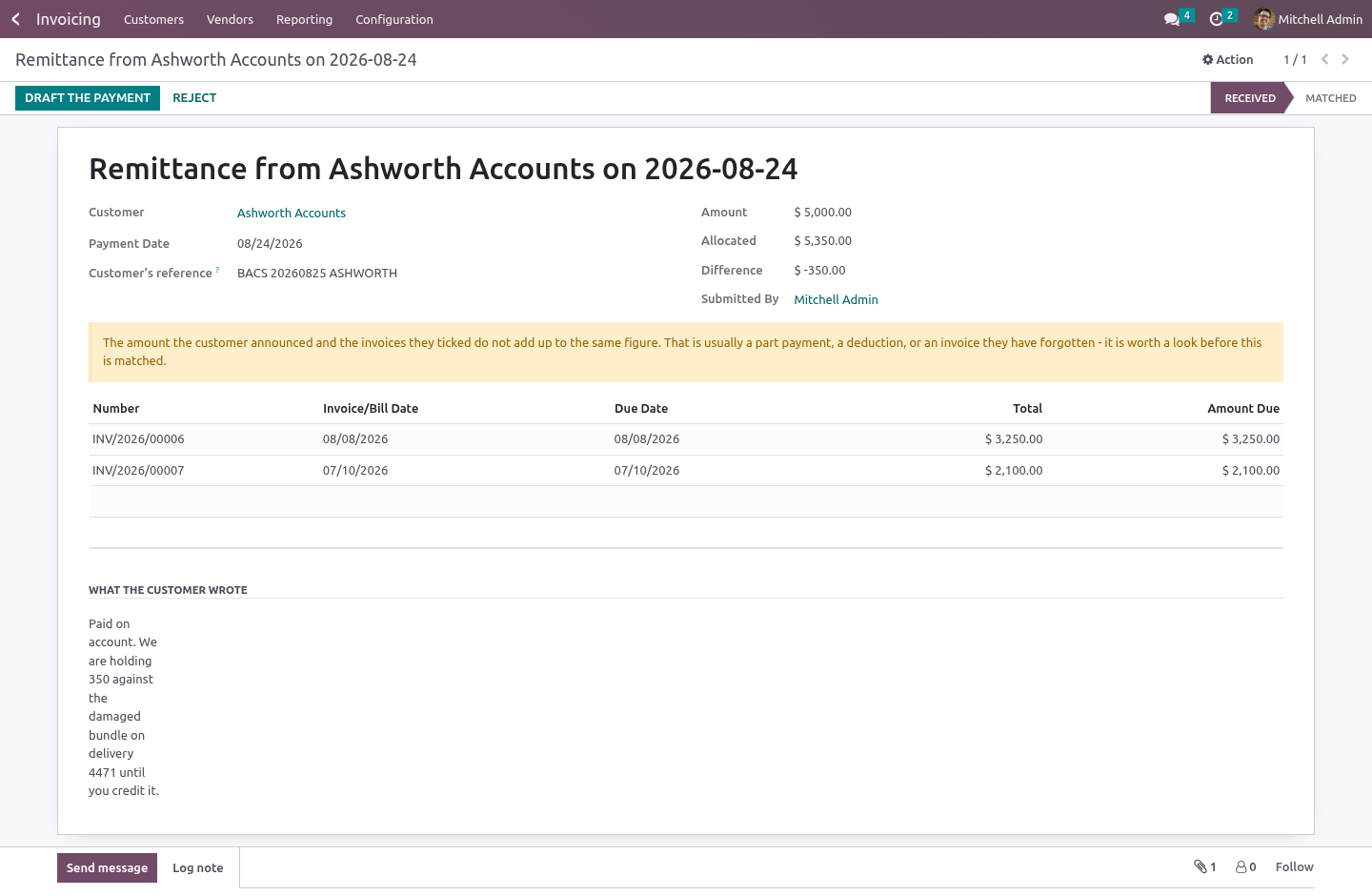
It arrives in your accounts department beside the ledger, never in it. Matching one drafts an account.payment for somebody to check against the bank before posting. The figures came from outside; a portal that posts receipts unread is a portal that writes into your ledger.
The list shows, per advice, what the customer announced against what the invoices they ticked actually come to, and says so when the two differ. That gap is nearly always a part payment, a deduction, or an invoice they have forgotten — and all three are worth seeing before the payment is drafted, not after.
Nobody can create a remittance advice by hand, in any group. What a customer told you is evidence; somebody who could type one could also type the payment they wish had arrived, and afterwards nothing would tell the two apart.
What the page will not do
The statement is scoped to the logged-in customer's own commercial partner and the contacts under it, in a company they already have posted documents in. Never a partner or a company named in the request — a page that reports on whoever the URL says is a way to read somebody else's ledger one identifier at a time.
An invoice ticked on the form is checked against that customer's own open items, in the controller and again as a database constraint. A zero or negative amount is refused. A payment dated in the future is refused, because it has not happened. Uploads are PDF, PNG or JPEG, up to 10 MB.
Invoices belonging to a branch of the same customer do appear, and can be ticked — a statement that shows only one contact's invoices never matches what the customer's own accounts department is looking at.
Series
Community 16.0, 17.0, 18.0, 19.0 and 20.0.
How we make sure it works
Before every release, 27 automated checks run against this app on Odoo 16, 17, 18, 19 and 20. Among them:
An advice cannot be matched twice.
A customer never sees another customers invoice.
A rejected advice cannot then be matched.
Another customers invoice cannot be attached.
Another customer never appears.
The complete list is in the source you receive.
What it does not do
Said before you buy, because it is the half that decides whether the app fits:
Post the payment a customer reports: it arrives beside the ledger for your accountant to reconcile, never in it.
Call an overdue account overdue before its terms have run out.
Show a customer anything the portal does not already let them see.
Install
Copy bambooforge_customer_portal into your addons path and update the app list, or install the ZIP from the Odoo Apps Store.
Install Customer Portal: Statement of Account & Payments.
Open Remittance Advices.
Questions people ask
- Which Odoo versions does it run on?
Odoo 16.0, 17.0, 18.0, 19.0, 20.0, on the series you buy it for; each series is its own listing.
- Community or Enterprise?
Both. It needs no Enterprise app.
- What does it need?
The standard Invoicing, Portal apps. No extra Python package.
- Where does it show up?
Under the Remittance Advices menu.
- Does anything leave my server?
No. It makes no call outside your Odoo server: no telemetry, no licence check, no third-party service.
- What happens if I uninstall it?
Odoo drops the app's own tables and fields; the standard records it worked on (contacts, orders, products) stay as they are.