 BambooForge Labs
Product Configurator (CPQ) with Price Rules
Product configurator and CPQ: ask the questions, enforce the rules on the server, price by real size in the real unit, freeze what was quoted.
Available for Odoo 16.0, Odoo 17.0, Odoo 18.0, Odoo 19.0, Odoo 20.0. Technical name bambooforge_cpq.
Transcript of the walkthrough (Odoo 20)
Product Configurator (CPQ) with Price Rules. Product configurator and CPQ: ask the questions, enforce the rules on the server, price by real size in the real unit, freeze what was quoted. Said before you buy, because it is the half that decides whether the app fits: In the next few minutes: product configurator (cpq) with price rules, then the questions, then the rules, on the server, then size, in the unit the bands are written in, then the price, and when it stops moving. Then what this app deliberately does not do, so you can tell before you buy whether it fits.
Everything lives under Configurations then Configurable Products then Configurator. 1. Copy bambooforge_cpq into your addons path and update the app list, or install the ZIP from the Odoo Apps Store. 2.
Install Product Configurator (CPQ) with Price Rules. 3. Open Configurations - its menus are Configurable Products, Configurator. Product Configurator (CPQ) with Price Rules.
For anybody who sells something that is made to order — windows, fencing, signage, cable assemblies, furniture, flight cases. Odoo Community has product variants, which answer "which of these twelve do you want". It does not have a configurator, which answers "how big, in what, with which handle, and what does that come to". The questions.
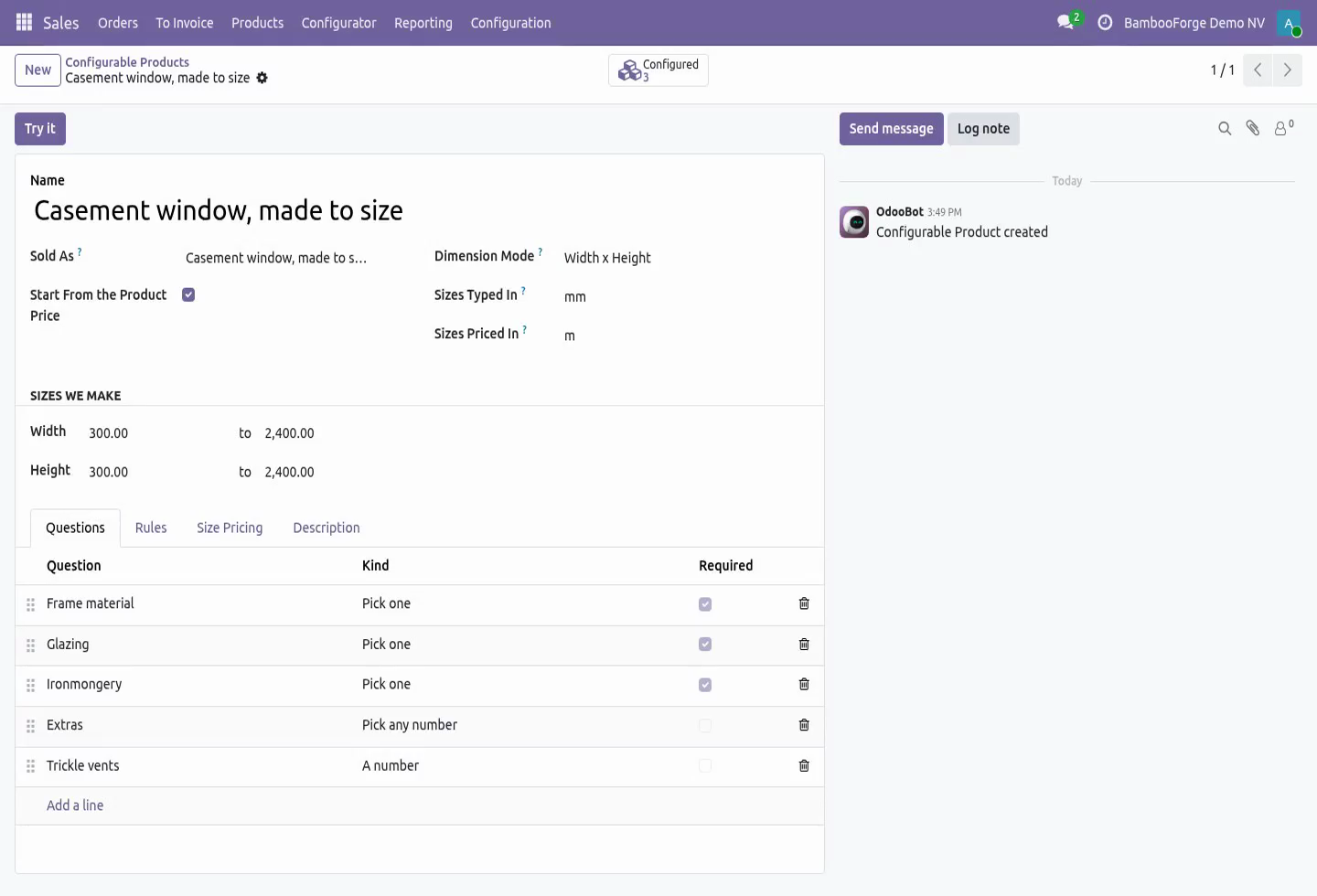
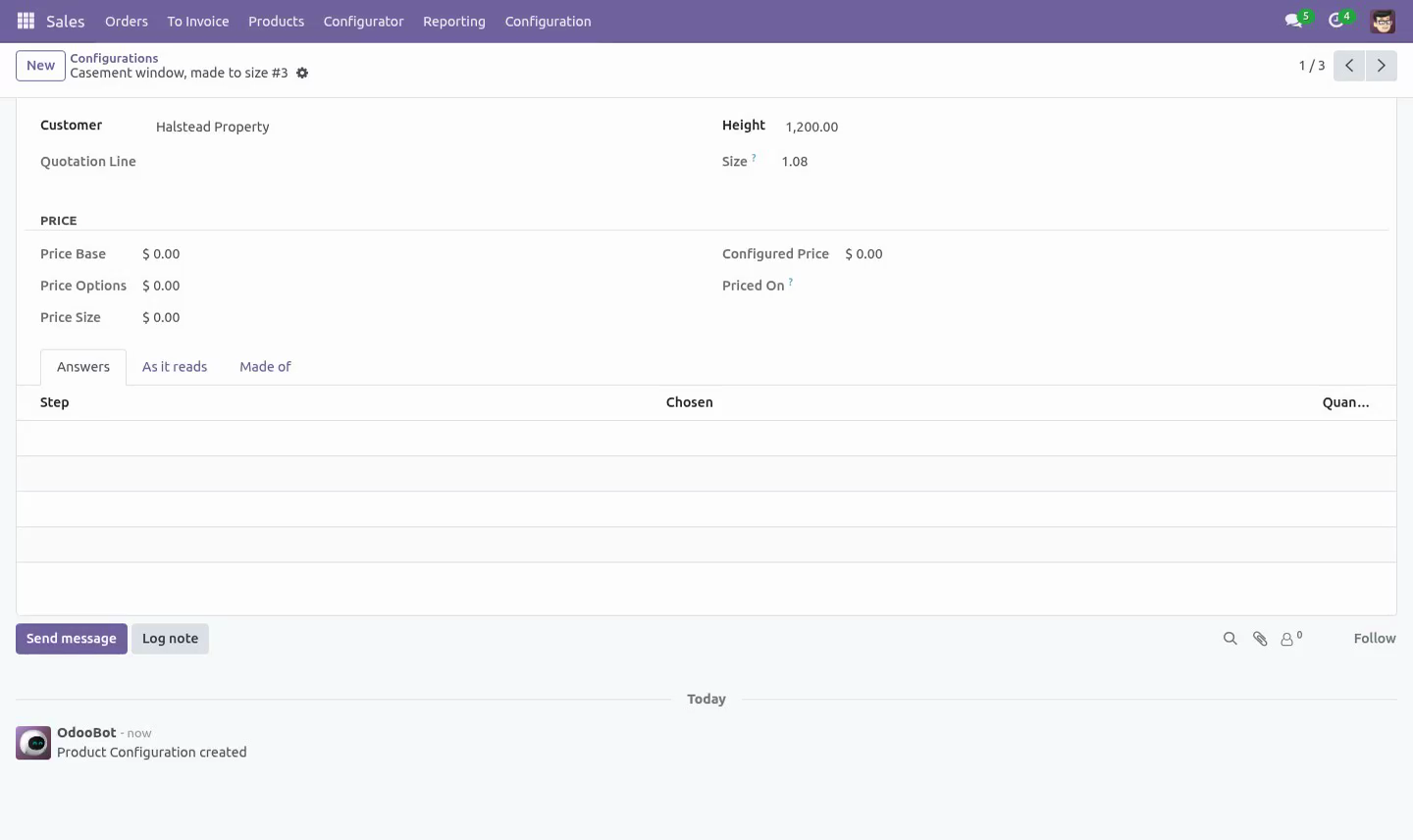
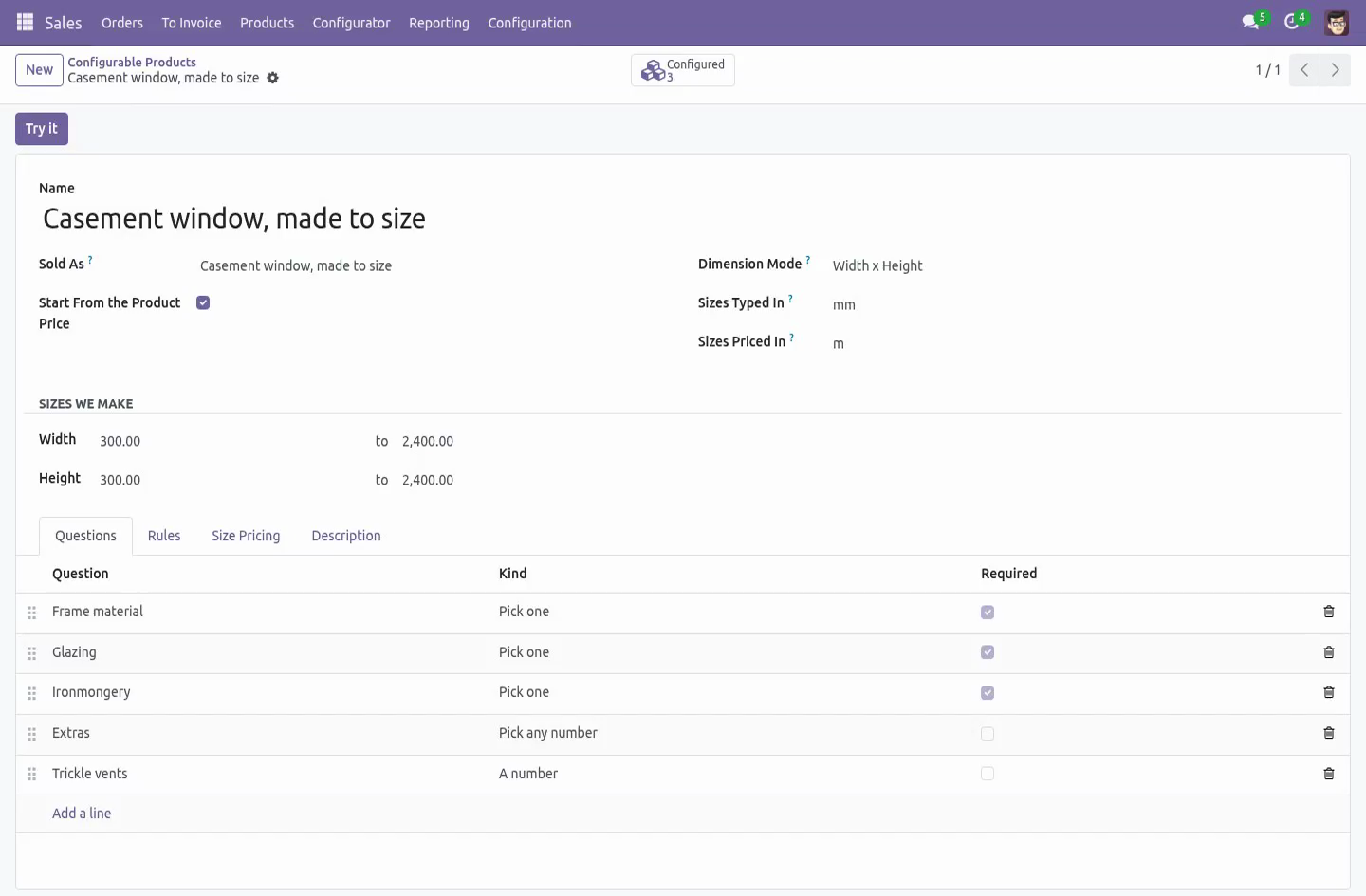
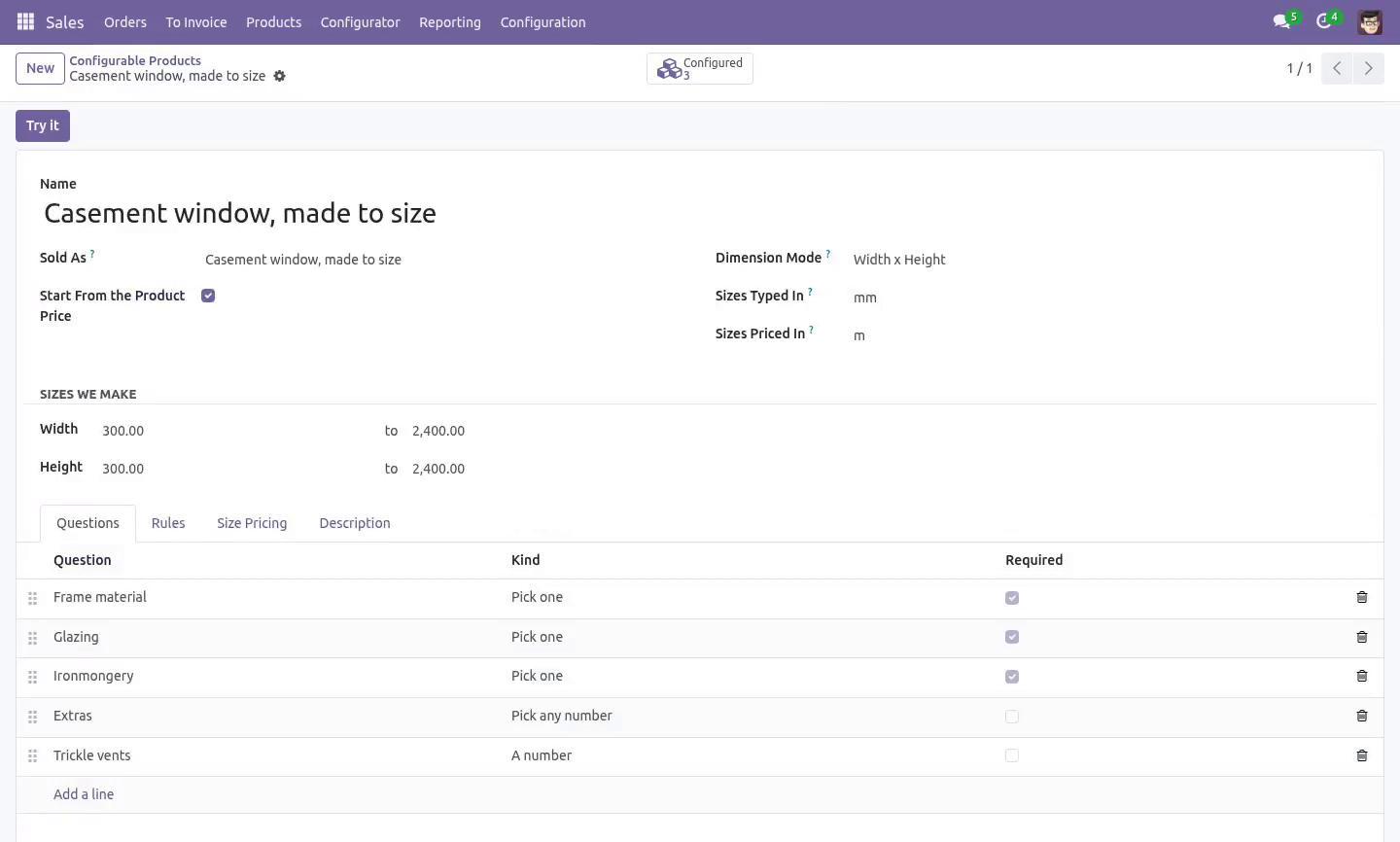
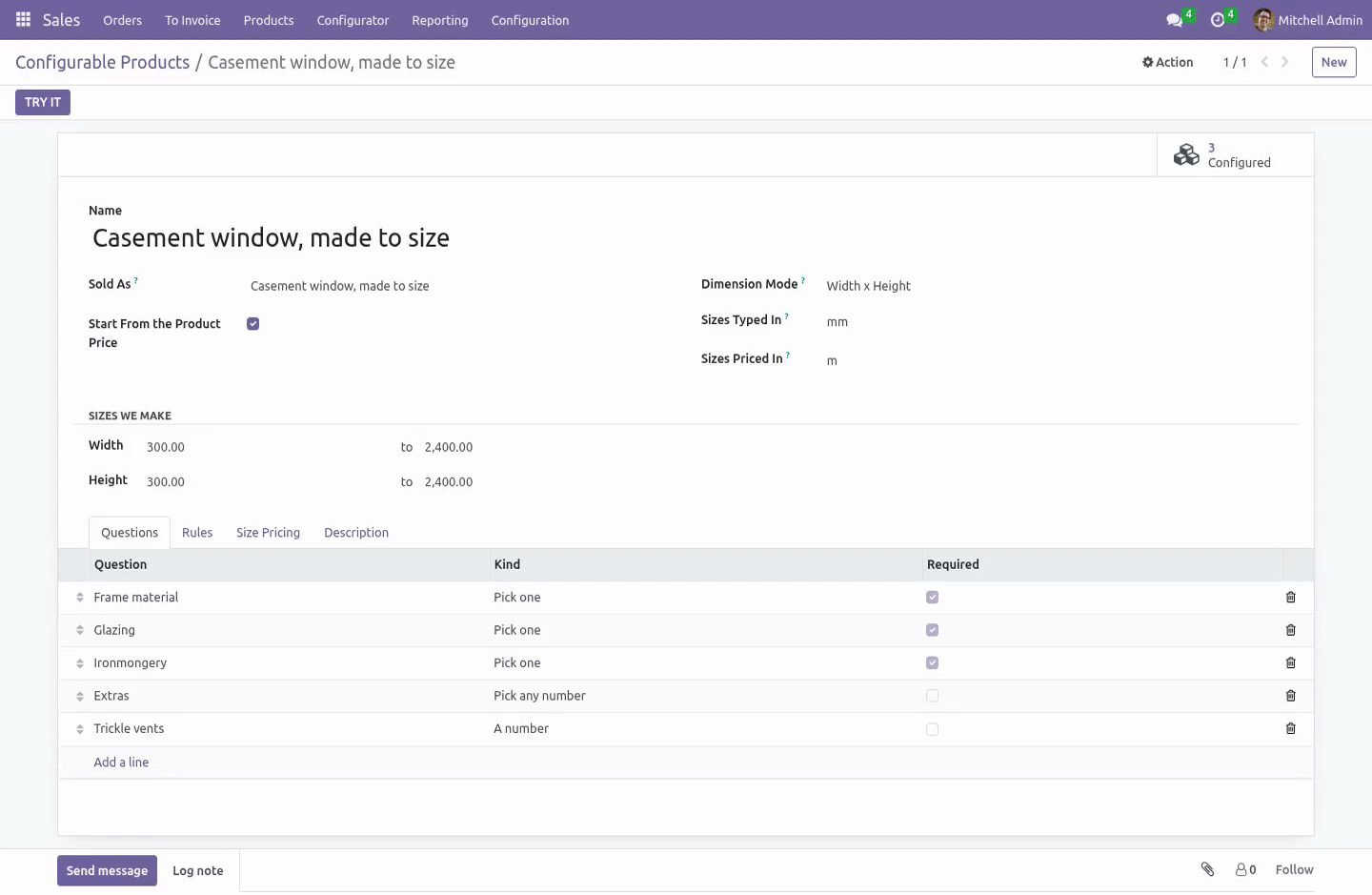
A configurable product is a list of questions asked in the order you ask them on the phone. Three kinds: Pick one — the handle, the finish, the glazing. Pick any number — the extras. A number — how many trickle vents, how many metres of trim.
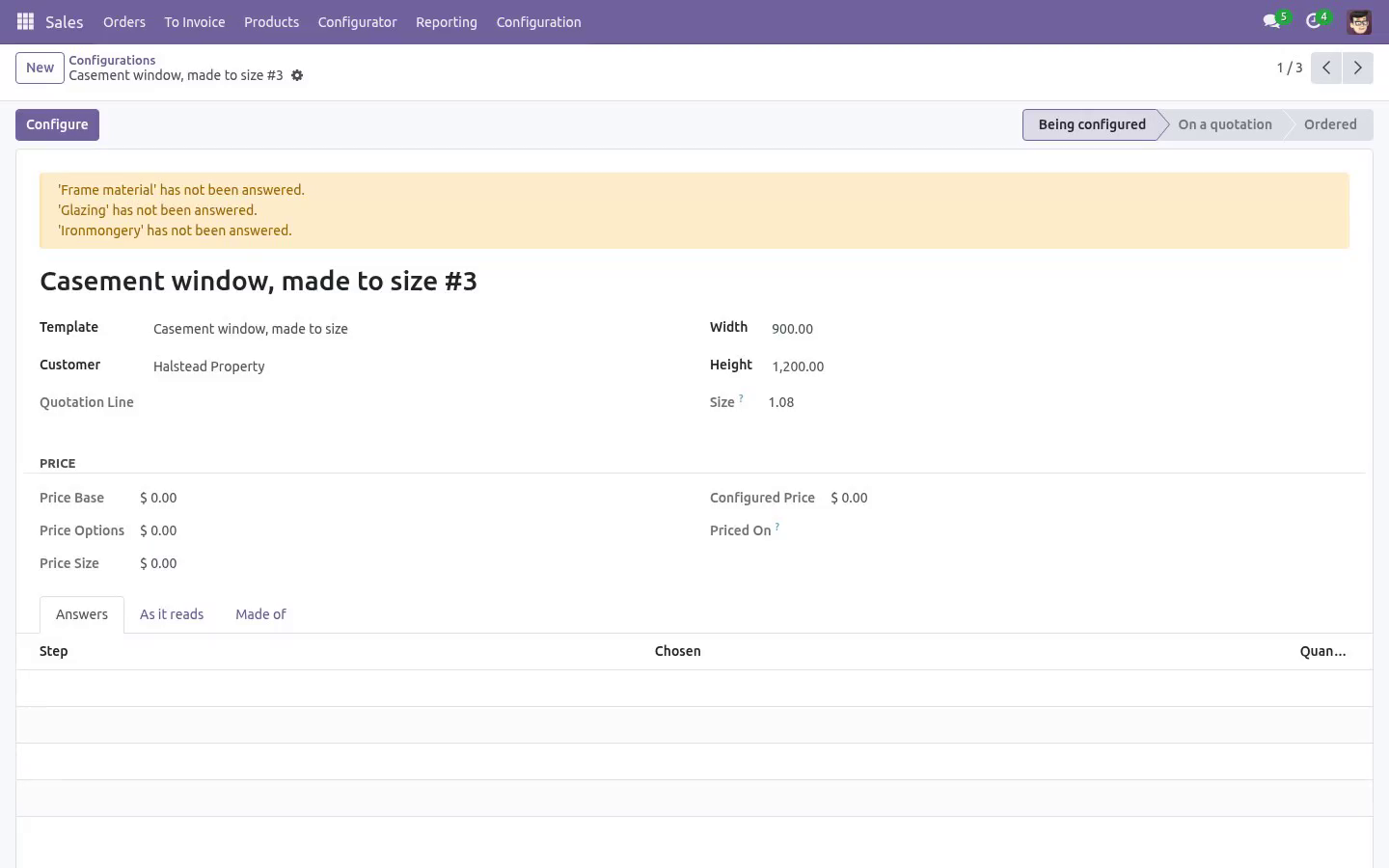
Every answer can add a flat amount, add an amount per unit of size (for a coating charged by the square metre), and carry a component. A question can be marked required: a required question left blank stops the configuration being priced, which is better than a quotation that silently forgot the glazing. The rules, on the server. All three are checked in the model, not in the browser.
A rule that only lives in the screen stops existing the first time an order arrives by import, by RPC, or by duplicating last year's quotation. cannot be combined with — the brass handle does not clear a triple-glazed sash. needs — triple glazing needs the reinforced frame. automatically adds — triple glazing brings the long screws with it.
It never displaces an answer a human chose. If a rule wants the hand-oiled finish and the salesperson picked the cheap one on purpose, nothing is swapped silently — the clash is reported in plain words and the configuration will not price until a person settles it. It never drops an implication silently. The pass runs to the end of the chain, bounded by the number of answers, and anything that could not land is reported as a problem.
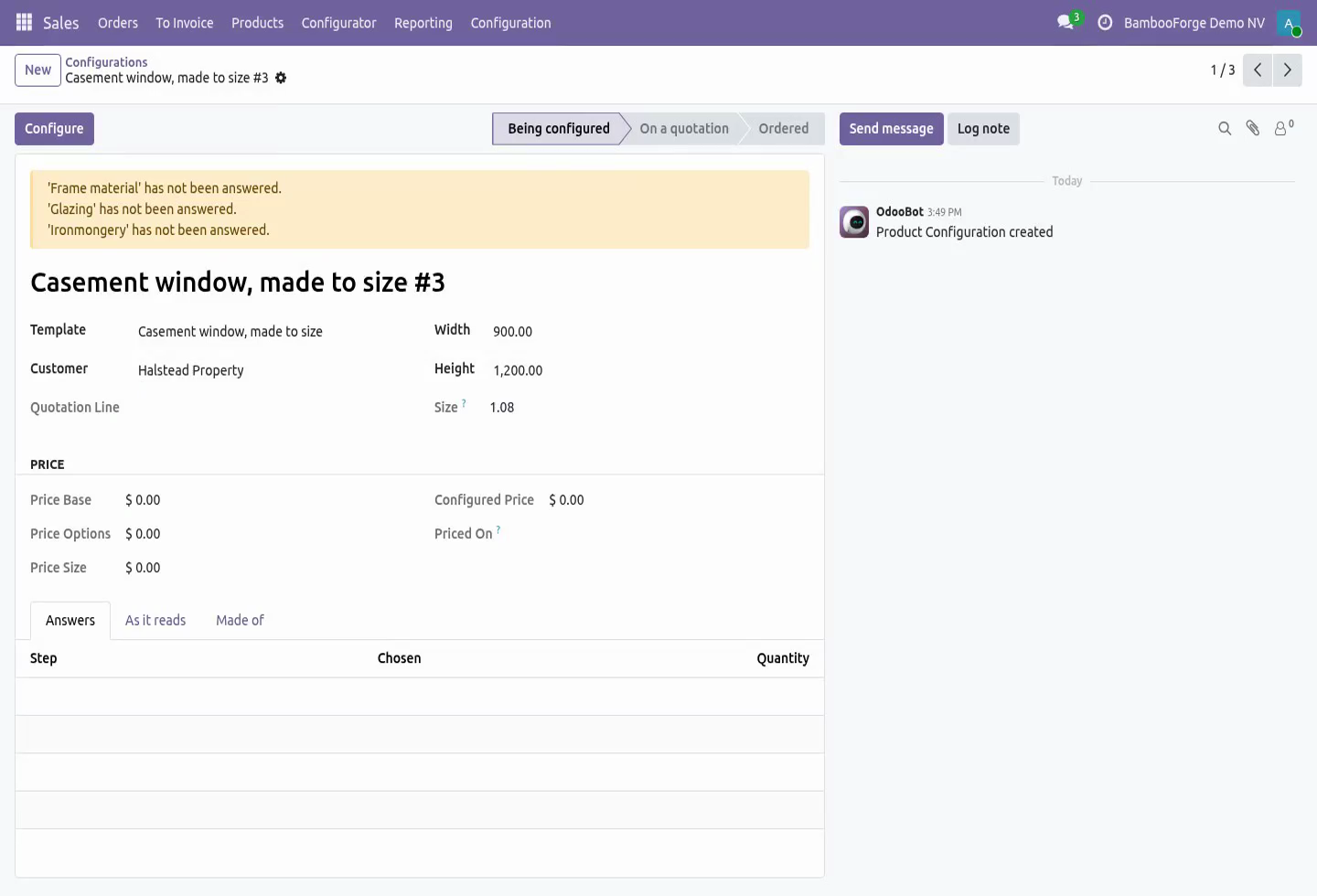
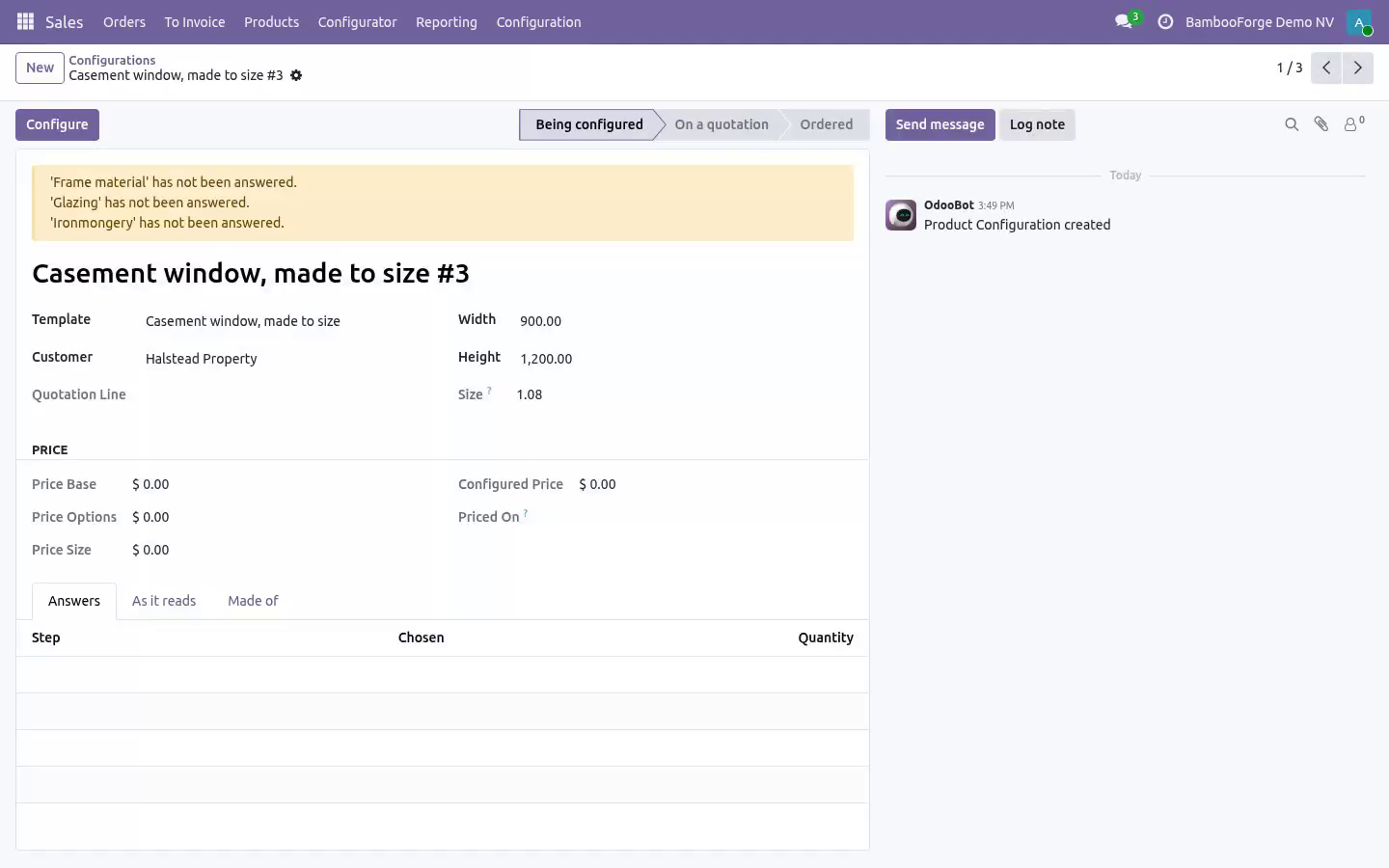
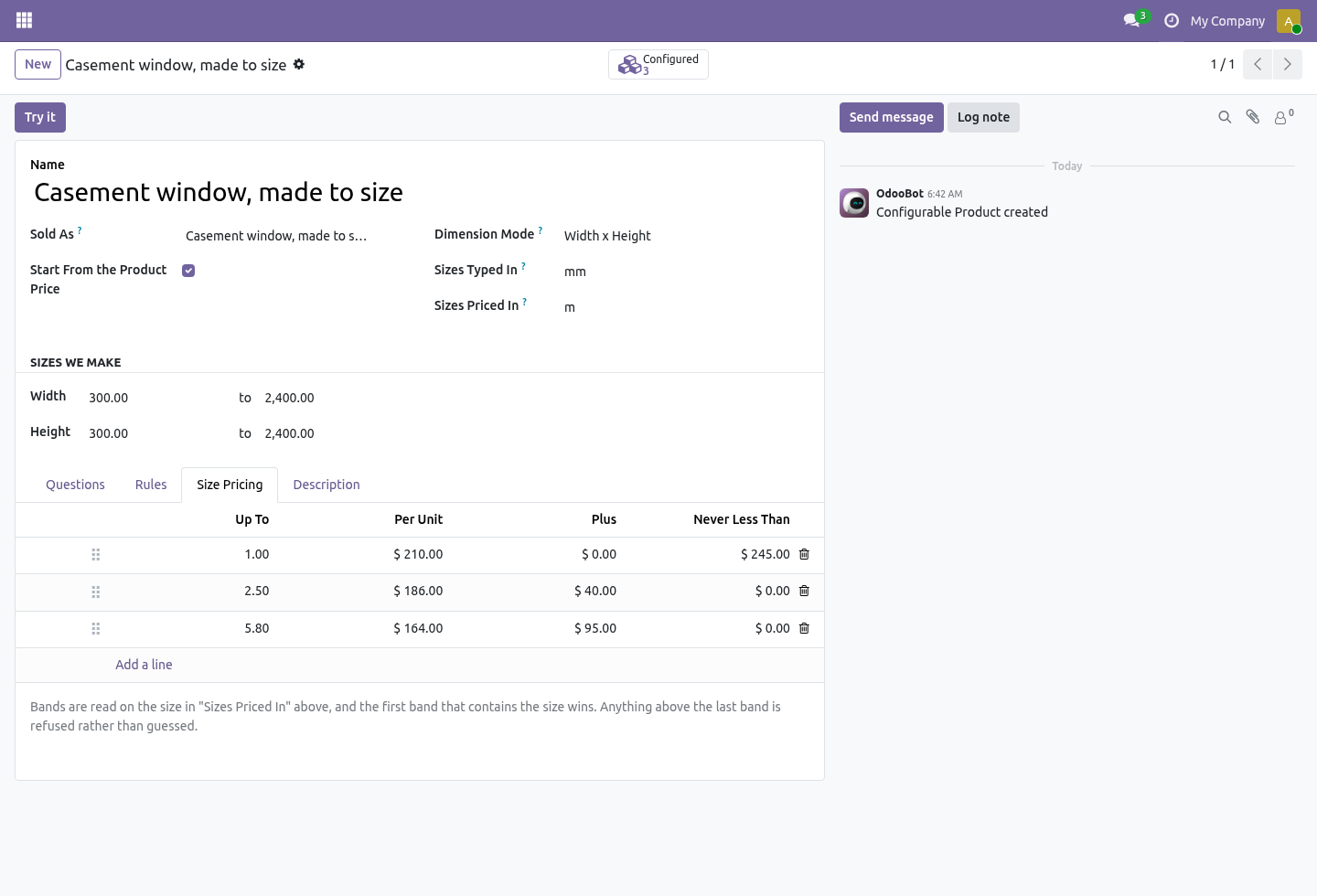
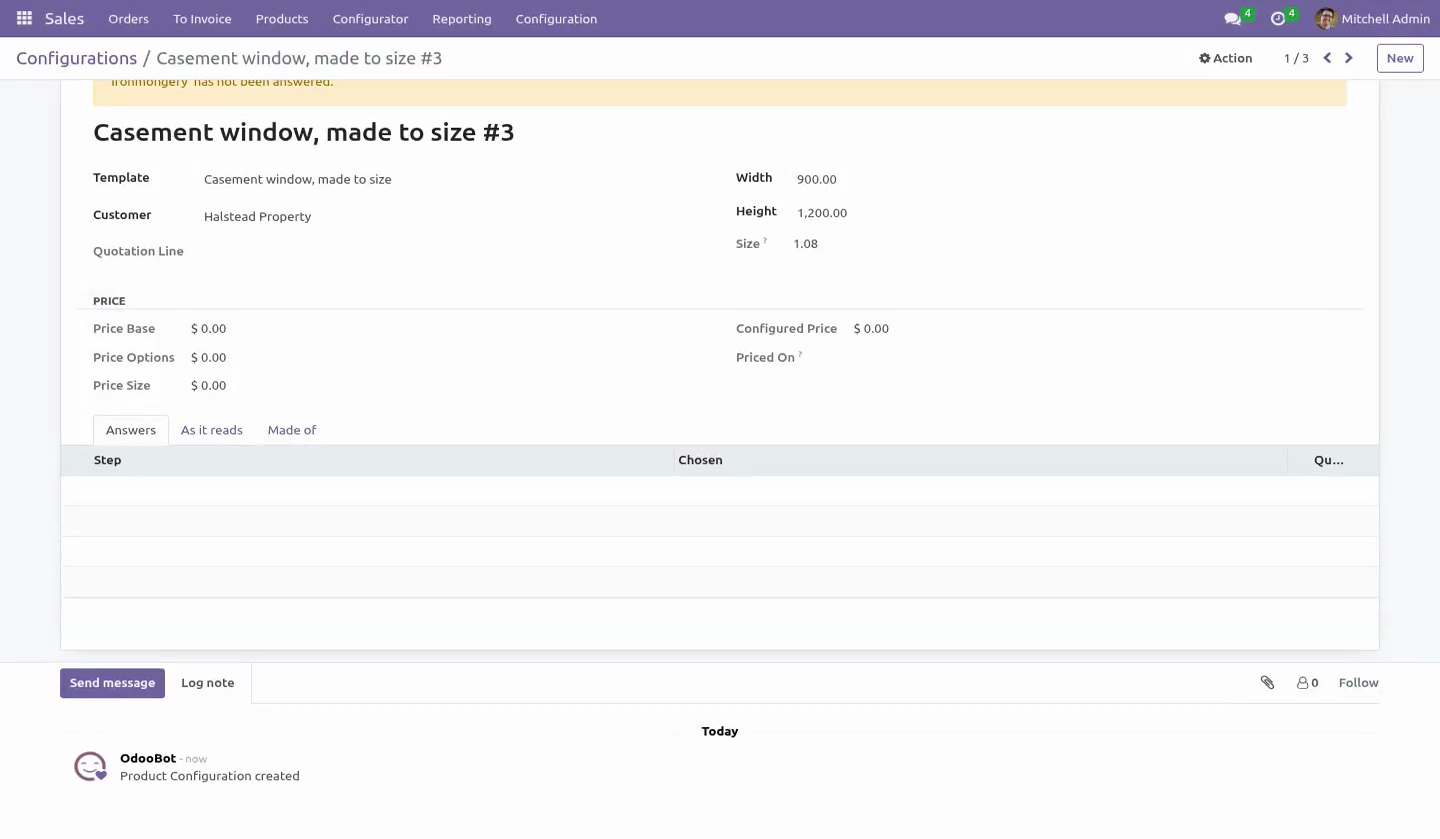
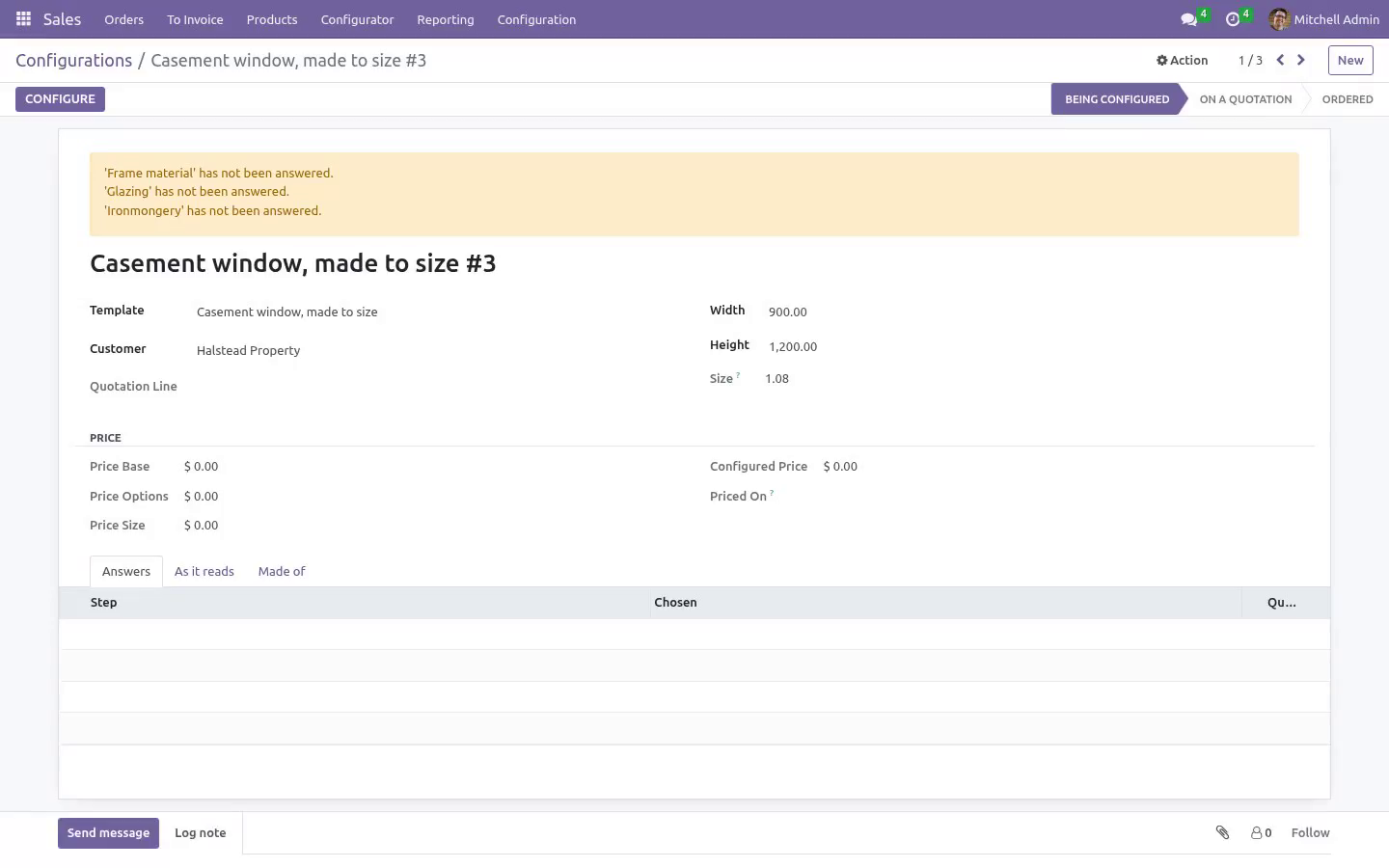
A window built without its reinforcement because a chain was eleven rules deep is not a configurator, it is a liability. Two promises about "automatically adds": Size, in the unit the bands are written in. Turn on length, width×height or width×height×depth, and state two units: the one the shop floor types (Sizes Typed In — millimetres for joinery) and the one the bands are priced in (Sizes Priced In — square metres). A joiner types 1200 × 900; the bands are read on 1.08.
The two units are stated separately on purpose. "Convert to the reference unit of the family" sounds cleaner and is wrong on a moving target: Odoo 16–20 make the metre the reference for length, Odoo 20 rebuilt units as a chain whose root is the millimetre — the same code would divide by a thousand on one series and not on the other, and nothing would look wrong until a quotation went out. Two units that cannot be converted into each other are refused at configuration time, on every series — including 19 and 20, where the standard conversion no longer raises and would happily price kilograms per metre. The price, and when it stops moving.
Housekeeping is honest too: an abandoned wizard (opened, closed, never answered) is cleaned up when the order confirms rather than frozen at a price of zero for ever, and deleting a quotation line archives its quoted configuration — kept for the audit trail, no longer a reason the product can never be retired. The preview in the configurator is the price that lands on the quotation — implications included, in the order's currency. The salesperson reads it out loud on the phone; those two numbers being different is the fastest way this class of software gets switched off. The base product goes through the pricelist, at the line's unit of measure and the order's date — so a dozen is priced as a dozen, the customer's agreed discount applies, and a quotation dated next month prices off next month's pricelist.
Options and size are cost build-up on top and are not discounted again. Taxes are never written by this module — and a product whose tax is included in the price is handled the way core handles it: the net figure the engineer typed is grossed up onto the line, so a 20% included tax does not quietly eat a sixth of every window. The price is frozen the moment it is quoted, with the date it was worked out. Retuning a band next month does not rewrite what the customer was sent.
Typing the quantity afterwards — which is the order the work actually happens in — does not either, and neither does the Update Prices button. The freeze covers the answers as well as the number: once quoted, the answers cannot be rewritten, added to or deleted, by anybody, through any door — form, import or RPC. What the works order is built to is what the customer was charged for. A configuration on a confirmed order cannot be edited at all.
Cancelling the order makes it readable again as a quotation. Duplicating a quotation duplicates the configuration. On the quotation. A configurable product on a quotation line shows a small slider icon for anyone in the Sales app — the group is implied by Salesperson, and a user without it can still open every quotation (the injected fields are group-scoped and the flag is computed in one query per order, not one per line).
Press it, answer the questions, and the line gets the configured price and a description that reads like something a customer would recognise. Changing the product on a configured line is refused — the description and the price would be describing something else. Delete the line and start again. What the line is made of, and what it costs you.
Every answer can carry a component and a quantity. The first time a line is priced, those components are written onto the configuration's Made of tab as an ordinary editable list - and from there they belong to that quotation line. Add a component, remove one, swap one, change a quantity: this job takes two long brackets, not four; this customer supplies their own glass. Nothing you do there is written back to the template, and no other quotation line changes.
The next quotation starts from the standard build again, and Rebuild from answers puts this one back to it. Companies. Templates, questions, answers, rules, bands and configurations all carry the company and a record rule. The products an answer carries are checked against the template's company — the fencing contractor's engineer cannot wire the joinery's hinge into their product by picking it from a list that forgot to filter.
What it needs. sale_management, sales_team, product and uom. All Community. No Enterprise module is required, and none is used; Manufacturing is optional and only ever additive.
How we make sure it works. Before every release, 66 automated checks run against this app on Odoo 16, 17, 18, 19 and 20. Among them: A size nobody priced is refused not guessed. Two units that cannot be converted are refused.
A generated bill of materials cannot be picked by accident. An abandoned draft is not frozen by confirming the order. An answer cannot be added to an ordered configuration. The complete list is in the source you receive.
The complete manual is at docs dot bambooforge dot dev, the demo database is linked from the store page, and support answers within twenty-four hours. Links are in the description.
Transcript of the walkthrough (Odoo 19)
Product Configurator (CPQ) with Price Rules. Product configurator and CPQ: ask the questions, enforce the rules on the server, price by real size in the real unit, freeze what was quoted. For anybody who sells something that is made to order — windows, fencing, signage, cable assemblies, furniture, flight cases. Odoo Community has product variants, which answer "which of these twelve do you want".
It does not have a configurator, which answers "how big, in what, with which handle, and what does that come to". In the next few minutes: product configurator (cpq) with price rules, then the questions, then the rules, on the server, then size, in the unit the bands are written in, then the price, and when it stops moving. Then what this app deliberately does not do, so you can tell before you buy whether it fits. Everything lives under Configurations then Configurable Products then Configurator.
Product Configurator (CPQ) with Price Rules. For anybody who sells something that is made to order — windows, fencing, signage, cable assemblies, furniture, flight cases. Odoo Community has product variants, which answer "which of these twelve do you want". It does not have a configurator, which answers "how big, in what, with which handle, and what does that come to".
The questions. A configurable product is a list of questions asked in the order you ask them on the phone. Three kinds: Pick one — the handle, the finish, the glazing. Pick any number — the extras.
A number — how many trickle vents, how many metres of trim. Every answer can add a flat amount, add an amount per unit of size (for a coating charged by the square metre), and carry a component. A question can be marked required: a required question left blank stops the configuration being priced, which is better than a quotation that silently forgot the glazing. The rules, on the server.
All three are checked in the model, not in the browser. A rule that only lives in the screen stops existing the first time an order arrives by import, by RPC, or by duplicating last year's quotation. cannot be combined with — the brass handle does not clear a triple-glazed sash. needs — triple glazing needs the reinforced frame.
automatically adds — triple glazing brings the long screws with it. It never displaces an answer a human chose. If a rule wants the hand-oiled finish and the salesperson picked the cheap one on purpose, nothing is swapped silently — the clash is reported in plain words and the configuration will not price until a person settles it. It never drops an implication silently.
The pass runs to the end of the chain, bounded by the number of answers, and anything that could not land is reported as a problem. A window built without its reinforcement because a chain was eleven rules deep is not a configurator, it is a liability. Two promises about "automatically adds": Size, in the unit the bands are written in. Turn on length, width×height or width×height×depth, and state two units: the one the shop floor types (Sizes Typed In — millimetres for joinery) and the one the bands are priced in (Sizes Priced In — square metres).
A joiner types 1200 × 900; the bands are read on 1.08. The two units are stated separately on purpose. "Convert to the reference unit of the family" sounds cleaner and is wrong on a moving target: Odoo 19–18 make the metre the reference for length, Odoo 19 rebuilt units as a chain whose root is the millimetre — the same code would divide by a thousand on one series and not on the other, and nothing would look wrong until a quotation went out. Two units that cannot be converted into each other are refused at configuration time, on every series — including 19, where the standard conversion no longer raises and would happily price kilograms per metre.
The price, and when it stops moving. Housekeeping is honest too: an abandoned wizard (opened, closed, never answered) is cleaned up when the order confirms rather than frozen at a price of zero for ever, and deleting a quotation line archives its quoted configuration — kept for the audit trail, no longer a reason the product can never be retired. The preview in the configurator is the price that lands on the quotation — implications included, in the order's currency. The salesperson reads it out loud on the phone; those two numbers being different is the fastest way this class of software gets switched off.
The base product goes through the pricelist, at the line's unit of measure and the order's date — so a dozen is priced as a dozen, the customer's agreed discount applies, and a quotation dated next month prices off next month's pricelist. Options and size are cost build-up on top and are not discounted again. Taxes are never written by this module — and a product whose tax is included in the price is handled the way core handles it: the net figure the engineer typed is grossed up onto the line, so a 20% included tax does not quietly eat a sixth of every window. The price is frozen the moment it is quoted, with the date it was worked out.
Retuning a band next month does not rewrite what the customer was sent. Typing the quantity afterwards — which is the order the work actually happens in — does not either, and neither does the Update Prices button. The freeze covers the answers as well as the number: once quoted, the answers cannot be rewritten, added to or deleted, by anybody, through any door — form, import or RPC. What the works order is built to is what the customer was charged for.
A configuration on a confirmed order cannot be edited at all. Cancelling the order makes it readable again as a quotation. Duplicating a quotation duplicates the configuration. On the quotation.
Casement window, made to size
Size: 1200.0 x 1500.0
Frame material: Accoya
Glazing: Triple glazed, 4-12-4-12-4
Ironmongery: Brushed stainless
Changing the product on a configured line is refused — the description and the price would be describing something else. Delete the line and start again. Bills of materials. Every answer can carry a component and a quantity, and the Made of tab lists them on every configuration, Manufacturing or not.
With Manufacturing installed and Build a Bill of Materials ticked on the product, a manager can create the BoM from what was actually chosen. It is created once per configuration, inactive, and named after the configuration — because sixty active BoMs a week on the same product variant means _bom_find picks one at random and the shop floor cuts brass handles for a steel-handle order. Somebody activates the one they mean, for the job they mean. Companies.
Templates, questions, answers, rules, bands and configurations all carry the company and a record rule. The products an answer carries are checked against the template's company — the fencing contractor's engineer cannot wire the joinery's hinge into their product by picking it from a list that forgot to filter. What it needs. sale_management, sales_team, product and uom.
All Community. No Enterprise module is required, and none is used; Manufacturing is optional and only ever additive. The complete manual is at docs dot bambooforge dot dev, the demo database is linked from the store page, and support answers within twenty-four hours. Links are in the description.
Transcript of the walkthrough (Odoo 18)
Product Configurator (CPQ) with Price Rules. Product configurator and CPQ: ask the questions, enforce the rules on the server, price by real size in the real unit, freeze what was quoted. For anybody who sells something that is made to order — windows, fencing, signage, cable assemblies, furniture, flight cases. Odoo Community has product variants, which answer "which of these twelve do you want".
It does not have a configurator, which answers "how big, in what, with which handle, and what does that come to". In the next few minutes: product configurator (cpq) with price rules, then the questions, then the rules, on the server, then size, in the unit the bands are written in, then the price, and when it stops moving. Then what this app deliberately does not do, so you can tell before you buy whether it fits. Everything lives under Configurations then Configurable Products then Configurator.
Product Configurator (CPQ) with Price Rules. For anybody who sells something that is made to order — windows, fencing, signage, cable assemblies, furniture, flight cases. Odoo Community has product variants, which answer "which of these twelve do you want". It does not have a configurator, which answers "how big, in what, with which handle, and what does that come to".
The questions. A configurable product is a list of questions asked in the order you ask them on the phone. Three kinds: Pick one — the handle, the finish, the glazing. Pick any number — the extras.
A number — how many trickle vents, how many metres of trim. Every answer can add a flat amount, add an amount per unit of size (for a coating charged by the square metre), and carry a component. A question can be marked required: a required question left blank stops the configuration being priced, which is better than a quotation that silently forgot the glazing. The rules, on the server.
All three are checked in the model, not in the browser. A rule that only lives in the screen stops existing the first time an order arrives by import, by RPC, or by duplicating last year's quotation. cannot be combined with — the brass handle does not clear a triple-glazed sash. needs — triple glazing needs the reinforced frame.
automatically adds — triple glazing brings the long screws with it. It never displaces an answer a human chose. If a rule wants the hand-oiled finish and the salesperson picked the cheap one on purpose, nothing is swapped silently — the clash is reported in plain words and the configuration will not price until a person settles it. It never drops an implication silently.
The pass runs to the end of the chain, bounded by the number of answers, and anything that could not land is reported as a problem. A window built without its reinforcement because a chain was eleven rules deep is not a configurator, it is a liability. Two promises about "automatically adds": Size, in the unit the bands are written in. Turn on length, width×height or width×height×depth, and state two units: the one the shop floor types (Sizes Typed In — millimetres for joinery) and the one the bands are priced in (Sizes Priced In — square metres).
A joiner types 1200 × 900; the bands are read on 1.08. The two units are stated separately on purpose. "Convert to the reference unit of the family" sounds cleaner and is wrong on a moving target: Odoo 18–18 make the metre the reference for length, Odoo 18 rebuilt units as a chain whose root is the millimetre — the same code would divide by a thousand on one series and not on the other, and nothing would look wrong until a quotation went out. Two units that cannot be converted into each other are refused at configuration time, on every series — including 19, where the standard conversion no longer raises and would happily price kilograms per metre.
The price, and when it stops moving. Housekeeping is honest too: an abandoned wizard (opened, closed, never answered) is cleaned up when the order confirms rather than frozen at a price of zero for ever, and deleting a quotation line archives its quoted configuration — kept for the audit trail, no longer a reason the product can never be retired. The preview in the configurator is the price that lands on the quotation — implications included, in the order's currency. The salesperson reads it out loud on the phone; those two numbers being different is the fastest way this class of software gets switched off.
The base product goes through the pricelist, at the line's unit of measure and the order's date — so a dozen is priced as a dozen, the customer's agreed discount applies, and a quotation dated next month prices off next month's pricelist. Options and size are cost build-up on top and are not discounted again. Taxes are never written by this module — and a product whose tax is included in the price is handled the way core handles it: the net figure the engineer typed is grossed up onto the line, so a 20% included tax does not quietly eat a sixth of every window. The price is frozen the moment it is quoted, with the date it was worked out.
Retuning a band next month does not rewrite what the customer was sent. Typing the quantity afterwards — which is the order the work actually happens in — does not either, and neither does the Update Prices button. The freeze covers the answers as well as the number: once quoted, the answers cannot be rewritten, added to or deleted, by anybody, through any door — form, import or RPC. What the works order is built to is what the customer was charged for.
A configuration on a confirmed order cannot be edited at all. Cancelling the order makes it readable again as a quotation. Duplicating a quotation duplicates the configuration. On the quotation.
Casement window, made to size Size: 1200.0 x 1500.0 Frame material: Accoya Glazing: Triple glazed, 4-12-4-12-4 Ironmongery: Brushed stainless Changing the product on a configured line is refused — the description and the price would be describing something else. Delete the line and start again. Bills of materials. Every answer can carry a component and a quantity, and the Made of tab lists them on every configuration, Manufacturing or not.
With Manufacturing installed and Build a Bill of Materials ticked on the product, a manager can create the BoM from what was actually chosen. It is created once per configuration, inactive, and named after the configuration — because sixty active BoMs a week on the same product variant means _bom_find picks one at random and the shop floor cuts brass handles for a steel-handle order. Somebody activates the one they mean, for the job they mean. Companies.
Templates, questions, answers, rules, bands and configurations all carry the company and a record rule. The products an answer carries are checked against the template's company — the fencing contractor's engineer cannot wire the joinery's hinge into their product by picking it from a list that forgot to filter. What it needs. sale_management, sales_team, product and uom.
All Community. No Enterprise module is required, and none is used; Manufacturing is optional and only ever additive. The complete manual is at docs dot bambooforge dot dev, the demo database is linked from the store page, and support answers within twenty-four hours. Links are in the description.
Transcript of the walkthrough (Odoo 17)
Product Configurator (CPQ) with Price Rules. Product configurator and CPQ: ask the questions, enforce the rules on the server, price by real size in the real unit, freeze what was quoted. For anybody who sells something that is made to order — windows, fencing, signage, cable assemblies, furniture, flight cases. Odoo Community has product variants, which answer "which of these twelve do you want".
It does not have a configurator, which answers "how big, in what, with which handle, and what does that come to". In the next few minutes: product configurator (cpq) with price rules, then the questions, then the rules, on the server, then size, in the unit the bands are written in, then the price, and when it stops moving. Then what this app deliberately does not do, so you can tell before you buy whether it fits. Everything lives under Configurations then Configurable Products then Configurator.
Product Configurator (CPQ) with Price Rules. For anybody who sells something that is made to order — windows, fencing, signage, cable assemblies, furniture, flight cases. Odoo Community has product variants, which answer "which of these twelve do you want". It does not have a configurator, which answers "how big, in what, with which handle, and what does that come to".
The questions. A configurable product is a list of questions asked in the order you ask them on the phone. Three kinds: Pick one — the handle, the finish, the glazing. Pick any number — the extras.
A number — how many trickle vents, how many metres of trim. Every answer can add a flat amount, add an amount per unit of size (for a coating charged by the square metre), and carry a component. A question can be marked required: a required question left blank stops the configuration being priced, which is better than a quotation that silently forgot the glazing. The rules, on the server.
All three are checked in the model, not in the browser. A rule that only lives in the screen stops existing the first time an order arrives by import, by RPC, or by duplicating last year's quotation. cannot be combined with — the brass handle does not clear a triple-glazed sash. needs — triple glazing needs the reinforced frame.
automatically adds — triple glazing brings the long screws with it. It never displaces an answer a human chose. If a rule wants the hand-oiled finish and the salesperson picked the cheap one on purpose, nothing is swapped silently — the clash is reported in plain words and the configuration will not price until a person settles it. It never drops an implication silently.
The pass runs to the end of the chain, bounded by the number of answers, and anything that could not land is reported as a problem. A window built without its reinforcement because a chain was eleven rules deep is not a configurator, it is a liability. Two promises about "automatically adds": Size, in the unit the bands are written in. Turn on length, width×height or width×height×depth, and state two units: the one the shop floor types (Sizes Typed In — millimetres for joinery) and the one the bands are priced in (Sizes Priced In — square metres).
A joiner types 1200 × 900; the bands are read on 1.08. The two units are stated separately on purpose. "Convert to the reference unit of the family" sounds cleaner and is wrong on a moving target: Odoo 16–18 make the metre the reference for length, Odoo 19 rebuilt units as a chain whose root is the millimetre — the same code would divide by a thousand on one series and not on the other, and nothing would look wrong until a quotation went out. Two units that cannot be converted into each other are refused at configuration time, on every series — including 19, where the standard conversion no longer raises and would happily price kilograms per metre.
The price, and when it stops moving. Housekeeping is honest too: an abandoned wizard (opened, closed, never answered) is cleaned up when the order confirms rather than frozen at a price of zero for ever, and deleting a quotation line archives its quoted configuration — kept for the audit trail, no longer a reason the product can never be retired. The preview in the configurator is the price that lands on the quotation — implications included, in the order's currency. The salesperson reads it out loud on the phone; those two numbers being different is the fastest way this class of software gets switched off.
The base product goes through the pricelist, at the line's unit of measure and the order's date — so a dozen is priced as a dozen, the customer's agreed discount applies, and a quotation dated next month prices off next month's pricelist. Options and size are cost build-up on top and are not discounted again. Taxes are never written by this module — and a product whose tax is included in the price is handled the way core handles it: the net figure the engineer typed is grossed up onto the line, so a 20% included tax does not quietly eat a sixth of every window. The price is frozen the moment it is quoted, with the date it was worked out.
Retuning a band next month does not rewrite what the customer was sent. Typing the quantity afterwards — which is the order the work actually happens in — does not either, and neither does the Update Prices button. The freeze covers the answers as well as the number: once quoted, the answers cannot be rewritten, added to or deleted, by anybody, through any door — form, import or RPC. What the works order is built to is what the customer was charged for.
A configuration on a confirmed order cannot be edited at all. Cancelling the order makes it readable again as a quotation. Duplicating a quotation duplicates the configuration. On the quotation.
Casement window, made to size Size: 1200.0 x 1500.0 Frame material: Accoya Glazing: Triple glazed, 4-12-4-12-4 Ironmongery: Brushed stainless Changing the product on a configured line is refused — the description and the price would be describing something else. Delete the line and start again. Bills of materials. Every answer can carry a component and a quantity, and the Made of tab lists them on every configuration, Manufacturing or not.
With Manufacturing installed and Build a Bill of Materials ticked on the product, a manager can create the BoM from what was actually chosen. It is created once per configuration, inactive, and named after the configuration — because sixty active BoMs a week on the same product variant means _bom_find picks one at random and the shop floor cuts brass handles for a steel-handle order. Somebody activates the one they mean, for the job they mean. Companies.
Templates, questions, answers, rules, bands and configurations all carry the company and a record rule. The products an answer carries are checked against the template's company — the fencing contractor's engineer cannot wire the joinery's hinge into their product by picking it from a list that forgot to filter. What it needs. sale_management, sales_team, product and uom.
All Community. No Enterprise module is required, and none is used; Manufacturing is optional and only ever additive. The complete manual is at docs dot bambooforge dot dev, the demo database is linked from the store page, and support answers within twenty-four hours. Links are in the description.
Transcript of the walkthrough (Odoo 16)
Product Configurator (CPQ) with Price Rules. Product configurator and CPQ: ask the questions, enforce the rules on the server, price by real size in the real unit, freeze what was quoted. For anybody who sells something that is made to order — windows, fencing, signage, cable assemblies, furniture, flight cases. Odoo Community has product variants, which answer "which of these twelve do you want".
It does not have a configurator, which answers "how big, in what, with which handle, and what does that come to". In the next few minutes: product configurator (cpq) with price rules, then the questions, then the rules, on the server, then size, in the unit the bands are written in, then the price, and when it stops moving. Then what this app deliberately does not do, so you can tell before you buy whether it fits. Everything lives under Configurations then Configurable Products then Configurator.
Product Configurator (CPQ) with Price Rules. For anybody who sells something that is made to order — windows, fencing, signage, cable assemblies, furniture, flight cases. Odoo Community has product variants, which answer "which of these twelve do you want". It does not have a configurator, which answers "how big, in what, with which handle, and what does that come to".
The questions. A configurable product is a list of questions asked in the order you ask them on the phone. Three kinds: Pick one — the handle, the finish, the glazing. Pick any number — the extras.
A number — how many trickle vents, how many metres of trim. Every answer can add a flat amount, add an amount per unit of size (for a coating charged by the square metre), and carry a component. A question can be marked required: a required question left blank stops the configuration being priced, which is better than a quotation that silently forgot the glazing. The rules, on the server.
All three are checked in the model, not in the browser. A rule that only lives in the screen stops existing the first time an order arrives by import, by RPC, or by duplicating last year's quotation. cannot be combined with — the brass handle does not clear a triple-glazed sash. needs — triple glazing needs the reinforced frame.
automatically adds — triple glazing brings the long screws with it. It never displaces an answer a human chose. If a rule wants the hand-oiled finish and the salesperson picked the cheap one on purpose, nothing is swapped silently — the clash is reported in plain words and the configuration will not price until a person settles it. It never drops an implication silently.
The pass runs to the end of the chain, bounded by the number of answers, and anything that could not land is reported as a problem. A window built without its reinforcement because a chain was eleven rules deep is not a configurator, it is a liability. Two promises about "automatically adds": Size, in the unit the bands are written in. Turn on length, width×height or width×height×depth, and state two units: the one the shop floor types (Sizes Typed In — millimetres for joinery) and the one the bands are priced in (Sizes Priced In — square metres).
A joiner types 1200 × 900; the bands are read on 1.08. The two units are stated separately on purpose. "Convert to the reference unit of the family" sounds cleaner and is wrong on a moving target: Odoo 16–18 make the metre the reference for length, Odoo 16 rebuilt units as a chain whose root is the millimetre — the same code would divide by a thousand on one series and not on the other, and nothing would look wrong until a quotation went out. Two units that cannot be converted into each other are refused at configuration time, on every series — including 19, where the standard conversion no longer raises and would happily price kilograms per metre.
The price, and when it stops moving. Housekeeping is honest too: an abandoned wizard (opened, closed, never answered) is cleaned up when the order confirms rather than frozen at a price of zero for ever, and deleting a quotation line archives its quoted configuration — kept for the audit trail, no longer a reason the product can never be retired. The preview in the configurator is the price that lands on the quotation — implications included, in the order's currency. The salesperson reads it out loud on the phone; those two numbers being different is the fastest way this class of software gets switched off.
The base product goes through the pricelist, at the line's unit of measure and the order's date — so a dozen is priced as a dozen, the customer's agreed discount applies, and a quotation dated next month prices off next month's pricelist. Options and size are cost build-up on top and are not discounted again. Taxes are never written by this module — and a product whose tax is included in the price is handled the way core handles it: the net figure the engineer typed is grossed up onto the line, so a 20% included tax does not quietly eat a sixth of every window. The price is frozen the moment it is quoted, with the date it was worked out.
Retuning a band next month does not rewrite what the customer was sent. Typing the quantity afterwards — which is the order the work actually happens in — does not either, and neither does the Update Prices button. The freeze covers the answers as well as the number: once quoted, the answers cannot be rewritten, added to or deleted, by anybody, through any door — form, import or RPC. What the works order is built to is what the customer was charged for.
A configuration on a confirmed order cannot be edited at all. Cancelling the order makes it readable again as a quotation. Duplicating a quotation duplicates the configuration. On the quotation.
Casement window, made to size Size: 1200.0 x 1500.0 Frame material: Accoya Glazing: Triple glazed, 4-12-4-12-4 Ironmongery: Brushed stainless Changing the product on a configured line is refused — the description and the price would be describing something else. Delete the line and start again. Bills of materials. Every answer can carry a component and a quantity, and the Made of tab lists them on every configuration, Manufacturing or not.
With Manufacturing installed and Build a Bill of Materials ticked on the product, a manager can create the BoM from what was actually chosen. It is created once per configuration, inactive, and named after the configuration — because sixty active BoMs a week on the same product variant means _bom_find picks one at random and the shop floor cuts brass handles for a steel-handle order. Somebody activates the one they mean, for the job they mean. Companies.
Templates, questions, answers, rules, bands and configurations all carry the company and a record rule. The products an answer carries are checked against the template's company — the fencing contractor's engineer cannot wire the joinery's hinge into their product by picking it from a list that forgot to filter. What it needs. sale_management, sales_team, product and uom.
All Community. No Enterprise module is required, and none is used; Manufacturing is optional and only ever additive. The complete manual is at docs dot bambooforge dot dev, the demo database is linked from the store page, and support answers within twenty-four hours. Links are in the description.
Key facts
- What it is
- Product configurator and CPQ: ask the questions, enforce the rules on the server, price by real size in the real unit, freeze what was quoted.
- For
- Sales
- Odoo versions
- 16.0, 17.0, 18.0, 19.0, 20.0 - Community and Enterprise
- Runs on
- Odoo.sh or Odoo you host yourself - not Odoo Online, which accepts no third-party apps
- Price
- 149 EUR, one-time, on the Odoo Apps Store
- Technical name
- bambooforge_cpq
- Not for
- Said before you buy, because it is the half that decides whether the app fits:; Drop an implication silently: a rule that cannot land is reported, on the server, on every path an order can arrive by.; Price outside the rules you wrote - there is no hidden pricing engine.; Reprice the customer's line when you edit its components. The cost follows the build; the agreed price does not.; Show the customer what the line is made of as priced lines. One line, one price, and the answers as text underneath.; Let anyone change the build after the order is confirmed.
- Manual last updated
- 2026-10-15
Product Configurator (CPQ) with Price Rules
For anybody who sells something that is made to order — windows, fencing, signage, cable assemblies, furniture, flight cases. Odoo Community has product variants, which answer "which of these twelve do you want". It does not have a configurator, which answers "how big, in what, with which handle, and what does that come to".
The questions
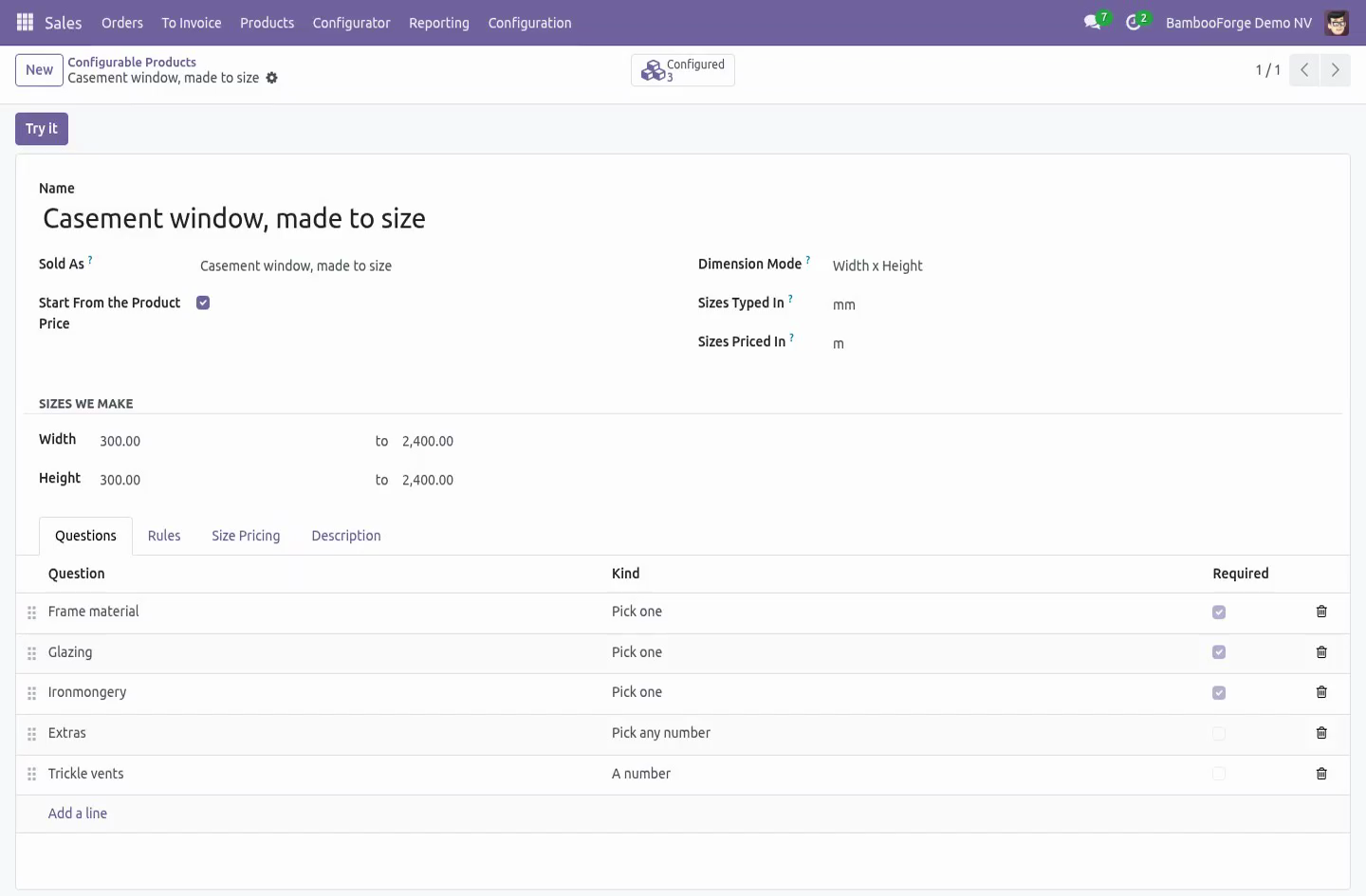
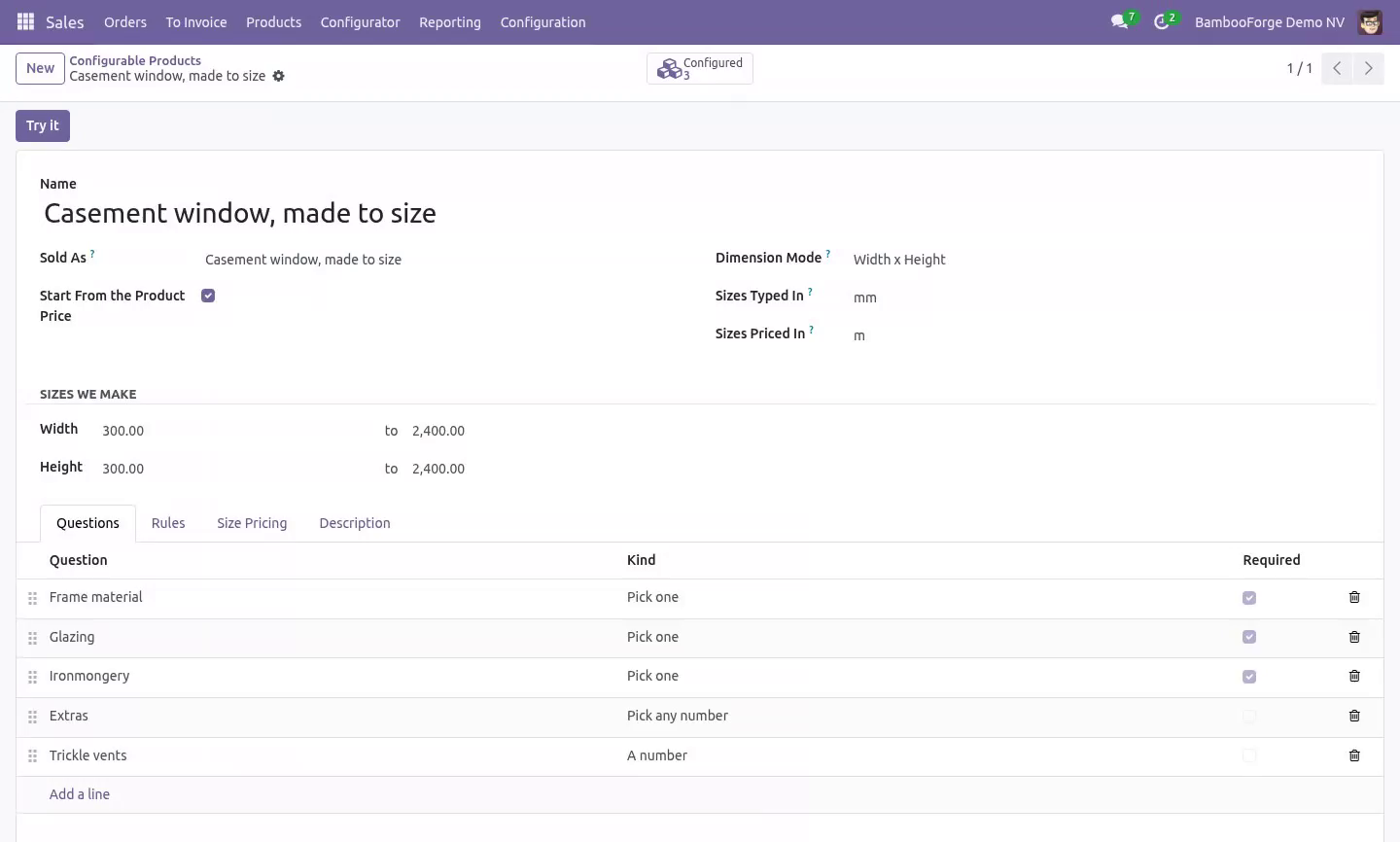
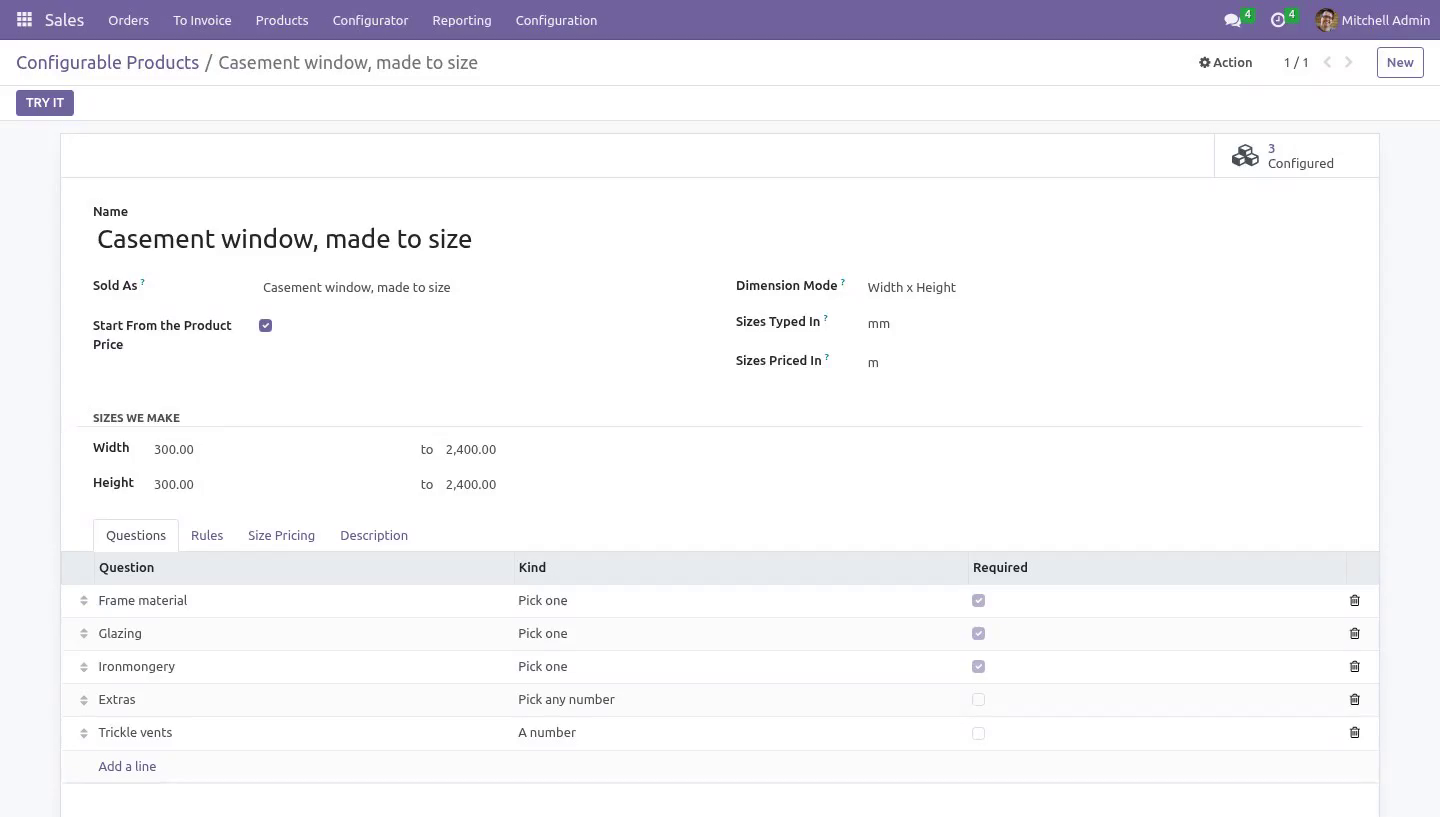
A configurable product is a list of questions asked in the order you ask them on the phone. Three kinds:
Pick one — the handle, the finish, the glazing.
Pick any number — the extras.
A number — how many trickle vents, how many metres of trim.
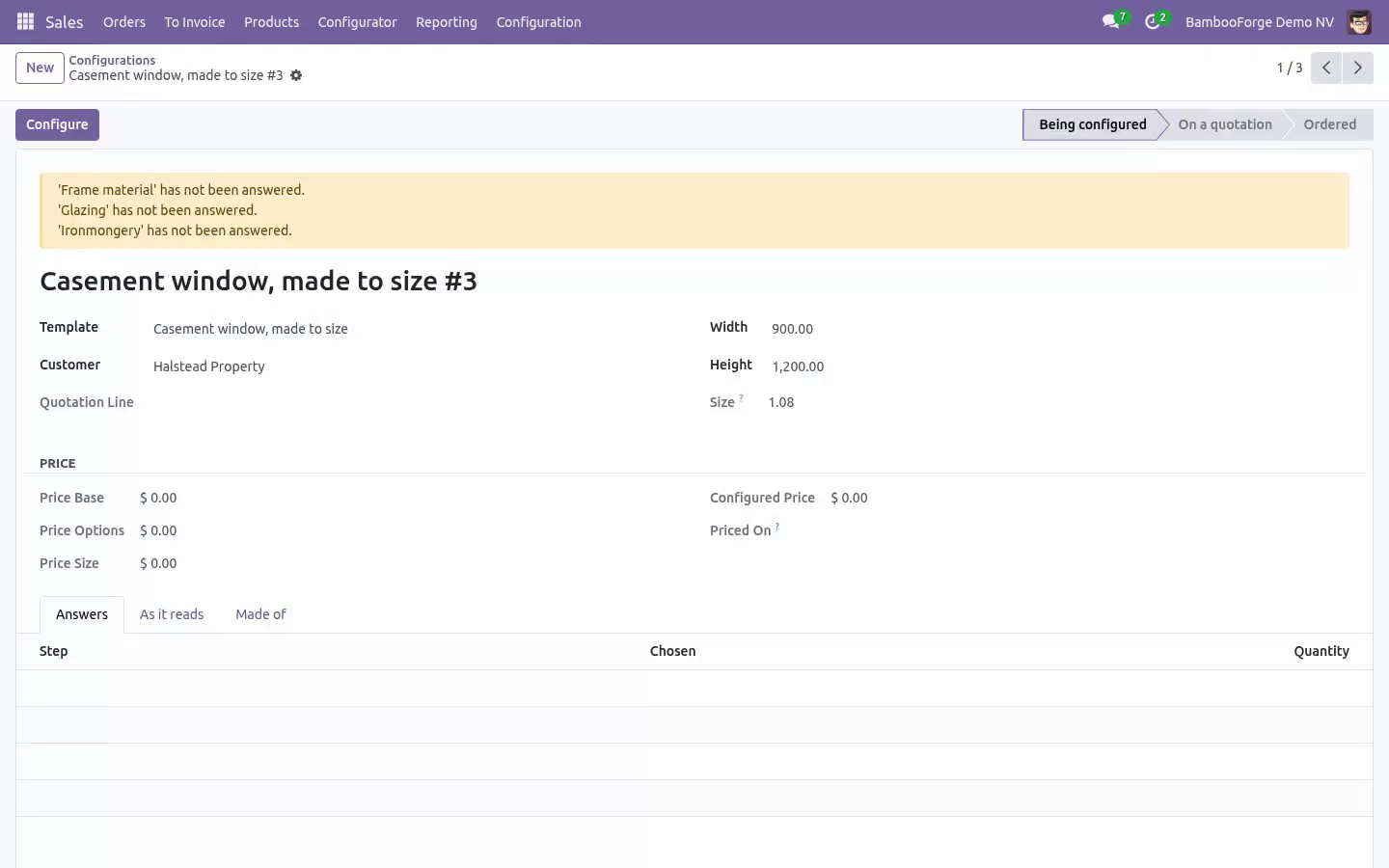
Every answer can add a flat amount, add an amount per unit of size (for a coating charged by the square metre), and carry a component. A question can be marked required: a required question left blank stops the configuration being priced, which is better than a quotation that silently forgot the glazing.
A question with no answers on it yet is not an error — somebody is still building the product. Trying to quote one is, and that is where it is caught.
Duplicate works. Copying a configurable product copies its questions, its answers, its size bands — and rebuilds the rules so they point at the copied answers, not the originals. "Tilt-and-turn, same as the casement" is one button, and the copy quotes the same money the original would.
The rules, on the server
Three kinds of rule between answers:
cannot be combined with — the brass handle does not clear a triple-glazed sash.
needs — triple glazing needs the reinforced frame.
automatically adds — triple glazing brings the long screws with it.
All three are checked in the model, not in the browser. A rule that only lives in the screen stops existing the first time an order arrives by import, by RPC, or by duplicating last year's quotation.
Two promises about "automatically adds":
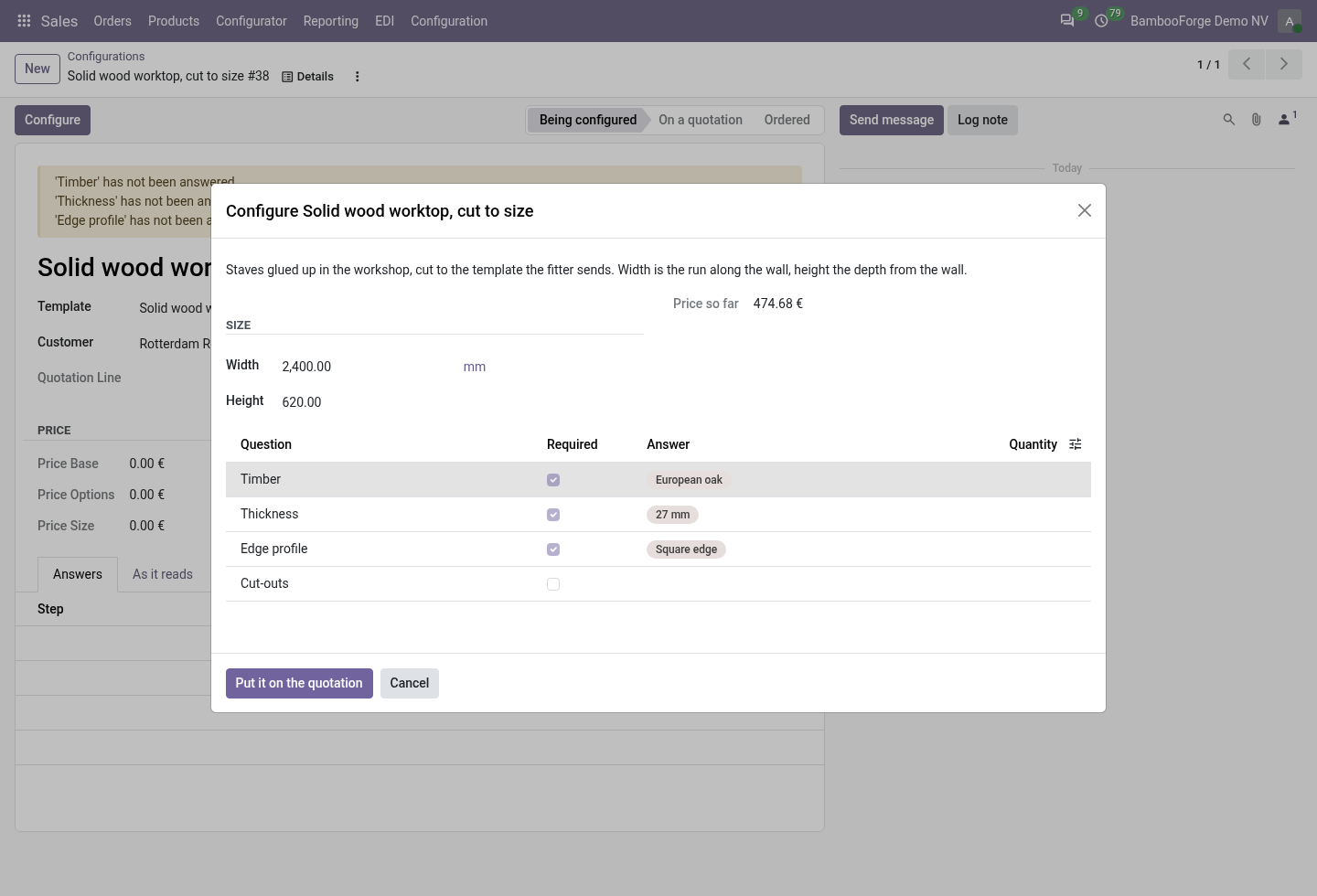
It never displaces an answer a human chose. If a rule wants the hand-oiled finish and the salesperson picked the cheap one on purpose, nothing is swapped silently — the clash is reported in plain words and the configuration will not price until a person settles it.
It never drops an implication silently. The pass runs to the end of the chain, bounded by the number of answers, and anything that could not land is reported as a problem. A window built without its reinforcement because a chain was eleven rules deep is not a configurator, it is a liability.
Say why in the message, not what. "The brass handle does not clear a triple-glazed sash" is a sentence a salesperson can read out loud.
Size, in the unit the bands are written in
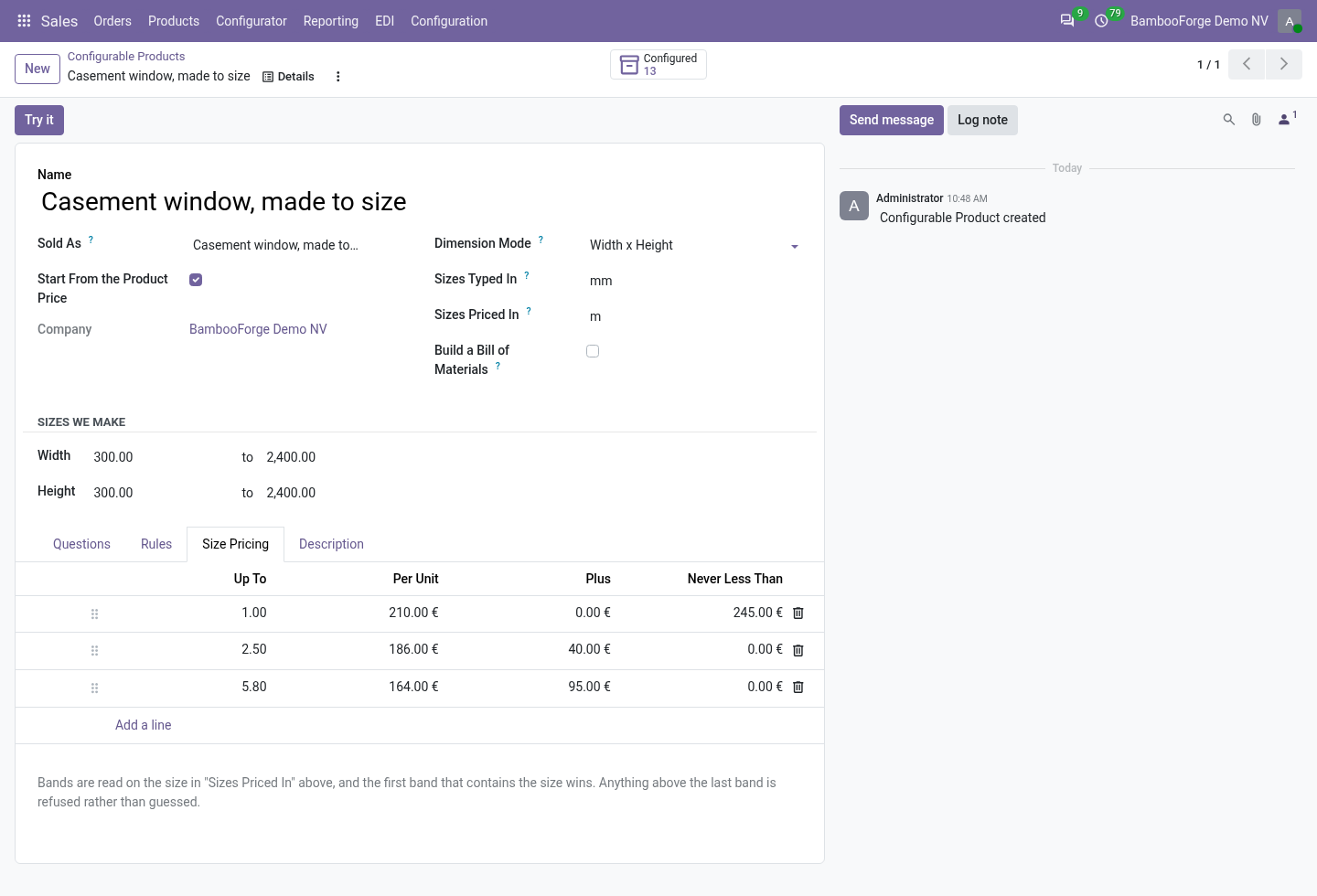
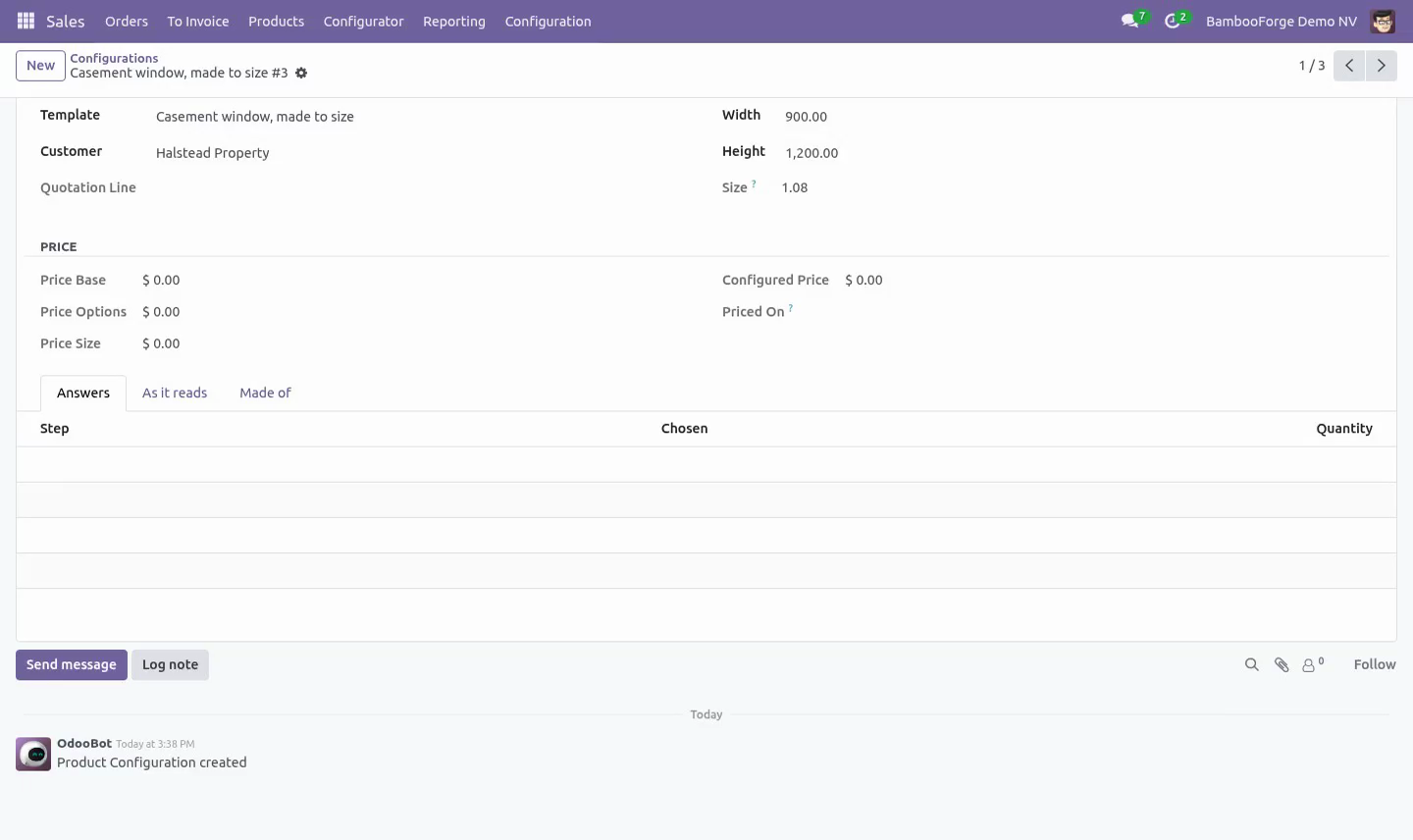
Turn on length, width×height or width×height×depth, and state two units: the one the shop floor types (Sizes Typed In — millimetres for joinery) and the one the bands are priced in (Sizes Priced In — square metres). A joiner types 1200 × 900; the bands are read on 1.08.
The two units are stated separately on purpose. "Convert to the reference unit of the family" sounds cleaner and is wrong on a moving target: Odoo 16–20 make the metre the reference for length, Odoo 20 rebuilt units as a chain whose root is the millimetre — the same code would divide by a thousand on one series and not on the other, and nothing would look wrong until a quotation went out. Two units that cannot be converted into each other are refused at configuration time, on every series — including 19 and 20, where the standard conversion no longer raises and would happily price kilograms per metre.
Bands are read in order and the first one that contains the size wins, compared at six decimal places — 4100 mm × 100 mm is 0.41 square metres and lands in the "up to 0.41" band, not three billionths past it at five times the price. Each band has a rate, a flat amount and a minimum charge, because a window 200 mm wide still costs a man an afternoon. Two bands ending at the same size are refused outright.
A size above the largest band is refused, not guessed. The everyday misconfiguration is somebody widening what the shop makes and forgetting the band that covers it; the configurator says so and asks for the job to be quoted by hand.
The price, and when it stops moving
The preview in the configurator is the price that lands on the quotation — implications included, in the order's currency. The salesperson reads it out loud on the phone; those two numbers being different is the fastest way this class of software gets switched off.
The base product goes through the pricelist, at the line's unit of measure and the order's date — so a dozen is priced as a dozen, the customer's agreed discount applies, and a quotation dated next month prices off next month's pricelist.
Options and size are cost build-up on top and are not discounted again.
Taxes are never written by this module — and a product whose tax is included in the price is handled the way core handles it: the net figure the engineer typed is grossed up onto the line, so a 20% included tax does not quietly eat a sixth of every window.
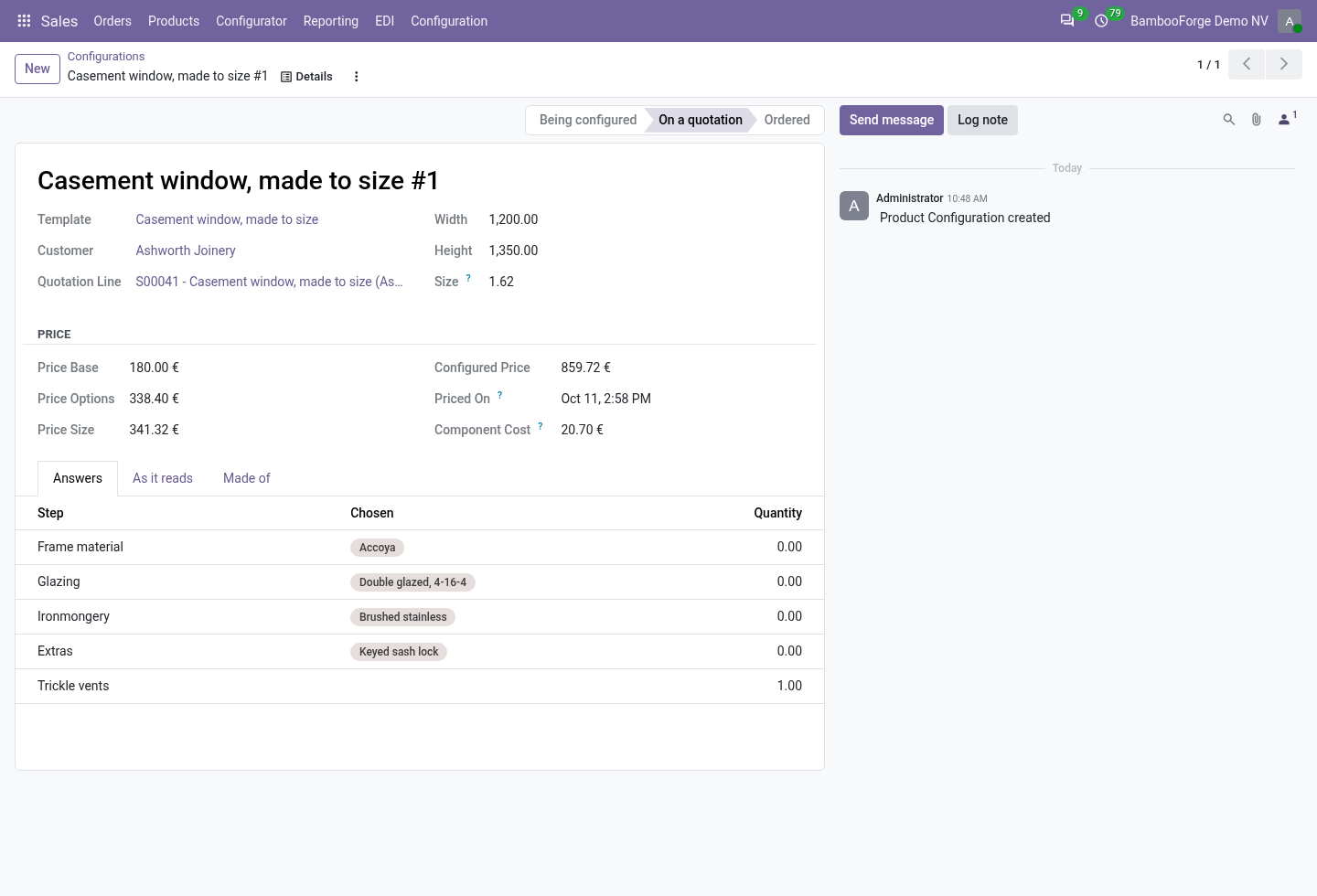
The price is frozen the moment it is quoted, with the date it was worked out. Retuning a band next month does not rewrite what the customer was sent. Typing the quantity afterwards — which is the order the work actually happens in — does not either, and neither does the Update Prices button.
The freeze covers the answers as well as the number: once quoted, the answers cannot be rewritten, added to or deleted, by anybody, through any door — form, import or RPC. What the works order is built to is what the customer was charged for.
A configuration on a confirmed order cannot be edited at all. Cancelling the order makes it readable again as a quotation.
Duplicating a quotation duplicates the configuration.
A question or an answer that has been sold cannot be deleted, only archived. A deleted answer makes an old quotation lie about what was ordered.
Housekeeping is honest too: an abandoned wizard (opened, closed, never answered) is cleaned up when the order confirms rather than frozen at a price of zero for ever, and deleting a quotation line archives its quoted configuration — kept for the audit trail, no longer a reason the product can never be retired.
On the quotation
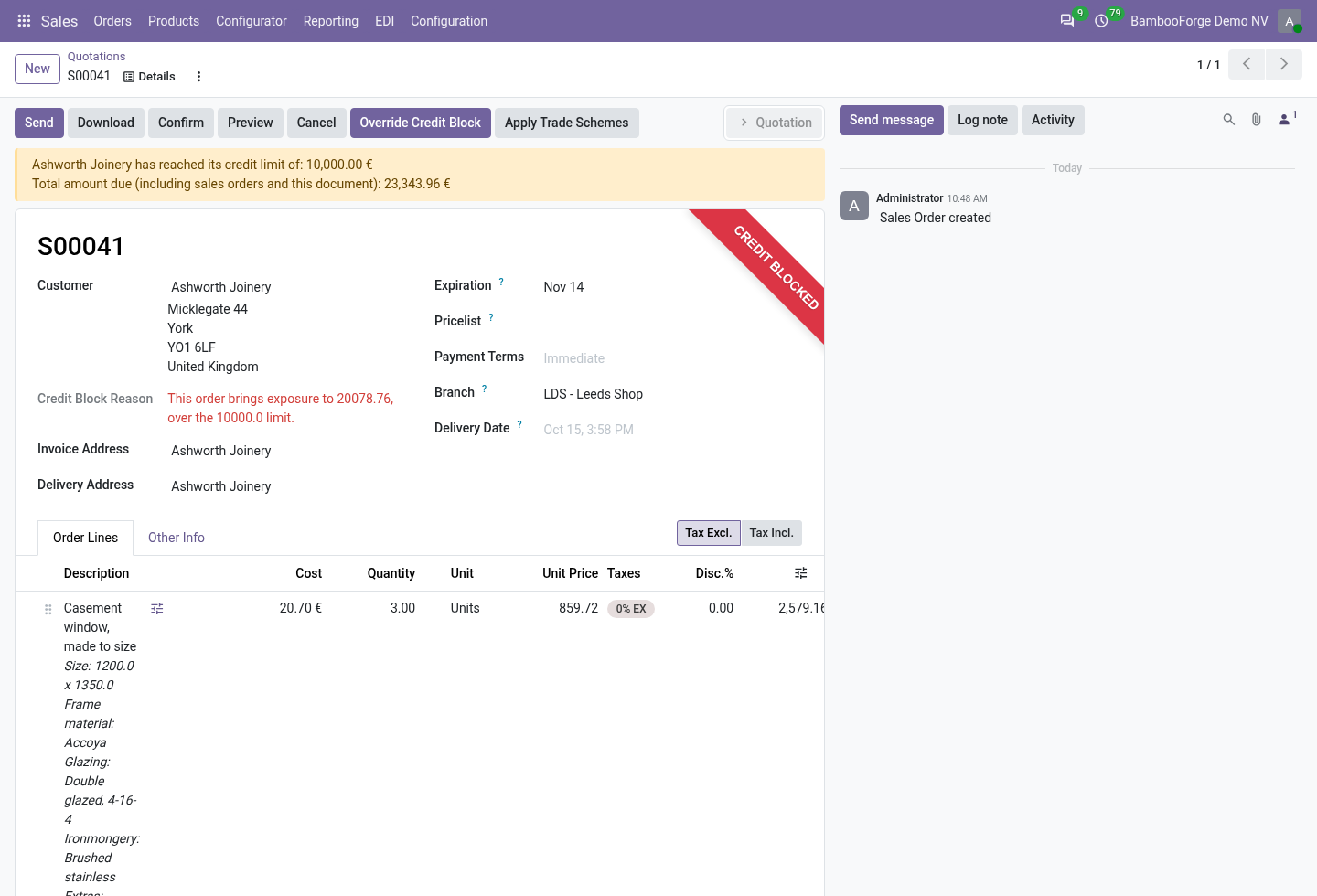
A configurable product on a quotation line shows a small slider icon for anyone in the Sales app — the group is implied by Salesperson, and a user without it can still open every quotation (the injected fields are group-scoped and the flag is computed in one query per order, not one per line). Press it, answer the questions, and the line gets the configured price and a description that reads like something a customer would recognise:
Casement window, made to size Size: 1200.0 x 1500.0 Frame material: Accoya Glazing: Triple glazed, 4-12-4-12-4 Ironmongery: Brushed stainless
Changing the product on a configured line is refused — the description and the price would be describing something else. Delete the line and start again.
What the line is made of, and what it costs you
Every answer can carry a component and a quantity. The first time a line is priced, those components are written onto the configuration's Made of tab as an ordinary editable list - and from there they belong to that quotation line.
Add a component, remove one, swap one, change a quantity: this job takes two long brackets, not four; this customer supplies their own glass. Nothing you do there is written back to the template, and no other quotation line changes. The next quotation starts from the standard build again, and Rebuild from answers puts this one back to it.
Under the list is Component Cost: the components' own cost prices, added up, read as the configuration's company - so a two-company database quotes with its own costs and not the other company's. It follows the list, immediately: swap a brass handle for steel and the number moves.
The same number reaches the quotation line as Cost, in the order's currency, next to the price. If Odoo's own Margin feature is installed, its Cost and Margin columns are filled from here too, so the margin a salesperson reads is the margin of what is actually on the line.
Two things deliberately do not happen. The customer's price does not move when you change a component - a quotation says what it said, and the build is your business, not theirs. And the customer never sees the components as priced lines: the line stays one line, with one price, and the chosen answers printed underneath as plain text.
Once the order is confirmed the list is closed: changing what a customer agreed to, after they agreed to it, is not an edit but a different sale.
With Manufacturing installed and Build a Bill of Materials ticked on the product, a manager can create the BoM from the list as it stands.
It is created once per configuration, inactive, and named after the configuration — because sixty active BoMs a week on the same product variant means _bom_find picks one at random and the shop floor cuts brass handles for a steel-handle order. Somebody activates the one they mean, for the job they mean.
Companies
Templates, questions, answers, rules, bands and configurations all carry the company and a record rule. The products an answer carries are checked against the template's company — the fencing contractor's engineer cannot wire the joinery's hinge into their product by picking it from a list that forgot to filter.
What it needs
sale_management, sales_team, product and uom. All Community. No Enterprise module is required, and none is used; Manufacturing is optional and only ever additive.
How we make sure it works
Before every release, 66 automated checks run against this app on Odoo 16, 17, 18, 19 and 20. Among them:
A size nobody priced is refused not guessed.
Two units that cannot be converted are refused.
A generated bill of materials cannot be picked by accident.
An abandoned draft is not frozen by confirming the order.
An answer cannot be added to an ordered configuration.
The complete list is in the source you receive.
What it does not do
Said before you buy, because it is the half that decides whether the app fits:
Drop an implication silently: a rule that cannot land is reported, on the server, on every path an order can arrive by.
Price outside the rules you wrote - there is no hidden pricing engine.
Reprice the customer's line when you edit its components. The cost follows the build; the agreed price does not.
Show the customer what the line is made of as priced lines. One line, one price, and the answers as text underneath.
Let anyone change the build after the order is confirmed.
Install
Copy bambooforge_cpq into your addons path and update the app list, or install the ZIP from the Odoo Apps Store.
Install Product Configurator (CPQ) with Price Rules.
Open Configurations - its menus are Configurable Products, Configurator.
Questions people ask
- Which Odoo versions does it run on?
Odoo 16.0, 17.0, 18.0, 19.0, 20.0, on the series you buy it for; each series is its own listing.
- Community or Enterprise?
Both. It needs no Enterprise app.
- What does it need?
The standard Discuss, Products, Sales, Settings, Units of Measure, sales_team apps. No extra Python package.
- Where does it show up?
Under the Configurations menu (Configurable Products, Configurator).
- Does anything leave my server?
No. It makes no call outside your Odoo server: no telemetry, no licence check, no third-party service.
- What happens if I uninstall it?
Odoo drops the app's own tables and fields; the standard records it worked on (contacts, orders, products) stay as they are.