 BambooForge Labs
SEO All in One with Cookie Scanner and Consent
Scan your own pages, list the third parties they really load and the cookies you really set, and see which ones your banner never declared.
Available for Odoo 16.0, Odoo 17.0, Odoo 18.0, Odoo 19.0, Odoo 20.0. Technical name bambooforge_cookie_scanner.
Transcript of the walkthrough (Odoo 20)
SEO All in One with Cookie Scanner and Consent. Scan your own pages, list the third parties they really load and the cookies you really set, and see which ones your banner never declared. Said before you buy, because it is the half that decides whether the app fits: In the next few minutes: seo all in one with cookie scanner and consent, then running a scan, then what it will not claim, then the work list, then the knowledge base. Then what this app deliberately does not do, so you can tell before you buy whether it fits.
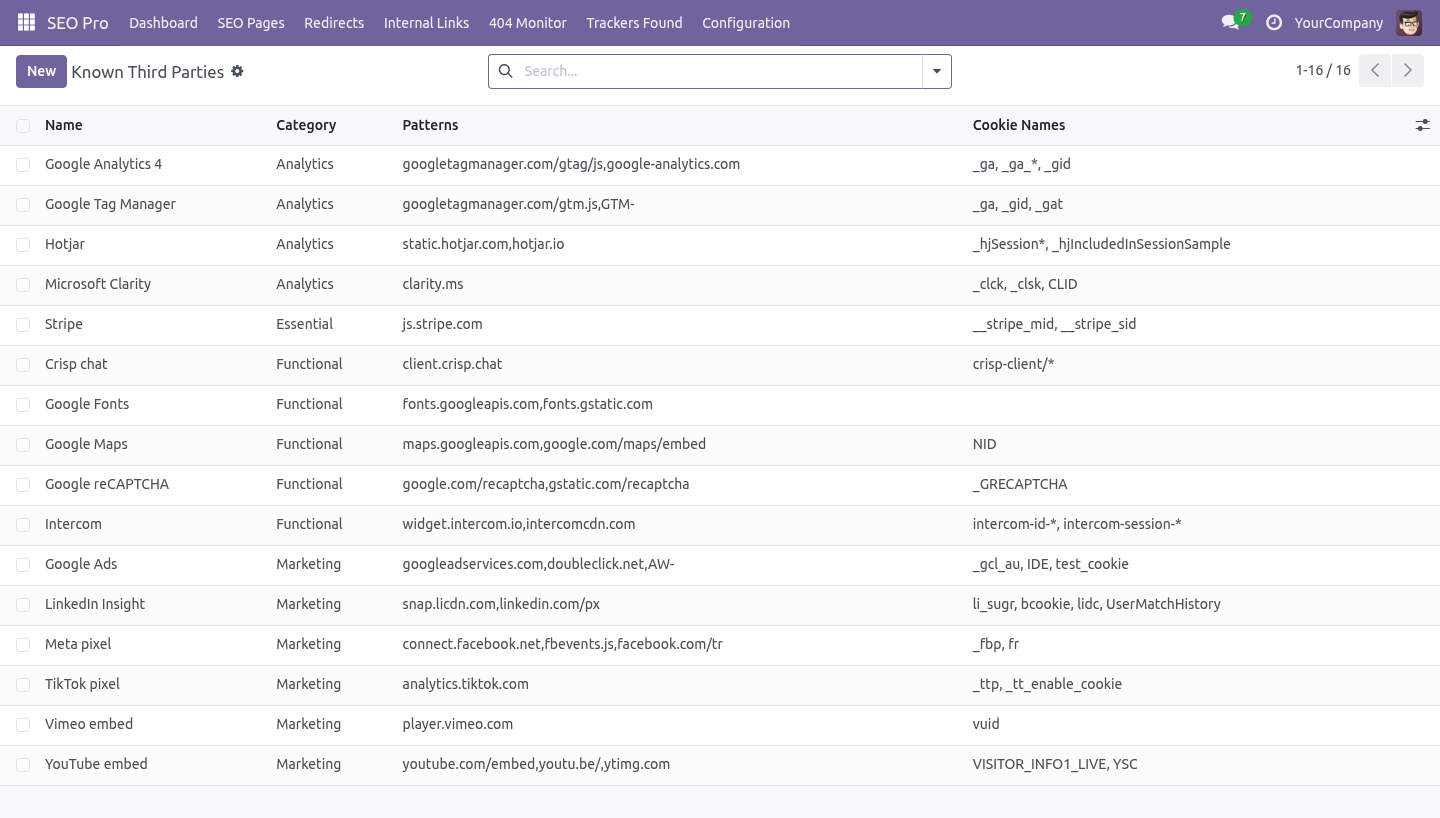
Everything lives under Cookie Scans then Known Third Parties then Trackers Found. 1. Install BambooForge Cookie Scanner (it needs SEO Pro). Sixteen known third parties are created and a monthly scan is scheduled for every website; nothing is fetched until the first scan runs.
2. Open SEO Pro → Trackers Found, and under Configuration, Cookie Scans and Known Third Parties. SEO All in One with Cookie Scanner and Consent. An add-on for BambooForge Consent Pro.
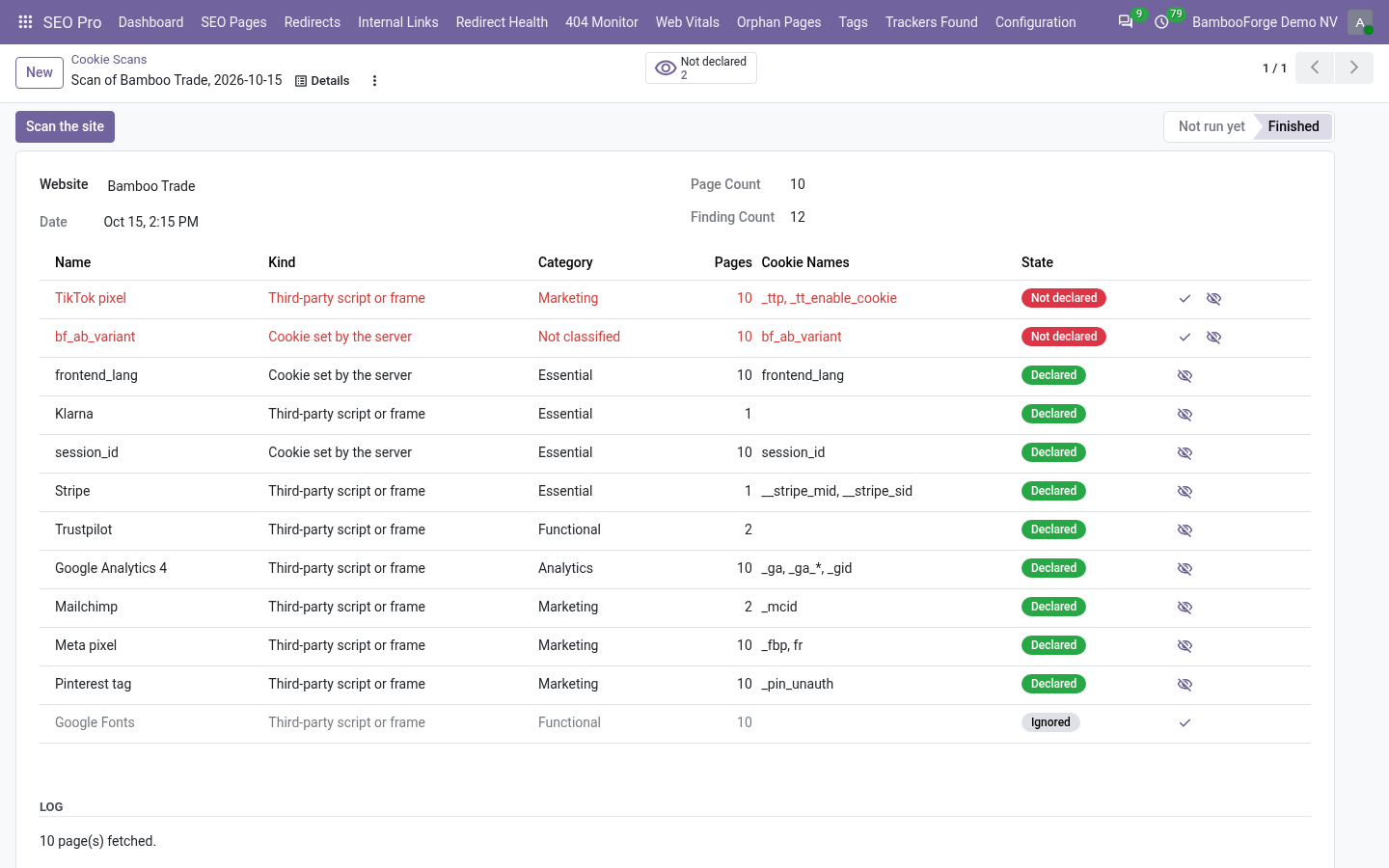
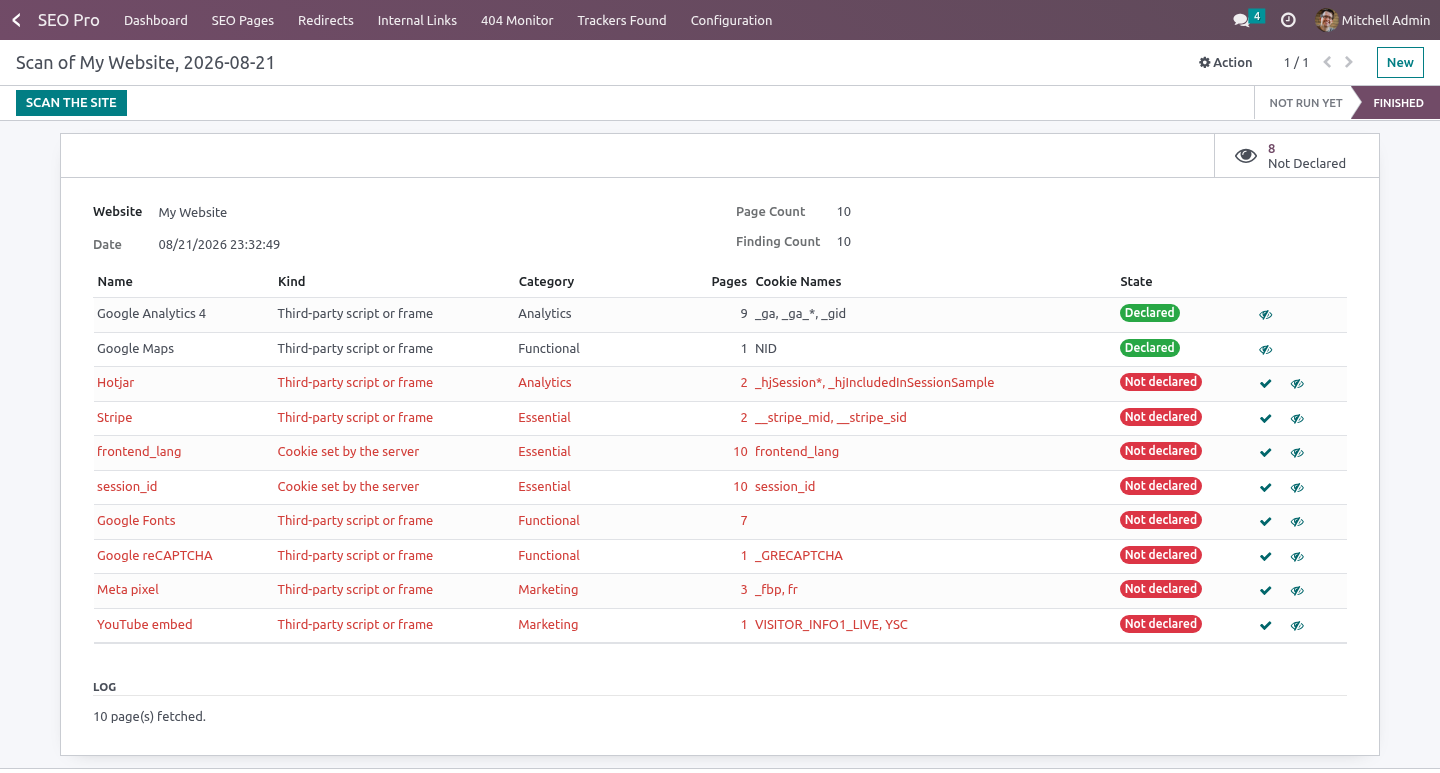
A cookie banner lists what somebody typed into it eighteen months ago; a website loads what its pages actually contain. This shows you the gap. Running a scan. Configuration → Cookie Scans → New → Scan the site.
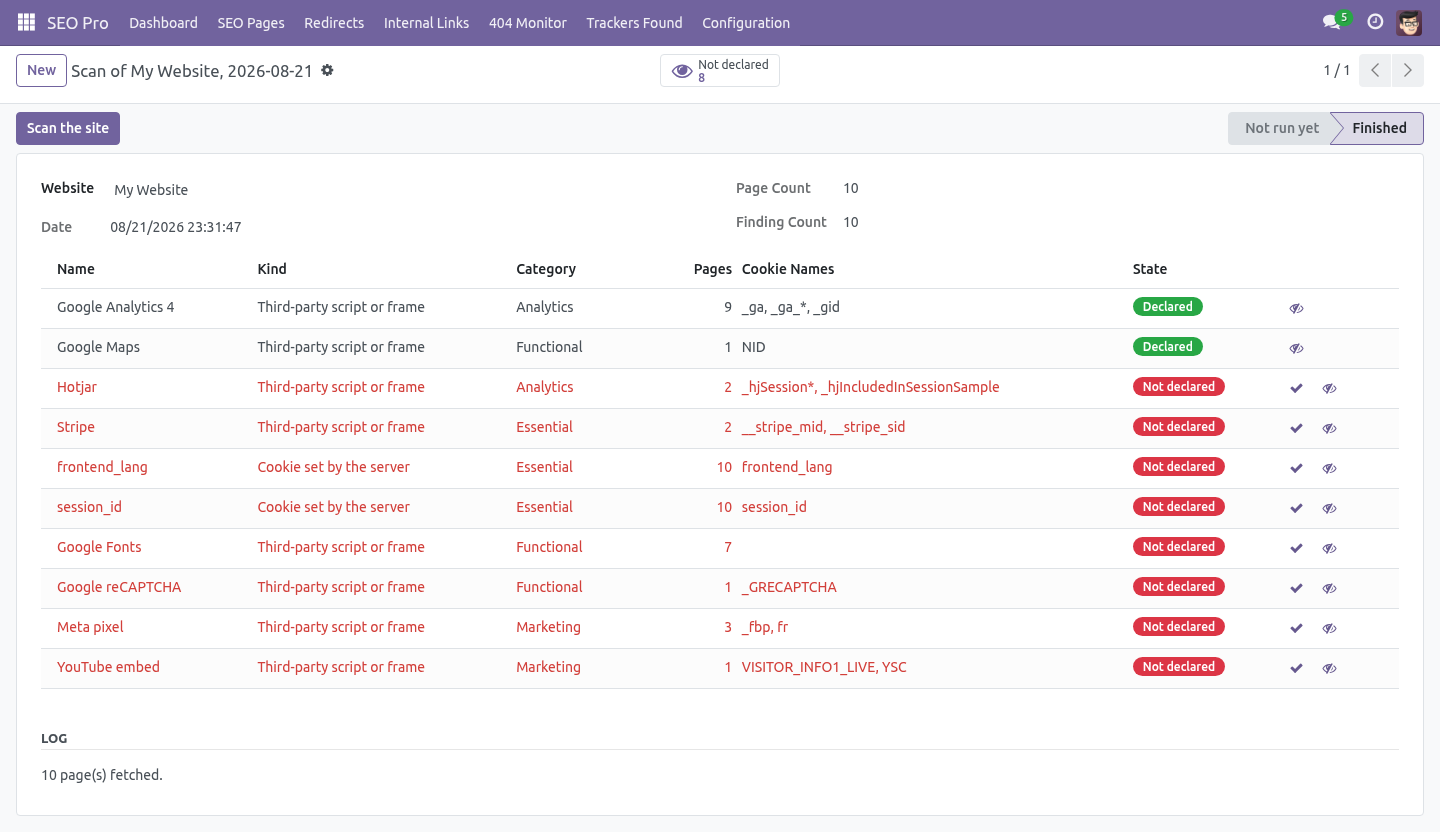
third parties, matched against the knowledge base; cookies your server set, read from the response headers. The scan fetches this website's own pages - the ones SEO Pro has indexed, at most sixty, one at a time, each with a twelve second timeout and a two megabyte cap. It never fetches another host: a scanner that can be pointed elsewhere is a proxy. What it will not claim.
It does not run JavaScript. That matters, and it is stated on every screen: it reports which vendor is present and which cookies that vendor is known to set - not that it observed them. Cookies from the response headers are labelled separately, because those really were observed. That is the version of the report you can defend.
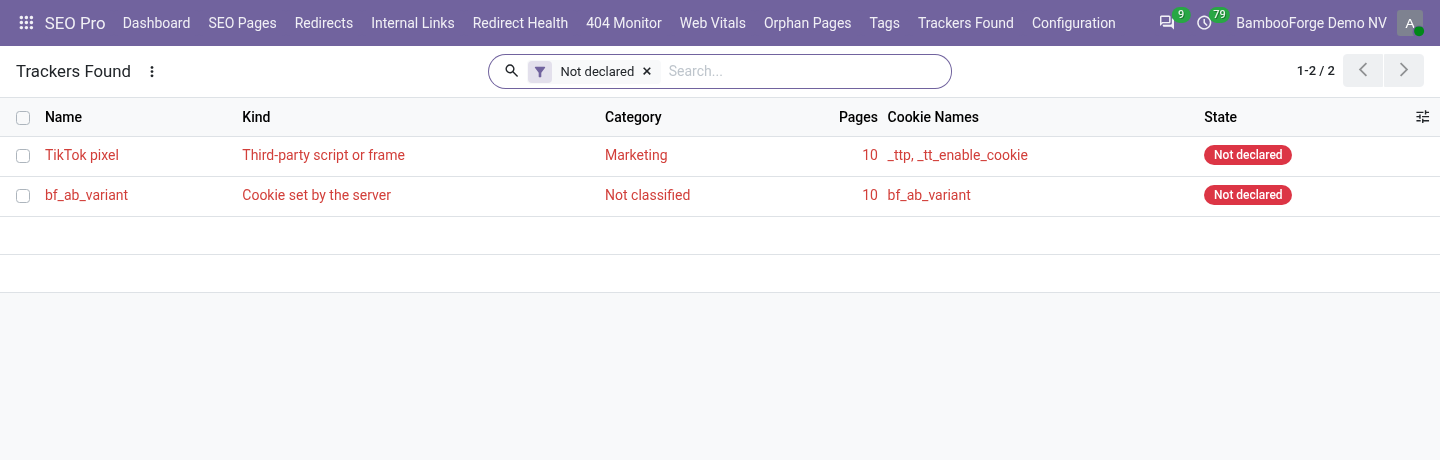
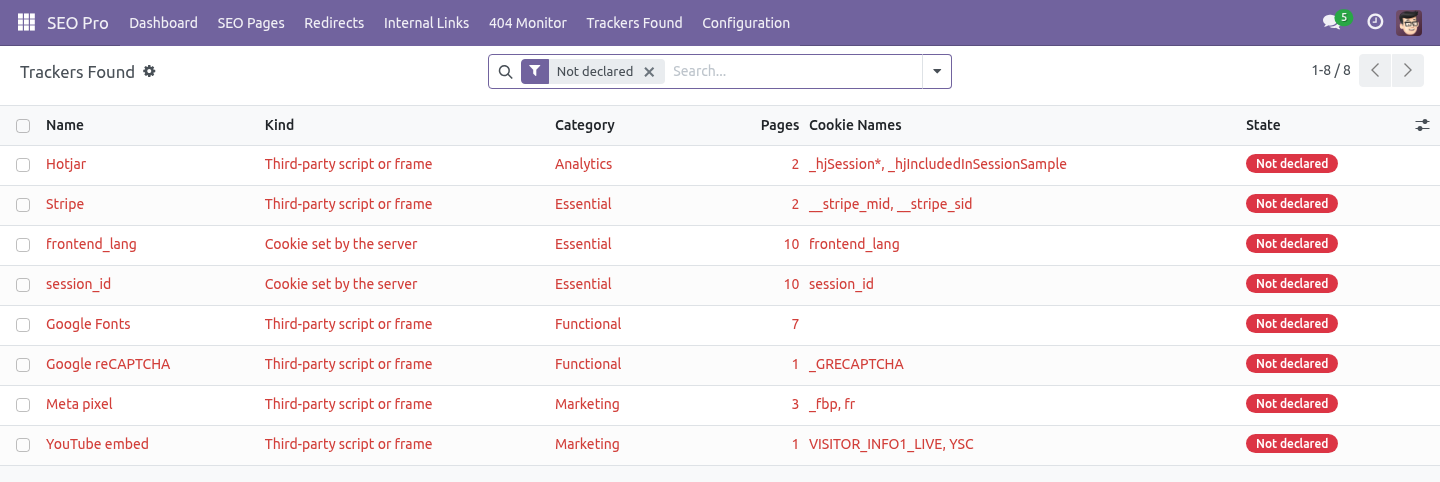
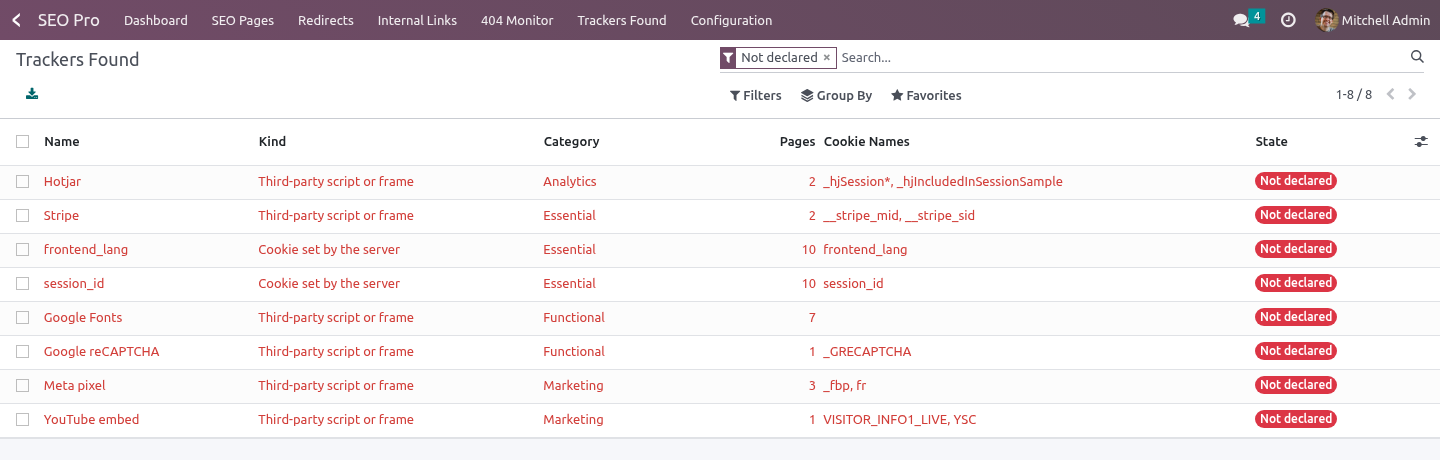
A tool that shows a cookie list it inferred is a tool that will be wrong in a meeting. The work list. SEO Pro → Trackers Found opens on Not declared: findings that Consent Pro has never been told about. A finding is treated as declared when a Consent Pro script has the same name, or contains one of the vendor's fingerprints in its URL, code or preset.
Declare in Consent Pro creates the entry with the vendor's category, so the banner and the register agree with the site. Ignore is for the ones you have decided about - a first-party analytics script, say. The knowledge base. Configuration → Known Third Parties.
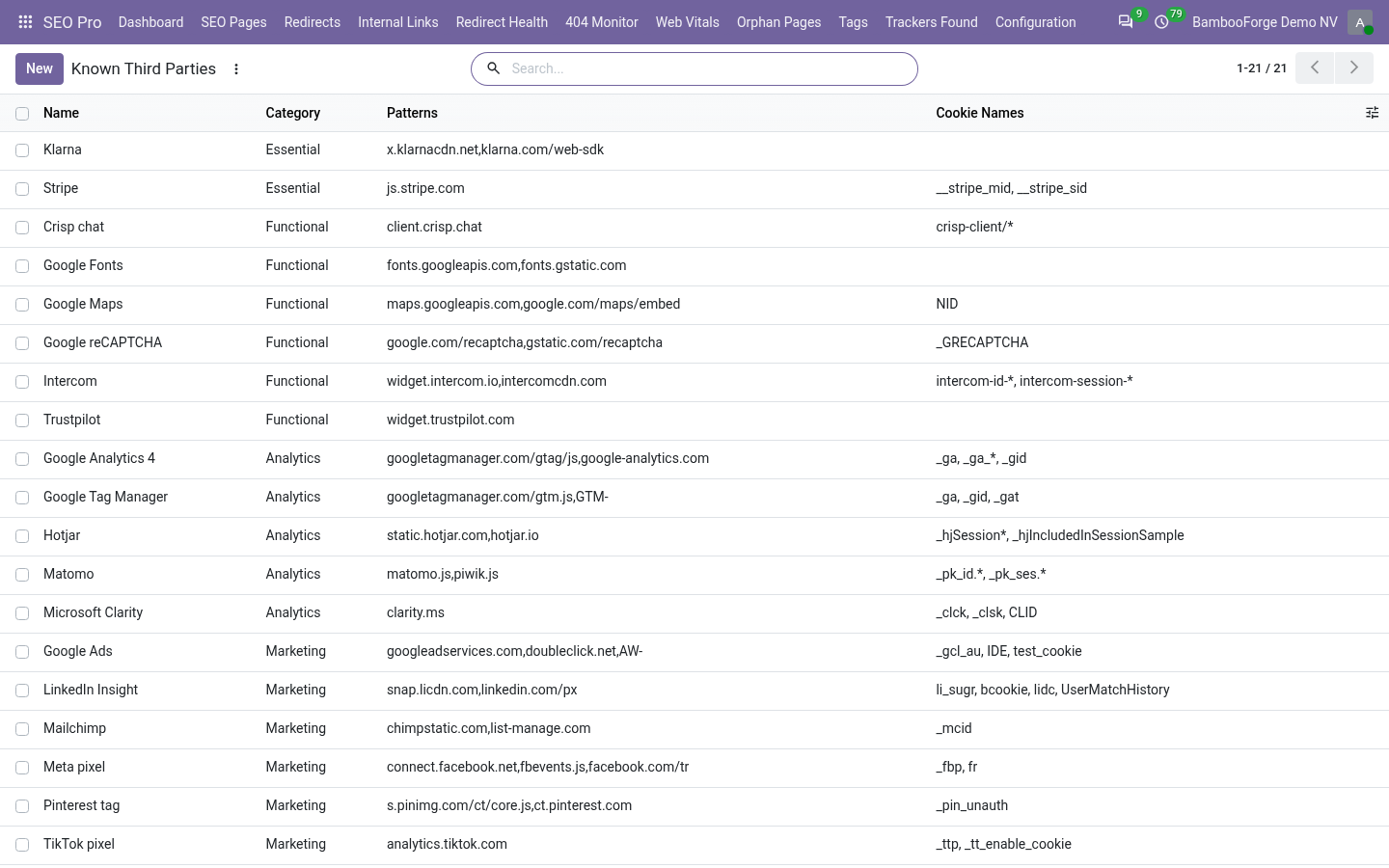
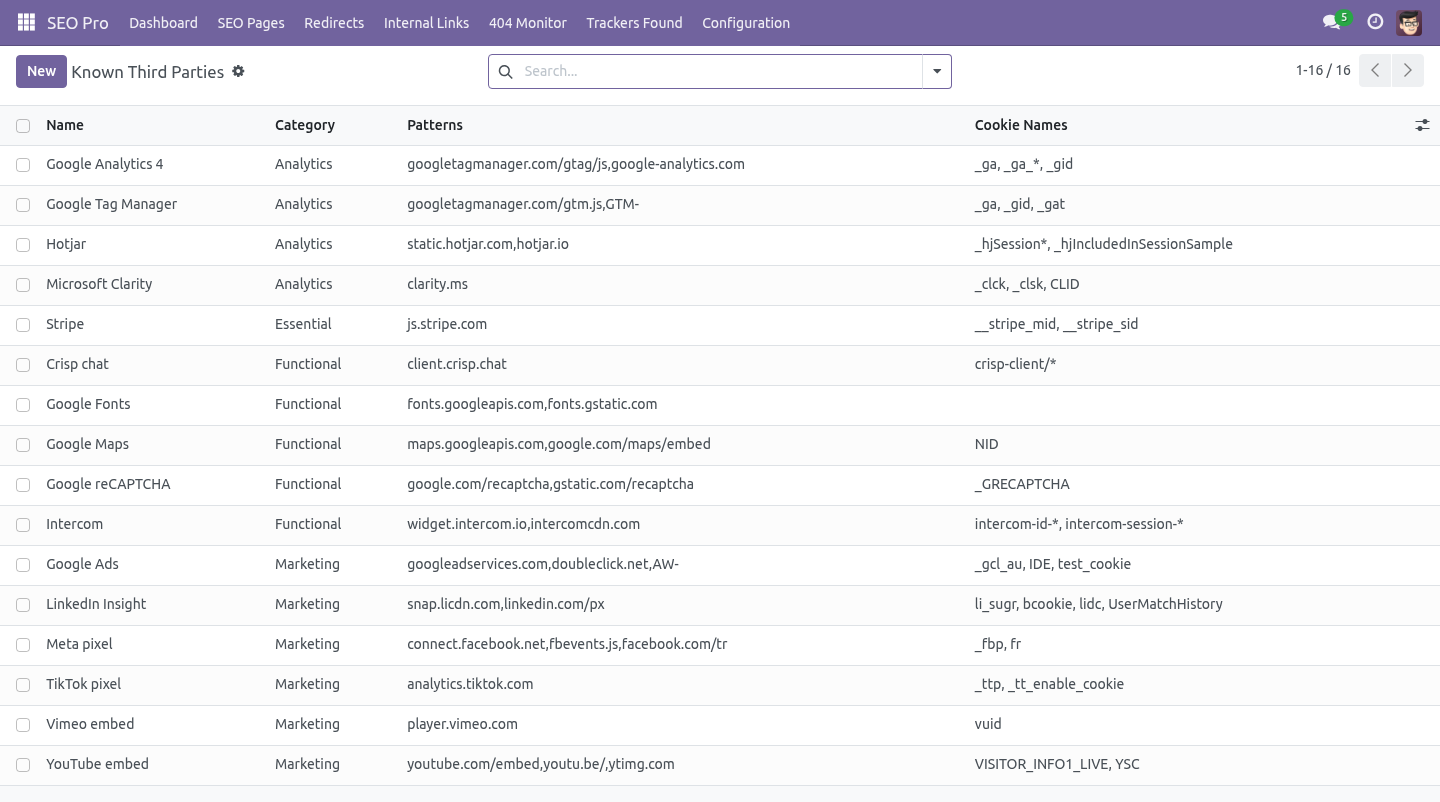
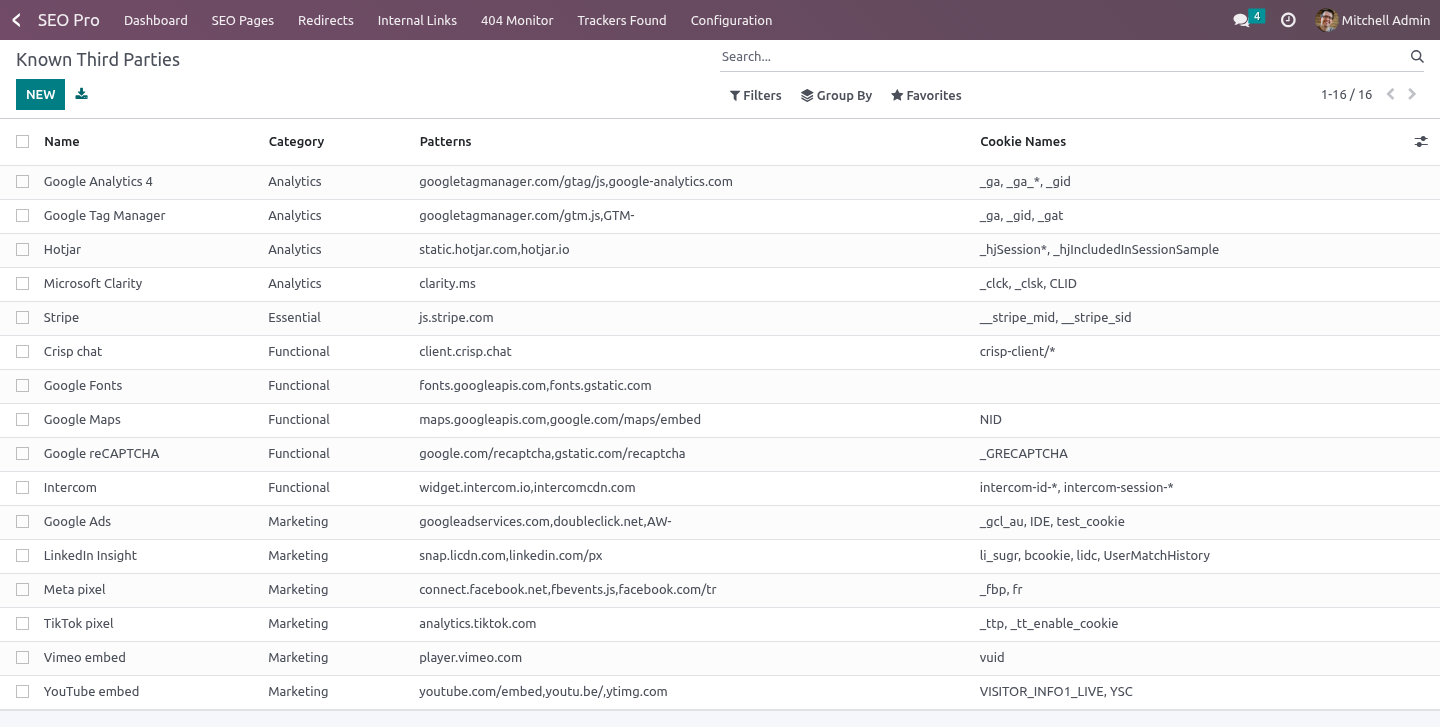
A vendor is: a name, as it should appear in the banner; a category - essential, functional, analytics or marketing; patterns: comma-separated fragments to look for in the page source, usually a host or a script path; the cookies it is known to set, used to fill in a declaration; optionally a privacy policy URL and a note. Google Fonts sets no cookie, and is listed anyway: the visitor's IP address reaches Google, which a German court has had an opinion about. Stripe is filed as essential because that is what it is on a checkout. If it is on every page of your site, that is the finding.
They are ordinary records. Add the one your agency uses; the next scan knows it. The monthly scan. Every website with Scan for undeclared trackers monthly on is scanned at 02:20, so a script somebody added in a hurry shows up in the report before it shows up in an audit.
A website whose scan fails does not stop the others. How we make sure it works. Before every release, 22 automated checks run against this app on Odoo 16, 17, 18, 19 and 20. Among them: A read only seo user cannot start a scan.
Declaring twice does not duplicate the entry. It never fetches another host. A page that answers 404 is not scanned for trackers. A page that errors does not stop the scan.
The complete list is in the source you receive. Questions people ask. Which Odoo versions does it run on? Odoo 16.0, 17.0, 18.0, 19.0, 20.0, on the series you buy it for; each series is its own listing.
Community or Enterprise? Both. It needs no Enterprise app. Support.
support@bambooforge.dev - the people who wrote it. The complete manual is at docs dot bambooforge dot dev, the demo database is linked from the store page, and support answers within twenty-four hours. Links are in the description.
Transcript of the walkthrough (Odoo 19)
Cookie Scanner & Consent Audit. Scan your own pages, list the third parties they really load and the cookies you really set, and see which ones your banner never declared. An add-on for BambooForge Consent Pro. A cookie banner lists what somebody typed into it eighteen months ago; a website loads what its pages actually contain.
This shows you the gap. In the next few minutes: cookie scanner & consent audit, then running a scan, then what it will not claim, then the work list, then the knowledge base. Then what this app deliberately does not do, so you can tell before you buy whether it fits. Everything lives under Cookie Scans then Known Third Parties then Trackers Found.
Install BambooForge Cookie Scanner. Sixteen known third parties are created, and a monthly scan is scheduled for every website. Nothing is fetched until the first scan runs. Cookie Scanner & Consent Audit.
An add-on for BambooForge Consent Pro. A cookie banner lists what somebody typed into it eighteen months ago; a website loads what its pages actually contain. This shows you the gap. Running a scan.
Configuration → Cookie Scans → New → Scan the site. third parties, matched against the knowledge base; cookies your server set, read from the response headers. The scan fetches this website's own pages - the ones SEO Pro has indexed, at most sixty, one at a time, each with a twelve second timeout and a two megabyte cap. It never fetches another host: a scanner that can be pointed elsewhere is a proxy.
What it will not claim. It does not run JavaScript. That matters, and it is stated on every screen: it reports which vendor is present and which cookies that vendor is known to set - not that it observed them. Cookies from the response headers are labelled separately, because those really were observed.
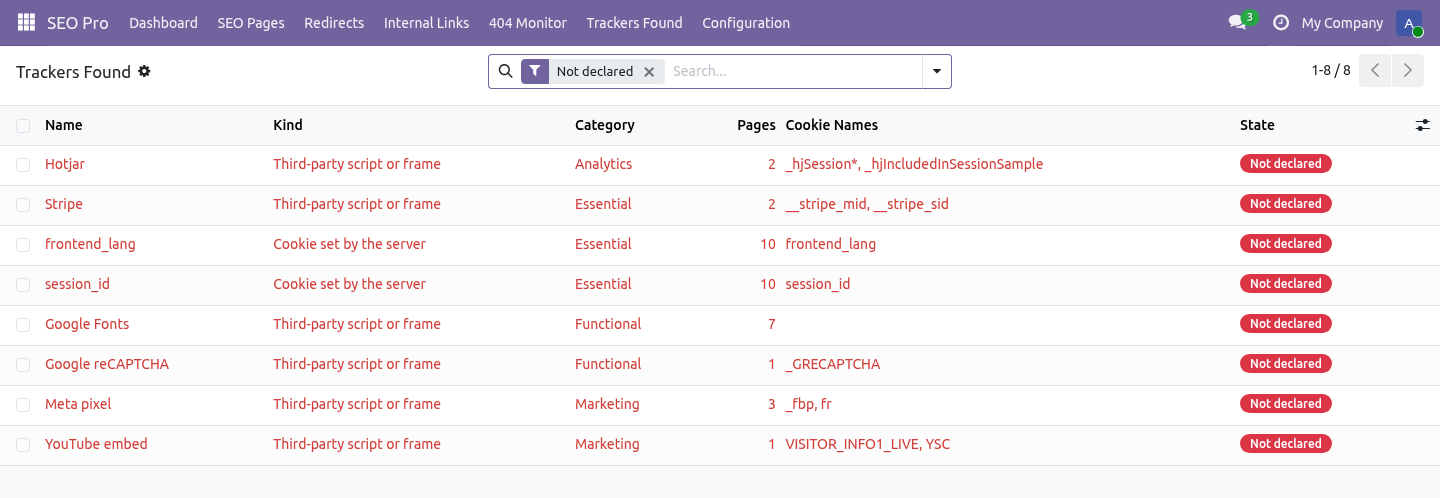
That is the version of the report you can defend. A tool that shows a cookie list it inferred is a tool that will be wrong in a meeting. The work list. SEO Pro → Trackers Found opens on Not declared: findings that Consent Pro has never been told about.
A finding is treated as declared when a Consent Pro script has the same name, or contains one of the vendor's fingerprints in its URL, code or preset. Declare in Consent Pro creates the entry with the vendor's category, so the banner and the register agree with the site. Ignore is for the ones you have decided about - a first-party analytics script, say. The knowledge base.
Configuration → Known Third Parties. A vendor is: a name, as it should appear in the banner; a category - essential, functional, analytics or marketing; patterns: comma-separated fragments to look for in the page source, usually a host or a script path; the cookies it is known to set, used to fill in a declaration; optionally a privacy policy URL and a note. Google Fonts sets no cookie, and is listed anyway: the visitor's IP address reaches Google, which a German court has had an opinion about. Stripe is filed as essential because that is what it is on a checkout.
If it is on every page of your site, that is the finding. They are ordinary records. Add the one your agency uses; the next scan knows it. The monthly scan.
Every website with Scan for undeclared trackers monthly on is scanned at 02:20, so a script somebody added in a hurry shows up in the report before it shows up in an audit. A website whose scan fails does not stop the others. Support. support@bambooforge.dev - the people who wrote it.
The complete manual is at docs dot bambooforge dot dev, the demo database is linked from the store page, and support answers within twenty-four hours. Links are in the description.
Transcript of the walkthrough (Odoo 18)
Cookie Scanner & Consent Audit. Scan your own pages, list the third parties they really load and the cookies you really set, and see which ones your banner never declared. An add-on for BambooForge Consent Pro. A cookie banner lists what somebody typed into it eighteen months ago; a website loads what its pages actually contain.
This shows you the gap. In the next few minutes: cookie scanner & consent audit, then running a scan, then what it will not claim, then the work list, then the knowledge base. Then what this app deliberately does not do, so you can tell before you buy whether it fits. Everything lives under Cookie Scans then Known Third Parties then Trackers Found.
Install BambooForge Cookie Scanner. Sixteen known third parties are created, and a monthly scan is scheduled for every website. Nothing is fetched until the first scan runs. Cookie Scanner & Consent Audit.
An add-on for BambooForge Consent Pro. A cookie banner lists what somebody typed into it eighteen months ago; a website loads what its pages actually contain. This shows you the gap. Running a scan.
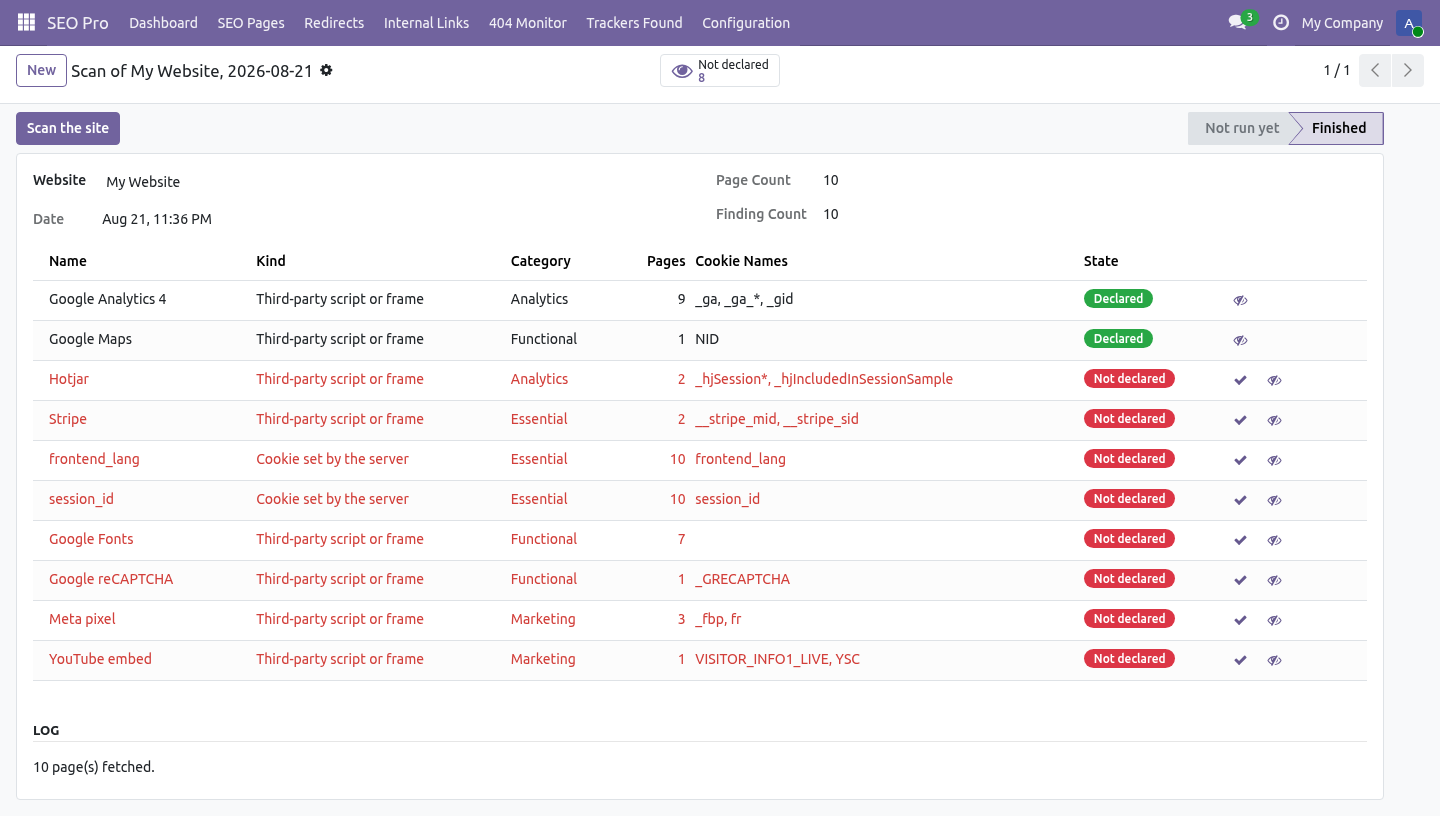
Configuration → Cookie Scans → New → Scan the site. third parties, matched against the knowledge base; cookies your server set, read from the response headers. The scan fetches this website's own pages - the ones SEO Pro has indexed, at most sixty, one at a time, each with a twelve second timeout and a two megabyte cap. It never fetches another host: a scanner that can be pointed elsewhere is a proxy.
What it will not claim. It does not run JavaScript. That matters, and it is stated on every screen: it reports which vendor is present and which cookies that vendor is known to set - not that it observed them. Cookies from the response headers are labelled separately, because those really were observed.
That is the version of the report you can defend. A tool that shows a cookie list it inferred is a tool that will be wrong in a meeting. The work list. SEO Pro → Trackers Found opens on Not declared: findings that Consent Pro has never been told about.
A finding is treated as declared when a Consent Pro script has the same name, or contains one of the vendor's fingerprints in its URL, code or preset. Declare in Consent Pro creates the entry with the vendor's category, so the banner and the register agree with the site. Ignore is for the ones you have decided about - a first-party analytics script, say. The knowledge base.
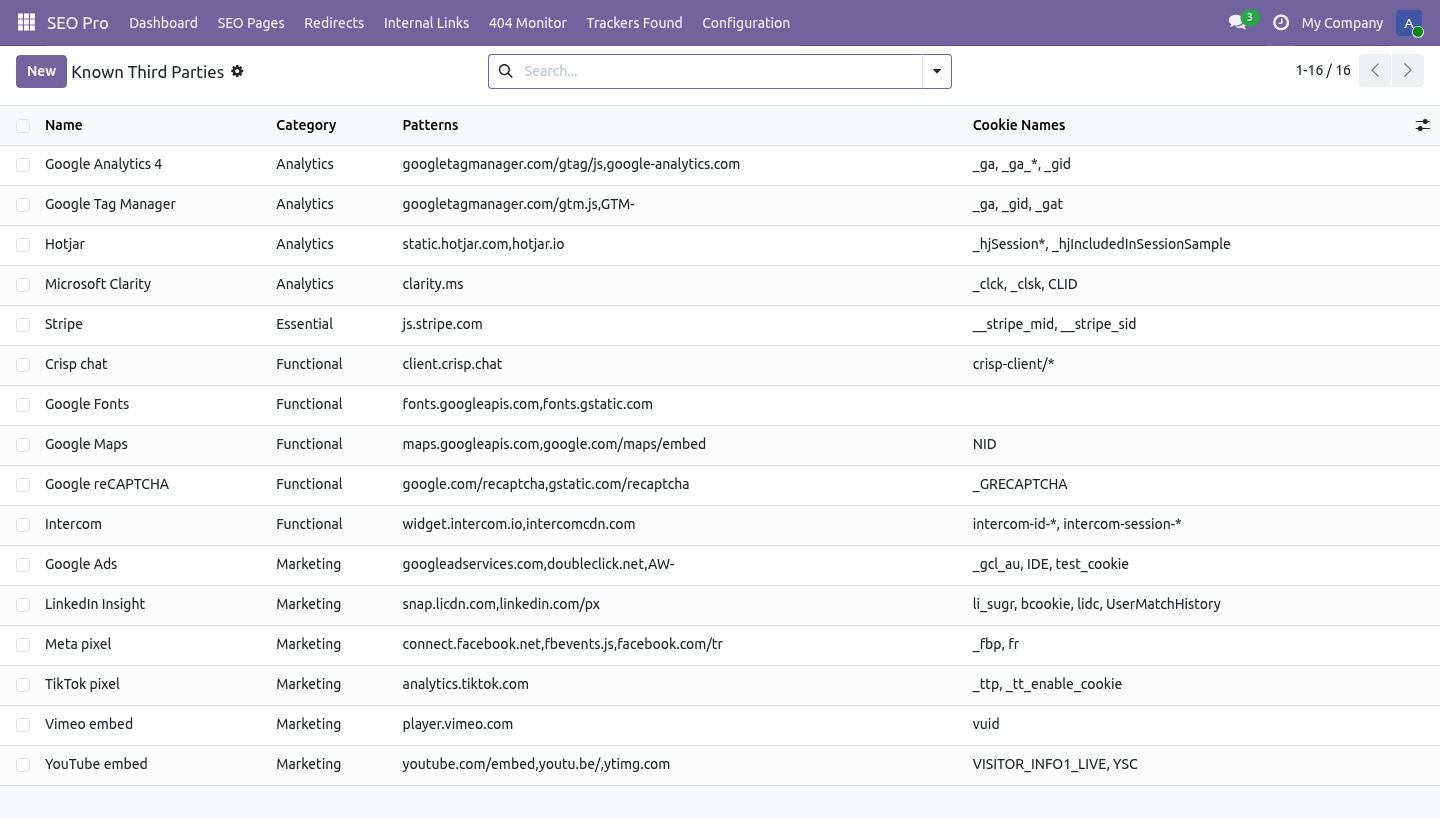
Configuration → Known Third Parties. A vendor is: a name, as it should appear in the banner; a category - essential, functional, analytics or marketing; patterns: comma-separated fragments to look for in the page source, usually a host or a script path; the cookies it is known to set, used to fill in a declaration; optionally a privacy policy URL and a note. Google Fonts sets no cookie, and is listed anyway: the visitor's IP address reaches Google, which a German court has had an opinion about. Stripe is filed as essential because that is what it is on a checkout.
If it is on every page of your site, that is the finding. They are ordinary records. Add the one your agency uses; the next scan knows it. The monthly scan.
Every website with Scan for undeclared trackers monthly on is scanned at 02:20, so a script somebody added in a hurry shows up in the report before it shows up in an audit. A website whose scan fails does not stop the others. Support. support@bambooforge.dev - the people who wrote it.
The complete manual is at docs dot bambooforge dot dev, the demo database is linked from the store page, and support answers within twenty-four hours. Links are in the description.
Transcript of the walkthrough (Odoo 17)
Cookie Scanner & Consent Audit. Scan your own pages, list the third parties they really load and the cookies you really set, and see which ones your banner never declared. An add-on for BambooForge Consent Pro. A cookie banner lists what somebody typed into it eighteen months ago; a website loads what its pages actually contain.
This shows you the gap. In the next few minutes: cookie scanner & consent audit, then running a scan, then what it will not claim, then the work list, then the knowledge base. Then what this app deliberately does not do, so you can tell before you buy whether it fits. Everything lives under Cookie Scans then Known Third Parties then Trackers Found.
Install BambooForge Cookie Scanner. Sixteen known third parties are created, and a monthly scan is scheduled for every website. Nothing is fetched until the first scan runs. Cookie Scanner & Consent Audit.
An add-on for BambooForge Consent Pro. A cookie banner lists what somebody typed into it eighteen months ago; a website loads what its pages actually contain. This shows you the gap. Running a scan.
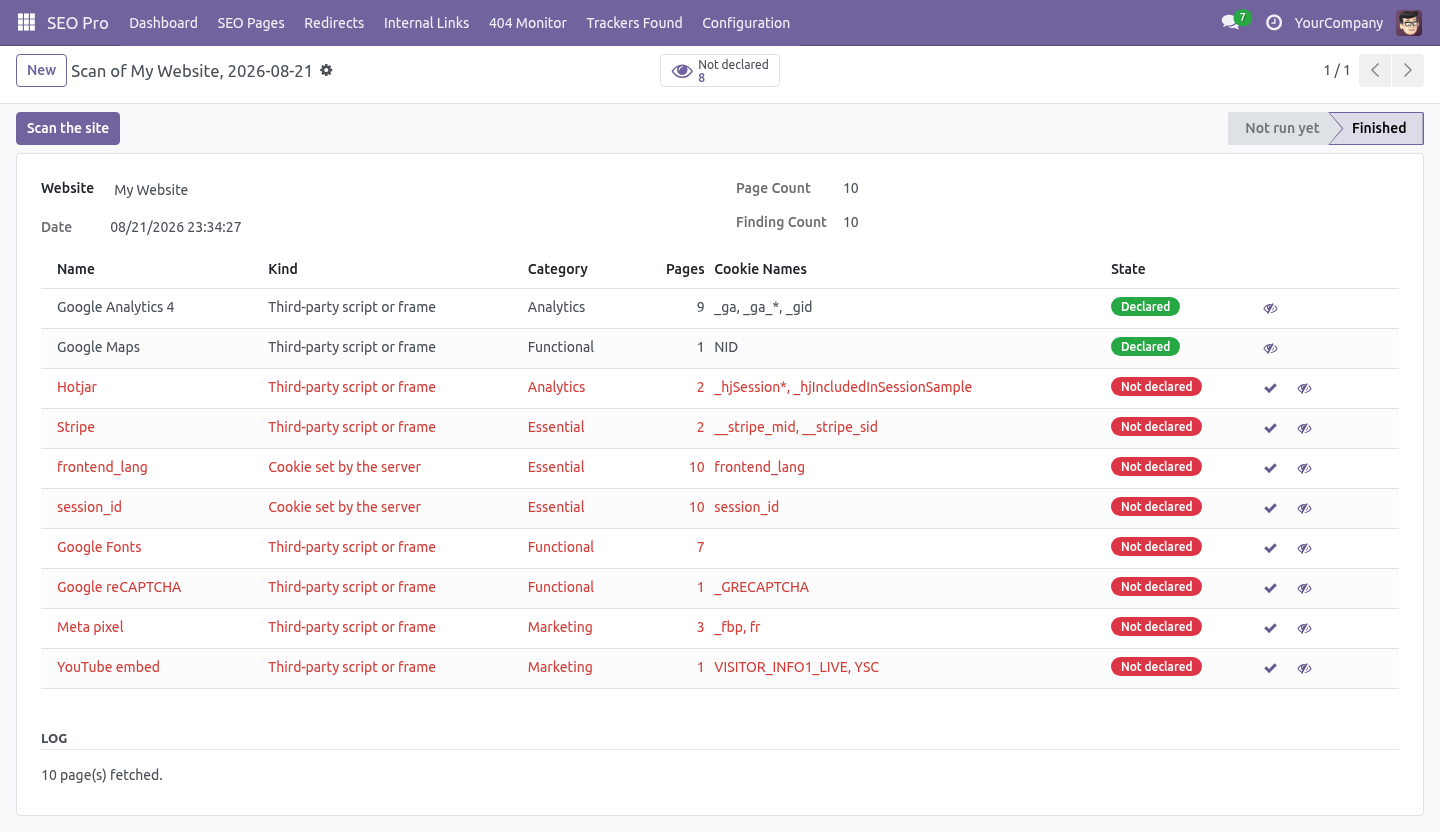
Configuration → Cookie Scans → New → Scan the site. third parties, matched against the knowledge base; cookies your server set, read from the response headers. The scan fetches this website's own pages - the ones SEO Pro has indexed, at most sixty, one at a time, each with a twelve second timeout and a two megabyte cap. It never fetches another host: a scanner that can be pointed elsewhere is a proxy.
What it will not claim. It does not run JavaScript. That matters, and it is stated on every screen: it reports which vendor is present and which cookies that vendor is known to set - not that it observed them. Cookies from the response headers are labelled separately, because those really were observed.
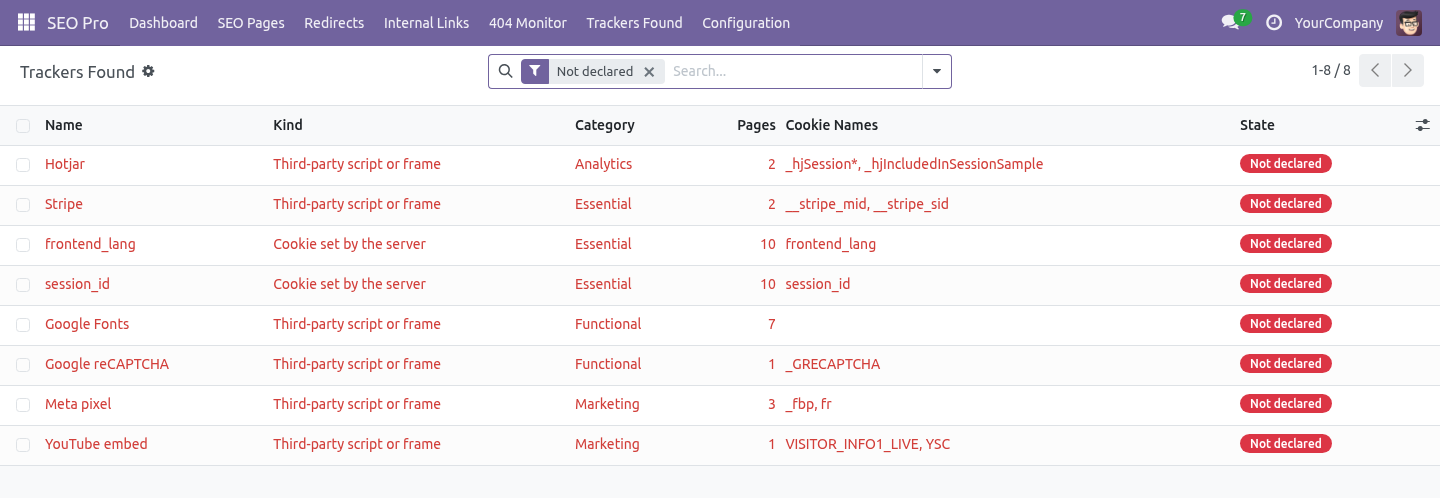
That is the version of the report you can defend. A tool that shows a cookie list it inferred is a tool that will be wrong in a meeting. The work list. SEO Pro → Trackers Found opens on Not declared: findings that Consent Pro has never been told about.
A finding is treated as declared when a Consent Pro script has the same name, or contains one of the vendor's fingerprints in its URL, code or preset. Declare in Consent Pro creates the entry with the vendor's category, so the banner and the register agree with the site. Ignore is for the ones you have decided about - a first-party analytics script, say. The knowledge base.
Configuration → Known Third Parties. A vendor is: a name, as it should appear in the banner; a category - essential, functional, analytics or marketing; patterns: comma-separated fragments to look for in the page source, usually a host or a script path; the cookies it is known to set, used to fill in a declaration; optionally a privacy policy URL and a note. Google Fonts sets no cookie, and is listed anyway: the visitor's IP address reaches Google, which a German court has had an opinion about. Stripe is filed as essential because that is what it is on a checkout.
If it is on every page of your site, that is the finding. They are ordinary records. Add the one your agency uses; the next scan knows it. The monthly scan.
Every website with Scan for undeclared trackers monthly on is scanned at 02:20, so a script somebody added in a hurry shows up in the report before it shows up in an audit. A website whose scan fails does not stop the others. Support. support@bambooforge.dev - the people who wrote it.
The complete manual is at docs dot bambooforge dot dev, the demo database is linked from the store page, and support answers within twenty-four hours. Links are in the description.
Transcript of the walkthrough (Odoo 16)
Cookie Scanner & Consent Audit. Scan your own pages, list the third parties they really load and the cookies you really set, and see which ones your banner never declared. An add-on for BambooForge Consent Pro. A cookie banner lists what somebody typed into it eighteen months ago; a website loads what its pages actually contain.
This shows you the gap. In the next few minutes: cookie scanner & consent audit, then running a scan, then what it will not claim, then the work list, then the knowledge base. Then what this app deliberately does not do, so you can tell before you buy whether it fits. Everything lives under Cookie Scans then Known Third Parties then Trackers Found.
Install BambooForge Cookie Scanner. Sixteen known third parties are created, and a monthly scan is scheduled for every website. Nothing is fetched until the first scan runs. Cookie Scanner & Consent Audit.
An add-on for BambooForge Consent Pro. A cookie banner lists what somebody typed into it eighteen months ago; a website loads what its pages actually contain. This shows you the gap. Running a scan.
Configuration → Cookie Scans → New → Scan the site. third parties, matched against the knowledge base; cookies your server set, read from the response headers. The scan fetches this website's own pages - the ones SEO Pro has indexed, at most sixty, one at a time, each with a twelve second timeout and a two megabyte cap. It never fetches another host: a scanner that can be pointed elsewhere is a proxy.
What it will not claim. It does not run JavaScript. That matters, and it is stated on every screen: it reports which vendor is present and which cookies that vendor is known to set - not that it observed them. Cookies from the response headers are labelled separately, because those really were observed.
That is the version of the report you can defend. A tool that shows a cookie list it inferred is a tool that will be wrong in a meeting. The work list. SEO Pro → Trackers Found opens on Not declared: findings that Consent Pro has never been told about.
A finding is treated as declared when a Consent Pro script has the same name, or contains one of the vendor's fingerprints in its URL, code or preset. Declare in Consent Pro creates the entry with the vendor's category, so the banner and the register agree with the site. Ignore is for the ones you have decided about - a first-party analytics script, say. The knowledge base.
Configuration → Known Third Parties. A vendor is: a name, as it should appear in the banner; a category - essential, functional, analytics or marketing; patterns: comma-separated fragments to look for in the page source, usually a host or a script path; the cookies it is known to set, used to fill in a declaration; optionally a privacy policy URL and a note. Google Fonts sets no cookie, and is listed anyway: the visitor's IP address reaches Google, which a German court has had an opinion about. Stripe is filed as essential because that is what it is on a checkout.
If it is on every page of your site, that is the finding. They are ordinary records. Add the one your agency uses; the next scan knows it. The monthly scan.
Every website with Scan for undeclared trackers monthly on is scanned at 02:20, so a script somebody added in a hurry shows up in the report before it shows up in an audit. A website whose scan fails does not stop the others. Support. support@bambooforge.dev - the people who wrote it.
The complete manual is at docs dot bambooforge dot dev, the demo database is linked from the store page, and support answers within twenty-four hours. Links are in the description.
Key facts
- What it is
- Scan your own pages, list the third parties they really load and the cookies you really set, and see which ones your banner never declared.
- For
- Website
- Odoo versions
- 16.0, 17.0, 18.0, 19.0, 20.0 - Community and Enterprise
- Runs on
- Odoo.sh or Odoo you host yourself - not Odoo Online, which accepts no third-party apps
- Price
- 287 EUR, one-time, on the Odoo Apps Store
- Technical name
- bambooforge_cookie_scanner
- Not for
- Said before you buy, because it is the half that decides whether the app fits:; Fetch any host but your own website: a scanner that can be pointed elsewhere would be a proxy.; Declare a tracker for you: findings are a work list for Consent Pro, a person decides.; Run for a read-only SEO user - starting a scan needs the SEO manager role.
- Live demo
- https://demo20.bambooforge.dev/odoo/action-bambooforge_cookie_scanner.action_bf_cookie_scan
- Manual last updated
- 2026-10-15