 BambooForge Labs
Financial Reports All in One with Consolidation
Consolidate several companies into one statement on Odoo Community: the group's P&L or balance sheet from the Financial Reports Builder, each member translated to the parent's currency, intercompany balances and trading eliminated by partner, manual adjustments as a second book, an intercompany matching check - and a company-by-company matrix you can drill and export.
Available for Odoo 16.0, Odoo 17.0, Odoo 18.0, Odoo 19.0, Odoo 20.0. Technical name bambooforge_consolidation.
Transcript of the walkthrough (Odoo 20)
Financial Reports All in One with Consolidation. Consolidate several companies into one statement on Odoo Community: the group's P&L or balance sheet from the Financial Reports Builder, each member translated to the parent's currency, intercompany balances and trading eliminated by partner, manual adjustments as a second book, an intercompany matching check - and a company-by-company matrix you can drill and export. A group of companies on Odoo Community has as many balance sheets as it has companies and no way to read them as one. This app reads them as one, on the statements you already built in the Financial Reports Builder.
In the next few minutes: financial reports all in one with consolidation, then what you get, then building a group, then how a member's figure is computed, then rates. Then what this app deliberately does not do, so you can tell before you buy whether it fits. Everything lives under Consolidation. Needs Financial Reports Builder by BambooForge; the store price of this page includes it.
A Consolidation menu appears under the Report Builder. The people who may read financial reports may read groups and run them; the report designers may build groups. Financial Reports All in One with Consolidation. A group of companies on Odoo Community has as many balance sheets as it has companies and no way to read them as one.
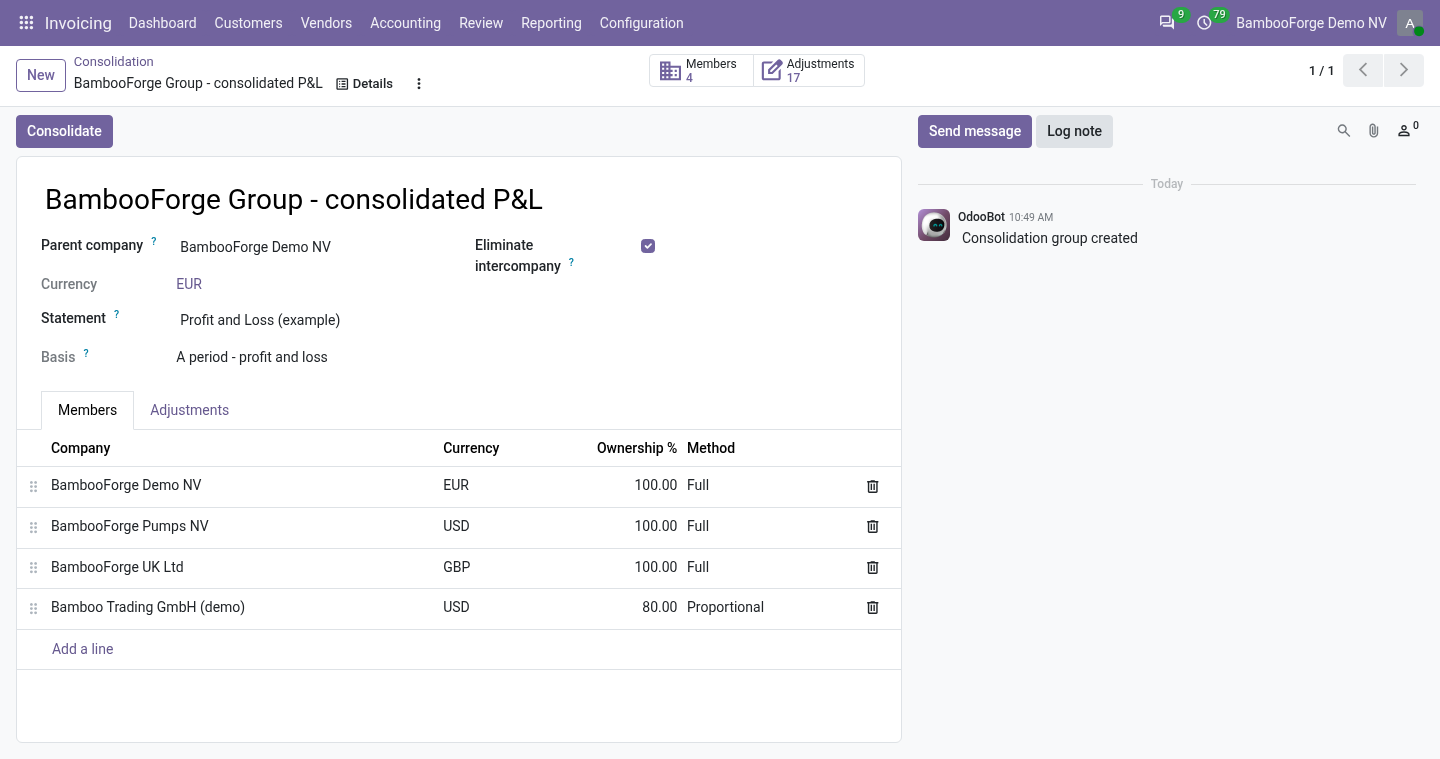
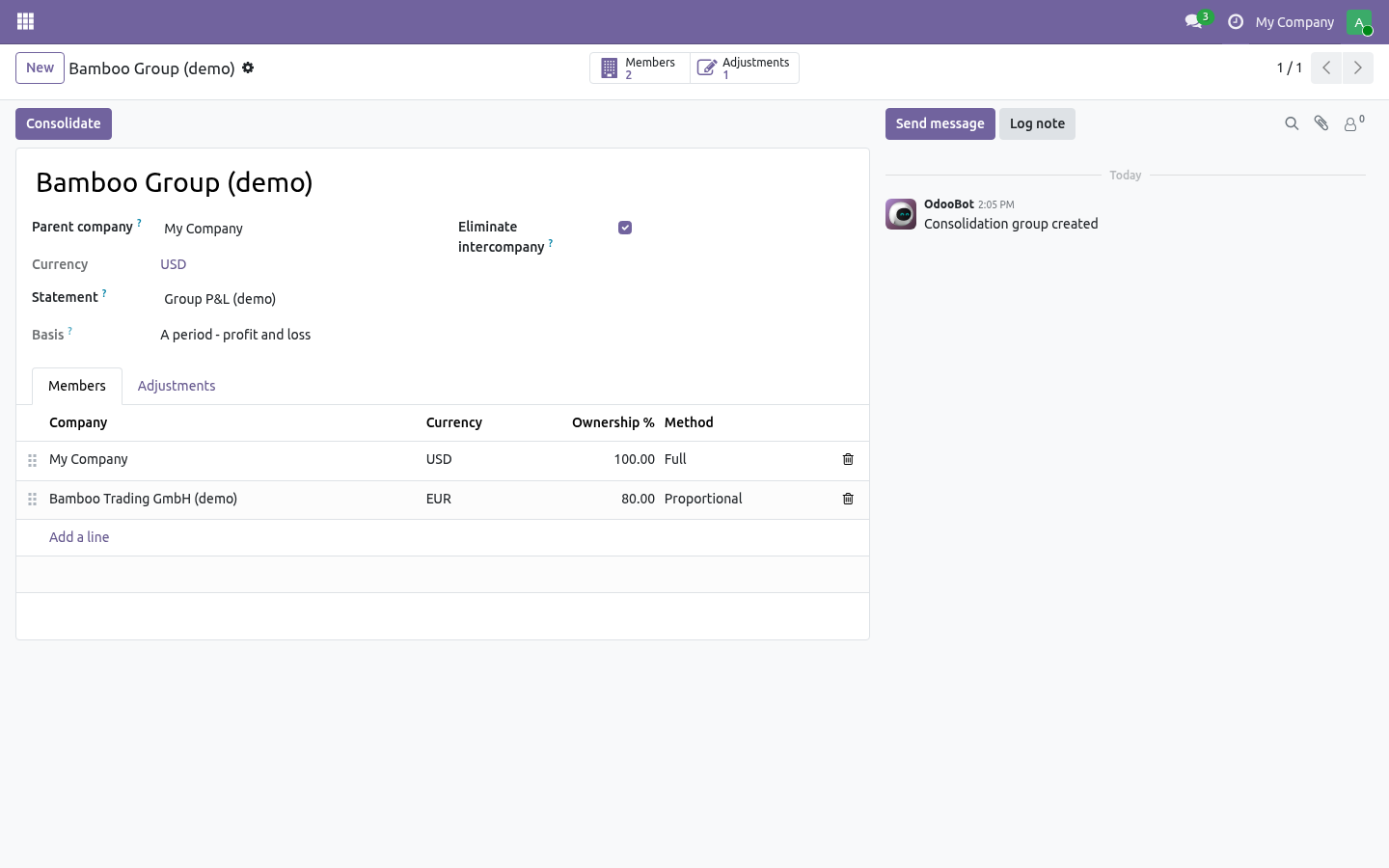
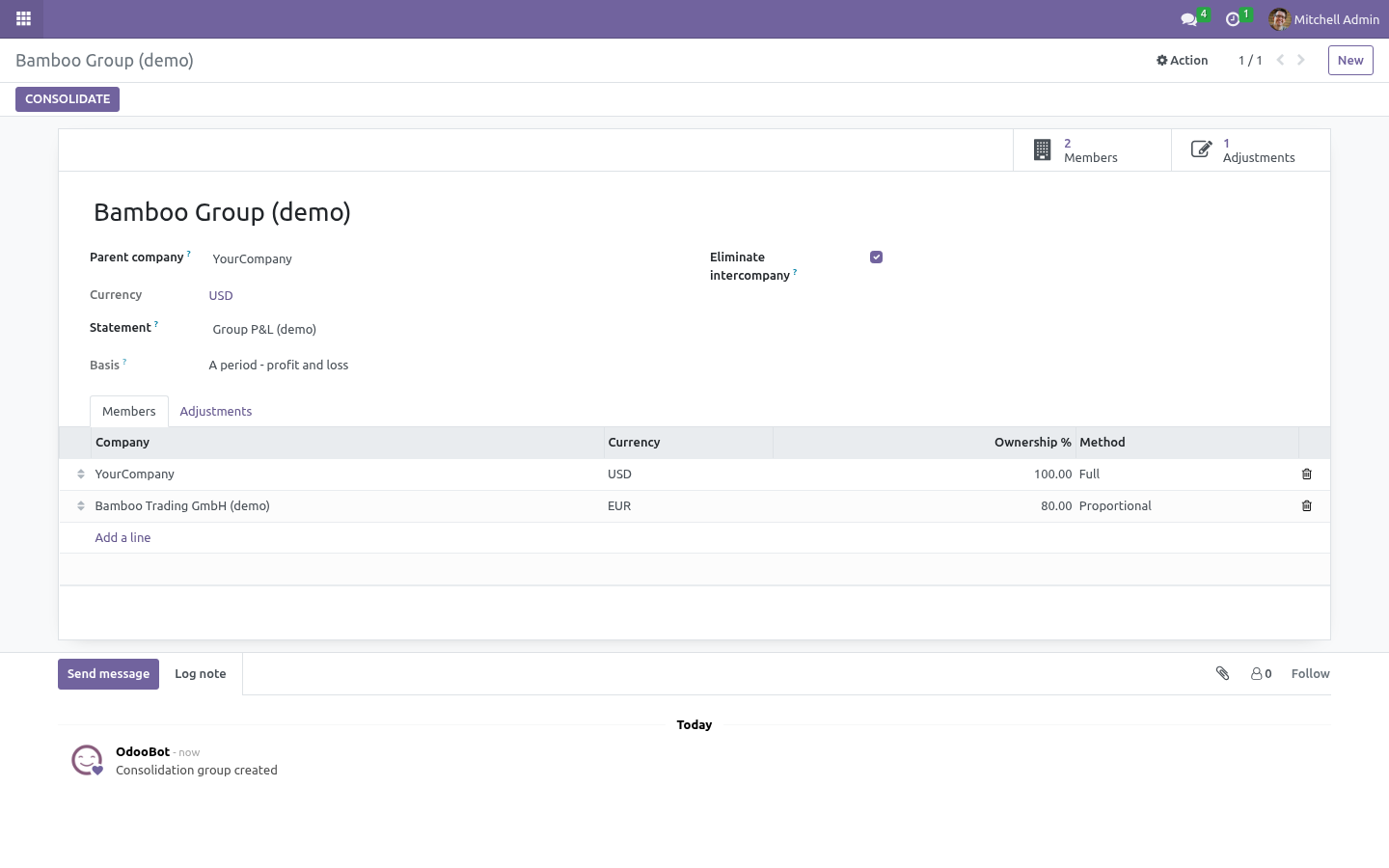
This app reads them as one, on the statements you already built in the Financial Reports Builder. What you get A consolidation group: the parent company, the statement to consolidate, the members with their ownership share and method. Every member's figures computed on its own chart of accounts by the statement's line definitions - prefixes, types and formulas match by code, so the group's accounts need not be identical. Currency translation to the parent's currency: closing rate on the last day for a balance sheet, the average rate over the period for a P&L.
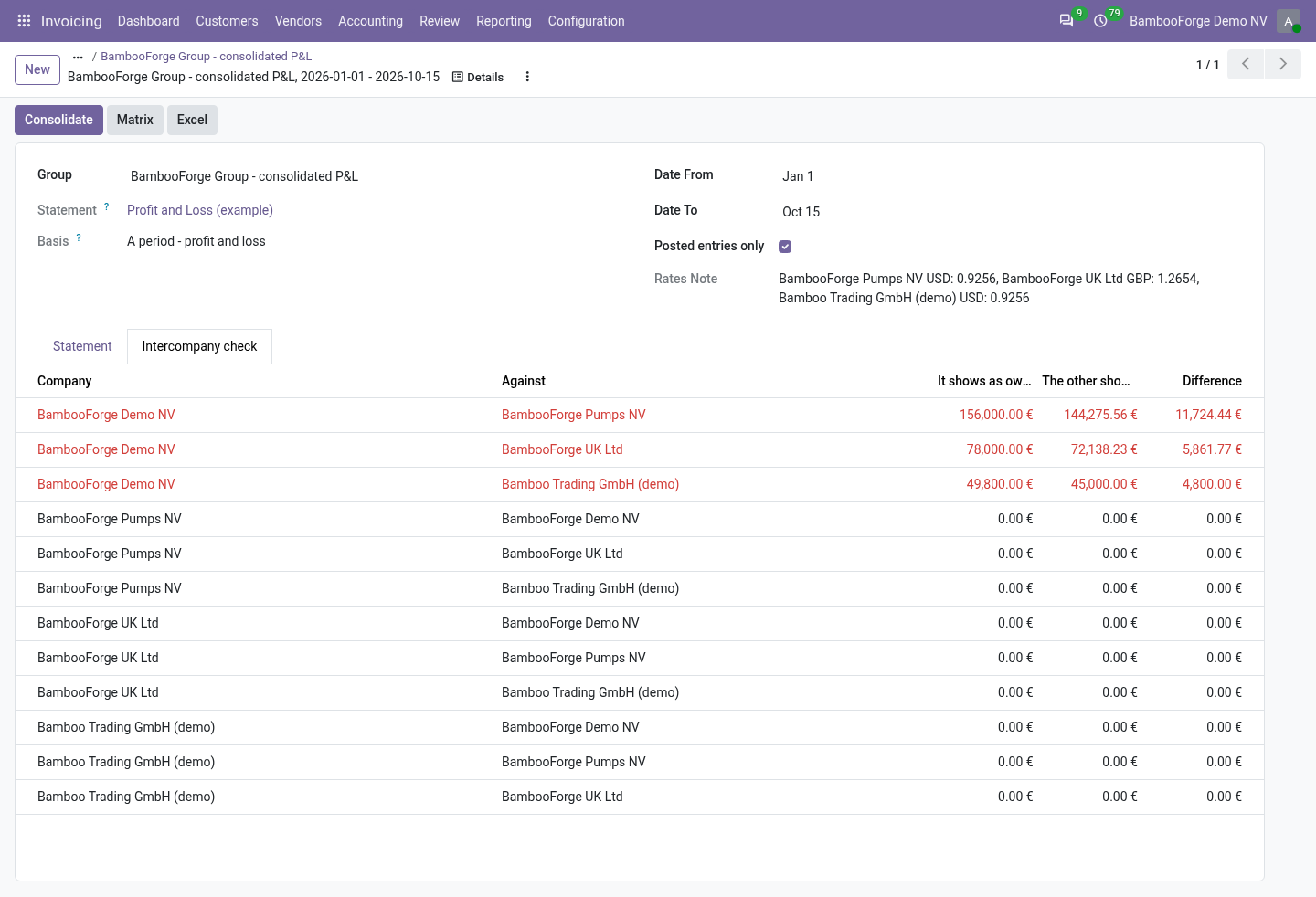
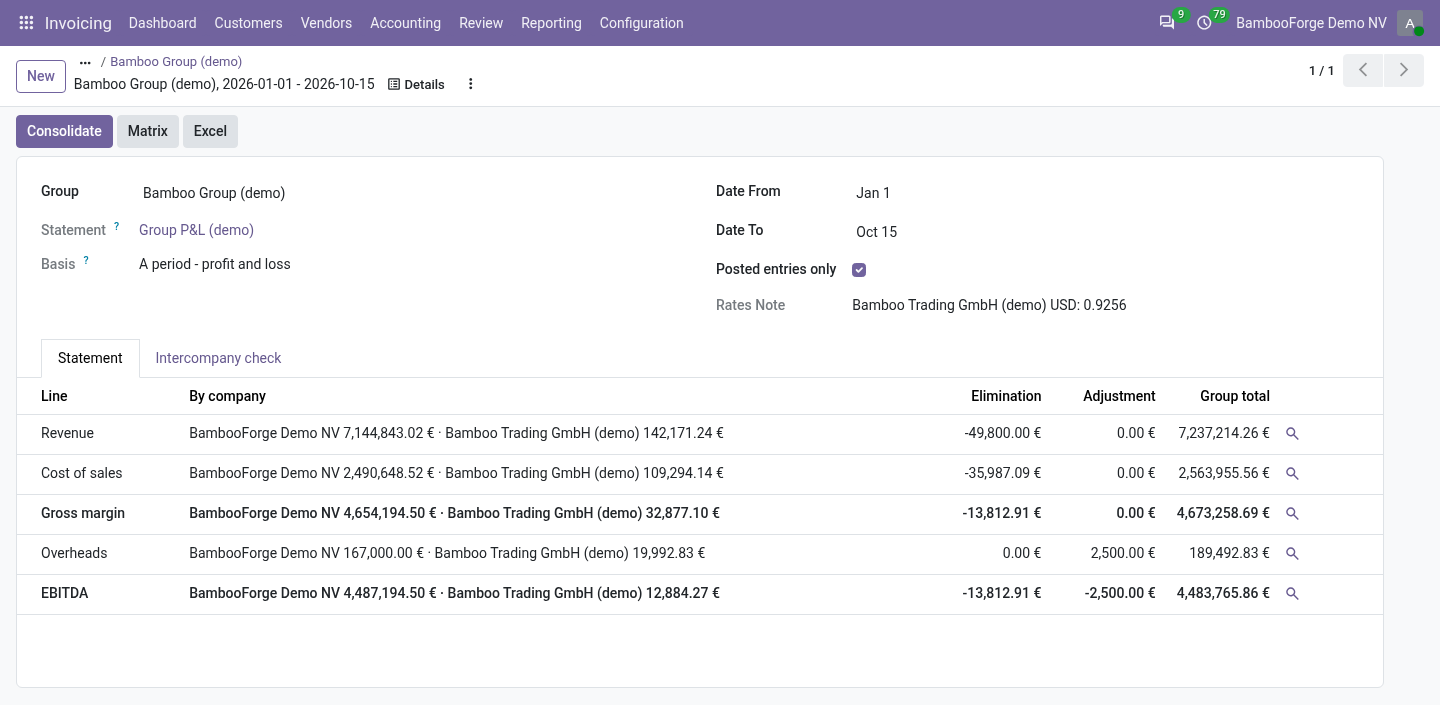
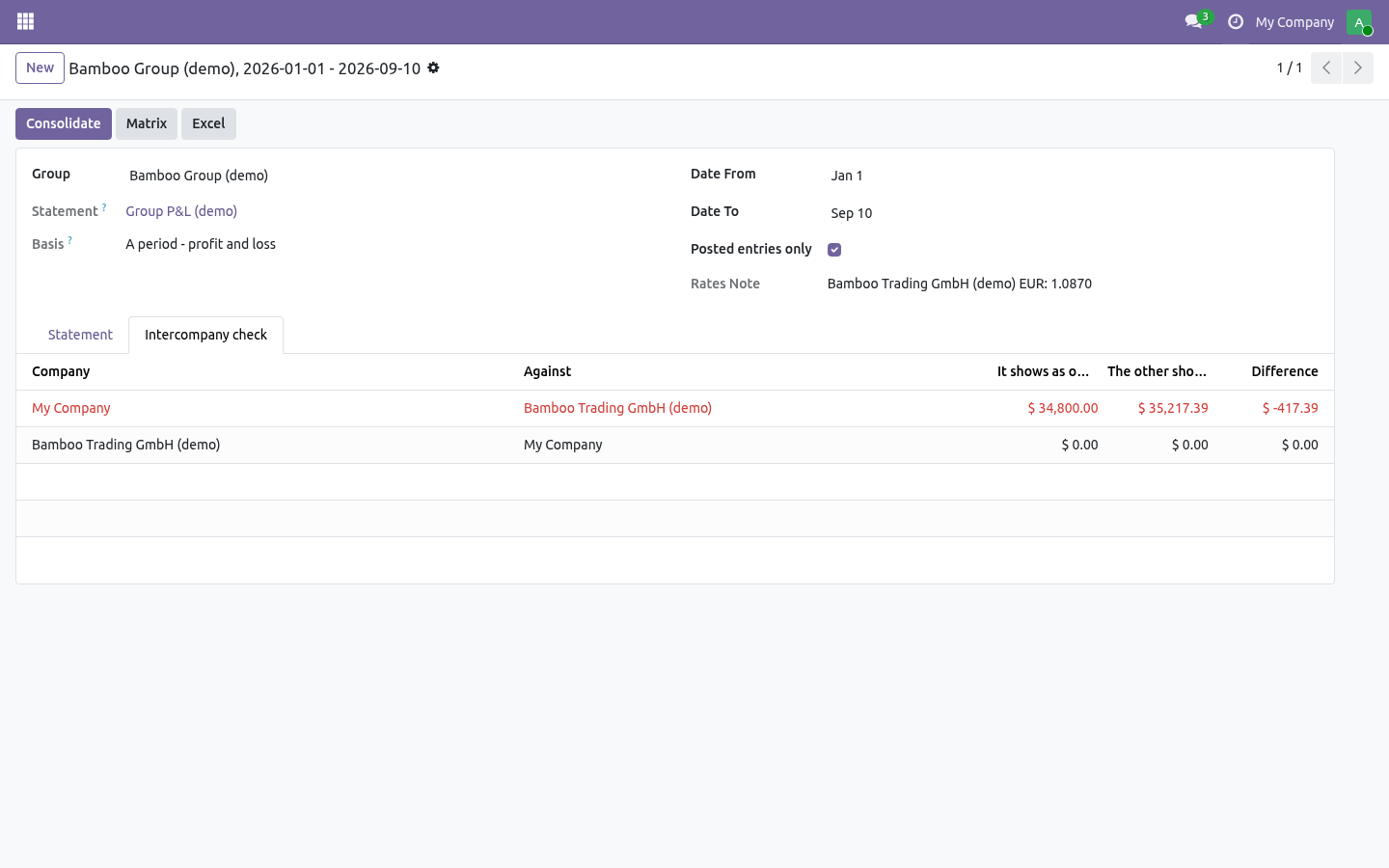
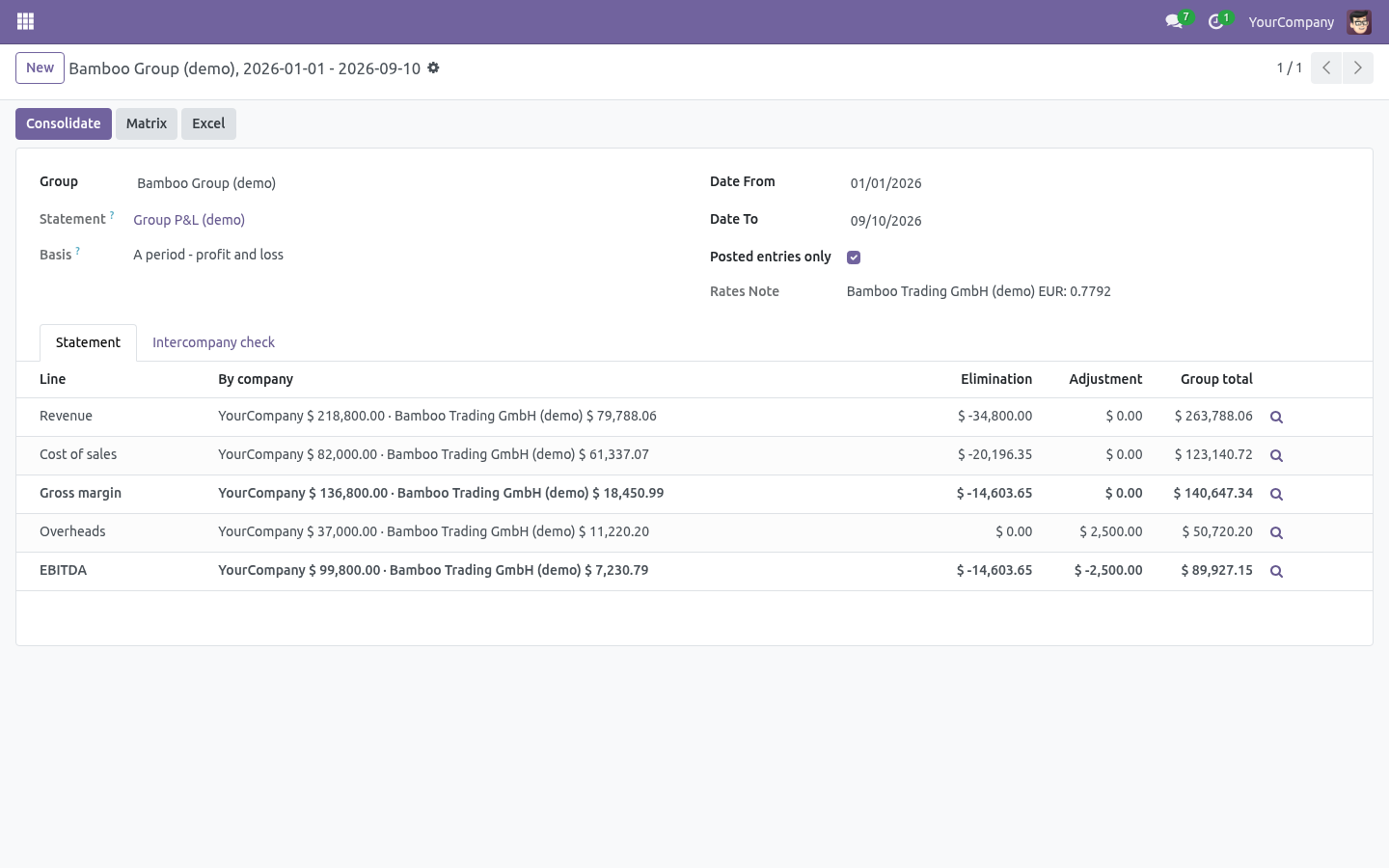
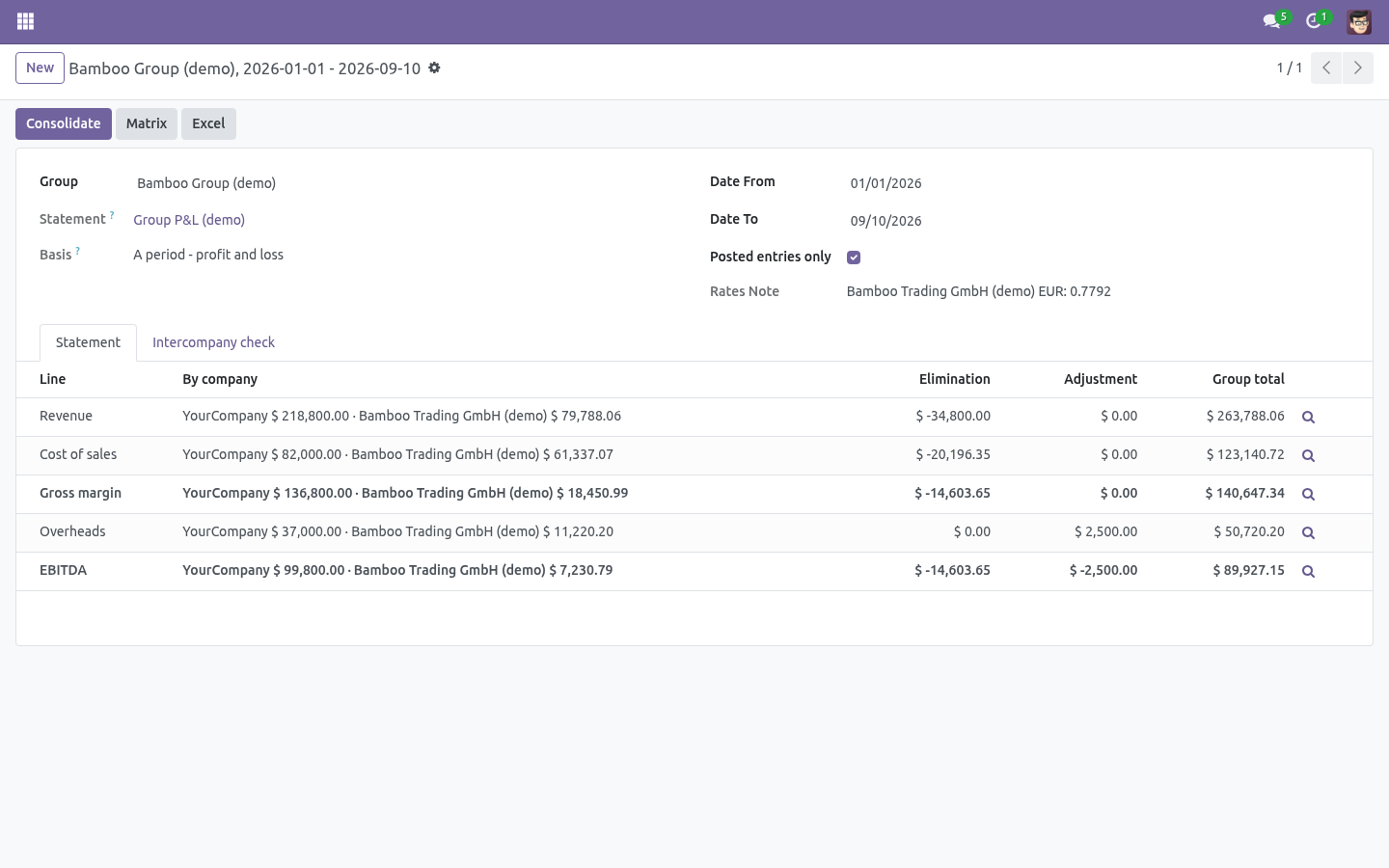
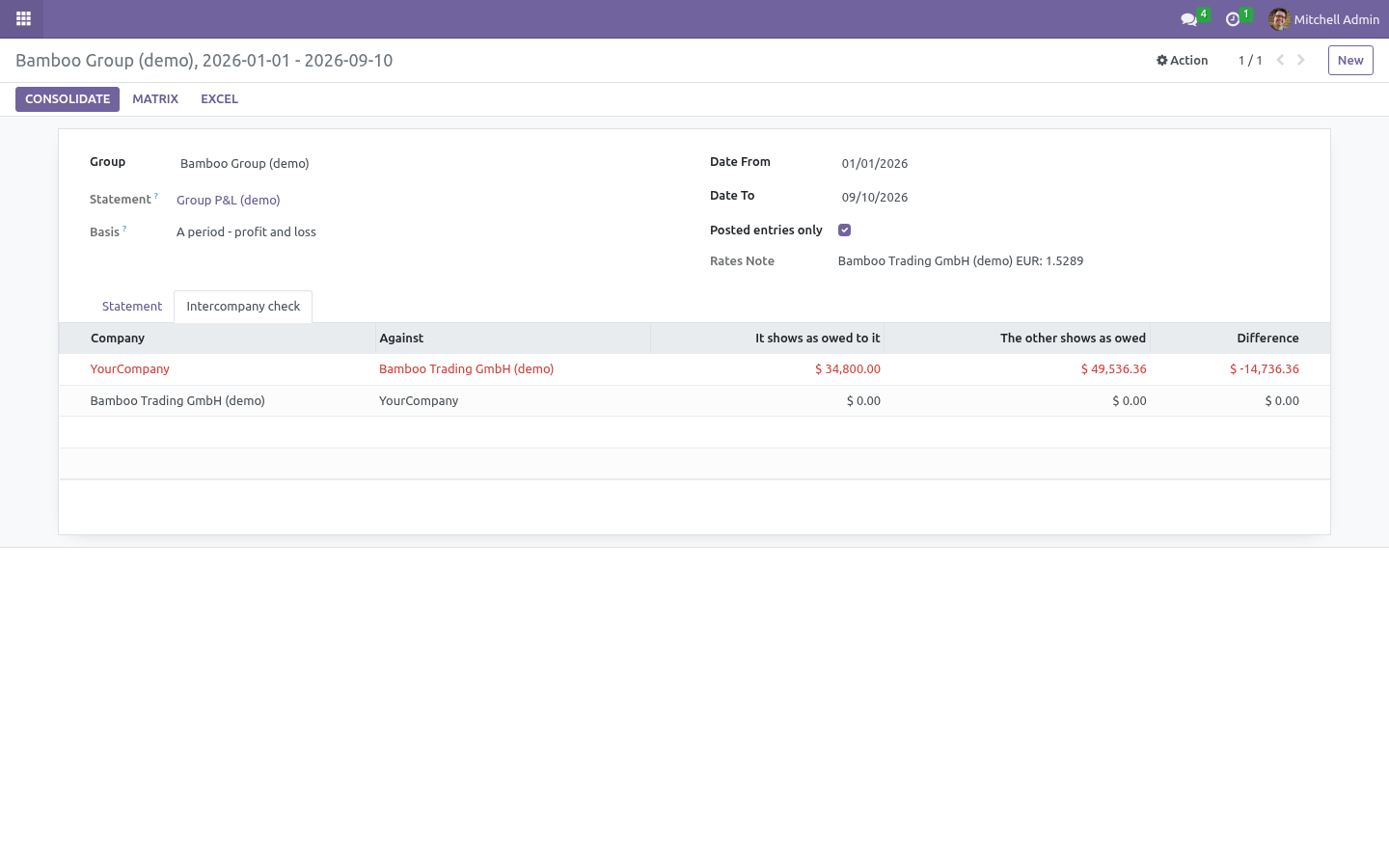
The rates used are printed on the run. Eliminations read from the books: every journal item a member posted against another member's partner - the intercompany receivable and payable, the intercompany sale and purchase - is taken out of the total, line by line, and shown in its own column. A second book of adjustments per line - goodwill, minority interest, an audit reclassification - dated, with a reason, applied to the runs whose period they fall in. An intercompany check: what A carries as owed by B against what B carries as owed to A, for every pair, with the difference.
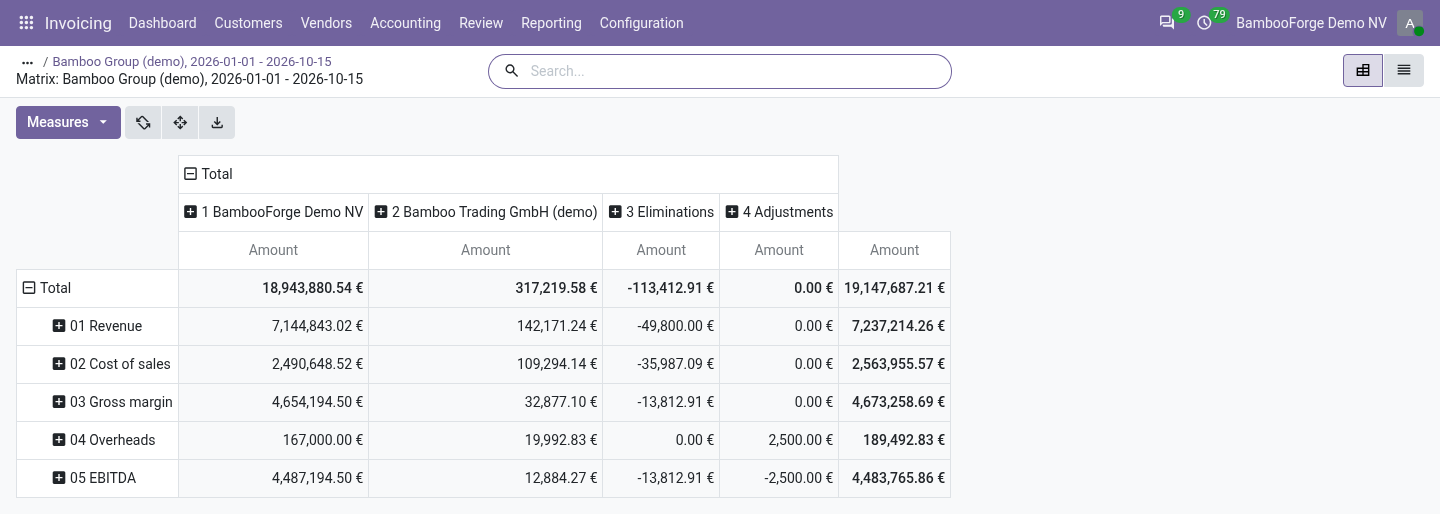
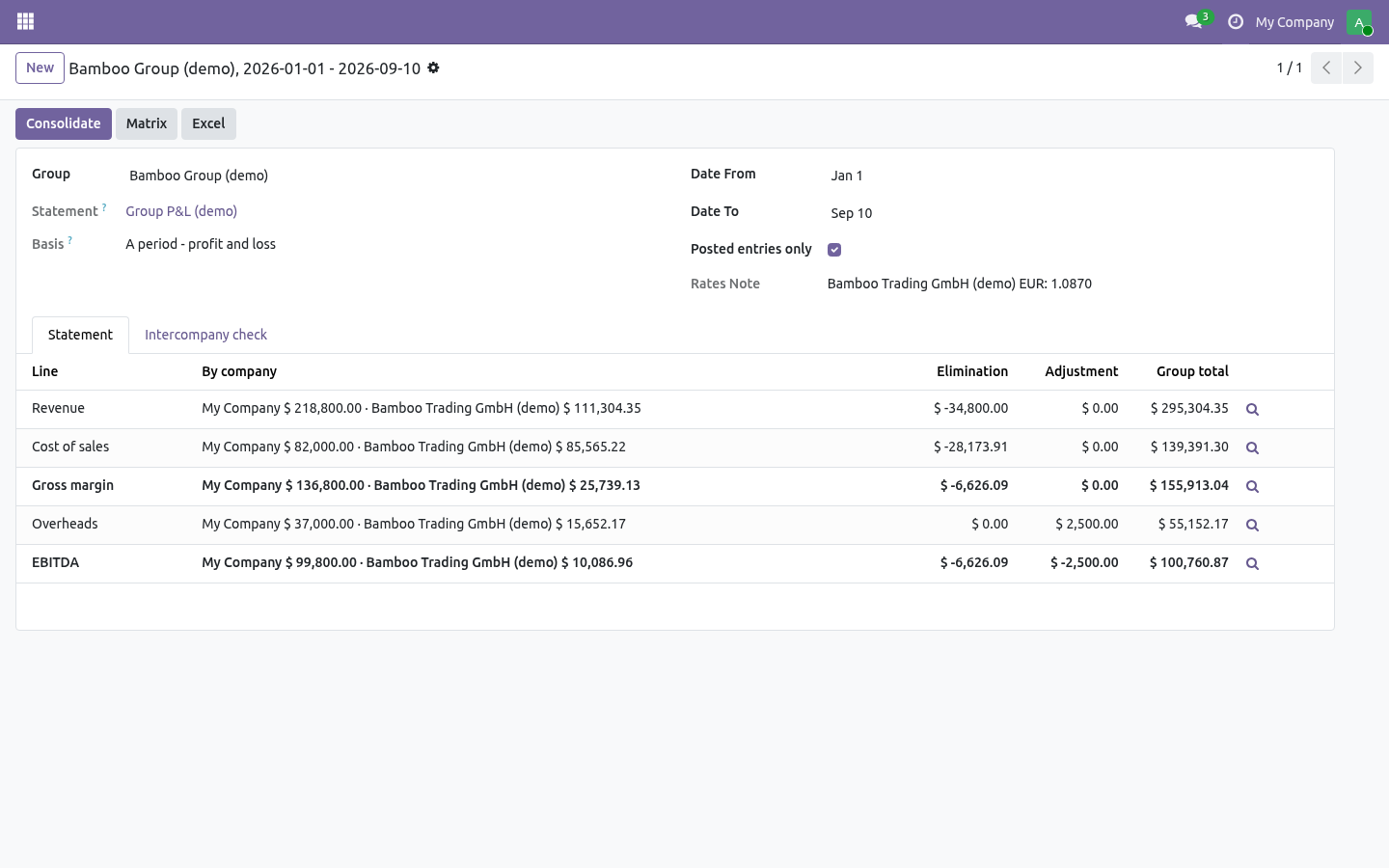
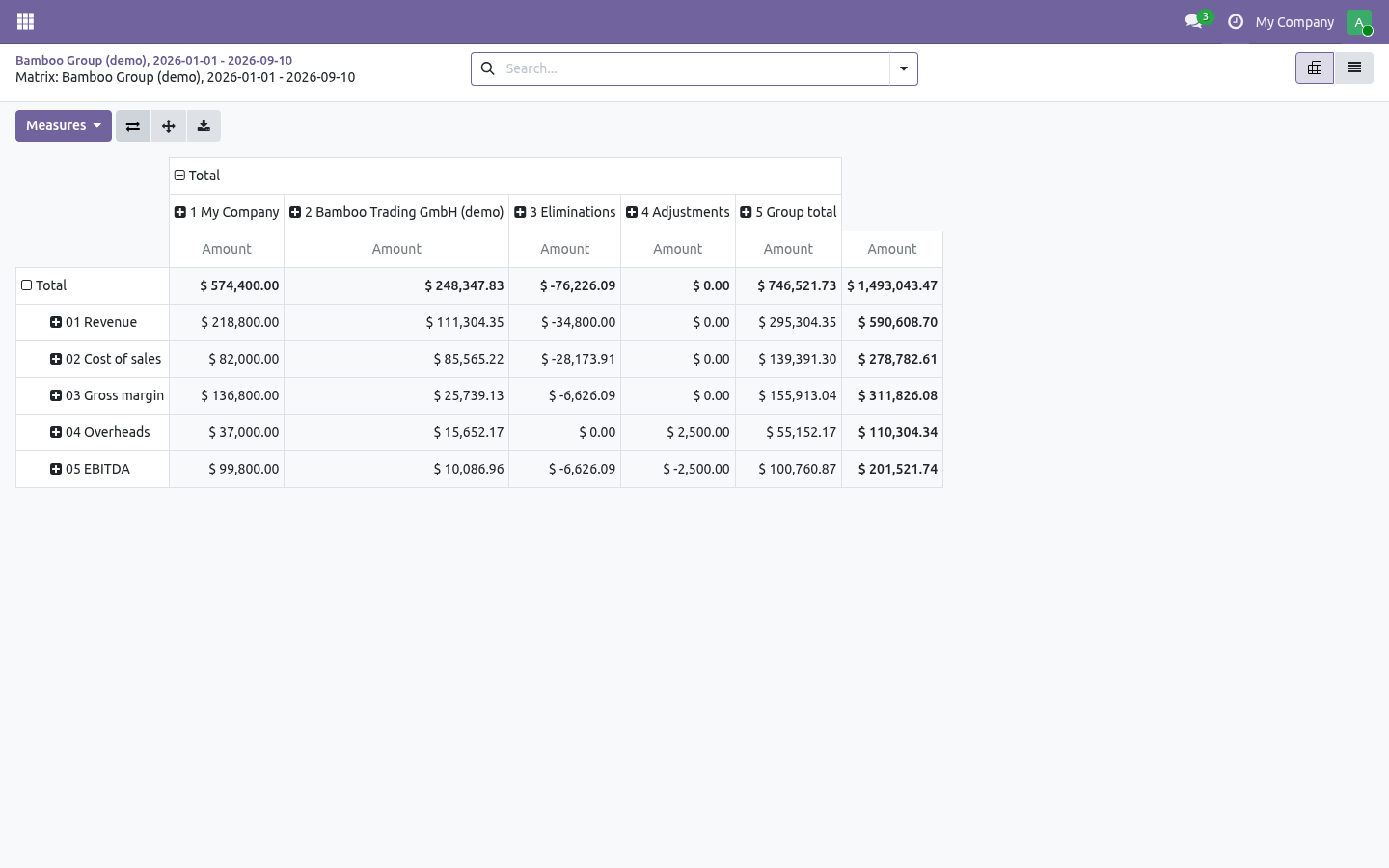
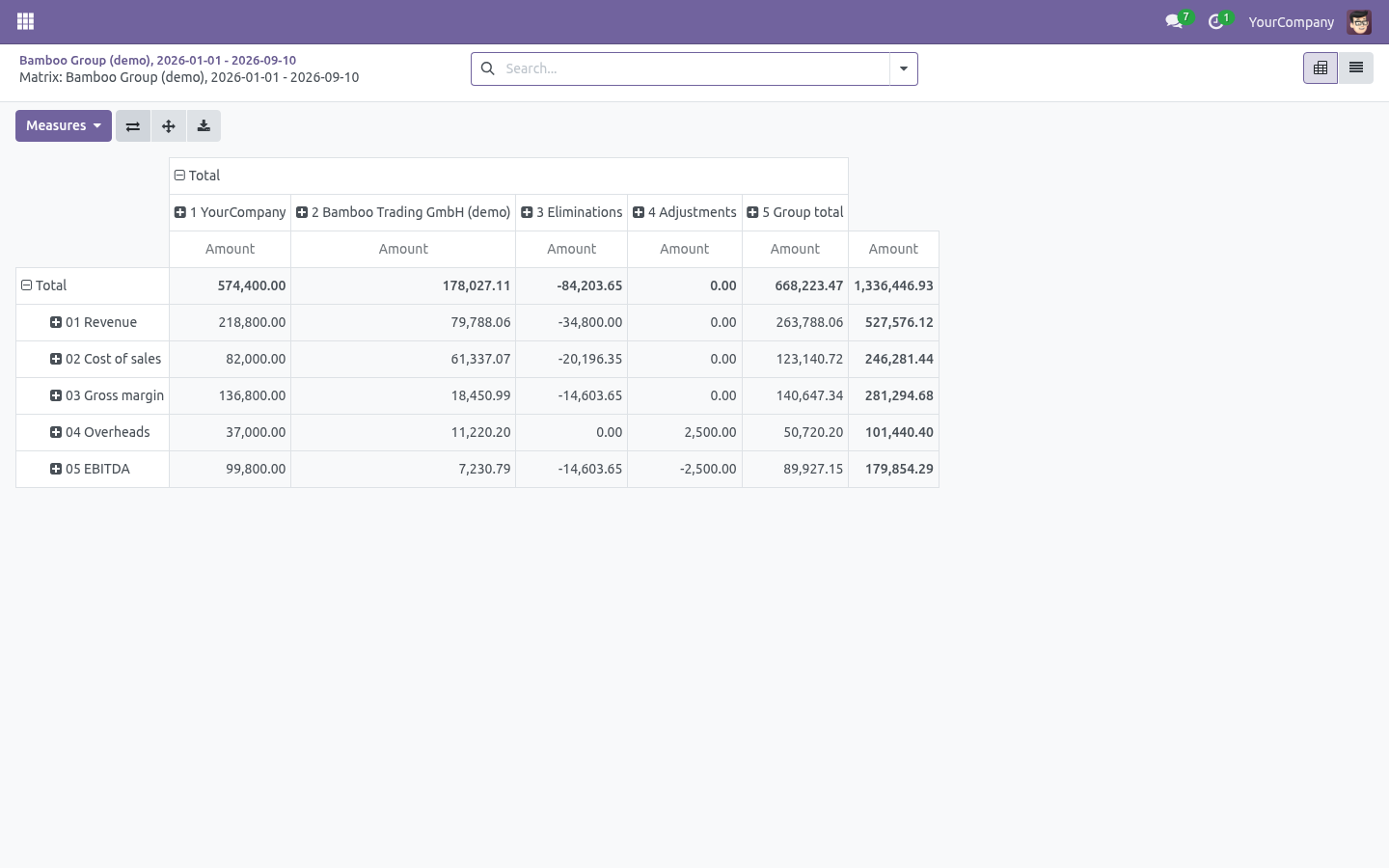
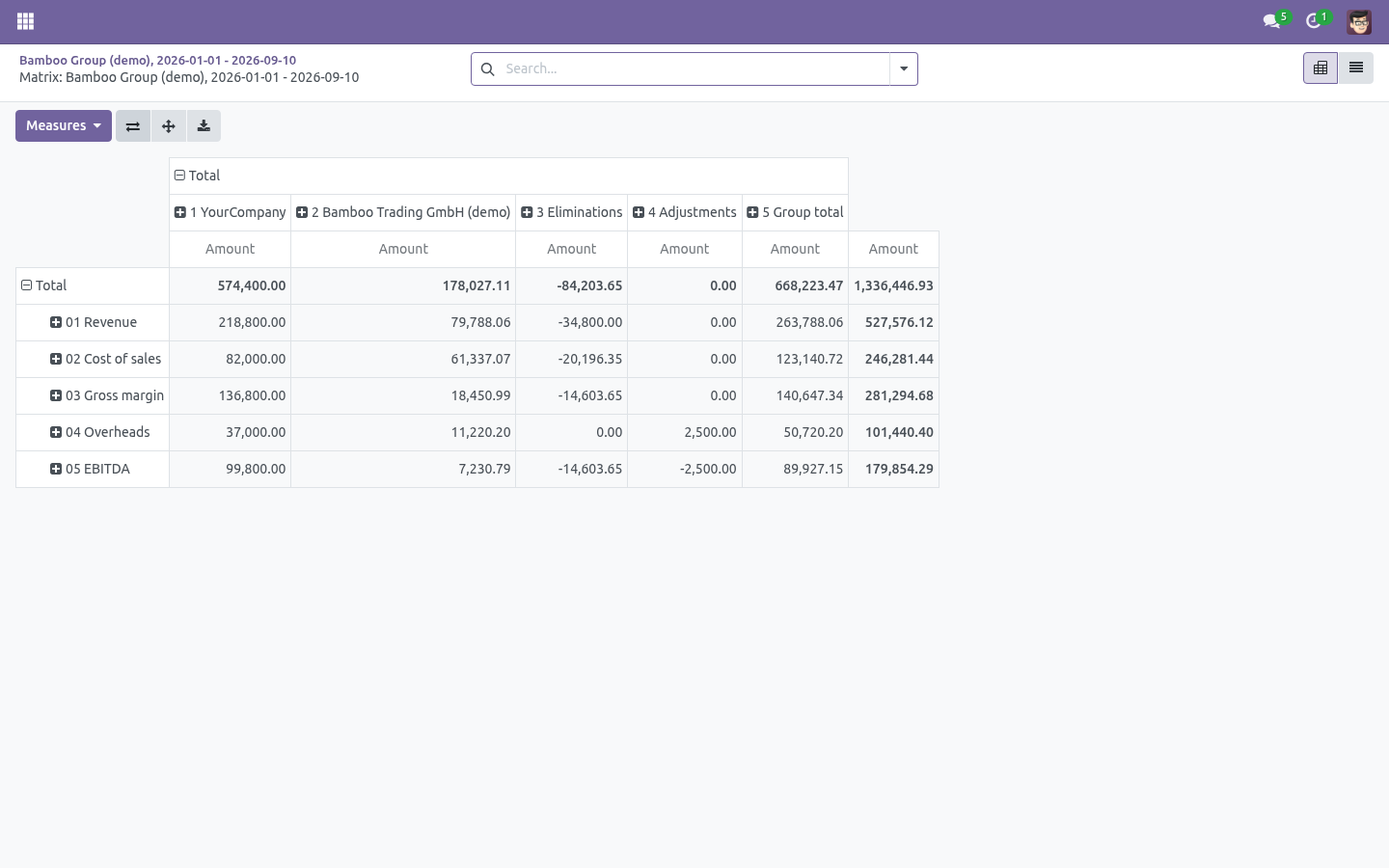
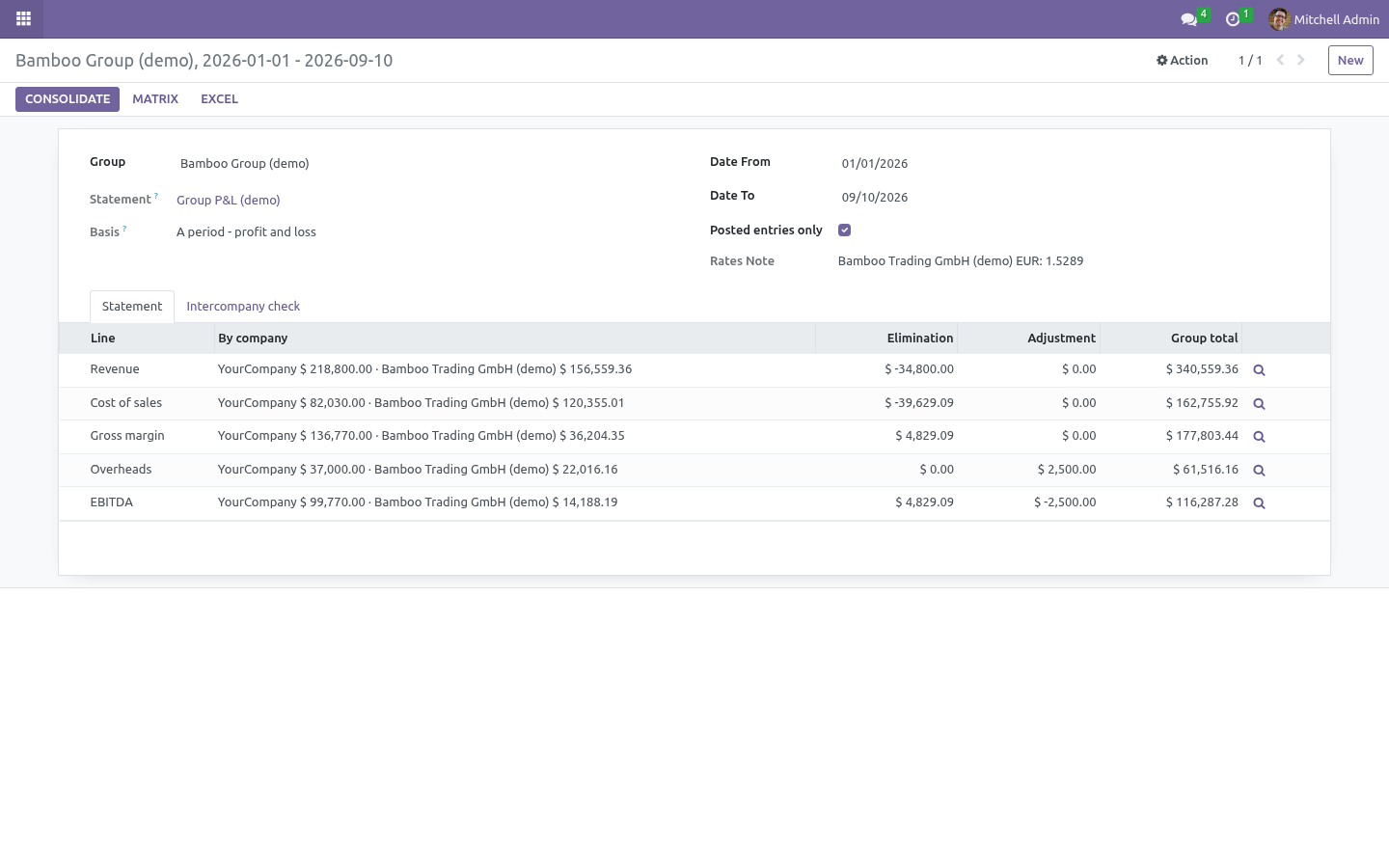
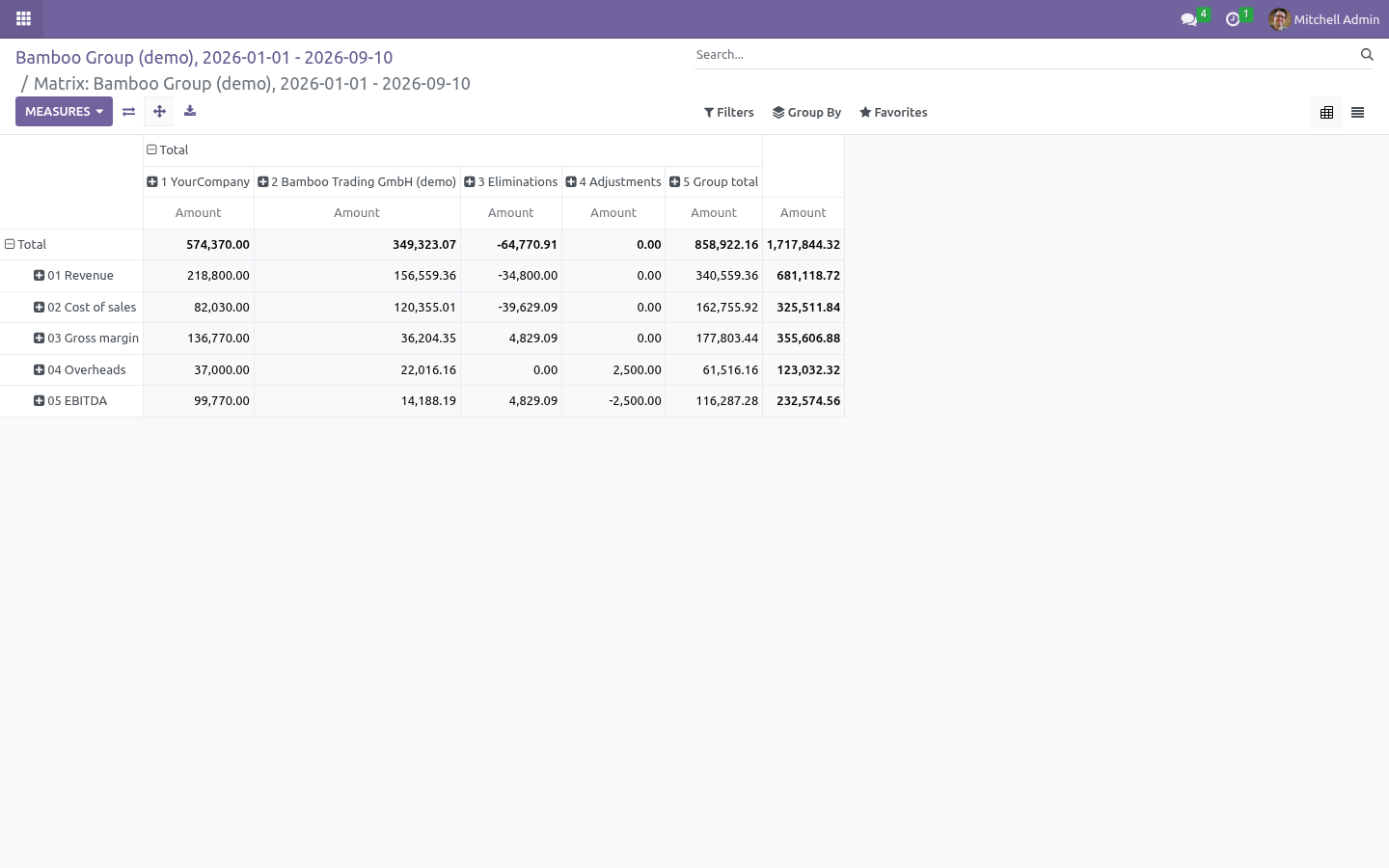
The run as a matrix: one column per member, eliminations, adjustments, group total - a list on the run, a pivot you can flip, an Excel workbook, and a drill-down into any member's journal items on any line. Building a group. 1. Build the statement once, in the parent company, with the Financial Reports Builder - a P&L on prefixes 70, 60, 61 and a Result formula, or a balance sheet on account types.
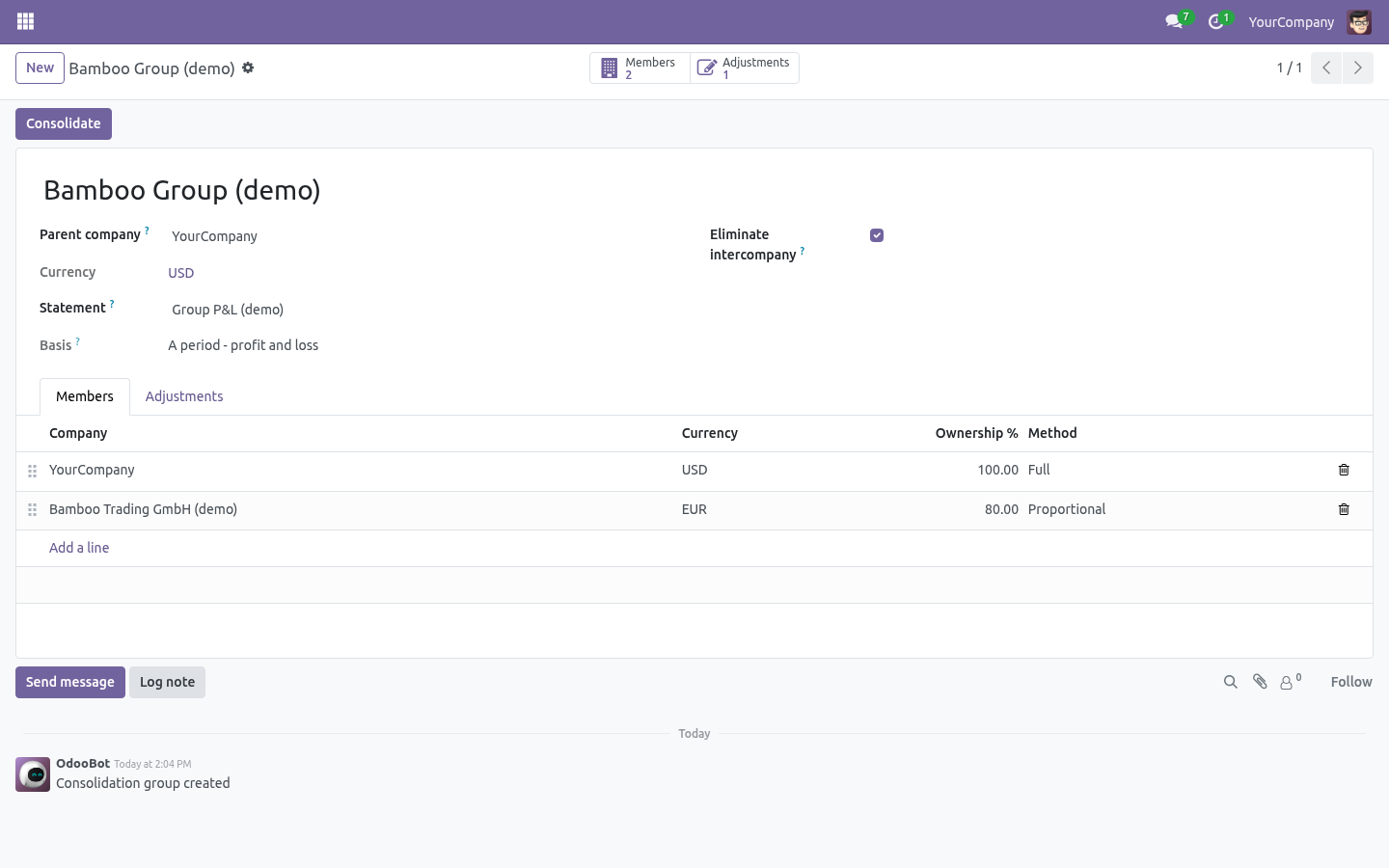
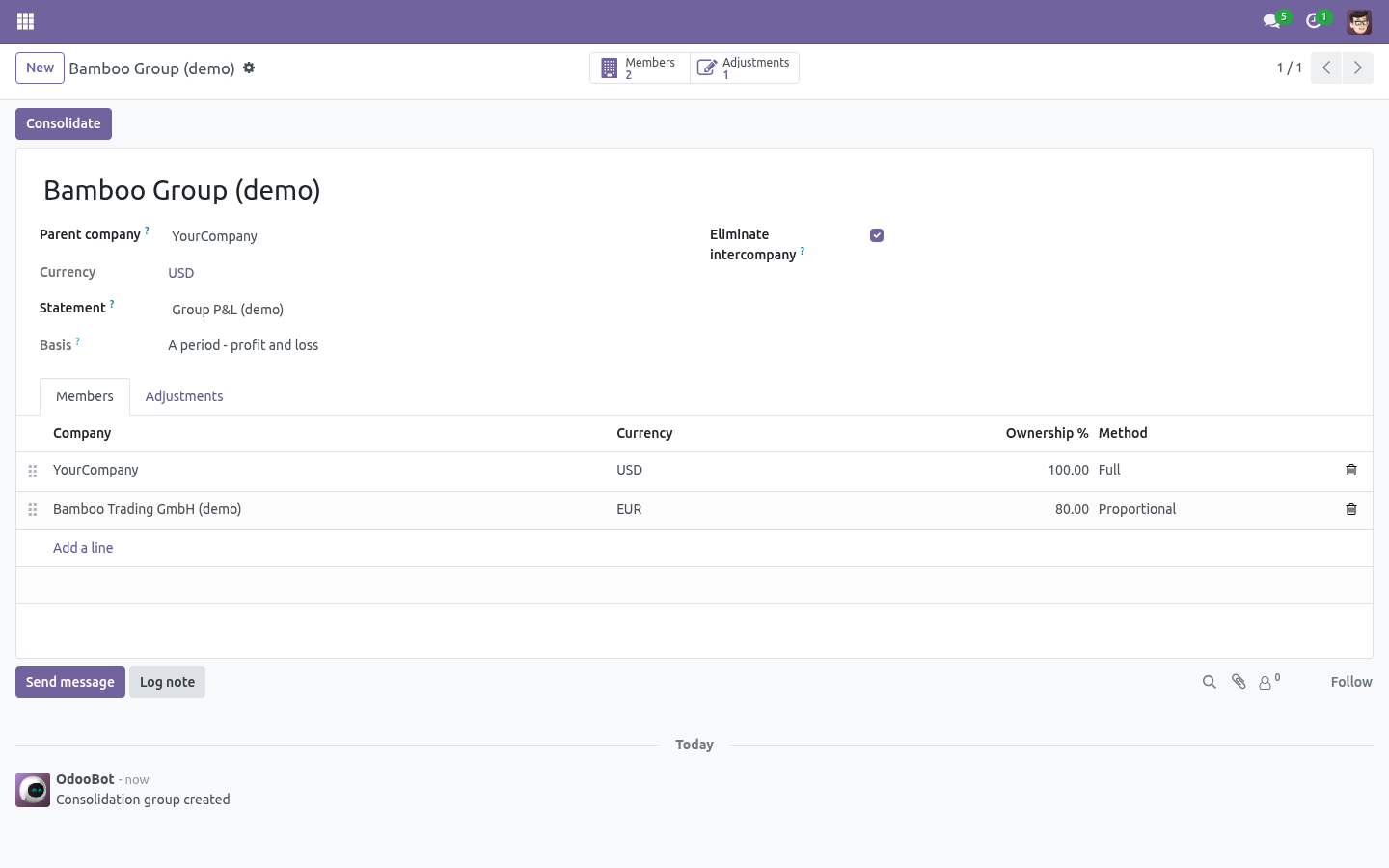
2. Consolidation → New: the parent company, the statement, and the members. Each member has an ownership share and a method: Full takes the member whole; Proportional takes the share of every line; Excluded keeps it on the list and out of the figures. 3.
Leave Eliminate intercompany ticked unless you have a reason. 4. Press Consolidate, give the period, press Consolidate again. The parent itself is a member like any other: add it to the list.
How a member's figure is computed. For each member, the run reads that company's chart of accounts and asks every line of the statement which accounts it claims - a prefix line claims by code, a type line by account type - sums the balances of those accounts over the period (or up to the date, for a position), applies the line's sign, and resolves the formulas over the line codes. Branch companies post under their parent and are counted with it, the way the Financial Reports Builder counts them. The result is in the member's currency; the group's rate for that currency turns it into the parent's.
Rates. Rates come from Accounting → Configuration → Currencies, read for the parent company. The run prints every rate it used. Because a whole run uses one rate per currency, a balance sheet still balances after translation; no translation-reserve line is invented.
A position (balance sheet) is translated at the closing rate: the rate in force on the last day of the run. A period (P&L) is translated at the average of the rates in force over the period, one reading a day up to a month long and sparser beyond that. Eliminations. The members are, to each other, partners.
Every journal item a member posted with another member's partner on it is intercompany: the receivable the parent holds on the subsidiary, the payable the subsidiary holds on the parent, the sale and the purchase between them. The run computes each member's statement a second time over those items only, and subtracts the result - so the elimination is exact for the lines your statement defines, and it is drawn in its own column. What is not eliminated: an intercompany transaction posted without the partner. The intercompany check is where those show up.
Adjustments. The adjustments tab of the group is the second book: a date, a statement line, an amount in the parent's currency with the line's own sign, and a reason. An adjustment counts in a P&L run whose period contains its date, and in a balance-sheet run dated on or after it. A formula line cannot be adjusted - adjust what it adds up and the formula follows.
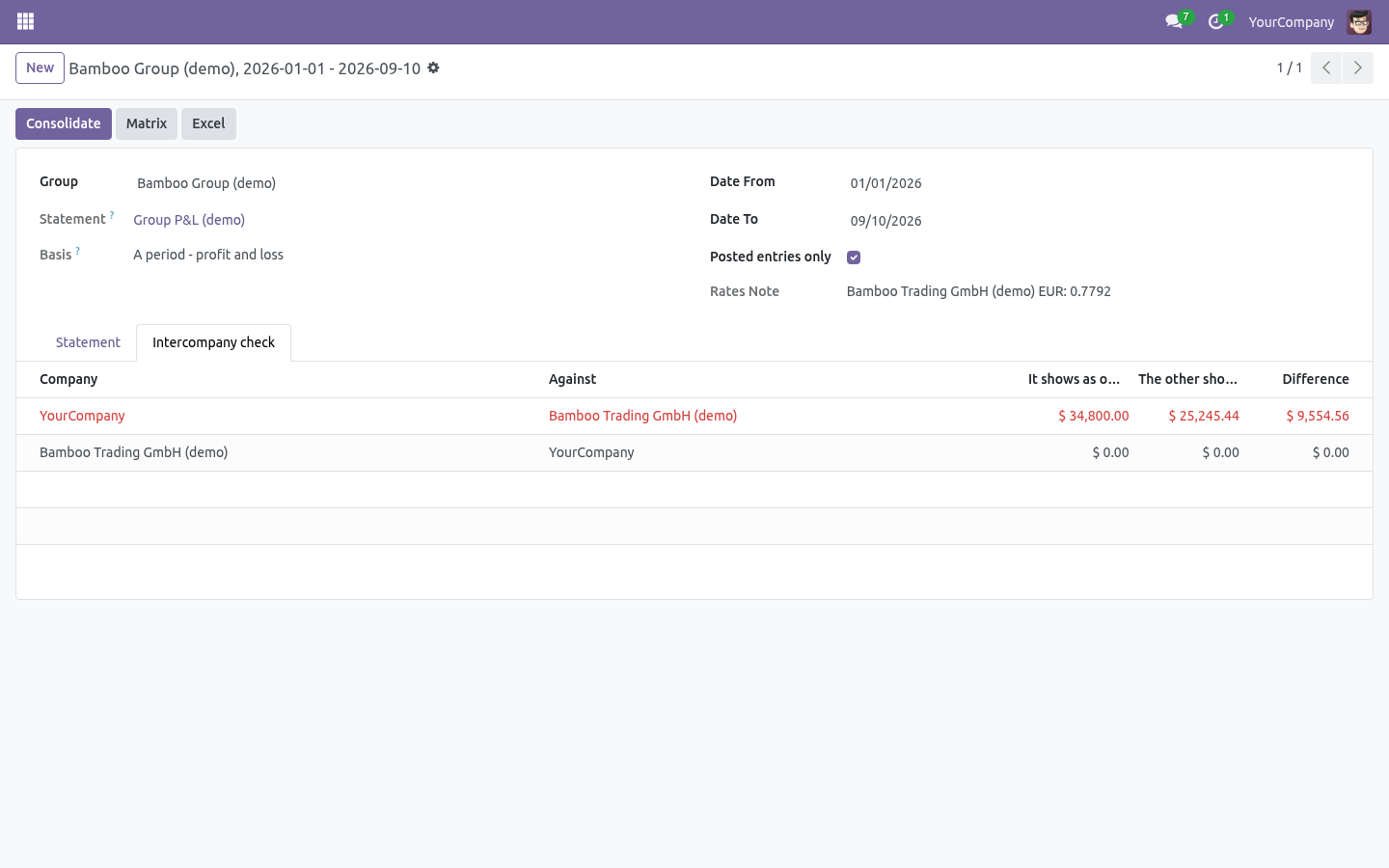
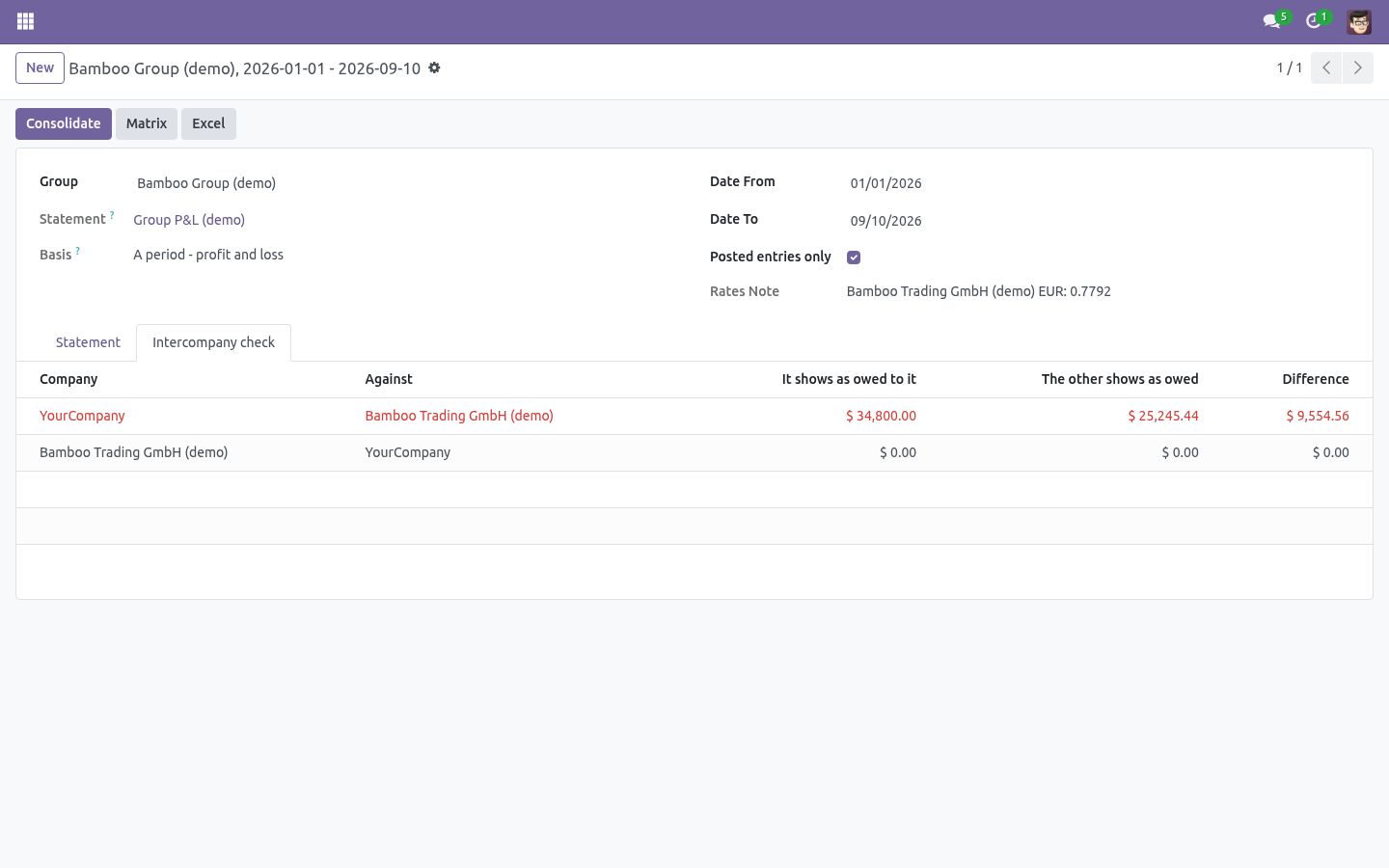
The intercompany check. For every ordered pair of members the run shows what the first carries on receivable accounts against the second's partner, and what the second carries on payable accounts against the first's partner, both in the parent's currency at the closing rate, and the difference. A red row is an invoice one side has not booked, a rate difference, or a partner missing on a line. How we make sure it works.
Before every release, 15 automated checks run against this app on Odoo 16, 17, 18, 19 and 20. Among them: Formula line cannot be adjusted. Excluded member stays out. Rate average for a period closing for a position.
Adjustment lands on its line and period. Consolidated totals translated and eliminated. The complete list is in the source you receive. Now the part most videos leave out: what this does not do.
The group's accounts are matched by code and type through the statement's lines; a member whose chart uses other codes needs a statement written for that. One rate per currency per run. Transaction-date rates, hedging and a translation reserve are not modelled. Eliminations rest on the partner being on the journal item.
Full consolidation of a subsidiary's equity against the parent's investment is an adjustment you write, not one the app guesses. Runs are not stored: consolidate again, or keep the Excel workbook. The complete manual is at docs dot bambooforge dot dev, the demo database is linked from the store page, and support answers within twenty-four hours. Links are in the description.
Key facts
- What it is
- Consolidate several companies into one statement on Odoo Community: the group's P&L or balance sheet from the Financial Reports Builder, each member translated to the parent's currency, intercompany balances and trading eliminated by partner, manual adjustments as a second book, an intercompany matching check - and a company-by-company matrix you can drill and export.
- For
- Accounting
- Odoo versions
- 16.0, 17.0, 18.0, 19.0, 20.0 - Community and Enterprise
- Runs on
- Odoo.sh or Odoo you host yourself - not Odoo Online, which accepts no third-party apps
- Price
- 318 EUR, one-time, on the Odoo Apps Store
- Technical name
- bambooforge_consolidation
- Not for
- The group's accounts are matched by code and type through the statement's lines; a member whose chart uses other codes needs a statement written for that.; One rate per currency per run. Transaction-date rates, hedging and a translation reserve are not modelled.; Eliminations rest on the partner being on the journal item. Full consolidation of a subsidiary's equity against the parent's investment is an adjustment you write, not one the app guesses.; Runs are not stored: consolidate again, or keep the Excel workbook.
- Live demo
- https://demo20.bambooforge.dev/odoo/action-bambooforge_consolidation.action_bf_consol_group
- Manual last updated
- 2026-10-15
Financial Reports All in One with Consolidation
A group of companies on Odoo Community has as many balance sheets as it has companies and no way to read them as one. This app reads them as one, on the statements you already built in the Financial Reports Builder.
What you get
A consolidation group: the parent company, the statement to consolidate, the members with their ownership share and method.
Every member's figures computed on its own chart of accounts by the statement's line definitions - prefixes, types and formulas match by code, so the group's accounts need not be identical.
Currency translation to the parent's currency: closing rate on the last day for a balance sheet, the average rate over the period for a P&L. The rates used are printed on the run.
Eliminations read from the books: every journal item a member posted against another member's partner - the intercompany receivable and payable, the intercompany sale and purchase - is taken out of the total, line by line, and shown in its own column.
A second book of adjustments per line - goodwill, minority interest, an audit reclassification - dated, with a reason, applied to the runs whose period they fall in.
An intercompany check: what A carries as owed by B against what B carries as owed to A, for every pair, with the difference.
The run as a matrix: one column per member, eliminations, adjustments, group total - a list on the run, a pivot you can flip, an Excel workbook, and a drill-down into any member's journal items on any line.
Install
Needs Financial Reports Builder by BambooForge; the store price of this page includes it. A Consolidation menu appears under the Report Builder. The people who may read financial reports may read groups and run them; the report designers may build groups.
Building a group
Build the statement once, in the parent company, with the Financial Reports Builder - a P&L on prefixes 70, 60, 61 and a Result formula, or a balance sheet on account types.
Consolidation → New: the parent company, the statement, and the members. Each member has an ownership share and a method: Full takes the member whole; Proportional takes the share of every line; Excluded keeps it on the list and out of the figures.
Leave Eliminate intercompany ticked unless you have a reason.
Press Consolidate, give the period, press Consolidate again.
The parent itself is a member like any other: add it to the list.
How a member's figure is computed
For each member, the run reads that company's chart of accounts and asks every line of the statement which accounts it claims - a prefix line claims by code, a type line by account type - sums the balances of those accounts over the period (or up to the date, for a position), applies the line's sign, and resolves the formulas over the line codes. Branch companies post under their parent and are counted with it, the way the Financial Reports Builder counts them.
The result is in the member's currency; the group's rate for that currency turns it into the parent's.
Rates
A position (balance sheet) is translated at the closing rate: the rate in force on the last day of the run.
A period (P&L) is translated at the average of the rates in force over the period, one reading a day up to a month long and sparser beyond that.
Rates come from Accounting → Configuration → Currencies, read for the parent company. The run prints every rate it used. Because a whole run uses one rate per currency, a balance sheet still balances after translation; no translation-reserve line is invented.
Eliminations
The members are, to each other, partners. Every journal item a member posted with another member's partner on it is intercompany: the receivable the parent holds on the subsidiary, the payable the subsidiary holds on the parent, the sale and the purchase between them. The run computes each member's statement a second time over those items only, and subtracts the result - so the elimination is exact for the lines your statement defines, and it is drawn in its own column.
What is not eliminated: an intercompany transaction posted without the partner. The intercompany check is where those show up.
Adjustments
The adjustments tab of the group is the second book: a date, a statement line, an amount in the parent's currency with the line's own sign, and a reason. An adjustment counts in a P&L run whose period contains its date, and in a balance-sheet run dated on or after it. A formula line cannot be adjusted - adjust what it adds up and the formula follows.
The intercompany check
For every ordered pair of members the run shows what the first carries on receivable accounts against the second's partner, and what the second carries on payable accounts against the first's partner, both in the parent's currency at the closing rate, and the difference. A red row is an invoice one side has not booked, a rate difference, or a partner missing on a line.
Limits, stated plainly
The group's accounts are matched by code and type through the statement's lines; a member whose chart uses other codes needs a statement written for that.
One rate per currency per run. Transaction-date rates, hedging and a translation reserve are not modelled.
Eliminations rest on the partner being on the journal item. Full consolidation of a subsidiary's equity against the parent's investment is an adjustment you write, not one the app guesses.
Runs are not stored: consolidate again, or keep the Excel workbook.
How we make sure it works
Before every release, 15 automated checks run against this app on Odoo 16, 17, 18, 19 and 20. Among them:
Formula line cannot be adjusted.
Excluded member stays out.
Rate average for a period closing for a position.
Adjustment lands on its line and period.
Consolidated totals translated and eliminated.
The complete list is in the source you receive.