 BambooForge Labs
Cookie Consent Banner & GDPR Consent Mode v2
GDPR cookie consent banner with Google Consent Mode v2, script blocking until consent, a tamper-proof log and presets for GA4 and Meta Pixel.
Available for Odoo 16.0, Odoo 17.0, Odoo 18.0, Odoo 19.0, Odoo 20.0. Technical name bambooforge_consent_pro.
Transcript of the walkthrough (Odoo 20)
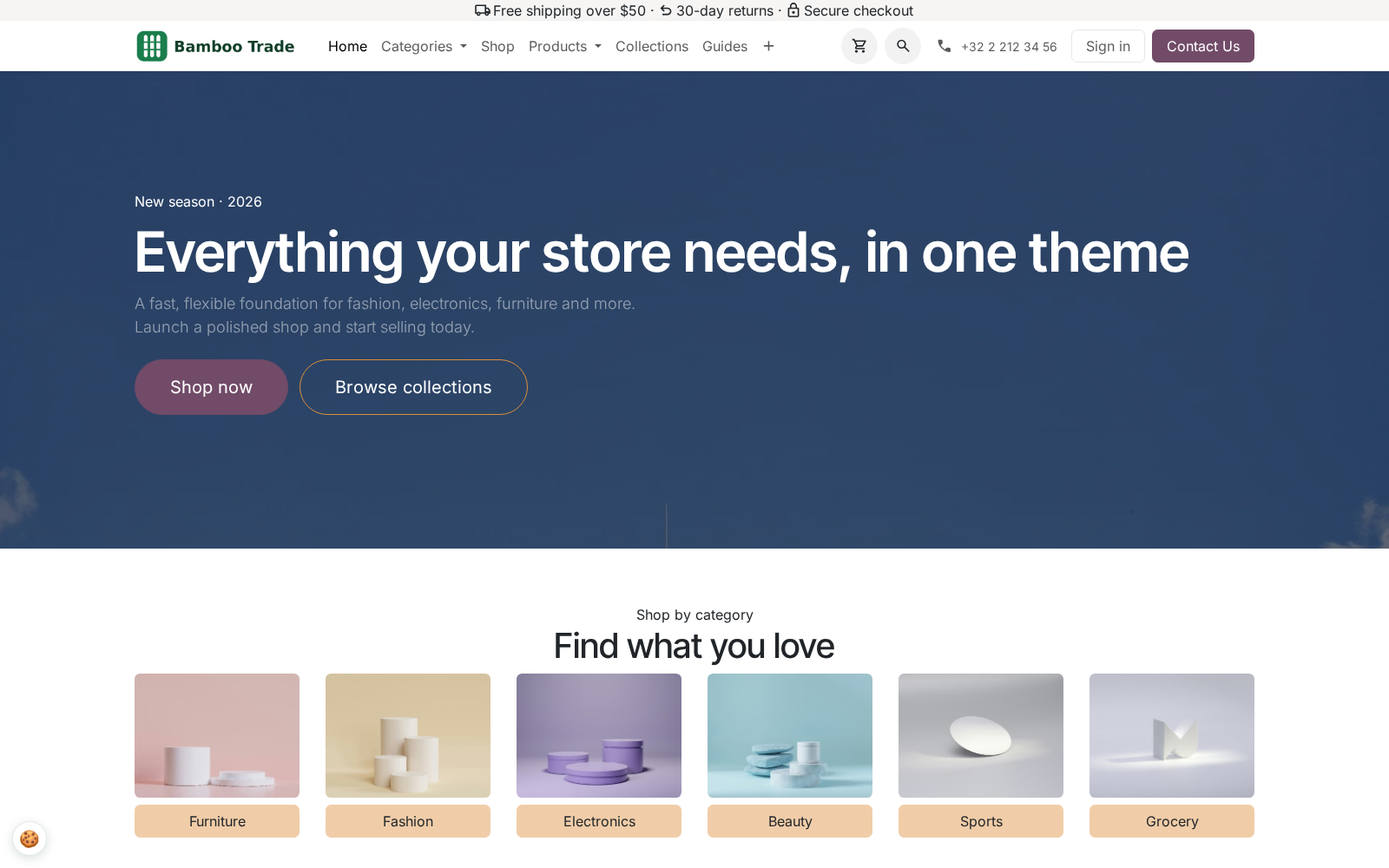
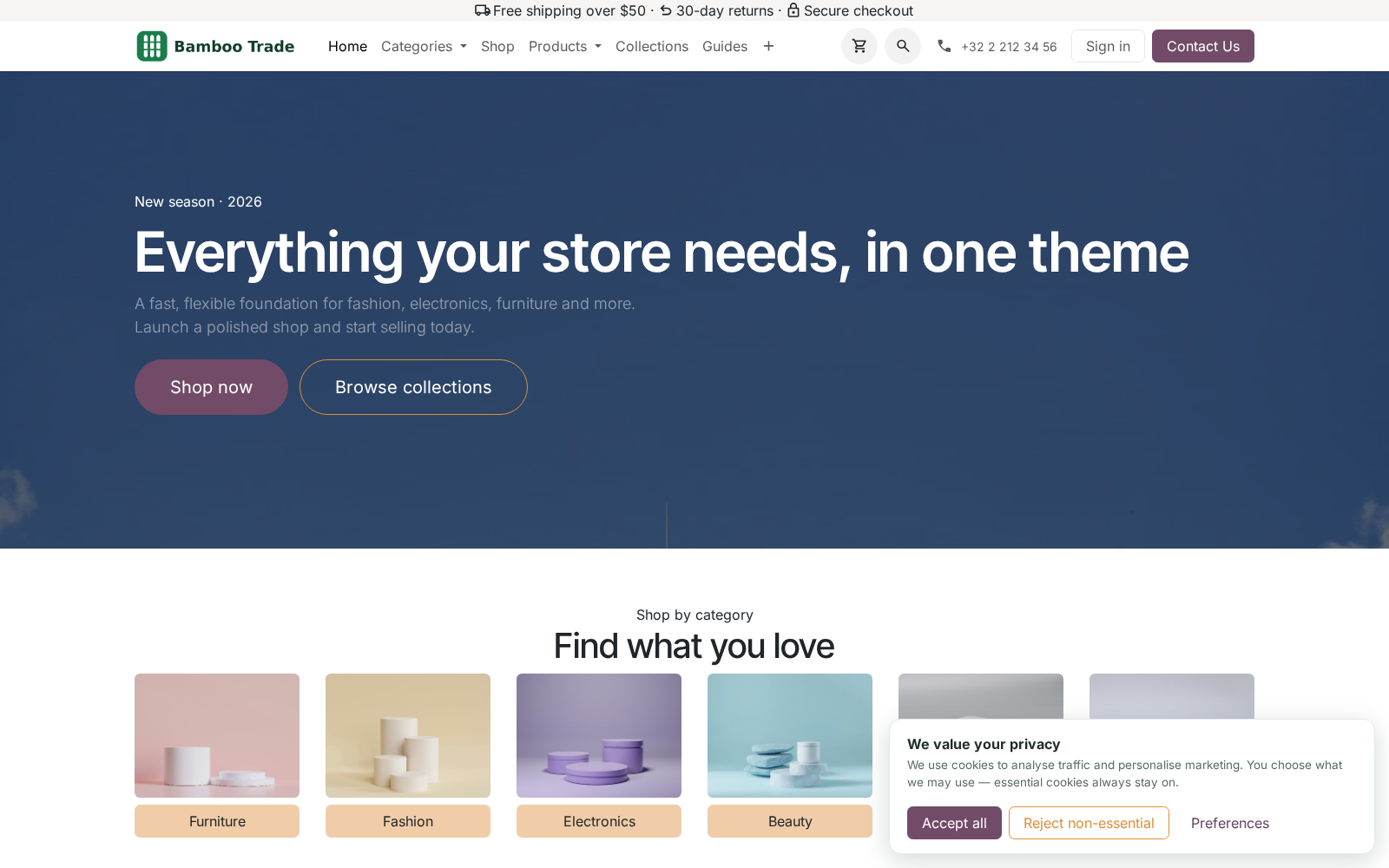
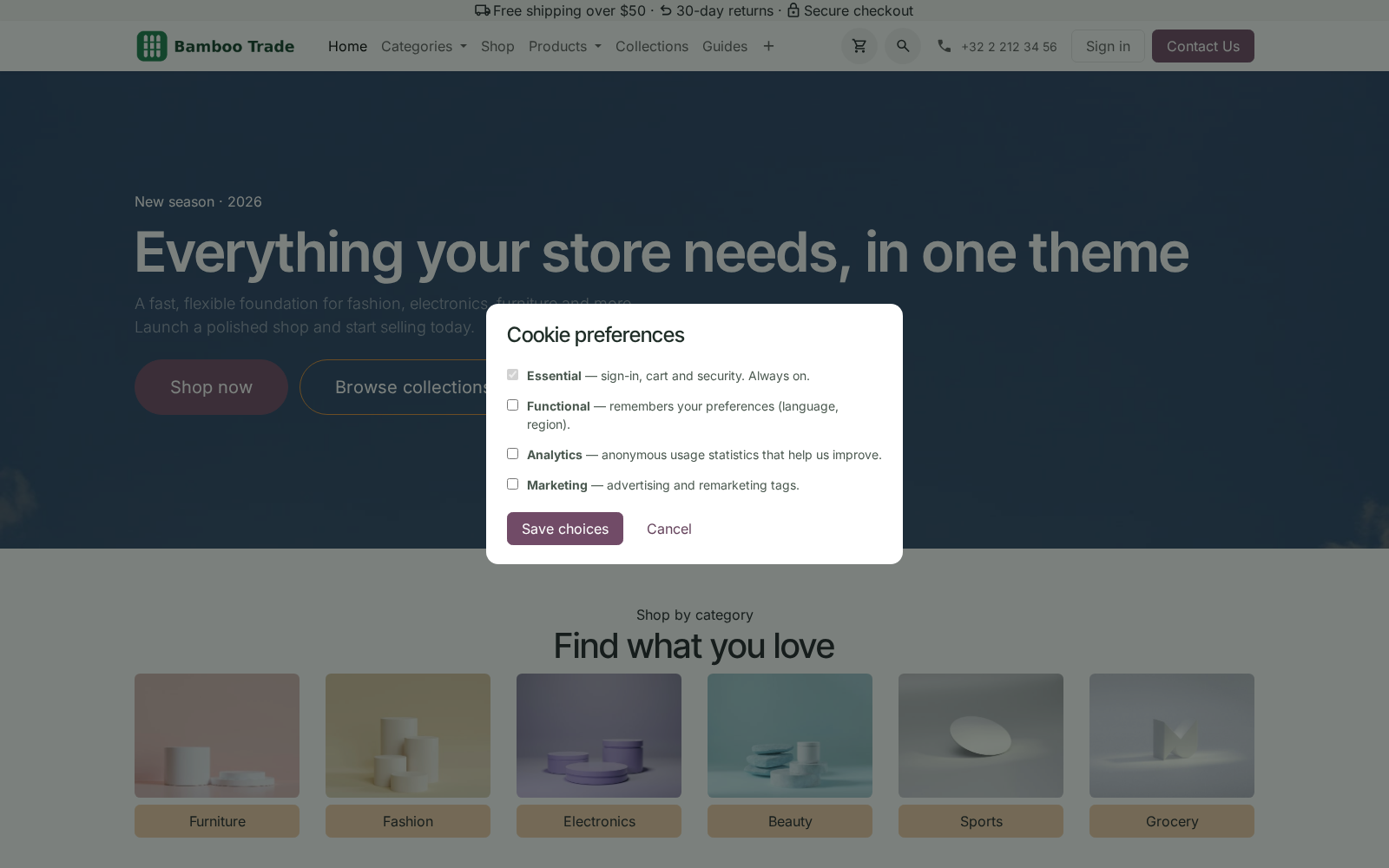
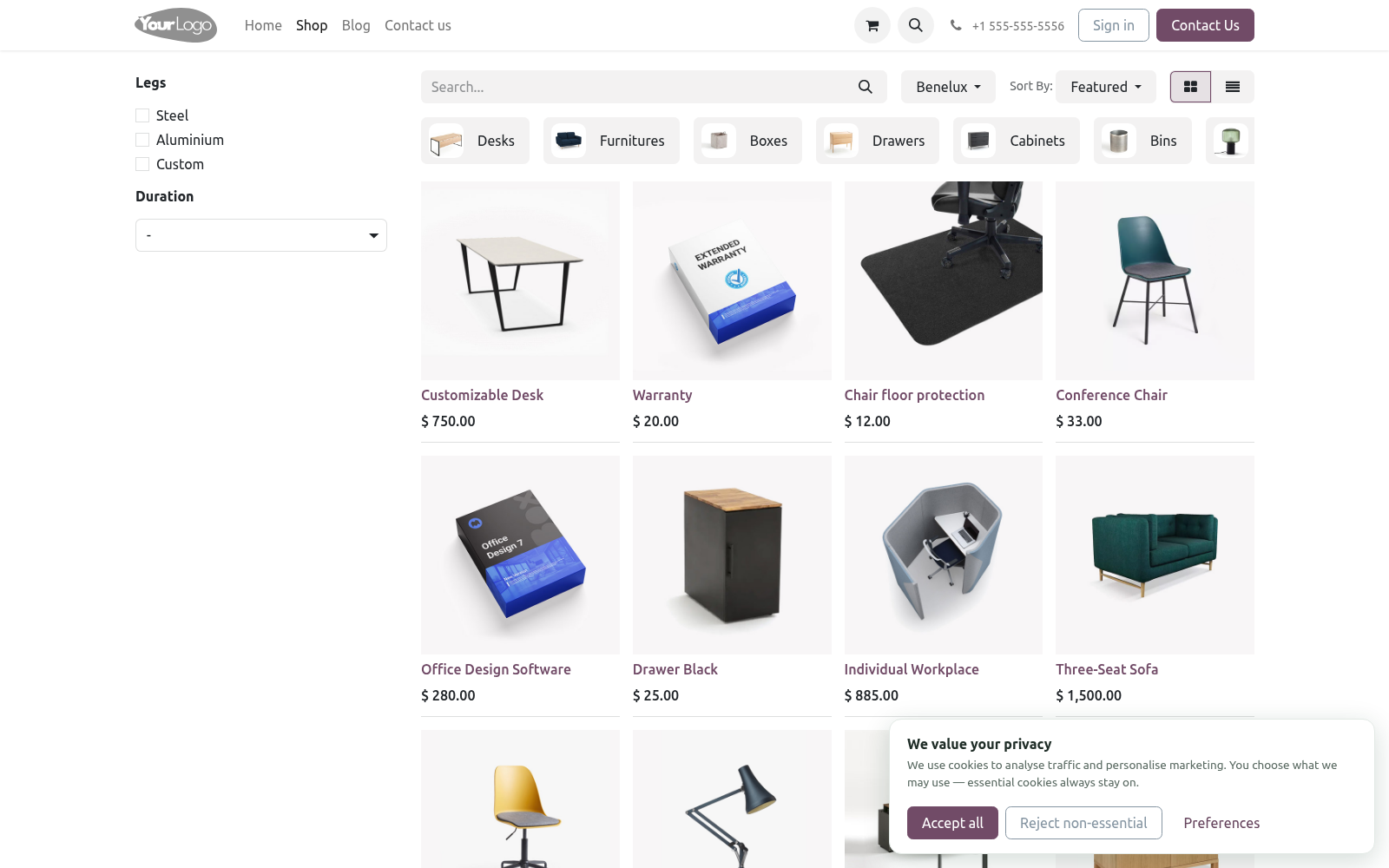
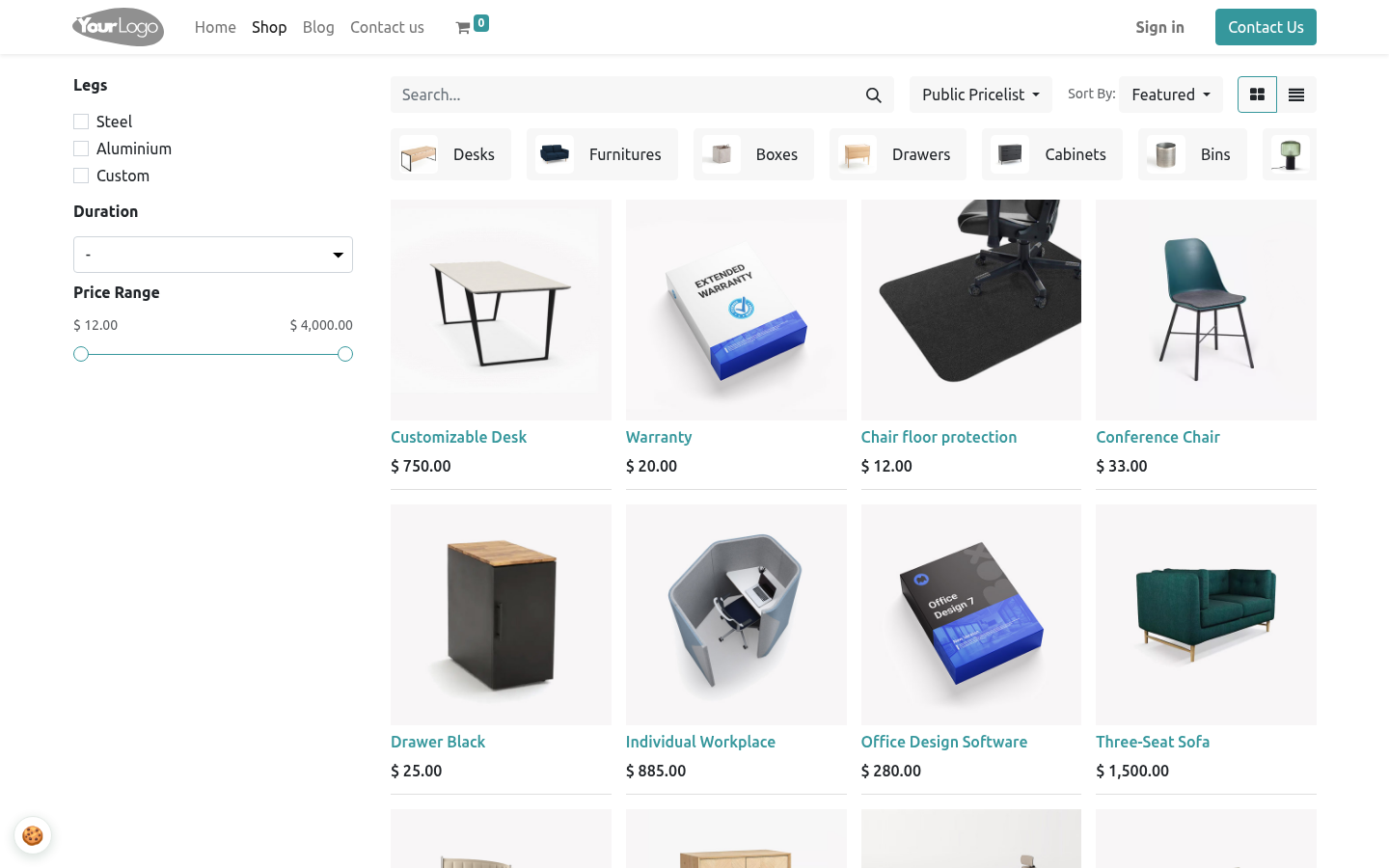
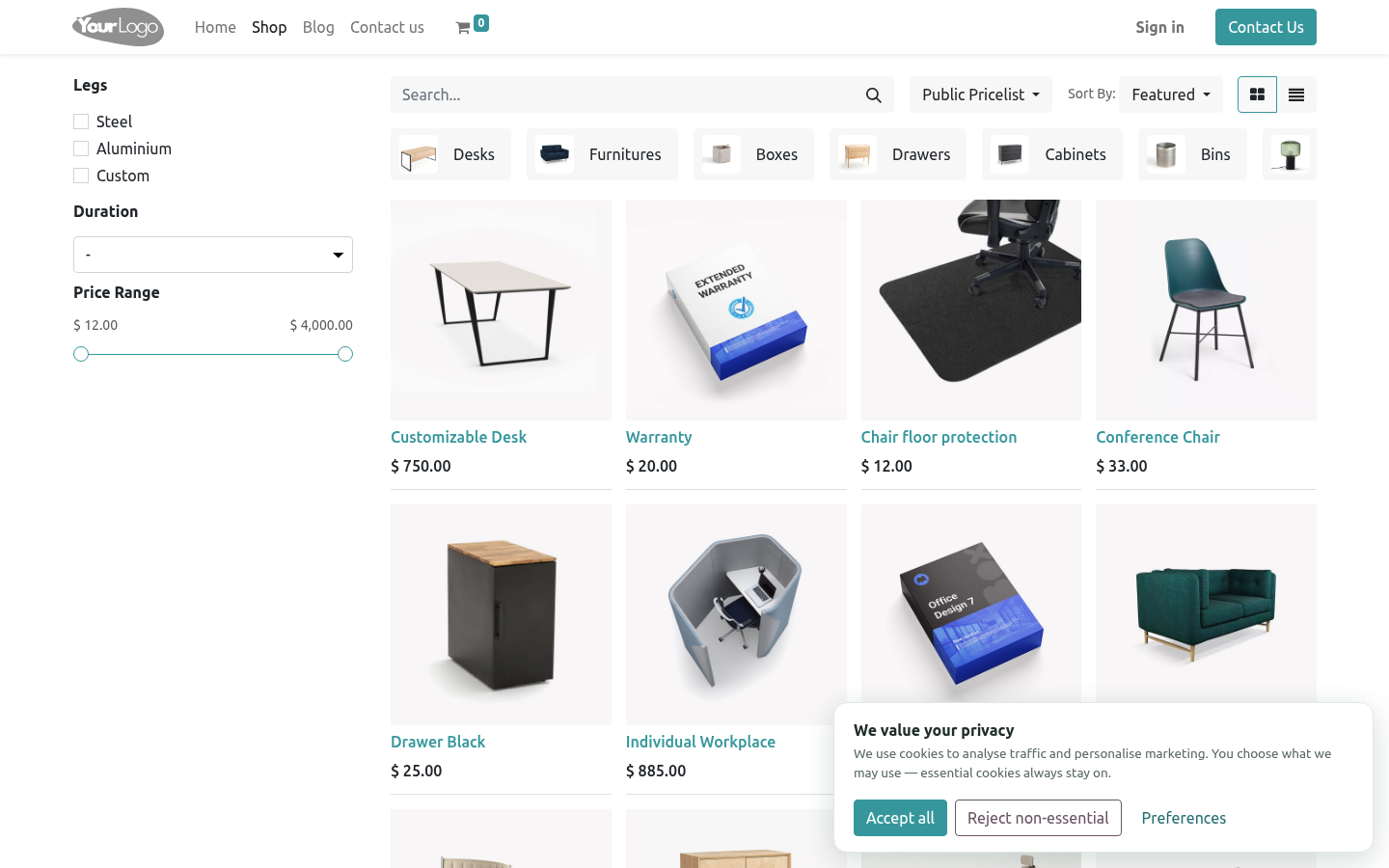
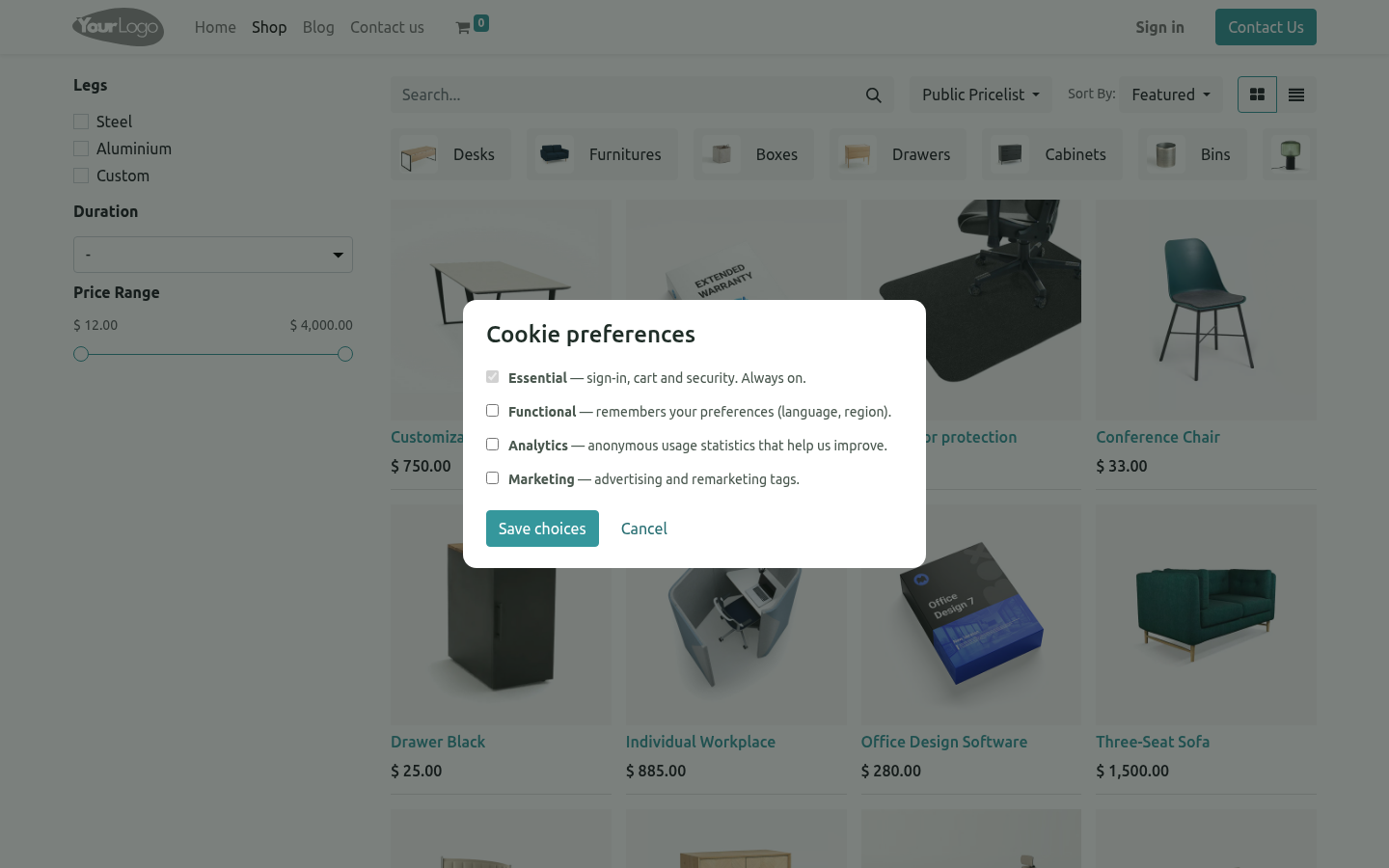
Cookie Consent Banner & GDPR Consent Mode v2. GDPR cookie consent banner with Google Consent Mode v2, script blocking until consent, a tamper-proof log and presets for GA4 and Meta Pixel. A complete consent-management platform (CMP) for the Odoo 20 website: per-category cookie banner with a preferences modal, Google Consent Mode v2 signals, marketing/analytics scripts held back until the visitor agrees, an audit-ready consent register, EU geo-targeting and one-click presets for the common trackers. In the next few minutes: cookie consent banner & gdpr consent mode v2, then managing scripts, then the consent register, then changing your cookie policy, then withdrawing consent.
Then what this app deliberately does not do, so you can tell before you buy whether it fits. Everything lives under Managed Scripts then Consent Register then Consent Pro. #. Install BambooForge Consent Pro.
The banner is live immediately with sensible defaults; the core cookies bar is switched off. #. Open Website ▸ Configuration ▸ Settings ▸ Consent Pro and pick the audience mode (everyone vs EU-only), banner texts and policy version. #.
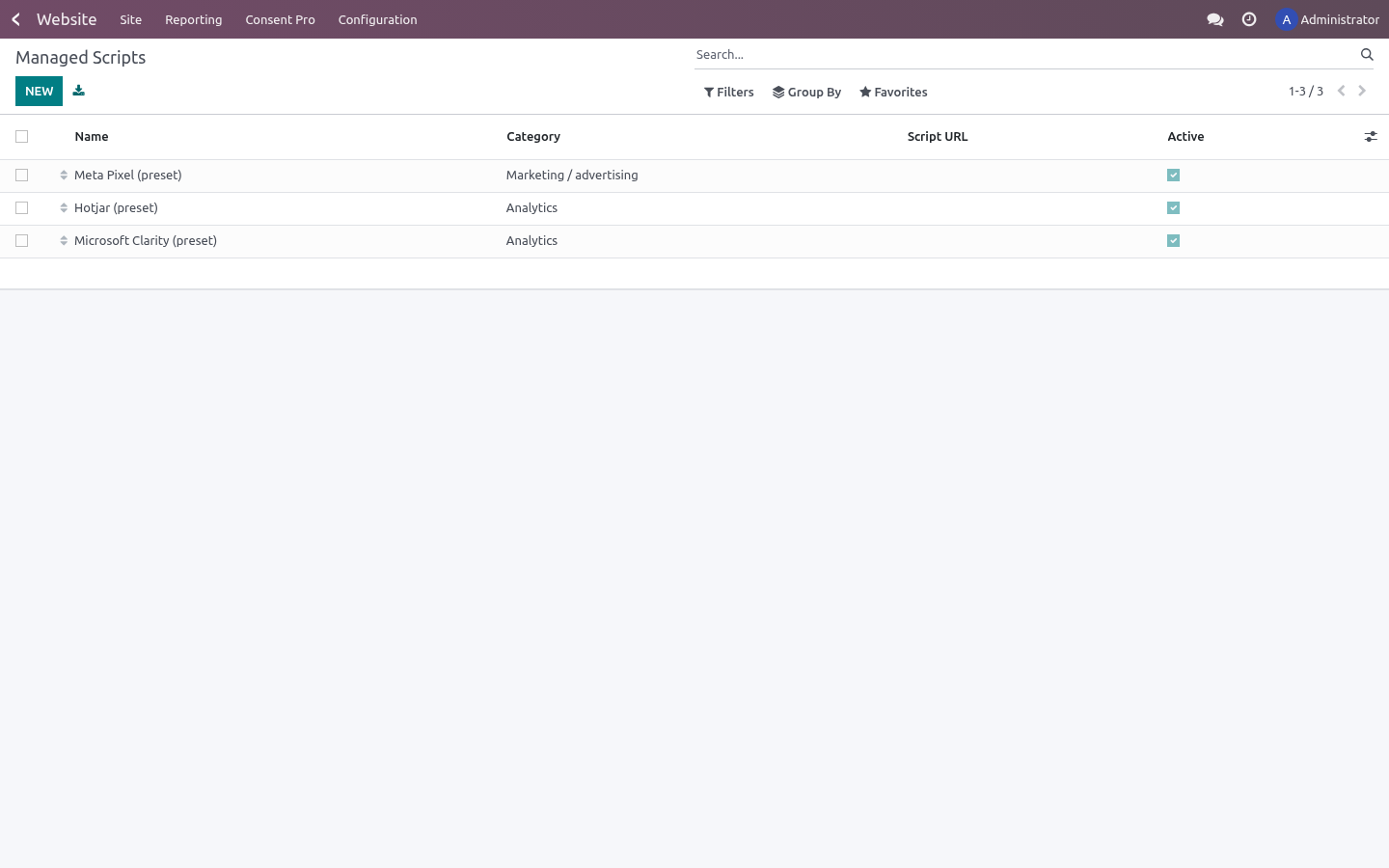
Move your trackers into Website ▸ Configuration ▸ Consent Pro ▸ Managed Scripts — or activate a preset and paste your pixel ID. #. Visit the site in a private window: choose, then check Consent Register — your choice is there. Cookie Consent Banner & GDPR Consent Mode v2.
A complete consent-management platform (CMP) for the Odoo 20 website: per-category cookie banner with a preferences modal, Google Consent Mode v2 signals, marketing/analytics scripts held back until the visitor agrees, an audit-ready consent register, EU geo-targeting and one-click presets for the common trackers. This page is the complete manual. Follow it top to bottom and you can install, brand the banner, wire your trackers, prove consent to an auditor and fix the common issues without contacting support. Managing scripts.
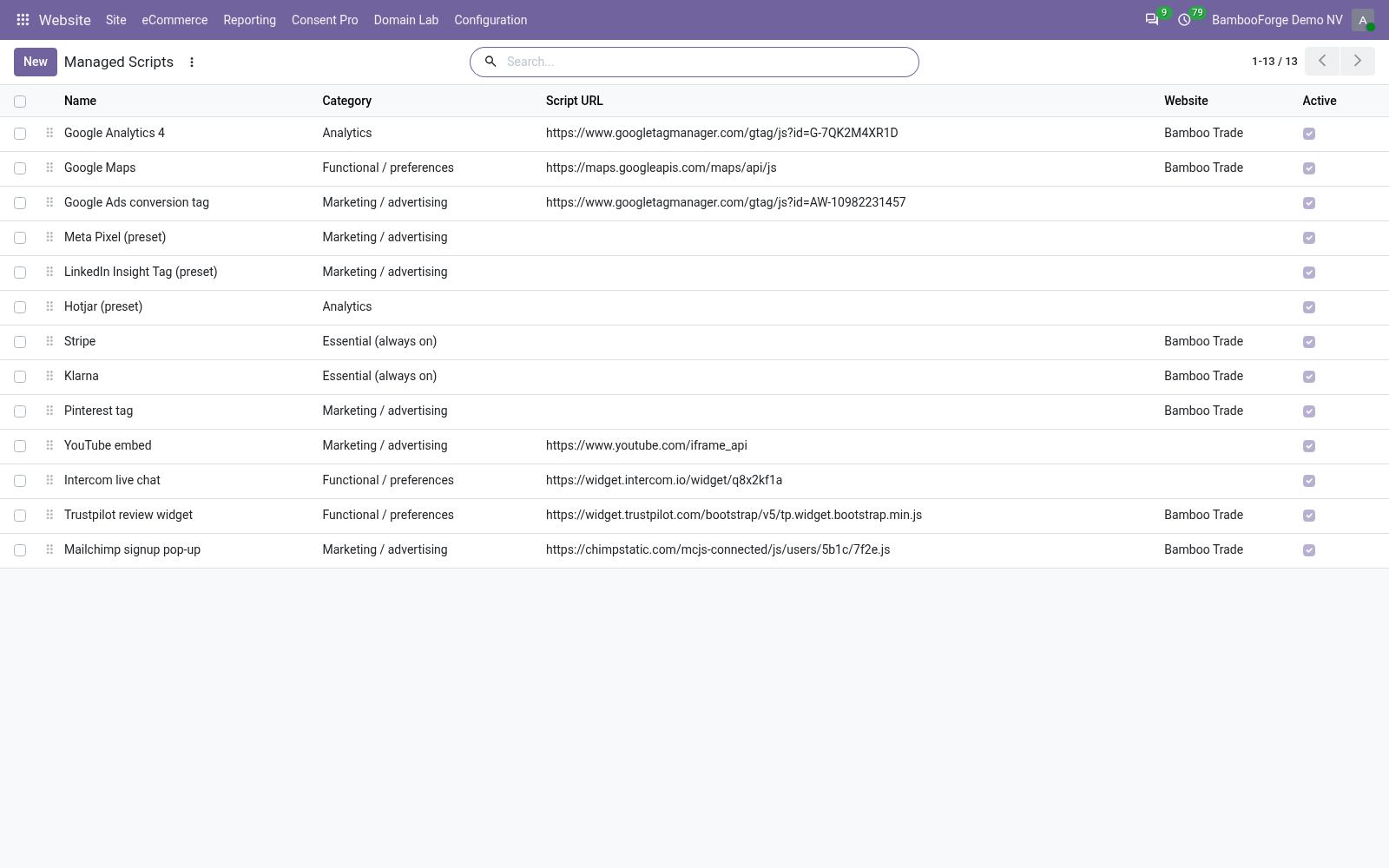
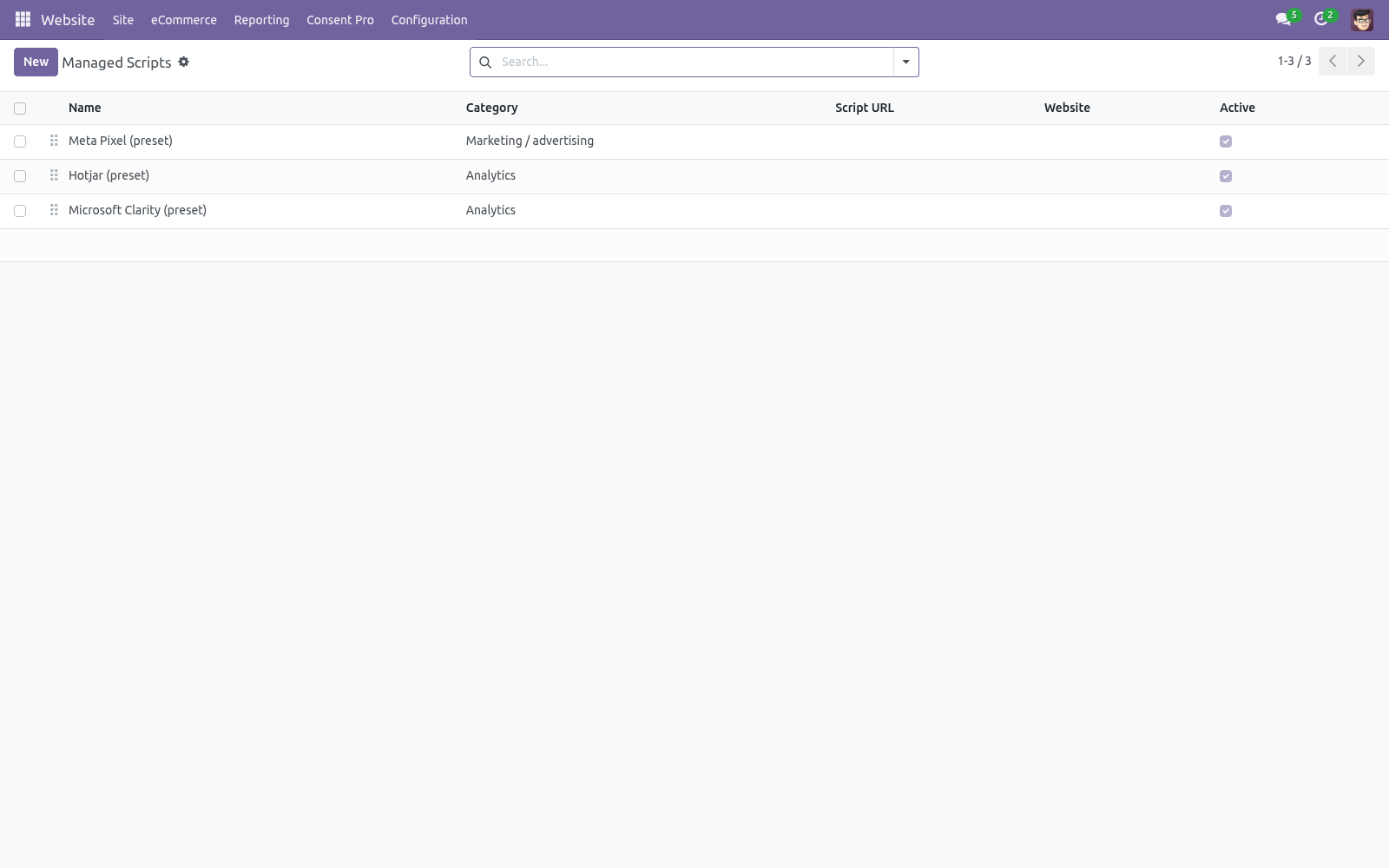
Each Managed Script holds a category, an optional external Script URL and/or Inline JavaScript. Both run only once the visitor grants that category — injected immediately after the choice (no reload needed) and server-rendered on later page views. If you keep a tag hard-coded in a template or through the website editor, neutralise it like this and Consent Pro will activate it on consent. Google tags (GA4, Google Ads) need no managed script when Consent Mode is enabled: keep using Odoo's built-in GA4 field — Google's own tags read the consent signals and stay dormant until granted.
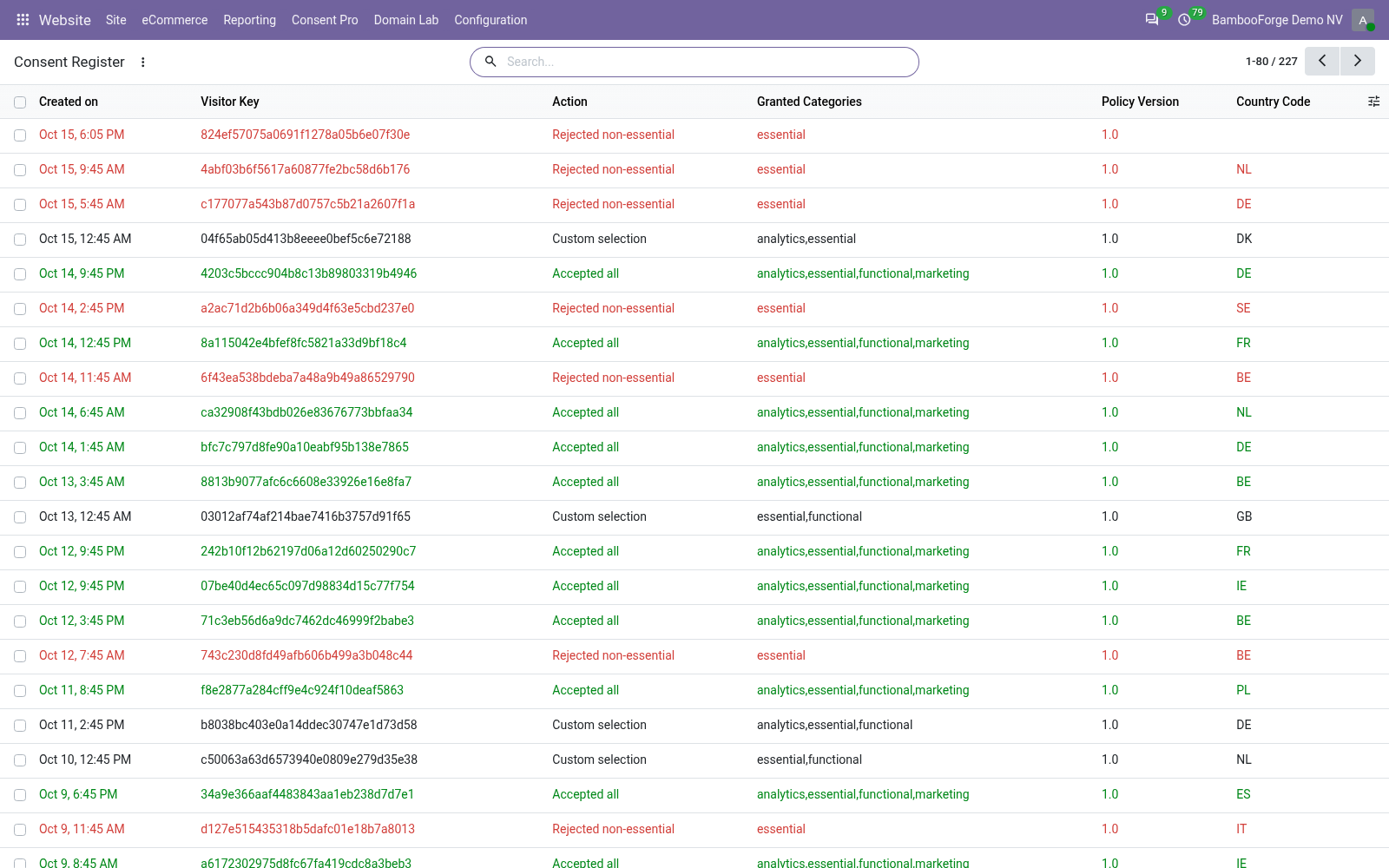
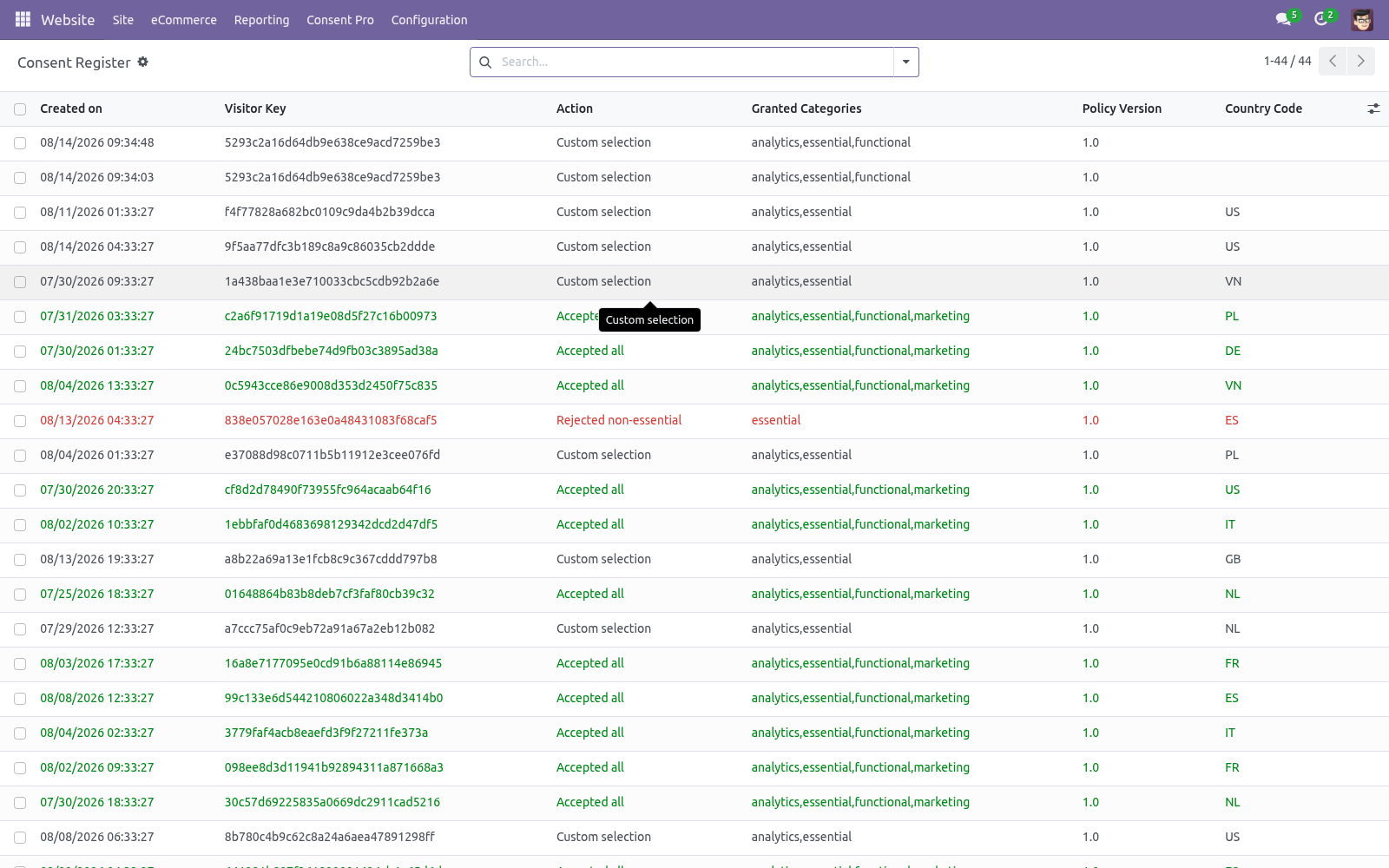
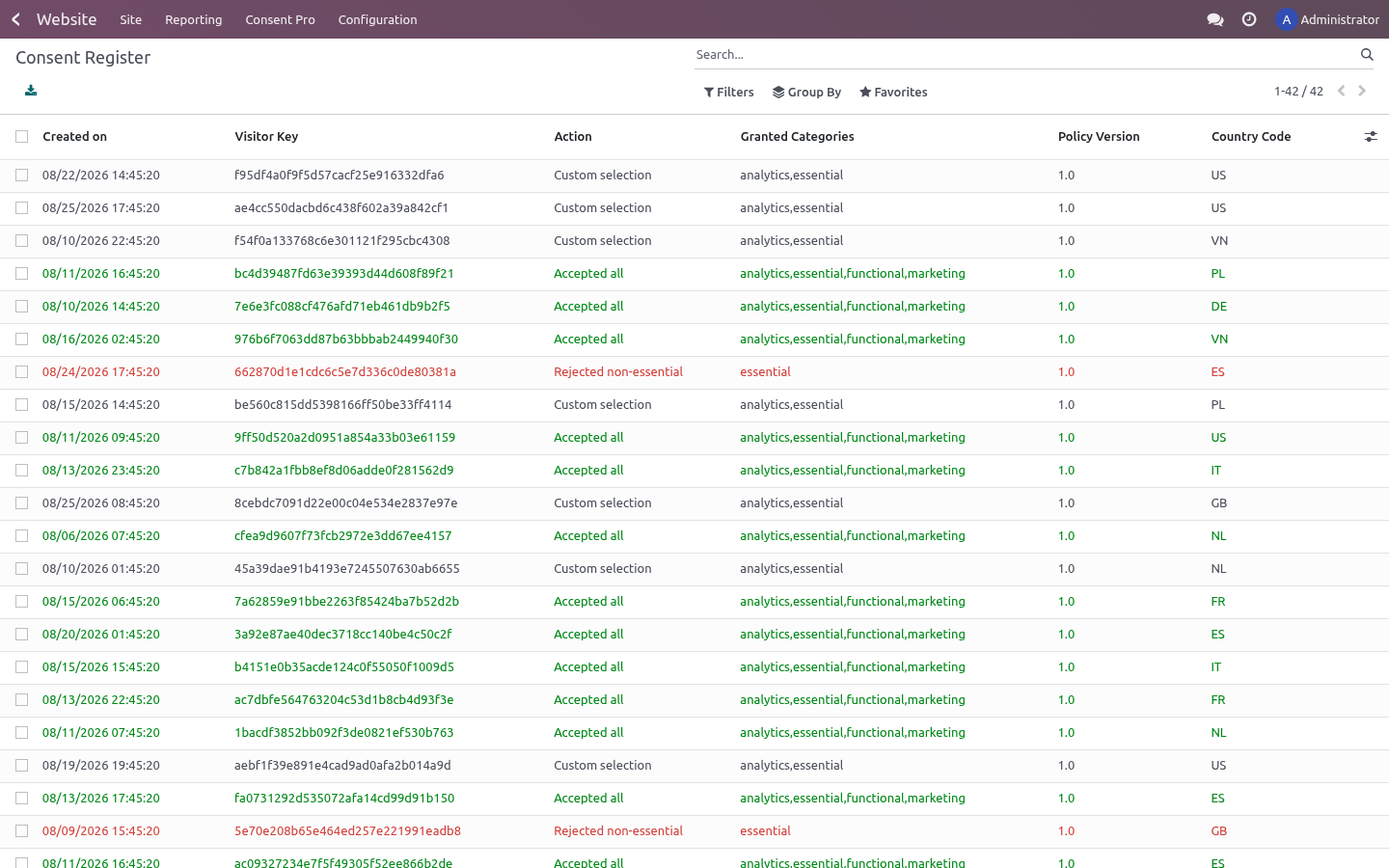
The consent register. Website ▸ Configuration ▸ Consent Pro ▸ Consent Register lists every choice: timestamp, salted visitor key, action, granted categories, policy version, country. Filter and group by action/country/day; export to XLSX with the standard exporter for an audit bundle. Entries older than the per-website retention (Settings, default 13 months — CNIL guidance) are vacuumed automatically.
One entry per distinct choice. An entry is identified by website + visitor key + policy version + action + granted categories. When the same visitor submits exactly the same choice again — reloading the page, clicking Accept all twice, a script replaying the request — the existing entry is refreshed in place and no row is added. A genuine change of mind differs in the action or in the categories (accept-all, then withdraw; analytics on, then analytics off) and is therefore stored as its own entry, so the register still shows what changed and when.
Changing your cookie policy. Bump Policy version in Settings. Existing consent cookies no longer match, so every visitor is prompted again and new register entries carry the new version. Withdrawing consent.
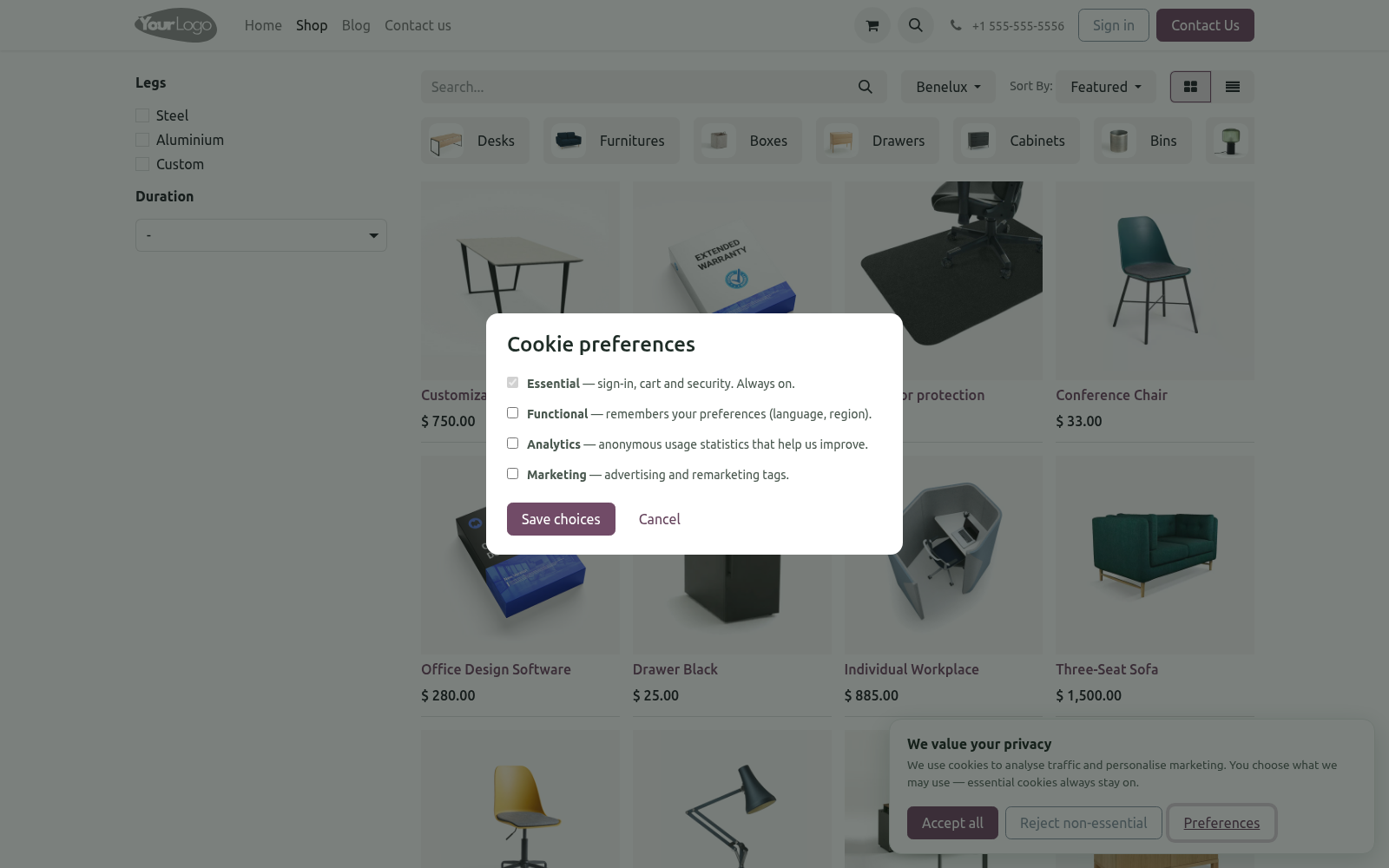
The floating 🍪 badge (and the window.bfConsent.open() JS API for custom footer links) reopens the preferences modal at any time, as the GDPR requires. Newly revoked categories stop loading from the next page view; Google tags react immediately via consent update. Configuration. Access: website designers manage scripts and read the register; deleting register entries is reserved to administrators.
Troubleshooting. Two banners show. The core cookies bar was re-enabled. Switch Cookies Bar off in website settings — Consent Pro replaces it.
My tracker fires before consent. It is not registered: move the tag into Managed Scripts or wrap it in the text/plain pattern. Tags pasted into Website ▸ Custom head code run outside any CMP's control. FAQ.
Is this enough for GDPR/ePrivacy compliance? It implements the technical requirements: prior blocking, granular opt-in, equal reject, withdrawal, proof of consent, re-prompt on change. Pair it with an accurate cookie policy page — legal texts remain your responsibility. Does it work with Odoo's GA4 integration?
Yes — that is the flagship case. Consent Mode v2 governs it without any extra configuration. Upgrade. #.
Back up the database. #. Replace the module folder, restart, then. #.
Review the Changelog; bump the policy version if a new release adds categories you start using. Uninstall. #. Apps ▸ BambooForge Consent Pro ▸ Uninstall.
#. Removed: managed scripts, the consent register, banner templates and settings fields. Visitors' bf_consent cookies simply expire. #.
Re-enable the core Cookies Bar in website settings if you still want a basic banner afterwards. #. Remember: without a CMP your trackers fire unconditionally again — check your compliance posture before removing. The complete manual is at docs dot bambooforge dot dev, the demo database is linked from the store page, and support answers within twenty-four hours.
Links are in the description.
Transcript of the walkthrough (Odoo 19)
Cookie Consent Banner & GDPR Consent Mode v2. GDPR cookie consent banner with Google Consent Mode v2, script blocking until consent, a tamper-proof log and presets for GA4 and Meta Pixel. A complete consent-management platform (CMP) for the Odoo 19 website: per-category cookie banner with a preferences modal, Google Consent Mode v2 signals, marketing/analytics scripts held back until the visitor agrees, an audit-ready consent register, EU geo-targeting and one-click presets for the common trackers. In the next few minutes: cookie consent banner & gdpr consent mode v2, then managing scripts, then the consent register, then changing your cookie policy, then withdrawing consent.
Then what this app deliberately does not do, so you can tell before you buy whether it fits. Everything lives under Managed Scripts then Consent Register then Consent Pro. Cookie Consent Banner & GDPR Consent Mode v2. A complete consent-management platform (CMP) for the Odoo 19 website: per-category cookie banner with a preferences modal, Google Consent Mode v2 signals, marketing/analytics scripts held back until the visitor agrees, an audit-ready consent register, EU geo-targeting and one-click presets for the common trackers.
This page is the complete manual. Follow it top to bottom and you can install, brand the banner, wire your trackers, prove consent to an auditor and fix the common issues without contacting support. Managing scripts. Each Managed Script holds a category, an optional external Script URL and/or Inline JavaScript.
Both run only once the visitor grants that category — injected immediately after the choice (no reload needed) and server-rendered on later page views. <script type="text/plain" data-bf-consent="marketing"> fbq('init', '123456789'); </script> The consent register. Website ▸ Configuration ▸ Consent Pro ▸ Consent Register lists every choice: timestamp, salted visitor key, action, granted categories, policy version, country. Filter and group by action/country/day; export to XLSX with the standard exporter for an audit bundle.
Entries older than the per-website retention (Settings, default 13 months — CNIL guidance) are vacuumed automatically. One entry per distinct choice. An entry is identified by website + visitor key + policy version + action + granted categories. When the same visitor submits exactly the same choice again — reloading the page, clicking Accept all twice, a script replaying the request — the existing entry is refreshed in place and no row is added.
A genuine change of mind differs in the action or in the categories (accept-all, then withdraw; analytics on, then analytics off) and is therefore stored as its own entry, so the register still shows what changed and when. Changing your cookie policy. Bump Policy version in Settings. Existing consent cookies no longer match, so every visitor is prompted again and new register entries carry the new version.
Withdrawing consent. The floating 🍪 badge (and the window.bfConsent.open() JS API for custom footer links) reopens the preferences modal at any time, as the GDPR requires. Newly revoked categories stop loading from the next page view; Google tags react immediately via consent update. Configuration.
Access: website designers manage scripts and read the register; deleting register entries is reserved to administrators. - Setting (per website) - Consent Pro banner Master switch. Off = no banner, no scripts blocked, no logging. - Audience mode Ask every visitor, or EU-only (implied consent elsewhere — scripts load, no banner, badge still available).
- Google Consent Mode v2 Emit default + update signals. Leave on if you use any Google tag. - Reject button Troubleshooting. Two banners show.
The core cookies bar was re-enabled. Switch Cookies Bar off in website settings — Consent Pro replaces it. My tracker fires before consent. It is not registered: move the tag into Managed Scripts or wrap it in the text/plain pattern.
Tags pasted into Website ▸ Custom head code run outside any CMP's control. FAQ. Is this enough for GDPR/ePrivacy compliance? It implements the technical requirements: prior blocking, granular opt-in, equal reject, withdrawal, proof of consent, re-prompt on change.
Pair it with an accurate cookie policy page — legal texts remain your responsibility. Does it work with Odoo's GA4 integration? Yes — that is the flagship case. Consent Mode v2 governs it without any extra configuration.
Upgrade. odoo-bin -d <db> -u bambooforge_consent_pro --stop-after-init #. Review the Changelog; bump the policy version if a new release adds categories you start using. Uninstall.
#. Apps ▸ BambooForge Consent Pro ▸ Uninstall. #. Removed: managed scripts, the consent register, banner templates and settings fields.
Visitors' bf_consent cookies simply expire. #. Re-enable the core Cookies Bar in website settings if you still want a basic banner afterwards. #.
Remember: without a CMP your trackers fire unconditionally again — check your compliance posture before removing. The complete manual is at docs dot bambooforge dot dev, the demo database is linked from the store page, and support answers within twenty-four hours. Links are in the description.
Transcript of the walkthrough (Odoo 18)
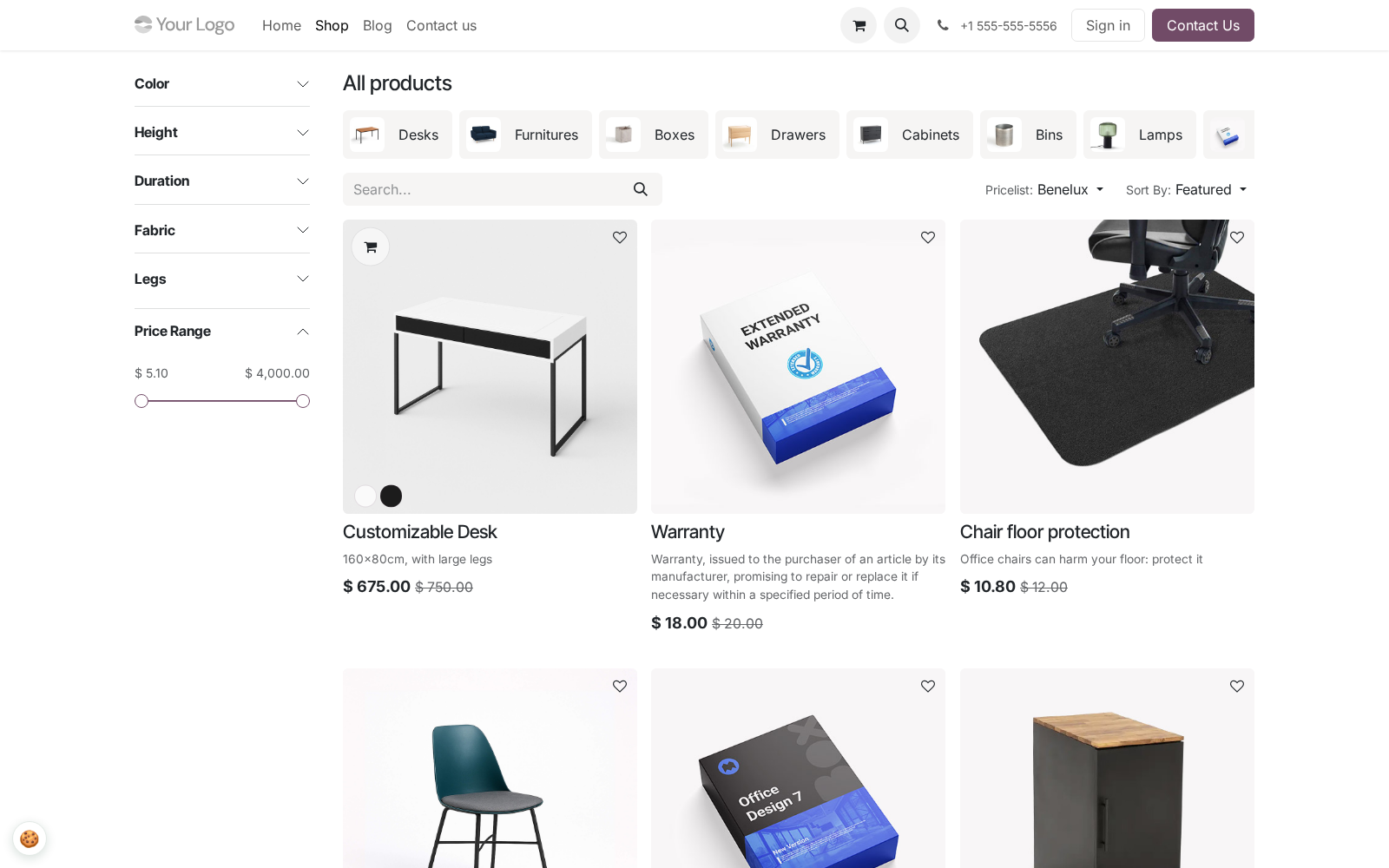
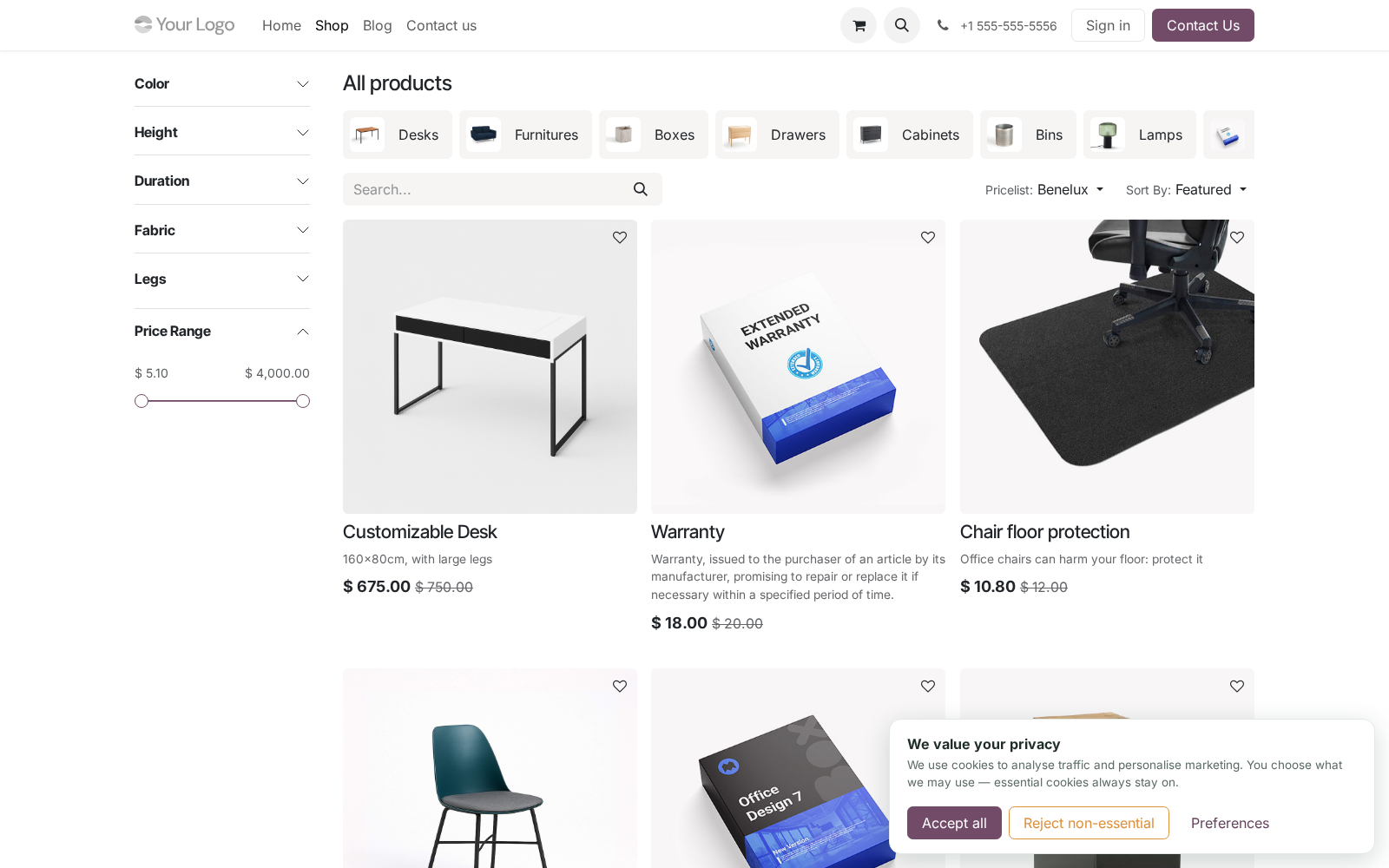
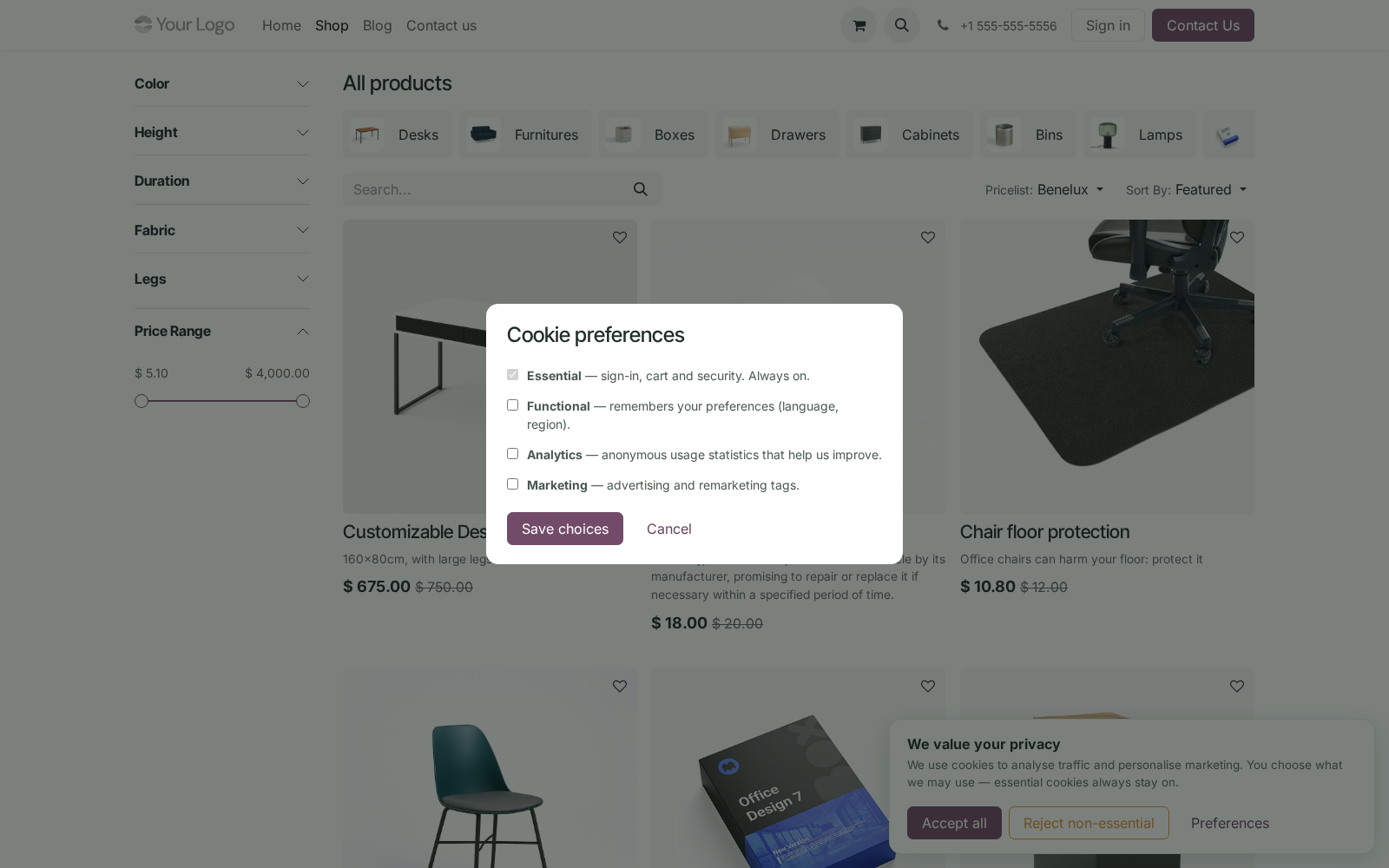
Cookie Consent Banner & GDPR Consent Mode v2. GDPR cookie consent banner with Google Consent Mode v2, script blocking until consent, a tamper-proof log and presets for GA4 and Meta Pixel. A complete consent-management platform (CMP) for the Odoo 18 website: per-category cookie banner with a preferences modal, Google Consent Mode v2 signals, marketing/analytics scripts held back until the visitor agrees, an audit-ready consent register, EU geo-targeting and one-click presets for the common trackers. In the next few minutes: cookie consent banner & gdpr consent mode v2, then managing scripts, then the consent register, then changing your cookie policy, then withdrawing consent.
Then what this app deliberately does not do, so you can tell before you buy whether it fits. Everything lives under Managed Scripts then Consent Register then Consent Pro. Cookie Consent Banner & GDPR Consent Mode v2. A complete consent-management platform (CMP) for the Odoo 18 website: per-category cookie banner with a preferences modal, Google Consent Mode v2 signals, marketing/analytics scripts held back until the visitor agrees, an audit-ready consent register, EU geo-targeting and one-click presets for the common trackers.
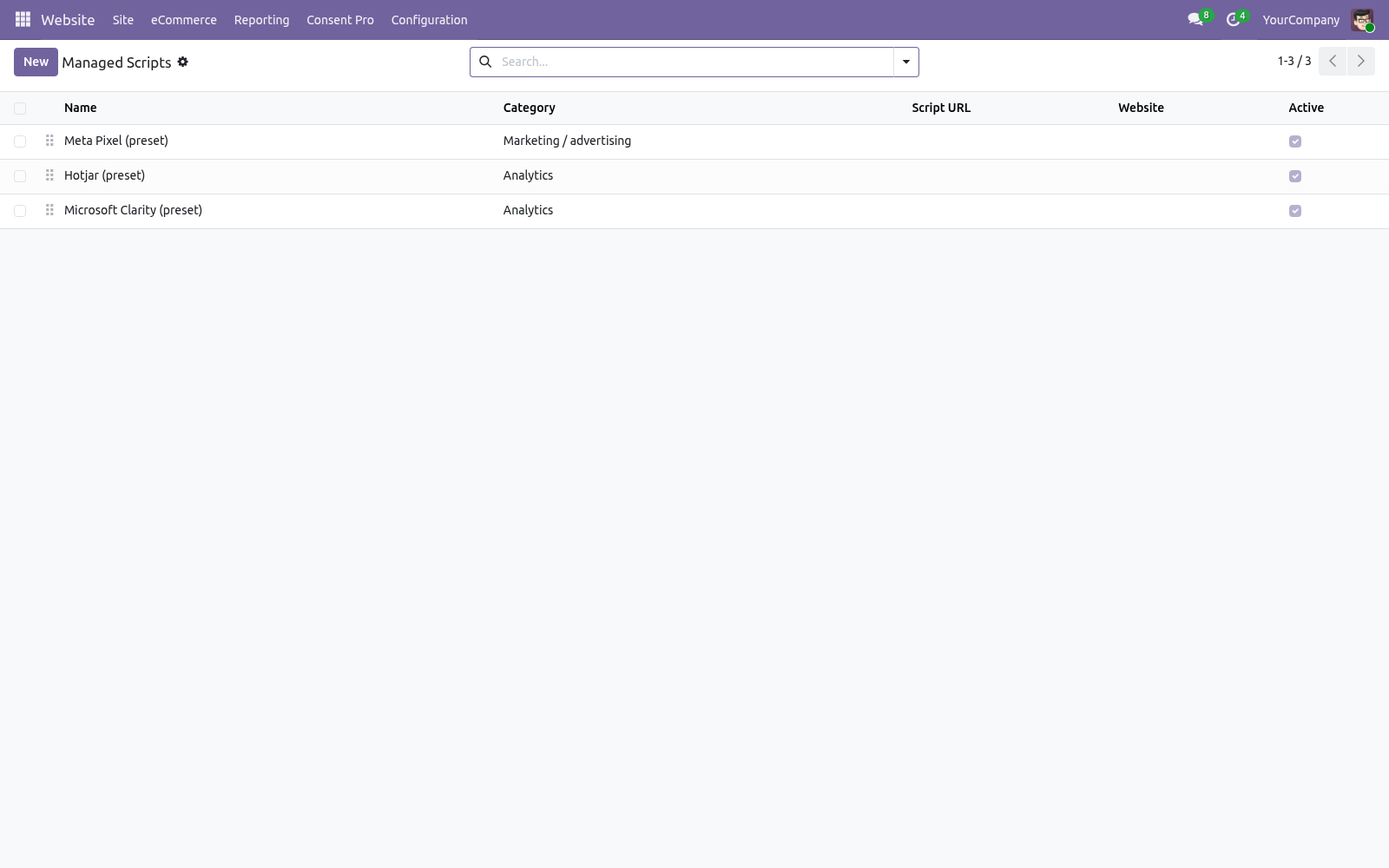
This page is the complete manual. Follow it top to bottom and you can install, brand the banner, wire your trackers, prove consent to an auditor and fix the common issues without contacting support. Managing scripts. Each Managed Script holds a category, an optional external Script URL and/or Inline JavaScript.
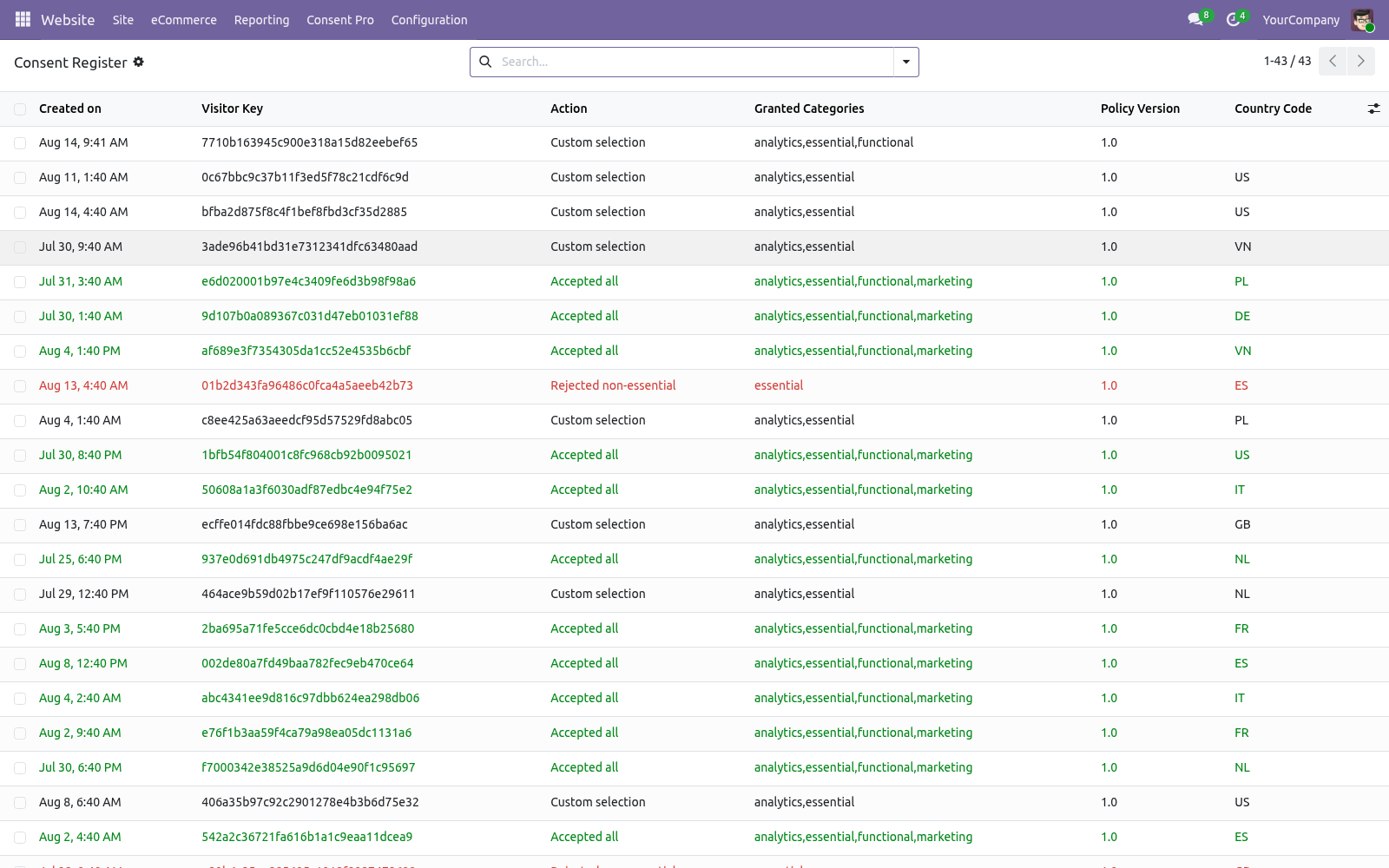
Both run only once the visitor grants that category — injected immediately after the choice (no reload needed) and server-rendered on later page views. <script type="text/plain" data-bf-consent="marketing"> fbq('init', '123456789'); </script> The consent register. Website ▸ Configuration ▸ Consent Pro ▸ Consent Register lists every choice: timestamp, salted visitor key, action, granted categories, policy version, country. Filter and group by action/country/day; export to XLSX with the standard exporter for an audit bundle.
Entries older than the per-website retention (Settings, default 13 months — CNIL guidance) are vacuumed automatically. One entry per distinct choice. An entry is identified by website + visitor key + policy version + action + granted categories. When the same visitor submits exactly the same choice again — reloading the page, clicking Accept all twice, a script replaying the request — the existing entry is refreshed in place and no row is added.
A genuine change of mind differs in the action or in the categories (accept-all, then withdraw; analytics on, then analytics off) and is therefore stored as its own entry, so the register still shows what changed and when. Changing your cookie policy. Bump Policy version in Settings. Existing consent cookies no longer match, so every visitor is prompted again and new register entries carry the new version.
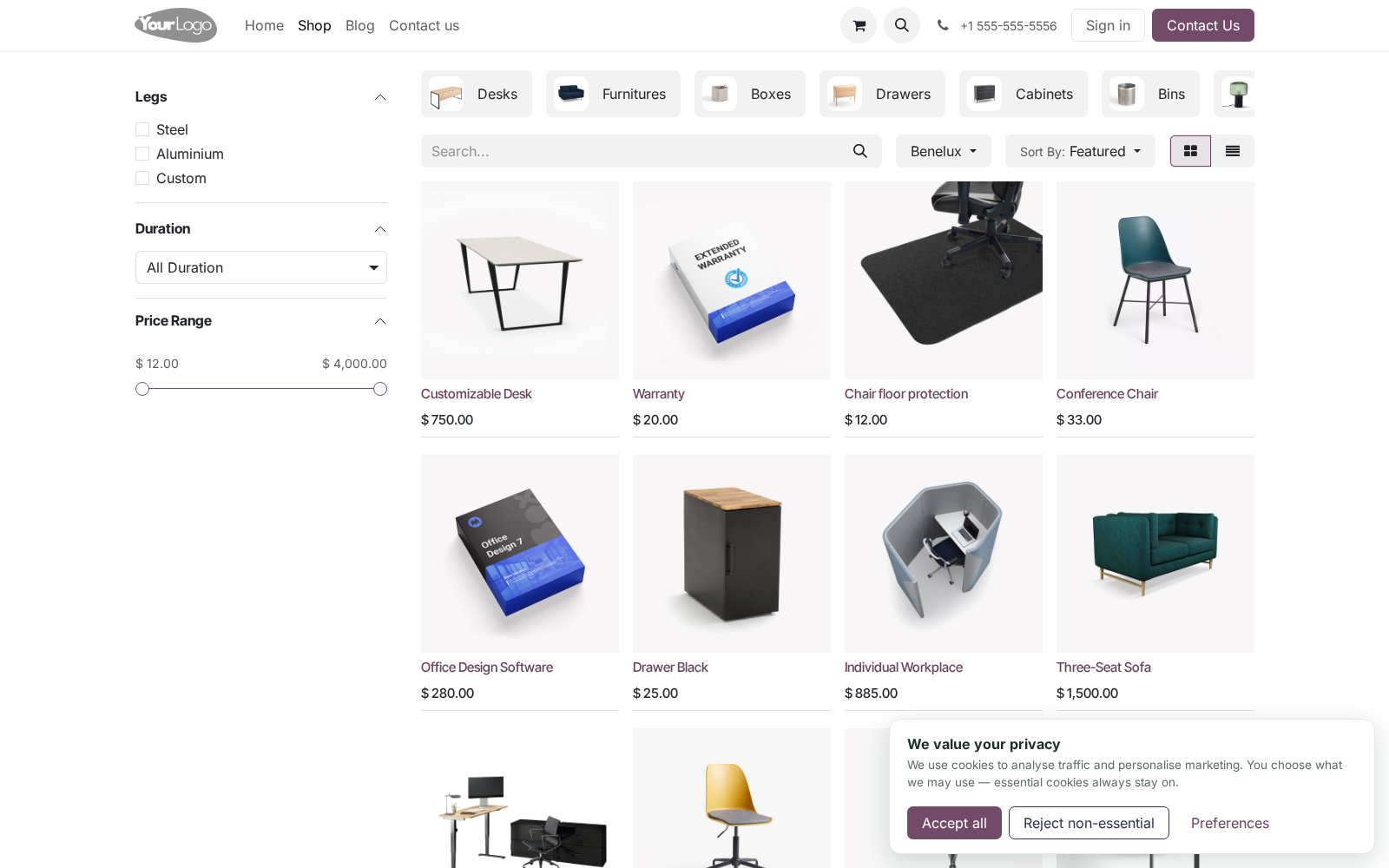
Withdrawing consent. The floating 🍪 badge (and the window.bfConsent.open() JS API for custom footer links) reopens the preferences modal at any time, as the GDPR requires. Newly revoked categories stop loading from the next page view; Google tags react immediately via consent update. Configuration.
Access: website designers manage scripts and read the register; deleting register entries is reserved to administrators. - Setting (per website) - Consent Pro banner Master switch. Off = no banner, no scripts blocked, no logging. - Audience mode Ask every visitor, or EU-only (implied consent elsewhere — scripts load, no banner, badge still available).
- Google Consent Mode v2 Emit default + update signals. Leave on if you use any Google tag. - Reject button Troubleshooting. Two banners show.
The core cookies bar was re-enabled. Switch Cookies Bar off in website settings — Consent Pro replaces it. My tracker fires before consent. It is not registered: move the tag into Managed Scripts or wrap it in the text/plain pattern.
Tags pasted into Website ▸ Custom head code run outside any CMP's control. FAQ. Is this enough for GDPR/ePrivacy compliance? It implements the technical requirements: prior blocking, granular opt-in, equal reject, withdrawal, proof of consent, re-prompt on change.
Pair it with an accurate cookie policy page — legal texts remain your responsibility. Does it work with Odoo's GA4 integration? Yes — that is the flagship case. Consent Mode v2 governs it without any extra configuration.
Upgrade. odoo-bin -d <db> -u bambooforge_consent_pro --stop-after-init #. Review the Changelog; bump the policy version if a new release adds categories you start using. Uninstall.
#. Apps ▸ BambooForge Consent Pro ▸ Uninstall. #. Removed: managed scripts, the consent register, banner templates and settings fields.
Visitors' bf_consent cookies simply expire. #. Re-enable the core Cookies Bar in website settings if you still want a basic banner afterwards. #.
Remember: without a CMP your trackers fire unconditionally again — check your compliance posture before removing. The complete manual is at docs dot bambooforge dot dev, the demo database is linked from the store page, and support answers within twenty-four hours. Links are in the description.
Transcript of the walkthrough (Odoo 17)
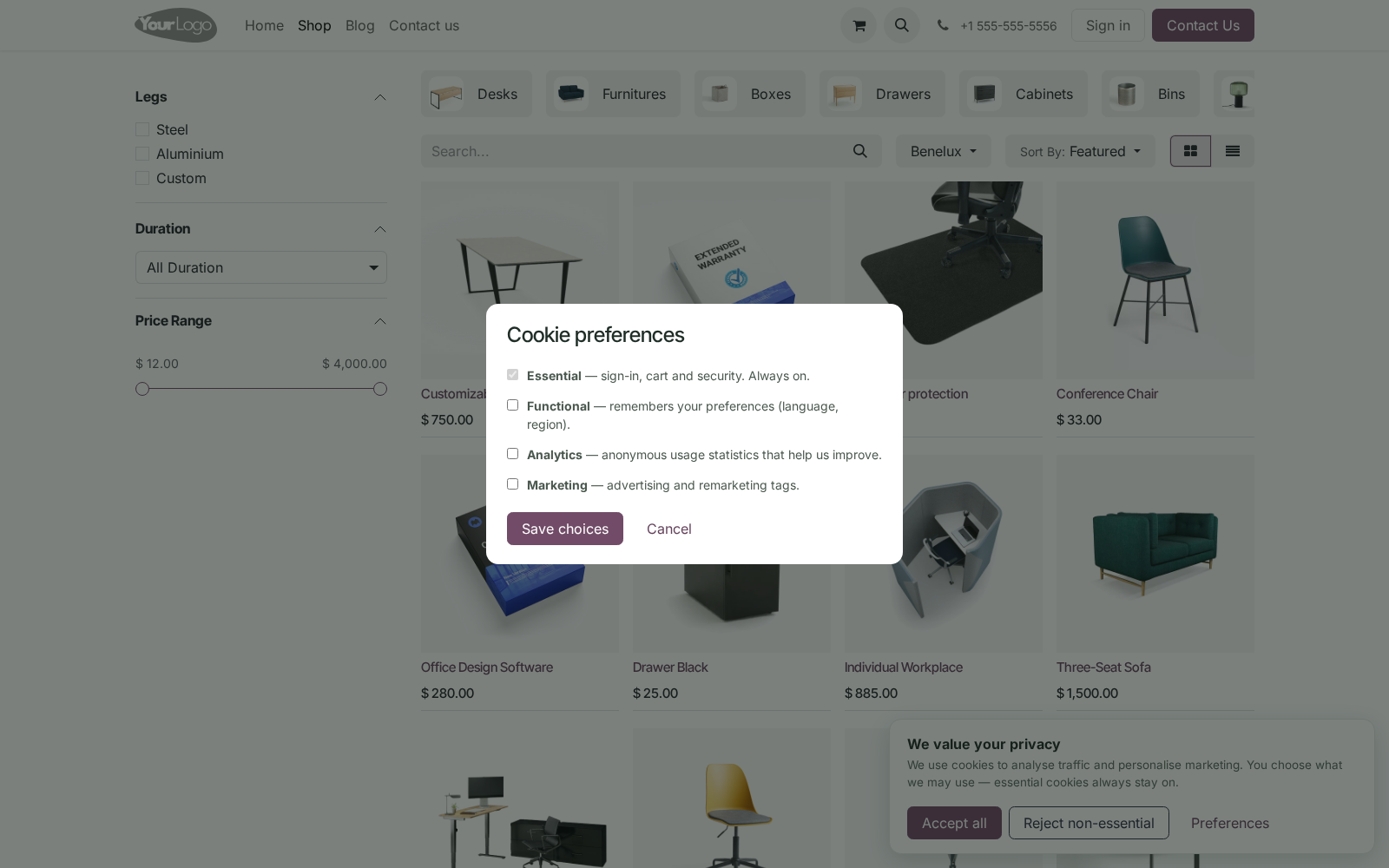
Cookie Consent Banner & GDPR Consent Mode v2. GDPR cookie consent banner with Google Consent Mode v2, script blocking until consent, a tamper-proof log and presets for GA4 and Meta Pixel. A complete consent-management platform (CMP) for the Odoo 17 website: per-category cookie banner with a preferences modal, Google Consent Mode v2 signals, marketing/analytics scripts held back until the visitor agrees, an audit-ready consent register, EU geo-targeting and one-click presets for the common trackers. In the next few minutes: cookie consent banner & gdpr consent mode v2, then managing scripts, then the consent register, then changing your cookie policy, then withdrawing consent.
Then what this app deliberately does not do, so you can tell before you buy whether it fits. Everything lives under Managed Scripts then Consent Register then Consent Pro. Cookie Consent Banner & GDPR Consent Mode v2. A complete consent-management platform (CMP) for the Odoo 17 website: per-category cookie banner with a preferences modal, Google Consent Mode v2 signals, marketing/analytics scripts held back until the visitor agrees, an audit-ready consent register, EU geo-targeting and one-click presets for the common trackers.
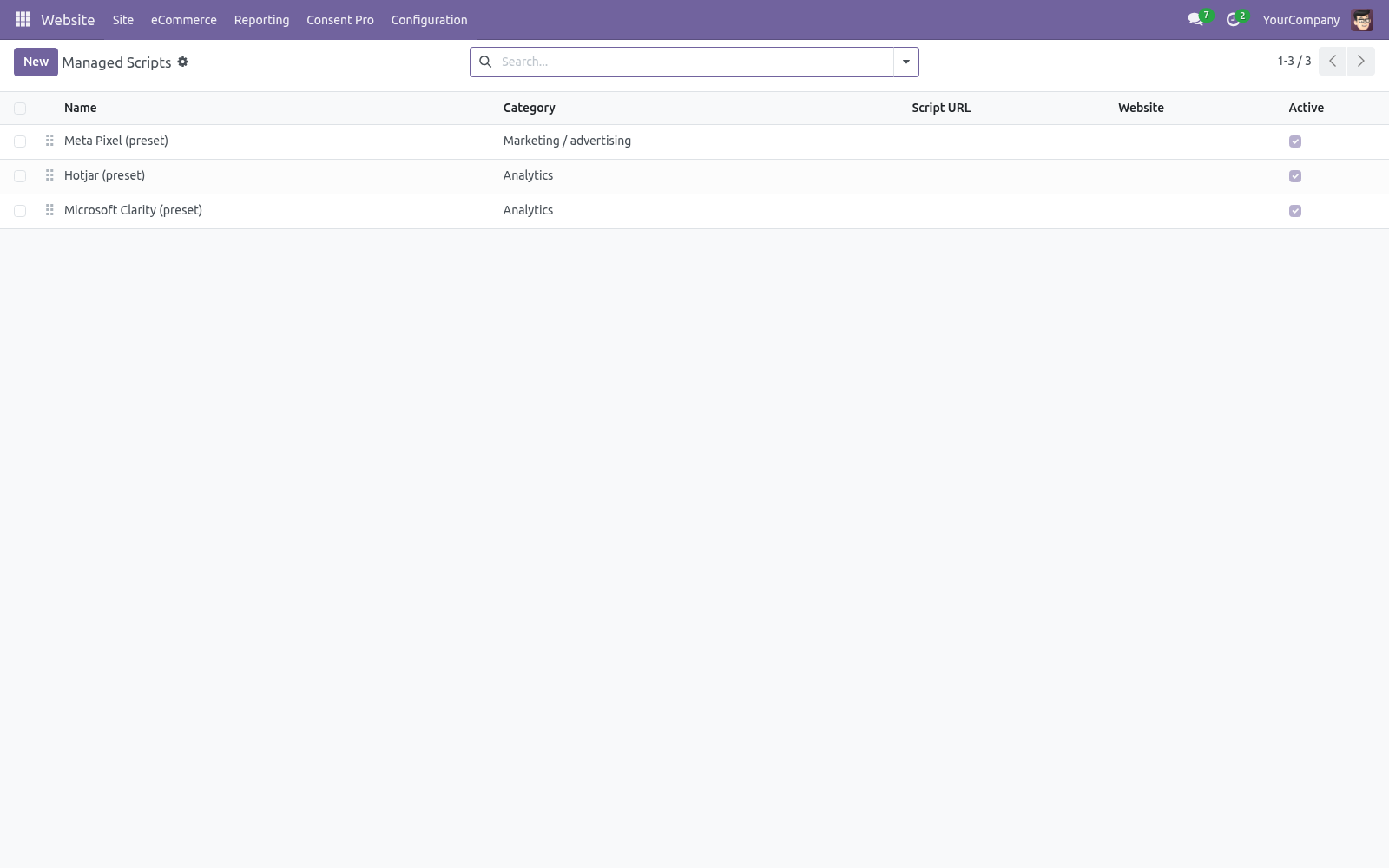
This page is the complete manual. Follow it top to bottom and you can install, brand the banner, wire your trackers, prove consent to an auditor and fix the common issues without contacting support. Managing scripts. Each Managed Script holds a category, an optional external Script URL and/or Inline JavaScript.
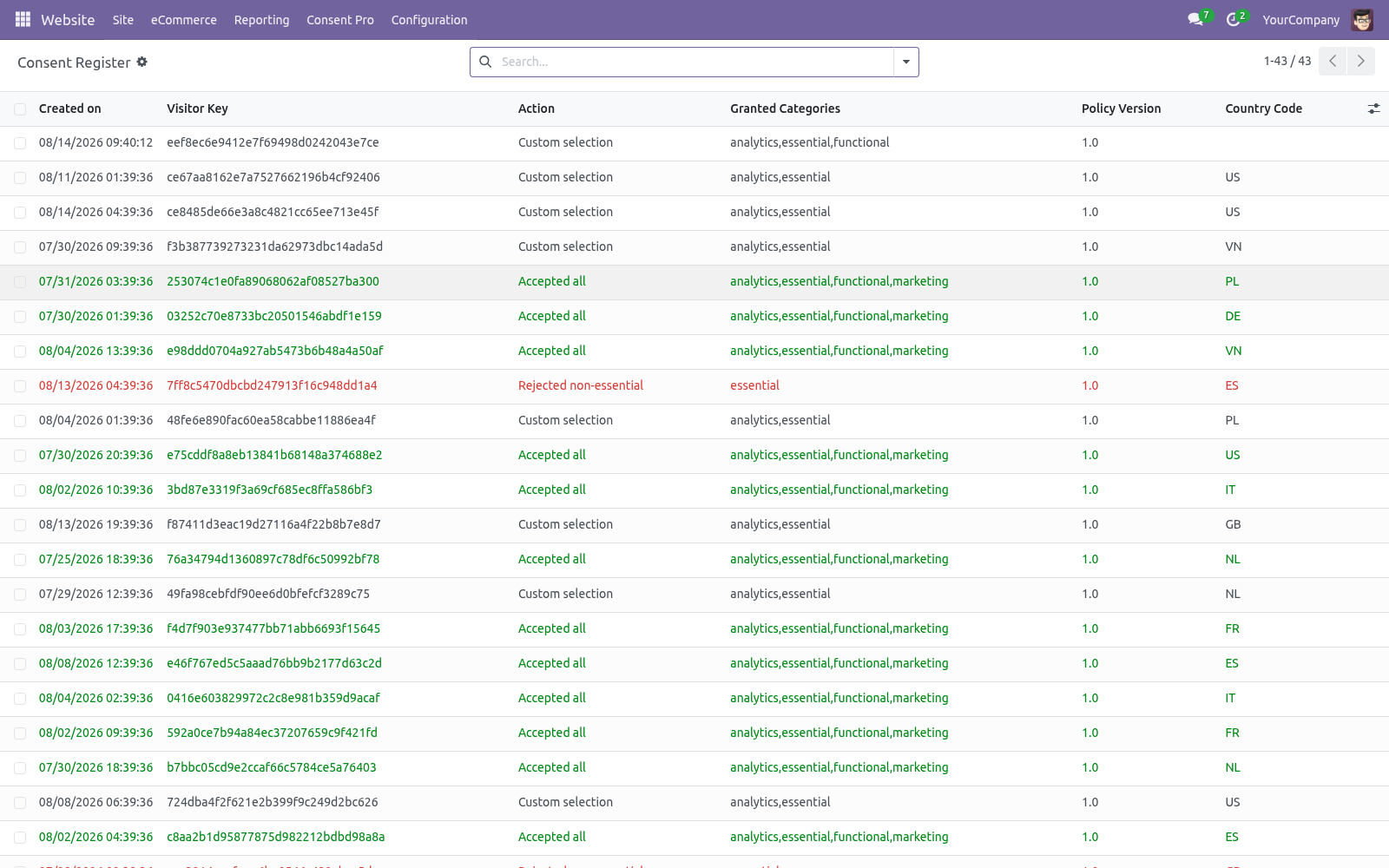
Both run only once the visitor grants that category — injected immediately after the choice (no reload needed) and server-rendered on later page views. <script type="text/plain" data-bf-consent="marketing"> fbq('init', '123456789'); </script> The consent register. Website ▸ Configuration ▸ Consent Pro ▸ Consent Register lists every choice: timestamp, salted visitor key, action, granted categories, policy version, country. Filter and group by action/country/day; export to XLSX with the standard exporter for an audit bundle.
Entries older than the per-website retention (Settings, default 13 months — CNIL guidance) are vacuumed automatically. One entry per distinct choice. An entry is identified by website + visitor key + policy version + action + granted categories. When the same visitor submits exactly the same choice again — reloading the page, clicking Accept all twice, a script replaying the request — the existing entry is refreshed in place and no row is added.
A genuine change of mind differs in the action or in the categories (accept-all, then withdraw; analytics on, then analytics off) and is therefore stored as its own entry, so the register still shows what changed and when. Changing your cookie policy. Bump Policy version in Settings. Existing consent cookies no longer match, so every visitor is prompted again and new register entries carry the new version.
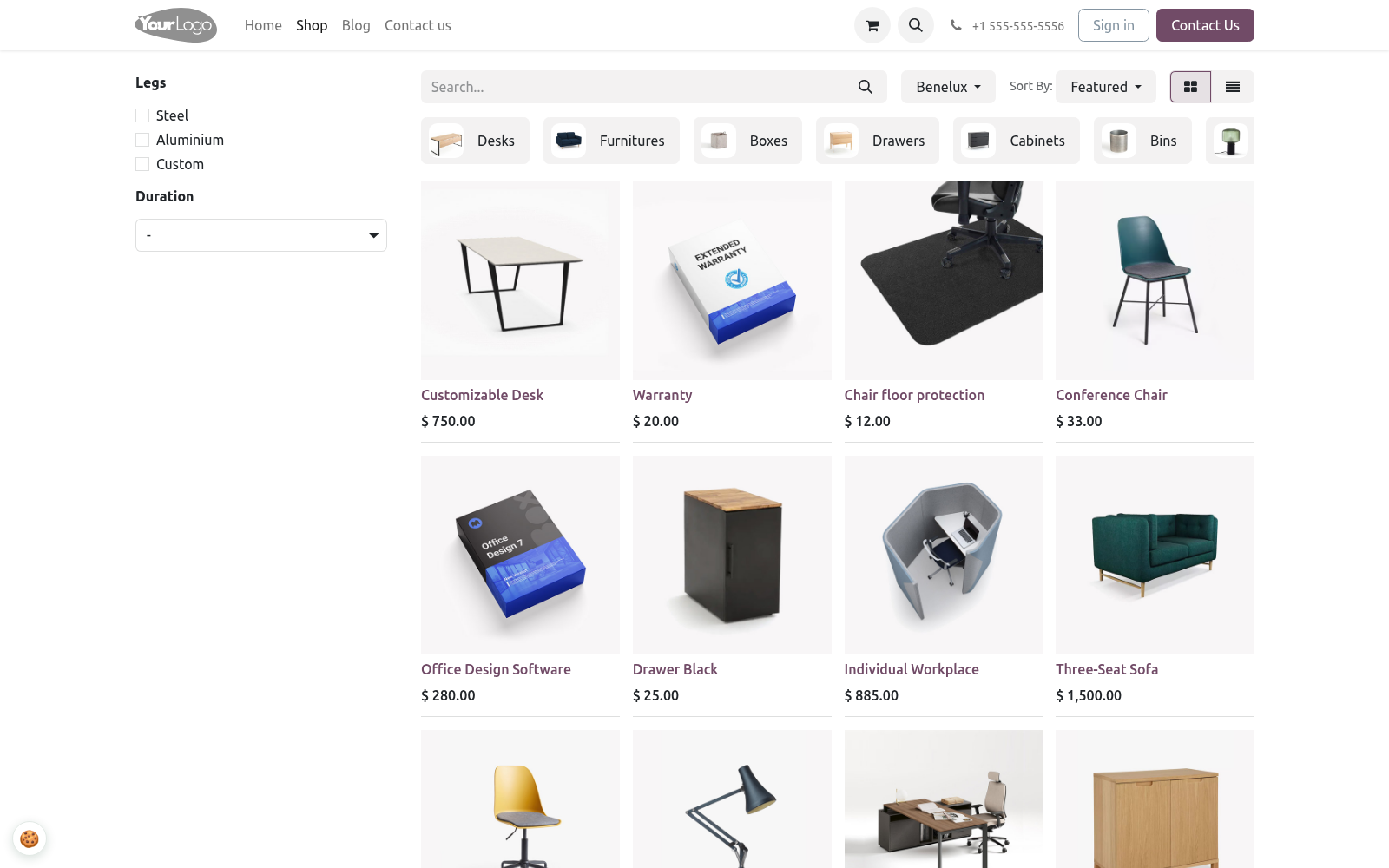
Withdrawing consent. The floating 🍪 badge (and the window.bfConsent.open() JS API for custom footer links) reopens the preferences modal at any time, as the GDPR requires. Newly revoked categories stop loading from the next page view; Google tags react immediately via consent update. Configuration.
Access: website designers manage scripts and read the register; deleting register entries is reserved to administrators. - Setting (per website) - Consent Pro banner Master switch. Off = no banner, no scripts blocked, no logging. - Audience mode Ask every visitor, or EU-only (implied consent elsewhere — scripts load, no banner, badge still available).
- Google Consent Mode v2 Emit default + update signals. Leave on if you use any Google tag. - Reject button Troubleshooting. Two banners show.
The core cookies bar was re-enabled. Switch Cookies Bar off in website settings — Consent Pro replaces it. My tracker fires before consent. It is not registered: move the tag into Managed Scripts or wrap it in the text/plain pattern.
Tags pasted into Website ▸ Custom head code run outside any CMP's control. FAQ. Is this enough for GDPR/ePrivacy compliance? It implements the technical requirements: prior blocking, granular opt-in, equal reject, withdrawal, proof of consent, re-prompt on change.
Pair it with an accurate cookie policy page — legal texts remain your responsibility. Does it work with Odoo's GA4 integration? Yes — that is the flagship case. Consent Mode v2 governs it without any extra configuration.
Upgrade. odoo-bin -d <db> -u bambooforge_consent_pro --stop-after-init #. Review the Changelog; bump the policy version if a new release adds categories you start using. Uninstall.
#. Apps ▸ BambooForge Consent Pro ▸ Uninstall. #. Removed: managed scripts, the consent register, banner templates and settings fields.
Visitors' bf_consent cookies simply expire. #. Re-enable the core Cookies Bar in website settings if you still want a basic banner afterwards. #.
Remember: without a CMP your trackers fire unconditionally again — check your compliance posture before removing. The complete manual is at docs dot bambooforge dot dev, the demo database is linked from the store page, and support answers within twenty-four hours. Links are in the description.
Transcript of the walkthrough (Odoo 16)
Cookie Consent Banner & GDPR Consent Mode v2. GDPR cookie consent banner with Google Consent Mode v2, script blocking until consent, a tamper-proof log and presets for GA4 and Meta Pixel. A complete consent-management platform (CMP) for the Odoo 16 website: per-category cookie banner with a preferences modal, Google Consent Mode v2 signals, marketing/analytics scripts held back until the visitor agrees, an audit-ready consent register, EU geo-targeting and one-click presets for the common trackers. In the next few minutes: cookie consent banner & gdpr consent mode v2, then managing scripts, then the consent register, then changing your cookie policy, then withdrawing consent.
Then what this app deliberately does not do, so you can tell before you buy whether it fits. Everything lives under Managed Scripts then Consent Register then Consent Pro. Cookie Consent Banner & GDPR Consent Mode v2. A complete consent-management platform (CMP) for the Odoo 16 website: per-category cookie banner with a preferences modal, Google Consent Mode v2 signals, marketing/analytics scripts held back until the visitor agrees, an audit-ready consent register, EU geo-targeting and one-click presets for the common trackers.
This page is the complete manual. Follow it top to bottom and you can install, brand the banner, wire your trackers, prove consent to an auditor and fix the common issues without contacting support. Managing scripts. Each Managed Script holds a category, an optional external Script URL and/or Inline JavaScript.
Both run only once the visitor grants that category — injected immediately after the choice (no reload needed) and server-rendered on later page views. <script type="text/plain" data-bf-consent="marketing"> fbq('init', '123456789'); </script> The consent register. Website ▸ Configuration ▸ Consent Pro ▸ Consent Register lists every choice: timestamp, salted visitor key, action, granted categories, policy version, country. Filter and group by action/country/day; export to XLSX with the standard exporter for an audit bundle.
Entries older than the per-website retention (Settings, default 13 months — CNIL guidance) are vacuumed automatically. One entry per distinct choice. An entry is identified by website + visitor key + policy version + action + granted categories. When the same visitor submits exactly the same choice again — reloading the page, clicking Accept all twice, a script replaying the request — the existing entry is refreshed in place and no row is added.
A genuine change of mind differs in the action or in the categories (accept-all, then withdraw; analytics on, then analytics off) and is therefore stored as its own entry, so the register still shows what changed and when. Changing your cookie policy. Bump Policy version in Settings. Existing consent cookies no longer match, so every visitor is prompted again and new register entries carry the new version.
Withdrawing consent. The floating 🍪 badge (and the window.bfConsent.open() JS API for custom footer links) reopens the preferences modal at any time, as the GDPR requires. Newly revoked categories stop loading from the next page view; Google tags react immediately via consent update. Configuration.
Access: website designers manage scripts and read the register; deleting register entries is reserved to administrators. - Setting (per website) - Consent Pro banner Master switch. Off = no banner, no scripts blocked, no logging. - Audience mode Ask every visitor, or EU-only (implied consent elsewhere — scripts load, no banner, badge still available).
- Google Consent Mode v2 Emit default + update signals. Leave on if you use any Google tag. - Reject button Troubleshooting. Two banners show.
The core cookies bar was re-enabled. Switch Cookies Bar off in website settings — Consent Pro replaces it. My tracker fires before consent. It is not registered: move the tag into Managed Scripts or wrap it in the text/plain pattern.
Tags pasted into Website ▸ Custom head code run outside any CMP's control. FAQ. Is this enough for GDPR/ePrivacy compliance? It implements the technical requirements: prior blocking, granular opt-in, equal reject, withdrawal, proof of consent, re-prompt on change.
Pair it with an accurate cookie policy page — legal texts remain your responsibility. Does it work with Odoo's GA4 integration? Yes — that is the flagship case. Consent Mode v2 governs it without any extra configuration.
Upgrade. odoo-bin -d <db> -u bambooforge_consent_pro --stop-after-init #. Review the Changelog; bump the policy version if a new release adds categories you start using. Uninstall.
#. Apps ▸ BambooForge Consent Pro ▸ Uninstall. #. Removed: managed scripts, the consent register, banner templates and settings fields.
Visitors' bf_consent cookies simply expire. #. Re-enable the core Cookies Bar in website settings if you still want a basic banner afterwards. #.
Remember: without a CMP your trackers fire unconditionally again — check your compliance posture before removing. The complete manual is at docs dot bambooforge dot dev, the demo database is linked from the store page, and support answers within twenty-four hours. Links are in the description.
Key facts
- What it is
- GDPR cookie consent banner with Google Consent Mode v2, script blocking until consent, a tamper-proof log and presets for GA4 and Meta Pixel.
- For
- Website
- Odoo versions
- 16.0, 17.0, 18.0, 19.0, 20.0 - Community and Enterprise
- Runs on
- Odoo.sh or Odoo you host yourself - not Odoo Online, which accepts no third-party apps
- Price
- 89 EUR, one-time, on the Odoo Apps Store
- Technical name
- bambooforge_consent_pro
- Live demo
- https://demo20.bambooforge.dev/odoo/action-bambooforge_consent_pro.action_bf_consent_script
- Manual last updated
- 2026-09-21