 BambooForge Labs
Sales Commission Management
Sales commission that survives an audit: tiered quotas, commission on margin, pay-on-payment with clawback, one traceable line per invoice line.
Available for Odoo 16.0, Odoo 17.0, Odoo 18.0, Odoo 19.0, Odoo 20.0. Technical name bambooforge_commission.
Transcript of the walkthrough (Odoo 20)
Sales Commission Management. Sales commission that survives an audit: tiered quotas, commission on margin, pay-on-payment with clawback, one traceable line per invoice line. Said before you buy, because it is the half that decides whether the app fits: In the next few minutes: sales commission management, then the three records, then write a plan, then run a period, then how the numbers come out. Then what this app deliberately does not do, so you can tell before you buy whether it fits.
Everything lives under Commissions then Commission Runs then Commissions then Plans. 1. Install BambooForge Commission Engine (depends on Accounting and Sales). 2.
Give the people who own the plans the Commissions: Manager group. Salespeople with the standard Sales user group can read commission lines. 3. The Commissions menu appears with Commission Runs, Commissions and Plans.
Sales Commission Management. Commissions that survive an audit: tiered quota ladders, commission on margin as well as revenue, pay-on-payment with automatic clawback on credit notes, and one traceable line per invoice line — generated, reviewed, confirmed and paid in runs. Odoo ships no commission engine in Community or Enterprise. This is that engine, and this page is its complete manual.
The three records. Plan — who is paid, on what, and when. Run — a period: generate, review, confirm, pay. Commission line — one earning, tied to the invoice line that produced it.
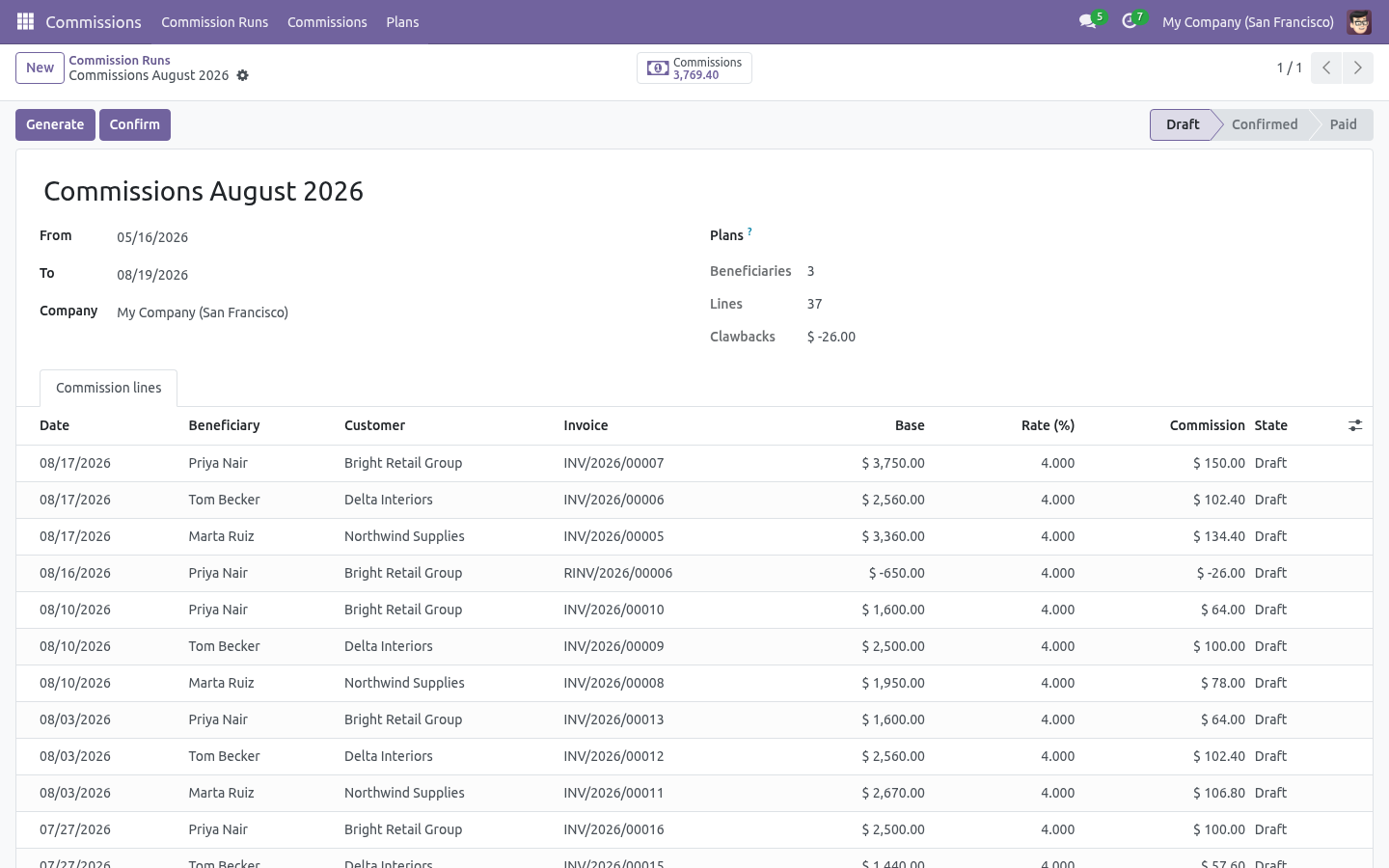
Nothing is computed on the fly at reporting time: a line is a record with the base, the rate, the paid share and the resulting amount, so a payout can be explained six months later. Write a plan Run a period. Commissions → Commission Runs → New — pick the dates, optionally restrict to some plans, then Generate. Confirm freezes the lines (they move to Confirmed).
Mark paid closes the run once the money has left. Reset to draft re-opens a confirmed run; a paid run stays paid. The run walks every posted customer invoice and credit note whose invoice date falls in the period, applies each matching plan, and creates one commission line per invoice line. Then: How the numbers come out.
The base is the invoice line's untaxed subtotal, or its margin when the plan says so. A credit note produces the same base with the opposite sign. The band is chosen by what the beneficiary had already earned before this line inside the run, so a ladder actually ratchets. Reading the result.
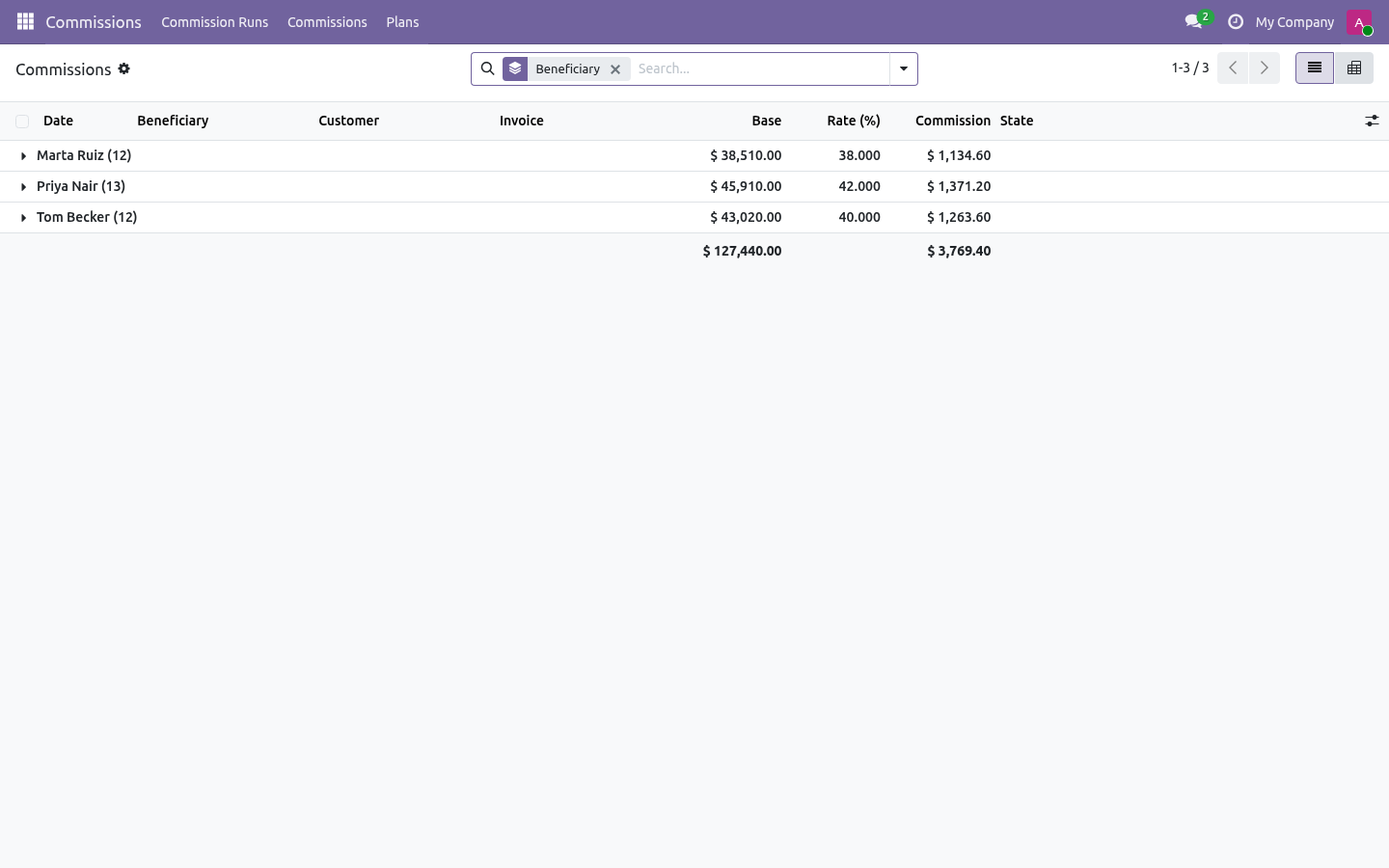
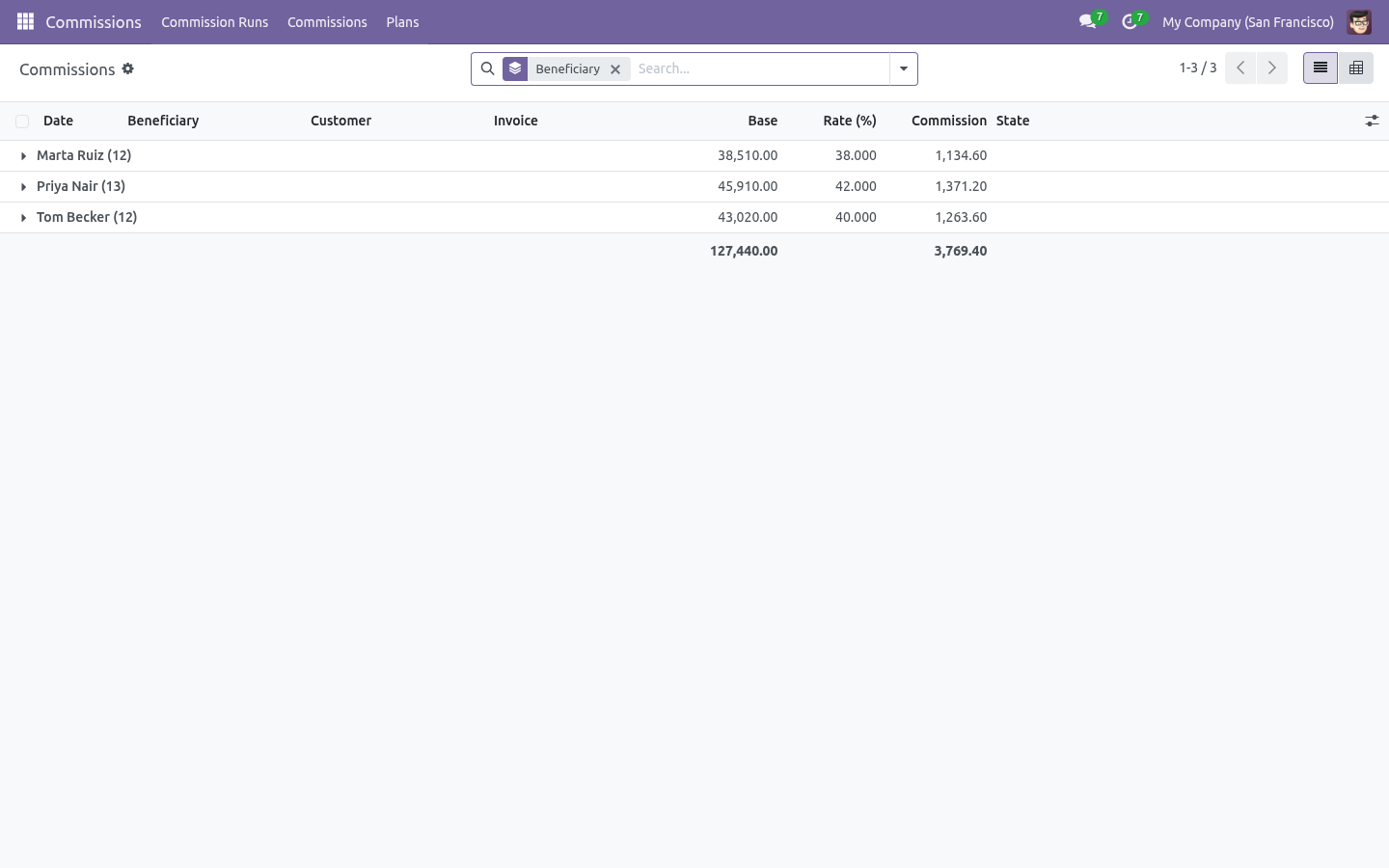
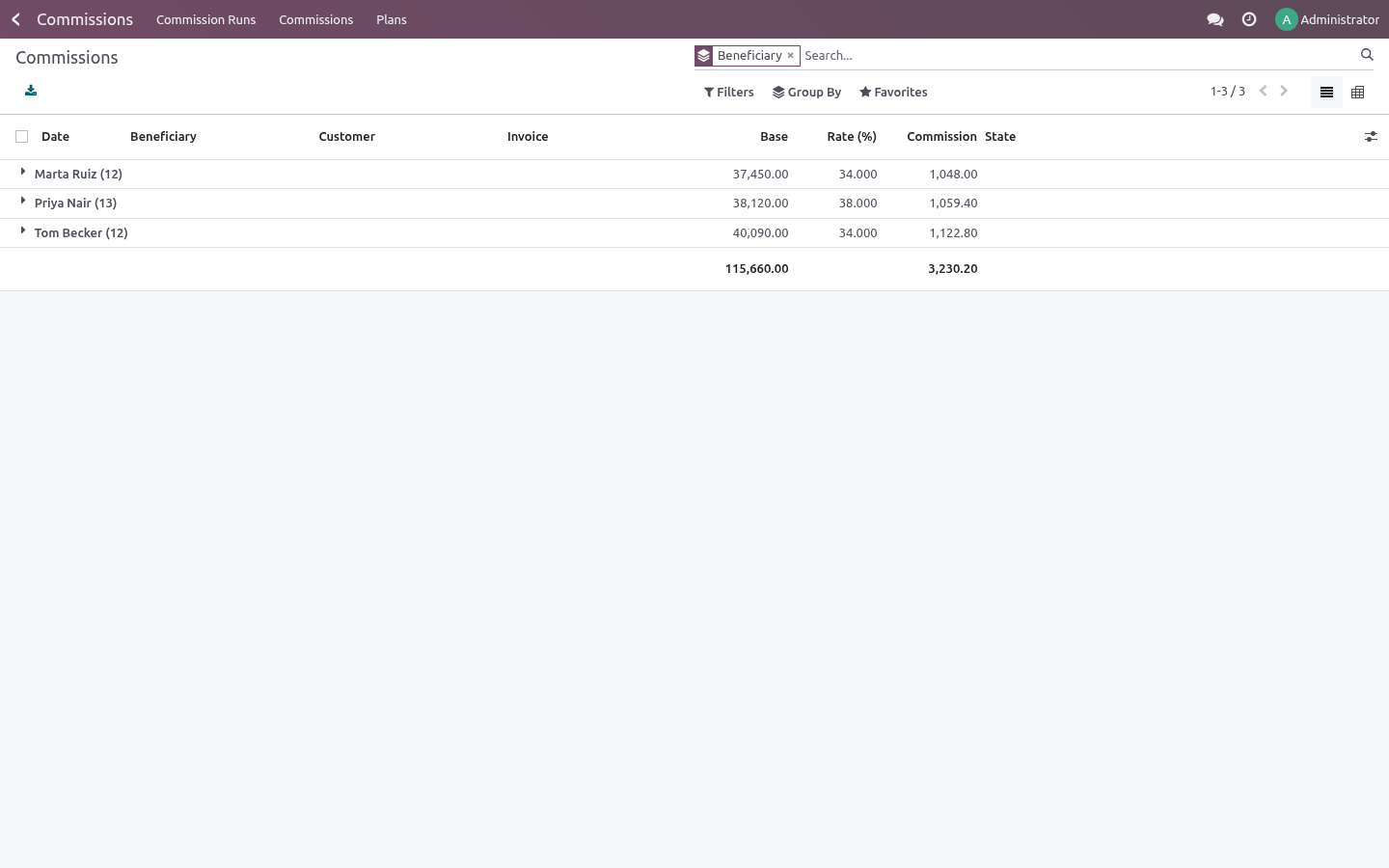
Commissions → Commissions lists every line, grouped by beneficiary by default, with filters for draft / confirmed / paid and for clawbacks. The pivot view (beneficiary against month) is what most people export for payroll. Every line has a button to open the invoice it came from, and carries the band's name so the rate can be traced to the plan. Troubleshooting.
A line is missing Check in order: is the invoice posted, is its invoice date inside the period, does the plan's category or customer filter exclude it, does the plan have at least one band, and — for pay-on-payment — has any money arrived. Nothing is generated at all A confirmed run refuses to regenerate on purpose, so amounts people have already agreed to do not move. Reset it to draft first. What changed in 1.1 Ladders keep counting.
Regenerating a run - or running a second run over the same period - no longer restarts the quota ladder at the bottom band: everything already commissioned still counts. Late payments are paid. On pay-on-payment plans, money that arrives after a run was confirmed becomes a payment true-up line in the next run - flagged, auditable, never double-counted. Foreign-currency invoices convert to company currency at the invoice date before any rate is applied.
Margin uses the deal's cost (the sale order's cost field) when the sale margin feature is installed, so later cost changes never rewrite commission history. A monthly scheduled job drafts last month's run; a salesperson now sees only their own commission lines; plans and runs carry a chatter that tracks every change. What changed in 1.2 Statements: print all beneficiaries at once, or mail each person a PDF holding only their lines - true-ups and clawbacks labelled as such. Agent bills: one click turns the confirmed lines of every agent into a real vendor bill (one per partner, one bill line per commission line, never billed twice), in the purchase journal you choose on the run.
How we make sure it works. Before every release, 60 automated checks run against this app on Odoo 16, 17, 18, 19 and 20. Among them: A paid line cannot be cancelled. A paid run cannot be reset.
An empty run cannot be confirmed. Generating twice does not pay twice. A second run does not pay the first run again. The complete list is in the source you receive.
The complete manual is at docs dot bambooforge dot dev, the demo database is linked from the store page, and support answers within twenty-four hours. Links are in the description.
Transcript of the walkthrough (Odoo 19)
Sales Commission Management. Sales commission that survives an audit: tiered quotas, commission on margin, pay-on-payment with clawback, one traceable line per invoice line. Commissions that survive an audit: tiered quota ladders, commission on margin as well as revenue, pay-on-payment with automatic clawback on credit notes, and one traceable line per invoice line — generated, reviewed, confirmed and paid in runs. In the next few minutes: sales commission management, then the three records, then write a plan, then run a period, then how the numbers come out.
Then what this app deliberately does not do, so you can tell before you buy whether it fits. Everything lives under Commissions then Commission Runs then Commissions then Plans. 1. Install BambooForge Commission Engine (depends on Accounting and Sales).
2. Give the people who own the plans the Commissions: Manager group. Salespeople with the standard Sales user group can read commission lines. 3.
The Commissions menu appears with Commission Runs, Commissions and Plans. Sales Commission Management. Commissions that survive an audit: tiered quota ladders, commission on margin as well as revenue, pay-on-payment with automatic clawback on credit notes, and one traceable line per invoice line — generated, reviewed, confirmed and paid in runs. Odoo ships no commission engine in Community or Enterprise.
This is that engine, and this page is its complete manual. The three records. Plan — who is paid, on what, and when. Run — a period: generate, review, confirm, pay.
Commission line — one earning, tied to the invoice line that produced it. Nothing is computed on the fly at reporting time: a line is a record with the base, the rate, the paid share and the resulting amount, so a payout can be explained six months later. Write a plan. +------------------------+--------------------------------------------------+ Run a period.
Commissions → Commission Runs → New — pick the dates, optionally restrict to some plans, then Generate. Confirm freezes the lines (they move to Confirmed). Mark paid closes the run once the money has left. Reset to draft re-opens a confirmed run; a paid run stays paid.
The run walks every posted customer invoice and credit note whose invoice date falls in the period, applies each matching plan, and creates one commission line per invoice line. Then: How the numbers come out. The base is the invoice line's untaxed subtotal, or its margin when the plan says so. A credit note produces the same base with the opposite sign.
The band is chosen by what the beneficiary had already earned before this line inside the run, so a ladder actually ratchets. Reading the result. Commissions → Commissions lists every line, grouped by beneficiary by default, with filters for draft / confirmed / paid and for clawbacks. The pivot view (beneficiary against month) is what most people export for payroll.
Every line has a button to open the invoice it came from, and carries the band's name so the rate can be traced to the plan. Troubleshooting. A line is missing Check in order: is the invoice posted, is its invoice date inside the period, does the plan's category or customer filter exclude it, does the plan have at least one band, and — for pay-on-payment — has any money arrived. Nothing is generated at all A confirmed run refuses to regenerate on purpose, so amounts people have already agreed to do not move.
Reset it to draft first. What changed in 1.1 Ladders keep counting. Regenerating a run - or running a second run over the same period - no longer restarts the quota ladder at the bottom band: everything already commissioned still counts. Late payments are paid.
On pay-on-payment plans, money that arrives after a run was confirmed becomes a payment true-up line in the next run - flagged, auditable, never double-counted. Foreign-currency invoices convert to company currency at the invoice date before any rate is applied. Margin uses the deal's cost (the sale order's cost field) when the sale margin feature is installed, so later cost changes never rewrite commission history. A monthly scheduled job drafts last month's run; a salesperson now sees only their own commission lines; plans and runs carry a chatter that tracks every change.
What changed in 1.2 Statements: print all beneficiaries at once, or mail each person a PDF holding only their lines - true-ups and clawbacks labelled as such. Agent bills: one click turns the confirmed lines of every agent into a real vendor bill (one per partner, one bill line per commission line, never billed twice), in the purchase journal you choose on the run. Support. support@bambooforge.dev — questions, bug reports and feature requests are answered by the developers who wrote the module.
The complete manual is at docs dot bambooforge dot dev, the demo database is linked from the store page, and support answers within twenty-four hours. Links are in the description.
Transcript of the walkthrough (Odoo 18)
Sales Commission Management. Sales commission that survives an audit: tiered quotas, commission on margin, pay-on-payment with clawback, one traceable line per invoice line. Commissions that survive an audit: tiered quota ladders, commission on margin as well as revenue, pay-on-payment with automatic clawback on credit notes, and one traceable line per invoice line — generated, reviewed, confirmed and paid in runs. In the next few minutes: sales commission management, then the three records, then write a plan, then run a period, then how the numbers come out.
Then what this app deliberately does not do, so you can tell before you buy whether it fits. Everything lives under Commissions then Commission Runs then Commissions then Plans. 1. Install BambooForge Commission Engine (depends on Accounting and Sales).
2. Give the people who own the plans the Commissions: Manager group. Salespeople with the standard Sales user group can read commission lines. 3.
The Commissions menu appears with Commission Runs, Commissions and Plans. Sales Commission Management. Commissions that survive an audit: tiered quota ladders, commission on margin as well as revenue, pay-on-payment with automatic clawback on credit notes, and one traceable line per invoice line — generated, reviewed, confirmed and paid in runs. Odoo ships no commission engine in Community or Enterprise.
This is that engine, and this page is its complete manual. The three records. Plan — who is paid, on what, and when. Run — a period: generate, review, confirm, pay.
Commission line — one earning, tied to the invoice line that produced it. Nothing is computed on the fly at reporting time: a line is a record with the base, the rate, the paid share and the resulting amount, so a payout can be explained six months later. Write a plan. +------------------------+--------------------------------------------------+ Run a period.
Commissions → Commission Runs → New — pick the dates, optionally restrict to some plans, then Generate. Confirm freezes the lines (they move to Confirmed). Mark paid closes the run once the money has left. Reset to draft re-opens a confirmed run; a paid run stays paid.
The run walks every posted customer invoice and credit note whose invoice date falls in the period, applies each matching plan, and creates one commission line per invoice line. Then: How the numbers come out. The base is the invoice line's untaxed subtotal, or its margin when the plan says so. A credit note produces the same base with the opposite sign.
The band is chosen by what the beneficiary had already earned before this line inside the run, so a ladder actually ratchets. Reading the result. Commissions → Commissions lists every line, grouped by beneficiary by default, with filters for draft / confirmed / paid and for clawbacks. The pivot view (beneficiary against month) is what most people export for payroll.
Every line has a button to open the invoice it came from, and carries the band's name so the rate can be traced to the plan. Troubleshooting. A line is missing Check in order: is the invoice posted, is its invoice date inside the period, does the plan's category or customer filter exclude it, does the plan have at least one band, and — for pay-on-payment — has any money arrived. Nothing is generated at all A confirmed run refuses to regenerate on purpose, so amounts people have already agreed to do not move.
Reset it to draft first. What changed in 1.1 Ladders keep counting. Regenerating a run - or running a second run over the same period - no longer restarts the quota ladder at the bottom band: everything already commissioned still counts. Late payments are paid.
On pay-on-payment plans, money that arrives after a run was confirmed becomes a payment true-up line in the next run - flagged, auditable, never double-counted. Foreign-currency invoices convert to company currency at the invoice date before any rate is applied. Margin uses the deal's cost (the sale order's cost field) when the sale margin feature is installed, so later cost changes never rewrite commission history. A monthly scheduled job drafts last month's run; a salesperson now sees only their own commission lines; plans and runs carry a chatter that tracks every change.
What changed in 1.2 Statements: print all beneficiaries at once, or mail each person a PDF holding only their lines - true-ups and clawbacks labelled as such. Agent bills: one click turns the confirmed lines of every agent into a real vendor bill (one per partner, one bill line per commission line, never billed twice), in the purchase journal you choose on the run. Support. support@bambooforge.dev — questions, bug reports and feature requests are answered by the developers who wrote the module.
The complete manual is at docs dot bambooforge dot dev, the demo database is linked from the store page, and support answers within twenty-four hours. Links are in the description.
Transcript of the walkthrough (Odoo 17)
Sales Commission Management. Sales commission that survives an audit: tiered quotas, commission on margin, pay-on-payment with clawback, one traceable line per invoice line. Commissions that survive an audit: tiered quota ladders, commission on margin as well as revenue, pay-on-payment with automatic clawback on credit notes, and one traceable line per invoice line — generated, reviewed, confirmed and paid in runs. In the next few minutes: sales commission management, then the three records, then write a plan, then run a period, then how the numbers come out.
Then what this app deliberately does not do, so you can tell before you buy whether it fits. Everything lives under Commissions then Commission Runs then Commissions then Plans. 1. Install BambooForge Commission Engine (depends on Accounting and Sales).
2. Give the people who own the plans the Commissions: Manager group. Salespeople with the standard Sales user group can read commission lines. 3.
The Commissions menu appears with Commission Runs, Commissions and Plans. Sales Commission Management. Commissions that survive an audit: tiered quota ladders, commission on margin as well as revenue, pay-on-payment with automatic clawback on credit notes, and one traceable line per invoice line — generated, reviewed, confirmed and paid in runs. Odoo ships no commission engine in Community or Enterprise.
This is that engine, and this page is its complete manual. The three records. Plan — who is paid, on what, and when. Run — a period: generate, review, confirm, pay.
Commission line — one earning, tied to the invoice line that produced it. Nothing is computed on the fly at reporting time: a line is a record with the base, the rate, the paid share and the resulting amount, so a payout can be explained six months later. Write a plan. +------------------------+--------------------------------------------------+ Run a period.
Commissions → Commission Runs → New — pick the dates, optionally restrict to some plans, then Generate. Confirm freezes the lines (they move to Confirmed). Mark paid closes the run once the money has left. Reset to draft re-opens a confirmed run; a paid run stays paid.
The run walks every posted customer invoice and credit note whose invoice date falls in the period, applies each matching plan, and creates one commission line per invoice line. Then: How the numbers come out. The base is the invoice line's untaxed subtotal, or its margin when the plan says so. A credit note produces the same base with the opposite sign.
The band is chosen by what the beneficiary had already earned before this line inside the run, so a ladder actually ratchets. Reading the result. Commissions → Commissions lists every line, grouped by beneficiary by default, with filters for draft / confirmed / paid and for clawbacks. The pivot view (beneficiary against month) is what most people export for payroll.
Every line has a button to open the invoice it came from, and carries the band's name so the rate can be traced to the plan. Troubleshooting. A line is missing Check in order: is the invoice posted, is its invoice date inside the period, does the plan's category or customer filter exclude it, does the plan have at least one band, and — for pay-on-payment — has any money arrived. Nothing is generated at all A confirmed run refuses to regenerate on purpose, so amounts people have already agreed to do not move.
Reset it to draft first. What changed in 1.1 Ladders keep counting. Regenerating a run - or running a second run over the same period - no longer restarts the quota ladder at the bottom band: everything already commissioned still counts. Late payments are paid.
On pay-on-payment plans, money that arrives after a run was confirmed becomes a payment true-up line in the next run - flagged, auditable, never double-counted. Foreign-currency invoices convert to company currency at the invoice date before any rate is applied. Margin uses the deal's cost (the sale order's cost field) when the sale margin feature is installed, so later cost changes never rewrite commission history. A monthly scheduled job drafts last month's run; a salesperson now sees only their own commission lines; plans and runs carry a chatter that tracks every change.
What changed in 1.2 Statements: print all beneficiaries at once, or mail each person a PDF holding only their lines - true-ups and clawbacks labelled as such. Agent bills: one click turns the confirmed lines of every agent into a real vendor bill (one per partner, one bill line per commission line, never billed twice), in the purchase journal you choose on the run. Support. support@bambooforge.dev — questions, bug reports and feature requests are answered by the developers who wrote the module.
The complete manual is at docs dot bambooforge dot dev, the demo database is linked from the store page, and support answers within twenty-four hours. Links are in the description.
Transcript of the walkthrough (Odoo 16)
Sales Commission Management. Sales commission that survives an audit: tiered quotas, commission on margin, pay-on-payment with clawback, one traceable line per invoice line. Commissions that survive an audit: tiered quota ladders, commission on margin as well as revenue, pay-on-payment with automatic clawback on credit notes, and one traceable line per invoice line — generated, reviewed, confirmed and paid in runs. In the next few minutes: sales commission management, then the three records, then write a plan, then run a period, then how the numbers come out.
Then what this app deliberately does not do, so you can tell before you buy whether it fits. Everything lives under Commissions then Commission Runs then Commissions then Plans. 1. Install BambooForge Commission Engine (depends on Accounting and Sales).
2. Give the people who own the plans the Commissions: Manager group. Salespeople with the standard Sales user group can read commission lines. 3.
The Commissions menu appears with Commission Runs, Commissions and Plans. Sales Commission Management. Commissions that survive an audit: tiered quota ladders, commission on margin as well as revenue, pay-on-payment with automatic clawback on credit notes, and one traceable line per invoice line — generated, reviewed, confirmed and paid in runs. Odoo ships no commission engine in Community or Enterprise.
This is that engine, and this page is its complete manual. The three records. Plan — who is paid, on what, and when. Run — a period: generate, review, confirm, pay.
Commission line — one earning, tied to the invoice line that produced it. Nothing is computed on the fly at reporting time: a line is a record with the base, the rate, the paid share and the resulting amount, so a payout can be explained six months later. Write a plan. +------------------------+--------------------------------------------------+ Run a period.
Commissions → Commission Runs → New — pick the dates, optionally restrict to some plans, then Generate. Confirm freezes the lines (they move to Confirmed). Mark paid closes the run once the money has left. Reset to draft re-opens a confirmed run; a paid run stays paid.
The run walks every posted customer invoice and credit note whose invoice date falls in the period, applies each matching plan, and creates one commission line per invoice line. Then: How the numbers come out. The base is the invoice line's untaxed subtotal, or its margin when the plan says so. A credit note produces the same base with the opposite sign.
The band is chosen by what the beneficiary had already earned before this line inside the run, so a ladder actually ratchets. Reading the result. Commissions → Commissions lists every line, grouped by beneficiary by default, with filters for draft / confirmed / paid and for clawbacks. The pivot view (beneficiary against month) is what most people export for payroll.
Every line has a button to open the invoice it came from, and carries the band's name so the rate can be traced to the plan. Troubleshooting. A line is missing Check in order: is the invoice posted, is its invoice date inside the period, does the plan's category or customer filter exclude it, does the plan have at least one band, and — for pay-on-payment — has any money arrived. Nothing is generated at all A confirmed run refuses to regenerate on purpose, so amounts people have already agreed to do not move.
Reset it to draft first. What changed in 1.1 Ladders keep counting. Regenerating a run - or running a second run over the same period - no longer restarts the quota ladder at the bottom band: everything already commissioned still counts. Late payments are paid.
On pay-on-payment plans, money that arrives after a run was confirmed becomes a payment true-up line in the next run - flagged, auditable, never double-counted. Foreign-currency invoices convert to company currency at the invoice date before any rate is applied. Margin uses the deal's cost (the sale order's cost field) when the sale margin feature is installed, so later cost changes never rewrite commission history. A monthly scheduled job drafts last month's run; a salesperson now sees only their own commission lines; plans and runs carry a chatter that tracks every change.
What changed in 1.2 Statements: print all beneficiaries at once, or mail each person a PDF holding only their lines - true-ups and clawbacks labelled as such. Agent bills: one click turns the confirmed lines of every agent into a real vendor bill (one per partner, one bill line per commission line, never billed twice), in the purchase journal you choose on the run. Support. support@bambooforge.dev — questions, bug reports and feature requests are answered by the developers who wrote the module.
The complete manual is at docs dot bambooforge dot dev, the demo database is linked from the store page, and support answers within twenty-four hours. Links are in the description.
Key facts
- What it is
- Sales commission that survives an audit: tiered quotas, commission on margin, pay-on-payment with clawback, one traceable line per invoice line.
- For
- Sales
- Odoo versions
- 16.0, 17.0, 18.0, 19.0, 20.0 - Community and Enterprise
- Runs on
- Odoo.sh or Odoo you host yourself - not Odoo Online, which accepts no third-party apps
- Price
- 119 EUR, one-time, on the Odoo Apps Store
- Technical name
- bambooforge_commission
- Not for
- Said before you buy, because it is the half that decides whether the app fits:; Accept overlapping bands on a plan, or a band that ends before it starts.; Compute margin without product costs - a plan on margin reads the cost from the product.
- Manual last updated
- 2026-10-15
Sales Commission Management
Commissions that survive an audit: tiered quota ladders, commission on margin as well as revenue, pay-on-payment with automatic clawback on credit notes, and one traceable line per invoice line — generated, reviewed, confirmed and paid in runs.
Odoo ships no commission engine in Community or Enterprise. This is that engine, and this page is its complete manual.
The three records
Plan — who is paid, on what, and when. Run — a period: generate, review, confirm, pay. Commission line — one earning, tied to the invoice line that produced it.
Nothing is computed on the fly at reporting time: a line is a record with the base, the rate, the paid share and the resulting amount, so a payout can be explained six months later.
Install
Install BambooForge Commission Engine (depends on Accounting and Sales).
Give the people who own the plans the Commissions: Manager group. Salespeople with the standard Sales user group can read commission lines.
The Commissions menu appears with Commission Runs, Commissions and Plans.
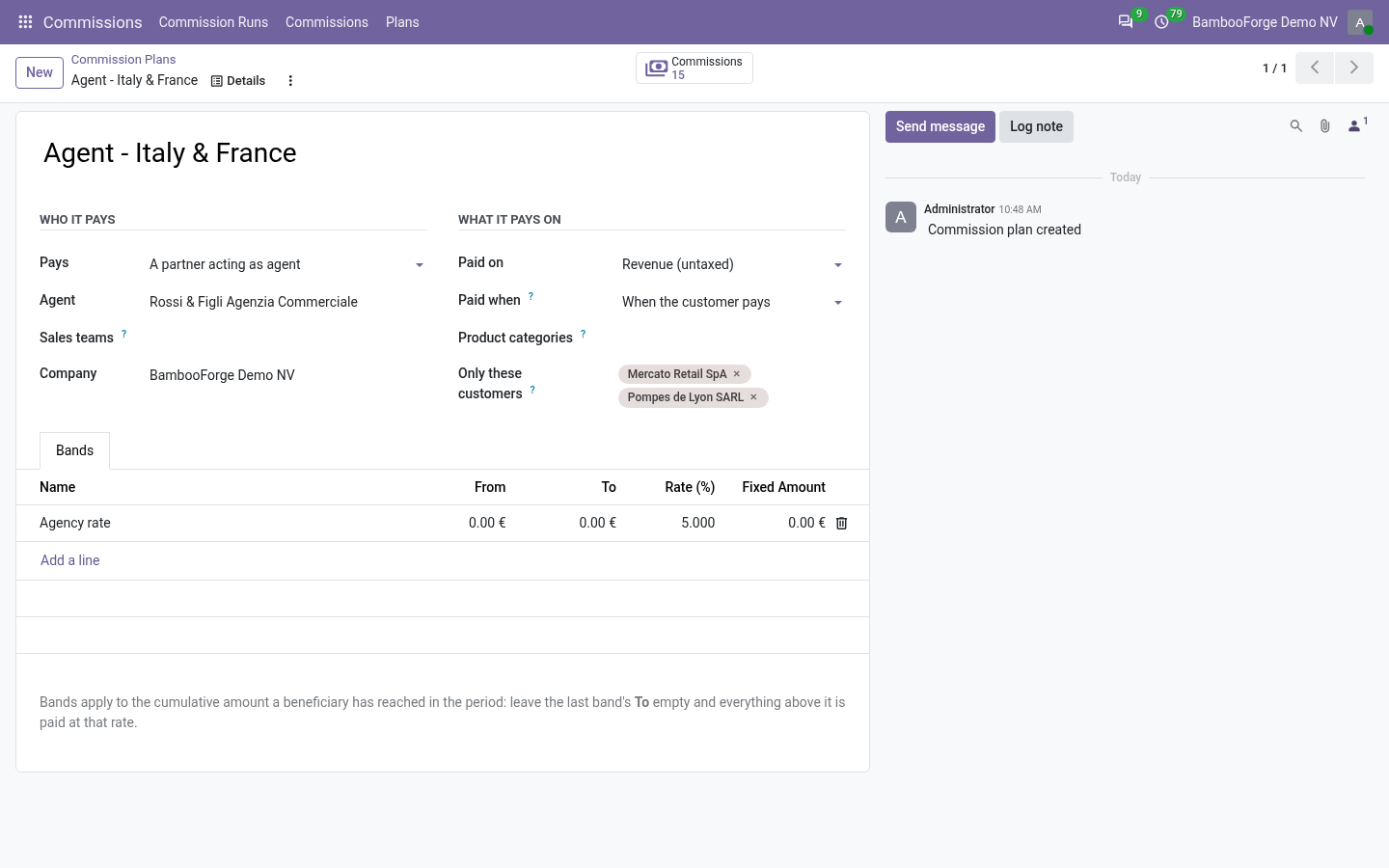
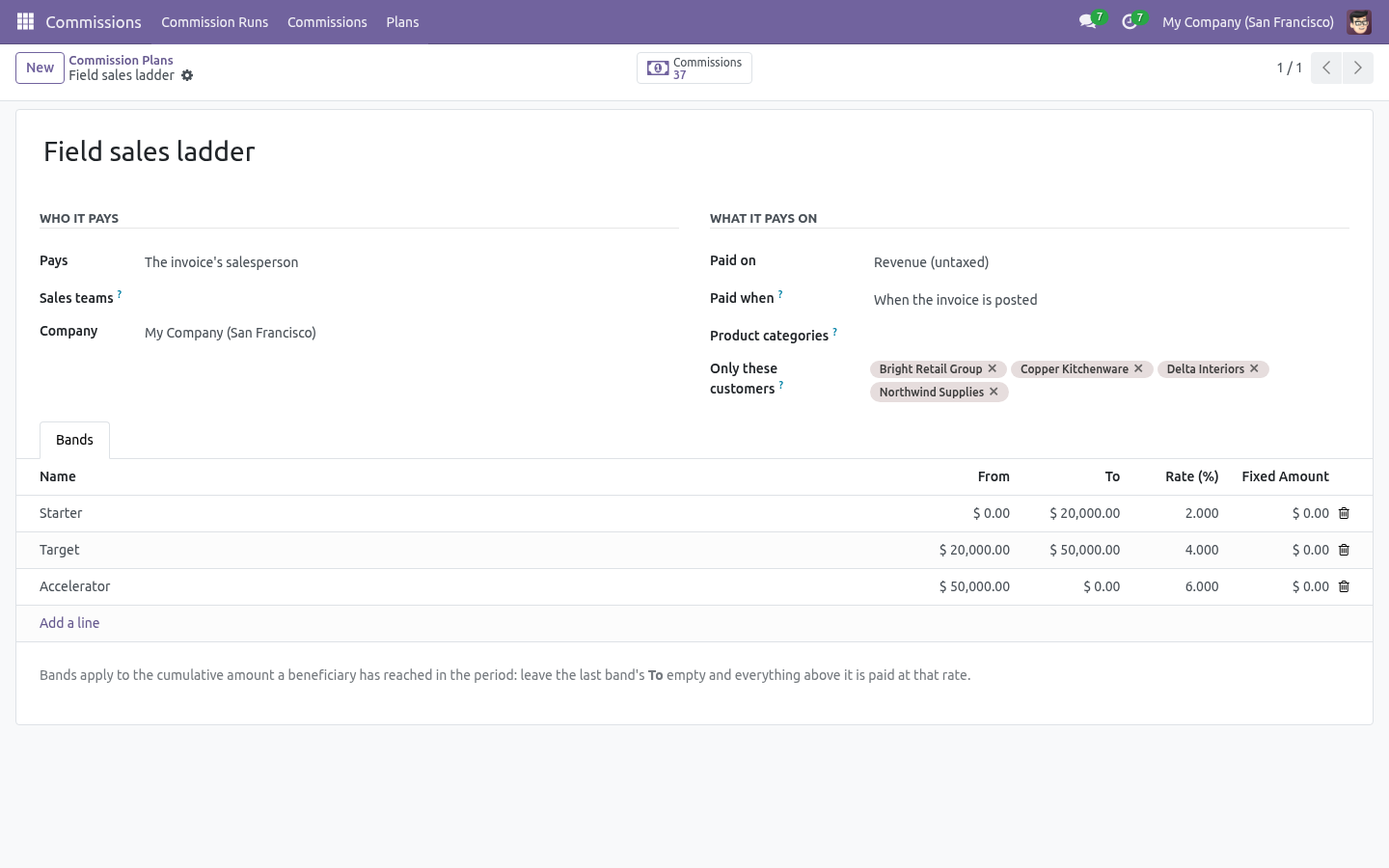
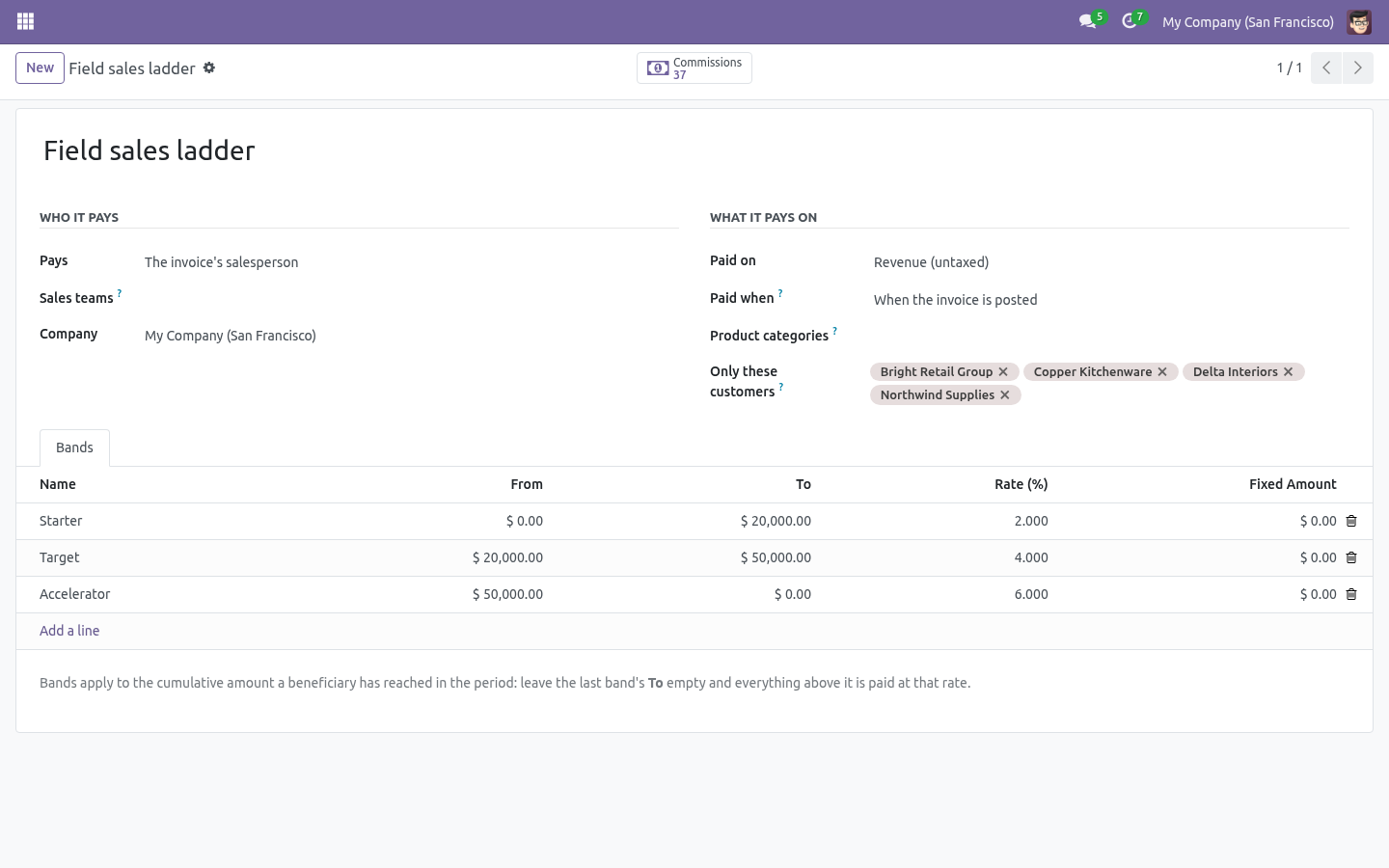
Write a plan
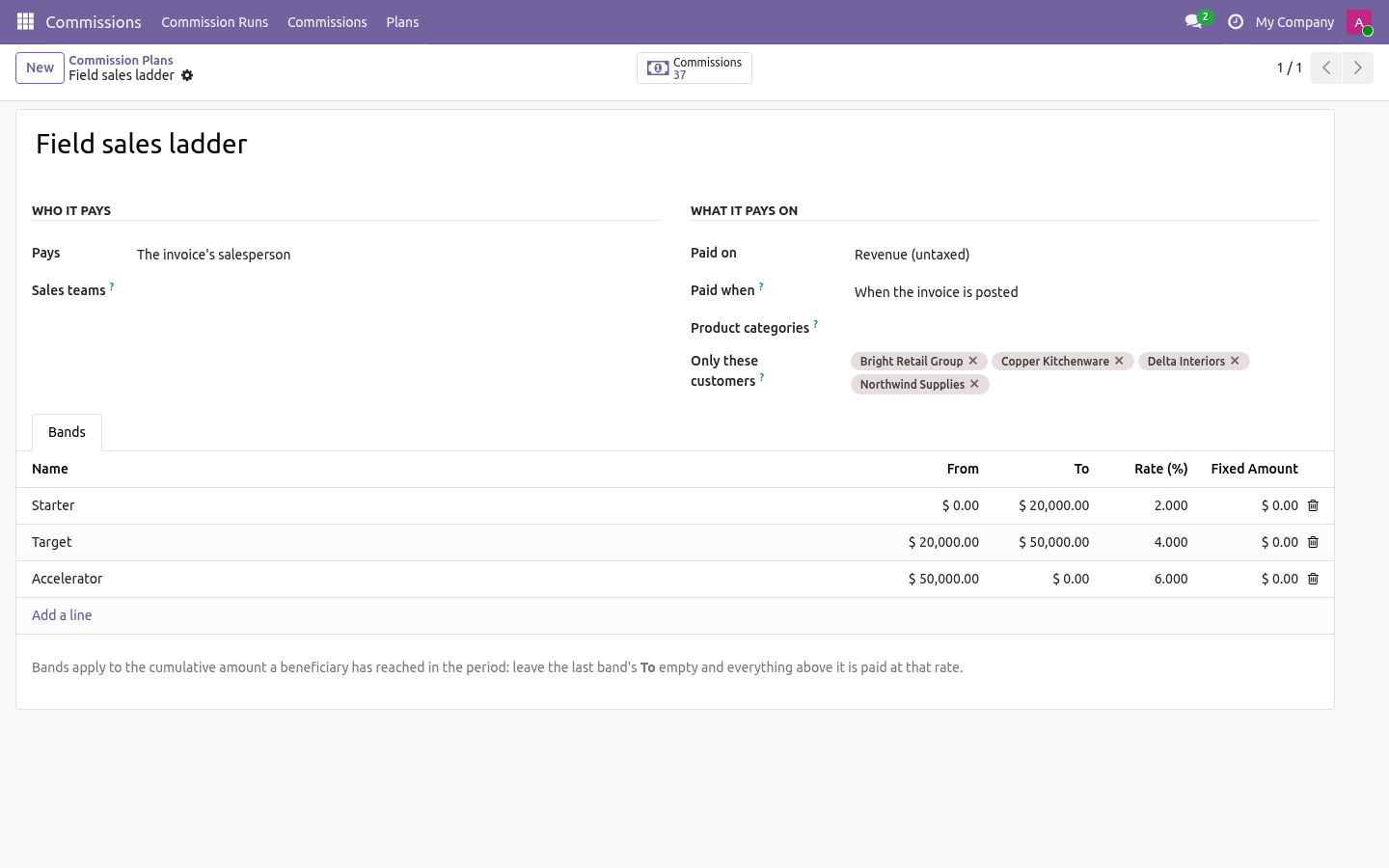
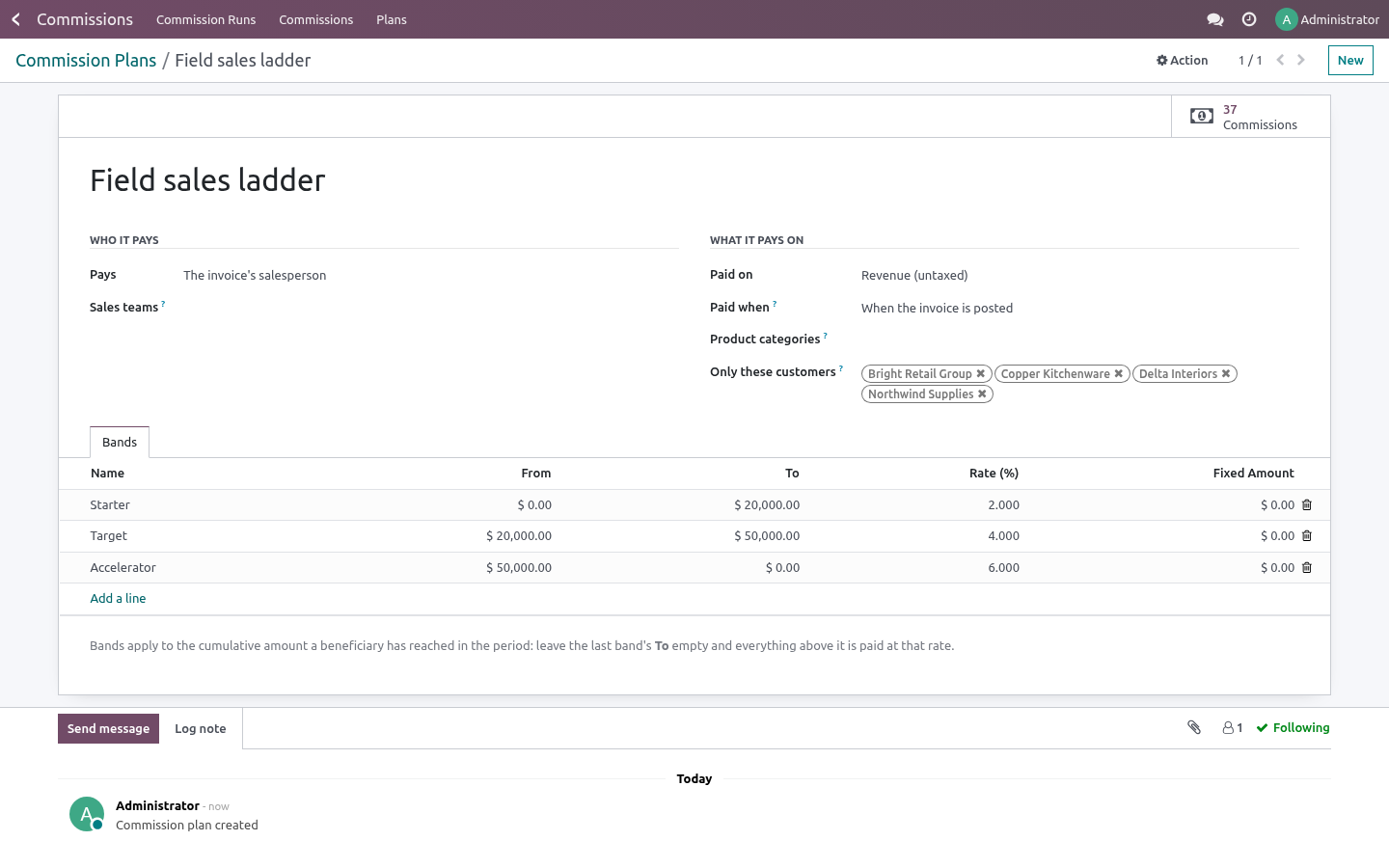
Commissions → Plans → New
Who it pays
The invoice's salesperson |
Whoever is on the invoice. The usual case. |
The sales team's leader |
Pays the manager of the team on the invoice. |
One person |
A fixed beneficiary, whoever sold it — for an overlay or a house account. |
A partner acting as agent |
Pays a contact rather than a user: dealers, resellers, introducers. |
What it pays on
Revenue (untaxed) — the invoice line's subtotal.
Margin — subtotal minus quantity × product cost. No extra module: the cost comes from the product, so a plan on margin works out of the box.
When it pays
When the invoice is posted — the commission exists as soon as the invoice does.
When the customer pays — the commission follows the money: a half-paid invoice pays half, and nothing is earned until something is collected.
Filters — product categories (children included) and specific customers. Leave them empty for everything.
Bands — the ladder. Each band covers a range of the cumulative amount the beneficiary has reached in the period: 0–50,000 at 2%, 50,000–100,000 at 3%, above 100,000 at 4% is three bands; leave the last band's To empty. A band can also carry a fixed amount paid once per invoice line — a per-deal bonus on top of the rate.
Bands are validated: one cannot end before it starts, and two cannot overlap.
Run a period
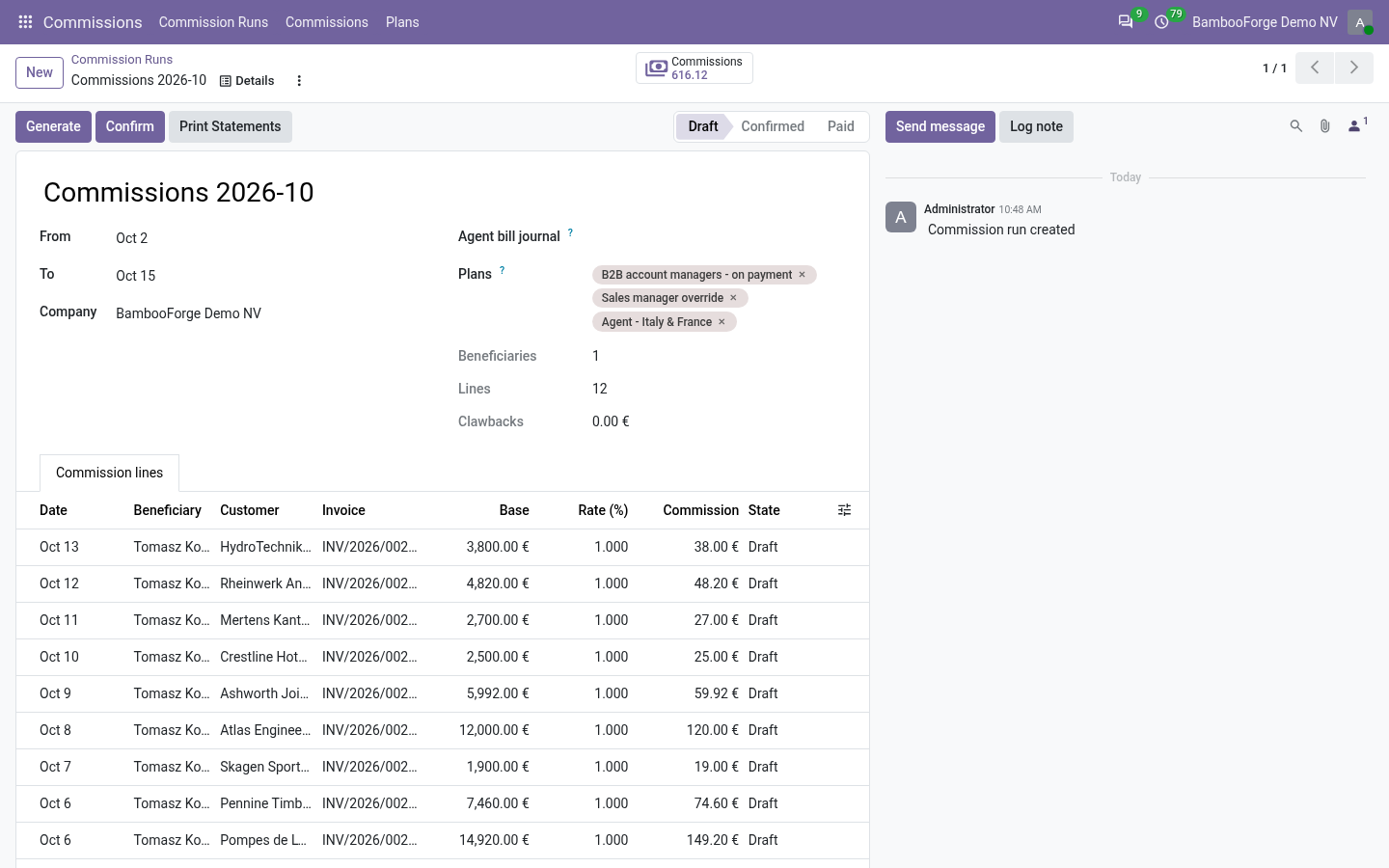
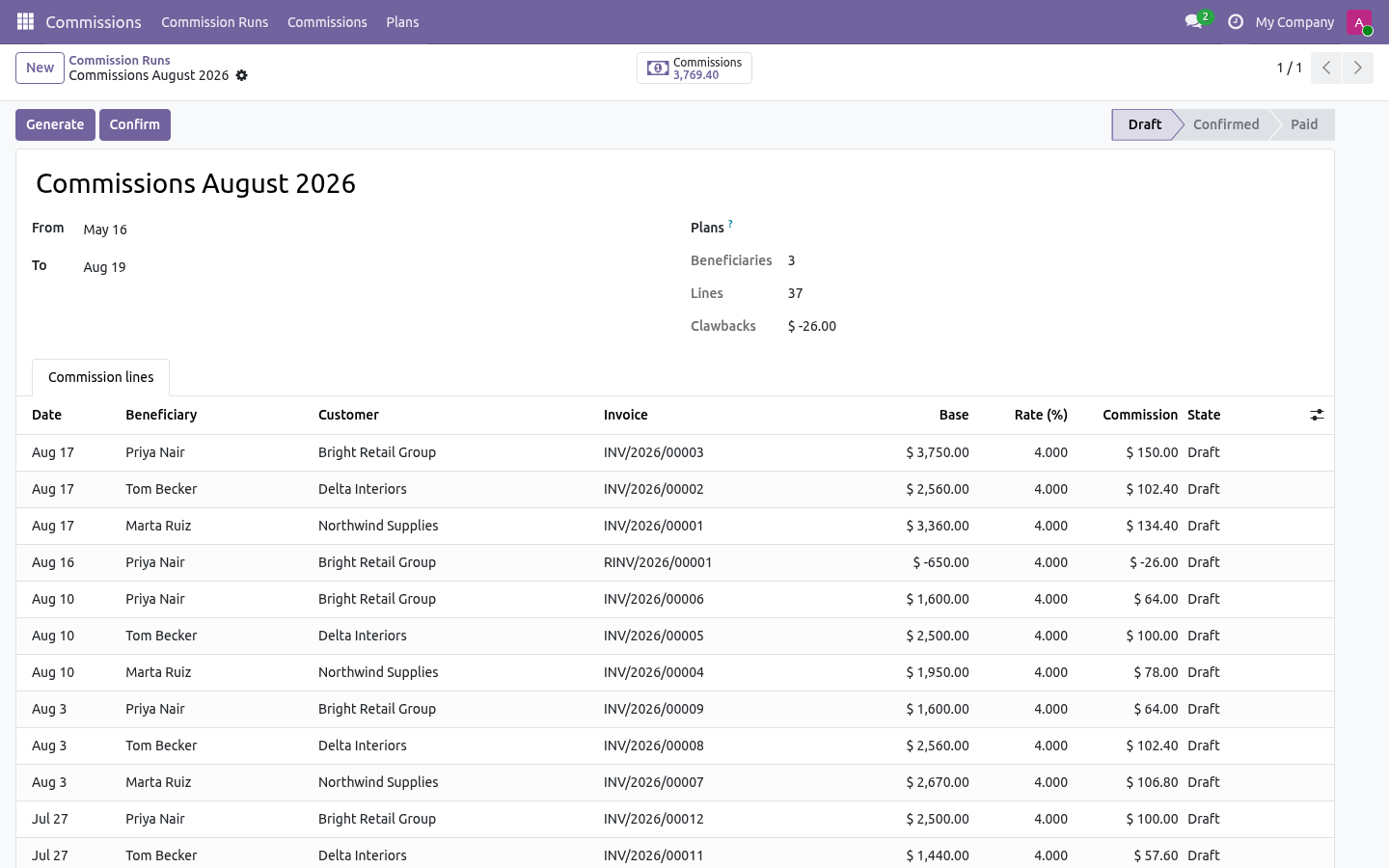
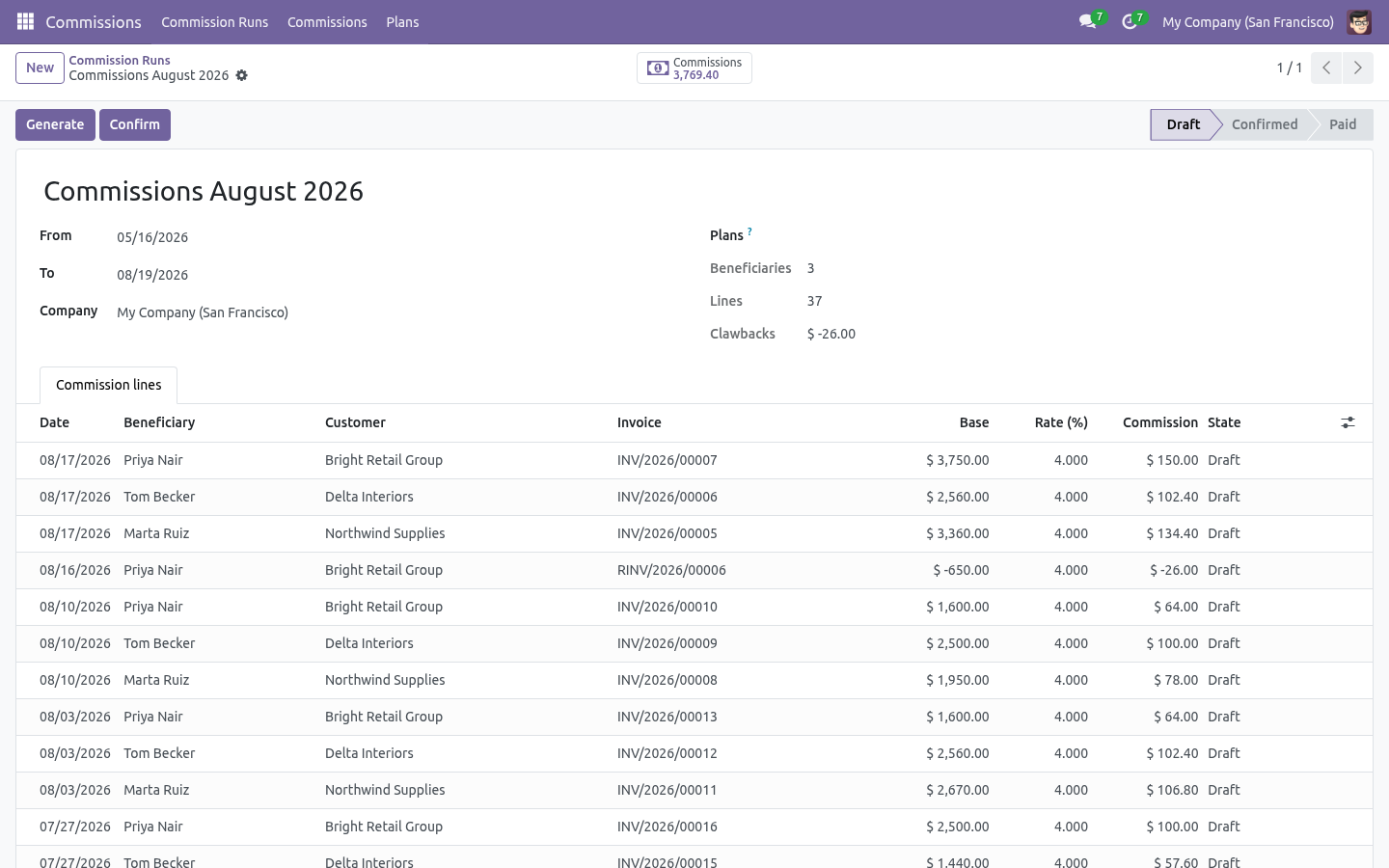
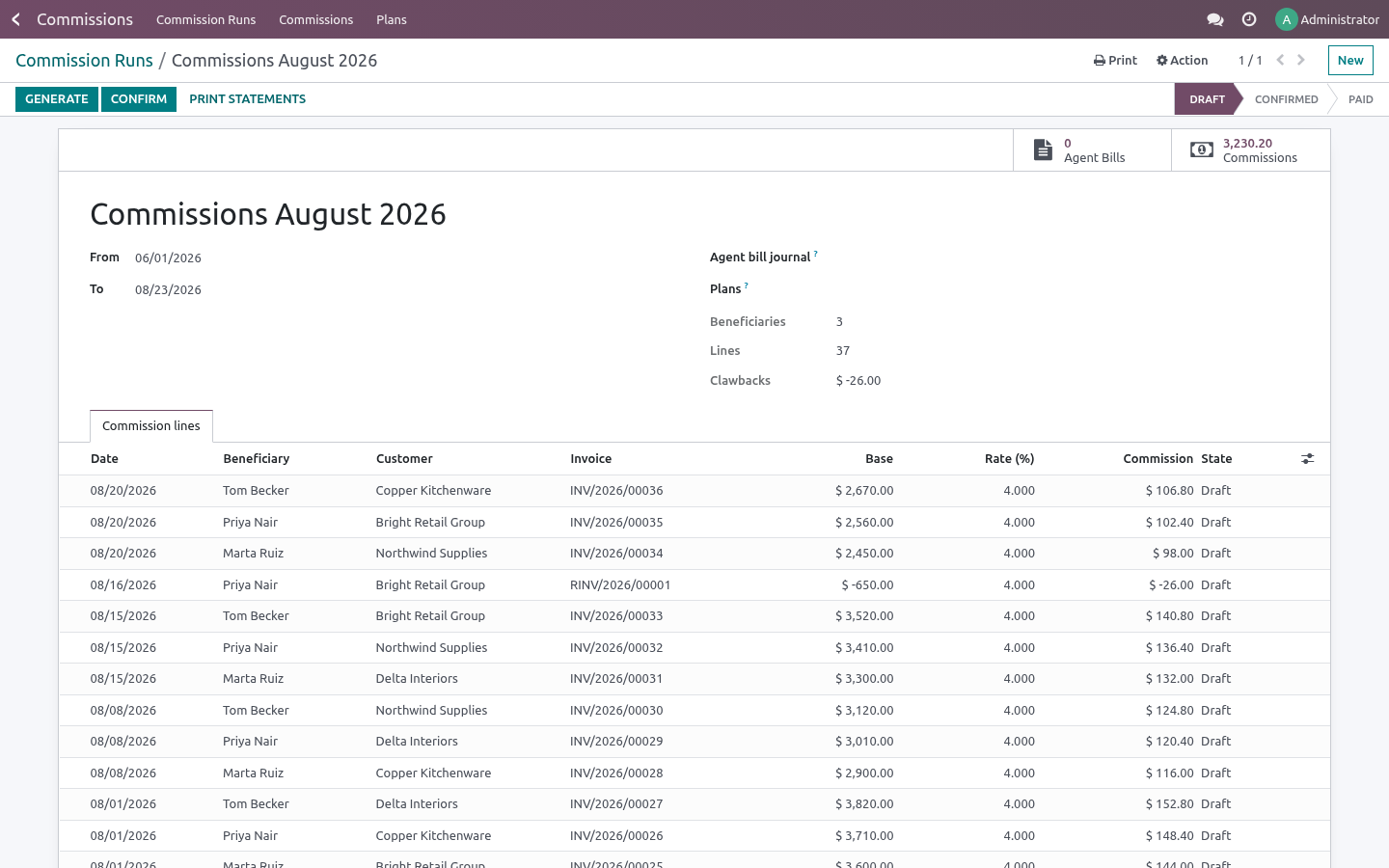
Commissions → Commission Runs → New — pick the dates, optionally restrict to some plans, then Generate.
The run walks every posted customer invoice and credit note whose invoice date falls in the period, applies each matching plan, and creates one commission line per invoice line. Then:
Confirm freezes the lines (they move to Confirmed).
Mark paid closes the run once the money has left.
Reset to draft re-opens a confirmed run; a paid run stays paid.
Generation is idempotent and non-overlapping: an invoice line that already carries a commission line for a plan is never paid again, in this run or any other. Regenerate a draft run as often as you like as invoices are posted or paid.
How the numbers come out
The base is the invoice line's untaxed subtotal, or its margin when the plan says so. A credit note produces the same base with the opposite sign.
The band is chosen by what the beneficiary had already earned before this line inside the run, so a ladder actually ratchets.
The paid share applies on pay-on-payment plans: the amount collected divided by the invoice total, clamped to 0–100%. Rerun the period after more money arrives and the remaining share follows.
The clawback is a normal commission line with a negative amount, flagged as a clawback, dated in the credit note's period. Nothing is deleted, so the history stays readable.
Reading the result
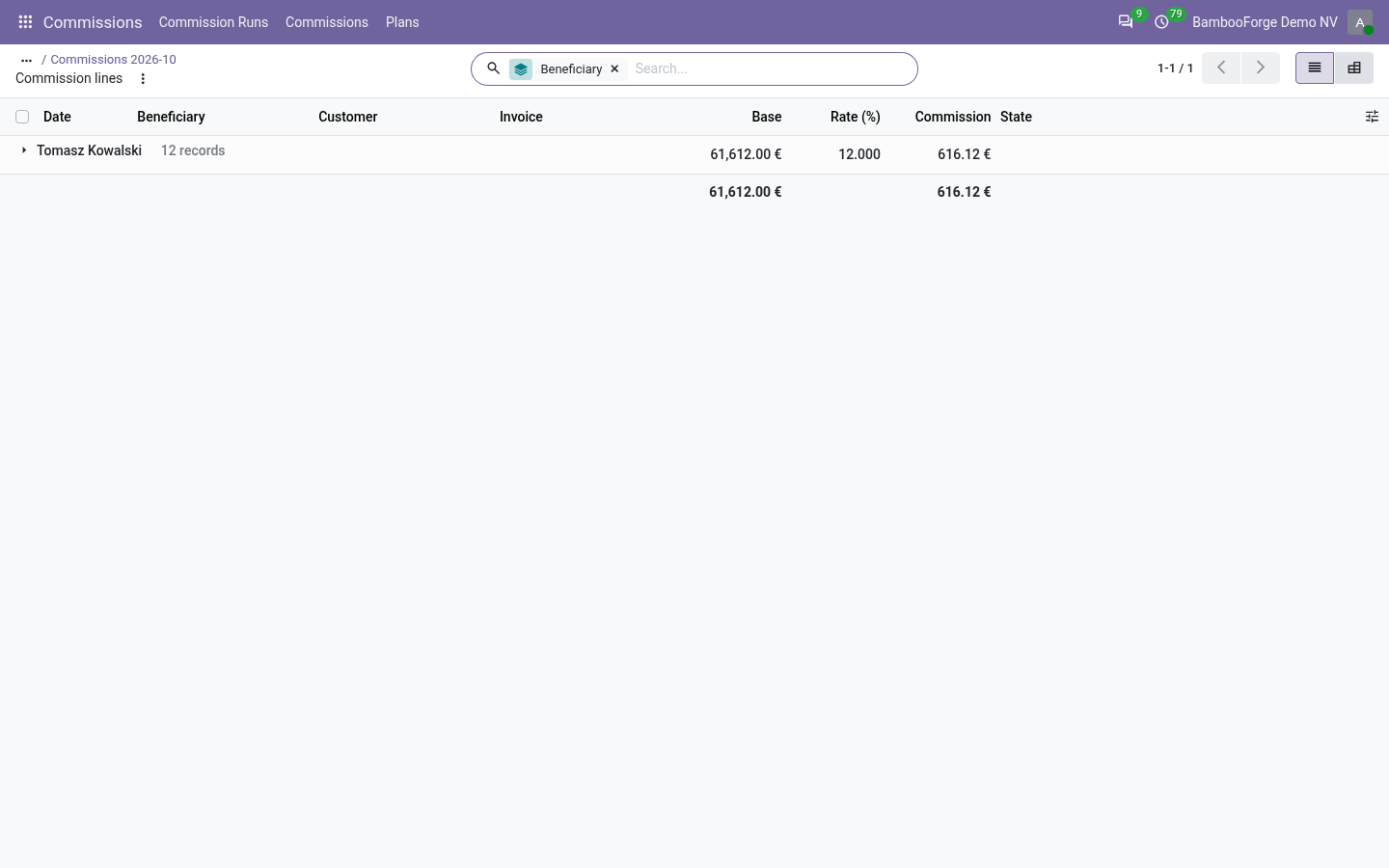
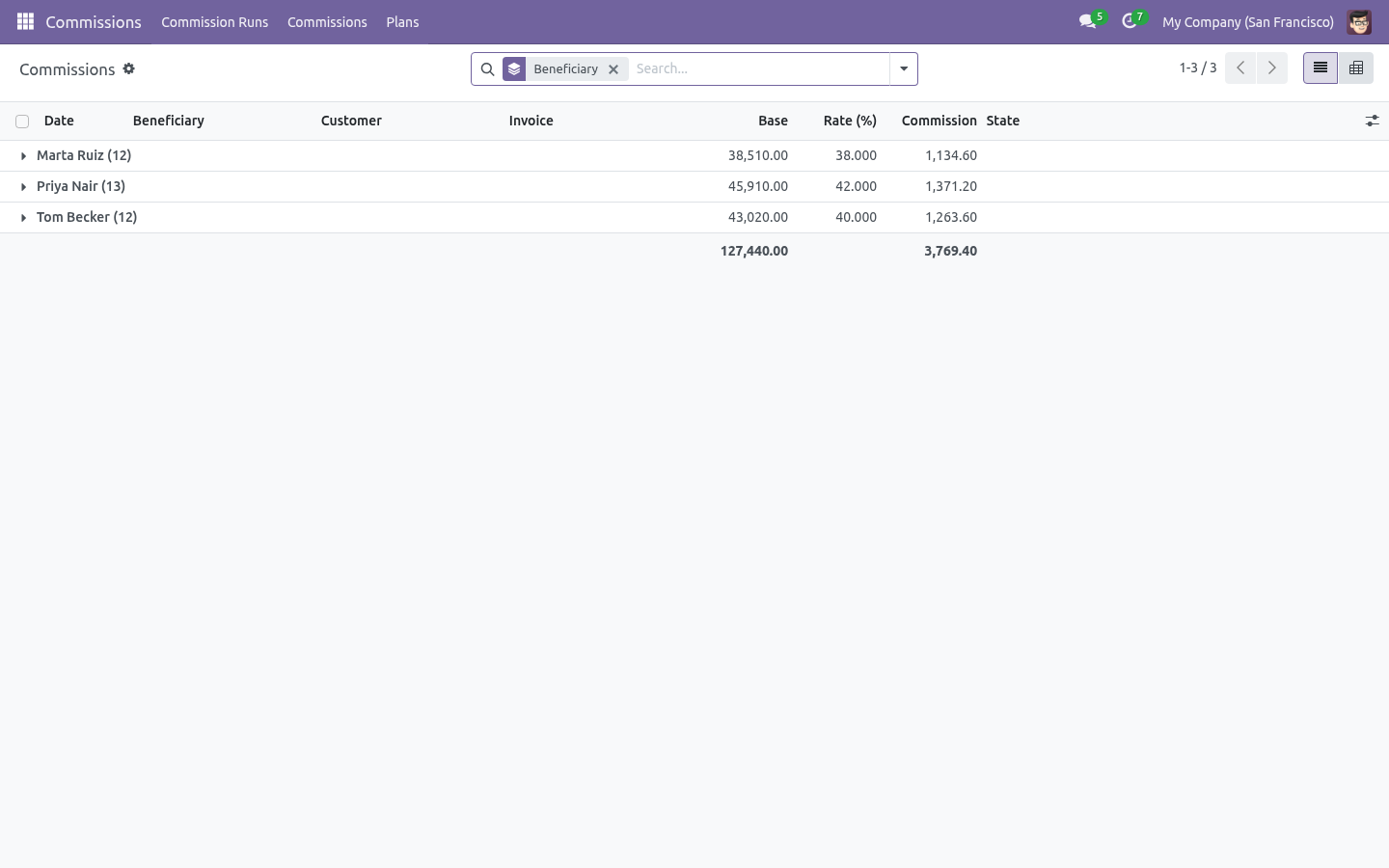
Commissions → Commissions lists every line, grouped by beneficiary by default, with filters for draft / confirmed / paid and for clawbacks. The pivot view (beneficiary against month) is what most people export for payroll.
Every line has a button to open the invoice it came from, and carries the band's name so the rate can be traced to the plan.
What it does not do
Said before you buy, because it is the half that decides whether the app fits:
Accept overlapping bands on a plan, or a band that ends before it starts.
Compute margin without product costs - a plan on margin reads the cost from the product.
Troubleshooting
- A line is missing
Check in order: is the invoice posted, is its invoice date inside the period, does the plan's category or customer filter exclude it, does the plan have at least one band, and — for pay-on-payment — has any money arrived.
- Nothing is generated at all
A confirmed run refuses to regenerate on purpose, so amounts people have already agreed to do not move. Reset it to draft first.
- The rate looks too low
The ladder is cumulative within the run: the first invoices of a period sit in the lowest band. A monthly run and a yearly run therefore pay differently, which is exactly what a quota ladder means.
- Margin is negative
The line was sold below the product's cost. The commission is negative, which is the honest answer; exclude those products with a category filter if that is not your policy.
- Two plans pay the same invoice
That is allowed — an overlay plan on top of a base plan is a common design. Each plan produces its own line.
What changed in 1.1
Ladders keep counting. Regenerating a run - or running a second run over the same period - no longer restarts the quota ladder at the bottom band: everything already commissioned still counts.
Late payments are paid. On pay-on-payment plans, money that arrives after a run was confirmed becomes a payment true-up line in the next run - flagged, auditable, never double-counted.
Foreign-currency invoices convert to company currency at the invoice date before any rate is applied.
Margin uses the deal's cost (the sale order's cost field) when the sale margin feature is installed, so later cost changes never rewrite commission history.
A monthly scheduled job drafts last month's run; a salesperson now sees only their own commission lines; plans and runs carry a chatter that tracks every change.
What changed in 1.2
Statements: print all beneficiaries at once, or mail each person a PDF holding only their lines - true-ups and clawbacks labelled as such.
Agent bills: one click turns the confirmed lines of every agent into a real vendor bill (one per partner, one bill line per commission line, never billed twice), in the purchase journal you choose on the run.
How we make sure it works
Before every release, 60 automated checks run against this app on Odoo 16, 17, 18, 19 and 20. Among them:
A paid line cannot be cancelled.
A paid run cannot be reset.
An empty run cannot be confirmed.
Generating twice does not pay twice.
A second run does not pay the first run again.
The complete list is in the source you receive.
Support
support@bambooforge.dev — questions, bug reports and feature requests are answered by the developers who wrote the module.