 BambooForge Labs
Hospital & Clinic Management with Light EMR
Clinic and hospital management on Odoo Community: patient files with allergies, a day sheet, consultations with vitals, and prescriptions.
Available for Odoo 16.0, Odoo 17.0, Odoo 18.0, Odoo 19.0, Odoo 20.0. Technical name bambooforge_clinic.
Transcript of the walkthrough (Odoo 20)
Hospital & Clinic Management with Light EMR. Clinic and hospital management on Odoo Community: patient files with allergies, a day sheet, consultations with vitals, and prescriptions. Said before you buy, because it is the half that decides whether the app fits: In the next few minutes: what it is, then the patient file, then the day sheet, then the consultation, then prescriptions. Then what this app deliberately does not do, so you can tell before you buy whether it fits.
Everything lives under Clinic then Day sheet then Patients then Clinical. Odoo Community 16.0, 17.0, 18.0 or 19.0. Depends only on mail, product and account - all Community. No Enterprise module, no external service, nothing phoning home.
What it is. A small clinic runs on three things Odoo Community does not have: a patient file, a day sheet, and a consultation that turns into money. This app adds exactly those three, and deliberately stops there - it is not a hospital information system and does not pretend to be one. The patient file.
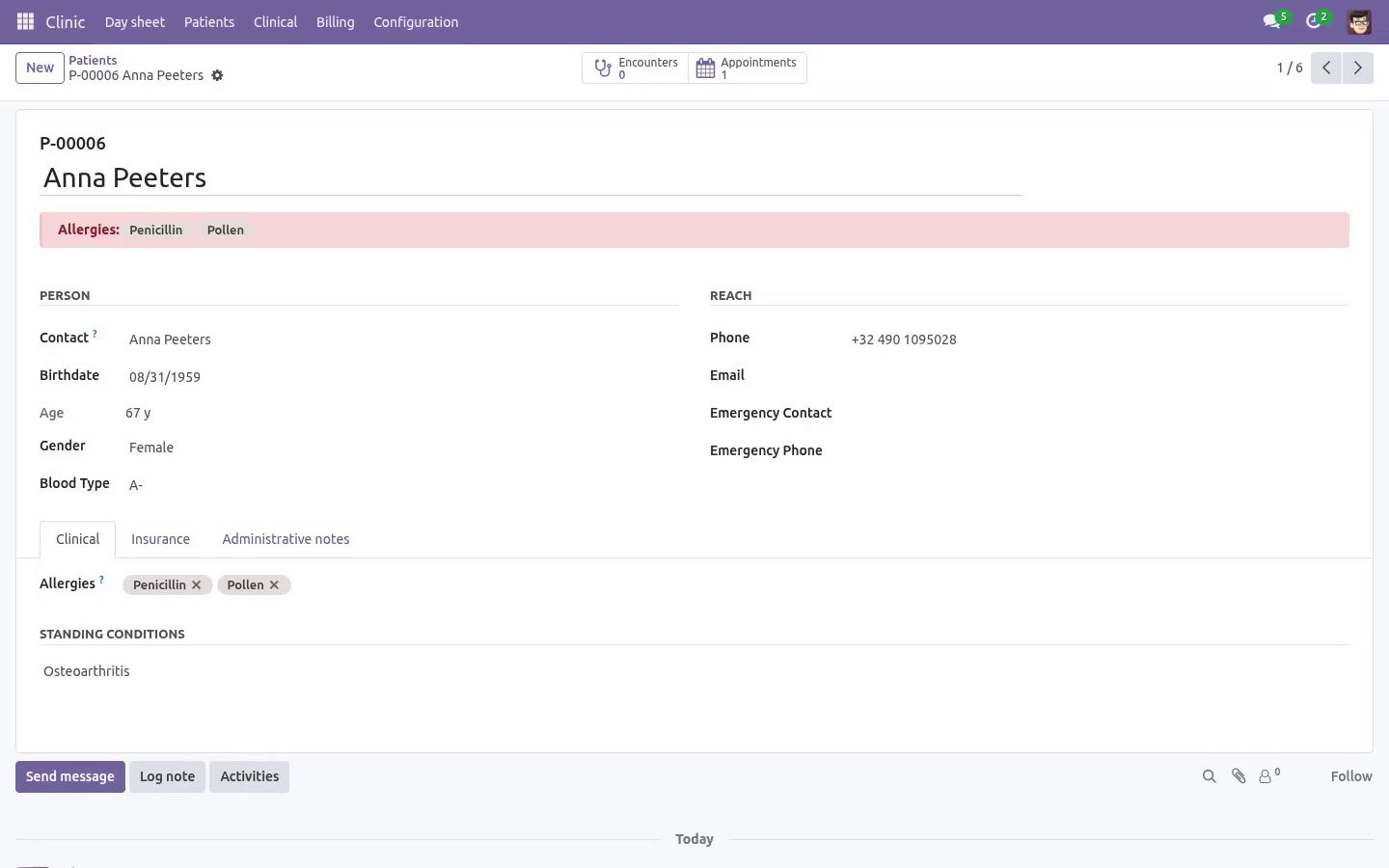
One file per person, attached to the Odoo contact rather than replacing it, so the invoice still goes where invoices go. A permanent patient number (P-00042) assigned once. The front desk quotes it on the phone; it never gets reused. Date of birth with the age computed the way a clinician reads it - years for adults, months for infants, days for a newborn.
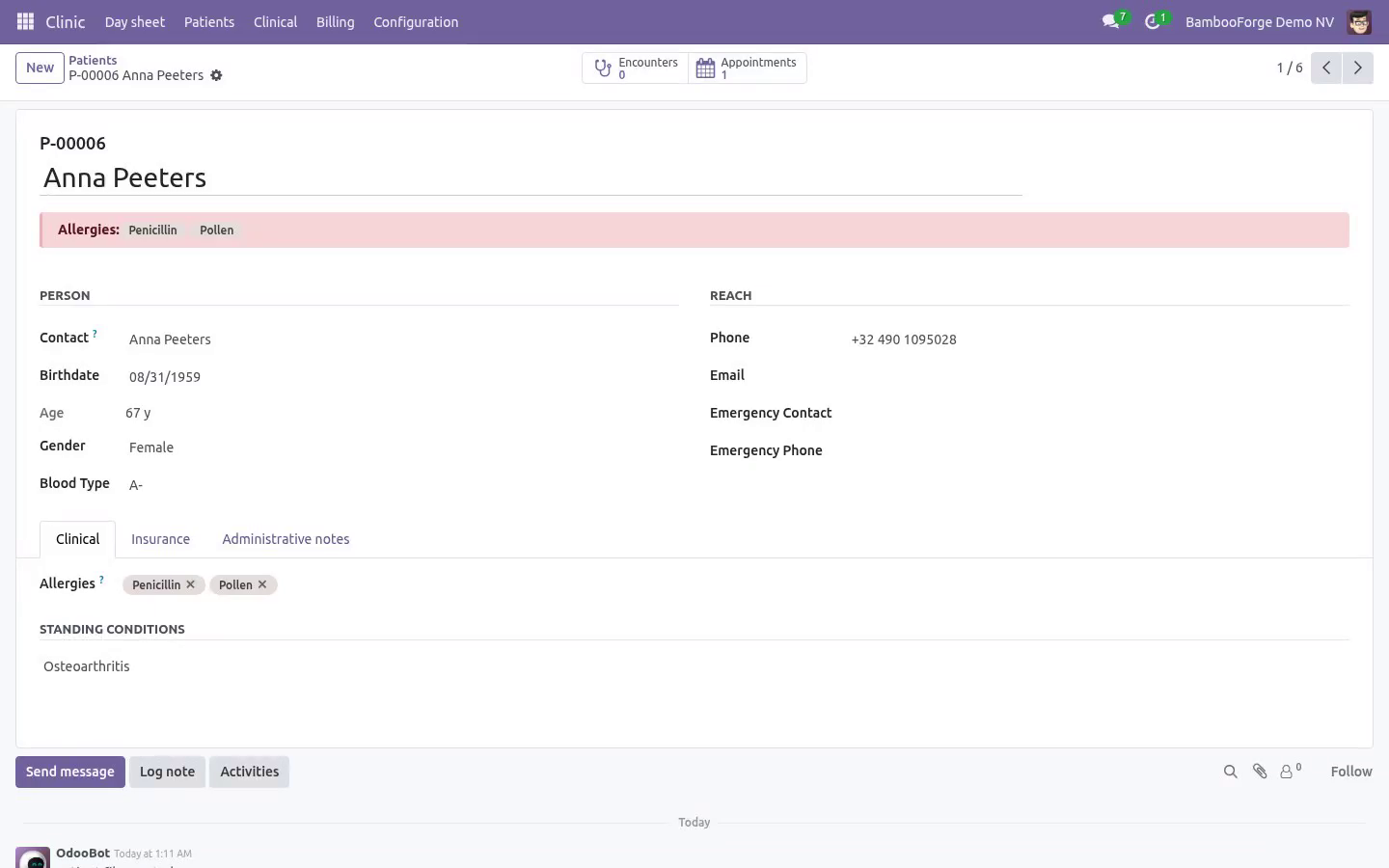
Blood type, insurance details, emergency contact, standing conditions. Allergies, shown as a red banner on every consultation and every prescription. That banner is the reason this model exists. The day sheet.
Not online booking - that is a customer picking a slot on a website. This is the list the front desk works from: Booked → arrived → in consultation → done, plus no-show and cancelled. One click checks somebody in and starts the clock. A waiting-time column, because how long people sit there is the number a clinic is judged on.
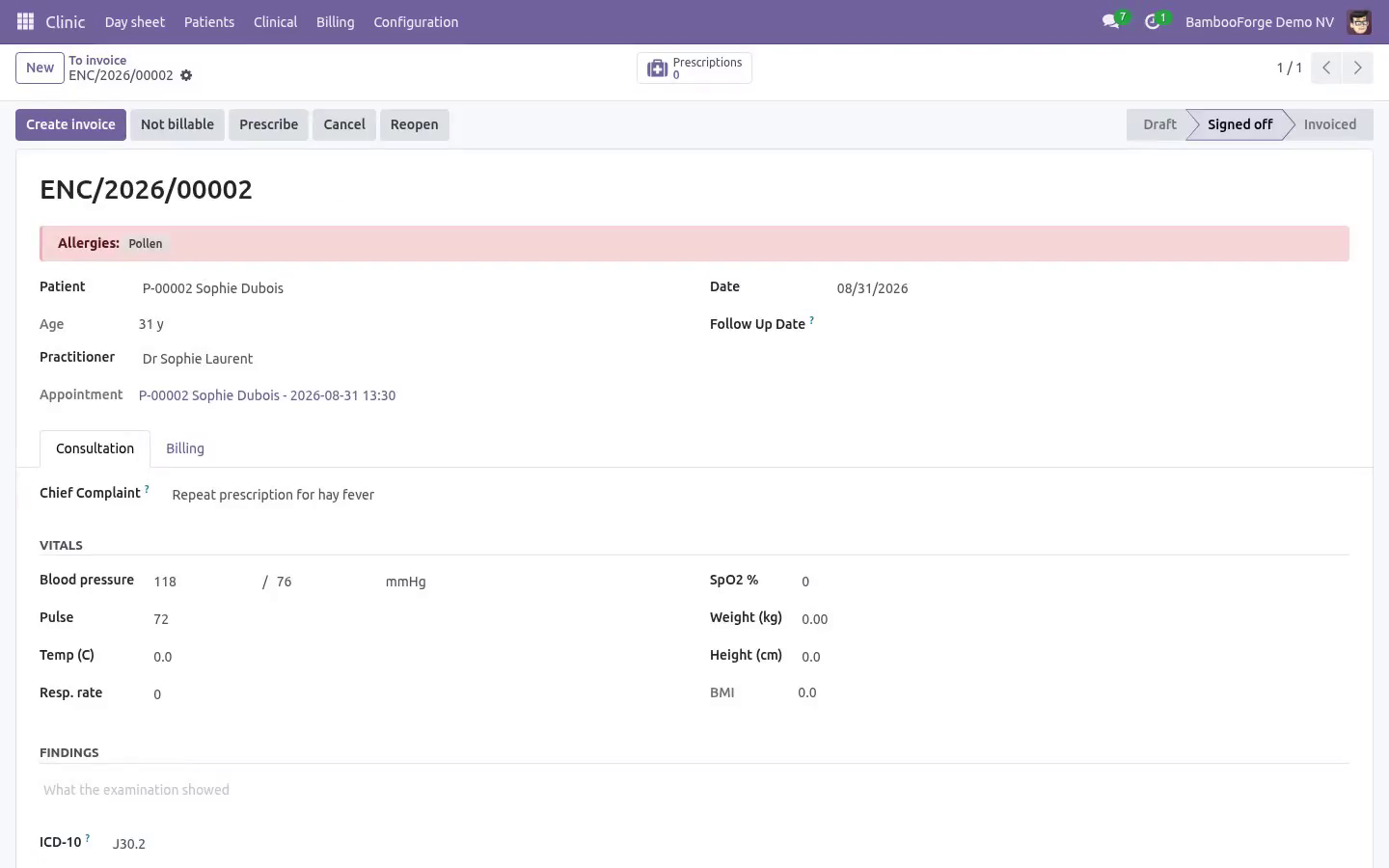
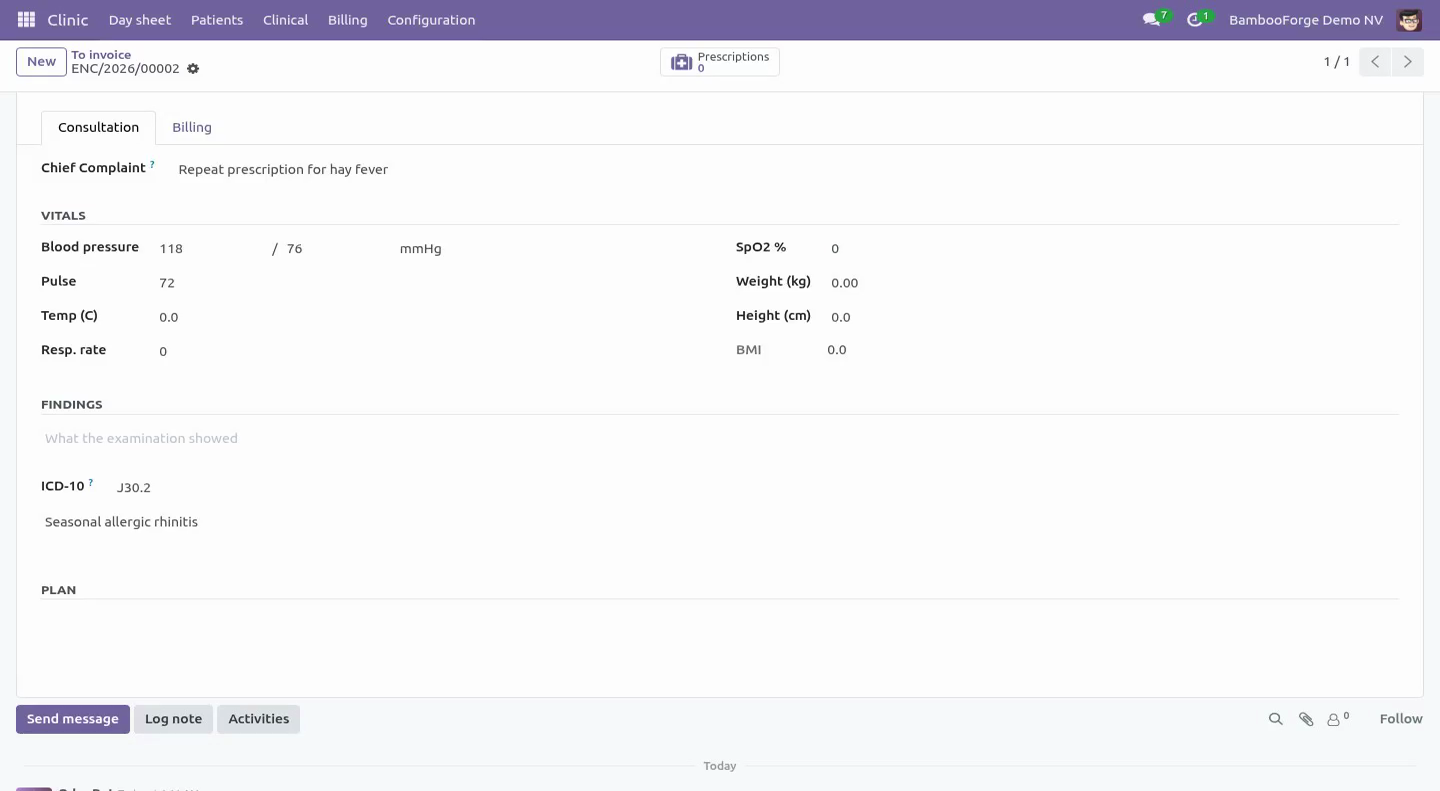
Overlapping bookings for the same practitioner are refused - two people cannot have the same doctor at the same time. Cancel one and the slot frees itself. The same data as a day calendar, coloured per practitioner. The consultation Chief complaint in the patient's own words, examination, diagnosis with an ICD-10 field, and a plan.
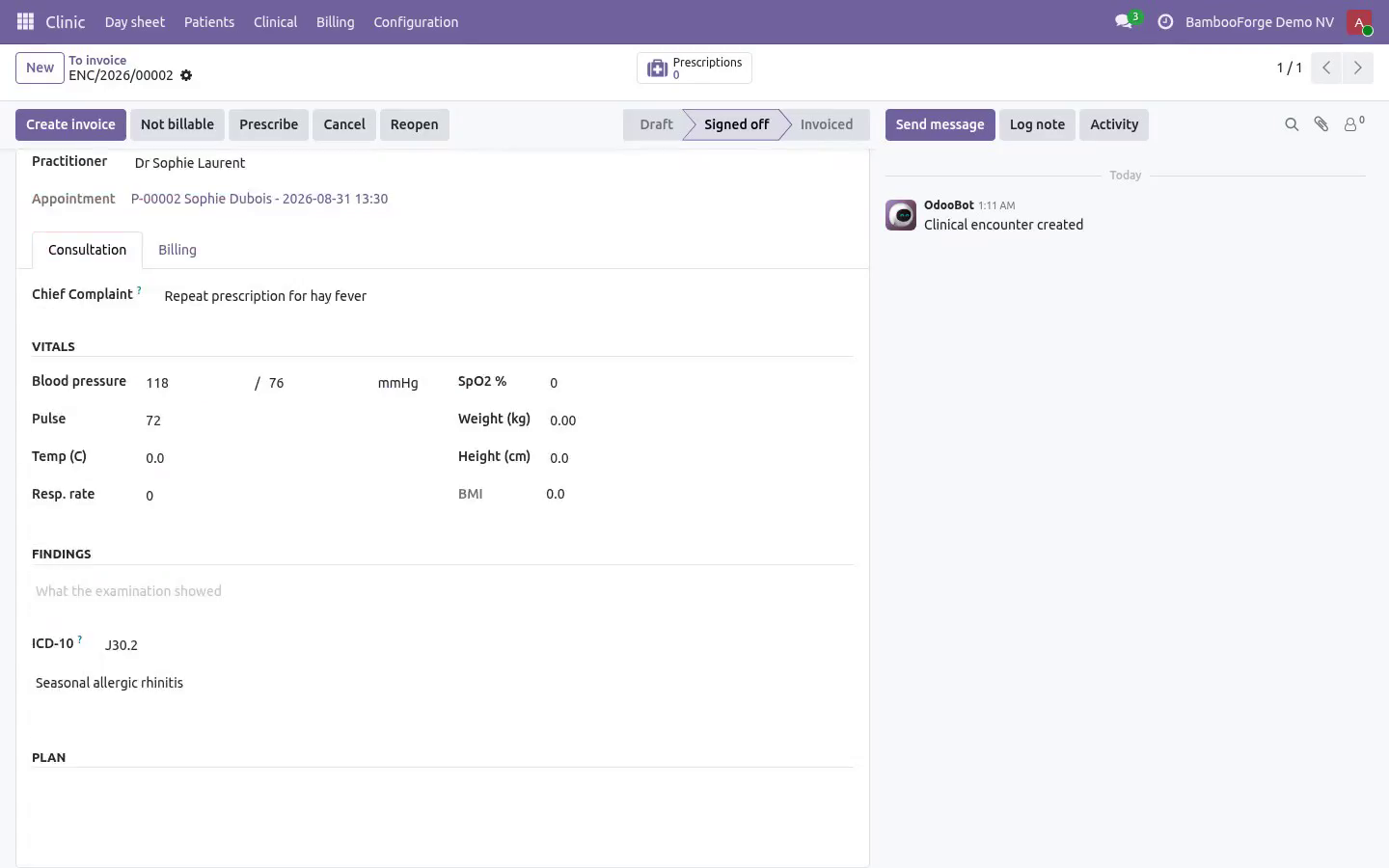
Vitals: blood pressure, pulse, temperature, respiratory rate, SpO2, weight, height - with BMI computed and classified. Vitals are checked against plausibility bands. A temperature typed as 370 is refused, and so is a blood pressure entered the wrong way round (diastolic above systolic). These are the two mistakes that otherwise reach a chart nobody re-reads.
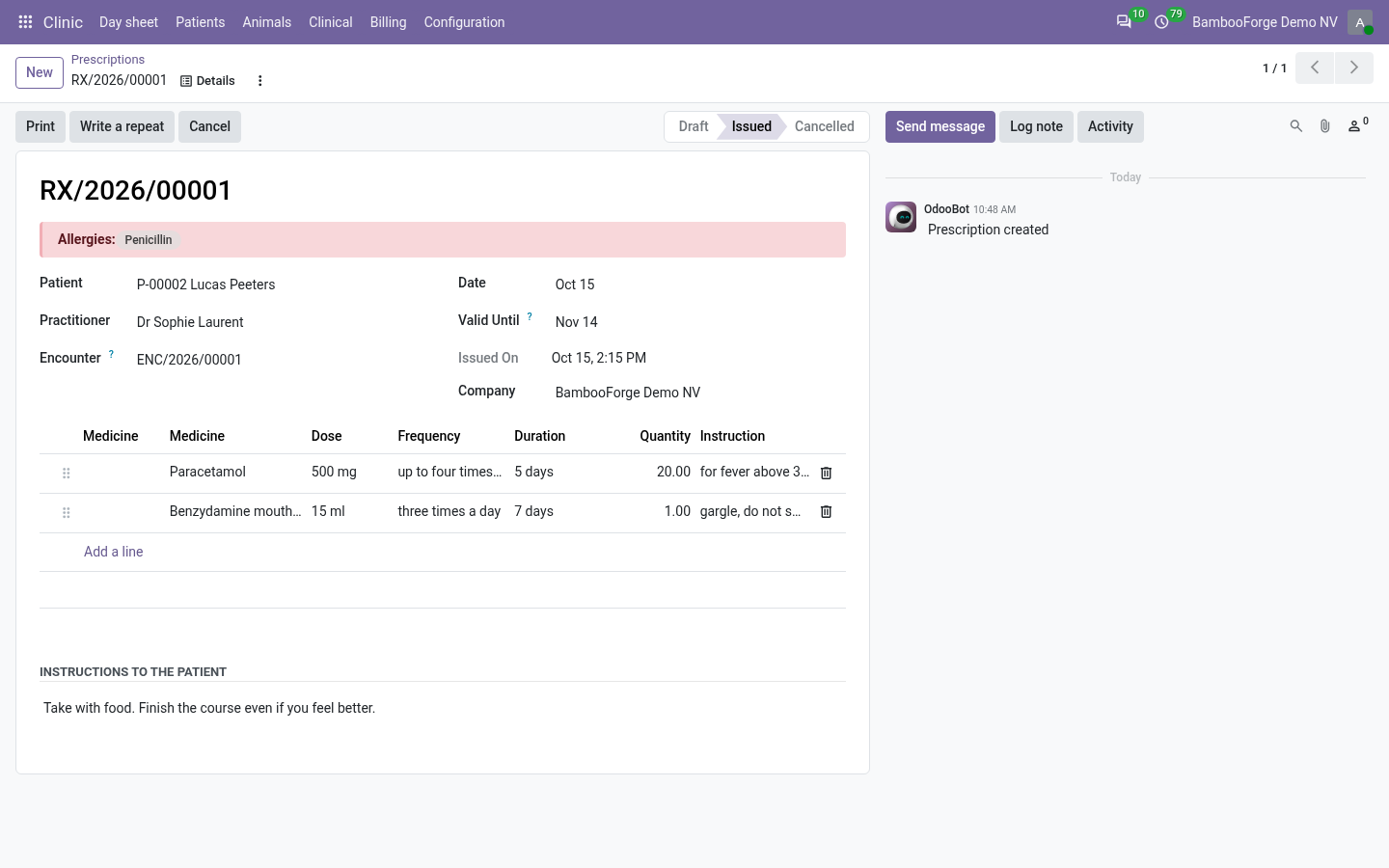
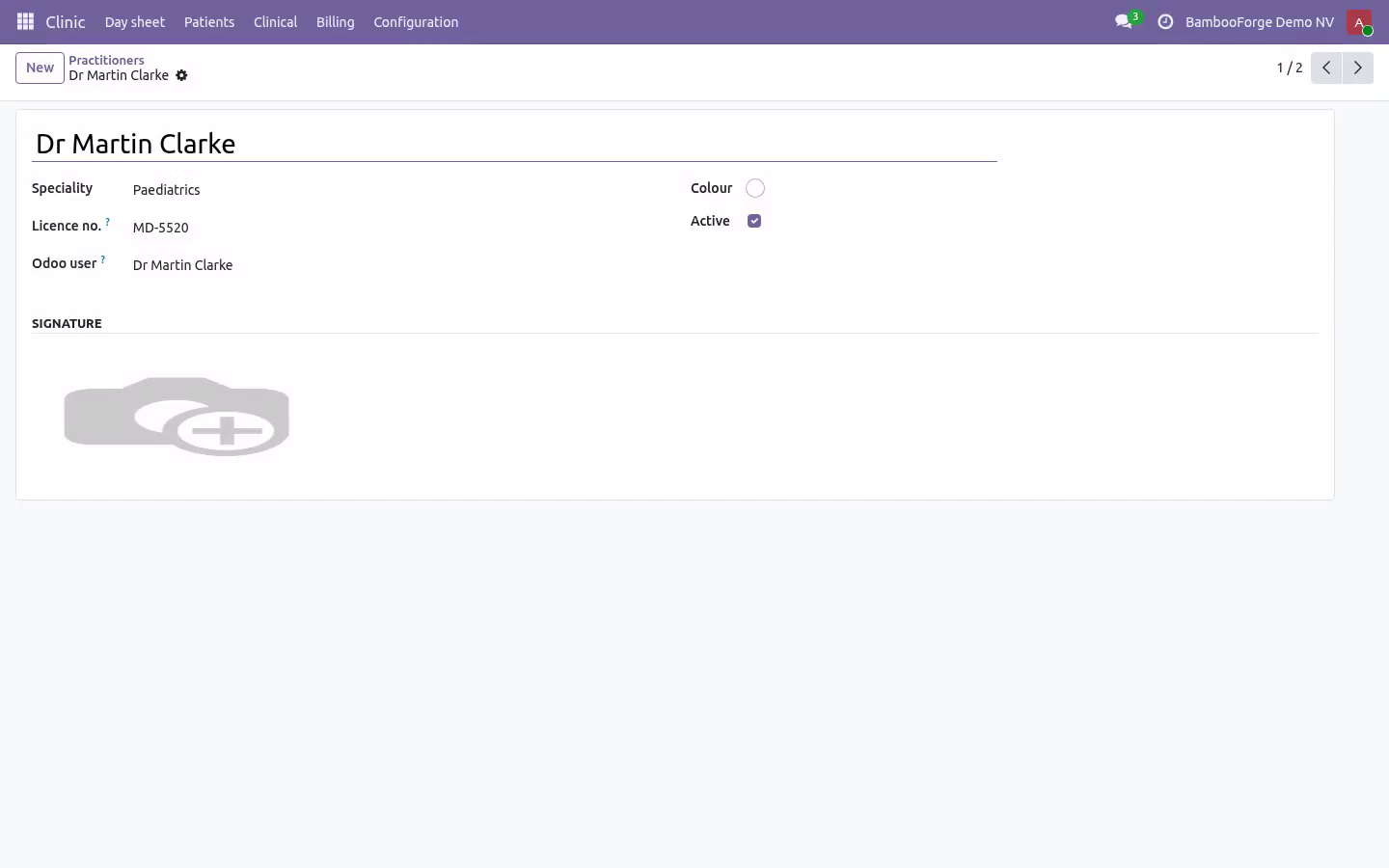
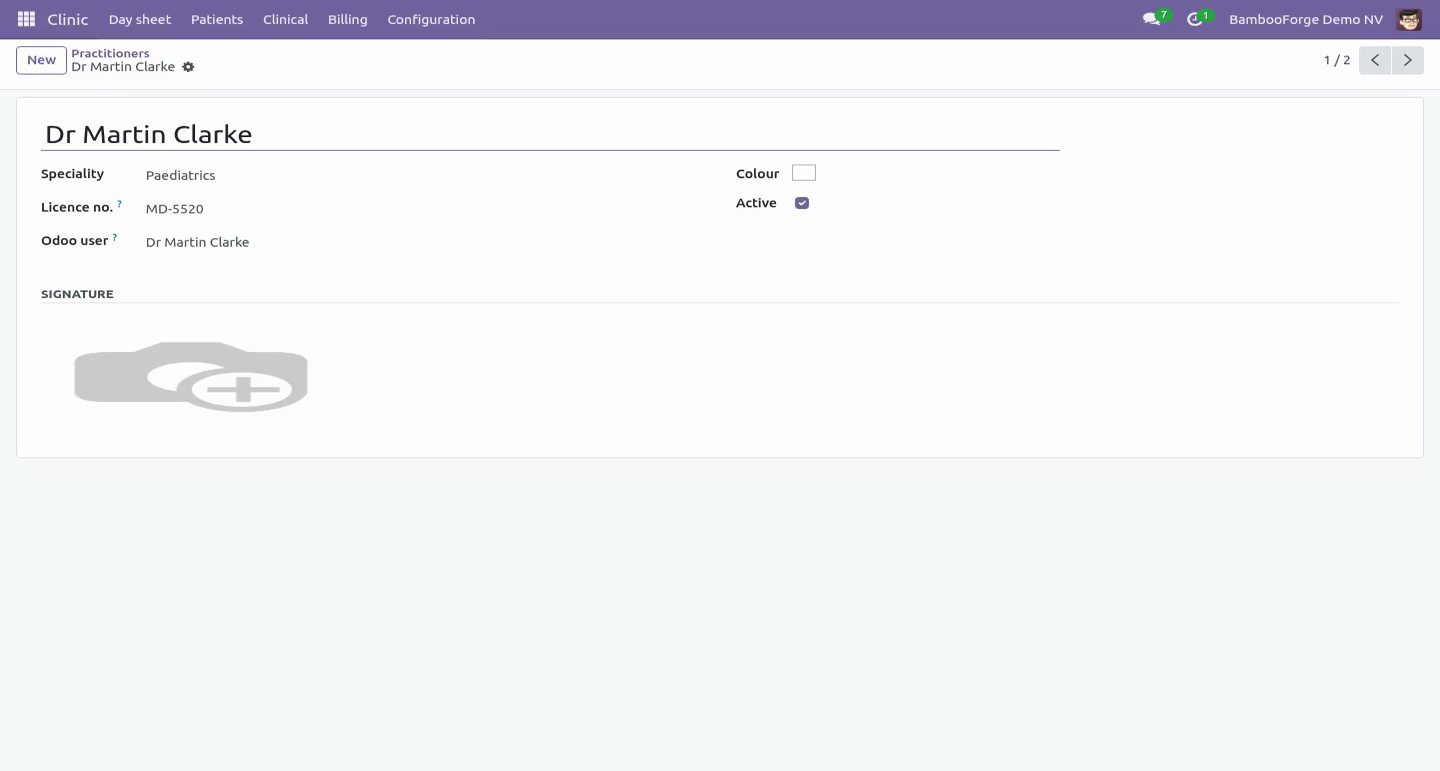
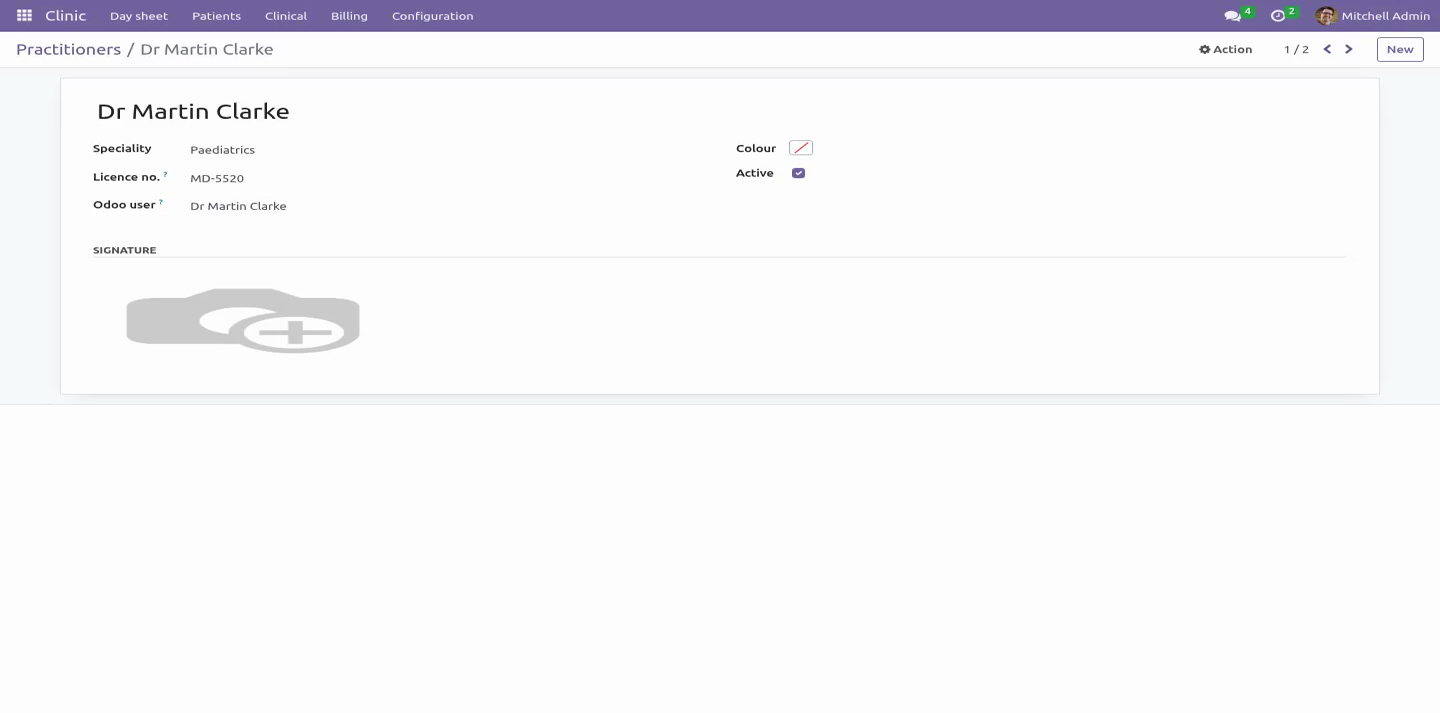
Sign-off requires a diagnosis: an encounter with no finding is not a record, it is a gap. A follow-up date schedules a real Odoo activity for the practitioner, so a review is not left to memory. Prescriptions Print with the practitioner's licence number, the patient's allergies and a validity date - the three things the pharmacist on the other side actually needs. Issuing is refused when the practitioner has no licence number on file, because such a prescription is not valid at a pharmacy.
Once issued a prescription is read-only. Correcting one means cancelling it and writing another: a document that can change after printing is not a record. Billing Billable items sit on the consultation - a consultation fee, a dressing, a test - and become one customer invoice in one click. The invoice can only follow the record, never lead it: an unsigned encounter cannot be billed.
A "To invoice" list shows every signed-off visit that was never billed, and a visit whose invoice was credited comes back onto it. That list is the usual clinic leak, and it is one menu item. Who sees what. Multi-company record rules throughout: a patient file belongs to the clinic that opened it.
Front desk books, checks in, invoices and takes payment - and cannot open clinical notes or prescriptions. Reception is not a clinical role, and the access rights say so. Practitioners hold the clinical record. Managers configure rooms, practitioners and allergies, are the only ones who can reopen a signed-off encounter, and hold the invoicing rights the practice's books need.
How we make sure it works. Before every release, 97 automated checks run against this app on Odoo 16, 17, 18, 19 and 20. Among them: The front desk is not shown buttons that can only fail. A repeat of an expired script is written not refused.
The front desk cannot read the rest of the ledger. A posted invoice cannot be detached by an import. The state cannot be moved by a plain write. The complete list is in the source you receive.
Questions people ask. Which Odoo versions does it run on? Odoo 16.0, 17.0, 18.0, 19.0, 20.0, on the series you buy it for; each series is its own listing. Community or Enterprise?
Both. It needs no Enterprise app. Support. support@bambooforge.dev - answered within two business days.
This module is licensed OPL-1; one purchase covers one production database plus its staging copies. \n The complete manual is at docs dot bambooforge dot dev, the demo database is linked from the store page, and support answers within twenty-four hours. Links are in the description.
Transcript of the walkthrough (Odoo 19)
Hospital & Clinic Management with Light EMR. Clinic and hospital management on Odoo Community: patient files with allergies, a day sheet, consultations with vitals, and prescriptions. A small clinic runs on three things Odoo Community does not have: a patient file, a day sheet, and a consultation that turns into money. This app adds exactly those three, and deliberately stops there - it is not a hospital information system and does not pretend to be one.
One file per person, attached to the Odoo contact rather than replacing it, so the invoice still goes where invoices go. In the next few minutes: what it is, then the patient file, then the day sheet, then the consultation, then prescriptions. Then what this app deliberately does not do, so you can tell before you buy whether it fits. Everything lives under Clinic then Day sheet then Patients then Clinical.
Odoo Community 16.0, 17.0, 18.0 or 19.0. Depends only on mail, product and account - all Community. No Enterprise module, no external service, nothing phoning home. What it is.
A small clinic runs on three things Odoo Community does not have: a patient file, a day sheet, and a consultation that turns into money. This app adds exactly those three, and deliberately stops there - it is not a hospital information system and does not pretend to be one. The patient file. One file per person, attached to the Odoo contact rather than replacing it, so the invoice still goes where invoices go.
A permanent patient number (P-00042) assigned once. The front desk quotes it on the phone; it never gets reused. Date of birth with the age computed the way a clinician reads it - years for adults, months for infants, days for a newborn. Blood type, insurance details, emergency contact, standing conditions.
Allergies, shown as a red banner on every consultation and every prescription. That banner is the reason this model exists. The day sheet. Not online booking - that is a customer picking a slot on a website.
This is the list the front desk works from: Booked → arrived → in consultation → done, plus no-show and cancelled. One click checks somebody in and starts the clock. A waiting-time column, because how long people sit there is the number a clinic is judged on. Overlapping bookings for the same practitioner are refused - two people cannot have the same doctor at the same time.
Cancel one and the slot frees itself. The same data as a day calendar, coloured per practitioner. The consultation Chief complaint in the patient's own words, examination, diagnosis with an ICD-10 field, and a plan. Vitals: blood pressure, pulse, temperature, respiratory rate, SpO2, weight, height - with BMI computed and classified.
Vitals are checked against plausibility bands. A temperature typed as 370 is refused, and so is a blood pressure entered the wrong way round (diastolic above systolic). These are the two mistakes that otherwise reach a chart nobody re-reads. Sign-off requires a diagnosis: an encounter with no finding is not a record, it is a gap.
A follow-up date schedules a real Odoo activity for the practitioner, so a review is not left to memory. Prescriptions Print with the practitioner's licence number, the patient's allergies and a validity date - the three things the pharmacist on the other side actually needs. Issuing is refused when the practitioner has no licence number on file, because such a prescription is not valid at a pharmacy. Once issued a prescription is read-only.
Correcting one means cancelling it and writing another: a document that can change after printing is not a record. Billing Billable items sit on the consultation - a consultation fee, a dressing, a test - and become one customer invoice in one click. The invoice can only follow the record, never lead it: an unsigned encounter cannot be billed. A "To invoice" list shows every signed-off visit that was never billed, and a visit whose invoice was credited comes back onto it.
That list is the usual clinic leak, and it is one menu item. Who sees what. Multi-company record rules throughout: a patient file belongs to the clinic that opened it. Front desk books, checks in, invoices and takes payment - and cannot open clinical notes or prescriptions.
Reception is not a clinical role, and the access rights say so. Practitioners hold the clinical record. Managers configure rooms, practitioners and allergies, are the only ones who can reopen a signed-off encounter, and hold the invoicing rights the practice's books need. Support.
support@bambooforge.dev - answered within two business days. This module is licensed OPL-1; one purchase covers one production database plus its staging copies. \n What changed in 1.3. A second operations review, this time against the roles rather than the records.
Everything below has a test that was written to fail against the old code first: The buttons match the rights. Sign off, Prescribe, Start consultation and the prescriptions counter are practitioners' work and are no longer offered to the desk, where they could only ever raise an access error. The workflow is the only way a visit changes state. An import or an RPC call could write state and move_id directly: the posted invoice was orphaned, the visit came back onto the "To invoice" list and the next click billed the same consultation twice.
A signed-off or invoiced visit cannot be deleted, nor can an issued prescription. Freezing edits and leaving deletion open is not freezing anything. "Not billable" needs a reason on every path, not only where the form asked for one. Only a manager reopens a visit - in the record, not only on the screen.
Re-signing a visit no longer stacks follow-up reminders, and clearing the review date clears the reminder. Overbooking is checked both ways: unticking the flag puts the slot back under the rule, and an emergency still reserves the room it is in - a doctor can run late, a room cannot hold two consultations. Clash messages are in the reader's timezone. A receptionist in Brussels was told about an appointment at 02:00.
What changed in 1.1. An operations review against a real three-doctor practice found nine things that bite in the first week. All of them are fixed and each has a test: Reception could not open a single patient file - the visit counters dragged the desk through an access check on the clinical record. Counted with sudo now; the desk sees how many visits, never what happened in them.
A cancelled or deleted invoice used to leave the visit looking billed for ever, invisible and unbillable. It now returns to the "To invoice" list and says why in the chatter. A signed-off visit is frozen. Changing a price on an invoiced encounter used to leave the ledger and the record disagreeing.
Reopen it deliberately, or not at all. "Not billable" is a state: the free re-check, the staff visit, the insurer-direct case. Without it the leak list filled with noise and people stopped reading it. Tax.
The counter now quotes the number the invoice will print, and the invoice carries the product's taxes through the patient's fiscal position. The day job closes days, not hours. A clinic running ninety minutes late keeps its waiting room; yesterday's leftovers are closed overnight, including visits the doctor saw but wrote up next morning. Overbooking is a decision: tick "Overbooked" to squeeze in a walk-in instead of lying about the time.
Two consultations can no longer share a room. Waiting time is searchable, so "who has waited longest" is a filter rather than a column read down by eye. A cancelled prescription no longer prints as a valid one, and "Write a repeat" creates a new editable prescription instead of duplicating a frozen one. The complete manual is at docs dot bambooforge dot dev, the demo database is linked from the store page, and support answers within twenty-four hours.
Links are in the description.
Transcript of the walkthrough (Odoo 18)
Hospital & Clinic Management with Light EMR. Clinic and hospital management on Odoo Community: patient files with allergies, a day sheet, consultations with vitals, and prescriptions. A small clinic runs on three things Odoo Community does not have: a patient file, a day sheet, and a consultation that turns into money. This app adds exactly those three, and deliberately stops there - it is not a hospital information system and does not pretend to be one.
One file per person, attached to the Odoo contact rather than replacing it, so the invoice still goes where invoices go. In the next few minutes: what it is, then the patient file, then the day sheet, then the consultation, then prescriptions. Then what this app deliberately does not do, so you can tell before you buy whether it fits. Everything lives under Clinic then Day sheet then Patients then Clinical.
Odoo Community 16.0, 17.0, 18.0 or 19.0. Depends only on mail, product and account - all Community. No Enterprise module, no external service, nothing phoning home. What it is.
A small clinic runs on three things Odoo Community does not have: a patient file, a day sheet, and a consultation that turns into money. This app adds exactly those three, and deliberately stops there - it is not a hospital information system and does not pretend to be one. The patient file. One file per person, attached to the Odoo contact rather than replacing it, so the invoice still goes where invoices go.
A permanent patient number (P-00042) assigned once. The front desk quotes it on the phone; it never gets reused. Date of birth with the age computed the way a clinician reads it - years for adults, months for infants, days for a newborn. Blood type, insurance details, emergency contact, standing conditions.
Allergies, shown as a red banner on every consultation and every prescription. That banner is the reason this model exists. The day sheet. Not online booking - that is a customer picking a slot on a website.
This is the list the front desk works from: Booked → arrived → in consultation → done, plus no-show and cancelled. One click checks somebody in and starts the clock. A waiting-time column, because how long people sit there is the number a clinic is judged on. Overlapping bookings for the same practitioner are refused - two people cannot have the same doctor at the same time.
Cancel one and the slot frees itself. The same data as a day calendar, coloured per practitioner. The consultation Chief complaint in the patient's own words, examination, diagnosis with an ICD-10 field, and a plan. Vitals: blood pressure, pulse, temperature, respiratory rate, SpO2, weight, height - with BMI computed and classified.
Vitals are checked against plausibility bands. A temperature typed as 370 is refused, and so is a blood pressure entered the wrong way round (diastolic above systolic). These are the two mistakes that otherwise reach a chart nobody re-reads. Sign-off requires a diagnosis: an encounter with no finding is not a record, it is a gap.
A follow-up date schedules a real Odoo activity for the practitioner, so a review is not left to memory. Prescriptions Print with the practitioner's licence number, the patient's allergies and a validity date - the three things the pharmacist on the other side actually needs. Issuing is refused when the practitioner has no licence number on file, because such a prescription is not valid at a pharmacy. Once issued a prescription is read-only.
Correcting one means cancelling it and writing another: a document that can change after printing is not a record. Billing Billable items sit on the consultation - a consultation fee, a dressing, a test - and become one customer invoice in one click. The invoice can only follow the record, never lead it: an unsigned encounter cannot be billed. A "To invoice" list shows every signed-off visit that was never billed, and a visit whose invoice was credited comes back onto it.
That list is the usual clinic leak, and it is one menu item. Who sees what. Multi-company record rules throughout: a patient file belongs to the clinic that opened it. Front desk books, checks in, invoices and takes payment - and cannot open clinical notes or prescriptions.
Reception is not a clinical role, and the access rights say so. Practitioners hold the clinical record. Managers configure rooms, practitioners and allergies, are the only ones who can reopen a signed-off encounter, and hold the invoicing rights the practice's books need. Support.
support@bambooforge.dev - answered within two business days. This module is licensed OPL-1; one purchase covers one production database plus its staging copies. \n What changed in 1.3. A second operations review, this time against the roles rather than the records.
Everything below has a test that was written to fail against the old code first: The buttons match the rights. Sign off, Prescribe, Start consultation and the prescriptions counter are practitioners' work and are no longer offered to the desk, where they could only ever raise an access error. The workflow is the only way a visit changes state. An import or an RPC call could write state and move_id directly: the posted invoice was orphaned, the visit came back onto the "To invoice" list and the next click billed the same consultation twice.
A signed-off or invoiced visit cannot be deleted, nor can an issued prescription. Freezing edits and leaving deletion open is not freezing anything. "Not billable" needs a reason on every path, not only where the form asked for one. Only a manager reopens a visit - in the record, not only on the screen.
Re-signing a visit no longer stacks follow-up reminders, and clearing the review date clears the reminder. Overbooking is checked both ways: unticking the flag puts the slot back under the rule, and an emergency still reserves the room it is in - a doctor can run late, a room cannot hold two consultations. Clash messages are in the reader's timezone. A receptionist in Brussels was told about an appointment at 02:00.
What changed in 1.1. An operations review against a real three-doctor practice found nine things that bite in the first week. All of them are fixed and each has a test: Reception could not open a single patient file - the visit counters dragged the desk through an access check on the clinical record. Counted with sudo now; the desk sees how many visits, never what happened in them.
A cancelled or deleted invoice used to leave the visit looking billed for ever, invisible and unbillable. It now returns to the "To invoice" list and says why in the chatter. A signed-off visit is frozen. Changing a price on an invoiced encounter used to leave the ledger and the record disagreeing.
Reopen it deliberately, or not at all. "Not billable" is a state: the free re-check, the staff visit, the insurer-direct case. Without it the leak list filled with noise and people stopped reading it. Tax.
The counter now quotes the number the invoice will print, and the invoice carries the product's taxes through the patient's fiscal position. The day job closes days, not hours. A clinic running ninety minutes late keeps its waiting room; yesterday's leftovers are closed overnight, including visits the doctor saw but wrote up next morning. Overbooking is a decision: tick "Overbooked" to squeeze in a walk-in instead of lying about the time.
Two consultations can no longer share a room. Waiting time is searchable, so "who has waited longest" is a filter rather than a column read down by eye. A cancelled prescription no longer prints as a valid one, and "Write a repeat" creates a new editable prescription instead of duplicating a frozen one. The complete manual is at docs dot bambooforge dot dev, the demo database is linked from the store page, and support answers within twenty-four hours.
Links are in the description.
Transcript of the walkthrough (Odoo 17)
Hospital & Clinic Management with Light EMR. Clinic and hospital management on Odoo Community: patient files with allergies, a day sheet, consultations with vitals, and prescriptions. A small clinic runs on three things Odoo Community does not have: a patient file, a day sheet, and a consultation that turns into money. This app adds exactly those three, and deliberately stops there - it is not a hospital information system and does not pretend to be one.
One file per person, attached to the Odoo contact rather than replacing it, so the invoice still goes where invoices go. In the next few minutes: what it is, then the patient file, then the day sheet, then the consultation, then prescriptions. Then what this app deliberately does not do, so you can tell before you buy whether it fits. Everything lives under Clinic then Day sheet then Patients then Clinical.
Odoo Community 16.0, 17.0, 18.0 or 19.0. Depends only on mail, product and account - all Community. No Enterprise module, no external service, nothing phoning home. What it is.
A small clinic runs on three things Odoo Community does not have: a patient file, a day sheet, and a consultation that turns into money. This app adds exactly those three, and deliberately stops there - it is not a hospital information system and does not pretend to be one. The patient file. One file per person, attached to the Odoo contact rather than replacing it, so the invoice still goes where invoices go.
A permanent patient number (P-00042) assigned once. The front desk quotes it on the phone; it never gets reused. Date of birth with the age computed the way a clinician reads it - years for adults, months for infants, days for a newborn. Blood type, insurance details, emergency contact, standing conditions.
Allergies, shown as a red banner on every consultation and every prescription. That banner is the reason this model exists. The day sheet. Not online booking - that is a customer picking a slot on a website.
This is the list the front desk works from: Booked → arrived → in consultation → done, plus no-show and cancelled. One click checks somebody in and starts the clock. A waiting-time column, because how long people sit there is the number a clinic is judged on. Overlapping bookings for the same practitioner are refused - two people cannot have the same doctor at the same time.
Cancel one and the slot frees itself. The same data as a day calendar, coloured per practitioner. The consultation Chief complaint in the patient's own words, examination, diagnosis with an ICD-10 field, and a plan. Vitals: blood pressure, pulse, temperature, respiratory rate, SpO2, weight, height - with BMI computed and classified.
Vitals are checked against plausibility bands. A temperature typed as 370 is refused, and so is a blood pressure entered the wrong way round (diastolic above systolic). These are the two mistakes that otherwise reach a chart nobody re-reads. Sign-off requires a diagnosis: an encounter with no finding is not a record, it is a gap.
A follow-up date schedules a real Odoo activity for the practitioner, so a review is not left to memory. Prescriptions Print with the practitioner's licence number, the patient's allergies and a validity date - the three things the pharmacist on the other side actually needs. Issuing is refused when the practitioner has no licence number on file, because such a prescription is not valid at a pharmacy. Once issued a prescription is read-only.
Correcting one means cancelling it and writing another: a document that can change after printing is not a record. Billing Billable items sit on the consultation - a consultation fee, a dressing, a test - and become one customer invoice in one click. The invoice can only follow the record, never lead it: an unsigned encounter cannot be billed. A "To invoice" list shows every signed-off visit that was never billed, and a visit whose invoice was credited comes back onto it.
That list is the usual clinic leak, and it is one menu item. Who sees what. Multi-company record rules throughout: a patient file belongs to the clinic that opened it. Front desk books, checks in, invoices and takes payment - and cannot open clinical notes or prescriptions.
Reception is not a clinical role, and the access rights say so. Practitioners hold the clinical record. Managers configure rooms, practitioners and allergies, are the only ones who can reopen a signed-off encounter, and hold the invoicing rights the practice's books need. Support.
support@bambooforge.dev - answered within two business days. This module is licensed OPL-1; one purchase covers one production database plus its staging copies. \n What changed in 1.3. A second operations review, this time against the roles rather than the records.
Everything below has a test that was written to fail against the old code first: The buttons match the rights. Sign off, Prescribe, Start consultation and the prescriptions counter are practitioners' work and are no longer offered to the desk, where they could only ever raise an access error. The workflow is the only way a visit changes state. An import or an RPC call could write state and move_id directly: the posted invoice was orphaned, the visit came back onto the "To invoice" list and the next click billed the same consultation twice.
A signed-off or invoiced visit cannot be deleted, nor can an issued prescription. Freezing edits and leaving deletion open is not freezing anything. "Not billable" needs a reason on every path, not only where the form asked for one. Only a manager reopens a visit - in the record, not only on the screen.
Re-signing a visit no longer stacks follow-up reminders, and clearing the review date clears the reminder. Overbooking is checked both ways: unticking the flag puts the slot back under the rule, and an emergency still reserves the room it is in - a doctor can run late, a room cannot hold two consultations. Clash messages are in the reader's timezone. A receptionist in Brussels was told about an appointment at 02:00.
What changed in 1.1. An operations review against a real three-doctor practice found nine things that bite in the first week. All of them are fixed and each has a test: Reception could not open a single patient file - the visit counters dragged the desk through an access check on the clinical record. Counted with sudo now; the desk sees how many visits, never what happened in them.
A cancelled or deleted invoice used to leave the visit looking billed for ever, invisible and unbillable. It now returns to the "To invoice" list and says why in the chatter. A signed-off visit is frozen. Changing a price on an invoiced encounter used to leave the ledger and the record disagreeing.
Reopen it deliberately, or not at all. "Not billable" is a state: the free re-check, the staff visit, the insurer-direct case. Without it the leak list filled with noise and people stopped reading it. Tax.
The counter now quotes the number the invoice will print, and the invoice carries the product's taxes through the patient's fiscal position. The day job closes days, not hours. A clinic running ninety minutes late keeps its waiting room; yesterday's leftovers are closed overnight, including visits the doctor saw but wrote up next morning. Overbooking is a decision: tick "Overbooked" to squeeze in a walk-in instead of lying about the time.
Two consultations can no longer share a room. Waiting time is searchable, so "who has waited longest" is a filter rather than a column read down by eye. A cancelled prescription no longer prints as a valid one, and "Write a repeat" creates a new editable prescription instead of duplicating a frozen one. The complete manual is at docs dot bambooforge dot dev, the demo database is linked from the store page, and support answers within twenty-four hours.
Links are in the description.
Transcript of the walkthrough (Odoo 16)
Hospital & Clinic Management with Light EMR. Clinic and hospital management on Odoo Community: patient files with allergies, a day sheet, consultations with vitals, and prescriptions. A small clinic runs on three things Odoo Community does not have: a patient file, a day sheet, and a consultation that turns into money. This app adds exactly those three, and deliberately stops there - it is not a hospital information system and does not pretend to be one.
One file per person, attached to the Odoo contact rather than replacing it, so the invoice still goes where invoices go. In the next few minutes: what it is, then the patient file, then the day sheet, then the consultation, then prescriptions. Then what this app deliberately does not do, so you can tell before you buy whether it fits. Everything lives under Clinic then Day sheet then Patients then Clinical.
Odoo Community 16.0, 17.0, 18.0 or 19.0. Depends only on mail, product and account - all Community. No Enterprise module, no external service, nothing phoning home. What it is.
A small clinic runs on three things Odoo Community does not have: a patient file, a day sheet, and a consultation that turns into money. This app adds exactly those three, and deliberately stops there - it is not a hospital information system and does not pretend to be one. The patient file. One file per person, attached to the Odoo contact rather than replacing it, so the invoice still goes where invoices go.
A permanent patient number (P-00042) assigned once. The front desk quotes it on the phone; it never gets reused. Date of birth with the age computed the way a clinician reads it - years for adults, months for infants, days for a newborn. Blood type, insurance details, emergency contact, standing conditions.
Allergies, shown as a red banner on every consultation and every prescription. That banner is the reason this model exists. The day sheet. Not online booking - that is a customer picking a slot on a website.
This is the list the front desk works from: Booked → arrived → in consultation → done, plus no-show and cancelled. One click checks somebody in and starts the clock. A waiting-time column, because how long people sit there is the number a clinic is judged on. Overlapping bookings for the same practitioner are refused - two people cannot have the same doctor at the same time.
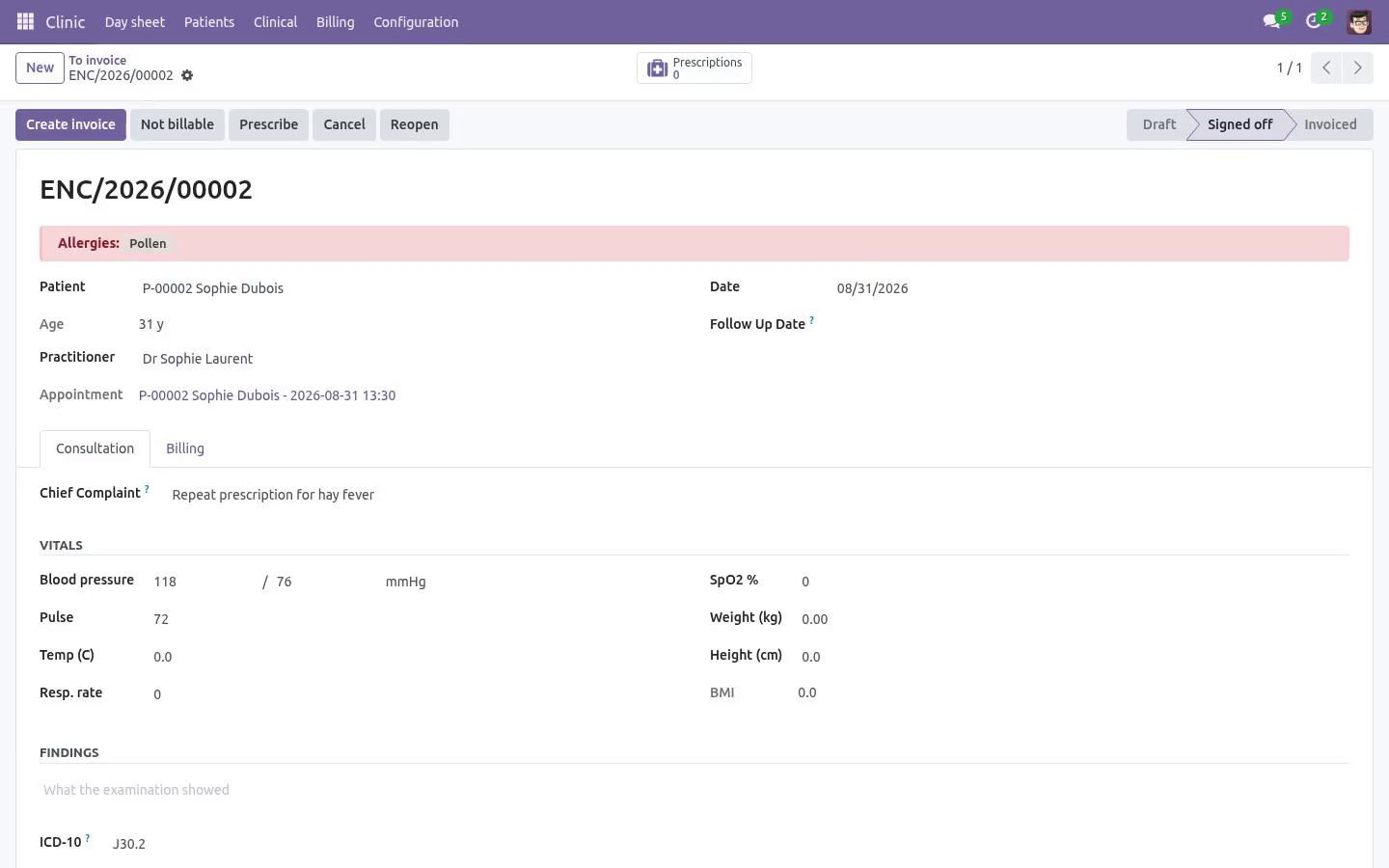
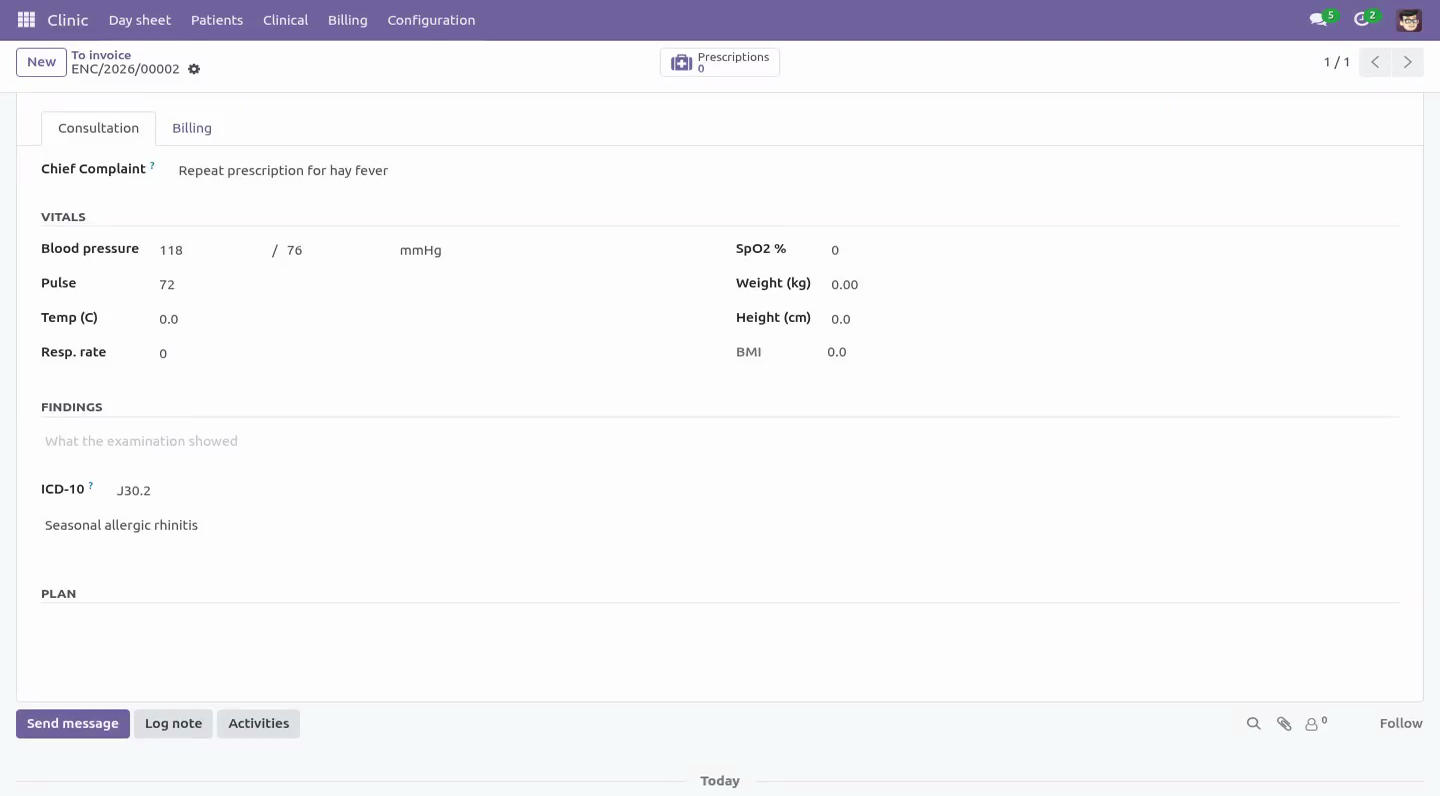
Cancel one and the slot frees itself. The same data as a day calendar, coloured per practitioner. The consultation Chief complaint in the patient's own words, examination, diagnosis with an ICD-10 field, and a plan. Vitals: blood pressure, pulse, temperature, respiratory rate, SpO2, weight, height - with BMI computed and classified.
Vitals are checked against plausibility bands. A temperature typed as 370 is refused, and so is a blood pressure entered the wrong way round (diastolic above systolic). These are the two mistakes that otherwise reach a chart nobody re-reads. Sign-off requires a diagnosis: an encounter with no finding is not a record, it is a gap.
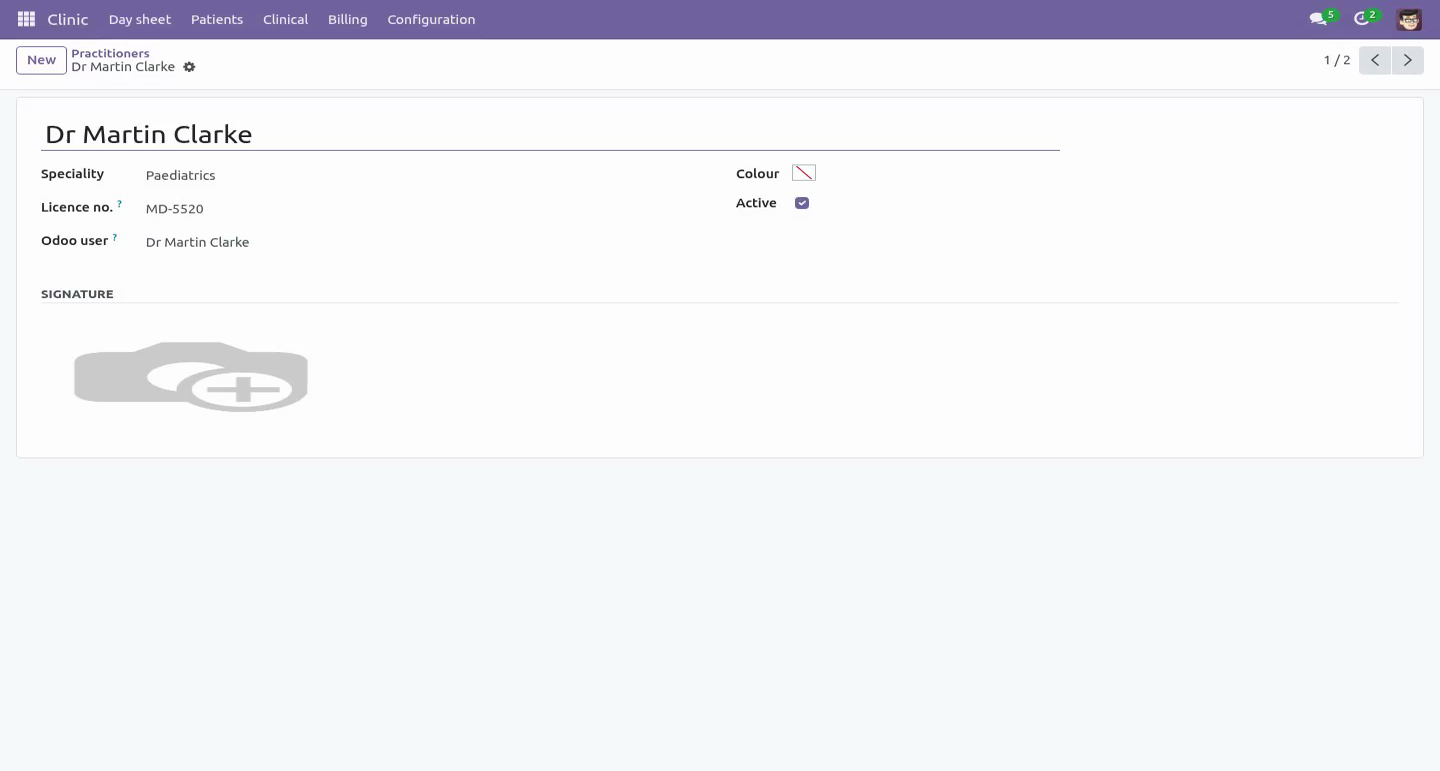
A follow-up date schedules a real Odoo activity for the practitioner, so a review is not left to memory. Prescriptions Print with the practitioner's licence number, the patient's allergies and a validity date - the three things the pharmacist on the other side actually needs. Issuing is refused when the practitioner has no licence number on file, because such a prescription is not valid at a pharmacy. Once issued a prescription is read-only.
Correcting one means cancelling it and writing another: a document that can change after printing is not a record. Billing Billable items sit on the consultation - a consultation fee, a dressing, a test - and become one customer invoice in one click. The invoice can only follow the record, never lead it: an unsigned encounter cannot be billed. A "To invoice" list shows every signed-off visit that was never billed, and a visit whose invoice was credited comes back onto it.
That list is the usual clinic leak, and it is one menu item. Who sees what. Multi-company record rules throughout: a patient file belongs to the clinic that opened it. Front desk books, checks in, invoices and takes payment - and cannot open clinical notes or prescriptions.
Reception is not a clinical role, and the access rights say so. Practitioners hold the clinical record. Managers configure rooms, practitioners and allergies, are the only ones who can reopen a signed-off encounter, and hold the invoicing rights the practice's books need. Support.
support@bambooforge.dev - answered within two business days. This module is licensed OPL-1; one purchase covers one production database plus its staging copies. \n What changed in 1.3. A second operations review, this time against the roles rather than the records.
Everything below has a test that was written to fail against the old code first: The buttons match the rights. Sign off, Prescribe, Start consultation and the prescriptions counter are practitioners' work and are no longer offered to the desk, where they could only ever raise an access error. The workflow is the only way a visit changes state. An import or an RPC call could write state and move_id directly: the posted invoice was orphaned, the visit came back onto the "To invoice" list and the next click billed the same consultation twice.
A signed-off or invoiced visit cannot be deleted, nor can an issued prescription. Freezing edits and leaving deletion open is not freezing anything. "Not billable" needs a reason on every path, not only where the form asked for one. Only a manager reopens a visit - in the record, not only on the screen.
Re-signing a visit no longer stacks follow-up reminders, and clearing the review date clears the reminder. Overbooking is checked both ways: unticking the flag puts the slot back under the rule, and an emergency still reserves the room it is in - a doctor can run late, a room cannot hold two consultations. Clash messages are in the reader's timezone. A receptionist in Brussels was told about an appointment at 02:00.
What changed in 1.1. An operations review against a real three-doctor practice found nine things that bite in the first week. All of them are fixed and each has a test: Reception could not open a single patient file - the visit counters dragged the desk through an access check on the clinical record. Counted with sudo now; the desk sees how many visits, never what happened in them.
A cancelled or deleted invoice used to leave the visit looking billed for ever, invisible and unbillable. It now returns to the "To invoice" list and says why in the chatter. A signed-off visit is frozen. Changing a price on an invoiced encounter used to leave the ledger and the record disagreeing.
Reopen it deliberately, or not at all. "Not billable" is a state: the free re-check, the staff visit, the insurer-direct case. Without it the leak list filled with noise and people stopped reading it. Tax.
The counter now quotes the number the invoice will print, and the invoice carries the product's taxes through the patient's fiscal position. The day job closes days, not hours. A clinic running ninety minutes late keeps its waiting room; yesterday's leftovers are closed overnight, including visits the doctor saw but wrote up next morning. Overbooking is a decision: tick "Overbooked" to squeeze in a walk-in instead of lying about the time.
Two consultations can no longer share a room. Waiting time is searchable, so "who has waited longest" is a filter rather than a column read down by eye. A cancelled prescription no longer prints as a valid one, and "Write a repeat" creates a new editable prescription instead of duplicating a frozen one. The complete manual is at docs dot bambooforge dot dev, the demo database is linked from the store page, and support answers within twenty-four hours.
Links are in the description.
Key facts
- What it is
- Clinic and hospital management on Odoo Community: patient files with allergies, a day sheet, consultations with vitals, and prescriptions.
- For
- Industries
- Odoo versions
- 16.0, 17.0, 18.0, 19.0, 20.0 - Community and Enterprise
- Runs on
- Odoo.sh or Odoo you host yourself - not Odoo Online, which accepts no third-party apps
- Price
- 149 EUR, one-time, on the Odoo Apps Store
- Technical name
- bambooforge_clinic
- Not for
- Said before you buy, because it is the half that decides whether the app fits:; Book the same practitioner twice at the same time.; Sign off an encounter without a diagnosis.
- Manual last updated
- 2026-10-15
Hospital & Clinic Management with Light EMR
What it is
A small clinic runs on three things Odoo Community does not have: a patient file, a day sheet, and a consultation that turns into money. This app adds exactly those three, and deliberately stops there - it is not a hospital information system and does not pretend to be one.
The patient file
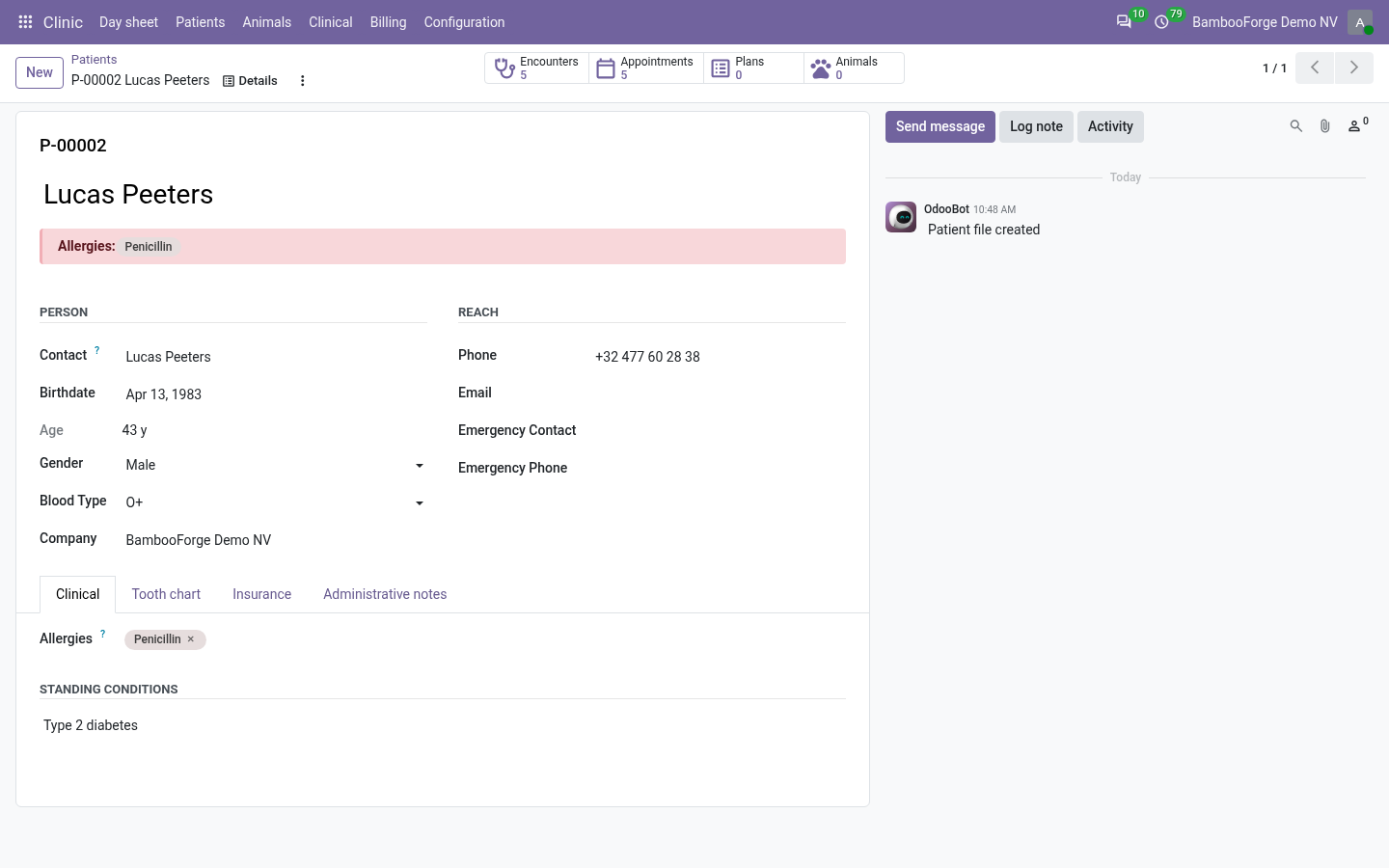
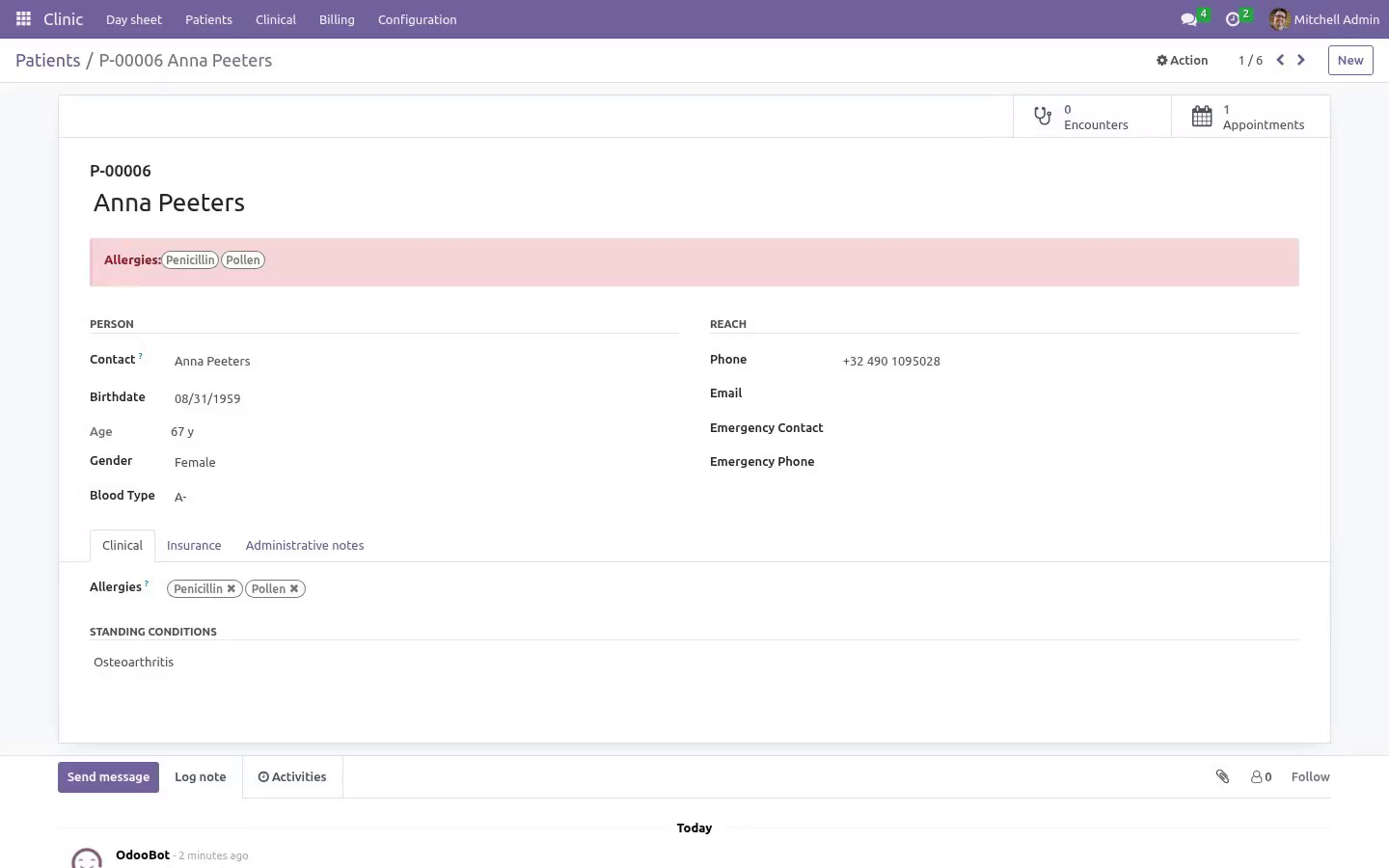
One file per person, attached to the Odoo contact rather than replacing it, so the invoice still goes where invoices go.
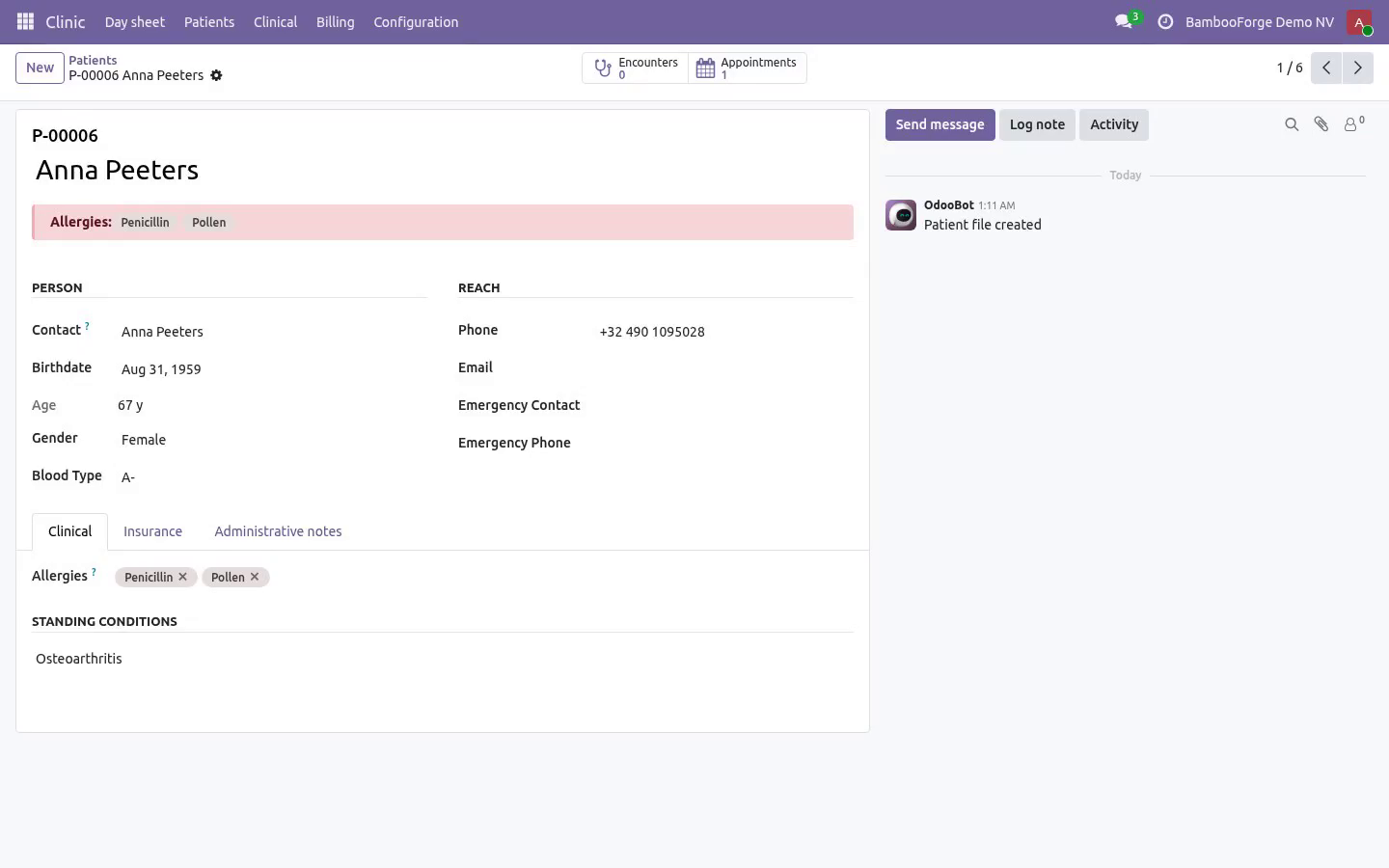
A permanent patient number (P-00042) assigned once. The front desk quotes it on the phone; it never gets reused.
Date of birth with the age computed the way a clinician reads it - years for adults, months for infants, days for a newborn.
Blood type, insurance details, emergency contact, standing conditions.
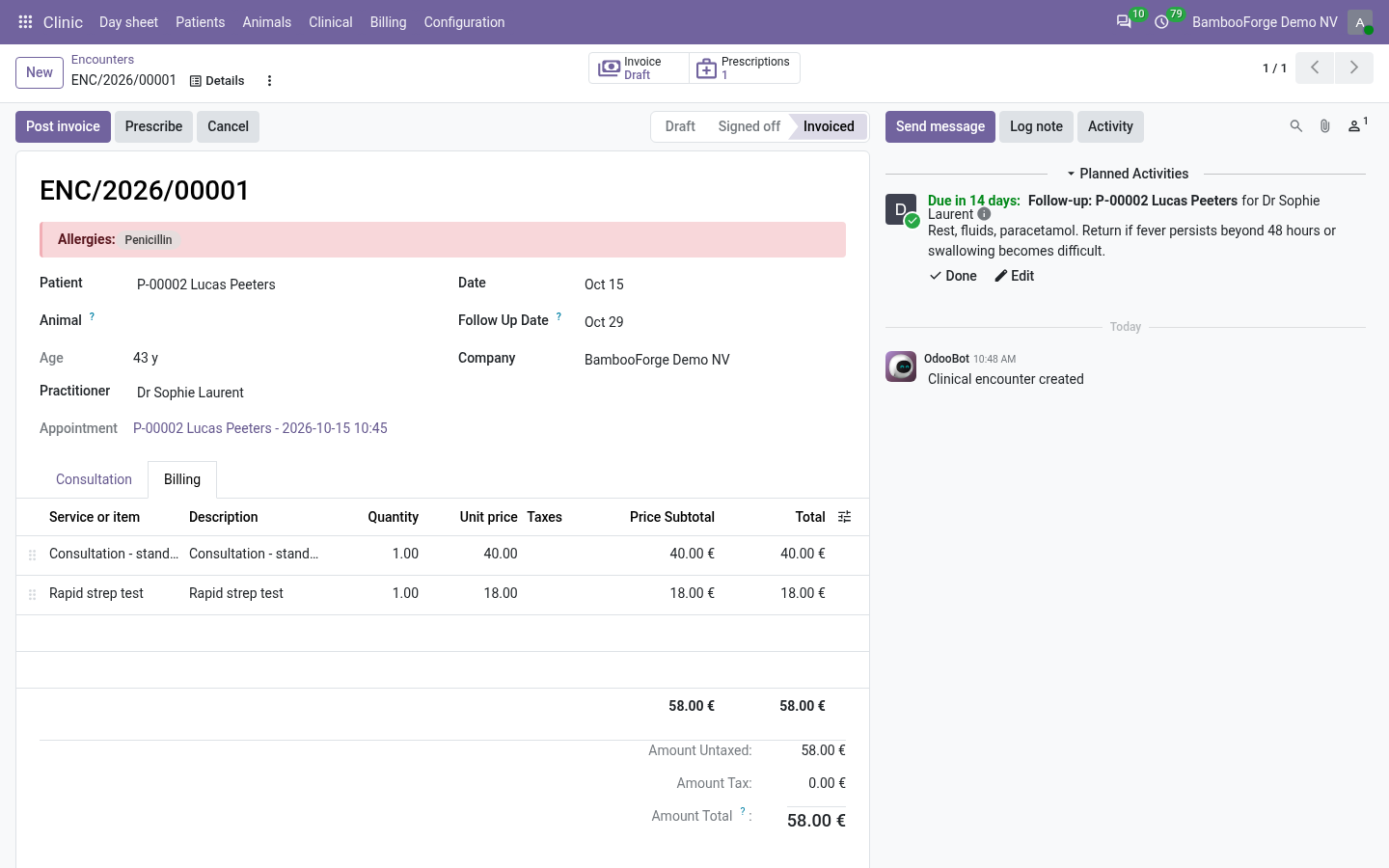
Allergies, shown as a red banner on every consultation and every prescription. That banner is the reason this model exists.
The day sheet
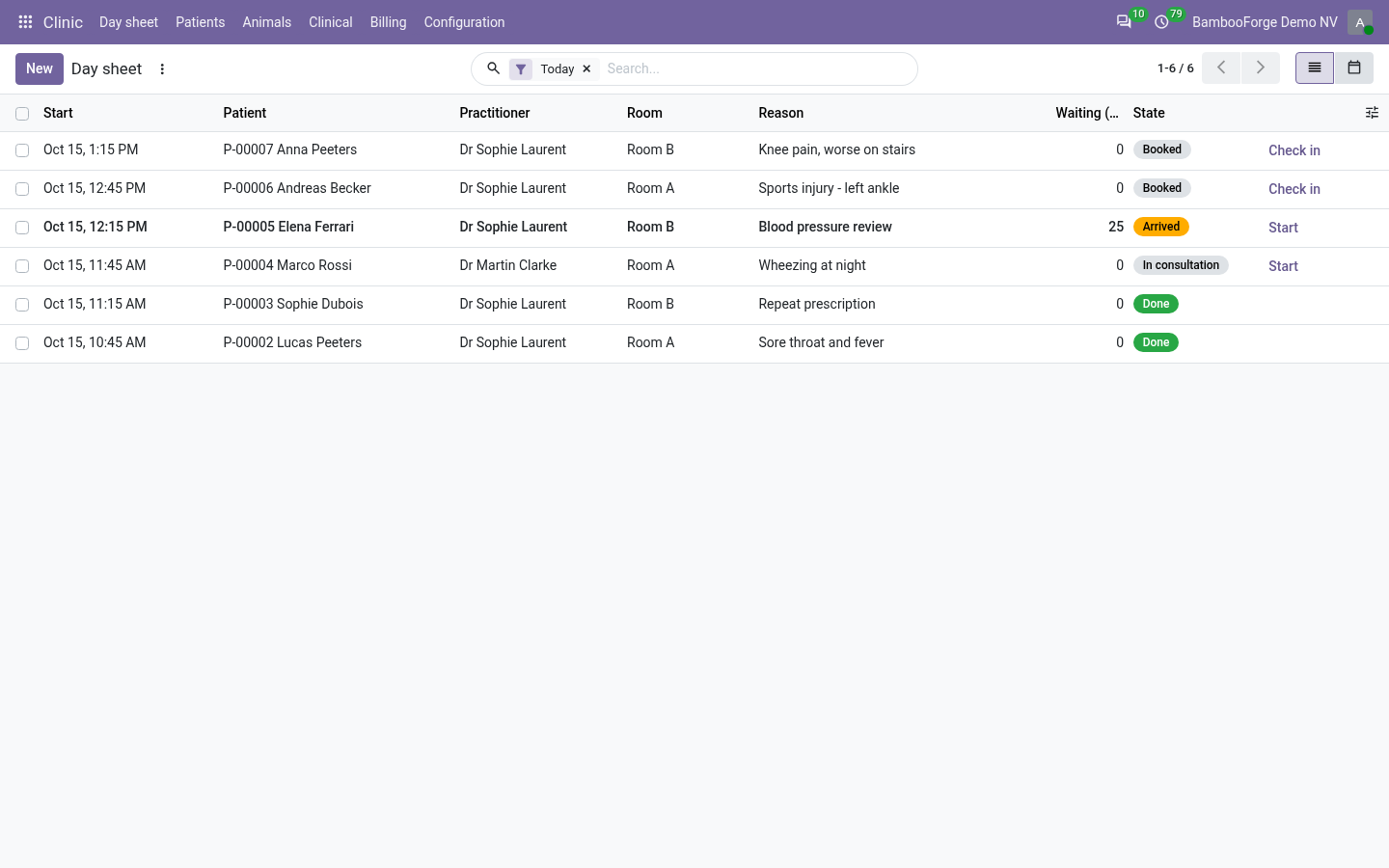
Not online booking - that is a customer picking a slot on a website. This is the list the front desk works from:
Booked → arrived → in consultation → done, plus no-show and cancelled. One click checks somebody in and starts the clock.
A waiting-time column, because how long people sit there is the number a clinic is judged on.
Overlapping bookings for the same practitioner are refused - two people cannot have the same doctor at the same time. Cancel one and the slot frees itself.
An overnight job closes the day once it is over, in the clinic's own timezone: still booked and never came is a no-show; checked in and never written up is left without being seen, which is not the same thing and must not be counted as one; a visit the doctor saw and wrote up next morning closes itself. A clinic running ninety minutes late keeps its waiting room.
The same data as a day calendar, coloured per practitioner.
The consultation
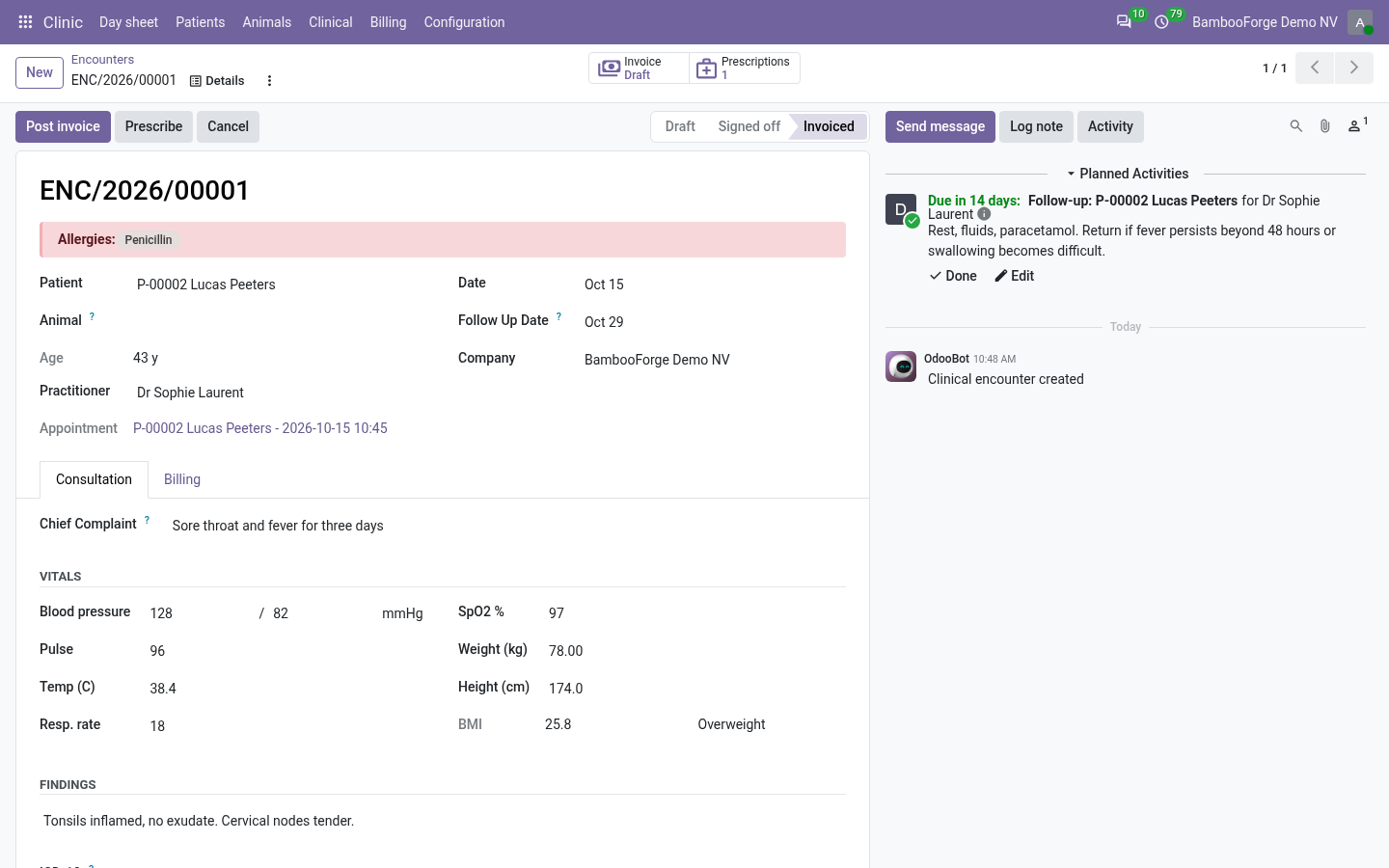
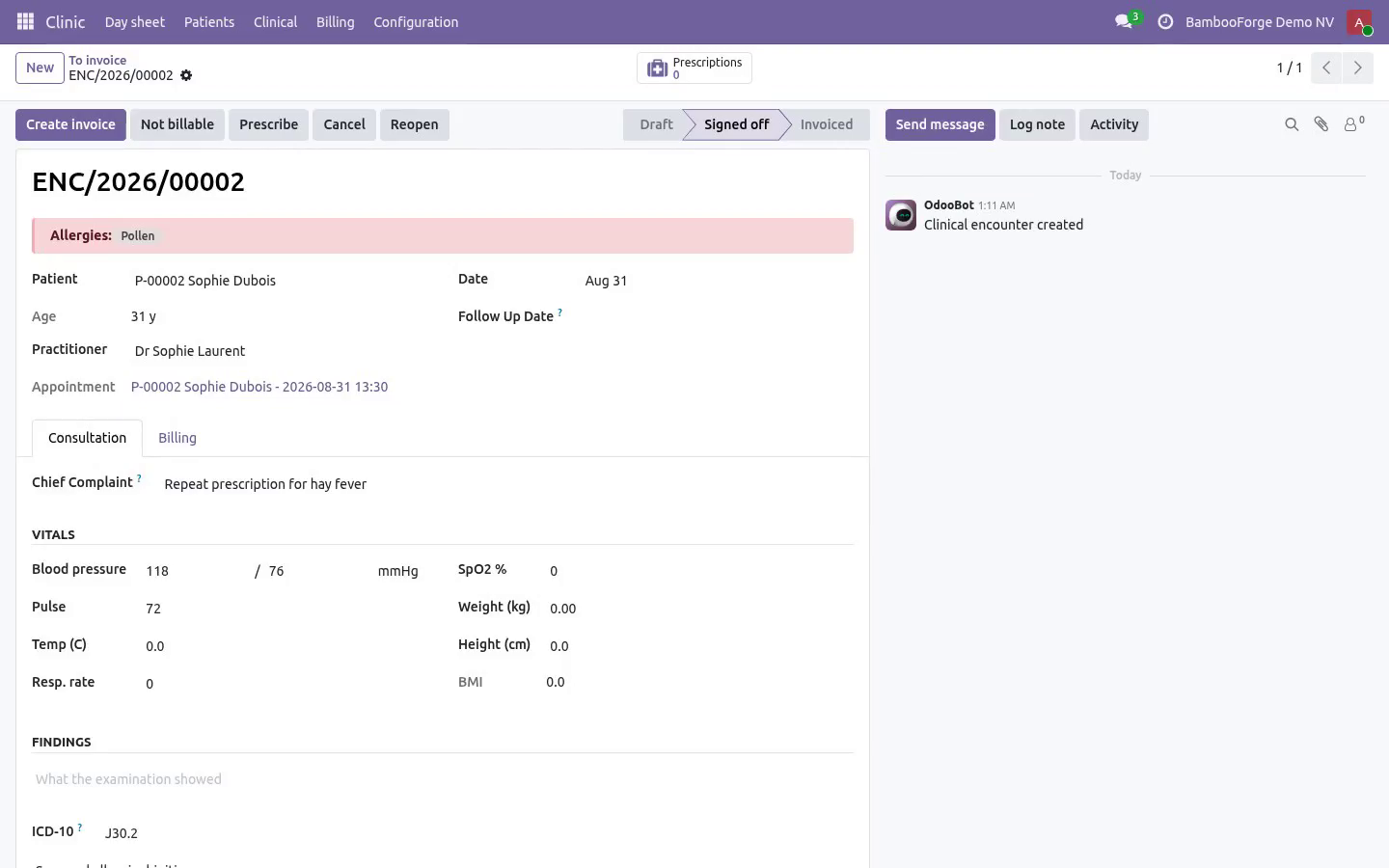
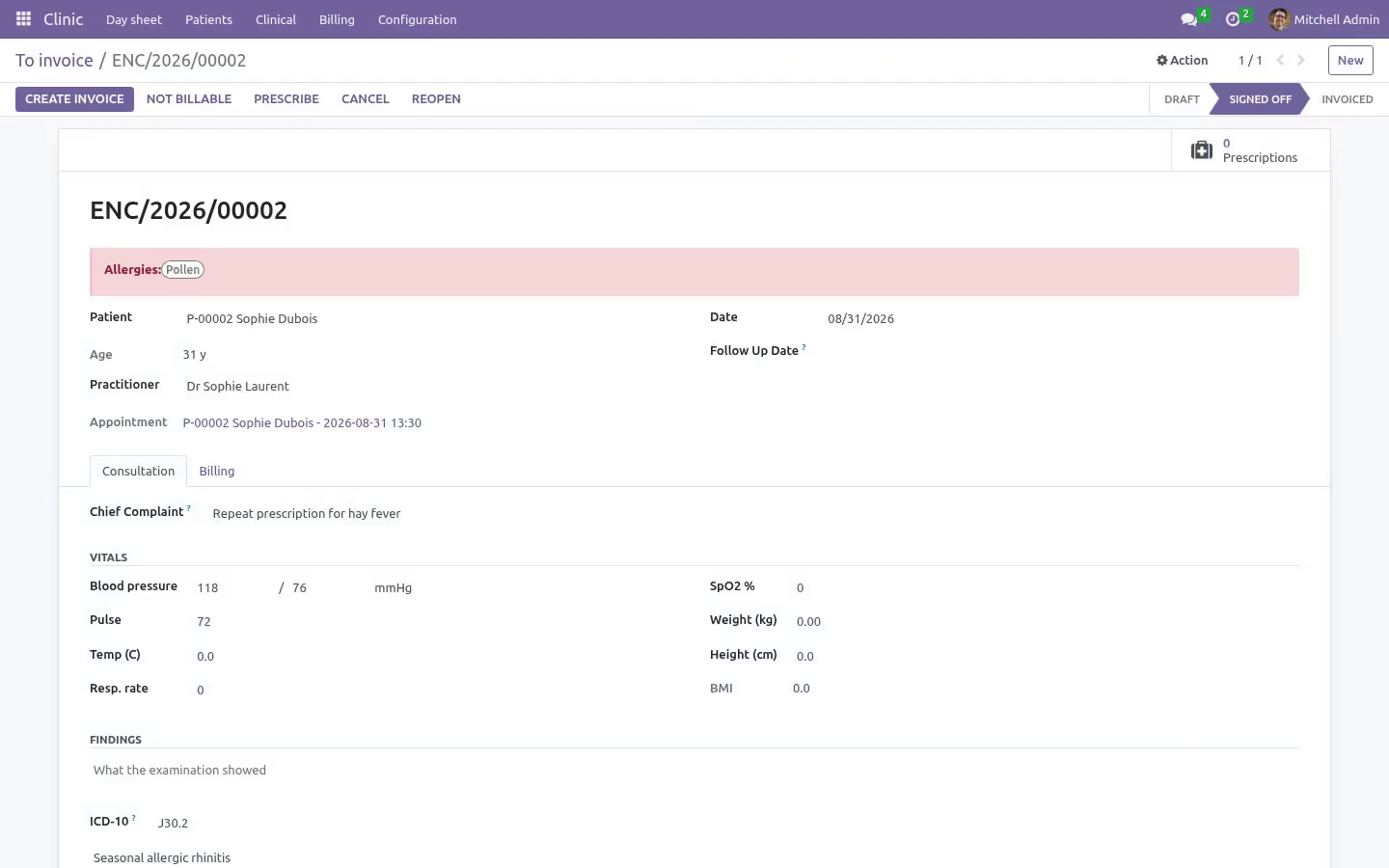
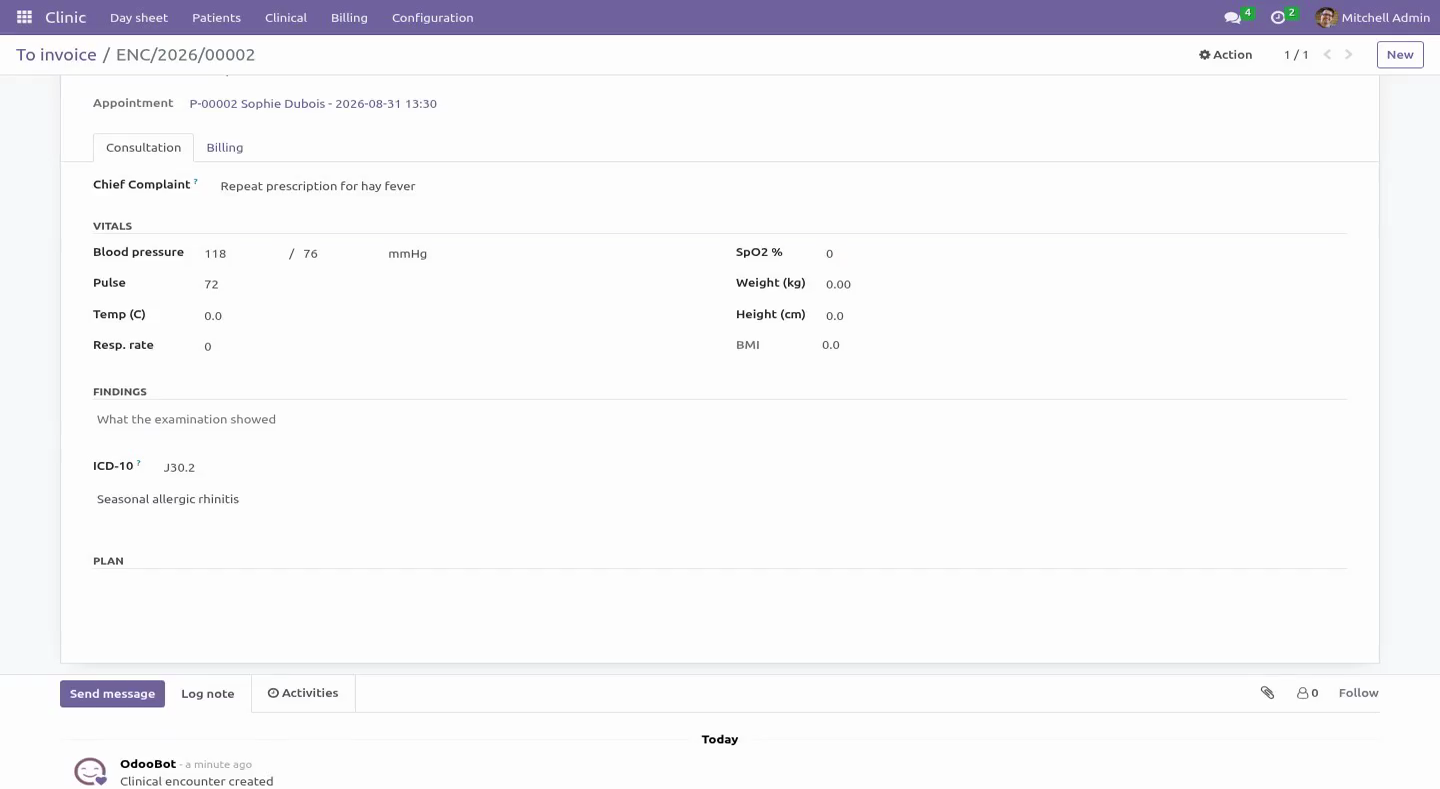
Chief complaint in the patient's own words, examination, diagnosis with an ICD-10 field, and a plan.
Vitals: blood pressure, pulse, temperature, respiratory rate, SpO2, weight, height - with BMI computed and classified.
Vitals are checked against plausibility bands. A temperature typed as 370 is refused, and so is a blood pressure entered the wrong way round (diastolic above systolic). These are the two mistakes that otherwise reach a chart nobody re-reads.
Sign-off requires a diagnosis: an encounter with no finding is not a record, it is a gap.
A follow-up date schedules a real Odoo activity for the practitioner, so a review is not left to memory.
Prescriptions
Print with the practitioner's licence number, the patient's allergies and a validity date - the three things the pharmacist on the other side actually needs.
Issuing is refused when the practitioner has no licence number on file, because such a prescription is not valid at a pharmacy.
Once issued a prescription is read-only. Correcting one means cancelling it and writing another: a document that can change after printing is not a record.
Billing
Billable items sit on the consultation - a consultation fee, a dressing, a test - and become one customer invoice in one click.
The invoice can only follow the record, never lead it: an unsigned encounter cannot be billed.
A "To invoice" list shows every signed-off visit that was never billed, and a visit whose invoice was credited comes back onto it. That list is the usual clinic leak, and it is one menu item.
Reception raises and posts the bill, without holding a single accounting right: the module writes the journal entry itself, behind the same permission check the visit makes. The front desk reads back the invoices it raised and nothing else in the ledger. Crediting one is an accounting decision and stays with the clinic manager, who does hold Odoo's invoicing rights.
Who sees what
Front desk books, checks in, invoices and takes payment - and cannot open clinical notes or prescriptions. Reception is not a clinical role, and the access rights say so.
Practitioners hold the clinical record.
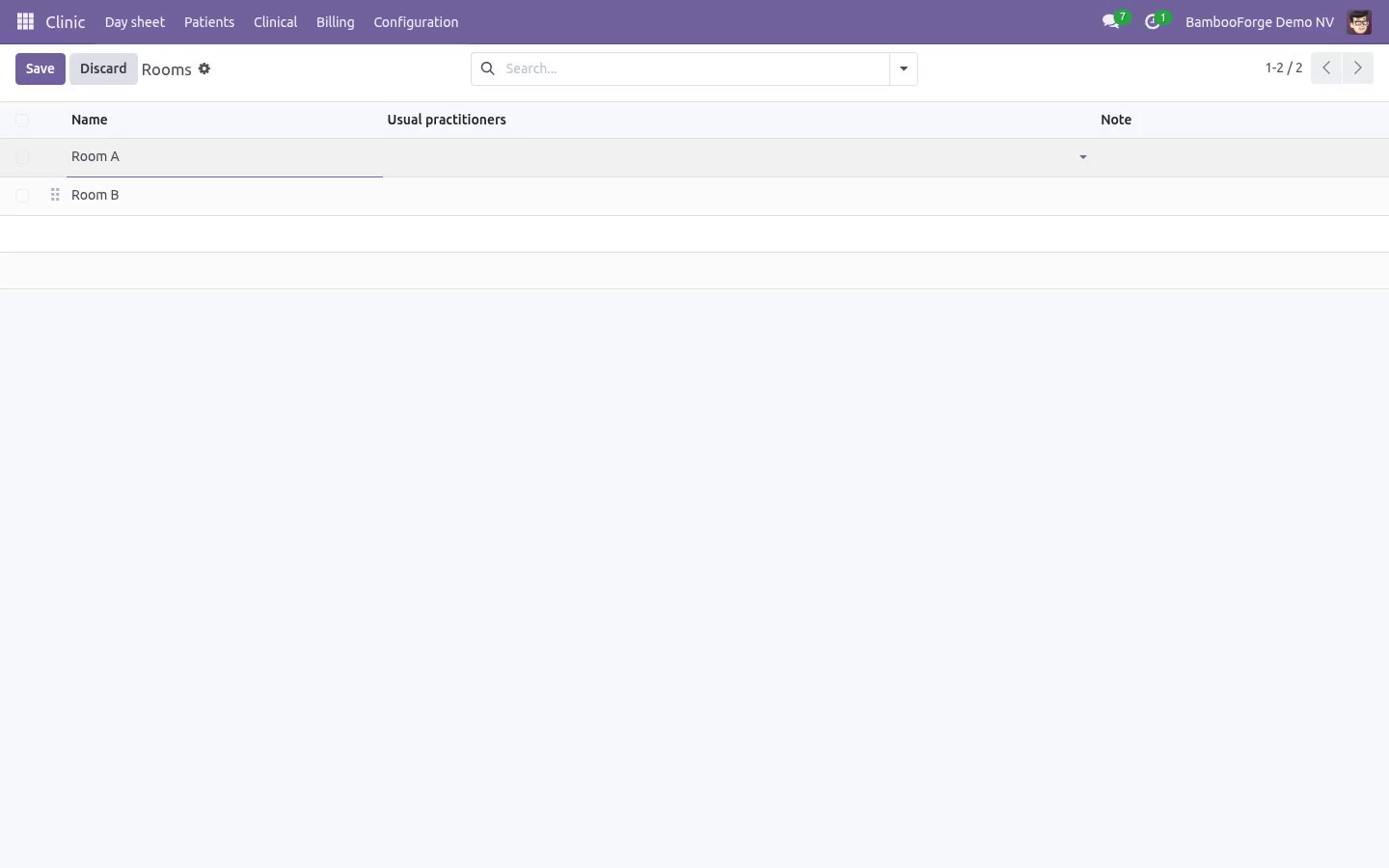
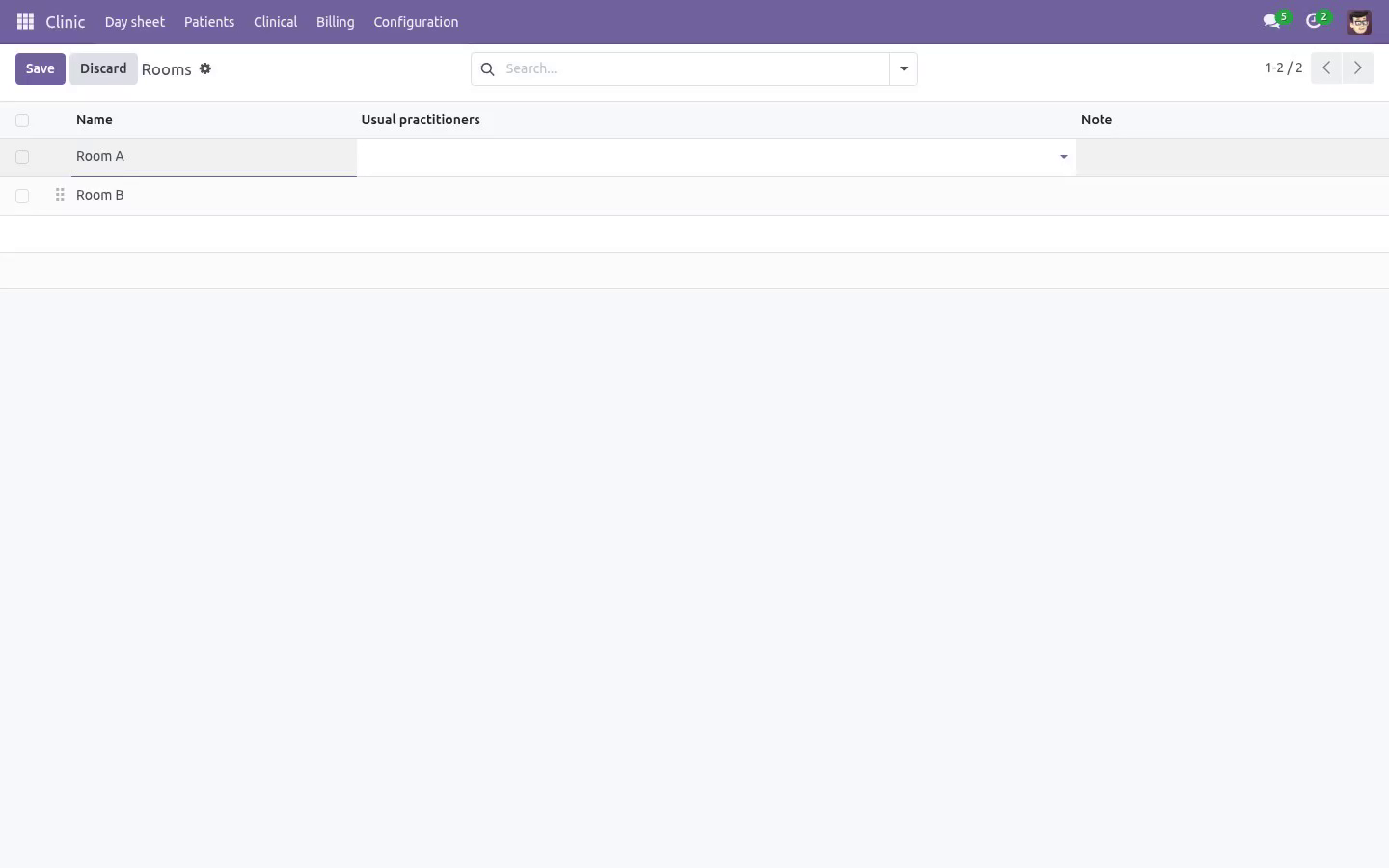
Managers configure rooms, practitioners and allergies, are the only ones who can reopen a signed-off encounter, and hold the invoicing rights the practice's books need.
Multi-company record rules throughout: a patient file belongs to the clinic that opened it.
Requirements
Odoo Community 16.0, 17.0, 18.0, 19.0 or 20.0. Depends only on mail, product and account - all Community. No Enterprise module, no external service, nothing phoning home.
How we make sure it works
Before every release, 98 automated checks run against this app on Odoo 16, 17, 18, 19 and 20. Among them:
The front desk is not shown buttons that can only fail.
A repeat of an expired script is written not refused.
The front desk cannot read the rest of the ledger.
A posted invoice cannot be detached by an import.
The state cannot be moved by a plain write.
The complete list is in the source you receive.
What it does not do
Said before you buy, because it is the half that decides whether the app fits:
Book the same practitioner twice at the same time.
Sign off an encounter without a diagnosis.
Install
Copy bambooforge_clinic into your addons path and update the app list, or install the ZIP from the Odoo Apps Store.
Install Hospital & Clinic Management with Light EMR.
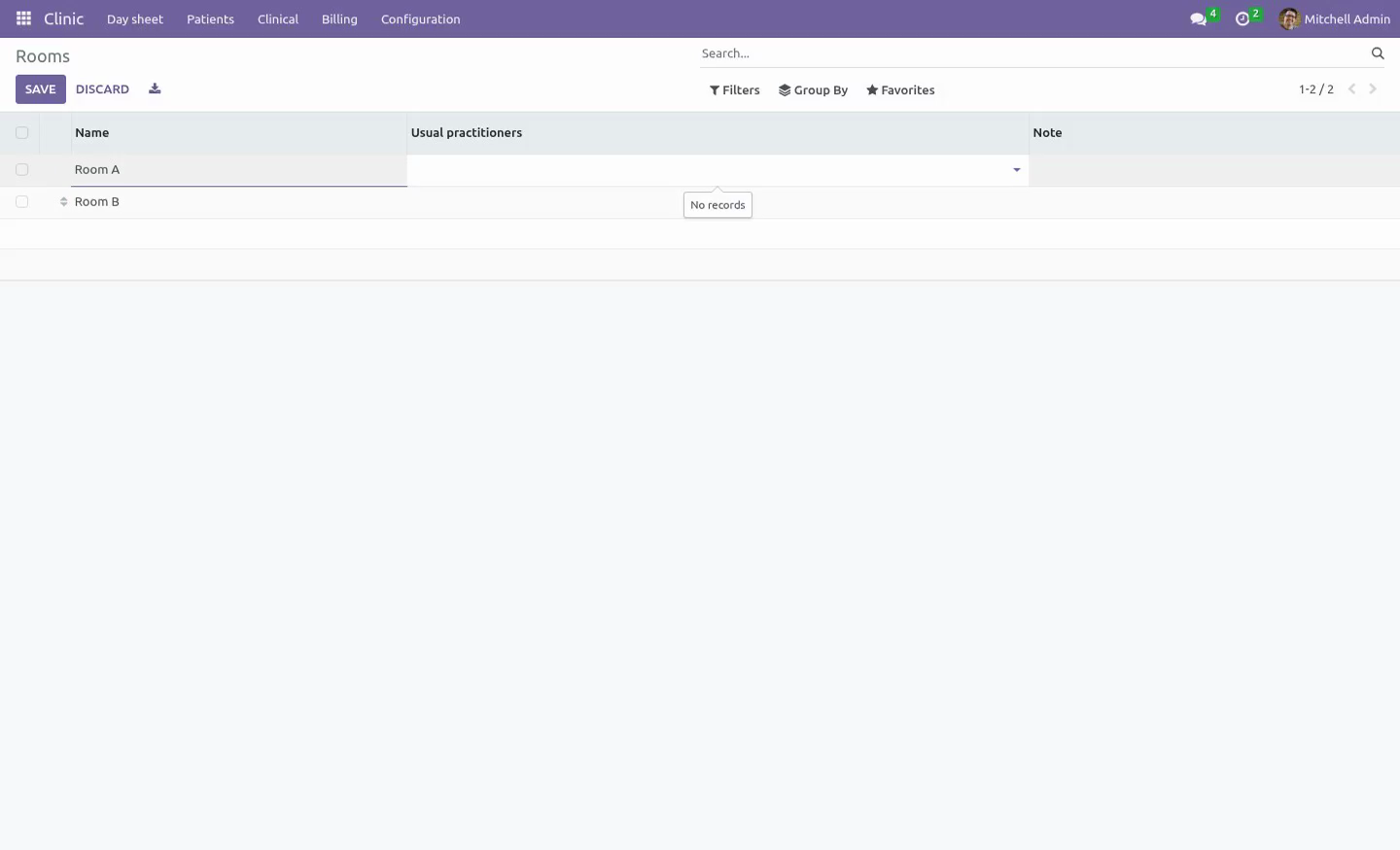
Open Clinic - its menus are Day sheet, Patients, Clinical, Billing.
Questions people ask
- Which Odoo versions does it run on?
Odoo 16.0, 17.0, 18.0, 19.0, 20.0, on the series you buy it for; each series is its own listing.
- Community or Enterprise?
Both. It needs no Enterprise app.
- What does it need?
The standard Discuss, Invoicing, Products, Settings apps. No extra Python package.
- Where does it show up?
Under the Clinic menu (Day sheet, Patients, Clinical, Billing).
- Does anything leave my server?
No. It makes no call outside your Odoo server: no telemetry, no licence check, no third-party service.
- What happens if I uninstall it?
Odoo drops the app's own tables and fields; the standard records it worked on (contacts, orders, products) stay as they are.
Support
support@bambooforge.dev - answered within two business days. This module is licensed OPL-1; one purchase covers one production database plus its staging copies.
What changed in 1.3
A second operations review, this time against the roles rather than the records. Everything below has a test that was written to fail against the old code first:
Reception can raise the bill, post it and read it back - which is what the listing always said and what no clinic group could actually do: creating an invoice needs Odoo's invoicing right, and no clinic group implied it. The module now writes the journal entry with its own rights behind the same permission check the visit makes, and the front desk sees the invoices it raised and nothing else in the ledger. Crediting one stays with the clinic manager, who does hold the accounting groups.
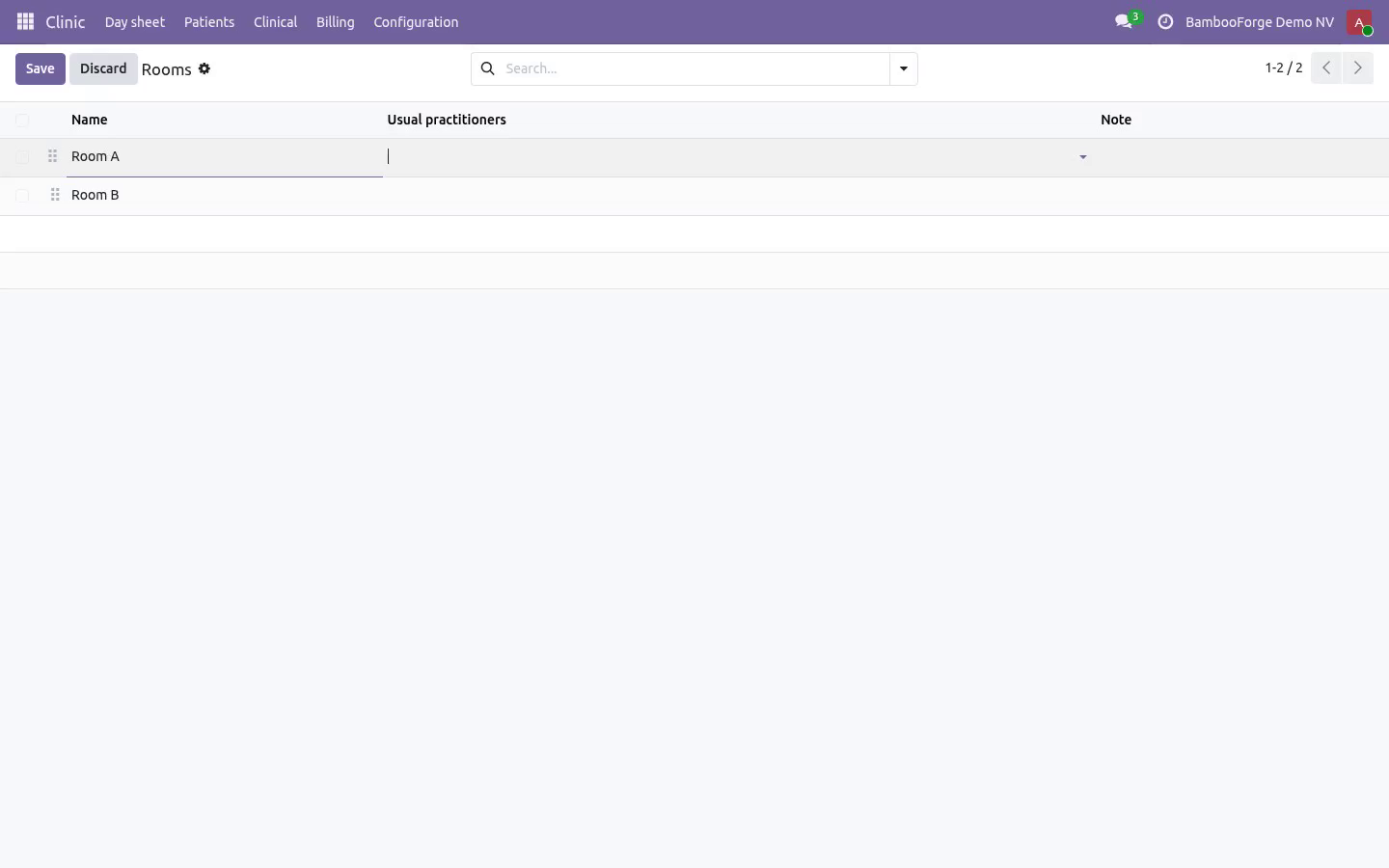
The buttons match the rights. Sign off, Prescribe, Start consultation and the prescriptions counter are practitioners' work and are no longer offered to the desk, where they could only ever raise an access error.
The workflow is the only way a visit changes state. An import or an RPC call could write state and move_id directly: the posted invoice was orphaned, the visit came back onto the "To invoice" list and the next click billed the same consultation twice.
A signed-off or invoiced visit cannot be deleted, nor can an issued prescription. Freezing edits and leaving deletion open is not freezing anything.
"Not billable" needs a reason on every path, not only where the form asked for one.
Only a manager reopens a visit - in the record, not only on the screen.
Re-signing a visit no longer stacks follow-up reminders, and clearing the review date clears the reminder.
The day closes in the clinic's own timezone, an hour that means something in the building. A patient who arrived and was never written up is filed as left without being seen, not as a no-show: she came, and the practice should not phone her to ask why she did not. One historical double booking no longer rolls back the whole night, every night.
Overbooking is checked both ways: unticking the flag puts the slot back under the rule, and an emergency still reserves the room it is in - a doctor can run late, a room cannot hold two consultations.
Clash messages are in the reader's timezone. A receptionist in Brussels was told about an appointment at 02:00.
"Write a repeat" works on the prescriptions people repeat: the validity window comes forward instead of refusing the copy.
Two branches are two clinics: a practitioner, room, patient or product from the other branch is refused rather than quietly booked.
Booking a slot and raising an invoice both take a lock first, so two receptionists in the same second cannot make two of either.
What changed in 1.1
An operations review against a real three-doctor practice found nine things that bite in the first week. All of them are fixed and each has a test:
Reception could not open a single patient file - the visit counters dragged the desk through an access check on the clinical record. Counted with sudo now; the desk sees how many visits, never what happened in them.
Reception can now invoice, which is what a front desk does, while every clinical field (complaint, examination, diagnosis, plan, all vitals, allergies, standing conditions) is blocked at ORM level, not merely hidden in a notebook page. Clinical fields are no longer tracked either: a tracked field prints itself into a chatter the desk can read.
A cancelled or deleted invoice used to leave the visit looking billed for ever, invisible and unbillable. It now returns to the "To invoice" list and says why in the chatter.
A signed-off visit is frozen. Changing a price on an invoiced encounter used to leave the ledger and the record disagreeing. Reopen it deliberately, or not at all.
"Not billable" is a state: the free re-check, the staff visit, the insurer-direct case. Without it the leak list filled with noise and people stopped reading it.
Tax. The counter now quotes the number the invoice will print, and the invoice carries the product's taxes through the patient's fiscal position.
The day job closes days, not hours. A clinic running ninety minutes late keeps its waiting room; yesterday's leftovers are closed overnight, including visits the doctor saw but wrote up next morning.
Overbooking is a decision: tick "Overbooked" to squeeze in a walk-in instead of lying about the time. Two consultations can no longer share a room.
Waiting time is searchable, so "who has waited longest" is a filter rather than a column read down by eye. A cancelled prescription no longer prints as a valid one, and "Write a repeat" creates a new editable prescription instead of duplicating a frozen one.