 BambooForge Labs
Chatter Tools: Search, Pin & Bulk Messages
Search every chatter at once, pin what matters, post a template onto hundreds of records, resend failed notifications and purge dead rows.
Available for Odoo 16.0, Odoo 17.0, Odoo 18.0, Odoo 19.0, Odoo 20.0. Technical name bambooforge_chatter_tools.
Transcript of the walkthrough (Odoo 20)
Chatter Tools: Search, Pin & Bulk Messages. Search every chatter at once, pin what matters, post a template onto hundreds of records, resend failed notifications and purge dead rows. Said before you buy, because it is the half that decides whether the app fits: In the next few minutes: chatter tools: search, pin & bulk messages, then search every chatter at once, then templates, then pinning, then resending what failed. Then what this app deliberately does not do, so you can tell before you buy whether it fits.
Everything lives under Failed Notifications then Search the Chatter then Templates then Cleanup Rules. 1. Copy bambooforge_chatter_tools into your addons path and update the app list, or install the ZIP from the Odoo Apps Store. 2.
Install Chatter Tools: Search, Pin & Bulk Messages. 3. Open Failed Notifications - its menus are Search the Chatter, Templates, Cleanup Rules. Chatter Tools: Search, Pin & Bulk Messages.
The chatter is Odoo's best idea and its least maintained screen. Five things it cannot do, and every desk needs. Search every chatter at once. Settings › Chatter Tools › Search the Chatter.
Every message on every record: by text, by author, by model, by type, by month, grouped however you like. The chatter itself can only be read one record at a time, which is no use at all when somebody asks "who told the customer that, and when?". Two filters do most of the work. Typed by a person keeps comment and email — what somebody wrote and what arrived — and gets the twenty million system rows out of the way.
Written by the system does the opposite, and is how you look at what a cleanup rule is about to throw away before you let it. Templates. The paragraph somebody types forty times a week — "rang them about the delay", "credit checked, on hold" — written once. Placeholders are the ones a mail template uses.
{{ object.name }} works in the rich-text box, because QWeb interpolates {{ }} in attributes but never in a text node — which is why a mail template writes {{ }} in the subject and <t t-out=""/> in the body — and the template is converted before rendering, exactly the way core converts it for its own preview. A t-out written by hand keeps working. Pinning. One message on a record that the next person has to read before they do anything.
One click in the message's hover menu; the pin records who did it and when, and pinned messages are never deleted by a cleanup rule. Odoo 20's chatter does not take extra actions in that menu, so pinning there is done from Search the Chatter instead. Everything else in this module is the same on 16.0 through 19.0; the 20.0 build differs only where Odoo 20 moved what it hangs off. Resending what failed.
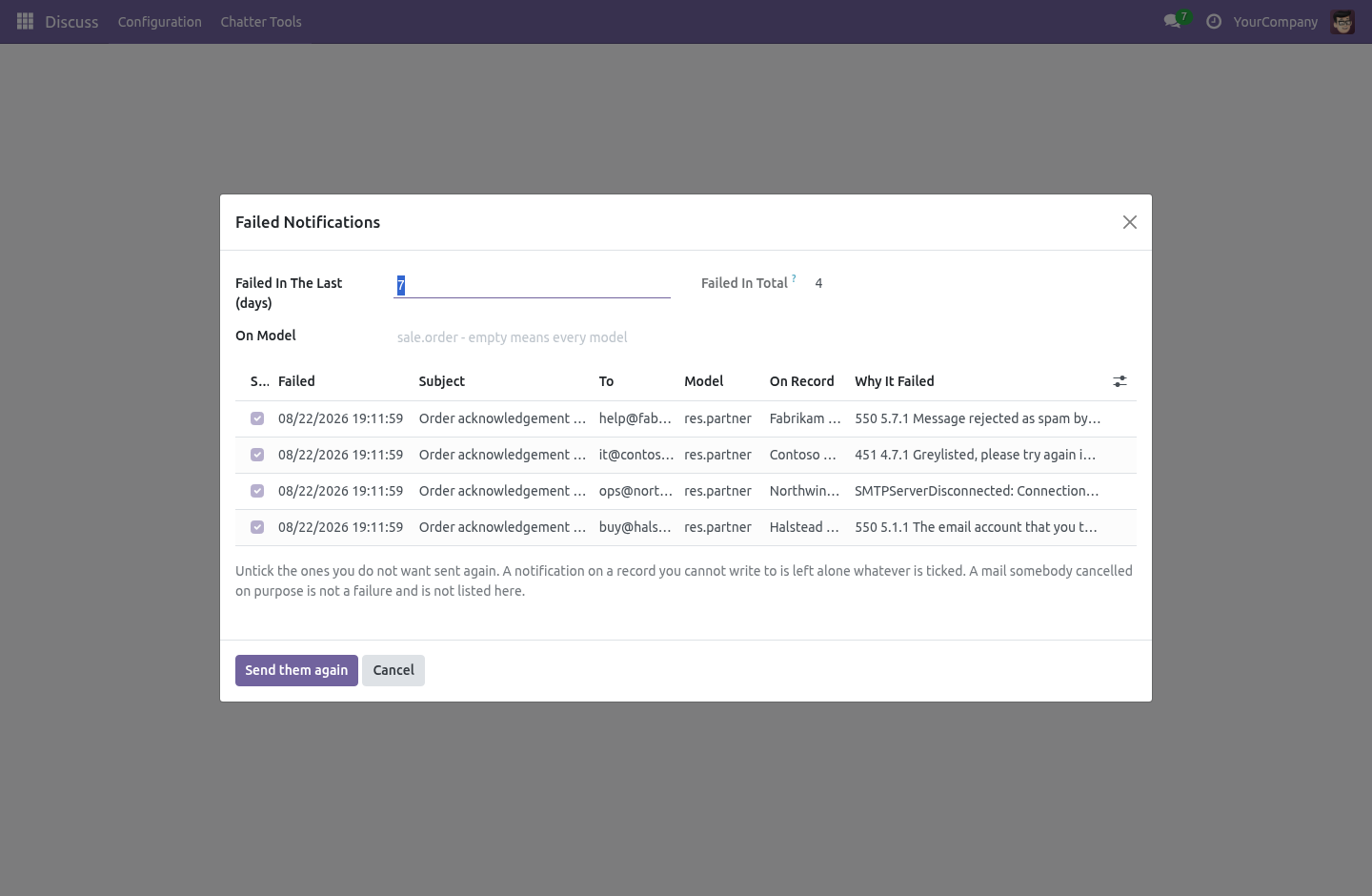
A notification in exception is invisible: the record says the customer was told, and the customer was not. Settings › Chatter Tools › Failed Notifications lists them with the reason and the date, and puts the ones you tick back in the queue. A notification on a record you may not write to is left alone whatever is ticked, and the wizard says how many it skipped. Sending somebody's mail again is writing on their record.
Throwing the rest away. Every stage change and every tracked field writes a mail_message row. Nobody reads the ones from 2019 and everybody pays for them in backup time, in restore time and in the index. Notifications only — stage moves, tracking, "created by"; Everything the system wrote — the above plus automated comments and user notifications; Empty — a notification with no body and no file, which is the most common row of all.
A cleanup rule says: on this model, messages of this kind, older than this many months. The kinds are Who can do what. Every internal user is a Chatter Tools user: posts from a template, pins a message, sends a failed notification again — always on records they may already write to. A manager writes the templates everybody uses and the cleanup rules that throw chatter away.
What it needs. mail only. Community. No Enterprise module is required, and none is used.
How we make sure it works. Before every release, 65 automated checks run against this app on Odoo 16, 17, 18, 19 and 20. Among them: A note an email actually went out from is never deleted. A portal customer never sees a pinned internal note.
A template that is not offered cannot be posted. Records the caller cannot read are dropped. A broken placeholder shows in the preview not the chatter. The complete list is in the source you receive.
Questions people ask. Which Odoo versions does it run on? Odoo 16.0, 17.0, 18.0, 19.0, 20.0, on the series you buy it for; each series is its own listing. Community or Enterprise?
Both. It needs no Enterprise app. The complete manual is at docs dot bambooforge dot dev, the demo database is linked from the store page, and support answers within twenty-four hours. Links are in the description.
Transcript of the walkthrough (Odoo 19)
Chatter Tools: Search, Pin & Bulk Messages. Search every chatter at once, pin what matters, post a template onto hundreds of records, resend failed notifications and purge dead rows. The chatter is Odoo's best idea and its least maintained screen. Five things it cannot do, and every desk needs.
In the next few minutes: chatter tools: search, pin & bulk messages, then search every chatter at once, then templates, then pinning, then resending what failed. Then what this app deliberately does not do, so you can tell before you buy whether it fits. Everything lives under Failed Notifications then Search the Chatter then Templates then Cleanup Rules. Chatter Tools: Search, Pin & Bulk Messages.
The chatter is Odoo's best idea and its least maintained screen. Five things it cannot do, and every desk needs. Search every chatter at once. Settings › Chatter Tools › Search the Chatter.
Every message on every record: by text, by author, by model, by type, by month, grouped however you like. The chatter itself can only be read one record at a time, which is no use at all when somebody asks "who told the customer that, and when?". Two filters do most of the work. Typed by a person keeps comment and email — what somebody wrote and what arrived — and gets the twenty million system rows out of the way.
Written by the system does the opposite, and is how you look at what a cleanup rule is about to throw away before you let it. Templates. The paragraph somebody types forty times a week — "rang them about the delay", "credit checked, on hold" — written once. Placeholders are the ones a mail template uses.
{{ object.name }} works in the rich-text box, because QWeb interpolates {{ }} in attributes but never in a text node — which is why a mail template writes {{ }} in the subject and <t t-out=""/> in the body — and the template is converted before rendering, exactly the way core converts it for its own preview. A t-out written by hand keeps working. Pinning. One message on a record that the next person has to read before they do anything.
One click in the message's hover menu; the pin records who did it and when, and pinned messages are never deleted by a cleanup rule. Odoo 19's chatter does not take extra actions in that menu, so pinning there is done from Search the Chatter instead. Everything else in this module is identical on all four series. Resending what failed.
A notification in exception is invisible: the record says the customer was told, and the customer was not. Settings › Chatter Tools › Failed Notifications lists them with the reason and the date, and puts the ones you tick back in the queue. A notification on a record you may not write to is left alone whatever is ticked, and the wizard says how many it skipped. Sending somebody's mail again is writing on their record.
Throwing the rest away. Every stage change and every tracked field writes a mail_message row. Nobody reads the ones from 2019 and everybody pays for them in backup time, in restore time and in the index. Notifications only — stage moves, tracking, "created by"; Everything the system wrote — the above plus automated comments and user notifications; Empty — a notification with no body and no file, which is the most common row of all.
A cleanup rule says: on this model, messages of this kind, older than this many months. The kinds are Who can do what. Every internal user is a Chatter Tools user: posts from a template, pins a message, sends a failed notification again — always on records they may already write to. A manager writes the templates everybody uses and the cleanup rules that throw chatter away.
What it needs. mail only. Community. No Enterprise module is required, and none is used.
The complete manual is at docs dot bambooforge dot dev, the demo database is linked from the store page, and support answers within twenty-four hours. Links are in the description.
Transcript of the walkthrough (Odoo 18)
Chatter Tools: Search, Pin & Bulk Messages. Search every chatter at once, pin what matters, post a template onto hundreds of records, resend failed notifications and purge dead rows. The chatter is Odoo's best idea and its least maintained screen. Five things it cannot do, and every desk needs.
In the next few minutes: chatter tools: search, pin & bulk messages, then search every chatter at once, then templates, then pinning, then resending what failed. Then what this app deliberately does not do, so you can tell before you buy whether it fits. Everything lives under Failed Notifications then Search the Chatter then Templates then Cleanup Rules. Chatter Tools: Search, Pin & Bulk Messages.
The chatter is Odoo's best idea and its least maintained screen. Five things it cannot do, and every desk needs. Search every chatter at once. Settings › Chatter Tools › Search the Chatter.
Every message on every record: by text, by author, by model, by type, by month, grouped however you like. The chatter itself can only be read one record at a time, which is no use at all when somebody asks "who told the customer that, and when?". Two filters do most of the work. Typed by a person keeps comment and email — what somebody wrote and what arrived — and gets the twenty million system rows out of the way.
Written by the system does the opposite, and is how you look at what a cleanup rule is about to throw away before you let it. Templates. The paragraph somebody types forty times a week — "rang them about the delay", "credit checked, on hold" — written once. Placeholders are the ones a mail template uses.
{{ object.name }} works in the rich-text box, because QWeb interpolates {{ }} in attributes but never in a text node — which is why a mail template writes {{ }} in the subject and <t t-out=""/> in the body — and the template is converted before rendering, exactly the way core converts it for its own preview. A t-out written by hand keeps working. Pinning. One message on a record that the next person has to read before they do anything.
One click in the message's hover menu; the pin records who did it and when, and pinned messages are never deleted by a cleanup rule. Odoo 18's chatter does not take extra actions in that menu, so pinning there is done from Search the Chatter instead. Everything else in this module is identical on all four series. Resending what failed.
A notification in exception is invisible: the record says the customer was told, and the customer was not. Settings › Chatter Tools › Failed Notifications lists them with the reason and the date, and puts the ones you tick back in the queue. A notification on a record you may not write to is left alone whatever is ticked, and the wizard says how many it skipped. Sending somebody's mail again is writing on their record.
Throwing the rest away. Every stage change and every tracked field writes a mail_message row. Nobody reads the ones from 2019 and everybody pays for them in backup time, in restore time and in the index. Notifications only — stage moves, tracking, "created by"; Everything the system wrote — the above plus automated comments and user notifications; Empty — a notification with no body and no file, which is the most common row of all.
A cleanup rule says: on this model, messages of this kind, older than this many months. The kinds are Who can do what. Every internal user is a Chatter Tools user: posts from a template, pins a message, sends a failed notification again — always on records they may already write to. A manager writes the templates everybody uses and the cleanup rules that throw chatter away.
What it needs. mail only. Community. No Enterprise module is required, and none is used.
The complete manual is at docs dot bambooforge dot dev, the demo database is linked from the store page, and support answers within twenty-four hours. Links are in the description.
Transcript of the walkthrough (Odoo 17)
Chatter Tools: Search, Pin & Bulk Messages. Search every chatter at once, pin what matters, post a template onto hundreds of records, resend failed notifications and purge dead rows. The chatter is Odoo's best idea and its least maintained screen. Five things it cannot do, and every desk needs.
In the next few minutes: chatter tools: search, pin & bulk messages, then search every chatter at once, then templates, then pinning, then resending what failed. Then what this app deliberately does not do, so you can tell before you buy whether it fits. Everything lives under Failed Notifications then Search the Chatter then Templates then Cleanup Rules. Chatter Tools: Search, Pin & Bulk Messages.
The chatter is Odoo's best idea and its least maintained screen. Five things it cannot do, and every desk needs. Search every chatter at once. Settings › Chatter Tools › Search the Chatter.
Every message on every record: by text, by author, by model, by type, by month, grouped however you like. The chatter itself can only be read one record at a time, which is no use at all when somebody asks "who told the customer that, and when?". Two filters do most of the work. Typed by a person keeps comment and email — what somebody wrote and what arrived — and gets the twenty million system rows out of the way.
Written by the system does the opposite, and is how you look at what a cleanup rule is about to throw away before you let it. Templates. The paragraph somebody types forty times a week — "rang them about the delay", "credit checked, on hold" — written once. Placeholders are the ones a mail template uses.
{{ object.name }} works in the rich-text box, because QWeb interpolates {{ }} in attributes but never in a text node — which is why a mail template writes {{ }} in the subject and <t t-out=""/> in the body — and the template is converted before rendering, exactly the way core converts it for its own preview. A t-out written by hand keeps working. Pinning. One message on a record that the next person has to read before they do anything.
One click in the message's hover menu; the pin records who did it and when, and pinned messages are never deleted by a cleanup rule. Odoo 16's chatter does not take extra actions in that menu, so pinning there is done from Search the Chatter instead. Everything else in this module is identical on all four series. Resending what failed.
A notification in exception is invisible: the record says the customer was told, and the customer was not. Settings › Chatter Tools › Failed Notifications lists them with the reason and the date, and puts the ones you tick back in the queue. A notification on a record you may not write to is left alone whatever is ticked, and the wizard says how many it skipped. Sending somebody's mail again is writing on their record.
Throwing the rest away. Every stage change and every tracked field writes a mail_message row. Nobody reads the ones from 2019 and everybody pays for them in backup time, in restore time and in the index. Notifications only — stage moves, tracking, "created by"; Everything the system wrote — the above plus automated comments and user notifications; Empty — a notification with no body and no file, which is the most common row of all.
A cleanup rule says: on this model, messages of this kind, older than this many months. The kinds are Who can do what. Every internal user is a Chatter Tools user: posts from a template, pins a message, sends a failed notification again — always on records they may already write to. A manager writes the templates everybody uses and the cleanup rules that throw chatter away.
What it needs. mail only. Community. No Enterprise module is required, and none is used.
The complete manual is at docs dot bambooforge dot dev, the demo database is linked from the store page, and support answers within twenty-four hours. Links are in the description.
Transcript of the walkthrough (Odoo 16)
Chatter Tools: Search, Pin & Bulk Messages. Search every chatter at once, pin what matters, post a template onto hundreds of records, resend failed notifications and purge dead rows. The chatter is Odoo's best idea and its least maintained screen. Five things it cannot do, and every desk needs.
In the next few minutes: chatter tools: search, pin & bulk messages, then search every chatter at once, then templates, then pinning, then resending what failed. Then what this app deliberately does not do, so you can tell before you buy whether it fits. Everything lives under Failed Notifications then Search the Chatter then Templates then Cleanup Rules. Chatter Tools: Search, Pin & Bulk Messages.
The chatter is Odoo's best idea and its least maintained screen. Five things it cannot do, and every desk needs. Search every chatter at once. Settings › Chatter Tools › Search the Chatter.
Every message on every record: by text, by author, by model, by type, by month, grouped however you like. The chatter itself can only be read one record at a time, which is no use at all when somebody asks "who told the customer that, and when?". Two filters do most of the work. Typed by a person keeps comment and email — what somebody wrote and what arrived — and gets the twenty million system rows out of the way.
Written by the system does the opposite, and is how you look at what a cleanup rule is about to throw away before you let it. Templates. The paragraph somebody types forty times a week — "rang them about the delay", "credit checked, on hold" — written once. Placeholders are the ones a mail template uses.
{{ object.name }} works in the rich-text box, because QWeb interpolates {{ }} in attributes but never in a text node — which is why a mail template writes {{ }} in the subject and <t t-out=""/> in the body — and the template is converted before rendering, exactly the way core converts it for its own preview. A t-out written by hand keeps working. Pinning. One message on a record that the next person has to read before they do anything.
One click in the message's hover menu; the pin records who did it and when, and pinned messages are never deleted by a cleanup rule. Odoo 16's chatter does not take extra actions in that menu, so pinning there is done from Search the Chatter instead. Everything else in this module is identical on all four series. Resending what failed.
A notification in exception is invisible: the record says the customer was told, and the customer was not. Settings › Chatter Tools › Failed Notifications lists them with the reason and the date, and puts the ones you tick back in the queue. A notification on a record you may not write to is left alone whatever is ticked, and the wizard says how many it skipped. Sending somebody's mail again is writing on their record.
Throwing the rest away. Every stage change and every tracked field writes a mail_message row. Nobody reads the ones from 2019 and everybody pays for them in backup time, in restore time and in the index. Notifications only — stage moves, tracking, "created by"; Everything the system wrote — the above plus automated comments and user notifications; Empty — a notification with no body and no file, which is the most common row of all.
A cleanup rule says: on this model, messages of this kind, older than this many months. The kinds are Who can do what. Every internal user is a Chatter Tools user: posts from a template, pins a message, sends a failed notification again — always on records they may already write to. A manager writes the templates everybody uses and the cleanup rules that throw chatter away.
What it needs. mail only. Community. No Enterprise module is required, and none is used.
The complete manual is at docs dot bambooforge dot dev, the demo database is linked from the store page, and support answers within twenty-four hours. Links are in the description.
Key facts
- What it is
- Search every chatter at once, pin what matters, post a template onto hundreds of records, resend failed notifications and purge dead rows.
- For
- Discuss
- Odoo versions
- 16.0, 17.0, 18.0, 19.0, 20.0 - Community and Enterprise
- Runs on
- Odoo.sh or Odoo you host yourself - not Odoo Online, which accepts no third-party apps
- Price
- 89 EUR, one-time, on the Odoo Apps Store
- Technical name
- bambooforge_chatter_tools
- Not for
- Said before you buy, because it is the half that decides whether the app fits:; Send a message a template cannot render: it posts nothing rather than half a sentence.; Read chatters the user cannot read - search runs with the user's own rights.
- Live demo
- https://demo20.bambooforge.dev/odoo/action-bambooforge_chatter_tools.action_bf_chatter_resend
- Manual last updated
- 2026-10-15
Chatter Tools: Search, Pin & Bulk Messages
The chatter is Odoo's best idea and its least maintained screen. Five things it cannot do, and every desk needs.
Search every chatter at once
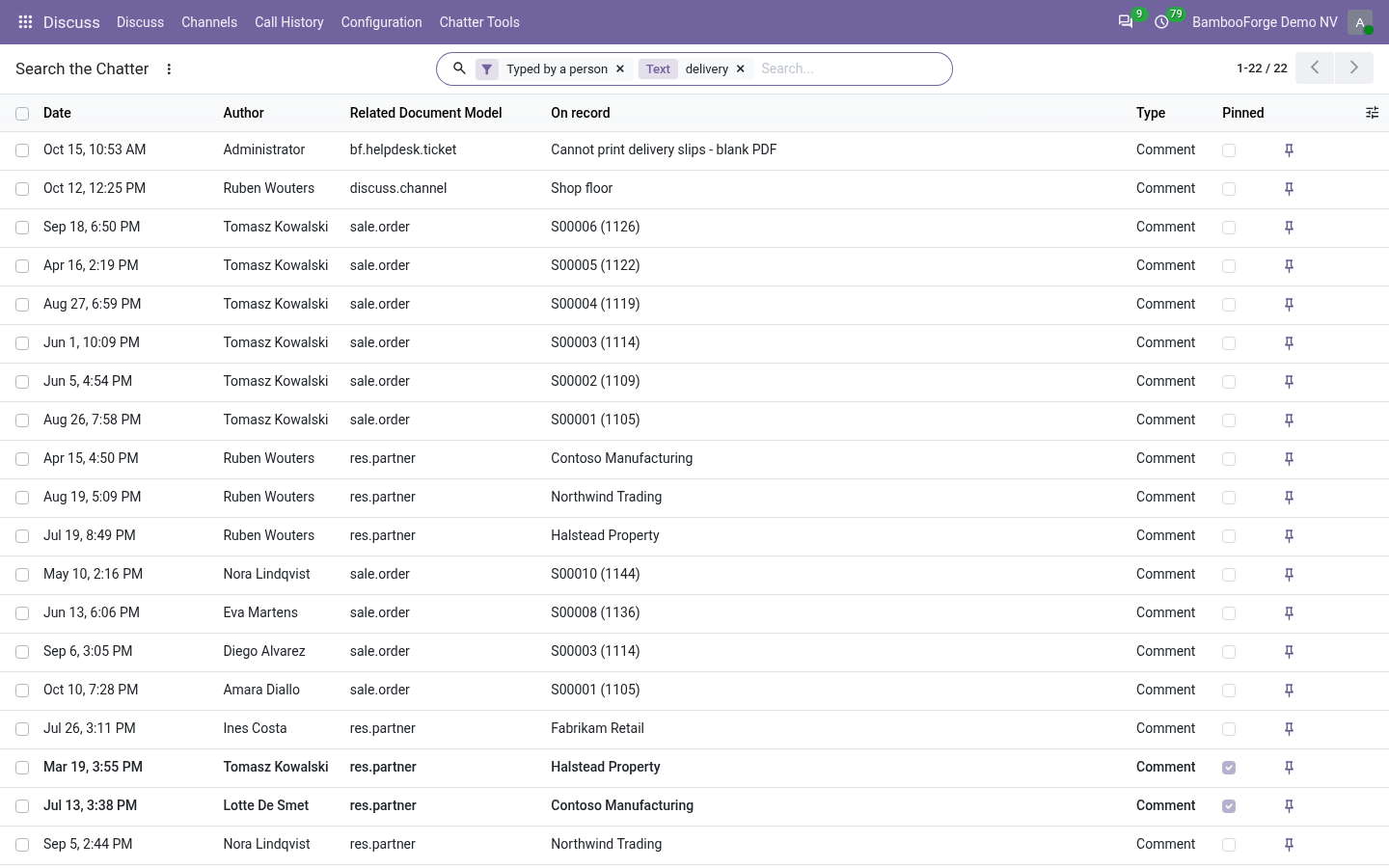
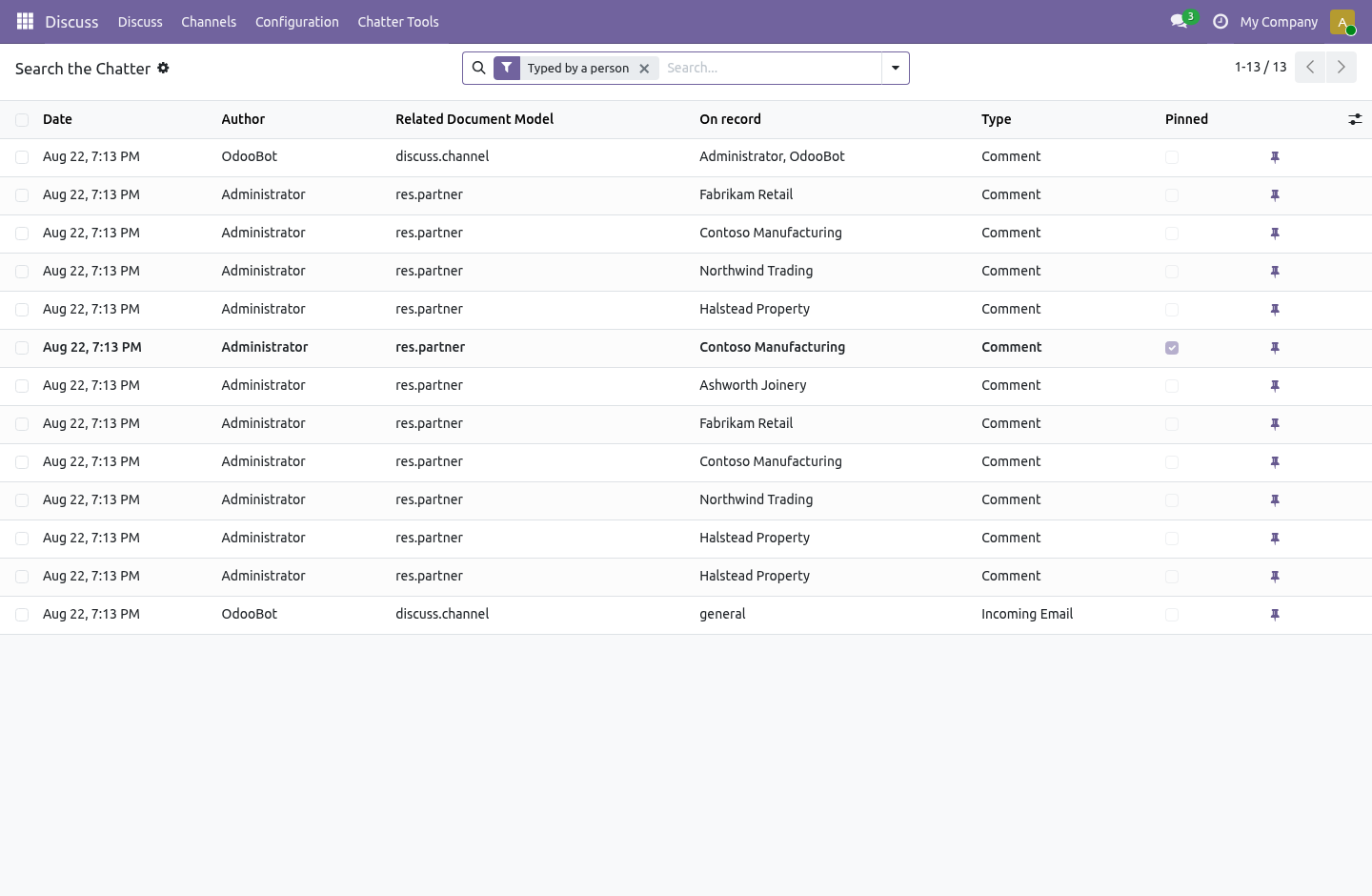
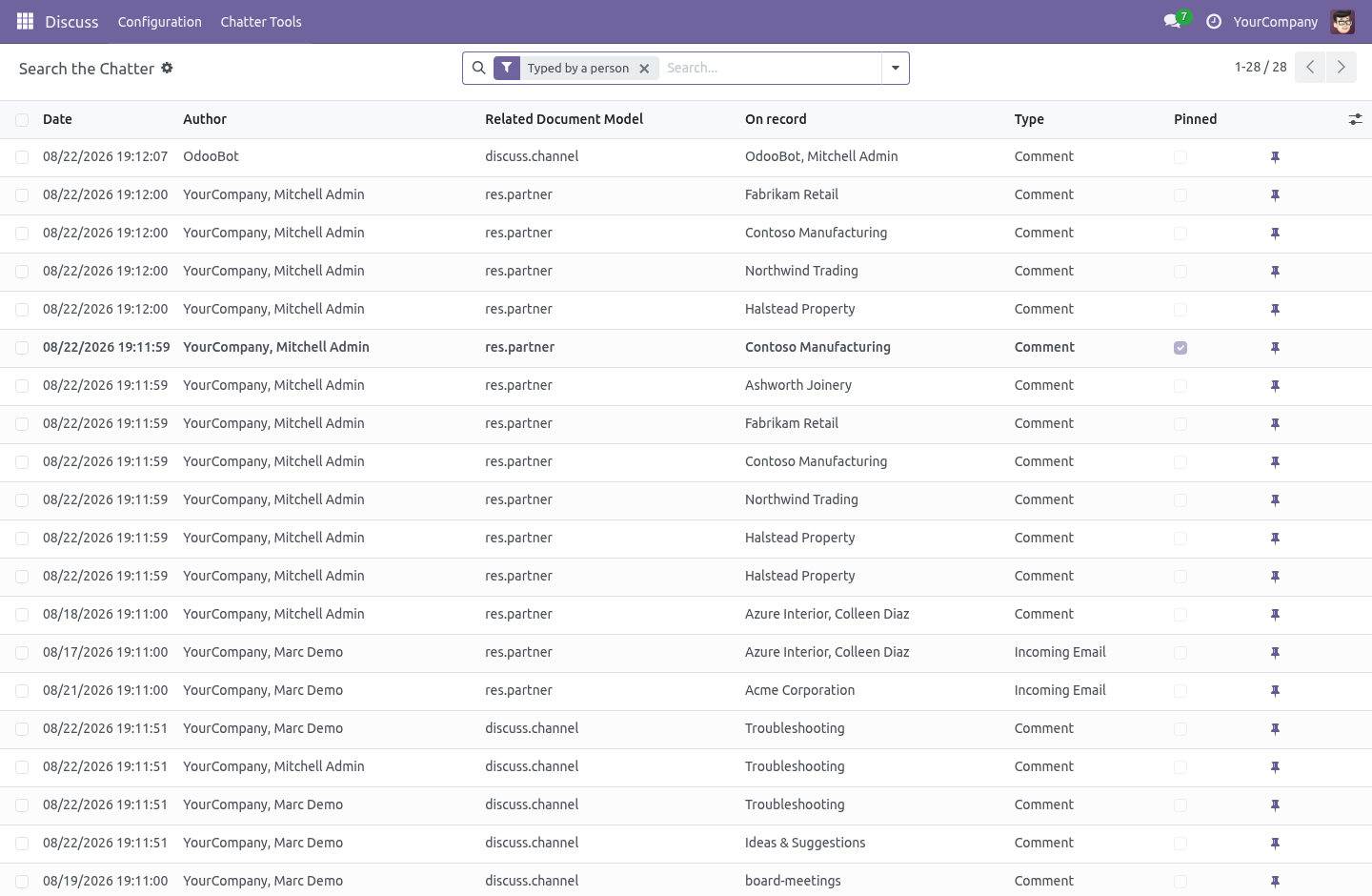
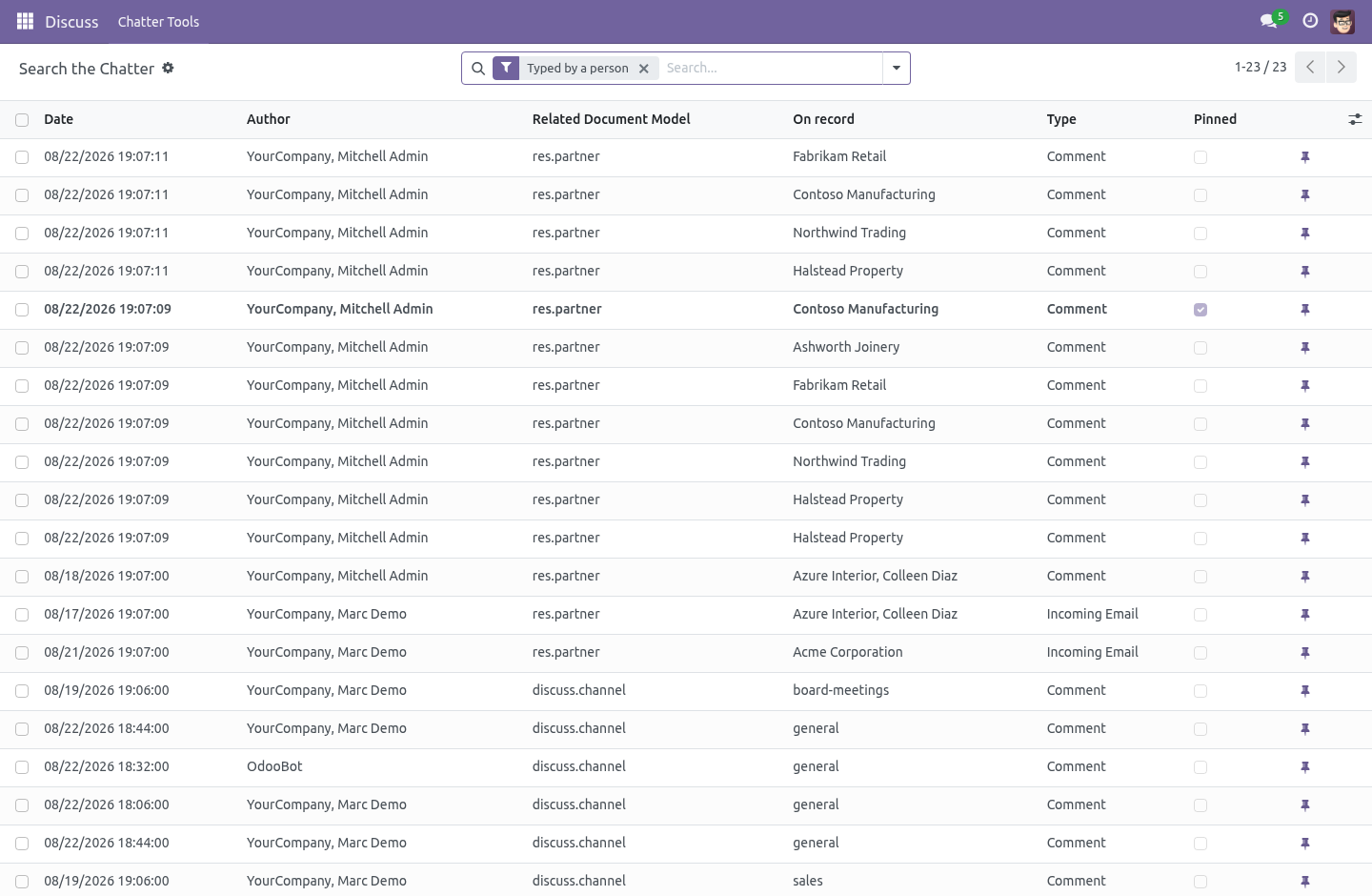
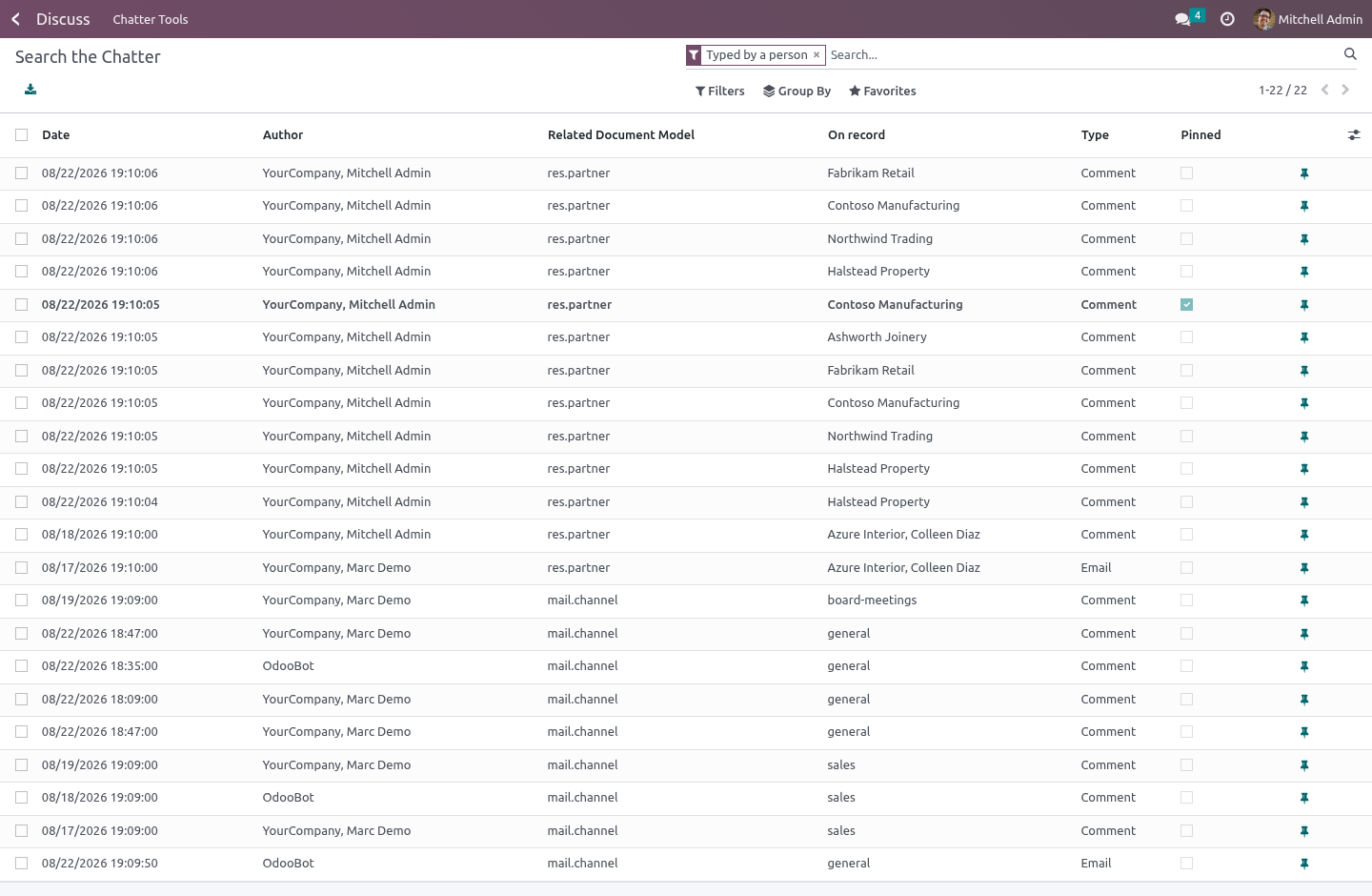
Settings › Chatter Tools › Search the Chatter. Every message on every record: by text, by author, by model, by type, by month, grouped however you like. The chatter itself can only be read one record at a time, which is no use at all when somebody asks "who told the customer that, and when?".
Two filters do most of the work. Typed by a person keeps comment and email — what somebody wrote and what arrived — and gets the twenty million system rows out of the way. Written by the system does the opposite, and is how you look at what a cleanup rule is about to throw away before you let it.
Templates
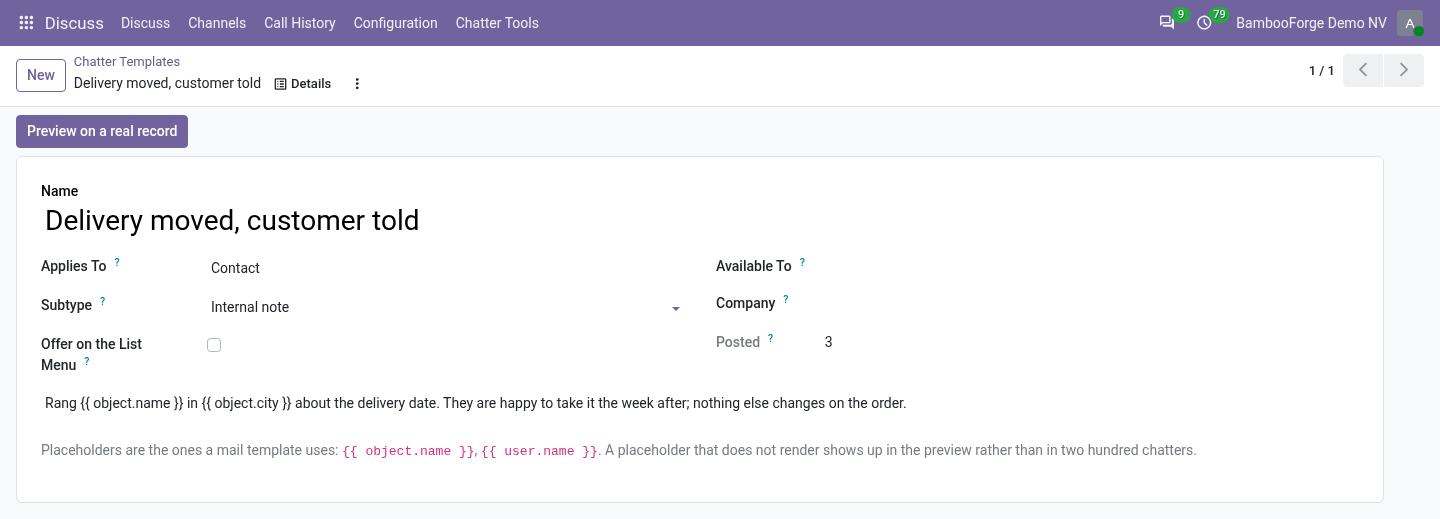
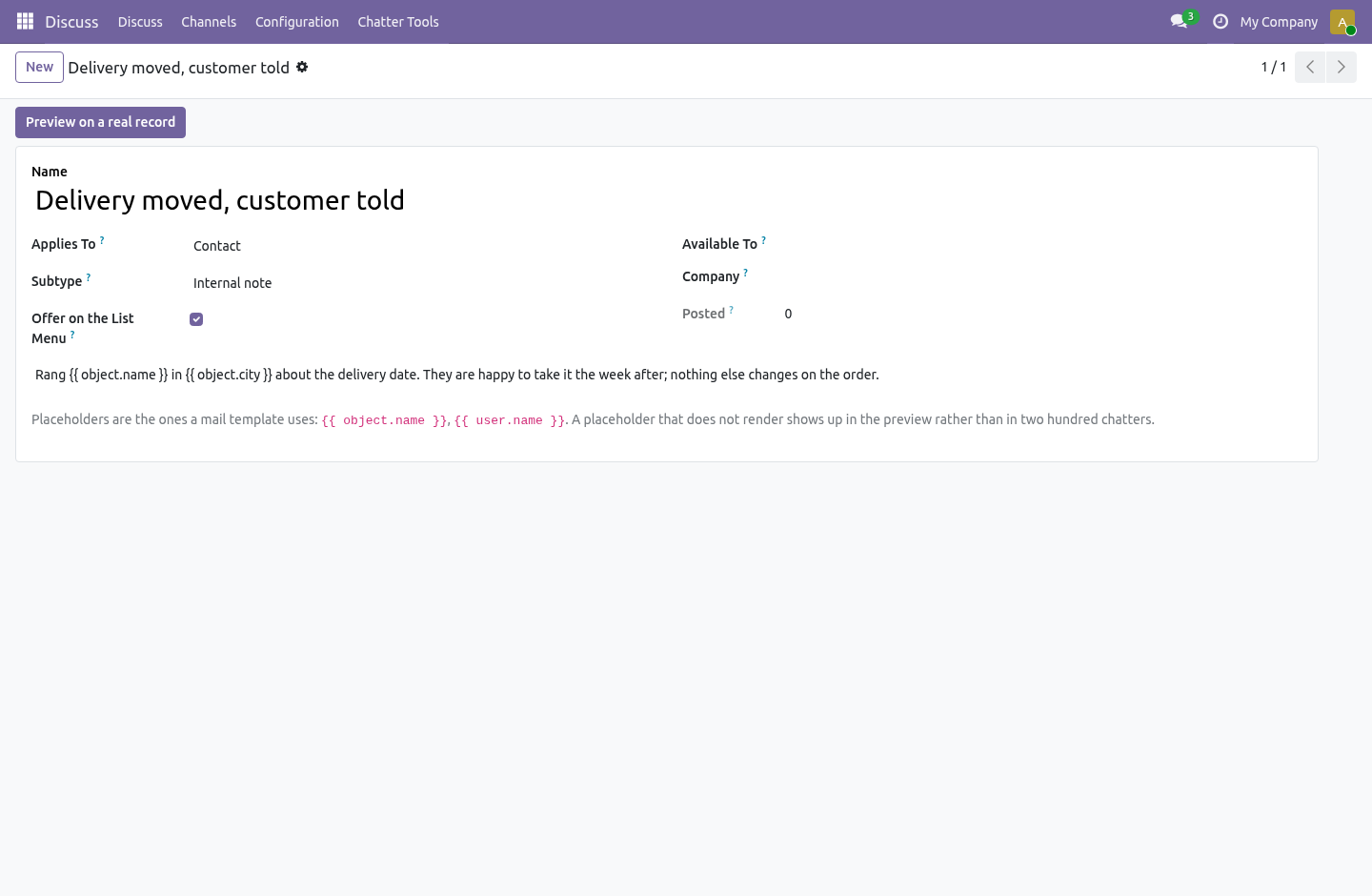
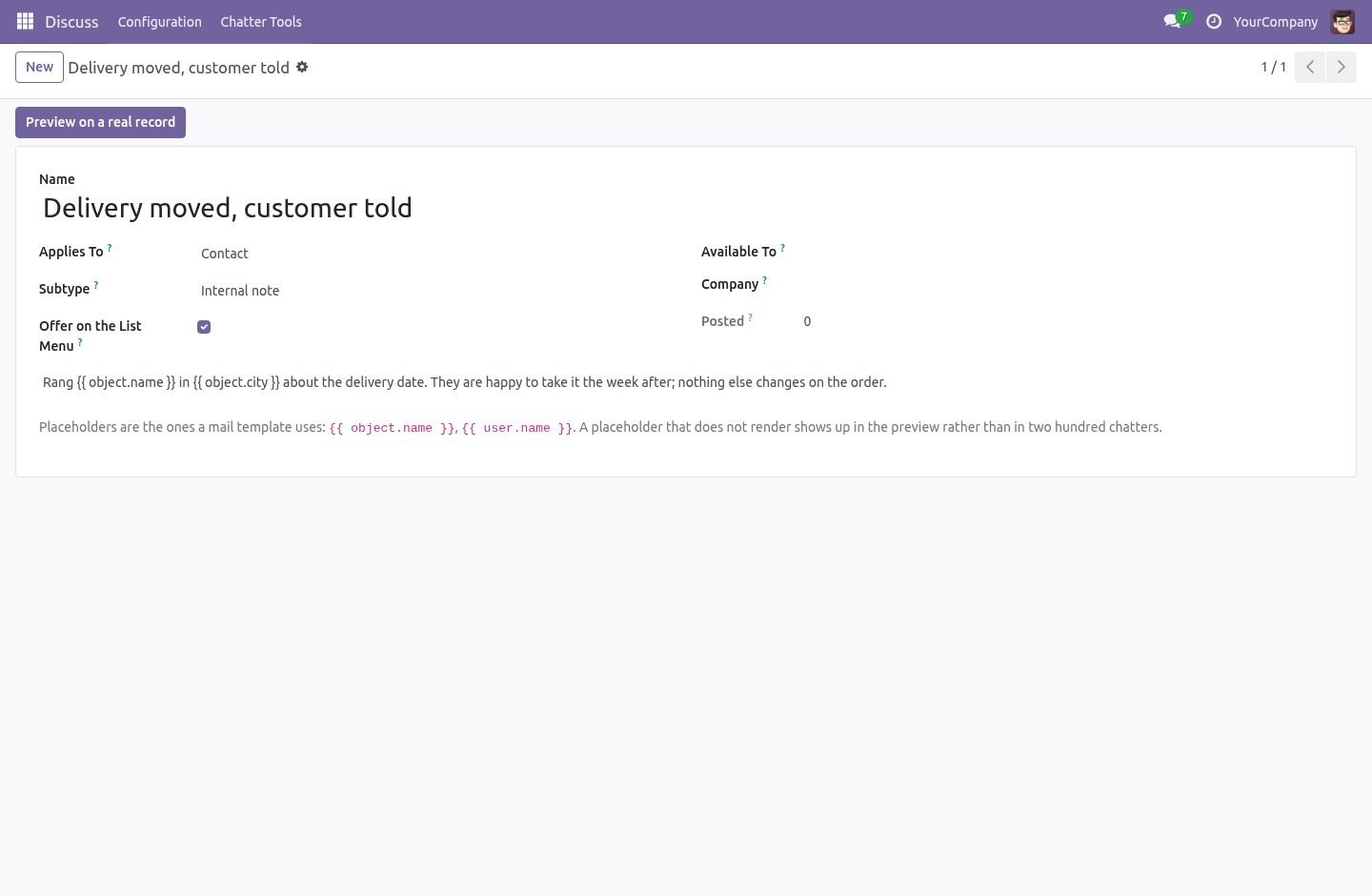
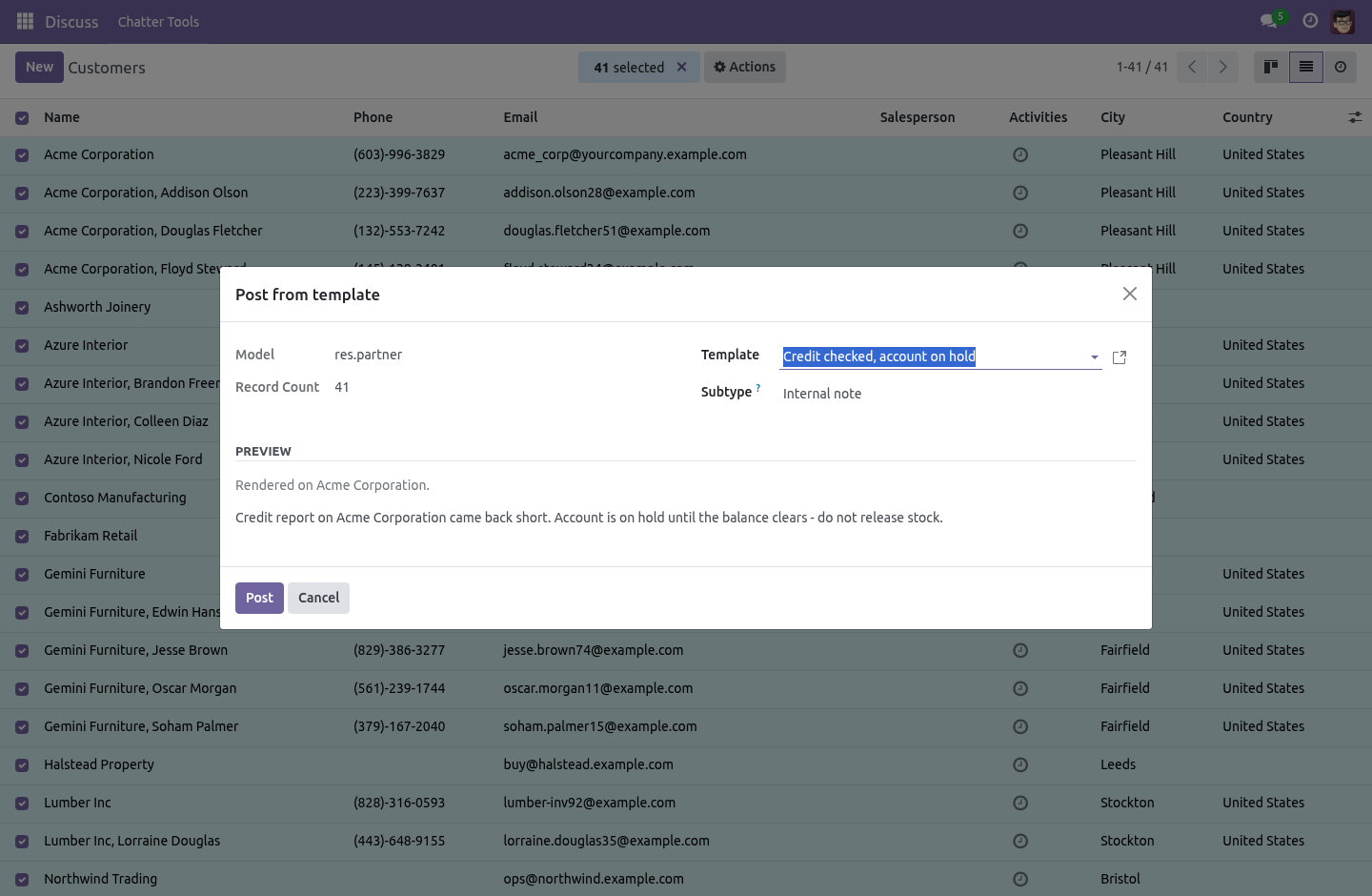
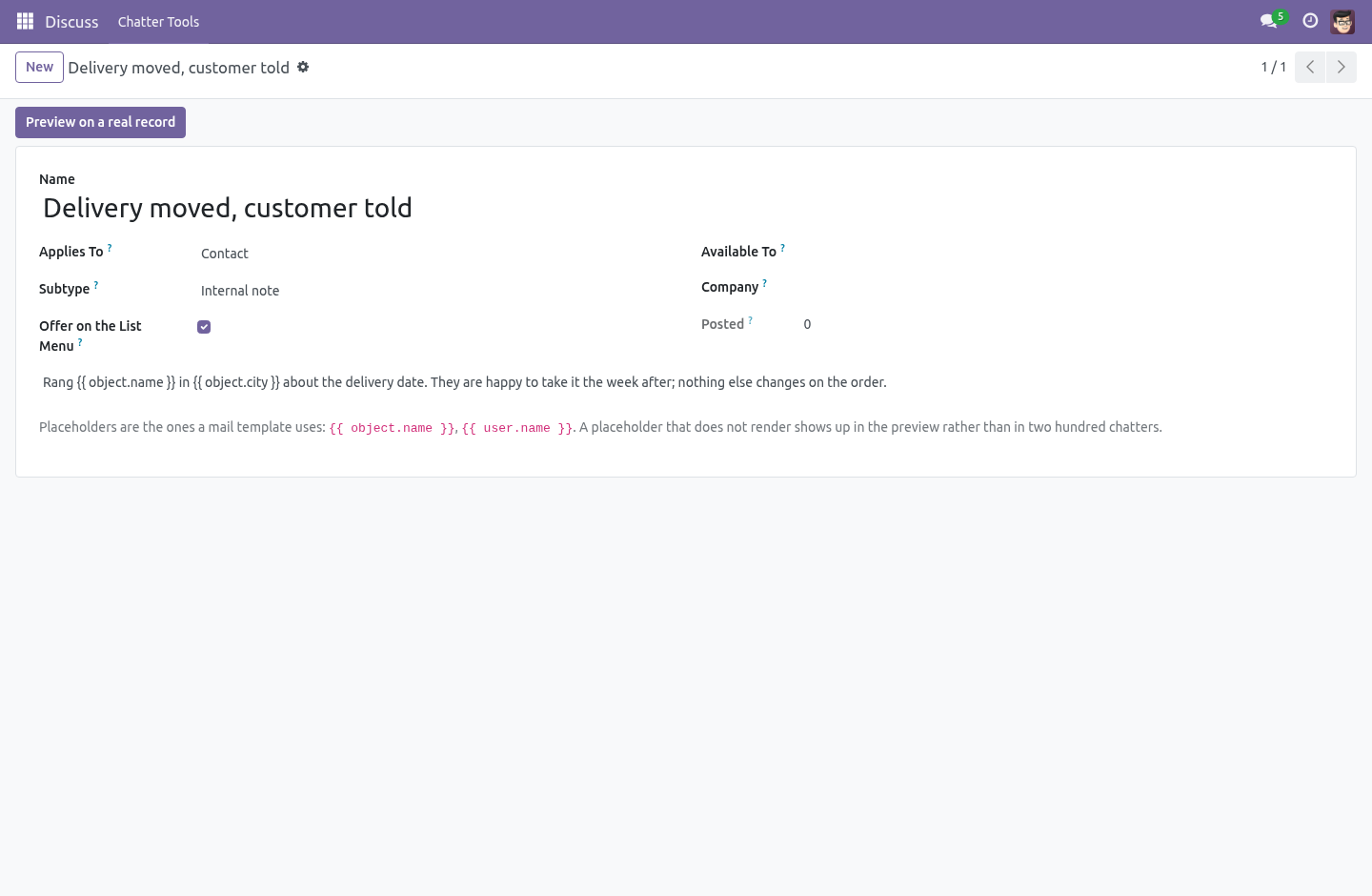
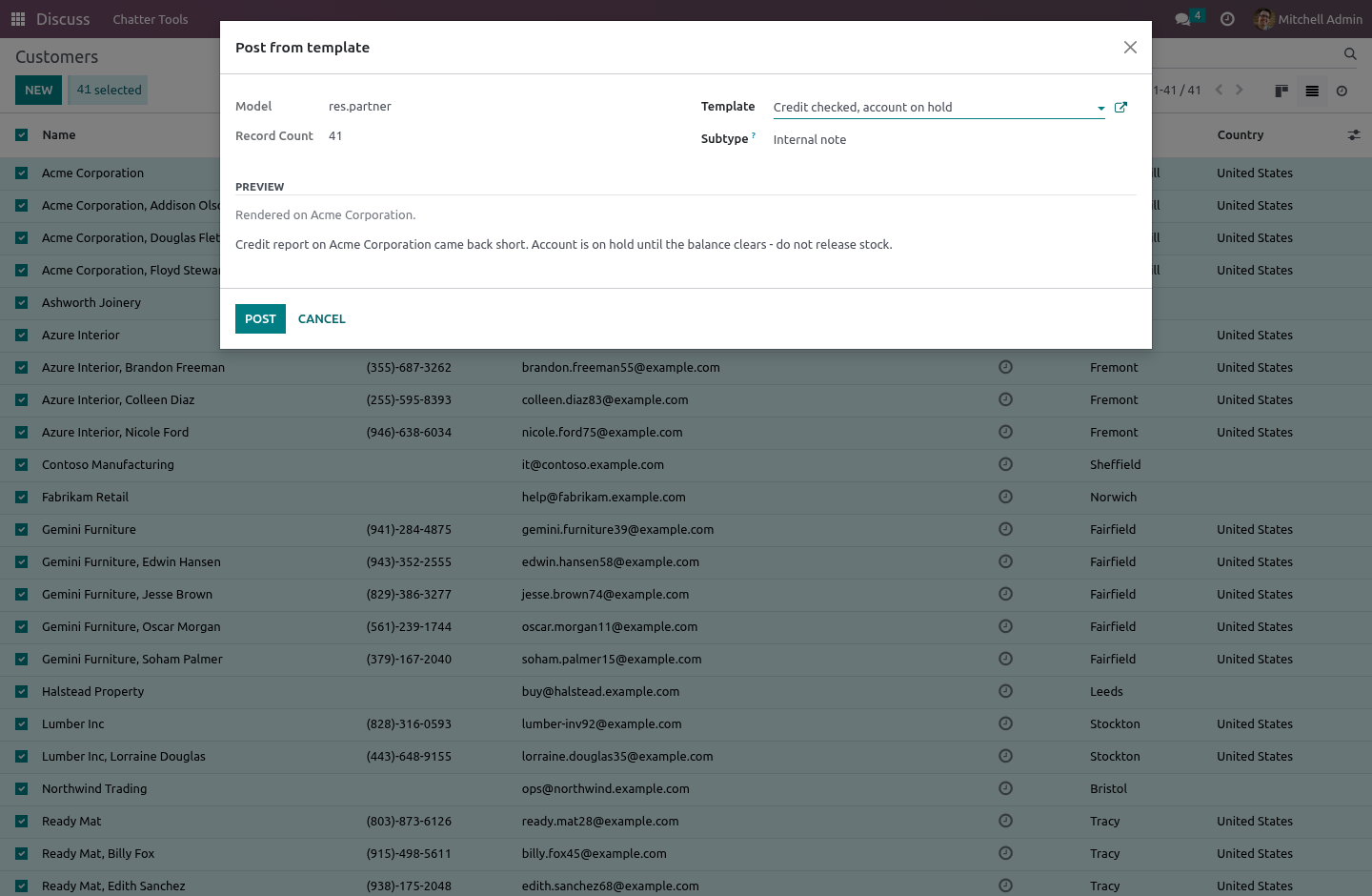
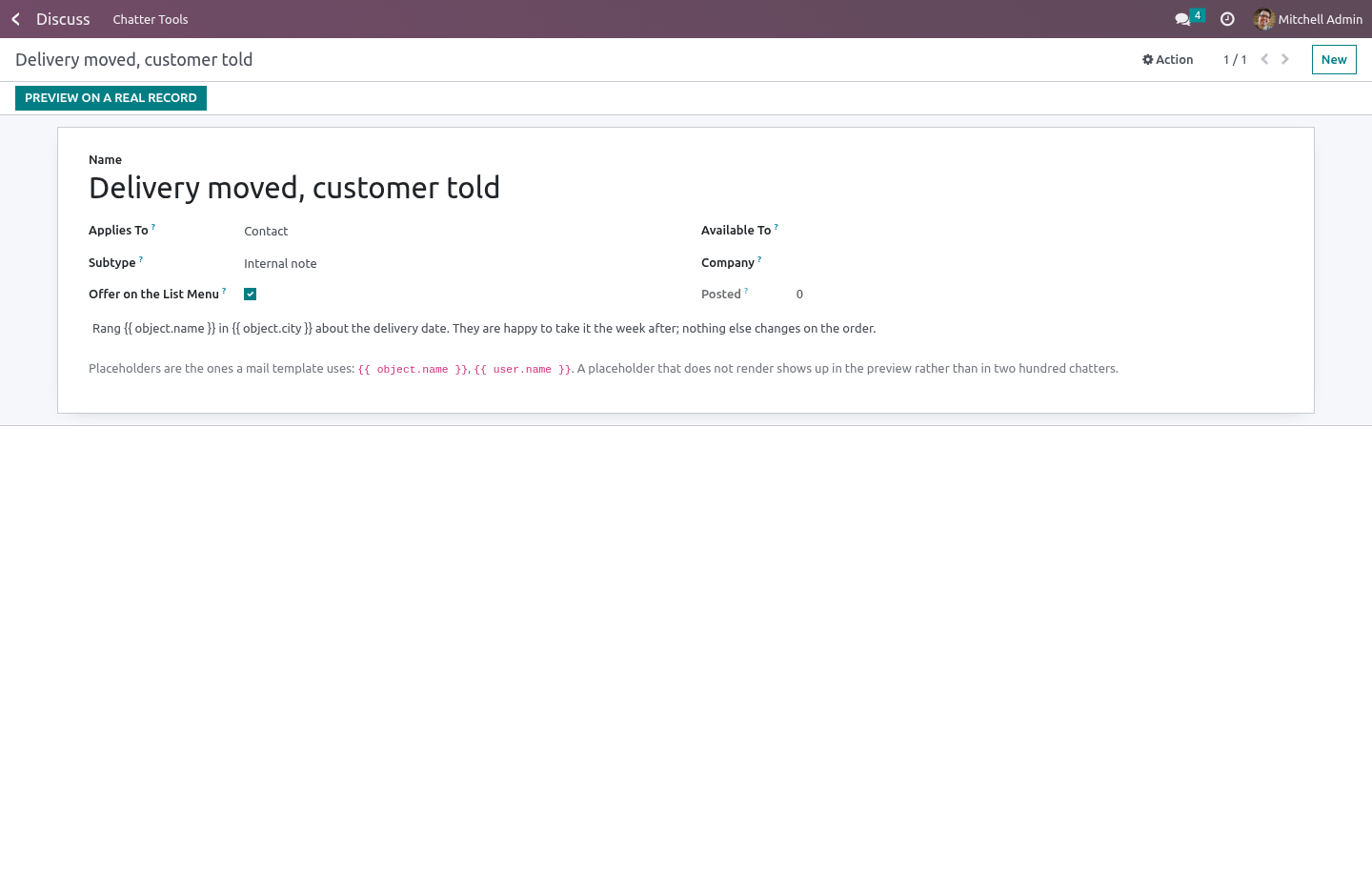
The paragraph somebody types forty times a week — "rang them about the delay", "credit checked, on hold" — written once.
Placeholders are the ones a mail template uses. {{ object.name }} works in the rich-text box, because QWeb interpolates {{ }} in attributes but never in a text node — which is why a mail template writes {{ }} in the subject and <t t-out=""/> in the body — and the template is converted before rendering, exactly the way core converts it for its own preview. A t-out written by hand keeps working.
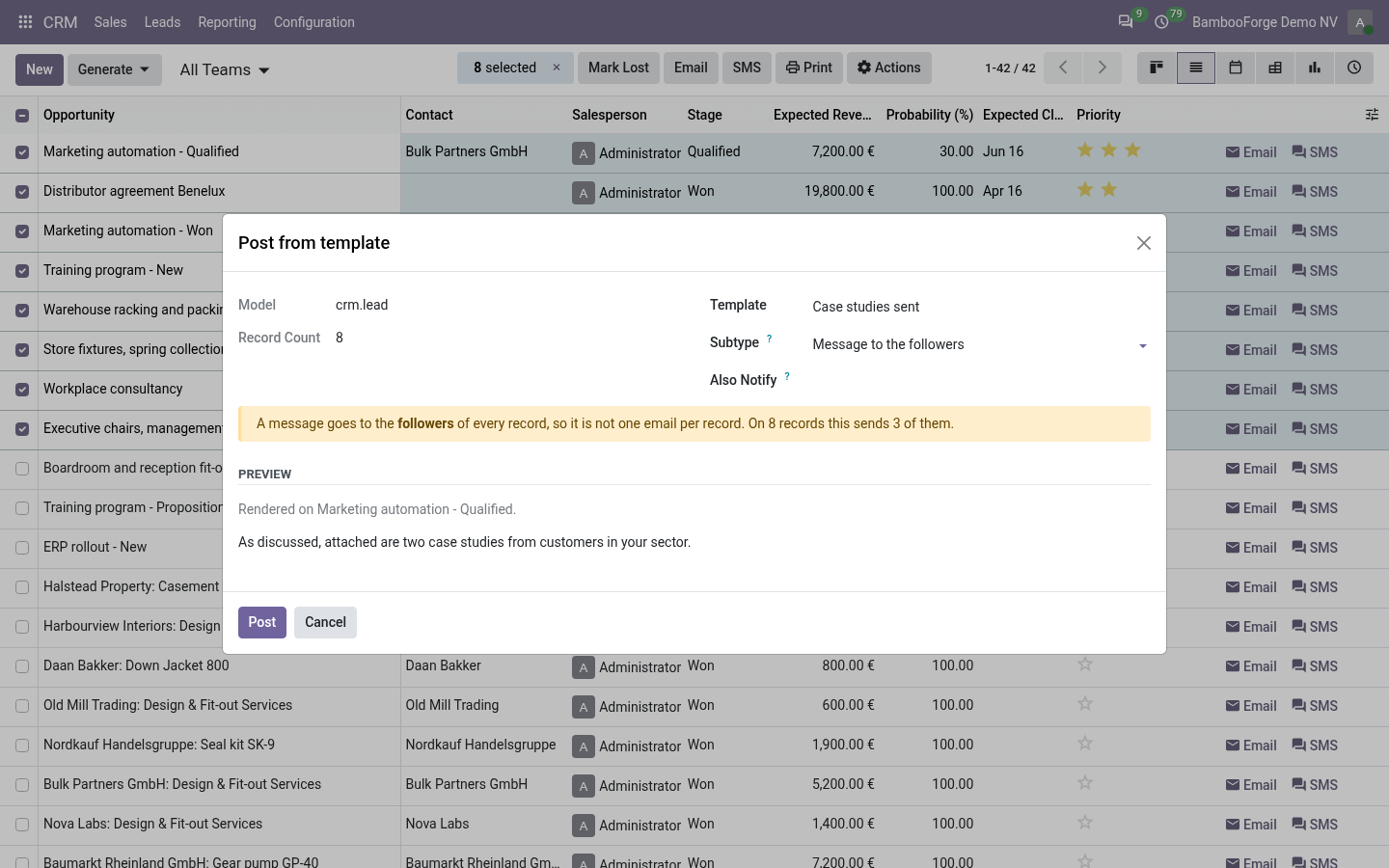
A template says whether it posts an internal note (the default) or a message to the followers (which sends email). It can be limited to a role, and to a company.
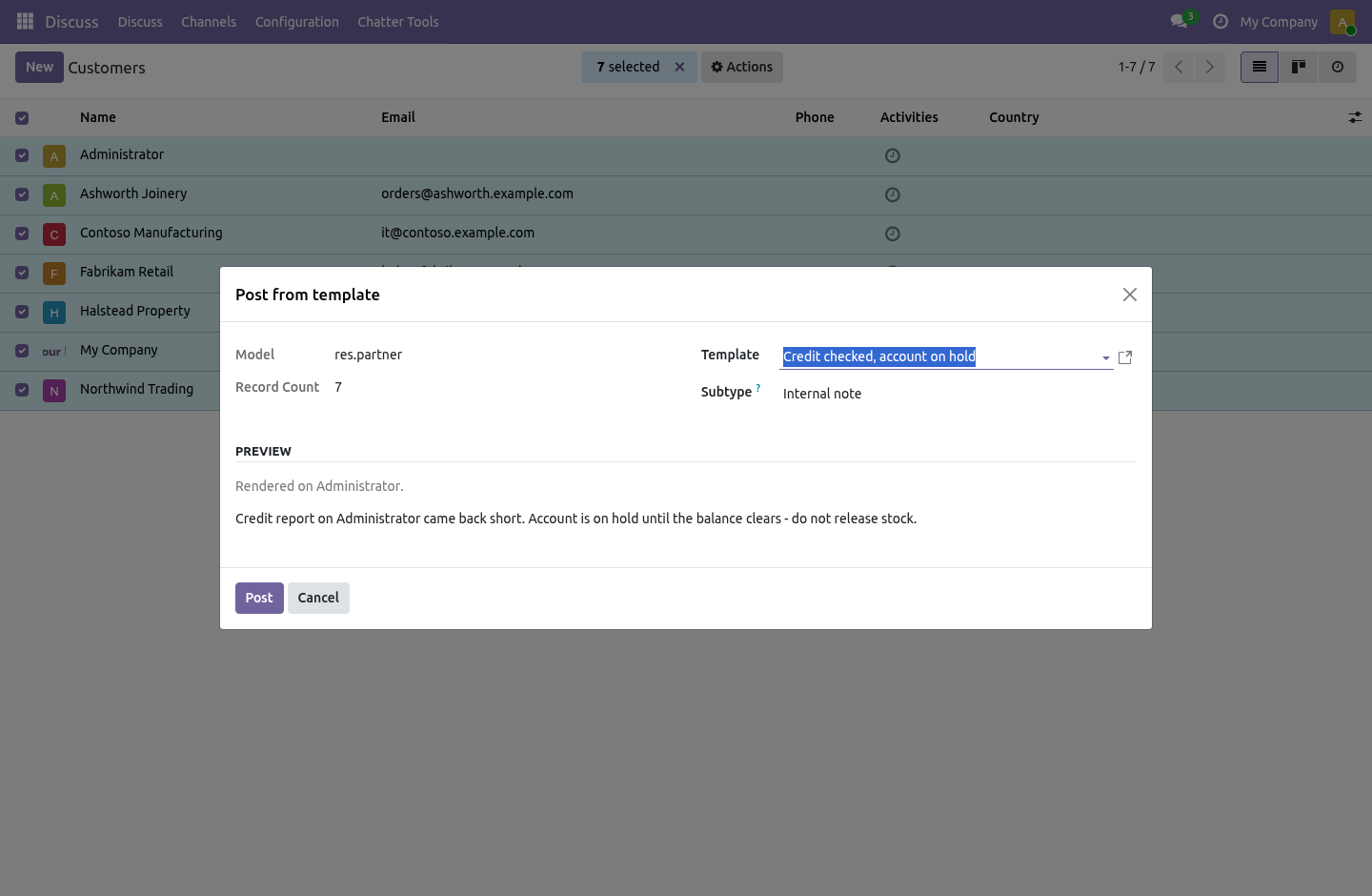
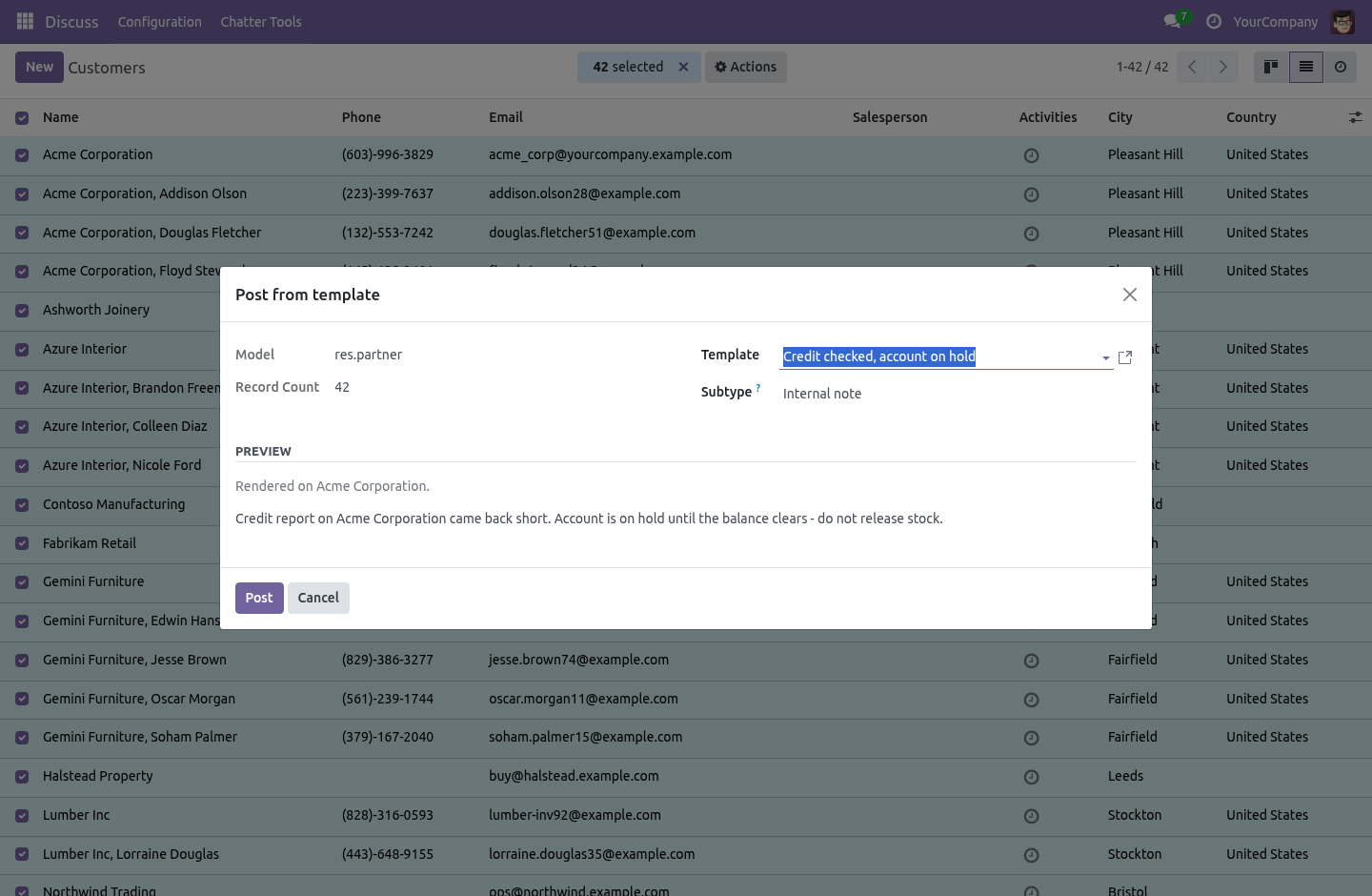
Posting one at a time is the Post from template entry in the Action menu of that model's list. Five templates on sale.order put one line in that menu, not five: the entry belongs to the model.
Posting on two hundred records at once is the same entry with two hundred rows ticked. The wizard renders the preview against the first record you selected, by name — a placeholder typo shows up there rather than in two hundred chatters where nobody can take it back — and says, in as many words, how many emails a message would send. A template that does not render posts nothing at all rather than half a sentence, and one record that cannot be posted to does not lose the other hundred and ninety-nine.
Each template counts how often it has been used. A template nobody uses is a template to delete.
Pinning
One message on a record that the next person has to read before they do anything. One click in the message's hover menu; the pin records who did it and when, and pinned messages are never deleted by a cleanup rule.
Odoo 20's chatter does not take extra actions in that menu, so pinning there is done from Search the Chatter instead. Everything else in this module is the same on every series but the newest, whose build differs only where Odoo moved what it hangs off.
Resending what failed
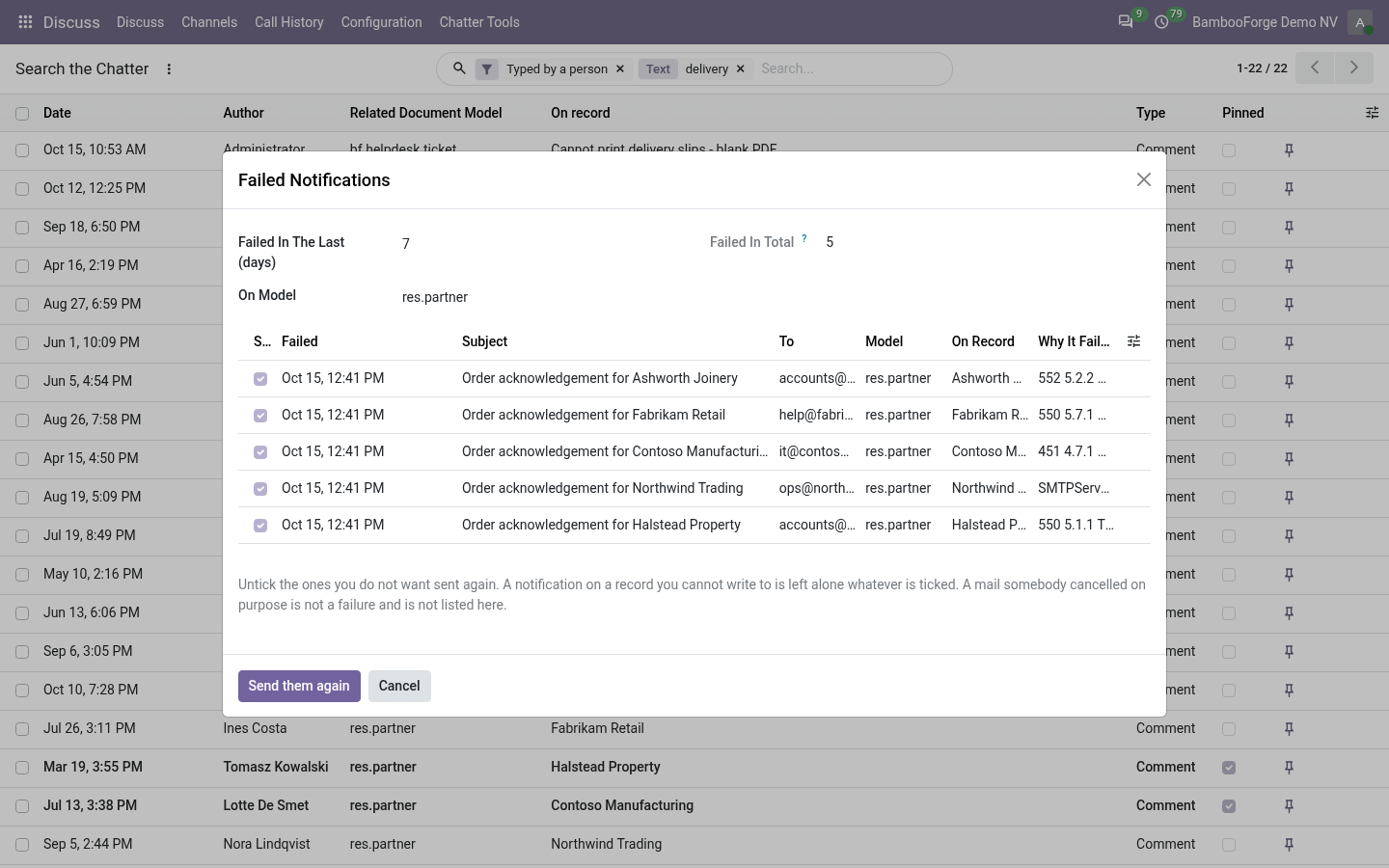
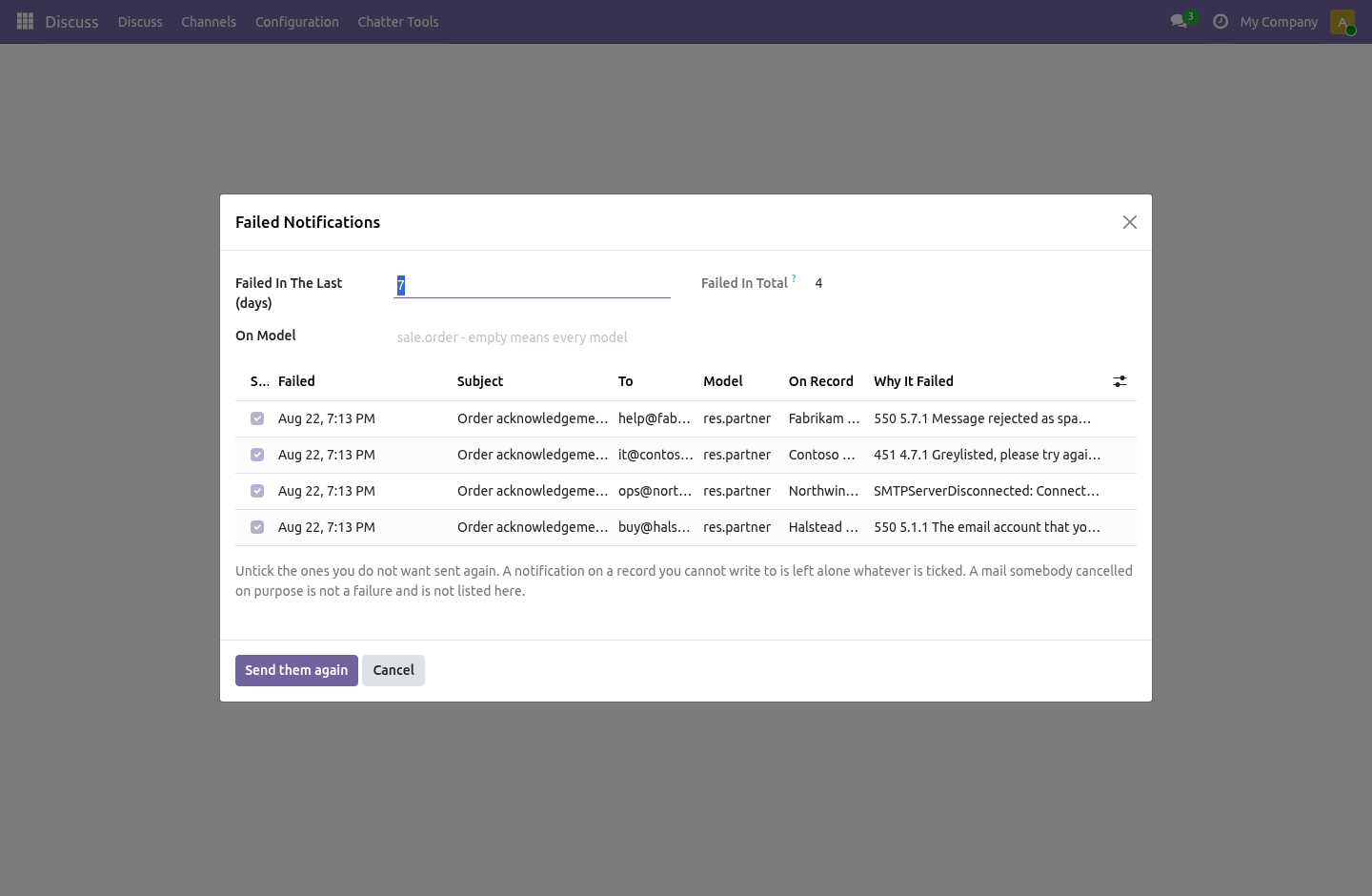
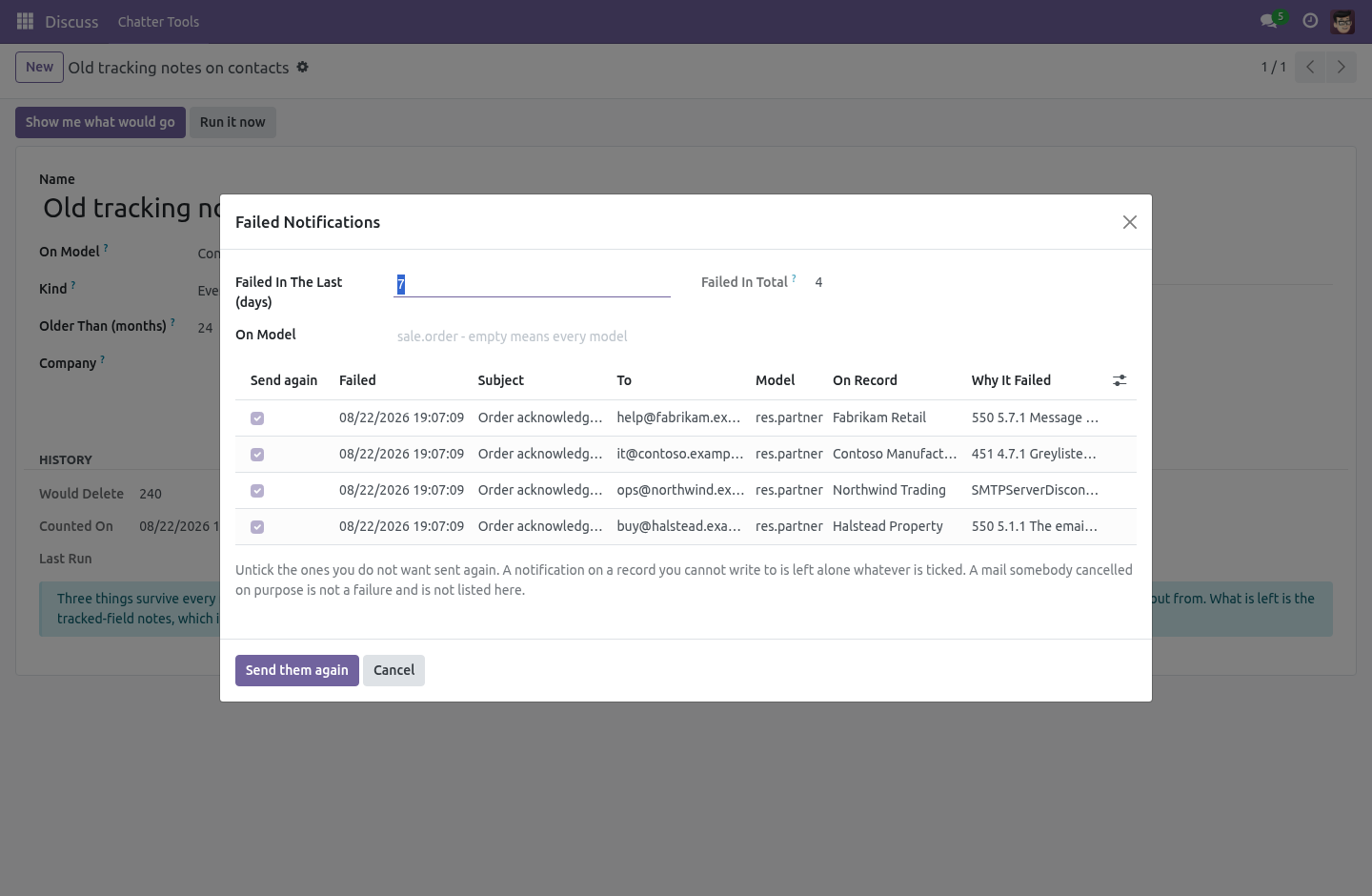
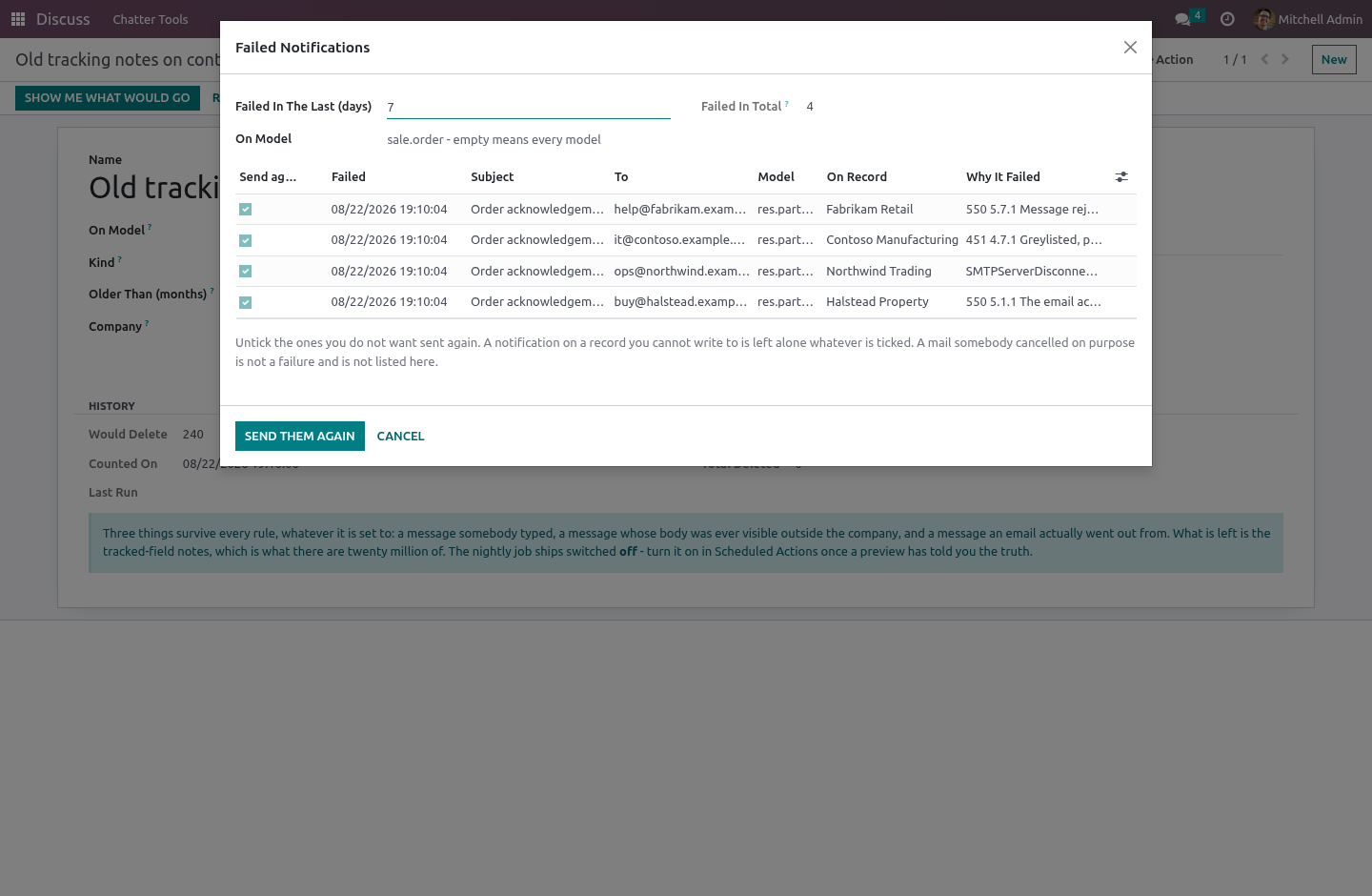
A notification in exception is invisible: the record says the customer was told, and the customer was not. Settings › Chatter Tools › Failed Notifications lists them with the reason and the date, and puts the ones you tick back in the queue.
A notification on a record you may not write to is left alone whatever is ticked, and the wizard says how many it skipped. Sending somebody's mail again is writing on their record.
Throwing the rest away
Every stage change and every tracked field writes a mail_message row. Nobody reads the ones from 2019 and everybody pays for them in backup time, in restore time and in the index.
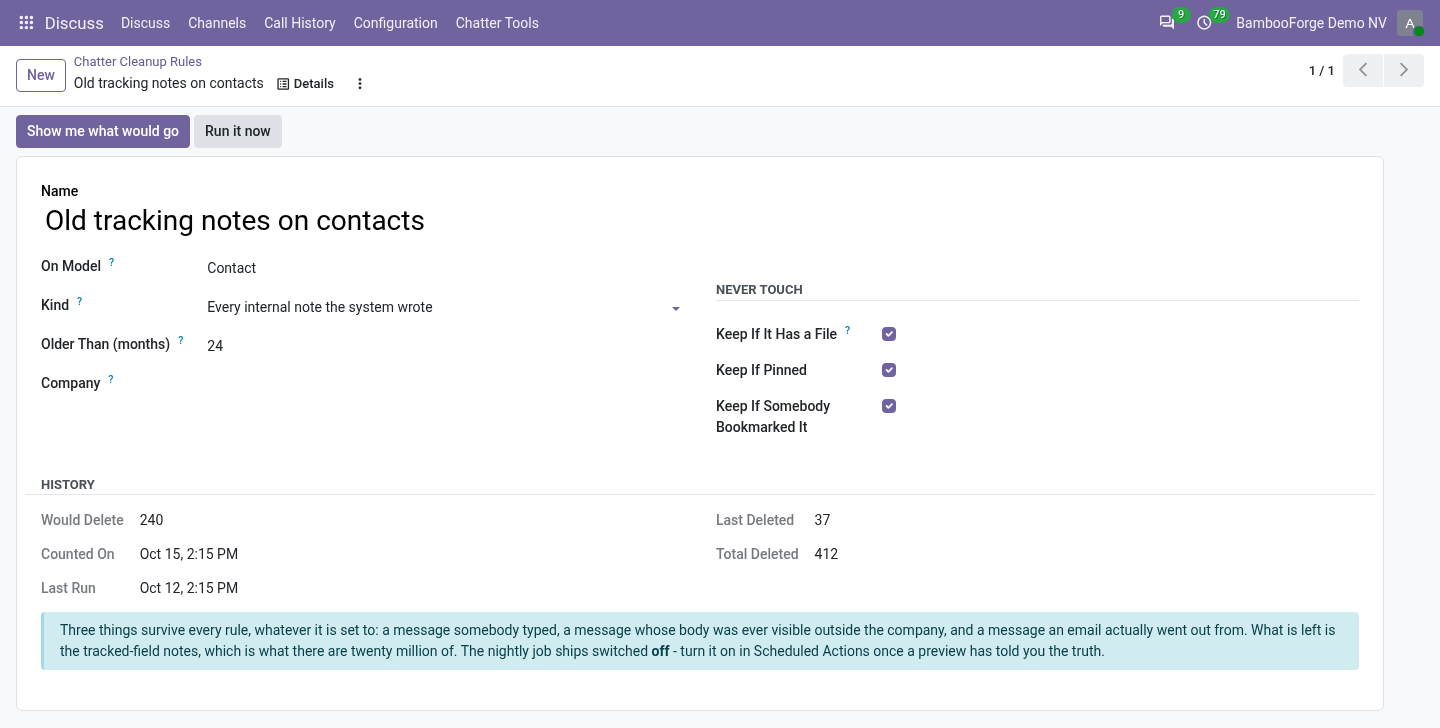
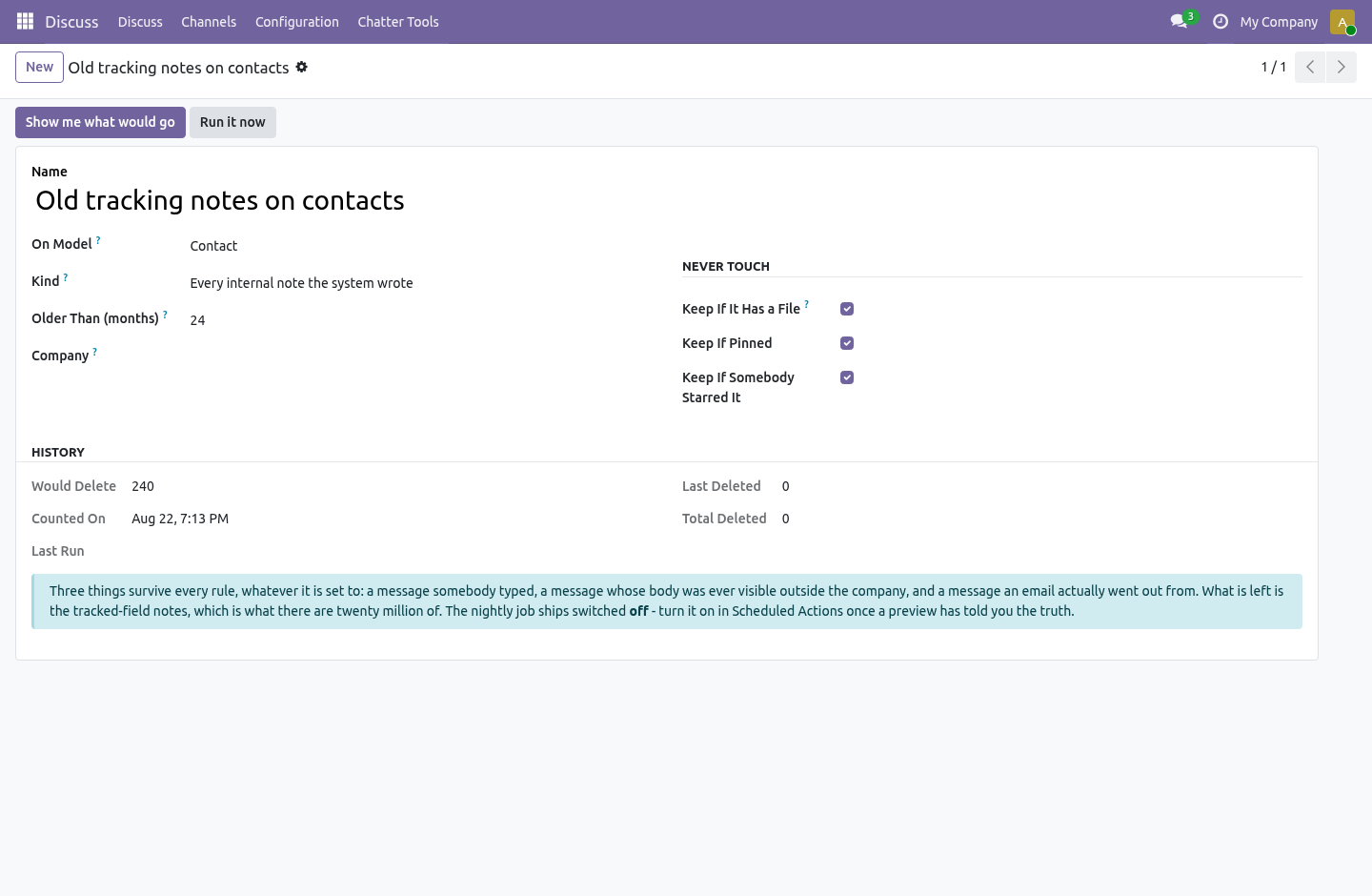
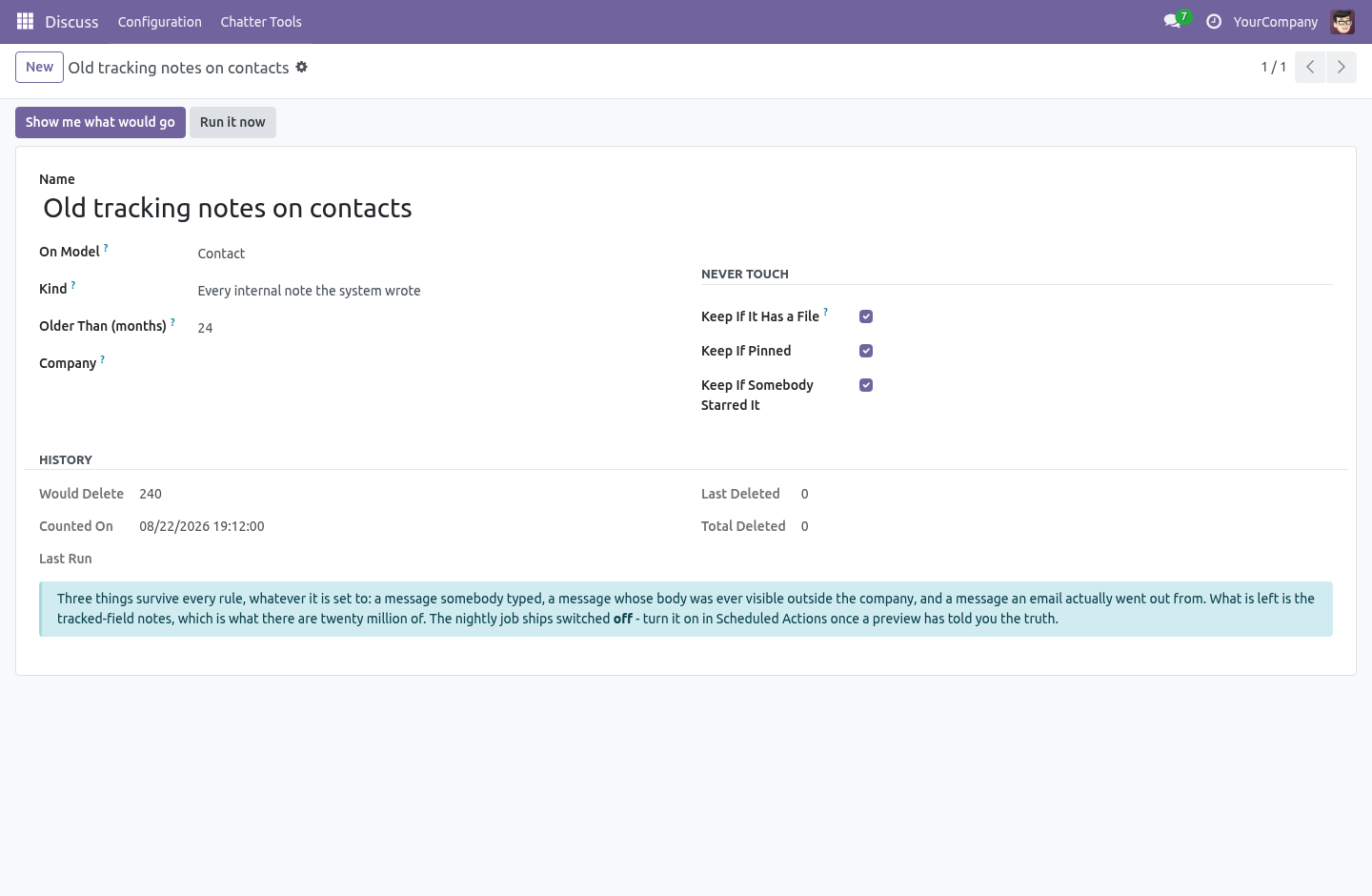
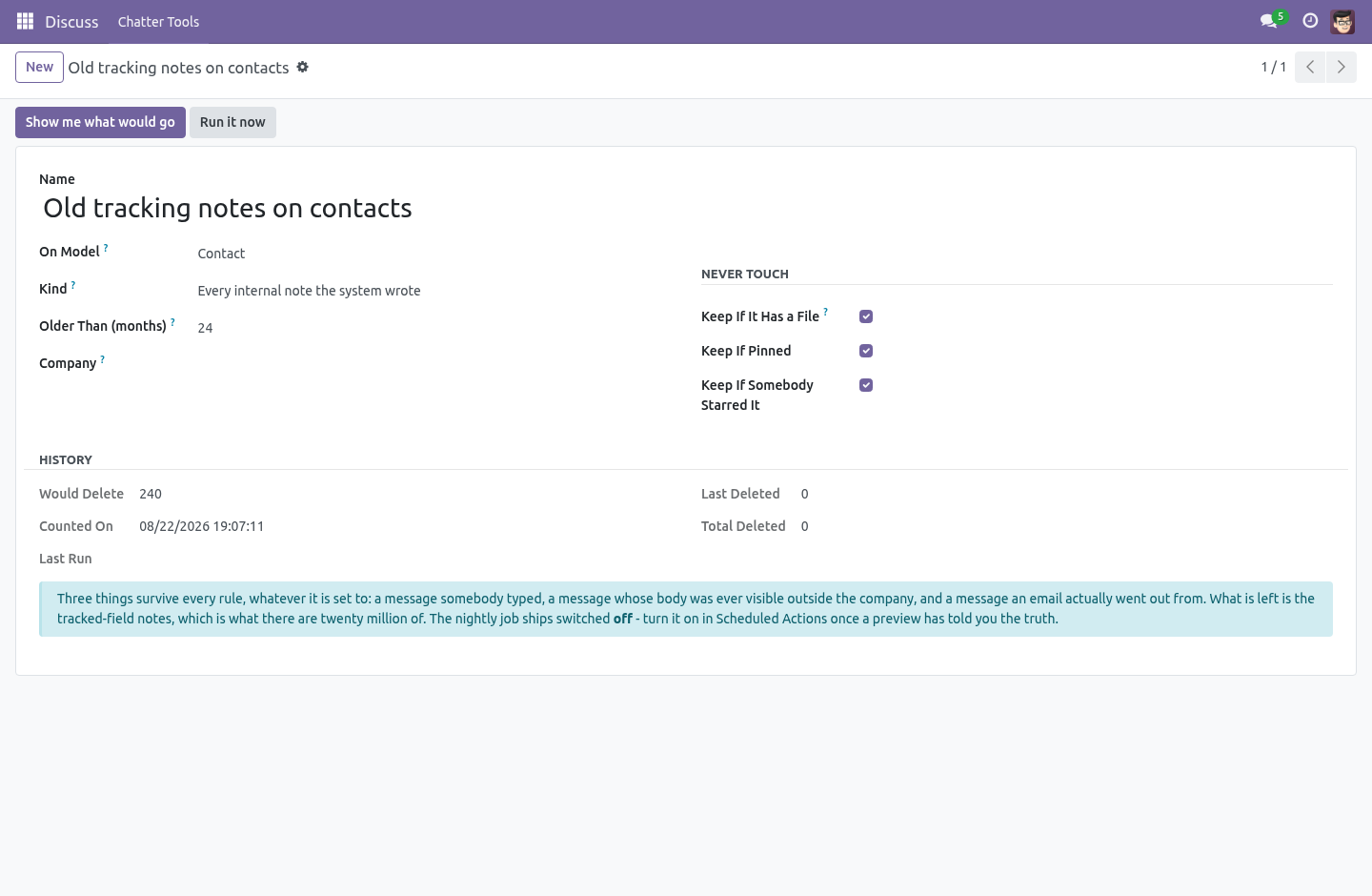
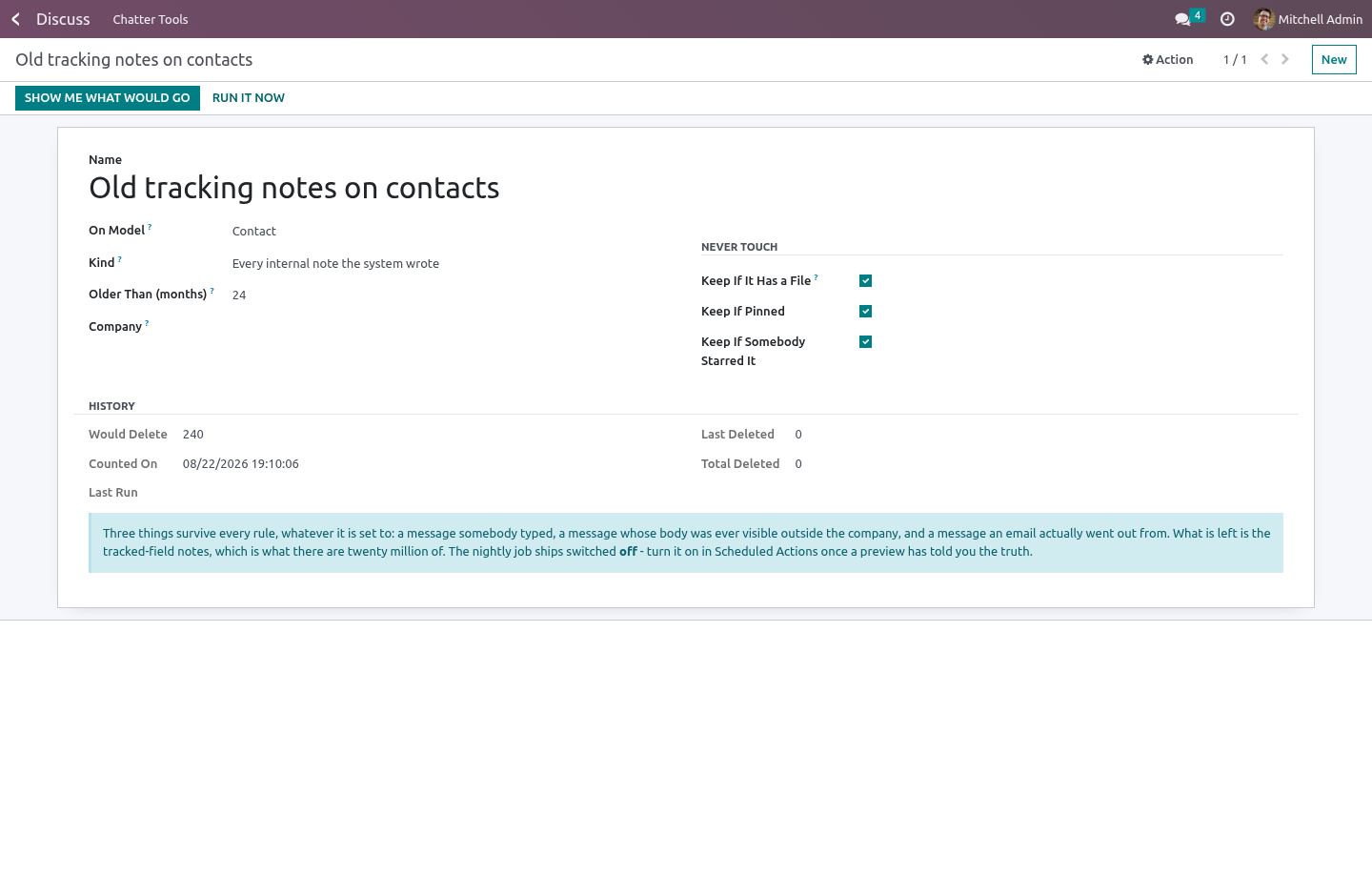
A cleanup rule says: on this model, messages of this kind, older than this many months. The kinds are
Notifications only — stage moves, tracking, "created by";
Everything the system wrote — the above plus automated comments and user notifications;
Empty — a notification with no body and no file, which is the most common row of all.
Three things survive every rule, whatever it is set to. That is not three checkboxes; it is the shape of the rule, and it is decided in one method so there is one place to read and one place to argue with.
A message somebody typed. The kinds are an allow-list of one message type, notification, so comment and email are outside every rule — and so is a message type invented by a future version, which is kept rather than guessed at.
A message whose body was ever visible outside the company. This is not the same as "somebody typed it", and it is the wall that matters most. The copy of the quotation the customer was sent, the delivery confirmation, the portal invite — core writes all of them into the chatter through message_post_with_source, as message_type='notification' with the customer-facing mail.mt_comment subtype. A rule that trusted the message type alone would throw away the only record of what the customer was promised, and the tracking values and delivery receipts would cascade away with it.
A message an email actually went out from. If somebody was sent it, it is evidence of what they were told.
A tracked-field note has no body at all and falls through all three, which is the point: those are the rows there are twenty million of.
Files, pinned messages and starred messages are kept unless you say otherwise — and if you say the files may go, the files really go, rather than the row alone while the blob stays in the filestore.
Show me what would go counts the rows and opens exactly those rows, by id, so the list and the number are the same thing. The nightly job ships switched off: a cleanup rule that starts deleting the night it is installed is an incident, not a feature. Turn it on in Scheduled Actions once a preview has told you the truth. It runs oldest rule first with a budget per night, in batches, and one rule that fails does not stop the others.
Who can do what
Every internal user is a Chatter Tools user: posts from a template, pins a message, sends a failed notification again — always on records they may already write to. A manager writes the templates everybody uses and the cleanup rules that throw chatter away.
What it needs
mail only. Community. No Enterprise module is required, and none is used.
How we make sure it works
Before every release, 66 automated checks run against this app on Odoo 16, 17, 18, 19 and 20. Among them:
A note an email actually went out from is never deleted.
A portal customer never sees a pinned internal note.
A template that is not offered cannot be posted.
Records the caller cannot read are dropped.
A broken placeholder shows in the preview not the chatter.
The complete list is in the source you receive.
What it does not do
Said before you buy, because it is the half that decides whether the app fits:
Send a message a template cannot render: it posts nothing rather than half a sentence.
Read chatters the user cannot read - search runs with the user's own rights.
Install
Copy bambooforge_chatter_tools into your addons path and update the app list, or install the ZIP from the Odoo Apps Store.
Install Chatter Tools: Search, Pin & Bulk Messages.
Open Failed Notifications - its menus are Search the Chatter, Templates, Cleanup Rules.
Questions people ask
- Which Odoo versions does it run on?
Odoo 16.0, 17.0, 18.0, 19.0, 20.0, on the series you buy it for; each series is its own listing.
- Community or Enterprise?
Both. It needs no Enterprise app.
- What does it need?
The standard Discuss, Settings apps. No extra Python package.
- Where does it show up?
Under the Failed Notifications menu (Search the Chatter, Templates, Cleanup Rules).
- Does anything leave my server?
No. It makes no call outside your Odoo server: no telemetry, no licence check, no third-party service.
- What happens if I uninstall it?
Odoo drops the app's own tables and fields; the standard records it worked on (contacts, orders, products) stay as they are.