 BambooForge Labs
Car Dealership Management
Used-car dealership stock with true cost per unit, days-in-stock ageing, and a deal that shows gross after discount, over-allowance and recon.
Available for Odoo 16.0, Odoo 17.0, Odoo 18.0, Odoo 19.0, Odoo 20.0. Technical name bambooforge_car_dealership.
Transcript of the walkthrough (Odoo 20)
Car Dealership Management. Used-car dealership stock with true cost per unit, days-in-stock ageing, and a deal that shows gross after discount, over-allowance and recon. Said before you buy, because it is the half that decides whether the app fits: In the next few minutes: car dealership management, then stock, then the deal, then delivery, then roles. Then what this app deliberately does not do, so you can tell before you buy whether it fits.
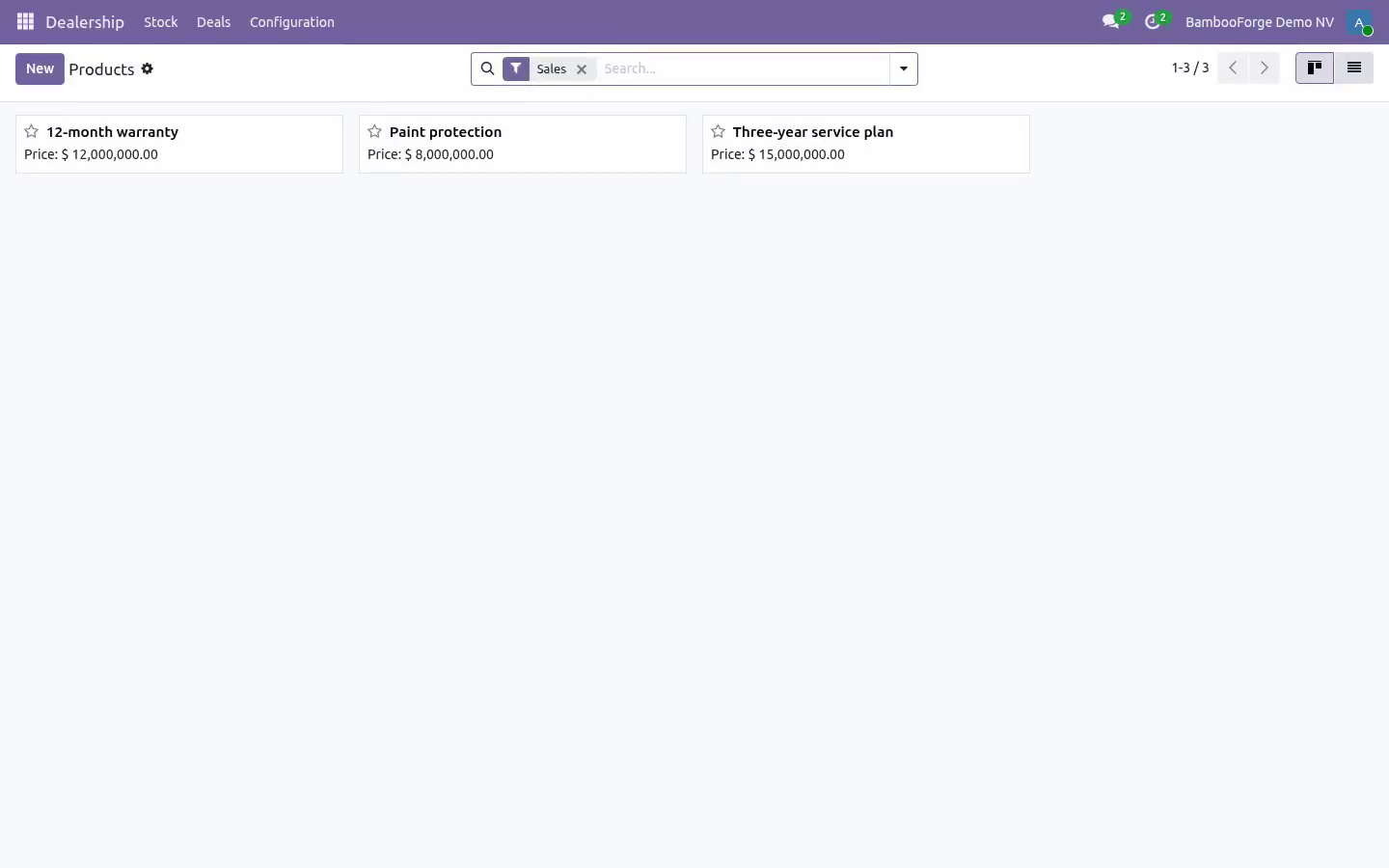
Everything lives under Dealership then Stock then Deals then Configuration. 1. Copy bambooforge_car_dealership into your addons path and update the app list, or install the ZIP from the Odoo Apps Store. 2.
Install Car Dealership Management. 3. Open Dealership - its menus are Stock, Deals, Configuration. Car Dealership Management.
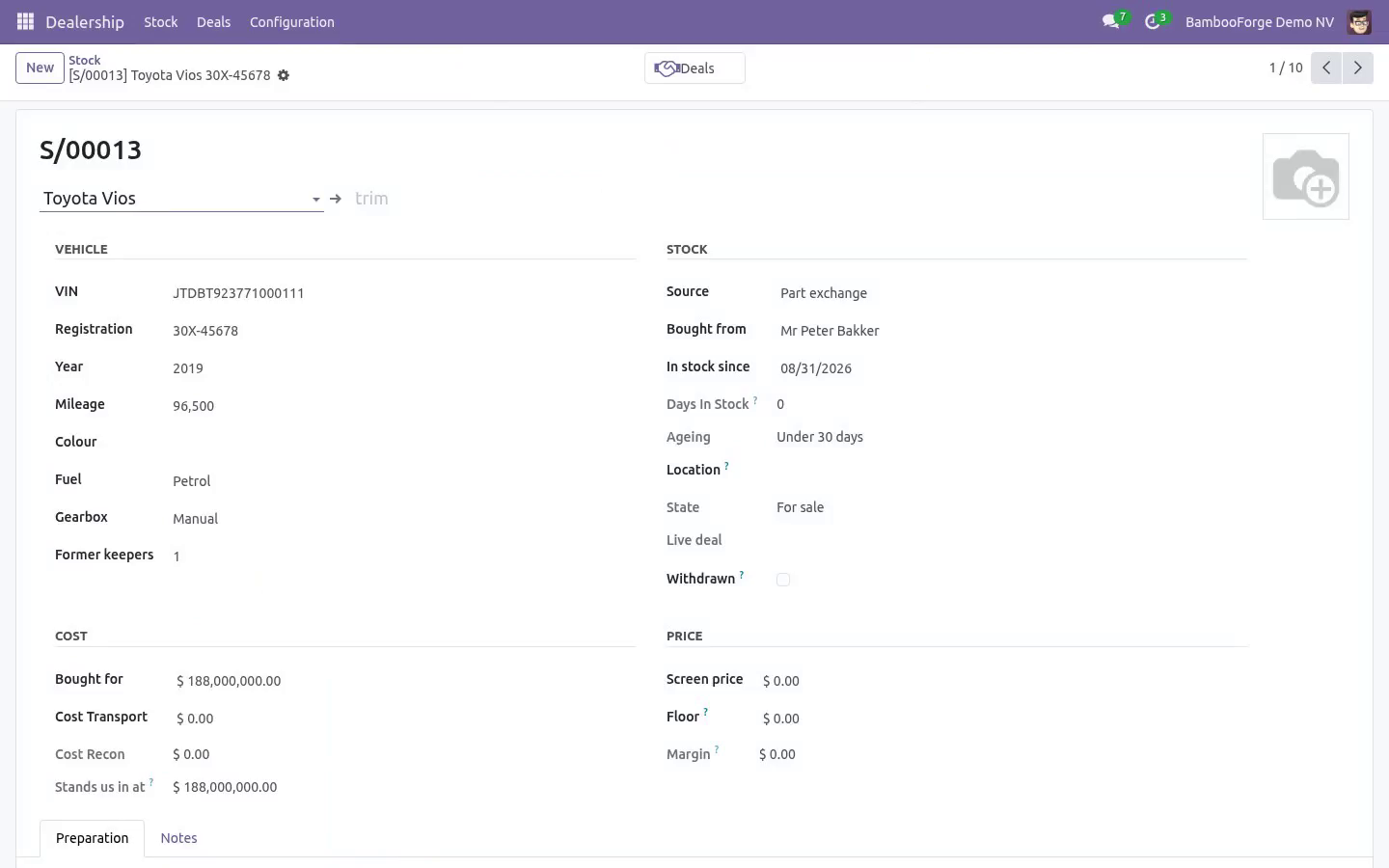
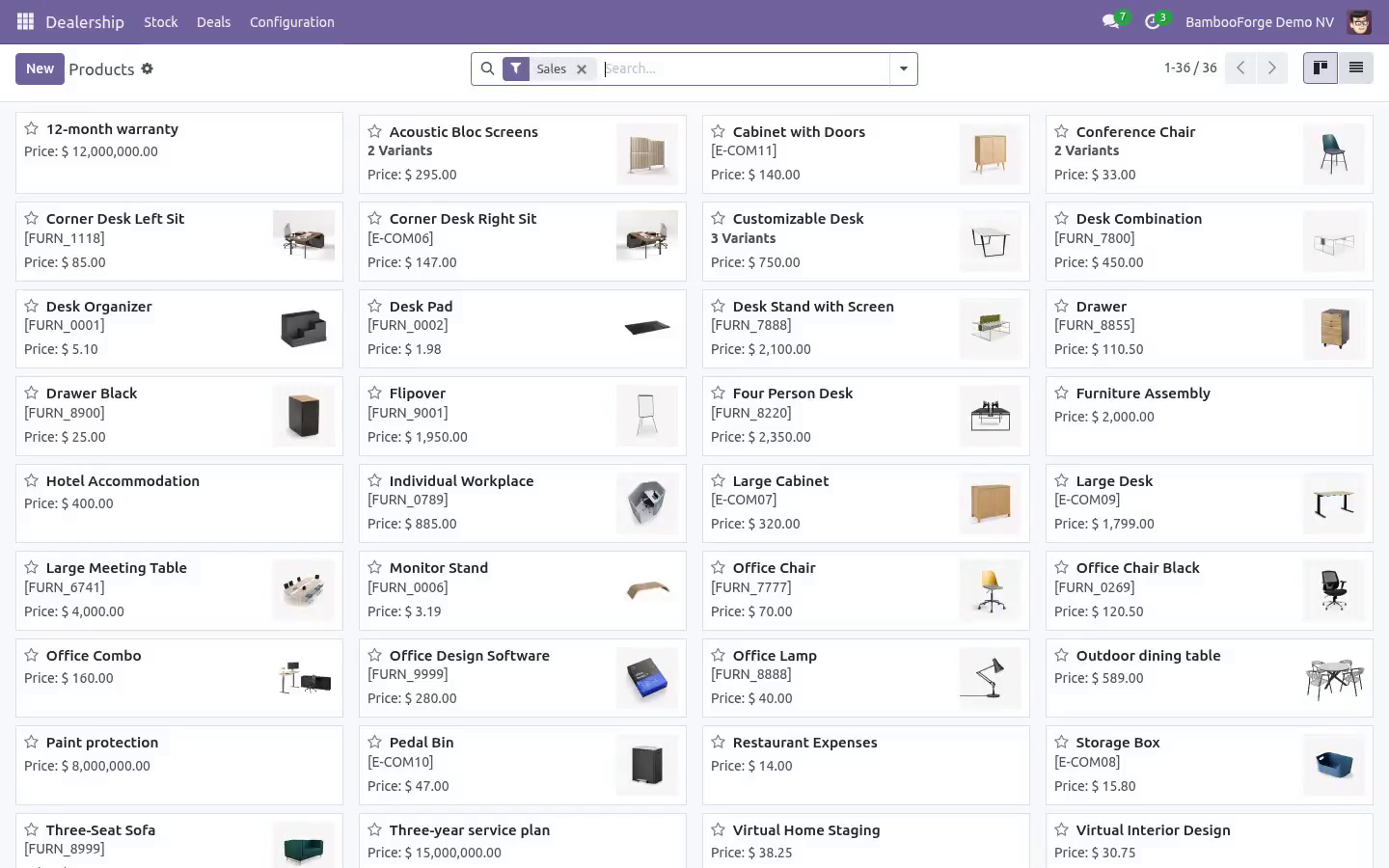
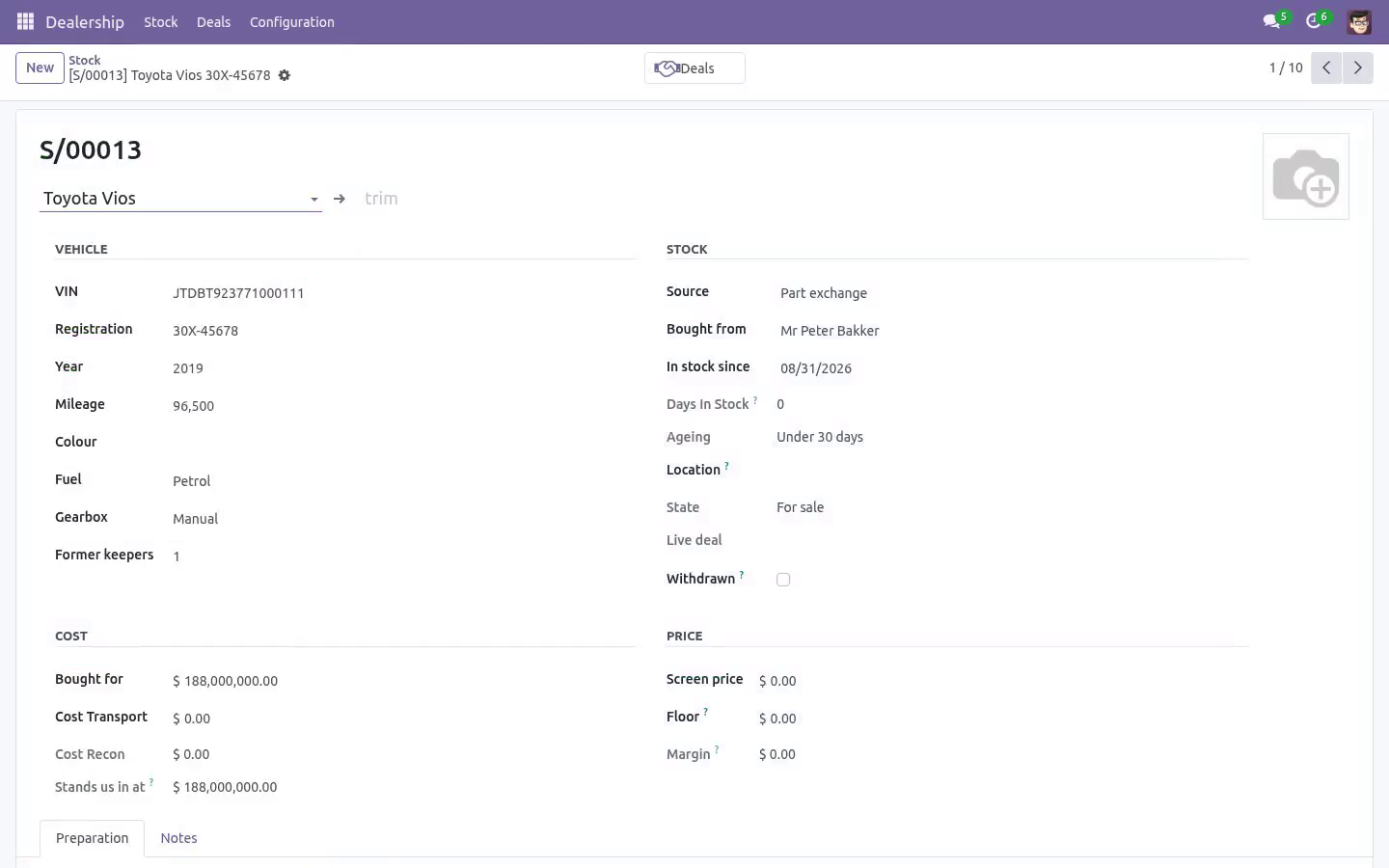
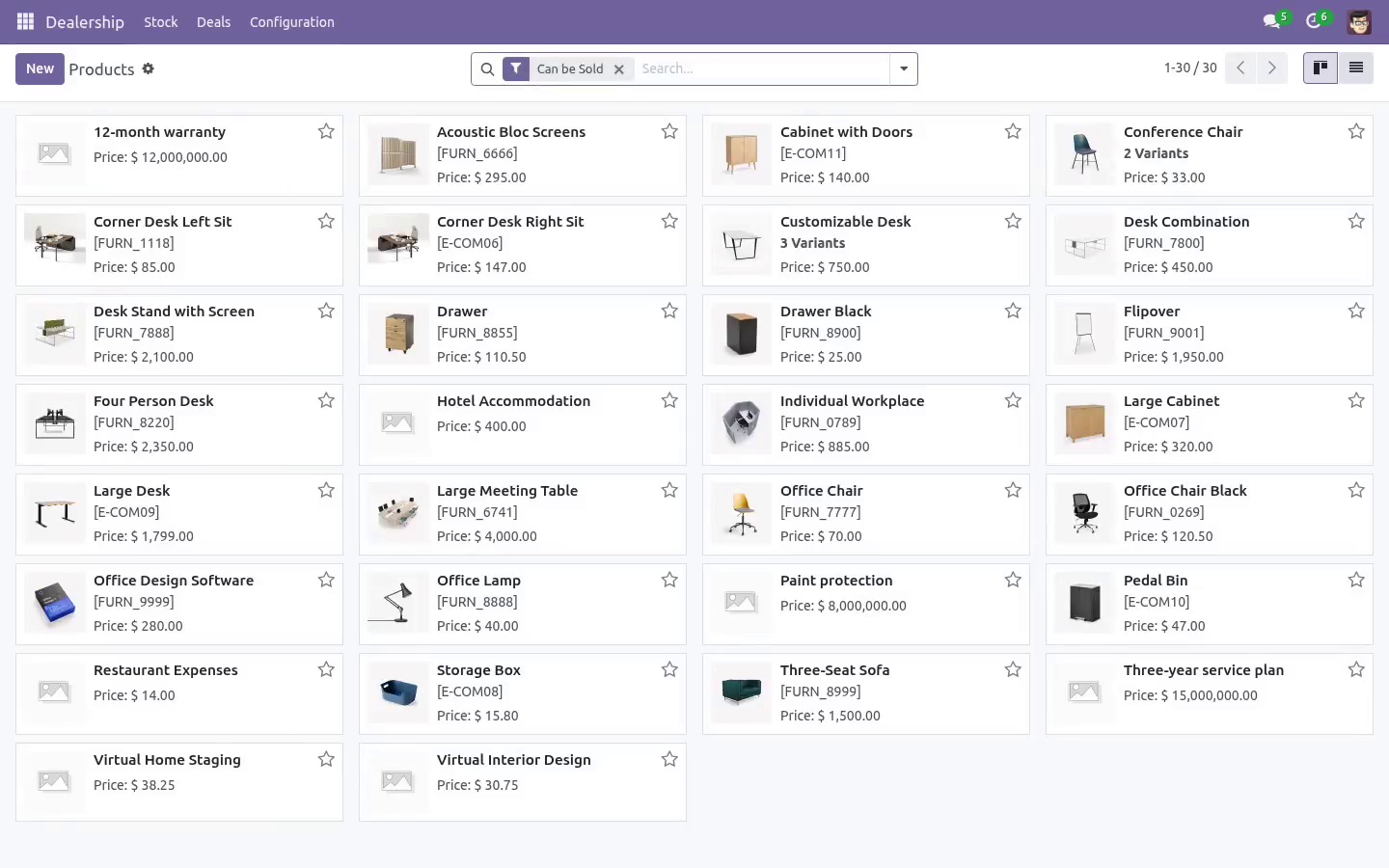
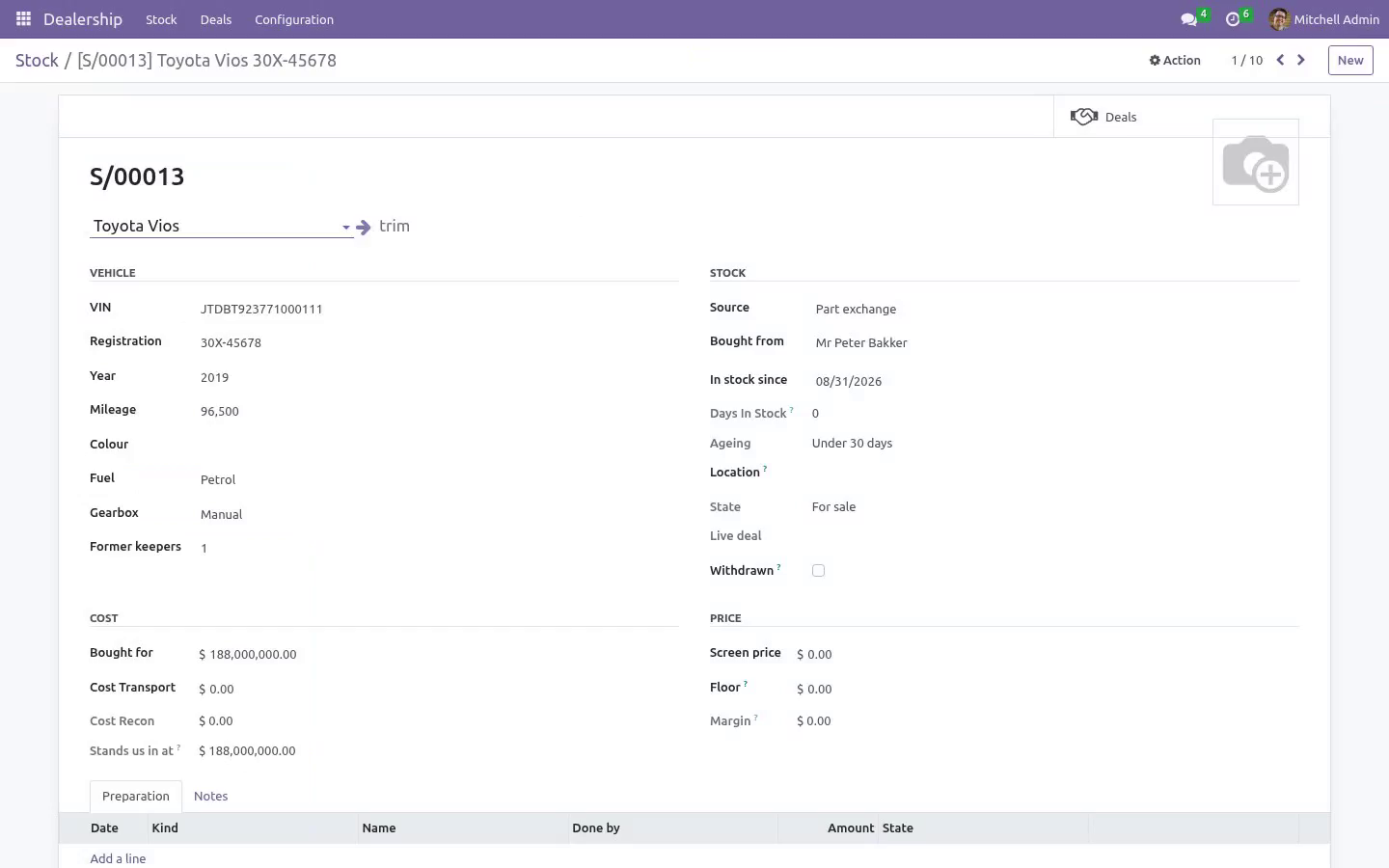
For a single dealership - the forecourt, not a dealer network. Built around the two numbers a used-car business lives on: what a unit stands you in at, and how long it has been sitting there. Stock VIN, plate, model, year, mileage, colour, photo, and where on the site it actually is. Cars go missing on forecourts more often than anybody admits.
The cost is the buying price plus transport plus every preparation line. That total, not the buying price, is what a deal is judged against. A preparation line that has been paid is not rewritten once the car is sold. A late bill goes on as its own line, and it moves the unit's cost without moving the gross of a deal that is already done.
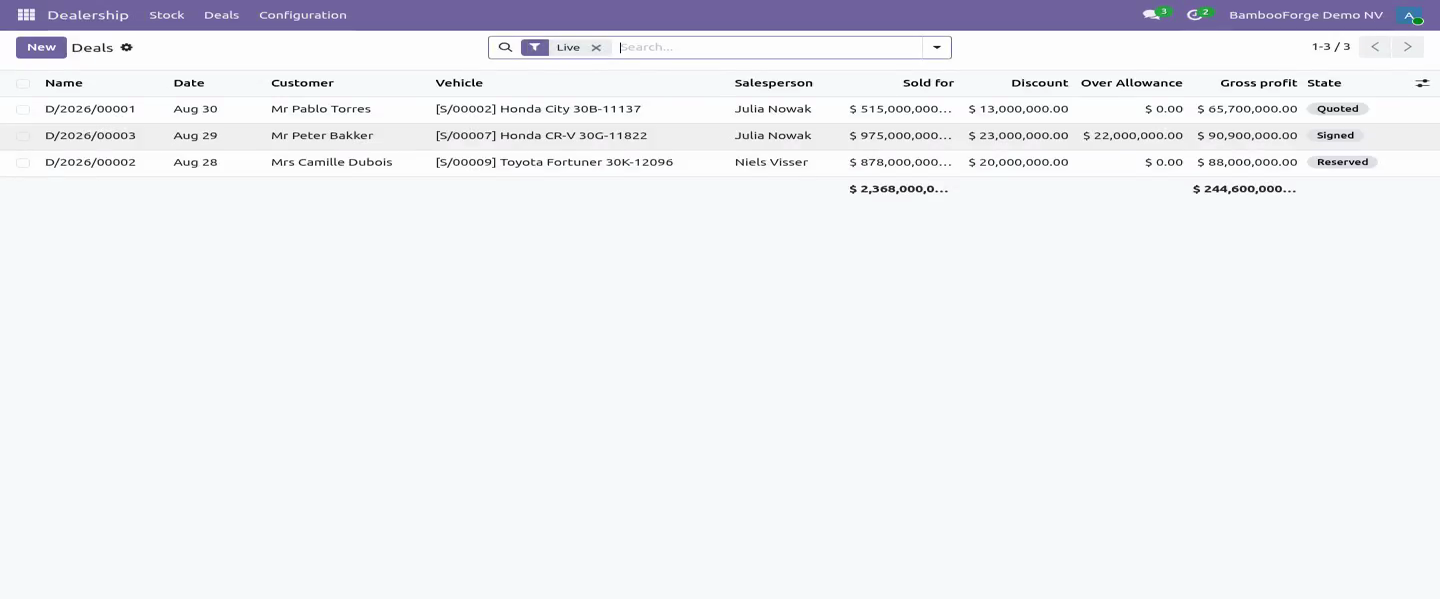
A salesperson may say where a car is, what the odometer reads and what it needs. What it cost, what it is priced at and when it came in belong to the manager who bought it - field by field, not just on the screen. The deal. The gross is shown after the three ways money quietly leaves, and before the one that comes back: A part exchange is taken into stock at what it is really worth, as its own unit, through a short form that asks what the customer's car actually is.
Only a manager puts the value on it; taking the car in and signing the deal are both refused while an allowance has been promised for a car nobody has appraised. What a deal was signed on stops moving. Price, allowance, car, customer and extras are locked at signature; a manager who needs to change one reopens the deal in the open and signs it again. A live deal is lost, not deleted.
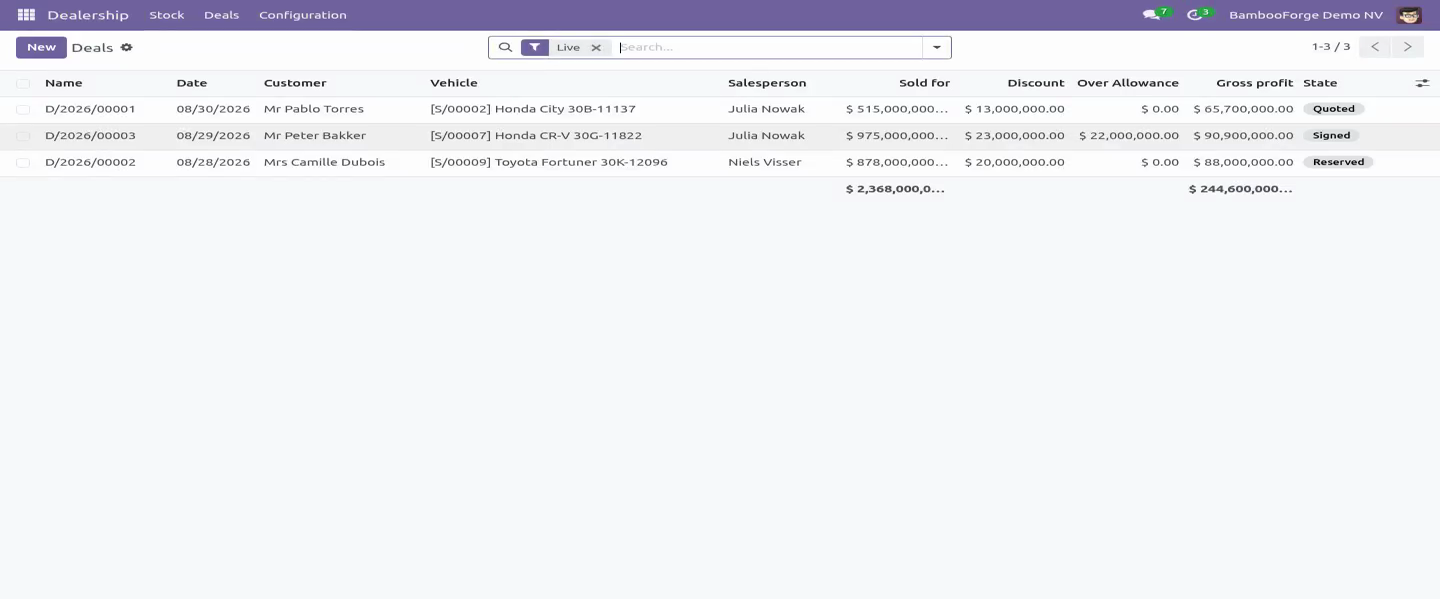
The gross is frozen at signature on what the car stood us in at that day, so a bill that turns up a fortnight later moves the unit's cost without rewriting a month that has already been reported. One car, one live deal - held by a unique index as well as by the check, because two salespeople in two tabs on a Saturday is exactly when the check is too late. 1. the discount off the screen price; 2.
the over-allowance on the part exchange - what was allowed for the customer's car less what it is really worth; 3. the cost of the extras, so a warranty sold at cost shows as the favour it is - and the cost comes off the product on the server, so an extra added by a salesperson who cannot see costs still carries one; 4. plus the finance commission, because a car sold on finance makes more than the same car sold for cash. Delivery.
Cars leave against paperwork: delivery is refused until a posted invoice exists that has not been credited - a reversed invoice is no paperwork, and it lets the deal be invoiced again. Invoicing and handing the car over are the manager's, on the server and not only on the screen. The invoice carries the part exchange as a negative line, so the customer reads one figure rather than two documents, the extras sit on it with their own tax, and the vehicle line is raised on a product chosen once in the settings, so it has a tax and an income account like every other line in the ledger. A lost deal gives the customer their car back: the part exchange comes off the forecourt with it.
Roles. A salesperson quotes, reserves and signs within the floor, takes a part exchange in, and sees the screen price but never the cost, the floor, the over-allowance or the gross - all of them are field-level rules, and none of the figures appear in a chatter note either. A sales manager buys stock, sets the floor, values a part exchange, signs off deals below it, reopens a signed deal, settles a deposit after signature, invoices, hands the car over, and sees every number. Every one of those is checked on the server.
A hidden button is not a rule. Community only. Depends on product and account - both Community. Tested on 16.0, 17.0, 18.0 and 19.0.
How we make sure it works. Before every release, 60 automated checks run against this app on Odoo 16, 17, 18, 19 and 20. Among them: A deal with a deposit held cannot simply be lost. A quote can be deleted a delivered deal cannot.
A car does not leave without paperwork. A credit note stays on the deal. Recon cannot be rewritten after the sale. The complete list is in the source you receive.
Questions people ask. Which Odoo versions does it run on? Odoo 16.0, 17.0, 18.0, 19.0, 20.0, on the series you buy it for; each series is its own listing. Community or Enterprise?
Both. It needs no Enterprise app. The complete manual is at docs dot bambooforge dot dev, the demo database is linked from the store page, and support answers within twenty-four hours. Links are in the description.
Transcript of the walkthrough (Odoo 19)
Car Dealership Management. Used-car dealership stock with true cost per unit, days-in-stock ageing, and a deal that shows gross after discount, over-allowance and recon. 1. the discount off the screen price; 2.
the over-allowance on the part exchange - what was allowed for the customer's car less what it is really worth; 3. the cost of the extras, so a warranty sold at cost shows as the favour it is - and the cost comes off the product on the server, so an extra added by a salesperson who cannot see costs still carries one; 4. plus the finance commission, because a car sold on finance makes more than the same car sold for cash. In the next few minutes: car dealership management, then stock, then the deal, then delivery, then roles.
Then what this app deliberately does not do, so you can tell before you buy whether it fits. Everything lives under Dealership then Stock then Deals then Configuration. Car Dealership Management. For a single dealership - the forecourt, not a dealer network.
Built around the two numbers a used-car business lives on: what a unit stands you in at, and how long it has been sitting there. Stock VIN, plate, model, year, mileage, colour, photo, and where on the site it actually is. Cars go missing on forecourts more often than anybody admits. The cost is the buying price plus transport plus every preparation line.
That total, not the buying price, is what a deal is judged against. A preparation line that has been paid is not rewritten once the car is sold. A late bill goes on as its own line, and it moves the unit's cost without moving the gross of a deal that is already done. A salesperson may say where a car is, what the odometer reads and what it needs.
What it cost, what it is priced at and when it came in belong to the manager who bought it - field by field, not just on the screen. The deal. The gross is shown after the three ways money quietly leaves, and before the one that comes back: A part exchange is taken into stock at what it is really worth, as its own unit, through a short form that asks what the customer's car actually is. Only a manager puts the value on it; taking the car in and signing the deal are both refused while an allowance has been promised for a car nobody has appraised.
What a deal was signed on stops moving. Price, allowance, car, customer and extras are locked at signature; a manager who needs to change one reopens the deal in the open and signs it again. A live deal is lost, not deleted. The gross is frozen at signature on what the car stood us in at that day, so a bill that turns up a fortnight later moves the unit's cost without rewriting a month that has already been reported.
One car, one live deal - held by a unique index as well as by the check, because two salespeople in two tabs on a Saturday is exactly when the check is too late. 1. the discount off the screen price; 2. the over-allowance on the part exchange - what was allowed for the customer's car less what it is really worth; 3.
the cost of the extras, so a warranty sold at cost shows as the favour it is - and the cost comes off the product on the server, so an extra added by a salesperson who cannot see costs still carries one; 4. plus the finance commission, because a car sold on finance makes more than the same car sold for cash. Delivery. Cars leave against paperwork: delivery is refused until a posted invoice exists that has not been credited - a reversed invoice is no paperwork, and it lets the deal be invoiced again.
Invoicing and handing the car over are the manager's, on the server and not only on the screen. The invoice carries the part exchange as a negative line, so the customer reads one figure rather than two documents, the extras sit on it with their own tax, and the vehicle line is raised on a product chosen once in the settings, so it has a tax and an income account like every other line in the ledger. A lost deal gives the customer their car back: the part exchange comes off the forecourt with it. Roles.
A salesperson quotes, reserves and signs within the floor, takes a part exchange in, and sees the screen price but never the cost, the floor, the over-allowance or the gross - all of them are field-level rules, and none of the figures appear in a chatter note either. A sales manager buys stock, sets the floor, values a part exchange, signs off deals below it, reopens a signed deal, settles a deposit after signature, invoices, hands the car over, and sees every number. Every one of those is checked on the server. A hidden button is not a rule.
Community only. Depends on product and account - both Community. Tested on 16.0, 17.0, 18.0 and 19.0. The complete manual is at docs dot bambooforge dot dev, the demo database is linked from the store page, and support answers within twenty-four hours.
Links are in the description.
Transcript of the walkthrough (Odoo 18)
Car Dealership Management. Used-car dealership stock with true cost per unit, days-in-stock ageing, and a deal that shows gross after discount, over-allowance and recon. 1. the discount off the screen price; 2.
the over-allowance on the part exchange - what was allowed for the customer's car less what it is really worth; 3. the cost of the extras, so a warranty sold at cost shows as the favour it is - and the cost comes off the product on the server, so an extra added by a salesperson who cannot see costs still carries one; 4. plus the finance commission, because a car sold on finance makes more than the same car sold for cash. In the next few minutes: car dealership management, then stock, then the deal, then delivery, then roles.
Then what this app deliberately does not do, so you can tell before you buy whether it fits. Everything lives under Dealership then Stock then Deals then Configuration. Car Dealership Management. For a single dealership - the forecourt, not a dealer network.
Built around the two numbers a used-car business lives on: what a unit stands you in at, and how long it has been sitting there. Stock VIN, plate, model, year, mileage, colour, photo, and where on the site it actually is. Cars go missing on forecourts more often than anybody admits. The cost is the buying price plus transport plus every preparation line.
That total, not the buying price, is what a deal is judged against. A preparation line that has been paid is not rewritten once the car is sold. A late bill goes on as its own line, and it moves the unit's cost without moving the gross of a deal that is already done. A salesperson may say where a car is, what the odometer reads and what it needs.
What it cost, what it is priced at and when it came in belong to the manager who bought it - field by field, not just on the screen. The deal. The gross is shown after the three ways money quietly leaves, and before the one that comes back: A part exchange is taken into stock at what it is really worth, as its own unit, through a short form that asks what the customer's car actually is. Only a manager puts the value on it; taking the car in and signing the deal are both refused while an allowance has been promised for a car nobody has appraised.
What a deal was signed on stops moving. Price, allowance, car, customer and extras are locked at signature; a manager who needs to change one reopens the deal in the open and signs it again. A live deal is lost, not deleted. The gross is frozen at signature on what the car stood us in at that day, so a bill that turns up a fortnight later moves the unit's cost without rewriting a month that has already been reported.
One car, one live deal - held by a unique index as well as by the check, because two salespeople in two tabs on a Saturday is exactly when the check is too late. 1. the discount off the screen price; 2. the over-allowance on the part exchange - what was allowed for the customer's car less what it is really worth; 3.
the cost of the extras, so a warranty sold at cost shows as the favour it is - and the cost comes off the product on the server, so an extra added by a salesperson who cannot see costs still carries one; 4. plus the finance commission, because a car sold on finance makes more than the same car sold for cash. Delivery. Cars leave against paperwork: delivery is refused until a posted invoice exists that has not been credited - a reversed invoice is no paperwork, and it lets the deal be invoiced again.
Invoicing and handing the car over are the manager's, on the server and not only on the screen. The invoice carries the part exchange as a negative line, so the customer reads one figure rather than two documents, the extras sit on it with their own tax, and the vehicle line is raised on a product chosen once in the settings, so it has a tax and an income account like every other line in the ledger. A lost deal gives the customer their car back: the part exchange comes off the forecourt with it. Roles.
A salesperson quotes, reserves and signs within the floor, takes a part exchange in, and sees the screen price but never the cost, the floor, the over-allowance or the gross - all of them are field-level rules, and none of the figures appear in a chatter note either. A sales manager buys stock, sets the floor, values a part exchange, signs off deals below it, reopens a signed deal, settles a deposit after signature, invoices, hands the car over, and sees every number. Every one of those is checked on the server. A hidden button is not a rule.
Community only. Depends on product and account - both Community. Tested on 16.0, 17.0, 18.0 and 19.0. The complete manual is at docs dot bambooforge dot dev, the demo database is linked from the store page, and support answers within twenty-four hours.
Links are in the description.
Transcript of the walkthrough (Odoo 17)
Car Dealership Management. Used-car dealership stock with true cost per unit, days-in-stock ageing, and a deal that shows gross after discount, over-allowance and recon. 1. the discount off the screen price; 2.
the over-allowance on the part exchange - what was allowed for the customer's car less what it is really worth; 3. the cost of the extras, so a warranty sold at cost shows as the favour it is - and the cost comes off the product on the server, so an extra added by a salesperson who cannot see costs still carries one; 4. plus the finance commission, because a car sold on finance makes more than the same car sold for cash. In the next few minutes: car dealership management, then stock, then the deal, then delivery, then roles.
Then what this app deliberately does not do, so you can tell before you buy whether it fits. Everything lives under Dealership then Stock then Deals then Configuration. Car Dealership Management. For a single dealership - the forecourt, not a dealer network.
Built around the two numbers a used-car business lives on: what a unit stands you in at, and how long it has been sitting there. Stock VIN, plate, model, year, mileage, colour, photo, and where on the site it actually is. Cars go missing on forecourts more often than anybody admits. The cost is the buying price plus transport plus every preparation line.
That total, not the buying price, is what a deal is judged against. A preparation line that has been paid is not rewritten once the car is sold. A late bill goes on as its own line, and it moves the unit's cost without moving the gross of a deal that is already done. A salesperson may say where a car is, what the odometer reads and what it needs.
What it cost, what it is priced at and when it came in belong to the manager who bought it - field by field, not just on the screen. The deal. The gross is shown after the three ways money quietly leaves, and before the one that comes back: A part exchange is taken into stock at what it is really worth, as its own unit, through a short form that asks what the customer's car actually is. Only a manager puts the value on it; taking the car in and signing the deal are both refused while an allowance has been promised for a car nobody has appraised.
What a deal was signed on stops moving. Price, allowance, car, customer and extras are locked at signature; a manager who needs to change one reopens the deal in the open and signs it again. A live deal is lost, not deleted. The gross is frozen at signature on what the car stood us in at that day, so a bill that turns up a fortnight later moves the unit's cost without rewriting a month that has already been reported.
One car, one live deal - held by a unique index as well as by the check, because two salespeople in two tabs on a Saturday is exactly when the check is too late. 1. the discount off the screen price; 2. the over-allowance on the part exchange - what was allowed for the customer's car less what it is really worth; 3.
the cost of the extras, so a warranty sold at cost shows as the favour it is - and the cost comes off the product on the server, so an extra added by a salesperson who cannot see costs still carries one; 4. plus the finance commission, because a car sold on finance makes more than the same car sold for cash. Delivery. Cars leave against paperwork: delivery is refused until a posted invoice exists that has not been credited - a reversed invoice is no paperwork, and it lets the deal be invoiced again.
Invoicing and handing the car over are the manager's, on the server and not only on the screen. The invoice carries the part exchange as a negative line, so the customer reads one figure rather than two documents, the extras sit on it with their own tax, and the vehicle line is raised on a product chosen once in the settings, so it has a tax and an income account like every other line in the ledger. A lost deal gives the customer their car back: the part exchange comes off the forecourt with it. Roles.
A salesperson quotes, reserves and signs within the floor, takes a part exchange in, and sees the screen price but never the cost, the floor, the over-allowance or the gross - all of them are field-level rules, and none of the figures appear in a chatter note either. A sales manager buys stock, sets the floor, values a part exchange, signs off deals below it, reopens a signed deal, settles a deposit after signature, invoices, hands the car over, and sees every number. Every one of those is checked on the server. A hidden button is not a rule.
Community only. Depends on product and account - both Community. Tested on 16.0, 17.0, 18.0 and 19.0. The complete manual is at docs dot bambooforge dot dev, the demo database is linked from the store page, and support answers within twenty-four hours.
Links are in the description.
Transcript of the walkthrough (Odoo 16)
Car Dealership Management. Used-car dealership stock with true cost per unit, days-in-stock ageing, and a deal that shows gross after discount, over-allowance and recon. 1. the discount off the screen price; 2.
the over-allowance on the part exchange - what was allowed for the customer's car less what it is really worth; 3. the cost of the extras, so a warranty sold at cost shows as the favour it is - and the cost comes off the product on the server, so an extra added by a salesperson who cannot see costs still carries one; 4. plus the finance commission, because a car sold on finance makes more than the same car sold for cash. In the next few minutes: car dealership management, then stock, then the deal, then delivery, then roles.
Then what this app deliberately does not do, so you can tell before you buy whether it fits. Everything lives under Dealership then Stock then Deals then Configuration. Car Dealership Management. For a single dealership - the forecourt, not a dealer network.
Built around the two numbers a used-car business lives on: what a unit stands you in at, and how long it has been sitting there. Stock VIN, plate, model, year, mileage, colour, photo, and where on the site it actually is. Cars go missing on forecourts more often than anybody admits. The cost is the buying price plus transport plus every preparation line.
That total, not the buying price, is what a deal is judged against. A preparation line that has been paid is not rewritten once the car is sold. A late bill goes on as its own line, and it moves the unit's cost without moving the gross of a deal that is already done. A salesperson may say where a car is, what the odometer reads and what it needs.
What it cost, what it is priced at and when it came in belong to the manager who bought it - field by field, not just on the screen. The deal. The gross is shown after the three ways money quietly leaves, and before the one that comes back: A part exchange is taken into stock at what it is really worth, as its own unit, through a short form that asks what the customer's car actually is. Only a manager puts the value on it; taking the car in and signing the deal are both refused while an allowance has been promised for a car nobody has appraised.
What a deal was signed on stops moving. Price, allowance, car, customer and extras are locked at signature; a manager who needs to change one reopens the deal in the open and signs it again. A live deal is lost, not deleted. The gross is frozen at signature on what the car stood us in at that day, so a bill that turns up a fortnight later moves the unit's cost without rewriting a month that has already been reported.
One car, one live deal - held by a unique index as well as by the check, because two salespeople in two tabs on a Saturday is exactly when the check is too late. 1. the discount off the screen price; 2. the over-allowance on the part exchange - what was allowed for the customer's car less what it is really worth; 3.
the cost of the extras, so a warranty sold at cost shows as the favour it is - and the cost comes off the product on the server, so an extra added by a salesperson who cannot see costs still carries one; 4. plus the finance commission, because a car sold on finance makes more than the same car sold for cash. Delivery. Cars leave against paperwork: delivery is refused until a posted invoice exists that has not been credited - a reversed invoice is no paperwork, and it lets the deal be invoiced again.
Invoicing and handing the car over are the manager's, on the server and not only on the screen. The invoice carries the part exchange as a negative line, so the customer reads one figure rather than two documents, the extras sit on it with their own tax, and the vehicle line is raised on a product chosen once in the settings, so it has a tax and an income account like every other line in the ledger. A lost deal gives the customer their car back: the part exchange comes off the forecourt with it. Roles.
A salesperson quotes, reserves and signs within the floor, takes a part exchange in, and sees the screen price but never the cost, the floor, the over-allowance or the gross - all of them are field-level rules, and none of the figures appear in a chatter note either. A sales manager buys stock, sets the floor, values a part exchange, signs off deals below it, reopens a signed deal, settles a deposit after signature, invoices, hands the car over, and sees every number. Every one of those is checked on the server. A hidden button is not a rule.
Community only. Depends on product and account - both Community. Tested on 16.0, 17.0, 18.0 and 19.0. The complete manual is at docs dot bambooforge dot dev, the demo database is linked from the store page, and support answers within twenty-four hours.
Links are in the description.
Key facts
- What it is
- Used-car dealership stock with true cost per unit, days-in-stock ageing, and a deal that shows gross after discount, over-allowance and recon.
- For
- Industries
- Odoo versions
- 16.0, 17.0, 18.0, 19.0, 20.0 - Community and Enterprise
- Runs on
- Odoo.sh or Odoo you host yourself - not Odoo Online, which accepts no third-party apps
- Price
- 129 EUR, one-time, on the Odoo Apps Store
- Technical name
- bambooforge_car_dealership
- Not for
- Said before you buy, because it is the half that decides whether the app fits:; Run a dealer network: it is built for a single dealership's forecourt.; Rewrite a preparation line that has been paid once the car is sold.; Let a deal under the floor through without a manager's signed-off action.
- Manual last updated
- 2026-10-15
Car Dealership Management
For a single dealership - the forecourt, not a dealer network. Built around the two numbers a used-car business lives on: what a unit stands you in at, and how long it has been sitting there.
Stock
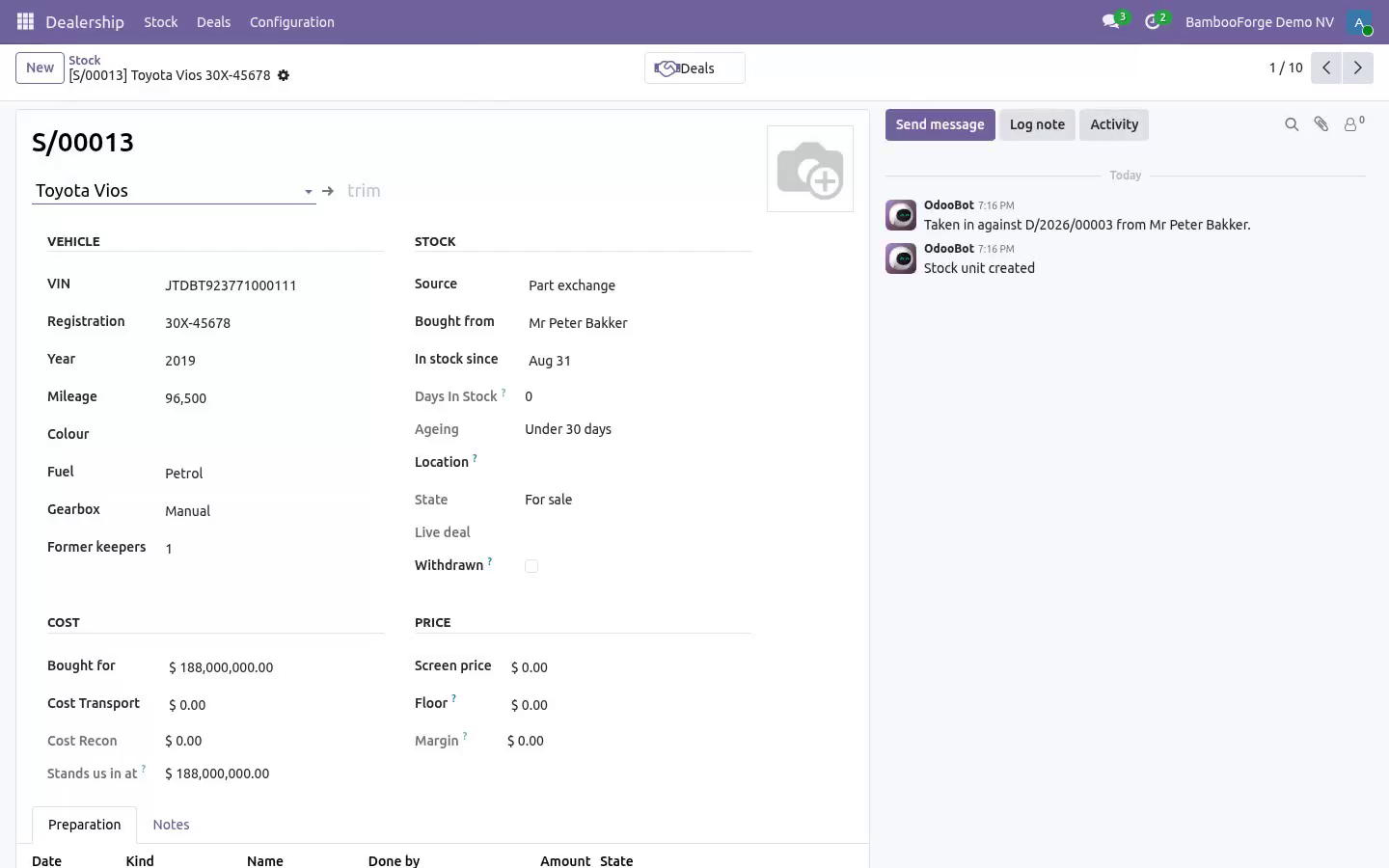
VIN, plate, model, year, mileage, colour, photo, and where on the site it actually is. Cars go missing on forecourts more often than anybody admits.
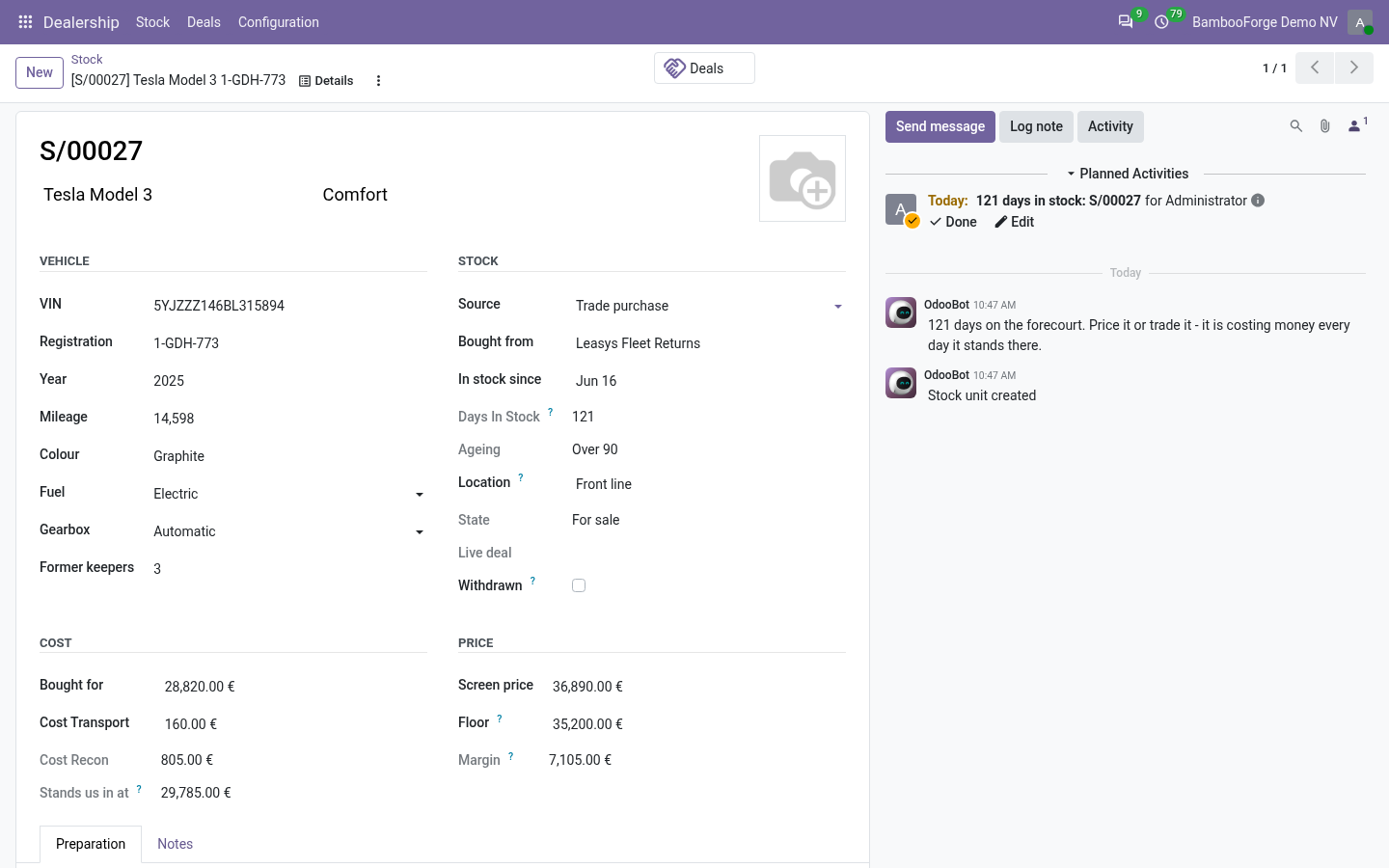
The cost is the buying price plus transport plus every preparation line. That total, not the buying price, is what a deal is judged against.
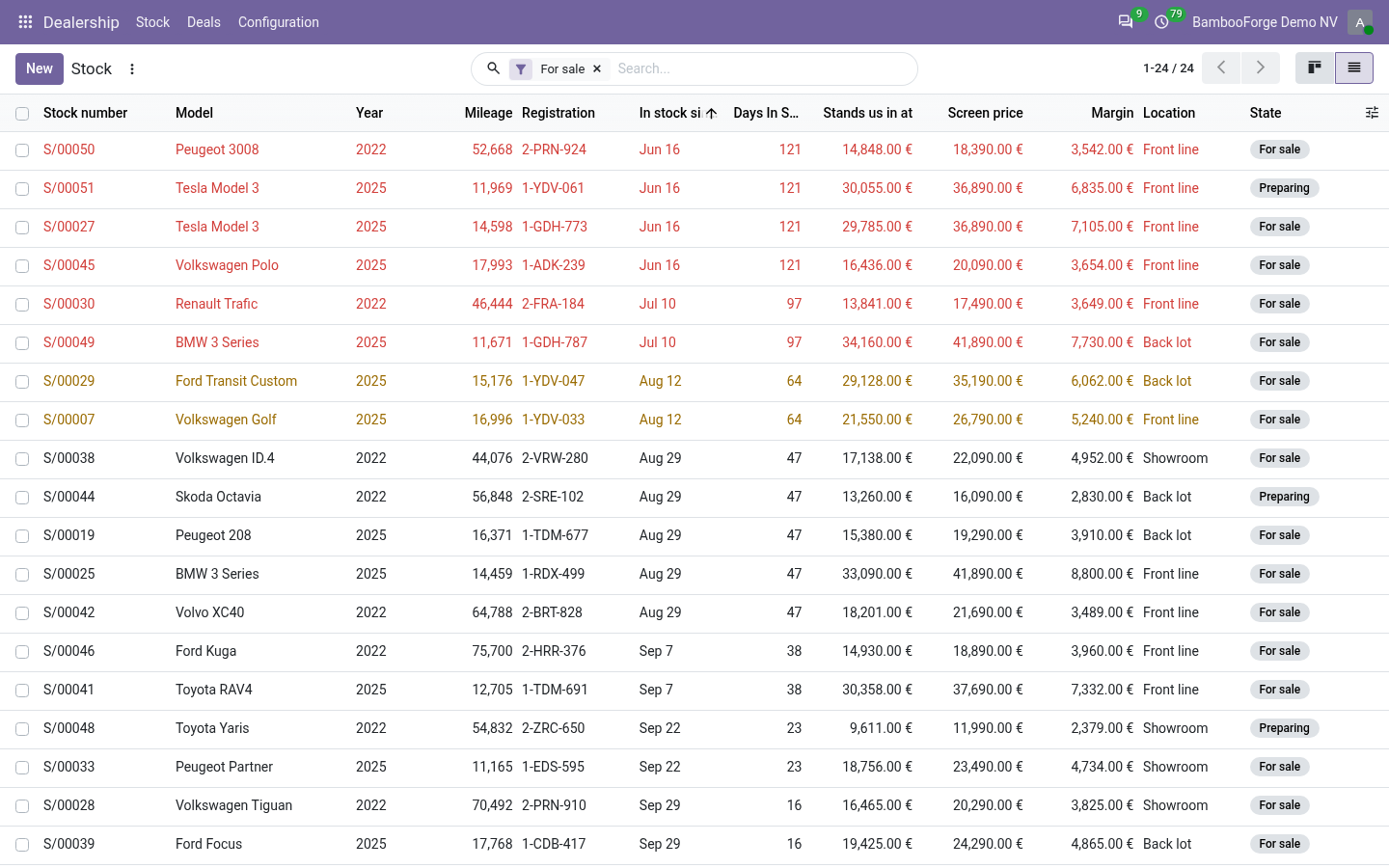
Days in stock is computed and banded: under 30, 30-60, 60-90, over 90 - coloured on the forecourt board. A scheduled job puts the ninety-day cars on the list of whoever bought them - never on OdooBot's, where nobody would ever see it - because they are the ones nobody mentions in the morning meeting. The note it leaves says how long the car has stood there and nothing about what it cost: everyone who can read the car can read its notes.
A preparation line that has been paid is not rewritten once the car is sold. A late bill goes on as its own line, and it moves the unit's cost without moving the gross of a deal that is already done.
A salesperson may say where a car is, what the odometer reads and what it needs. What it cost, what it is priced at and when it came in belong to the manager who bought it - field by field, not just on the screen.
The deal
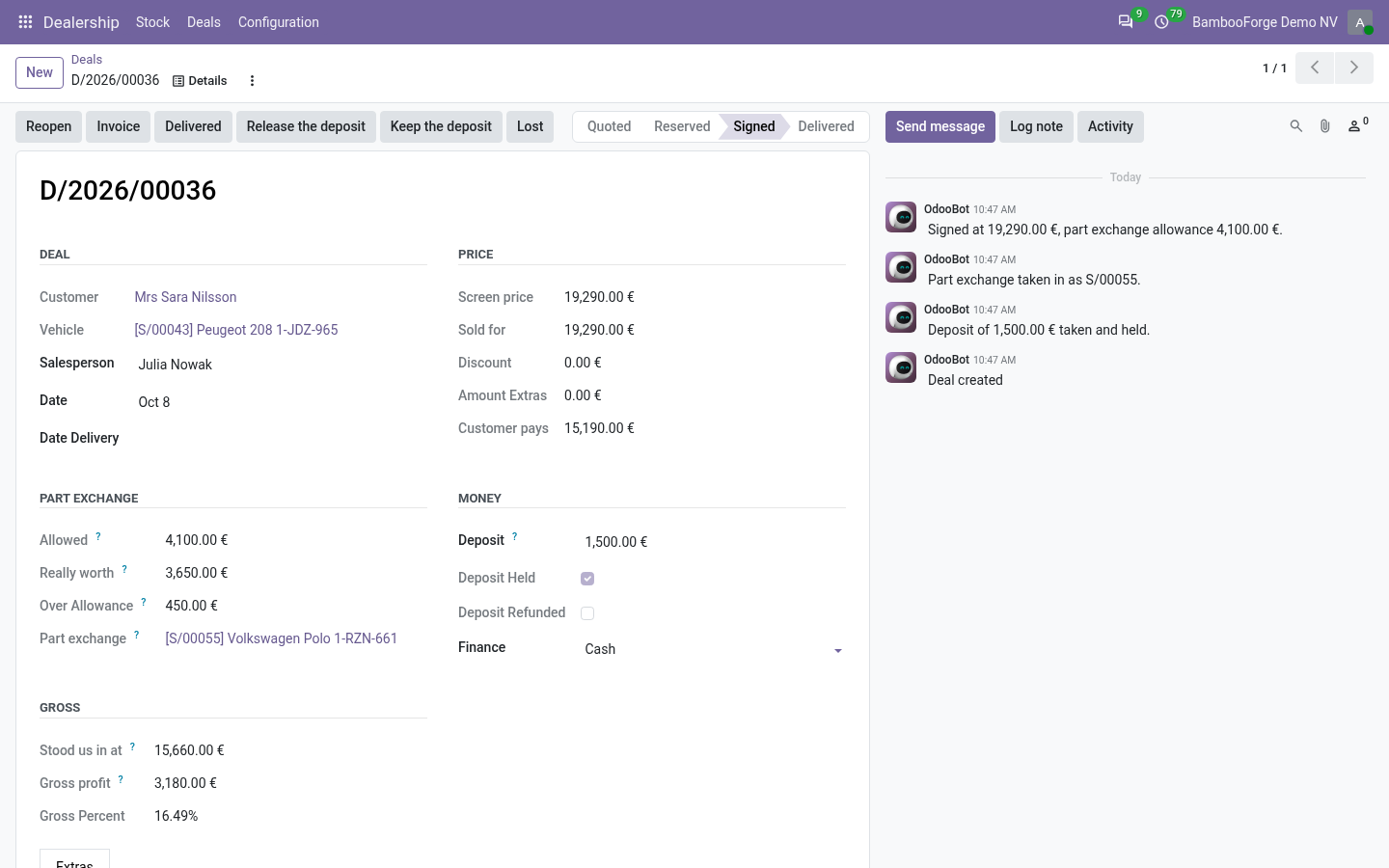
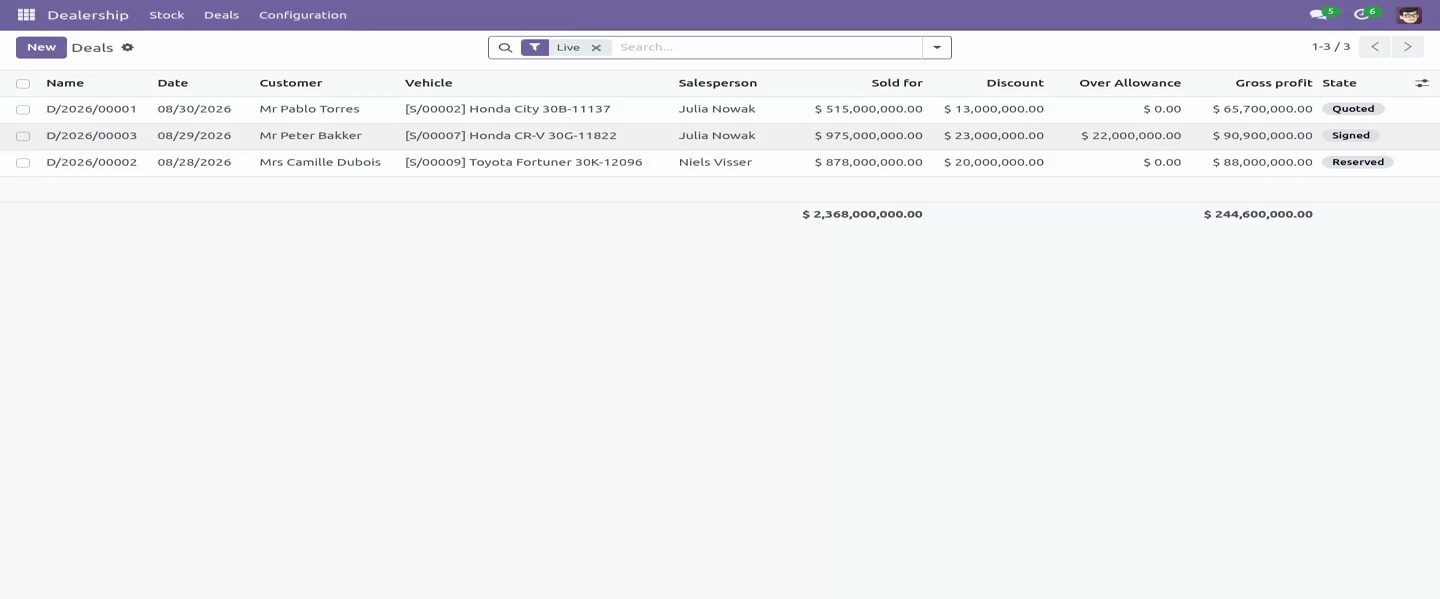
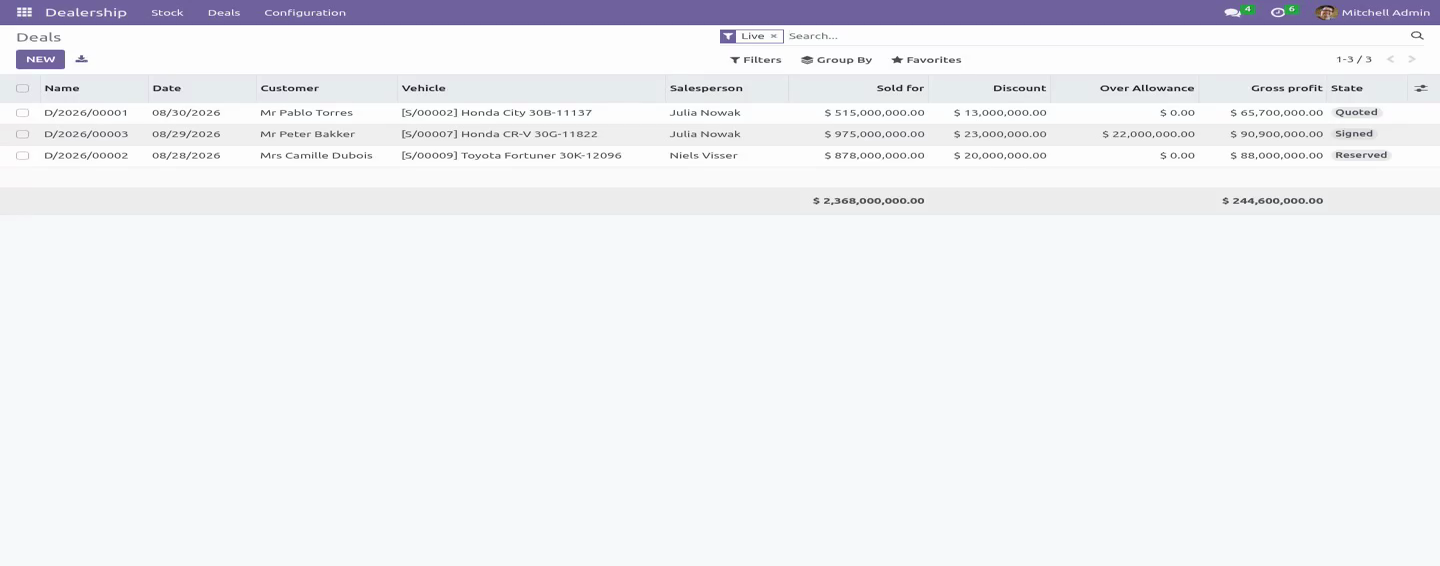
The gross is shown after the three ways money quietly leaves, and before the one that comes back:
the discount off the screen price;
the over-allowance on the part exchange - what was allowed for the customer's car less what it is really worth;
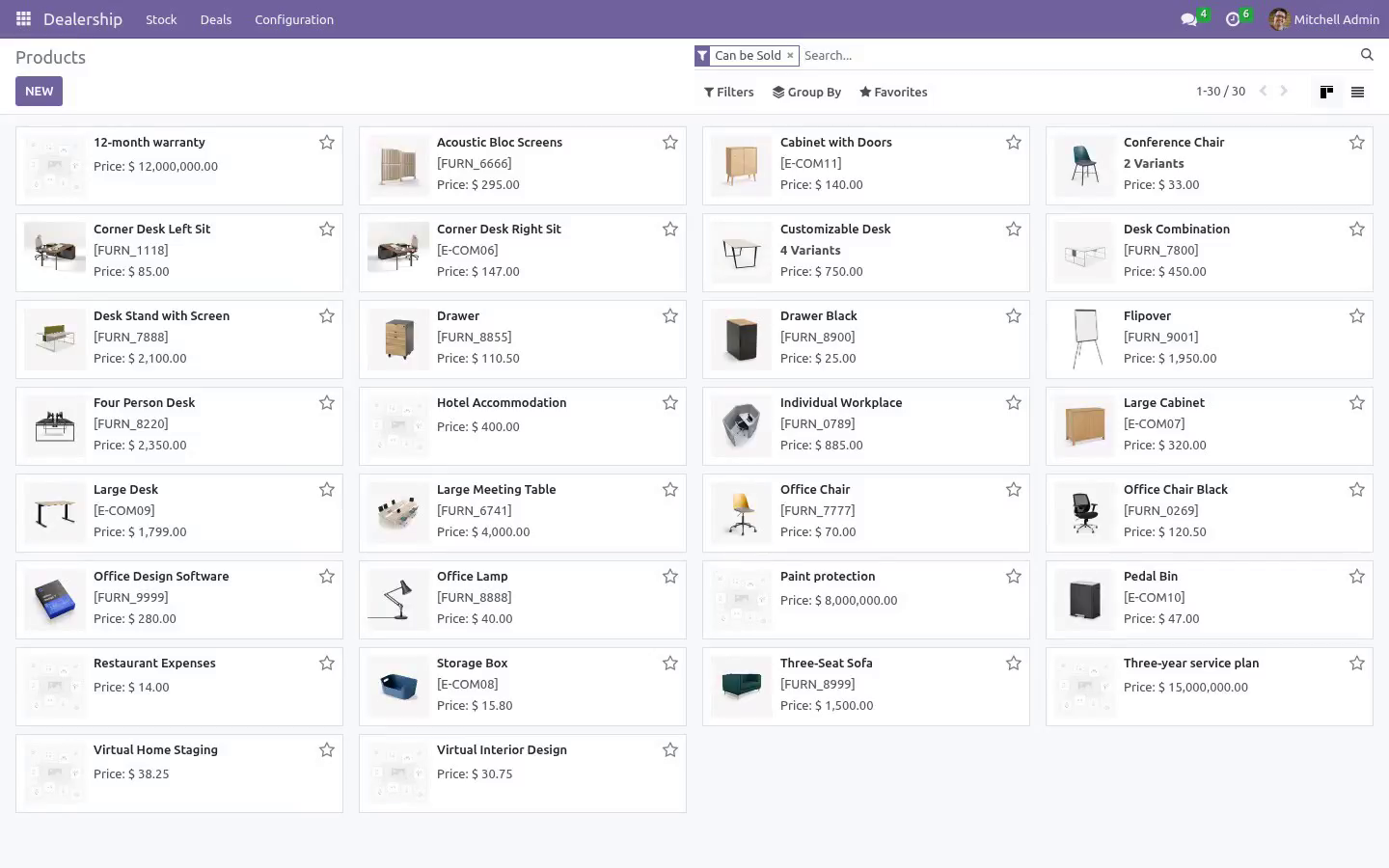
the cost of the extras, so a warranty sold at cost shows as the favour it is - and the cost comes off the product on the server, so an extra added by a salesperson who cannot see costs still carries one;
plus the finance commission, because a car sold on finance makes more than the same car sold for cash.
The floor price is enforced on the server, not in the button bar. A deal under it needs a sign below the floor action that refuses anyone but a manager - no context flag, no hidden button, and who signed it off goes on the record. The message deliberately does not name the figure, because a salesperson who knows the floor negotiates to it. The over-allowance counts against the floor: money given away on the trade-in is money off the car.
A part exchange is taken into stock at what it is really worth, as its own unit, through a short form that asks what the customer's car actually is. Only a manager puts the value on it; taking the car in and signing the deal are both refused while an allowance has been promised for a car nobody has appraised.
A deposit holds the car, and nothing else does: a deal cannot be reserved without one and it is refundable until signature. After signature it is part of the price, and a manager either keeps it or releases it - either way it is on the record, and either way the deal can then be lost. A signed deal that falls through is not left standing for ever with the car marked sold.
What a deal was signed on stops moving. Price, allowance, car, customer and extras are locked at signature; a manager who needs to change one reopens the deal in the open and signs it again. A live deal is lost, not deleted.
The gross is frozen at signature on what the car stood us in at that day, so a bill that turns up a fortnight later moves the unit's cost without rewriting a month that has already been reported.
One car, one live deal - held by a unique index as well as by the check, because two salespeople in two tabs on a Saturday is exactly when the check is too late.
Delivery
Cars leave against paperwork: delivery is refused until a posted invoice exists that has not been credited - a reversed invoice is no paperwork, and it lets the deal be invoiced again. Invoicing and handing the car over are the manager's, on the server and not only on the screen. The invoice carries the part exchange as a negative line, so the customer reads one figure rather than two documents, the extras sit on it with their own tax, and the vehicle line is raised on a product chosen once in the settings, so it has a tax and an income account like every other line in the ledger.
A lost deal gives the customer their car back: the part exchange comes off the forecourt with it.
Roles
A salesperson quotes, reserves and signs within the floor, takes a part exchange in, and sees the screen price but never the cost, the floor, the over-allowance or the gross - all of them are field-level rules, and none of the figures appear in a chatter note either. A sales manager buys stock, sets the floor, values a part exchange, signs off deals below it, reopens a signed deal, settles a deposit after signature, invoices, hands the car over, and sees every number.
Every one of those is checked on the server. A hidden button is not a rule.
Community only
Depends on product and account - both Community. Tested on 16.0, 17.0, 18.0, 19.0 and 20.0.
How we make sure it works
Before every release, 60 automated checks run against this app on Odoo 16, 17, 18, 19 and 20. Among them:
A deal with a deposit held cannot simply be lost.
A quote can be deleted a delivered deal cannot.
A car does not leave without paperwork.
A credit note stays on the deal.
Recon cannot be rewritten after the sale.
The complete list is in the source you receive.
What it does not do
Said before you buy, because it is the half that decides whether the app fits:
Run a dealer network: it is built for a single dealership's forecourt.
Rewrite a preparation line that has been paid once the car is sold.
Let a deal under the floor through without a manager's signed-off action.
Install
Copy bambooforge_car_dealership into your addons path and update the app list, or install the ZIP from the Odoo Apps Store.
Install Car Dealership Management.
Open Dealership - its menus are Stock, Deals, Configuration.
Questions people ask
- Which Odoo versions does it run on?
Odoo 16.0, 17.0, 18.0, 19.0, 20.0, on the series you buy it for; each series is its own listing.
- Community or Enterprise?
Both. It needs no Enterprise app.
- What does it need?
The standard Discuss, Invoicing, Products, Settings apps. No extra Python package.
- Where does it show up?
Under the Dealership menu (Stock, Deals, Configuration).
- Does anything leave my server?
No. It makes no call outside your Odoo server: no telemetry, no licence check, no third-party service.
- What happens if I uninstall it?
Odoo drops the app's own tables and fields; the standard records it worked on (contacts, orders, products) stay as they are.