 BambooForge Labs
Multi-branch Operations & Branch Reporting
Run several branches, shops or depots inside one company with their own document numbers, journals and reporting - no second company needed.
Available for Odoo 16.0, Odoo 17.0, Odoo 18.0, Odoo 19.0, Odoo 20.0. Technical name bambooforge_branch.
Transcript of the walkthrough (Odoo 20)
Multi-branch Operations & Branch Reporting. Run several branches, shops or depots inside one company with their own document numbers, journals and reporting - no second company needed. A company with four shops is still one company. One VAT number, one chart of accounts, one P&L for the tax office.
Odoo's answer to "run them separately" is to make them separate companies, and that answer costs four charts of accounts to keep in step, an inter-company sale every time stock moves between two of your own depots, consolidated reporting you have to build yourself, and a partner maintained four times. In the next few minutes: multi-branch operations & branch reporting, then the branch itself, then it goes on the documents that matter, then it propagates, then its own document numbers. Then what this app deliberately does not do, so you can tell before you buy whether it fits. Everything lives under Branches then By Branch then Configuration.
1. Copy bambooforge_branch into your addons path and update the app list, or install the ZIP from the Odoo Apps Store. 2. Install Multi-branch Operations & Branch Reporting.
3. Open Branches - its menus are By Branch, Configuration. Multi-branch Operations & Branch Reporting. A company with four shops is still one company.
One VAT number, one chart of accounts, one P&L for the tax office. Odoo's answer to "run them separately" is to make them separate companies, and that answer costs four charts of accounts to keep in step, an inter-company sale every time stock moves between two of your own depots, consolidated reporting you have to build yourself, and a partner maintained four times. This module adds a branch instead: a dimension that sits below the company and above the document. The branch itself.
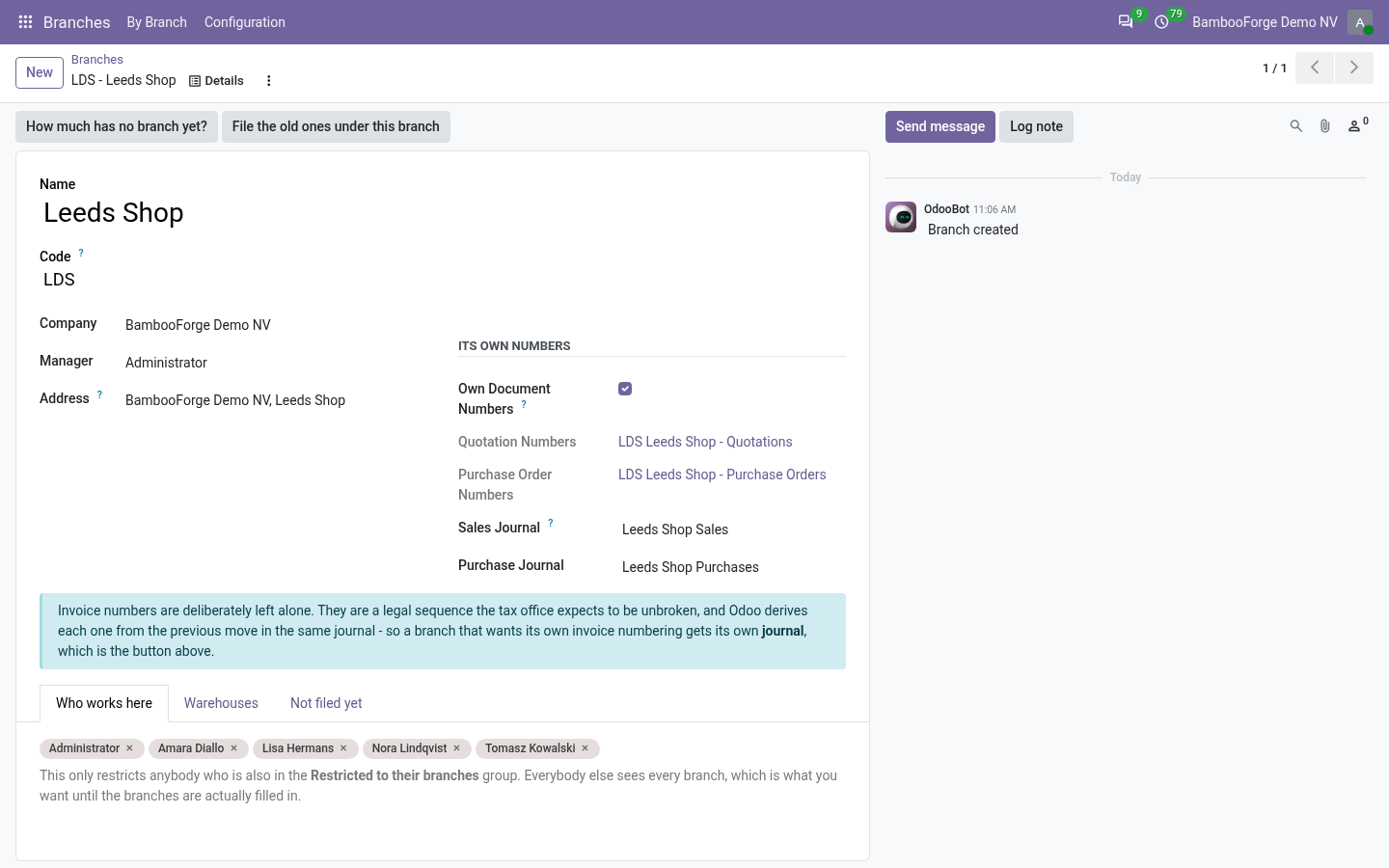
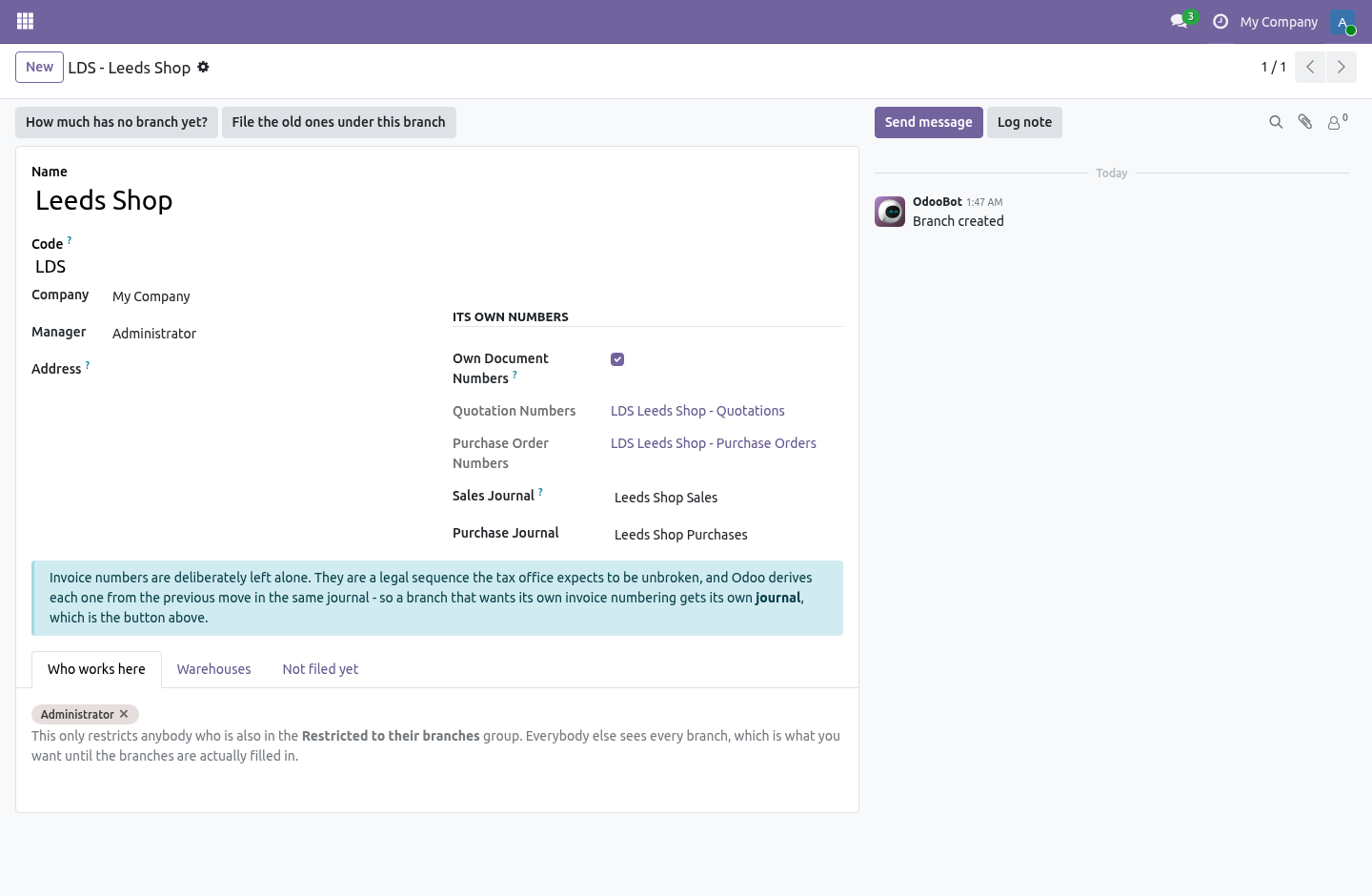
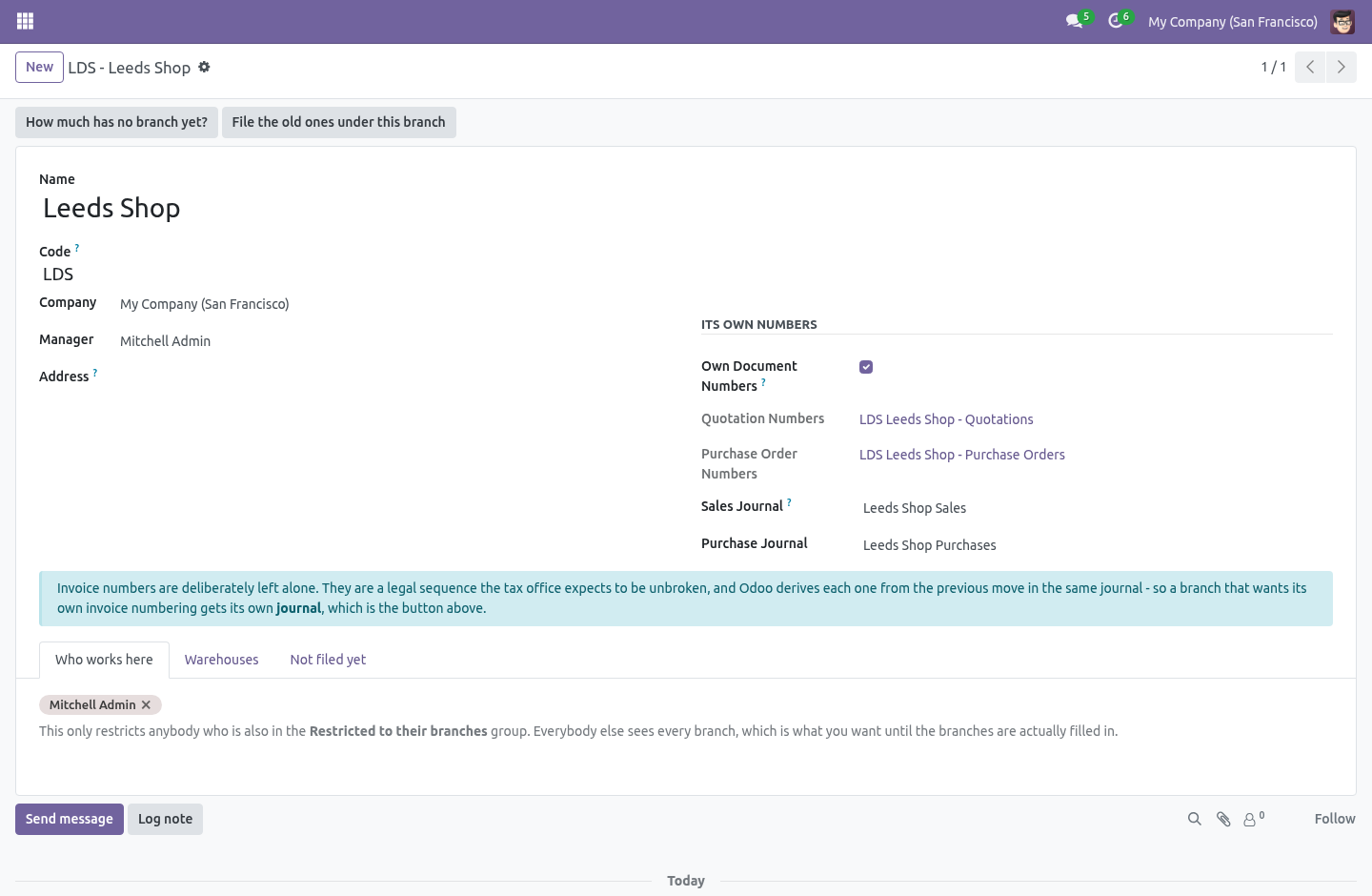
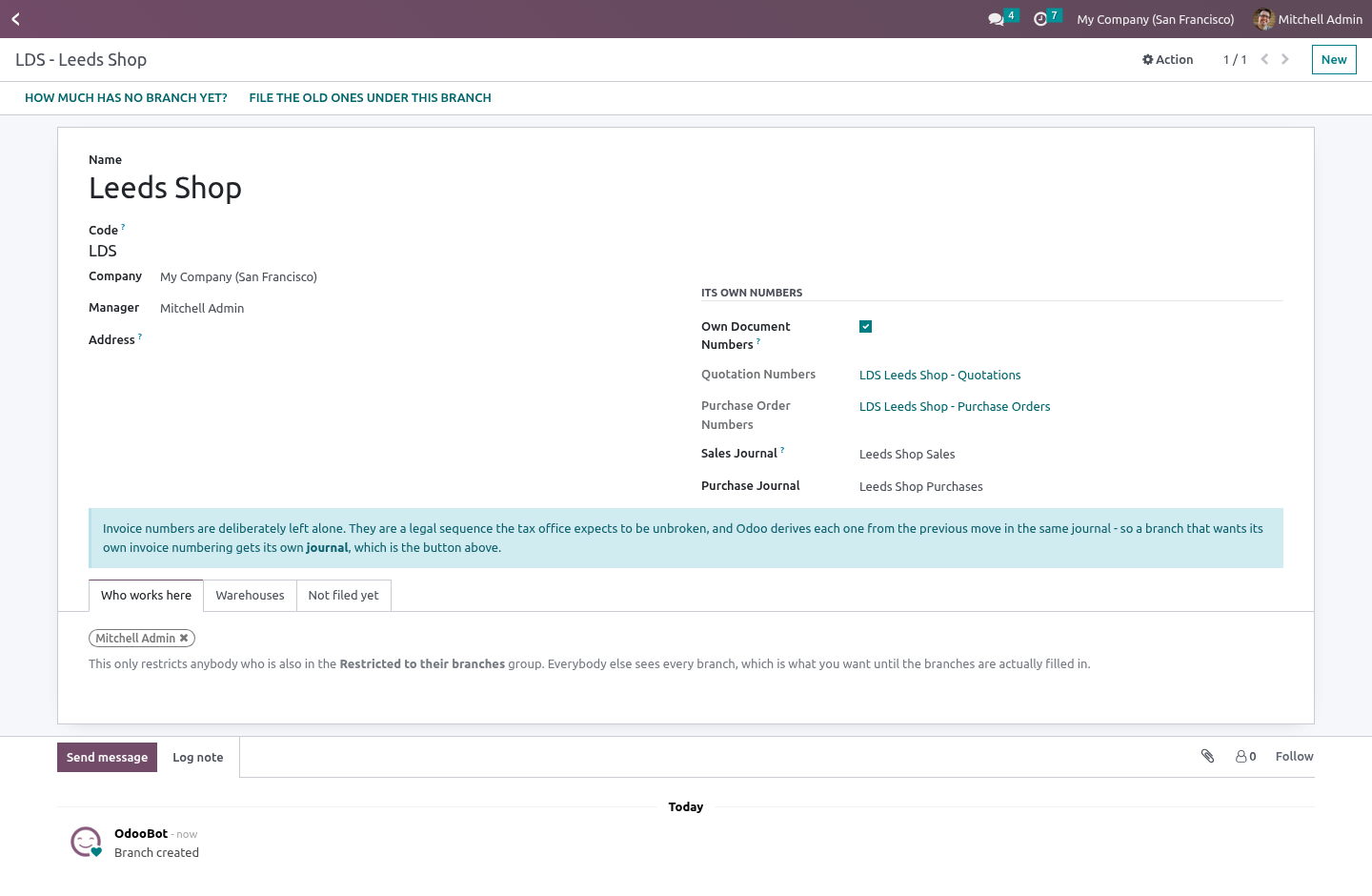
Branches › Configuration › Branches. A branch is a shop, a depot or an office. It has a name, a code, a company, an address that can go on its documents, a manager, and a list of who works there. Keep the code short and keep it stable: it is what goes into the document numbers, so LDS is a better answer than LEEDS-SHOP-01.
Two branches of one company cannot share a code, because the code is what tells their numbers apart. It goes on the documents that matter. Quotations and orders, purchase orders, invoices and bills, transfers. Also on warehouses, and on people.
A new document starts at your branch. If you work at exactly one, it is that one, without you ever opening your own user form — because somebody who has to pick their own branch on every quotation is somebody who leaves the field empty, and a dimension that is empty on half the database reports nothing at all. If you work at several, set a default on your user; if you work at none, documents start empty and stay visible to everybody. It propagates.
This is the part that decides whether a dimension gets filled in or not. The branch on a quotation reaches its invoice and its delivery. The branch on a purchase order reaches its bill and its receipt. A transfer that came from no order takes the branch of the warehouse it is happening in.
A branch somebody chose by hand is never overruled. The delivery is the interesting one. A procurement's values are not copied wholesale onto the stock move it creates — stock.rule._get_stock_move_values builds the move dictionary key by key — so this module tells the rule to carry the branch across, and the transfer that _assign_picking builds out of those moves inherits it from them. Its own document numbers.
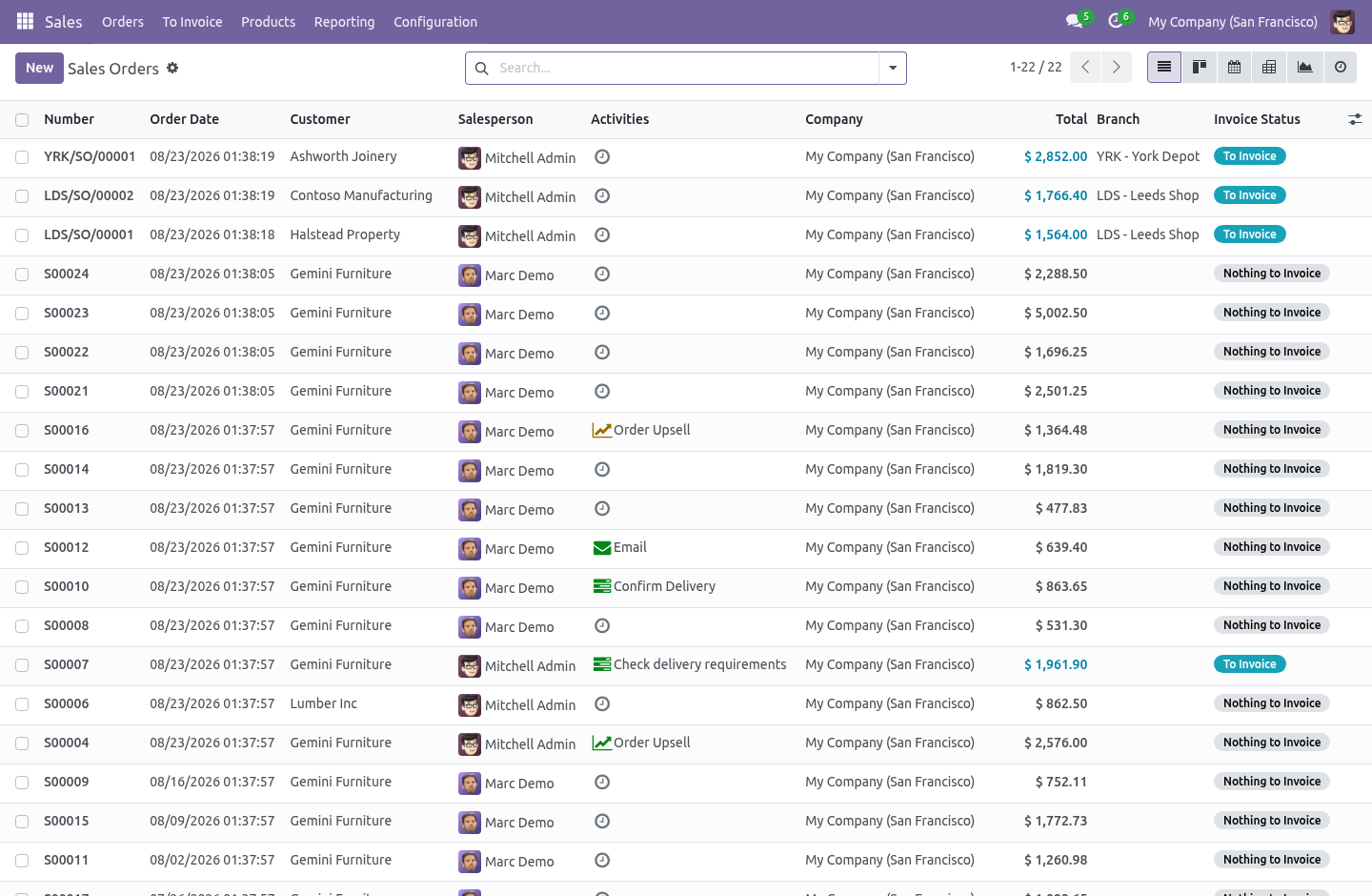
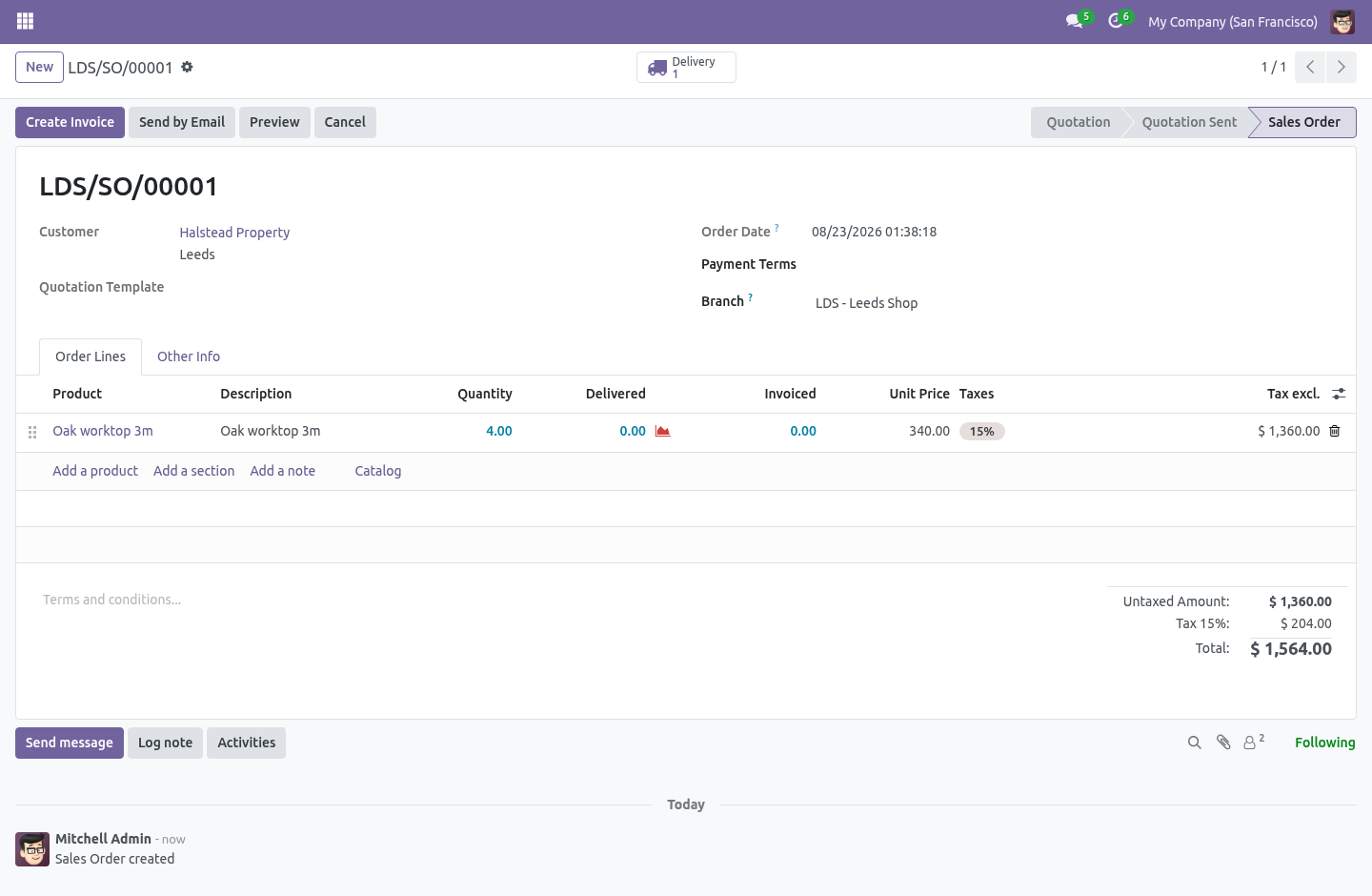
Tick Own Document Numbers on a branch and its quotations become LDS/SO/00042 instead of S00042, from a real ir.sequence belonging to that branch, so two shops never race for the same number. Purchase orders get the same treatment. A quotation that already carries a reference — a duplicate, or an import from somebody else's system — keeps it. Core only reaches for a sequence when the name is still New, and so does this.
Restriction is opt-in, and it never blinds anybody. Put somebody in Restricted to their branches and they see the documents of the branches they work at — plus everything that has no branch on it yet. That second half is not an oversight. A live database has years of documents with no branch on them.
A rule that hides those on the day it is switched on takes half the pipeline away from the person who was told this would help them, and the rollout gets rolled back before anybody assigns a single branch. Driving the unassigned half to zero. The Not filed yet page on a branch counts the documents in that company with no branch on them at all, per model. Use File the old ones under this branch rather than selecting a whole list and setting the branch by hand.
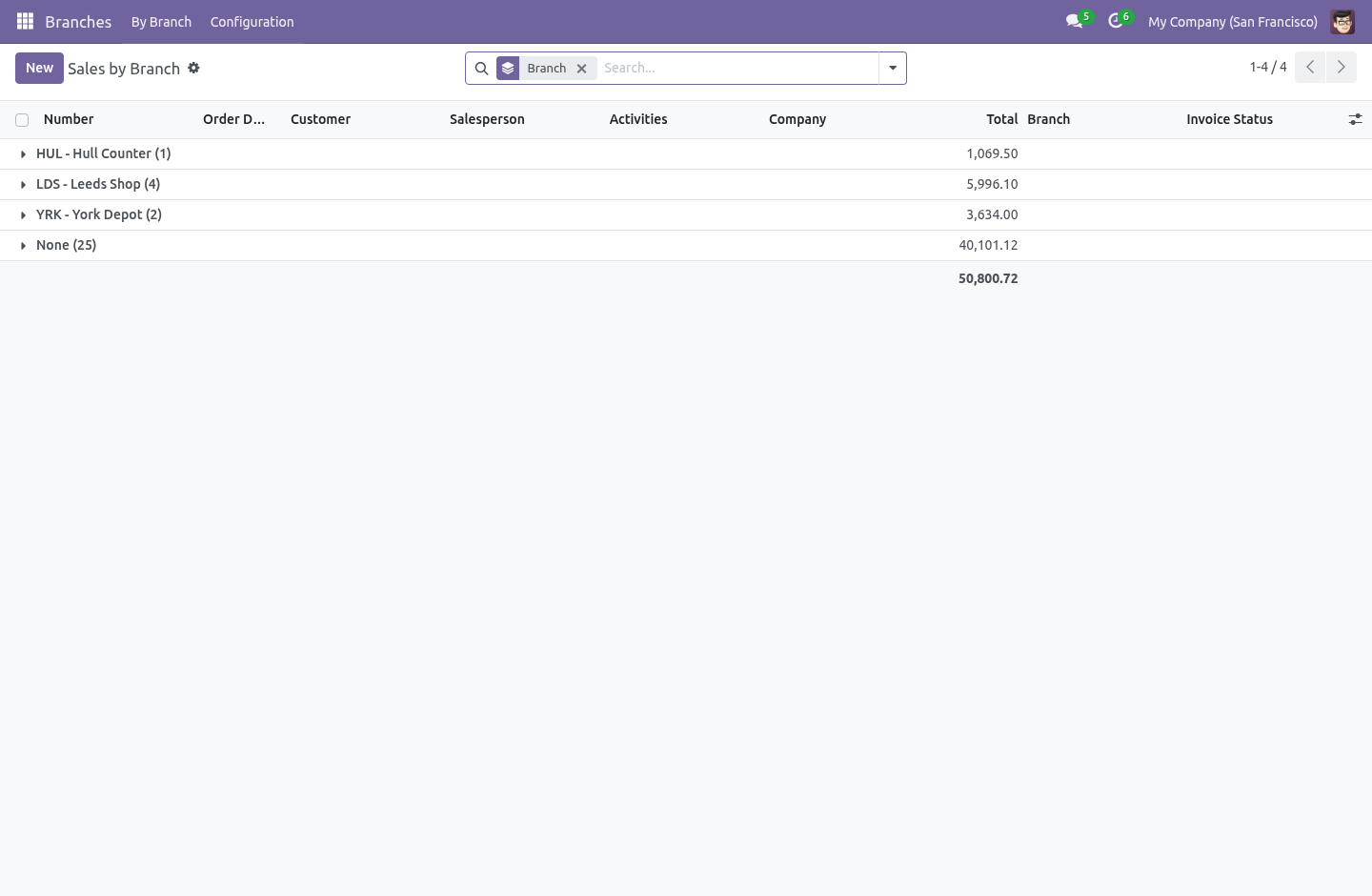
The branch is a tracked field, so a multi-edit over three hundred thousand invoices writes three hundred thousand chatter messages inside one request, and the request is killed long before it commits — leaving the count exactly where it was. The button works in batches, with tracking off, committing as it goes, and it takes its answer from what the document already knows: a transfer belongs to its warehouse's branch, an invoice or a bill to the branch of the journal it was posted in. Reporting. Branches › By Branch opens the lists people already know — sales, purchases, invoices and bills, transfers — grouped by branch.
Same views, same filters, same columns anybody has already set up. There is also a No branch yet filter in each of those searches. How we make sure it works. Before every release, 67 automated checks run against this app on Odoo 16, 17, 18, 19 and 20.
Among them: They cannot file under a branch they do not work at. A document cannot be filed under another companys branch. They cannot move a document out of their branch. Two branches of one company cannot share a code.
A restricted user cannot un file a document. The complete list is in the source you receive. Questions people ask. Which Odoo versions does it run on?
Odoo 16.0, 17.0, 18.0, 19.0, 20.0, on the series you buy it for; each series is its own listing. Community or Enterprise? Both. It needs no Enterprise app.
The complete manual is at docs dot bambooforge dot dev, the demo database is linked from the store page, and support answers within twenty-four hours. Links are in the description.
Transcript of the walkthrough (Odoo 19)
Multi-branch Operations & Branch Reporting. Run several branches, shops or depots inside one company with their own document numbers, journals and reporting - no second company needed. A company with four shops is still one company. One VAT number, one chart of accounts, one P&L for the tax office.
Odoo's answer to "run them separately" is to make them separate companies, and that answer costs four charts of accounts to keep in step, an inter-company sale every time stock moves between two of your own depots, consolidated reporting you have to build yourself, and a partner maintained four times. In the next few minutes: multi-branch operations & branch reporting, then the branch itself, then it goes on the documents that matter, then it propagates, then its own document numbers. Then what this app deliberately does not do, so you can tell before you buy whether it fits. Everything lives under Branches then By Branch then Configuration.
Multi-branch Operations & Branch Reporting. A company with four shops is still one company. One VAT number, one chart of accounts, one P&L for the tax office. Odoo's answer to "run them separately" is to make them separate companies, and that answer costs four charts of accounts to keep in step, an inter-company sale every time stock moves between two of your own depots, consolidated reporting you have to build yourself, and a partner maintained four times.
This module adds a branch instead: a dimension that sits below the company and above the document. The branch itself. Branches › Configuration › Branches. A branch is a shop, a depot or an office.
It has a name, a code, a company, an address that can go on its documents, a manager, and a list of who works there. Keep the code short and keep it stable: it is what goes into the document numbers, so LDS is a better answer than LEEDS-SHOP-01. Two branches of one company cannot share a code, because the code is what tells their numbers apart. It goes on the documents that matter.
Quotations and orders, purchase orders, invoices and bills, transfers. Also on warehouses, and on people. A new document starts at your branch. If you work at exactly one, it is that one, without you ever opening your own user form — because somebody who has to pick their own branch on every quotation is somebody who leaves the field empty, and a dimension that is empty on half the database reports nothing at all.
If you work at several, set a default on your user; if you work at none, documents start empty and stay visible to everybody. It propagates. This is the part that decides whether a dimension gets filled in or not. The branch on a quotation reaches its invoice and its delivery.
The branch on a purchase order reaches its bill and its receipt. A transfer that came from no order takes the branch of the warehouse it is happening in. A branch somebody chose by hand is never overruled. The delivery is the interesting one.
A procurement's values are not copied wholesale onto the stock move it creates — stock.rule._get_stock_move_values builds the move dictionary key by key — so this module tells the rule to carry the branch across, and the transfer that _assign_picking builds out of those moves inherits it from them. Its own document numbers. Tick Own Document Numbers on a branch and its quotations become LDS/SO/00042 instead of S00042, from a real ir.sequence belonging to that branch, so two shops never race for the same number. Purchase orders get the same treatment.
A quotation that already carries a reference — a duplicate, or an import from somebody else's system — keeps it. Core only reaches for a sequence when the name is still New, and so does this. Restriction is opt-in, and it never blinds anybody. Put somebody in Restricted to their branches and they see the documents of the branches they work at — plus everything that has no branch on it yet.
That second half is not an oversight. A live database has years of documents with no branch on them. A rule that hides those on the day it is switched on takes half the pipeline away from the person who was told this would help them, and the rollout gets rolled back before anybody assigns a single branch. Driving the unassigned half to zero.
The Not filed yet page on a branch counts the documents in that company with no branch on them at all, per model. Use File the old ones under this branch rather than selecting a whole list and setting the branch by hand. The branch is a tracked field, so a multi-edit over three hundred thousand invoices writes three hundred thousand chatter messages inside one request, and the request is killed long before it commits — leaving the count exactly where it was. The button works in batches, with tracking off, committing as it goes, and it takes its answer from what the document already knows: a transfer belongs to its warehouse's branch, an invoice or a bill to the branch of the journal it was posted in.
Reporting. Branches › By Branch opens the lists people already know — sales, purchases, invoices and bills, transfers — grouped by branch. Same views, same filters, same columns anybody has already set up. There is also a No branch yet filter in each of those searches.
The complete manual is at docs dot bambooforge dot dev, the demo database is linked from the store page, and support answers within twenty-four hours. Links are in the description.
Transcript of the walkthrough (Odoo 18)
Multi-branch Operations & Branch Reporting. Run several branches, shops or depots inside one company with their own document numbers, journals and reporting - no second company needed. A company with four shops is still one company. One VAT number, one chart of accounts, one P&L for the tax office.
Odoo's answer to "run them separately" is to make them separate companies, and that answer costs four charts of accounts to keep in step, an inter-company sale every time stock moves between two of your own depots, consolidated reporting you have to build yourself, and a partner maintained four times. In the next few minutes: multi-branch operations & branch reporting, then the branch itself, then it goes on the documents that matter, then it propagates, then its own document numbers. Then what this app deliberately does not do, so you can tell before you buy whether it fits. Everything lives under Branches then By Branch then Configuration.
Multi-branch Operations & Branch Reporting. A company with four shops is still one company. One VAT number, one chart of accounts, one P&L for the tax office. Odoo's answer to "run them separately" is to make them separate companies, and that answer costs four charts of accounts to keep in step, an inter-company sale every time stock moves between two of your own depots, consolidated reporting you have to build yourself, and a partner maintained four times.
This module adds a branch instead: a dimension that sits below the company and above the document. The branch itself. Branches › Configuration › Branches. A branch is a shop, a depot or an office.
It has a name, a code, a company, an address that can go on its documents, a manager, and a list of who works there. Keep the code short and keep it stable: it is what goes into the document numbers, so LDS is a better answer than LEEDS-SHOP-01. Two branches of one company cannot share a code, because the code is what tells their numbers apart. It goes on the documents that matter.
Quotations and orders, purchase orders, invoices and bills, transfers. Also on warehouses, and on people. A new document starts at your branch. If you work at exactly one, it is that one, without you ever opening your own user form — because somebody who has to pick their own branch on every quotation is somebody who leaves the field empty, and a dimension that is empty on half the database reports nothing at all.
If you work at several, set a default on your user; if you work at none, documents start empty and stay visible to everybody. It propagates. This is the part that decides whether a dimension gets filled in or not. The branch on a quotation reaches its invoice and its delivery.
The branch on a purchase order reaches its bill and its receipt. A transfer that came from no order takes the branch of the warehouse it is happening in. A branch somebody chose by hand is never overruled. The delivery is the interesting one.
A procurement's values are not copied wholesale onto the stock move it creates — stock.rule._get_stock_move_values builds the move dictionary key by key — so this module tells the rule to carry the branch across, and the transfer that _assign_picking builds out of those moves inherits it from them. Its own document numbers. Tick Own Document Numbers on a branch and its quotations become LDS/SO/00042 instead of S00042, from a real ir.sequence belonging to that branch, so two shops never race for the same number. Purchase orders get the same treatment.
A quotation that already carries a reference — a duplicate, or an import from somebody else's system — keeps it. Core only reaches for a sequence when the name is still New, and so does this. Restriction is opt-in, and it never blinds anybody. Put somebody in Restricted to their branches and they see the documents of the branches they work at — plus everything that has no branch on it yet.
That second half is not an oversight. A live database has years of documents with no branch on them. A rule that hides those on the day it is switched on takes half the pipeline away from the person who was told this would help them, and the rollout gets rolled back before anybody assigns a single branch. Driving the unassigned half to zero.
The Not filed yet page on a branch counts the documents in that company with no branch on them at all, per model. Use File the old ones under this branch rather than selecting a whole list and setting the branch by hand. The branch is a tracked field, so a multi-edit over three hundred thousand invoices writes three hundred thousand chatter messages inside one request, and the request is killed long before it commits — leaving the count exactly where it was. The button works in batches, with tracking off, committing as it goes, and it takes its answer from what the document already knows: a transfer belongs to its warehouse's branch, an invoice or a bill to the branch of the journal it was posted in.
Reporting. Branches › By Branch opens the lists people already know — sales, purchases, invoices and bills, transfers — grouped by branch. Same views, same filters, same columns anybody has already set up. There is also a No branch yet filter in each of those searches.
The complete manual is at docs dot bambooforge dot dev, the demo database is linked from the store page, and support answers within twenty-four hours. Links are in the description.
Transcript of the walkthrough (Odoo 17)
Multi-branch Operations & Branch Reporting. Run several branches, shops or depots inside one company with their own document numbers, journals and reporting - no second company needed. A company with four shops is still one company. One VAT number, one chart of accounts, one P&L for the tax office.
Odoo's answer to "run them separately" is to make them separate companies, and that answer costs four charts of accounts to keep in step, an inter-company sale every time stock moves between two of your own depots, consolidated reporting you have to build yourself, and a partner maintained four times. In the next few minutes: multi-branch operations & branch reporting, then the branch itself, then it goes on the documents that matter, then it propagates, then its own document numbers. Then what this app deliberately does not do, so you can tell before you buy whether it fits. Everything lives under Branches then By Branch then Configuration.
Multi-branch Operations & Branch Reporting. A company with four shops is still one company. One VAT number, one chart of accounts, one P&L for the tax office. Odoo's answer to "run them separately" is to make them separate companies, and that answer costs four charts of accounts to keep in step, an inter-company sale every time stock moves between two of your own depots, consolidated reporting you have to build yourself, and a partner maintained four times.
This module adds a branch instead: a dimension that sits below the company and above the document. The branch itself. Branches › Configuration › Branches. A branch is a shop, a depot or an office.
It has a name, a code, a company, an address that can go on its documents, a manager, and a list of who works there. Keep the code short and keep it stable: it is what goes into the document numbers, so LDS is a better answer than LEEDS-SHOP-01. Two branches of one company cannot share a code, because the code is what tells their numbers apart. It goes on the documents that matter.
Quotations and orders, purchase orders, invoices and bills, transfers. Also on warehouses, and on people. A new document starts at your branch. If you work at exactly one, it is that one, without you ever opening your own user form — because somebody who has to pick their own branch on every quotation is somebody who leaves the field empty, and a dimension that is empty on half the database reports nothing at all.
If you work at several, set a default on your user; if you work at none, documents start empty and stay visible to everybody. It propagates. This is the part that decides whether a dimension gets filled in or not. The branch on a quotation reaches its invoice and its delivery.
The branch on a purchase order reaches its bill and its receipt. A transfer that came from no order takes the branch of the warehouse it is happening in. A branch somebody chose by hand is never overruled. The delivery is the interesting one.
A procurement's values are not copied wholesale onto the stock move it creates — stock.rule._get_stock_move_values builds the move dictionary key by key — so this module tells the rule to carry the branch across, and the transfer that _assign_picking builds out of those moves inherits it from them. Its own document numbers. Tick Own Document Numbers on a branch and its quotations become LDS/SO/00042 instead of S00042, from a real ir.sequence belonging to that branch, so two shops never race for the same number. Purchase orders get the same treatment.
A quotation that already carries a reference — a duplicate, or an import from somebody else's system — keeps it. Core only reaches for a sequence when the name is still New, and so does this. Restriction is opt-in, and it never blinds anybody. Put somebody in Restricted to their branches and they see the documents of the branches they work at — plus everything that has no branch on it yet.
That second half is not an oversight. A live database has years of documents with no branch on them. A rule that hides those on the day it is switched on takes half the pipeline away from the person who was told this would help them, and the rollout gets rolled back before anybody assigns a single branch. Driving the unassigned half to zero.
The Not filed yet page on a branch counts the documents in that company with no branch on them at all, per model. Use File the old ones under this branch rather than selecting a whole list and setting the branch by hand. The branch is a tracked field, so a multi-edit over three hundred thousand invoices writes three hundred thousand chatter messages inside one request, and the request is killed long before it commits — leaving the count exactly where it was. The button works in batches, with tracking off, committing as it goes, and it takes its answer from what the document already knows: a transfer belongs to its warehouse's branch, an invoice or a bill to the branch of the journal it was posted in.
Reporting. Branches › By Branch opens the lists people already know — sales, purchases, invoices and bills, transfers — grouped by branch. Same views, same filters, same columns anybody has already set up. There is also a No branch yet filter in each of those searches.
The complete manual is at docs dot bambooforge dot dev, the demo database is linked from the store page, and support answers within twenty-four hours. Links are in the description.
Transcript of the walkthrough (Odoo 16)
Multi-branch Operations & Branch Reporting. Run several branches, shops or depots inside one company with their own document numbers, journals and reporting - no second company needed. A company with four shops is still one company. One VAT number, one chart of accounts, one P&L for the tax office.
Odoo's answer to "run them separately" is to make them separate companies, and that answer costs four charts of accounts to keep in step, an inter-company sale every time stock moves between two of your own depots, consolidated reporting you have to build yourself, and a partner maintained four times. In the next few minutes: multi-branch operations & branch reporting, then the branch itself, then it goes on the documents that matter, then it propagates, then its own document numbers. Then what this app deliberately does not do, so you can tell before you buy whether it fits. Everything lives under Branches then By Branch then Configuration.
Multi-branch Operations & Branch Reporting. A company with four shops is still one company. One VAT number, one chart of accounts, one P&L for the tax office. Odoo's answer to "run them separately" is to make them separate companies, and that answer costs four charts of accounts to keep in step, an inter-company sale every time stock moves between two of your own depots, consolidated reporting you have to build yourself, and a partner maintained four times.
This module adds a branch instead: a dimension that sits below the company and above the document. The branch itself. Branches › Configuration › Branches. A branch is a shop, a depot or an office.
It has a name, a code, a company, an address that can go on its documents, a manager, and a list of who works there. Keep the code short and keep it stable: it is what goes into the document numbers, so LDS is a better answer than LEEDS-SHOP-01. Two branches of one company cannot share a code, because the code is what tells their numbers apart. It goes on the documents that matter.
Quotations and orders, purchase orders, invoices and bills, transfers. Also on warehouses, and on people. A new document starts at your branch. If you work at exactly one, it is that one, without you ever opening your own user form — because somebody who has to pick their own branch on every quotation is somebody who leaves the field empty, and a dimension that is empty on half the database reports nothing at all.
If you work at several, set a default on your user; if you work at none, documents start empty and stay visible to everybody. It propagates. This is the part that decides whether a dimension gets filled in or not. The branch on a quotation reaches its invoice and its delivery.
The branch on a purchase order reaches its bill and its receipt. A transfer that came from no order takes the branch of the warehouse it is happening in. A branch somebody chose by hand is never overruled. The delivery is the interesting one.
A procurement's values are not copied wholesale onto the stock move it creates — stock.rule._get_stock_move_values builds the move dictionary key by key — so this module tells the rule to carry the branch across, and the transfer that _assign_picking builds out of those moves inherits it from them. Its own document numbers. Tick Own Document Numbers on a branch and its quotations become LDS/SO/00042 instead of S00042, from a real ir.sequence belonging to that branch, so two shops never race for the same number. Purchase orders get the same treatment.
A quotation that already carries a reference — a duplicate, or an import from somebody else's system — keeps it. Core only reaches for a sequence when the name is still New, and so does this. Restriction is opt-in, and it never blinds anybody. Put somebody in Restricted to their branches and they see the documents of the branches they work at — plus everything that has no branch on it yet.
That second half is not an oversight. A live database has years of documents with no branch on them. A rule that hides those on the day it is switched on takes half the pipeline away from the person who was told this would help them, and the rollout gets rolled back before anybody assigns a single branch. Driving the unassigned half to zero.
The Not filed yet page on a branch counts the documents in that company with no branch on them at all, per model. Use File the old ones under this branch rather than selecting a whole list and setting the branch by hand. The branch is a tracked field, so a multi-edit over three hundred thousand invoices writes three hundred thousand chatter messages inside one request, and the request is killed long before it commits — leaving the count exactly where it was. The button works in batches, with tracking off, committing as it goes, and it takes its answer from what the document already knows: a transfer belongs to its warehouse's branch, an invoice or a bill to the branch of the journal it was posted in.
Reporting. Branches › By Branch opens the lists people already know — sales, purchases, invoices and bills, transfers — grouped by branch. Same views, same filters, same columns anybody has already set up. There is also a No branch yet filter in each of those searches.
The complete manual is at docs dot bambooforge dot dev, the demo database is linked from the store page, and support answers within twenty-four hours. Links are in the description.
Key facts
- What it is
- Run several branches, shops or depots inside one company with their own document numbers, journals and reporting - no second company needed.
- For
- Accounting
- Odoo versions
- 16.0, 17.0, 18.0, 19.0, 20.0 - Community and Enterprise
- Runs on
- Odoo.sh or Odoo you host yourself - not Odoo Online, which accepts no third-party apps
- Price
- 169 EUR, one-time, on the Odoo Apps Store
- Technical name
- bambooforge_branch
- Not for
- It does not rewrite invoice numbers. See above.; It does not make branches into companies. Stock still moves between two of your own depots as an internal transfer, not as a sale.; It does not restrict anybody until you put them in the group.; It does not fence journal entries, payments or bank statement lines. See above — that is a decision, not a gap.; It does not stop a sequence number being consumed by a quotation that then fails to save. ir.sequence draws from a Postgres sequence, which is not rolled back, so a validation error can leave a gap in a branch's quotation numbers. Quotation numbers are a reference, not a legal series; invoice numbers, which are, are left to Odoo.
- Manual last updated
- 2026-09-21
Multi-branch Operations & Branch Reporting
A company with four shops is still one company. One VAT number, one chart of accounts, one P&L for the tax office. Odoo's answer to "run them separately" is to make them separate companies, and that answer costs four charts of accounts to keep in step, an inter-company sale every time stock moves between two of your own depots, consolidated reporting you have to build yourself, and a partner maintained four times.
This module adds a branch instead: a dimension that sits below the company and above the document.
The branch itself
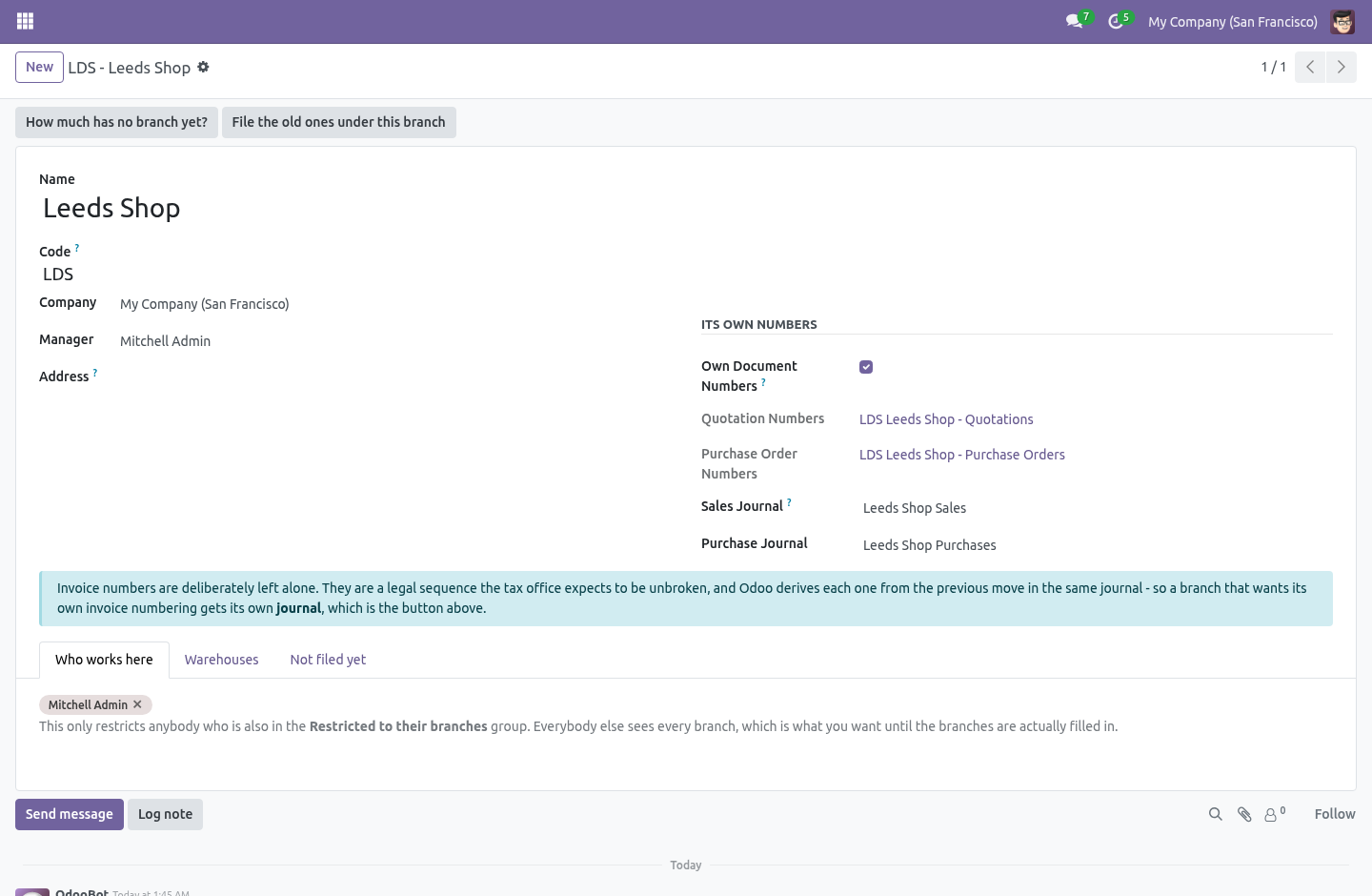
Branches › Configuration › Branches. A branch is a shop, a depot or an office. It has a name, a code, a company, an address that can go on its documents, a manager, and a list of who works there.
Keep the code short and keep it stable: it is what goes into the document numbers, so LDS is a better answer than LEEDS-SHOP-01. Two branches of one company cannot share a code, because the code is what tells their numbers apart.
A branch that is in use cannot be deleted. Archive it instead — the documents that were filed under it keep pointing at something that still has a name.
It goes on the documents that matter
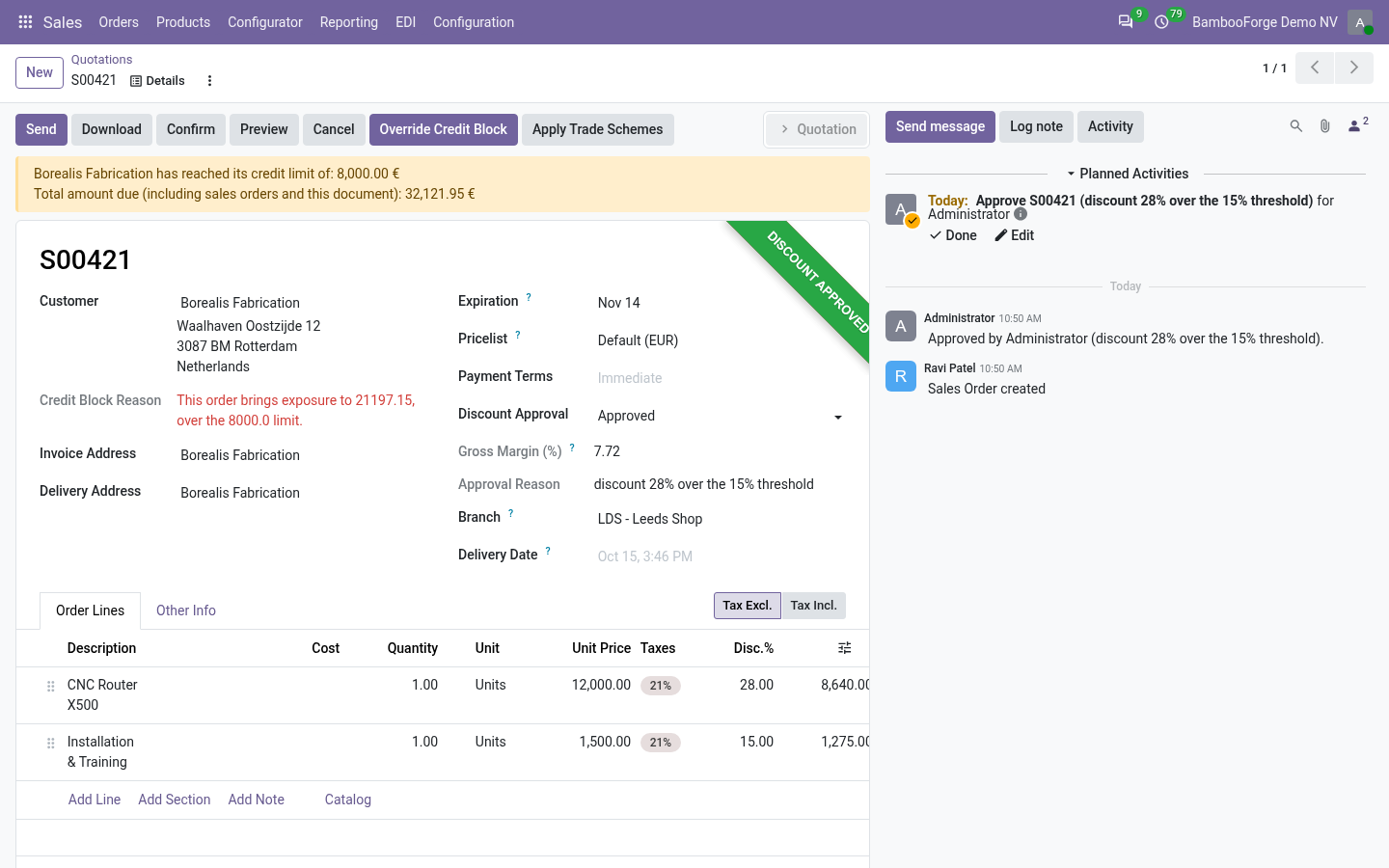
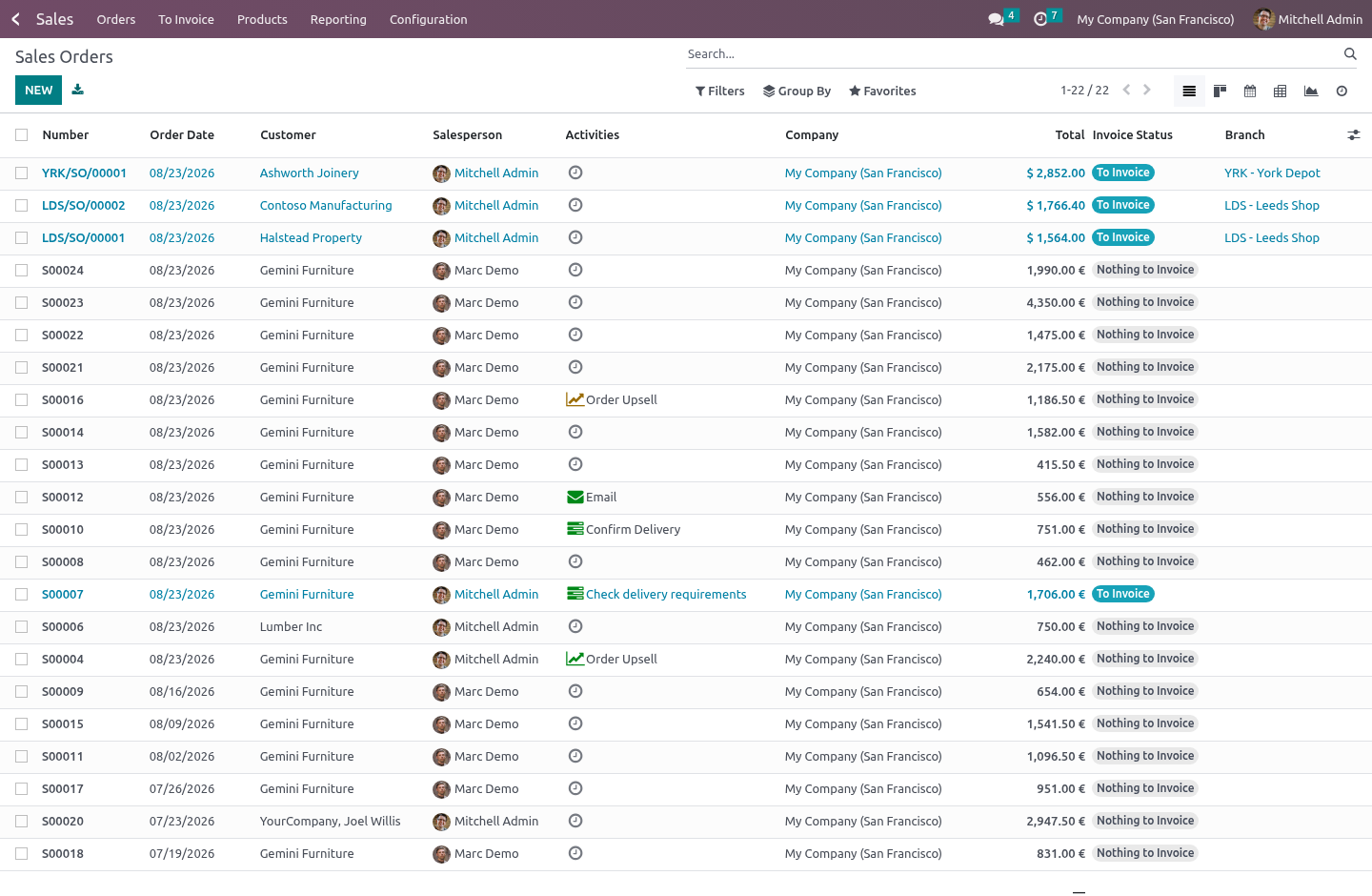
Quotations and orders, purchase orders, invoices and bills, transfers. Also on warehouses, and on people.
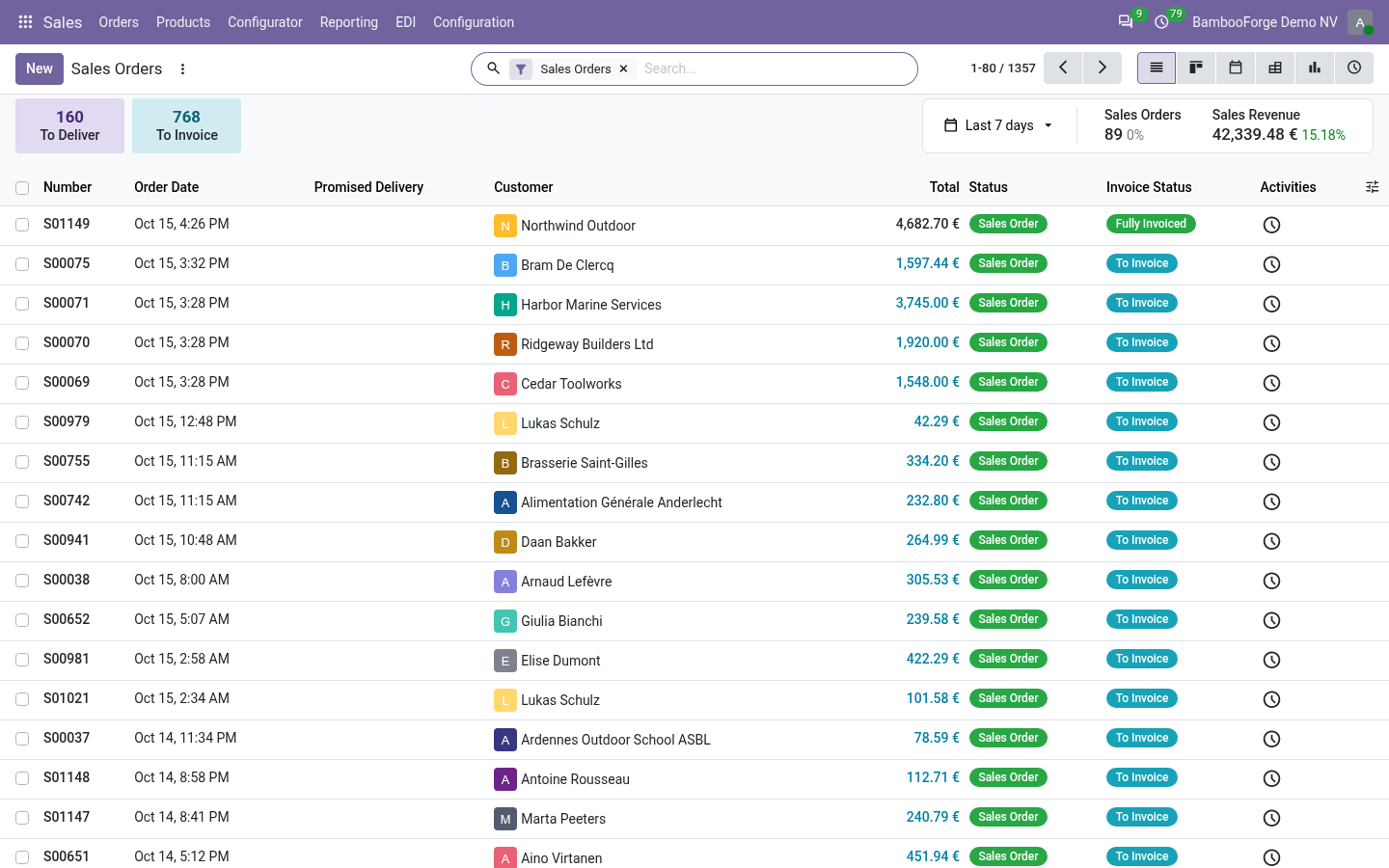
A new document starts at your branch. If you work at exactly one, it is that one, without you ever opening your own user form — because somebody who has to pick their own branch on every quotation is somebody who leaves the field empty, and a dimension that is empty on half the database reports nothing at all. If you work at several, set a default on your user; if you work at none, documents start empty and stay visible to everybody.
It propagates
This is the part that decides whether a dimension gets filled in or not.
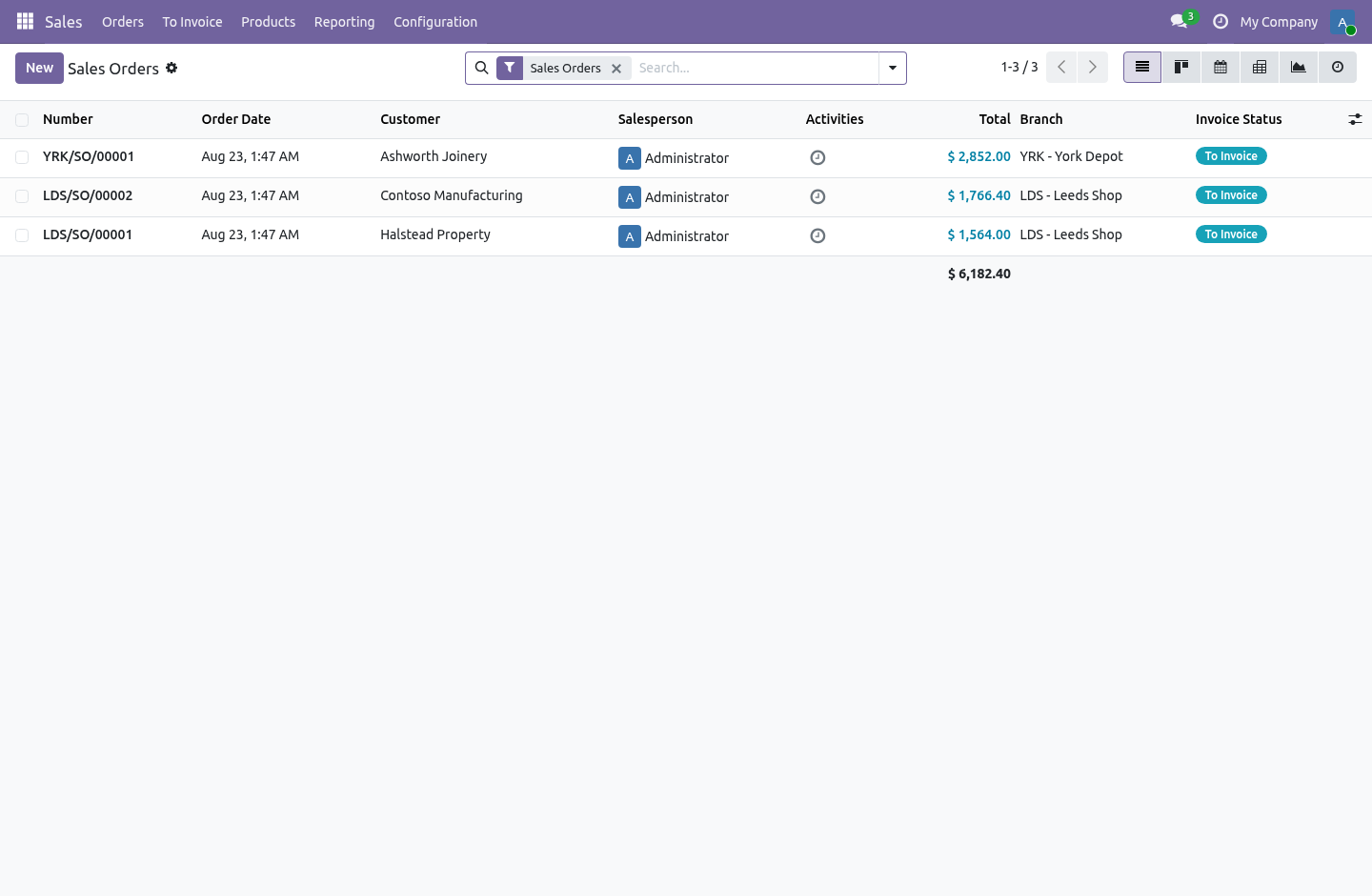
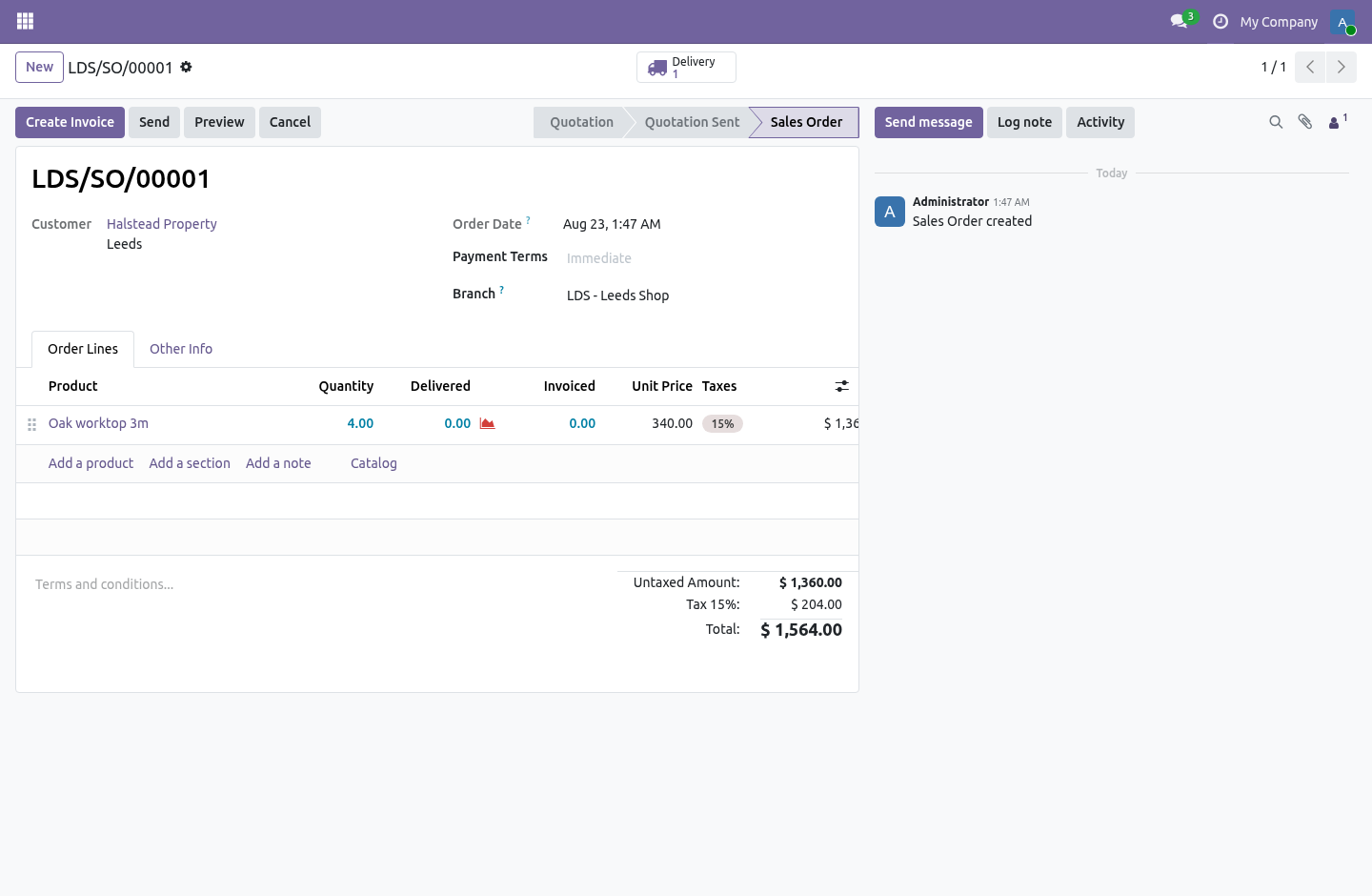
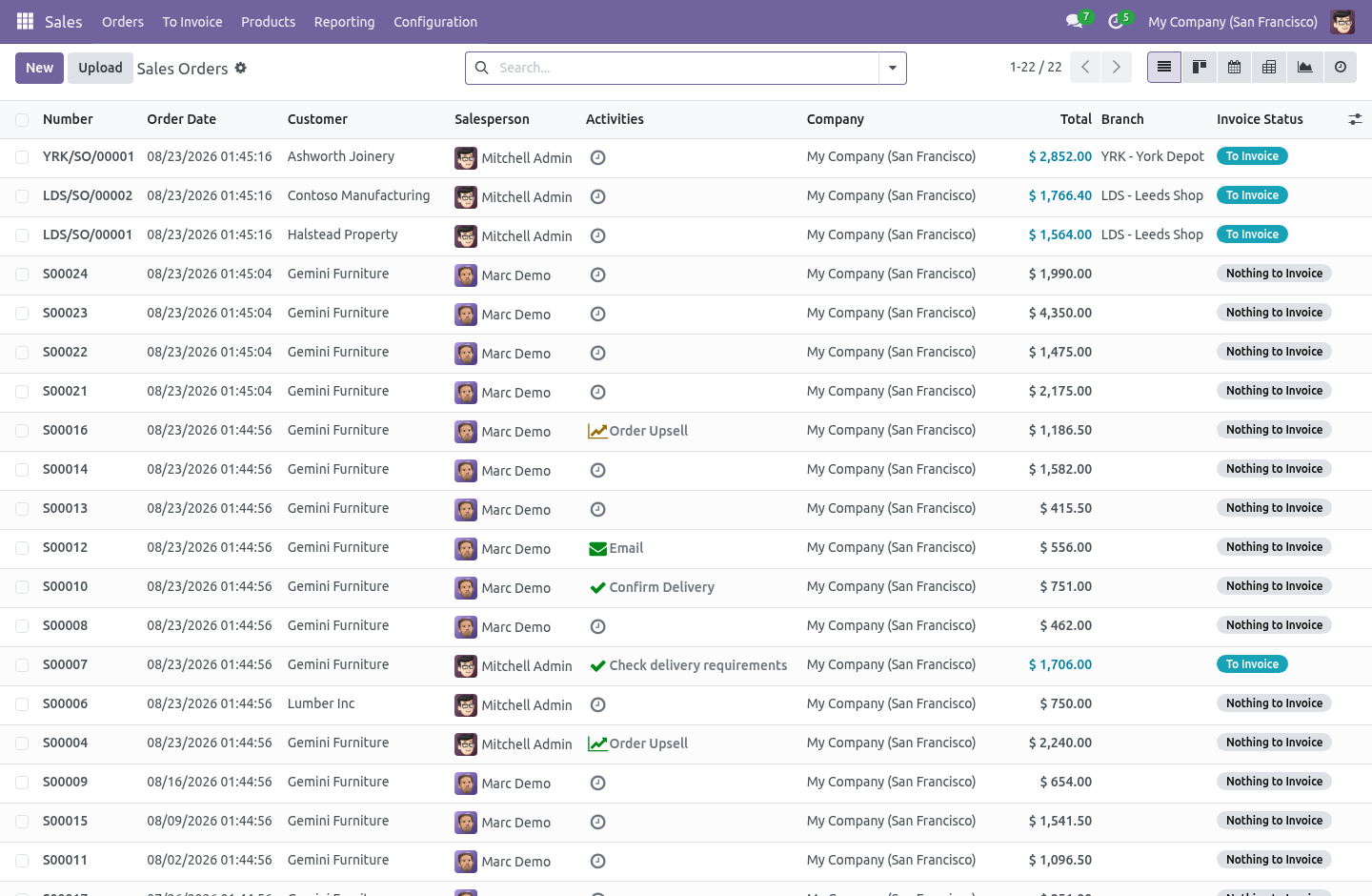
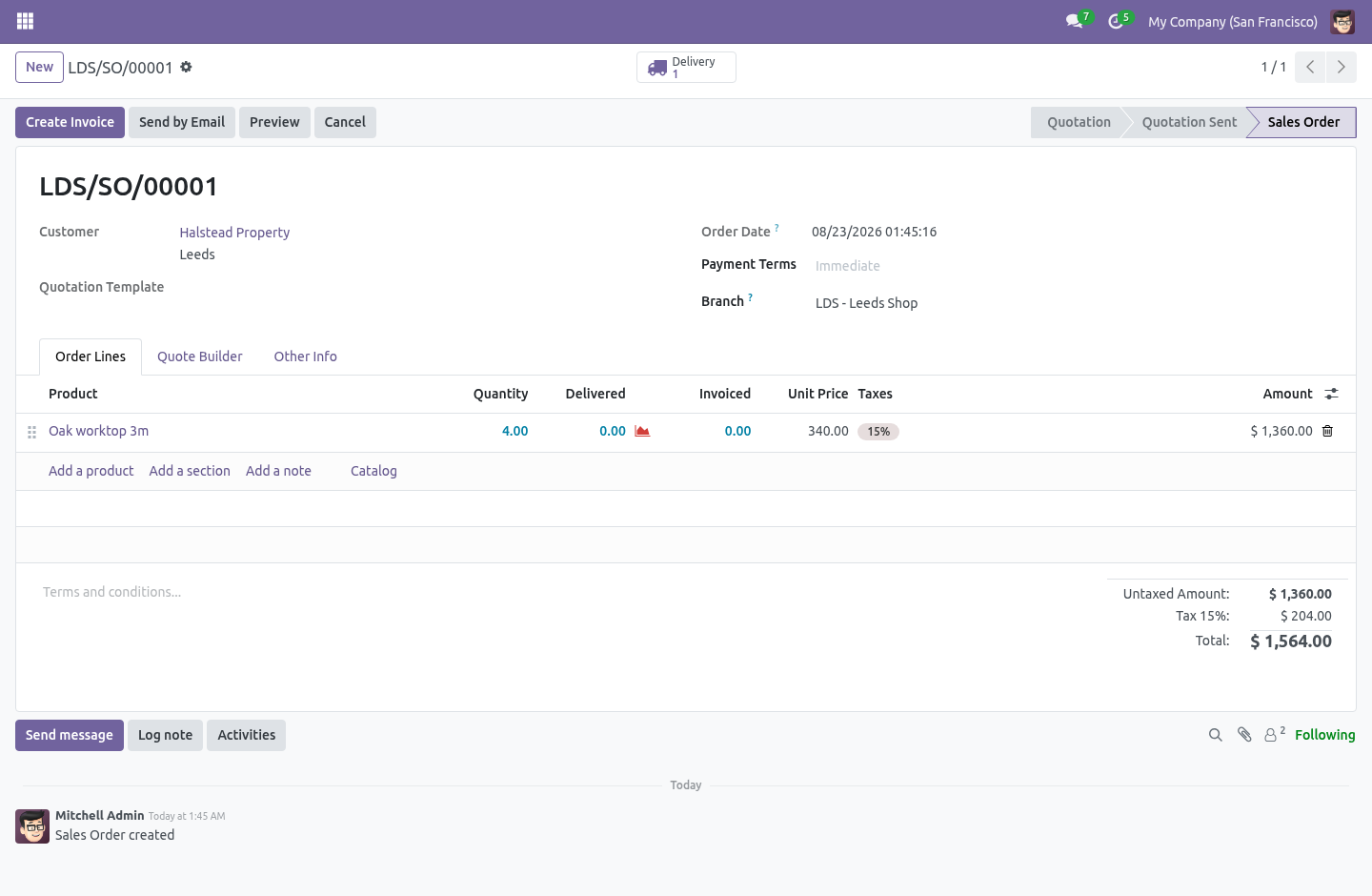
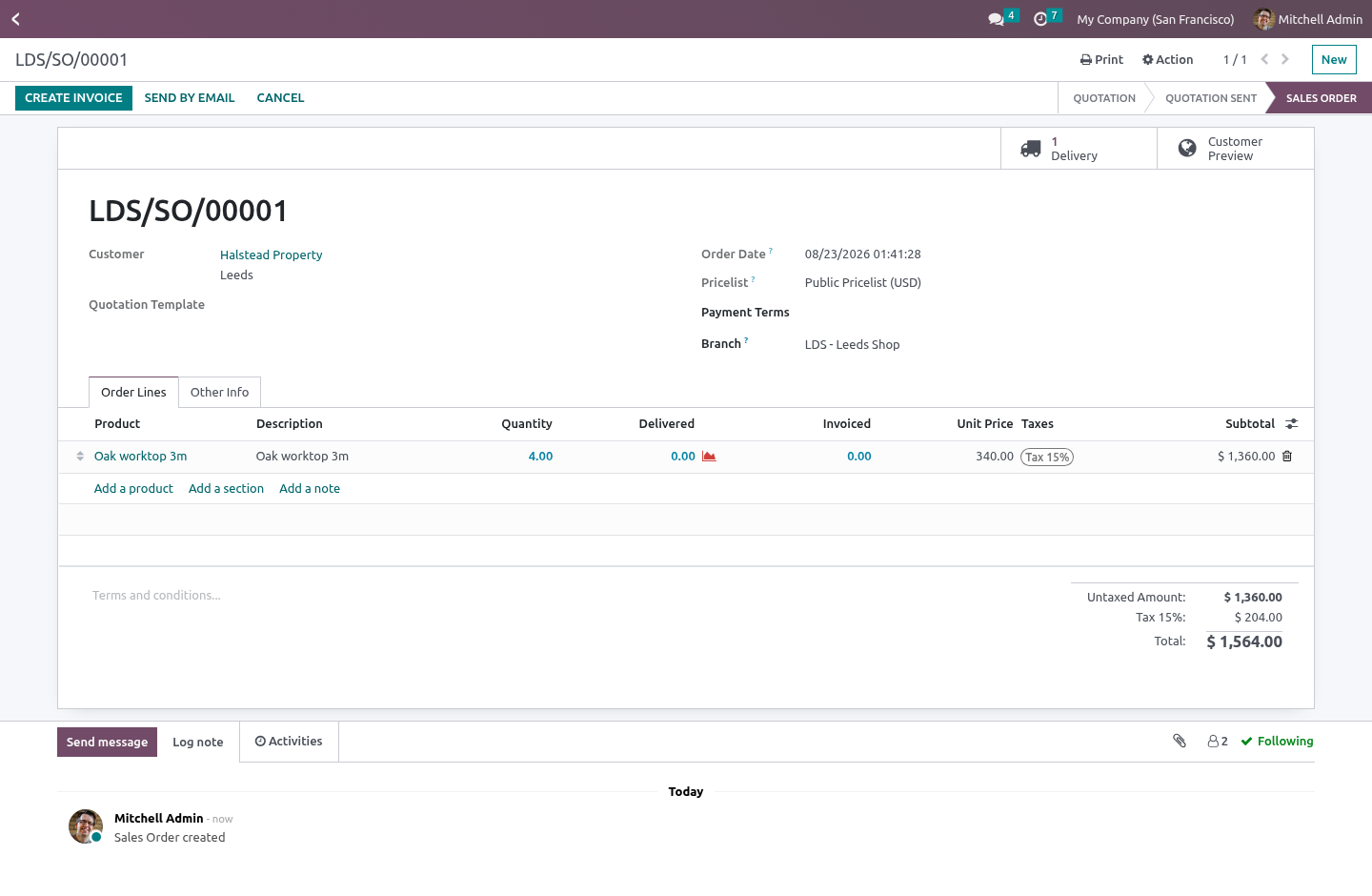
The branch on a quotation reaches its invoice and its delivery.
The branch on a purchase order reaches its bill and its receipt.
A transfer that came from no order takes the branch of the warehouse it is happening in.
A branch somebody chose by hand is never overruled.
The delivery is the interesting one. A procurement's values are not copied wholesale onto the stock move it creates — stock.rule._get_stock_move_values builds the move dictionary key by key — so this module tells the rule to carry the branch across, and the transfer that _assign_picking builds out of those moves inherits it from them.
Its own document numbers
Tick Own Document Numbers on a branch and its quotations become LDS/SO/00042 instead of S00042, from a real ir.sequence belonging to that branch, so two shops never race for the same number. Purchase orders get the same treatment.
A quotation that already carries a reference — a duplicate, or an import from somebody else's system — keeps it. Core only reaches for a sequence when the name is still New, and so does this.
Turning the switch back off does not destroy the sequence. The numbers it already handed out are on paper somewhere, and a sequence that restarts at one after somebody flicks a checkbox twice is a duplicate reference waiting to happen.
Invoice numbers are deliberately left alone. An invoice number is not a naming convention; it is a legal sequence the tax office expects to be unbroken, and Odoo derives each one from the previous move in the same journal. A module that rewrites account.move.name produces gaps somebody has to explain to an auditor. So a branch that wants its own invoice numbering gets its own journal — one button on the branch form creates a sales journal and a purchase journal for it, with a free code, and new invoices from that branch are posted there.
Restriction is opt-in, and it never blinds anybody
Put somebody in Restricted to their branches and they see the documents of the branches they work at — plus everything that has no branch on it yet.
That second half is not an oversight. A live database has years of documents with no branch on them. A rule that hides those on the day it is switched on takes half the pipeline away from the person who was told this would help them, and the rollout gets rolled back before anybody assigns a single branch.
What the fence covers. Quotations and orders, purchase orders, invoices and bills, transfers — and, just as importantly, their lines and the analysis views built on top of them: sale.order.line (where margin lives), account.move.line, stock.move, and the three pivots people actually open — Sales Analysis, Purchase Analysis, Invoice Analysis. Fencing the header alone answers a checklist rather than the promise: Sales › Reporting › Sales reads sale.report, whose own "All Orders Analysis" rule is "everything", and a rule on sale.order does not touch it.
What it deliberately does not cover: journal entries. Payments and bank statement lines both delegate to account.move, and record rules follow that delegation. A fence over every move would take the Leeds cashier's payment out of the York accountant's reconciliation widget — silently, because rules filter searches rather than raising, so the line would simply not be there. Branch reporting is about invoices and bills; the general ledger is one company's and stays that way.
Nobody is restricted until somebody restricts them. The list of branches on a user is a statement of where they work, not a fence. Moving somebody between branches takes effect immediately: the rule domains are cached per user, and both doorways — the user form and the branch's Who works here tab — flush that cache.
The rules are global rules with a condition, not rules attached to the restricted group. Record rules belonging to different groups are OR-ed together, so a rule attached to the restricted group would simply be ignored for anybody who also holds Sales / See all leads — which is most of the people worth restricting in the first place.
Automation is never blocked. A scheduler that cannot create a delivery for the Leeds shop is a scheduler that stops the Leeds shop.
Driving the unassigned half to zero
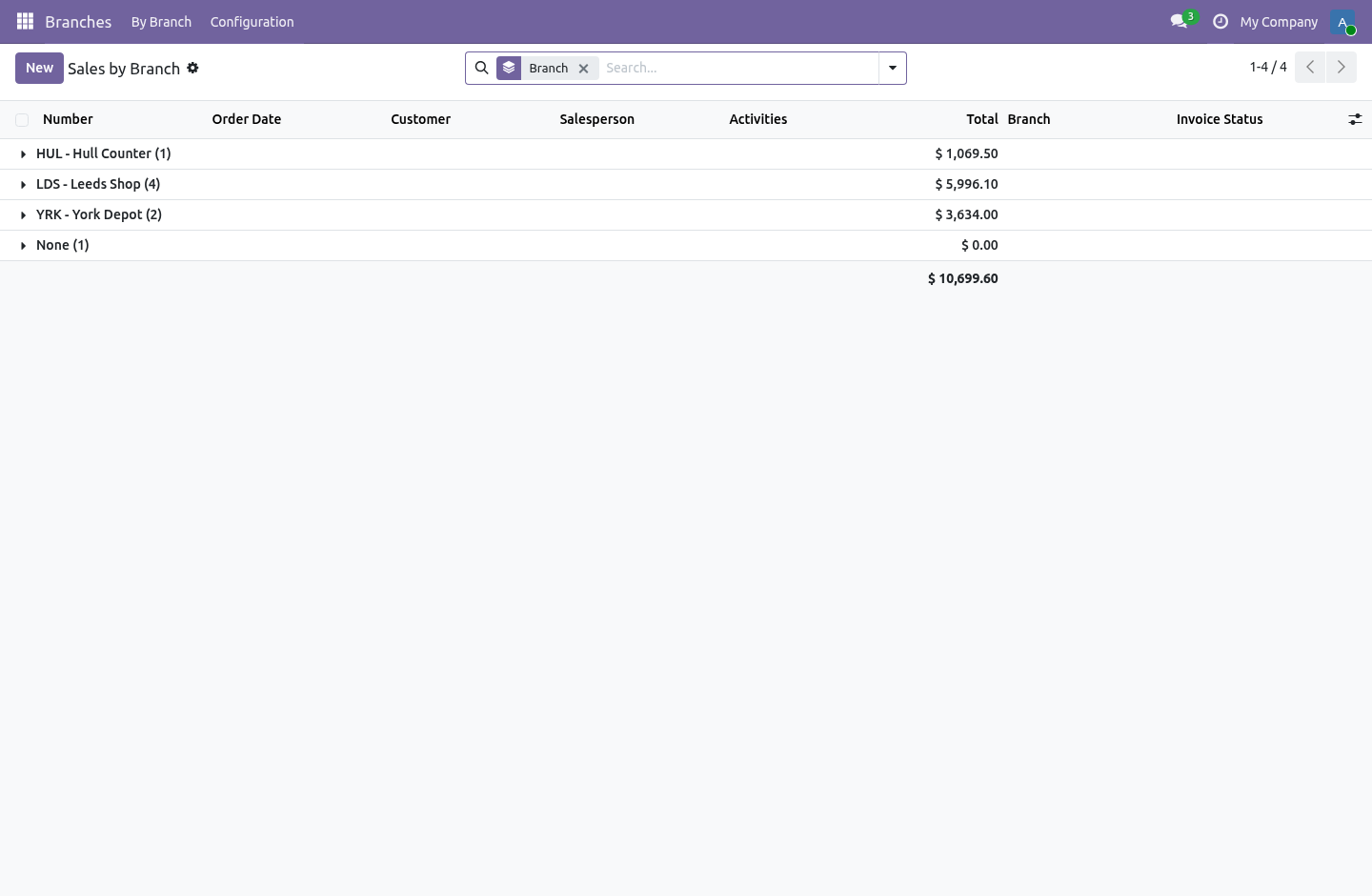
The Not filed yet page on a branch counts the documents in that company with no branch on them at all, per model.
Use File the old ones under this branch rather than selecting a whole list and setting the branch by hand. The branch is a tracked field, so a multi-edit over three hundred thousand invoices writes three hundred thousand chatter messages inside one request, and the request is killed long before it commits — leaving the count exactly where it was. The button works in batches, with tracking off, committing as it goes, and it takes its answer from what the document already knows: a transfer belongs to its warehouse's branch, an invoice or a bill to the branch of the journal it was posted in.
What is left after that is what genuinely has to be decided by a person. Open a list, filter it down, and set the branch on a few thousand at a time.
It is counted when you press the button and never on page load: it is four search_count calls over the four biggest tables in the database, which is not something a list view may do once per row.
Reporting
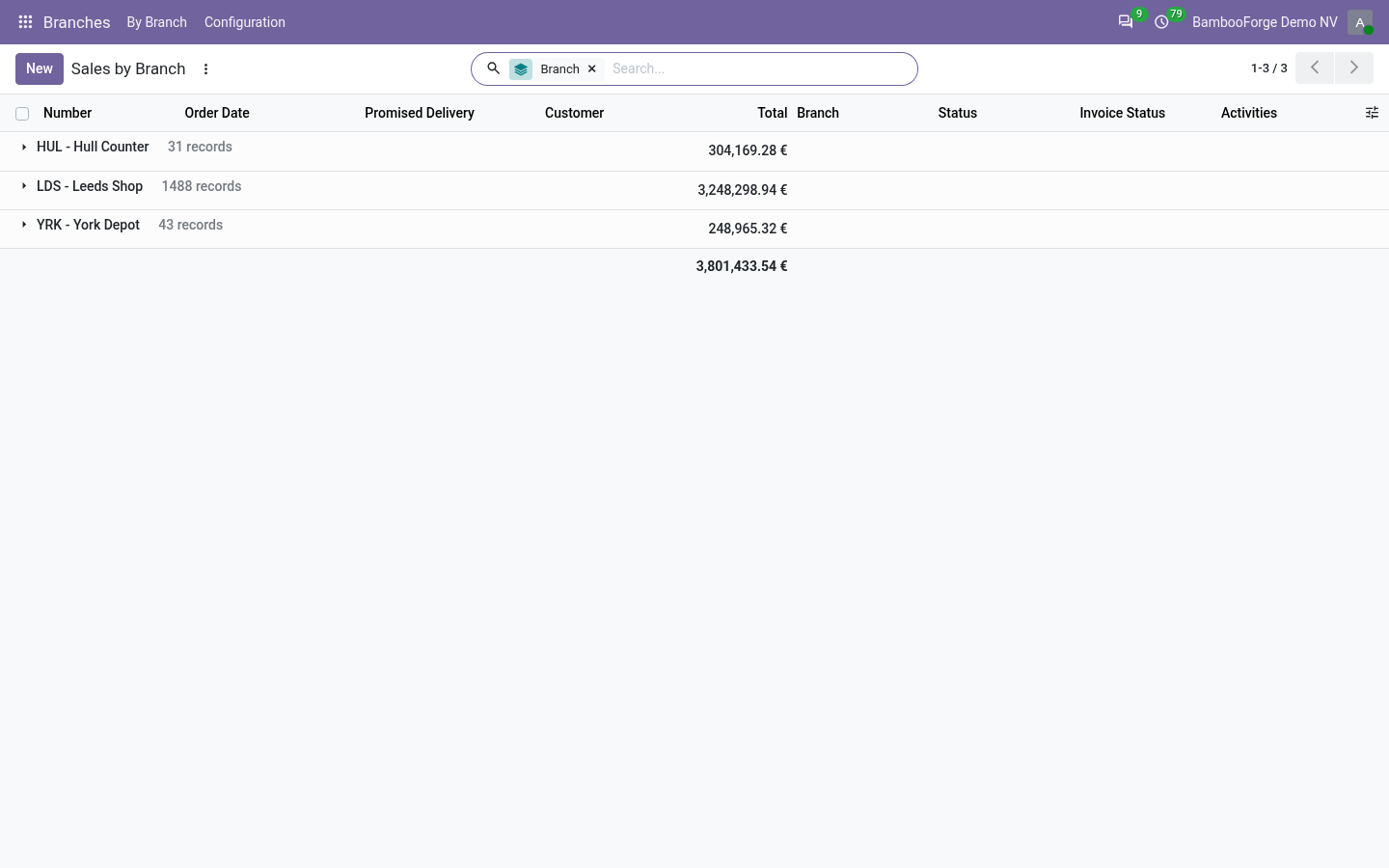
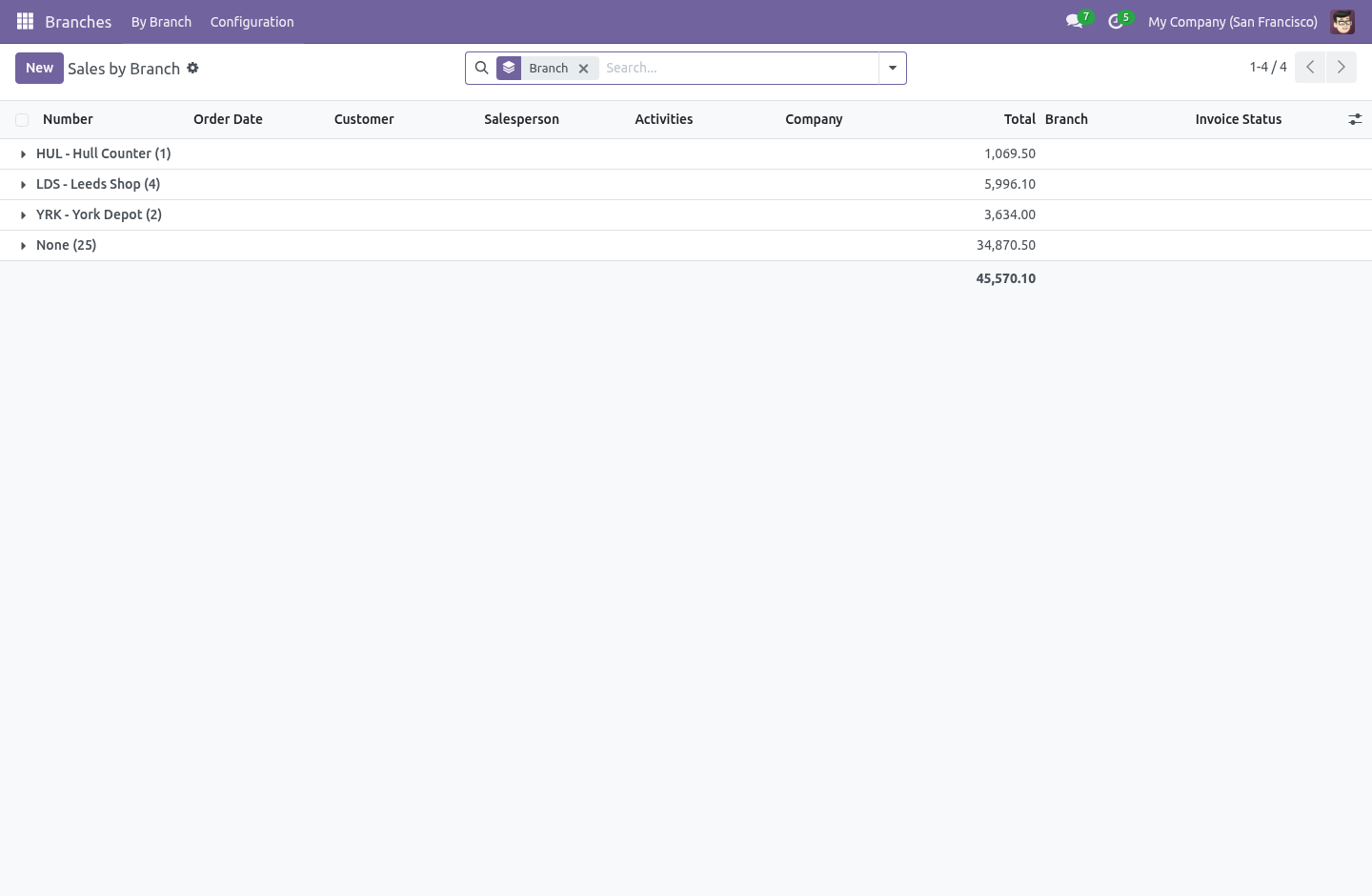
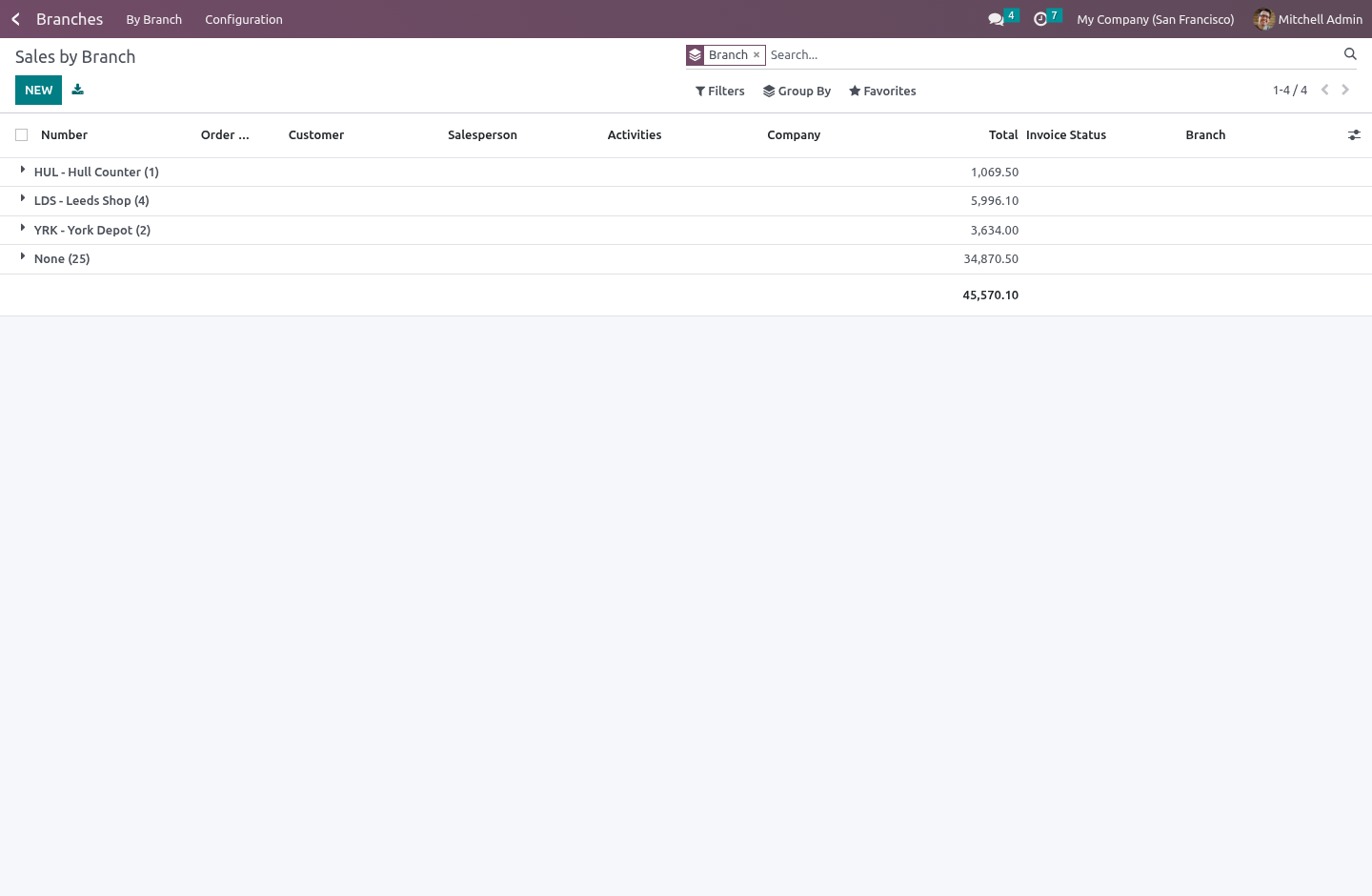
Branches › By Branch opens the lists people already know — sales, purchases, invoices and bills, transfers — grouped by branch. Same views, same filters, same columns anybody has already set up. There is also a No branch yet filter in each of those searches.
What it does not do
It does not rewrite invoice numbers. See above.
It does not make branches into companies. Stock still moves between two of your own depots as an internal transfer, not as a sale.
It does not restrict anybody until you put them in the group.
It does not fence journal entries, payments or bank statement lines. See above — that is a decision, not a gap.
It does not stop a sequence number being consumed by a quotation that then fails to save. ir.sequence draws from a Postgres sequence, which is not rolled back, so a validation error can leave a gap in a branch's quotation numbers. Quotation numbers are a reference, not a legal series; invoice numbers, which are, are left to Odoo.
How we make sure it works
Before every release, 67 automated checks run against this app on Odoo 16, 17, 18, 19 and 20. Among them:
They cannot file under a branch they do not work at.
A document cannot be filed under another companys branch.
They cannot move a document out of their branch.
Two branches of one company cannot share a code.
A restricted user cannot un file a document.
The complete list is in the source you receive.
Install
Copy bambooforge_branch into your addons path and update the app list, or install the ZIP from the Odoo Apps Store.
Install Multi-branch Operations & Branch Reporting.
Open Branches - its menus are By Branch, Configuration.
Questions people ask
- Which Odoo versions does it run on?
Odoo 16.0, 17.0, 18.0, 19.0, 20.0, on the series you buy it for; each series is its own listing.
- Community or Enterprise?
Both. It needs no Enterprise app.
- What does it need?
The standard Discuss, Inventory, Invoicing, Purchase, Sales, purchase_stock, sale_stock apps. No extra Python package.
- Where does it show up?
Under the Branches menu (By Branch, Configuration).
- Does anything leave my server?
No. It makes no call outside your Odoo server: no telemetry, no licence check, no third-party service.
- What happens if I uninstall it?
Odoo drops the app's own tables and fields; the standard records it worked on (contacts, orders, products) stay as they are.