 BambooForge Labs
Appointment Booking All in One with Skill Routing
Appointment booking with skill-based routing: weighted share, daily and weekly caps, backup members and a visitor preference.
Available for Odoo 16.0, Odoo 17.0, Odoo 18.0, Odoo 19.0, Odoo 20.0. Technical name bambooforge_booking_routing.
Transcript of the walkthrough (Odoo 20)
Appointment Booking All in One with Skill Routing. Appointment booking with skill-based routing: weighted share, daily and weekly caps, backup members and a visitor preference. Said before you buy, because it is the half that decides whether the app fits: In the next few minutes: appointment booking all in one with skill routing, then what booking pro already does, then skills, then weighted share, then caps. Then what this app deliberately does not do, so you can tell before you buy whether it fits.
Everything lives under Skills then Routing report. 1. Copy bambooforge_booking_routing into your addons path and update the app list, or install the ZIP from the Odoo Apps Store. 2.
Install Appointment Booking Suite: Skill-based Routing. 3. Open Skills - its menus are Routing report. Appointment Booking All in One with Skill Routing.
An add-on for BambooForge Booking Pro (17.0). Skills as records, a weighted share of the work, daily and weekly caps, backup members, and a preference the visitor can ask for on the booking page. What Booking Pro already does. Booking Pro hands a booking to a member in one of three ways: first free member, round robin and least busy.
All three treat every member as interchangeable. This add-on is for teams where they are not. Skills. Booking Pro ▸ Skills.
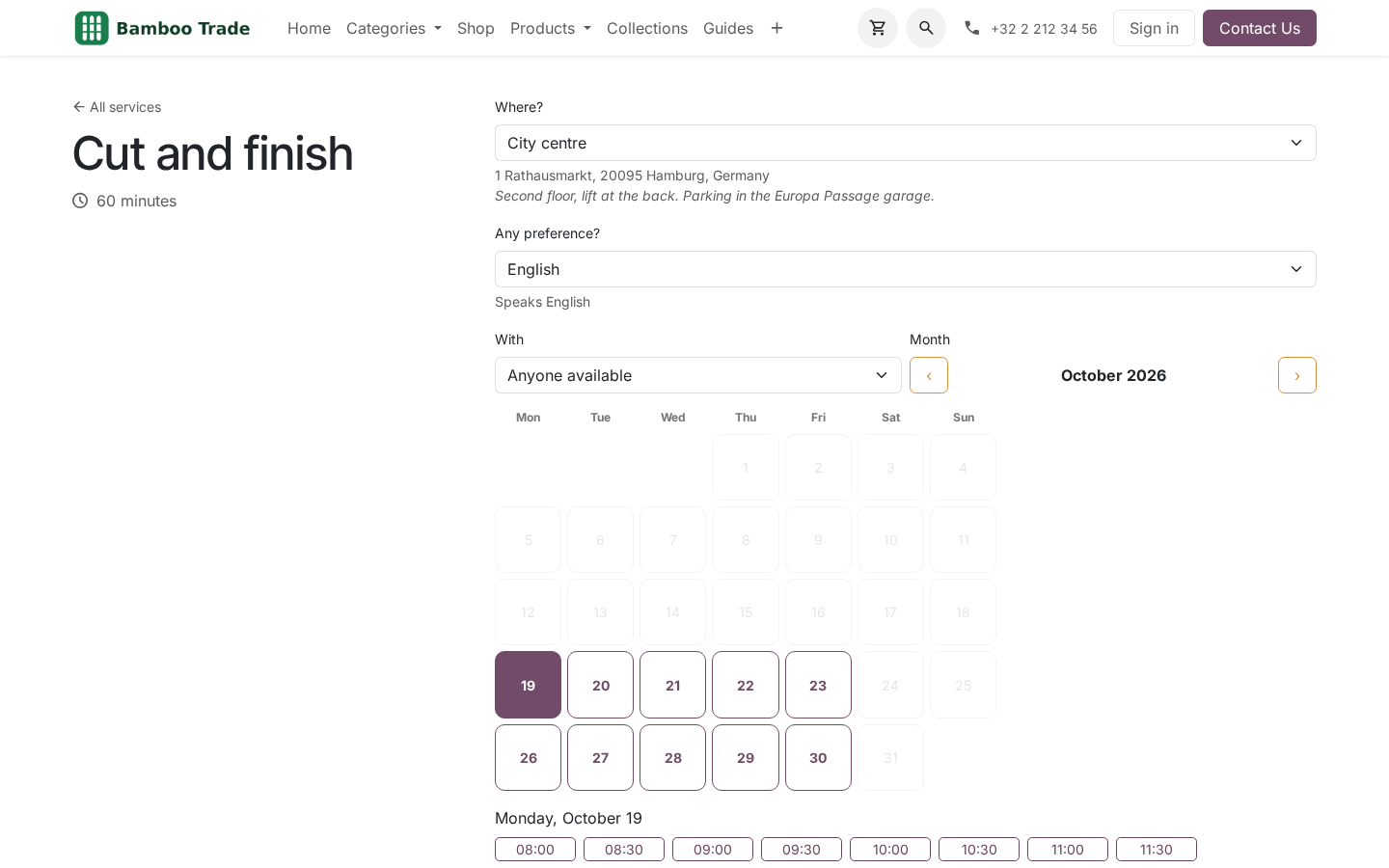
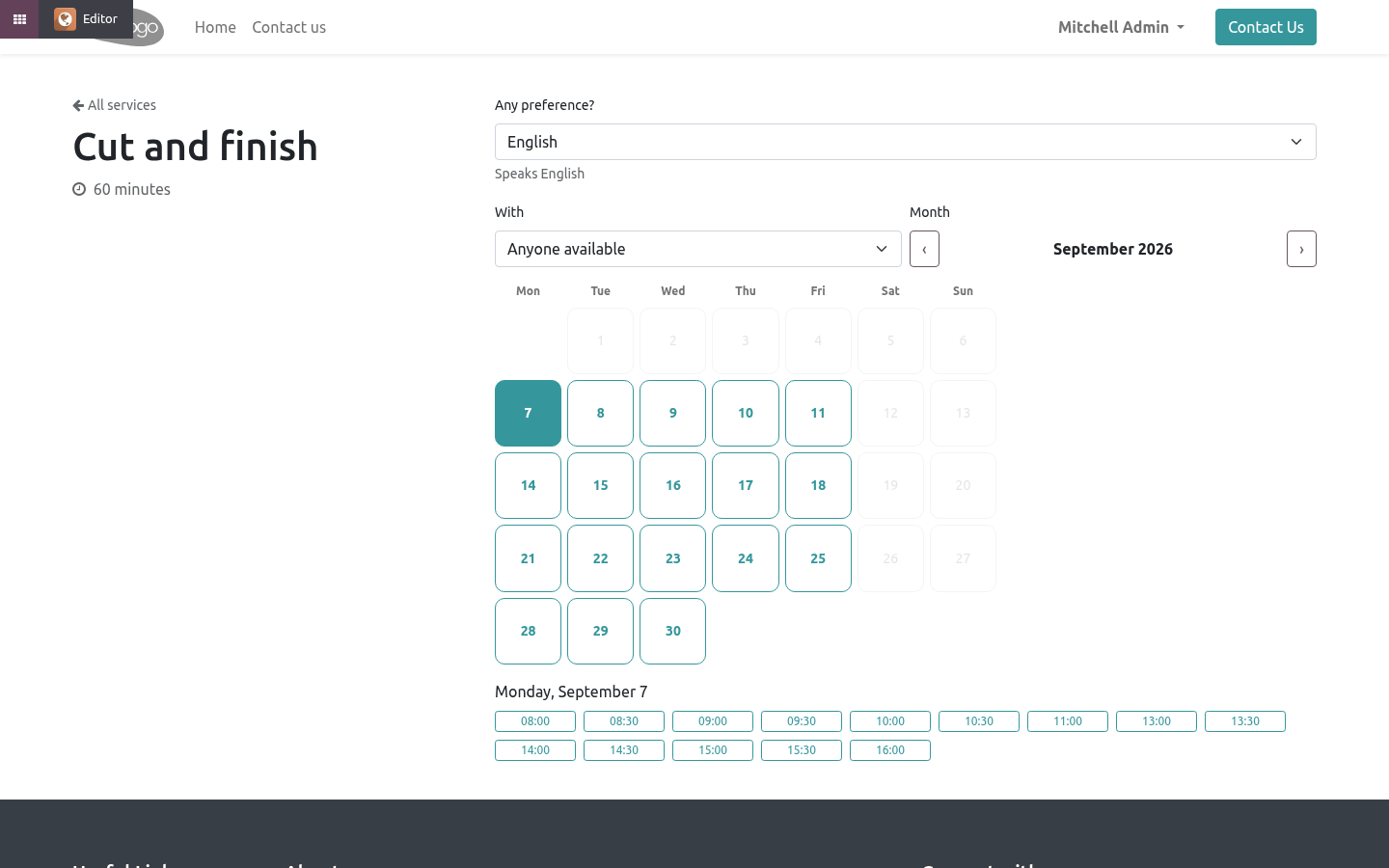
A skill is a record: Colour, English, Paediatric. Give each a short description - it is what the visitor reads when a service exposes it as a preference. Required skills - only members who hold every one of them are offered for this service, on the website and by the router. Saving a service whose required skills no member of its team holds is refused: the alternative is a page with no slots and nobody knowing why.
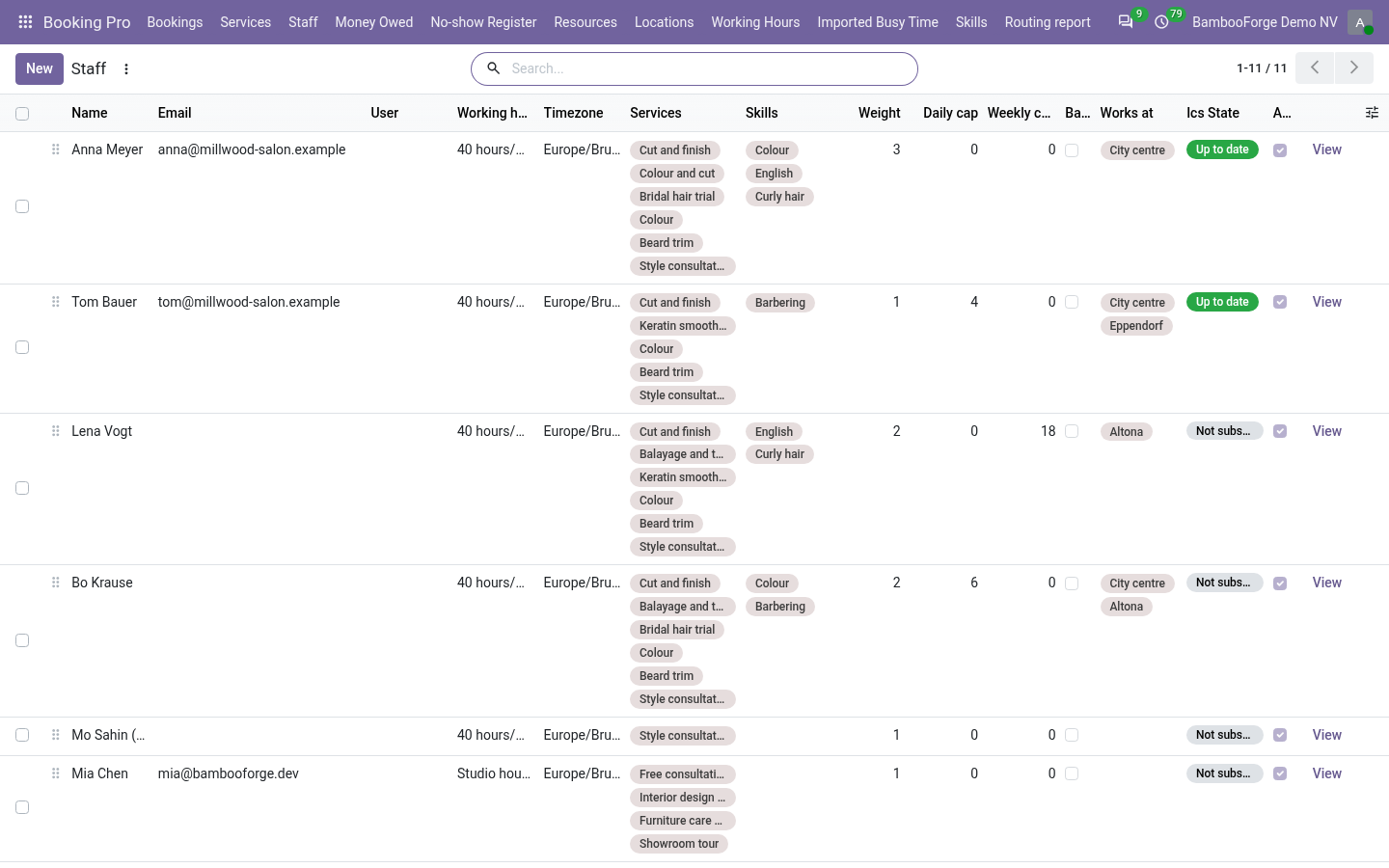
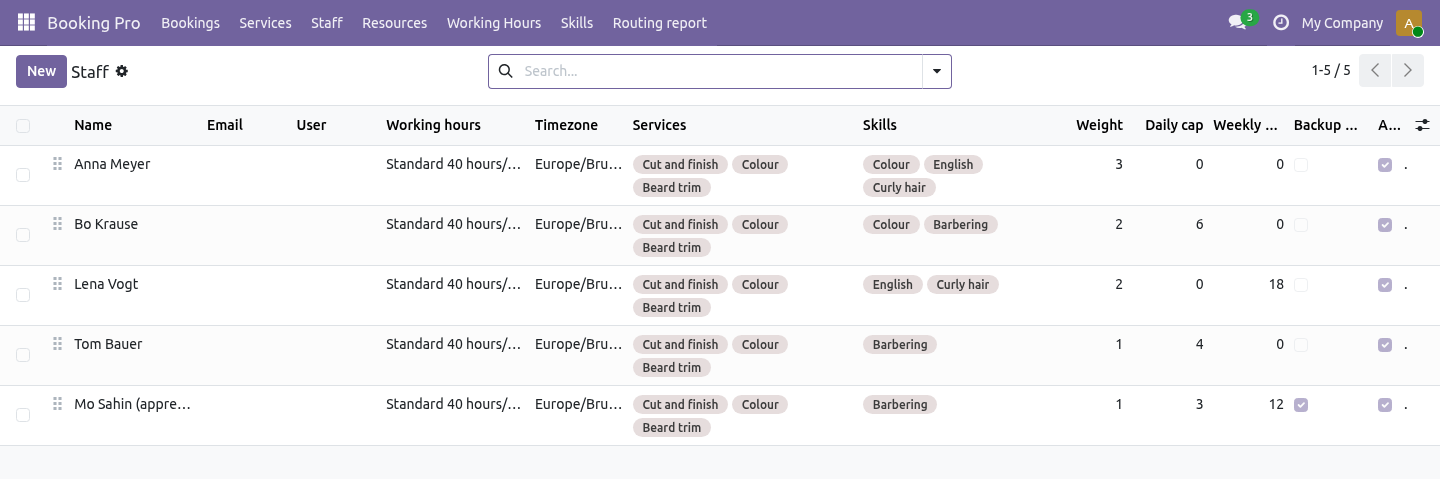
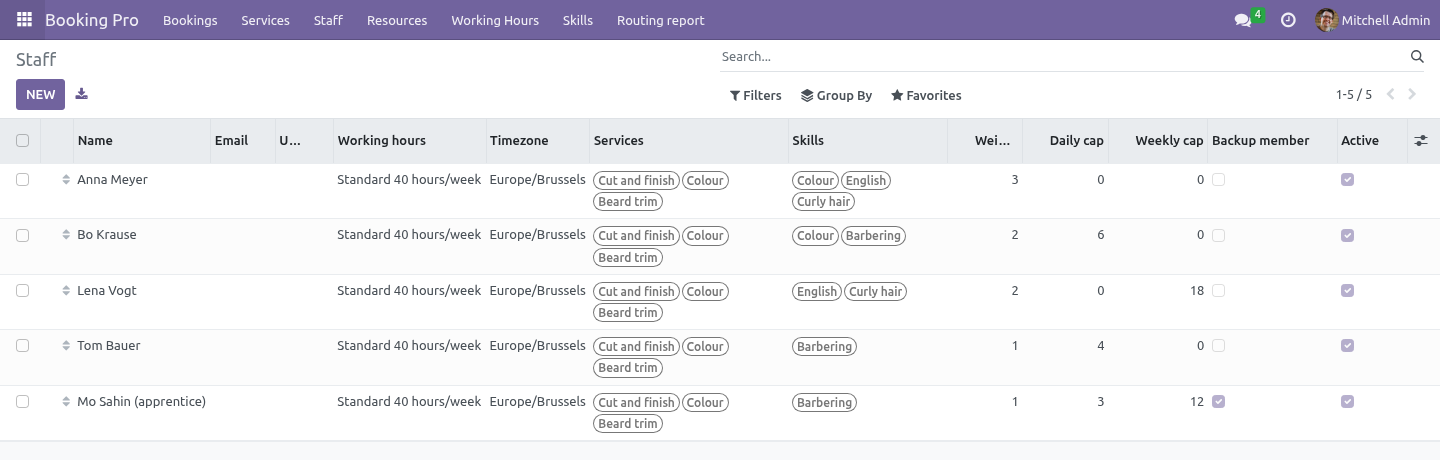
Visitor may ask for - the skills the booking page shows as a preference. The visitor picks one or leaves No preference; the slot grid is recomputed for the members who hold it, the staff dropdown hides the others, and the booking records what was asked for. Booking Pro ▸ Staff gains a Skills column. Tick what each member holds.
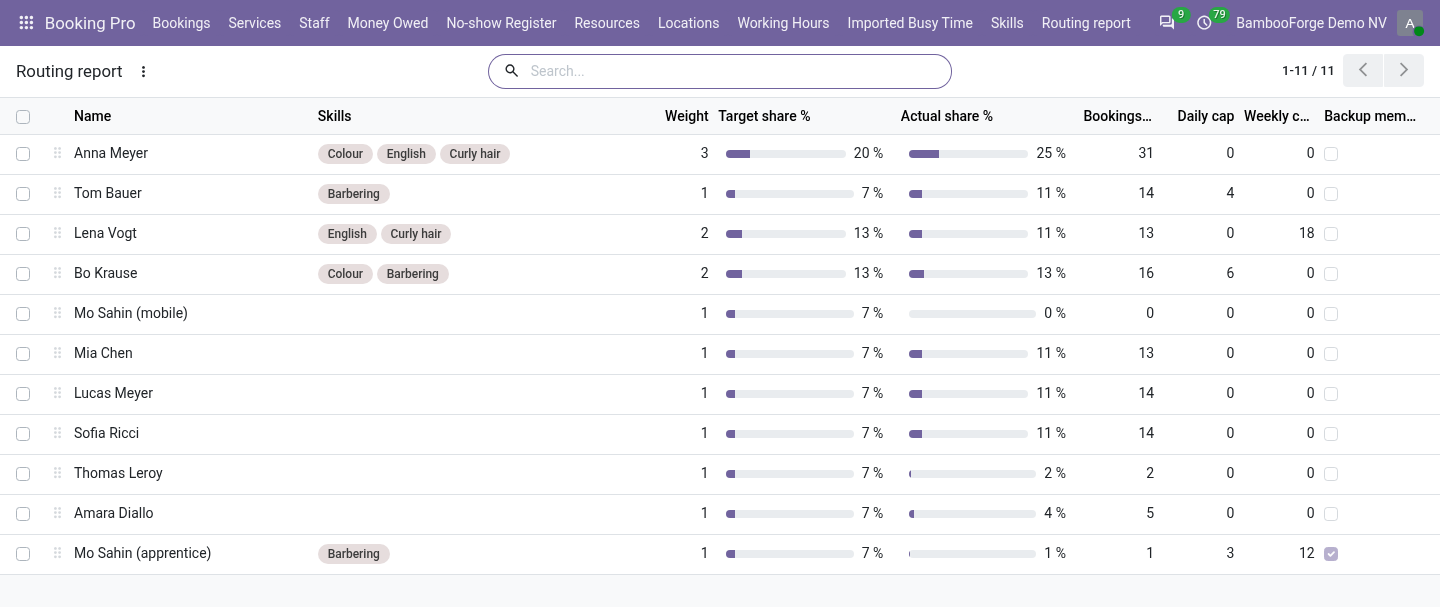
Weighted share. A fourth assignment mode on the service, Weighted share, with a Share window (days) next to it. Each member has a Weight (staff list, default 1). When the visitor leaves Anyone available, the next booking goes to the free member whose bookings over the window, divided by their weight, is lowest - the person furthest below their share.
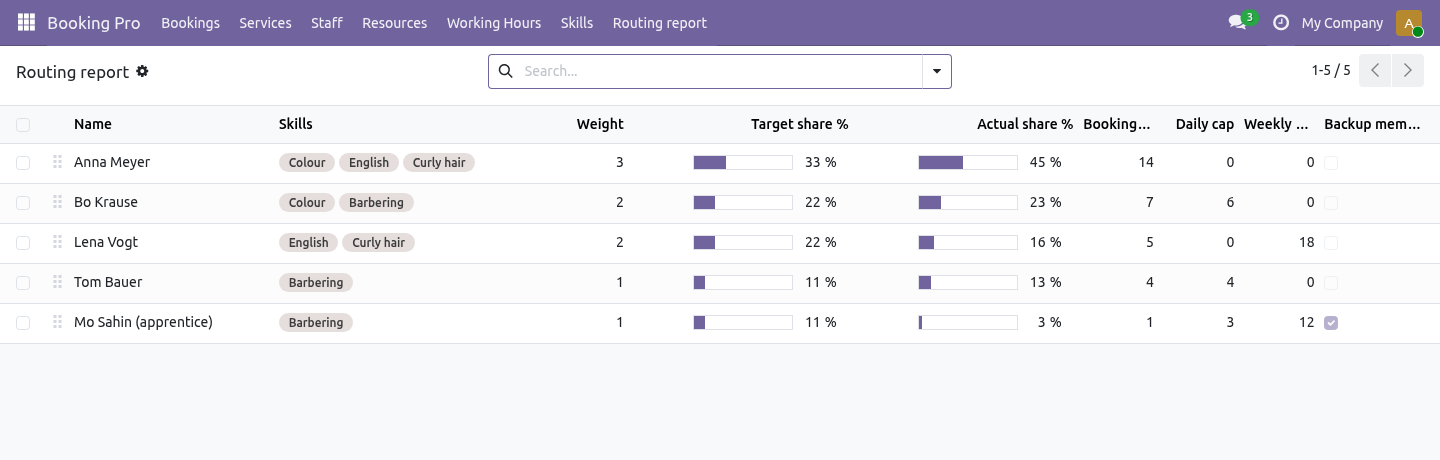
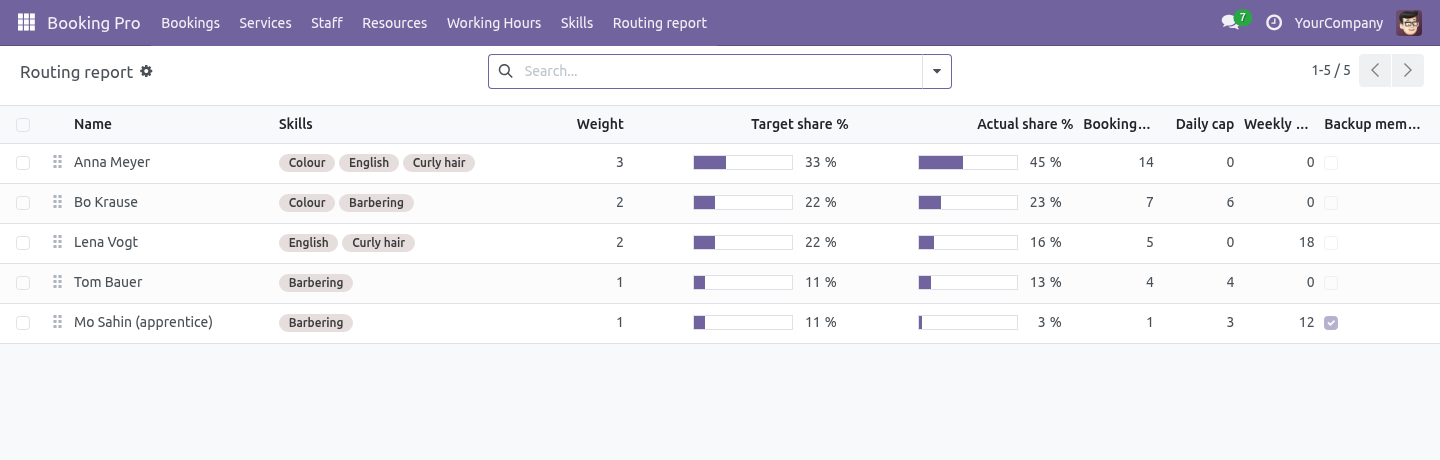
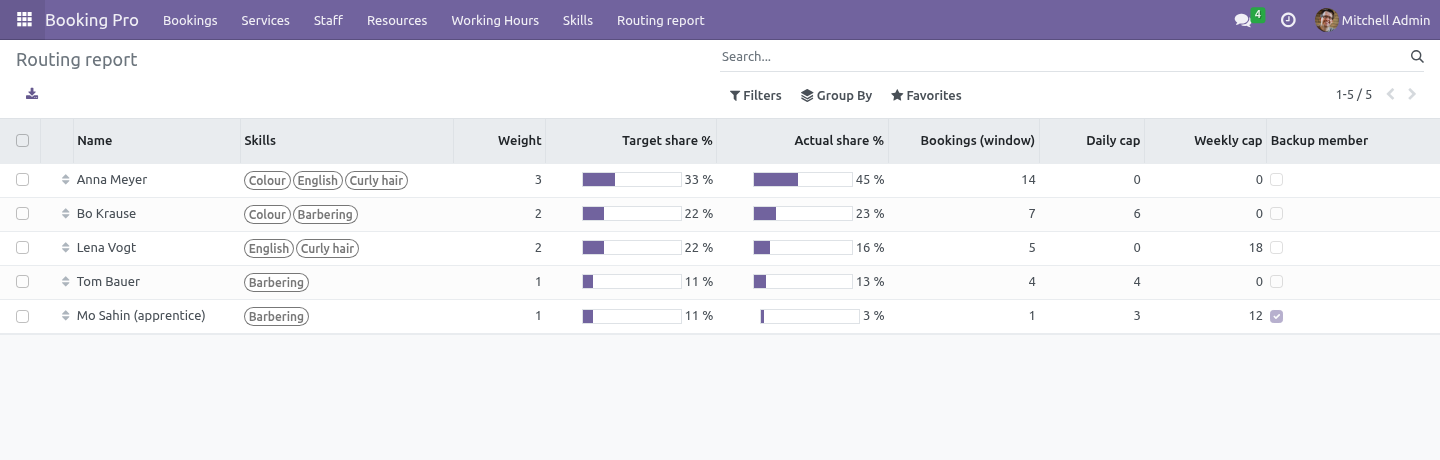
Part-timers at 1, the senior at 3, the apprentice at 2. Booking Pro ▸ Routing report shows the team with Target share (from the weights) next to Actual share (from the bookings in the window), so a rota that drifts is seen, not suspected. Caps. Daily cap and Weekly cap on a member (0 = none) count appointments: a group class with eight seats is one appointment.
When a member reaches the cap, the rest of that day - or that week, Monday to Sunday in the member's own timezone - stops being offered for them. Seats in an appointment already on the diary stay open, so a yoga class at its teacher's third-and-last slot of the day still fills. Backup members. Tick Backup member and the router only hands that member a booking when nobody else is free at that time.
The visitor can still choose them by name. Back office. Caps, skills and weights shape what the website offers. A receptionist placing a booking by hand sees a Skill gap warning when the member lacks what the service requires or the visitor asked for, and can still save.
The desk knows things the rules do not. Technical notes Extends Booking Pro's hooks only: _slot_staff (who is offered), _pick_staff (who is picked) and _busy_intervals (when a member is full). The double-booking lock in booking_submit is untouched. The visitor's preference travels as skill_id on /bf_booking/slots and /bf_booking/submit; the controller accepts only skills the service exposes and ignores the rest.
Composes with BambooForge Booking: Multi-location: both filter the staff dropdown by data attributes and both add parameters on the wire. Community only. No Enterprise module, no external service. How we make sure it works.
Before every release, 33 automated checks run against this app on Odoo 16, 17, 18, 19 and 20. Among them: A backup is picked only when nobody else is free. A service nobody can serve is refused. The last holder cannot drop the skill.
An unexposed preference is ignored not honoured. Cancelled appointments do not fill the cap. The complete list is in the source you receive. Questions people ask.
Which Odoo versions does it run on? Odoo 16.0, 17.0, 18.0, 19.0, 20.0, on the series you buy it for; each series is its own listing. Community or Enterprise? Both.
It needs no Enterprise app. The complete manual is at docs dot bambooforge dot dev, the demo database is linked from the store page, and support answers within twenty-four hours. Links are in the description.
Transcript of the walkthrough (Odoo 19)
Appointment Booking Suite: Skill-based Routing. Appointment booking with skill-based routing: weighted share, daily and weekly caps, backup members and a visitor preference. An add-on for BambooForge Booking Pro (17.0). Skills as records, a weighted share of the work, daily and weekly caps, backup members, and a preference the visitor can ask for on the booking page.
Booking Pro hands a booking to a member in one of three ways: first free member, round robin and least busy. All three treat every member as interchangeable. This add-on is for teams where they are not. Booking Pro ▸ Skills.
A skill is a record: Colour, English, Paediatric. Give each a short description - it is what the visitor reads when a service exposes it as a preference. In the next few minutes: appointment booking suite: skill-based routing, then what booking pro already does, then skills, then weighted share, then caps. Then what this app deliberately does not do, so you can tell before you buy whether it fits.
Everything lives under Skills then Routing report. Appointment Booking Suite: Skill-based Routing. An add-on for BambooForge Booking Pro (17.0). Skills as records, a weighted share of the work, daily and weekly caps, backup members, and a preference the visitor can ask for on the booking page.
What Booking Pro already does. Booking Pro hands a booking to a member in one of three ways: first free member, round robin and least busy. All three treat every member as interchangeable. This add-on is for teams where they are not.
Skills. Booking Pro ▸ Skills. A skill is a record: Colour, English, Paediatric. Give each a short description - it is what the visitor reads when a service exposes it as a preference.
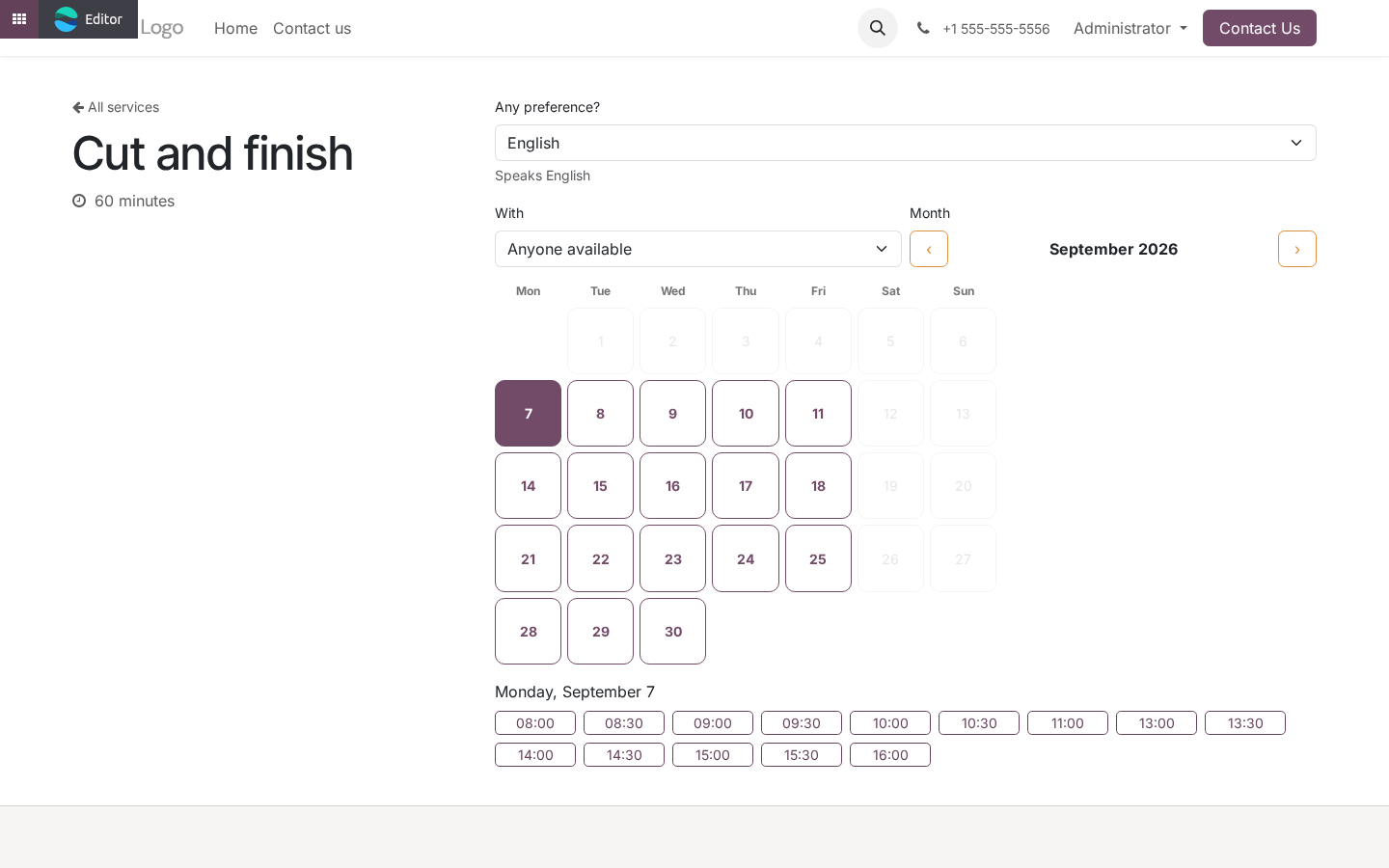
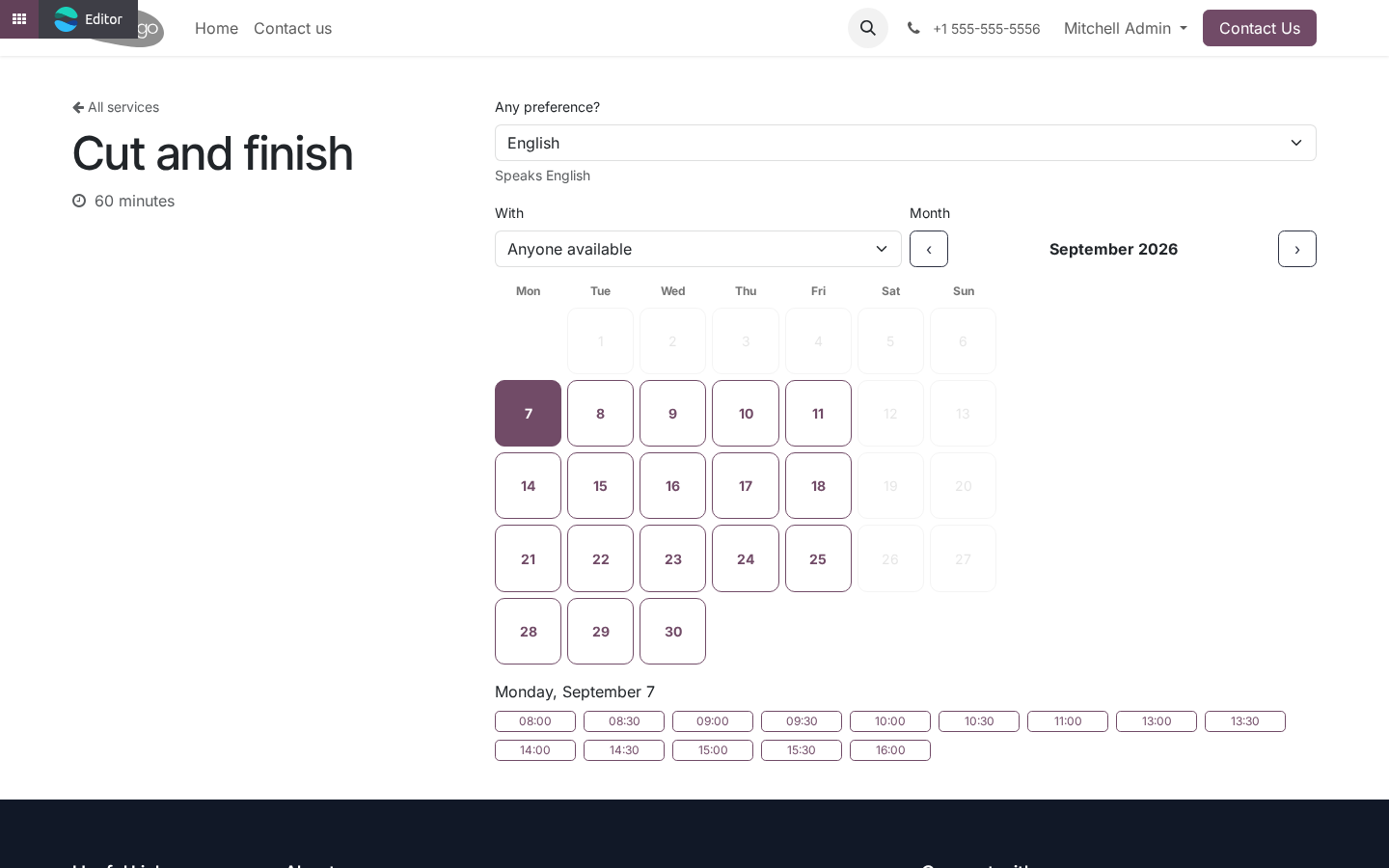
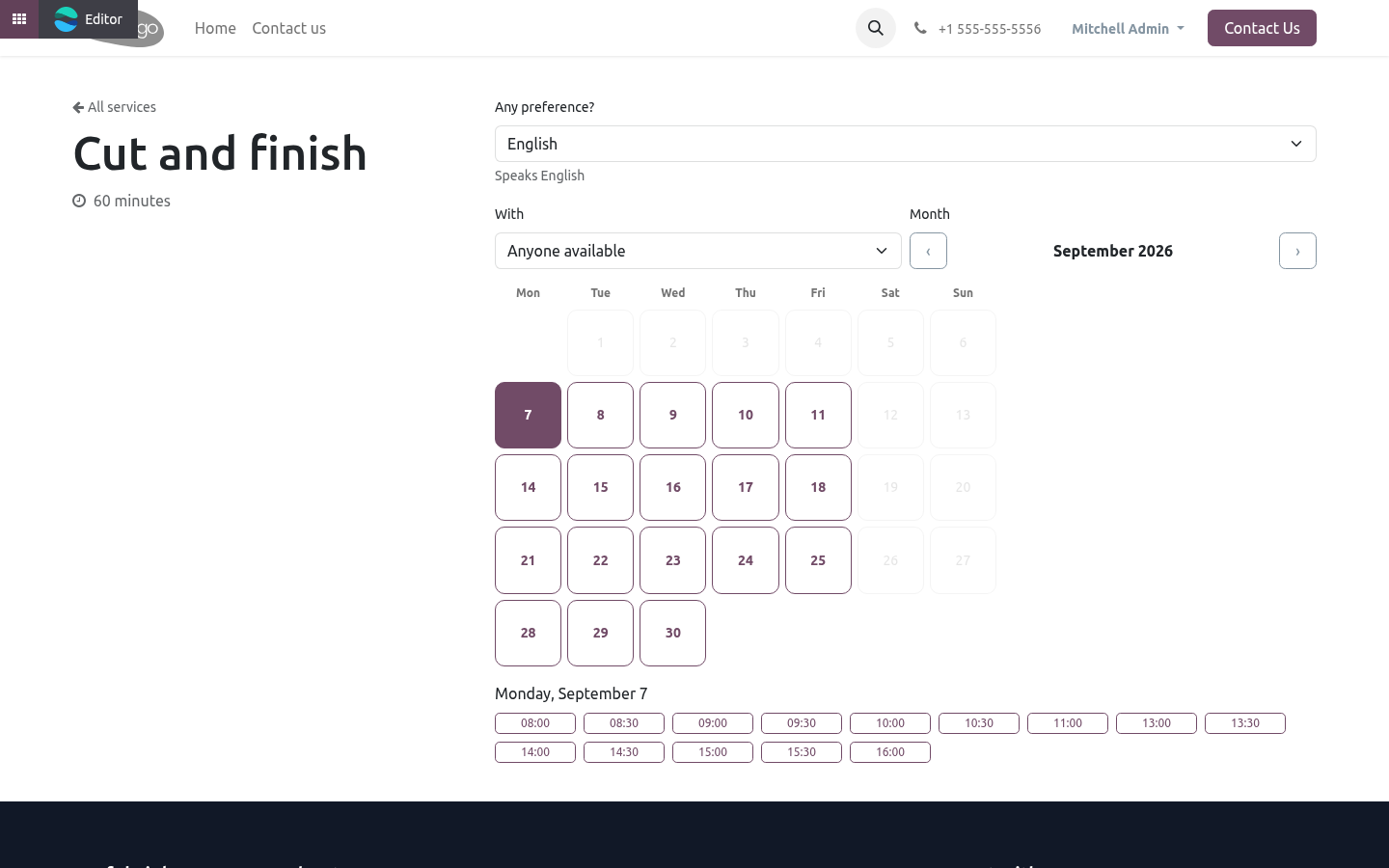
Required skills - only members who hold every one of them are offered for this service, on the website and by the router. Saving a service whose required skills no member of its team holds is refused: the alternative is a page with no slots and nobody knowing why. Visitor may ask for - the skills the booking page shows as a preference. The visitor picks one or leaves No preference; the slot grid is recomputed for the members who hold it, the staff dropdown hides the others, and the booking records what was asked for.
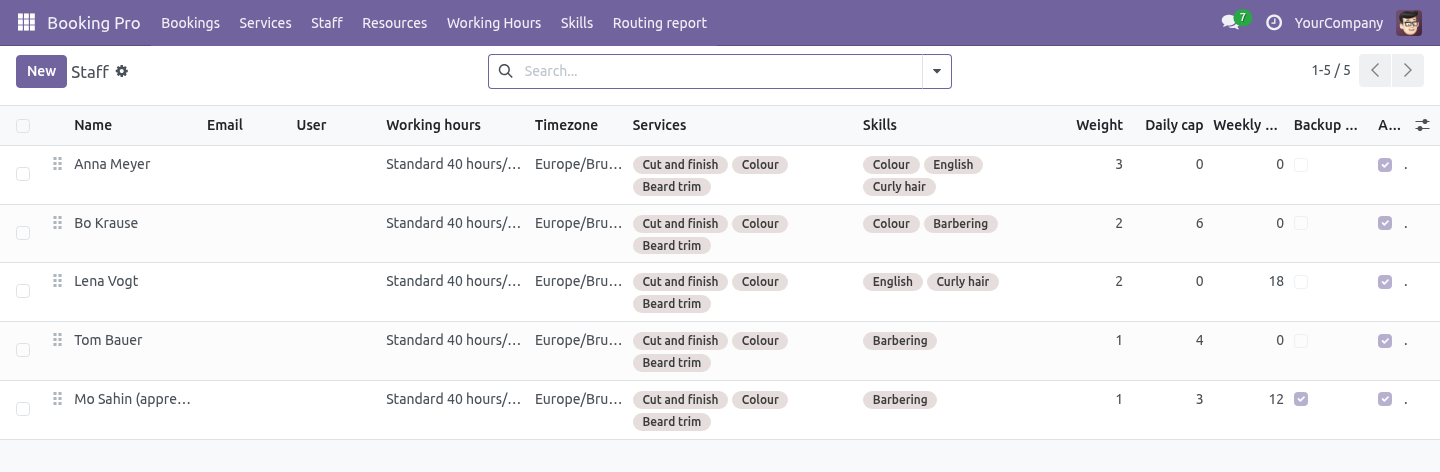
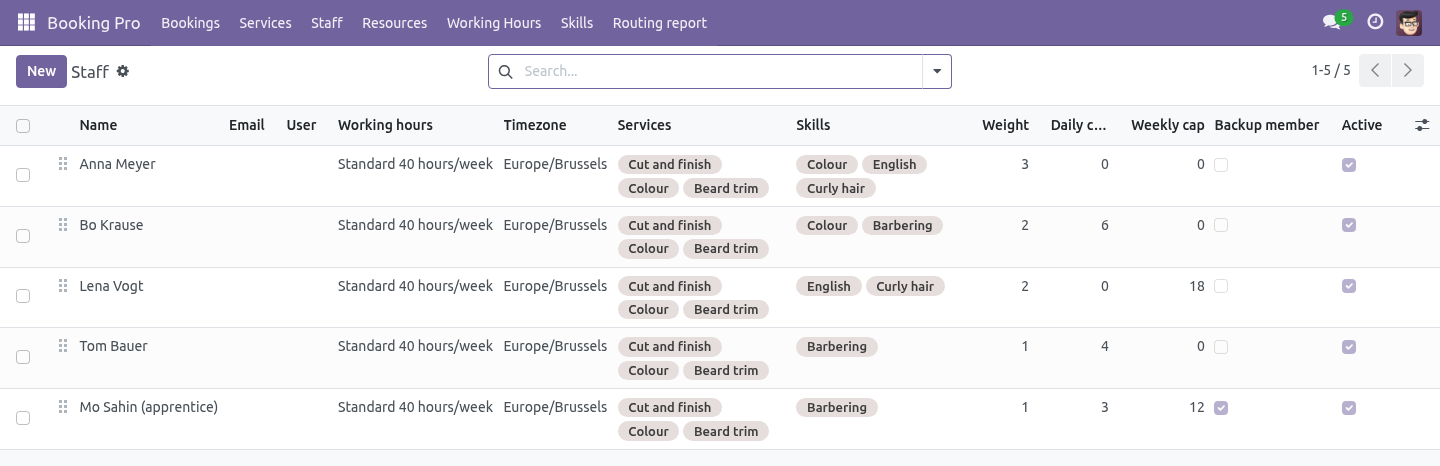
Booking Pro ▸ Staff gains a Skills column. Tick what each member holds. Weighted share. A fourth assignment mode on the service, Weighted share, with a Share window (days) next to it.
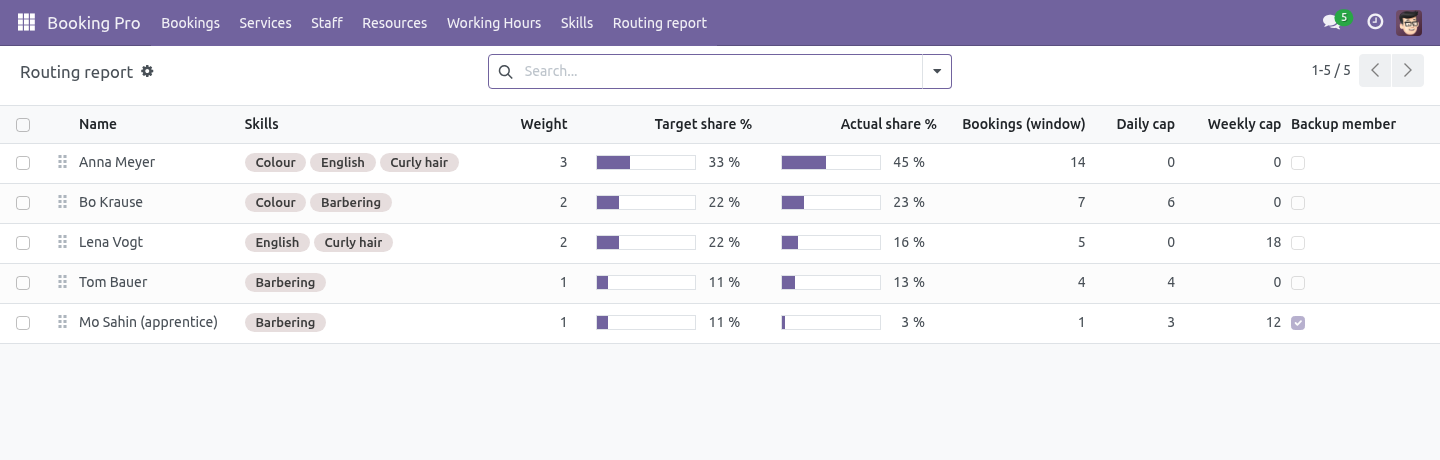
Each member has a Weight (staff list, default 1). When the visitor leaves Anyone available, the next booking goes to the free member whose bookings over the window, divided by their weight, is lowest - the person furthest below their share. Part-timers at 1, the senior at 3, the apprentice at 2. Booking Pro ▸ Routing report shows the team with Target share (from the weights) next to Actual share (from the bookings in the window), so a rota that drifts is seen, not suspected.
Caps. Daily cap and Weekly cap on a member (0 = none) count appointments: a group class with eight seats is one appointment. When a member reaches the cap, the rest of that day - or that week, Monday to Sunday in the member's own timezone - stops being offered for them. Seats in an appointment already on the diary stay open, so a yoga class at its teacher's third-and-last slot of the day still fills.
Backup members. Tick Backup member and the router only hands that member a booking when nobody else is free at that time. The visitor can still choose them by name. Back office.
Caps, skills and weights shape what the website offers. A receptionist placing a booking by hand sees a Skill gap warning when the member lacks what the service requires or the visitor asked for, and can still save. The desk knows things the rules do not. Technical notes Extends Booking Pro's hooks only: _slot_staff (who is offered), _pick_staff (who is picked) and _busy_intervals (when a member is full).
The double-booking lock in booking_submit is untouched. The visitor's preference travels as skill_id on /bf_booking/slots and /bf_booking/submit; the controller accepts only skills the service exposes and ignores the rest. Composes with BambooForge Booking: Multi-location: both filter the staff dropdown by data attributes and both add parameters on the wire. Community only.
No Enterprise module, no external service. The complete manual is at docs dot bambooforge dot dev, the demo database is linked from the store page, and support answers within twenty-four hours. Links are in the description.
Transcript of the walkthrough (Odoo 18)
Appointment Booking Suite: Skill-based Routing. Appointment booking with skill-based routing: weighted share, daily and weekly caps, backup members and a visitor preference. An add-on for BambooForge Booking Pro (17.0). Skills as records, a weighted share of the work, daily and weekly caps, backup members, and a preference the visitor can ask for on the booking page.
Booking Pro hands a booking to a member in one of three ways: first free member, round robin and least busy. All three treat every member as interchangeable. This add-on is for teams where they are not. Booking Pro ▸ Skills.
A skill is a record: Colour, English, Paediatric. Give each a short description - it is what the visitor reads when a service exposes it as a preference. In the next few minutes: appointment booking suite: skill-based routing, then what booking pro already does, then skills, then weighted share, then caps. Then what this app deliberately does not do, so you can tell before you buy whether it fits.
Everything lives under Skills then Routing report. Appointment Booking Suite: Skill-based Routing. An add-on for BambooForge Booking Pro (17.0). Skills as records, a weighted share of the work, daily and weekly caps, backup members, and a preference the visitor can ask for on the booking page.
What Booking Pro already does. Booking Pro hands a booking to a member in one of three ways: first free member, round robin and least busy. All three treat every member as interchangeable. This add-on is for teams where they are not.
Skills. Booking Pro ▸ Skills. A skill is a record: Colour, English, Paediatric. Give each a short description - it is what the visitor reads when a service exposes it as a preference.
Required skills - only members who hold every one of them are offered for this service, on the website and by the router. Saving a service whose required skills no member of its team holds is refused: the alternative is a page with no slots and nobody knowing why. Visitor may ask for - the skills the booking page shows as a preference. The visitor picks one or leaves No preference; the slot grid is recomputed for the members who hold it, the staff dropdown hides the others, and the booking records what was asked for.
Booking Pro ▸ Staff gains a Skills column. Tick what each member holds. Weighted share. A fourth assignment mode on the service, Weighted share, with a Share window (days) next to it.
Each member has a Weight (staff list, default 1). When the visitor leaves Anyone available, the next booking goes to the free member whose bookings over the window, divided by their weight, is lowest - the person furthest below their share. Part-timers at 1, the senior at 3, the apprentice at 2. Booking Pro ▸ Routing report shows the team with Target share (from the weights) next to Actual share (from the bookings in the window), so a rota that drifts is seen, not suspected.
Caps. Daily cap and Weekly cap on a member (0 = none) count appointments: a group class with eight seats is one appointment. When a member reaches the cap, the rest of that day - or that week, Monday to Sunday in the member's own timezone - stops being offered for them. Seats in an appointment already on the diary stay open, so a yoga class at its teacher's third-and-last slot of the day still fills.
Backup members. Tick Backup member and the router only hands that member a booking when nobody else is free at that time. The visitor can still choose them by name. Back office.
Caps, skills and weights shape what the website offers. A receptionist placing a booking by hand sees a Skill gap warning when the member lacks what the service requires or the visitor asked for, and can still save. The desk knows things the rules do not. Technical notes Extends Booking Pro's hooks only: _slot_staff (who is offered), _pick_staff (who is picked) and _busy_intervals (when a member is full).
The double-booking lock in booking_submit is untouched. The visitor's preference travels as skill_id on /bf_booking/slots and /bf_booking/submit; the controller accepts only skills the service exposes and ignores the rest. Composes with BambooForge Booking: Multi-location: both filter the staff dropdown by data attributes and both add parameters on the wire. Community only.
No Enterprise module, no external service. The complete manual is at docs dot bambooforge dot dev, the demo database is linked from the store page, and support answers within twenty-four hours. Links are in the description.
Transcript of the walkthrough (Odoo 17)
Appointment Booking Suite: Skill-based Routing. Appointment booking with skill-based routing: weighted share, daily and weekly caps, backup members and a visitor preference. An add-on for BambooForge Booking Pro (17.0). Skills as records, a weighted share of the work, daily and weekly caps, backup members, and a preference the visitor can ask for on the booking page.
Booking Pro hands a booking to a member in one of three ways: first free member, round robin and least busy. All three treat every member as interchangeable. This add-on is for teams where they are not. Booking Pro ▸ Skills.
A skill is a record: Colour, English, Paediatric. Give each a short description - it is what the visitor reads when a service exposes it as a preference. In the next few minutes: appointment booking suite: skill-based routing, then what booking pro already does, then skills, then weighted share, then caps. Then what this app deliberately does not do, so you can tell before you buy whether it fits.
Everything lives under Skills then Routing report. Appointment Booking Suite: Skill-based Routing. An add-on for BambooForge Booking Pro (17.0). Skills as records, a weighted share of the work, daily and weekly caps, backup members, and a preference the visitor can ask for on the booking page.
What Booking Pro already does. Booking Pro hands a booking to a member in one of three ways: first free member, round robin and least busy. All three treat every member as interchangeable. This add-on is for teams where they are not.
Skills. Booking Pro ▸ Skills. A skill is a record: Colour, English, Paediatric. Give each a short description - it is what the visitor reads when a service exposes it as a preference.
Required skills - only members who hold every one of them are offered for this service, on the website and by the router. Saving a service whose required skills no member of its team holds is refused: the alternative is a page with no slots and nobody knowing why. Visitor may ask for - the skills the booking page shows as a preference. The visitor picks one or leaves No preference; the slot grid is recomputed for the members who hold it, the staff dropdown hides the others, and the booking records what was asked for.
Booking Pro ▸ Staff gains a Skills column. Tick what each member holds. Weighted share. A fourth assignment mode on the service, Weighted share, with a Share window (days) next to it.
Each member has a Weight (staff list, default 1). When the visitor leaves Anyone available, the next booking goes to the free member whose bookings over the window, divided by their weight, is lowest - the person furthest below their share. Part-timers at 1, the senior at 3, the apprentice at 2. Booking Pro ▸ Routing report shows the team with Target share (from the weights) next to Actual share (from the bookings in the window), so a rota that drifts is seen, not suspected.
Caps. Daily cap and Weekly cap on a member (0 = none) count appointments: a group class with eight seats is one appointment. When a member reaches the cap, the rest of that day - or that week, Monday to Sunday in the member's own timezone - stops being offered for them. Seats in an appointment already on the diary stay open, so a yoga class at its teacher's third-and-last slot of the day still fills.
Backup members. Tick Backup member and the router only hands that member a booking when nobody else is free at that time. The visitor can still choose them by name. Back office.
Caps, skills and weights shape what the website offers. A receptionist placing a booking by hand sees a Skill gap warning when the member lacks what the service requires or the visitor asked for, and can still save. The desk knows things the rules do not. Technical notes Extends Booking Pro's hooks only: _slot_staff (who is offered), _pick_staff (who is picked) and _busy_intervals (when a member is full).
The double-booking lock in booking_submit is untouched. The visitor's preference travels as skill_id on /bf_booking/slots and /bf_booking/submit; the controller accepts only skills the service exposes and ignores the rest. Composes with BambooForge Booking: Multi-location: both filter the staff dropdown by data attributes and both add parameters on the wire. Community only.
No Enterprise module, no external service. The complete manual is at docs dot bambooforge dot dev, the demo database is linked from the store page, and support answers within twenty-four hours. Links are in the description.
Transcript of the walkthrough (Odoo 16)
Appointment Booking Suite: Skill-based Routing. Appointment booking with skill-based routing: weighted share, daily and weekly caps, backup members and a visitor preference. An add-on for BambooForge Booking Pro (17.0). Skills as records, a weighted share of the work, daily and weekly caps, backup members, and a preference the visitor can ask for on the booking page.
Booking Pro hands a booking to a member in one of three ways: first free member, round robin and least busy. All three treat every member as interchangeable. This add-on is for teams where they are not. Booking Pro ▸ Skills.
A skill is a record: Colour, English, Paediatric. Give each a short description - it is what the visitor reads when a service exposes it as a preference. In the next few minutes: appointment booking suite: skill-based routing, then what booking pro already does, then skills, then weighted share, then caps. Then what this app deliberately does not do, so you can tell before you buy whether it fits.
Everything lives under Skills then Routing report. Appointment Booking Suite: Skill-based Routing. An add-on for BambooForge Booking Pro (17.0). Skills as records, a weighted share of the work, daily and weekly caps, backup members, and a preference the visitor can ask for on the booking page.
What Booking Pro already does. Booking Pro hands a booking to a member in one of three ways: first free member, round robin and least busy. All three treat every member as interchangeable. This add-on is for teams where they are not.
Skills. Booking Pro ▸ Skills. A skill is a record: Colour, English, Paediatric. Give each a short description - it is what the visitor reads when a service exposes it as a preference.
Required skills - only members who hold every one of them are offered for this service, on the website and by the router. Saving a service whose required skills no member of its team holds is refused: the alternative is a page with no slots and nobody knowing why. Visitor may ask for - the skills the booking page shows as a preference. The visitor picks one or leaves No preference; the slot grid is recomputed for the members who hold it, the staff dropdown hides the others, and the booking records what was asked for.
Booking Pro ▸ Staff gains a Skills column. Tick what each member holds. Weighted share. A fourth assignment mode on the service, Weighted share, with a Share window (days) next to it.
Each member has a Weight (staff list, default 1). When the visitor leaves Anyone available, the next booking goes to the free member whose bookings over the window, divided by their weight, is lowest - the person furthest below their share. Part-timers at 1, the senior at 3, the apprentice at 2. Booking Pro ▸ Routing report shows the team with Target share (from the weights) next to Actual share (from the bookings in the window), so a rota that drifts is seen, not suspected.
Caps. Daily cap and Weekly cap on a member (0 = none) count appointments: a group class with eight seats is one appointment. When a member reaches the cap, the rest of that day - or that week, Monday to Sunday in the member's own timezone - stops being offered for them. Seats in an appointment already on the diary stay open, so a yoga class at its teacher's third-and-last slot of the day still fills.
Backup members. Tick Backup member and the router only hands that member a booking when nobody else is free at that time. The visitor can still choose them by name. Back office.
Caps, skills and weights shape what the website offers. A receptionist placing a booking by hand sees a Skill gap warning when the member lacks what the service requires or the visitor asked for, and can still save. The desk knows things the rules do not. Technical notes Extends Booking Pro's hooks only: _slot_staff (who is offered), _pick_staff (who is picked) and _busy_intervals (when a member is full).
The double-booking lock in booking_submit is untouched. The visitor's preference travels as skill_id on /bf_booking/slots and /bf_booking/submit; the controller accepts only skills the service exposes and ignores the rest. Composes with BambooForge Booking: Multi-location: both filter the staff dropdown by data attributes and both add parameters on the wire. Community only.
No Enterprise module, no external service. The complete manual is at docs dot bambooforge dot dev, the demo database is linked from the store page, and support answers within twenty-four hours. Links are in the description.
Key facts
- What it is
- Appointment booking with skill-based routing: weighted share, daily and weekly caps, backup members and a visitor preference.
- For
- Website
- Odoo versions
- 16.0, 17.0, 18.0, 19.0, 20.0 - Community and Enterprise
- Runs on
- Odoo.sh or Odoo you host yourself - not Odoo Online, which accepts no third-party apps
- Price
- 228 EUR, one-time, on the Odoo Apps Store
- Technical name
- bambooforge_booking_routing
- Not for
- Said before you buy, because it is the half that decides whether the app fits:; Let a service be saved whose required skills no member of its team holds.; Override a visitor's explicit choice of staff member: the router assigns only when they leave No preference.
- Live demo
- https://demo20.bambooforge.dev/odoo/action-bambooforge_booking_routing.action_bf_booking_skill
- Manual last updated
- 2026-10-15
Appointment Booking All in One with Skill Routing
An add-on for BambooForge Booking Pro (17.0). Skills as records, a weighted share of the work, daily and weekly caps, backup members, and a preference the visitor can ask for on the booking page.
What Booking Pro already does
Booking Pro hands a booking to a member in one of three ways: first free member, round robin and least busy. All three treat every member as interchangeable. This add-on is for teams where they are not.
Skills
Booking Pro ▸ Skills. A skill is a record: Colour, English, Paediatric. Give each a short description - it is what the visitor reads when a service exposes it as a preference.
Booking Pro ▸ Staff gains a Skills column. Tick what each member holds.
On a service (Who / what is booked):
Required skills - only members who hold every one of them are offered for this service, on the website and by the router. Saving a service whose required skills no member of its team holds is refused: the alternative is a page with no slots and nobody knowing why.
Visitor may ask for - the skills the booking page shows as a preference. The visitor picks one or leaves No preference; the slot grid is recomputed for the members who hold it, the staff dropdown hides the others, and the booking records what was asked for.
Caps
Daily cap and Weekly cap on a member (0 = none) count appointments: a group class with eight seats is one appointment. When a member reaches the cap, the rest of that day - or that week, Monday to Sunday in the member's own timezone - stops being offered for them. Seats in an appointment already on the diary stay open, so a yoga class at its teacher's third-and-last slot of the day still fills.
Backup members
Tick Backup member and the router only hands that member a booking when nobody else is free at that time. The visitor can still choose them by name.
Back office
Caps, skills and weights shape what the website offers. A receptionist placing a booking by hand sees a Skill gap warning when the member lacks what the service requires or the visitor asked for, and can still save. The desk knows things the rules do not.
Technical notes
Extends Booking Pro's hooks only: _slot_staff (who is offered), _pick_staff (who is picked) and _busy_intervals (when a member is full). The double-booking lock in booking_submit is untouched.
The visitor's preference travels as skill_id on /bf_booking/slots and /bf_booking/submit; the controller accepts only skills the service exposes and ignores the rest.
Composes with BambooForge Booking: Multi-location: both filter the staff dropdown by data attributes and both add parameters on the wire.
Community only. No Enterprise module, no external service.
How we make sure it works
Before every release, 33 automated checks run against this app on Odoo 16, 17, 18, 19 and 20. Among them:
A backup is picked only when nobody else is free.
A service nobody can serve is refused.
The last holder cannot drop the skill.
An unexposed preference is ignored not honoured.
Cancelled appointments do not fill the cap.
The complete list is in the source you receive.
What it does not do
Said before you buy, because it is the half that decides whether the app fits:
Let a service be saved whose required skills no member of its team holds.
Override a visitor's explicit choice of staff member: the router assigns only when they leave No preference.
Install
Copy bambooforge_booking_routing into your addons path and update the app list, or install the ZIP from the Odoo Apps Store.
Install Appointment Booking Suite: Skill-based Routing.
Open Skills - its menus are Routing report.
Questions people ask
- Which Odoo versions does it run on?
Odoo 16.0, 17.0, 18.0, 19.0, 20.0, on the series you buy it for; each series is its own listing.
- Community or Enterprise?
Both. It needs no Enterprise app.
- What does it need?
The standard Web; booking pro (BambooForge) must be installed first app. No extra Python package.
- Where does it show up?
Under the Skills menu (Routing report).
- Does anything leave my server?
No. It makes no call outside your Odoo server: no telemetry, no licence check, no third-party service.
- What happens if I uninstall it?
Odoo drops the app's own tables and fields; the standard records it worked on (contacts, orders, products) stay as they are.