 BambooForge Labs
Appointment Booking All in One for Many Locations
Appointment booking across branches: the visitor picks the location, only staff who work there are offered, and travel time prevents clashes.
Available for Odoo 16.0, Odoo 17.0, Odoo 18.0, Odoo 19.0, Odoo 20.0. Technical name bambooforge_booking_locations.
Transcript of the walkthrough (Odoo 20)
Appointment Booking All in One for Many Locations. Appointment booking across branches: the visitor picks the location, only staff who work there are offered, and travel time prevents clashes. An add-on for BambooForge Booking Pro. Booking Pro's location is one line of text on the service; this makes the branch a record, with the people who work there and the time it takes to reach the next one.
In the next few minutes: appointment booking all in one for many locations, then locations, then what the visitor sees, then travel time, then multi-company. Then what this app deliberately does not do, so you can tell before you buy whether it fits. Everything lives under Locations. 1.
Install BambooForge Booking: Multi-location (it needs Booking Pro). Nothing changes until a service is given branches; a service with none keeps the page and the behaviour it had. 2. Open the new menu Booking Pro → Locations.
Appointment Booking All in One for Many Locations. An add-on for BambooForge Booking Pro. Booking Pro's location is one line of text on the service; this makes the branch a record, with the people who work there and the time it takes to reach the next one. Locations.
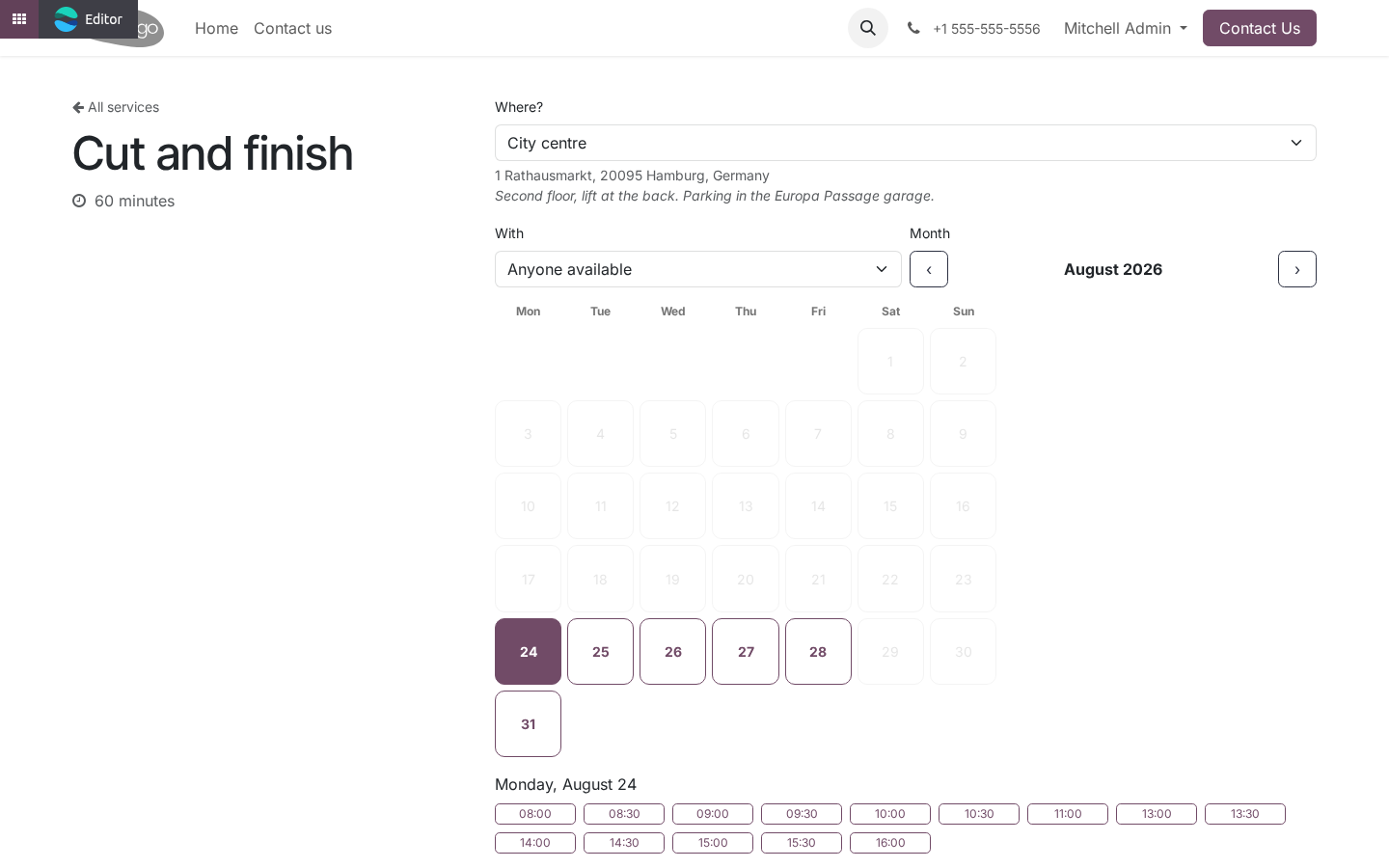
Then, on each service: Offered at - one branch, some, or none. What the visitor sees. A Where? selector above the calendar, with the address and directions of the chosen branch under it.
The first branch is preselected, so the calendar is never shown unfiltered. Changing the branch reloads the slots and hides, in the With dropdown, the staff who do not work there. The branch travels with the booking: into the record, into the manage page, into the calendar event and into the invitation - because a customer with two branches in their calendar and no address on the event drives to the wrong one. Travel time.
A stylist finishing in Altona at 12:00 cannot start in the city centre at 12:00. When a slot is computed for one branch, every booking that person has at another branch blocks the calendar for the booking plus the journey on both sides. the explicit pair between the two branches, if there is one, in either direction; otherwise the larger of the two branches' default travel times. The larger, not the smaller, because the pessimistic side of that choice is a gap in the diary and the optimistic side is a customer waiting in the wrong branch.
Multi-company. Locations belong to a company and are filtered by it. Staff and services are Booking Pro's and follow its rules. How we make sure it works.
Before every release, 30 automated checks run against this app on Odoo 16, 17, 18, 19 and 20. Among them: Travel time pads only the journey not the day. A branch with upcoming bookings cannot be deleted. An archived branch is not offered on the page.
Moving a booking to another branch updates the invitation. A branch of another service is ignored. The complete list is in the source you receive. Questions people ask.
Which Odoo versions does it run on? Odoo 16.0, 17.0, 18.0, 19.0, 20.0, on the series you buy it for; each series is its own listing. Community or Enterprise? Both.
It needs no Enterprise app. Support. support@bambooforge.dev - the people who wrote it. Now the part most videos leave out: what this does not do.
Travel time is a number you set, not a route somebody computed. Two branches ten minutes apart at 11:00 and forty at 17:00 are one number here - pick the one you would rather explain. A staff member's working hours are still one calendar per person (Booking Pro's Working hours). Different hours at different branches is not modelled; the common approach is a member per branch.
The complete manual is at docs dot bambooforge dot dev, the demo database is linked from the store page, and support answers within twenty-four hours. Links are in the description.
Transcript of the walkthrough (Odoo 19)
Appointment Booking Suite: Multi-location Scheduling. Appointment booking across branches: the visitor picks the location, only staff who work there are offered, and travel time prevents clashes. An add-on for BambooForge Booking Pro. Booking Pro's location is one line of text on the service; this makes the branch a record, with the people who work there and the time it takes to reach the next one.
In the next few minutes: appointment booking suite: multi-location scheduling, then locations, then what the visitor sees, then travel time, then multi-company. Then what this app deliberately does not do, so you can tell before you buy whether it fits. Everything lives under Locations. Install BambooForge Booking: Multi-location.
Nothing changes until a service is given branches: a service with none keeps the page and the behaviour it had. Appointment Booking Suite: Multi-location Scheduling. An add-on for BambooForge Booking Pro. Booking Pro's location is one line of text on the service; this makes the branch a record, with the people who work there and the time it takes to reach the next one.
Locations. Then, on each service: Offered at - one branch, some, or none. What the visitor sees. A Where?
selector above the calendar, with the address and directions of the chosen branch under it. The first branch is preselected, so the calendar is never shown unfiltered. Changing the branch reloads the slots and hides, in the With dropdown, the staff who do not work there. The branch travels with the booking: into the record, into the manage page, into the calendar event and into the invitation - because a customer with two branches in their calendar and no address on the event drives to the wrong one.
Travel time. A stylist finishing in Altona at 12:00 cannot start in the city centre at 12:00. When a slot is computed for one branch, every booking that person has at another branch blocks the calendar for the booking plus the journey on both sides. the explicit pair between the two branches, if there is one, in either direction; otherwise the larger of the two branches' default travel times.
The larger, not the smaller, because the pessimistic side of that choice is a gap in the diary and the optimistic side is a customer waiting in the wrong branch. Multi-company. Locations belong to a company and are filtered by it. Staff and services are Booking Pro's and follow its rules.
Support. support@bambooforge.dev - the people who wrote it. Now the part most videos leave out: what this does not do. Travel time is a number you set, not a route somebody computed.
Two branches ten minutes apart at 11:00 and forty at 17:00 are one number here - pick the one you would rather explain. A staff member's working hours are still one calendar per person (Booking Pro's Working hours). Different hours at different branches is not modelled; the common approach is a member per branch. The complete manual is at docs dot bambooforge dot dev, the demo database is linked from the store page, and support answers within twenty-four hours.
Links are in the description.
Transcript of the walkthrough (Odoo 18)
Appointment Booking Suite: Multi-location Scheduling. Appointment booking across branches: the visitor picks the location, only staff who work there are offered, and travel time prevents clashes. An add-on for BambooForge Booking Pro. Booking Pro's location is one line of text on the service; this makes the branch a record, with the people who work there and the time it takes to reach the next one.
In the next few minutes: appointment booking suite: multi-location scheduling, then locations, then what the visitor sees, then travel time, then multi-company. Then what this app deliberately does not do, so you can tell before you buy whether it fits. Everything lives under Locations. Install BambooForge Booking: Multi-location.
Nothing changes until a service is given branches: a service with none keeps the page and the behaviour it had. Appointment Booking Suite: Multi-location Scheduling. An add-on for BambooForge Booking Pro. Booking Pro's location is one line of text on the service; this makes the branch a record, with the people who work there and the time it takes to reach the next one.
Locations. Then, on each service: Offered at - one branch, some, or none. What the visitor sees. A Where?
selector above the calendar, with the address and directions of the chosen branch under it. The first branch is preselected, so the calendar is never shown unfiltered. Changing the branch reloads the slots and hides, in the With dropdown, the staff who do not work there. The branch travels with the booking: into the record, into the manage page, into the calendar event and into the invitation - because a customer with two branches in their calendar and no address on the event drives to the wrong one.
Travel time. A stylist finishing in Altona at 12:00 cannot start in the city centre at 12:00. When a slot is computed for one branch, every booking that person has at another branch blocks the calendar for the booking plus the journey on both sides. the explicit pair between the two branches, if there is one, in either direction; otherwise the larger of the two branches' default travel times.
The larger, not the smaller, because the pessimistic side of that choice is a gap in the diary and the optimistic side is a customer waiting in the wrong branch. Multi-company. Locations belong to a company and are filtered by it. Staff and services are Booking Pro's and follow its rules.
Support. support@bambooforge.dev - the people who wrote it. Now the part most videos leave out: what this does not do. Travel time is a number you set, not a route somebody computed.
Two branches ten minutes apart at 11:00 and forty at 17:00 are one number here - pick the one you would rather explain. A staff member's working hours are still one calendar per person (Booking Pro's Working hours). Different hours at different branches is not modelled; the common approach is a member per branch. The complete manual is at docs dot bambooforge dot dev, the demo database is linked from the store page, and support answers within twenty-four hours.
Links are in the description.
Transcript of the walkthrough (Odoo 17)
Appointment Booking Suite: Multi-location Scheduling. Appointment booking across branches: the visitor picks the location, only staff who work there are offered, and travel time prevents clashes. An add-on for BambooForge Booking Pro. Booking Pro's location is one line of text on the service; this makes the branch a record, with the people who work there and the time it takes to reach the next one.
In the next few minutes: appointment booking suite: multi-location scheduling, then locations, then what the visitor sees, then travel time, then multi-company. Then what this app deliberately does not do, so you can tell before you buy whether it fits. Everything lives under Locations. Install BambooForge Booking: Multi-location.
Nothing changes until a service is given branches: a service with none keeps the page and the behaviour it had. Appointment Booking Suite: Multi-location Scheduling. An add-on for BambooForge Booking Pro. Booking Pro's location is one line of text on the service; this makes the branch a record, with the people who work there and the time it takes to reach the next one.
Locations. Then, on each service: Offered at - one branch, some, or none. What the visitor sees. A Where?
selector above the calendar, with the address and directions of the chosen branch under it. The first branch is preselected, so the calendar is never shown unfiltered. Changing the branch reloads the slots and hides, in the With dropdown, the staff who do not work there. The branch travels with the booking: into the record, into the manage page, into the calendar event and into the invitation - because a customer with two branches in their calendar and no address on the event drives to the wrong one.
Travel time. A stylist finishing in Altona at 12:00 cannot start in the city centre at 12:00. When a slot is computed for one branch, every booking that person has at another branch blocks the calendar for the booking plus the journey on both sides. the explicit pair between the two branches, if there is one, in either direction; otherwise the larger of the two branches' default travel times.
The larger, not the smaller, because the pessimistic side of that choice is a gap in the diary and the optimistic side is a customer waiting in the wrong branch. Multi-company. Locations belong to a company and are filtered by it. Staff and services are Booking Pro's and follow its rules.
Support. support@bambooforge.dev - the people who wrote it. Now the part most videos leave out: what this does not do. Travel time is a number you set, not a route somebody computed.
Two branches ten minutes apart at 11:00 and forty at 17:00 are one number here - pick the one you would rather explain. A staff member's working hours are still one calendar per person (Booking Pro's Working hours). Different hours at different branches is not modelled; the common approach is a member per branch. The complete manual is at docs dot bambooforge dot dev, the demo database is linked from the store page, and support answers within twenty-four hours.
Links are in the description.
Transcript of the walkthrough (Odoo 16)
Appointment Booking Suite: Multi-location Scheduling. Appointment booking across branches: the visitor picks the location, only staff who work there are offered, and travel time prevents clashes. An add-on for BambooForge Booking Pro. Booking Pro's location is one line of text on the service; this makes the branch a record, with the people who work there and the time it takes to reach the next one.
In the next few minutes: appointment booking suite: multi-location scheduling, then locations, then what the visitor sees, then travel time, then multi-company. Then what this app deliberately does not do, so you can tell before you buy whether it fits. Everything lives under Locations. Install BambooForge Booking: Multi-location.
Nothing changes until a service is given branches: a service with none keeps the page and the behaviour it had. Appointment Booking Suite: Multi-location Scheduling. An add-on for BambooForge Booking Pro. Booking Pro's location is one line of text on the service; this makes the branch a record, with the people who work there and the time it takes to reach the next one.
Locations. Then, on each service: Offered at - one branch, some, or none. What the visitor sees. A Where?
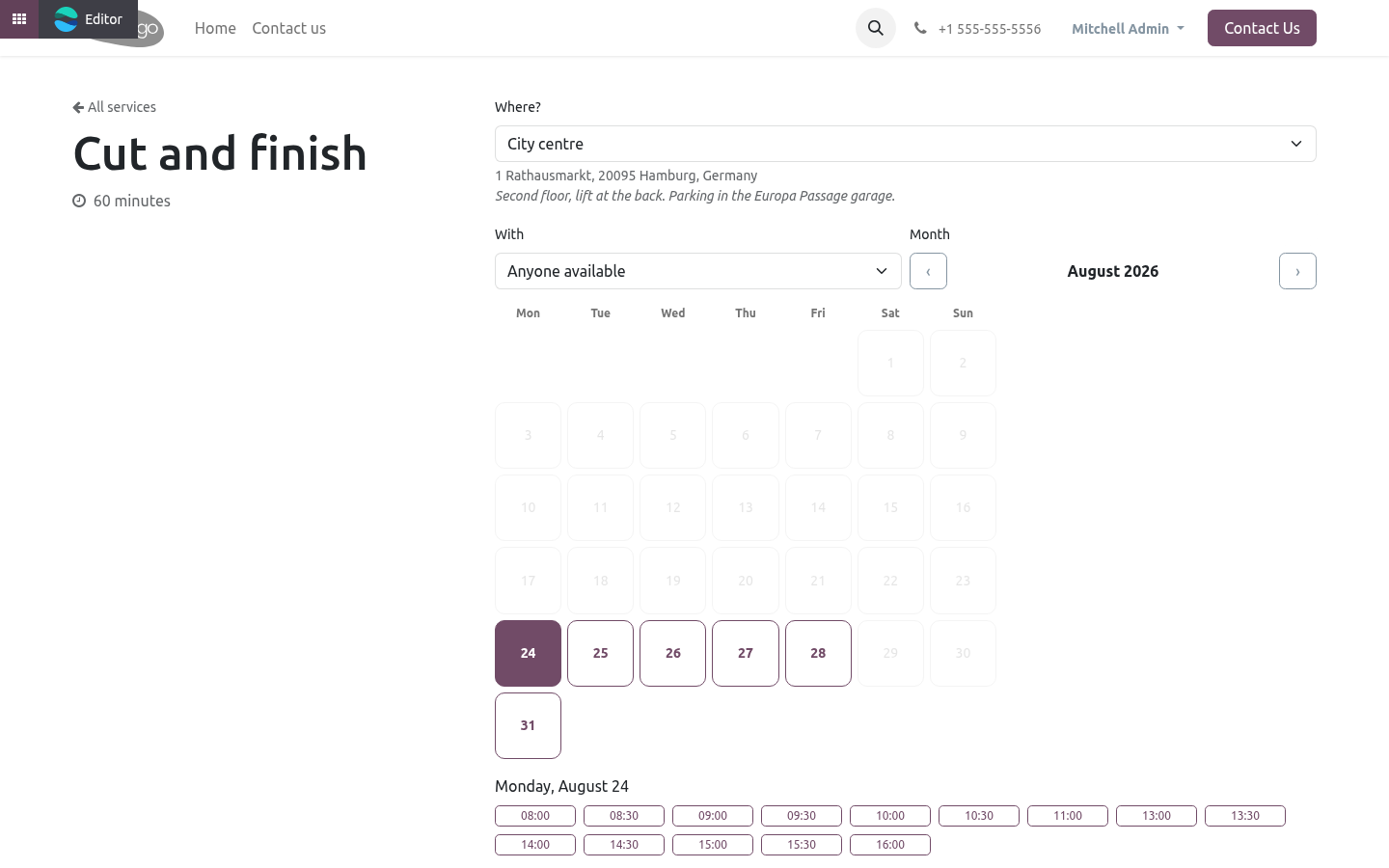
selector above the calendar, with the address and directions of the chosen branch under it. The first branch is preselected, so the calendar is never shown unfiltered. Changing the branch reloads the slots and hides, in the With dropdown, the staff who do not work there. The branch travels with the booking: into the record, into the manage page, into the calendar event and into the invitation - because a customer with two branches in their calendar and no address on the event drives to the wrong one.
Travel time. A stylist finishing in Altona at 12:00 cannot start in the city centre at 12:00. When a slot is computed for one branch, every booking that person has at another branch blocks the calendar for the booking plus the journey on both sides. the explicit pair between the two branches, if there is one, in either direction; otherwise the larger of the two branches' default travel times.
The larger, not the smaller, because the pessimistic side of that choice is a gap in the diary and the optimistic side is a customer waiting in the wrong branch. Multi-company. Locations belong to a company and are filtered by it. Staff and services are Booking Pro's and follow its rules.
Support. support@bambooforge.dev - the people who wrote it. Now the part most videos leave out: what this does not do. Travel time is a number you set, not a route somebody computed.
Two branches ten minutes apart at 11:00 and forty at 17:00 are one number here - pick the one you would rather explain. A staff member's working hours are still one calendar per person (Booking Pro's Working hours). Different hours at different branches is not modelled; the common approach is a member per branch. The complete manual is at docs dot bambooforge dot dev, the demo database is linked from the store page, and support answers within twenty-four hours.
Links are in the description.
Key facts
- What it is
- Appointment booking across branches: the visitor picks the location, only staff who work there are offered, and travel time prevents clashes.
- For
- Website
- Odoo versions
- 16.0, 17.0, 18.0, 19.0, 20.0 - Community and Enterprise
- Runs on
- Odoo.sh or Odoo you host yourself - not Odoo Online, which accepts no third-party apps
- Price
- 228 EUR, one-time, on the Odoo Apps Store
- Technical name
- bambooforge_booking_locations
- Not for
- Travel time is a number you set, not a route somebody computed. Two branches ten minutes apart at 11:00 and forty at 17:00 are one number here - pick the one you would rather explain.; A staff member's working hours are still one calendar per person (Booking Pro's Working hours). Different hours at different branches is not modelled; the common approach is a member per branch.
- Live demo
- https://demo20.bambooforge.dev/odoo/action-bambooforge_booking_locations.action_bf_booking_location
- Manual last updated
- 2026-10-15
Appointment Booking All in One for Many Locations
An add-on for BambooForge Booking Pro. Booking Pro's location is one line of text on the service; this makes the branch a record, with the people who work there and the time it takes to reach the next one.
Install
Install BambooForge Booking: Multi-location (it needs Booking Pro). Nothing changes until a service is given branches; a service with none keeps the page and the behaviour it had.
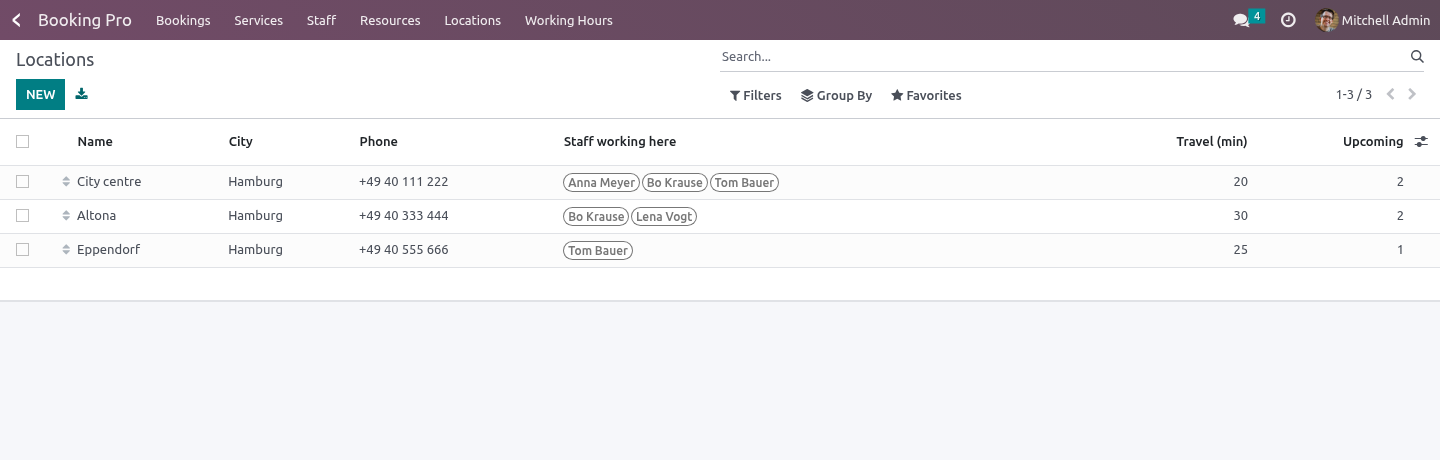
Open the new menu Booking Pro → Locations.
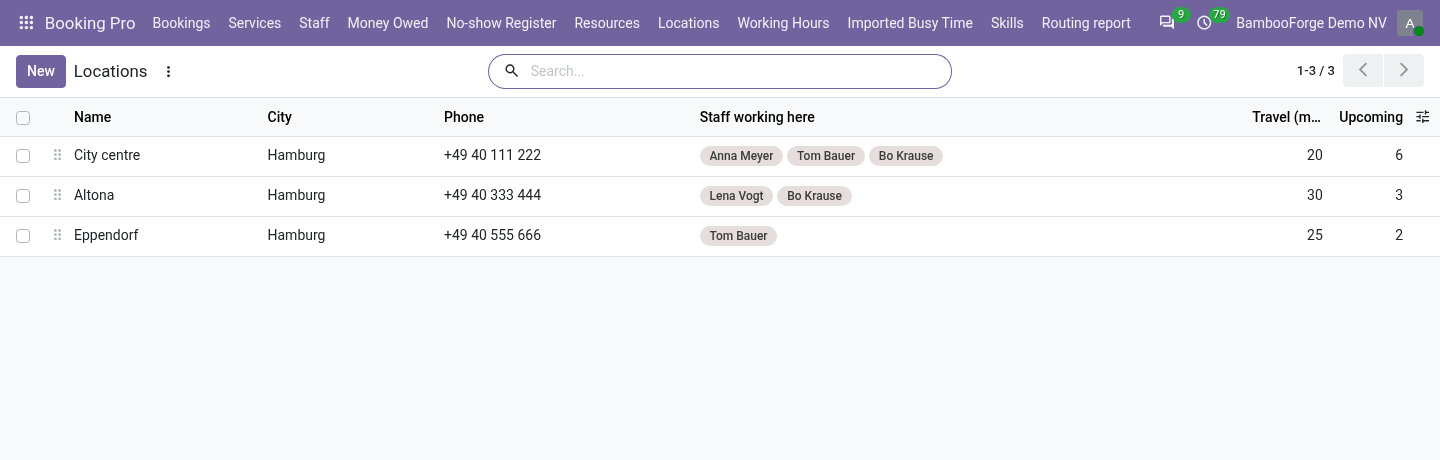
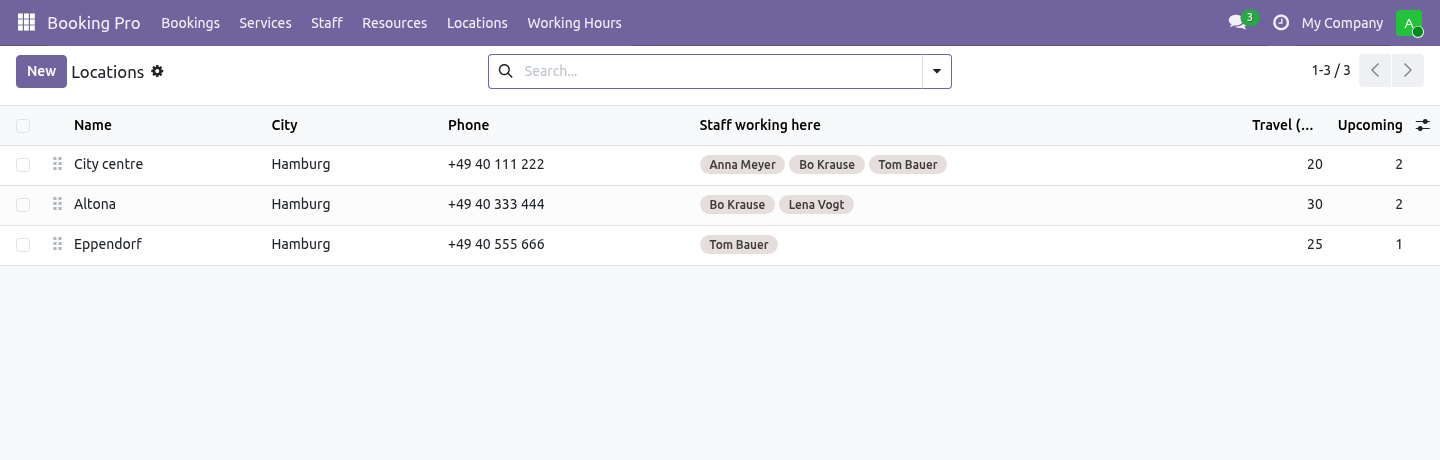
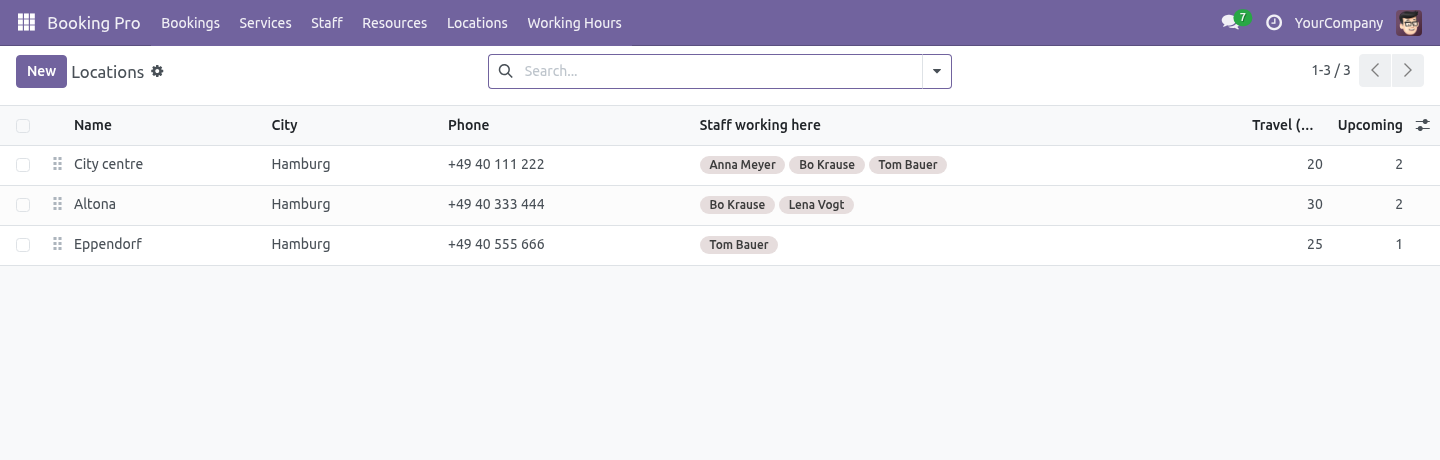
Locations
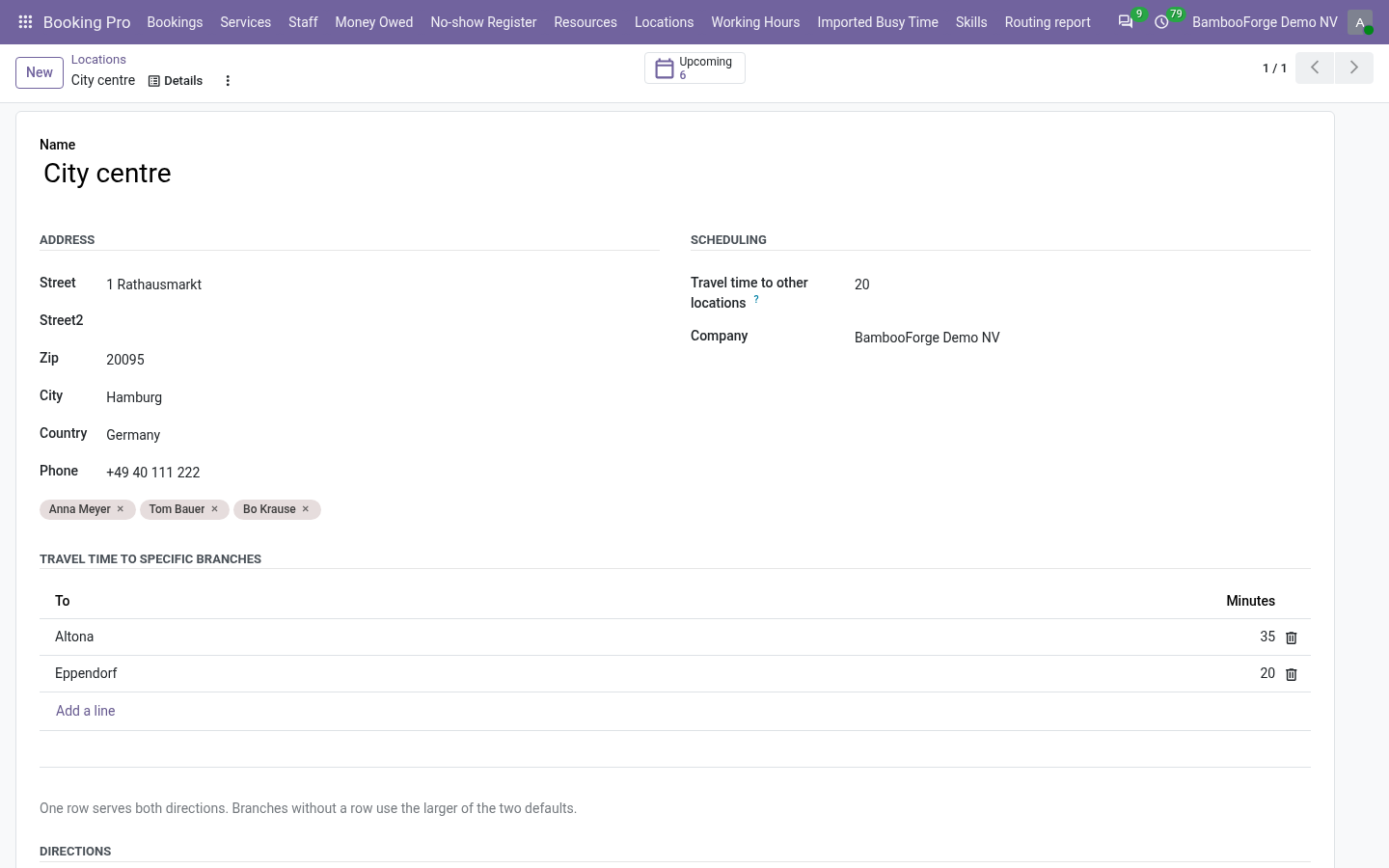
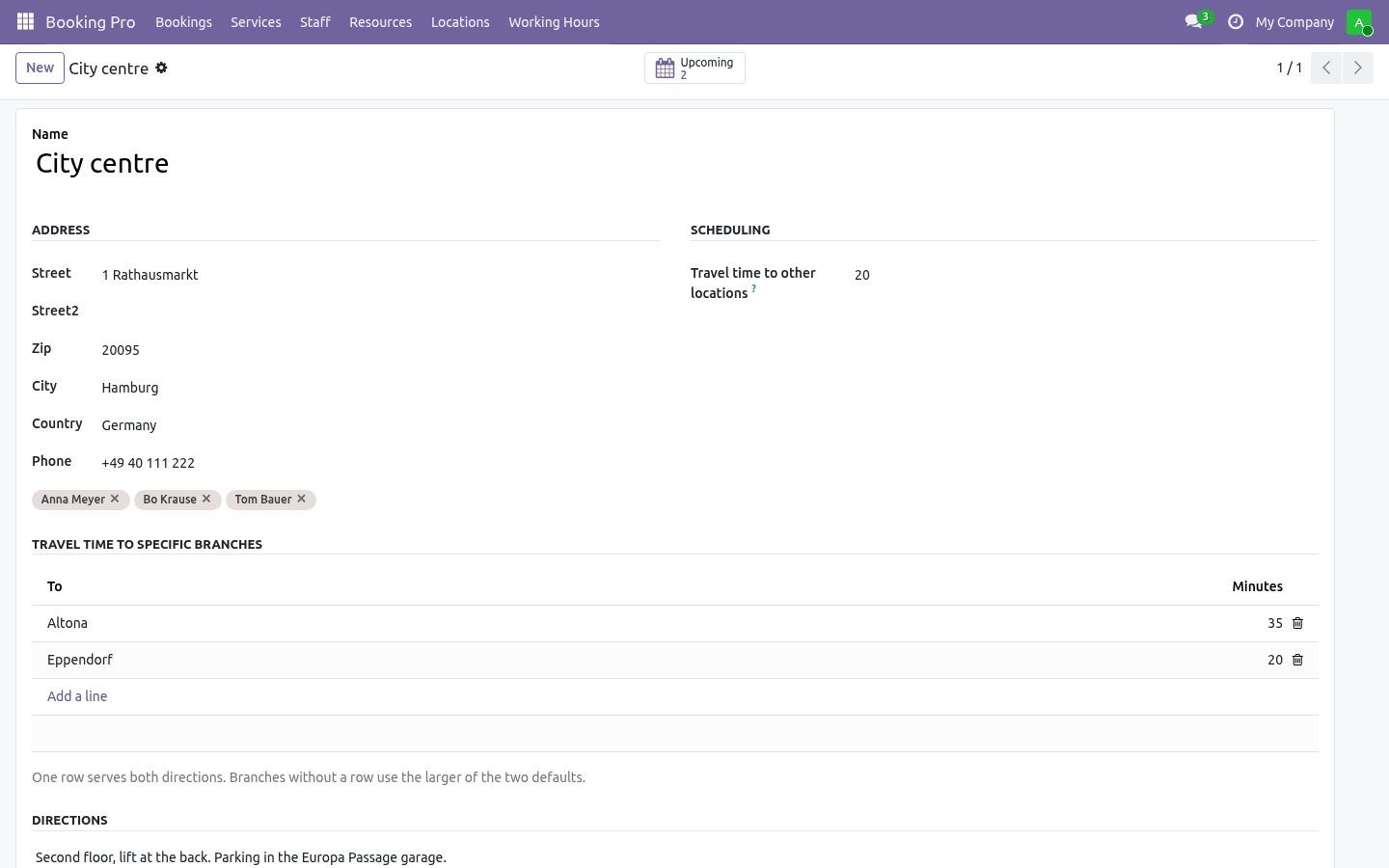
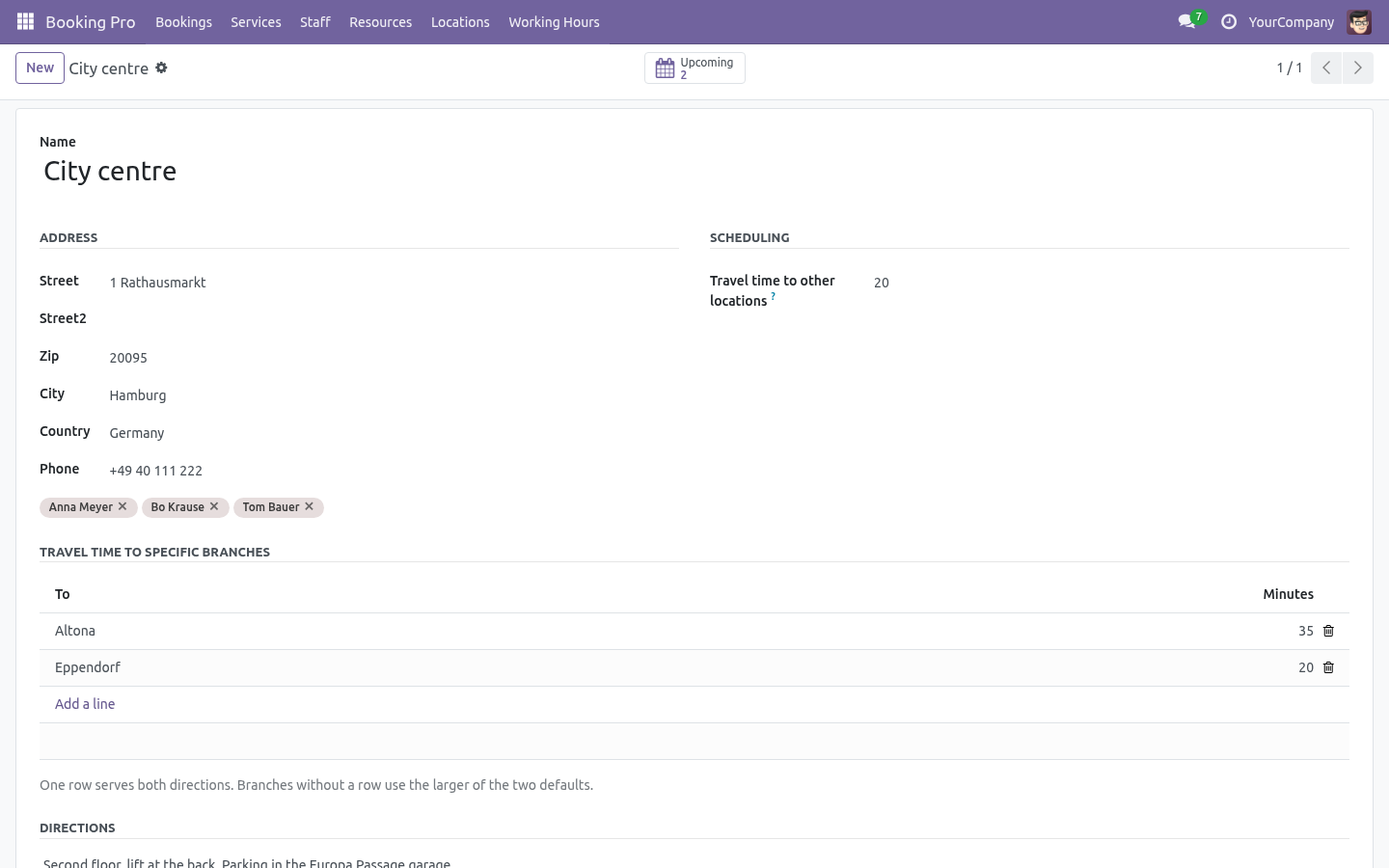
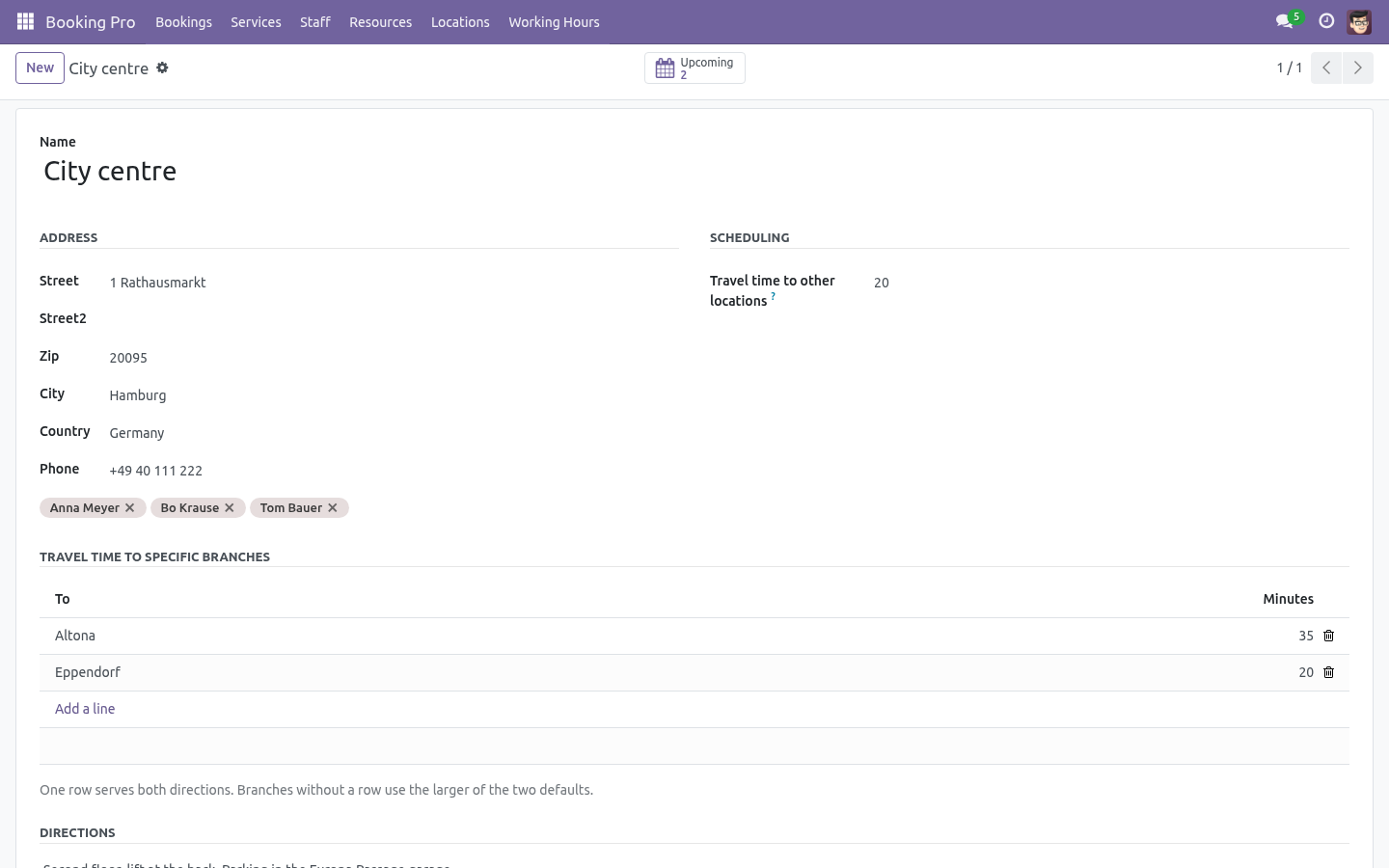
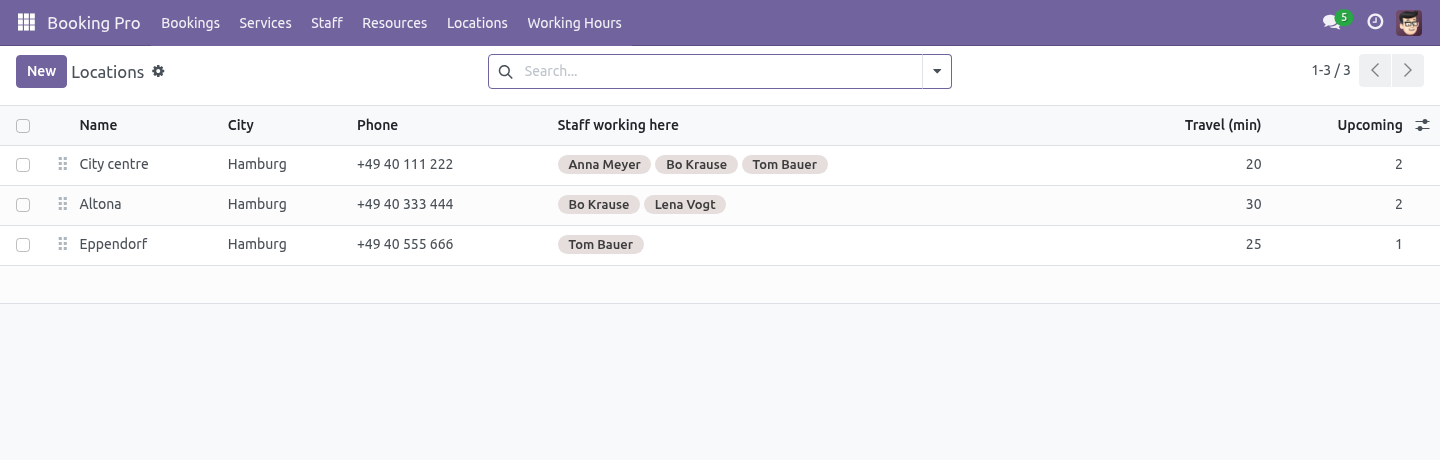
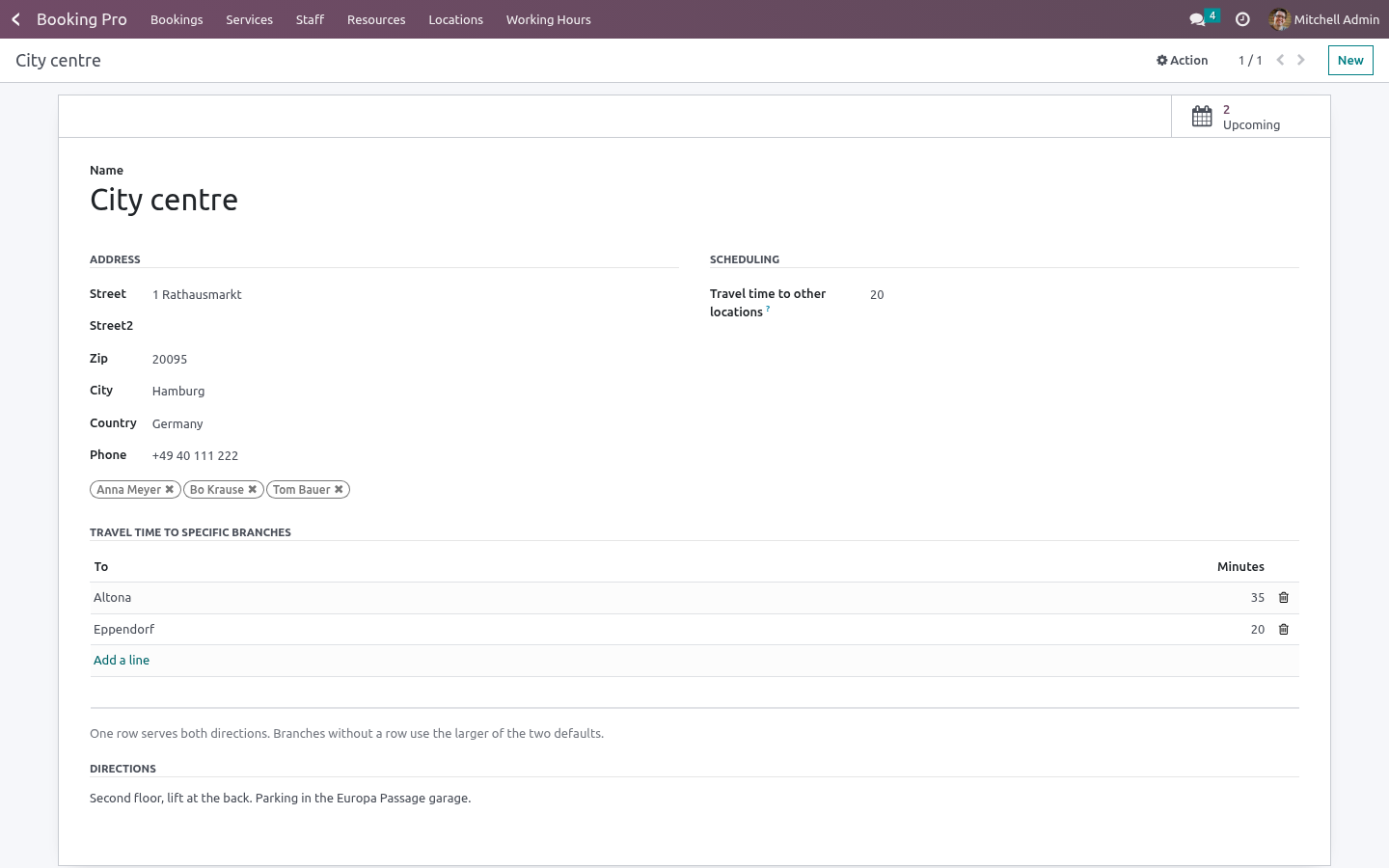
Booking Pro → Locations. A location is:
Field |
What it is for |
|---|---|
Name, address, phone |
Shown to the visitor under the branch selector, in the confirmation page, and in the LOCATION line of the .ics invitation. |
Directions |
Free text for the confirmation: parking, entrance, which floor. |
Staff working here |
Who can take bookings at this branch. A member listed under no branch works everywhere - the mobile hairdresser, the online consultant. |
Travel time to other |
Minutes to reach or leave this branch, used |
locations |
when no explicit pair is defined. |
Travel time to specific |
Per pair. One row serves both directions. |
branches |
Then, on each service: Offered at - one branch, some, or none.
What the visitor sees
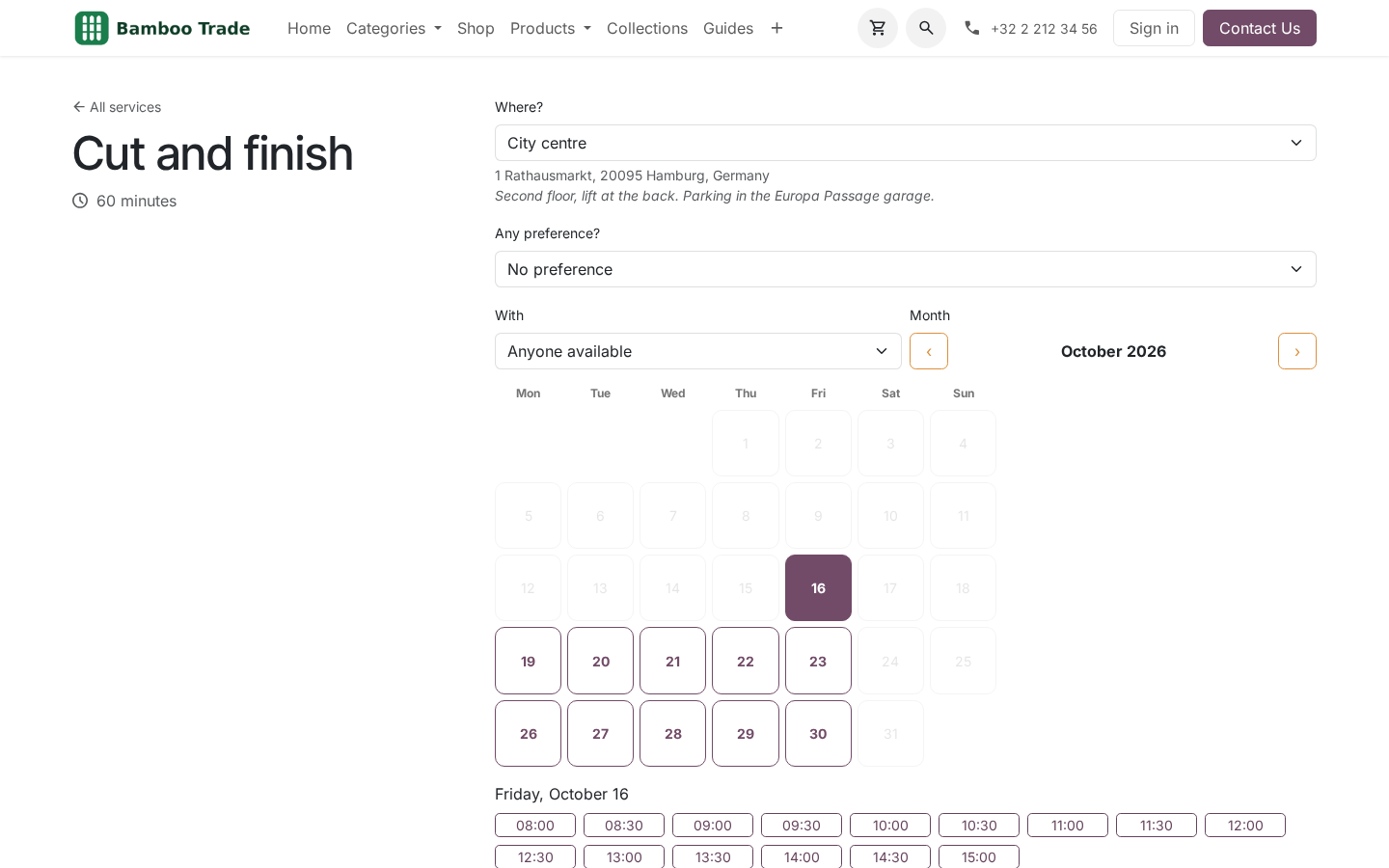
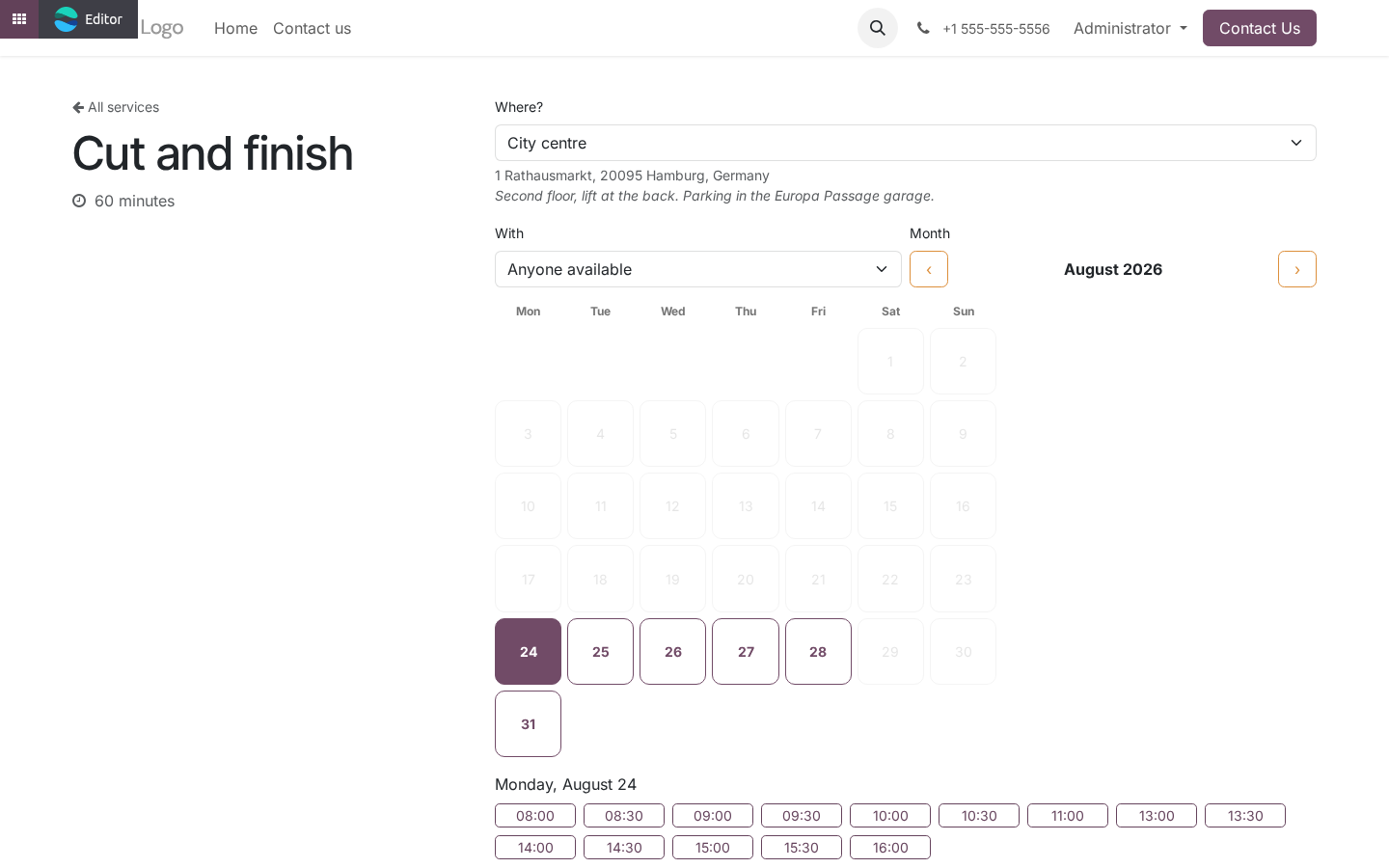
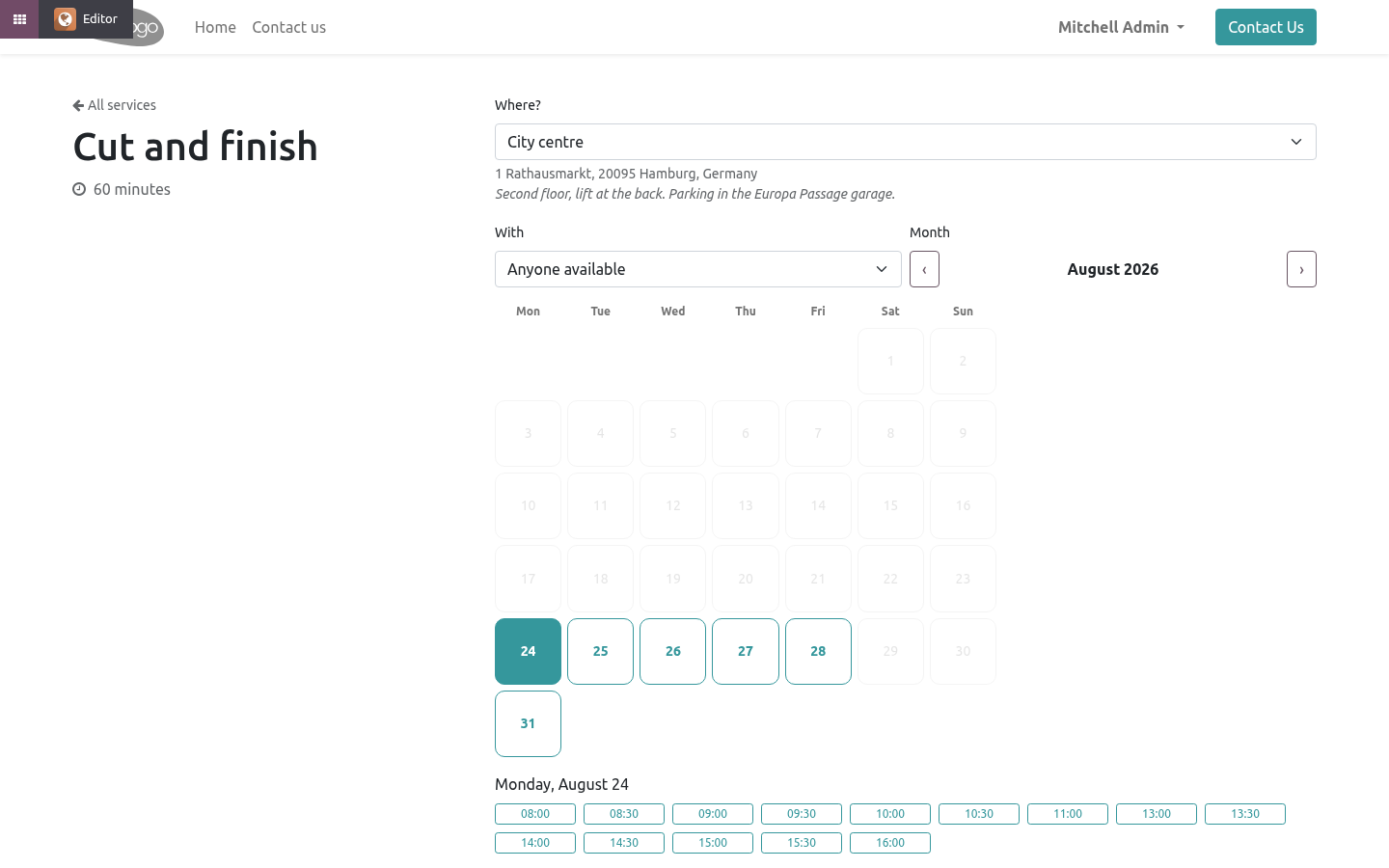
A Where? selector above the calendar, with the address and directions of the chosen branch under it. The first branch is preselected, so the calendar is never shown unfiltered. Changing the branch reloads the slots and hides, in the With dropdown, the staff who do not work there.
The branch travels with the booking: into the record, into the manage page, into the calendar event and into the invitation - because a customer with two branches in their calendar and no address on the event drives to the wrong one.
Travel time
A stylist finishing in Altona at 12:00 cannot start in the city centre at 12:00. When a slot is computed for one branch, every booking that person has at another branch blocks the calendar for the booking plus the journey on both sides.
Which journey:
the explicit pair between the two branches, if there is one, in either direction;
otherwise the larger of the two branches' default travel times.
The larger, not the smaller, because the pessimistic side of that choice is a gap in the diary and the optimistic side is a customer waiting in the wrong branch.
A booking at the same branch needs no journey; the service's own buffers apply as before.
Honest limits
Travel time is a number you set, not a route somebody computed. Two branches ten minutes apart at 11:00 and forty at 17:00 are one number here - pick the one you would rather explain.
A staff member's working hours are still one calendar per person (Booking Pro's Working hours). Different hours at different branches is not modelled; the common approach is a member per branch.
Multi-company
Locations belong to a company and are filtered by it. Staff and services are Booking Pro's and follow its rules.
How we make sure it works
Before every release, 30 automated checks run against this app on Odoo 16, 17, 18, 19 and 20. Among them:
Travel time pads only the journey not the day.
A branch with upcoming bookings cannot be deleted.
An archived branch is not offered on the page.
Moving a booking to another branch updates the invitation.
A branch of another service is ignored.
The complete list is in the source you receive.
Questions people ask
- Which Odoo versions does it run on?
Odoo 16.0, 17.0, 18.0, 19.0, 20.0, on the series you buy it for; each series is its own listing.
- Community or Enterprise?
Both. It needs no Enterprise app.
- What does it need?
The standard Web; booking pro (BambooForge) must be installed first app. No extra Python package.
- Where does it show up?
Under the Locations menu.
- Does anything leave my server?
No. It makes no call outside your Odoo server: no telemetry, no licence check, no third-party service.
- What happens if I uninstall it?
Odoo drops the app's own tables and fields; the standard records it worked on (contacts, orders, products) stay as they are.
Support
support@bambooforge.dev - the people who wrote it.