 BambooForge Labs
Appointment Booking All in One with Deposits
Appointment booking with deposits: take part of the price up front, refund tiers by cancellation notice, no-show fees and a no-show register.
Available for Odoo 16.0, Odoo 17.0, Odoo 18.0, Odoo 19.0, Odoo 20.0. Technical name bambooforge_booking_deposit.
Transcript of the walkthrough (Odoo 20)
Appointment Booking All in One with Deposits. Appointment booking with deposits: take part of the price up front, refund tiers by cancellation notice, no-show fees and a no-show register. An add-on for BambooForge Booking Pro. Booking Pro can ask for the whole price up front; this asks for enough that an empty chair on a Saturday is not free for the person who booked it.
In the next few minutes: appointment booking all in one with deposits, then on the service, then deposit, then refund tiers, then no-show fee. Then what this app deliberately does not do, so you can tell before you buy whether it fits. Everything lives under Money Owed then No-show Register. 1.
Install BambooForge Booking: Deposit & No-show (it needs Booking Pro). Nothing changes until a service is given a deposit or a no-show fee. 2. For the online part - collecting the deposit - enable a provider in Odoo's Payment app, exactly as Booking Pro's prepayment needs.
3. Open the two new menus under Booking Pro: Money Owed and No-show Register. Appointment Booking All in One with Deposits. An add-on for BambooForge Booking Pro.
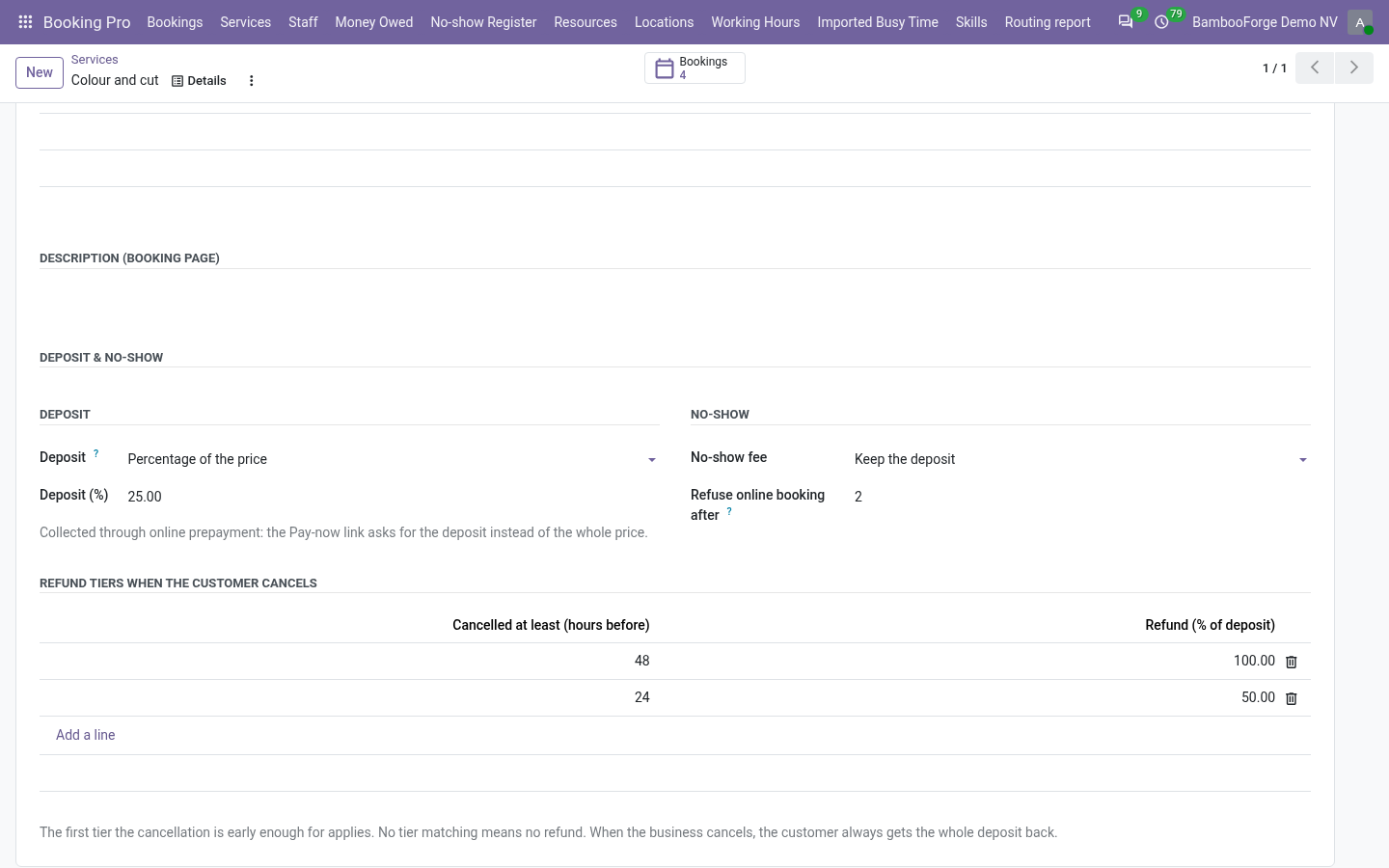
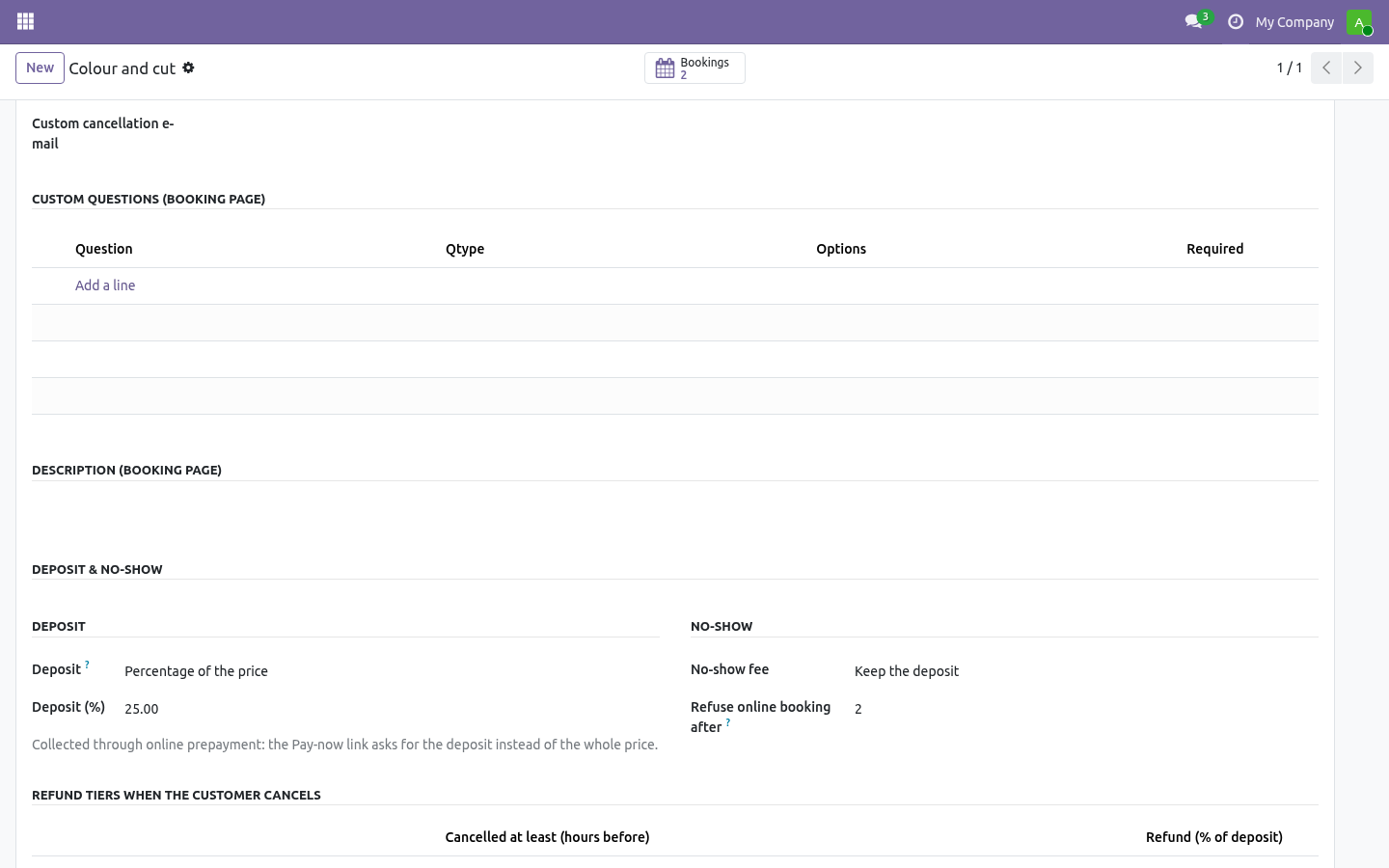
Booking Pro can ask for the whole price up front; this asks for enough that an empty chair on a Saturday is not free for the person who booked it. On the service. A new Deposit & no-show section on the service form. Deposit Percentage of the price or fixed amount.
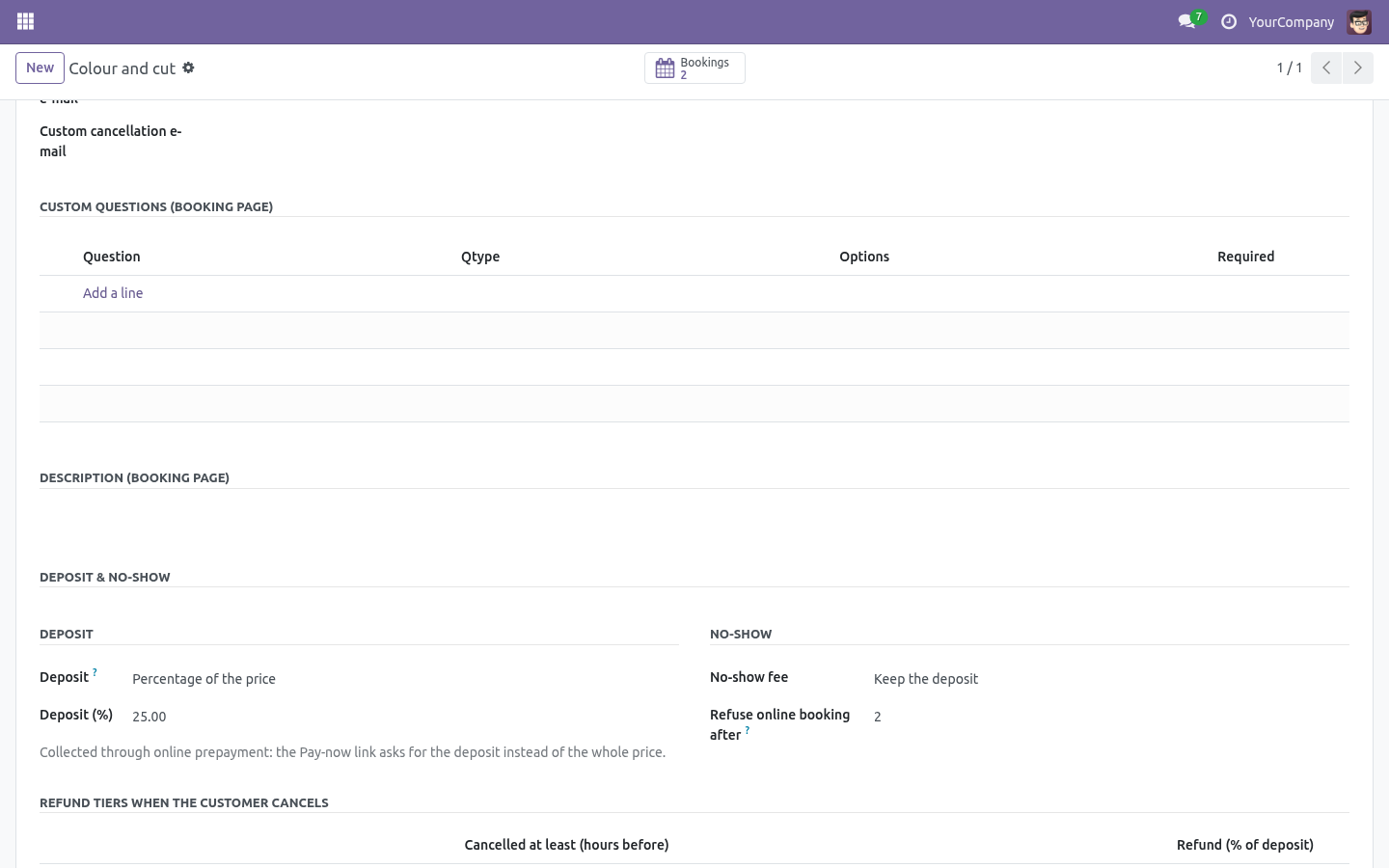
A fixed amount above the price is refused: that is a surcharge, not a deposit. The deposit is collected through Booking Pro's online prepayment: tick it, and the Pay-now link asks for the deposit instead of the whole price. The booking stays Pending until it is paid, as before. The rest is due on the day, and the booking says how much.
Refund tiers. "Cancel at least 48 hours before: 100 % of the deposit back. At least 24 hours: 50 %." The earliest tier the cancellation qualifies for applies; no tier matching means no refund. These tiers are shown to the visitor on the booking page before they book.
When the business cancels, the customer always gets the whole deposit back, whatever the tiers say. No-show fee Keep the deposit - the usual choice, and the default. Percentage of the price or fixed amount - when the fee is covered by the deposit already paid, it is marked collected; when it is not, it is due. Refuse online booking after N no-shows in the last twelve months: the visitor is asked to call.
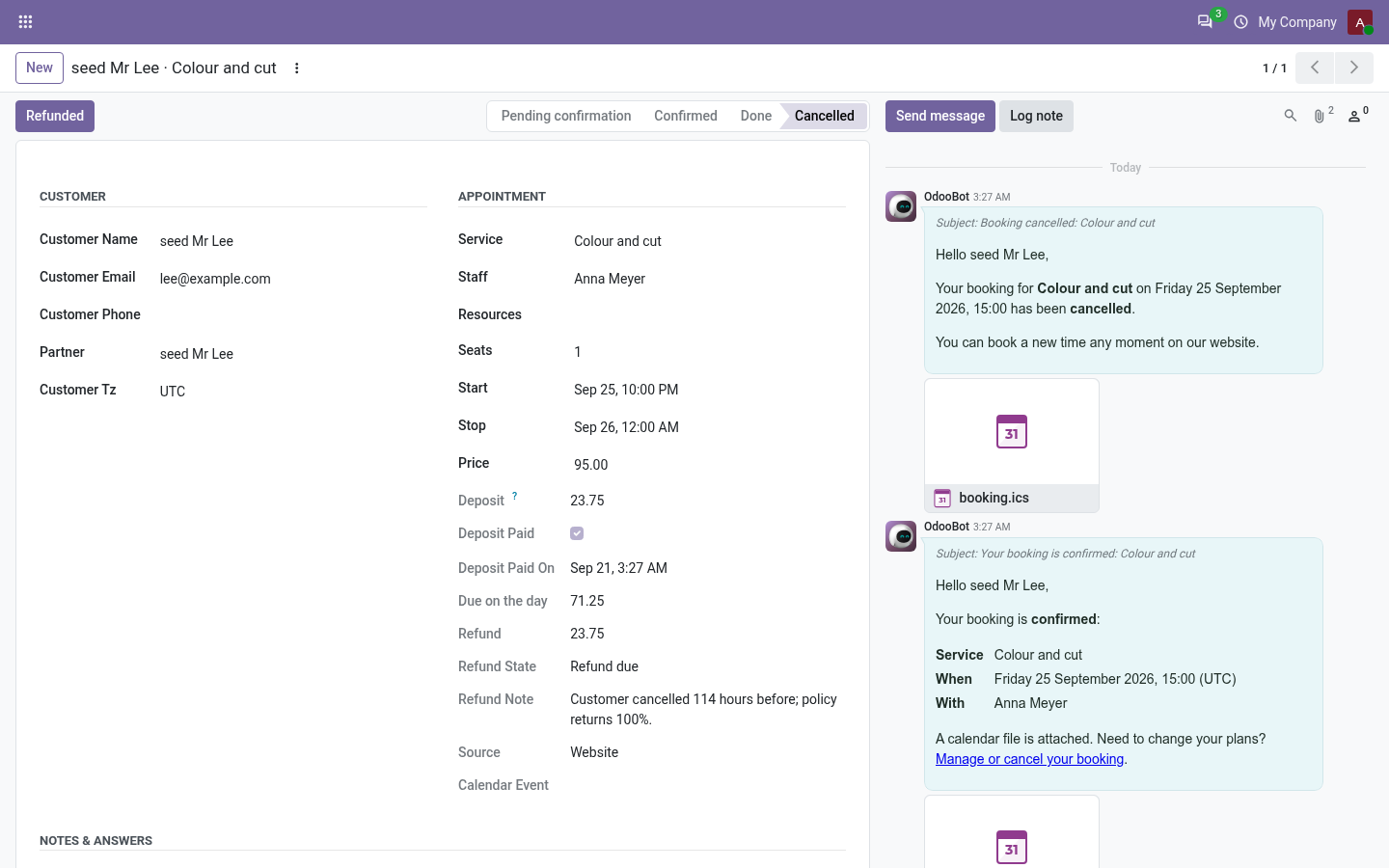
The desk can still book them by hand, because the desk knows things the form does not. Zero never refuses anybody. On the booking. The booking shows the deposit, whether it was paid and when, and the balance due on the day.
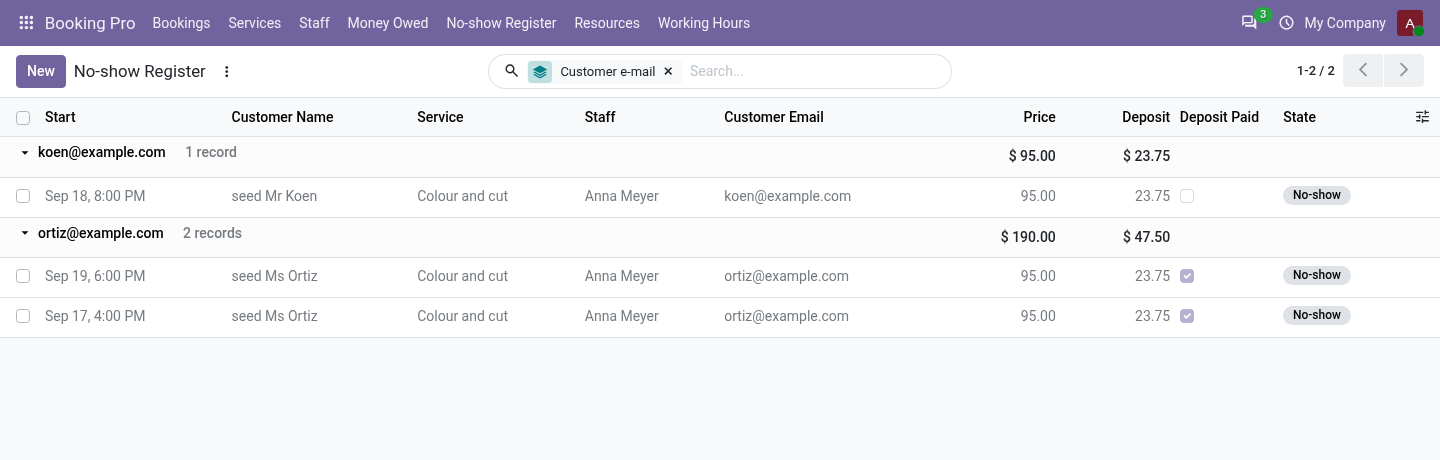
Three things a human does: Deposit received The desk took it in cash or by phone. A confirmation that came from a paid online transaction marks it by itself. The register. Every no-show is a booking in state No-show.
No-show Register groups them by customer e-mail; the count over the last twelve months is also on the contact card. Counting is by e-mail, case-insensitive, because that is what a walk-in customer gives you. What it will not pretend. It does not place a hold on a card.
That needs a payment provider with manual capture and a promise about when the hold is released, and a wrong promise there costs more than a deposit ever will. The deposit is the honest version, and it is what most places actually run. How we make sure it works. Before every release, 36 automated checks run against this app on Odoo 16, 17, 18, 19 and 20.
Among them: A cancelled booking cannot become a paid no show. Cancelling twice does not reopen a refund already paid. A booking user cannot waive or refund. A limit of zero refuses nobody.
Keeping an unpaid deposit keeps nothing. The complete list is in the source you receive. Questions people ask. Which Odoo versions does it run on?
Odoo 16.0, 17.0, 18.0, 19.0, 20.0, on the series you buy it for; each series is its own listing. Community or Enterprise? Both. It needs no Enterprise app.
The complete manual is at docs dot bambooforge dot dev, the demo database is linked from the store page, and support answers within twenty-four hours. Links are in the description.
Transcript of the walkthrough (Odoo 19)
Appointment Booking Suite: Deposits & No-show Fees. Appointment booking with deposits: take part of the price up front, refund tiers by cancellation notice, no-show fees and a no-show register. An add-on for BambooForge Booking Pro. Booking Pro can ask for the whole price up front; this asks for enough that an empty chair on a Saturday is not free for the person who booked it.
In the next few minutes: appointment booking suite: deposits & no-show fees, then on the service, then deposit, then refund tiers, then no-show fee. Then what this app deliberately does not do, so you can tell before you buy whether it fits. Everything lives under Money Owed then No-show Register. Install BambooForge Booking: Deposit & No-show.
Nothing changes until a service is given a deposit or a no-show fee. The online part - collecting the deposit - needs Odoo's Payment app with an enabled provider, exactly as Booking Pro's prepayment does. Appointment Booking Suite: Deposits & No-show Fees. An add-on for BambooForge Booking Pro.
Booking Pro can ask for the whole price up front; this asks for enough that an empty chair on a Saturday is not free for the person who booked it. On the service. A new Deposit & no-show section on the service form. Deposit Percentage of the price or fixed amount.
A fixed amount above the price is refused: that is a surcharge, not a deposit. The deposit is collected through Booking Pro's online prepayment: tick it, and the Pay-now link asks for the deposit instead of the whole price. The booking stays Pending until it is paid, as before. The rest is due on the day, and the booking says how much.
Refund tiers. "Cancel at least 48 hours before: 100 % of the deposit back. At least 24 hours: 50 %." The earliest tier the cancellation qualifies for applies; no tier matching means no refund. These tiers are shown to the visitor on the booking page before they book.
When the business cancels, the customer always gets the whole deposit back, whatever the tiers say. No-show fee Keep the deposit - the usual choice, and the default. Percentage of the price or fixed amount - when the fee is covered by the deposit already paid, it is marked collected; when it is not, it is due. Refuse online booking after N no-shows in the last twelve months: the visitor is asked to call.
The desk can still book them by hand, because the desk knows things the form does not. Zero never refuses anybody. On the booking. The booking shows the deposit, whether it was paid and when, and the balance due on the day.
Three things a human does: Deposit received The desk took it in cash or by phone. A confirmation that came from a paid online transaction marks it by itself. The register. Every no-show is a booking in state No-show.
No-show Register groups them by customer e-mail; the count over the last twelve months is also on the contact card. Counting is by e-mail, case-insensitive, because that is what a walk-in customer gives you. What it will not pretend. It does not place a hold on a card.
That needs a payment provider with manual capture and a promise about when the hold is released, and a wrong promise there costs more than a deposit ever will. The deposit is the honest version, and it is what most places actually run. Support. support@bambooforge.dev - the people who wrote it.
The complete manual is at docs dot bambooforge dot dev, the demo database is linked from the store page, and support answers within twenty-four hours. Links are in the description.
Transcript of the walkthrough (Odoo 18)
Appointment Booking Suite: Deposits & No-show Fees. Appointment booking with deposits: take part of the price up front, refund tiers by cancellation notice, no-show fees and a no-show register. An add-on for BambooForge Booking Pro. Booking Pro can ask for the whole price up front; this asks for enough that an empty chair on a Saturday is not free for the person who booked it.
In the next few minutes: appointment booking suite: deposits & no-show fees, then on the service, then deposit, then refund tiers, then no-show fee. Then what this app deliberately does not do, so you can tell before you buy whether it fits. Everything lives under Money Owed then No-show Register. Install BambooForge Booking: Deposit & No-show.
Nothing changes until a service is given a deposit or a no-show fee. The online part - collecting the deposit - needs Odoo's Payment app with an enabled provider, exactly as Booking Pro's prepayment does. Appointment Booking Suite: Deposits & No-show Fees. An add-on for BambooForge Booking Pro.
Booking Pro can ask for the whole price up front; this asks for enough that an empty chair on a Saturday is not free for the person who booked it. On the service. A new Deposit & no-show section on the service form. Deposit Percentage of the price or fixed amount.
A fixed amount above the price is refused: that is a surcharge, not a deposit. The deposit is collected through Booking Pro's online prepayment: tick it, and the Pay-now link asks for the deposit instead of the whole price. The booking stays Pending until it is paid, as before. The rest is due on the day, and the booking says how much.
Refund tiers. "Cancel at least 48 hours before: 100 % of the deposit back. At least 24 hours: 50 %." The earliest tier the cancellation qualifies for applies; no tier matching means no refund. These tiers are shown to the visitor on the booking page before they book.
When the business cancels, the customer always gets the whole deposit back, whatever the tiers say. No-show fee Keep the deposit - the usual choice, and the default. Percentage of the price or fixed amount - when the fee is covered by the deposit already paid, it is marked collected; when it is not, it is due. Refuse online booking after N no-shows in the last twelve months: the visitor is asked to call.
The desk can still book them by hand, because the desk knows things the form does not. Zero never refuses anybody. On the booking. The booking shows the deposit, whether it was paid and when, and the balance due on the day.
Three things a human does: Deposit received The desk took it in cash or by phone. A confirmation that came from a paid online transaction marks it by itself. The register. Every no-show is a booking in state No-show.
No-show Register groups them by customer e-mail; the count over the last twelve months is also on the contact card. Counting is by e-mail, case-insensitive, because that is what a walk-in customer gives you. What it will not pretend. It does not place a hold on a card.
That needs a payment provider with manual capture and a promise about when the hold is released, and a wrong promise there costs more than a deposit ever will. The deposit is the honest version, and it is what most places actually run. Support. support@bambooforge.dev - the people who wrote it.
The complete manual is at docs dot bambooforge dot dev, the demo database is linked from the store page, and support answers within twenty-four hours. Links are in the description.

Transcript of the walkthrough (Odoo 17)
Appointment Booking Suite: Deposits & No-show Fees. Appointment booking with deposits: take part of the price up front, refund tiers by cancellation notice, no-show fees and a no-show register. An add-on for BambooForge Booking Pro. Booking Pro can ask for the whole price up front; this asks for enough that an empty chair on a Saturday is not free for the person who booked it.
In the next few minutes: appointment booking suite: deposits & no-show fees, then on the service, then deposit, then refund tiers, then no-show fee. Then what this app deliberately does not do, so you can tell before you buy whether it fits. Everything lives under Money Owed then No-show Register. Install BambooForge Booking: Deposit & No-show.
Nothing changes until a service is given a deposit or a no-show fee. The online part - collecting the deposit - needs Odoo's Payment app with an enabled provider, exactly as Booking Pro's prepayment does. Appointment Booking Suite: Deposits & No-show Fees. An add-on for BambooForge Booking Pro.
Booking Pro can ask for the whole price up front; this asks for enough that an empty chair on a Saturday is not free for the person who booked it. On the service. A new Deposit & no-show section on the service form. Deposit Percentage of the price or fixed amount.
A fixed amount above the price is refused: that is a surcharge, not a deposit. The deposit is collected through Booking Pro's online prepayment: tick it, and the Pay-now link asks for the deposit instead of the whole price. The booking stays Pending until it is paid, as before. The rest is due on the day, and the booking says how much.
Refund tiers. "Cancel at least 48 hours before: 100 % of the deposit back. At least 24 hours: 50 %." The earliest tier the cancellation qualifies for applies; no tier matching means no refund. These tiers are shown to the visitor on the booking page before they book.
When the business cancels, the customer always gets the whole deposit back, whatever the tiers say. No-show fee Keep the deposit - the usual choice, and the default. Percentage of the price or fixed amount - when the fee is covered by the deposit already paid, it is marked collected; when it is not, it is due. Refuse online booking after N no-shows in the last twelve months: the visitor is asked to call.
The desk can still book them by hand, because the desk knows things the form does not. Zero never refuses anybody. On the booking. The booking shows the deposit, whether it was paid and when, and the balance due on the day.
Three things a human does: Deposit received The desk took it in cash or by phone. A confirmation that came from a paid online transaction marks it by itself. The register. Every no-show is a booking in state No-show.
No-show Register groups them by customer e-mail; the count over the last twelve months is also on the contact card. Counting is by e-mail, case-insensitive, because that is what a walk-in customer gives you. What it will not pretend. It does not place a hold on a card.
That needs a payment provider with manual capture and a promise about when the hold is released, and a wrong promise there costs more than a deposit ever will. The deposit is the honest version, and it is what most places actually run. Support. support@bambooforge.dev - the people who wrote it.
The complete manual is at docs dot bambooforge dot dev, the demo database is linked from the store page, and support answers within twenty-four hours. Links are in the description.
Transcript of the walkthrough (Odoo 16)
Appointment Booking Suite: Deposits & No-show Fees. Appointment booking with deposits: take part of the price up front, refund tiers by cancellation notice, no-show fees and a no-show register. An add-on for BambooForge Booking Pro. Booking Pro can ask for the whole price up front; this asks for enough that an empty chair on a Saturday is not free for the person who booked it.
In the next few minutes: appointment booking suite: deposits & no-show fees, then on the service, then deposit, then refund tiers, then no-show fee. Then what this app deliberately does not do, so you can tell before you buy whether it fits. Everything lives under Money Owed then No-show Register. Install BambooForge Booking: Deposit & No-show.
Nothing changes until a service is given a deposit or a no-show fee. The online part - collecting the deposit - needs Odoo's Payment app with an enabled provider, exactly as Booking Pro's prepayment does. Appointment Booking Suite: Deposits & No-show Fees. An add-on for BambooForge Booking Pro.
Booking Pro can ask for the whole price up front; this asks for enough that an empty chair on a Saturday is not free for the person who booked it. On the service. A new Deposit & no-show section on the service form. Deposit Percentage of the price or fixed amount.
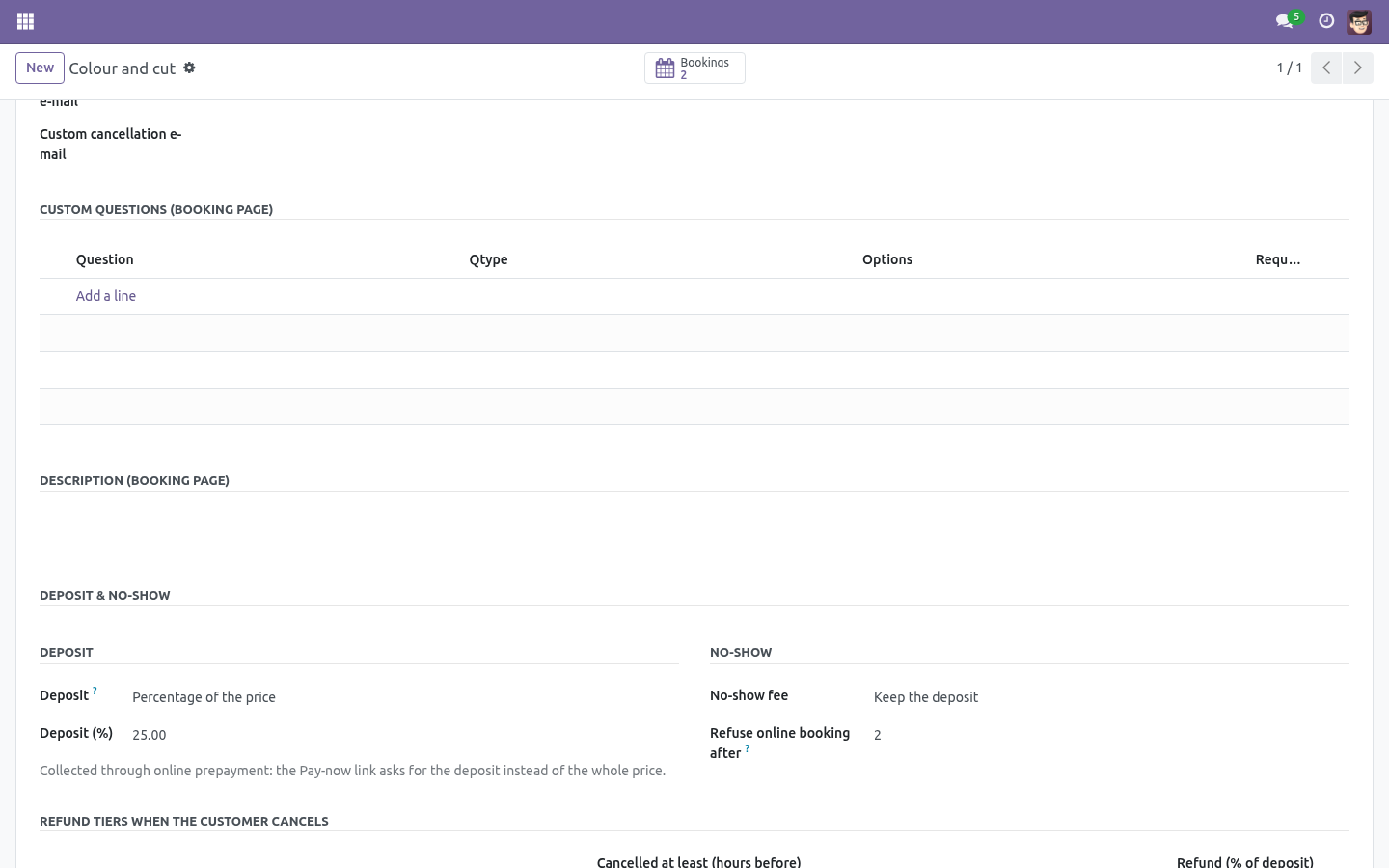
A fixed amount above the price is refused: that is a surcharge, not a deposit. The deposit is collected through Booking Pro's online prepayment: tick it, and the Pay-now link asks for the deposit instead of the whole price. The booking stays Pending until it is paid, as before. The rest is due on the day, and the booking says how much.
Refund tiers. "Cancel at least 48 hours before: 100 % of the deposit back. At least 24 hours: 50 %." The earliest tier the cancellation qualifies for applies; no tier matching means no refund. These tiers are shown to the visitor on the booking page before they book.
When the business cancels, the customer always gets the whole deposit back, whatever the tiers say. No-show fee Keep the deposit - the usual choice, and the default. Percentage of the price or fixed amount - when the fee is covered by the deposit already paid, it is marked collected; when it is not, it is due. Refuse online booking after N no-shows in the last twelve months: the visitor is asked to call.
The desk can still book them by hand, because the desk knows things the form does not. Zero never refuses anybody. On the booking. The booking shows the deposit, whether it was paid and when, and the balance due on the day.
Three things a human does: Deposit received The desk took it in cash or by phone. A confirmation that came from a paid online transaction marks it by itself. The register. Every no-show is a booking in state No-show.
No-show Register groups them by customer e-mail; the count over the last twelve months is also on the contact card. Counting is by e-mail, case-insensitive, because that is what a walk-in customer gives you. What it will not pretend. It does not place a hold on a card.
That needs a payment provider with manual capture and a promise about when the hold is released, and a wrong promise there costs more than a deposit ever will. The deposit is the honest version, and it is what most places actually run. Support. support@bambooforge.dev - the people who wrote it.
The complete manual is at docs dot bambooforge dot dev, the demo database is linked from the store page, and support answers within twenty-four hours. Links are in the description.
Key facts
- What it is
- Appointment booking with deposits: take part of the price up front, refund tiers by cancellation notice, no-show fees and a no-show register.
- For
- Website
- Odoo versions
- 16.0, 17.0, 18.0, 19.0, 20.0 - Community and Enterprise
- Runs on
- Odoo.sh or Odoo you host yourself - not Odoo Online, which accepts no third-party apps
- Price
- 228 EUR, one-time, on the Odoo Apps Store
- Technical name
- bambooforge_booking_deposit
- Live demo
- https://demo20.bambooforge.dev/odoo/action-bambooforge_booking_deposit.action_bf_booking_money
- Manual last updated
- 2026-10-15
Appointment Booking All in One with Deposits
An add-on for BambooForge Booking Pro. Booking Pro can ask for the whole price up front; this asks for enough that an empty chair on a Saturday is not free for the person who booked it.
Install
Install BambooForge Booking: Deposit & No-show (it needs Booking Pro). Nothing changes until a service is given a deposit or a no-show fee.
For the online part - collecting the deposit - enable a provider in Odoo's Payment app, exactly as Booking Pro's prepayment needs.
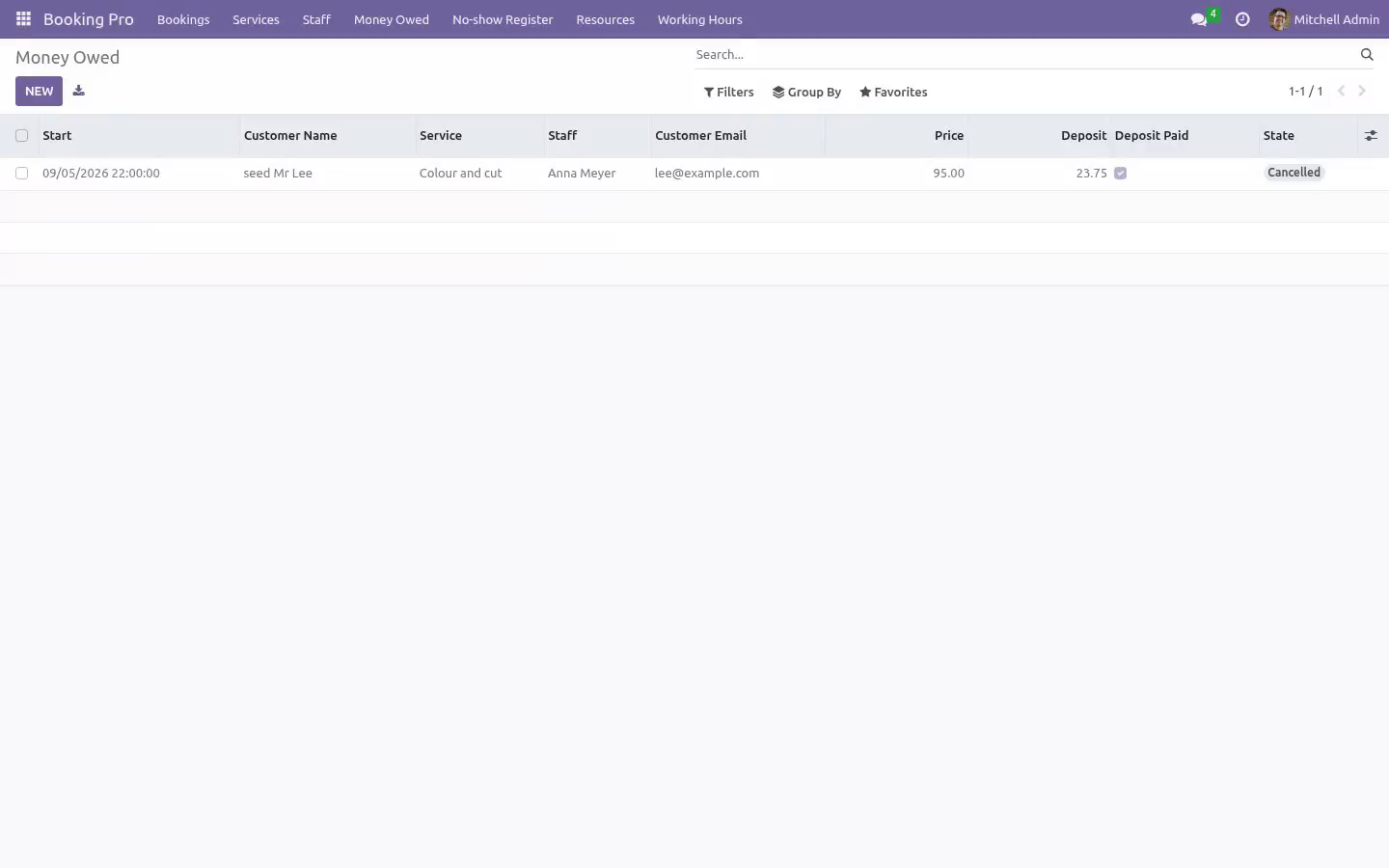
Open the two new menus under Booking Pro: Money Owed and No-show Register.
On the service
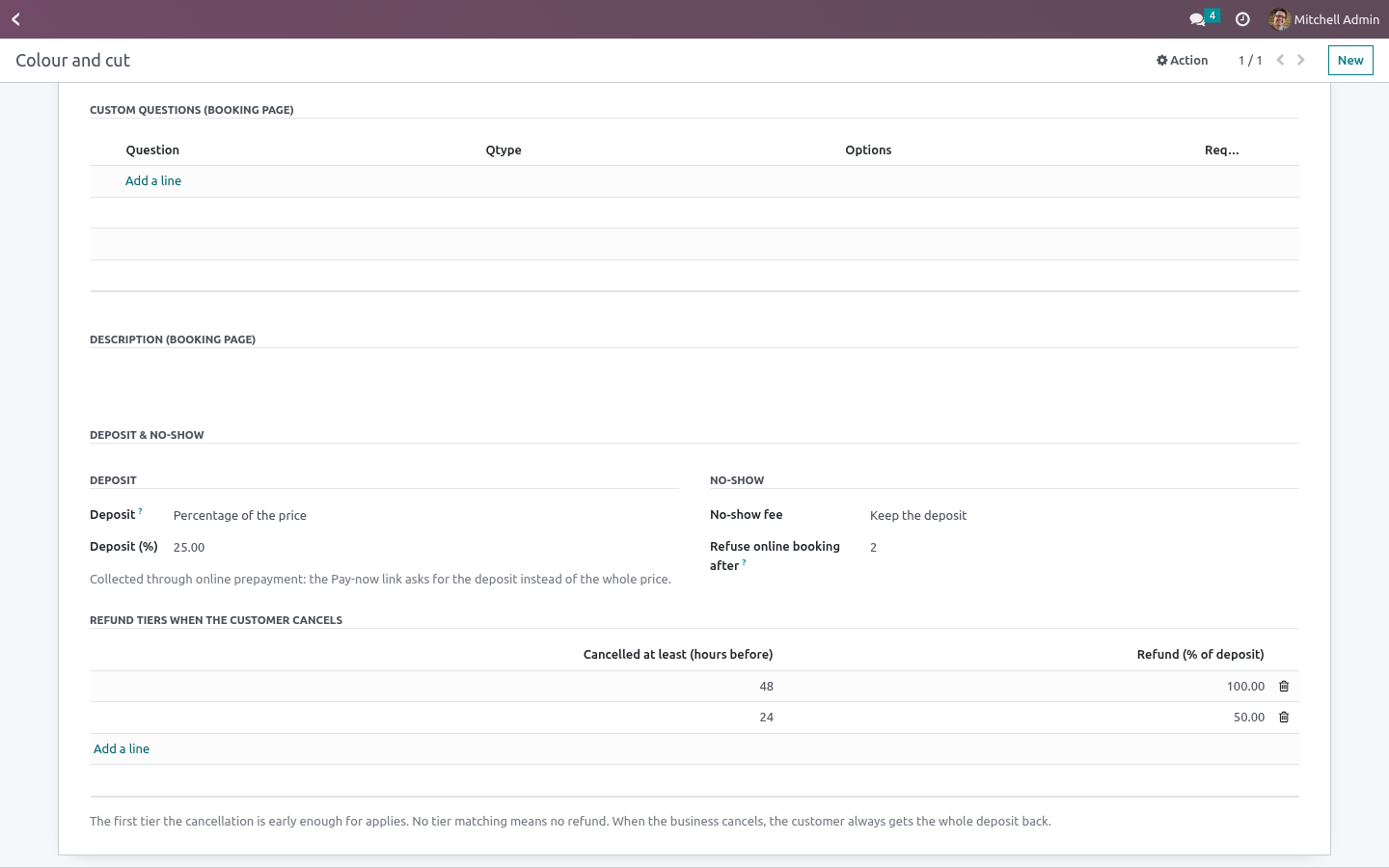
A new Deposit & no-show section on the service form.
Deposit
Percentage of the price or fixed amount. A fixed amount above the price is refused: that is a surcharge, not a deposit.
The deposit is collected through Booking Pro's online prepayment: tick it, and the Pay-now link asks for the deposit instead of the whole price. The booking stays Pending until it is paid, as before.
The rest is due on the day, and the booking says how much.
Refund tiers
"Cancel at least 48 hours before: 100 % of the deposit back. At least 24 hours: 50 %." The earliest tier the cancellation qualifies for applies; no tier matching means no refund. These tiers are shown to the visitor on the booking page before they book.
When the business cancels, the customer always gets the whole deposit back, whatever the tiers say.
No-show fee
Keep the deposit - the usual choice, and the default.
Percentage of the price or fixed amount - when the fee is covered by the deposit already paid, it is marked collected; when it is not, it is due.
Refuse online booking after N no-shows in the last twelve months: the visitor is asked to call. The desk can still book them by hand, because the desk knows things the form does not. Zero never refuses anybody.
On the booking
The booking shows the deposit, whether it was paid and when, and the balance due on the day. Three things a human does:
- Deposit received
The desk took it in cash or by phone. A confirmation that came from a paid online transaction marks it by itself.
- Refunded
A refund due was executed. Recorded with who and when. Nothing moves money automatically - a refund is a decision, and the decision is the record.
- Fee collected / Waive the fee
Same for a no-show fee that was due.
Money Owed lists everything still due in either direction.
The register
Every no-show is a booking in state No-show. No-show Register groups them by customer e-mail; the count over the last twelve months is also on the contact card. Counting is by e-mail, case-insensitive, because that is what a walk-in customer gives you.
What it will not pretend
It does not place a hold on a card. That needs a payment provider with manual capture and a promise about when the hold is released, and a wrong promise there costs more than a deposit ever will. The deposit is the honest version, and it is what most places actually run.
How we make sure it works
Before every release, 36 automated checks run against this app on Odoo 16, 17, 18, 19 and 20. Among them:
A cancelled booking cannot become a paid no show.
Cancelling twice does not reopen a refund already paid.
A booking user cannot waive or refund.
A limit of zero refuses nobody.
Keeping an unpaid deposit keeps nothing.
The complete list is in the source you receive.
Questions people ask
- Which Odoo versions does it run on?
Odoo 16.0, 17.0, 18.0, 19.0, 20.0, on the series you buy it for; each series is its own listing.
- Community or Enterprise?
Both. It needs no Enterprise app.
- What does it need?
The standard Web; booking pro (BambooForge) must be installed first app. No extra Python package.
- Where does it show up?
Under the Money Owed menu (No-show Register).
- Does anything leave my server?
No. It makes no call outside your Odoo server: no telemetry, no licence check, no third-party service.
- What happens if I uninstall it?
Odoo drops the app's own tables and fields; the standard records it worked on (contacts, orders, products) stay as they are.
Support
support@bambooforge.dev - the people who wrote it.