 BambooForge Labs
Appointment Booking All in One with Calendar Sync
Appointment booking with calendar sync: a subscription link for staff without an Odoo login, and their own calendar read back to block slots.
Available for Odoo 16.0, Odoo 17.0, Odoo 18.0, Odoo 19.0, Odoo 20.0. Technical name bambooforge_booking_calendar_sync.
Transcript of the walkthrough (Odoo 20)
Appointment Booking All in One with Calendar Sync. Appointment booking with calendar sync: a subscription link for staff without an Odoo login, and their own calendar read back to block slots. An add-on for BambooForge Booking Pro, for the staff who will never have an Odoo login. In the next few minutes: appointment booking all in one with calendar sync, then what odoo already does, then what this adds, then a subscription link, then their calendar, read back.
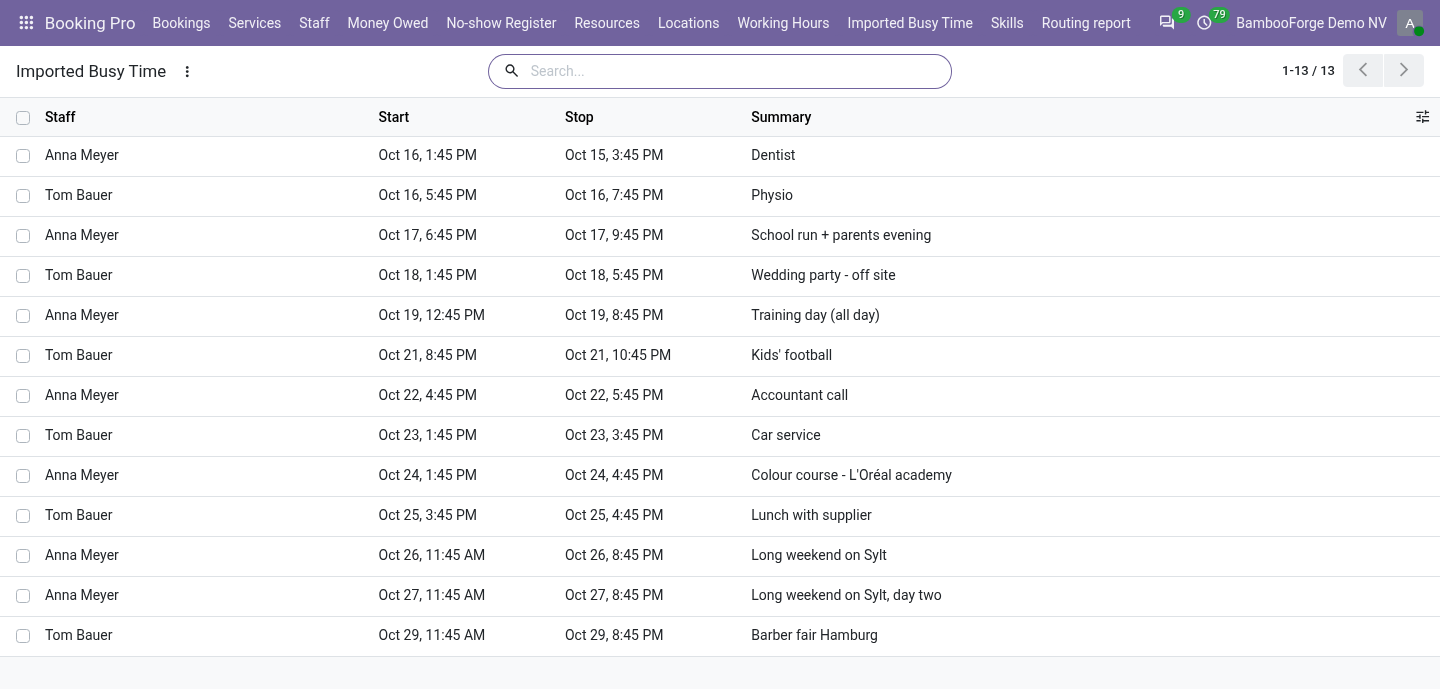
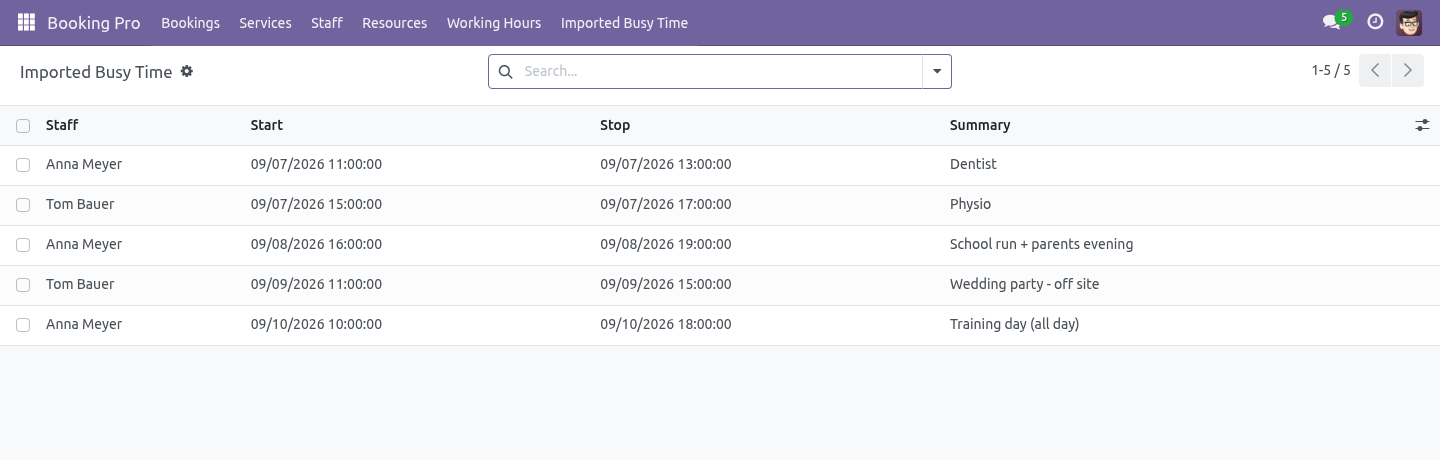
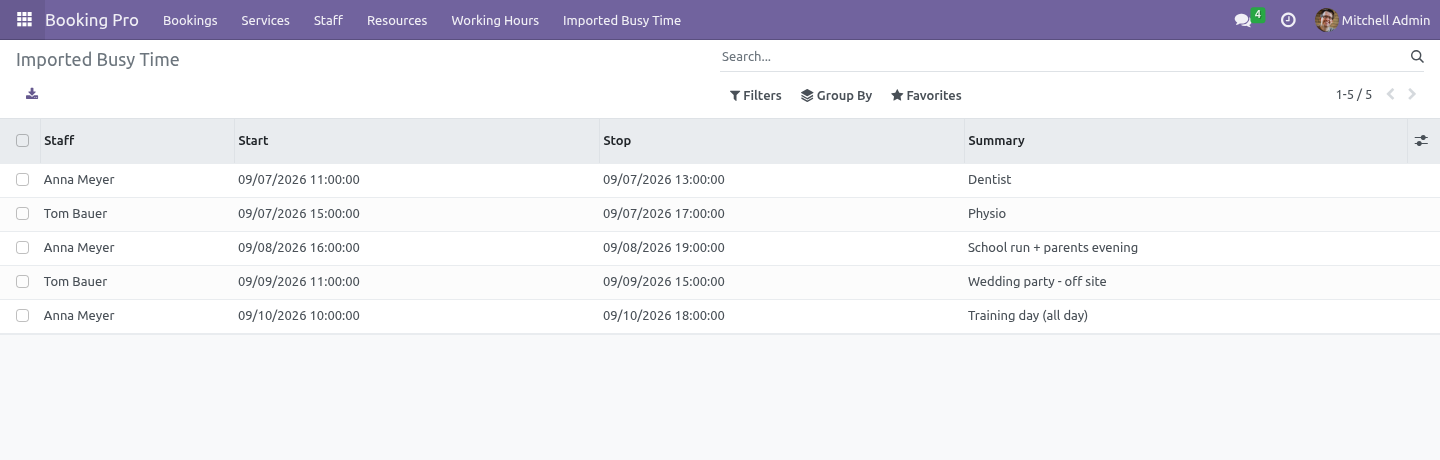
Then what this app deliberately does not do, so you can tell before you buy whether it fits. Everything lives under Imported Busy Time. 1. Copy bambooforge_booking_calendar_sync into your addons path and update the app list, or install the ZIP from the Odoo Apps Store.
2. Install Appointment Booking Suite: Google & Outlook Sync. 3. Open Imported Busy Time.
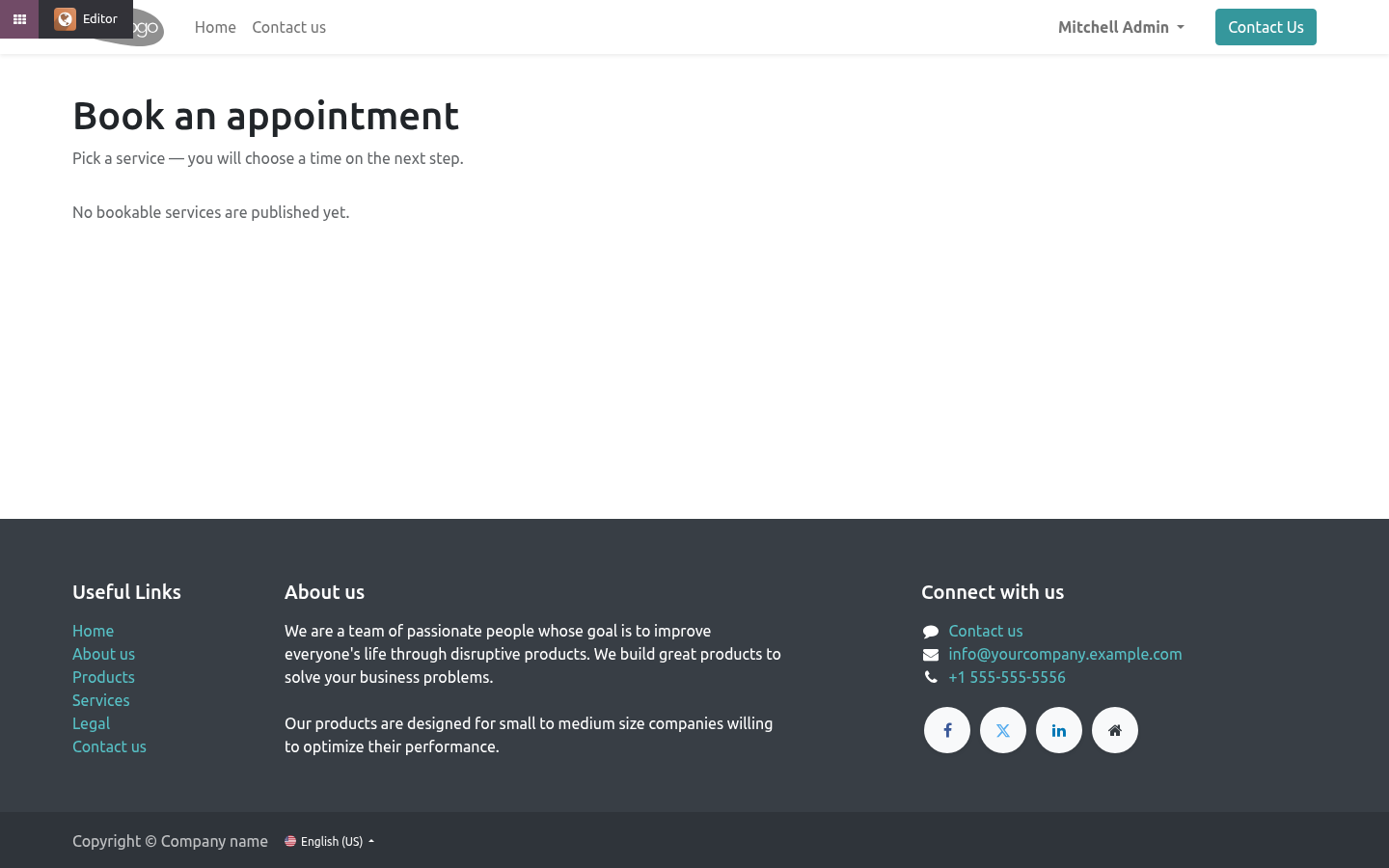
Appointment Booking All in One with Calendar Sync. An add-on for BambooForge Booking Pro, for the staff who will never have an Odoo login. What Odoo already does. Odoo Community ships google_calendar and microsoft_calendar, and Booking Pro already refuses a slot when a staff member's Odoo user has a calendar event in the way.
If your staff are Odoo users, connect their accounts in their own preferences. That is free, it is two-way, and this module does not try to sell it to you again. What this adds. The freelance trainer, the visiting dentist, the photographer who works Thursdays - none of them are Odoo users, and none of them will be.
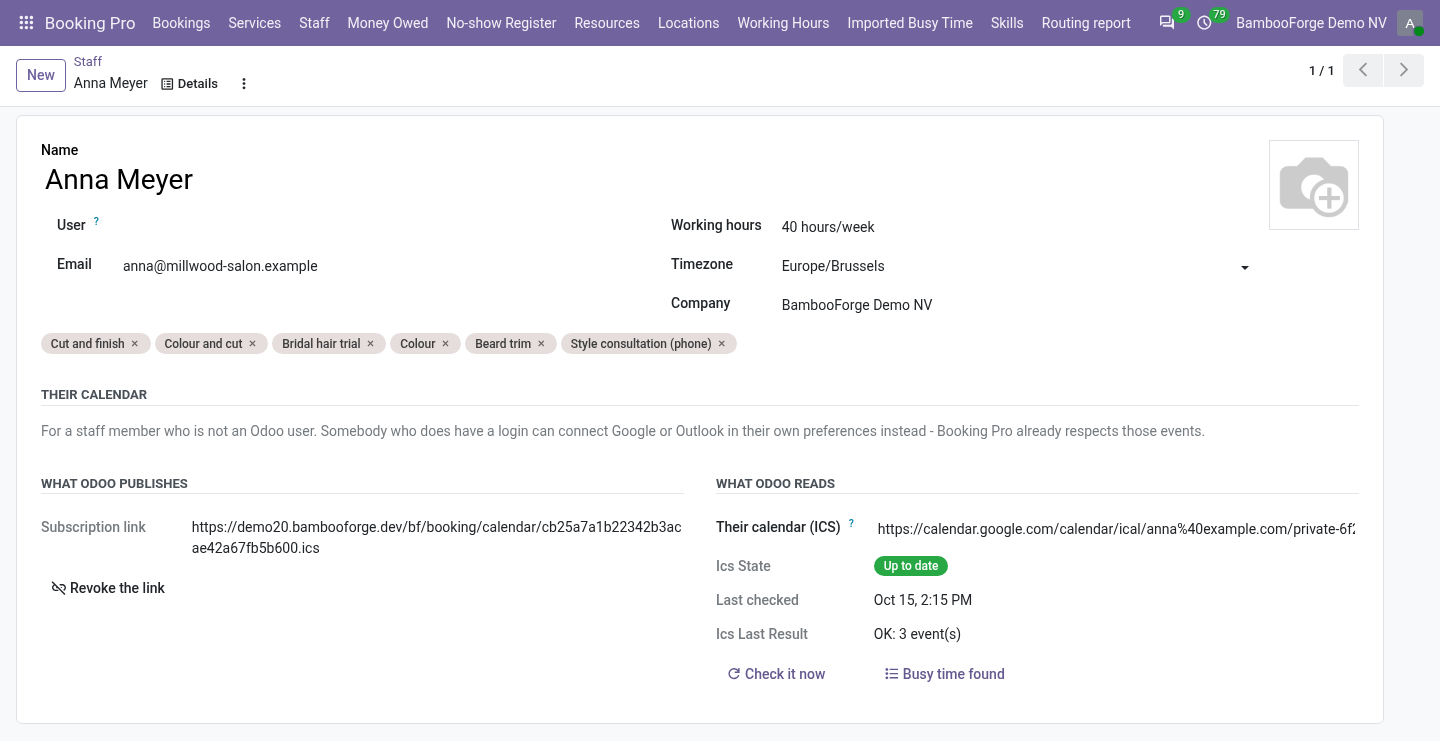
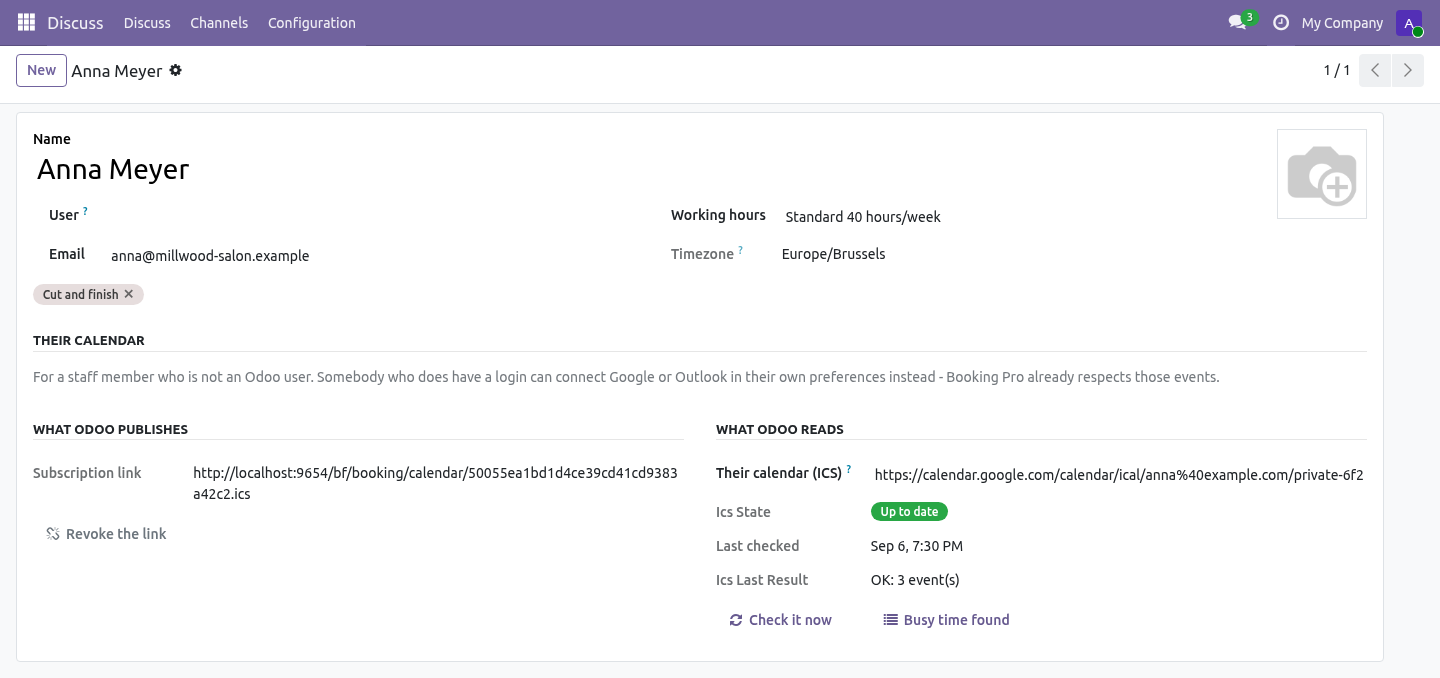
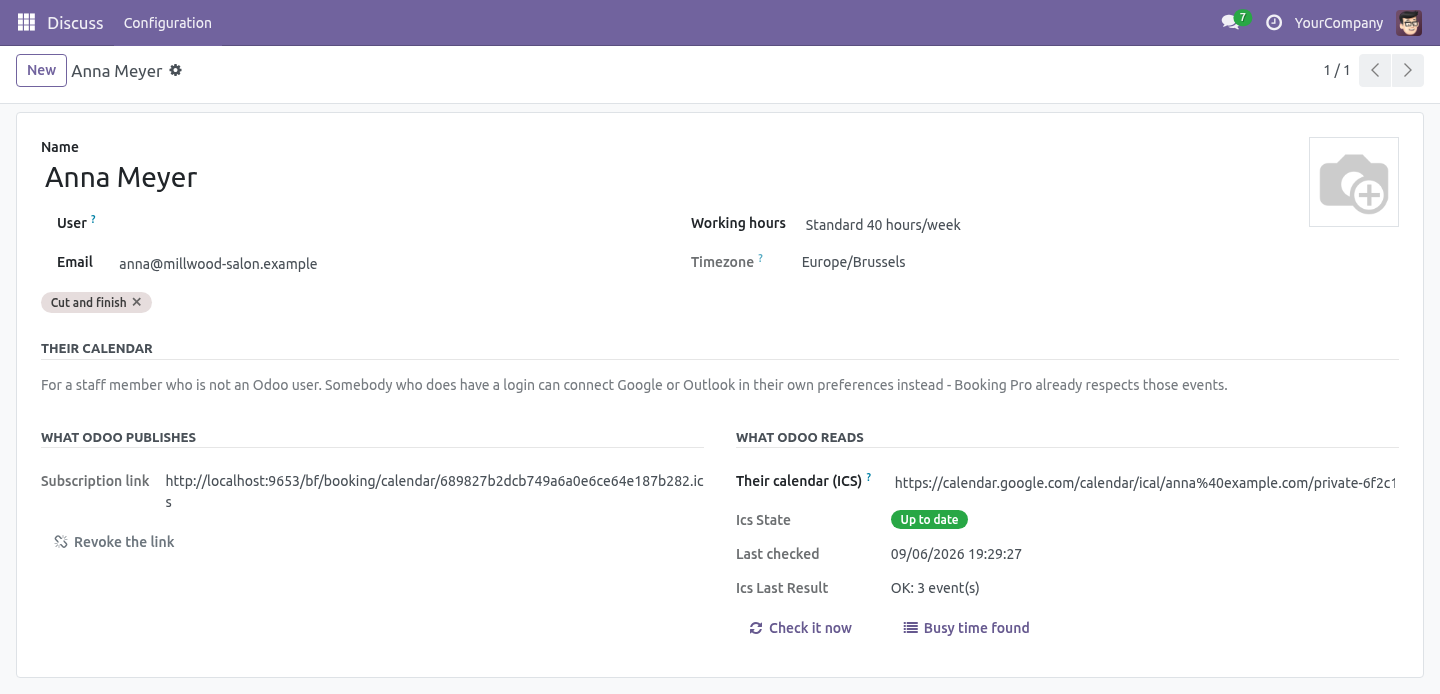
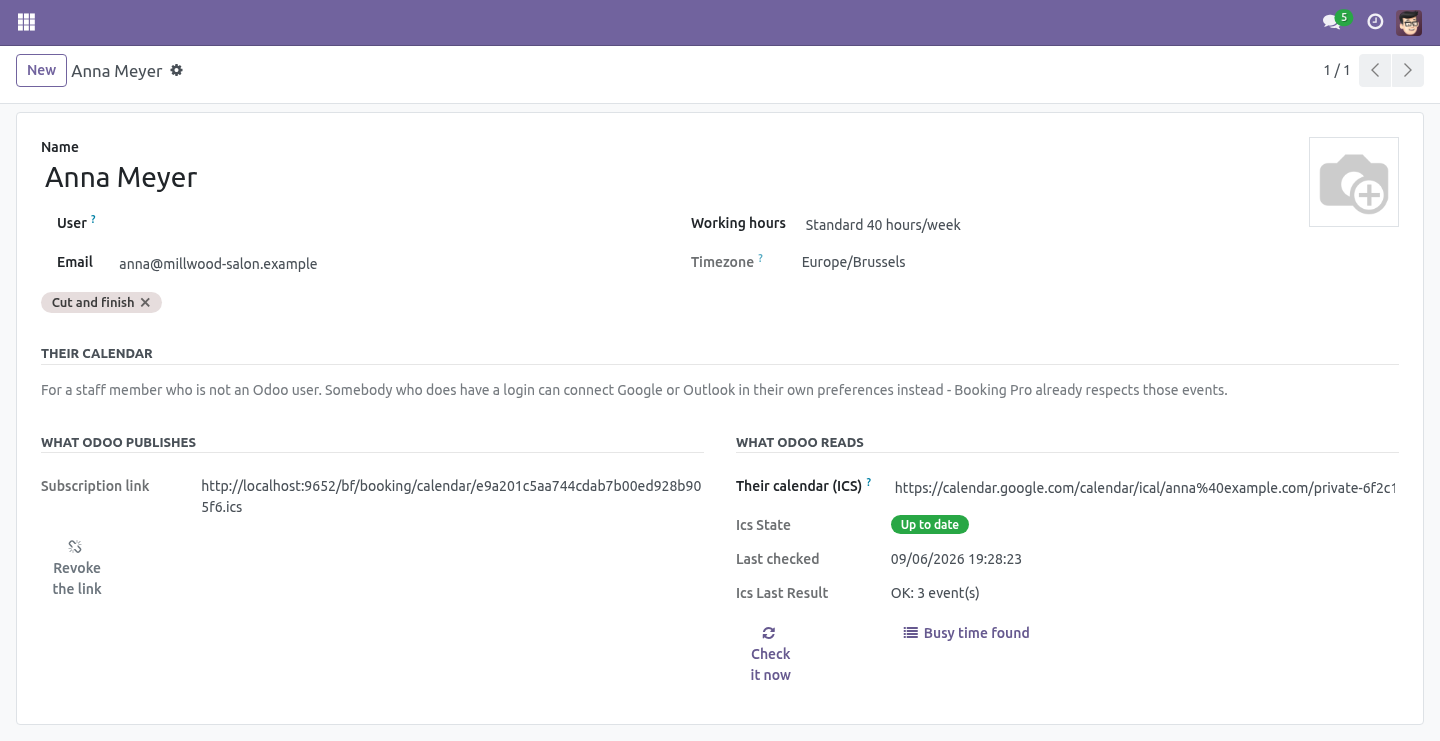
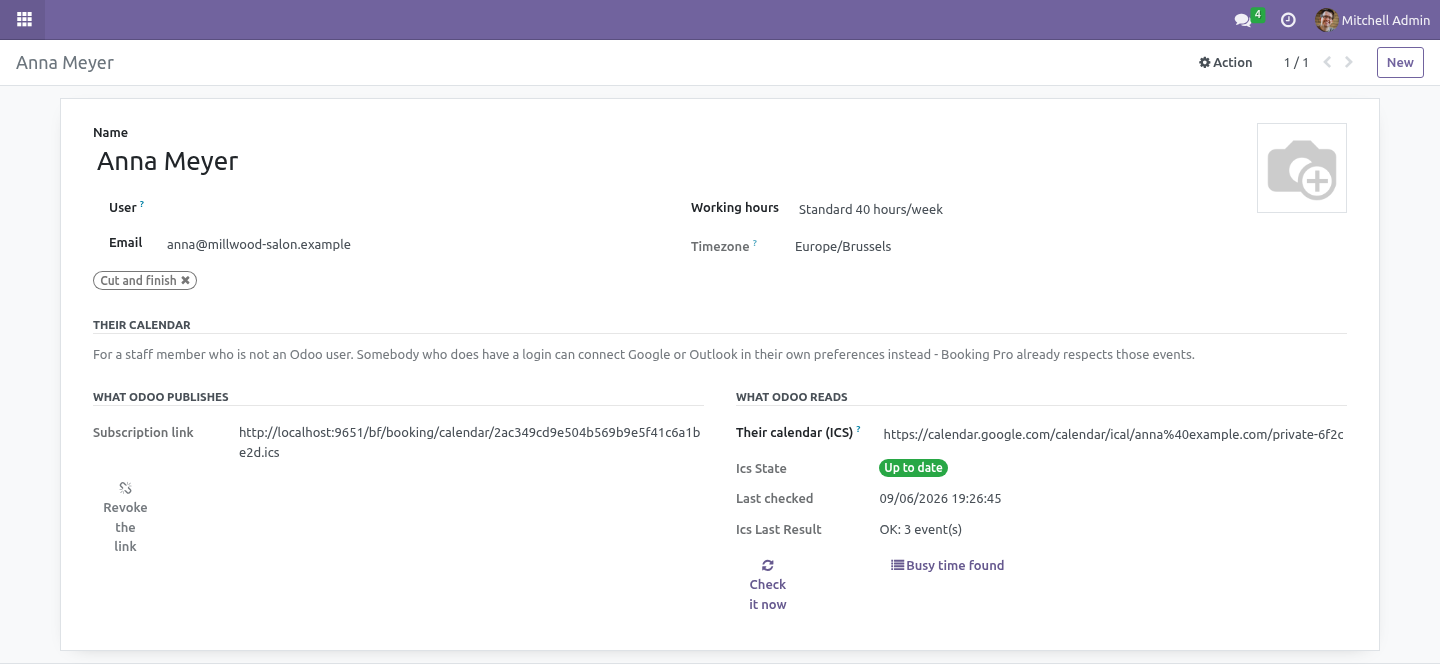
A subscription link. On the staff member's form, Create a subscription link. It produces a URL ending in .ics: paste it into Google Calendar ("From URL"), Outlook ("Subscribe from web"), Apple Calendar or a phone. Their bookings appear and keep updating, because that is what a subscribed calendar does.
Revoke the link stops every calendar that has it - for the day a phone is lost. A revoked link and a wrong link answer identically. Their calendar, read back. Paste the secret iCal address their own calendar publishes: Google Calendar - Settings for my calendars → Secret address in iCal format.
Outlook / Microsoft 365 - Settings → Calendar → Shared calendars → Publish a calendar → ICS link. Apple iCloud - share the calendar publicly and copy the webcal address. Events found there block slots. Odoo never writes to that calendar: the sync is one-way in, one-way out, and nothing of yours ends up in their personal diary.
What the reader understands. Deliberately small, and deliberately explicit about it: =========================== =========================================== Understood Not understood =========================== =========================================== Timed events with a zone Monthly and yearly repeats - imported as a single event rather than expanded wrongly All-day events, in the Exceptions to a repeat (EXDATE) - the calendar's own zone occurrence stays blocked Cancelled events (skipped) Attendee status: an invitation you have not answered still blocks Events marked free Attachments, alarms, anything not a time (skipped) Daily and weekly repeats, with COUNT and UNTIL =========================== =========================================== Housekeeping Imported busy time older than two days is deleted by the standard autovacuum. A pull replaces that member's imported blocks - no duplicates build up. A calendar that fails to answer is reported on the staff form and does not stop the other members from being refreshed.
How we make sure it works. Before every release, 29 automated checks run against this app on Odoo 16, 17, 18, 19 and 20. Among them: A url that is not a url is refused. A monthly repeat is imported once not guessed.
The link serves a calendar and a wrong one does not. A comma in a summary does not split the line. An event marked free is not busy. The complete list is in the source you receive.
Questions people ask. Which Odoo versions does it run on? Odoo 16.0, 17.0, 18.0, 19.0, 20.0, on the series you buy it for; each series is its own listing. Community or Enterprise?
Both. It needs no Enterprise app. Support. support@bambooforge.dev - the people who wrote it.
The complete manual is at docs dot bambooforge dot dev, the demo database is linked from the store page, and support answers within twenty-four hours. Links are in the description.
Transcript of the walkthrough (Odoo 19)
Appointment Booking Suite: Google & Outlook Sync. Appointment booking with calendar sync: a subscription link for staff without an Odoo login, and their own calendar read back to block slots. An add-on for BambooForge Booking Pro, for the staff who will never have an Odoo login. In the next few minutes: appointment booking suite: google & outlook sync, then what odoo already does, then what this adds, then a subscription link, then their calendar, read back.
Then what this app deliberately does not do, so you can tell before you buy whether it fits. Everything lives under Imported Busy Time. Appointment Booking Suite: Google & Outlook Sync. An add-on for BambooForge Booking Pro, for the staff who will never have an Odoo login.
What Odoo already does. Odoo Community ships google_calendar and microsoft_calendar, and Booking Pro already refuses a slot when a staff member's Odoo user has a calendar event in the way. If your staff are Odoo users, connect their accounts in their own preferences. That is free, it is two-way, and this module does not try to sell it to you again.
What this adds. The freelance trainer, the visiting dentist, the photographer who works Thursdays - none of them are Odoo users, and none of them will be. A subscription link. On the staff member's form, Create a subscription link.
It produces a URL ending in .ics: paste it into Google Calendar ("From URL"), Outlook ("Subscribe from web"), Apple Calendar or a phone. Their bookings appear and keep updating, because that is what a subscribed calendar does. Revoke the link stops every calendar that has it - for the day a phone is lost. A revoked link and a wrong link answer identically.
Their calendar, read back. Paste the secret iCal address their own calendar publishes: Google Calendar - Settings for my calendars → Secret address in iCal format. Outlook / Microsoft 365 - Settings → Calendar → Shared calendars → Publish a calendar → ICS link. Apple iCloud - share the calendar publicly and copy the webcal address.
Events found there block slots. Odoo never writes to that calendar: the sync is one-way in, one-way out, and nothing of yours ends up in their personal diary. What the reader understands. Deliberately small, and deliberately explicit about it: =========================== =========================================== Understood Not understood =========================== =========================================== Timed events with a zone Monthly and yearly repeats - imported as a single event rather than expanded wrongly All-day events, in the Exceptions to a repeat (EXDATE) - the calendar's own zone occurrence stays blocked Cancelled events (skipped) Attendee status: an invitation you have not answered still blocks Events marked free Attachments, alarms, anything not a time (skipped) Daily and weekly repeats, with COUNT and UNTIL =========================== =========================================== Housekeeping Imported busy time older than two days is deleted by the standard autovacuum.
A pull replaces that member's imported blocks - no duplicates build up. A calendar that fails to answer is reported on the staff form and does not stop the other members from being refreshed. Support. support@bambooforge.dev - the people who wrote it.
The complete manual is at docs dot bambooforge dot dev, the demo database is linked from the store page, and support answers within twenty-four hours. Links are in the description.
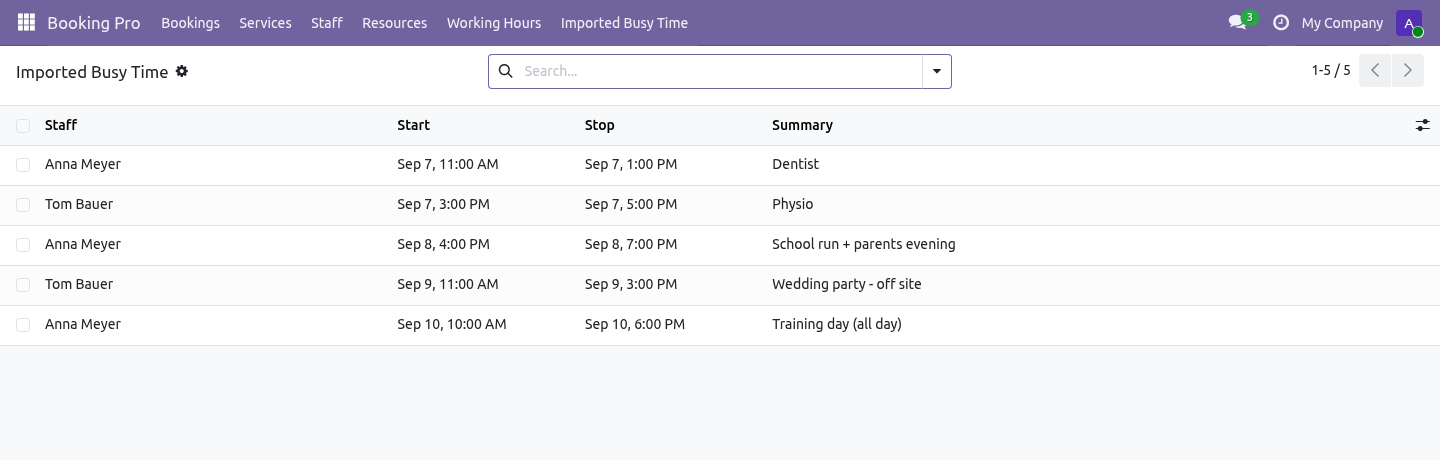
Transcript of the walkthrough (Odoo 18)
Appointment Booking Suite: Google & Outlook Sync. Appointment booking with calendar sync: a subscription link for staff without an Odoo login, and their own calendar read back to block slots. An add-on for BambooForge Booking Pro, for the staff who will never have an Odoo login. In the next few minutes: appointment booking suite: google & outlook sync, then what odoo already does, then what this adds, then a subscription link, then their calendar, read back.
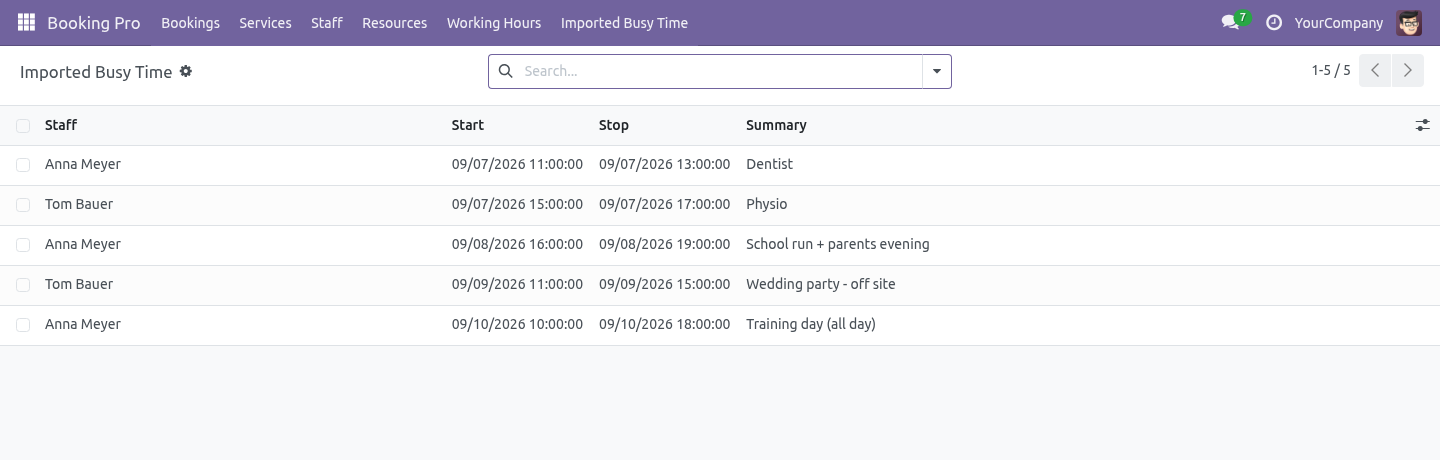
Then what this app deliberately does not do, so you can tell before you buy whether it fits. Everything lives under Imported Busy Time. Appointment Booking Suite: Google & Outlook Sync. An add-on for BambooForge Booking Pro, for the staff who will never have an Odoo login.
What Odoo already does. Odoo Community ships google_calendar and microsoft_calendar, and Booking Pro already refuses a slot when a staff member's Odoo user has a calendar event in the way. If your staff are Odoo users, connect their accounts in their own preferences. That is free, it is two-way, and this module does not try to sell it to you again.
What this adds. The freelance trainer, the visiting dentist, the photographer who works Thursdays - none of them are Odoo users, and none of them will be. A subscription link. On the staff member's form, Create a subscription link.
It produces a URL ending in .ics: paste it into Google Calendar ("From URL"), Outlook ("Subscribe from web"), Apple Calendar or a phone. Their bookings appear and keep updating, because that is what a subscribed calendar does. Revoke the link stops every calendar that has it - for the day a phone is lost. A revoked link and a wrong link answer identically.
Their calendar, read back. Paste the secret iCal address their own calendar publishes: Google Calendar - Settings for my calendars → Secret address in iCal format. Outlook / Microsoft 365 - Settings → Calendar → Shared calendars → Publish a calendar → ICS link. Apple iCloud - share the calendar publicly and copy the webcal address.
Events found there block slots. Odoo never writes to that calendar: the sync is one-way in, one-way out, and nothing of yours ends up in their personal diary. What the reader understands. Deliberately small, and deliberately explicit about it: =========================== =========================================== Understood Not understood =========================== =========================================== Timed events with a zone Monthly and yearly repeats - imported as a single event rather than expanded wrongly All-day events, in the Exceptions to a repeat (EXDATE) - the calendar's own zone occurrence stays blocked Cancelled events (skipped) Attendee status: an invitation you have not answered still blocks Events marked free Attachments, alarms, anything not a time (skipped) Daily and weekly repeats, with COUNT and UNTIL =========================== =========================================== Housekeeping Imported busy time older than two days is deleted by the standard autovacuum.
A pull replaces that member's imported blocks - no duplicates build up. A calendar that fails to answer is reported on the staff form and does not stop the other members from being refreshed. Support. support@bambooforge.dev - the people who wrote it.
The complete manual is at docs dot bambooforge dot dev, the demo database is linked from the store page, and support answers within twenty-four hours. Links are in the description.
Transcript of the walkthrough (Odoo 17)
Appointment Booking Suite: Google & Outlook Sync. Appointment booking with calendar sync: a subscription link for staff without an Odoo login, and their own calendar read back to block slots. An add-on for BambooForge Booking Pro, for the staff who will never have an Odoo login. In the next few minutes: appointment booking suite: google & outlook sync, then what odoo already does, then what this adds, then a subscription link, then their calendar, read back.
Then what this app deliberately does not do, so you can tell before you buy whether it fits. Everything lives under Imported Busy Time. Appointment Booking Suite: Google & Outlook Sync. An add-on for BambooForge Booking Pro, for the staff who will never have an Odoo login.
What Odoo already does. Odoo Community ships google_calendar and microsoft_calendar, and Booking Pro already refuses a slot when a staff member's Odoo user has a calendar event in the way. If your staff are Odoo users, connect their accounts in their own preferences. That is free, it is two-way, and this module does not try to sell it to you again.
What this adds. The freelance trainer, the visiting dentist, the photographer who works Thursdays - none of them are Odoo users, and none of them will be. A subscription link. On the staff member's form, Create a subscription link.
It produces a URL ending in .ics: paste it into Google Calendar ("From URL"), Outlook ("Subscribe from web"), Apple Calendar or a phone. Their bookings appear and keep updating, because that is what a subscribed calendar does. Revoke the link stops every calendar that has it - for the day a phone is lost. A revoked link and a wrong link answer identically.
Their calendar, read back. Paste the secret iCal address their own calendar publishes: Google Calendar - Settings for my calendars → Secret address in iCal format. Outlook / Microsoft 365 - Settings → Calendar → Shared calendars → Publish a calendar → ICS link. Apple iCloud - share the calendar publicly and copy the webcal address.
Events found there block slots. Odoo never writes to that calendar: the sync is one-way in, one-way out, and nothing of yours ends up in their personal diary. What the reader understands. Deliberately small, and deliberately explicit about it: =========================== =========================================== Understood Not understood =========================== =========================================== Timed events with a zone Monthly and yearly repeats - imported as a single event rather than expanded wrongly All-day events, in the Exceptions to a repeat (EXDATE) - the calendar's own zone occurrence stays blocked Cancelled events (skipped) Attendee status: an invitation you have not answered still blocks Events marked free Attachments, alarms, anything not a time (skipped) Daily and weekly repeats, with COUNT and UNTIL =========================== =========================================== Housekeeping Imported busy time older than two days is deleted by the standard autovacuum.
A pull replaces that member's imported blocks - no duplicates build up. A calendar that fails to answer is reported on the staff form and does not stop the other members from being refreshed. Support. support@bambooforge.dev - the people who wrote it.
The complete manual is at docs dot bambooforge dot dev, the demo database is linked from the store page, and support answers within twenty-four hours. Links are in the description.
Transcript of the walkthrough (Odoo 16)
Appointment Booking Suite: Google & Outlook Sync. Appointment booking with calendar sync: a subscription link for staff without an Odoo login, and their own calendar read back to block slots. An add-on for BambooForge Booking Pro, for the staff who will never have an Odoo login. In the next few minutes: appointment booking suite: google & outlook sync, then what odoo already does, then what this adds, then a subscription link, then their calendar, read back.
Then what this app deliberately does not do, so you can tell before you buy whether it fits. Everything lives under Imported Busy Time. Appointment Booking Suite: Google & Outlook Sync. An add-on for BambooForge Booking Pro, for the staff who will never have an Odoo login.
What Odoo already does. Odoo Community ships google_calendar and microsoft_calendar, and Booking Pro already refuses a slot when a staff member's Odoo user has a calendar event in the way. If your staff are Odoo users, connect their accounts in their own preferences. That is free, it is two-way, and this module does not try to sell it to you again.
What this adds. The freelance trainer, the visiting dentist, the photographer who works Thursdays - none of them are Odoo users, and none of them will be. A subscription link. On the staff member's form, Create a subscription link.
It produces a URL ending in .ics: paste it into Google Calendar ("From URL"), Outlook ("Subscribe from web"), Apple Calendar or a phone. Their bookings appear and keep updating, because that is what a subscribed calendar does. Revoke the link stops every calendar that has it - for the day a phone is lost. A revoked link and a wrong link answer identically.
Their calendar, read back. Paste the secret iCal address their own calendar publishes: Google Calendar - Settings for my calendars → Secret address in iCal format. Outlook / Microsoft 365 - Settings → Calendar → Shared calendars → Publish a calendar → ICS link. Apple iCloud - share the calendar publicly and copy the webcal address.
Events found there block slots. Odoo never writes to that calendar: the sync is one-way in, one-way out, and nothing of yours ends up in their personal diary. What the reader understands. Deliberately small, and deliberately explicit about it: =========================== =========================================== Understood Not understood =========================== =========================================== Timed events with a zone Monthly and yearly repeats - imported as a single event rather than expanded wrongly All-day events, in the Exceptions to a repeat (EXDATE) - the calendar's own zone occurrence stays blocked Cancelled events (skipped) Attendee status: an invitation you have not answered still blocks Events marked free Attachments, alarms, anything not a time (skipped) Daily and weekly repeats, with COUNT and UNTIL =========================== =========================================== Housekeeping Imported busy time older than two days is deleted by the standard autovacuum.
A pull replaces that member's imported blocks - no duplicates build up. A calendar that fails to answer is reported on the staff form and does not stop the other members from being refreshed. Support. support@bambooforge.dev - the people who wrote it.
The complete manual is at docs dot bambooforge dot dev, the demo database is linked from the store page, and support answers within twenty-four hours. Links are in the description.
Key facts
- What it is
- Appointment booking with calendar sync: a subscription link for staff without an Odoo login, and their own calendar read back to block slots.
- For
- Website
- Odoo versions
- 16.0, 17.0, 18.0, 19.0, 20.0 - Community and Enterprise
- Runs on
- Odoo.sh or Odoo you host yourself - not Odoo Online, which accepts no third-party apps
- Price
- 228 EUR, one-time, on the Odoo Apps Store
- Technical name
- bambooforge_booking_calendar_sync
- Live demo
- https://demo20.bambooforge.dev/odoo/action-bambooforge_booking_calendar_sync.action_bf_booking_busy
- Manual last updated
- 2026-10-15
Appointment Booking All in One with Calendar Sync
An add-on for BambooForge Booking Pro, for the staff who will never have an Odoo login.
What Odoo already does
Odoo Community ships google_calendar and microsoft_calendar, and Booking Pro already refuses a slot when a staff member's Odoo user has a calendar event in the way.
If your staff are Odoo users, connect their accounts in their own preferences. That is free, it is two-way, and this module does not try to sell it to you again.
What this adds
The freelance trainer, the visiting dentist, the photographer who works Thursdays - none of them are Odoo users, and none of them will be.
A subscription link
On the staff member's form, Create a subscription link. It produces a URL ending in .ics: paste it into Google Calendar ("From URL"), Outlook ("Subscribe from web"), Apple Calendar or a phone. Their bookings appear and keep updating, because that is what a subscribed calendar does.
Revoke the link stops every calendar that has it - for the day a phone is lost. A revoked link and a wrong link answer identically.
Their calendar, read back
Paste the secret iCal address their own calendar publishes:
Google Calendar - Settings for my calendars → Secret address in iCal format.
Outlook / Microsoft 365 - Settings → Calendar → Shared calendars → Publish a calendar → ICS link.
Apple iCloud - share the calendar publicly and copy the webcal address.
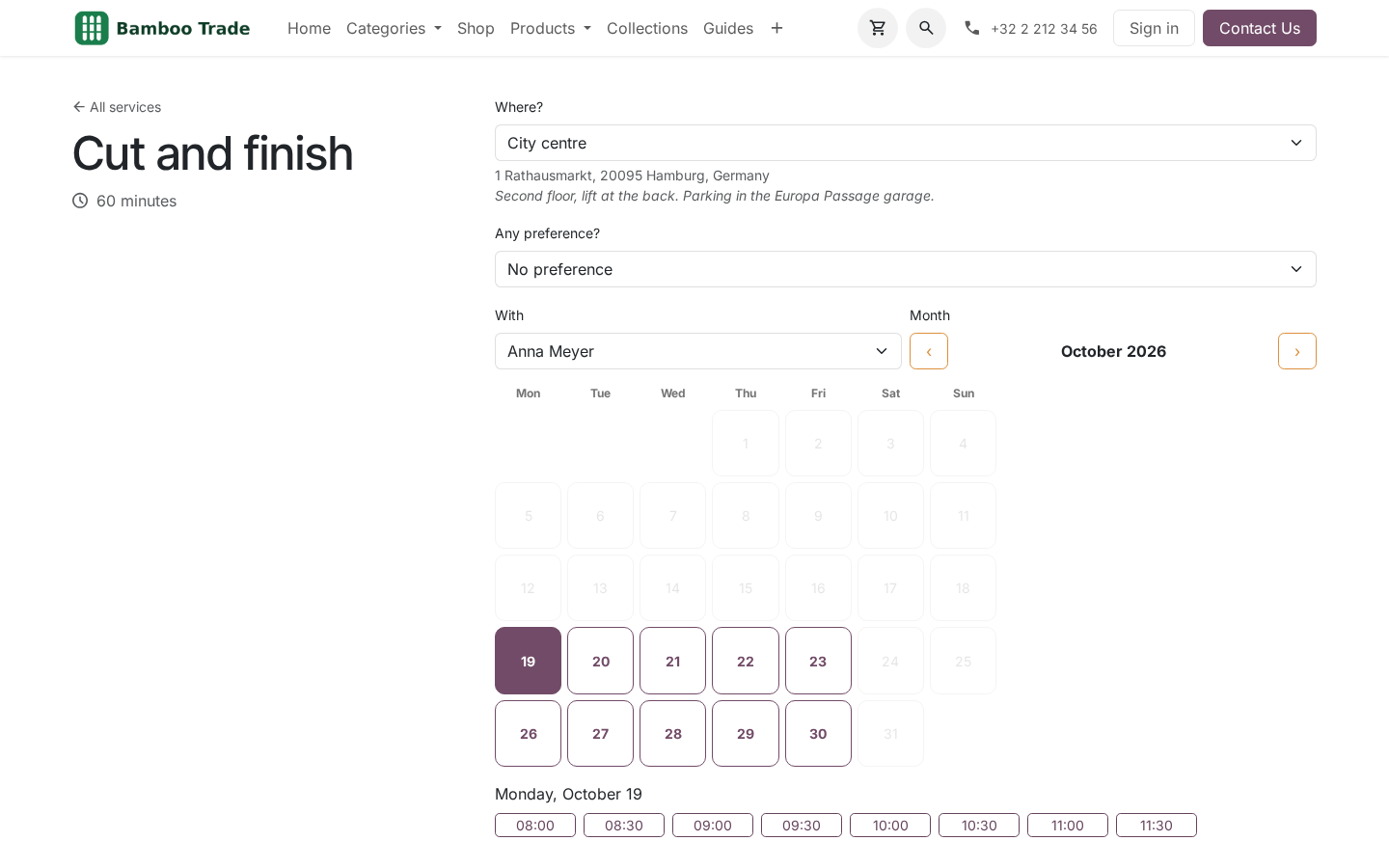
Events found there block slots. Odoo never writes to that calendar: the sync is one-way in, one-way out, and nothing of yours ends up in their personal diary.
Refreshed every fifteen minutes. A calendar checked once a day is a double booking waiting to happen.
What the reader understands
Deliberately small, and deliberately explicit about it:
Understood |
Not understood |
|---|---|
Timed events with a zone |
Monthly and yearly repeats - imported as a single event rather than expanded wrongly |
All-day events, in the |
Exceptions to a repeat (EXDATE) - the |
calendar's own zone |
occurrence stays blocked |
Cancelled events (skipped) |
Attendee status: an invitation you have not answered still blocks |
Events marked free |
Attachments, alarms, anything not a time |
(skipped) |
|
Daily and weekly repeats, |
|
with COUNT and UNTIL |
A wrong busy block silently costs a booking; a missing one costs a manual check. Where the two conflict, this errs towards blocking.
Housekeeping
Imported busy time older than two days is deleted by the standard autovacuum.
A pull replaces that member's imported blocks - no duplicates build up.
A calendar that fails to answer is reported on the staff form and does not stop the other members from being refreshed.
How we make sure it works
Before every release, 29 automated checks run against this app on Odoo 16, 17, 18, 19 and 20. Among them:
A url that is not a url is refused.
A monthly repeat is imported once not guessed.
The link serves a calendar and a wrong one does not.
A comma in a summary does not split the line.
An event marked free is not busy.
The complete list is in the source you receive.
Install
Copy bambooforge_booking_calendar_sync into your addons path and update the app list, or install the ZIP from the Odoo Apps Store.
Install Appointment Booking Suite: Google & Outlook Sync.
Open Imported Busy Time.
Questions people ask
- Which Odoo versions does it run on?
Odoo 16.0, 17.0, 18.0, 19.0, 20.0, on the series you buy it for; each series is its own listing.
- Community or Enterprise?
Both. It needs no Enterprise app.
- What does it need?
The standard Web; booking pro (BambooForge) must be installed first app. No extra Python package.
- Where does it show up?
Under the Imported Busy Time menu.
- Does anything leave my server?
It makes calls outside your server only where its manual says so - read the section on that service before you connect it.
- What happens if I uninstall it?
Odoo drops the app's own tables and fields; the standard records it worked on (contacts, orders, products) stay as they are.
Support
support@bambooforge.dev - the people who wrote it.