 BambooForge Labs
Bakery & Food Production Management
Bakery production in bakers' percentages: allergens computed from the recipe, batches with use-by and lot trace, the round, and the waste.
Available for Odoo 16.0, Odoo 17.0, Odoo 18.0, Odoo 19.0, Odoo 20.0. Technical name bambooforge_bakery.
Transcript of the walkthrough (Odoo 20)
Bakery & Food Production Management. Bakery production in bakers' percentages: allergens computed from the recipe, batches with use-by and lot trace, the round, and the waste. Each company numbers its own batches, plans and delivery notes. 1.
Copy bambooforge_bakery into your addons path and update the app list, or install the ZIP from the Odoo Apps Store. Community only; it depends on base, base_setup, mail, product, uom and account. 2. Install Bakery & Food Production Management.
3. Enter the ingredients with their allergens, and sign off their specifications. 4. Build the recipes; mark the flour lines as flour, or the percentages cannot be worked out.
Release the recipes. 5. Enter the standing orders. 6.
Set the two settings: the order cut-off and the waste target. In the next few minutes: bakery & food production management, then the label, then the trace, then the bakery, then the round. Then what this app deliberately does not do, so you can tell before you buy whether it fits. Everything lives under Bakery then Production plans then Batches then Deliveries.
1. Copy bambooforge_bakery into your addons path and update the app list, or install the ZIP from the Odoo Apps Store. Community only; it depends on base, base_setup, mail, product, uom and account. 2.
Install Bakery & Food Production Management. 3. Enter the ingredients with their allergens, and sign off their specifications. 4.
Build the recipes; mark the flour lines as flour, or the percentages cannot be worked out. Release the recipes. 5. Enter the standing orders.
6. Set the two settings: the order cut-off and the waste target. Bakery & Food Production Management. Built around the three things a bakery is judged on: the label, the trace, and the number nobody writes down.
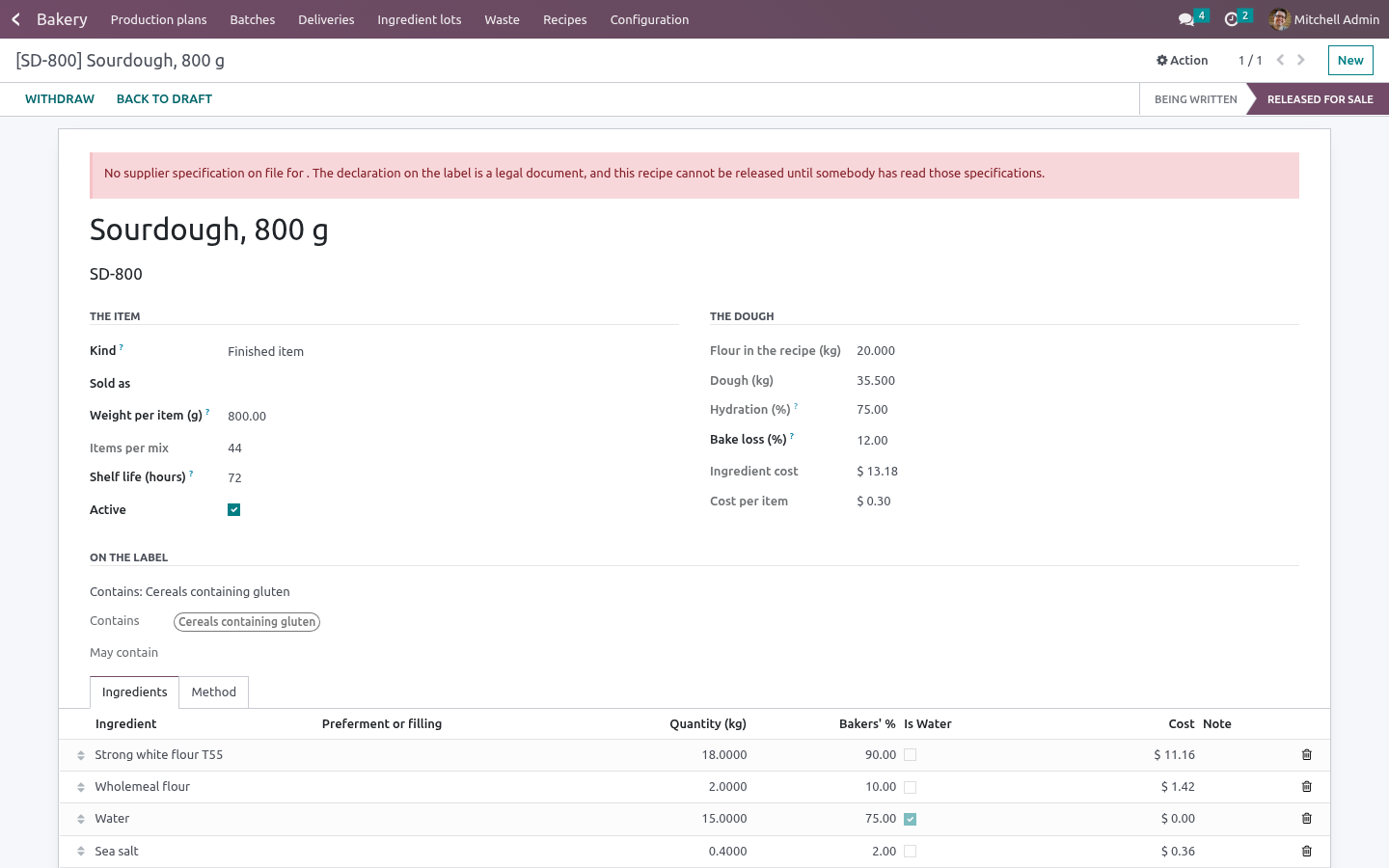
The label Every ingredient carries what it contains and what it may contain, entered from the supplier's specification and signed off with a name and a date. The recipe's declaration is computed from its lines, and travels up through preferments and fillings into whatever uses them. An allergen that is definitely present never also appears as a "may contain". A recipe cannot be released for sale while any ingredient in it has no specification on file.
Changing what an ingredient carries drops the sign-off, and the name and date on it, so a reformulation takes every recipe using it off sale by itself - nobody has to notice. Changing a released recipe - an ingredient, the weight, the shelf life - puts it back to draft with a line saying why. A label signed off against a recipe is only signed off against that recipe. The declaration is written in the bakery's own language and names the allergens in the order the regulation lists them, not in alphabetical order.
The fourteen regulated allergens ship with the module. A bakery adds its own beside them. The trace Lots are recorded when the sack is opened: the code exactly as printed, the supplier, the best-before. A batch records which lots went into it.
A lot past its date, under a block, emptier than the line says, or of something that is not in the recipe cannot go in - however the row is written. Blocking a lot stops the bread: a batch mixed with it does not come out of the oven for sale, and nothing made with it loads onto a van. Every batch and every round holding it is told on its own record, with how many are still in the bakery. Once a batch is baked, its lots cannot be edited or deleted, the batch itself cannot be deleted, and a lot that has been used cannot be deleted at all.
Every batch keeps the label it was baked with. A recipe reformulated next month does not change what was on last month's loaf. One screen answers a recall: the batches, how many reached each customer after returns, and who they are. Blocking the lot is the same button, and the answer is written on the lot.
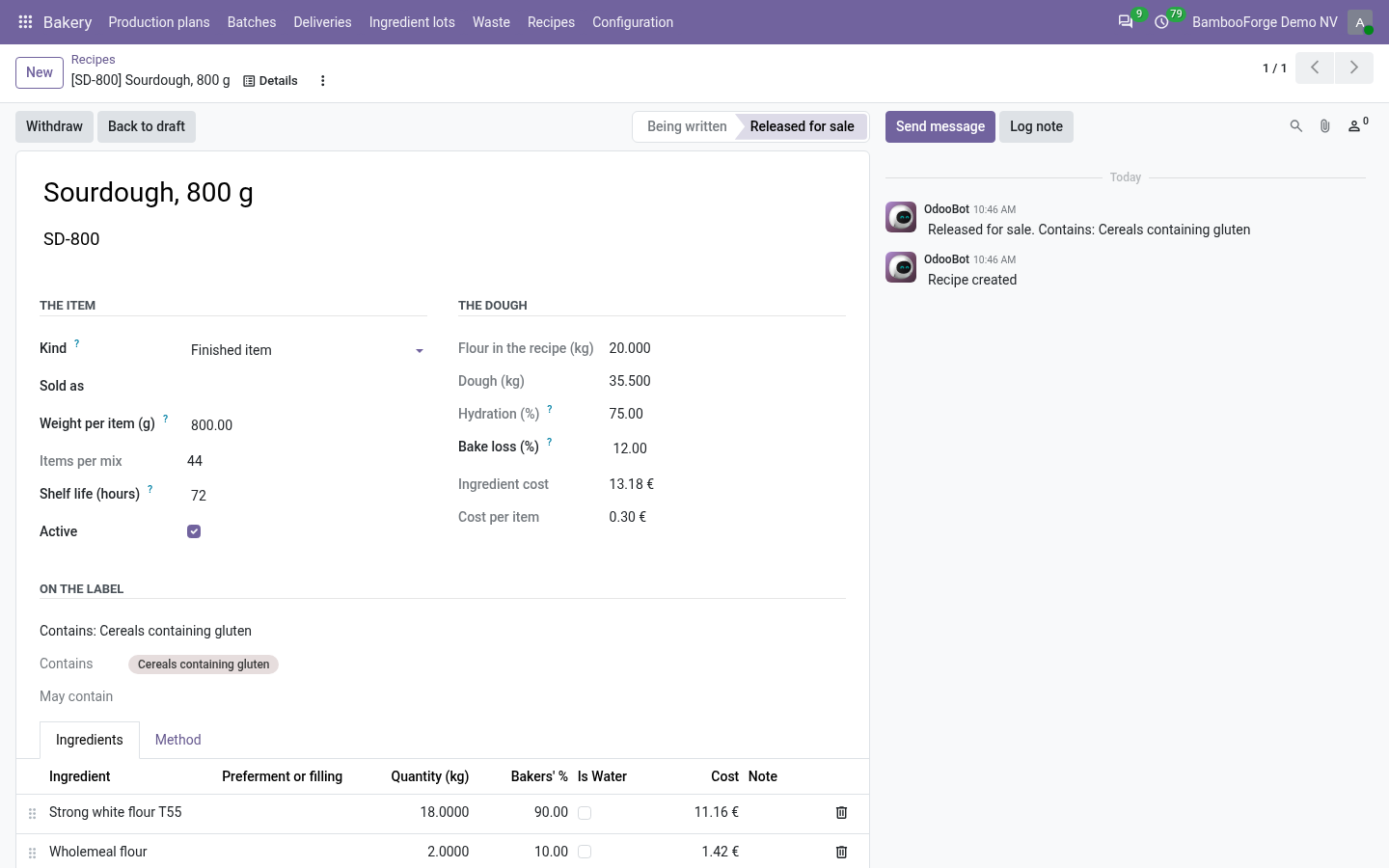
A lot within a week of its date lands on somebody's list - the person who booked it in, or a manager. Never a robot's. The bakery Recipes in bakers' percentages against the flour, with hydration, bake loss, shelf life, yield and cost per item. Scaling to tonight's numbers is arithmetic the system does - the mixing sheet is the recipe multiplied by what the plan says.
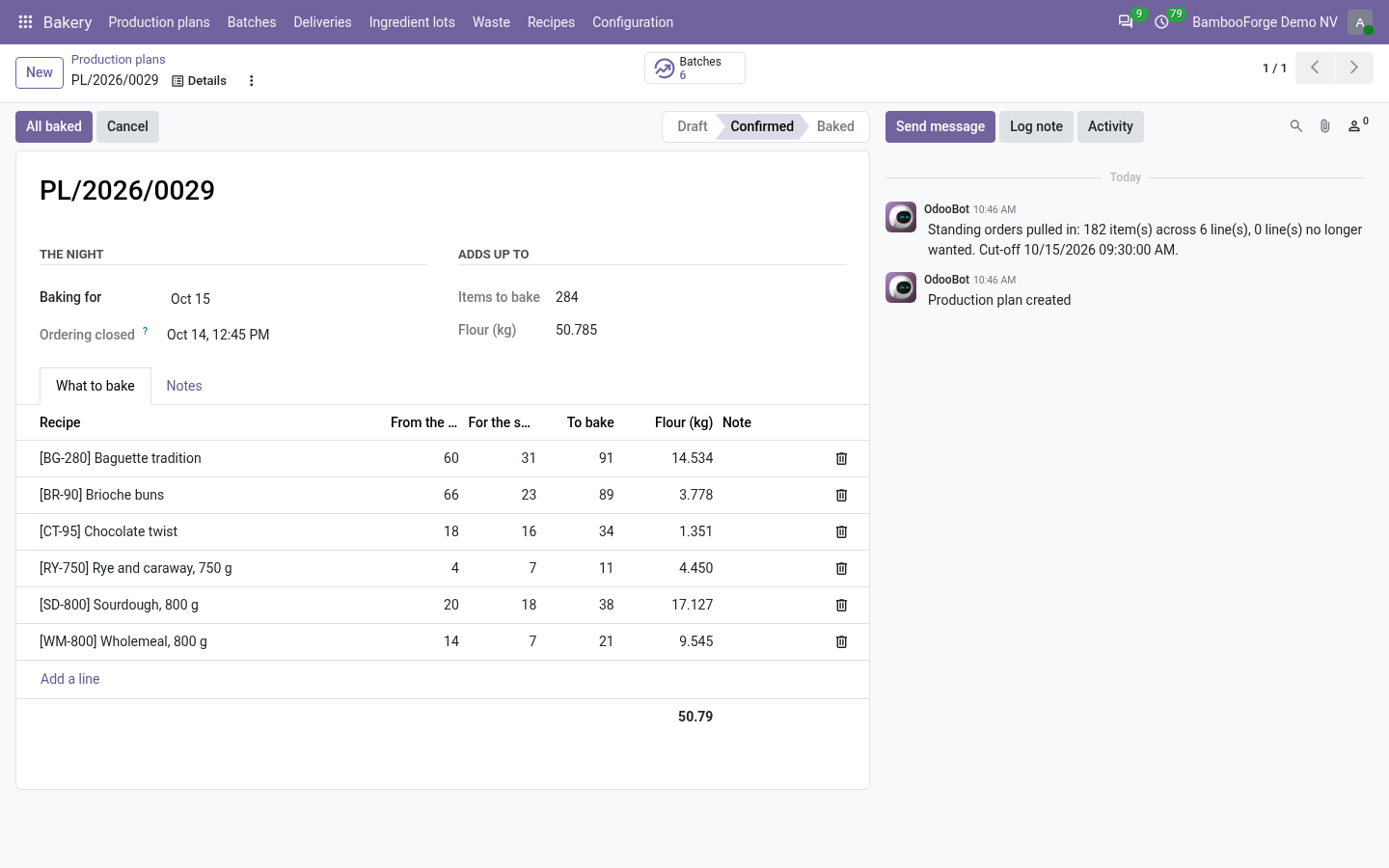
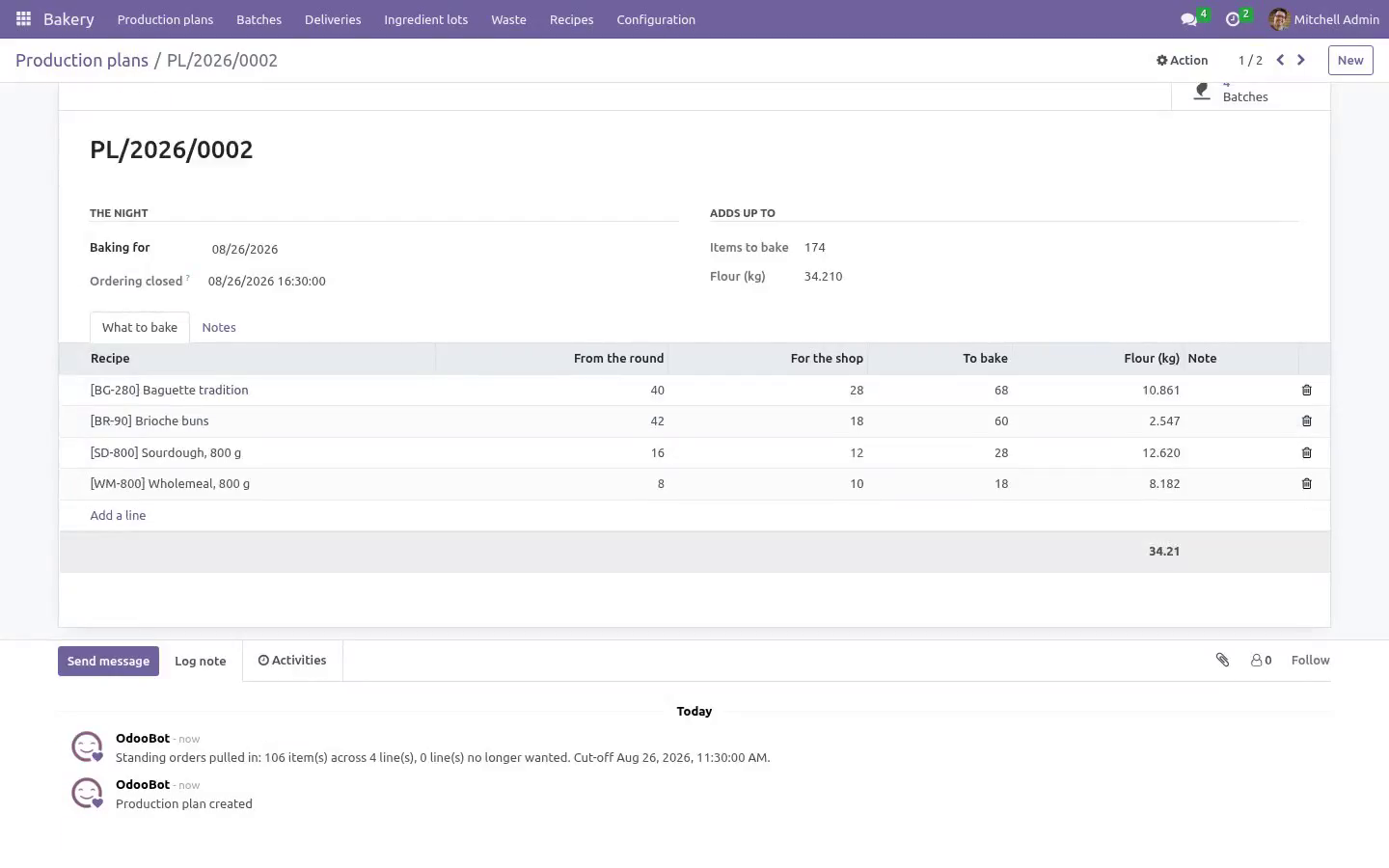
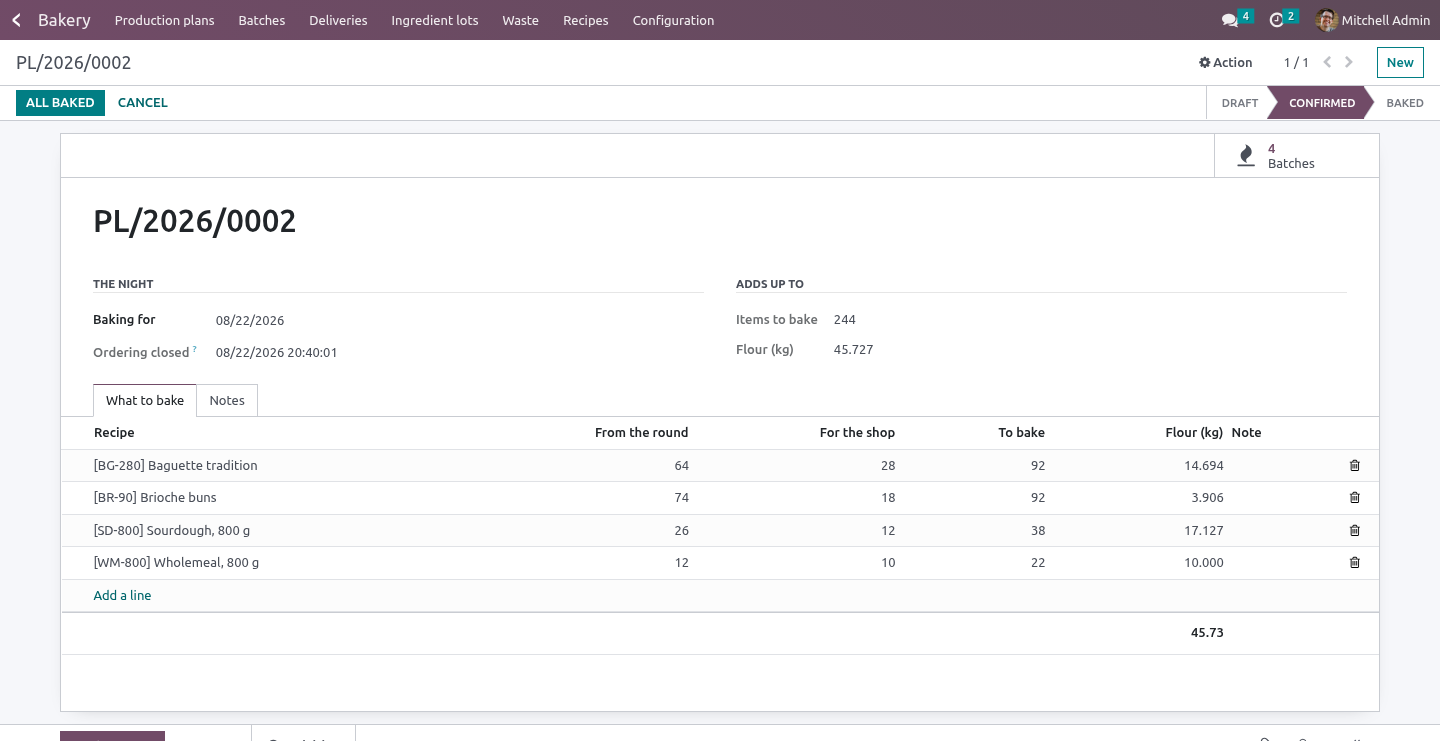
A production plan per night: standing orders per weekday added up, plus what the counter expects. Confirming it raises a batch per line and totals the flour. Pulling the round again drops the lines nobody wants any more, and records the cut-off as the moment it was really pulled. Use-by is out of the oven plus the shelf life.
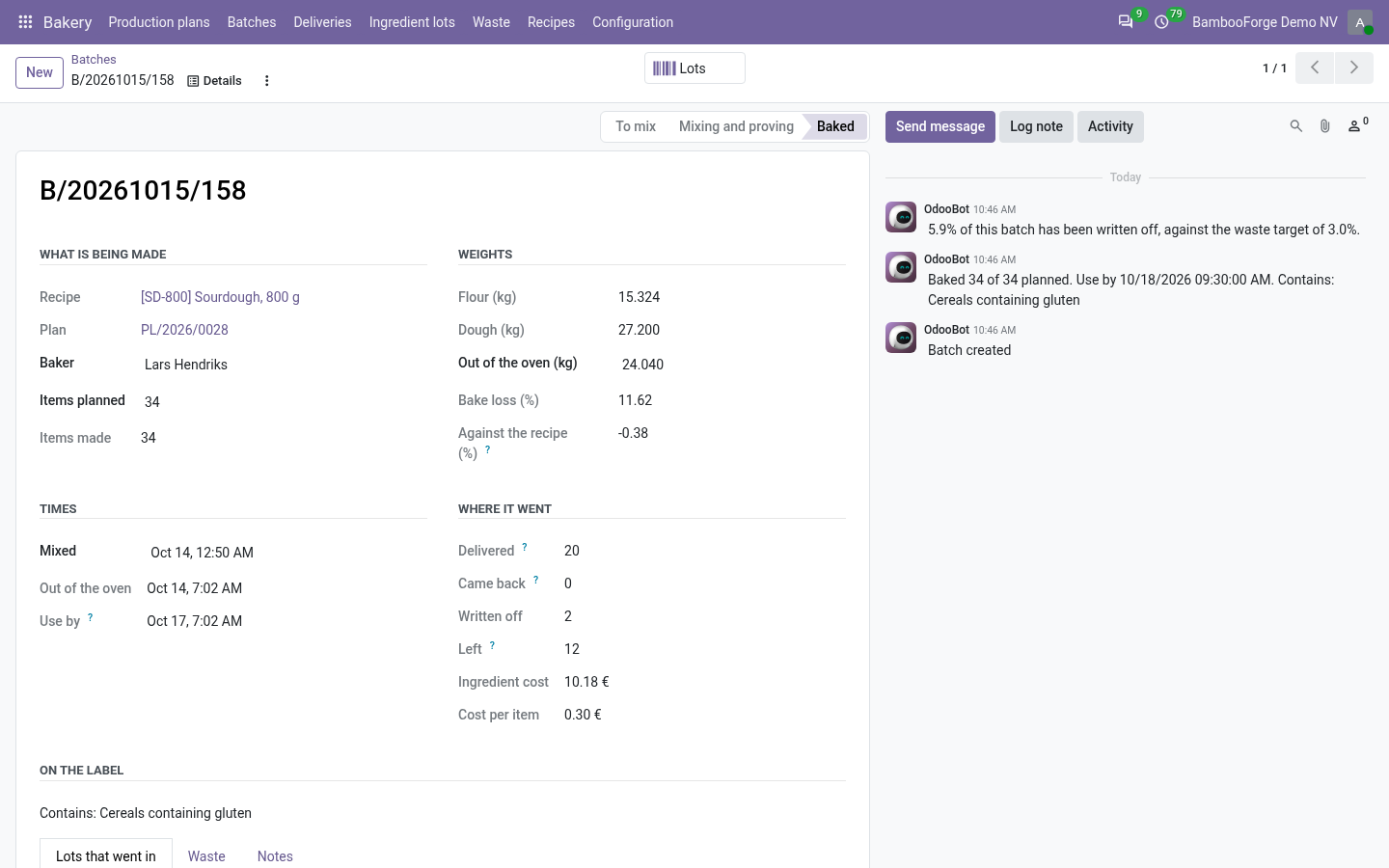
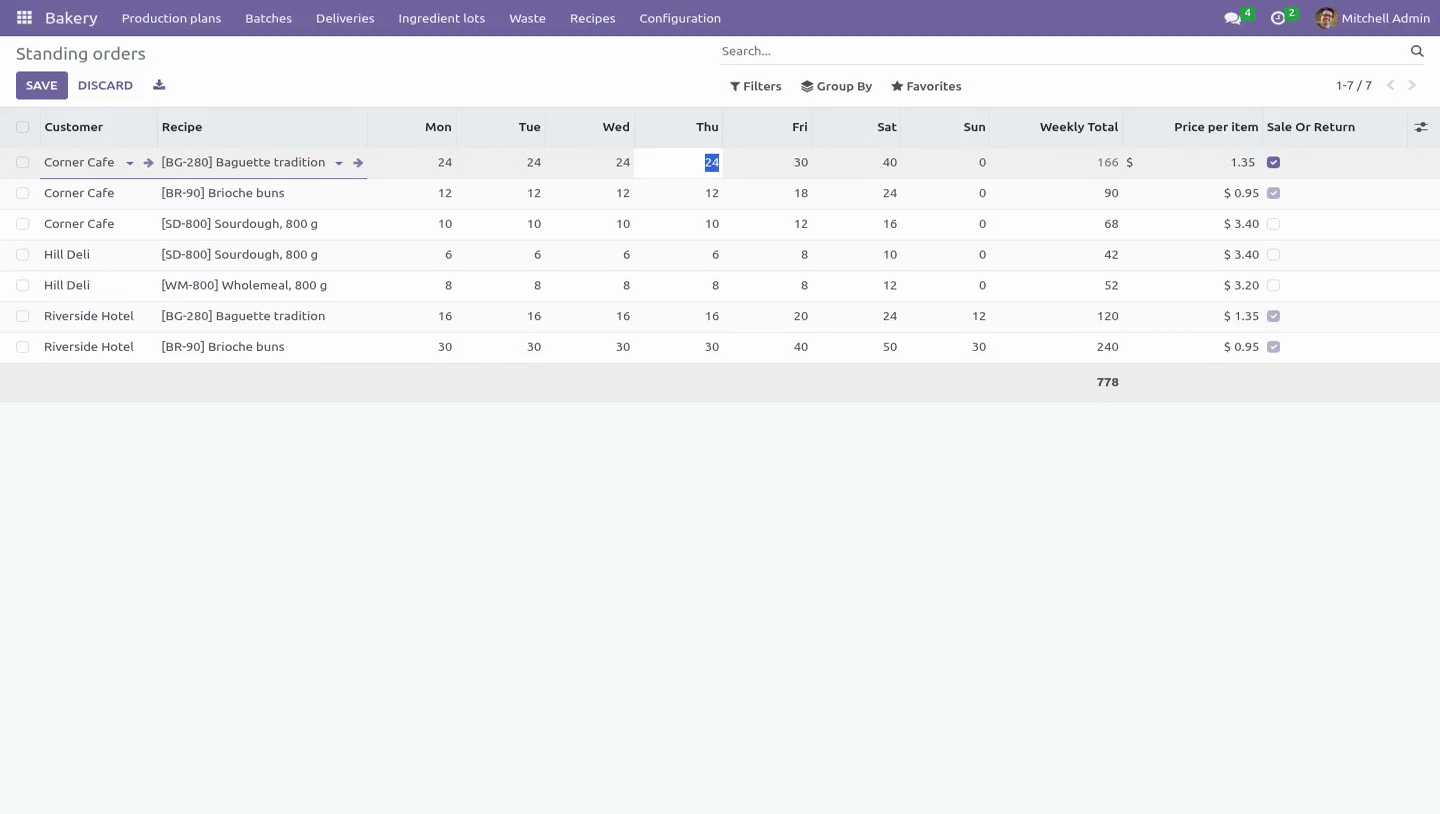
A round cannot carry a batch that is out of date before the end of the delivery day, counted in the bakery's own time. Bake loss is measured against the recipe's figure, and a bake two points out says so. A batch cannot come out of the oven without a count and without its lots. The round Standing orders per customer per weekday, with a price and whether the customer is sale or return.
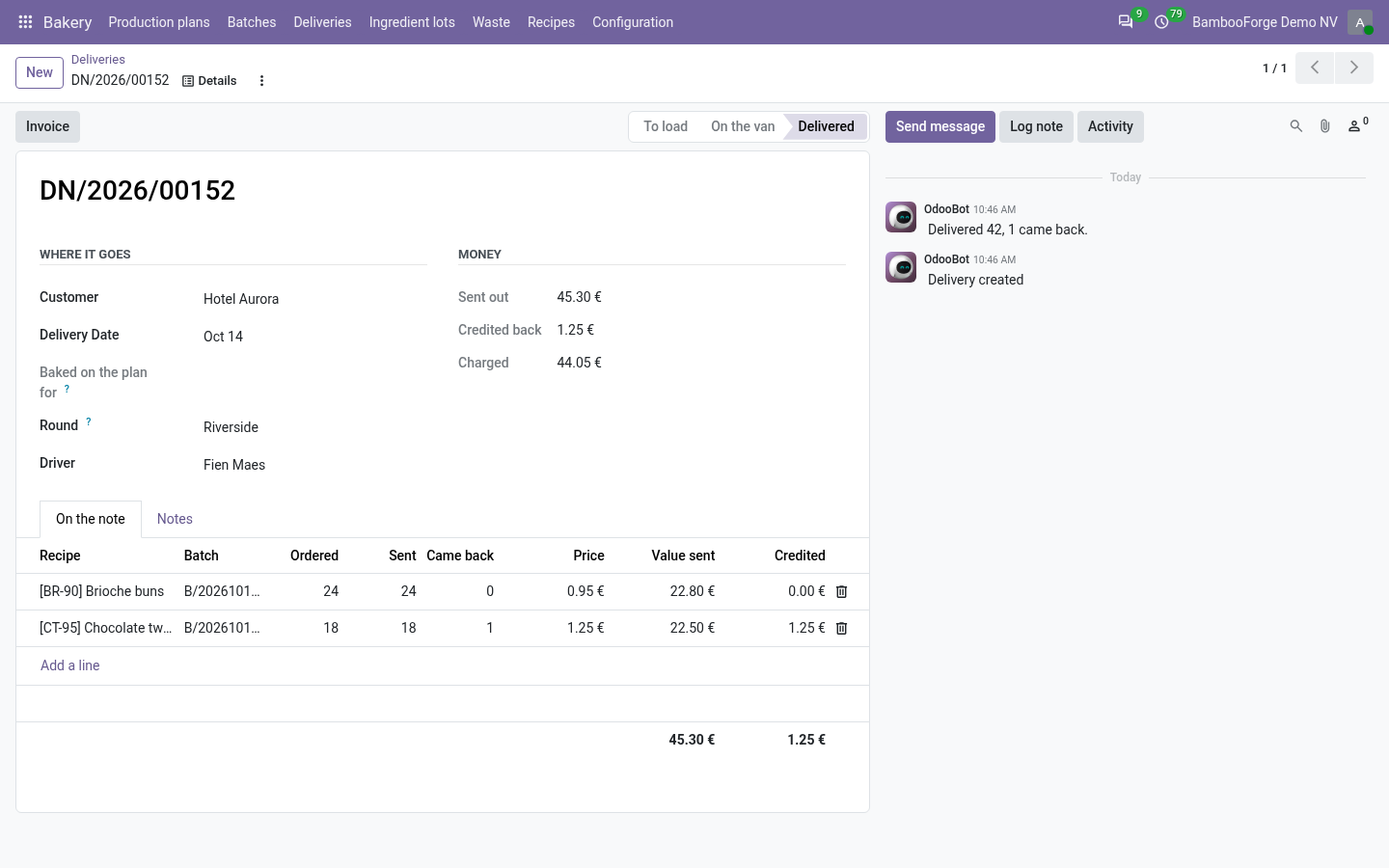
A delivery note carries what went out and what came back, and the invoice bills the difference. Every line names the batch it came from, which is the other half of a recall. A line without one cannot be loaded. What is left of a batch is counted across the whole note and with the batch held, so two lines cannot take the same bread twice and two vans loading at the same moment cannot both have the last twelve.
A delivery still being written up holds nothing back. Once the van has gone, the batch, the item and the quantity on a line stop being editable, the line cannot be deleted, and the delivery itself cannot be deleted. After the invoice, what came back is fixed too - it is the number that was charged. A delivery is invoiced once, in the company that made the bread, and an invoiced delivery cannot be cancelled.
Cancelling a round that went out puts the bread back. The waste Waste is a record against the batch, with a reason and what it cost to make - the recipe scaled to the batch, corrected by the sacks that were actually weighed, so an untraced ingredient does not simply cost nothing. More cannot be written off than is still in the bakery: what went out and stayed out is on a customer's shelf, not in the bin. Nothing is written off before it is baked.
Made, less what went out, plus what came back, less what was thrown away, is what is left - which is the number tomorrow's plan should be argued with. A batch with nothing left says so. A batch over the waste target says so on its own record. Roles.
Each company numbers its own batches, plans and delivery notes. Baker and driver - mixes, bakes, records lots and waste, pulls the round into a plan, loads and delivers. Cannot write a recipe, sign off a specification, release an item for sale or lift a recall block. Bakery manager - writes recipes, signs off specifications, releases items, sets standing orders, lifts a block and invoices the round.
The role carries the billing rights that invoicing needs. How we make sure it works. Before every release, 137 automated checks run against this app on Odoo 16, 17, 18, 19 and 20. Among them: Two lines cannot take the same bread twice.
A delivery cannot load a batch past its use by. A lot of something not in the recipe is refused. A lot row cannot be moved onto a blocked lot. A delivery cannot take more than the batch made.
The complete list is in the source you receive. Questions people ask. Which Odoo versions does it run on? Odoo 16.0, 17.0, 18.0, 19.0, 20.0, on the series you buy it for; each series is its own listing.
Community or Enterprise? Both. It needs no Enterprise app. Support The complete manual is at docs dot bambooforge dot dev, the demo database is linked from the store page, and support answers within twenty-four hours.
Links are in the description.
Transcript of the walkthrough (Odoo 19)
Bakery & Food Production Management. Bakery production in bakers' percentages: allergens computed from the recipe, batches with use-by and lot trace, the round, and the waste. Each company numbers its own batches, plans and delivery notes. Community only.
Depends on base, base_setup, mail, product, uom and account. In the next few minutes: bakery & food production management, then the label, then the trace, then the bakery, then the round. Then what this app deliberately does not do, so you can tell before you buy whether it fits. Everything lives under Bakery then Production plans then Batches then Deliveries.
Community only. Depends on base, base_setup, mail, product, uom and account. Bakery & Food Production Management. Built around the three things a bakery is judged on: the label, the trace, and the number nobody writes down.
The label Every ingredient carries what it contains and what it may contain, entered from the supplier's specification and signed off with a name and a date. The recipe's declaration is computed from its lines, and travels up through preferments and fillings into whatever uses them. An allergen that is definitely present never also appears as a "may contain". A recipe cannot be released for sale while any ingredient in it has no specification on file.
Changing what an ingredient carries drops the sign-off, and the name and date on it, so a reformulation takes every recipe using it off sale by itself - nobody has to notice. Changing a released recipe - an ingredient, the weight, the shelf life - puts it back to draft with a line saying why. A label signed off against a recipe is only signed off against that recipe. The declaration is written in the bakery's own language and names the allergens in the order the regulation lists them, not in alphabetical order.
The fourteen regulated allergens ship with the module. A bakery adds its own beside them. The trace Lots are recorded when the sack is opened: the code exactly as printed, the supplier, the best-before. A batch records which lots went into it.
A lot past its date, under a block, emptier than the line says, or of something that is not in the recipe cannot go in - however the row is written. Blocking a lot stops the bread: a batch mixed with it does not come out of the oven for sale, and nothing made with it loads onto a van. Every batch and every round holding it is told on its own record, with how many are still in the bakery. Once a batch is baked, its lots cannot be edited or deleted, the batch itself cannot be deleted, and a lot that has been used cannot be deleted at all.
Every batch keeps the label it was baked with. A recipe reformulated next month does not change what was on last month's loaf. One screen answers a recall: the batches, how many reached each customer after returns, and who they are. Blocking the lot is the same button, and the answer is written on the lot.
A lot within a week of its date lands on somebody's list - the person who booked it in, or a manager. Never a robot's. The bakery Recipes in bakers' percentages against the flour, with hydration, bake loss, shelf life, yield and cost per item. Scaling to tonight's numbers is arithmetic the system does - the mixing sheet is the recipe multiplied by what the plan says.
A production plan per night: standing orders per weekday added up, plus what the counter expects. Confirming it raises a batch per line and totals the flour. Pulling the round again drops the lines nobody wants any more, and records the cut-off as the moment it was really pulled. Use-by is out of the oven plus the shelf life.
A round cannot carry a batch that is out of date before the end of the delivery day, counted in the bakery's own time. Bake loss is measured against the recipe's figure, and a bake two points out says so. A batch cannot come out of the oven without a count and without its lots. The round Standing orders per customer per weekday, with a price and whether the customer is sale or return.
A delivery note carries what went out and what came back, and the invoice bills the difference. Every line names the batch it came from, which is the other half of a recall. A line without one cannot be loaded. What is left of a batch is counted across the whole note and with the batch held, so two lines cannot take the same bread twice and two vans loading at the same moment cannot both have the last twelve.
A delivery still being written up holds nothing back. Once the van has gone, the batch, the item and the quantity on a line stop being editable, the line cannot be deleted, and the delivery itself cannot be deleted. After the invoice, what came back is fixed too - it is the number that was charged. A delivery is invoiced once, in the company that made the bread, and an invoiced delivery cannot be cancelled.
Cancelling a round that went out puts the bread back. The waste Waste is a record against the batch, with a reason and what it cost to make - the recipe scaled to the batch, corrected by the sacks that were actually weighed, so an untraced ingredient does not simply cost nothing. More cannot be written off than is still in the bakery: what went out and stayed out is on a customer's shelf, not in the bin. Nothing is written off before it is baked.
Made, less what went out, plus what came back, less what was thrown away, is what is left - which is the number tomorrow's plan should be argued with. A batch with nothing left says so. A batch over the waste target says so on its own record. Roles.
Each company numbers its own batches, plans and delivery notes. Baker and driver - mixes, bakes, records lots and waste, pulls the round into a plan, loads and delivers. Cannot write a recipe, sign off a specification, release an item for sale or lift a recall block. Bakery manager - writes recipes, signs off specifications, releases items, sets standing orders, lifts a block and invoices the round.
The role carries the billing rights that invoicing needs. Support The complete manual is at docs dot bambooforge dot dev, the demo database is linked from the store page, and support answers within twenty-four hours. Links are in the description.
Transcript of the walkthrough (Odoo 18)
Bakery & Food Production Management. Bakery production in bakers' percentages: allergens computed from the recipe, batches with use-by and lot trace, the round, and the waste. Each company numbers its own batches, plans and delivery notes. Community only.
Depends on base, base_setup, mail, product, uom and account. In the next few minutes: bakery & food production management, then the label, then the trace, then the bakery, then the round. Then what this app deliberately does not do, so you can tell before you buy whether it fits. Everything lives under Bakery then Production plans then Batches then Deliveries.
Community only. Depends on base, base_setup, mail, product, uom and account. Bakery & Food Production Management. Built around the three things a bakery is judged on: the label, the trace, and the number nobody writes down.
The label Every ingredient carries what it contains and what it may contain, entered from the supplier's specification and signed off with a name and a date. The recipe's declaration is computed from its lines, and travels up through preferments and fillings into whatever uses them. An allergen that is definitely present never also appears as a "may contain". A recipe cannot be released for sale while any ingredient in it has no specification on file.
Changing what an ingredient carries drops the sign-off, and the name and date on it, so a reformulation takes every recipe using it off sale by itself - nobody has to notice. Changing a released recipe - an ingredient, the weight, the shelf life - puts it back to draft with a line saying why. A label signed off against a recipe is only signed off against that recipe. The declaration is written in the bakery's own language and names the allergens in the order the regulation lists them, not in alphabetical order.
The fourteen regulated allergens ship with the module. A bakery adds its own beside them. The trace Lots are recorded when the sack is opened: the code exactly as printed, the supplier, the best-before. A batch records which lots went into it.
A lot past its date, under a block, emptier than the line says, or of something that is not in the recipe cannot go in - however the row is written. Blocking a lot stops the bread: a batch mixed with it does not come out of the oven for sale, and nothing made with it loads onto a van. Every batch and every round holding it is told on its own record, with how many are still in the bakery. Once a batch is baked, its lots cannot be edited or deleted, the batch itself cannot be deleted, and a lot that has been used cannot be deleted at all.
Every batch keeps the label it was baked with. A recipe reformulated next month does not change what was on last month's loaf. One screen answers a recall: the batches, how many reached each customer after returns, and who they are. Blocking the lot is the same button, and the answer is written on the lot.
A lot within a week of its date lands on somebody's list - the person who booked it in, or a manager. Never a robot's. The bakery Recipes in bakers' percentages against the flour, with hydration, bake loss, shelf life, yield and cost per item. Scaling to tonight's numbers is arithmetic the system does - the mixing sheet is the recipe multiplied by what the plan says.
A production plan per night: standing orders per weekday added up, plus what the counter expects. Confirming it raises a batch per line and totals the flour. Pulling the round again drops the lines nobody wants any more, and records the cut-off as the moment it was really pulled. Use-by is out of the oven plus the shelf life.
A round cannot carry a batch that is out of date before the end of the delivery day, counted in the bakery's own time. Bake loss is measured against the recipe's figure, and a bake two points out says so. A batch cannot come out of the oven without a count and without its lots. The round Standing orders per customer per weekday, with a price and whether the customer is sale or return.
A delivery note carries what went out and what came back, and the invoice bills the difference. Every line names the batch it came from, which is the other half of a recall. A line without one cannot be loaded. What is left of a batch is counted across the whole note and with the batch held, so two lines cannot take the same bread twice and two vans loading at the same moment cannot both have the last twelve.
A delivery still being written up holds nothing back. Once the van has gone, the batch, the item and the quantity on a line stop being editable, the line cannot be deleted, and the delivery itself cannot be deleted. After the invoice, what came back is fixed too - it is the number that was charged. A delivery is invoiced once, in the company that made the bread, and an invoiced delivery cannot be cancelled.
Cancelling a round that went out puts the bread back. The waste Waste is a record against the batch, with a reason and what it cost to make - the recipe scaled to the batch, corrected by the sacks that were actually weighed, so an untraced ingredient does not simply cost nothing. More cannot be written off than is still in the bakery: what went out and stayed out is on a customer's shelf, not in the bin. Nothing is written off before it is baked.
Made, less what went out, plus what came back, less what was thrown away, is what is left - which is the number tomorrow's plan should be argued with. A batch with nothing left says so. A batch over the waste target says so on its own record. Roles.
Each company numbers its own batches, plans and delivery notes. Baker and driver - mixes, bakes, records lots and waste, pulls the round into a plan, loads and delivers. Cannot write a recipe, sign off a specification, release an item for sale or lift a recall block. Bakery manager - writes recipes, signs off specifications, releases items, sets standing orders, lifts a block and invoices the round.
The role carries the billing rights that invoicing needs. Support The complete manual is at docs dot bambooforge dot dev, the demo database is linked from the store page, and support answers within twenty-four hours. Links are in the description.
Transcript of the walkthrough (Odoo 17)
Bakery & Food Production Management. Bakery production in bakers' percentages: allergens computed from the recipe, batches with use-by and lot trace, the round, and the waste. Each company numbers its own batches, plans and delivery notes. Community only.
Depends on base, base_setup, mail, product, uom and account. In the next few minutes: bakery & food production management, then the label, then the trace, then the bakery, then the round. Then what this app deliberately does not do, so you can tell before you buy whether it fits. Everything lives under Bakery then Production plans then Batches then Deliveries.
Community only. Depends on base, base_setup, mail, product, uom and account. Bakery & Food Production Management. Built around the three things a bakery is judged on: the label, the trace, and the number nobody writes down.
The label Every ingredient carries what it contains and what it may contain, entered from the supplier's specification and signed off with a name and a date. The recipe's declaration is computed from its lines, and travels up through preferments and fillings into whatever uses them. An allergen that is definitely present never also appears as a "may contain". A recipe cannot be released for sale while any ingredient in it has no specification on file.
Changing what an ingredient carries drops the sign-off, and the name and date on it, so a reformulation takes every recipe using it off sale by itself - nobody has to notice. Changing a released recipe - an ingredient, the weight, the shelf life - puts it back to draft with a line saying why. A label signed off against a recipe is only signed off against that recipe. The declaration is written in the bakery's own language and names the allergens in the order the regulation lists them, not in alphabetical order.
The fourteen regulated allergens ship with the module. A bakery adds its own beside them. The trace Lots are recorded when the sack is opened: the code exactly as printed, the supplier, the best-before. A batch records which lots went into it.
A lot past its date, under a block, emptier than the line says, or of something that is not in the recipe cannot go in - however the row is written. Blocking a lot stops the bread: a batch mixed with it does not come out of the oven for sale, and nothing made with it loads onto a van. Every batch and every round holding it is told on its own record, with how many are still in the bakery. Once a batch is baked, its lots cannot be edited or deleted, the batch itself cannot be deleted, and a lot that has been used cannot be deleted at all.
Every batch keeps the label it was baked with. A recipe reformulated next month does not change what was on last month's loaf. One screen answers a recall: the batches, how many reached each customer after returns, and who they are. Blocking the lot is the same button, and the answer is written on the lot.
A lot within a week of its date lands on somebody's list - the person who booked it in, or a manager. Never a robot's. The bakery Recipes in bakers' percentages against the flour, with hydration, bake loss, shelf life, yield and cost per item. Scaling to tonight's numbers is arithmetic the system does - the mixing sheet is the recipe multiplied by what the plan says.
A production plan per night: standing orders per weekday added up, plus what the counter expects. Confirming it raises a batch per line and totals the flour. Pulling the round again drops the lines nobody wants any more, and records the cut-off as the moment it was really pulled. Use-by is out of the oven plus the shelf life.
A round cannot carry a batch that is out of date before the end of the delivery day, counted in the bakery's own time. Bake loss is measured against the recipe's figure, and a bake two points out says so. A batch cannot come out of the oven without a count and without its lots. The round Standing orders per customer per weekday, with a price and whether the customer is sale or return.
A delivery note carries what went out and what came back, and the invoice bills the difference. Every line names the batch it came from, which is the other half of a recall. A line without one cannot be loaded. What is left of a batch is counted across the whole note and with the batch held, so two lines cannot take the same bread twice and two vans loading at the same moment cannot both have the last twelve.
A delivery still being written up holds nothing back. Once the van has gone, the batch, the item and the quantity on a line stop being editable, the line cannot be deleted, and the delivery itself cannot be deleted. After the invoice, what came back is fixed too - it is the number that was charged. A delivery is invoiced once, in the company that made the bread, and an invoiced delivery cannot be cancelled.
Cancelling a round that went out puts the bread back. The waste Waste is a record against the batch, with a reason and what it cost to make - the recipe scaled to the batch, corrected by the sacks that were actually weighed, so an untraced ingredient does not simply cost nothing. More cannot be written off than is still in the bakery: what went out and stayed out is on a customer's shelf, not in the bin. Nothing is written off before it is baked.
Made, less what went out, plus what came back, less what was thrown away, is what is left - which is the number tomorrow's plan should be argued with. A batch with nothing left says so. A batch over the waste target says so on its own record. Roles.
Each company numbers its own batches, plans and delivery notes. Baker and driver - mixes, bakes, records lots and waste, pulls the round into a plan, loads and delivers. Cannot write a recipe, sign off a specification, release an item for sale or lift a recall block. Bakery manager - writes recipes, signs off specifications, releases items, sets standing orders, lifts a block and invoices the round.
The role carries the billing rights that invoicing needs. Support The complete manual is at docs dot bambooforge dot dev, the demo database is linked from the store page, and support answers within twenty-four hours. Links are in the description.
Transcript of the walkthrough (Odoo 16)
Bakery & Food Production Management. Bakery production in bakers' percentages: allergens computed from the recipe, batches with use-by and lot trace, the round, and the waste. Each company numbers its own batches, plans and delivery notes. Community only.
Depends on base, base_setup, mail, product, uom and account. In the next few minutes: bakery & food production management, then the label, then the trace, then the bakery, then the round. Then what this app deliberately does not do, so you can tell before you buy whether it fits. Everything lives under Bakery then Production plans then Batches then Deliveries.
Community only. Depends on base, base_setup, mail, product, uom and account. Bakery & Food Production Management. Built around the three things a bakery is judged on: the label, the trace, and the number nobody writes down.
The label Every ingredient carries what it contains and what it may contain, entered from the supplier's specification and signed off with a name and a date. The recipe's declaration is computed from its lines, and travels up through preferments and fillings into whatever uses them. An allergen that is definitely present never also appears as a "may contain". A recipe cannot be released for sale while any ingredient in it has no specification on file.
Changing what an ingredient carries drops the sign-off, and the name and date on it, so a reformulation takes every recipe using it off sale by itself - nobody has to notice. Changing a released recipe - an ingredient, the weight, the shelf life - puts it back to draft with a line saying why. A label signed off against a recipe is only signed off against that recipe. The declaration is written in the bakery's own language and names the allergens in the order the regulation lists them, not in alphabetical order.
The fourteen regulated allergens ship with the module. A bakery adds its own beside them. The trace Lots are recorded when the sack is opened: the code exactly as printed, the supplier, the best-before. A batch records which lots went into it.
A lot past its date, under a block, emptier than the line says, or of something that is not in the recipe cannot go in - however the row is written. Blocking a lot stops the bread: a batch mixed with it does not come out of the oven for sale, and nothing made with it loads onto a van. Every batch and every round holding it is told on its own record, with how many are still in the bakery. Once a batch is baked, its lots cannot be edited or deleted, the batch itself cannot be deleted, and a lot that has been used cannot be deleted at all.
Every batch keeps the label it was baked with. A recipe reformulated next month does not change what was on last month's loaf. One screen answers a recall: the batches, how many reached each customer after returns, and who they are. Blocking the lot is the same button, and the answer is written on the lot.
A lot within a week of its date lands on somebody's list - the person who booked it in, or a manager. Never a robot's. The bakery Recipes in bakers' percentages against the flour, with hydration, bake loss, shelf life, yield and cost per item. Scaling to tonight's numbers is arithmetic the system does - the mixing sheet is the recipe multiplied by what the plan says.
A production plan per night: standing orders per weekday added up, plus what the counter expects. Confirming it raises a batch per line and totals the flour. Pulling the round again drops the lines nobody wants any more, and records the cut-off as the moment it was really pulled. Use-by is out of the oven plus the shelf life.
A round cannot carry a batch that is out of date before the end of the delivery day, counted in the bakery's own time. Bake loss is measured against the recipe's figure, and a bake two points out says so. A batch cannot come out of the oven without a count and without its lots. The round Standing orders per customer per weekday, with a price and whether the customer is sale or return.
A delivery note carries what went out and what came back, and the invoice bills the difference. Every line names the batch it came from, which is the other half of a recall. A line without one cannot be loaded. What is left of a batch is counted across the whole note and with the batch held, so two lines cannot take the same bread twice and two vans loading at the same moment cannot both have the last twelve.
A delivery still being written up holds nothing back. Once the van has gone, the batch, the item and the quantity on a line stop being editable, the line cannot be deleted, and the delivery itself cannot be deleted. After the invoice, what came back is fixed too - it is the number that was charged. A delivery is invoiced once, in the company that made the bread, and an invoiced delivery cannot be cancelled.
Cancelling a round that went out puts the bread back. The waste Waste is a record against the batch, with a reason and what it cost to make - the recipe scaled to the batch, corrected by the sacks that were actually weighed, so an untraced ingredient does not simply cost nothing. More cannot be written off than is still in the bakery: what went out and stayed out is on a customer's shelf, not in the bin. Nothing is written off before it is baked.
Made, less what went out, plus what came back, less what was thrown away, is what is left - which is the number tomorrow's plan should be argued with. A batch with nothing left says so. A batch over the waste target says so on its own record. Roles.
Each company numbers its own batches, plans and delivery notes. Baker and driver - mixes, bakes, records lots and waste, pulls the round into a plan, loads and delivers. Cannot write a recipe, sign off a specification, release an item for sale or lift a recall block. Bakery manager - writes recipes, signs off specifications, releases items, sets standing orders, lifts a block and invoices the round.
The role carries the billing rights that invoicing needs. Support The complete manual is at docs dot bambooforge dot dev, the demo database is linked from the store page, and support answers within twenty-four hours. Links are in the description.
Key facts
- What it is
- Bakery production in bakers' percentages: allergens computed from the recipe, batches with use-by and lot trace, the round, and the waste.
- For
- Industries
- Odoo versions
- 16.0, 17.0, 18.0, 19.0, 20.0 - Community and Enterprise
- Runs on
- Odoo.sh or Odoo you host yourself - not Odoo Online, which accepts no third-party apps
- Price
- 99 EUR, one-time, on the Odoo Apps Store
- Technical name
- bambooforge_bakery
- Manual last updated
- 2026-10-14
Bakery & Food Production Management
Built around the three things a bakery is judged on: the label, the trace, and the number nobody writes down.
The label
Every ingredient carries what it contains and what it may contain, entered from the supplier's specification and signed off with a name and a date.
The recipe's declaration is computed from its lines, and travels up through preferments and fillings into whatever uses them.
An allergen that is definitely present never also appears as a "may contain".
A recipe cannot be released for sale while any ingredient in it has no specification on file.
Changing what an ingredient carries drops the sign-off, and the name and date on it, so a reformulation takes every recipe using it off sale by itself - nobody has to notice.
Changing a released recipe - an ingredient, the weight, the shelf life - puts it back to draft with a line saying why. A label signed off against a recipe is only signed off against that recipe.
The declaration is written in the bakery's own language and names the allergens in the order the regulation lists them, not in alphabetical order.
The fourteen regulated allergens ship with the module. A bakery adds its own beside them.
The trace
Lots are recorded when the sack is opened: the code exactly as printed, the supplier, the best-before.
A batch records which lots went into it. A lot past its date, under a block, emptier than the line says, or of something that is not in the recipe cannot go in - however the row is written.
Blocking a lot stops the bread: a batch mixed with it does not come out of the oven for sale, and nothing made with it loads onto a van. Every batch and every round holding it is told on its own record, with how many are still in the bakery.
Once a batch is baked, its lots cannot be edited or deleted, the batch itself cannot be deleted, and a lot that has been used cannot be deleted at all.
Every batch keeps the label it was baked with. A recipe reformulated next month does not change what was on last month's loaf.
One screen answers a recall: the batches, how many reached each customer after returns, and who they are. Blocking the lot is the same button, and the answer is written on the lot.
A lot within a week of its date lands on somebody's list - the person who booked it in, or a manager. Never a robot's.
The bakery
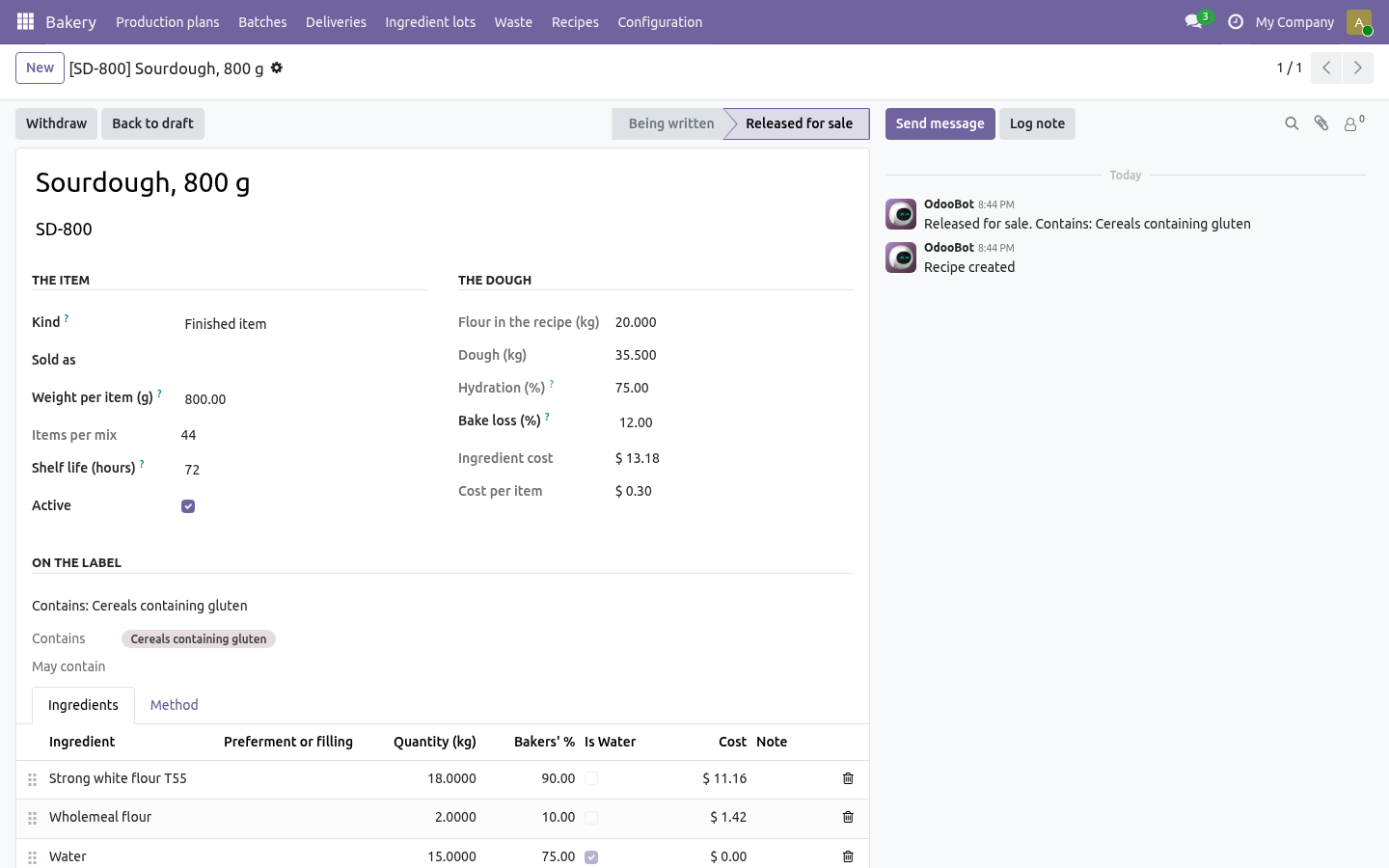
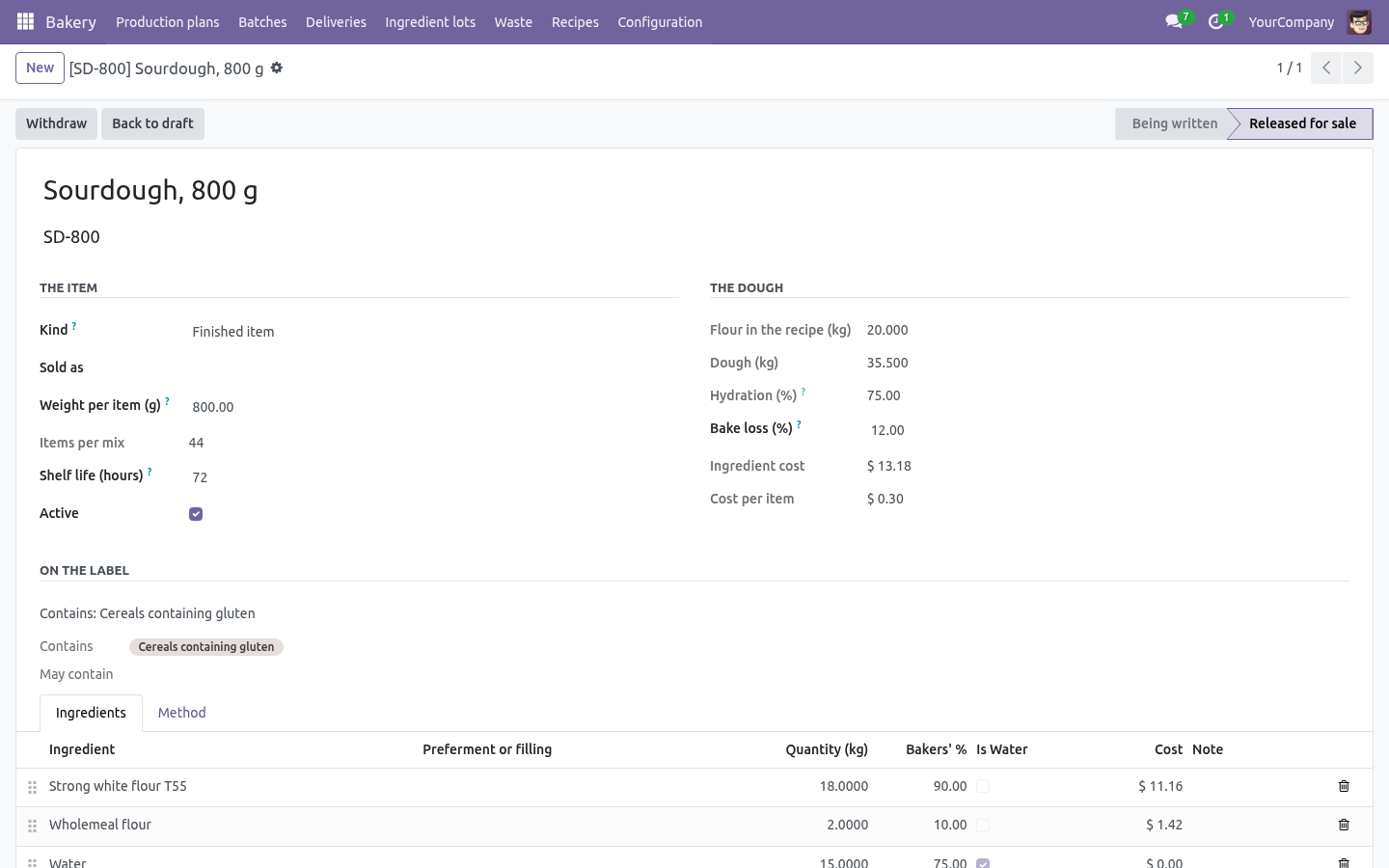
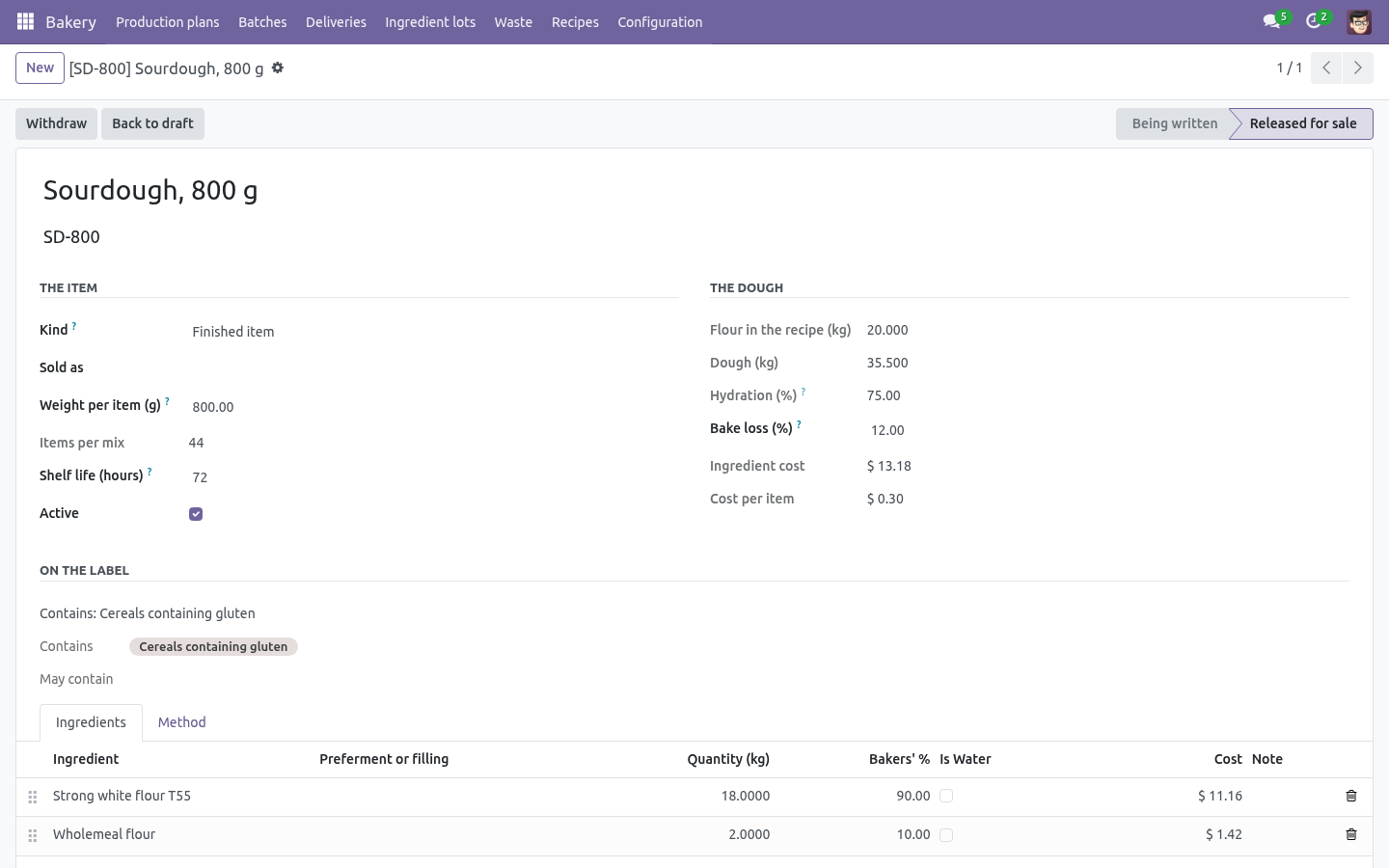
Recipes in bakers' percentages against the flour, with hydration, bake loss, shelf life, yield and cost per item.
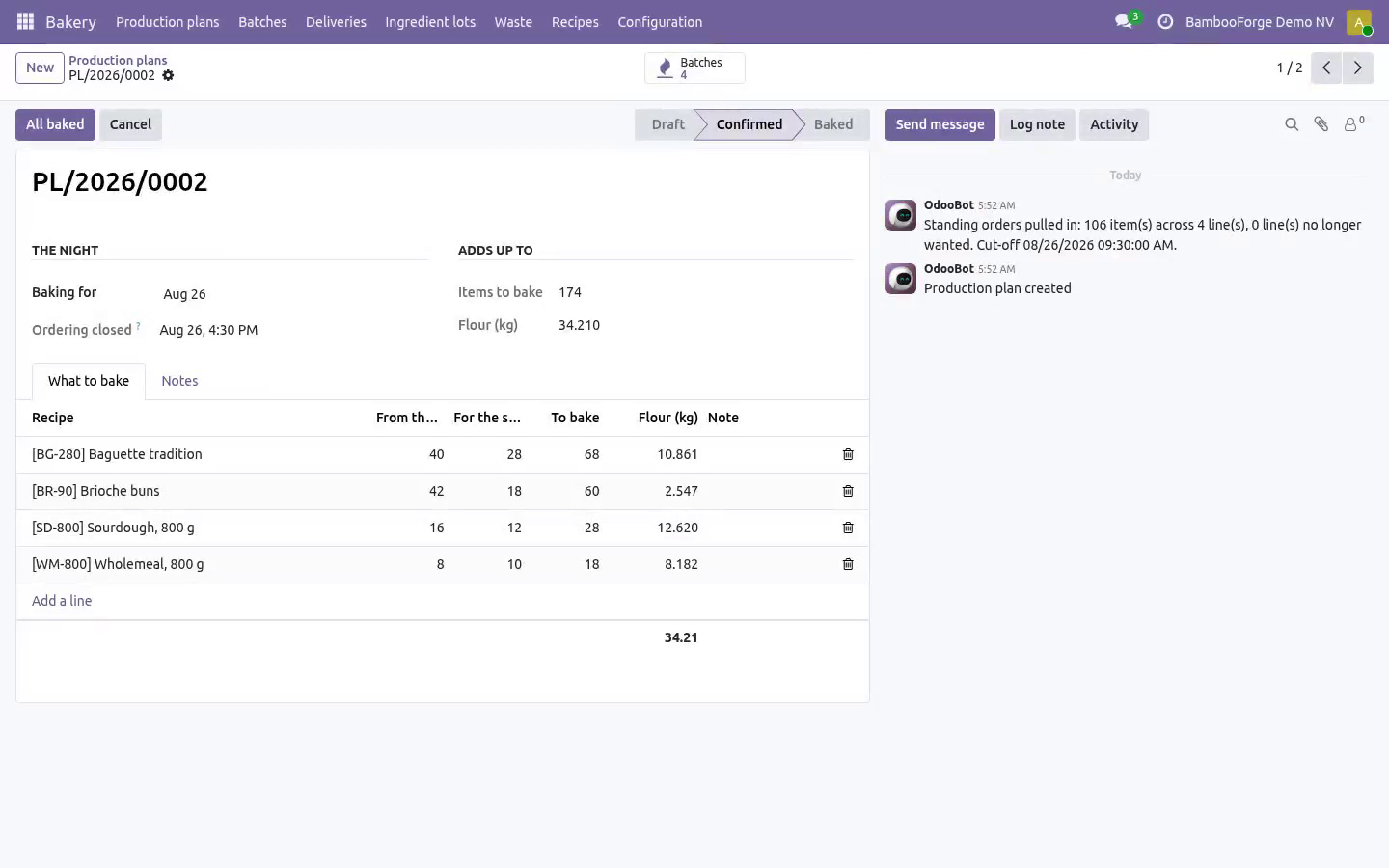
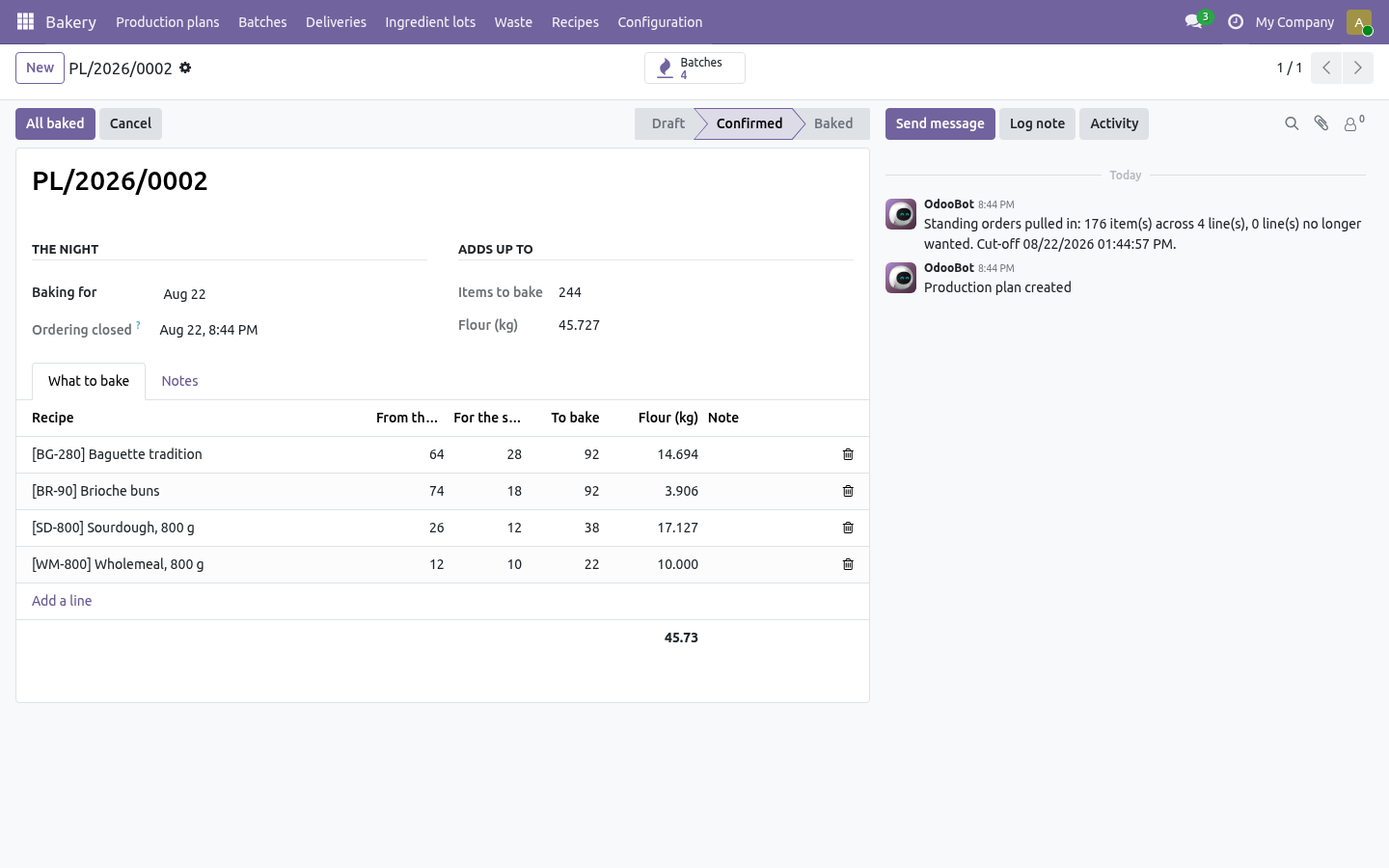
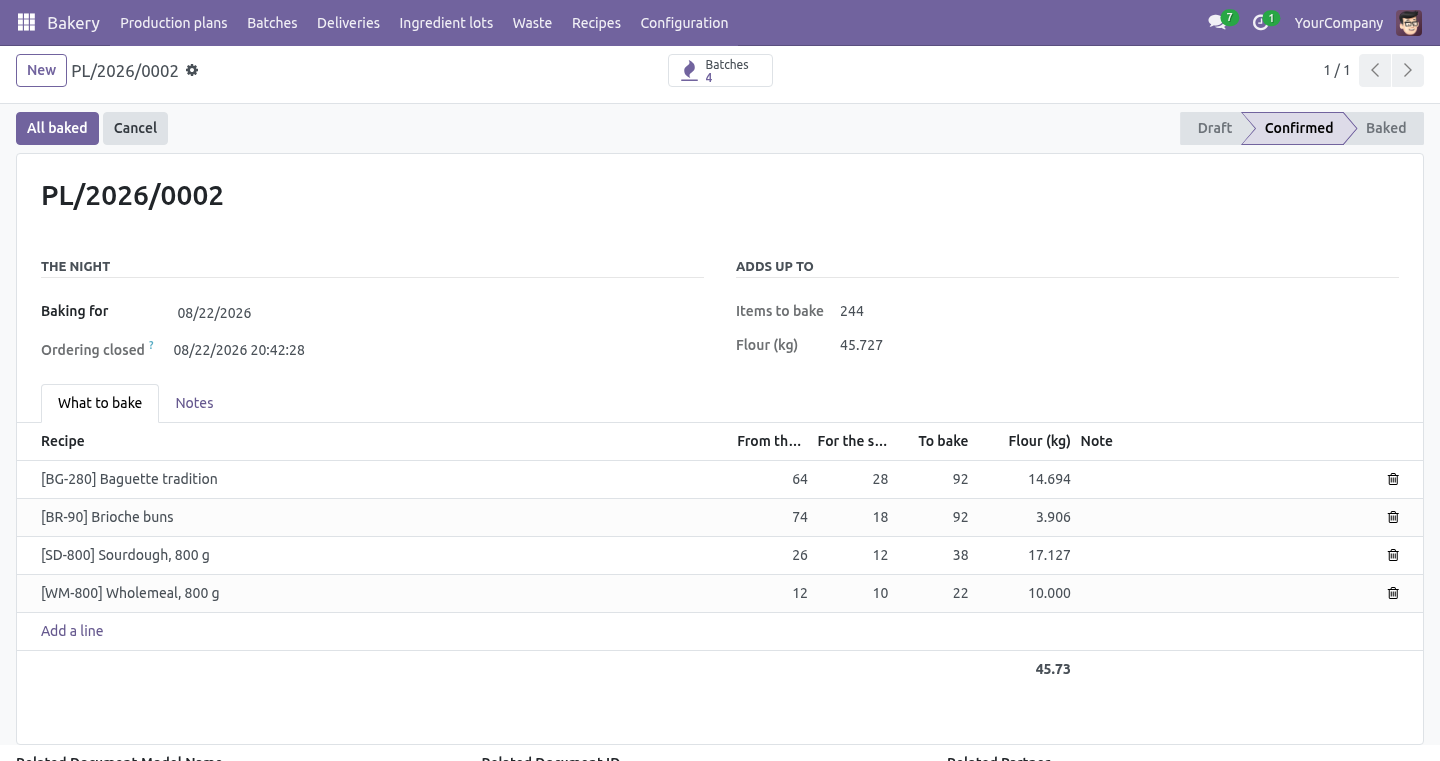
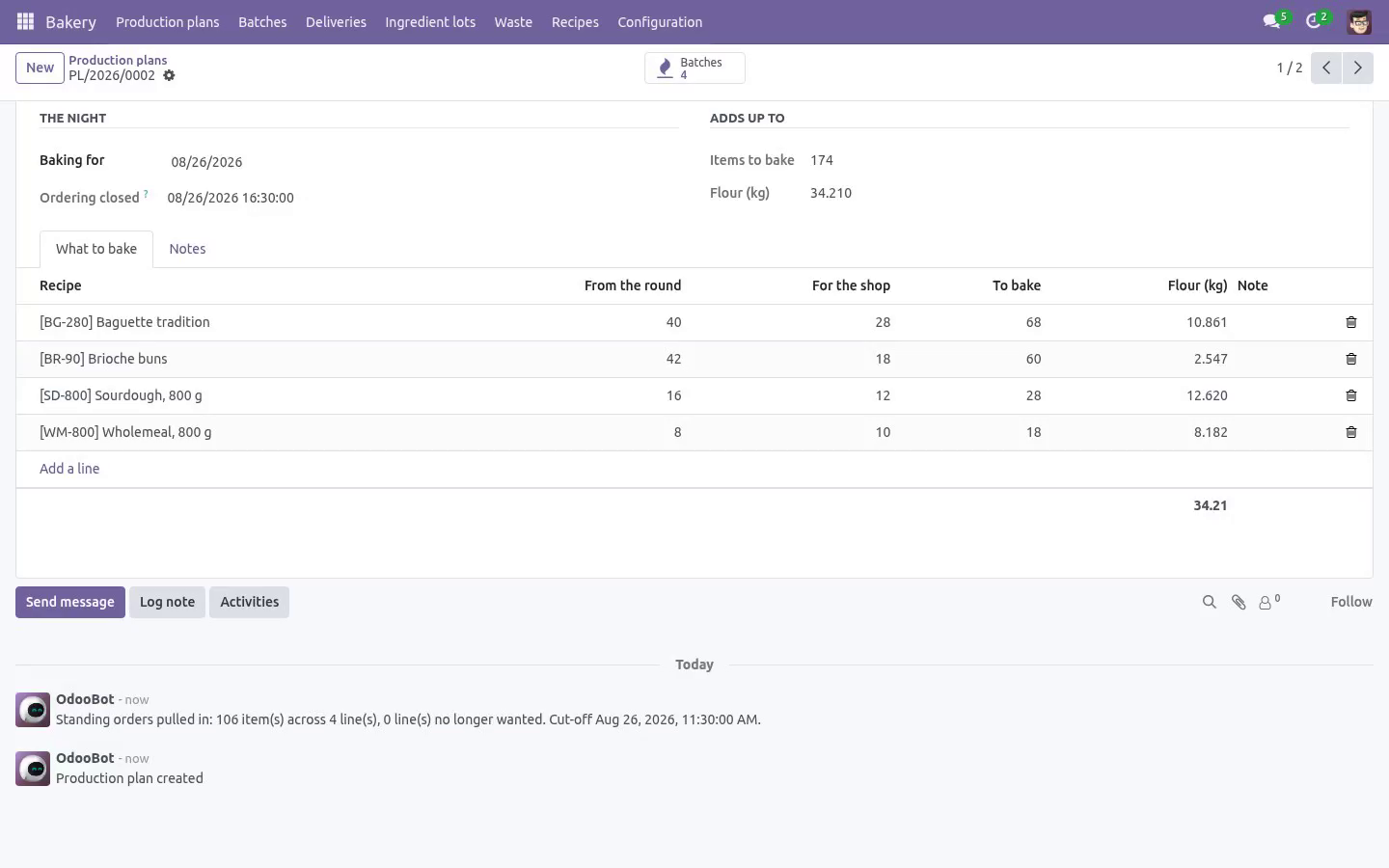
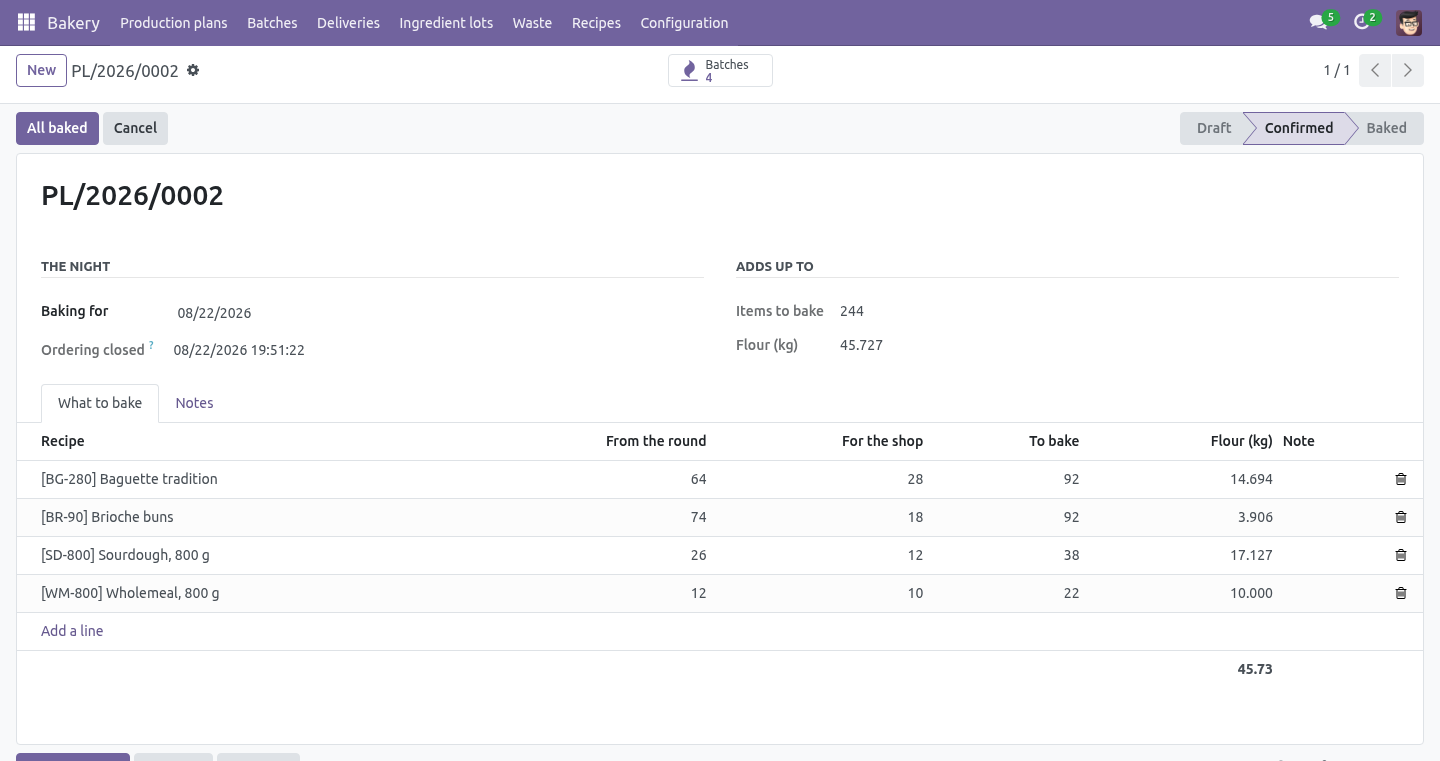
Scaling to tonight's numbers is arithmetic the system does - the mixing sheet is the recipe multiplied by what the plan says.
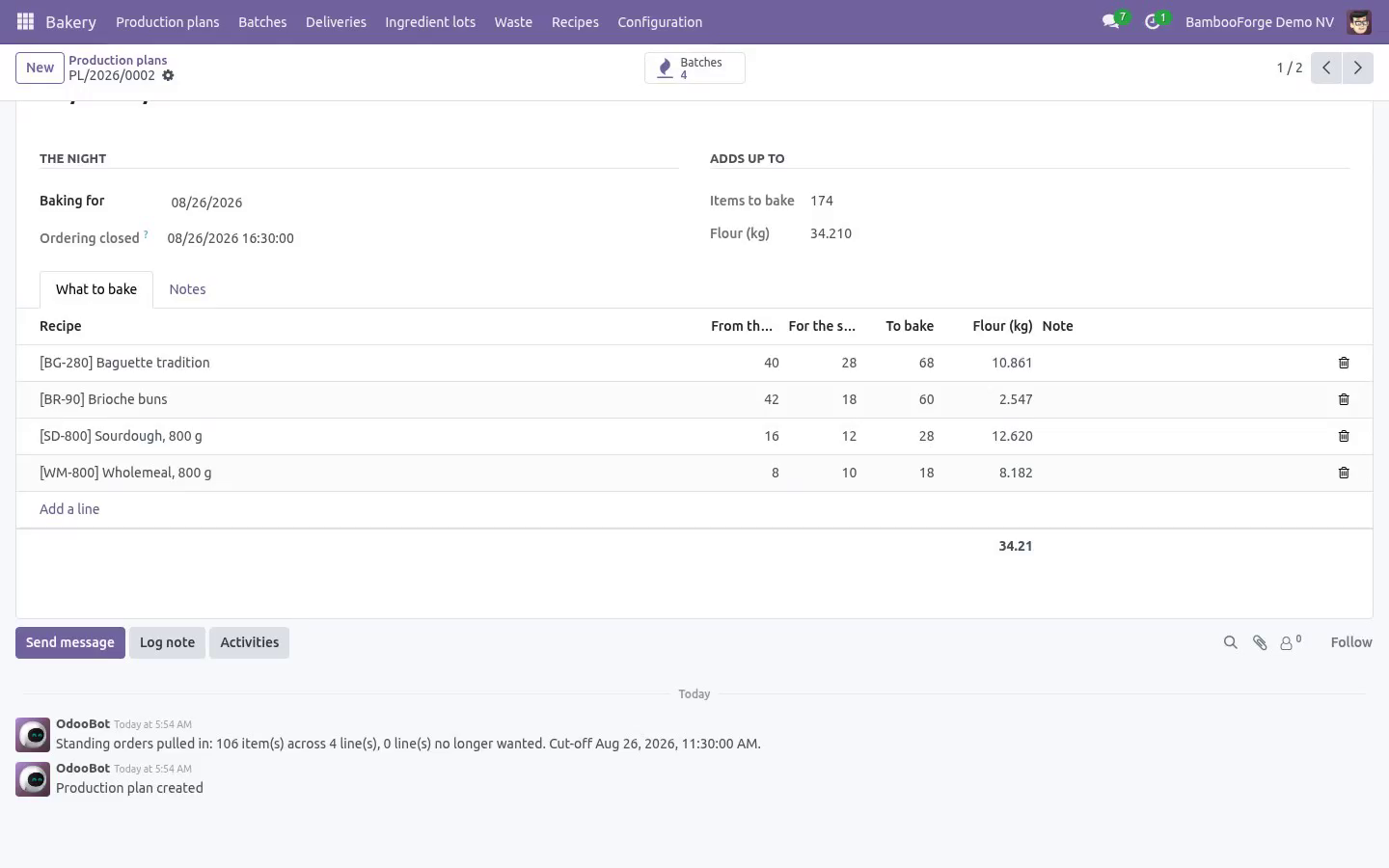
A production plan per night: standing orders per weekday added up, plus what the counter expects. Confirming it raises a batch per line and totals the flour.
A cut-off decides which night a late order lands on, and it is recorded on the plan. It is counted in the bakery's own time - fourteen hours before Tuesday is four o'clock on Monday afternoon where the bakery is - and an order lands on the next night that is still open, never on one already confirmed. A cancelled night does not block that day for ever.
Pulling the round again drops the lines nobody wants any more, and records the cut-off as the moment it was really pulled.
Use-by is out of the oven plus the shelf life. A round cannot carry a batch that is out of date before the end of the delivery day, counted in the bakery's own time.
Bake loss is measured against the recipe's figure, and a bake two points out says so.
A batch cannot come out of the oven without a count and without its lots.
The round
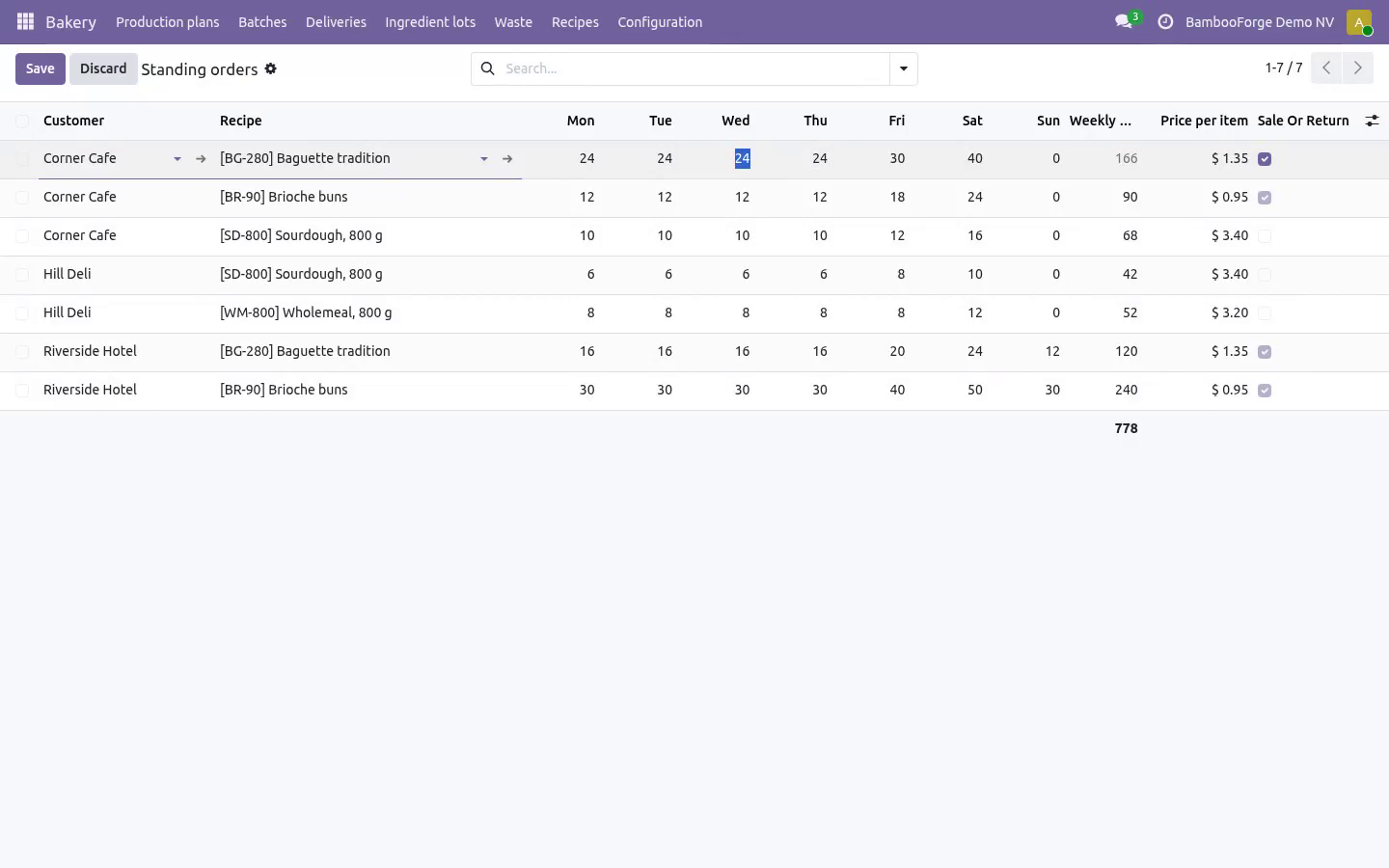
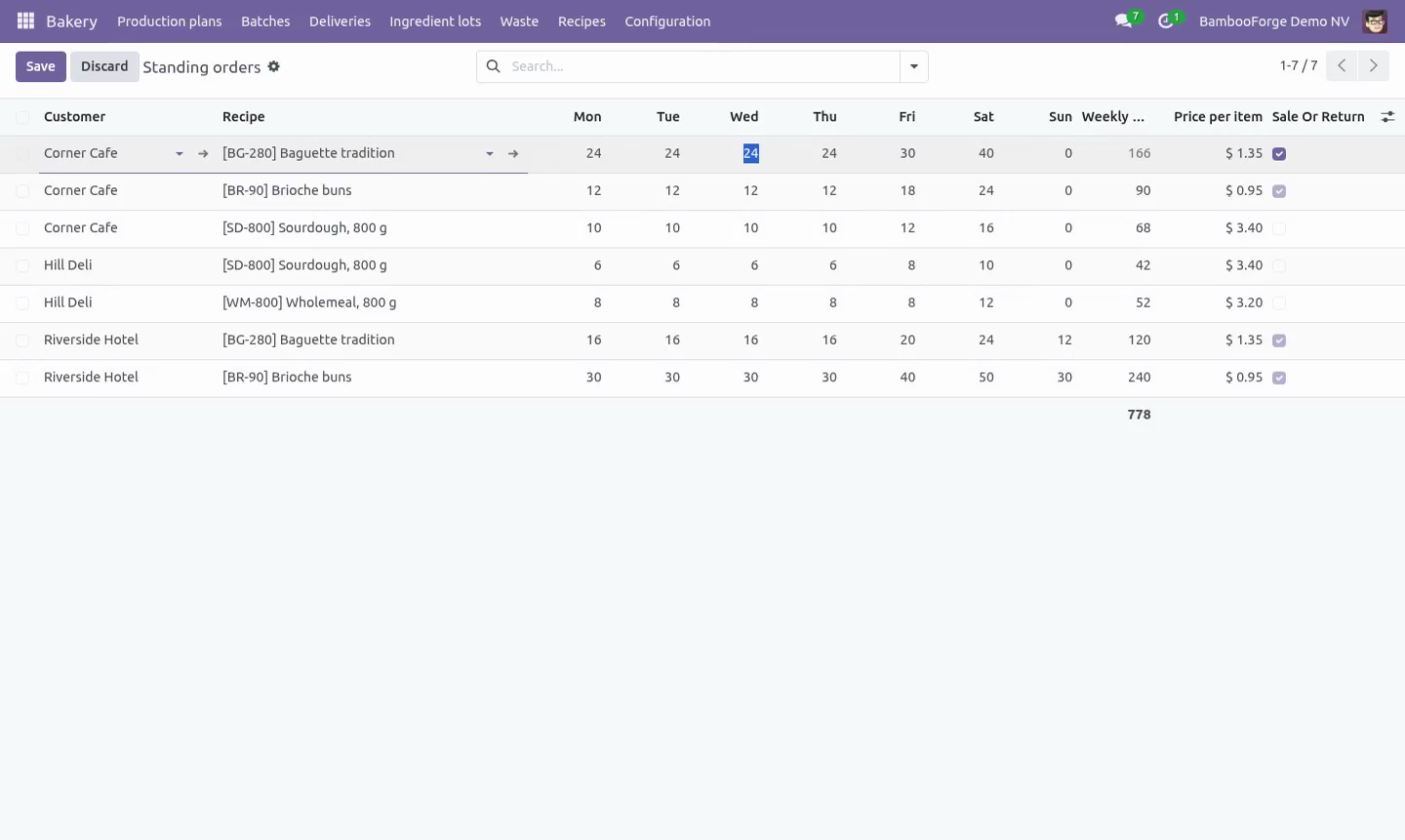
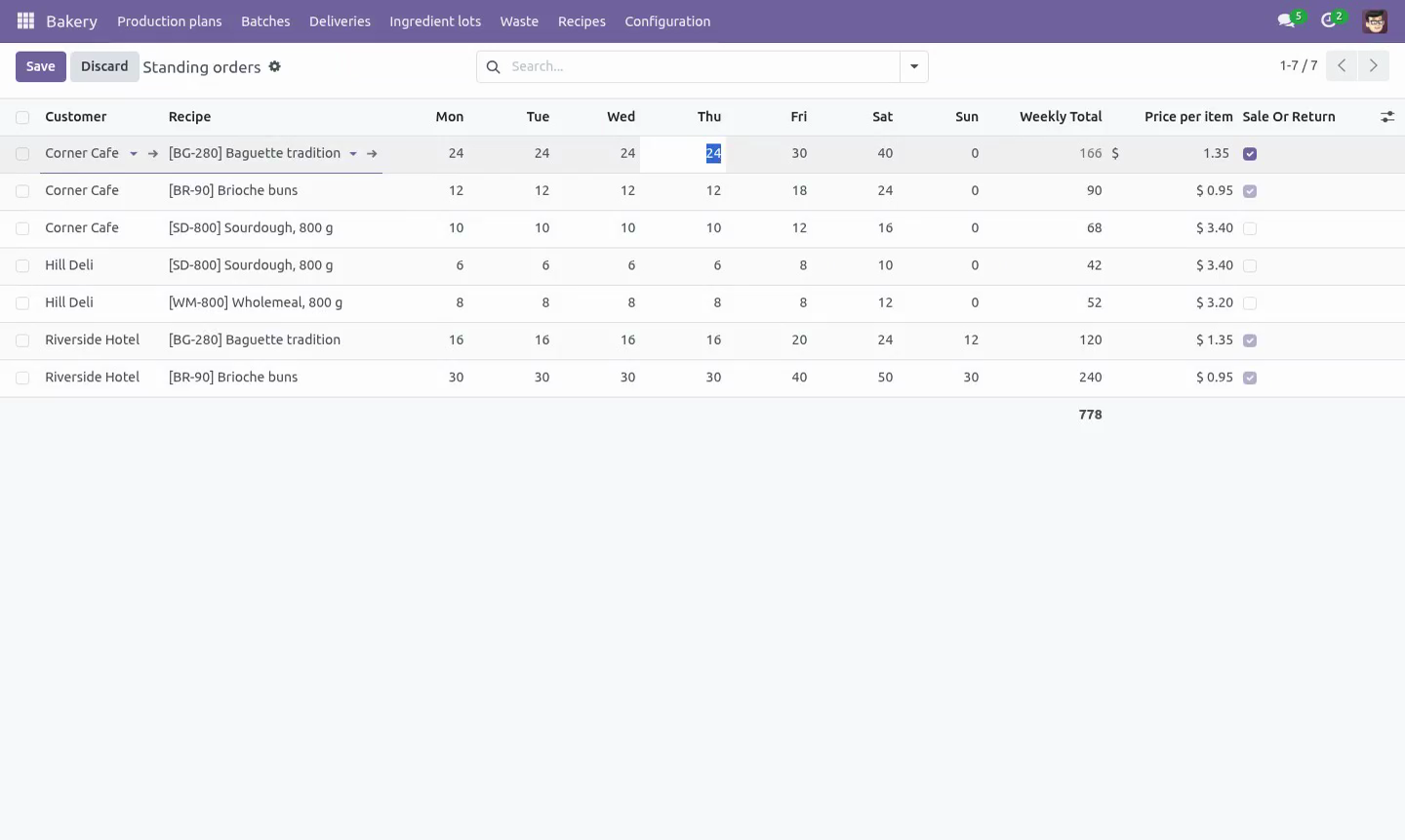
Standing orders per customer per weekday, with a price and whether the customer is sale or return.
A delivery note carries what went out and what came back, and the invoice bills the difference.
Every line names the batch it came from, which is the other half of a recall. A line without one cannot be loaded.
What is left of a batch is counted across the whole note and with the batch held, so two lines cannot take the same bread twice and two vans loading at the same moment cannot both have the last twelve. A delivery still being written up holds nothing back.
Once the van has gone, the batch, the item and the quantity on a line stop being editable, the line cannot be deleted, and the delivery itself cannot be deleted. After the invoice, what came back is fixed too - it is the number that was charged.
A delivery is invoiced once, in the company that made the bread, and an invoiced delivery cannot be cancelled. Cancelling a round that went out puts the bread back.
The waste
Waste is a record against the batch, with a reason and what it cost to make - the recipe scaled to the batch, corrected by the sacks that were actually weighed, so an untraced ingredient does not simply cost nothing.
More cannot be written off than is still in the bakery: what went out and stayed out is on a customer's shelf, not in the bin. Nothing is written off before it is baked.
Made, less what went out, plus what came back, less what was thrown away, is what is left - which is the number tomorrow's plan should be argued with. A batch with nothing left says so.
A batch over the waste target says so on its own record.
Roles
Baker and driver - mixes, bakes, records lots and waste, pulls the round into a plan, loads and delivers. Cannot write a recipe, sign off a specification, release an item for sale or lift a recall block.
Bakery manager - writes recipes, signs off specifications, releases items, sets standing orders, lifts a block and invoices the round. The role carries the billing rights that invoicing needs.
Each company numbers its own batches, plans and delivery notes.
Installation
Copy bambooforge_bakery into your addons path and update the app list, or install the ZIP from the Odoo Apps Store. Community only; it depends on base, base_setup, mail, product, uom and account.
Install Bakery & Food Production Management.
Enter the ingredients with their allergens, and sign off their specifications.
Build the recipes; mark the flour lines as flour, or the percentages cannot be worked out. Release the recipes.
Enter the standing orders.
Set the two settings: the order cut-off and the waste target.
How we make sure it works
Before every release, 137 automated checks run against this app on Odoo 16, 17, 18, 19 and 20. Among them:
Two lines cannot take the same bread twice.
A delivery cannot load a batch past its use by.
A lot of something not in the recipe is refused.
A lot row cannot be moved onto a blocked lot.
A delivery cannot take more than the batch made.
The complete list is in the source you receive.
Questions people ask
- Which Odoo versions does it run on?
Odoo 16.0, 17.0, 18.0, 19.0, 20.0, on the series you buy it for; each series is its own listing.
- Community or Enterprise?
Both. It needs no Enterprise app.
- What does it need?
The standard Discuss, Invoicing, Products, Settings, Units of Measure apps. No extra Python package.
- Where does it show up?
Under the Bakery menu (Production plans, Batches, Deliveries, Ingredient lots).
- Does anything leave my server?
No. It makes no call outside your Odoo server: no telemetry, no licence check, no third-party service.
- What happens if I uninstall it?
Odoo drops the app's own tables and fields; the standard records it worked on (contacts, orders, products) stay as they are.