 BambooForge Labs
Audit Log & Audit Trail for Odoo
Audit log and audit trail with field-level tracking, hash chaining, anomaly detection, alerts, PII masking, retention and a compliance PDF.
Available for Odoo 16.0, Odoo 17.0, Odoo 18.0, Odoo 19.0, Odoo 20.0. Technical name bambooforge_audit_pro.
Transcript of the walkthrough (Odoo 20)
Audit Log & Audit Trail for Odoo. Audit log and audit trail with field-level tracking, hash chaining, anomaly detection, alerts, PII masking, retention and a compliance PDF. Audit Pro hooks the Odoo ORM so that operations on the models you subscribe are recorded, then layers compliance tooling on top. It covers: In the next few minutes: audit log & audit trail for odoo, then access snapshots and reviews, then configuration, then step 1 — choose what to audit (audit rules), then step 2 — anomaly rules.
Then what this app deliberately does not do, so you can tell before you buy whether it fits. Everything lives under Audit then Audit Logs then Security then Alerts. 1. Copy bambooforge_audit_pro into your Odoo addons path.
2. Restart the Odoo service. 3. Open Apps, click Update Apps List, search for Audit Pro, and press Activate / Install.
The dependencies install automatically. 4. After install, an Audit application appears in the main app drawer. A post-install hook re-applies any active audit rules so logging starts immediately.
Audit Log & Audit Trail for Odoo. A complete audit trail for Odoo 20: log every create, write, delete and read on the models you choose, watch logins, raise alerts on suspicious activity, gate sensitive edits behind an approval workflow, push alerts to Slack/Discord/Teams, and archive logs off-system before they are purged — all from one Audit app. This page is the complete manual. If you follow it top to bottom you can install, choose what to audit, read the logs, wire up alerts and approvals, ship logs out, and fix the common issues without contacting support.
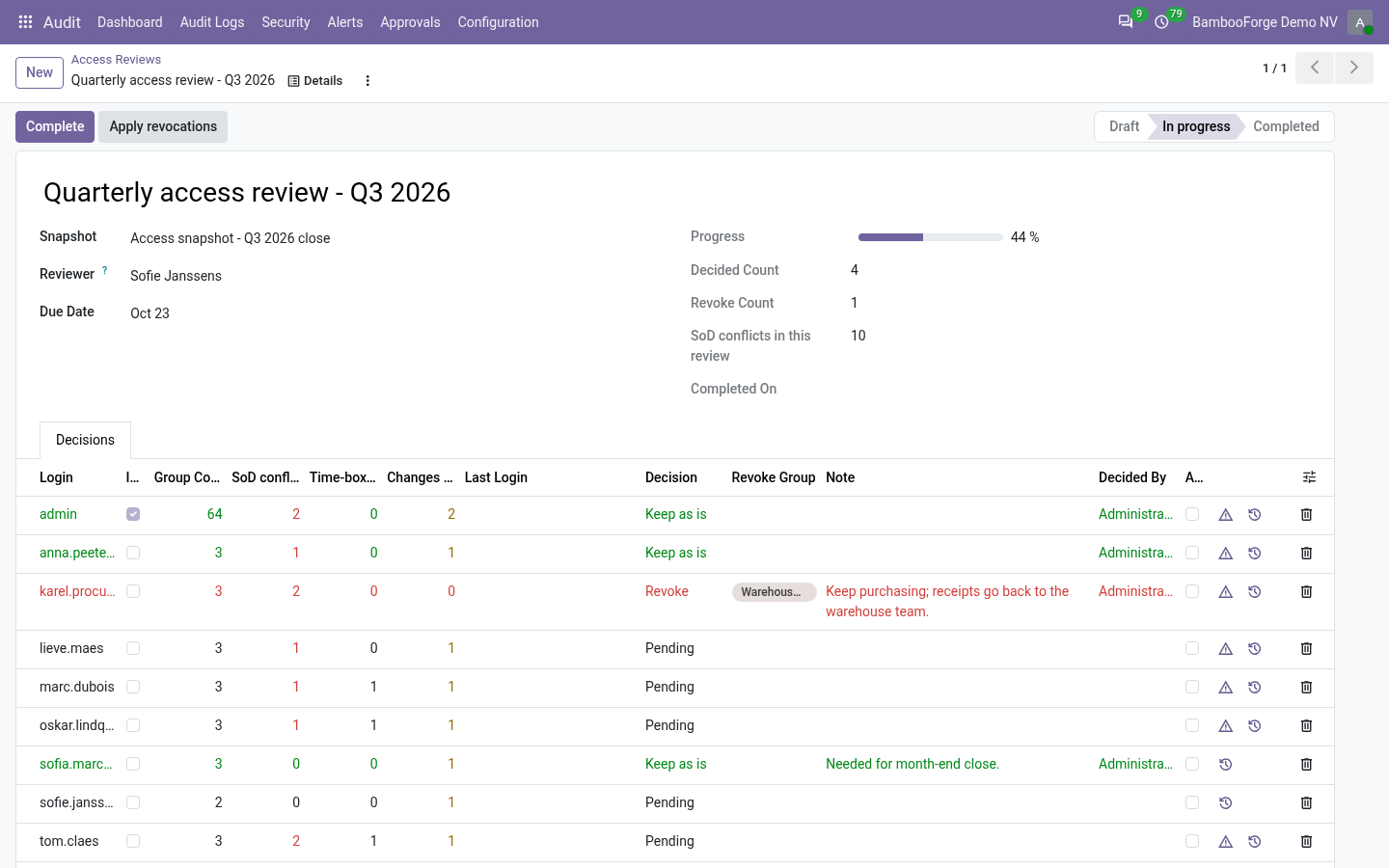
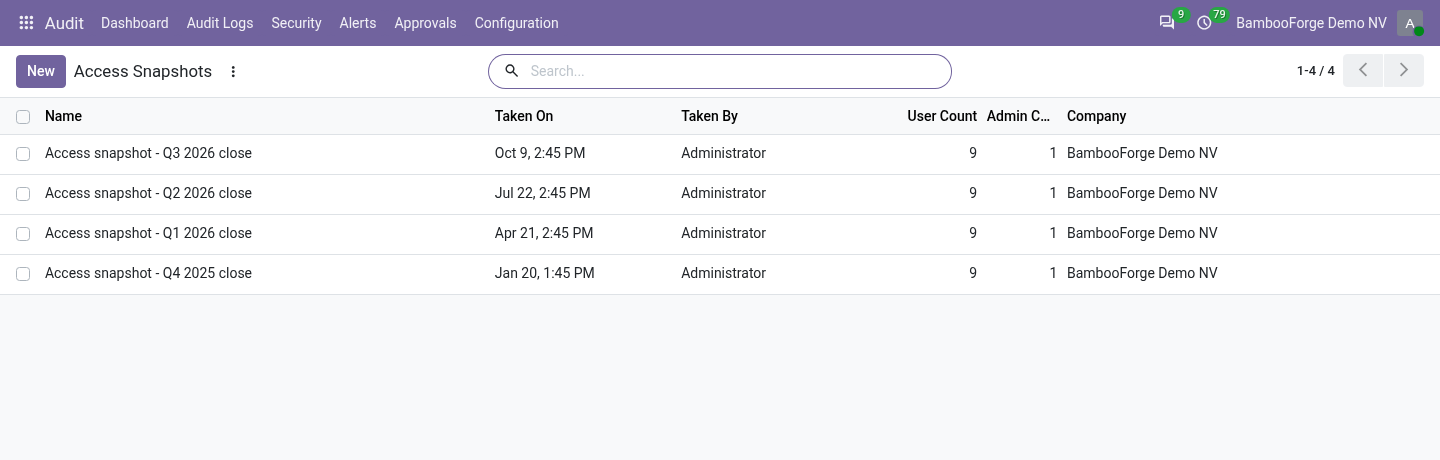
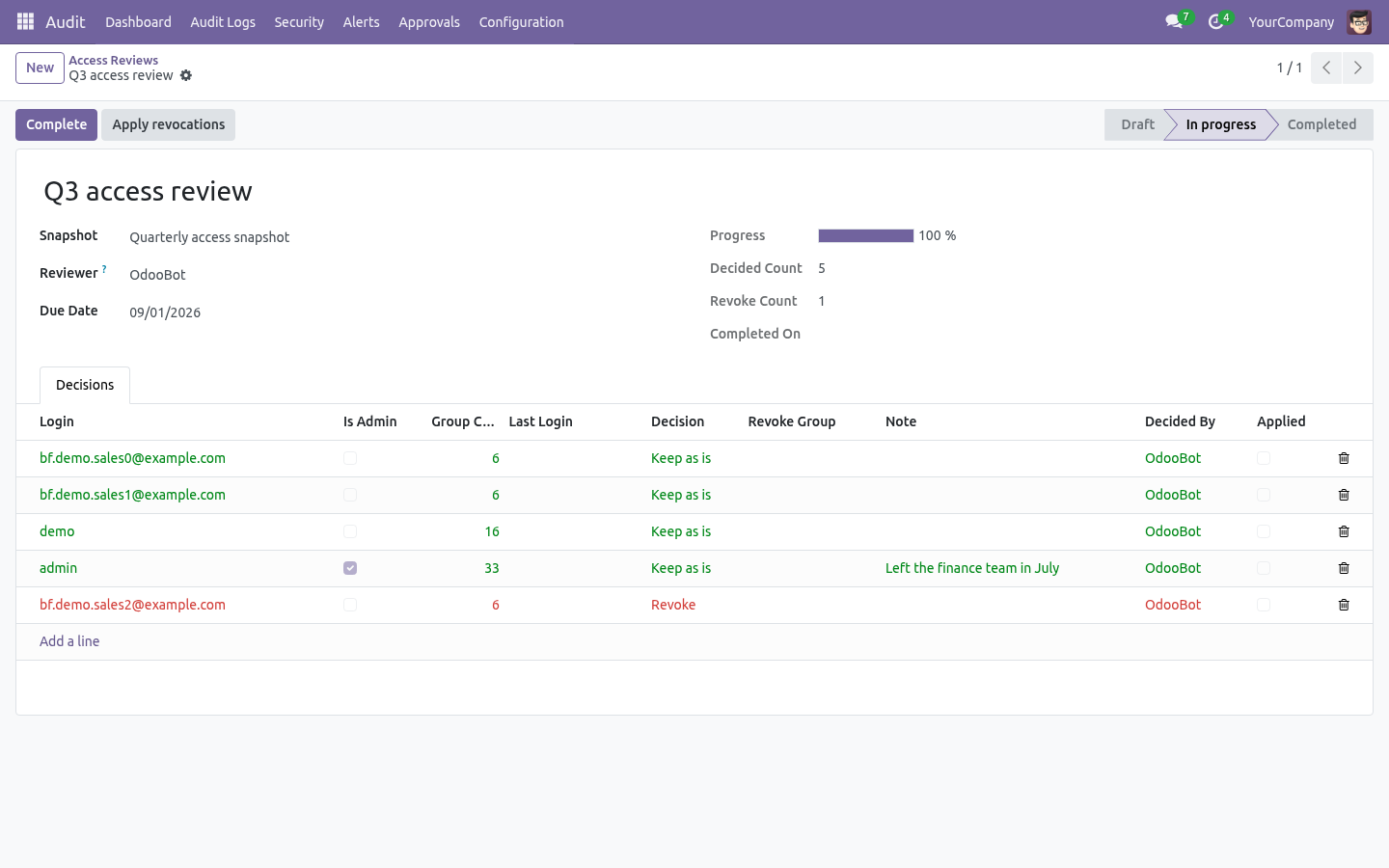
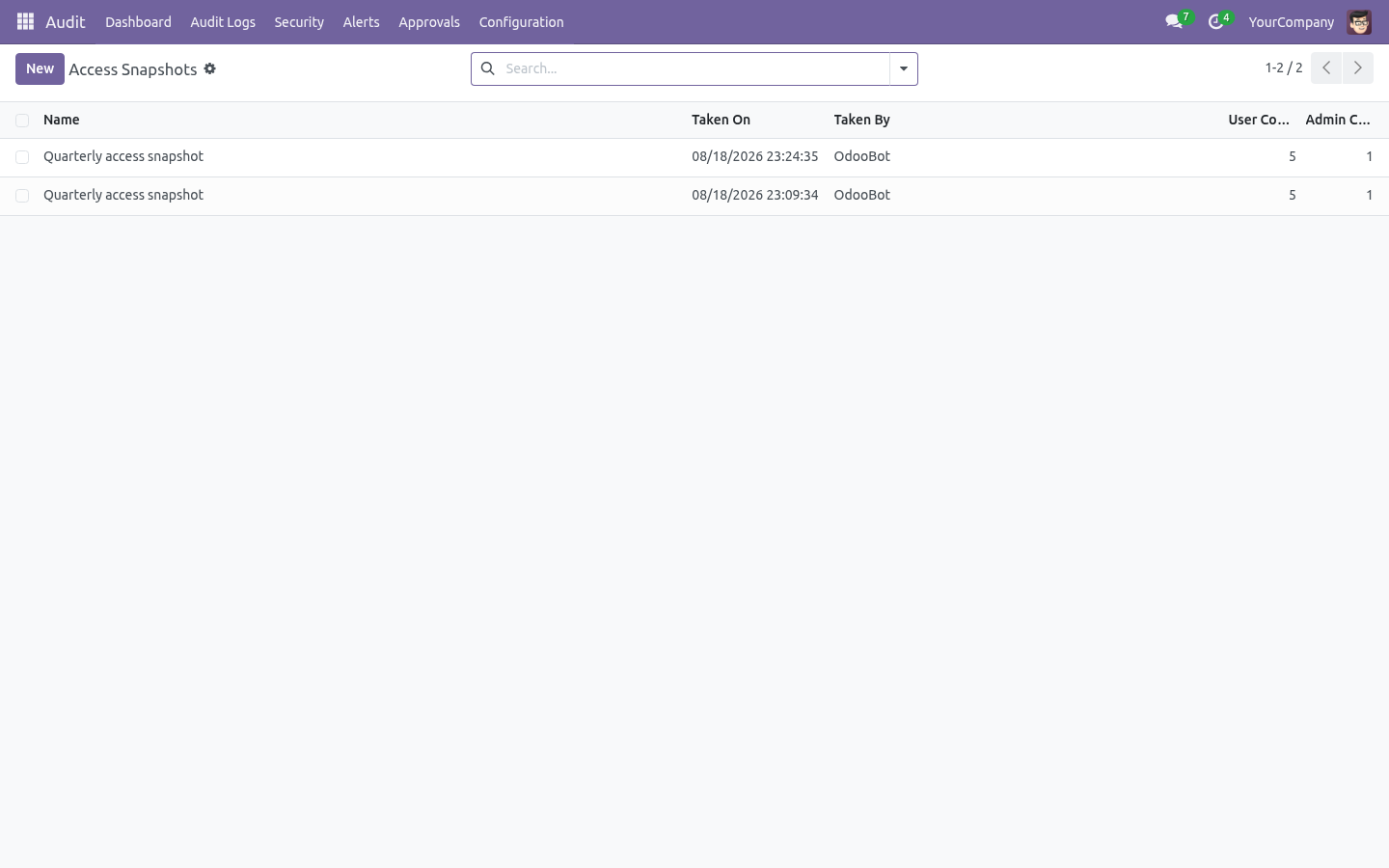
Access snapshots and reviews. Audit ▸ Security ▸ Access Snapshots freezes what every internal user may do: their groups, a fingerprint of those groups, and whether they hold administrator rights. Take one on demand or leave the scheduled action to do it, then open a later snapshot and press Compare to see who gained rights, who lost them, who joined and who left — users whose fingerprint is unchanged are deliberately not listed. Audit ▸ Security ▸ Access Reviews turns a snapshot into the evidence an auditor asks for: one decision per user — keep or revoke — each stamped with the reviewer and the moment they answered.
A campaign cannot be completed while a user is unanswered. Apply revocations strips only the groups the reviewer refused (leave the group list empty to remove everything the user held at snapshot time), records who applied it, and refuses to let a reviewer revoke their own access in a campaign they are signing. Configuration. All configuration lives under the Audit app.
The menu groups are: Step 1 — Choose what to audit (audit rules). Open Audit ▸ Configuration ▸ Rules and create a record (one rule per model — the model is unique across rules). PII Masking — Fields to Mask (PII). Values of these fields are masked when stored in audit lines (emails become a@b.c, phone numbers keep the country code and last two digits, everything else becomes ***).
Approval Workflow — Sensitive Fields (require approval), Approver Group and Approval Timeout (hours) (default 72). See Step 4. Retention & Archive — Retention Days (0 = use the global autovacuum, 180 days by default) and Archive Target. See Step 6.
Audit Models (Configuration ▸ Audit Models) subscribes several models at once with the same settings. Compliance Presets (Configuration ▸ Compliance Presets) bootstraps GDPR, SOX or PCI-DSS in one click — it creates and subscribes the right rules with masking, sensitive fields and retention already filled in, and skips models that are not installed on your database. Click Subscribe in the header to activate the rule. The state moves to Subscribed and an Audit History shortcut is added to the Action menu of the audited model's form.
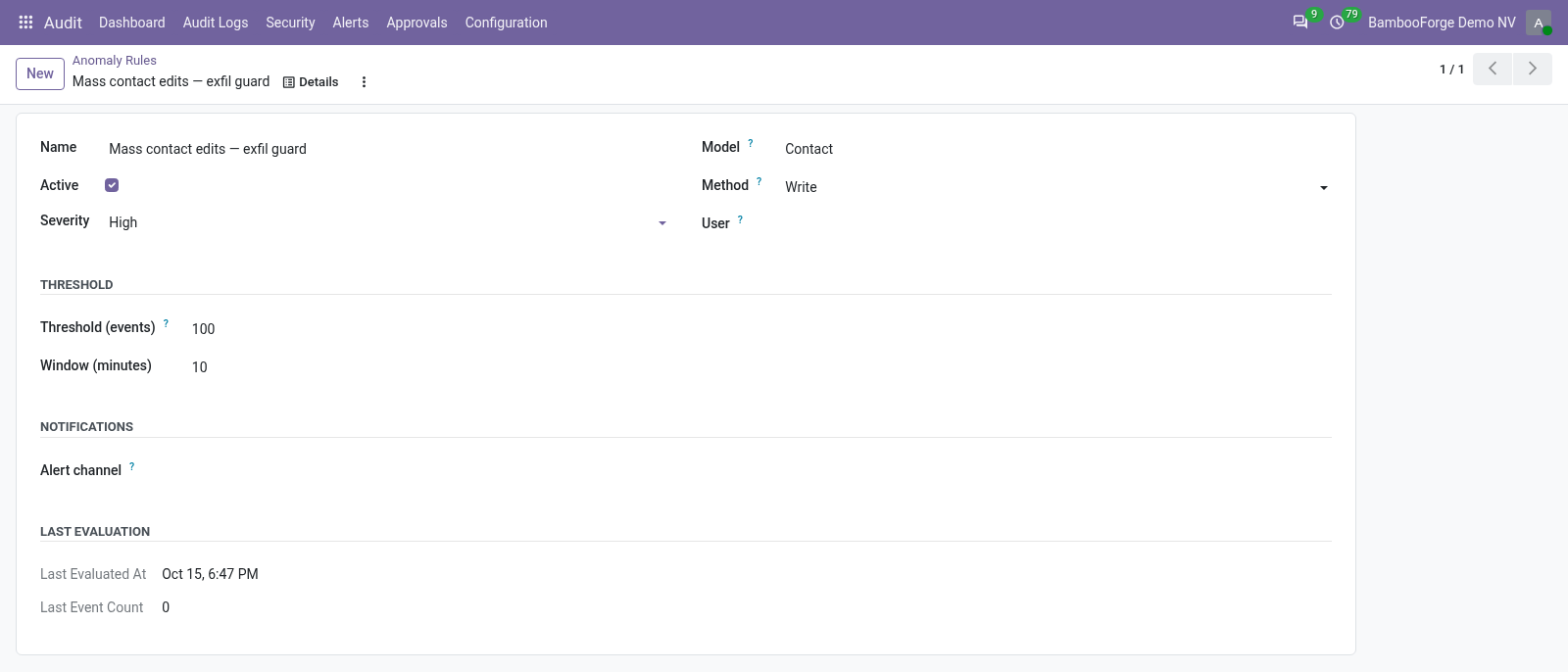
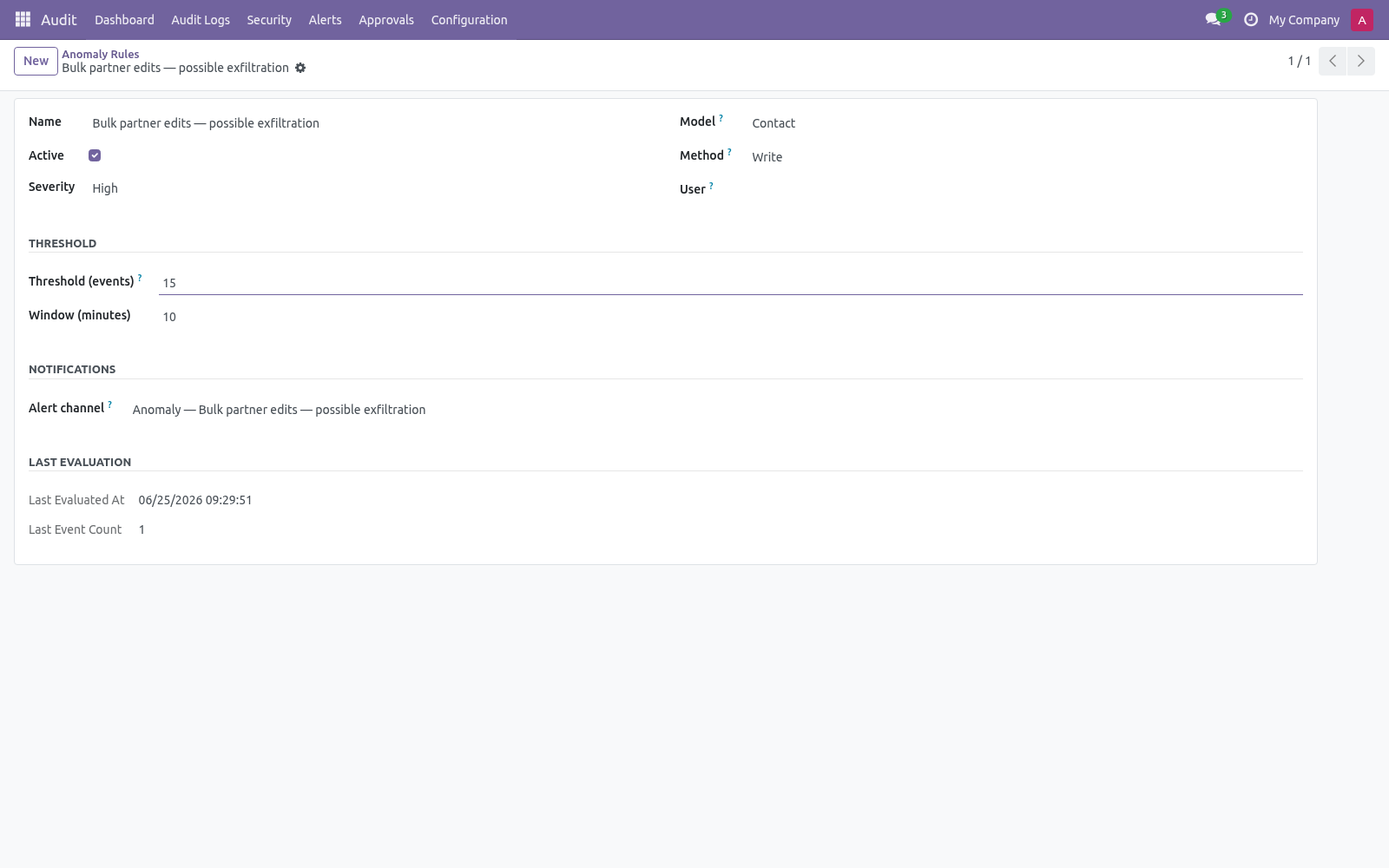
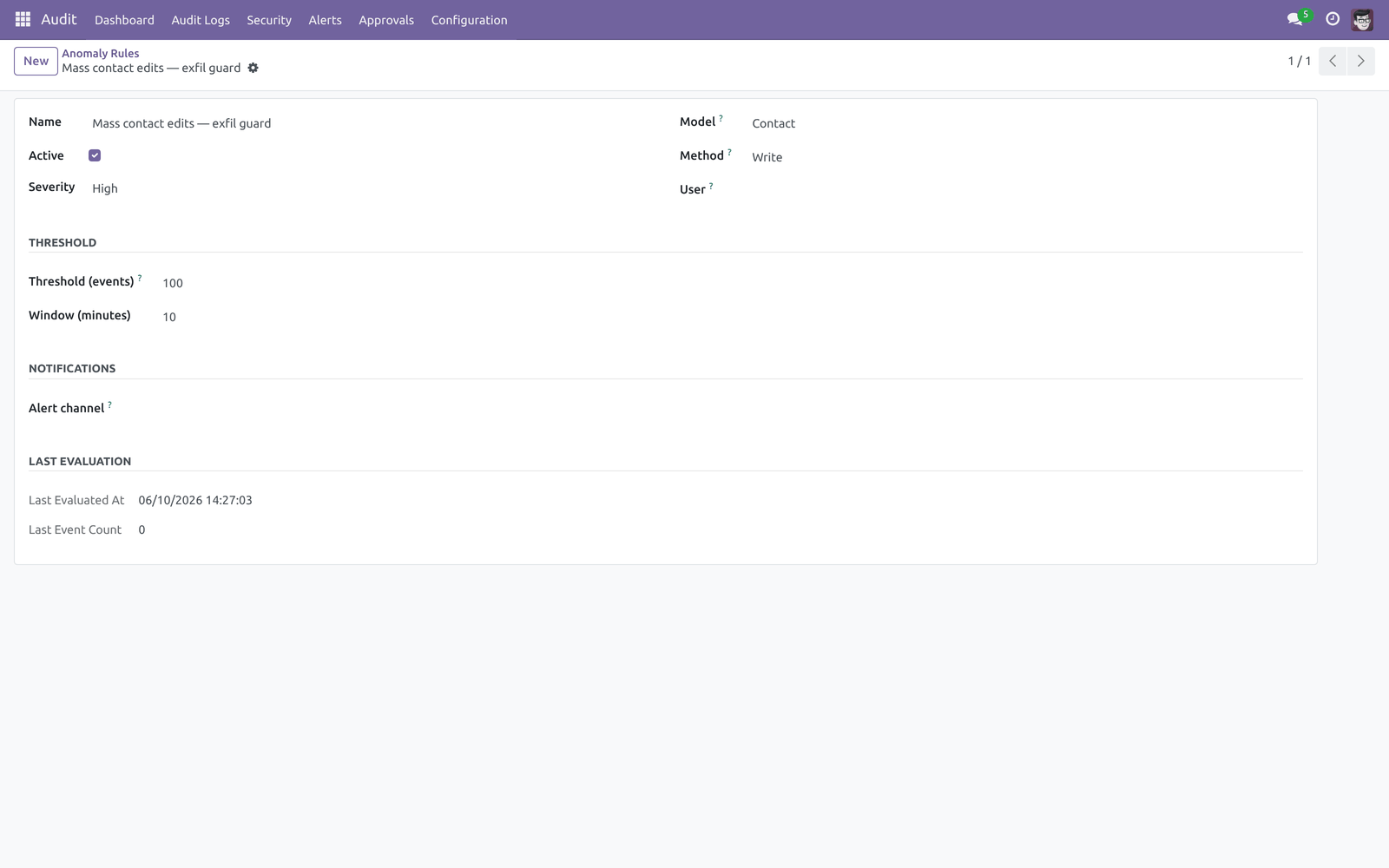
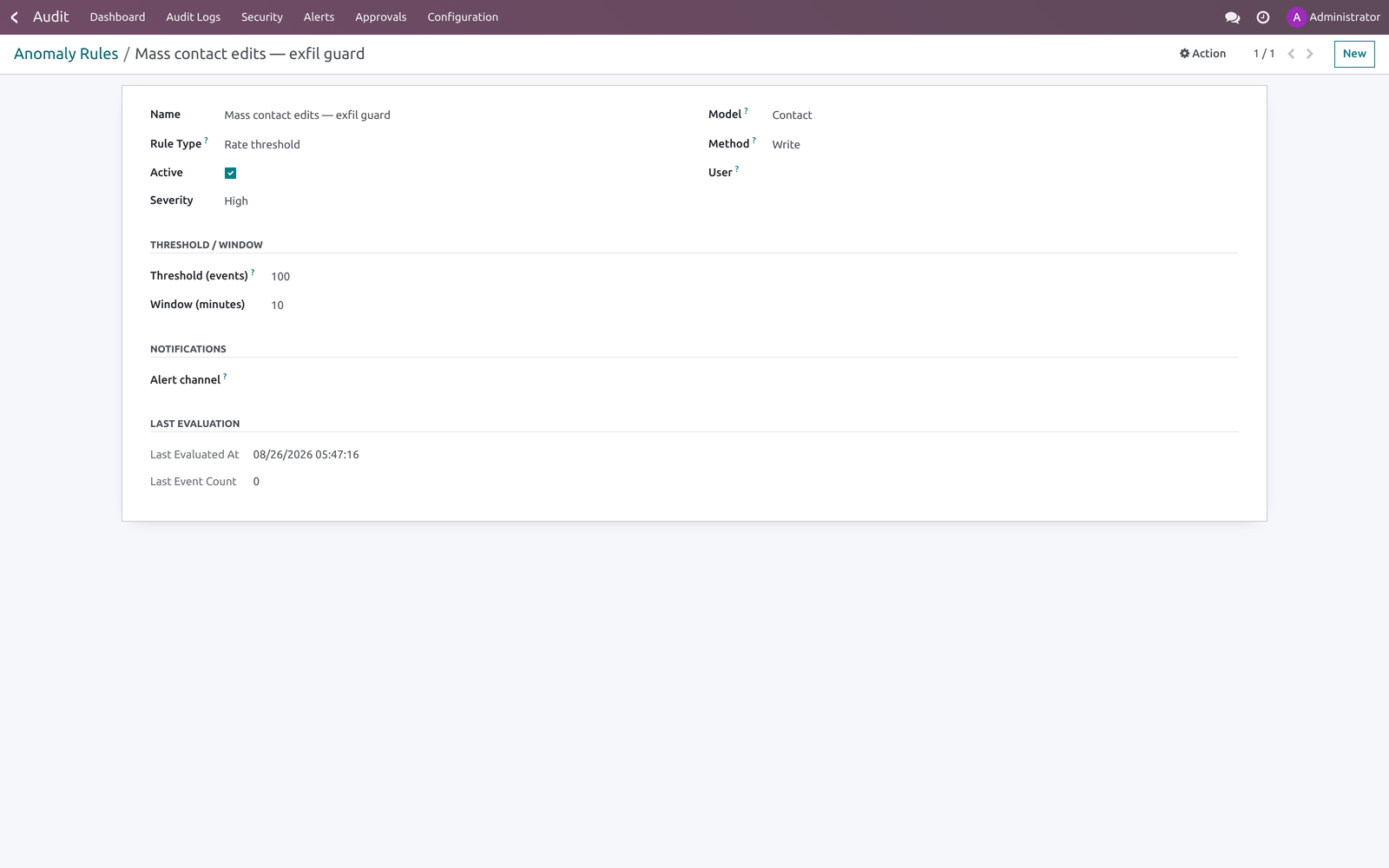
Click Unsubscribe to stop logging; you must unsubscribe before changing the model, operations or masking/sensitive fields. Step 2 — Anomaly rules. Open Audit ▸ Security ▸ Anomaly Rules. An anomaly rule raises an alert when the number of matching audit events crosses a threshold inside a time window.
A cron (Audit anomaly — evaluate thresholds, every 5 minutes) walks the active rules. The Last evaluation fields show the last run time and event count. Breaches are deduplicated so you do not get repeat alerts inside the same window. Step 3 — Alert rules, email and webhooks.
An Alert Rule (Audit ▸ Alerts ▸ Alert Rules) matches a slice of the trail and raises an Alert. Combine Model, User, Method, Field and Keyword (the alert fires only when the changed values contain that keyword) to narrow it. Send Email — uses an email template (defaults to the bundled audit-alert template) and an optional comma-separated Email Recipients override. Mail is queued, not sent inline, so a slow SMTP server never blocks the user write that triggered the alert.
Webhooks — one or more webhook records to call. Dispatch is queued (see Step 5). On the alert rule, the Notification Channels section controls how a match is shipped: Step 4 — Approval workflow. Approvals turn a risky edit into a reviewed action.
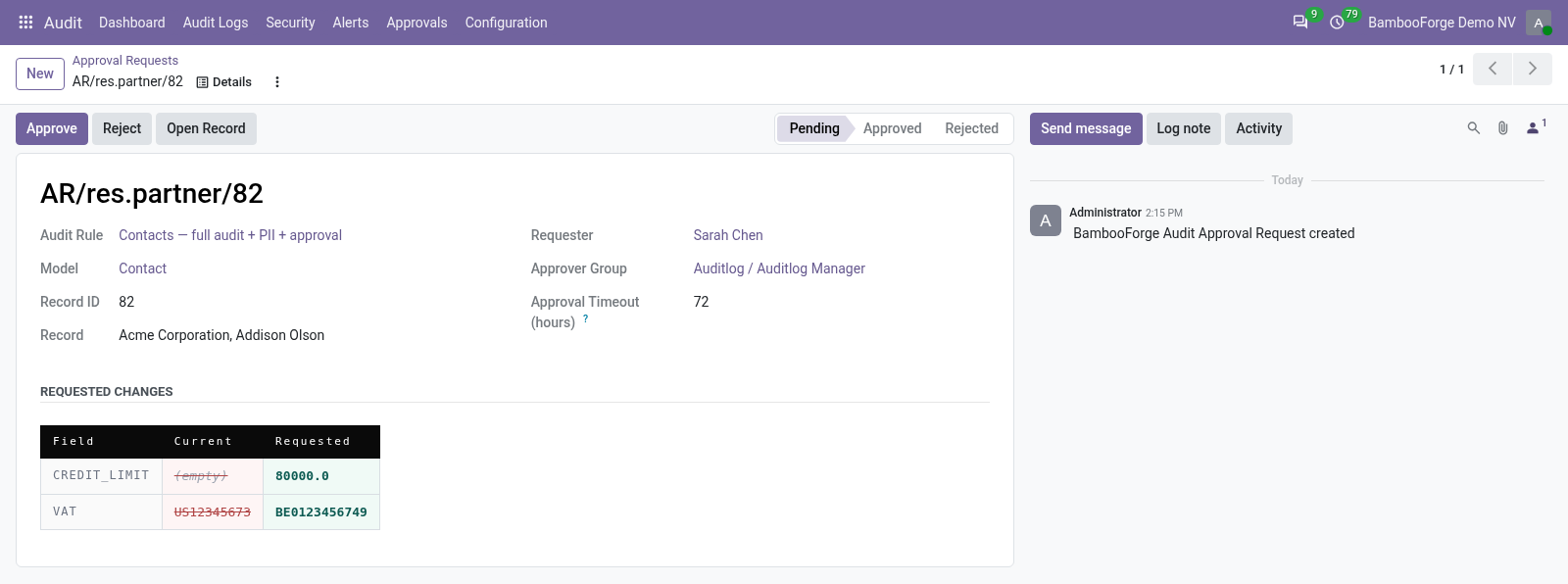
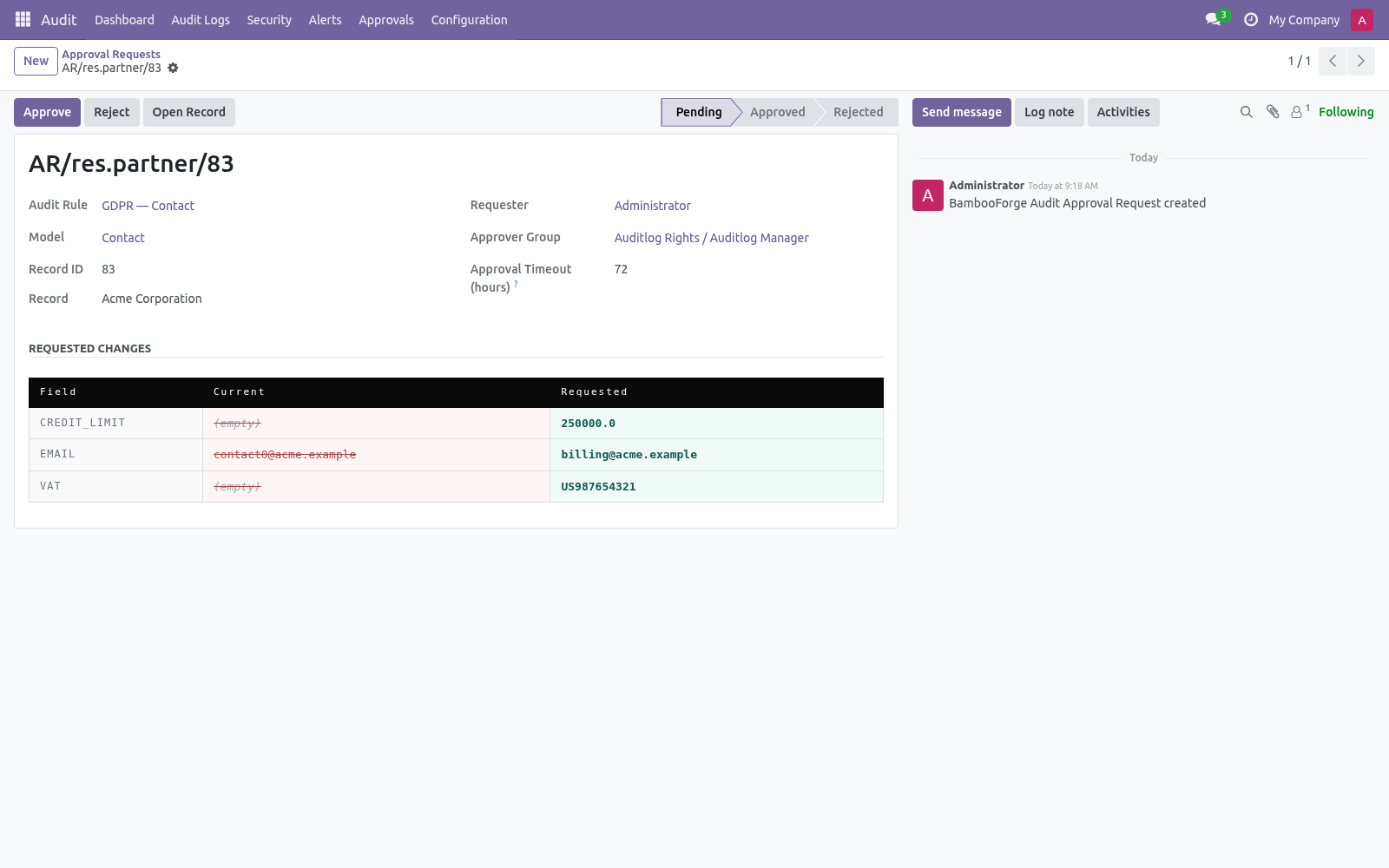
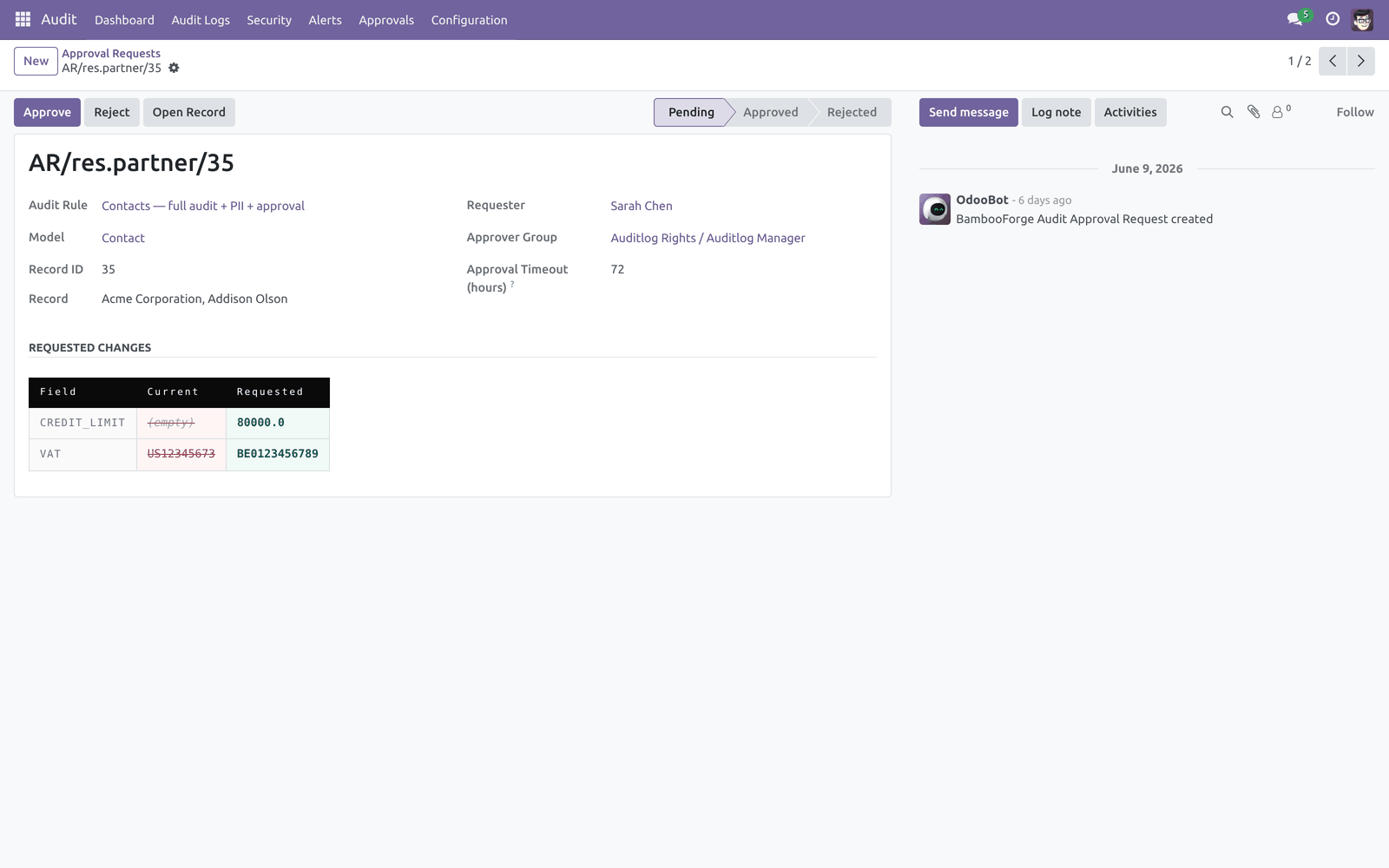
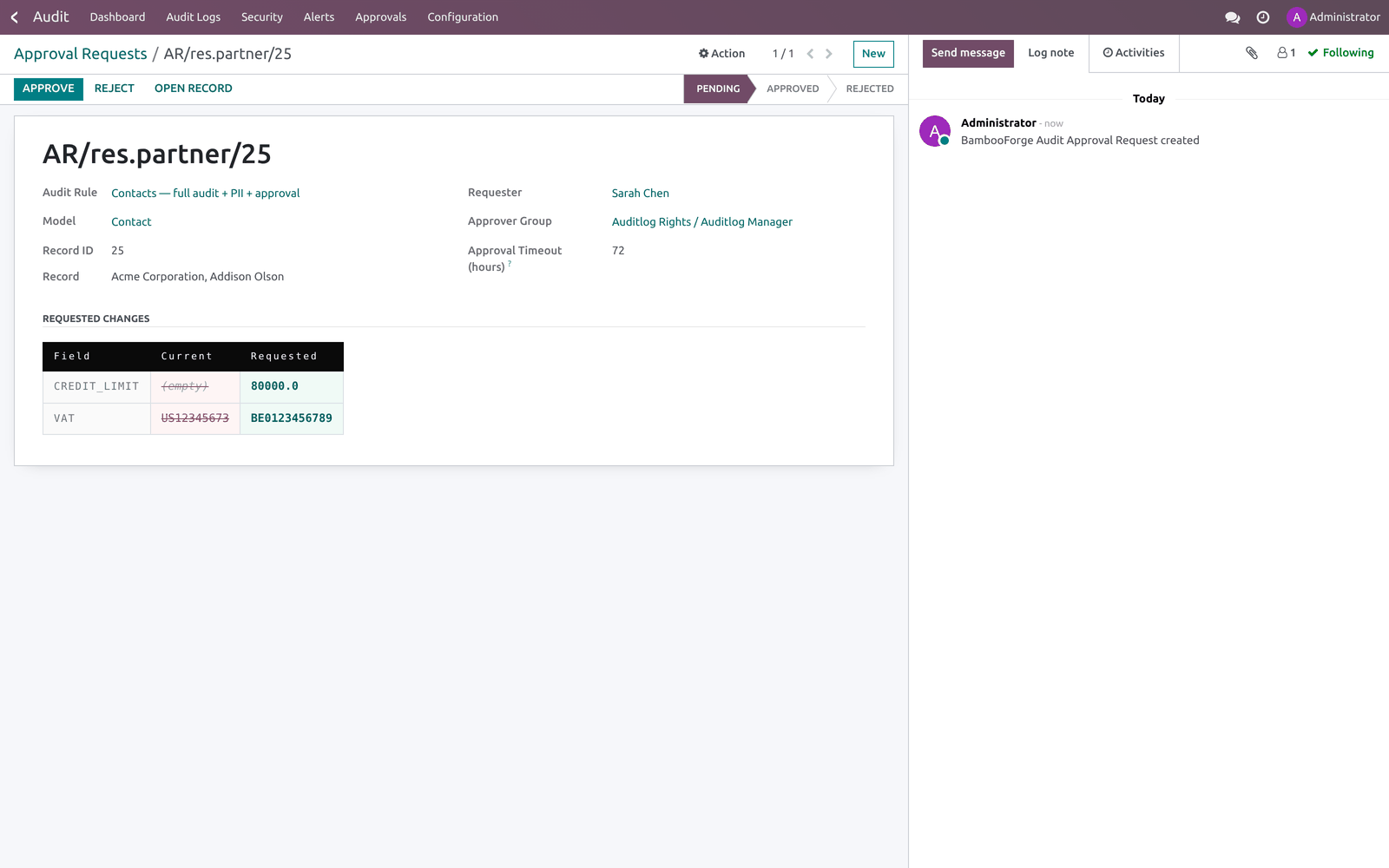
On an audit rule's Approval Workflow tab, add fields to Sensitive Fields (require approval), pick an Approver Group and set an Approval Timeout (hours). From then on, when any user tries to write one of those fields, the write is blocked and a bf.audit.approval.request is created instead. Approvers find pending requests under Audit ▸ Approvals. Step 5 — Webhook queue.
Webhook dispatch is asynchronous: when an alert fires, each webhook call is enqueued in Audit ▸ Configuration ▸ Webhook Queue and a cron (Audit webhook — drain queue, every minute) sends it with retry/back-off. This guarantees a slow or failing endpoint can never block the user write that triggered the alert. Each queue row shows its state (pending / sending / sent / failed), retry count and last error; Retry Now forces an immediate attempt. Step 6 — Archive targets & retention.
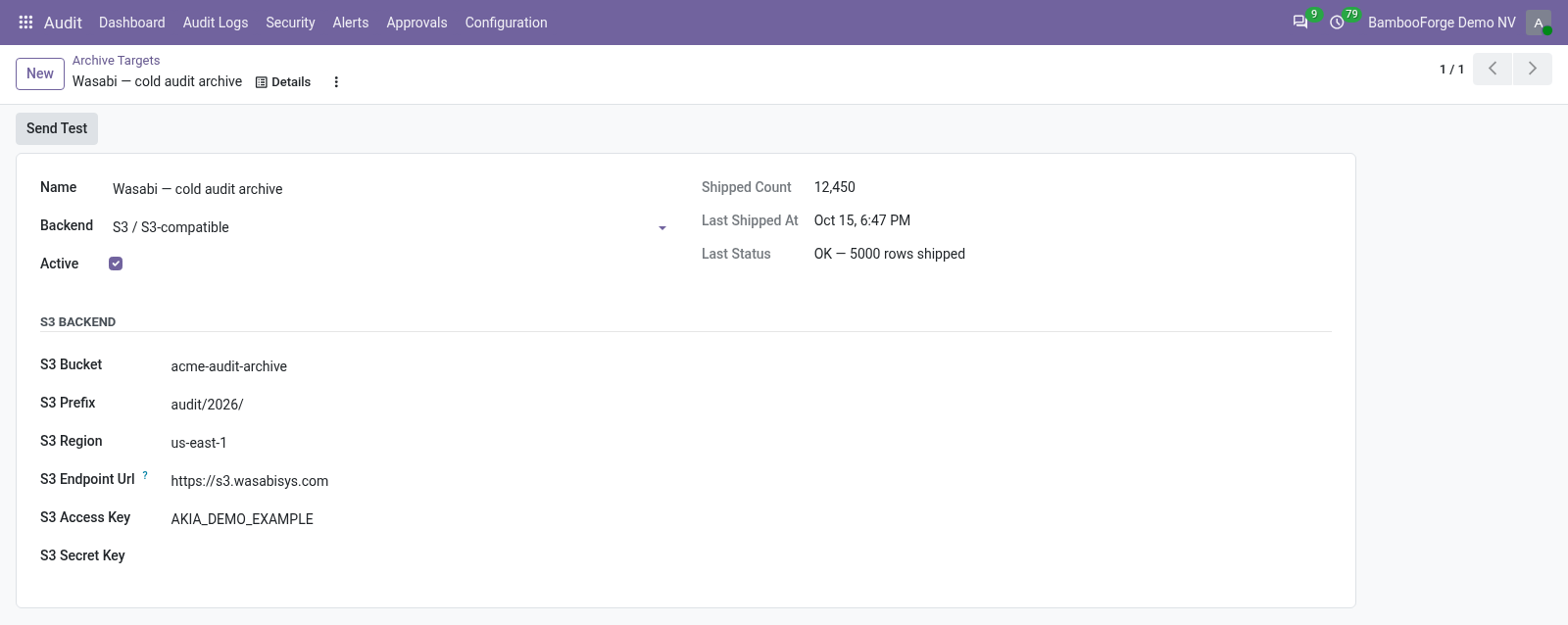
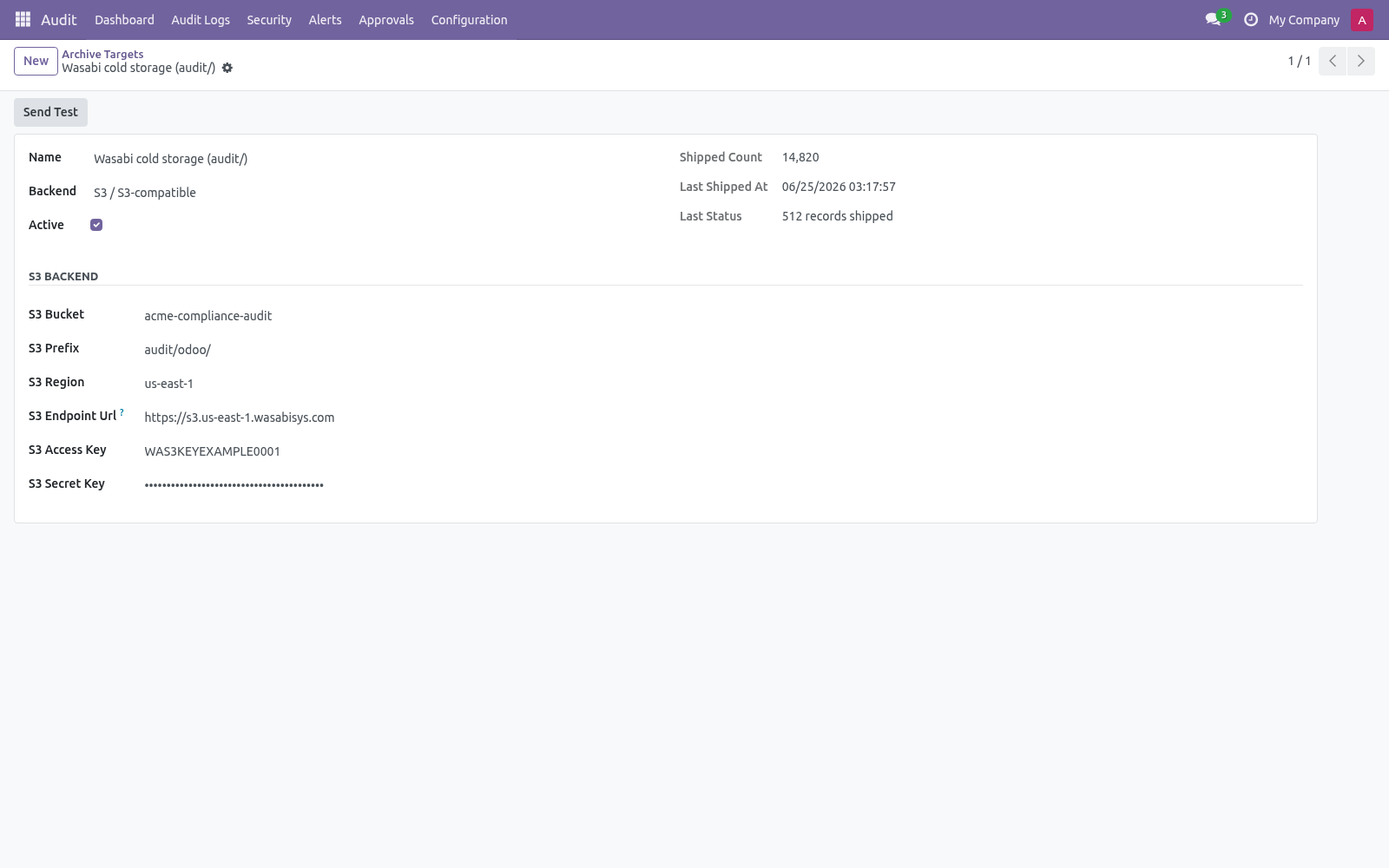
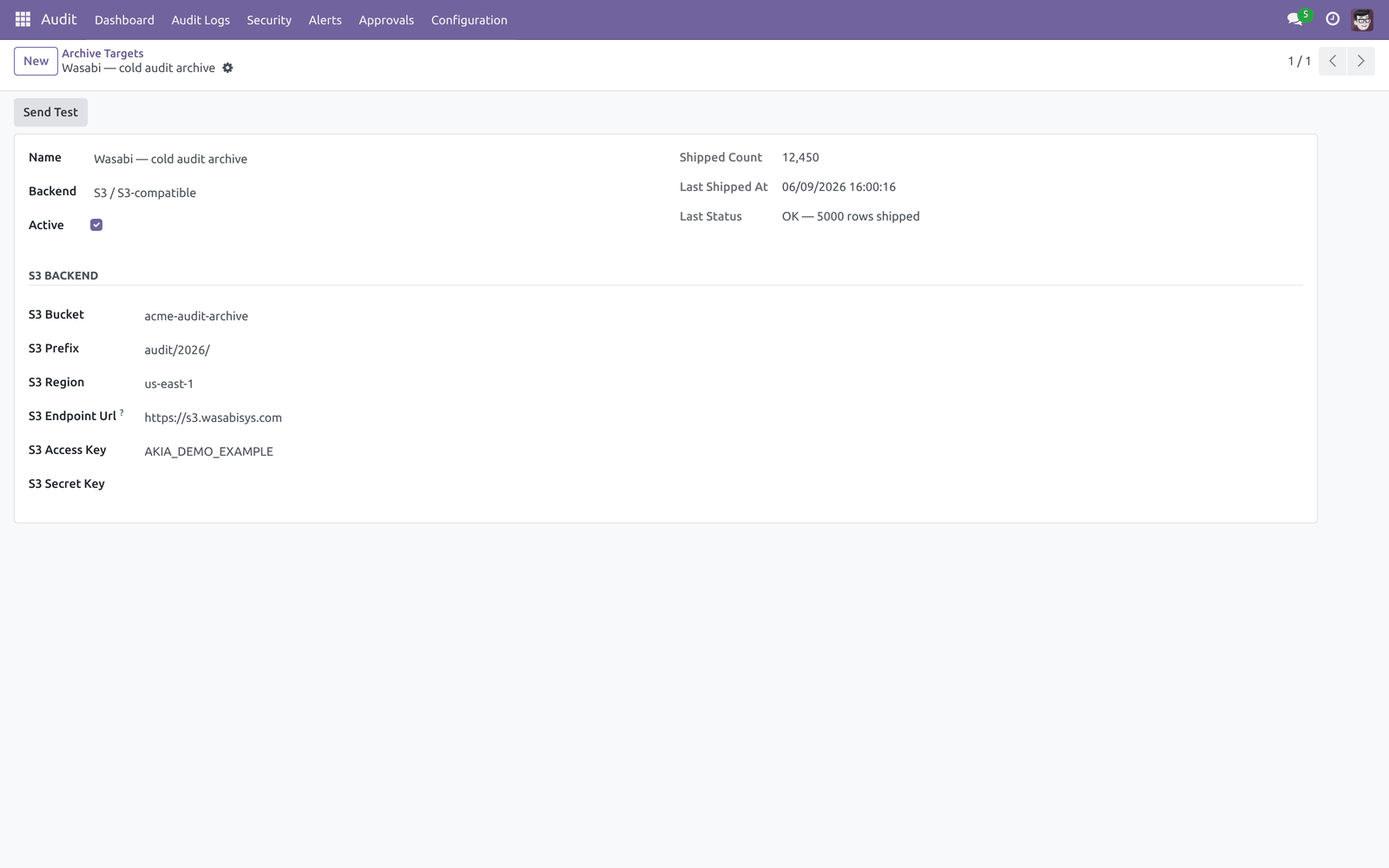
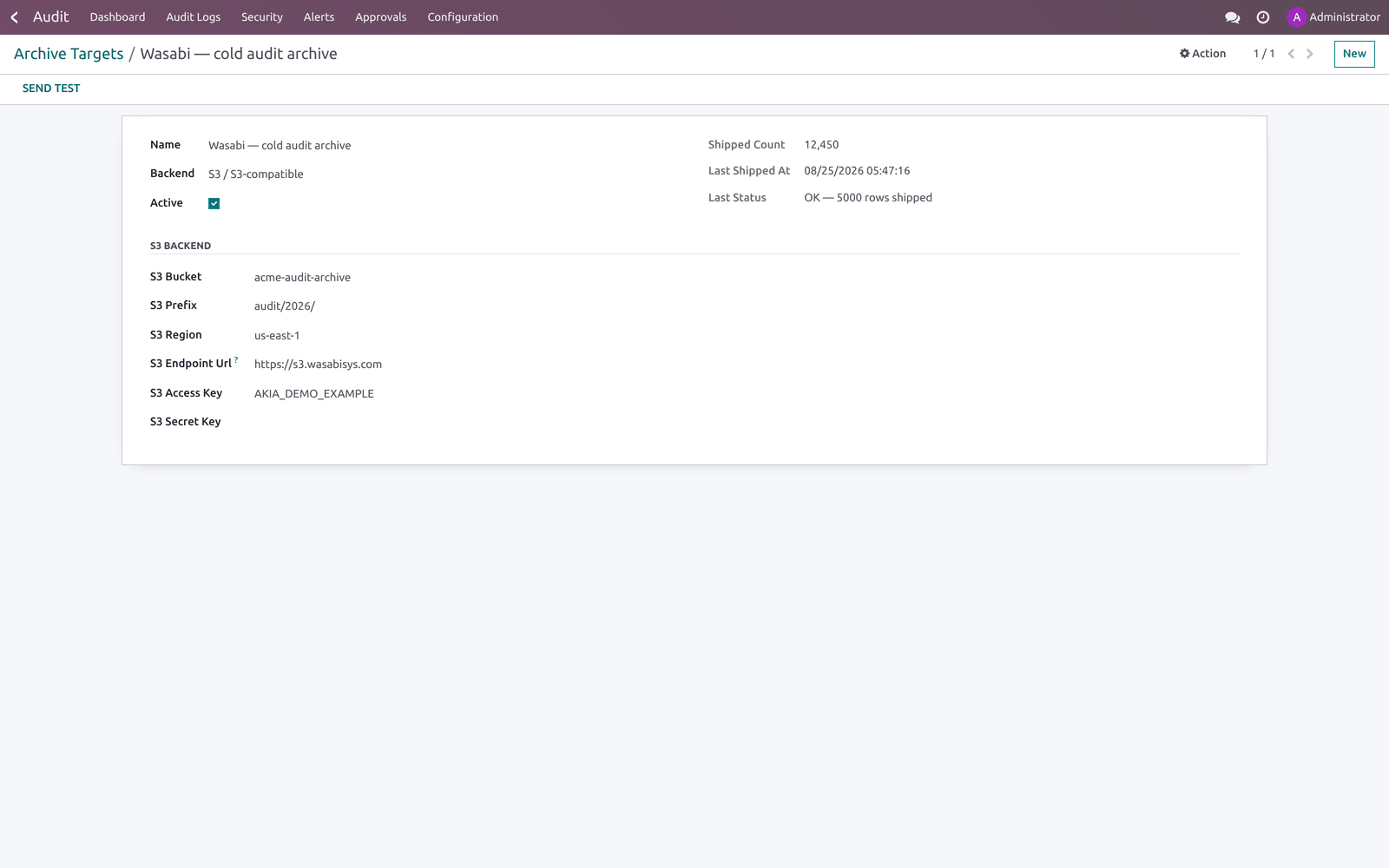
Logs are deleted on a schedule; archive targets let you keep a durable copy first. Create a target under Audit ▸ Configuration ▸ Archive Targets, then set it as the Archive Target on the relevant audit rule. Use Send Test to ship one synthetic record and confirm the target works; the form records the last status, time and shipped count. Dashboard.
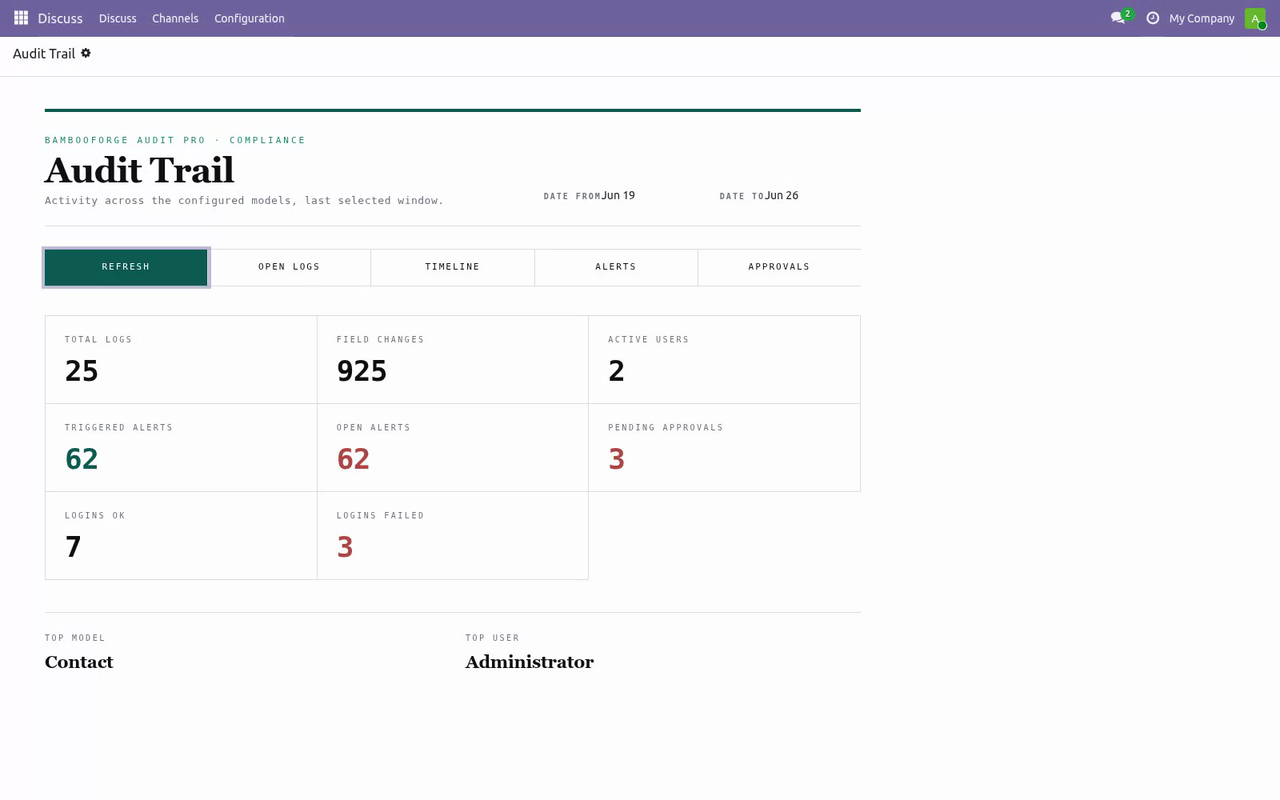
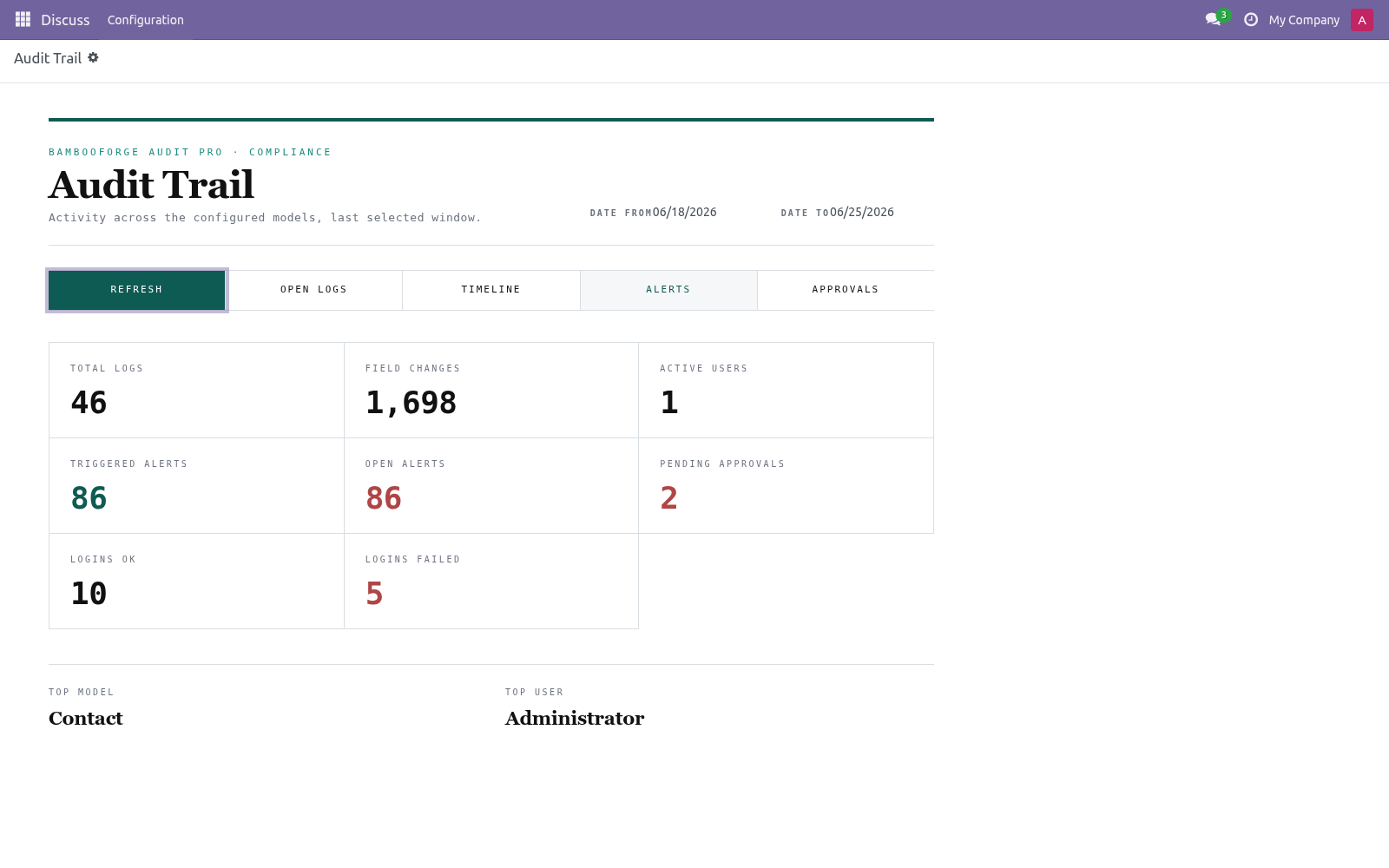
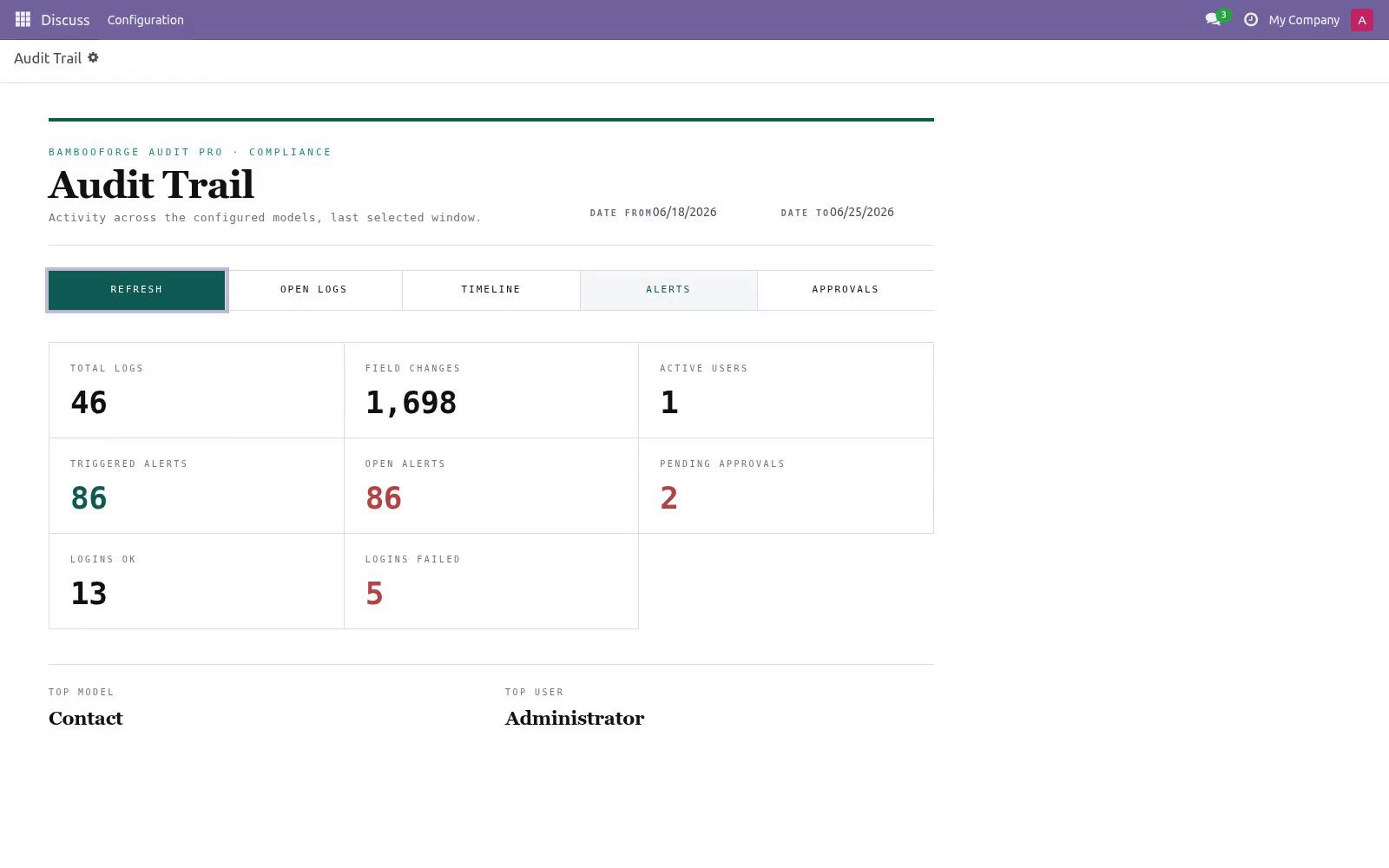
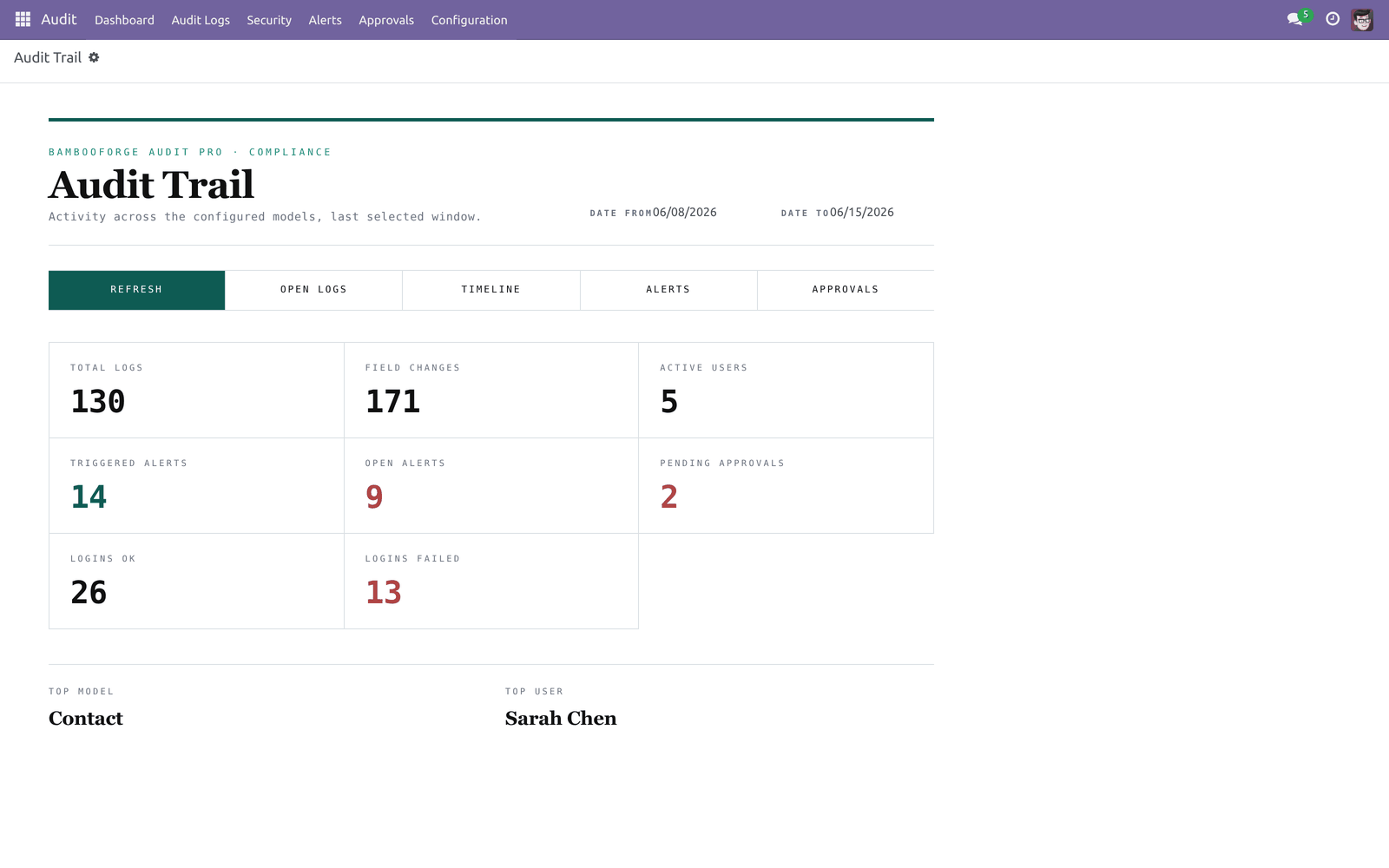

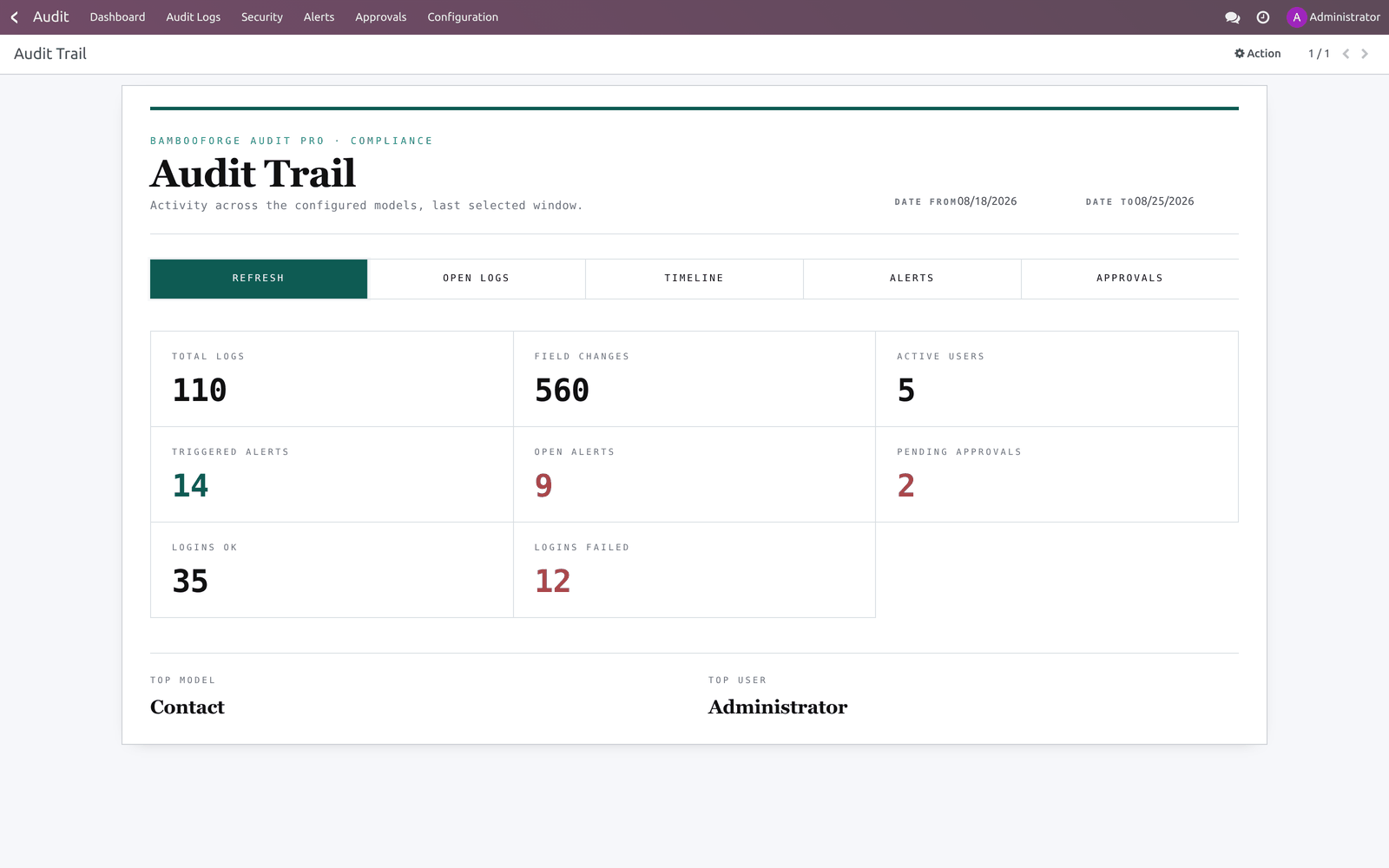

Open Audit ▸ Dashboard. Pick a From / To window; the KPIs recompute live: Total Logs, Field Changes, Active Users, Triggered Alerts, Open Alerts, Pending Approvals, Logins OK and Logins Failed, plus the Top Model and Top User for the window. The action bar drills into the same window: Open Logs, Timeline, Alerts and Approvals. Refresh reloads the figures.
Now the part most videos leave out: what this does not do. What is stored — for each audited operation: the model, record id, method, acting user, timestamp, HTTP request/session reference, and (for Full log) a before/after value per field. Login events store the attempted login, user, state, IP, user agent and a hashed session token. PII fields you mark are masked at capture.
Where data goes — audit data stays in your Odoo database unless you configure an archive target (file/syslog/S3) or expose the pull API. Webhooks send only the alert summary payload to the URL you configure. Multi-company — logs are isolated by company; users see only the companies they belong to. In scope — change/login auditing, anomaly rules, approval workflow, alerts with email + Slack/Discord/Teams/generic webhooks, archive targets, retention, hash-chain verification, GDPR anonymization, XLSX export, JSON-Lines pull API.
The complete manual is at docs dot bambooforge dot dev, the demo database is linked from the store page, and support answers within twenty-four hours. Links are in the description.

Transcript of the walkthrough (Odoo 19)
Audit Log & Audit Trail for Odoo. Audit log and audit trail with field-level tracking, hash chaining, anomaly detection, alerts, PII masking, retention and a compliance PDF. Audit Pro hooks the Odoo ORM so that operations on the models you subscribe are recorded, then layers compliance tooling on top. It covers: In the next few minutes: audit log & audit trail for odoo, then access snapshots and reviews, then configuration, then step 1 — choose what to audit (audit rules), then step 2 — anomaly rules.
Then what this app deliberately does not do, so you can tell before you buy whether it fits. Everything lives under Audit then Audit Logs then Security then Alerts. Audit Log & Audit Trail for Odoo. A complete audit trail for Odoo 19: log every create, write, delete and read on the models you choose, watch logins, raise alerts on suspicious activity, gate sensitive edits behind an approval workflow, push alerts to Slack/Discord/Teams, and archive logs off-system before they are purged — all from one Audit app.
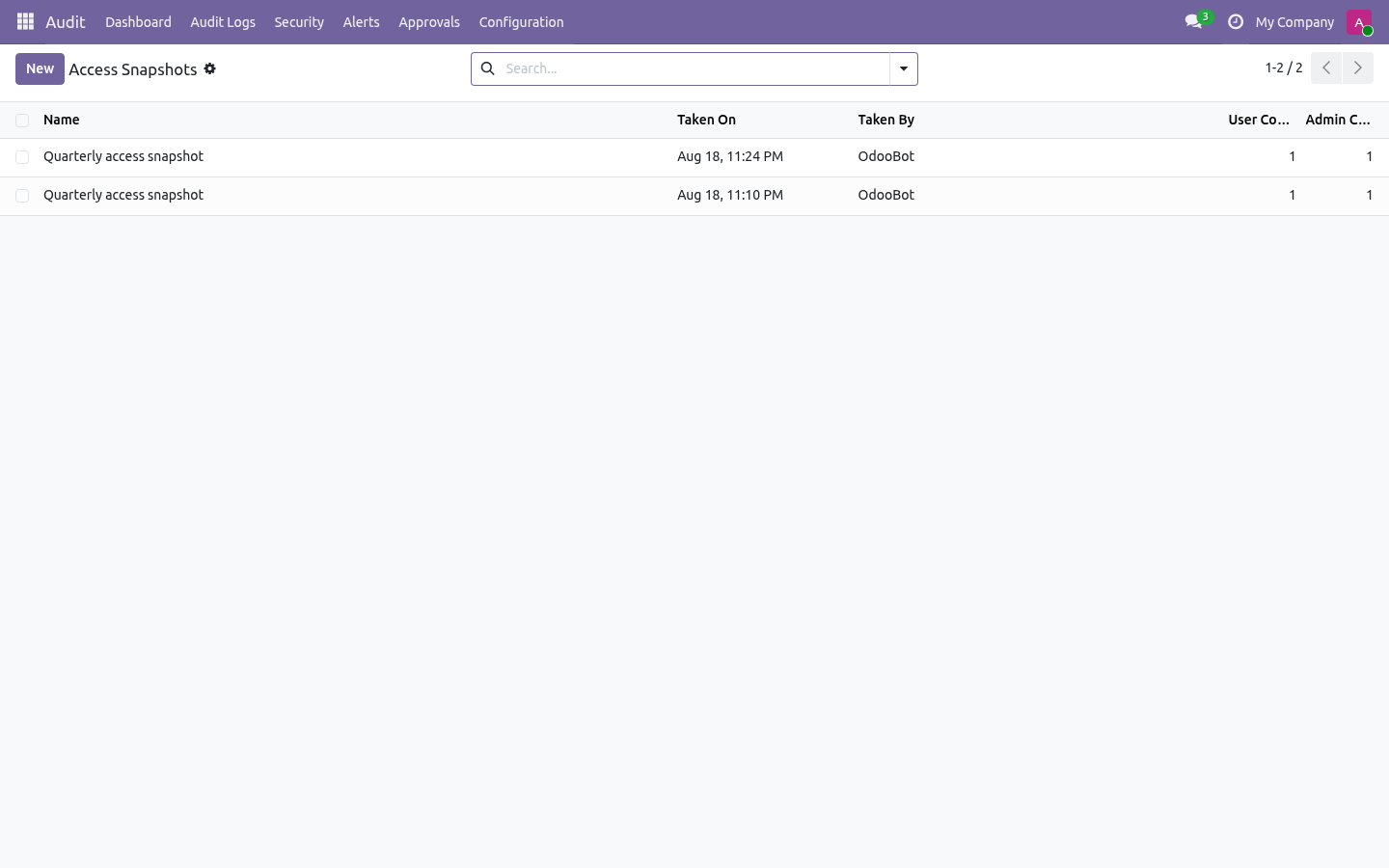
This page is the complete manual. If you follow it top to bottom you can install, choose what to audit, read the logs, wire up alerts and approvals, ship logs out, and fix the common issues without contacting support. Access snapshots and reviews. Audit ▸ Security ▸ Access Snapshots freezes what every internal user may do: their groups, a fingerprint of those groups, and whether they hold administrator rights.
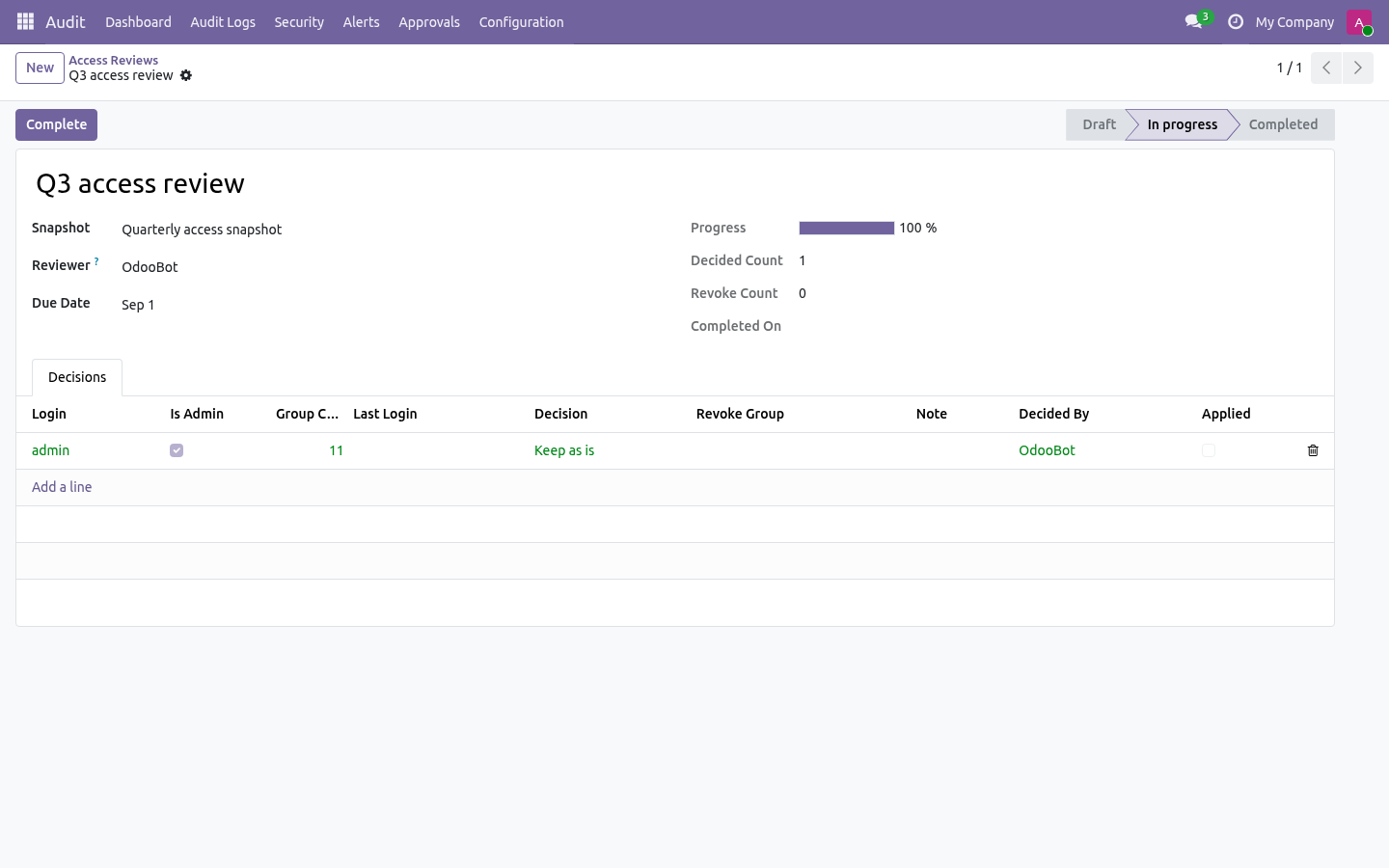
Take one on demand or leave the scheduled action to do it, then open a later snapshot and press Compare to see who gained rights, who lost them, who joined and who left — users whose fingerprint is unchanged are deliberately not listed. Audit ▸ Security ▸ Access Reviews turns a snapshot into the evidence an auditor asks for: one decision per user — keep or revoke — each stamped with the reviewer and the moment they answered. A campaign cannot be completed while a user is unanswered. Apply revocations strips only the groups the reviewer refused (leave the group list empty to remove everything the user held at snapshot time), records who applied it, and refuses to let a reviewer revoke their own access in a campaign they are signing.
Configuration. All configuration lives under the Audit app. The menu groups are: Logs, Log Lines, Timeline, Export Logs. Login Events, Anomaly Rules.
Alerts, Alert Rules. - Configuration Getting Started, Rules, Audit Models, Compliance Presets, Webhooks, Webhook Queue, Archive Targets. Approvals sit directly under Audit. Step 1 — Choose what to audit (audit rules).
Open Audit ▸ Configuration ▸ Rules and create a record (one rule per model — the model is unique across rules). The model to track. Locked once the rule is Subscribed. Full log makes a before/after diff of every field (richer, slower); Fast log records only the values passed to create/write (less detail, faster).
- Log Reads / Writes / Deletes / Creates Which operations generate logs. Writes, Deletes and Creates are on by default; Reads is off (it is the noisiest). - Capture Record On Full log + Log Deletes, keep a snapshot of a record's values when it is deleted. - Users to Exclude Operations by these users are never logged (for example an integration user).
Click Subscribe in the header to activate the rule. The state moves to Subscribed and an Audit History shortcut is added to the Action menu of the audited model's form. Click Unsubscribe to stop logging; you must unsubscribe before changing the model, operations or masking/sensitive fields. Step 2 — Anomaly rules.
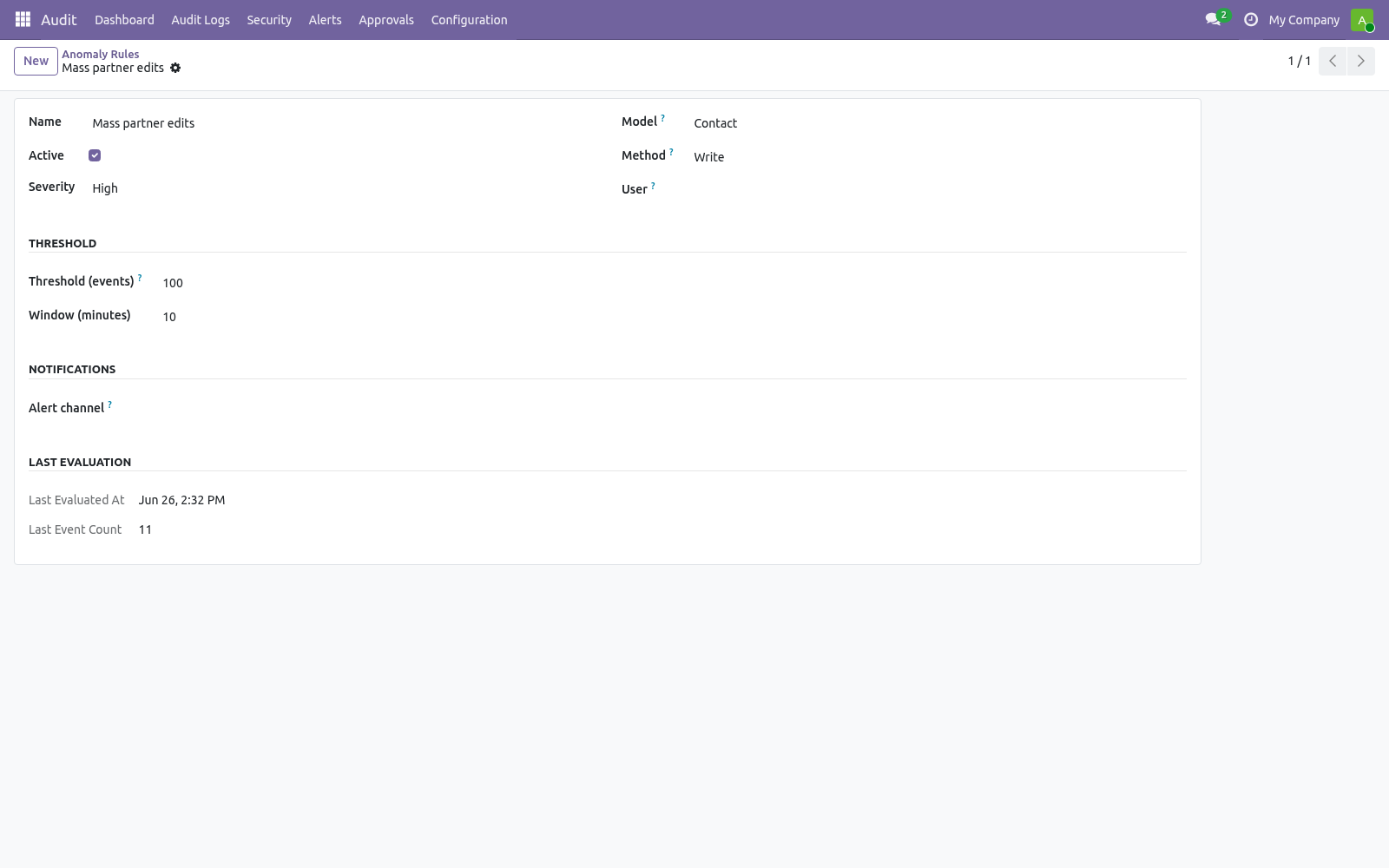
Open Audit ▸ Security ▸ Anomaly Rules. An anomaly rule raises an alert when the number of matching audit events crosses a threshold inside a time window. Scope to one model. Empty = all models.
Scope to Create / Write / Read / Delete. Empty = all. Scope to one user. Empty = any user.
- Threshold (events) Raise an alert when this many matching events occur within the window (default 100). - Window (minutes) The rolling window length (default 10). Low / Medium / High / Critical (labelling only). A cron (Audit anomaly — evaluate thresholds, every 5 minutes) walks the active rules.
The Last evaluation fields show the last run time and event count. Breaches are deduplicated so you do not get repeat alerts inside the same window. Step 3 — Alert rules, email and webhooks. An Alert Rule (Audit ▸ Alerts ▸ Alert Rules) matches a slice of the trail and raises an Alert.
Combine Model, User, Method, Field and Keyword (the alert fires only when the changed values contain that keyword) to narrow it. Send Email — uses an email template (defaults to the bundled audit-alert template) and an optional comma-separated Email Recipients override. Mail is queued, not sent inline, so a slow SMTP server never blocks the user write that triggered the alert. Webhooks — one or more webhook records to call.
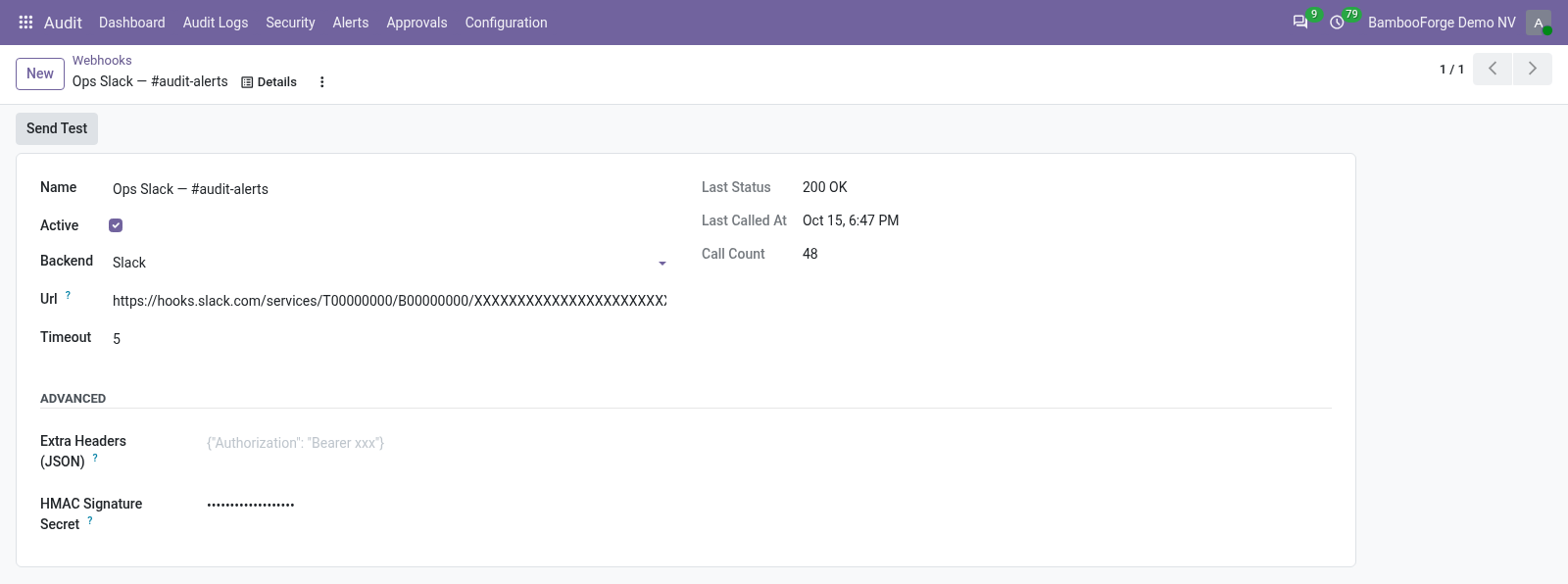
Dispatch is queued (see Step 5). Slack, Discord, Microsoft Teams or Generic JSON. This shapes the payload to the receiver's expected format. The incoming webhook URL.
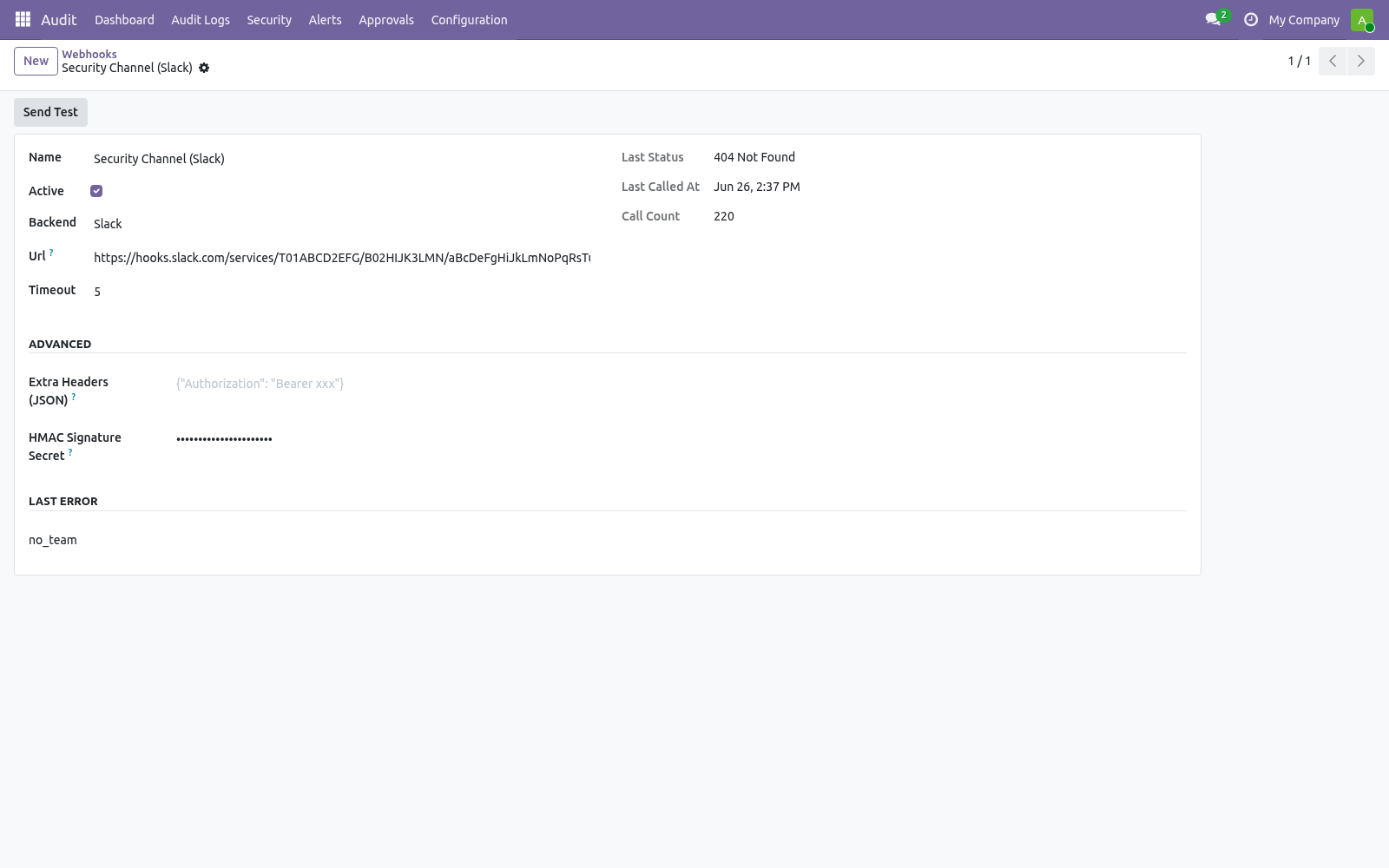
Must be a public host — internal/loopback/private addresses are rejected. Per-call timeout in seconds (default 5). - Extra Headers (JSON) Optional JSON object merged into the request headers, e.g. {"Authorization": "Bearer xxx"}.
- HMAC Signature Secret On the alert rule, the Notification Channels section controls how a match is shipped: Step 4 — Approval workflow. Approvals turn a risky edit into a reviewed action. On an audit rule's Approval Workflow tab, add fields to Sensitive Fields (require approval), pick an Approver Group and set an Approval Timeout (hours). From then on, when any user tries to write one of those fields, the write is blocked and a bf.audit.approval.request is created instead.
Approvers find pending requests under Audit ▸ Approvals. Step 5 — Webhook queue. Webhook dispatch is asynchronous: when an alert fires, each webhook call is enqueued in Audit ▸ Configuration ▸ Webhook Queue and a cron (Audit webhook — drain queue, every minute) sends it with retry/back-off. This guarantees a slow or failing endpoint can never block the user write that triggered the alert.
Each queue row shows its state (pending / sending / sent / failed), retry count and last error; Retry Now forces an immediate attempt. Step 6 — Archive targets & retention. Logs are deleted on a schedule; archive targets let you keep a durable copy first. Create a target under Audit ▸ Configuration ▸ Archive Targets, then set it as the Archive Target on the relevant audit rule.
What to configure File Path — a directory on the Odoo host. One JSON-Lines file is written per batch. For safety the path must sit inside the base directory set by the bambooforge_audit_pro.archive_base_dir system parameter (defaults to <data_dir>/bf_audit_archive); paths outside it are rejected. Syslog Host, Port (514) and Facility (local0–local7).
- S3 / S3-compatible Bucket, Prefix, Region, optional Endpoint URL (for MinIO / Wasabi / R2), and access/secret keys. Requires the boto3 package. - Auto-vacuum audit logs Deletes logs, HTTP requests, HTTP sessions, login events and old webhook-queue rows older than 180 days. Disabled out of the box — enable it to use the global window.
- Audit per-rule retention vacuum Use Send Test to ship one synthetic record and confirm the target works; the form records the last status, time and shipped count. Dashboard. Open Audit ▸ Dashboard. Pick a From / To window; the KPIs recompute live: Total Logs, Field Changes, Active Users, Triggered Alerts, Open Alerts, Pending Approvals, Logins OK and Logins Failed, plus the Top Model and Top User for the window.
The action bar drills into the same window: Open Logs, Timeline, Alerts and Approvals. Refresh reloads the figures. Now the part most videos leave out: what this does not do. What is stored — for each audited operation: the model, record id, method, acting user, timestamp, HTTP request/session reference, and (for Full log) a before/after value per field.
Login events store the attempted login, user, state, IP, user agent and a hashed session token. PII fields you mark are masked at capture. Where data goes — audit data stays in your Odoo database unless you configure an archive target (file/syslog/S3) or expose the pull API. Webhooks send only the alert summary payload to the URL you configure.
Multi-company — logs are isolated by company; users see only the companies they belong to. In scope — change/login auditing, anomaly rules, approval workflow, alerts with email + Slack/Discord/Teams/generic webhooks, archive targets, retention, hash-chain verification, GDPR anonymization, XLSX export, JSON-Lines pull API. The complete manual is at docs dot bambooforge dot dev, the demo database is linked from the store page, and support answers within twenty-four hours. Links are in the description.

Transcript of the walkthrough (Odoo 18)
Audit Log & Audit Trail for Odoo. Audit log and audit trail with field-level tracking, hash chaining, anomaly detection, alerts, PII masking, retention and a compliance PDF. Audit Pro hooks the Odoo ORM so that operations on the models you subscribe are recorded, then layers compliance tooling on top. It covers: In the next few minutes: audit log & audit trail for odoo, then access snapshots and reviews, then configuration, then step 1 — choose what to audit (audit rules), then step 2 — anomaly rules.
Then what this app deliberately does not do, so you can tell before you buy whether it fits. Everything lives under Audit then Audit Logs then Security then Alerts. Audit Log & Audit Trail for Odoo. A complete audit trail for Odoo 18: log every create, write, delete and read on the models you choose, watch logins, raise alerts on suspicious activity, gate sensitive edits behind an approval workflow, push alerts to Slack/Discord/Teams, and archive logs off-system before they are purged — all from one Audit app.
This page is the complete manual. If you follow it top to bottom you can install, choose what to audit, read the logs, wire up alerts and approvals, ship logs out, and fix the common issues without contacting support. Access snapshots and reviews. Audit ▸ Security ▸ Access Snapshots freezes what every internal user may do: their groups, a fingerprint of those groups, and whether they hold administrator rights.
Take one on demand or leave the scheduled action to do it, then open a later snapshot and press Compare to see who gained rights, who lost them, who joined and who left — users whose fingerprint is unchanged are deliberately not listed. Audit ▸ Security ▸ Access Reviews turns a snapshot into the evidence an auditor asks for: one decision per user — keep or revoke — each stamped with the reviewer and the moment they answered. A campaign cannot be completed while a user is unanswered. Apply revocations strips only the groups the reviewer refused (leave the group list empty to remove everything the user held at snapshot time), records who applied it, and refuses to let a reviewer revoke their own access in a campaign they are signing.
Configuration. All configuration lives under the Audit app. The menu groups are: Logs, Log Lines, Timeline, Export Logs. Login Events, Anomaly Rules.
Alerts, Alert Rules. - Configuration Getting Started, Rules, Audit Models, Compliance Presets, Webhooks, Webhook Queue, Archive Targets. Approvals sit directly under Audit. Step 1 — Choose what to audit (audit rules).
Open Audit ▸ Configuration ▸ Rules and create a record (one rule per model — the model is unique across rules). The model to track. Locked once the rule is Subscribed. Full log makes a before/after diff of every field (richer, slower); Fast log records only the values passed to create/write (less detail, faster).
- Log Reads / Writes / Deletes / Creates Which operations generate logs. Writes, Deletes and Creates are on by default; Reads is off (it is the noisiest). - Capture Record On Full log + Log Deletes, keep a snapshot of a record's values when it is deleted. - Users to Exclude Operations by these users are never logged (for example an integration user).
Click Subscribe in the header to activate the rule. The state moves to Subscribed and an Audit History shortcut is added to the Action menu of the audited model's form. Click Unsubscribe to stop logging; you must unsubscribe before changing the model, operations or masking/sensitive fields. Step 2 — Anomaly rules.
Open Audit ▸ Security ▸ Anomaly Rules. An anomaly rule raises an alert when the number of matching audit events crosses a threshold inside a time window. Scope to one model. Empty = all models.
Scope to Create / Write / Read / Delete. Empty = all. Scope to one user. Empty = any user.
- Threshold (events) Raise an alert when this many matching events occur within the window (default 100). - Window (minutes) The rolling window length (default 10). Low / Medium / High / Critical (labelling only). A cron (Audit anomaly — evaluate thresholds, every 5 minutes) walks the active rules.
The Last evaluation fields show the last run time and event count. Breaches are deduplicated so you do not get repeat alerts inside the same window. Step 3 — Alert rules, email and webhooks. An Alert Rule (Audit ▸ Alerts ▸ Alert Rules) matches a slice of the trail and raises an Alert.
Combine Model, User, Method, Field and Keyword (the alert fires only when the changed values contain that keyword) to narrow it. Send Email — uses an email template (defaults to the bundled audit-alert template) and an optional comma-separated Email Recipients override. Mail is queued, not sent inline, so a slow SMTP server never blocks the user write that triggered the alert. Webhooks — one or more webhook records to call.
Dispatch is queued (see Step 5). Slack, Discord, Microsoft Teams or Generic JSON. This shapes the payload to the receiver's expected format. The incoming webhook URL.
Must be a public host — internal/loopback/private addresses are rejected. Per-call timeout in seconds (default 5). - Extra Headers (JSON) Optional JSON object merged into the request headers, e.g. {"Authorization": "Bearer xxx"}.
- HMAC Signature Secret On the alert rule, the Notification Channels section controls how a match is shipped: Step 4 — Approval workflow. Approvals turn a risky edit into a reviewed action. On an audit rule's Approval Workflow tab, add fields to Sensitive Fields (require approval), pick an Approver Group and set an Approval Timeout (hours). From then on, when any user tries to write one of those fields, the write is blocked and a bf.audit.approval.request is created instead.
Approvers find pending requests under Audit ▸ Approvals. Step 5 — Webhook queue. Webhook dispatch is asynchronous: when an alert fires, each webhook call is enqueued in Audit ▸ Configuration ▸ Webhook Queue and a cron (Audit webhook — drain queue, every minute) sends it with retry/back-off. This guarantees a slow or failing endpoint can never block the user write that triggered the alert.
Each queue row shows its state (pending / sending / sent / failed), retry count and last error; Retry Now forces an immediate attempt. Step 6 — Archive targets & retention. Logs are deleted on a schedule; archive targets let you keep a durable copy first. Create a target under Audit ▸ Configuration ▸ Archive Targets, then set it as the Archive Target on the relevant audit rule.
What to configure File Path — a directory on the Odoo host. One JSON-Lines file is written per batch. For safety the path must sit inside the base directory set by the bambooforge_audit_pro.archive_base_dir system parameter (defaults to <data_dir>/bf_audit_archive); paths outside it are rejected. Syslog Host, Port (514) and Facility (local0–local7).
- S3 / S3-compatible Bucket, Prefix, Region, optional Endpoint URL (for MinIO / Wasabi / R2), and access/secret keys. Requires the boto3 package. - Auto-vacuum audit logs Deletes logs, HTTP requests, HTTP sessions, login events and old webhook-queue rows older than 180 days. Disabled out of the box — enable it to use the global window.
- Audit per-rule retention vacuum Use Send Test to ship one synthetic record and confirm the target works; the form records the last status, time and shipped count. Dashboard. Open Audit ▸ Dashboard. Pick a From / To window; the KPIs recompute live: Total Logs, Field Changes, Active Users, Triggered Alerts, Open Alerts, Pending Approvals, Logins OK and Logins Failed, plus the Top Model and Top User for the window.
The action bar drills into the same window: Open Logs, Timeline, Alerts and Approvals. Refresh reloads the figures. Now the part most videos leave out: what this does not do. What is stored — for each audited operation: the model, record id, method, acting user, timestamp, HTTP request/session reference, and (for Full log) a before/after value per field.
Login events store the attempted login, user, state, IP, user agent and a hashed session token. PII fields you mark are masked at capture. Where data goes — audit data stays in your Odoo database unless you configure an archive target (file/syslog/S3) or expose the pull API. Webhooks send only the alert summary payload to the URL you configure.
Multi-company — logs are isolated by company; users see only the companies they belong to. In scope — change/login auditing, anomaly rules, approval workflow, alerts with email + Slack/Discord/Teams/generic webhooks, archive targets, retention, hash-chain verification, GDPR anonymization, XLSX export, JSON-Lines pull API. The complete manual is at docs dot bambooforge dot dev, the demo database is linked from the store page, and support answers within twenty-four hours. Links are in the description.


Transcript of the walkthrough (Odoo 17)
Audit Log & Audit Trail for Odoo. Audit log and audit trail with field-level tracking, hash chaining, anomaly detection, alerts, PII masking, retention and a compliance PDF. Audit Pro hooks the Odoo ORM so that operations on the models you subscribe are recorded, then layers compliance tooling on top. It covers: In the next few minutes: audit log & audit trail for odoo, then access snapshots and reviews, then configuration, then step 1 — choose what to audit (audit rules), then step 2 — anomaly rules.
Then what this app deliberately does not do, so you can tell before you buy whether it fits. Everything lives under Audit then Audit Logs then Security then Alerts. Audit Log & Audit Trail for Odoo. A complete audit trail for Odoo 17: log every create, write, delete and read on the models you choose, watch logins, raise alerts on suspicious activity, gate sensitive edits behind an approval workflow, push alerts to Slack/Discord/Teams, and archive logs off-system before they are purged — all from one Audit app.
This page is the complete manual. If you follow it top to bottom you can install, choose what to audit, read the logs, wire up alerts and approvals, ship logs out, and fix the common issues without contacting support. Access snapshots and reviews. Audit ▸ Security ▸ Access Snapshots freezes what every internal user may do: their groups, a fingerprint of those groups, and whether they hold administrator rights.
Take one on demand or leave the scheduled action to do it, then open a later snapshot and press Compare to see who gained rights, who lost them, who joined and who left — users whose fingerprint is unchanged are deliberately not listed. Audit ▸ Security ▸ Access Reviews turns a snapshot into the evidence an auditor asks for: one decision per user — keep or revoke — each stamped with the reviewer and the moment they answered. A campaign cannot be completed while a user is unanswered. Apply revocations strips only the groups the reviewer refused (leave the group list empty to remove everything the user held at snapshot time), records who applied it, and refuses to let a reviewer revoke their own access in a campaign they are signing.
Configuration. All configuration lives under the Audit app. The menu groups are: Logs, Log Lines, Timeline, Export Logs. Login Events, Anomaly Rules.
Alerts, Alert Rules. - Configuration Getting Started, Rules, Audit Models, Compliance Presets, Webhooks, Webhook Queue, Archive Targets. Approvals sit directly under Audit. Step 1 — Choose what to audit (audit rules).
Open Audit ▸ Configuration ▸ Rules and create a record (one rule per model — the model is unique across rules). The model to track. Locked once the rule is Subscribed. Full log makes a before/after diff of every field (richer, slower); Fast log records only the values passed to create/write (less detail, faster).
- Log Reads / Writes / Deletes / Creates Which operations generate logs. Writes, Deletes and Creates are on by default; Reads is off (it is the noisiest). - Capture Record On Full log + Log Deletes, keep a snapshot of a record's values when it is deleted. - Users to Exclude Operations by these users are never logged (for example an integration user).
Click Subscribe in the header to activate the rule. The state moves to Subscribed and an Audit History shortcut is added to the Action menu of the audited model's form. Click Unsubscribe to stop logging; you must unsubscribe before changing the model, operations or masking/sensitive fields. Step 2 — Anomaly rules.
Open Audit ▸ Security ▸ Anomaly Rules. An anomaly rule raises an alert when the number of matching audit events crosses a threshold inside a time window. Scope to one model. Empty = all models.
Scope to Create / Write / Read / Delete. Empty = all. Scope to one user. Empty = any user.
- Threshold (events) Raise an alert when this many matching events occur within the window (default 100). - Window (minutes) The rolling window length (default 10). Low / Medium / High / Critical (labelling only). A cron (Audit anomaly — evaluate thresholds, every 5 minutes) walks the active rules.
The Last evaluation fields show the last run time and event count. Breaches are deduplicated so you do not get repeat alerts inside the same window. Step 3 — Alert rules, email and webhooks. An Alert Rule (Audit ▸ Alerts ▸ Alert Rules) matches a slice of the trail and raises an Alert.
Combine Model, User, Method, Field and Keyword (the alert fires only when the changed values contain that keyword) to narrow it. Send Email — uses an email template (defaults to the bundled audit-alert template) and an optional comma-separated Email Recipients override. Mail is queued, not sent inline, so a slow SMTP server never blocks the user write that triggered the alert. Webhooks — one or more webhook records to call.
Dispatch is queued (see Step 5). Slack, Discord, Microsoft Teams or Generic JSON. This shapes the payload to the receiver's expected format. The incoming webhook URL.
Must be a public host — internal/loopback/private addresses are rejected. Per-call timeout in seconds (default 5). - Extra Headers (JSON) Optional JSON object merged into the request headers, e.g. {"Authorization": "Bearer xxx"}.
- HMAC Signature Secret On the alert rule, the Notification Channels section controls how a match is shipped: Step 4 — Approval workflow. Approvals turn a risky edit into a reviewed action. On an audit rule's Approval Workflow tab, add fields to Sensitive Fields (require approval), pick an Approver Group and set an Approval Timeout (hours). From then on, when any user tries to write one of those fields, the write is blocked and a bf.audit.approval.request is created instead.
Approvers find pending requests under Audit ▸ Approvals. Step 5 — Webhook queue. Webhook dispatch is asynchronous: when an alert fires, each webhook call is enqueued in Audit ▸ Configuration ▸ Webhook Queue and a cron (Audit webhook — drain queue, every minute) sends it with retry/back-off. This guarantees a slow or failing endpoint can never block the user write that triggered the alert.
Each queue row shows its state (pending / sending / sent / failed), retry count and last error; Retry Now forces an immediate attempt. Step 6 — Archive targets & retention. Logs are deleted on a schedule; archive targets let you keep a durable copy first. Create a target under Audit ▸ Configuration ▸ Archive Targets, then set it as the Archive Target on the relevant audit rule.
What to configure File Path — a directory on the Odoo host. One JSON-Lines file is written per batch. For safety the path must sit inside the base directory set by the bambooforge_audit_pro.archive_base_dir system parameter (defaults to <data_dir>/bf_audit_archive); paths outside it are rejected. Syslog Host, Port (514) and Facility (local0–local7).
- S3 / S3-compatible Bucket, Prefix, Region, optional Endpoint URL (for MinIO / Wasabi / R2), and access/secret keys. Requires the boto3 package. - Auto-vacuum audit logs Deletes logs, HTTP requests, HTTP sessions, login events and old webhook-queue rows older than 180 days. Disabled out of the box — enable it to use the global window.
- Audit per-rule retention vacuum Use Send Test to ship one synthetic record and confirm the target works; the form records the last status, time and shipped count. Dashboard. Open Audit ▸ Dashboard. Pick a From / To window; the KPIs recompute live: Total Logs, Field Changes, Active Users, Triggered Alerts, Open Alerts, Pending Approvals, Logins OK and Logins Failed, plus the Top Model and Top User for the window.
The action bar drills into the same window: Open Logs, Timeline, Alerts and Approvals. Refresh reloads the figures. Now the part most videos leave out: what this does not do. What is stored — for each audited operation: the model, record id, method, acting user, timestamp, HTTP request/session reference, and (for Full log) a before/after value per field.
Login events store the attempted login, user, state, IP, user agent and a hashed session token. PII fields you mark are masked at capture. Where data goes — audit data stays in your Odoo database unless you configure an archive target (file/syslog/S3) or expose the pull API. Webhooks send only the alert summary payload to the URL you configure.
Multi-company — logs are isolated by company; users see only the companies they belong to. In scope — change/login auditing, anomaly rules, approval workflow, alerts with email + Slack/Discord/Teams/generic webhooks, archive targets, retention, hash-chain verification, GDPR anonymization, XLSX export, JSON-Lines pull API. The complete manual is at docs dot bambooforge dot dev, the demo database is linked from the store page, and support answers within twenty-four hours. Links are in the description.

Transcript of the walkthrough (Odoo 16)
Audit Log & Audit Trail for Odoo. Audit log and audit trail with field-level tracking, hash chaining, anomaly detection, alerts, PII masking, retention and a compliance PDF. Audit Pro hooks the Odoo ORM so that operations on the models you subscribe are recorded, then layers compliance tooling on top. It covers: In the next few minutes: audit log & audit trail for odoo, then access snapshots and reviews, then configuration, then step 1 — choose what to audit (audit rules), then step 2 — anomaly rules.
Then what this app deliberately does not do, so you can tell before you buy whether it fits. Everything lives under Audit then Audit Logs then Security then Alerts. Audit Log & Audit Trail for Odoo. A complete audit trail for Odoo 17: log every create, write, delete and read on the models you choose, watch logins, raise alerts on suspicious activity, gate sensitive edits behind an approval workflow, push alerts to Slack/Discord/Teams, and archive logs off-system before they are purged — all from one Audit app.
This page is the complete manual. If you follow it top to bottom you can install, choose what to audit, read the logs, wire up alerts and approvals, ship logs out, and fix the common issues without contacting support. Access snapshots and reviews. Audit ▸ Security ▸ Access Snapshots freezes what every internal user may do: their groups, a fingerprint of those groups, and whether they hold administrator rights.
Take one on demand or leave the scheduled action to do it, then open a later snapshot and press Compare to see who gained rights, who lost them, who joined and who left — users whose fingerprint is unchanged are deliberately not listed. Audit ▸ Security ▸ Access Reviews turns a snapshot into the evidence an auditor asks for: one decision per user — keep or revoke — each stamped with the reviewer and the moment they answered. A campaign cannot be completed while a user is unanswered. Apply revocations strips only the groups the reviewer refused (leave the group list empty to remove everything the user held at snapshot time), records who applied it, and refuses to let a reviewer revoke their own access in a campaign they are signing.
Configuration. All configuration lives under the Audit app. The menu groups are: Logs, Log Lines, Timeline, Export Logs. Login Events, Anomaly Rules.
Alerts, Alert Rules. - Configuration Getting Started, Rules, Audit Models, Compliance Presets, Webhooks, Webhook Queue, Archive Targets. Approvals sit directly under Audit. Step 1 — Choose what to audit (audit rules).
Open Audit ▸ Configuration ▸ Rules and create a record (one rule per model — the model is unique across rules). The model to track. Locked once the rule is Subscribed. Full log makes a before/after diff of every field (richer, slower); Fast log records only the values passed to create/write (less detail, faster).
- Log Reads / Writes / Deletes / Creates Which operations generate logs. Writes, Deletes and Creates are on by default; Reads is off (it is the noisiest). - Capture Record On Full log + Log Deletes, keep a snapshot of a record's values when it is deleted. - Users to Exclude Operations by these users are never logged (for example an integration user).
Click Subscribe in the header to activate the rule. The state moves to Subscribed and an Audit History shortcut is added to the Action menu of the audited model's form. Click Unsubscribe to stop logging; you must unsubscribe before changing the model, operations or masking/sensitive fields. Step 2 — Anomaly rules.
Open Audit ▸ Security ▸ Anomaly Rules. An anomaly rule raises an alert when the number of matching audit events crosses a threshold inside a time window. Scope to one model. Empty = all models.
Scope to Create / Write / Read / Delete. Empty = all. Scope to one user. Empty = any user.
- Threshold (events) Raise an alert when this many matching events occur within the window (default 100). - Window (minutes) The rolling window length (default 10). Low / Medium / High / Critical (labelling only). A cron (Audit anomaly — evaluate thresholds, every 5 minutes) walks the active rules.
The Last evaluation fields show the last run time and event count. Breaches are deduplicated so you do not get repeat alerts inside the same window. Step 3 — Alert rules, email and webhooks. An Alert Rule (Audit ▸ Alerts ▸ Alert Rules) matches a slice of the trail and raises an Alert.
Combine Model, User, Method, Field and Keyword (the alert fires only when the changed values contain that keyword) to narrow it. Send Email — uses an email template (defaults to the bundled audit-alert template) and an optional comma-separated Email Recipients override. Mail is queued, not sent inline, so a slow SMTP server never blocks the user write that triggered the alert. Webhooks — one or more webhook records to call.
Dispatch is queued (see Step 5). Slack, Discord, Microsoft Teams or Generic JSON. This shapes the payload to the receiver's expected format. The incoming webhook URL.
Must be a public host — internal/loopback/private addresses are rejected. Per-call timeout in seconds (default 5). - Extra Headers (JSON) Optional JSON object merged into the request headers, e.g. {"Authorization": "Bearer xxx"}.
- HMAC Signature Secret On the alert rule, the Notification Channels section controls how a match is shipped: Step 4 — Approval workflow. Approvals turn a risky edit into a reviewed action. On an audit rule's Approval Workflow tab, add fields to Sensitive Fields (require approval), pick an Approver Group and set an Approval Timeout (hours). From then on, when any user tries to write one of those fields, the write is blocked and a bf.audit.approval.request is created instead.
Approvers find pending requests under Audit ▸ Approvals. Step 5 — Webhook queue. Webhook dispatch is asynchronous: when an alert fires, each webhook call is enqueued in Audit ▸ Configuration ▸ Webhook Queue and a cron (Audit webhook — drain queue, every minute) sends it with retry/back-off. This guarantees a slow or failing endpoint can never block the user write that triggered the alert.
Each queue row shows its state (pending / sending / sent / failed), retry count and last error; Retry Now forces an immediate attempt. Step 6 — Archive targets & retention. Logs are deleted on a schedule; archive targets let you keep a durable copy first. Create a target under Audit ▸ Configuration ▸ Archive Targets, then set it as the Archive Target on the relevant audit rule.
What to configure File Path — a directory on the Odoo host. One JSON-Lines file is written per batch. For safety the path must sit inside the base directory set by the bambooforge_audit_pro.archive_base_dir system parameter (defaults to <data_dir>/bf_audit_archive); paths outside it are rejected. Syslog Host, Port (514) and Facility (local0–local7).
- S3 / S3-compatible Bucket, Prefix, Region, optional Endpoint URL (for MinIO / Wasabi / R2), and access/secret keys. Requires the boto3 package. - Auto-vacuum audit logs Deletes logs, HTTP requests, HTTP sessions, login events and old webhook-queue rows older than 180 days. Disabled out of the box — enable it to use the global window.
- Audit per-rule retention vacuum Use Send Test to ship one synthetic record and confirm the target works; the form records the last status, time and shipped count. Dashboard. Open Audit ▸ Dashboard. Pick a From / To window; the KPIs recompute live: Total Logs, Field Changes, Active Users, Triggered Alerts, Open Alerts, Pending Approvals, Logins OK and Logins Failed, plus the Top Model and Top User for the window.
The action bar drills into the same window: Open Logs, Timeline, Alerts and Approvals. Refresh reloads the figures. Now the part most videos leave out: what this does not do. What is stored — for each audited operation: the model, record id, method, acting user, timestamp, HTTP request/session reference, and (for Full log) a before/after value per field.
Login events store the attempted login, user, state, IP, user agent and a hashed session token. PII fields you mark are masked at capture. Where data goes — audit data stays in your Odoo database unless you configure an archive target (file/syslog/S3) or expose the pull API. Webhooks send only the alert summary payload to the URL you configure.
Multi-company — logs are isolated by company; users see only the companies they belong to. In scope — change/login auditing, anomaly rules, approval workflow, alerts with email + Slack/Discord/Teams/generic webhooks, archive targets, retention, hash-chain verification, GDPR anonymization, XLSX export, JSON-Lines pull API. The complete manual is at docs dot bambooforge dot dev, the demo database is linked from the store page, and support answers within twenty-four hours. Links are in the description.

Key facts
- What it is
- Audit log and audit trail with field-level tracking, hash chaining, anomaly detection, alerts, PII masking, retention and a compliance PDF.
- For
- Extra Tools
- Odoo versions
- 16.0, 17.0, 18.0, 19.0, 20.0 - Community and Enterprise
- Runs on
- Odoo.sh or Odoo you host yourself - not Odoo Online, which accepts no third-party apps
- Price
- 229 EUR, one-time, on the Odoo Apps Store
- Technical name
- bambooforge_audit_pro
- Not for
- What is stored — for each audited operation: the model, record id, method, acting user, timestamp, HTTP request/session reference, and (for Full log) a before/after value per field. Login events store the attempted login, user, state, IP, user agent and a hashed session token. PII fields you mark are masked at capture.; Where data goes — audit data stays in your Odoo database unless you configure an archive target (file/syslog/S3) or expose the pull API. Webhooks send only the alert summary payload to the URL you configure.; Multi-company — logs are isolated by company; users see only the companies they belong to.; In scope — change/login auditing, anomaly rules, approval workflow, alerts with email + Slack/Discord/Teams/generic webhooks, archive targets, retention, hash-chain verification, GDPR anonymization, XLSX export, JSON-Lines pull API.; Out of scope — the approval workflow intercepts write on sensitive fields, not create or delete. The S3 backend needs boto3. Webhook URLs must be public.
- Manual last updated
- 2026-10-15
Audit Log & Audit Trail for Odoo
A complete audit trail for Odoo 20: log every create, write, delete and read on the models you choose, watch logins, raise alerts on suspicious activity, gate sensitive edits behind an approval workflow, push alerts to Slack/Discord/Teams, and archive logs off-system before they are purged — all from one Audit app.
This page is the complete manual. If you follow it top to bottom you can install, choose what to audit, read the logs, wire up alerts and approvals, ship logs out, and fix the common issues without contacting support.
Overview
Audit Pro hooks the Odoo ORM so that operations on the models you subscribe are recorded, then layers compliance tooling on top. It covers:
Audit trail of record changes — create, write, delete and (optionally) read events on any model you pick, with a per-field before/after diff.
Login tracking — every successful, failed and blocked login is recorded with IP, user agent and a hashed session token, automatically, with no rule setup.
Anomaly rules — raise an alert when too many events of one kind happen in a short window (for example a single user doing hundreds of writes or deletes in minutes).
Approval workflows — writes that touch fields you mark Sensitive are intercepted and parked as approval requests until an approver in the configured group accepts them.
Alerts, email & webhooks — alert rules match a slice of the trail and notify by email and/or HTTP webhook (Slack, Discord, Microsoft Teams, or generic JSON).
Archive targets & retention — ship logs to a local file, syslog or S3-compatible storage before a retention cron deletes them.
Dashboard & timeline — a KPI dashboard over a date window, plus a single chronological stream that merges record events and field changes.
Tamper-evidence & privacy — each log is chained to the previous one with a hash you can verify, PII fields are masked at capture, and logs can be anonymized for GDPR.
Everything lives under one top-level Audit menu, grouped into Audit Logs, Security, Alerts and Configuration.
Requirements
Item |
Detail |
|---|---|
Odoo |
20.0, Community or Enterprise. |
Python |
xlsxwriter (used by Export Logs to write XLSX). It is the only extra dependency. The S3 archive backend also needs boto3, but only if you actually configure an S3 target — it is never required at install. |
Depends |
base, web, mail (all standard). No third-party Odoo modules. |
Access rights |
The Auditlog User group can read logs, dashboard and timeline. The Auditlog Manager group can configure rules, approvals, webhooks and archives, and may anonymize logs. Odoo Administration / Settings users (base.group_system) get Manager automatically. |
Network |
Outbound HTTPS is only needed if you use webhooks or the S3 archive backend. Webhook URLs must be public — internal/loopback/private hosts are refused (SSRF guard). |
Installation
Copy bambooforge_audit_pro into your Odoo addons path.
Restart the Odoo service.
Open Apps, click Update Apps List, search for Audit Pro, and press Activate / Install. The dependencies install automatically.
After install, an Audit application appears in the main app drawer. A post-install hook re-applies any active audit rules so logging starts immediately.
A guided Getting Started wizard is available under Audit ▸ Configuration ▸ Getting Started: three steps that subscribe a few rules, optionally wire one notification channel, and set a retention window. You can skip it and configure everything by hand using the sections below.
Access snapshots and reviews
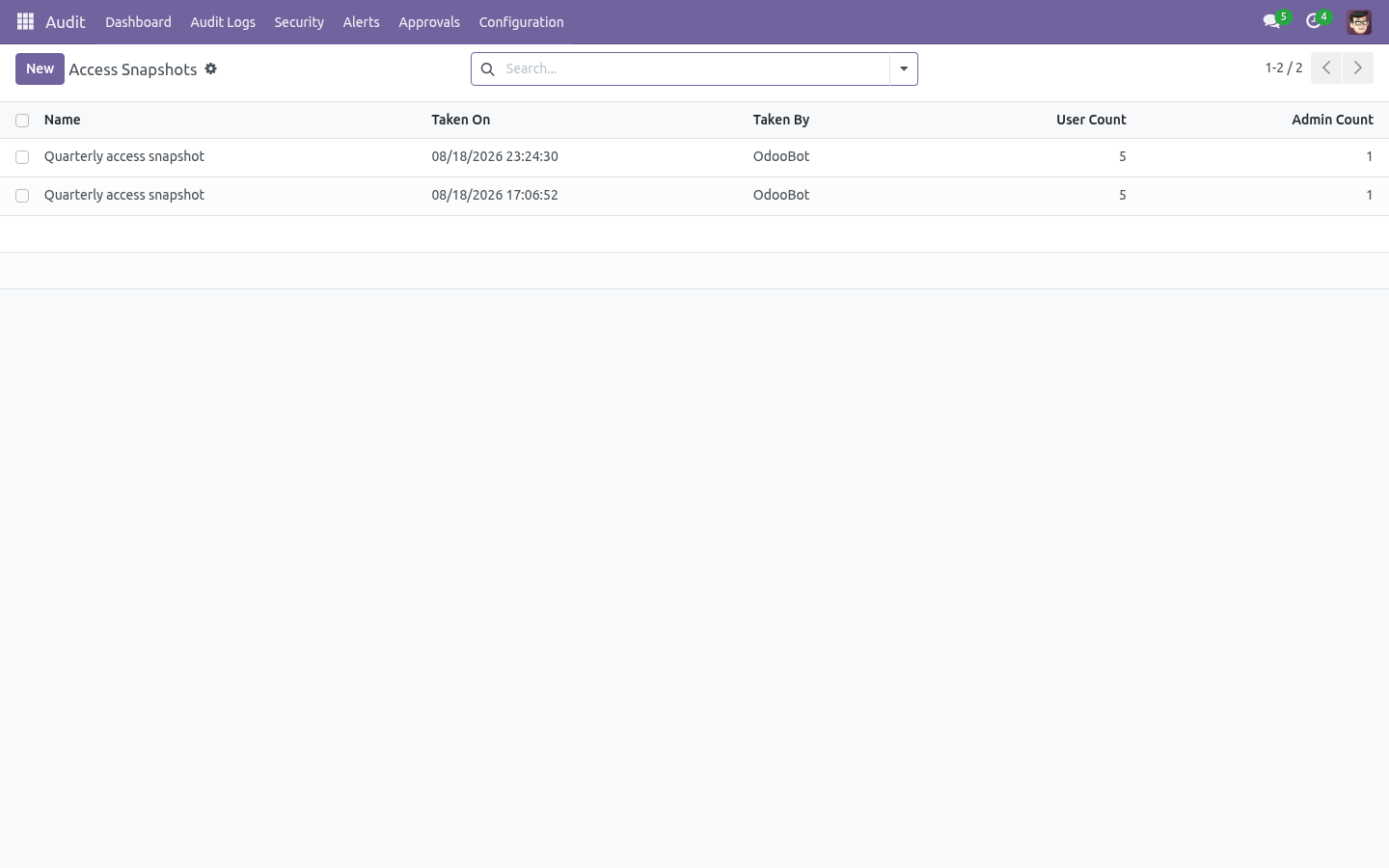
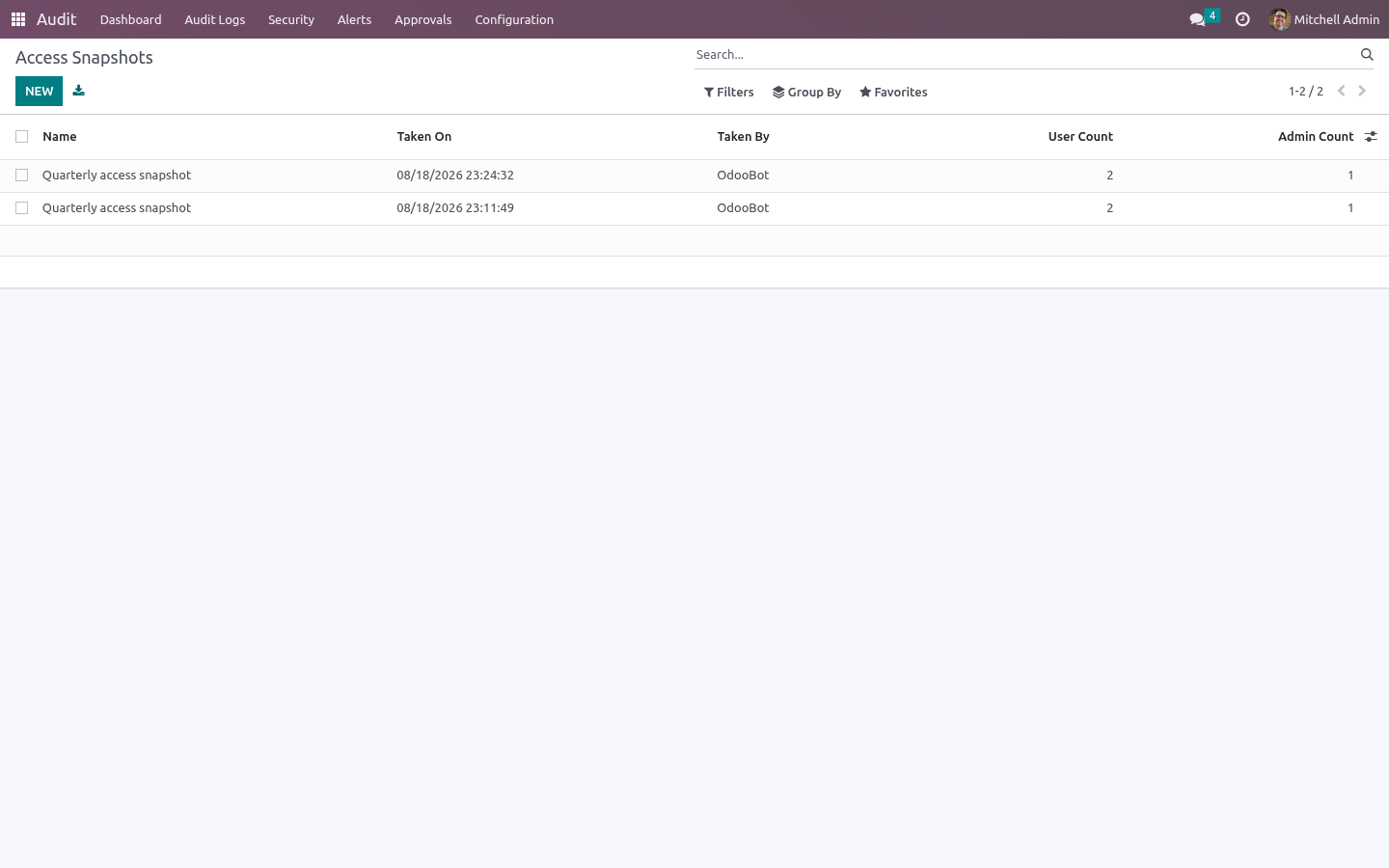
Audit ▸ Security ▸ Access Snapshots freezes what every internal user may do: their groups, a fingerprint of those groups, and whether they hold administrator rights. Take one on demand or leave the scheduled action to do it, then open a later snapshot and press Compare to see who gained rights, who lost them, who joined and who left — users whose fingerprint is unchanged are deliberately not listed.
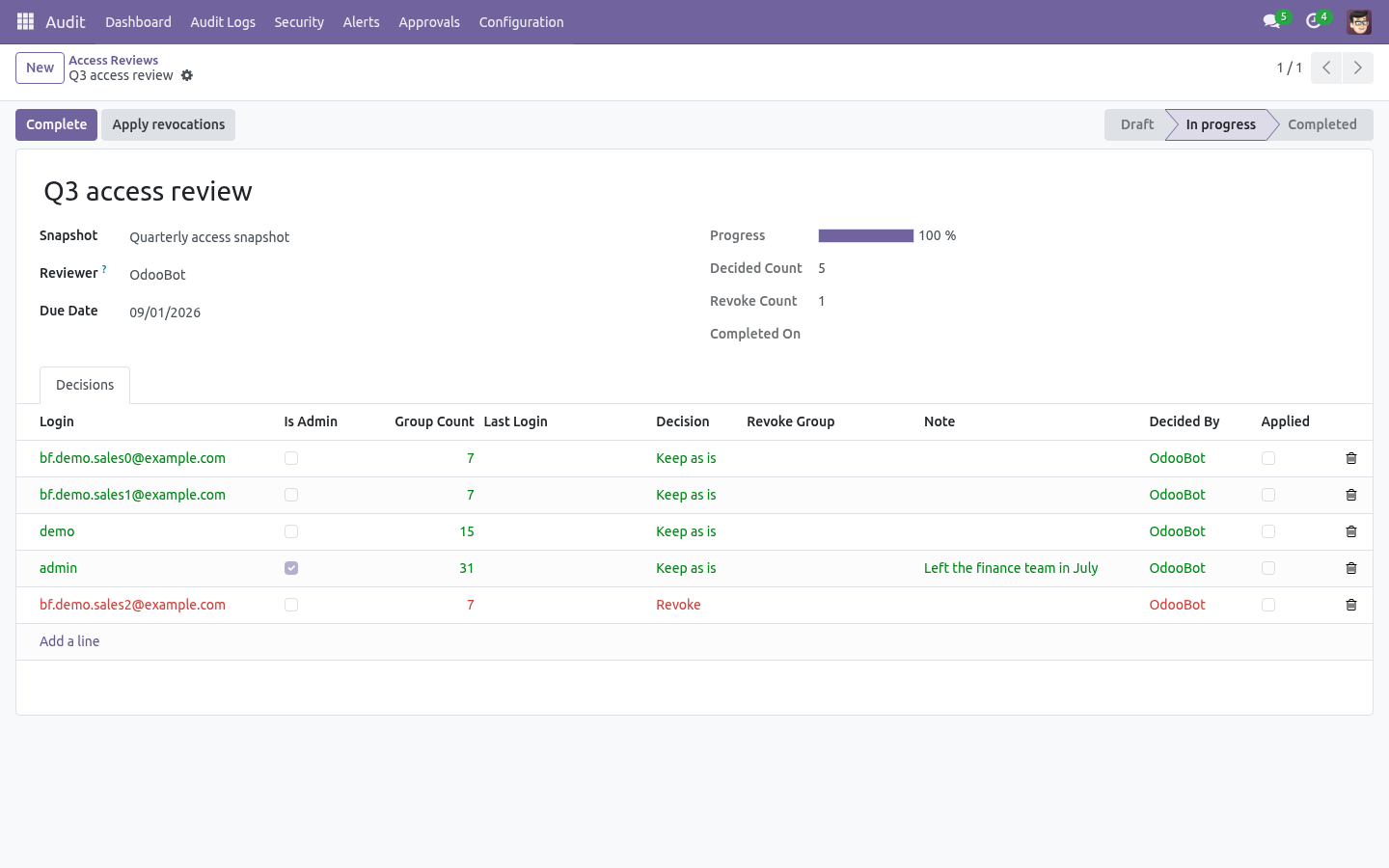
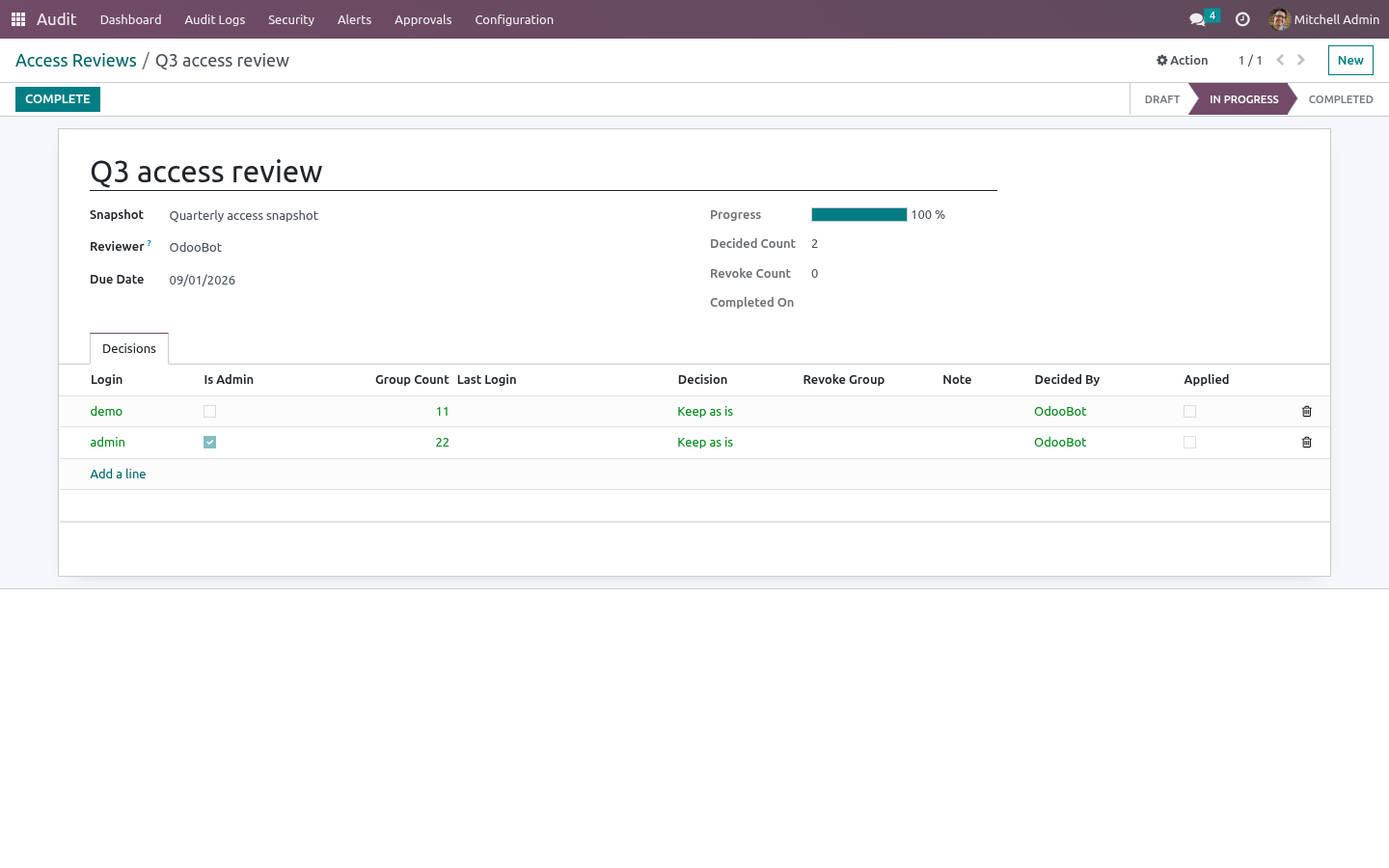
Audit ▸ Security ▸ Access Reviews turns a snapshot into the evidence an auditor asks for: one decision per user — keep or revoke — each stamped with the reviewer and the moment they answered. A campaign cannot be completed while a user is unanswered. Apply revocations strips only the groups the reviewer refused (leave the group list empty to remove everything the user held at snapshot time), records who applied it, and refuses to let a reviewer revoke their own access in a campaign they are signing.
Configuration
All configuration lives under the Audit app. The menu groups are:
Menu group |
Contains |
|---|---|
Audit Logs |
Logs, Log Lines, Timeline, Export Logs. |
Security |
Login Events, Anomaly Rules. |
Alerts |
Alerts, Alert Rules. |
Configuration |
Getting Started, Rules, Audit Models, Compliance Presets, Webhooks, Webhook Queue, Archive Targets. Approvals sit directly under Audit. |
Step 1 — Choose what to audit (audit rules)
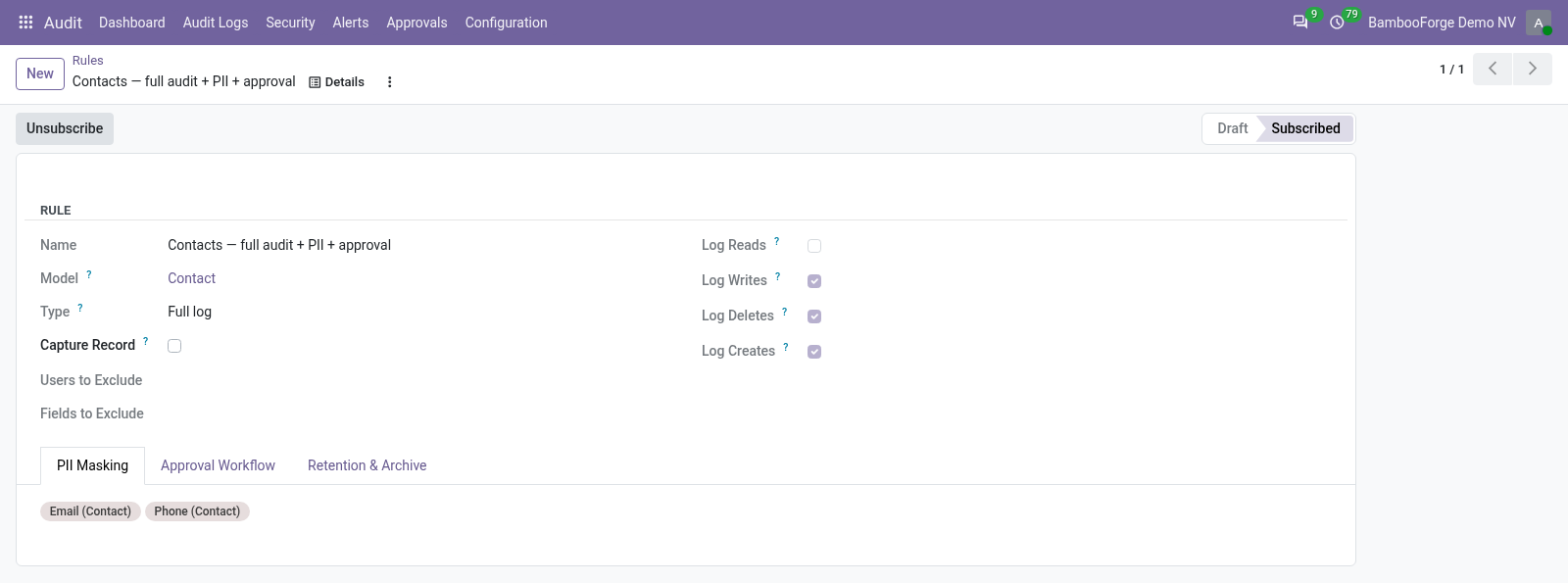
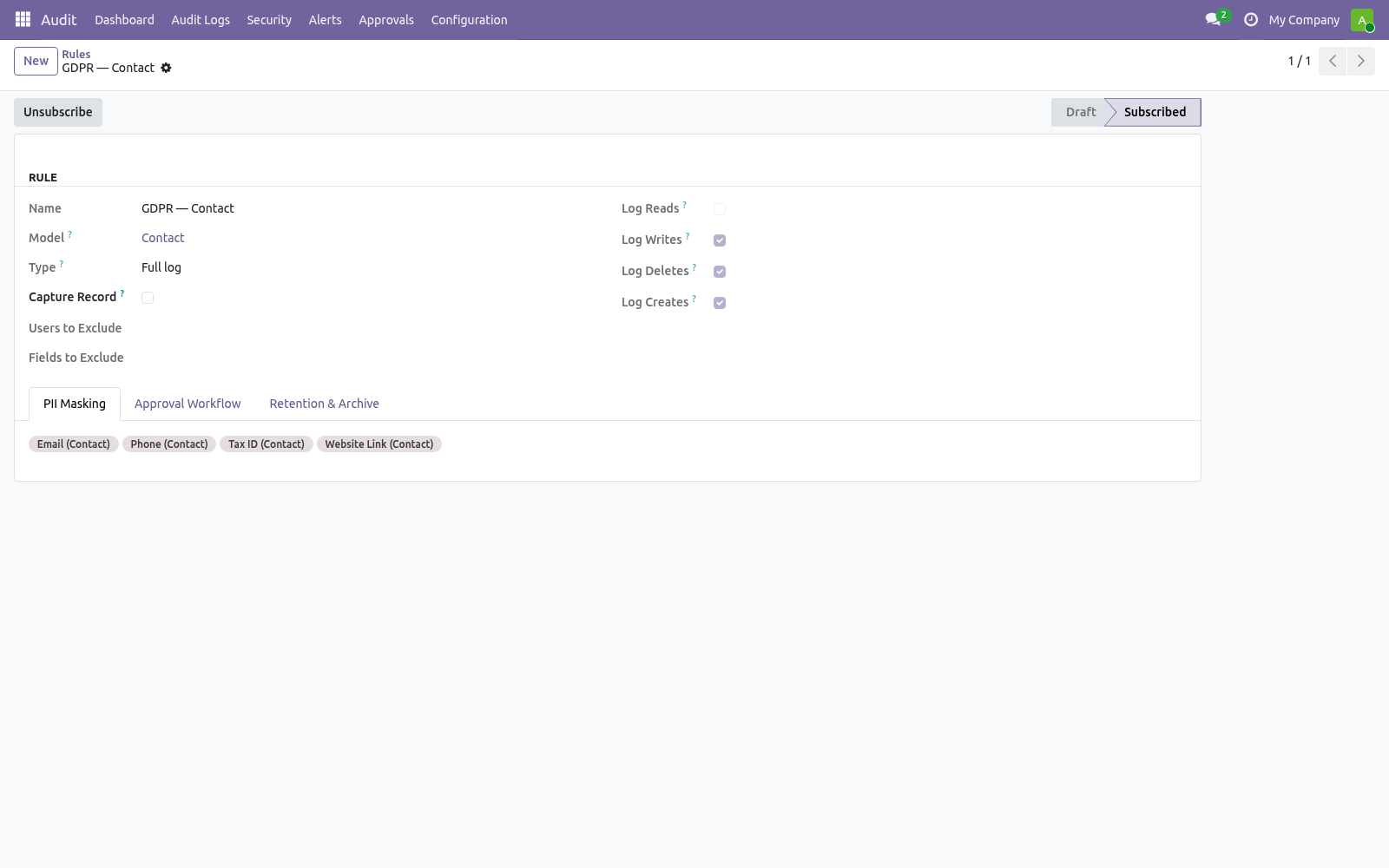
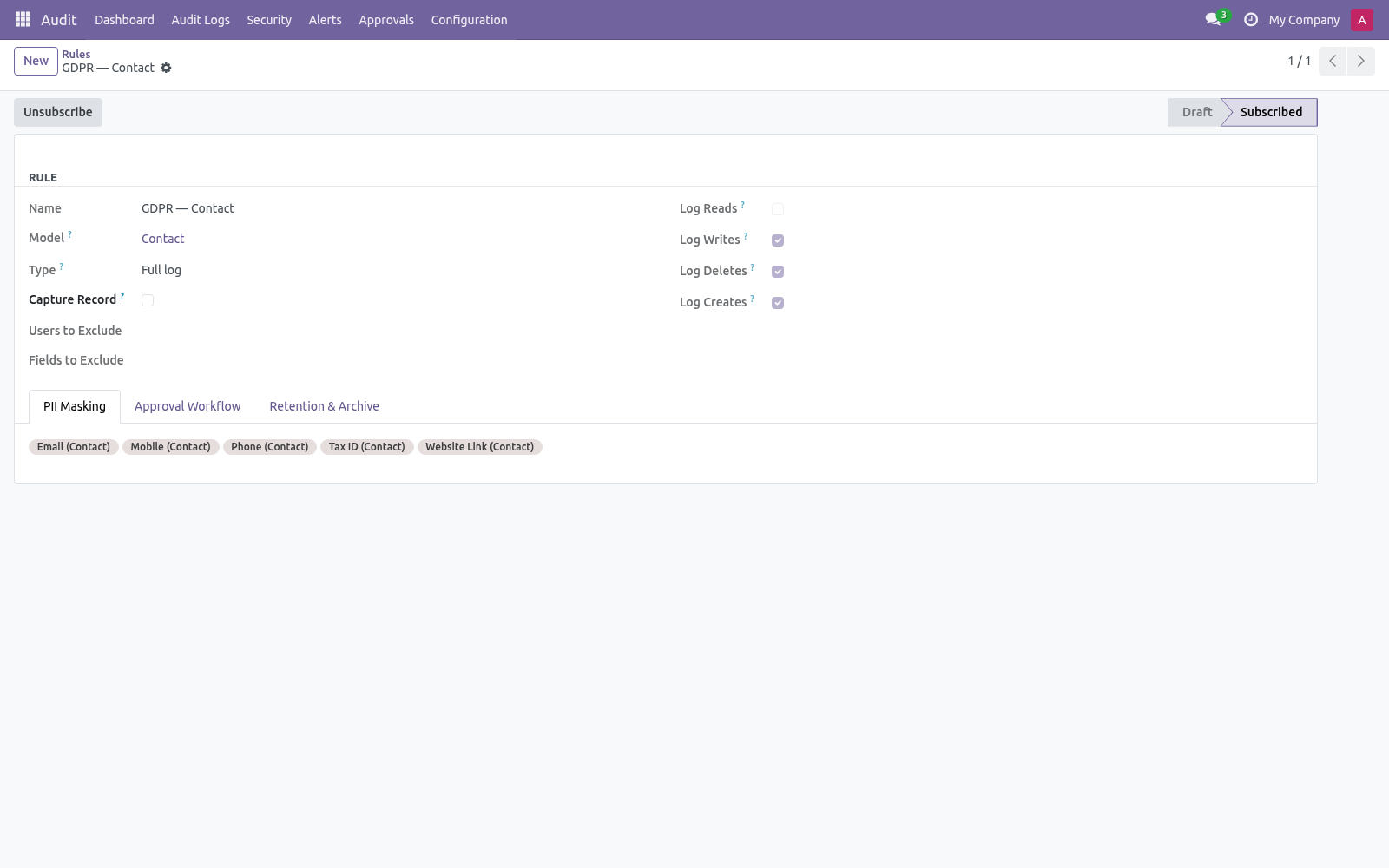
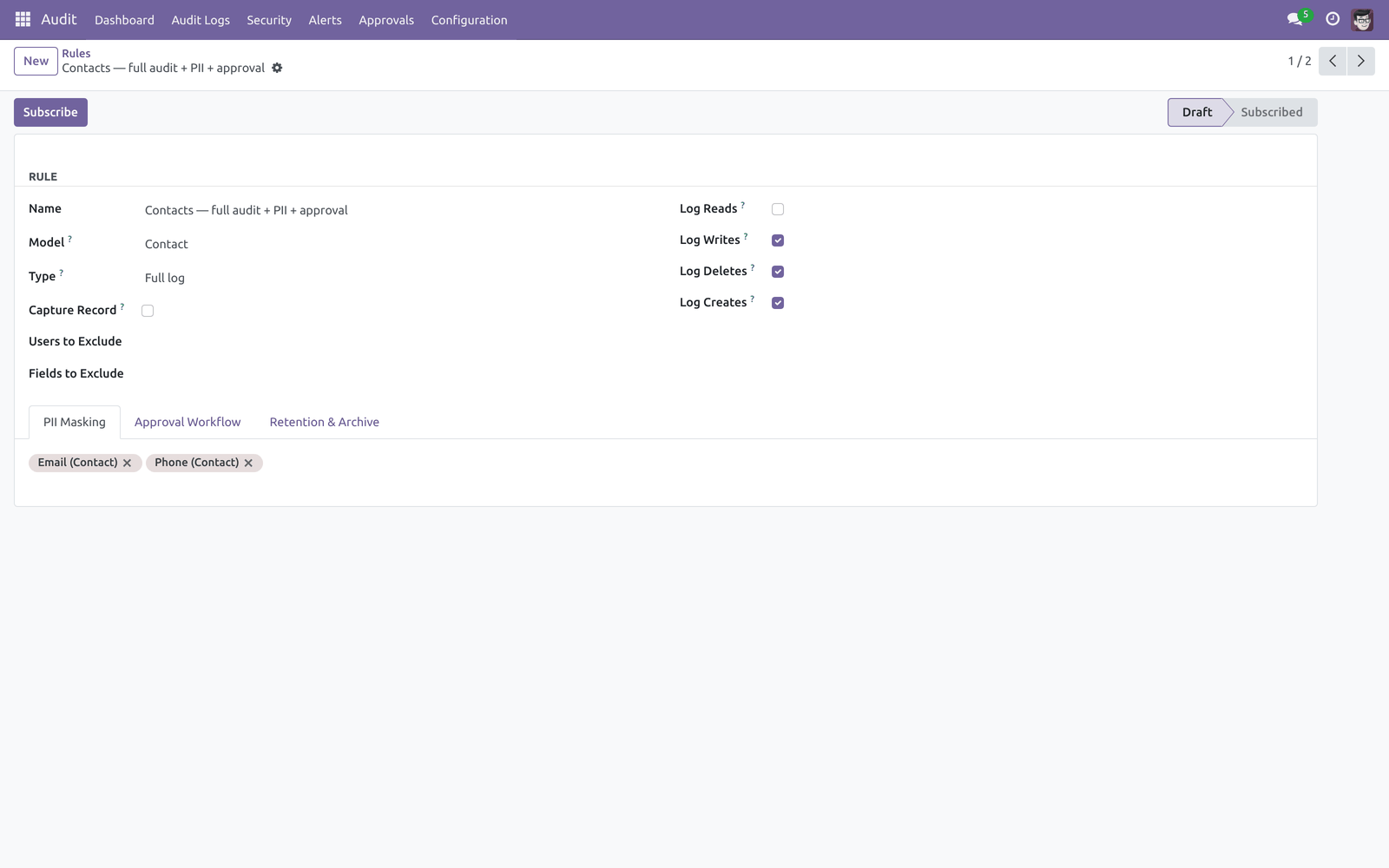
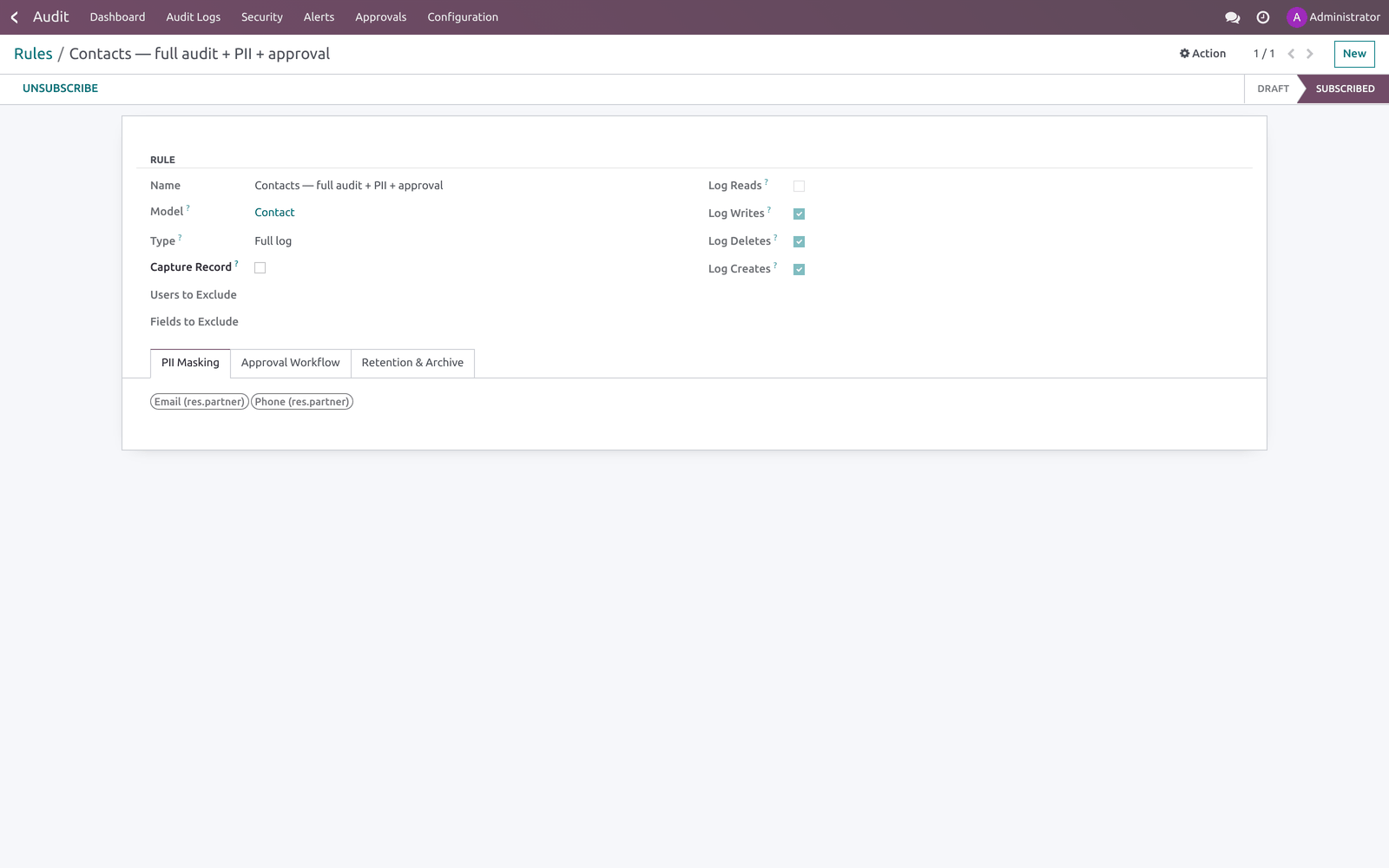
Open Audit ▸ Configuration ▸ Rules and create a record (one rule per model — the model is unique across rules).
Field |
What it does |
|---|---|
Model |
The model to track. Locked once the rule is Subscribed. |
Type |
Full log makes a before/after diff of every field (richer, slower); Fast log records only the values passed to create/write (less detail, faster). |
Log Reads / Writes / Deletes / Creates |
Which operations generate logs. Writes, Deletes and Creates are on by default; Reads is off (it is the noisiest). |
Capture Record |
On Full log + Log Deletes, keep a snapshot of a record's values when it is deleted. |
Users to Exclude |
Operations by these users are never logged (for example an integration user). |
Fields to Exclude |
Fields that never appear in the diff. |
The rule form also carries three tabs:
PII Masking — Fields to Mask (PII). Values of these fields are masked when stored in audit lines (emails become a***@b***.c, phone numbers keep the country code and last two digits, everything else becomes ***).
Approval Workflow — Sensitive Fields (require approval), Approver Group and Approval Timeout (hours) (default 72). See Step 4.
Retention & Archive — Retention Days (0 = use the global autovacuum, 180 days by default) and Archive Target. See Step 6.
Click Subscribe in the header to activate the rule. The state moves to Subscribed and an Audit History shortcut is added to the Action menu of the audited model's form. Click Unsubscribe to stop logging; you must unsubscribe before changing the model, operations or masking/sensitive fields.
Faster starts:
Audit Models (Configuration ▸ Audit Models) subscribes several models at once with the same settings.
Compliance Presets (Configuration ▸ Compliance Presets) bootstraps GDPR, SOX or PCI-DSS in one click — it creates and subscribes the right rules with masking, sensitive fields and retention already filled in, and skips models that are not installed on your database.
Step 2 — Anomaly rules
Open Audit ▸ Security ▸ Anomaly Rules. An anomaly rule raises an alert when the number of matching audit events crosses a threshold inside a time window.
Field |
What it does |
|---|---|
Model |
Scope to one model. Empty = all models. |
Method |
Scope to Create / Write / Read / Delete. Empty = all. |
User |
Scope to one user. Empty = any user. |
Threshold (events) |
Raise an alert when this many matching events occur within the window (default 100). |
Window (minutes) |
The rolling window length (default 10). |
Severity |
Low / Medium / High / Critical (labelling only). |
Alert channel |
The alert rule whose email + webhook channels fire on a breach. Leave empty and one is auto-created on the first breach. |
A cron (Audit anomaly — evaluate thresholds, every 5 minutes) walks the active rules. The Last evaluation fields show the last run time and event count. Breaches are deduplicated so you do not get repeat alerts inside the same window.
Step 3 — Alert rules, email and webhooks
An Alert Rule (Audit ▸ Alerts ▸ Alert Rules) matches a slice of the trail and raises an Alert. Combine Model, User, Method, Field and Keyword (the alert fires only when the changed values contain that keyword) to narrow it.
On the alert rule, the Notification Channels section controls how a match is shipped:
Send Email — uses an email template (defaults to the bundled audit-alert template) and an optional comma-separated Email Recipients override. Mail is queued, not sent inline, so a slow SMTP server never blocks the user write that triggered the alert.
Webhooks — one or more webhook records to call. Dispatch is queued (see Step 5).
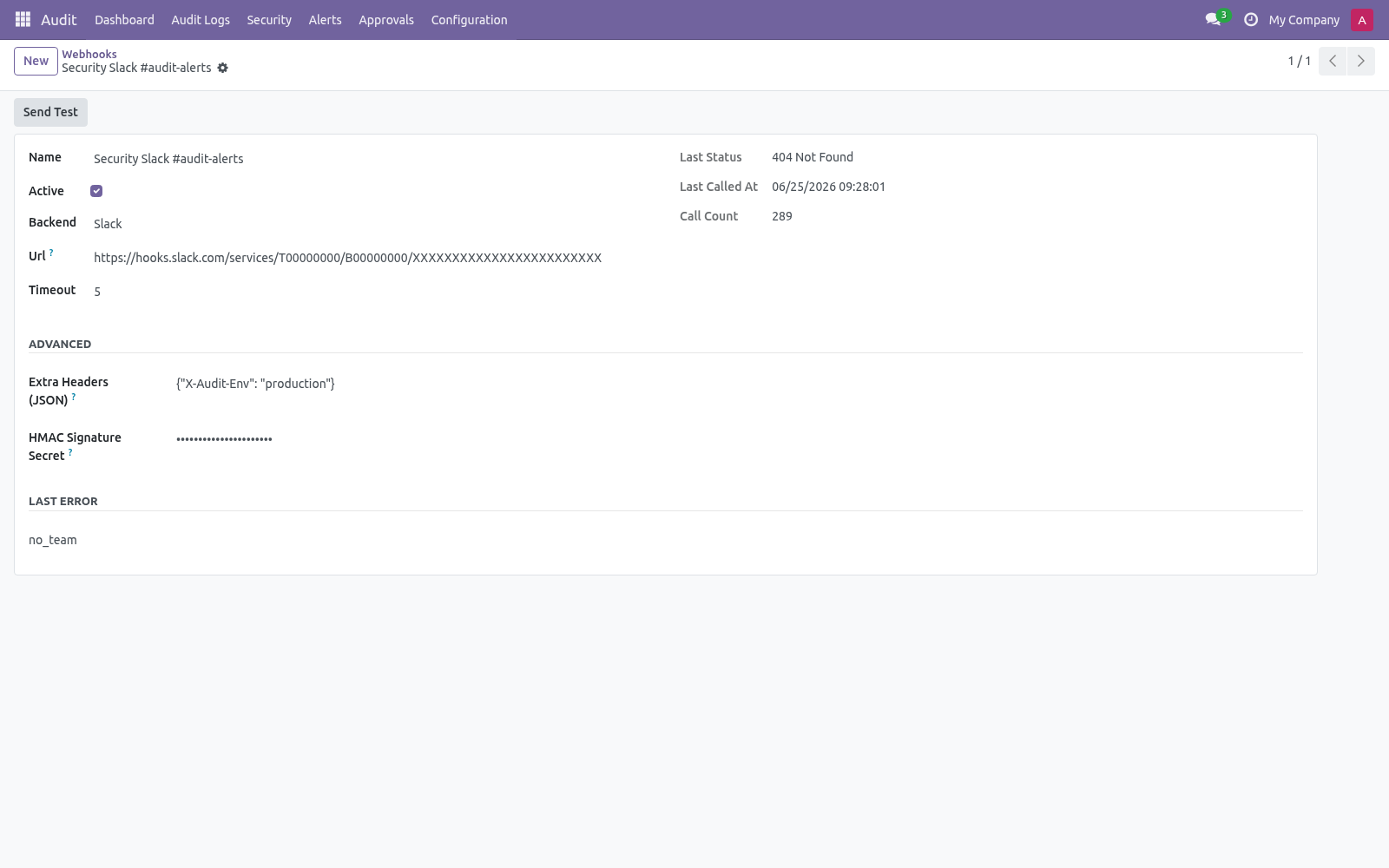
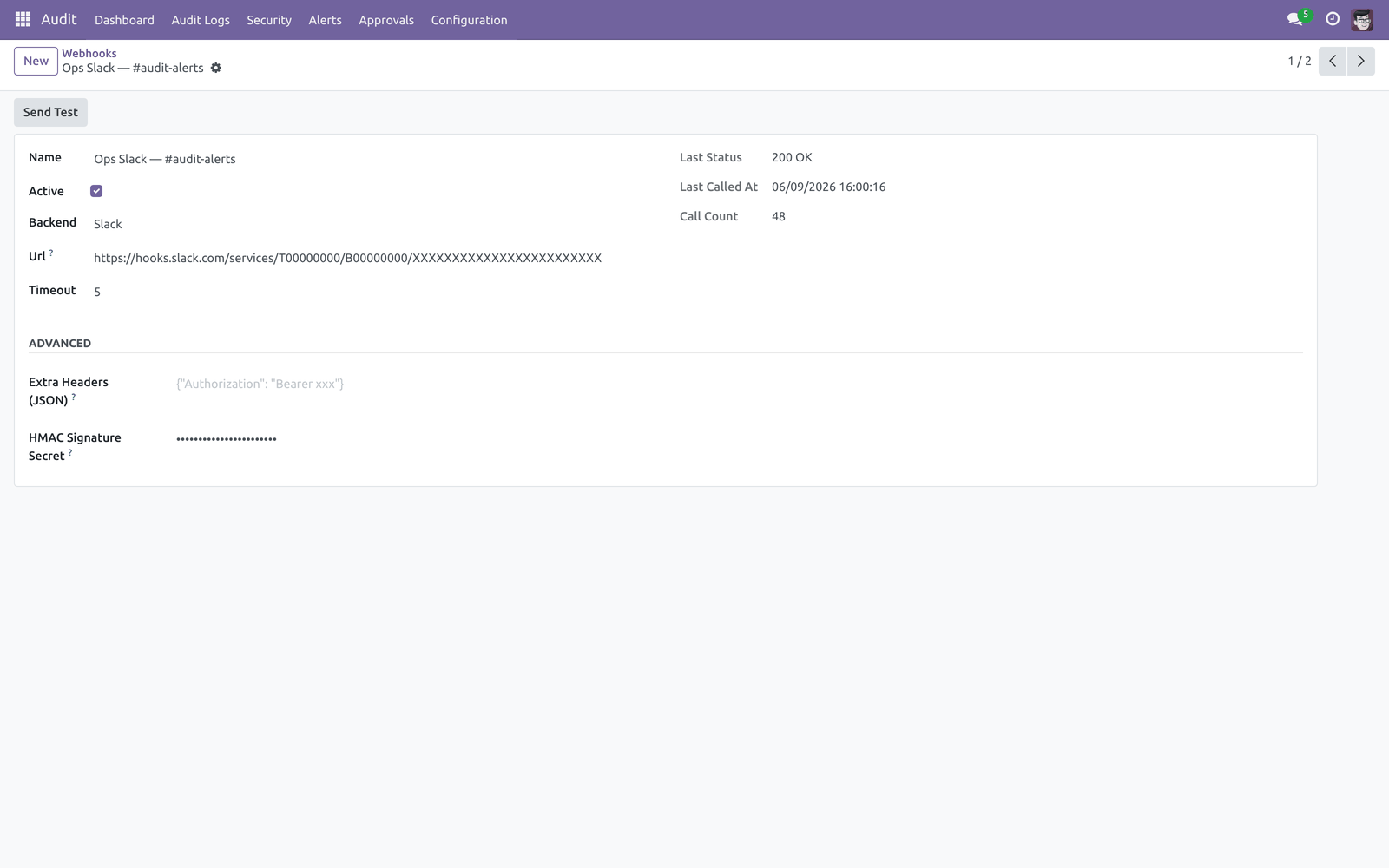
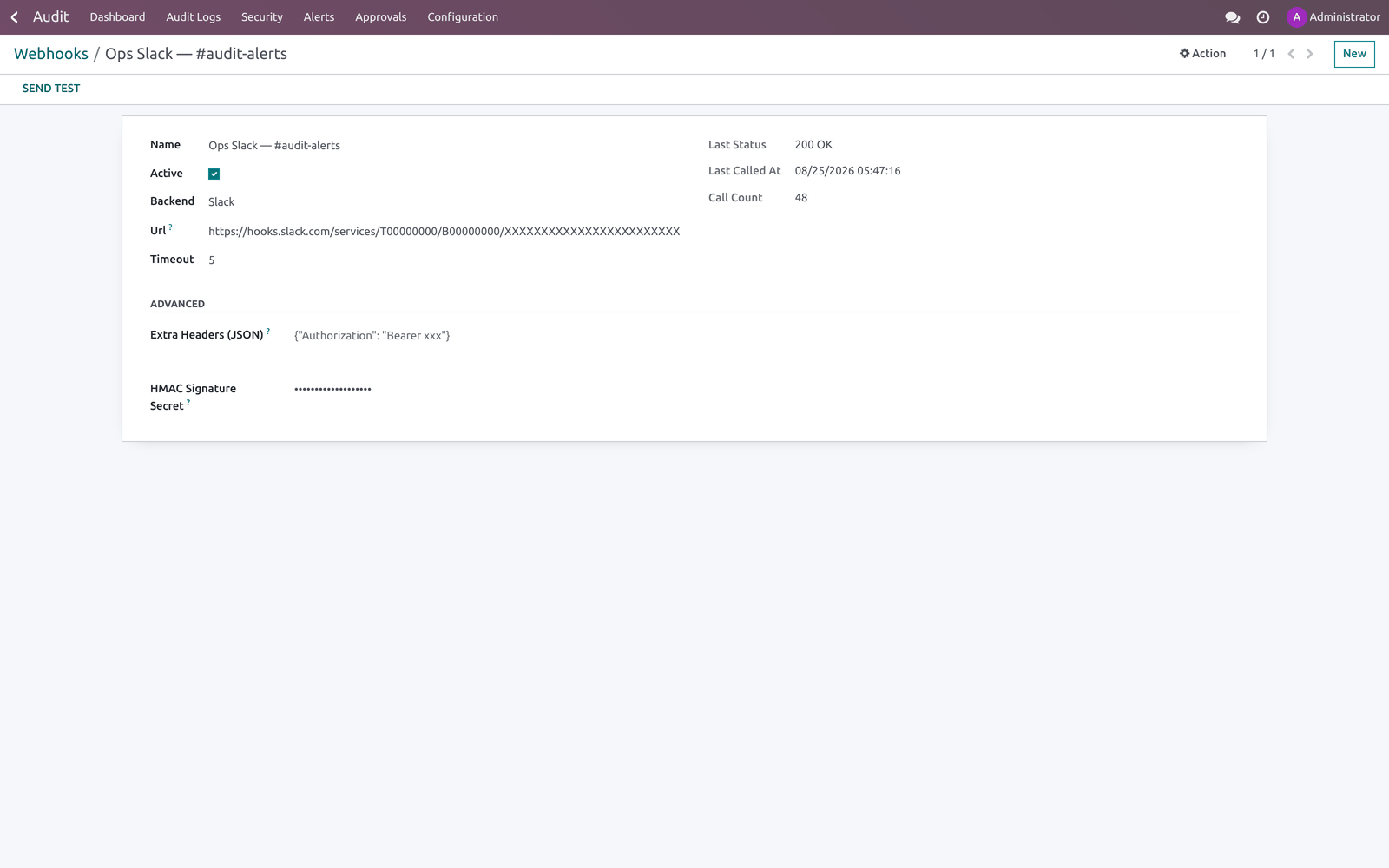
To create a webhook, open Audit ▸ Configuration ▸ Webhooks.
Field |
What to enter |
|---|---|
Backend |
Slack, Discord, Microsoft Teams or Generic JSON. This shapes the payload to the receiver's expected format. |
URL |
The incoming webhook URL. Must be a public host — internal/loopback/private addresses are rejected. |
Timeout |
Per-call timeout in seconds (default 5). |
Extra Headers (JSON) |
Optional JSON object merged into the request headers, e.g. {"Authorization": "Bearer xxx"}. |
HMAC Signature Secret |
If set, each request carries an X-BFAudit-Signature: sha256=… header so the receiver can verify the body was not altered. |
Use the Send Test button to POST a synthetic payload and confirm connectivity before attaching the webhook to an alert rule. The form shows the last status, last call time and call count.
Step 4 — Approval workflow
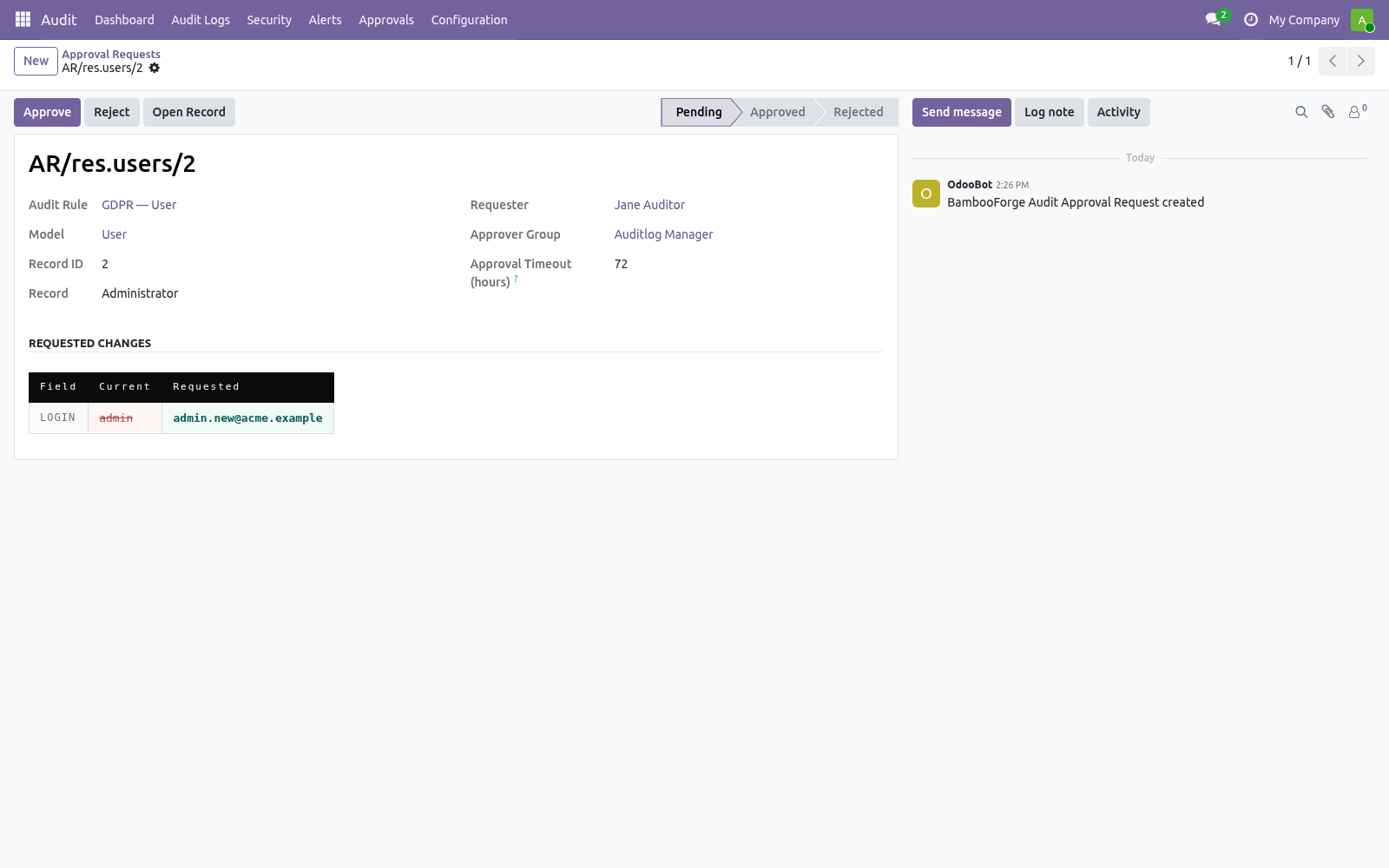
Approvals turn a risky edit into a reviewed action. On an audit rule's Approval Workflow tab, add fields to Sensitive Fields (require approval), pick an Approver Group and set an Approval Timeout (hours).
From then on, when any user tries to write one of those fields, the write is blocked and a bf.audit.approval.request is created instead. Approvers find pending requests under Audit ▸ Approvals.
The request shows a side-by-side Current vs Requested diff. An approver in the group clicks Approve to apply the change for real, Reject to discard it, or Open Record to inspect the target. Requests left pending past the rule's timeout are auto-expired by an hourly cron (Audit approval — expire pending). If applying an approved change fails (the record was deleted, the value is invalid…), the request moves to Apply Error with the reason recorded.
Step 5 — Webhook queue
Webhook dispatch is asynchronous: when an alert fires, each webhook call is enqueued in Audit ▸ Configuration ▸ Webhook Queue and a cron (Audit webhook — drain queue, every minute) sends it with retry/back-off. This guarantees a slow or failing endpoint can never block the user write that triggered the alert. Each queue row shows its state (pending / sending / sent / failed), retry count and last error; Retry Now forces an immediate attempt.
Step 6 — Archive targets & retention
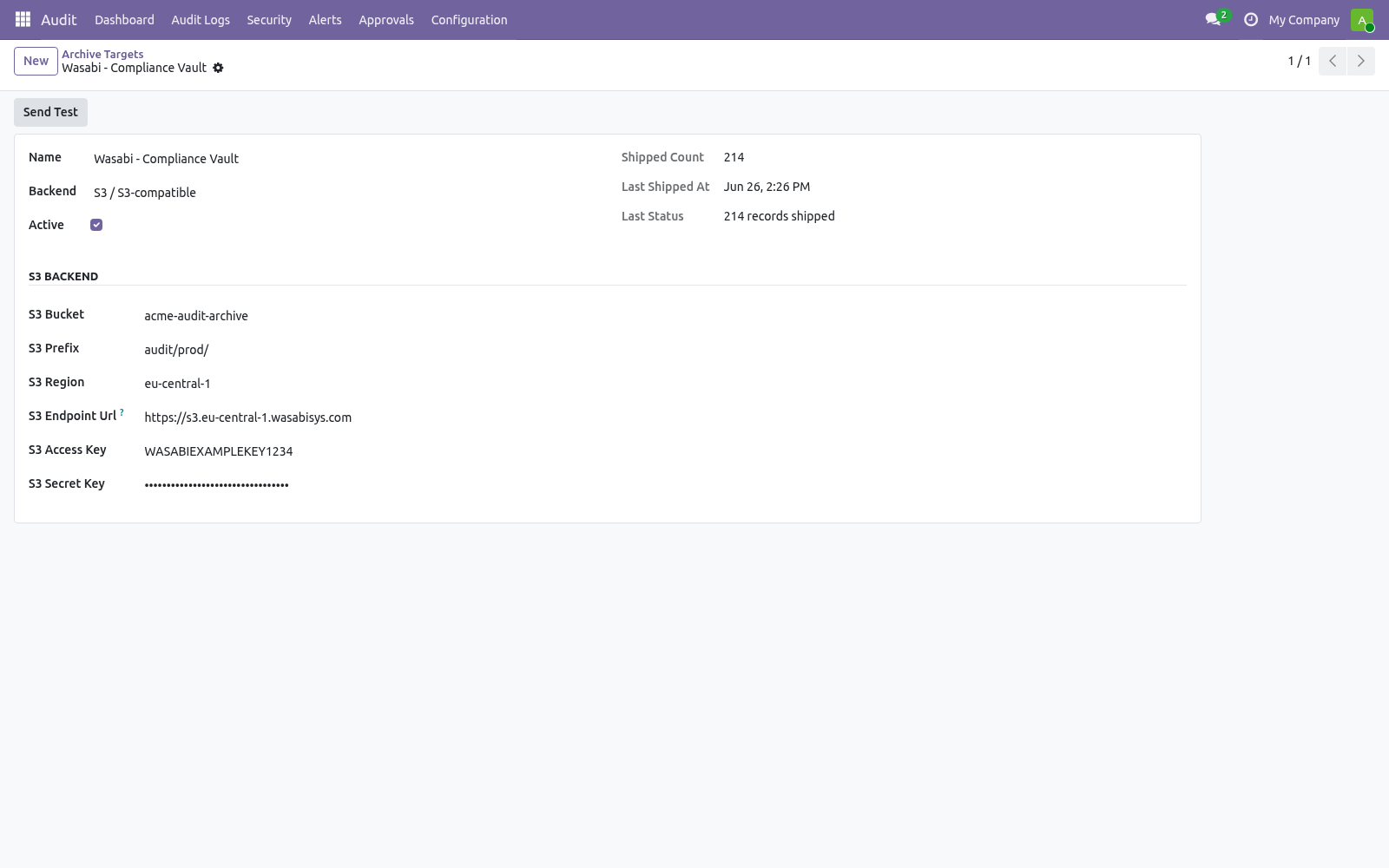
Logs are deleted on a schedule; archive targets let you keep a durable copy first. Create a target under Audit ▸ Configuration ▸ Archive Targets, then set it as the Archive Target on the relevant audit rule.
Backend |
What to configure |
|---|---|
Local File |
File Path — a directory on the Odoo host. One JSON-Lines file is written per batch. For safety the path must sit inside the base directory set by the bambooforge_audit_pro.archive_base_dir system parameter (defaults to <data_dir>/bf_audit_archive); paths outside it are rejected. |
Syslog |
Syslog Host, Port (514) and Facility (local0–local7). |
S3 / S3-compatible |
Bucket, Prefix, Region, optional Endpoint URL (for MinIO / Wasabi / R2), and access/secret keys. Requires the boto3 package. |
Use Send Test to ship one synthetic record and confirm the target works; the form records the last status, time and shipped count.
Retention is driven by two crons:
Cron |
Default |
What it does |
|---|---|---|
Auto-vacuum audit logs |
daily, off |
Deletes logs, HTTP requests, HTTP sessions, login events and old webhook-queue rows older than 180 days. Disabled out of the box — enable it to use the global window. |
Audit per-rule retention vacuum |
daily, on |
Deletes logs older than each subscribed rule's Retention Days (0 = skip). |
Audit approval — expire pending |
hourly, on |
Auto-expires approval requests past their timeout. |
Audit webhook — drain queue |
every minute, on |
Sends queued webhook calls with retry/back-off. |
Audit anomaly — evaluate thresholds |
every 5 min, on |
Evaluates anomaly rules. |
Both vacuums ship logs to their rule's archive target before deleting them, so a configured archive is always durable first.
Usage
Dashboard
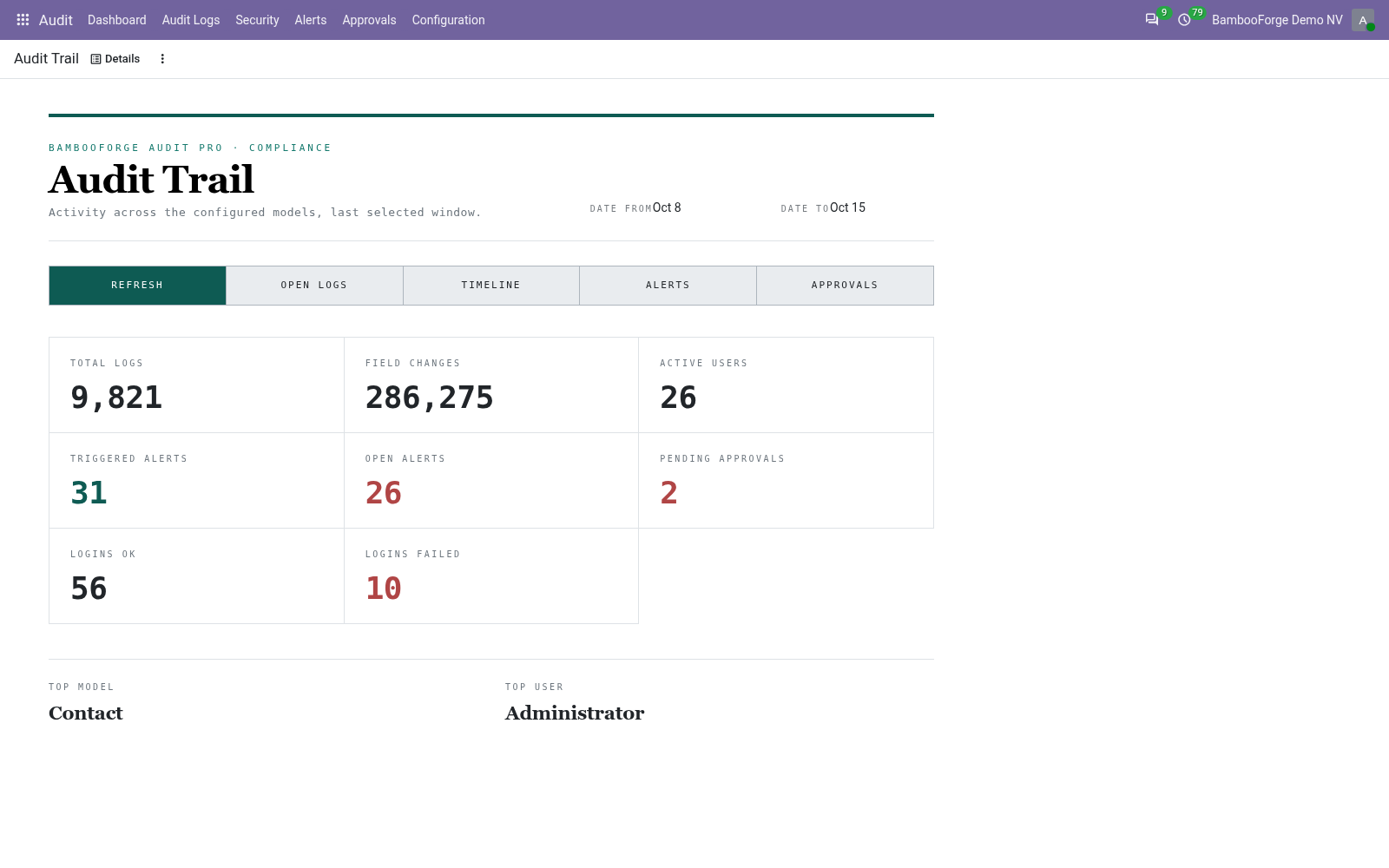
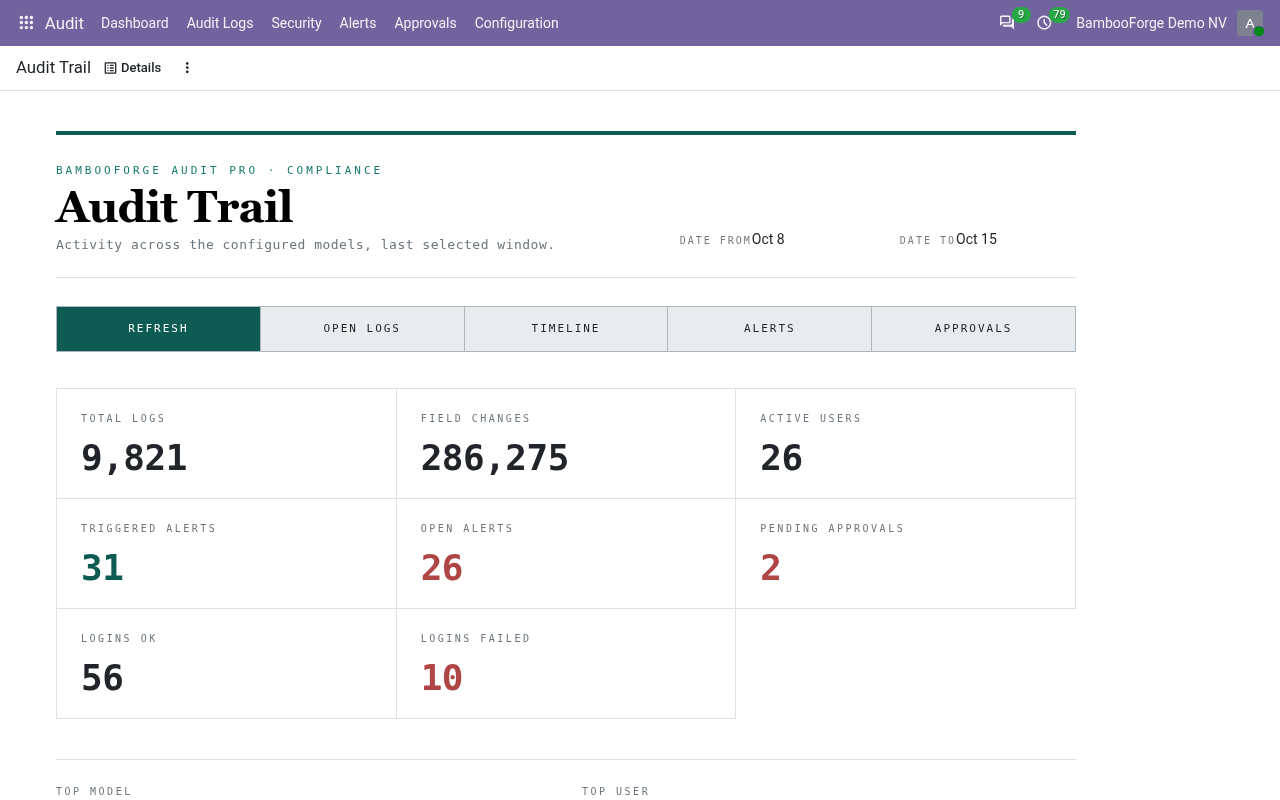
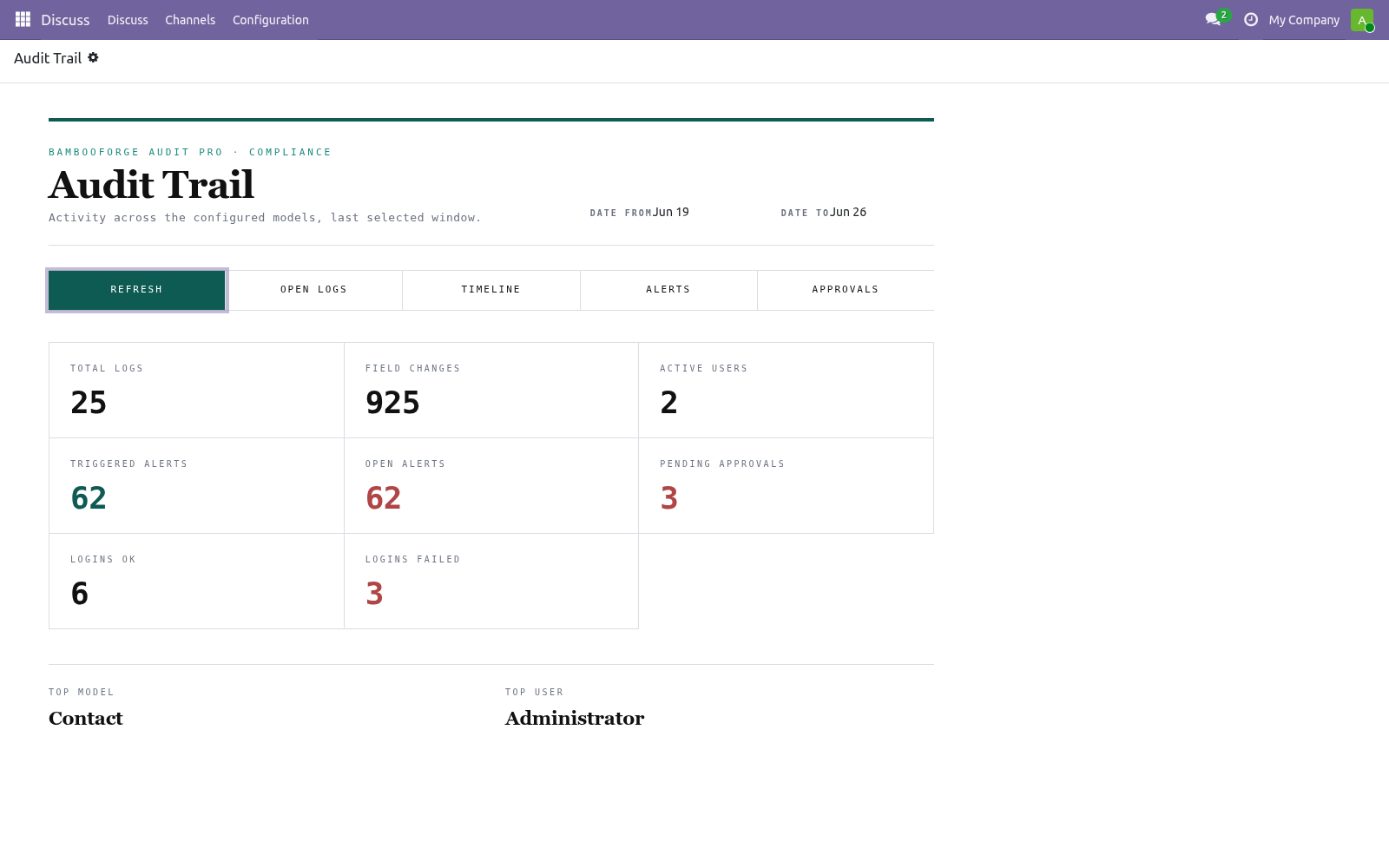
Open Audit ▸ Dashboard. Pick a From / To window; the KPIs recompute live: Total Logs, Field Changes, Active Users, Triggered Alerts, Open Alerts, Pending Approvals, Logins OK and Logins Failed, plus the Top Model and Top User for the window.
The action bar drills into the same window: Open Logs, Timeline, Alerts and Approvals. Refresh reloads the figures.
Logs
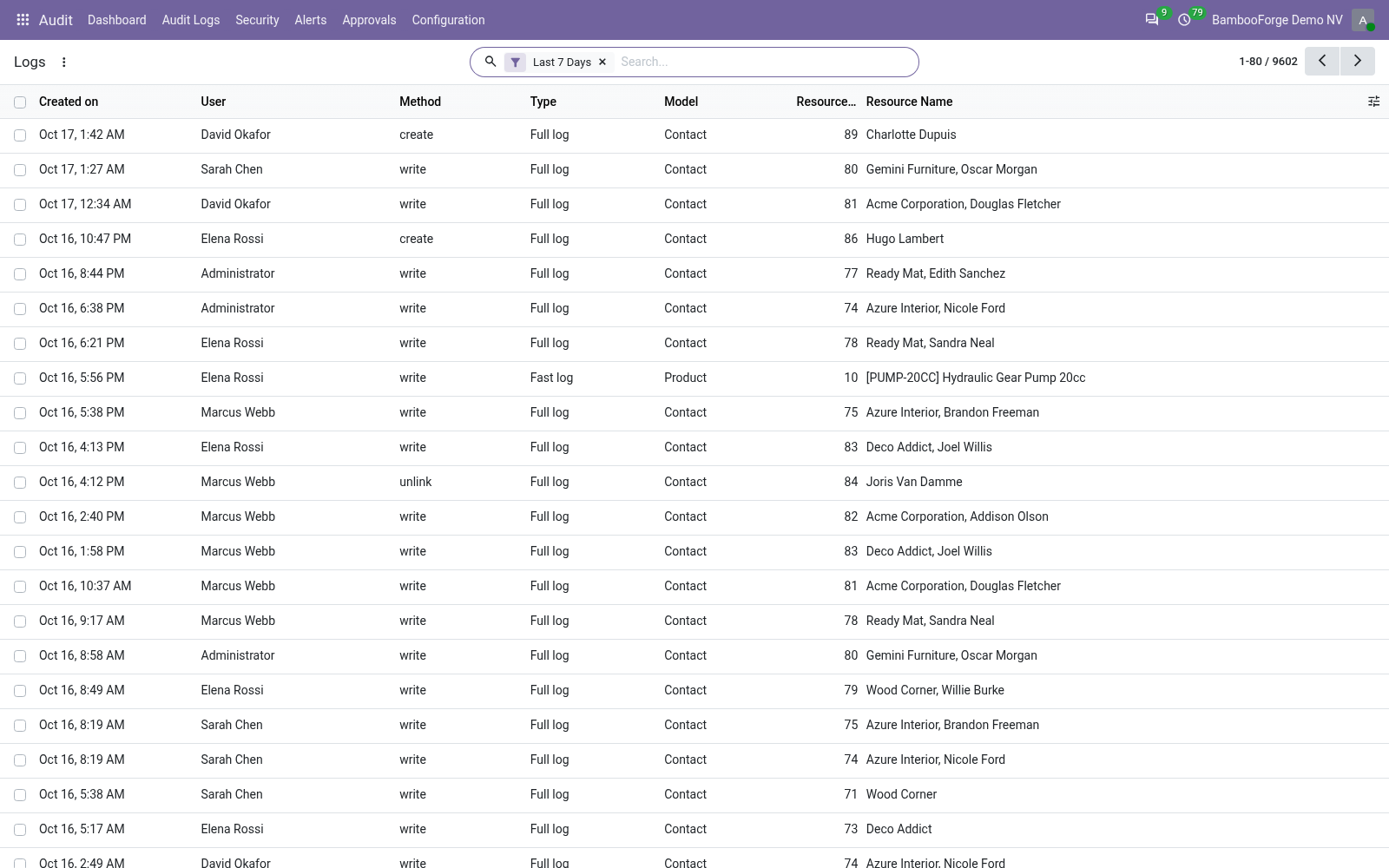
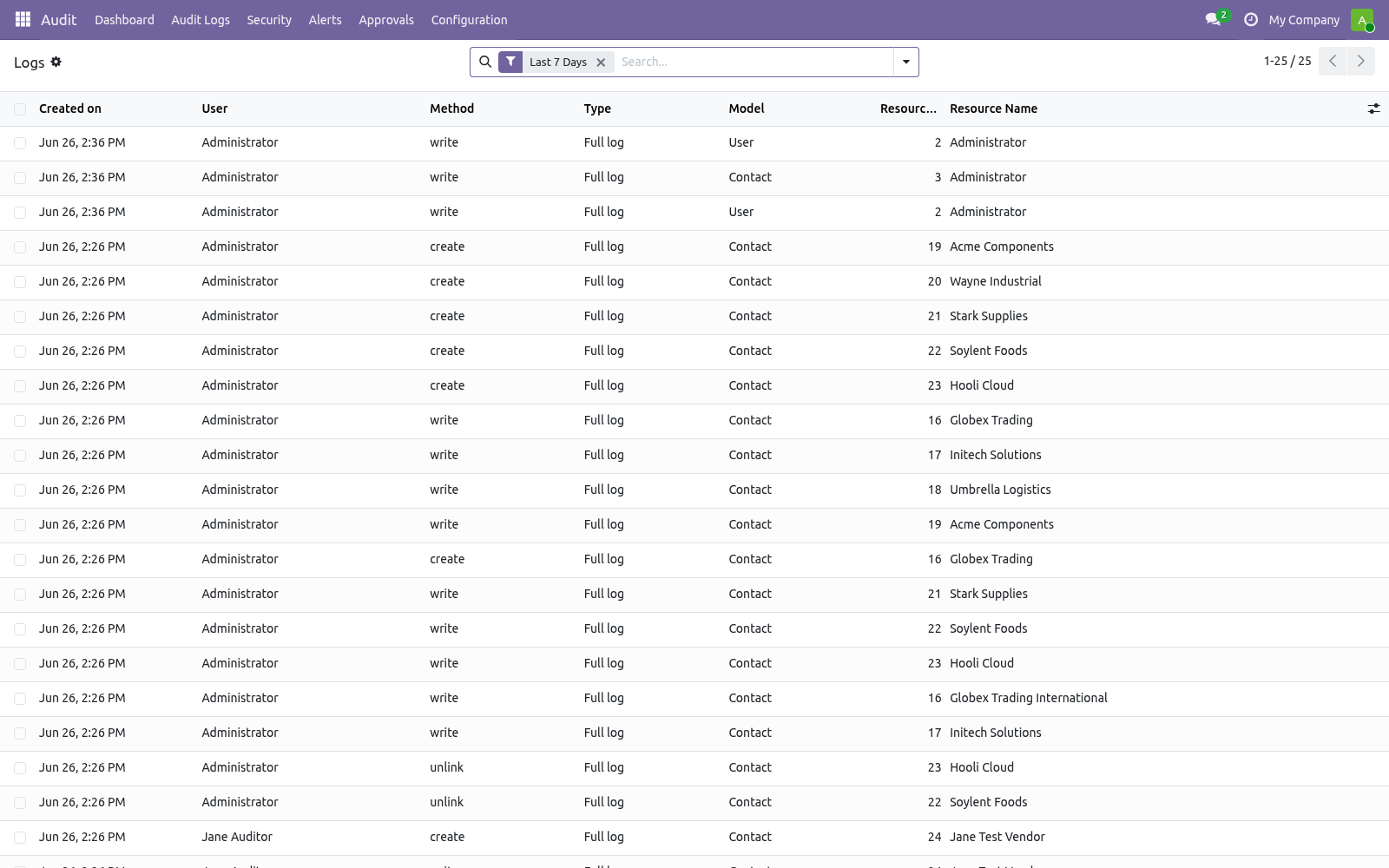
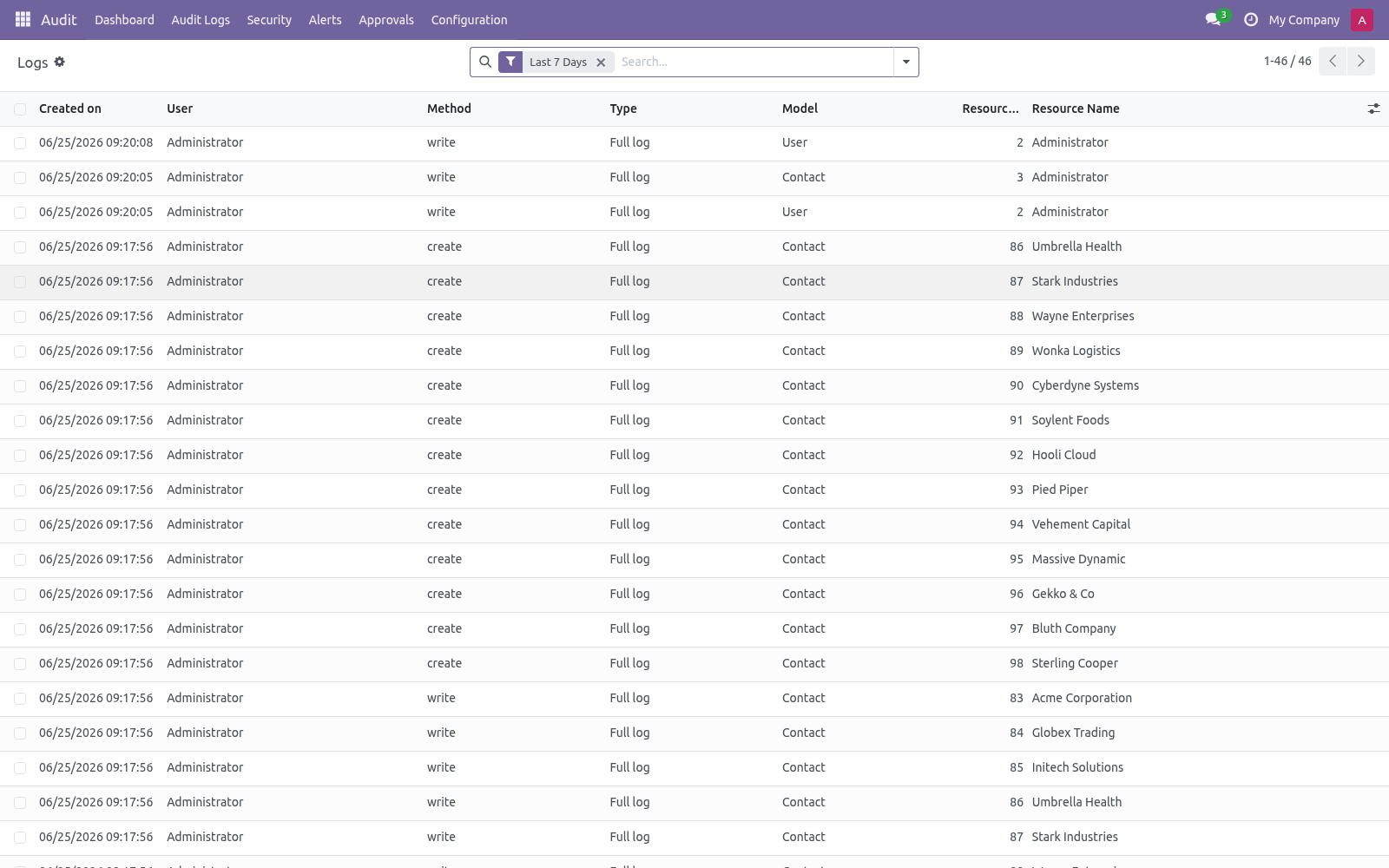
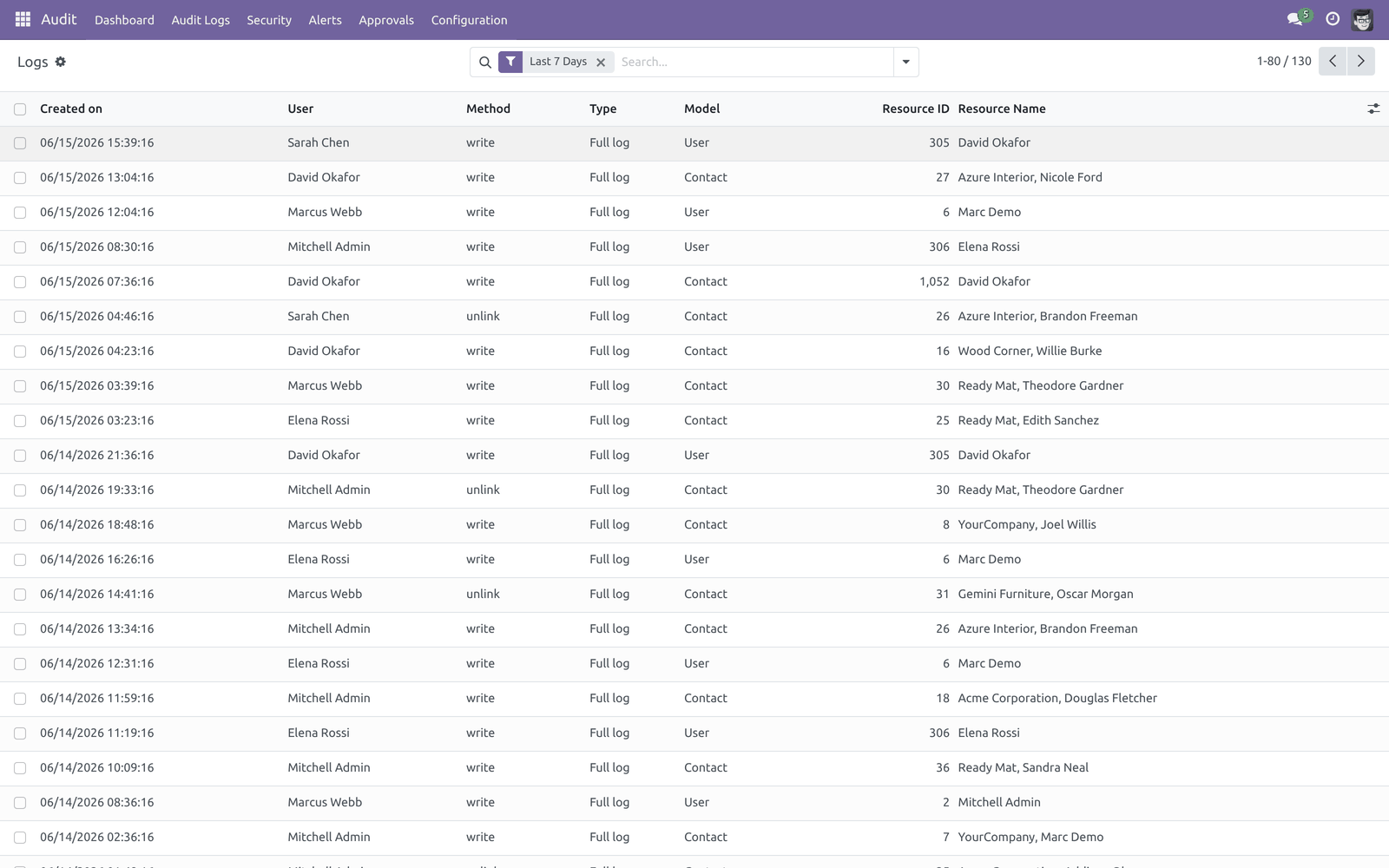
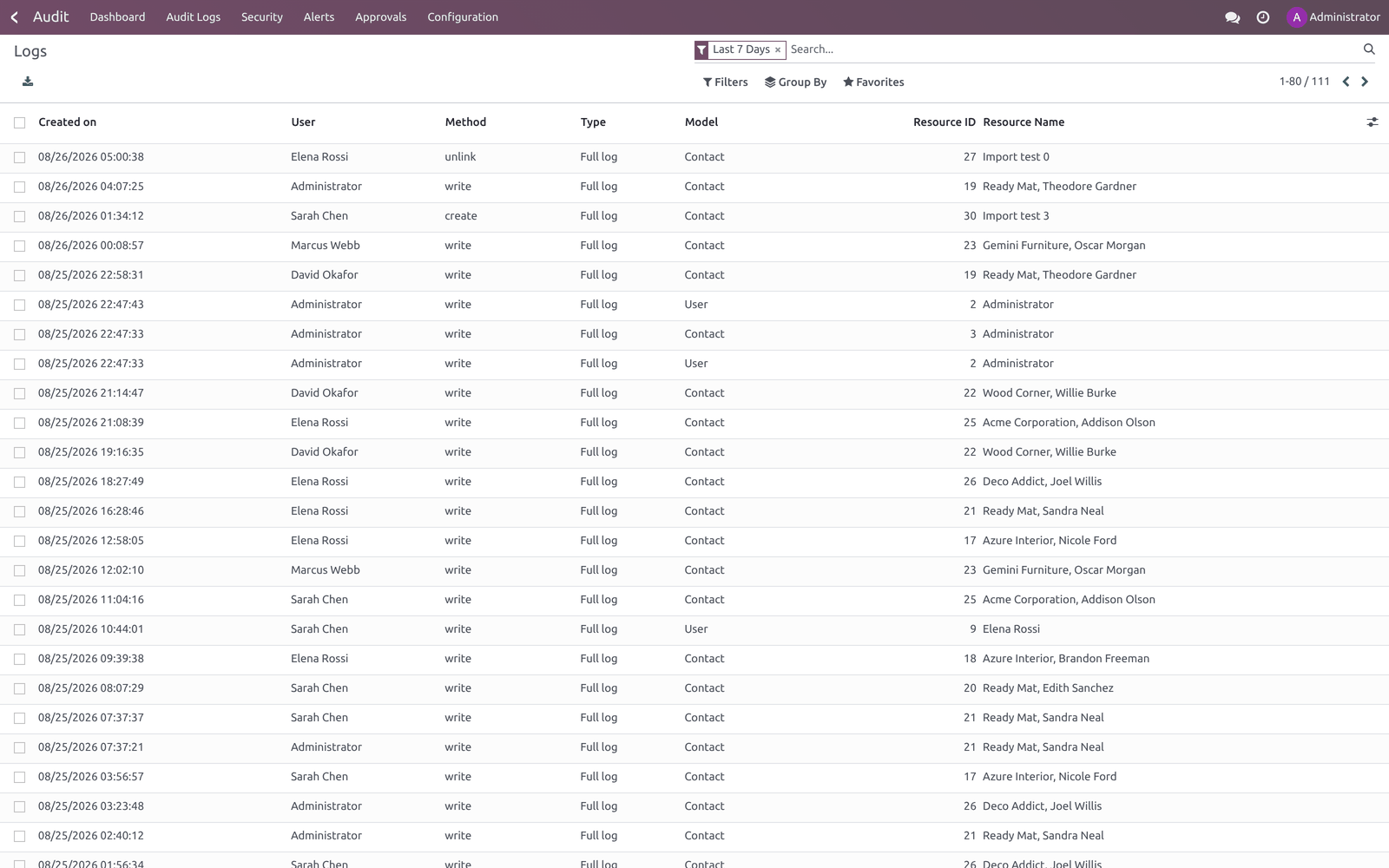
Audit ▸ Audit Logs ▸ Logs lists every captured operation (default filter: last 7 days). Each row is one operation on one record; open it to see the Changed Fields tab with the before/after value of each field and a per-field diff preview.
Group by User, Model, Method, Type, User session or HTTP Request to slice the trail. The log form also links to its Alerts and a record-scoped Timeline. From the list, two server actions are available in the Action menu: Anonymize (GDPR) (managers only — wipes field values to *** but keeps the envelope) and Verify Hash Chain (confirms the tamper-evidence chain is intact). Log Lines (Audit Logs ▸ Log Lines) is the same data flattened to one row per field change. Export Logs writes a filtered range to XLSX.
Login events
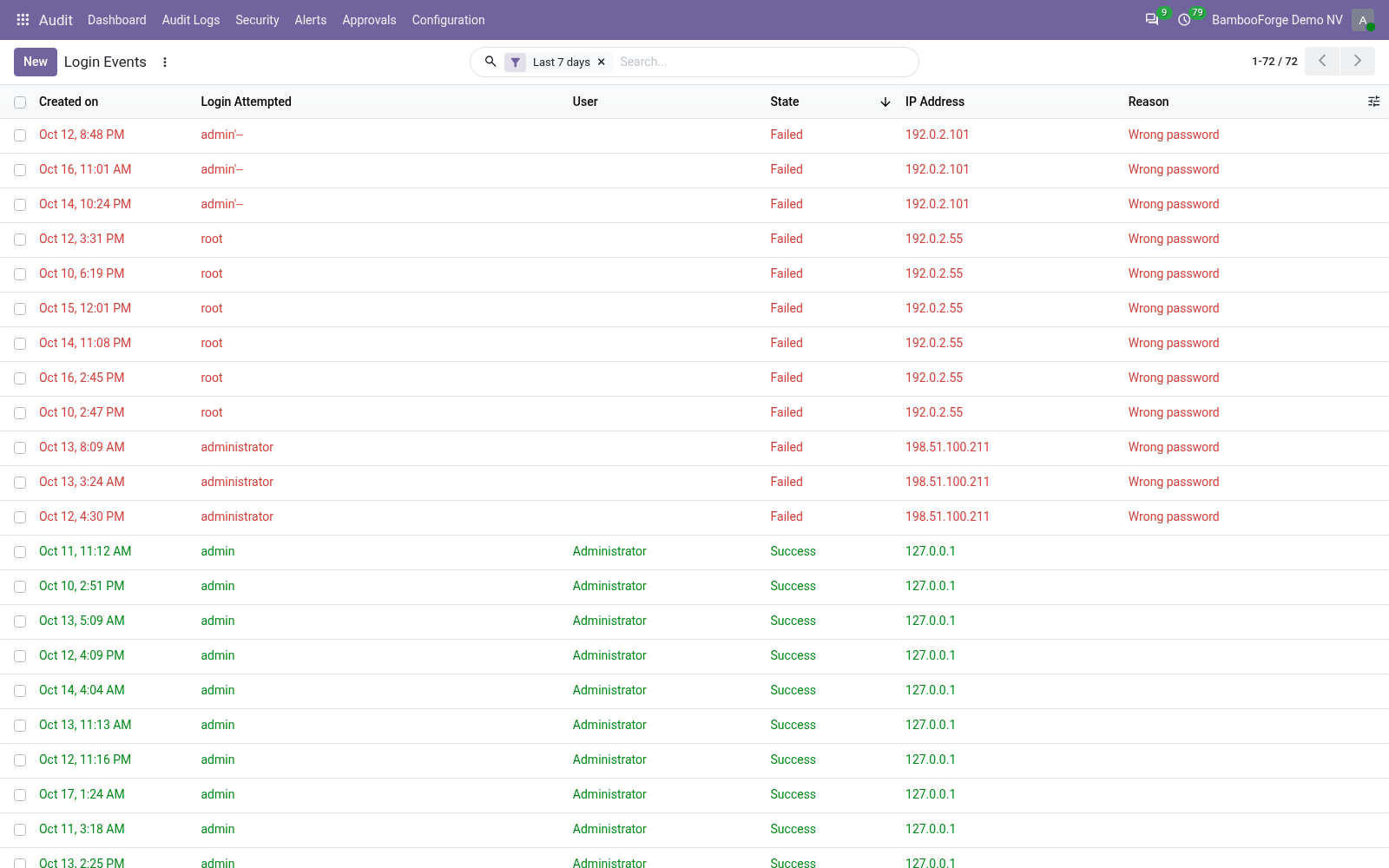
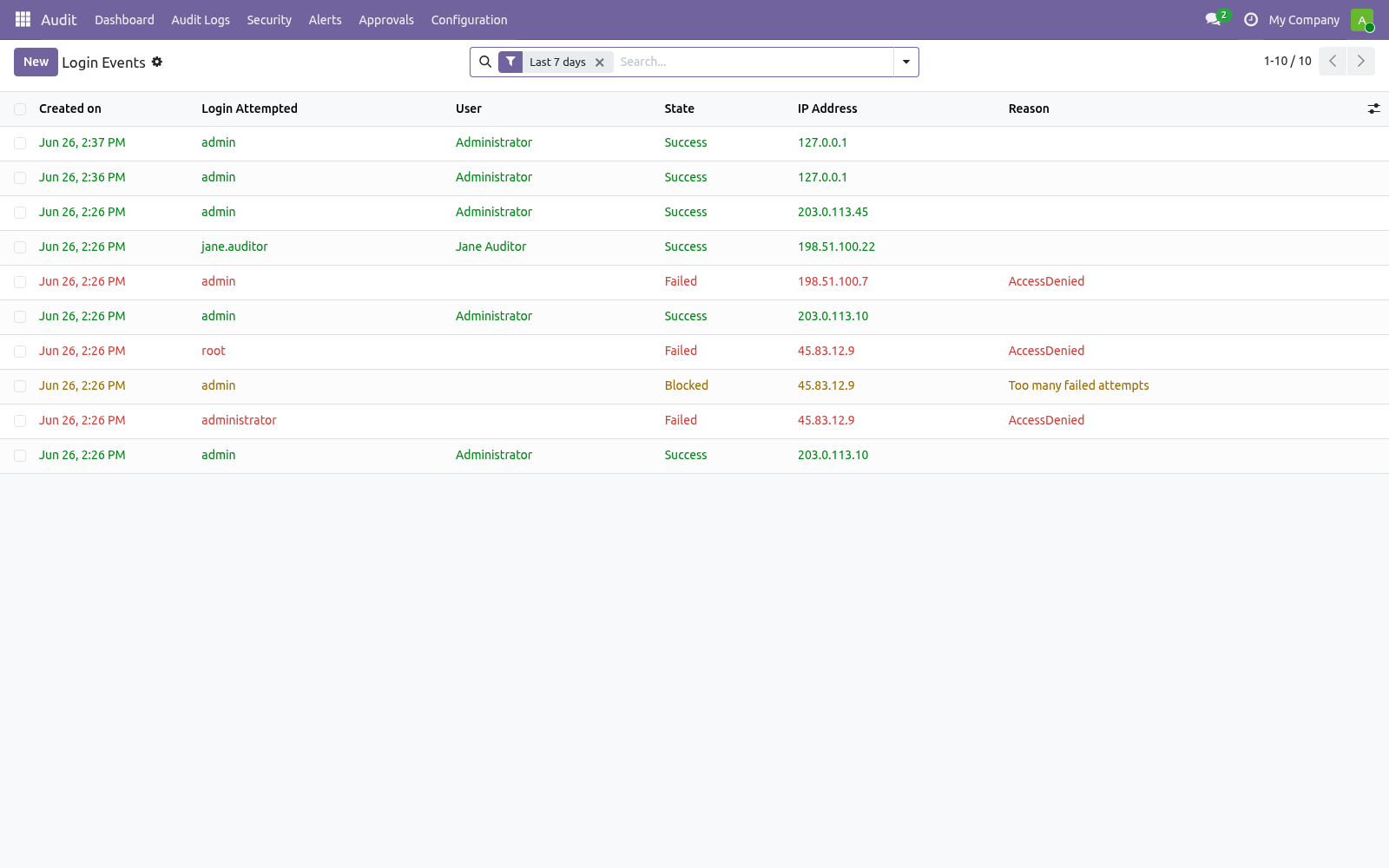
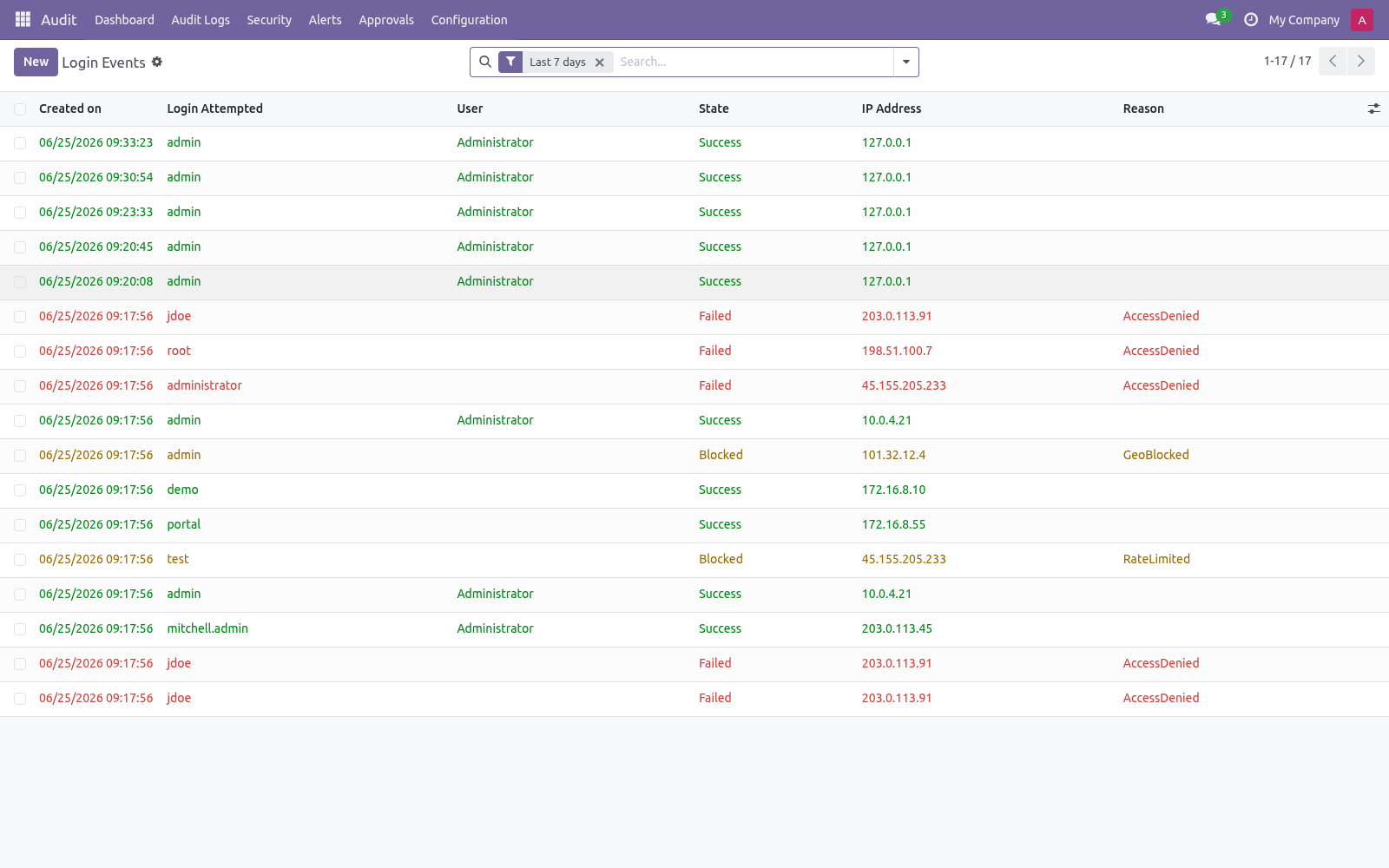
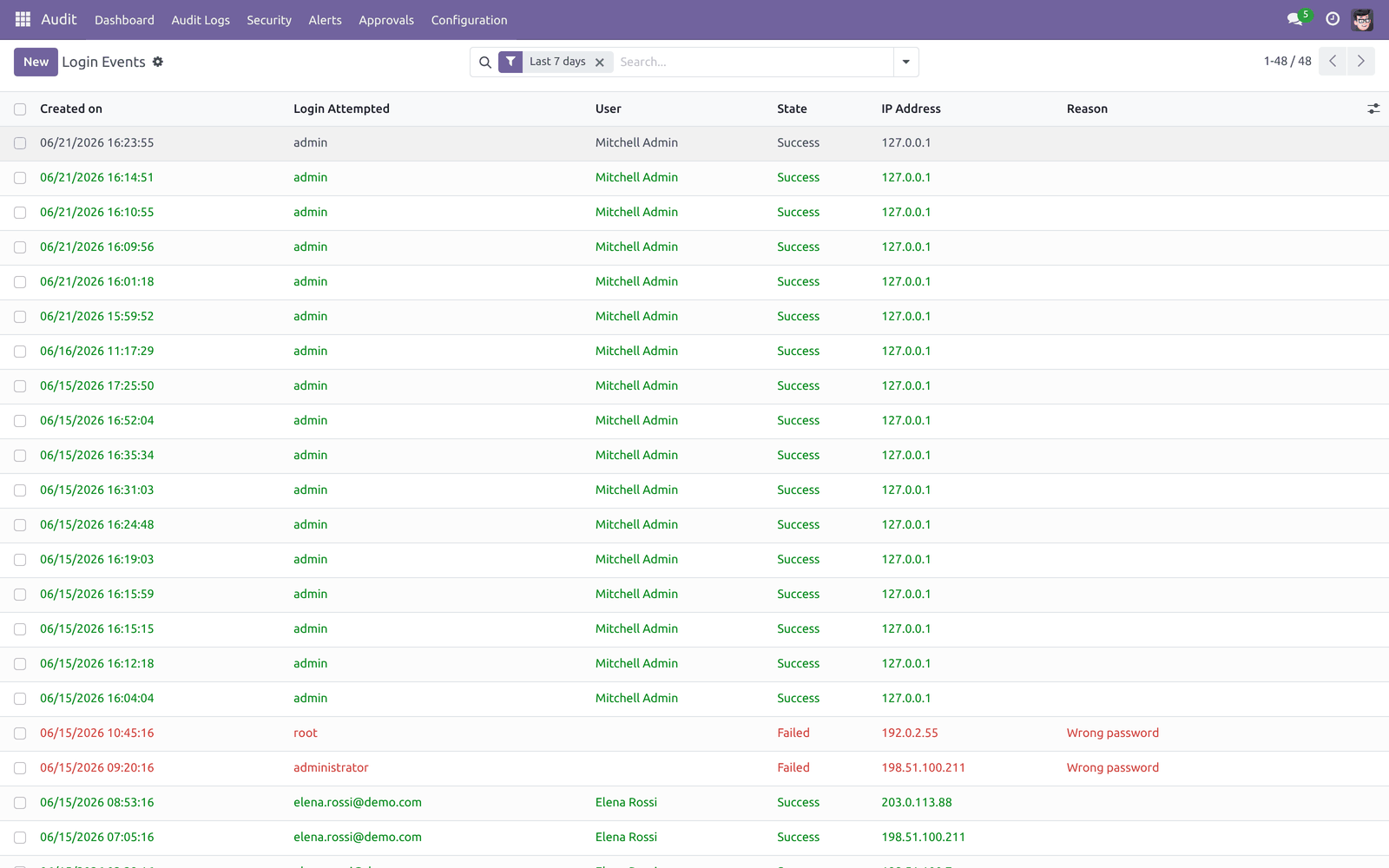
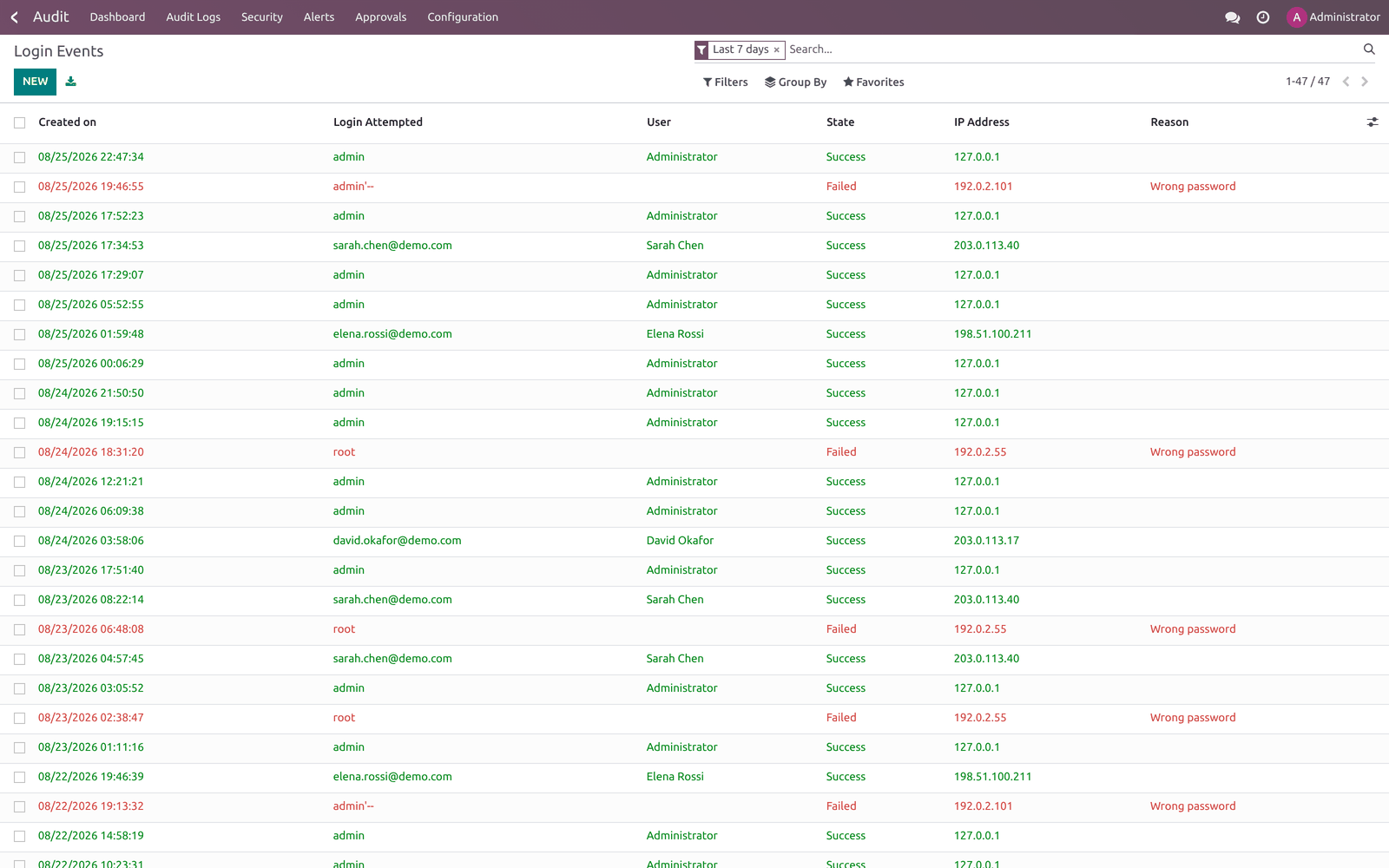
Audit ▸ Security ▸ Login Events records every authentication attempt with IP, user agent, a hashed session token and (on failure) the reason — no rule needed. Rows are colour-coded: green for success, red for failed, amber for blocked.
Default filter is the last 7 days; filter by Success / Failed / Blocked or group by User, State or IP.
Timeline
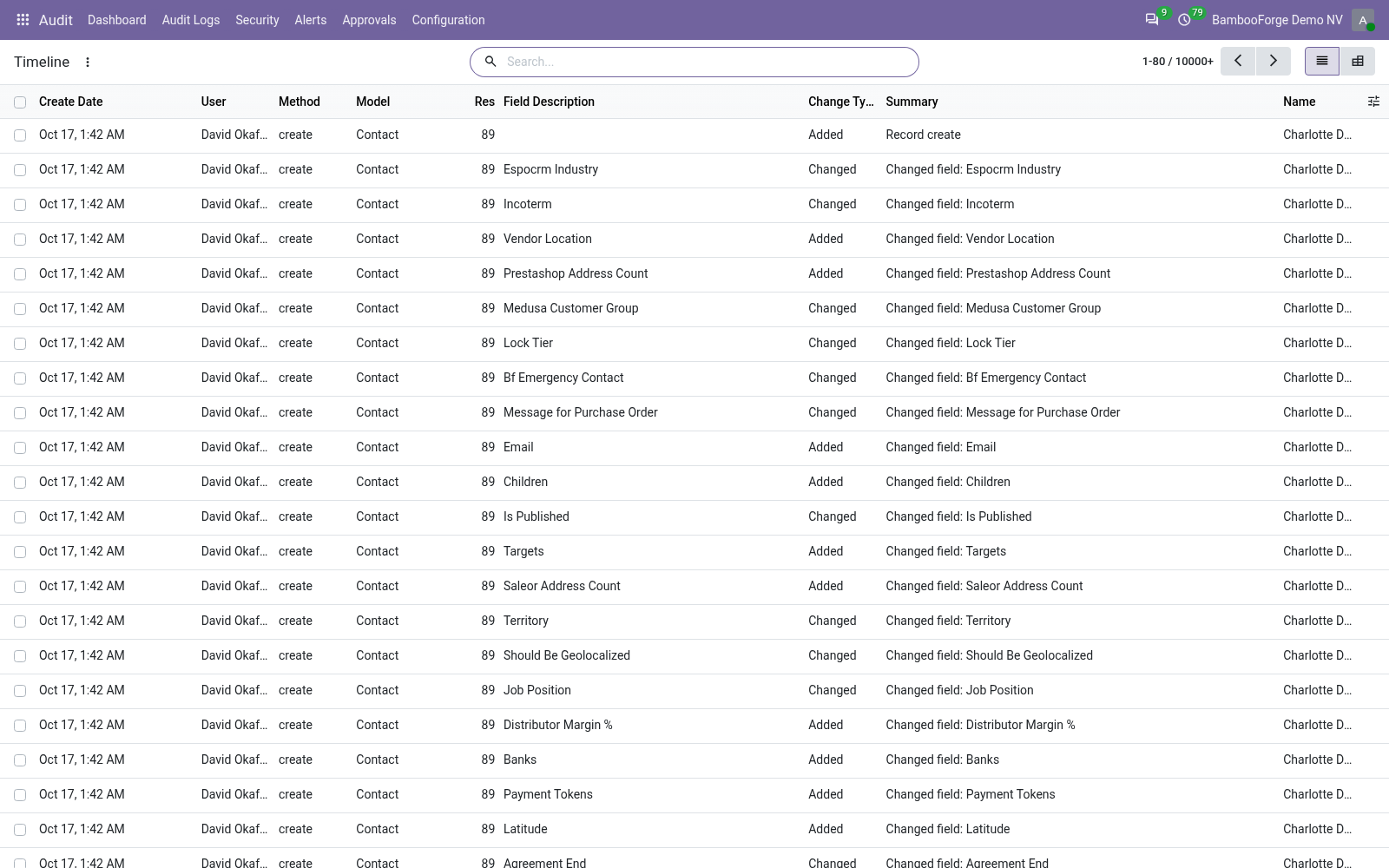
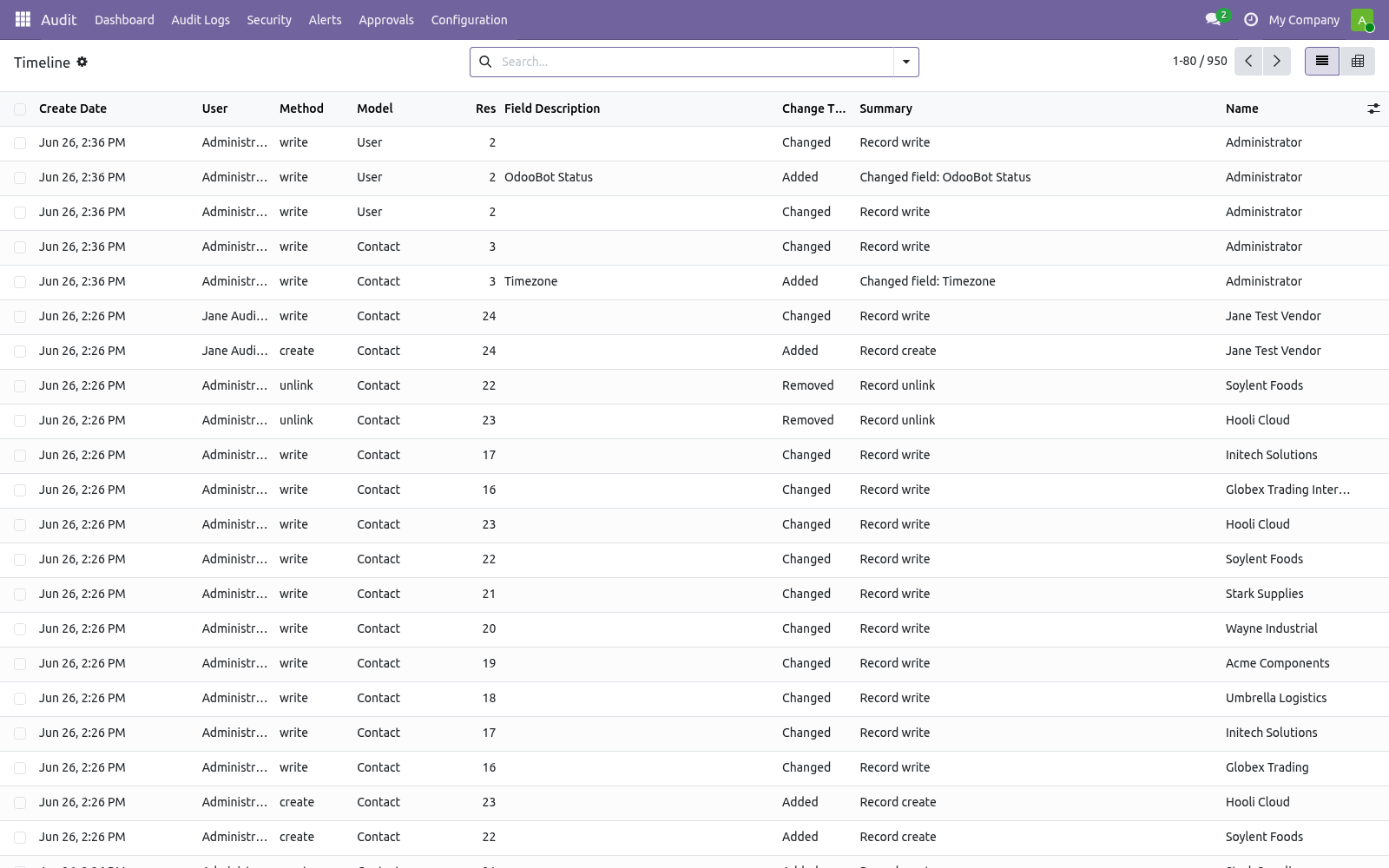
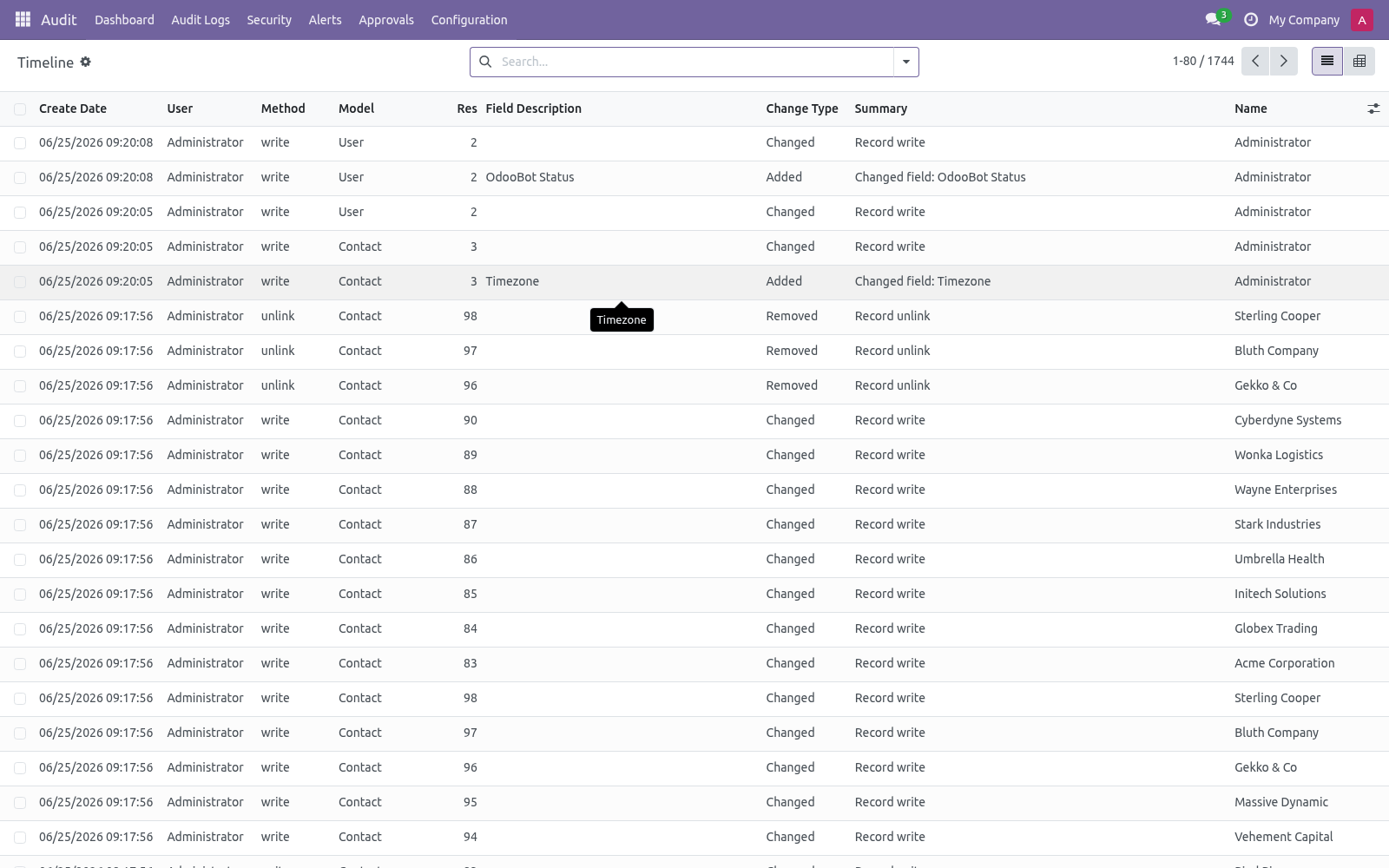
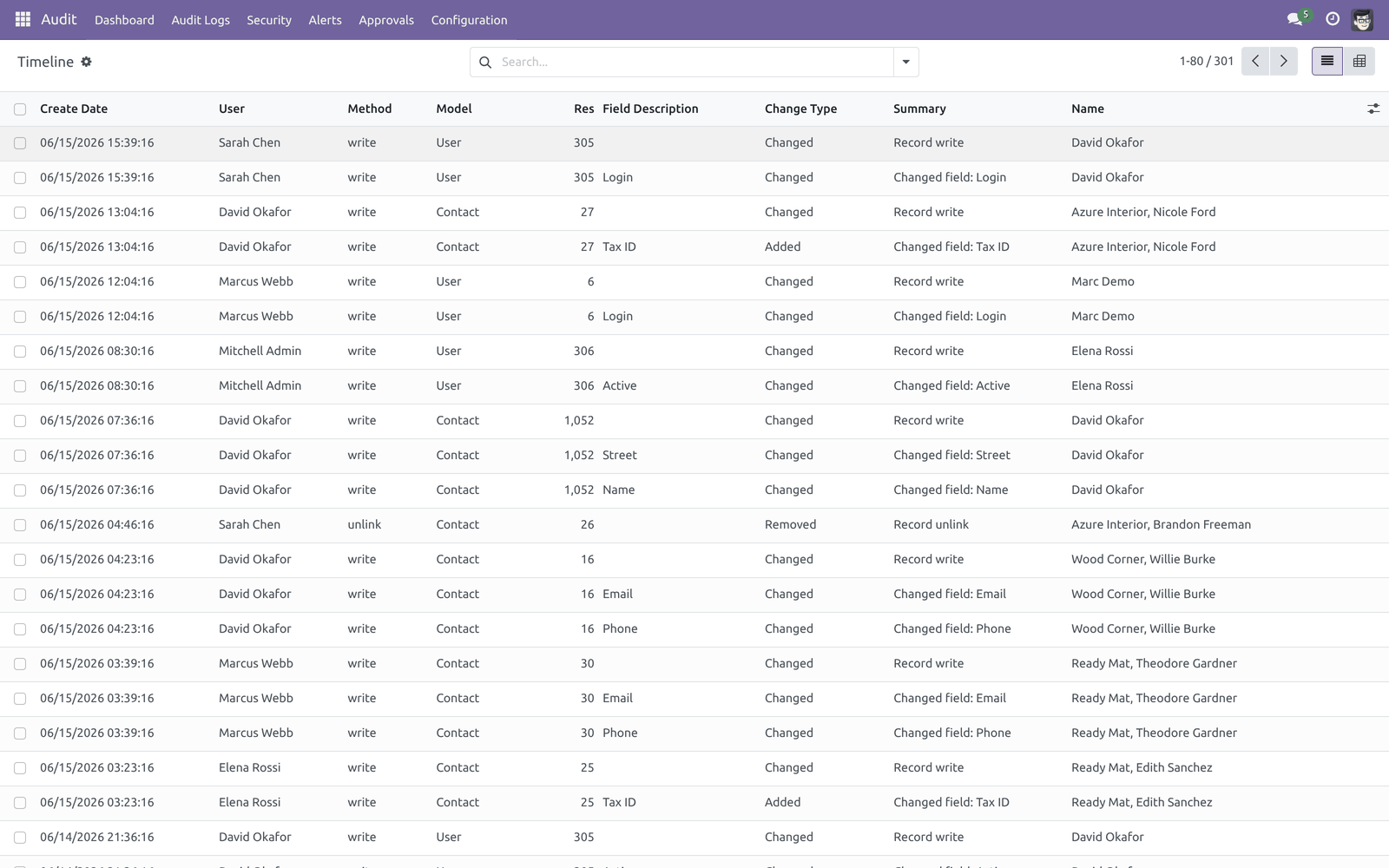
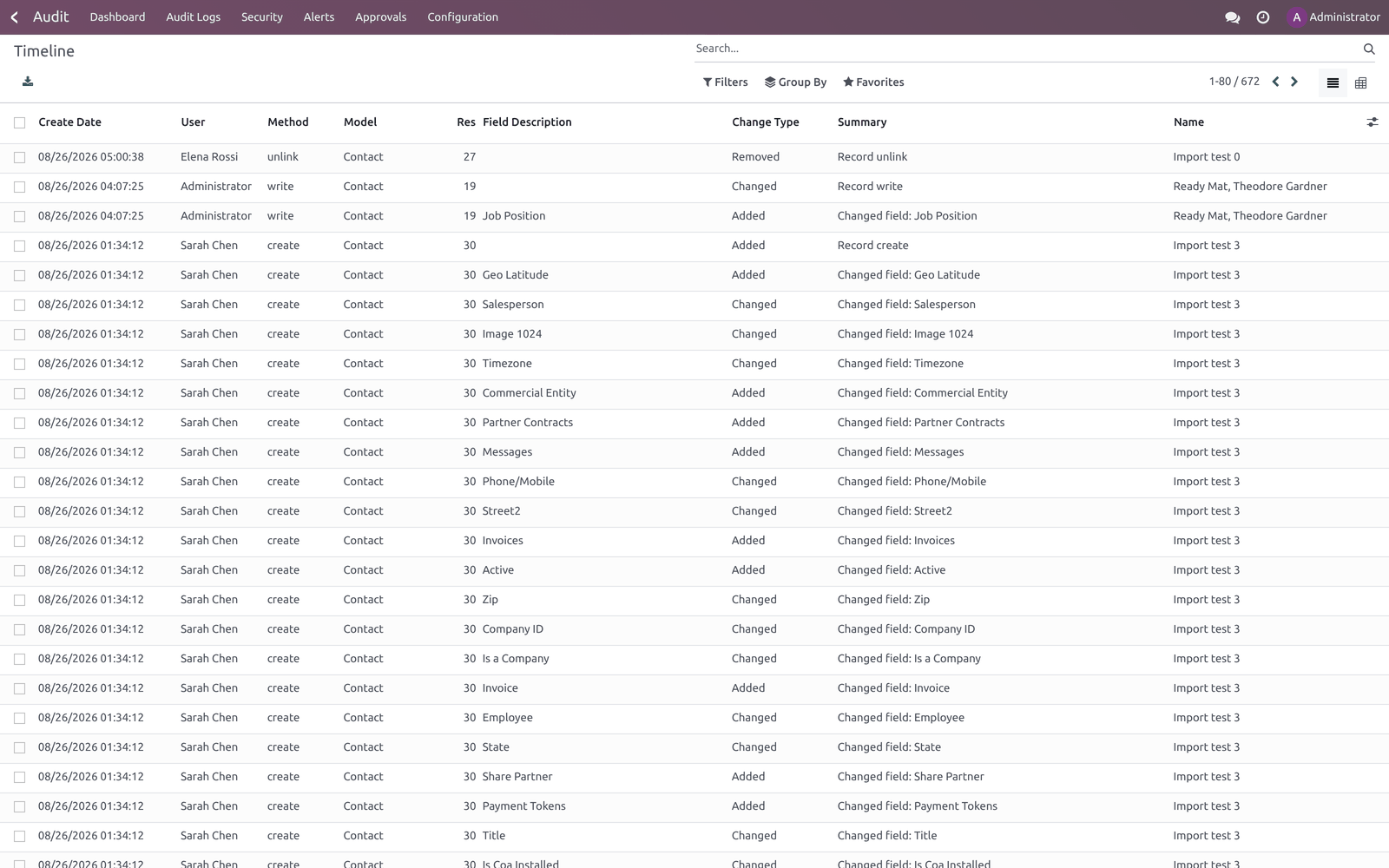
Audit ▸ Audit Logs ▸ Timeline merges record events and individual field changes into one chronological stream. Each entry shows the time, user, method, model, the changed field (if any) and a summary with a change type of Added, Removed or Changed.
Use the Field Changes / Record Events filters to focus, or switch to the pivot view to chart events by day and model.
Customization
Field coverage — override auditlog.rule.get_auditlog_fields to change which fields a rule captures (by default all stored, non-computed/related fields).
Generic webhooks — set a webhook's backend to Generic JSON to receive the full alert payload, and use Extra Headers and HMAC Signature Secret to integrate with any HTTP receiver.
SIEM / log shipper pull — a read endpoint at GET /api/bf_audit/logs streams logs as JSON Lines for Splunk, ELK/Logstash, Datadog, Loki or Grafana Agent. It accepts since, limit (default 1000, max 10000) and model query parameters. Authenticate with the X-Audit-API-Key header, matching either the bambooforge_audit_pro.api_key system parameter (full export) or a per-user key set under a user's Audit API tab (results are then scoped to that user's access rights).
Compliance presets — the GDPR / SOX / PCI-DSS presets are a starting point; after applying one, edit the generated rules to fit your data model.
Troubleshooting
Symptom |
Cause and fix |
|---|---|
Nothing is logged |
The rule is still in Draft. Open it and click Subscribe. Logging only starts once the state is Subscribed. |
A specific operation is not logged |
The matching Log Reads / Writes / Deletes / Creates toggle is off, the acting user is in Users to Exclude, or the field is in Fields to Exclude. Reads are off by default. |
Too much is logged / the system feels slow |
Full log and especially Log Reads are heavy. Switch the rule to Fast log, turn Reads off, exclude noisy fields/users, and scope anomaly rules tightly. The dashboard's Top Model / Top User show where the volume comes from. |
Logs grow without bound |
Retention is opt-in. Set Retention Days per rule (the per-rule cron is on), or enable the Auto-vacuum audit logs cron for the global 180-day window. |
A webhook never fires |
Check the alert rule actually lists the webhook, that the Webhook Queue row is not stuck in failed (read its last error), and that the Audit webhook — drain queue cron is active. Use Send Test on the webhook to isolate connectivity. |
Saving a webhook is refused |
The URL points at an internal/loopback/private host. Webhooks must use a public http(s):// endpoint (SSRF guard). Slack/Discord/Teams cloud URLs are fine. |
An approval is stuck / a user "cannot save" |
The field is marked Sensitive; the write became an approval request under Audit ▸ Approvals. An approver in the rule's Approver Group must Approve or Reject. Requests past the timeout auto-expire hourly. If approval shows Apply Error, the target record changed — re-do the edit. |
Approve/Reject buttons do nothing for me |
You are not in the rule's Approver Group. Add yourself, or have an Auditlog Manager decide. |
"Permission denied" on Anonymize |
Anonymizing requires the Auditlog Manager group. |
The API endpoint returns 401 / 403 |
401 = missing or wrong X-Audit-API-Key (check the system parameter or the per-user key). 403 = a per-user key whose user lacks audit-log read rights, or whose Audit API scope is empty. |
S3 archive test fails with a boto3 error |
The S3 backend needs the boto3 package installed in the Odoo environment. Install it, or use the Local File or Syslog backend instead. |
A user sees fewer logs than expected |
Logs are multi-company isolated: a user only sees logs of companies they belong to (company-less logs stay visible to all). |
Frequently asked questions
Does this slow Odoo down? Logging adds work to each audited operation, so only subscribe the models and operations you need. Fast log is lighter than Full log, and Log Reads is the heaviest option (off by default). Webhooks and alert emails are queued, never inline.
Can I audit reads, not just changes? Yes — turn on Log Reads on the rule. Expect high volume; reserve it for sensitive models.
How do I prove the logs were not tampered with? Every log is hash-chained to the previous one. Select logs and run Verify Hash Chain from the Action menu to confirm the chain is intact.
How do I comply with a GDPR erasure request? Select the relevant logs and run Anonymize (GDPR) (managers only). Field values become *** while the date/user/method/model envelope is kept for forensic integrity. You can also mask PII at capture time via the rule's PII Masking tab.
Can alerts go to Slack / Teams / Discord? Yes. Create a webhook with the matching backend, test it, and attach it to an alert rule's Webhooks field. Generic JSON covers any other HTTP receiver.
Where do archived logs go? To the archive target on each rule: a local JSON-Lines file, syslog, or an S3-compatible bucket. Archiving happens before the retention cron deletes the rows.
What support and refund policy do I get? Every request is answered within 24 hours, setup help included. If you report a bug within 2 months of purchase and it is not resolved within 15 days, you are entitled to a full money-back refund.
Data, privacy & limits
What is stored — for each audited operation: the model, record id, method, acting user, timestamp, HTTP request/session reference, and (for Full log) a before/after value per field. Login events store the attempted login, user, state, IP, user agent and a hashed session token. PII fields you mark are masked at capture.
Where data goes — audit data stays in your Odoo database unless you configure an archive target (file/syslog/S3) or expose the pull API. Webhooks send only the alert summary payload to the URL you configure.
Multi-company — logs are isolated by company; users see only the companies they belong to.
In scope — change/login auditing, anomaly rules, approval workflow, alerts with email + Slack/Discord/Teams/generic webhooks, archive targets, retention, hash-chain verification, GDPR anonymization, XLSX export, JSON-Lines pull API.
Out of scope — the approval workflow intercepts write on sensitive fields, not create or delete. The S3 backend needs boto3. Webhook URLs must be public.
Support & updates
Support: support@bambooforge.dev — answered within 24 hours, setup help included.
Refund: report a bug within 2 months of purchase; if unresolved within 15 days, full refund.
Full source is included. Updates track the supported Odoo 20 line.
Upgrading & version compatibility
This build targets Odoo 20.0. Each Odoo major series (16.0, 17.0, 18.0, 19.0, 20.0) has its own dedicated build of this module — always install the build that matches your Odoo version. Mixing a build with a different Odoo series is not supported.
Patch upgrades (same series, e.g. 20.0.1.0.0 → later)
Back up your database and filestore first.
Replace the module folder with the newer build.
Restart Odoo with the module updated:
./odoo-bin -c your.conf -u bambooforge_audit_pro -d your_db
Odoo applies any schema/data changes automatically. Your existing records and configuration are preserved.
Cross-version migration (moving to a newer Odoo)
Upgrading Odoo itself is a database migration handled by Odoo's standard upgrade tooling. When you migrate the database to the next Odoo series, install the matching build of this module for that series. Data created by this module carries over with the database migration.
After any upgrade the module's scheduled actions resume on their normal cadence — no manual re-activation is required.
Uninstallation
You can remove this module at any time from Apps → (this module) → Uninstall, or from the command line. Uninstalling is clean and reversible by reinstalling — but note what is and is not deleted.
What is removed
The module's own tables and every record in them (17 models, prefixed auditlog.*) — this is the data this module created.
The menus, actions, views and reports this module installed.
Its scheduled actions (cron jobs) — they stop immediately on uninstall.
The security groups this module defined (user assignments to them are dropped).
What is preserved
Your standard Odoo data (partners, products, sales, invoices, inventory moves) is not deleted — this module only reads and annotates it; the underlying records stay.
Attachments and chatter messages on standard records are kept.
As always, take a database backup before uninstalling in production.
Changelog
20.0.5.8.5
Built for Odoo 20: record rules and access rights rewritten onto Odoo 20's single ir.access model, the screens rebuilt on Owl 3, and every icon moved to the icon set Odoo 20 ships.
20.0.5.5.0
Current release for Odoo 20.0. This build includes:
Contextual anomaly detection, one-click GDPR/SOX compliance attestation PDF and a daily tamper tripwire on top of hash-chained audit logs, alerts, webhooks, PII masking, approval workflow, retention policy and external archiving.
Feature additions and fixes ship as new builds on the Odoo Apps store; this page and the module's version reflect the current published release. Always keep the build matched to your Odoo series (see Upgrading & version compatibility).
How we make sure it works
Before every release, 122 automated checks run against this app on Odoo 16, 17, 18, 19 and 20. Among them:
Review cannot complete while users are unanswered.
Reviewer cannot revoke their own access.
A cached id from another database is not believed.
Diff without an earlier snapshot is refused.
Archive test action does not raise.
The complete list is in the source you receive.