 BambooForge Labs
API Gateway for Odoo | REST API, OpenAPI, Webhooks & MCP Server
One key, three doors: a REST API with an OpenAPI file for Postman, n8n, Make and Zapier; signed webhooks that retry until delivered; and an MCP server for Claude and ChatGPT - each key limited to the models, fields and rows you list, with a review queue for writes and a log of every call.
Available for Odoo 16.0, Odoo 17.0, Odoo 18.0, Odoo 19.0, Odoo 20.0. Technical name bambooforge_ai_bridge.
Transcript of the walkthrough (Odoo 20)
API Gateway for Odoo / REST API, OpenAPI, Webhooks & MCP Server. One key, three doors: a REST API with an OpenAPI file for Postman, n8n, Make and Zapier; signed webhooks that retry until delivered; and an MCP server for Claude and ChatGPT - each key limited to the models, fields and rows you list, with a review queue for writes and a log of every call. One key, three doors. A REST API with an OpenAPI file that Postman, n8n, Make, Zapier and code generators read as-is; webhooks that tell another system the moment something happens, signed and retried until they get through; and an MCP server for Claude, ChatGPT and any other agent.
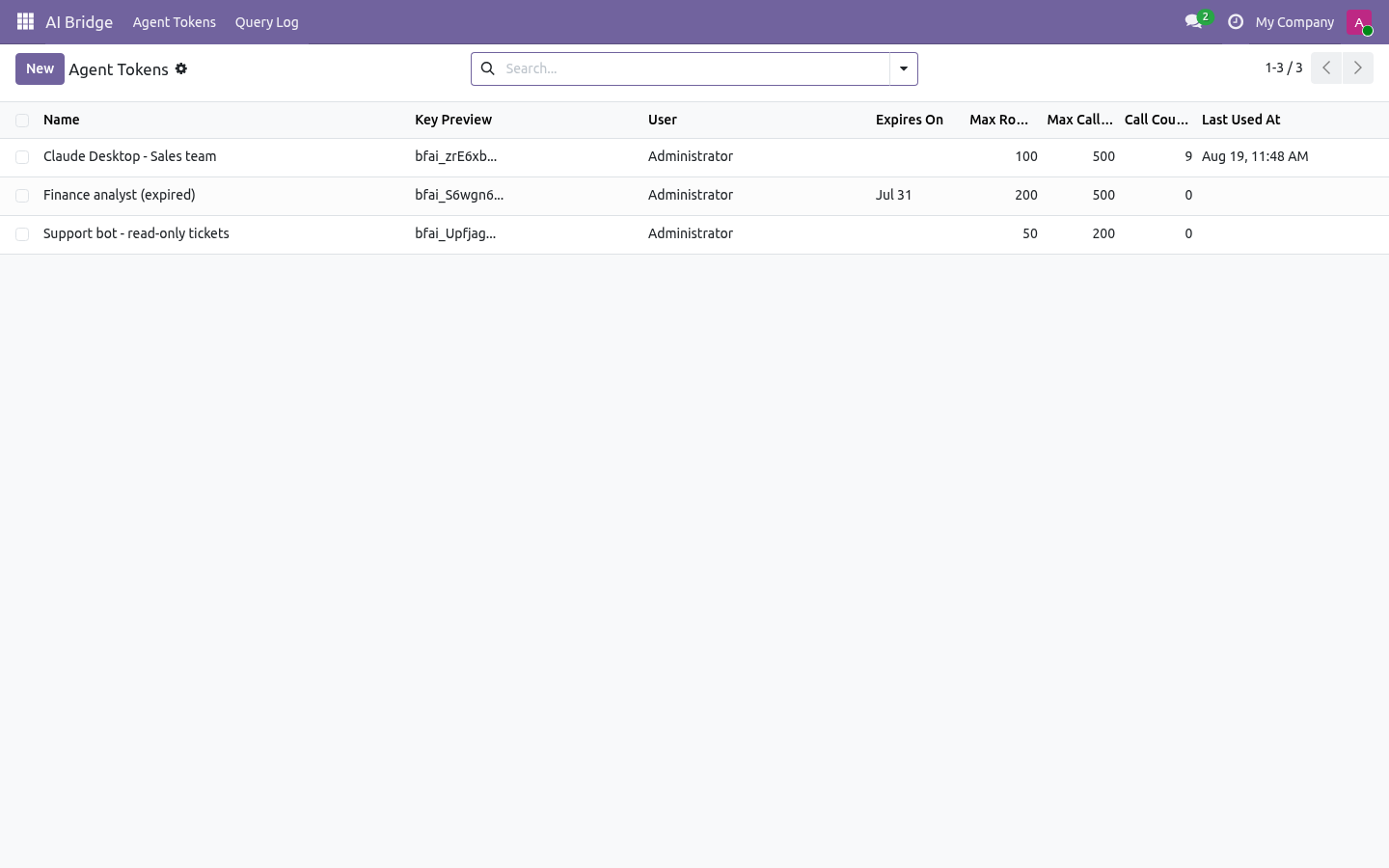
Every door opens exactly as far as the key was granted: the models, the fields, the rows and the calls a person listed - nothing else exists for it. In the next few minutes: why this exists, then issue a key, then allowed models: the keyhole, then give a system access: rest, then give an automation tool access: openapi. Then what this app deliberately does not do, so you can tell before you buy whether it fits. Everything lives under API Gateway then Keys then Query Log then Proposals.
1. Copy bambooforge_ai_bridge into your addons path and update the app list, or install the ZIP from the Odoo Apps store. 2. Install the app API Gateway for Odoo.
3. Give yourself the group AI Bridge / Manager (Settings → Users → your user → Other). Without it the menu stays hidden. 4.
The menu API Gateway appears with Keys, Proposals, Query Log, Webhooks and Deliveries. Why this exists. Odoo already has an API. What it does not have is a way to hand a piece of it to somebody else safely: an API key is the whole user - a partner who reads orders also reads payroll, and nothing tells you what they read; XML-RPC and JSON-RPC need a developer who knows model names, field names and domain syntax; the people who build automations in n8n or Make do not; Odoo 20's JSON-2 endpoint and /doc page describe the database, not a scope, and there is no OpenAPI file to import; the webhook action in Automation Rules fires once and forgets - no signature, no retry, no record of what was delivered.
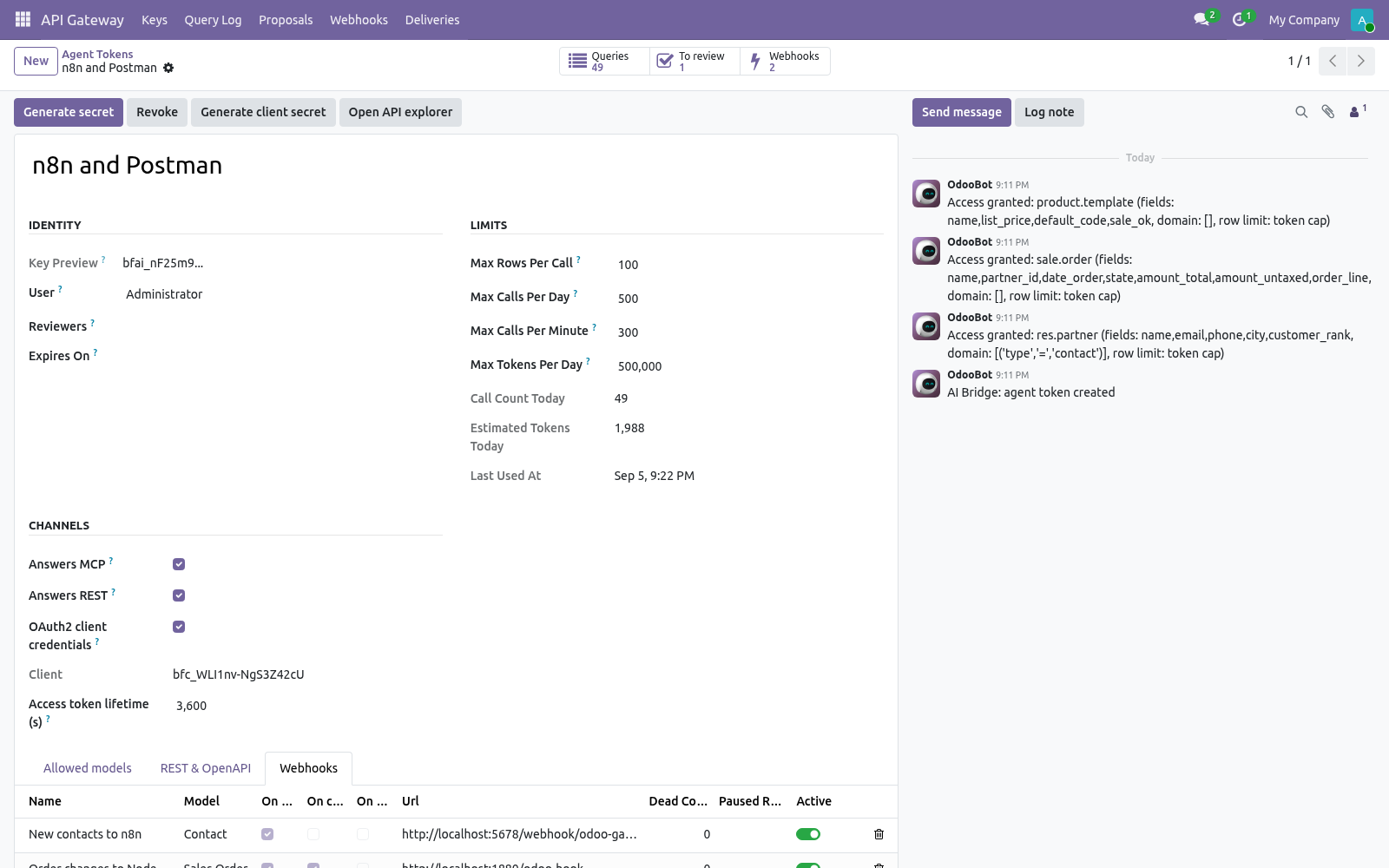
The gateway inverts the default. A key starts with zero models. A person lists what it may read, what it may change, whether changes apply at once or wait for review, and how much it may call. The same list drives the REST API, the OpenAPI document, the webhooks and the MCP tools, and every call through any door is one line in the query log.
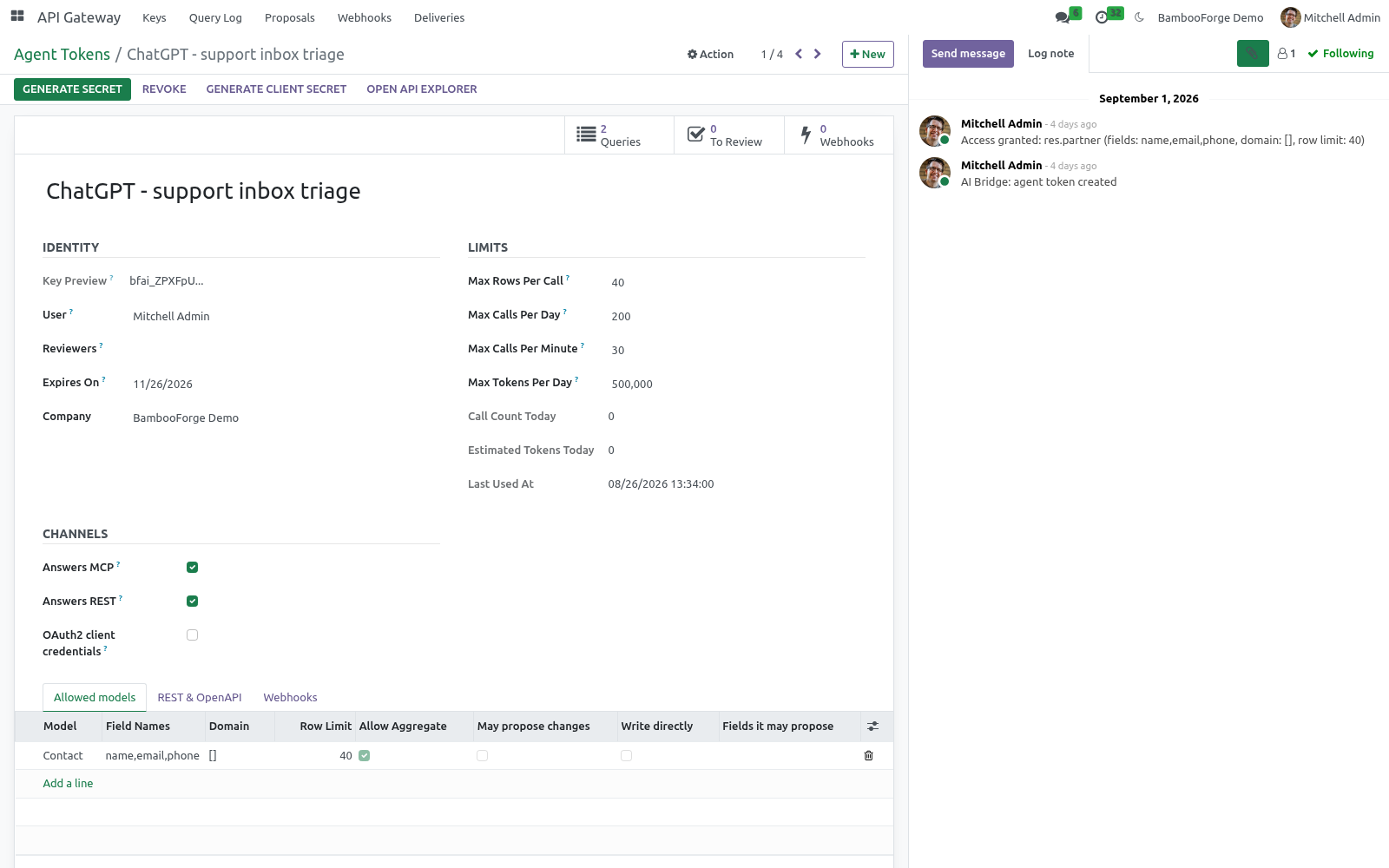
Issue a key Allowed models: the keyhole. Each line under Allowed models answers the questions every door asks: Model The only models the key can name. Anything else is refused before a query is built, and the refusal is logged. The answer does not say whether the model exists.
Give a system access: REST. Every allowed model is a resource. Send the key as a bearer token. Give an automation tool access: OpenAPI.
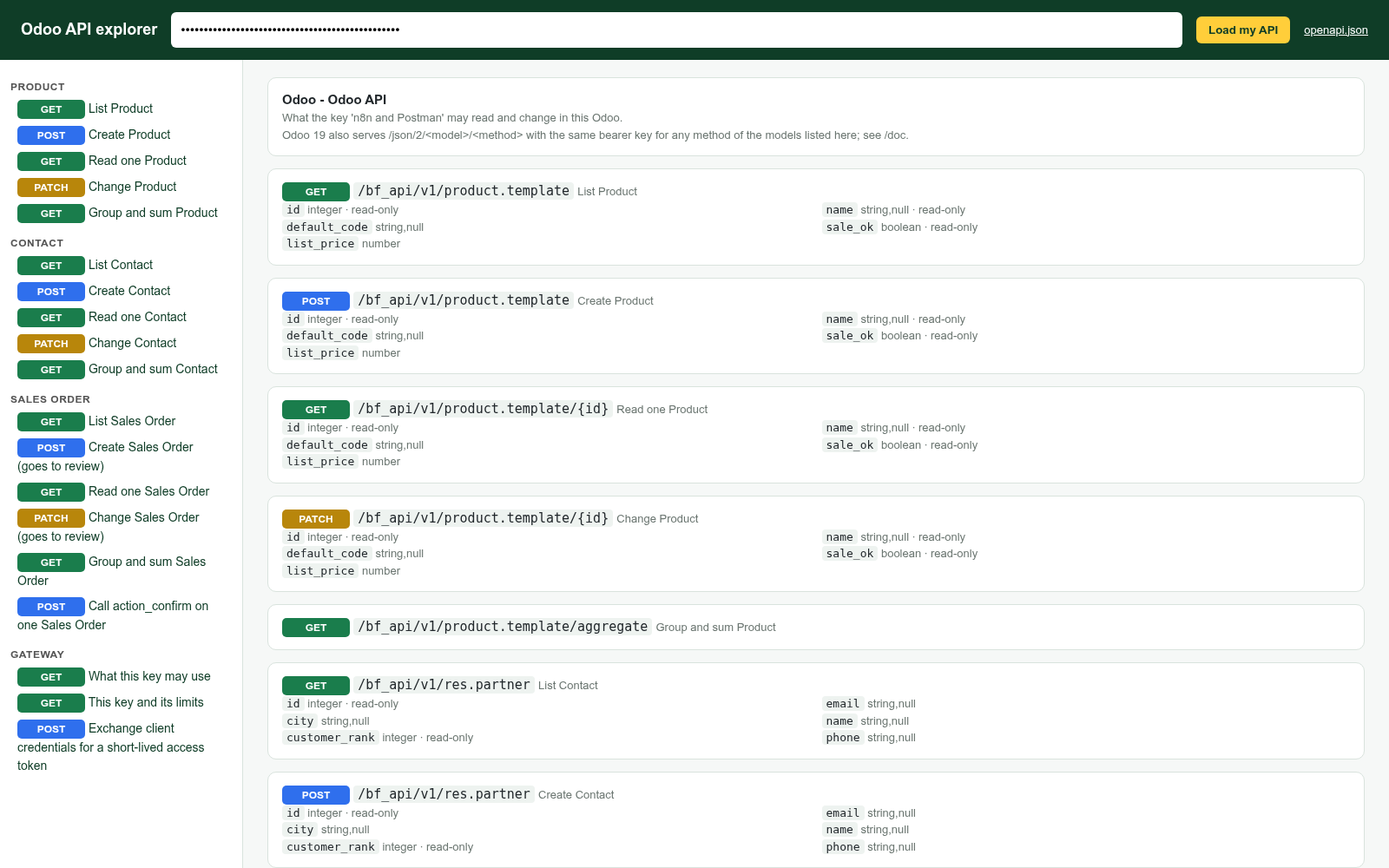
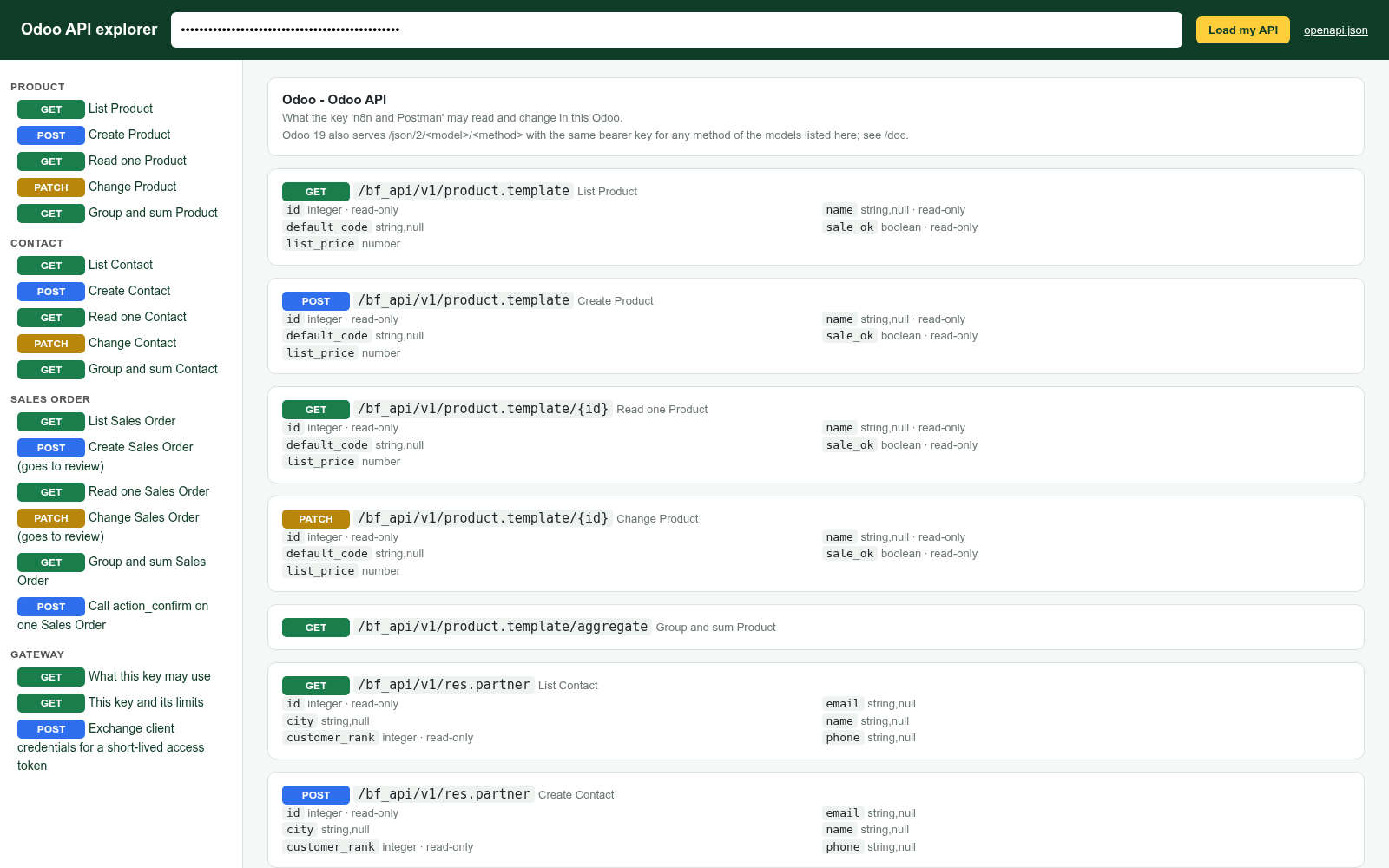
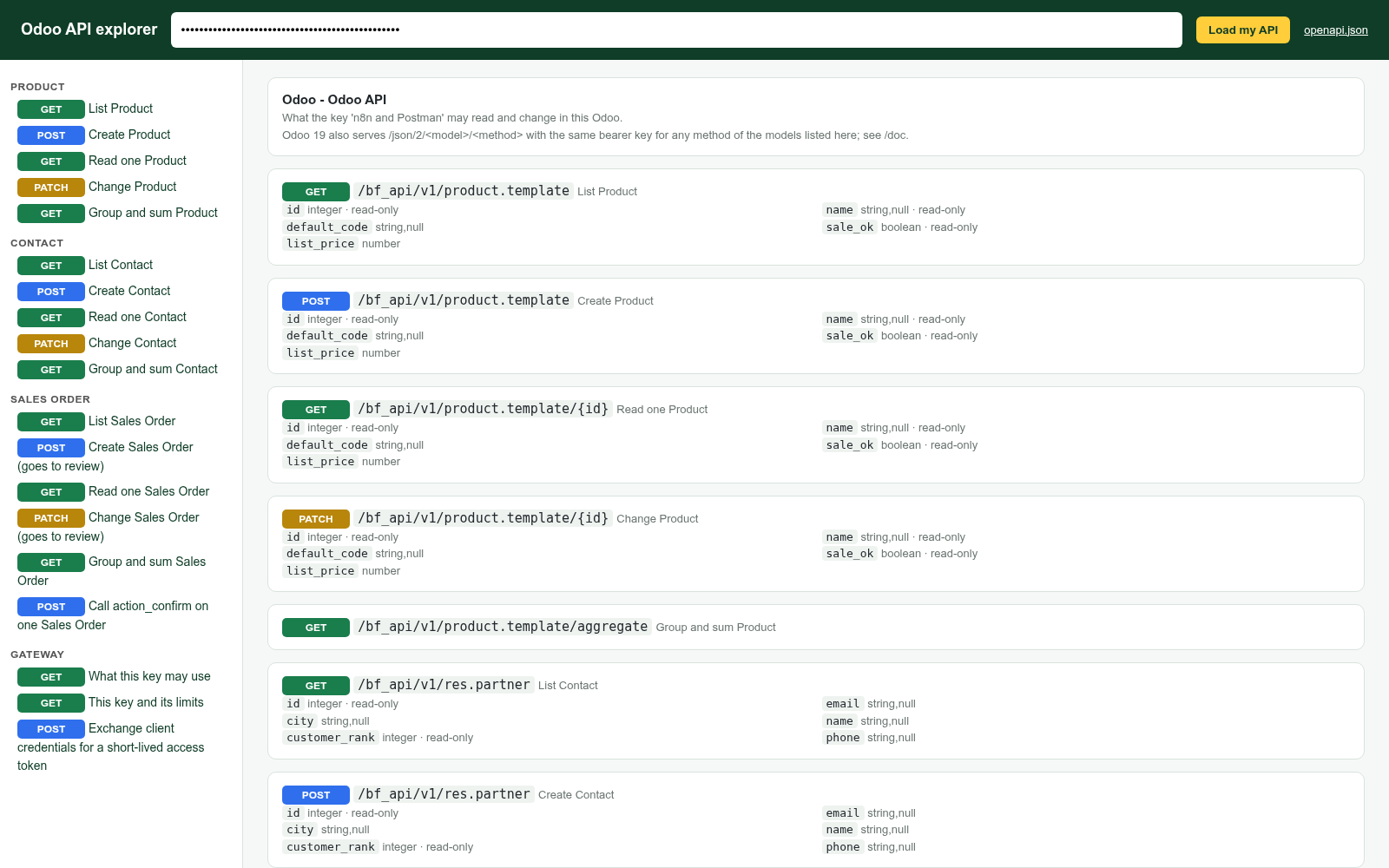
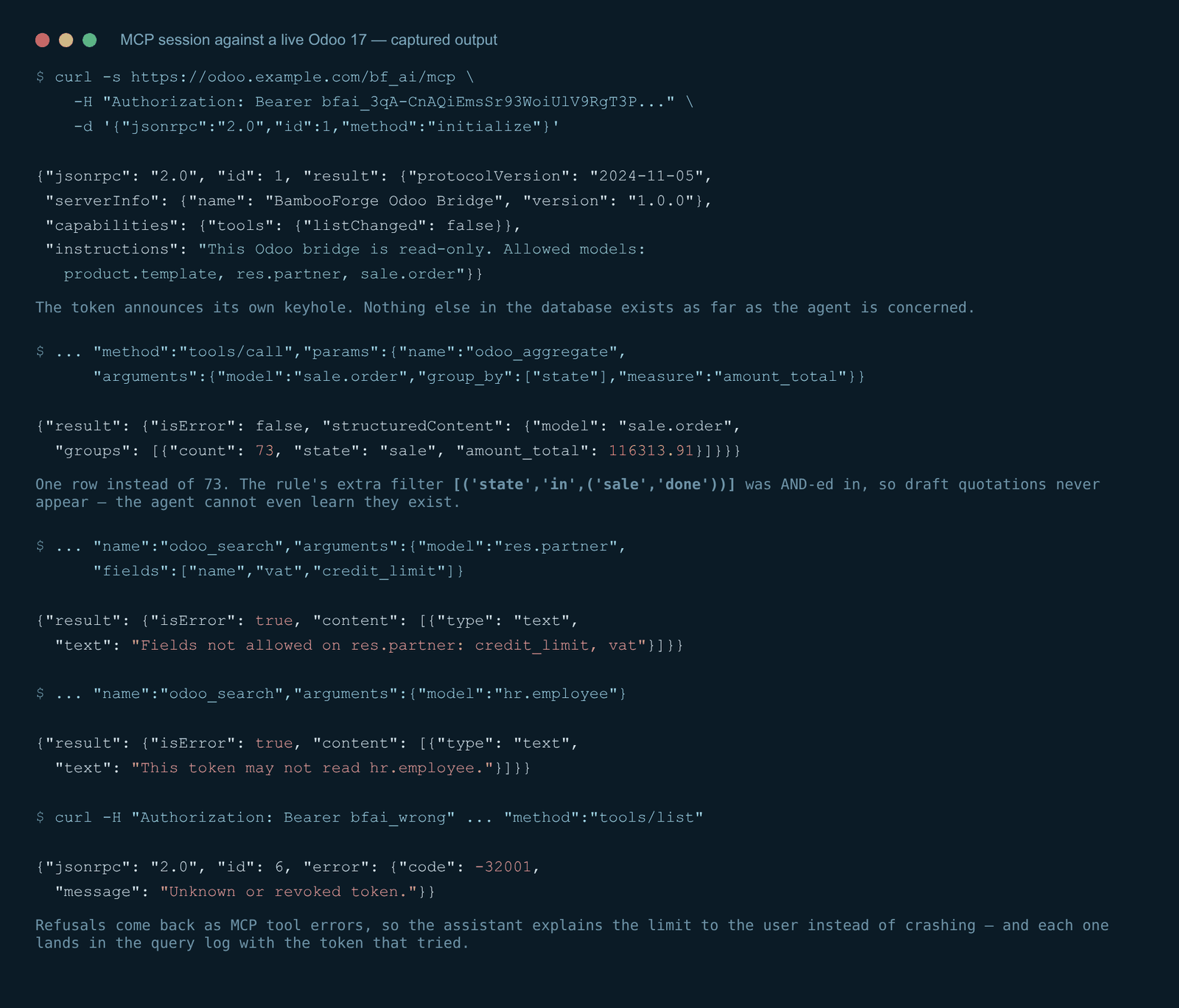
GET /api/openapi.json with the key returns an OpenAPI 3.1 document built from that key's rules: exactly its models, fields, writable fields, limits and actions, with an example taken from the first record the key may see. Import it into Postman, Insomnia, Bruno, n8n, Make, or a code generator - the paths, schemas and the bearer scheme are already there. A revoked key has no document. /api/doc is a built-in API explorer: paste the key, see every operation it may perform, try each one, copy the curl line.
It ships in the module - no CDN, nothing loaded from outside. Tell another system: webhooks OAuth2 client credentials. Some systems will not store a long-lived key. Press Generate client secret on the key: it gets a client_id and a secret shown once.
The system then exchanges them for an access token that lives one hour (tunable per key, 60 s to 24 h). The access token is a bearer token like the key and opens exactly the same doors; the scope only reports what the key was granted. Revoking the key revokes every access token. MCP clients that speak OAuth2 can use the same endpoint.
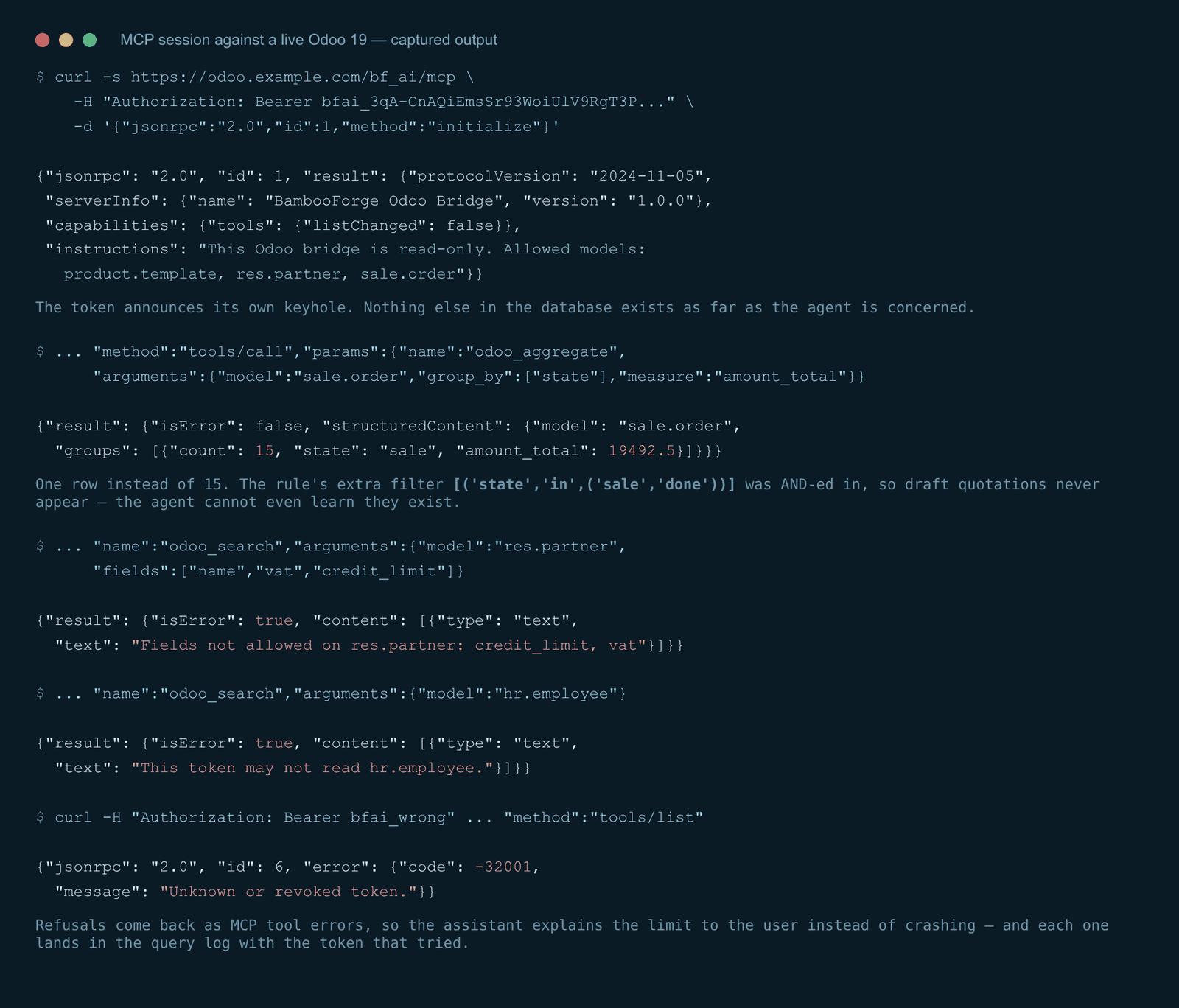
Give an AI agent access: MCP. The endpoint is. It speaks JSON-RPC 2.0 and implements the MCP methods initialize, tools/list, tools/call and ping. There is no session cookie and no CSRF token involved: the bearer token is the whole authentication.
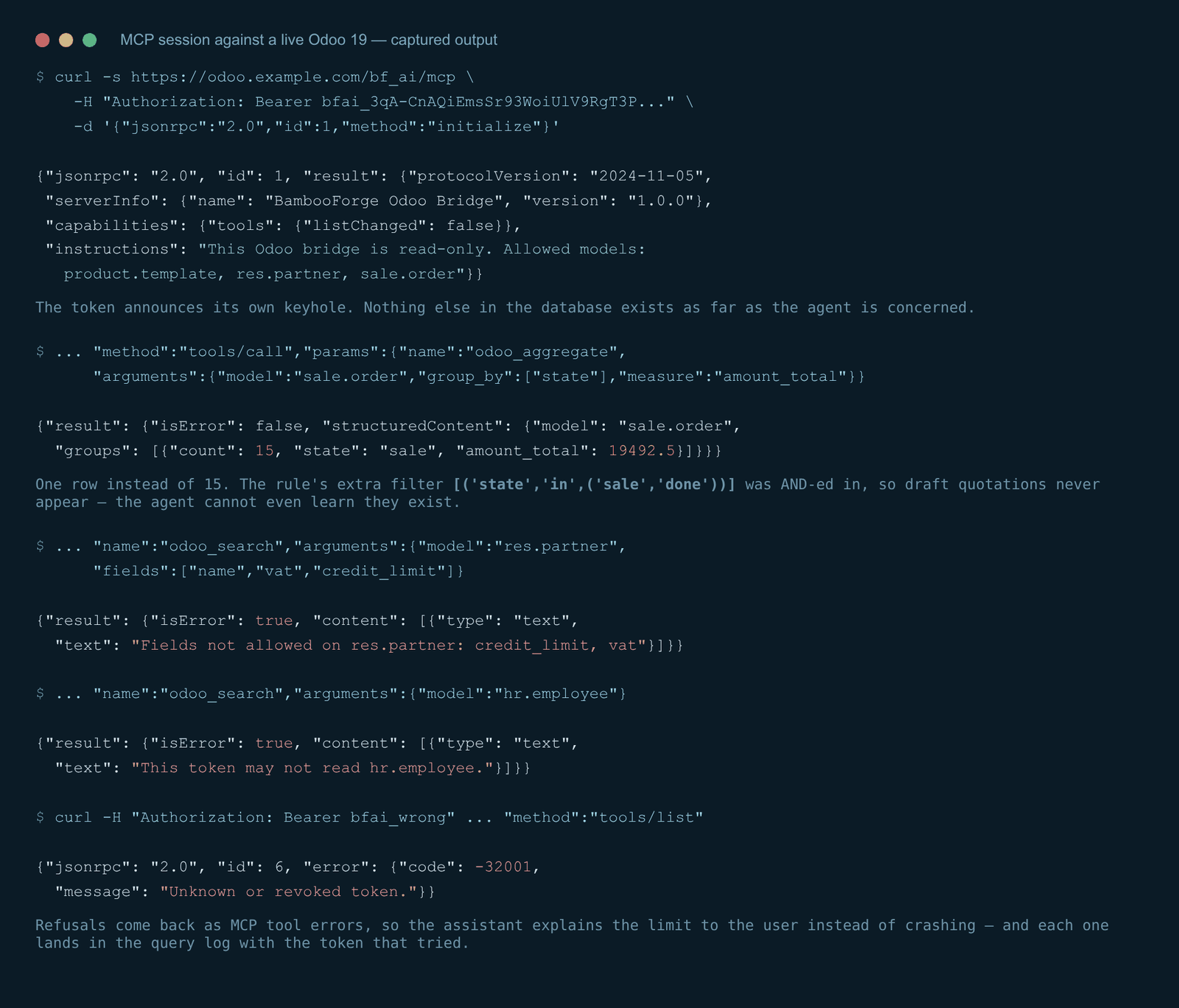
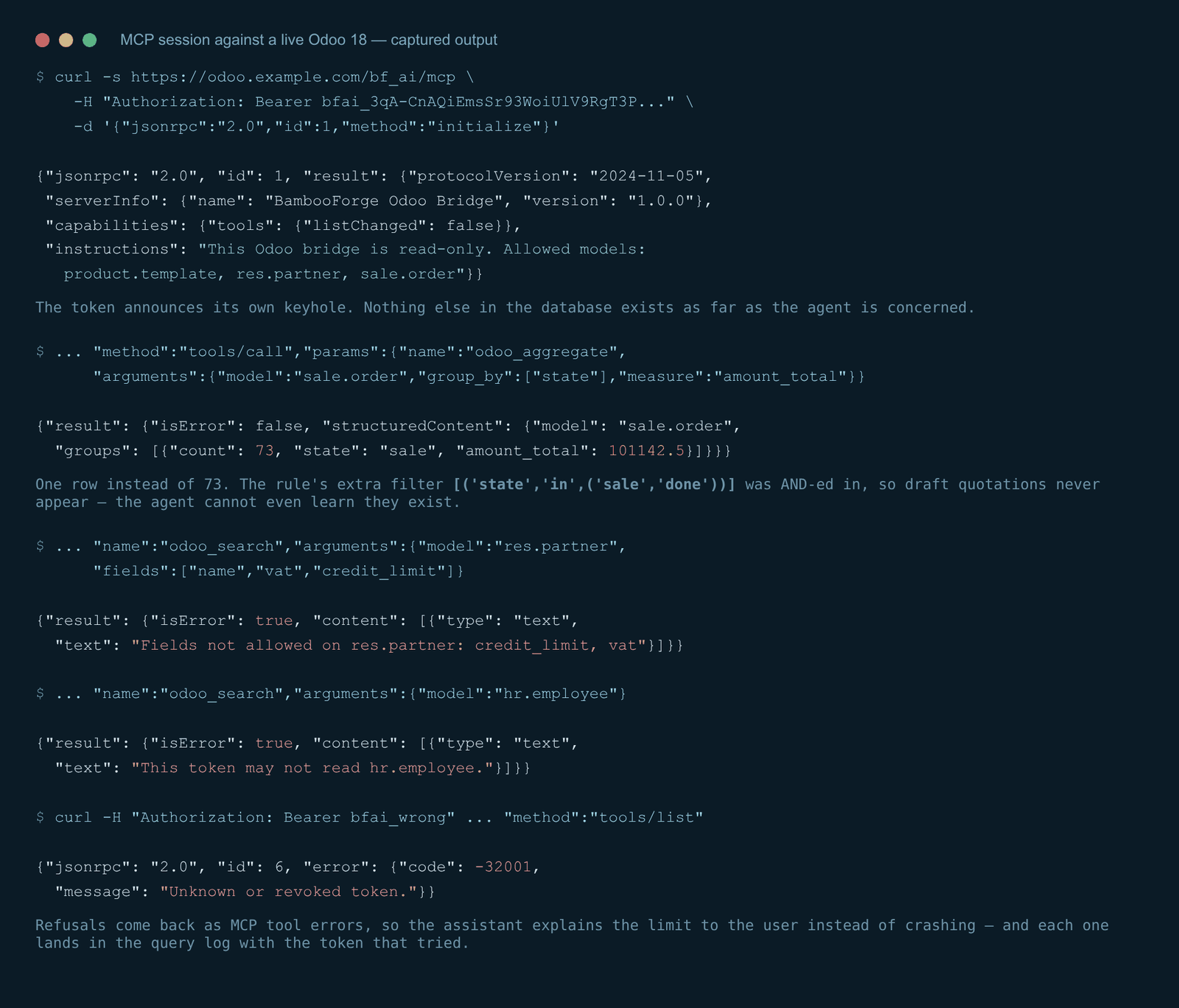
Check it with curl before touching any client. A healthy answer names the server and lists exactly the models you allowed. A tools/call answers in MCP shape — human-readable content plus machine-readable structuredContent. Note the group list: the rule on sale.order carried the extra filter [('state','in',('sale','done'))], so draft quotations never enter the answer — the agent cannot see they exist, whatever it asks.
The MCP tools. odoo_list_models What may I read? Returns each allowed model with its exposed fields, row limit and whether aggregates are allowed. Agents call this first.
odoo_describe_model — {"model": "sale.order"} Field names, types, labels and selection values for one allowed model, so the agent writes correct domains instead of guessing. Proposing a change. From 1.2 the agent can ask for a record to be created or updated. It cannot do it.
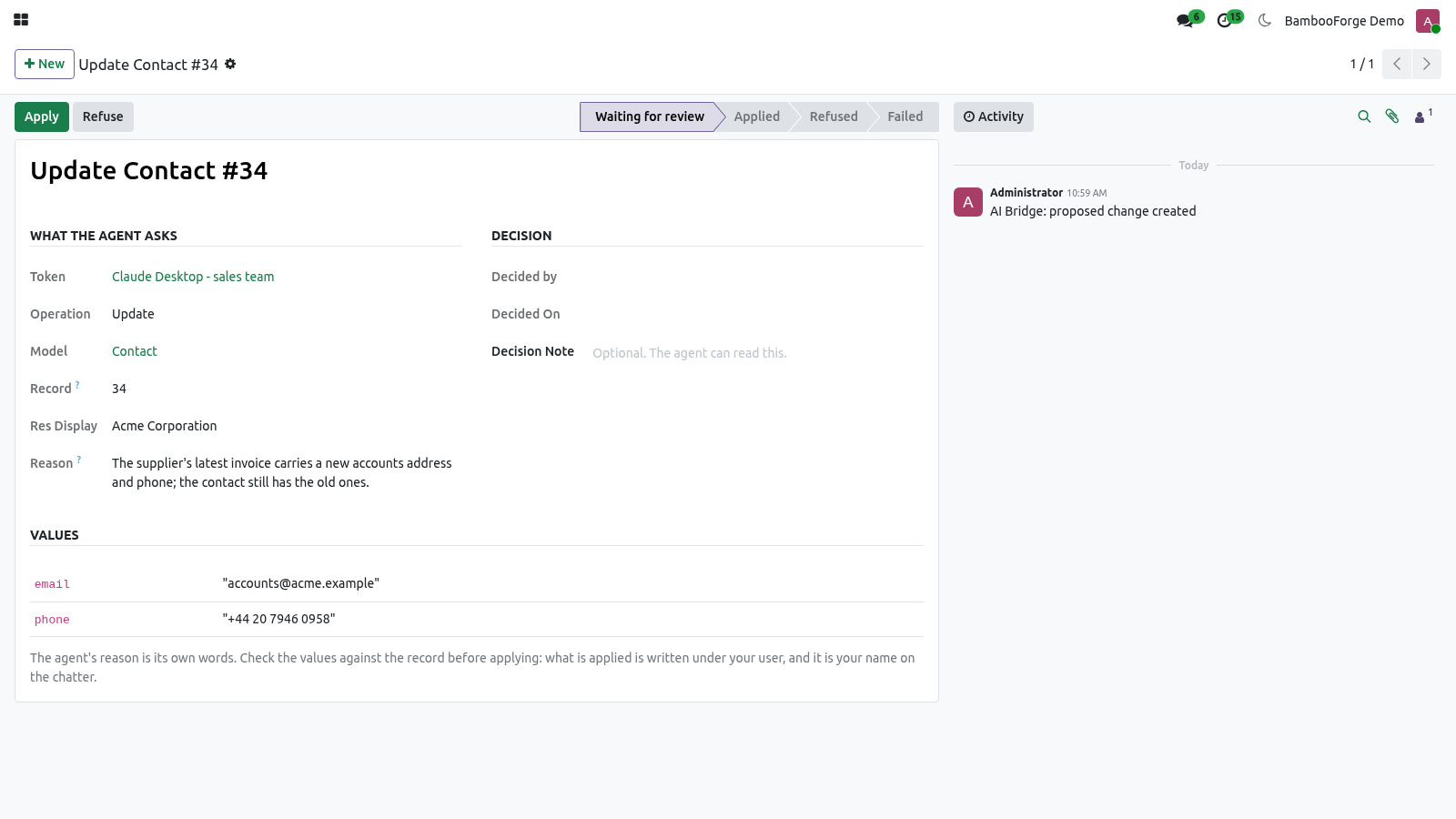
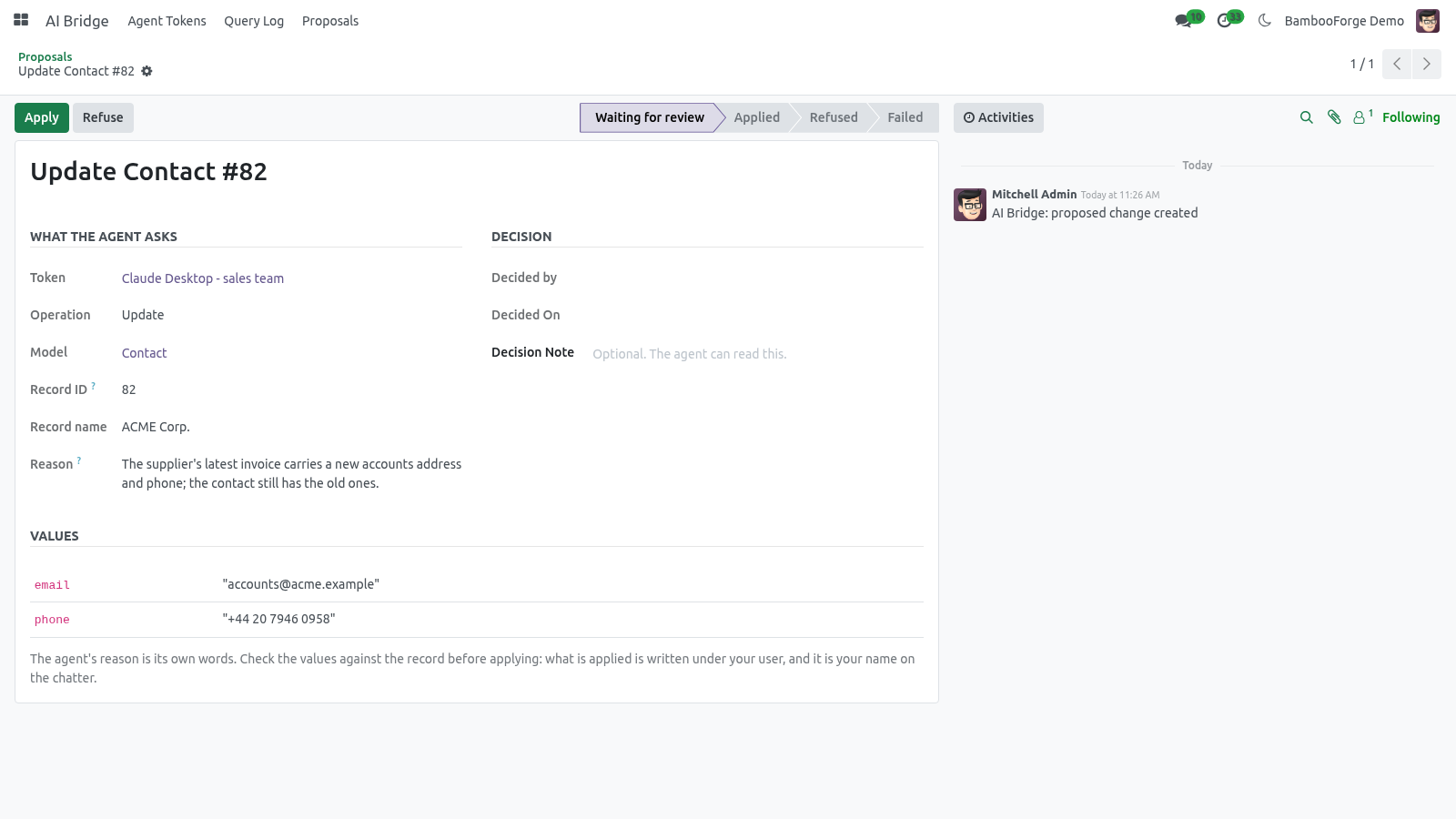
Three tools: odoo_propose_create - a model, the values, and a reason. odoo_propose_write - a model, a record id, the values, a reason. odoo_proposal_status - what became of the proposals it made. A proposal lands under API Gateway > Proposals as an activity for the token's reviewers (or its owner, if none are named).
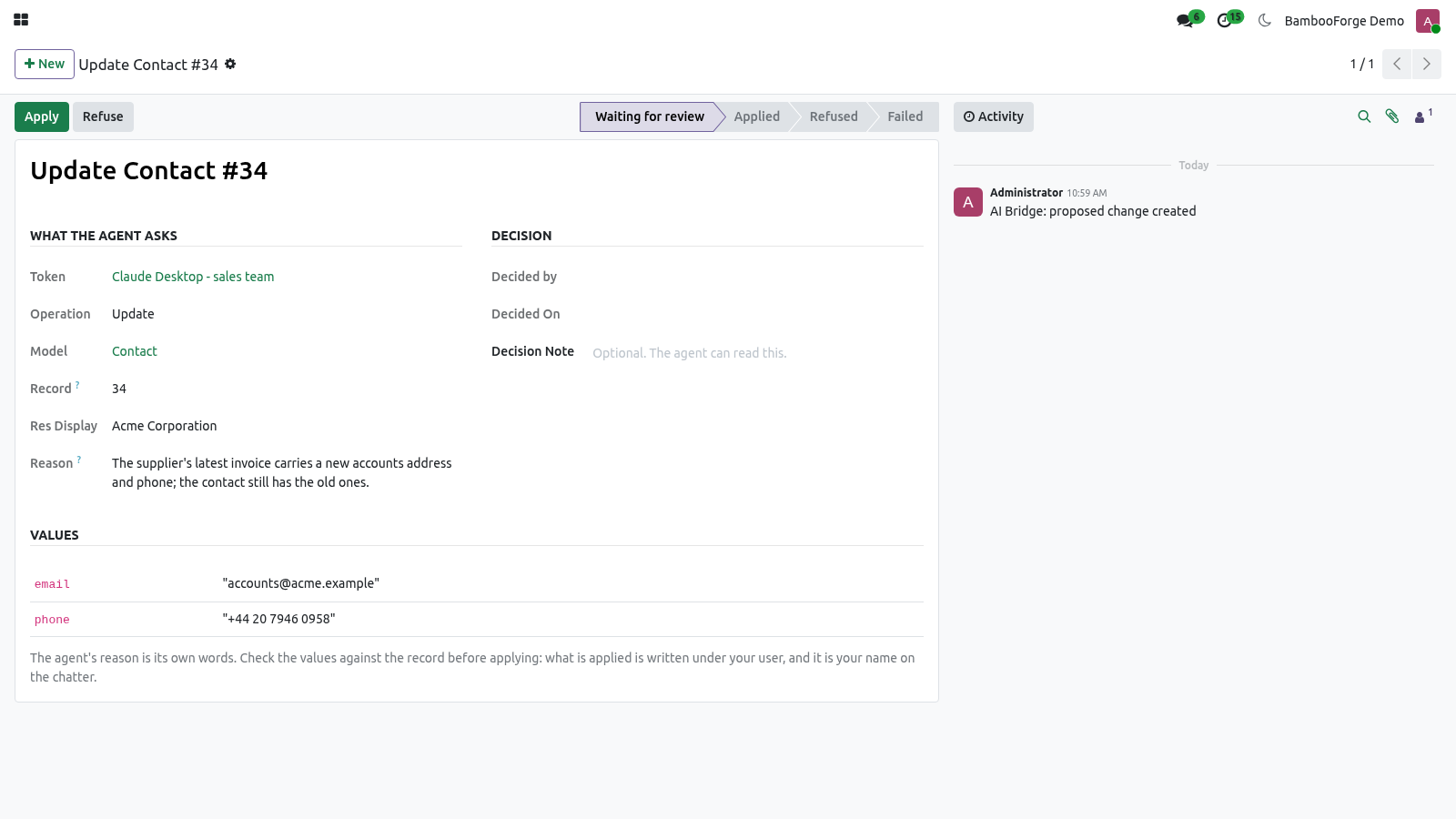
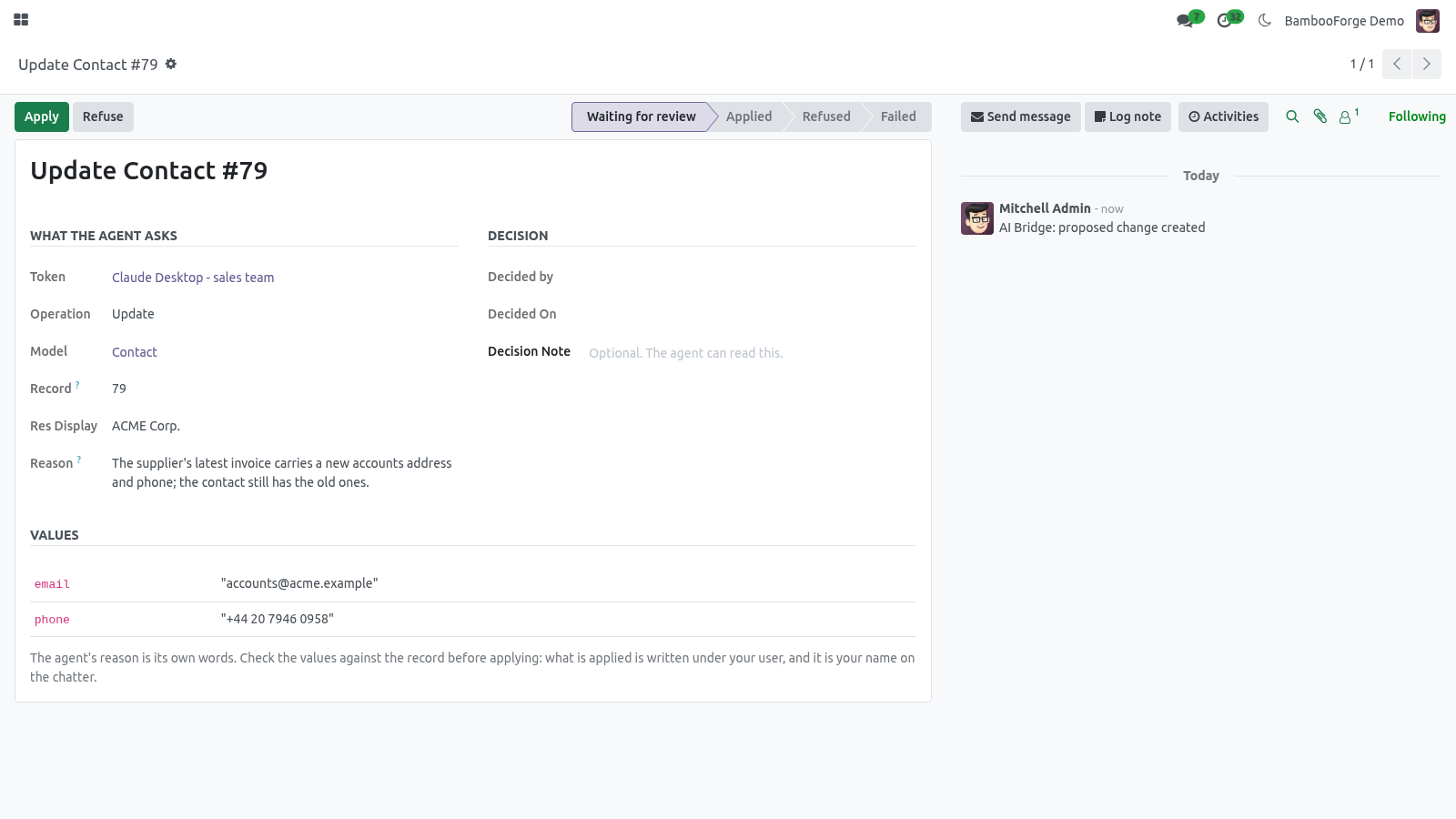
The reviewer sees the values as a table, the agent's reason as the agent's words, and two buttons. Apply writes the values under the reviewer's own user and access rights - so a reviewer who may not edit contacts cannot apply a contact change, whatever the token was allowed. The chatter of the record says which proposal, which token and which person. Refuse takes an optional note, which the agent can read back.
The complete manual is at docs dot bambooforge dot dev, the demo database is linked from the store page, and support answers within twenty-four hours. Links are in the description.
Transcript of the walkthrough (Odoo 19)
API Gateway for Odoo / REST API, OpenAPI, Webhooks & MCP Server. One key, three doors: a REST API with an OpenAPI file for Postman, n8n, Make and Zapier; signed webhooks that retry until delivered; and an MCP server for Claude and ChatGPT - each key limited to the models, fields and rows you list, with a review queue for writes and a log of every call. One key, three doors. A REST API with an OpenAPI file that Postman, n8n, Make, Zapier and code generators read as-is; webhooks that tell another system the moment something happens, signed and retried until they get through; and an MCP server for Claude, ChatGPT and any other agent.
Every door opens exactly as far as the key was granted: the models, the fields, the rows and the calls a person listed - nothing else exists for it. In the next few minutes: why this exists, then issue a key, then allowed models: the keyhole, then give a system access: rest, then give an automation tool access: openapi. Then what this app deliberately does not do, so you can tell before you buy whether it fits. Everything lives under API Gateway then Keys then Query Log then Proposals.
1. Copy bambooforge_ai_bridge into your addons path and update the app list, or install the ZIP from the Odoo Apps store. 2. Install the app API Gateway for Odoo.
3. Give yourself the group AI Bridge / Manager (Settings → Users → your user → Other). Without it the menu stays hidden. 4.
The menu API Gateway appears with Keys, Proposals, Query Log, Webhooks and Deliveries. Why this exists. Odoo already has an API. What it does not have is a way to hand a piece of it to somebody else safely: an API key is the whole user - a partner who reads orders also reads payroll, and nothing tells you what they read; XML-RPC and JSON-RPC need a developer who knows model names, field names and domain syntax; the people who build automations in n8n or Make do not; Odoo 19's JSON-2 endpoint and /doc page describe the database, not a scope, and there is no OpenAPI file to import; the webhook action in Automation Rules fires once and forgets - no signature, no retry, no record of what was delivered.
The gateway inverts the default. A key starts with zero models. A person lists what it may read, what it may change, whether changes apply at once or wait for review, and how much it may call. The same list drives the REST API, the OpenAPI document, the webhooks and the MCP tools, and every call through any door is one line in the query log.
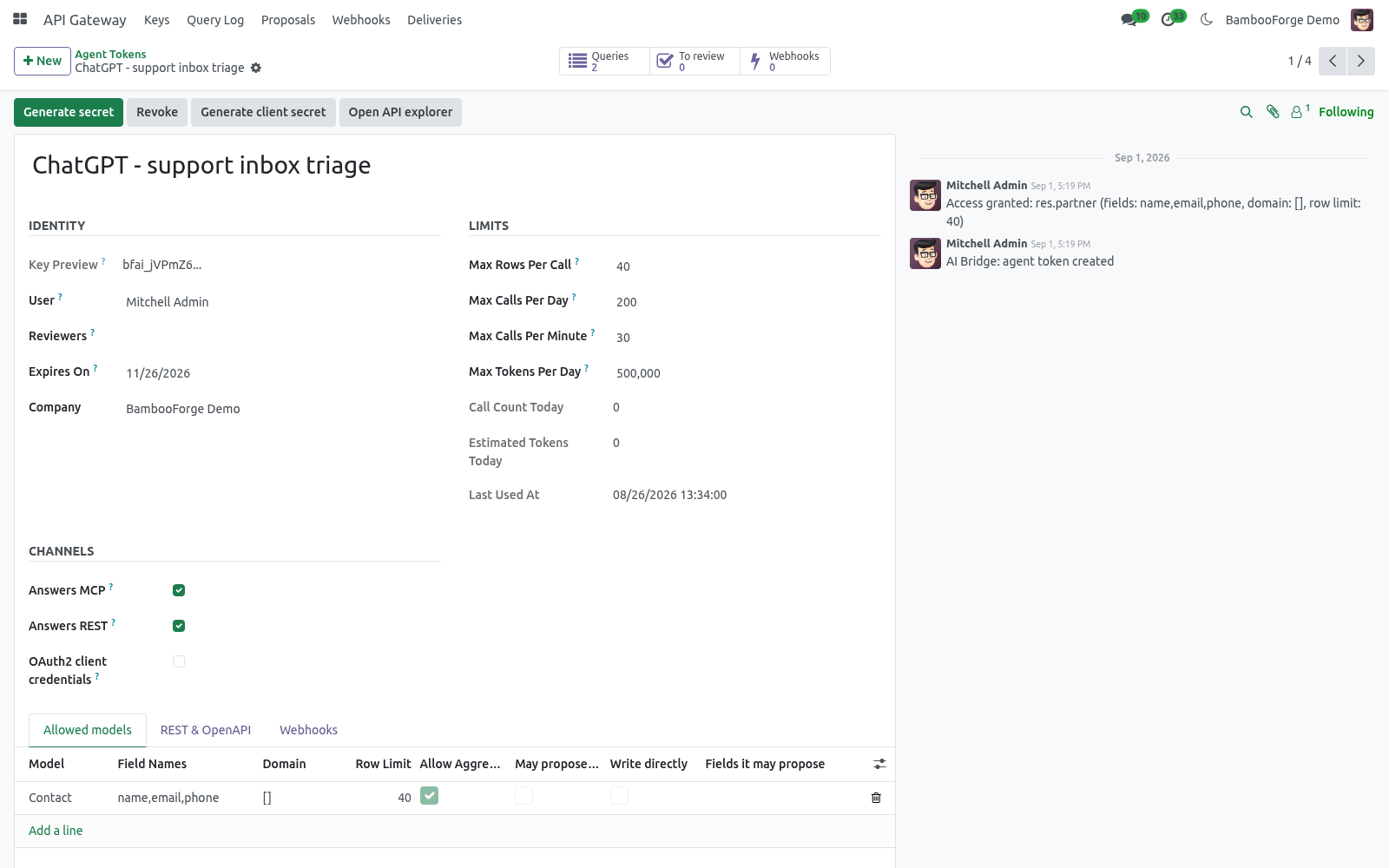
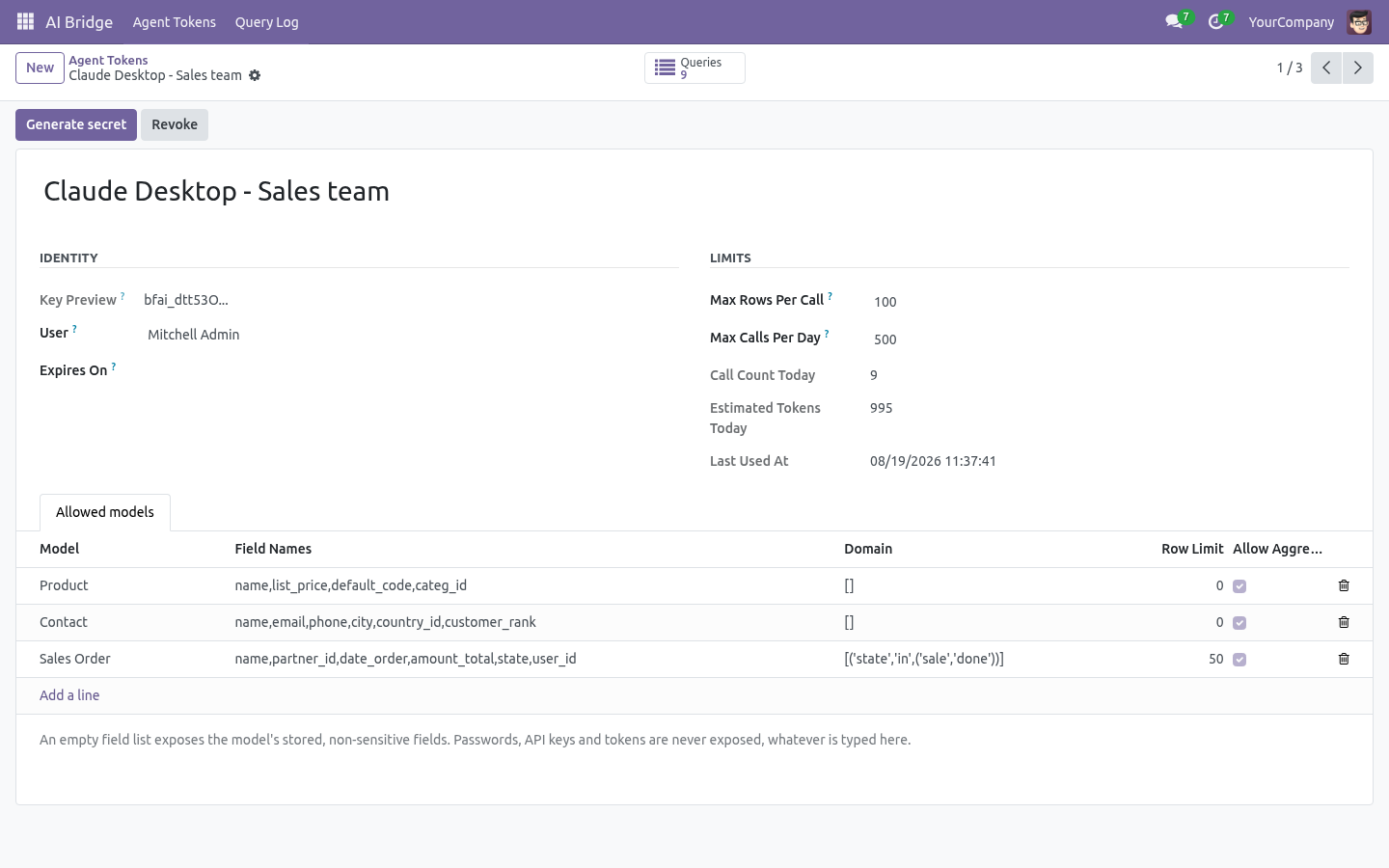
Issue a key Allowed models: the keyhole. Each line under Allowed models answers the questions every door asks: Model The only models the key can name. Anything else is refused before a query is built, and the refusal is logged. The answer does not say whether the model exists.
Give a system access: REST. Every allowed model is a resource. Send the key as a bearer token. Give an automation tool access: OpenAPI.
GET /api/openapi.json with the key returns an OpenAPI 3.1 document built from that key's rules: exactly its models, fields, writable fields, limits and actions, with an example taken from the first record the key may see. Import it into Postman, Insomnia, Bruno, n8n, Make, or a code generator - the paths, schemas and the bearer scheme are already there. A revoked key has no document. /api/doc is a built-in API explorer: paste the key, see every operation it may perform, try each one, copy the curl line.
It ships in the module - no CDN, nothing loaded from outside. Tell another system: webhooks OAuth2 client credentials. Some systems will not store a long-lived key. Press Generate client secret on the key: it gets a client_id and a secret shown once.
The system then exchanges them for an access token that lives one hour (tunable per key, 60 s to 24 h). The access token is a bearer token like the key and opens exactly the same doors; the scope only reports what the key was granted. Revoking the key revokes every access token. MCP clients that speak OAuth2 can use the same endpoint.
Give an AI agent access: MCP. The endpoint is. It speaks JSON-RPC 2.0 and implements the MCP methods initialize, tools/list, tools/call and ping. There is no session cookie and no CSRF token involved: the bearer token is the whole authentication.
Check it with curl before touching any client. A healthy answer names the server and lists exactly the models you allowed. A tools/call answers in MCP shape — human-readable content plus machine-readable structuredContent. Note the group list: the rule on sale.order carried the extra filter [('state','in',('sale','done'))], so draft quotations never enter the answer — the agent cannot see they exist, whatever it asks.
The MCP tools. odoo_list_models What may I read? Returns each allowed model with its exposed fields, row limit and whether aggregates are allowed. Agents call this first.
odoo_describe_model — {"model": "sale.order"} Field names, types, labels and selection values for one allowed model, so the agent writes correct domains instead of guessing. Proposing a change. From 1.2 the agent can ask for a record to be created or updated. It cannot do it.
Three tools: odoo_propose_create - a model, the values, and a reason. odoo_propose_write - a model, a record id, the values, a reason. odoo_proposal_status - what became of the proposals it made. A proposal lands under API Gateway > Proposals as an activity for the token's reviewers (or its owner, if none are named).
The reviewer sees the values as a table, the agent's reason as the agent's words, and two buttons. Apply writes the values under the reviewer's own user and access rights - so a reviewer who may not edit contacts cannot apply a contact change, whatever the token was allowed. The chatter of the record says which proposal, which token and which person. Refuse takes an optional note, which the agent can read back.
The complete manual is at docs dot bambooforge dot dev, the demo database is linked from the store page, and support answers within twenty-four hours. Links are in the description.
Transcript of the walkthrough (Odoo 18)
API Gateway for Odoo / REST API, OpenAPI, Webhooks & MCP Server. One key, three doors: a REST API with an OpenAPI file for Postman, n8n, Make and Zapier; signed webhooks that retry until delivered; and an MCP server for Claude and ChatGPT - each key limited to the models, fields and rows you list, with a review queue for writes and a log of every call. One key, three doors. A REST API with an OpenAPI file that Postman, n8n, Make, Zapier and code generators read as-is; webhooks that tell another system the moment something happens, signed and retried until they get through; and an MCP server for Claude, ChatGPT and any other agent.
Every door opens exactly as far as the key was granted: the models, the fields, the rows and the calls a person listed - nothing else exists for it. In the next few minutes: why this exists, then issue a key, then allowed models: the keyhole, then give a system access: rest, then give an automation tool access: openapi. Then what this app deliberately does not do, so you can tell before you buy whether it fits. Everything lives under API Gateway then Keys then Query Log then Proposals.
1. Copy bambooforge_ai_bridge into your addons path and update the app list, or install the ZIP from the Odoo Apps store. 2. Install the app API Gateway for Odoo.
3. Give yourself the group AI Bridge / Manager (Settings → Users → your user → Other). Without it the menu stays hidden. 4.
The menu API Gateway appears with Keys, Proposals, Query Log, Webhooks and Deliveries. Why this exists. Odoo already has an API. What it does not have is a way to hand a piece of it to somebody else safely: an API key is the whole user - a partner who reads orders also reads payroll, and nothing tells you what they read; XML-RPC and JSON-RPC need a developer who knows model names, field names and domain syntax; the people who build automations in n8n or Make do not; Odoo 18's JSON-2 endpoint and /doc page describe the database, not a scope, and there is no OpenAPI file to import; the webhook action in Automation Rules fires once and forgets - no signature, no retry, no record of what was delivered.
The gateway inverts the default. A key starts with zero models. A person lists what it may read, what it may change, whether changes apply at once or wait for review, and how much it may call. The same list drives the REST API, the OpenAPI document, the webhooks and the MCP tools, and every call through any door is one line in the query log.
Issue a key Allowed models: the keyhole. Each line under Allowed models answers the questions every door asks: Model The only models the key can name. Anything else is refused before a query is built, and the refusal is logged. The answer does not say whether the model exists.
Give a system access: REST. Every allowed model is a resource. Send the key as a bearer token. Give an automation tool access: OpenAPI.
GET /api/openapi.json with the key returns an OpenAPI 3.1 document built from that key's rules: exactly its models, fields, writable fields, limits and actions, with an example taken from the first record the key may see. Import it into Postman, Insomnia, Bruno, n8n, Make, or a code generator - the paths, schemas and the bearer scheme are already there. A revoked key has no document. /api/doc is a built-in API explorer: paste the key, see every operation it may perform, try each one, copy the curl line.
It ships in the module - no CDN, nothing loaded from outside. Tell another system: webhooks OAuth2 client credentials. Some systems will not store a long-lived key. Press Generate client secret on the key: it gets a client_id and a secret shown once.
The system then exchanges them for an access token that lives one hour (tunable per key, 60 s to 24 h). The access token is a bearer token like the key and opens exactly the same doors; the scope only reports what the key was granted. Revoking the key revokes every access token. MCP clients that speak OAuth2 can use the same endpoint.
Give an AI agent access: MCP. The endpoint is. It speaks JSON-RPC 2.0 and implements the MCP methods initialize, tools/list, tools/call and ping. There is no session cookie and no CSRF token involved: the bearer token is the whole authentication.
Check it with curl before touching any client. A healthy answer names the server and lists exactly the models you allowed. A tools/call answers in MCP shape — human-readable content plus machine-readable structuredContent. Note the group list: the rule on sale.order carried the extra filter [('state','in',('sale','done'))], so draft quotations never enter the answer — the agent cannot see they exist, whatever it asks.
The MCP tools. odoo_list_models What may I read? Returns each allowed model with its exposed fields, row limit and whether aggregates are allowed. Agents call this first.
odoo_describe_model — {"model": "sale.order"} Field names, types, labels and selection values for one allowed model, so the agent writes correct domains instead of guessing. Proposing a change. From 1.2 the agent can ask for a record to be created or updated. It cannot do it.
Three tools: odoo_propose_create - a model, the values, and a reason. odoo_propose_write - a model, a record id, the values, a reason. odoo_proposal_status - what became of the proposals it made. A proposal lands under API Gateway > Proposals as an activity for the token's reviewers (or its owner, if none are named).
The reviewer sees the values as a table, the agent's reason as the agent's words, and two buttons. Apply writes the values under the reviewer's own user and access rights - so a reviewer who may not edit contacts cannot apply a contact change, whatever the token was allowed. The chatter of the record says which proposal, which token and which person. Refuse takes an optional note, which the agent can read back.
The complete manual is at docs dot bambooforge dot dev, the demo database is linked from the store page, and support answers within twenty-four hours. Links are in the description.
Transcript of the walkthrough (Odoo 17)
API Gateway for Odoo / REST API, OpenAPI, Webhooks & MCP Server. One key, three doors: a REST API with an OpenAPI file for Postman, n8n, Make and Zapier; signed webhooks that retry until delivered; and an MCP server for Claude and ChatGPT - each key limited to the models, fields and rows you list, with a review queue for writes and a log of every call. One key, three doors. A REST API with an OpenAPI file that Postman, n8n, Make, Zapier and code generators read as-is; webhooks that tell another system the moment something happens, signed and retried until they get through; and an MCP server for Claude, ChatGPT and any other agent.
Every door opens exactly as far as the key was granted: the models, the fields, the rows and the calls a person listed - nothing else exists for it. In the next few minutes: why this exists, then issue a key, then allowed models: the keyhole, then give a system access: rest, then give an automation tool access: openapi. Then what this app deliberately does not do, so you can tell before you buy whether it fits. Everything lives under API Gateway then Keys then Query Log then Proposals.
1. Copy bambooforge_ai_bridge into your addons path and update the app list, or install the ZIP from the Odoo Apps store. 2. Install the app API Gateway for Odoo.
3. Give yourself the group AI Bridge / Manager (Settings → Users → your user → Other). Without it the menu stays hidden. 4.
The menu API Gateway appears with Keys, Proposals, Query Log, Webhooks and Deliveries. Why this exists. Odoo already has an API. What it does not have is a way to hand a piece of it to somebody else safely: an API key is the whole user - a partner who reads orders also reads payroll, and nothing tells you what they read; XML-RPC and JSON-RPC need a developer who knows model names, field names and domain syntax; the people who build automations in n8n or Make do not; Odoo 17's JSON-2 endpoint and /doc page describe the database, not a scope, and there is no OpenAPI file to import; the webhook action in Automation Rules fires once and forgets - no signature, no retry, no record of what was delivered.
The gateway inverts the default. A key starts with zero models. A person lists what it may read, what it may change, whether changes apply at once or wait for review, and how much it may call. The same list drives the REST API, the OpenAPI document, the webhooks and the MCP tools, and every call through any door is one line in the query log.
Issue a key Allowed models: the keyhole. Each line under Allowed models answers the questions every door asks: Model The only models the key can name. Anything else is refused before a query is built, and the refusal is logged. The answer does not say whether the model exists.
Give a system access: REST. Every allowed model is a resource. Send the key as a bearer token. Give an automation tool access: OpenAPI.
GET /api/openapi.json with the key returns an OpenAPI 3.1 document built from that key's rules: exactly its models, fields, writable fields, limits and actions, with an example taken from the first record the key may see. Import it into Postman, Insomnia, Bruno, n8n, Make, or a code generator - the paths, schemas and the bearer scheme are already there. A revoked key has no document. /api/doc is a built-in API explorer: paste the key, see every operation it may perform, try each one, copy the curl line.
It ships in the module - no CDN, nothing loaded from outside. Tell another system: webhooks OAuth2 client credentials. Some systems will not store a long-lived key. Press Generate client secret on the key: it gets a client_id and a secret shown once.
The system then exchanges them for an access token that lives one hour (tunable per key, 60 s to 24 h). The access token is a bearer token like the key and opens exactly the same doors; the scope only reports what the key was granted. Revoking the key revokes every access token. MCP clients that speak OAuth2 can use the same endpoint.
Give an AI agent access: MCP. The endpoint is. It speaks JSON-RPC 2.0 and implements the MCP methods initialize, tools/list, tools/call and ping. There is no session cookie and no CSRF token involved: the bearer token is the whole authentication.
Check it with curl before touching any client. A healthy answer names the server and lists exactly the models you allowed. A tools/call answers in MCP shape — human-readable content plus machine-readable structuredContent. Note the group list: the rule on sale.order carried the extra filter [('state','in',('sale','done'))], so draft quotations never enter the answer — the agent cannot see they exist, whatever it asks.
The MCP tools. odoo_list_models What may I read? Returns each allowed model with its exposed fields, row limit and whether aggregates are allowed. Agents call this first.
odoo_describe_model — {"model": "sale.order"} Field names, types, labels and selection values for one allowed model, so the agent writes correct domains instead of guessing. Proposing a change. From 1.2 the agent can ask for a record to be created or updated. It cannot do it.
Three tools: odoo_propose_create - a model, the values, and a reason. odoo_propose_write - a model, a record id, the values, a reason. odoo_proposal_status - what became of the proposals it made. A proposal lands under API Gateway > Proposals as an activity for the token's reviewers (or its owner, if none are named).
The reviewer sees the values as a table, the agent's reason as the agent's words, and two buttons. Apply writes the values under the reviewer's own user and access rights - so a reviewer who may not edit contacts cannot apply a contact change, whatever the token was allowed. The chatter of the record says which proposal, which token and which person. Refuse takes an optional note, which the agent can read back.
The complete manual is at docs dot bambooforge dot dev, the demo database is linked from the store page, and support answers within twenty-four hours. Links are in the description.
Transcript of the walkthrough (Odoo 16)
API Gateway for Odoo / REST API, OpenAPI, Webhooks & MCP Server. One key, three doors: a REST API with an OpenAPI file for Postman, n8n, Make and Zapier; signed webhooks that retry until delivered; and an MCP server for Claude and ChatGPT - each key limited to the models, fields and rows you list, with a review queue for writes and a log of every call. One key, three doors. A REST API with an OpenAPI file that Postman, n8n, Make, Zapier and code generators read as-is; webhooks that tell another system the moment something happens, signed and retried until they get through; and an MCP server for Claude, ChatGPT and any other agent.
Every door opens exactly as far as the key was granted: the models, the fields, the rows and the calls a person listed - nothing else exists for it. In the next few minutes: why this exists, then issue a key, then allowed models: the keyhole, then give a system access: rest, then give an automation tool access: openapi. Then what this app deliberately does not do, so you can tell before you buy whether it fits. Everything lives under API Gateway then Keys then Query Log then Proposals.
1. Copy bambooforge_ai_bridge into your addons path and update the app list, or install the ZIP from the Odoo Apps store. 2. Install the app API Gateway for Odoo.
3. Give yourself the group AI Bridge / Manager (Settings → Users → your user → Other). Without it the menu stays hidden. 4.
The menu API Gateway appears with Keys, Proposals, Query Log, Webhooks and Deliveries. Why this exists. Odoo already has an API. What it does not have is a way to hand a piece of it to somebody else safely: an API key is the whole user - a partner who reads orders also reads payroll, and nothing tells you what they read; XML-RPC and JSON-RPC need a developer who knows model names, field names and domain syntax; the people who build automations in n8n or Make do not; Odoo 16's JSON-2 endpoint and /doc page describe the database, not a scope, and there is no OpenAPI file to import; the webhook action in Automation Rules fires once and forgets - no signature, no retry, no record of what was delivered.
The gateway inverts the default. A key starts with zero models. A person lists what it may read, what it may change, whether changes apply at once or wait for review, and how much it may call. The same list drives the REST API, the OpenAPI document, the webhooks and the MCP tools, and every call through any door is one line in the query log.
Issue a key Allowed models: the keyhole. Each line under Allowed models answers the questions every door asks: Model The only models the key can name. Anything else is refused before a query is built, and the refusal is logged. The answer does not say whether the model exists.
Give a system access: REST. Every allowed model is a resource. Send the key as a bearer token. Give an automation tool access: OpenAPI.
GET /api/openapi.json with the key returns an OpenAPI 3.1 document built from that key's rules: exactly its models, fields, writable fields, limits and actions, with an example taken from the first record the key may see. Import it into Postman, Insomnia, Bruno, n8n, Make, or a code generator - the paths, schemas and the bearer scheme are already there. A revoked key has no document. /api/doc is a built-in API explorer: paste the key, see every operation it may perform, try each one, copy the curl line.
It ships in the module - no CDN, nothing loaded from outside. Tell another system: webhooks OAuth2 client credentials. Some systems will not store a long-lived key. Press Generate client secret on the key: it gets a client_id and a secret shown once.
The system then exchanges them for an access token that lives one hour (tunable per key, 60 s to 24 h). The access token is a bearer token like the key and opens exactly the same doors; the scope only reports what the key was granted. Revoking the key revokes every access token. MCP clients that speak OAuth2 can use the same endpoint.
Give an AI agent access: MCP. The endpoint is. It speaks JSON-RPC 2.0 and implements the MCP methods initialize, tools/list, tools/call and ping. There is no session cookie and no CSRF token involved: the bearer token is the whole authentication.
Check it with curl before touching any client. A healthy answer names the server and lists exactly the models you allowed. A tools/call answers in MCP shape — human-readable content plus machine-readable structuredContent. Note the group list: the rule on sale.order carried the extra filter [('state','in',('sale','done'))], so draft quotations never enter the answer — the agent cannot see they exist, whatever it asks.
The MCP tools. odoo_list_models What may I read? Returns each allowed model with its exposed fields, row limit and whether aggregates are allowed. Agents call this first.
odoo_describe_model — {"model": "sale.order"} Field names, types, labels and selection values for one allowed model, so the agent writes correct domains instead of guessing. Proposing a change. From 1.2 the agent can ask for a record to be created or updated. It cannot do it.
Three tools: odoo_propose_create - a model, the values, and a reason. odoo_propose_write - a model, a record id, the values, a reason. odoo_proposal_status - what became of the proposals it made. A proposal lands under API Gateway > Proposals as an activity for the token's reviewers (or its owner, if none are named).
The reviewer sees the values as a table, the agent's reason as the agent's words, and two buttons. Apply writes the values under the reviewer's own user and access rights - so a reviewer who may not edit contacts cannot apply a contact change, whatever the token was allowed. The chatter of the record says which proposal, which token and which person. Refuse takes an optional note, which the agent can read back.
The complete manual is at docs dot bambooforge dot dev, the demo database is linked from the store page, and support answers within twenty-four hours. Links are in the description.
Key facts
- What it is
- One key, three doors: a REST API with an OpenAPI file for Postman, n8n, Make and Zapier; signed webhooks that retry until delivered; and an MCP server for Claude and ChatGPT - each key limited to the models, fields and rows you list, with a review queue for writes and a log of every call.
- For
- Extra Tools
- Odoo versions
- 16.0, 17.0, 18.0, 19.0, 20.0 - Community and Enterprise
- Runs on
- Odoo.sh or Odoo you host yourself - not Odoo Online, which accepts no third-party apps
- Price
- 129 EUR, one-time, on the Odoo Apps Store
- Technical name
- bambooforge_ai_bridge
- Run for real
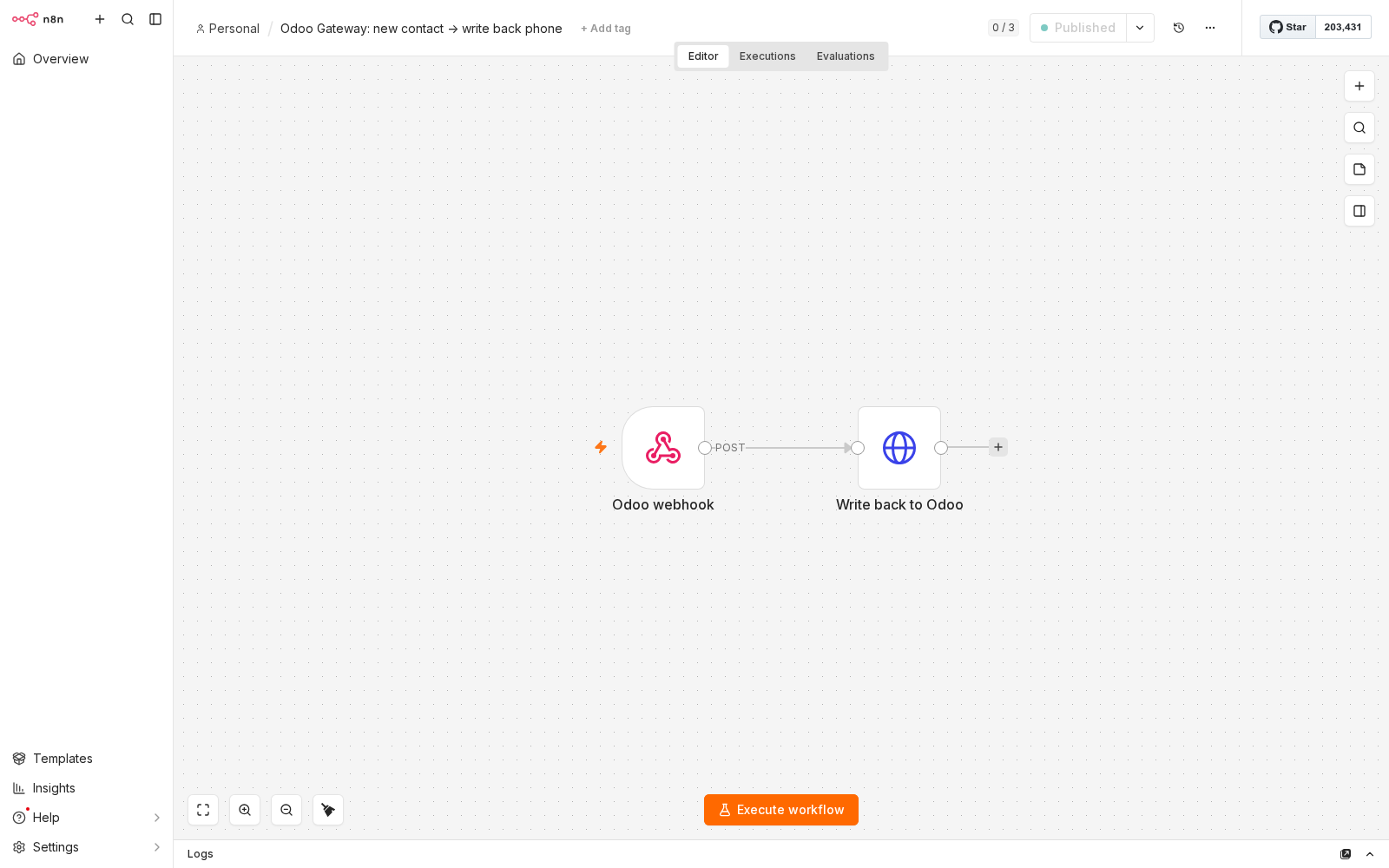
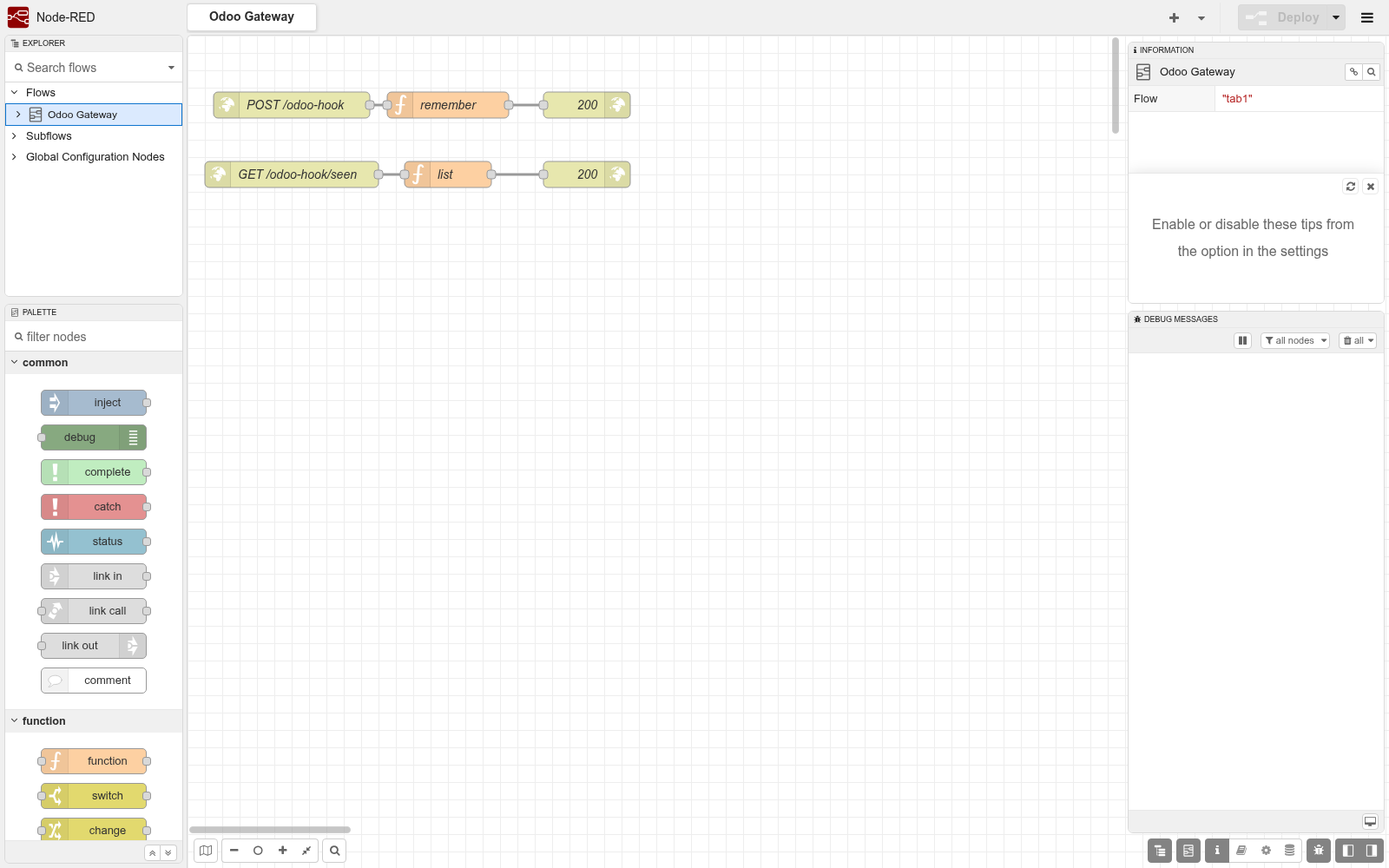
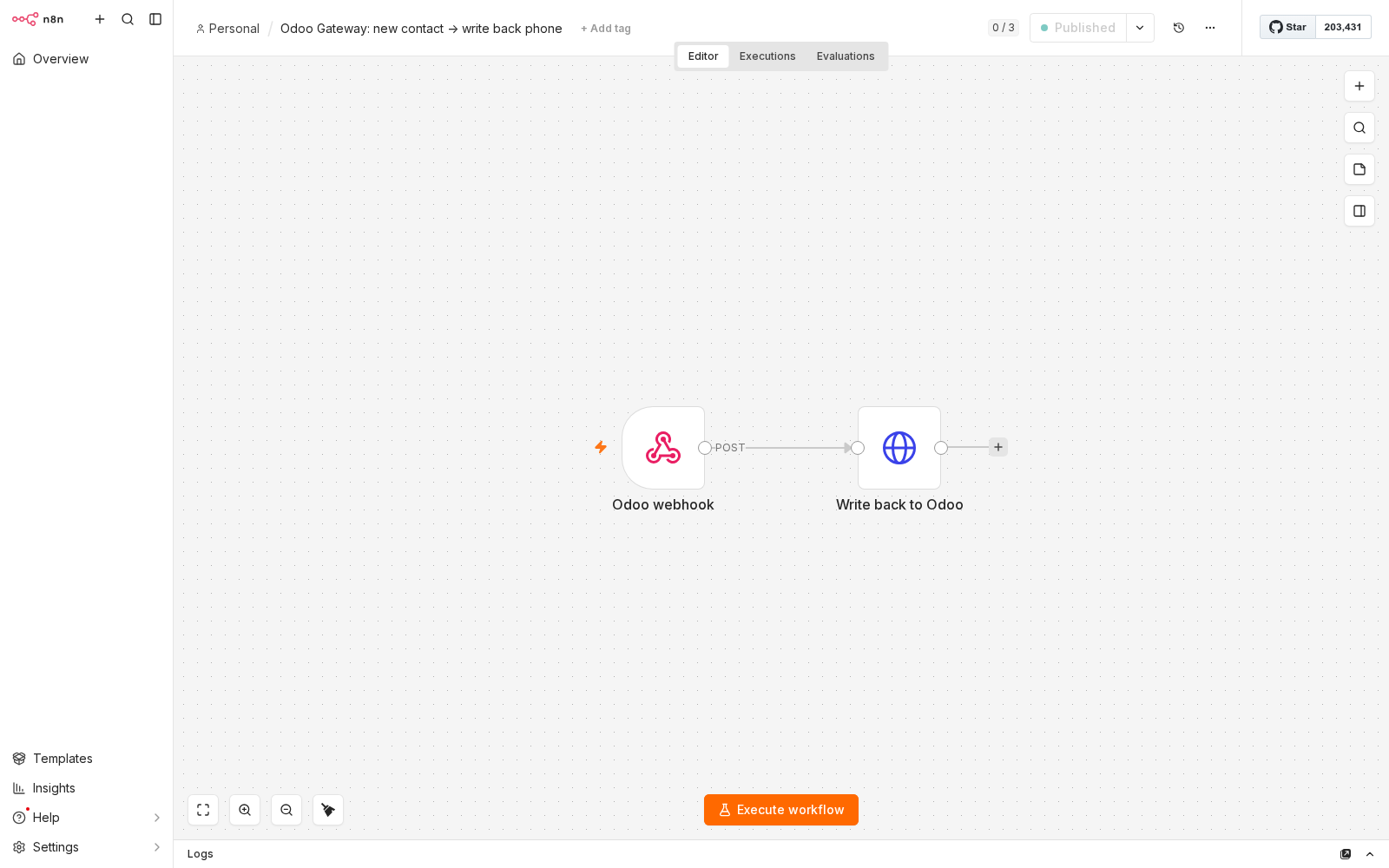
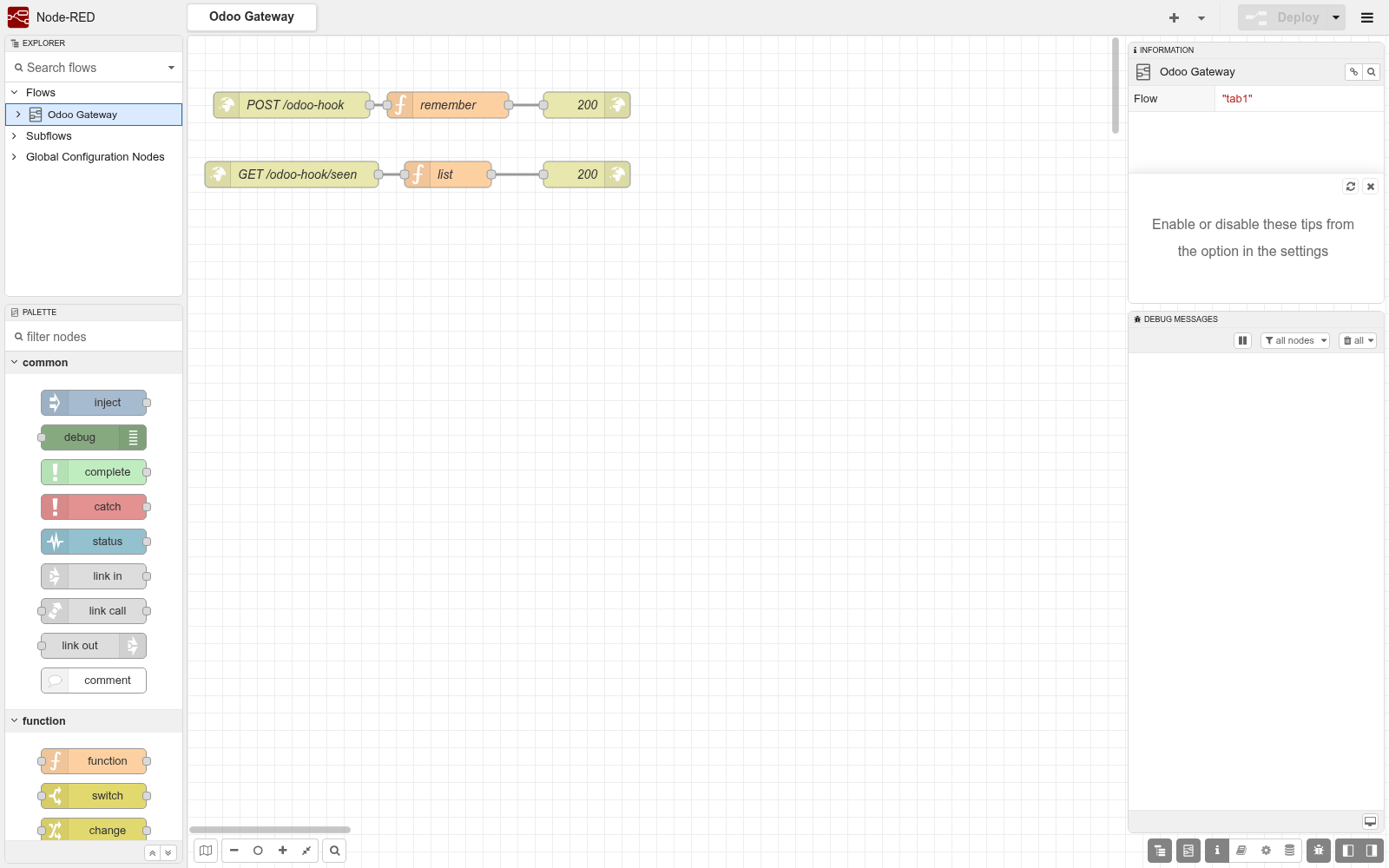
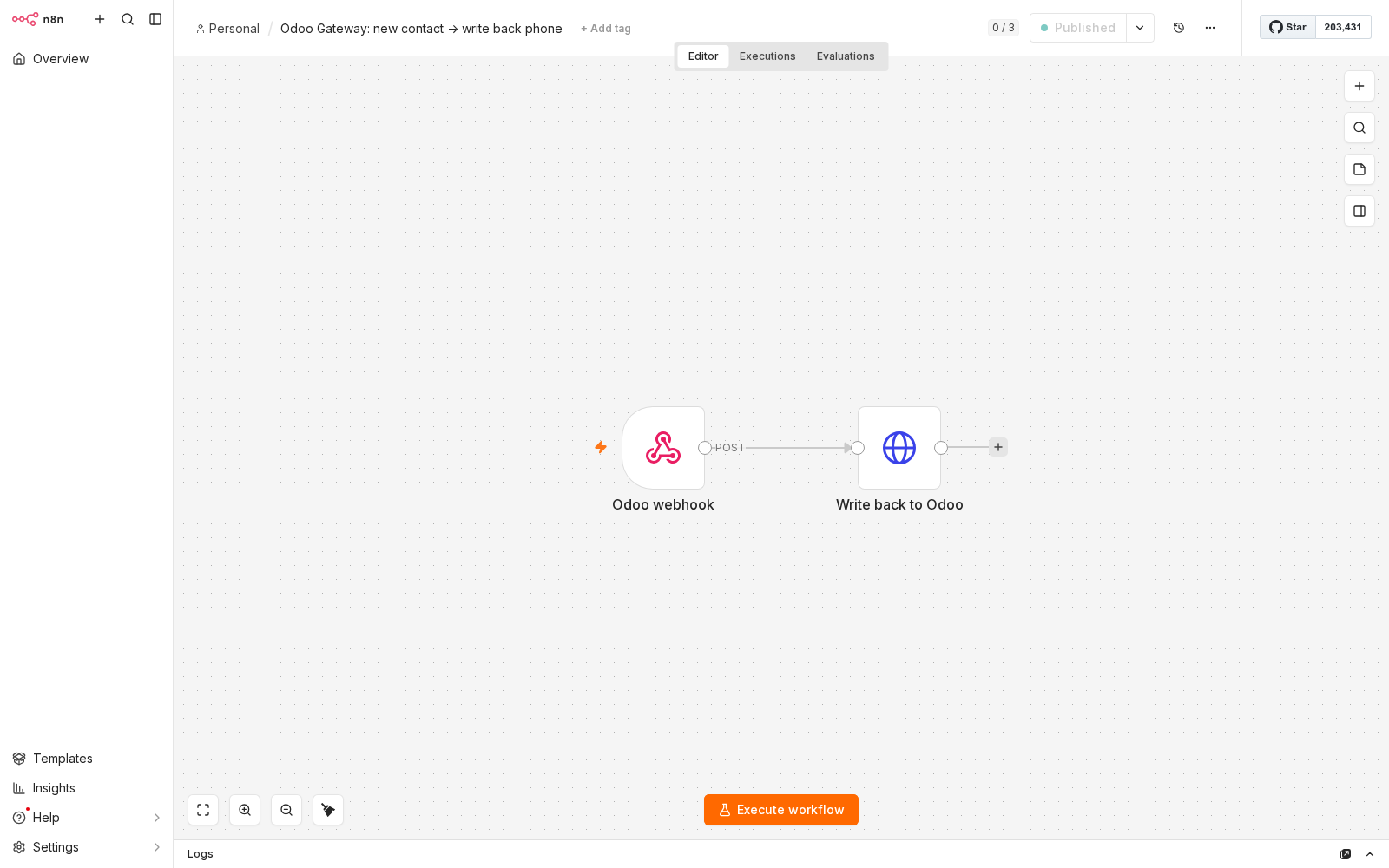
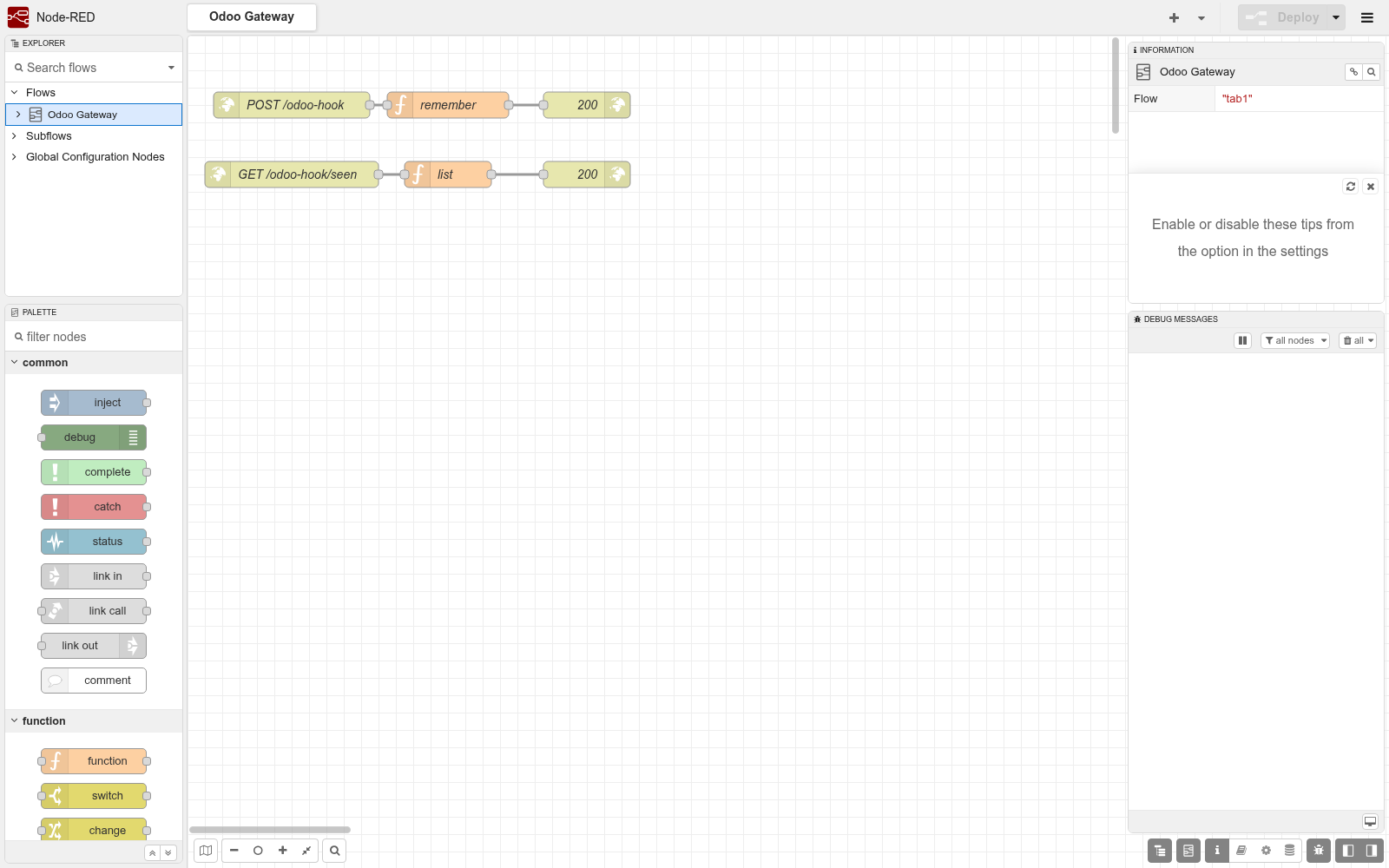
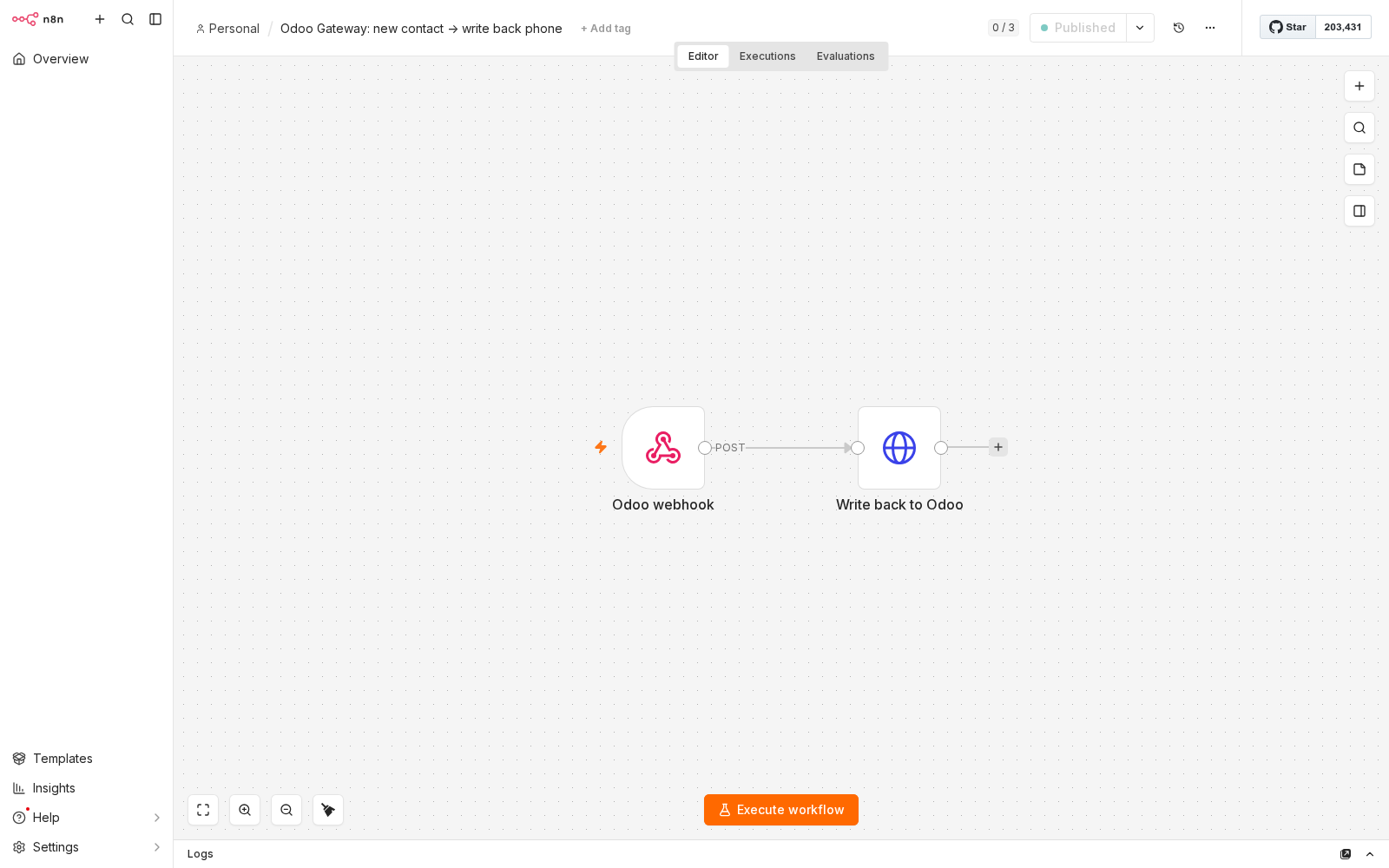
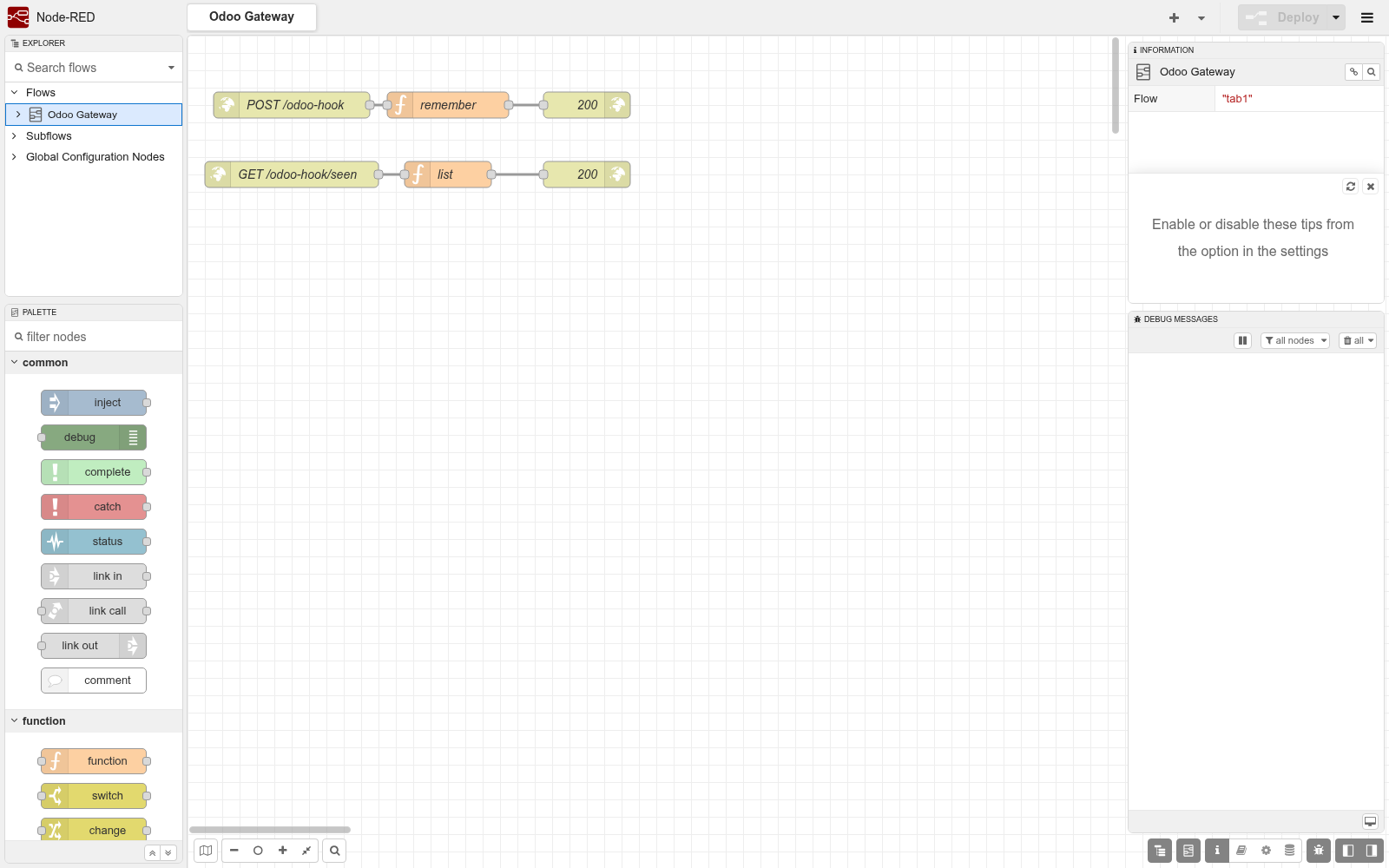
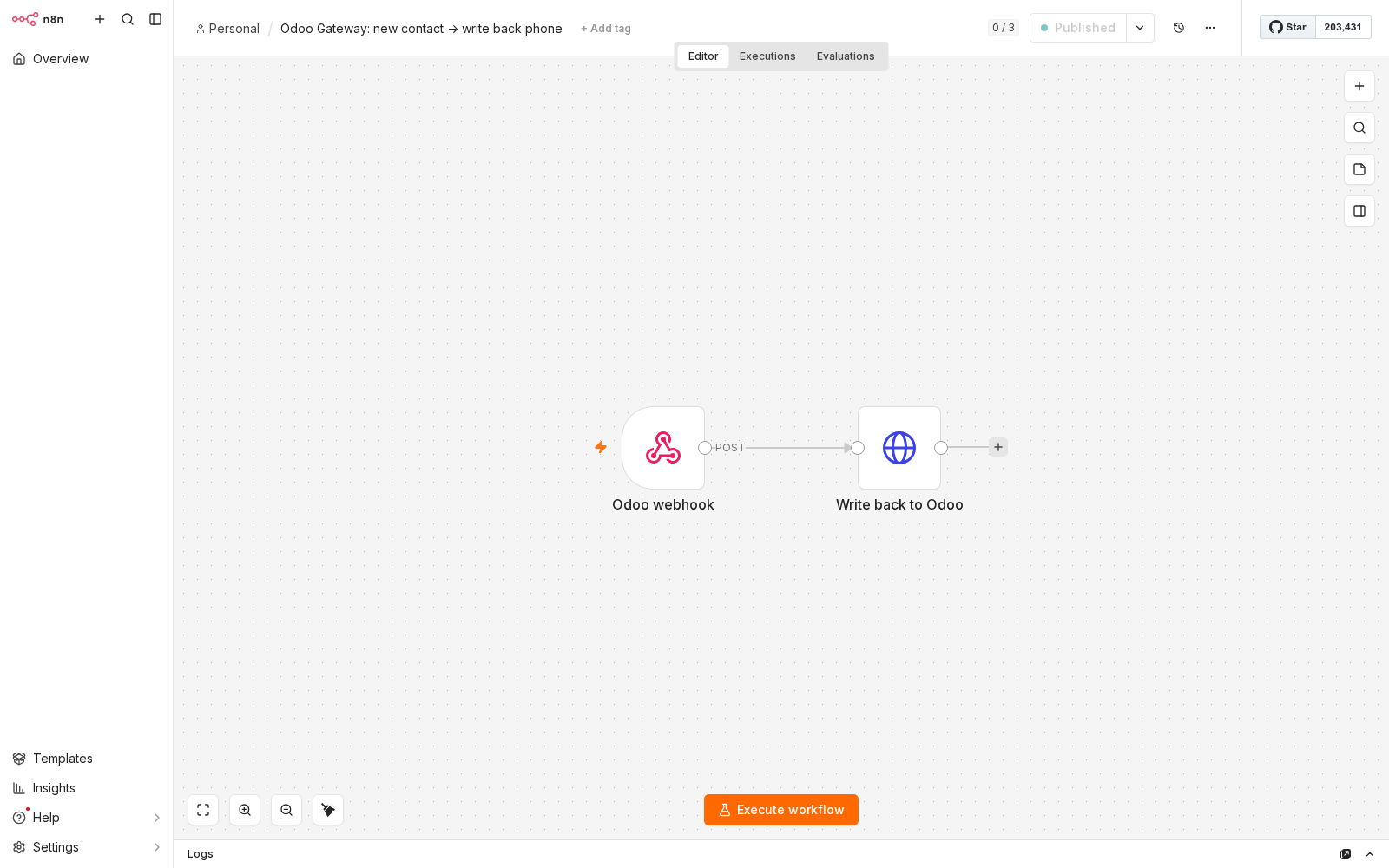
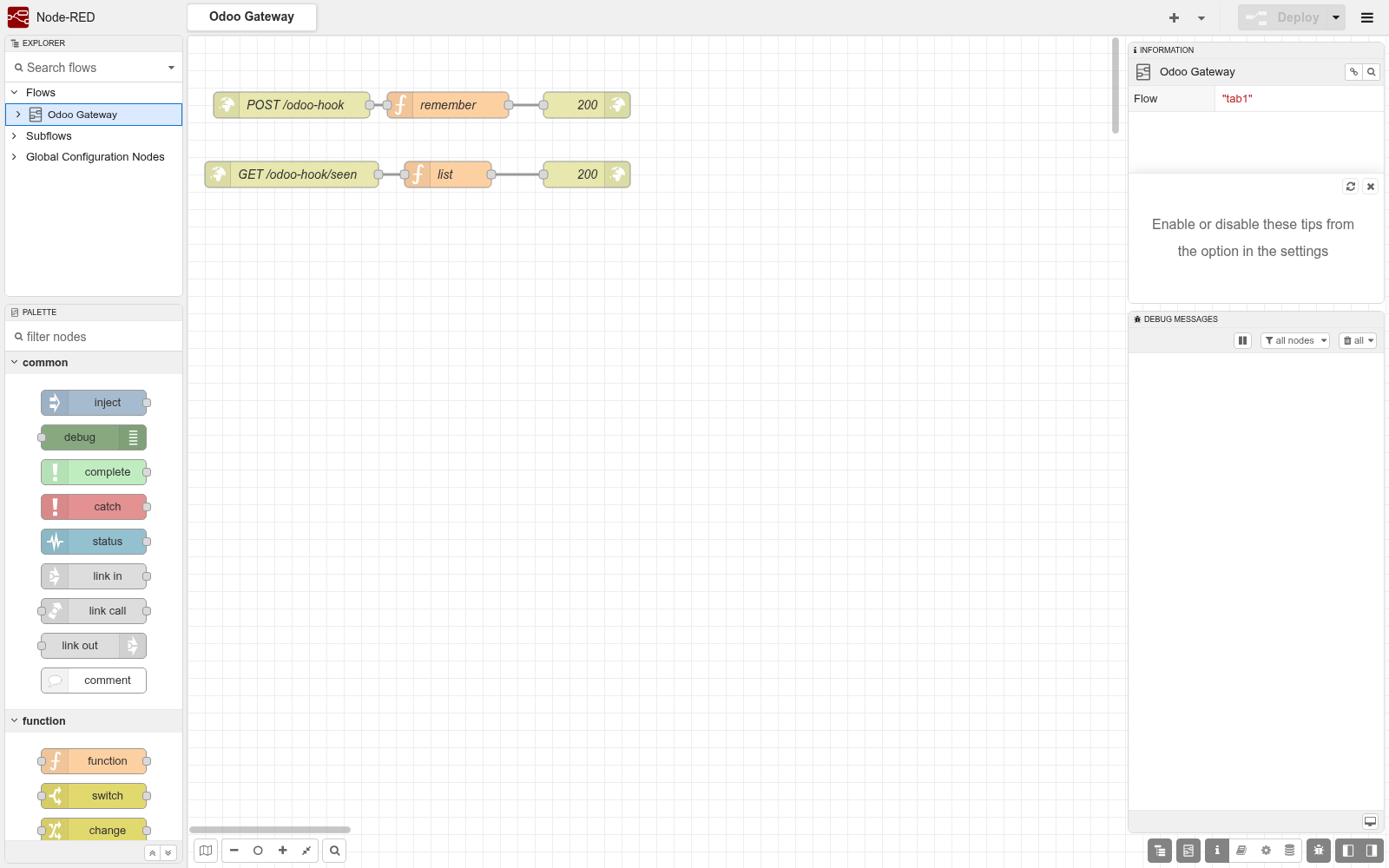
- Tested for real against n8n 2.34.6, Node-RED 5.0.6, Postman (newman), HTTPie and openapi-python-client: a contact created through REST fired a signed webhook into an n8n workflow that wrote a phone number back through REST; an order confirmed through a REST action reached a Node-RED flow with a verifiable signature; a 15-request Postman collection passed 24 of 24 assertions; the OpenAPI document validated with openapi-spec-validator and Redocly and generated a typed Python client that listed the orders - 0 errors.
- Compared with the alternatives
- https://docs.bambooforge.dev/bambooforge_ai_bridge/compare/
- Manual last updated
- 2026-10-15
API Gateway for Odoo | REST API, OpenAPI, Webhooks & MCP
One key, three doors. A REST API with an OpenAPI file that Postman, n8n, Make, Zapier and code generators read as-is; webhooks that tell another system the moment something happens, signed and retried until they get through; and an MCP server for Claude, ChatGPT and any other agent. Every door opens exactly as far as the key was granted: the models, the fields, the rows and the calls a person listed - nothing else exists for it.
This page is the complete manual. Follow it top to bottom and you can install the app, issue a key, connect a tool, a system or an agent, understand the guard rails and diagnose the usual problems without contacting support.
Why this exists
Odoo already has an API. What it does not have is a way to hand a piece of it to somebody else safely:
an API key is the whole user - a partner who reads orders also reads payroll, and nothing tells you what they read;
XML-RPC and JSON-RPC need a developer who knows model names, field names and domain syntax; the people who build automations in n8n or Make do not;
Odoo's JSON-2 endpoint (19.0 and later) and /doc page describe the database, not a scope, and there is no OpenAPI file to import;
the webhook action in Automation Rules fires once and forgets - no signature, no retry, no record of what was delivered.
The gateway inverts the default. A key starts with zero models. A person lists what it may read, what it may change, whether changes apply at once or wait for review, and how much it may call. The same list drives the REST API, the OpenAPI document, the webhooks and the MCP tools, and every call through any door is one line in the query log.
Install
Copy bambooforge_ai_bridge into your addons path and update the app list, or install the ZIP from the Odoo Apps store.
Install the app API Gateway for Odoo.
Give yourself the group AI Bridge / Manager (Settings → Users → your user → Other). Without it the menu stays hidden.
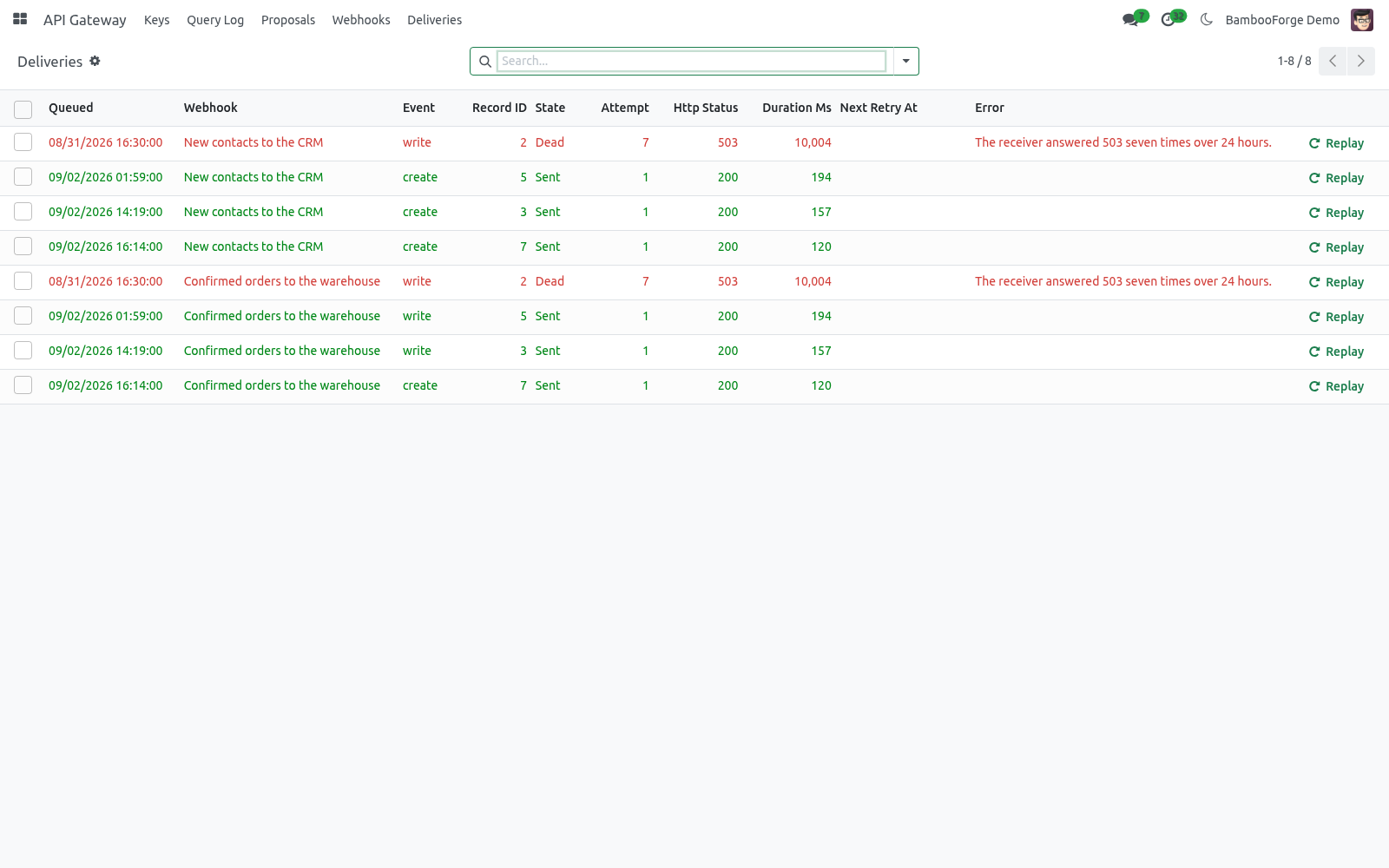
The menu API Gateway appears with Keys, Proposals, Query Log, Webhooks and Deliveries.
There is no external service, no outbound call of ours and no account with anyone: every endpoint lives inside your own Odoo.
Issue a key
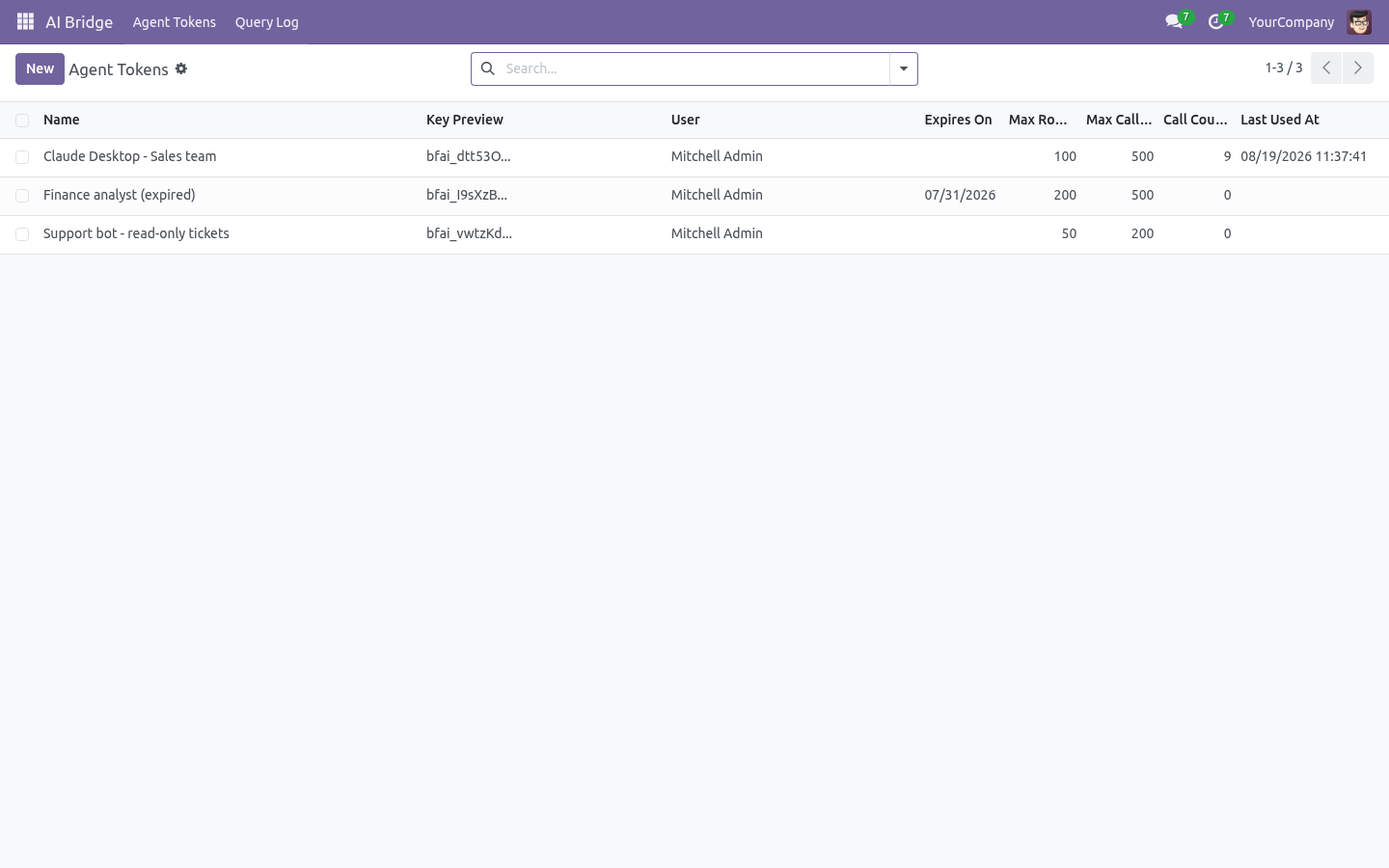
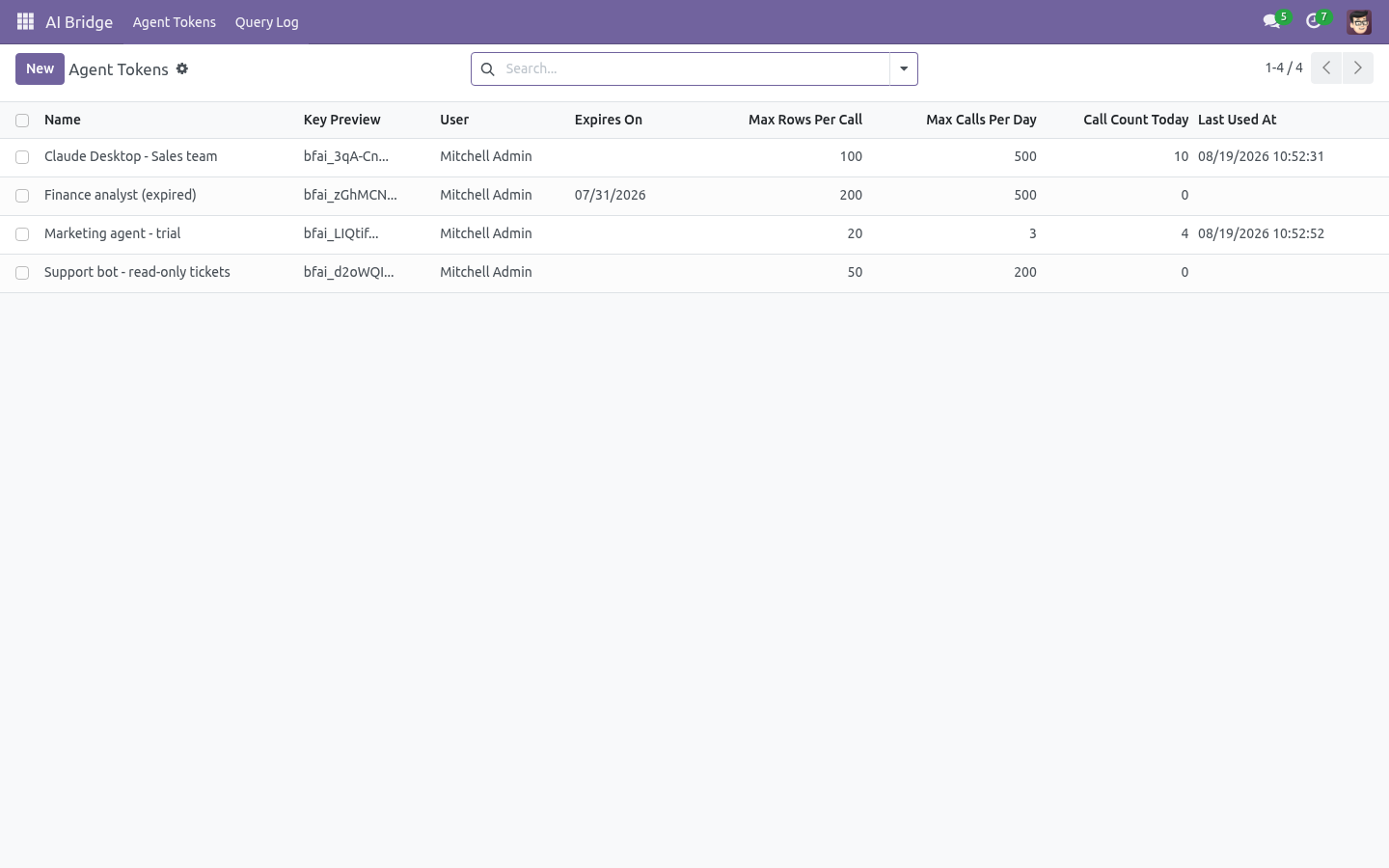
API Gateway → Keys → New
Field |
Meaning |
|---|---|
Name |
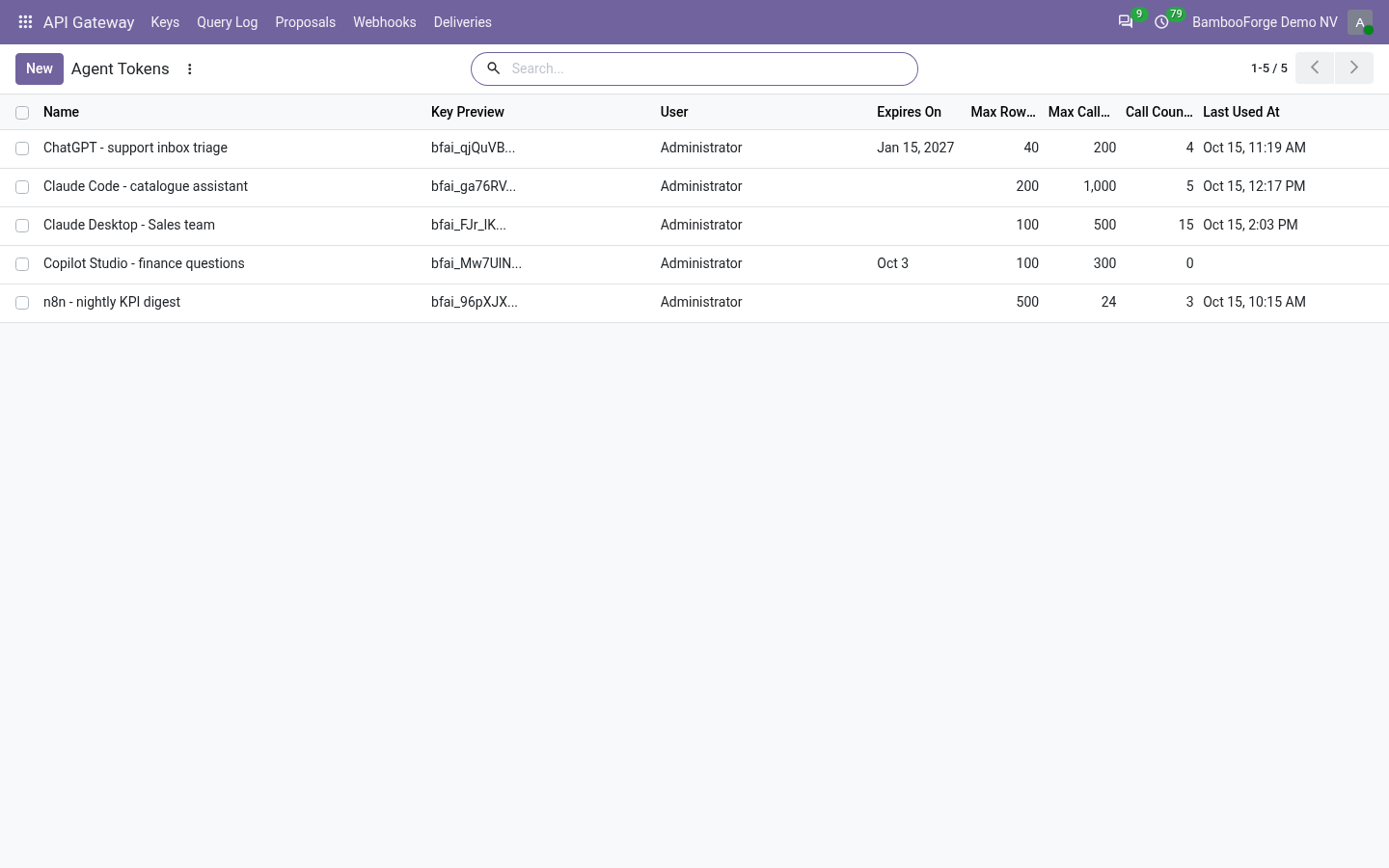
What the key is for, e.g. n8n - warehouse or Claude Desktop - sales team. It shows on every log line. |
Runs as user |
The Odoo user whose record rules and access rights apply to every call. Use a dedicated, low-privilege user - the allowlist is a second fence, not a replacement for ACLs. |
Reviewers |
Who is asked to apply or refuse the changes the key proposes. Empty: the key's user. |
Expires on |
Optional. After this date the key stops authenticating - and so do its access tokens. |
Max rows per call |
Hard ceiling on rows returned by one call (default 200). A per-model limit can lower it. |
Max calls per day / per minute |
Rolling caps shared by every door. Past them every call is refused with the reason, and REST answers 429 with Retry-After. |
Answers REST / Answers MCP |
Two switches: turn one door off without touching the other. |
OAuth2 client credentials |
For systems that prefer short-lived access tokens over a long-lived key (see below). |
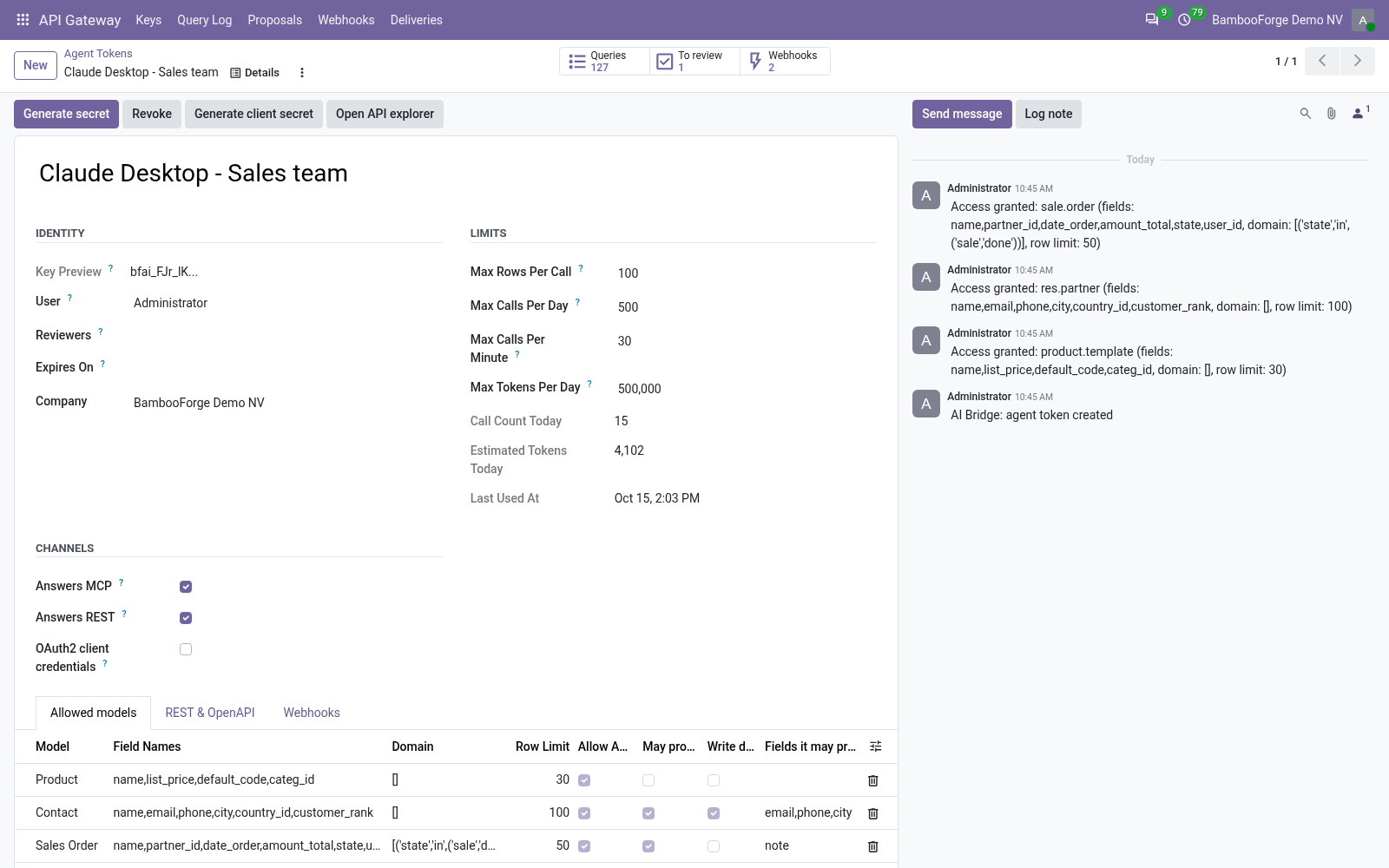
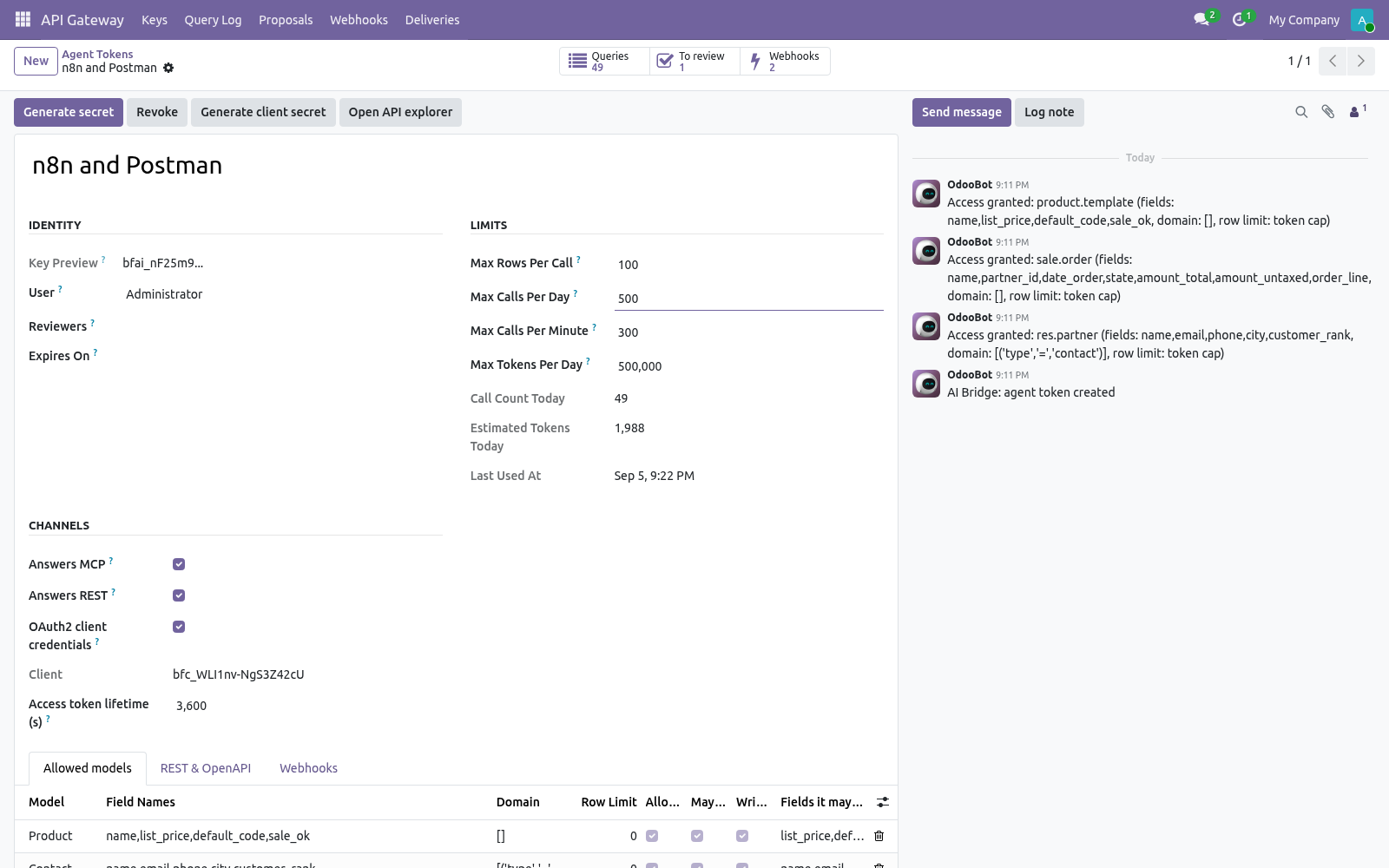
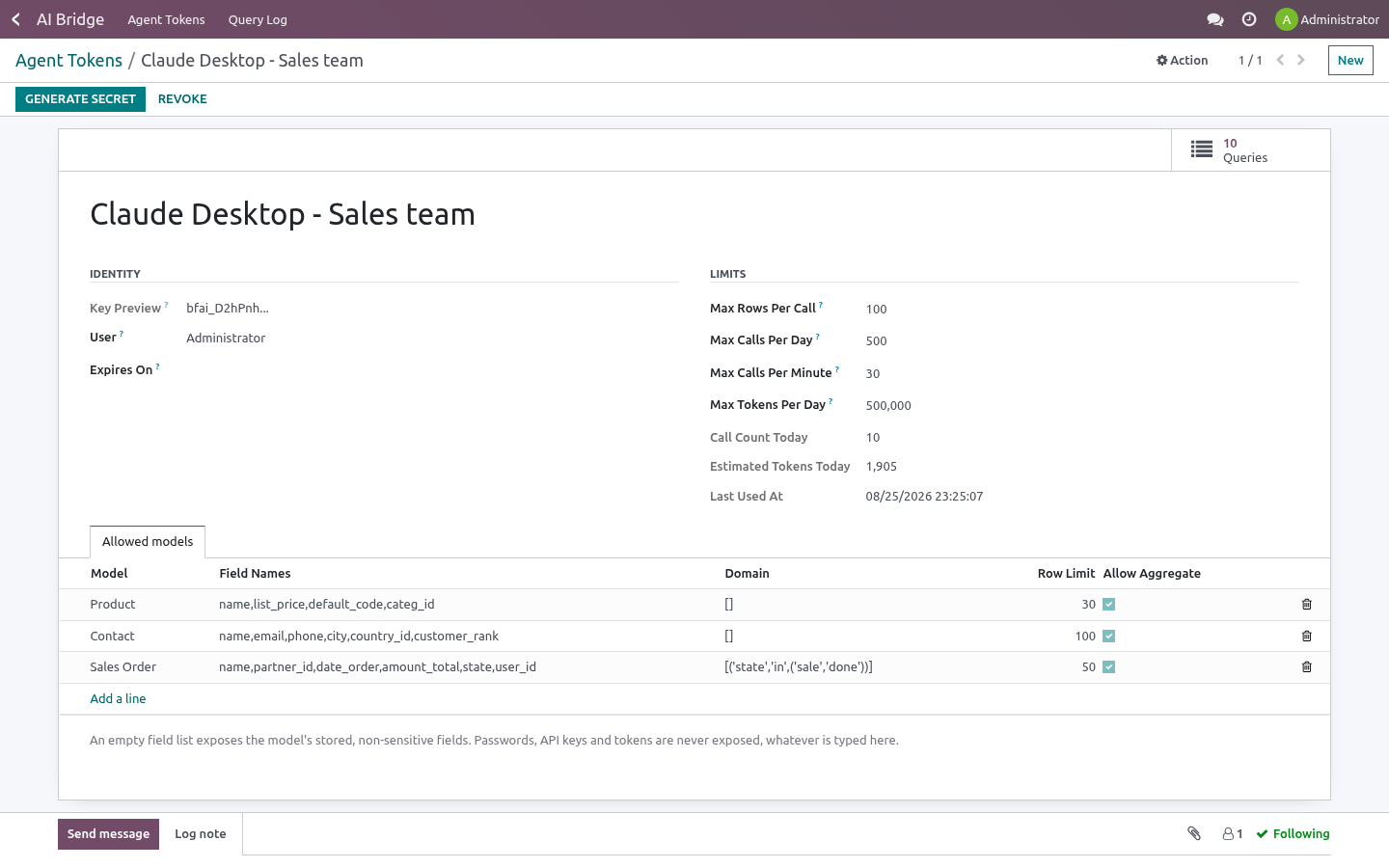
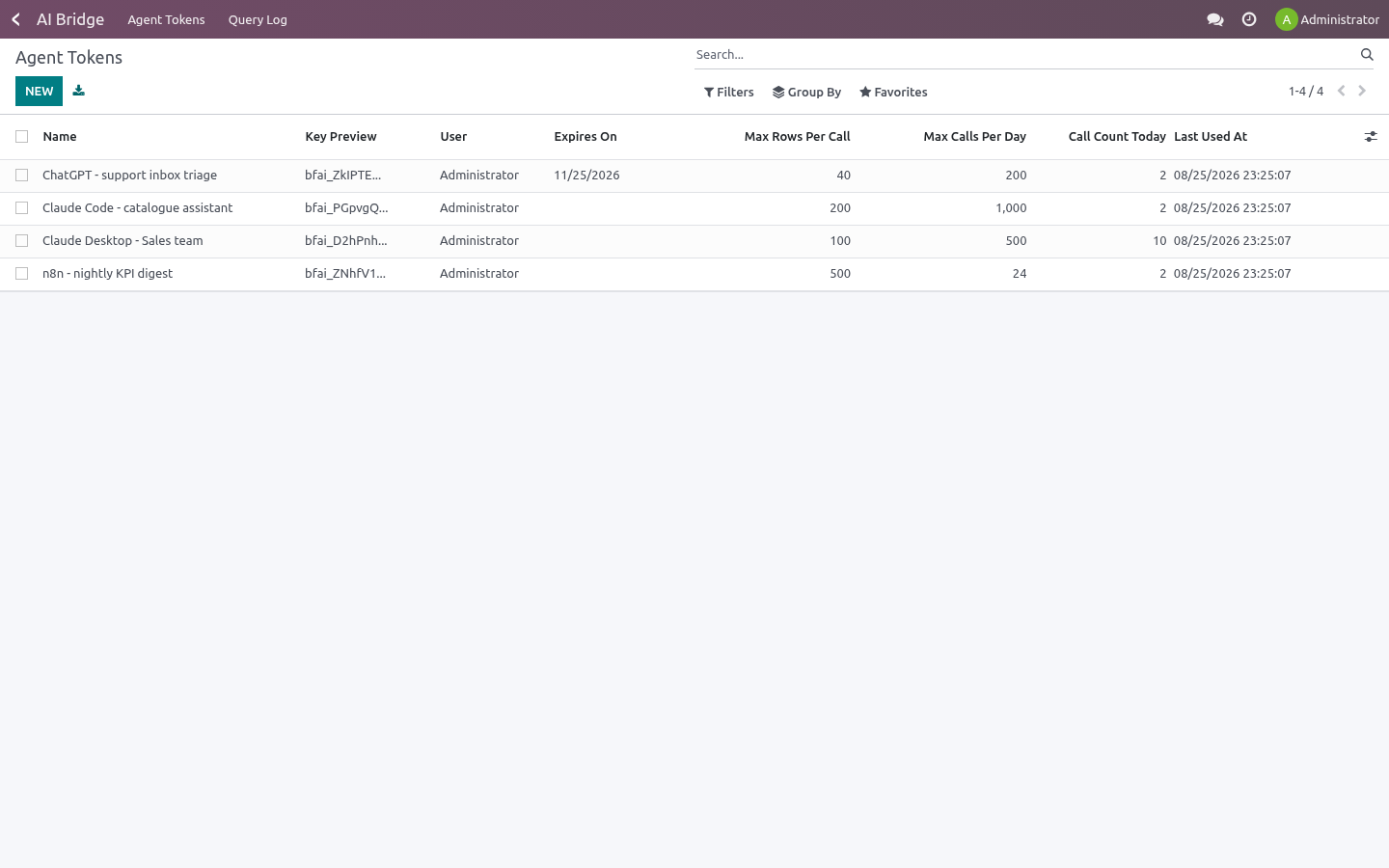
Add at least one line under Allowed models, then press Generate secret. The secret is shown once, in a banner at the top of the form, and looks like:
bfai_9f2c1e7ad4b3...
Only a SHA-256 digest is stored; nobody - including you - can read the secret back afterwards. Lost it? Press Generate secret again: the previous secret stops working immediately. Revoke stops the key, its client secret and every access token it issued, at once.
Allowed models: the keyhole
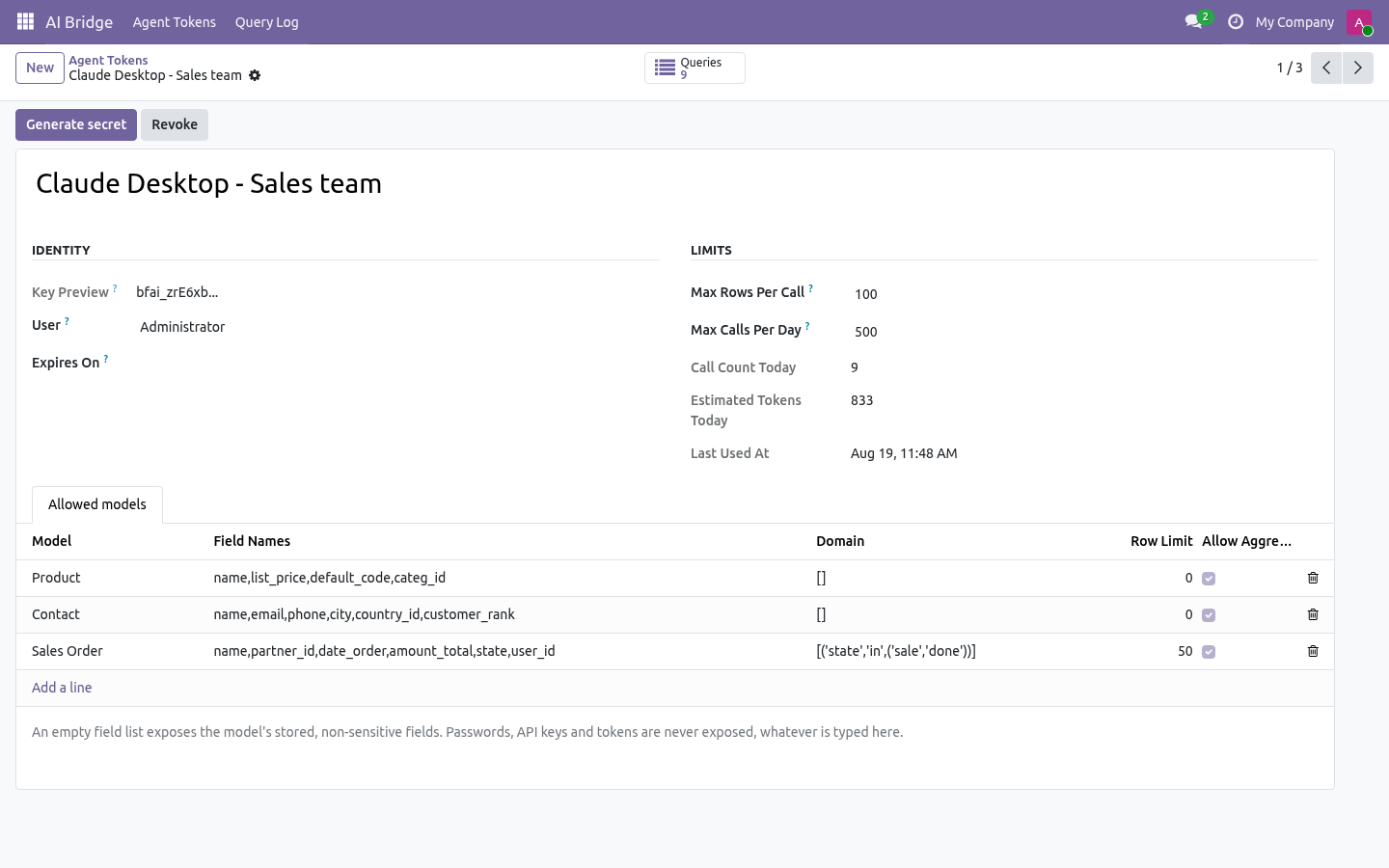
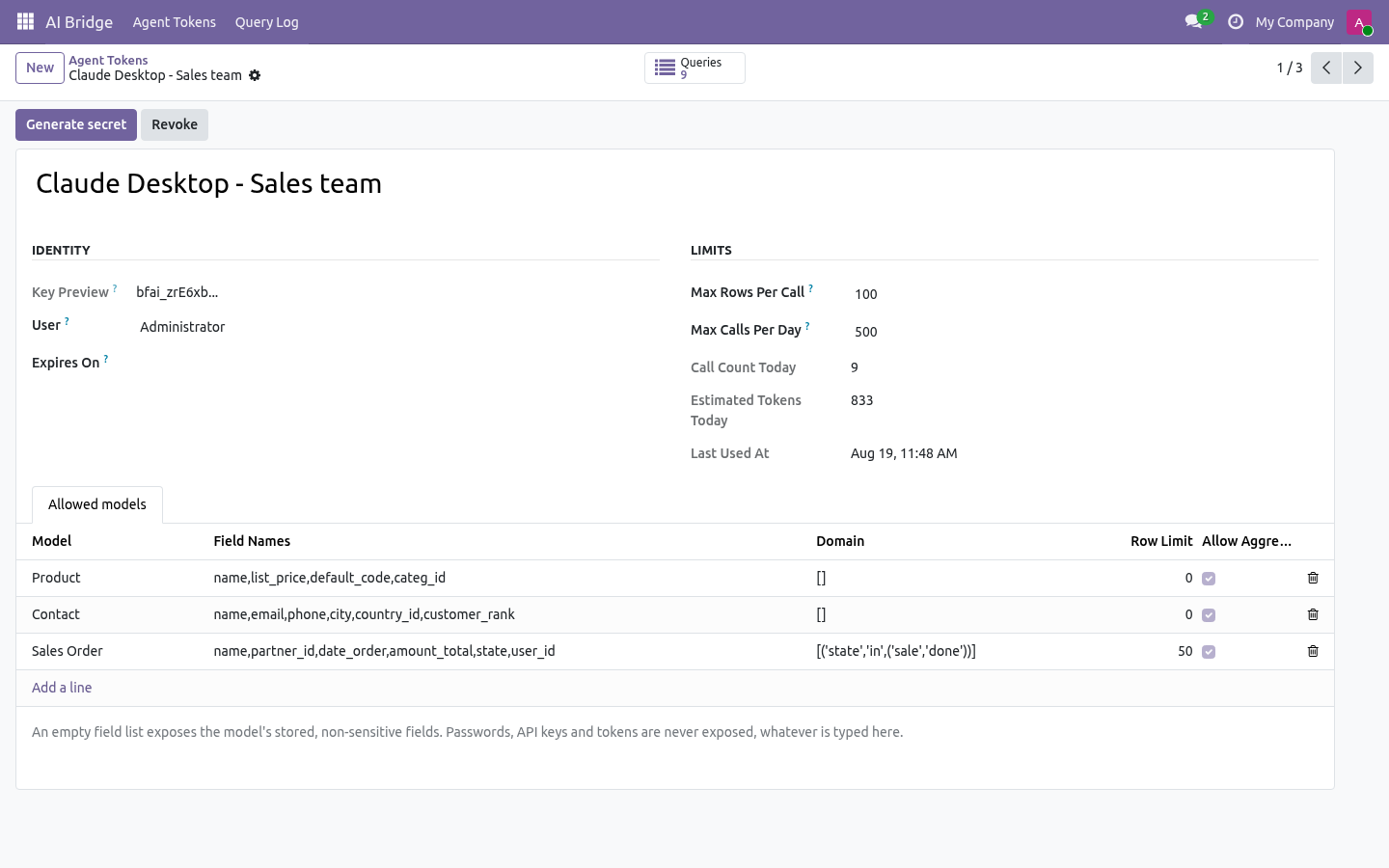
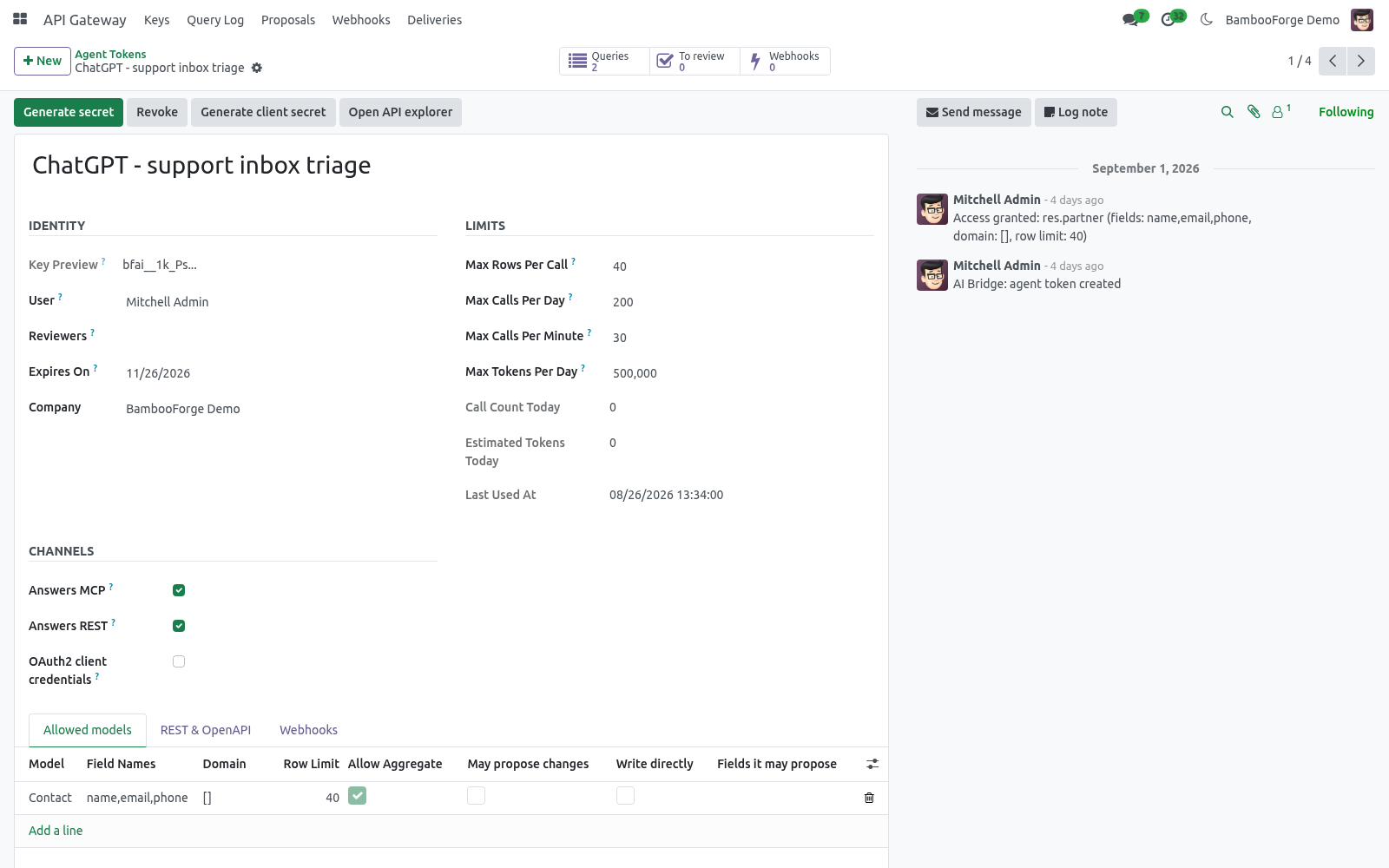
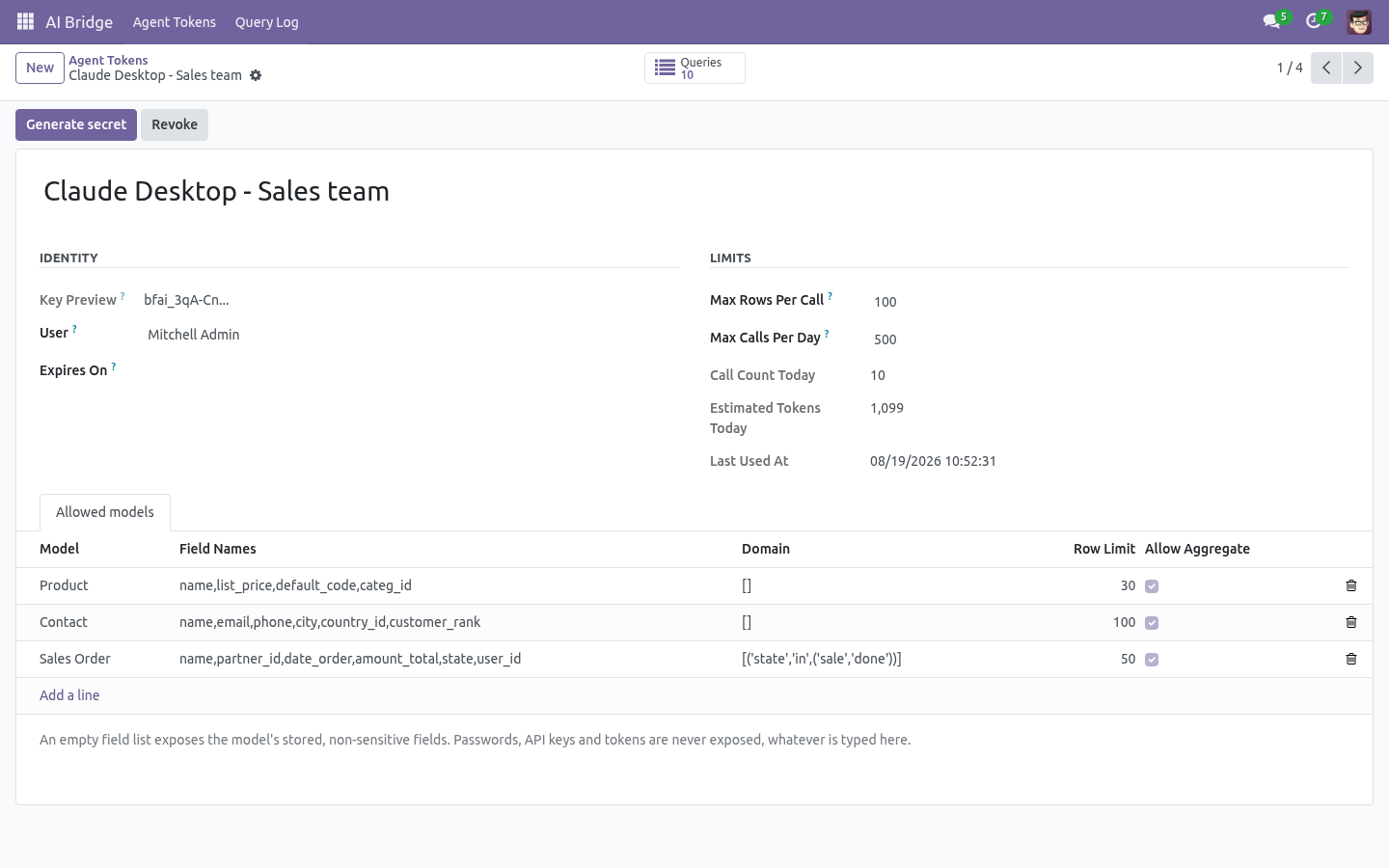
Each line under Allowed models answers the questions every door asks:
- Model
The only models the key can name. Anything else is refused before a query is built, and the refusal is logged. The answer does not say whether the model exists.
- Fields
A comma-separated allowlist, e.g. name,email,city,country_id. Leave it empty to expose every stored, non-binary field of the model. Regardless of what you type, these are always stripped: password, password_crypt, api_key, totp_secret, access_token and any field whose name contains password, token or secret; binary fields are excluded too.
- Extra filter (domain)
An Odoo domain the caller can never widen, e.g. [('company_id','=',1)] or [('state','=','sale')]. It is AND-ed with whatever the caller sends. This is how you expose confirmed orders of one company rather than the sale.order table. A record outside it does not exist: reading it is a 404, changing it is a 404, a webhook never mentions it.
- Row limit
Optional per-model ceiling, lower than the key's own.
- Allow aggregate
Whether grouped counts and sums may run on this model.
- May propose changes
The key may ask for a record to be created or changed; the ask lands under Proposals and is applied by a person, under that person's rights. This is how MCP agents write, and how REST writes unless the next switch is on.
- Write directly
REST POST and PATCH apply at once, under the key's user (201 / 200 instead of 202). For systems, not for agents.
- Writable fields
What a proposal or a direct write may touch. Empty means the readable fields minus anything that decides ownership, company, security or the archive flag - those are never writable, whatever is typed.
- May delete
REST DELETE removes the record under the key's user. Off by default.
- Callable actions
Comma-separated action_* or button_* methods REST may call on one record, e.g. action_confirm. Empty means none.
Give a system access: REST
Every allowed model is a resource. Send the key as a bearer token:
GET https://<your-odoo>/api/v1/sale.order?fields=name,amount_total,state&limit=20
Authorization: Bearer bfai_<your secret>
Call |
Answer |
|---|---|
GET /api/v1/models |
What this key may use: fields, writable fields, row limit, write mode, actions. |
GET /api/v1/me |
The key, its user, its limits and calls left. |
GET /api/v1/<model> |
A page: ?fields=a,b ?filter=<domain as JSON> ?order=write_date desc ?page= ?limit= ?count=1 (adds total). |
GET /api/v1/<model>/<id> |
One record, with an ETag. |
GET /api/v1/<model>/aggregate |
?group_by=partner_id&measure=amount_total |
POST /api/v1/<model> |
Create: 201 with the record, or 202 with a proposal_id when the rule says review. Idempotency-Key header optional. |
PATCH /api/v1/<model>/<id> |
Change: 200 or 202. If-Match with the ETag you read gives 412 if the record changed since. |
DELETE /api/v1/<model>/<id> |
204 - only when May delete is on. |
POST /api/v1/<model>/<id>/actions/<name> |
Call a listed action_* method; the body is its keyword arguments. |
GET /api/v1/proposals/<id> |
What became of a proposal this key made. |
Values come back the way a tool expects them: a many2one is {"id": 7, "display_name": "Ada Lovelace"}, one2many and many2many are lists of ids, dates are ISO 8601 and datetimes end in Z (Odoo stores UTC). To write a many2one, send the id. Add "_reason": "..." to a POST or PATCH body and the reviewer sees it next to the proposal.
Errors are application/problem+json:
{"type": "about:blank", "title": "Field not writable", "status": 400,
 "detail": "This key may not change these fields on res.partner: comment",
 "instance": "/api/v1/res.partner/17", "request_id": "9c95...", "fields": ["comment"]}
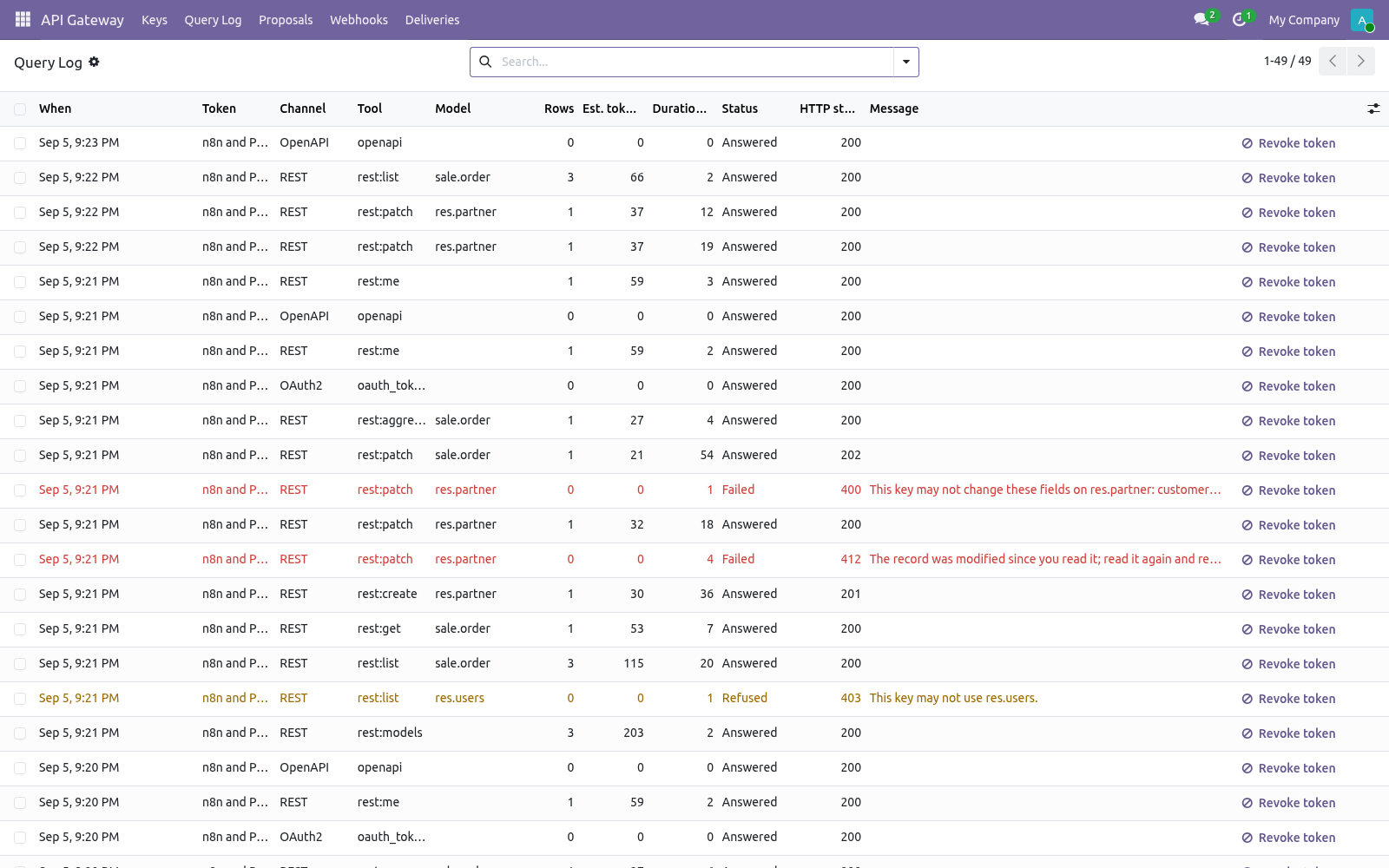
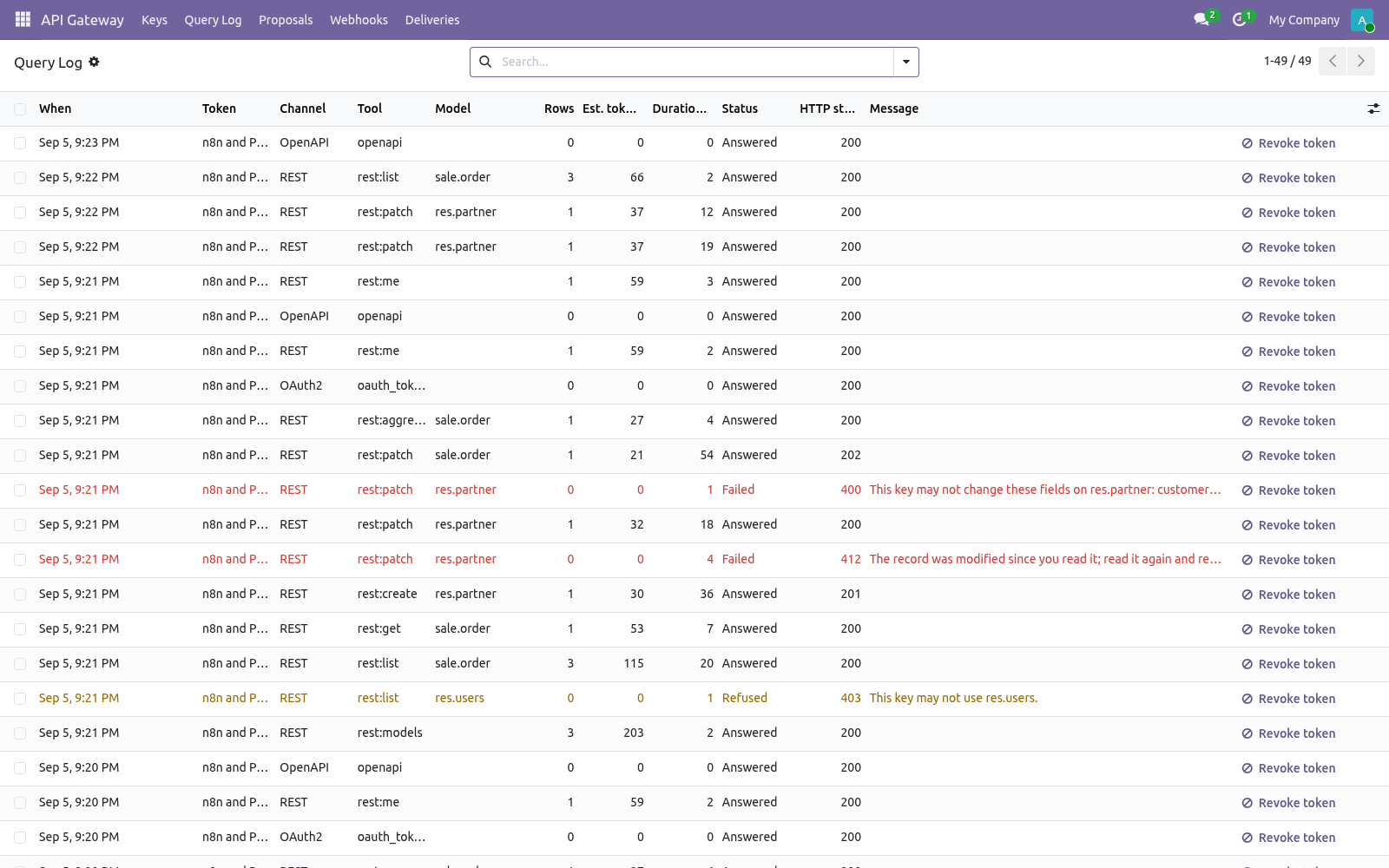
400 malformed, 401 no valid key, 403 not granted (the same answer whether the model exists or not), 404 outside the key's view, 409 an Idempotency-Key reused with a different body, 412 stale If-Match, 422 refused by Odoo's own constraints, 429 over a cap. Every answer carries X-Request-Id and, when a per-minute cap is set, X-RateLimit-Limit / -Remaining / -Reset.
A first session with curl:
curl -s https://your-odoo.example.com/api/v1/res.partner \
  -H "Authorization: Bearer bfai_xxx" -H "Content-Type: application/json" \
  -H "Idempotency-Key: 5c2d0a1e" \
  -d '{"name": "Round Trip Ltd", "city": "Leeds", "email": "rt@example.test"}'

curl -s "https://your-odoo.example.com/api/v1/sale.order?filter=[[\"state\",\"=\",\"sale\"]]&fields=name,amount_total&count=1" \
  -H "Authorization: Bearer bfai_xxx"
Give an automation tool access: OpenAPI
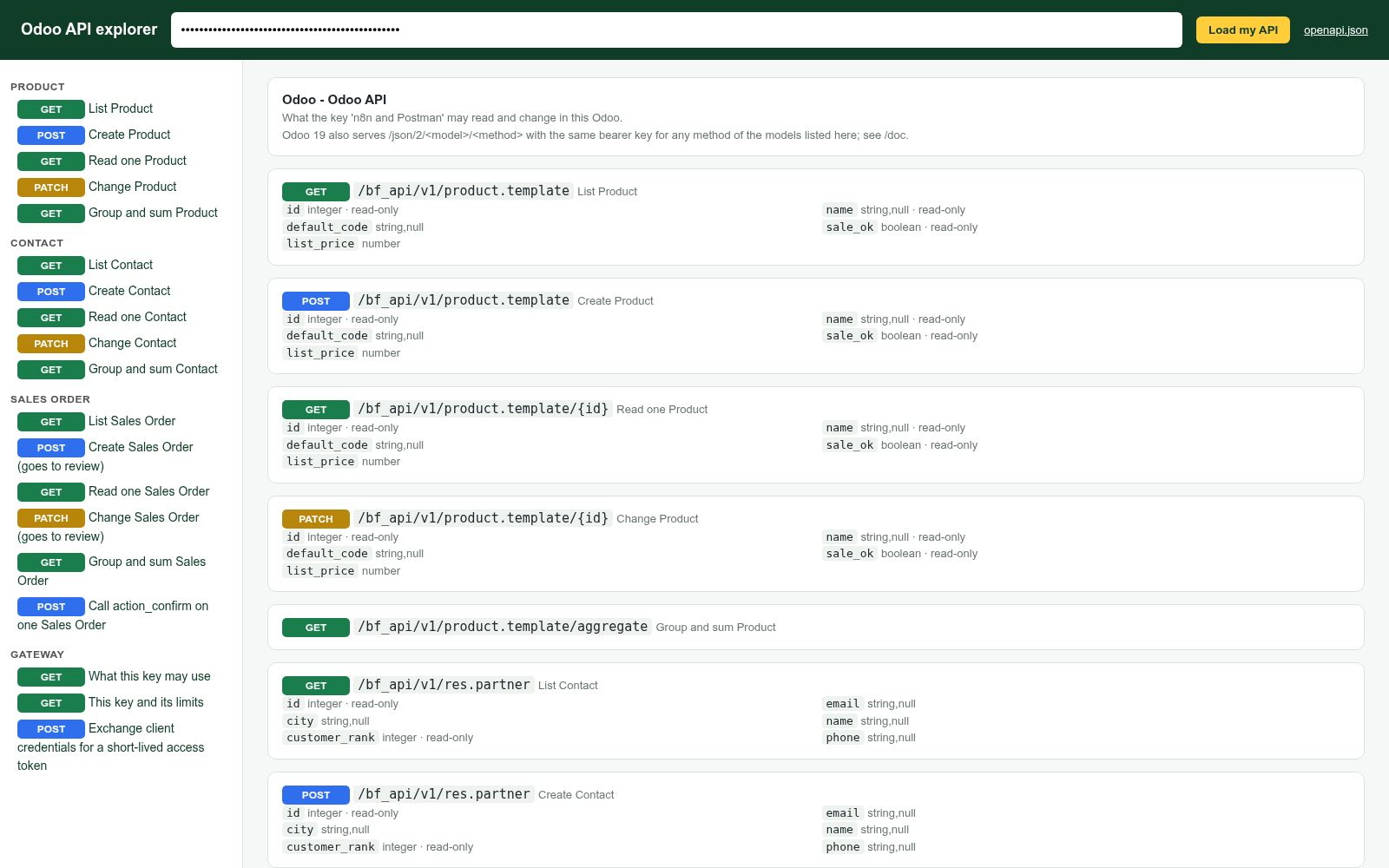
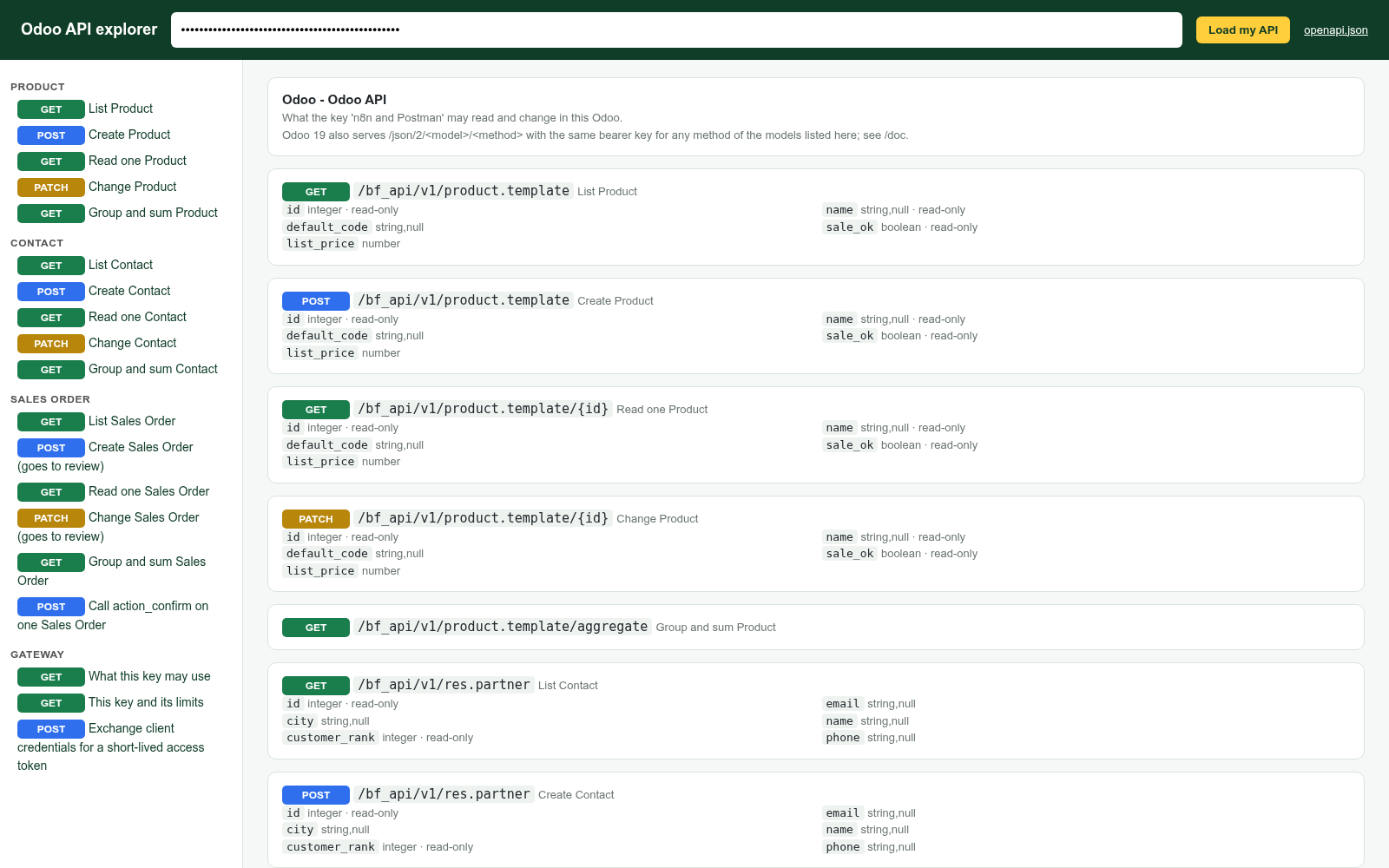
GET /api/openapi.json with the key returns an OpenAPI 3.1 document built from that key's rules: exactly its models, fields, writable fields, limits and actions, with an example taken from the first record the key may see. Import it into Postman, Insomnia, Bruno, n8n, Make, or a code generator - the paths, schemas and the bearer scheme are already there. A revoked key has no document.
/api/doc is a built-in API explorer: paste the key, see every operation it may perform, try each one, copy the curl line. It ships in the module - no CDN, nothing loaded from outside.
On Odoo 20 the document also points at the core /json/2/<model>/<method> endpoint, which accepts the same bearer key for any method of the listed models; /doc describes those.
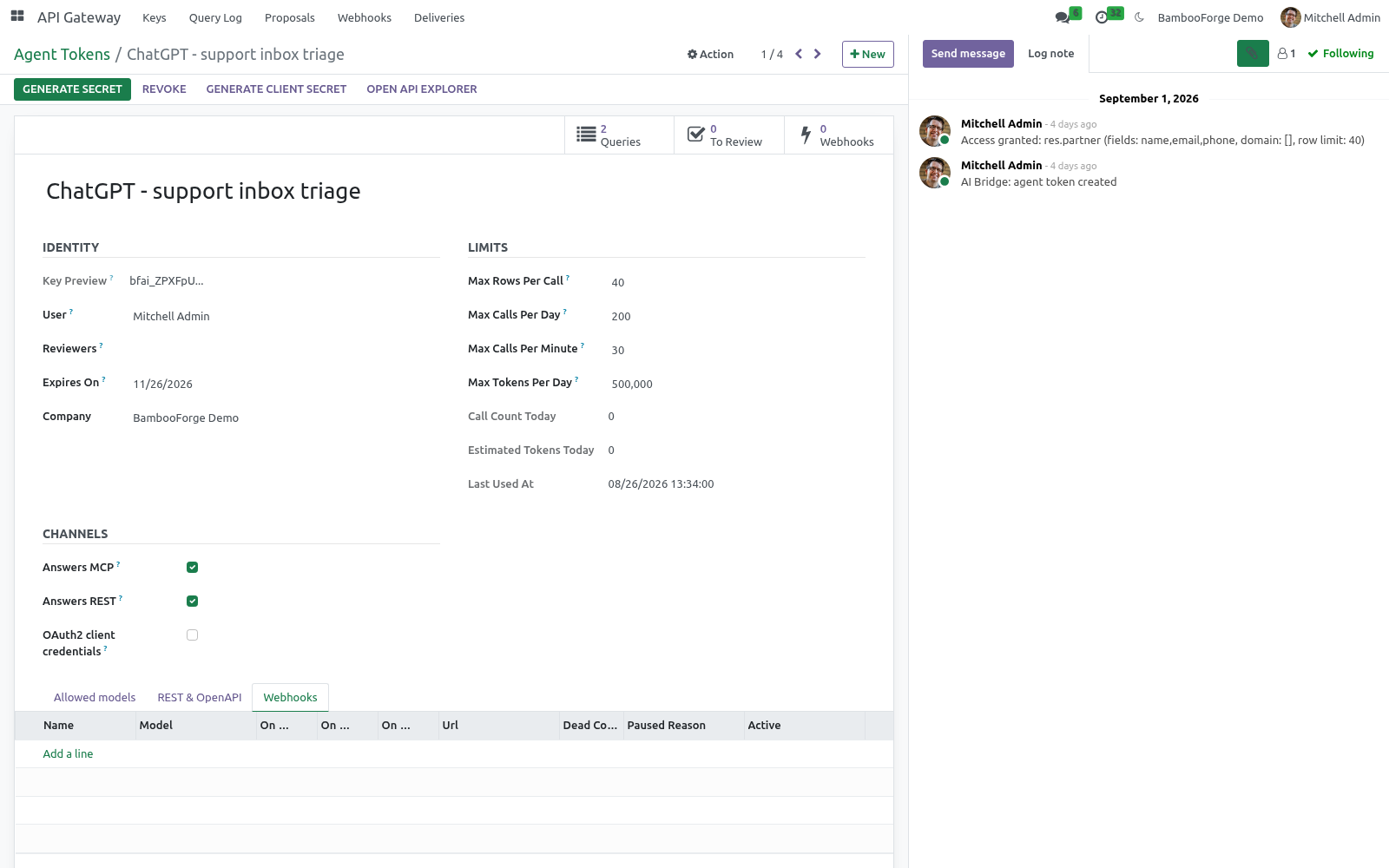
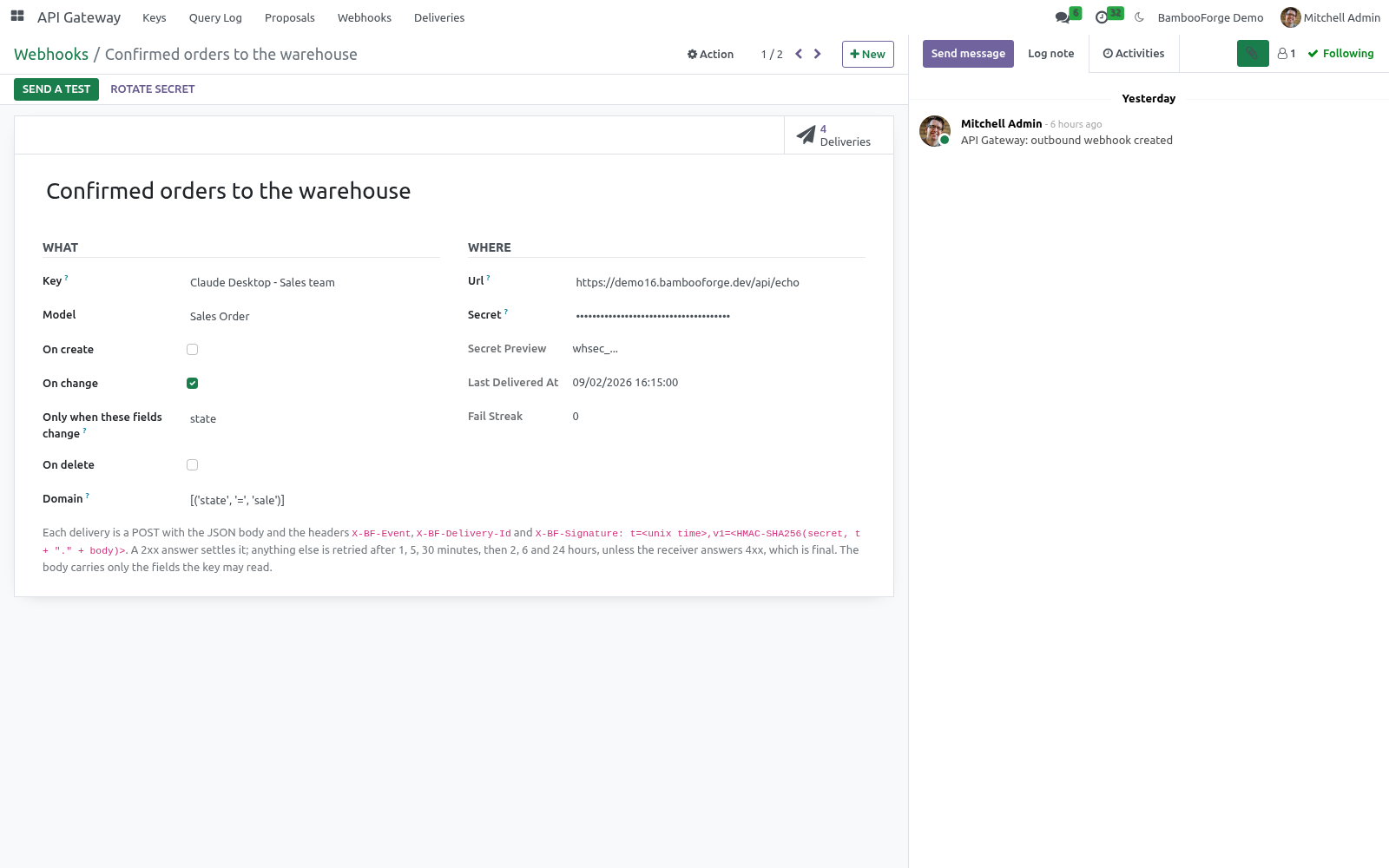
Tell another system: webhooks
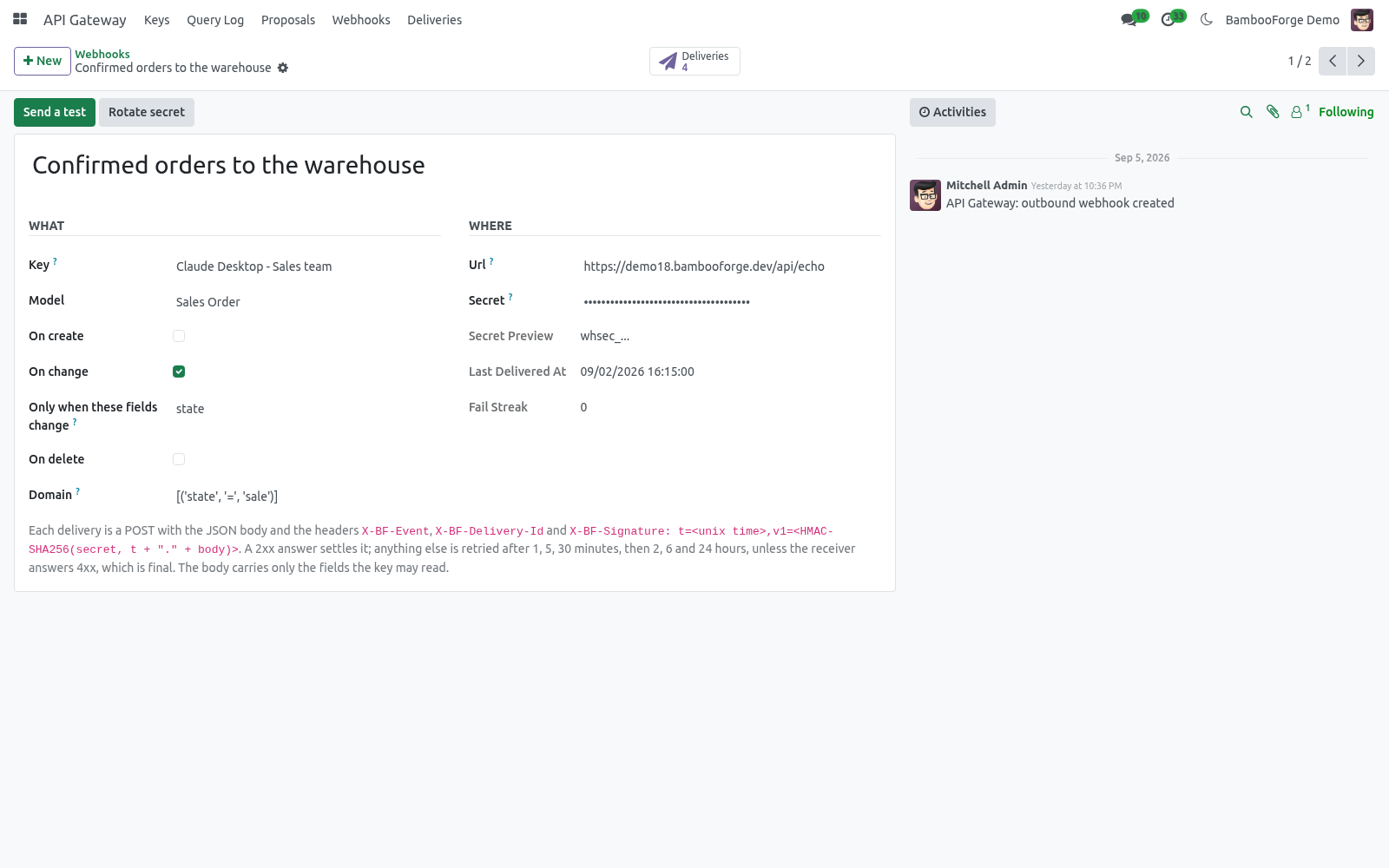
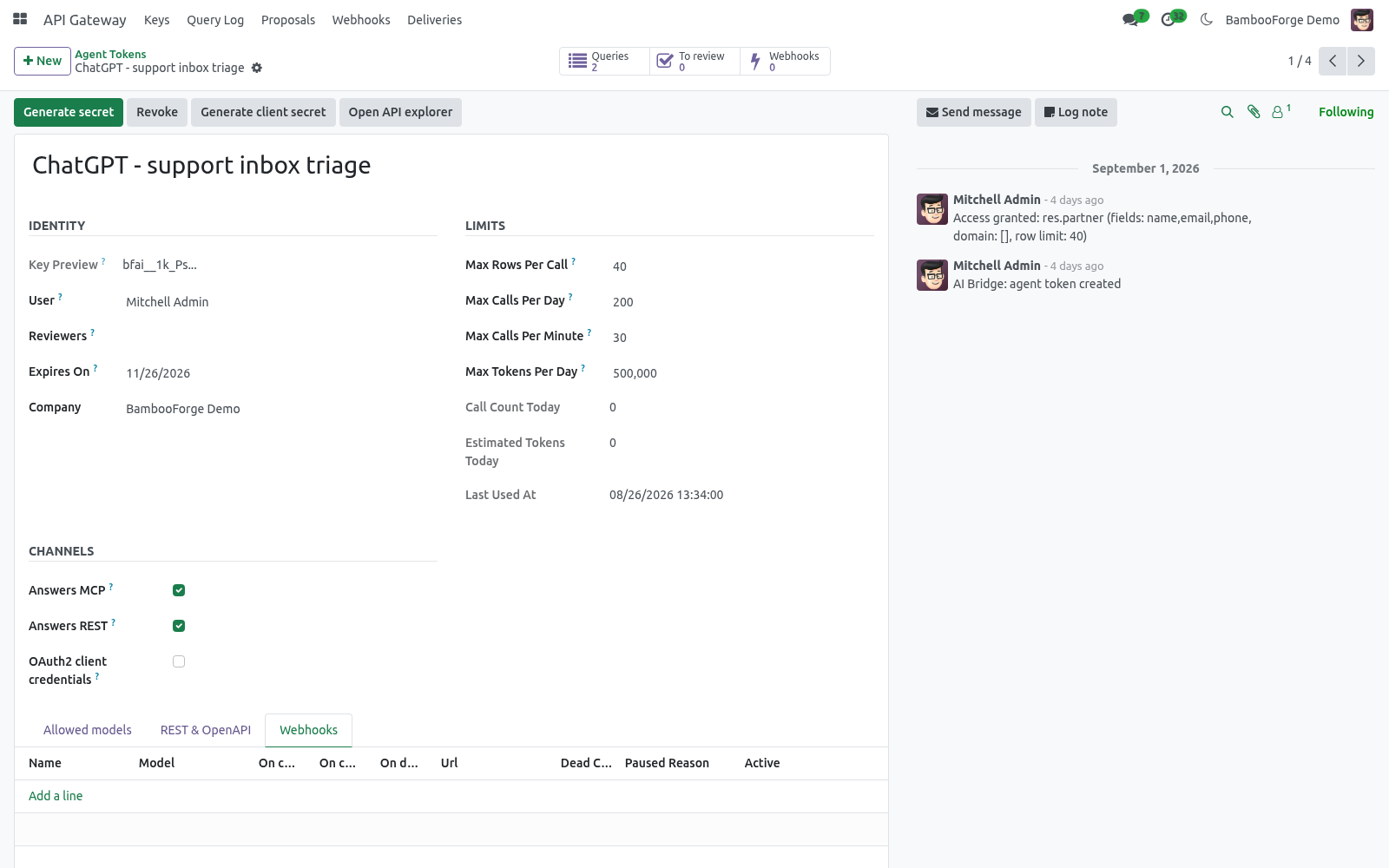
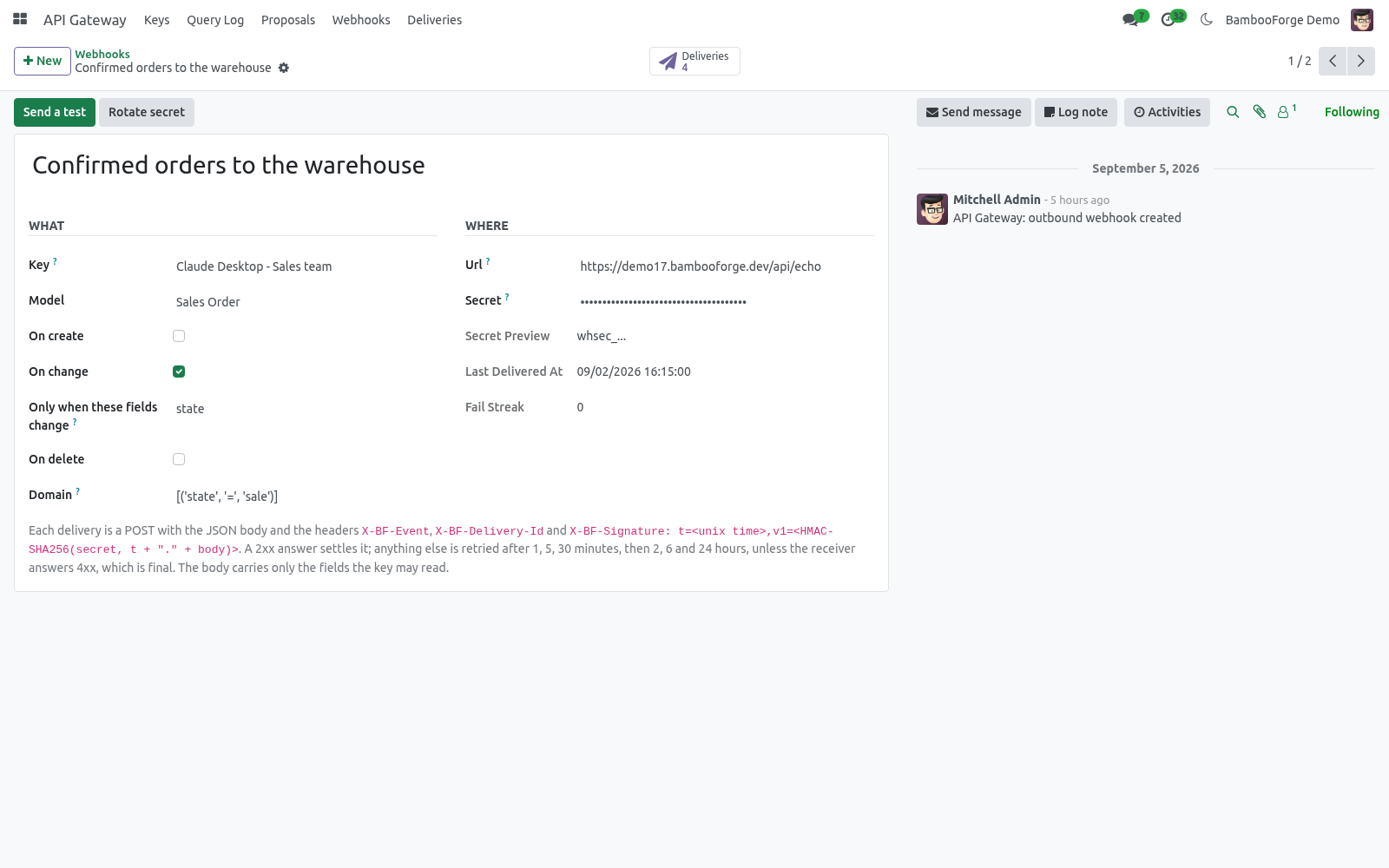
API Gateway → Webhooks → New
Field |
Meaning |
|---|---|
Key |
The payload never carries more than this key may read; the model must be on its allowlist. |
Model / events |
On create, on change, on delete. |
Only when these fields change |
On change: fire only when one of them changed. Empty: any change of an exposed field. |
Domain |
Only records matching it fire, e.g. [('state', '=', 'sale')]. |
URL / Secret |
Where to POST; the secret is generated and shared with the receiver to verify signatures. |
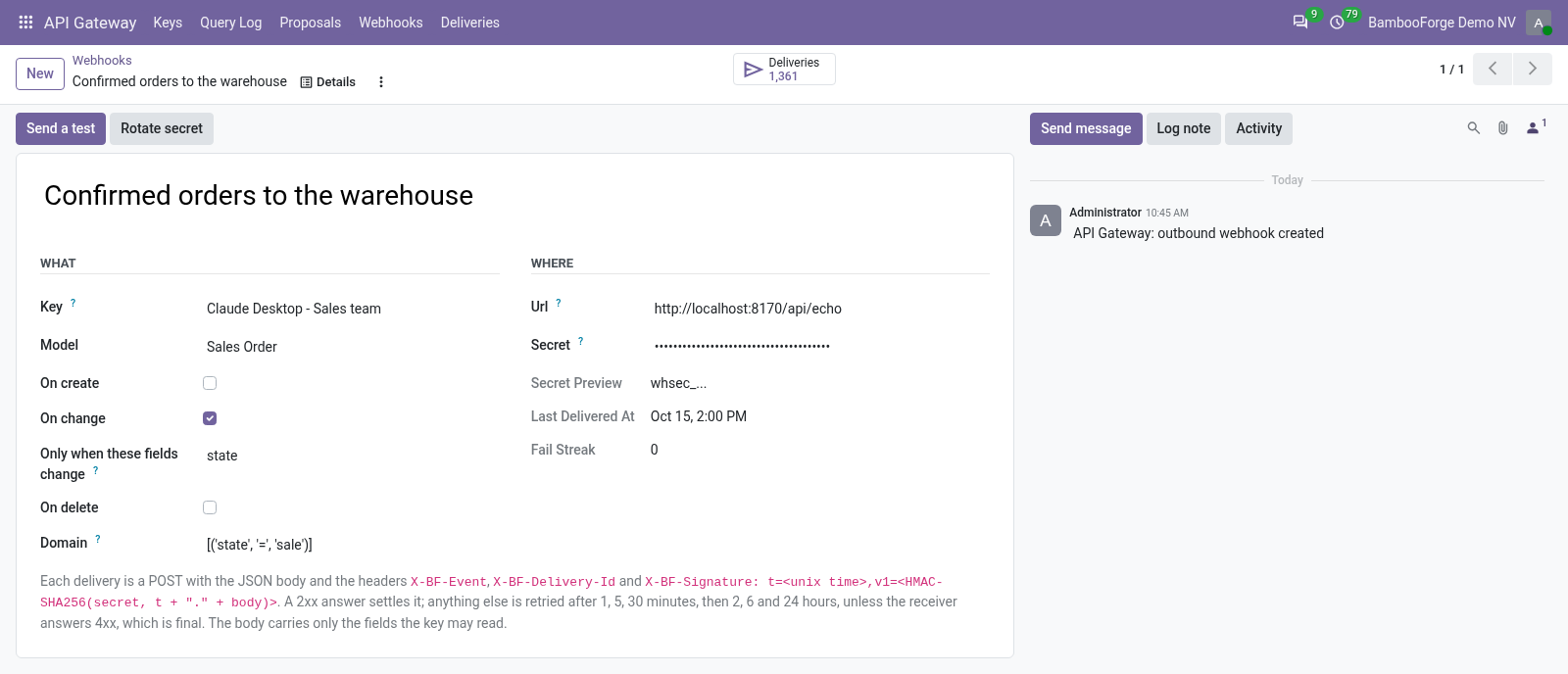
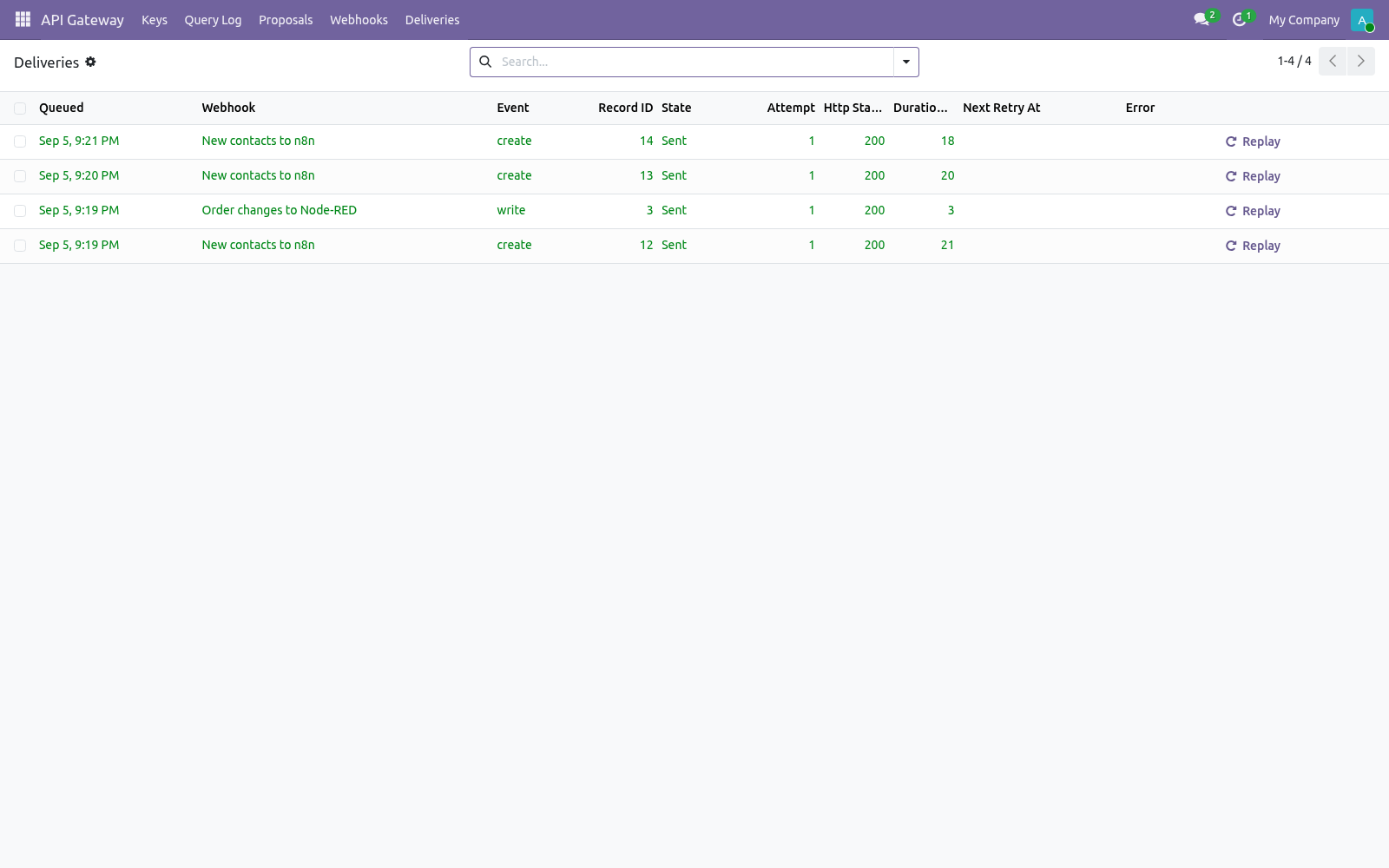
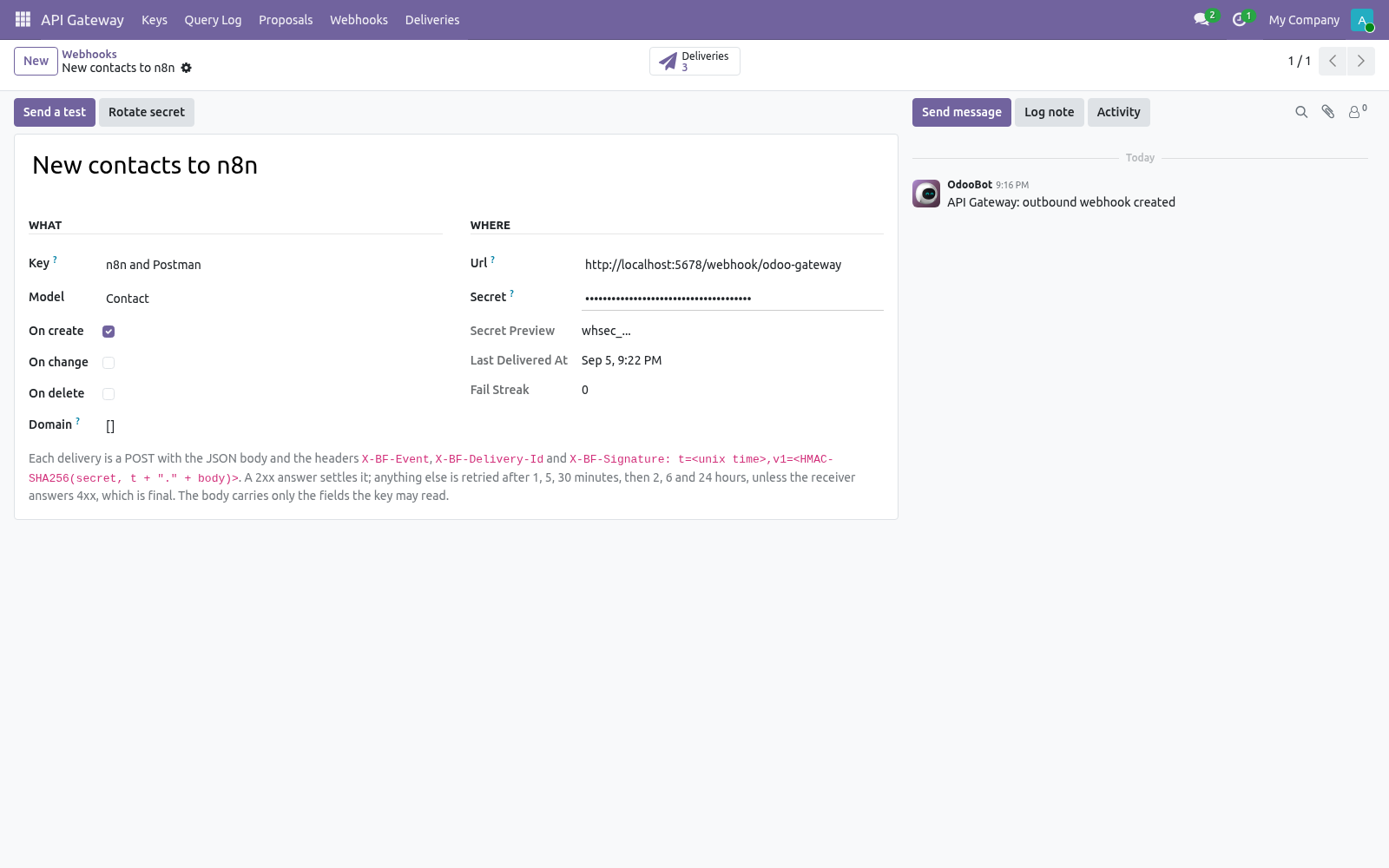
Each event becomes a delivery written in the same transaction as the change, so a committed change is never lost. A cron sends deliveries every minute; Send a test sends one now. While setting up, point the URL at your own Odoo's /api/echo: it answers 200 with {"received": true, "signature_valid": true} and stores nothing, so you can see a green delivery before the real receiver exists. The body:
{"event": "write", "model": "sale.order", "id": 3,
 "occurred_at": "2026-09-05T14:19:08.512Z", "webhook": "Order changes",
 "data": {"id": 3, "name": "S00003", "state": "sale", "amount_total": 529.58, ...},
 "changed": ["date_order", "state"], "previous": {"state": "draft"}}
Headers: X-BF-Event, X-BF-Model, X-BF-Delivery-Id, X-BF-Webhook-Id and X-BF-Signature: t=<unix time>,v1=<hex>, where v1 is HMAC-SHA256(secret, t + "." + raw body). Verify it in five lines:
import hmac, hashlib
def verify(secret, header, raw_body, tolerance=300):
    t, v1 = [p.split("=", 1)[1] for p in header.split(",")]
    expected = hmac.new(secret.encode(), f"{t}.{raw_body}".encode(), hashlib.sha256).hexdigest()
    return hmac.compare_digest(v1, expected) and abs(time.time() - int(t)) < tolerance
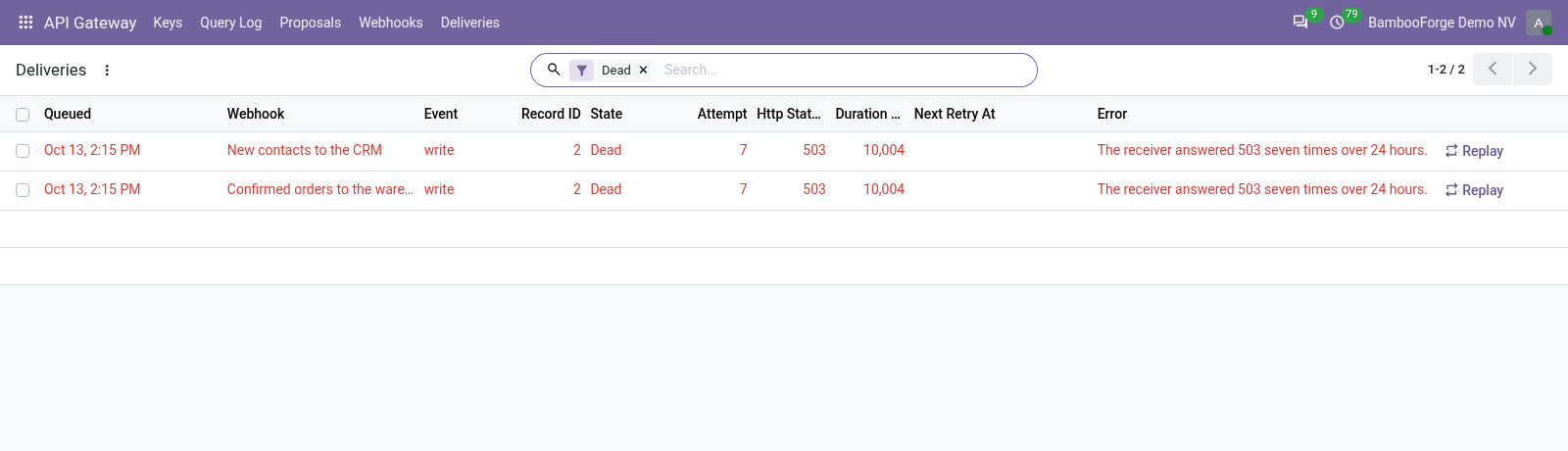
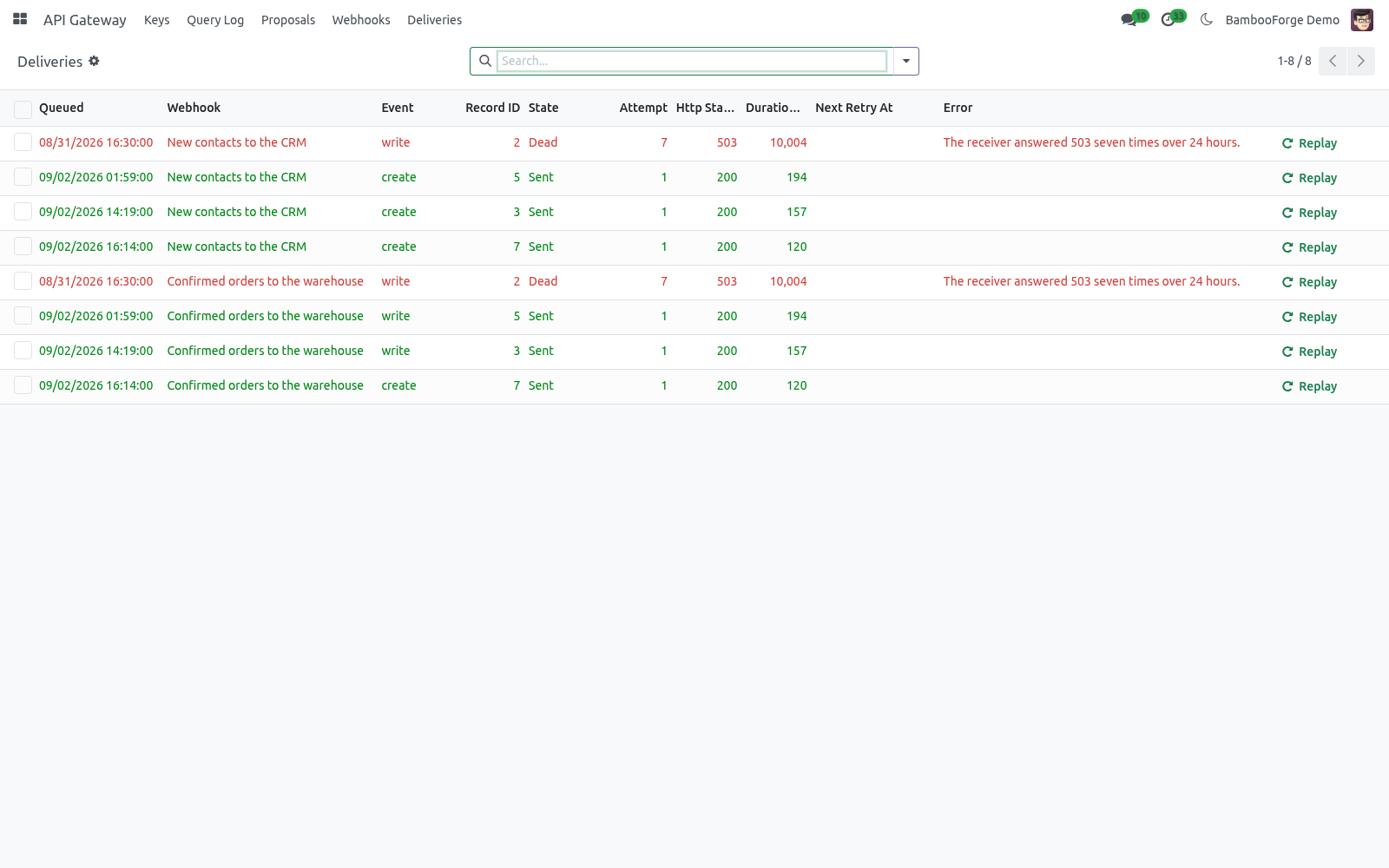
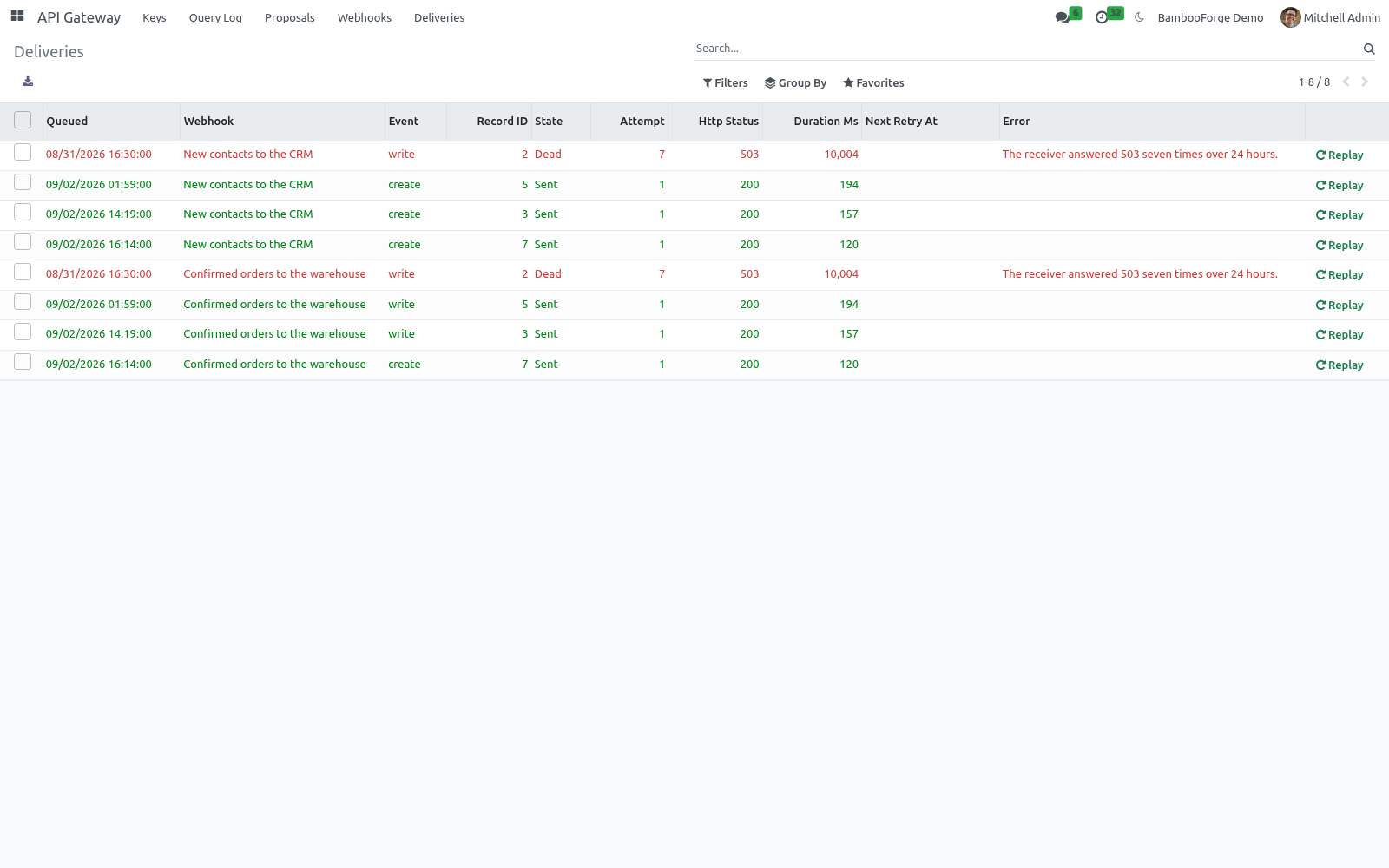
A 2xx answer settles the delivery. Anything else is retried after 1, 5 and 30 minutes, then 2, 6 and 24 hours, and is then dead; a 4xx (other than 408, 425, 429) is dead at once - the receiver said no. Ten dead deliveries in a row pause the webhook and leave an activity for its owner; Resume clears the streak. Every delivery is under Deliveries with attempt count, HTTP status, duration, the receiver's answer and a Replay button. Deliveries are kept 30 days (bf_ai_bridge.delivery_retention_days).
OAuth2 client credentials
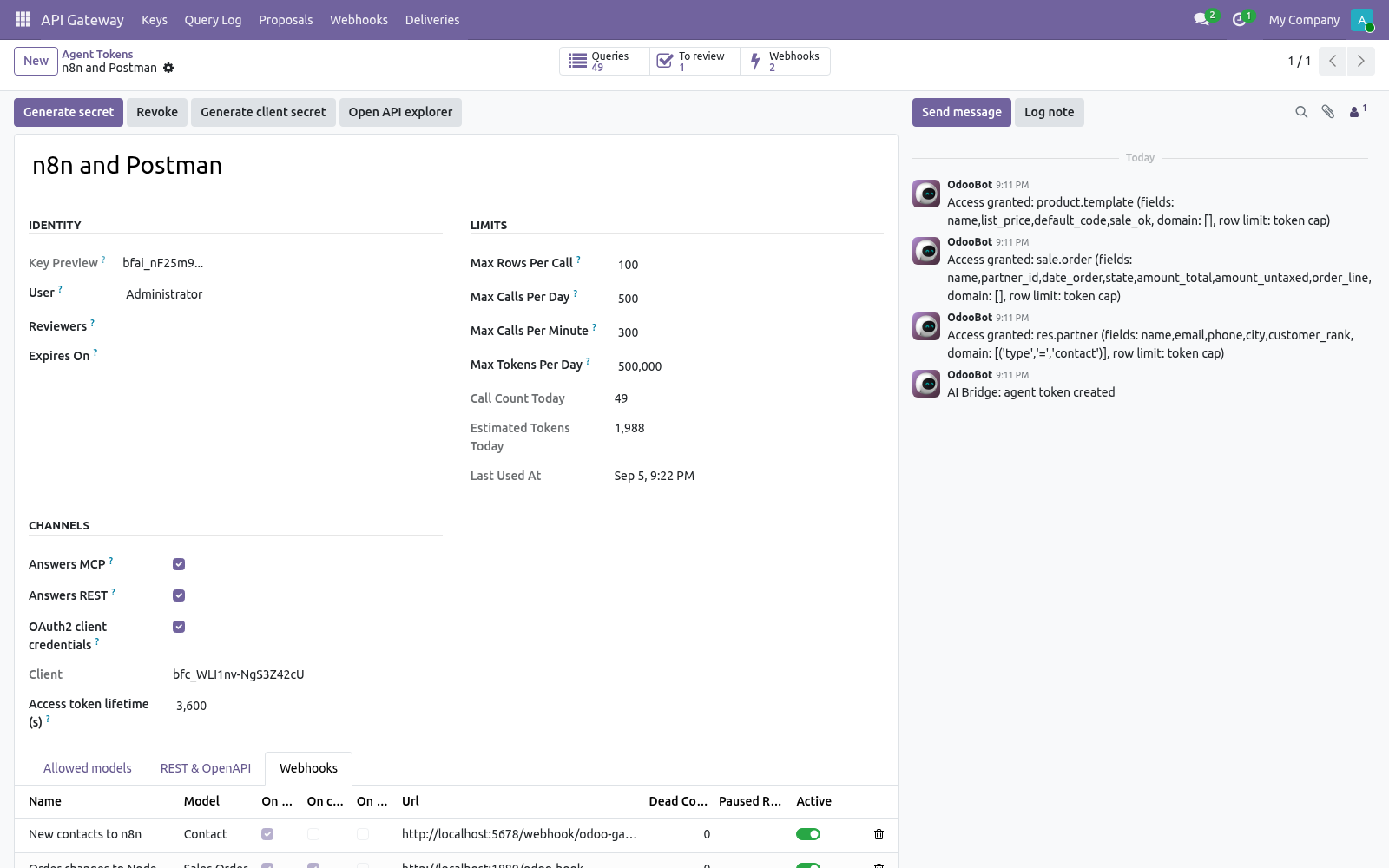
Some systems will not store a long-lived key. Press Generate client secret on the key: it gets a client_id and a secret shown once. The system then exchanges them for an access token that lives one hour (tunable per key, 60 s to 24 h):
POST /api/oauth/token
grant_type=client_credentials&client_id=bfc_...&client_secret=bfcs_...

{"access_token": "bfa_...", "token_type": "Bearer", "expires_in": 3600,
 "scope": "product.template res.partner sale.order"}
The access token is a bearer token like the key and opens exactly the same doors; the scope only reports what the key was granted. Revoking the key revokes every access token. MCP clients that speak OAuth2 can use the same endpoint.
Give an AI agent access: MCP
The endpoint is:
POST  https://<your-odoo>/api/mcp
Authorization: Bearer bfai_<your secret>
Content-Type: application/json
It speaks JSON-RPC 2.0 and implements the MCP methods initialize, tools/list, tools/call and ping. There is no session cookie and no CSRF token involved: the bearer token is the whole authentication.
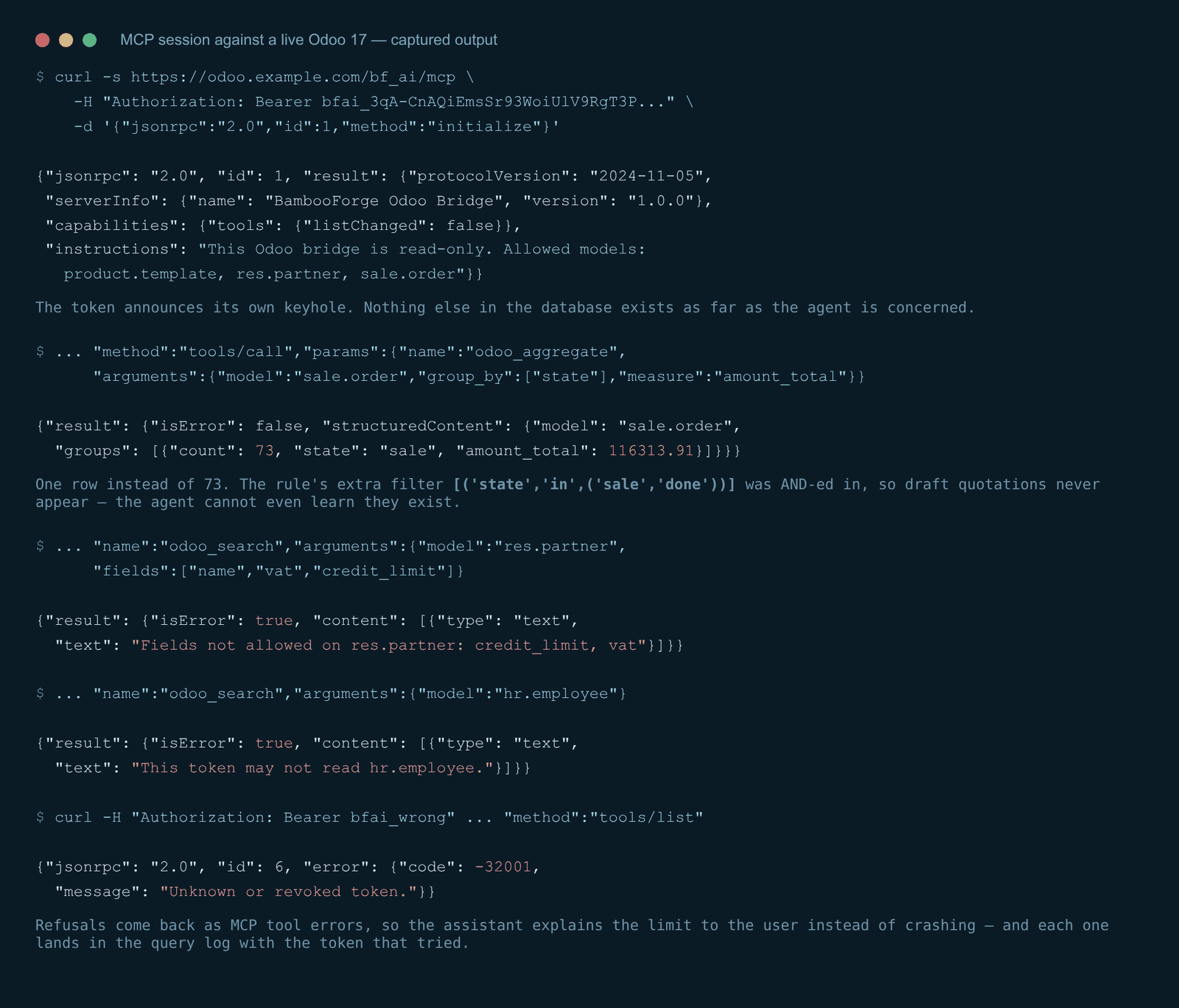
Check it with curl before touching any client:
curl -s https://your-odoo.example.com/api/mcp \
  -H "Authorization: Bearer bfai_xxx" \
  -H "Content-Type: application/json" \
  -d '{"jsonrpc":"2.0","id":1,"method":"initialize"}'
A healthy answer names the server and lists exactly the models you allowed:
{"jsonrpc": "2.0", "id": 1, "result": {
   "protocolVersion": "2024-11-05",
   "serverInfo": {"name": "BambooForge Odoo Bridge", "version": "1.0.0"},
   "capabilities": {"tools": {"listChanged": false}},
   "instructions": "This Odoo bridge is read-only. Allowed models:
                    product.template, res.partner, sale.order"}}
A tools/call answers in MCP shape — human-readable content plus machine-readable structuredContent:
{"jsonrpc": "2.0", "id": 4, "result": {"isError": false,
  "content": [{"type": "text", "text": "..."}],
  "structuredContent": {"model": "sale.order",
    "groups": [{"count": 73, "state": "sale", "amount_total": 116313.91}]}}}
Note the group list: the rule on sale.order carried the extra filter [('state','in',('sale','done'))], so draft quotations never enter the answer — the agent cannot see they exist, whatever it asks.
Claude Desktop / Claude Code. Clients that speak HTTP MCP take the URL and header directly. For a client that only speaks stdio, put a standard remote bridge in front — no code of ours is involved:
{
  "mcpServers": {
    "odoo": {
      "command": "npx",
      "args": ["-y", "mcp-remote", "https://your-odoo.example.com/api/mcp",
               "--header", "Authorization: Bearer bfai_xxx"]
    }
  }
}
Use HTTPS. A bearer token on plain HTTP is a bearer token in everyone's logs.
The MCP tools
- odoo_list_models
What may I read? Returns each allowed model with its exposed fields, row limit and whether aggregates are allowed. Agents call this first.
- odoo_describe_model — {"model": "sale.order"}
Field names, types, labels and selection values for one allowed model, so the agent writes correct domains instead of guessing.
- odoo_search — {"model", "domain", "fields", "limit", "order"}
The workhorse. The domain is validated (see below), AND-ed with the rule's filter, and the limit is clamped.
- odoo_read — {"model", "ids", "fields"}
Specific records by id, same field allowlist.
- odoo_aggregate — {"model", "domain", "group_by", "measure"}
Grouped count, or sum of one numeric field. This is what makes "how much did we sell per salesperson last month" cost 12 rows instead of 12,000.
Nothing in this list writes. The three tools below can only propose.
Proposing a change
From 1.2 the agent can ask for a record to be created or updated. It cannot do it. Three tools:
odoo_propose_create - a model, the values, and a reason.
odoo_propose_write - a model, a record id, the values, a reason.
odoo_proposal_status - what became of the proposals it made.
A proposal lands under API Gateway > Proposals as an activity for the token's reviewers (or its owner, if none are named). The reviewer sees the values as a table, the agent's reason as the agent's words, and two buttons. Apply writes the values under the reviewer's own user and access rights - so a reviewer who may not edit contacts cannot apply a contact change, whatever the token was allowed. The chatter of the record says which proposal, which token and which person. Refuse takes an optional note, which the agent can read back.
What the agent may propose is narrower than what it may read. A rule has to say May propose changes, and the fields it may touch are listed separately; empty means the readable fields minus anything that decides ownership, company, security or the archive flag - those are never proposable, whatever is typed. A record outside the rule's domain does not exist as far as a proposal is concerned. The grant is read again when the proposal is applied, not only when it was made: a field the token lost in between is not written on the strength of an older permission.
Every proposal is a line in the query log, like every read.
Running it against a local model
The bridge speaks MCP over HTTP, so any MCP client can use it - Claude Desktop, ChatGPT, and the open clients that drive a model served by Ollama or another OpenAI-compatible server on your own machine. Point the client at /api/mcp with the token, exactly as for a hosted model. The proposals door is the same door: a local model gets no more than a hosted one.
What the gateway refuses
A model that is not on the allowlist - refused before any SQL runs, with an answer that does not reveal whether the model exists.
A field that is not on the allowlist - the call is refused rather than silently trimmed, and the refusal names the field.
A write to a field outside the writable list - 400 naming the field; ownership, company, security and archive fields are never writable.
A domain sent as a string - string domains are executable Python in Odoo; only list (JSON) domains are accepted, every condition three parts, only & | ! as operators.
A record outside the rule's domain - 404; it does not exist for the key, and no webhook mentions it.
Anything above the caps - row counts are clamped, and past the daily or per-minute cap every call is refused until the window moves.
An expired, revoked or unknown key - 401 on REST, error -32001 on MCP.
Anything the key's user could not do anyway - reads and writes run as that user, so Odoo's own access rights and record rules are the second lock; a write they refuse is a 403.
The query log
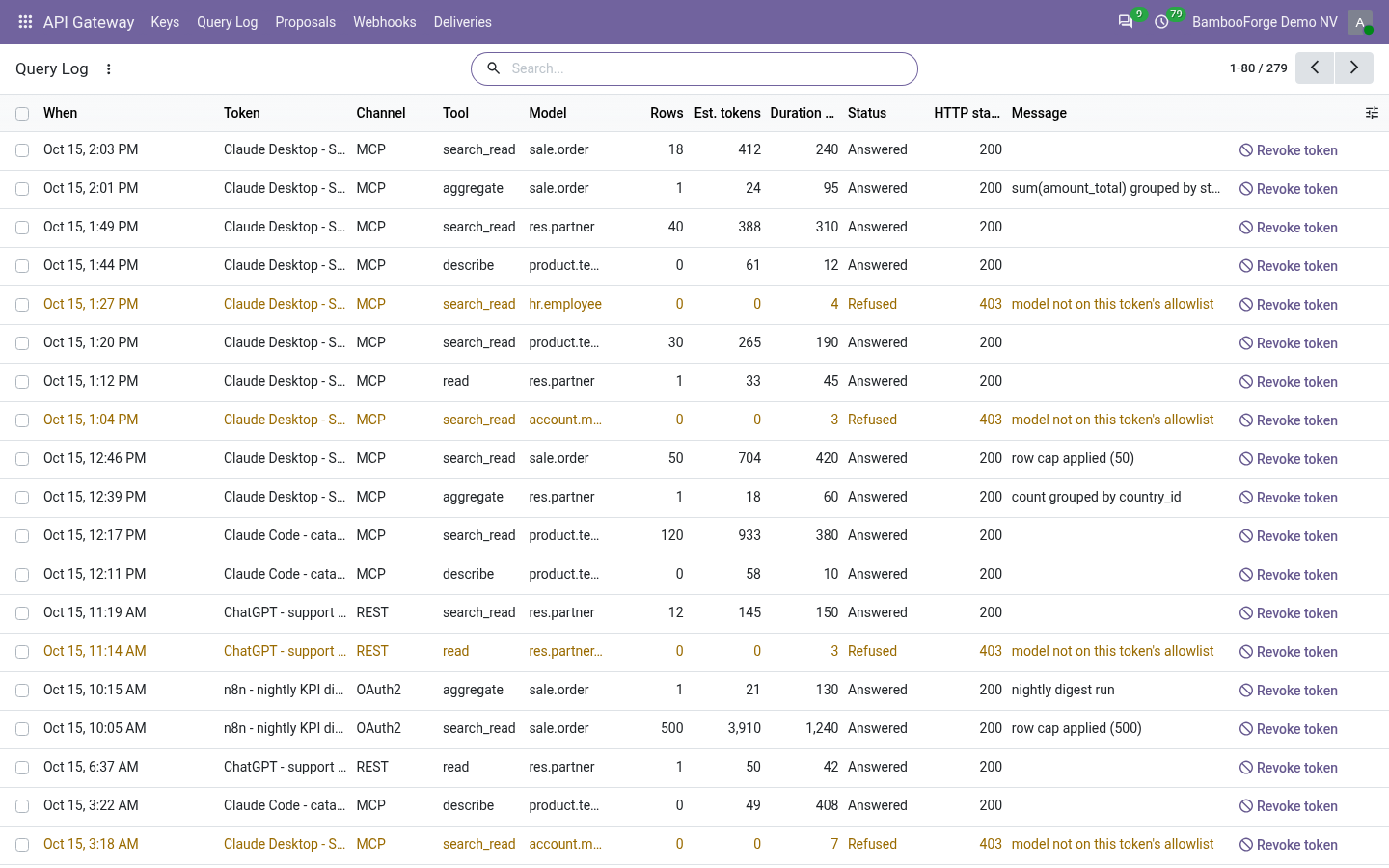
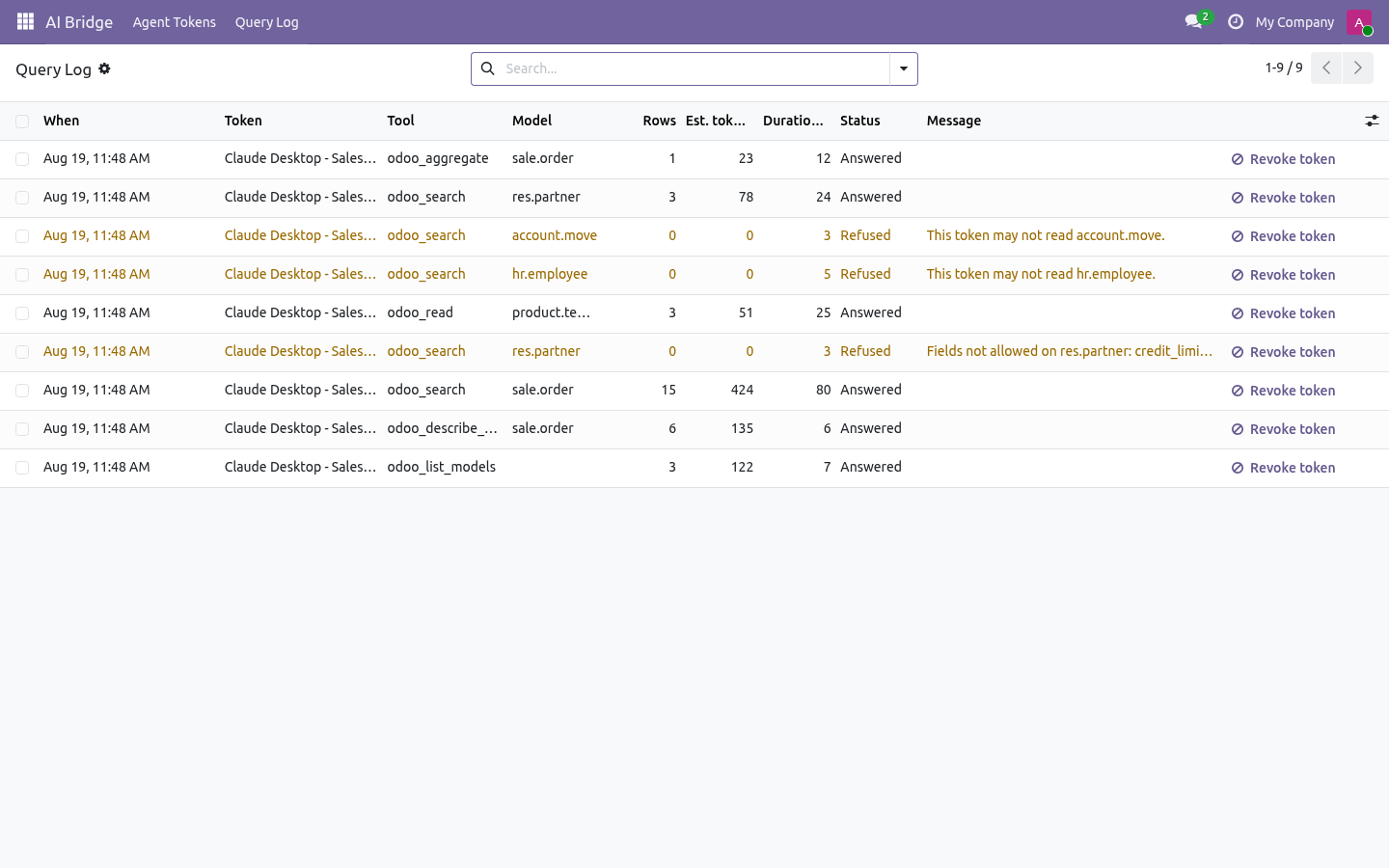
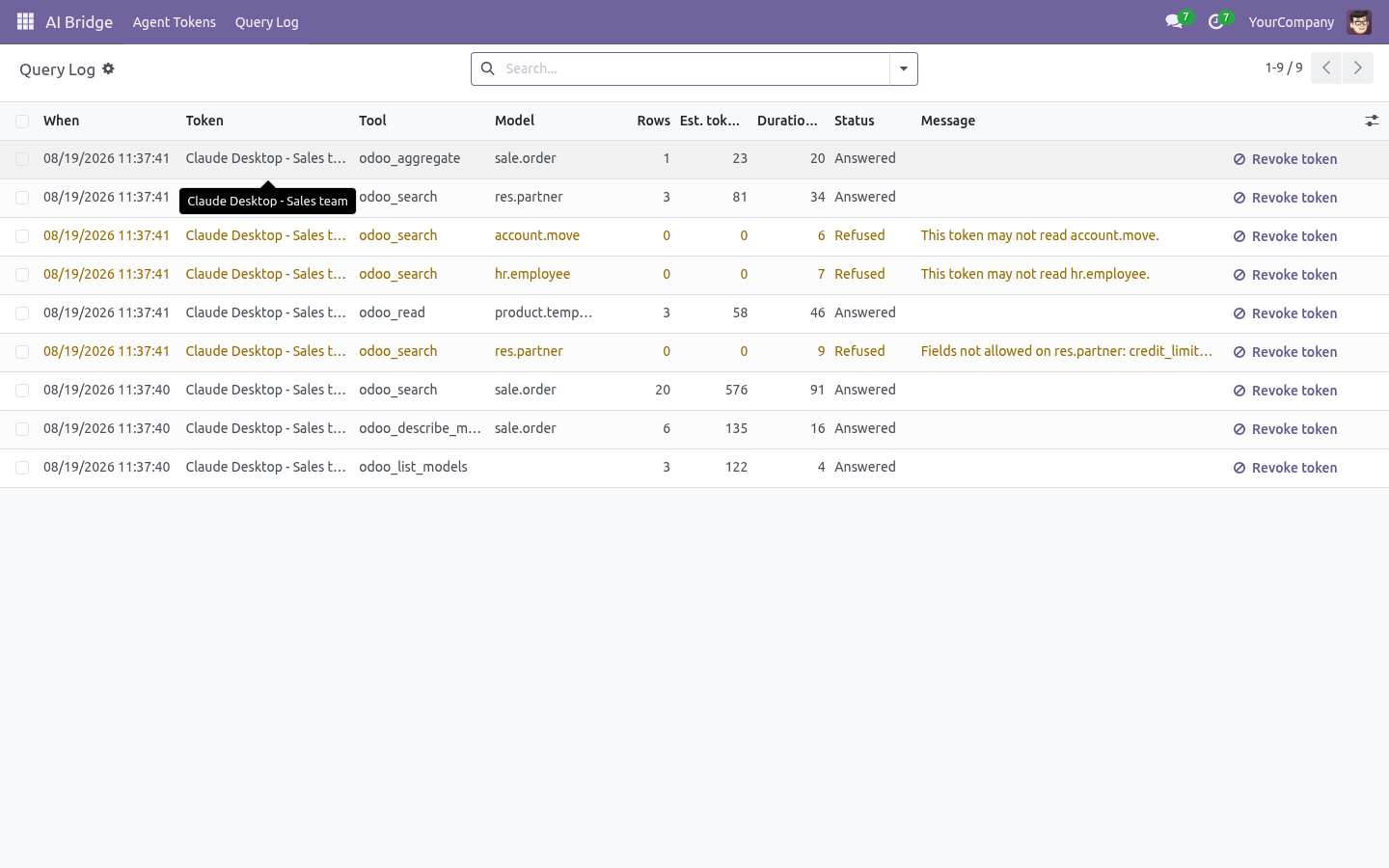
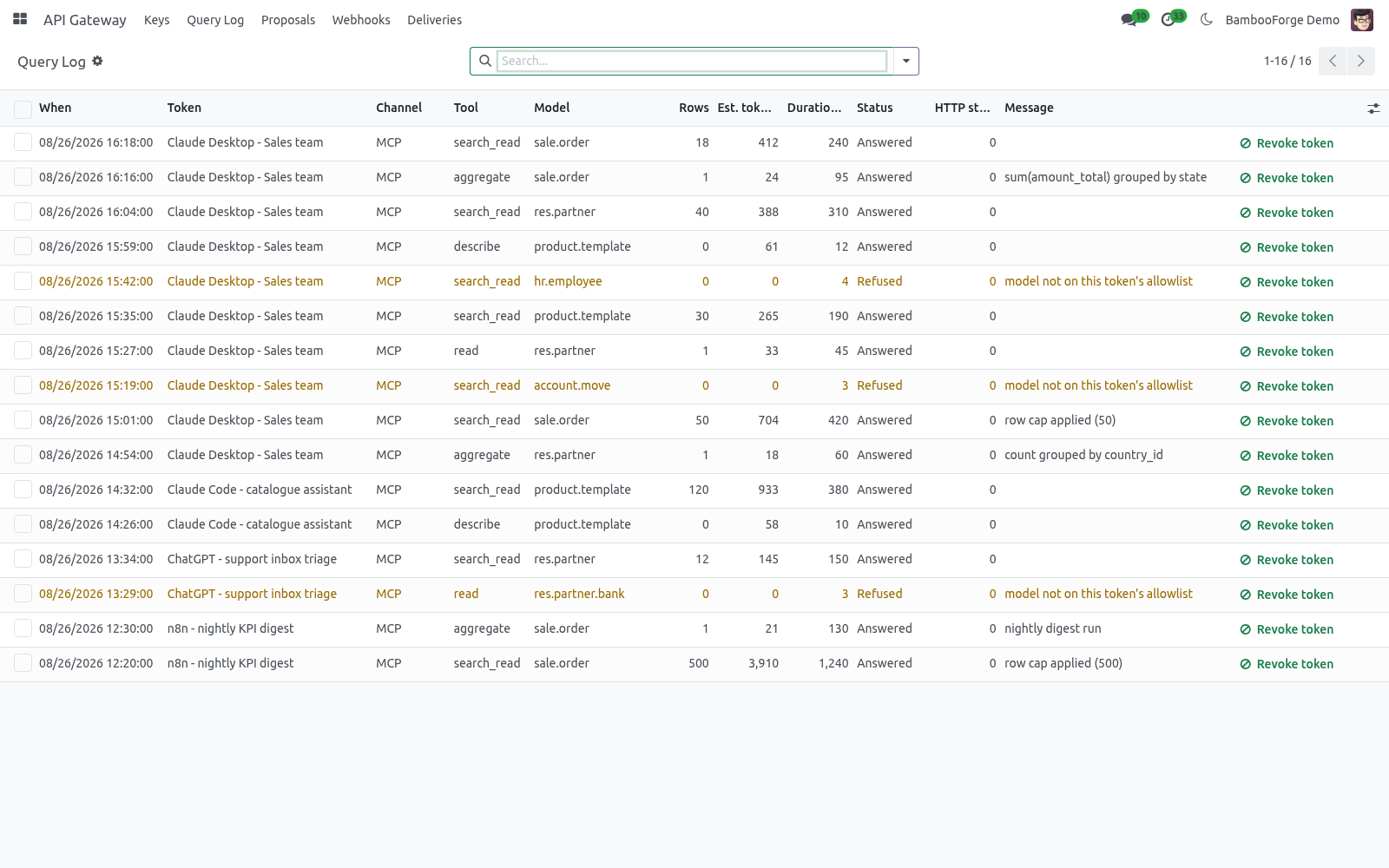
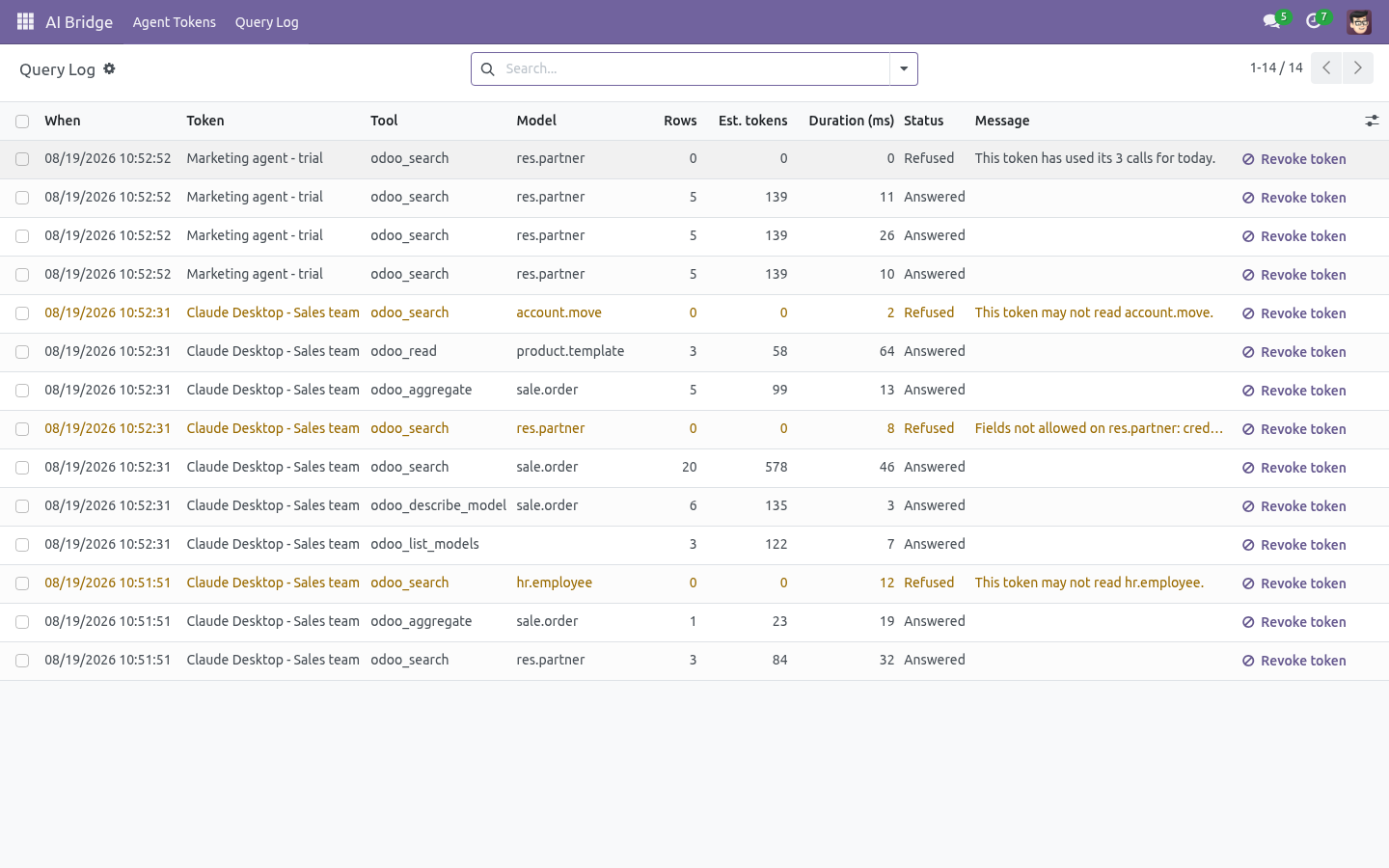
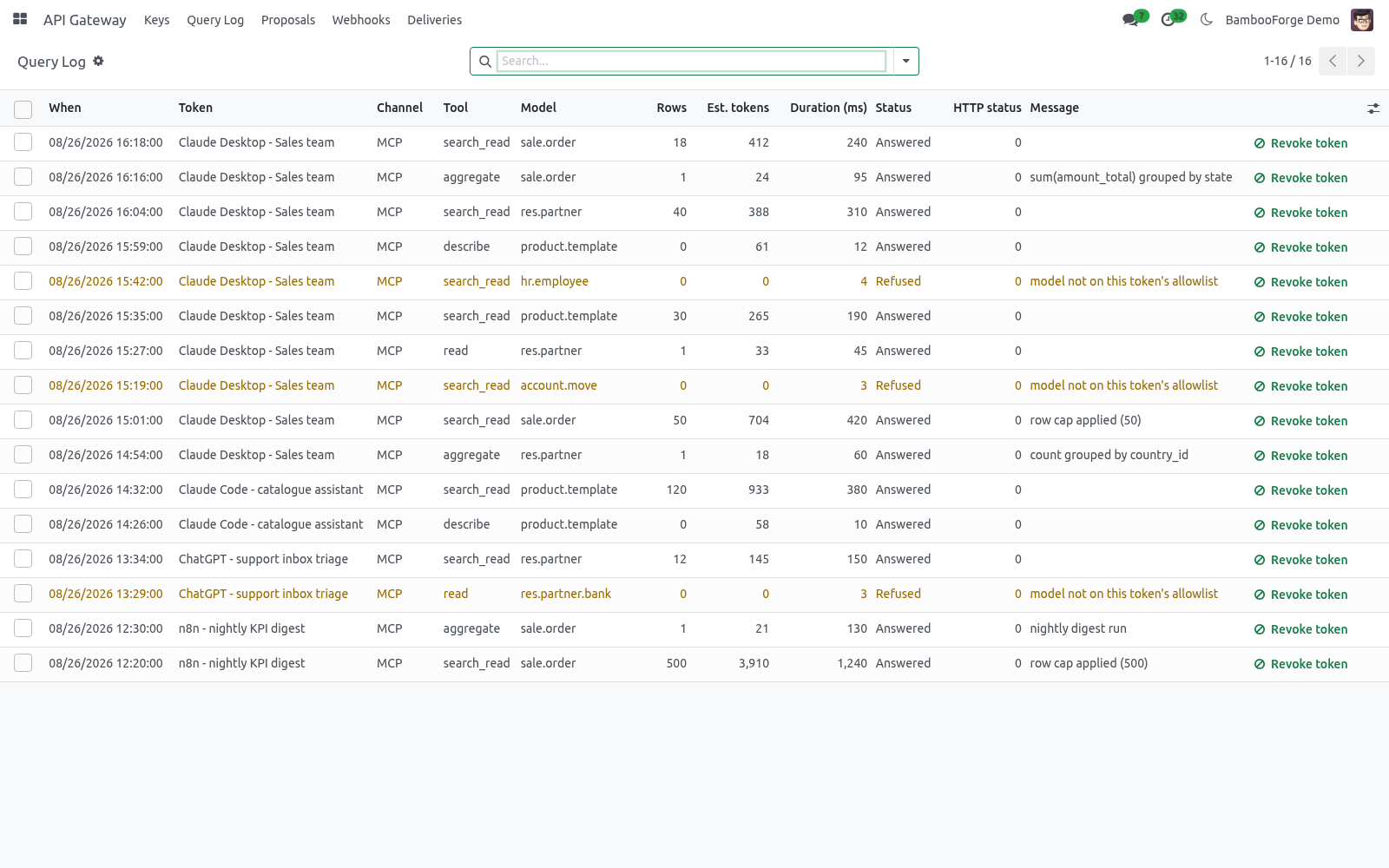
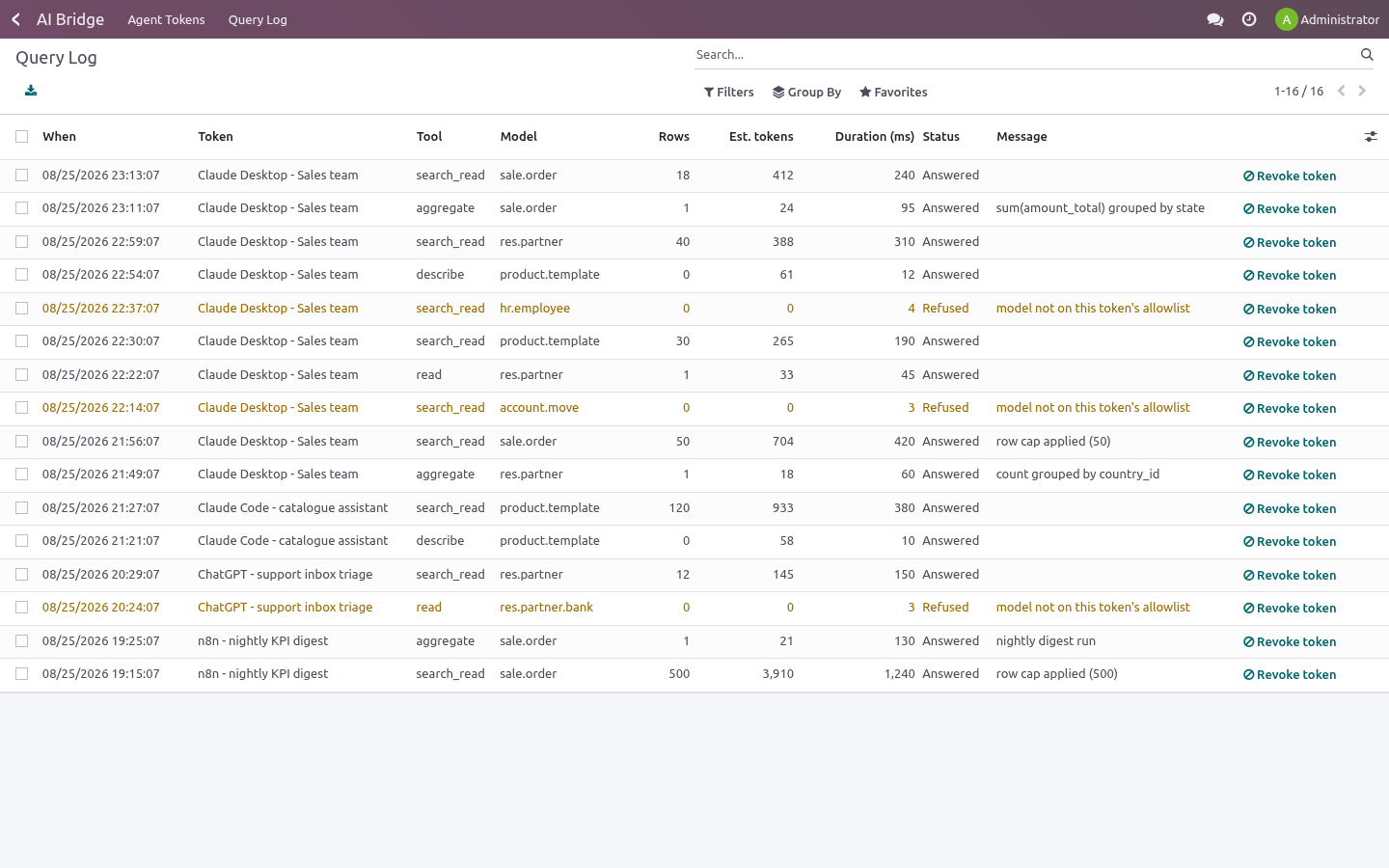
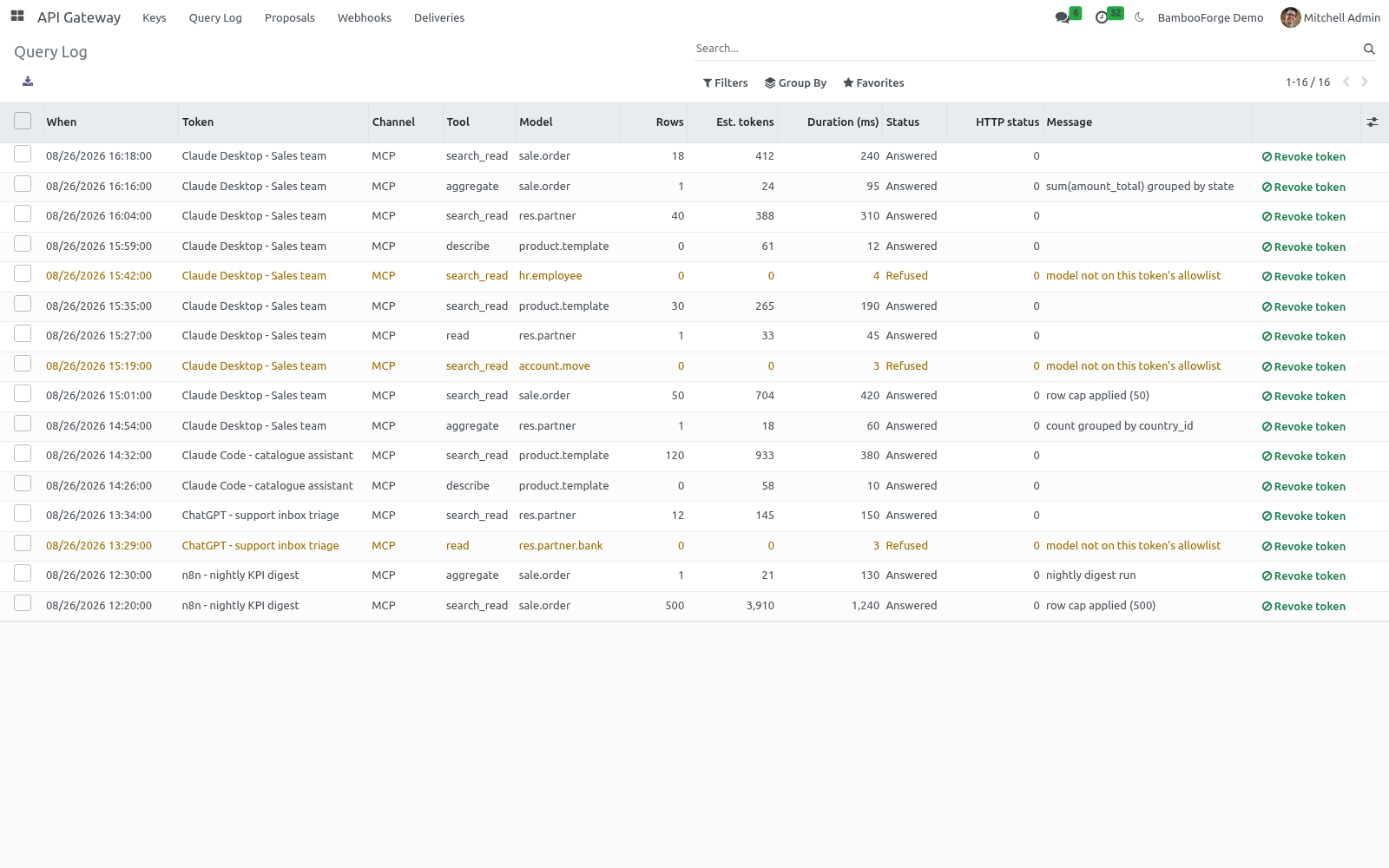
API Gateway → Query Log records, per call and per door (channel: REST, MCP, OAuth2, OpenAPI): key, operation, model, the exact arguments, HTTP method, path and status, row count, duration, an estimated token cost of the payload, the caller's IP and user agent, and the message of any refusal.
Use it three ways:
Cost and load - group by key, sum rows or estimated tokens; a runaway automation shows up as a wall of identical calls.
Security review - filter on Refused. A healthy integration refuses almost nothing; a burst of refusals means a badly configured client or an agent being talked into wandering.
Kill switch - the Revoke button on a log line disables the key that produced it, immediately.
Logs expire after 180 days (bf_ai_bridge.log_retention_days, 0 keeps everything).
Compared with the other doors into Odoo
Door |
What it means for you |
|---|---|
Odoo's XML-RPC / JSON-RPC |
Built in, on every version. A login and password (or API key) with the user's full rights; no allowlist, no OpenAPI file, no webhooks, no per-call log of what an automation read. |
Odoo's JSON-2 API |
Built in from 19.0, cleaner than XML-RPC, same scope: the caller's full rights. No webhooks. |
Odoo 20's MCP server |
Built into Odoo 20 Enterprise. It acts with the rights of the user behind the API key, like the other doors Odoo ships. |
REST API apps on the store |
Several, listed at roughly 87 to 122 EUR at the time of writing; they add REST endpoints. Check each listing for an OpenAPI file, webhooks, per-key model and field allowlists, and a query log before comparing. |
MCP connector apps on the store |
Listed at about 173 EUR at the time of writing for the MCP door alone. |
This app |
One key with three doors - MCP, REST with OpenAPI 3.1, signed webhooks - and, on every door, an allowlist of models, fields, rows and actions, propose-then-approve writes, per-key quotas, a query log with token estimates and a revoke button. 129 EUR per Odoo series, source included, no subscription. |
The store prices quoted are those shown on the Odoo Apps Store at the time of writing; check the listings for today's figures and features.
Security notes
Keys, client secrets and access tokens are stored as SHA-256 digests; the plaintext exists only in the banner shown at creation.
Every read and write runs with_user() as the key's user: record rules, multi-company rules and access rights apply. The allowlist narrows that - it never widens it. Nothing is sudo except reading the key itself and writing the log.
A new key has no rules: it answers 403 to everything until a person lists a model. There is no "allow all".
Fields protected by groups that the key's user is not in are absent from the schema and from every answer.
Controllers are auth="none" with save_session=False: no session is created, so a stolen bearer token cannot be turned into a browser session. Bodies are limited to 1 MB.
Webhook bodies are signed with a per-webhook secret and a timestamp; replaying an old delivery to the receiver is detectable.
Nothing leaves your server but the webhooks you configured. No telemetry, no vendor SDK, no CDN.
Troubleshooting
- 401 "No valid key"
The secret is wrong, the key was revoked, or Expires on has passed. Send the whole secret including the bfai_ prefix, or a live bfa_ access token.
- 403 "This key may not use X"
Add X under Allowed models. GET /api/v1/models lists what the key has.
- 400 "This key may not change these fields"
Add the field to Writable fields, or leave that empty to allow every readable, non-sensitive field.
- 202 instead of 201
The rule says May propose changes but not Write directly: the change is waiting under Proposals. Switch on Write directly for systems that should apply changes themselves.
- 429 with Retry-After
The per-minute or daily cap. Raise it on the key, or find the loop in the query log.
- Deliveries stay "Retrying"
The receiver is not answering 2xx; open the delivery to see its answer. A 4xx goes straight to Dead - fix the receiver and press Replay.
- A webhook fires for a record I did not expect
Its domain is AND-ed with the key's rule domain; check both. On change, set Only when these fields change.
- The OpenAPI file has no paths
The key has no rules yet.
- 404 on /api/... or /api/mcp
The app is not installed on that database, or your reverse proxy strips the path. Test on the Odoo port directly.
- The menu is missing
You are not in the AI Bridge / Manager group.
Tested against the real thing
Automated tests run against Odoo's own test server on every release; the sentence below is the part no test suite can give you - the gateway pointed at real tools, with real records.
Tested for real against n8n 2.34.6, Node-RED 5.0.6, Postman (newman), HTTPie and openapi-python-client: a contact created through REST fired a signed webhook into an n8n workflow that wrote a phone number back through REST; an order confirmed through a REST action reached a Node-RED flow with a verifiable signature; a 15-request Postman collection passed 24 of 24 assertions; the OpenAPI document validated with openapi-spec-validator and Redocly and generated a typed Python client that listed the orders - 0 errors.
What changed in 1.3
REST API on every allowed model: list, read, aggregate, create, change, delete and listed actions, with paging, filters, ETags, idempotency keys and RFC 9457 errors.
OpenAPI 3.1 per key, and a built-in API explorer at /api/doc.
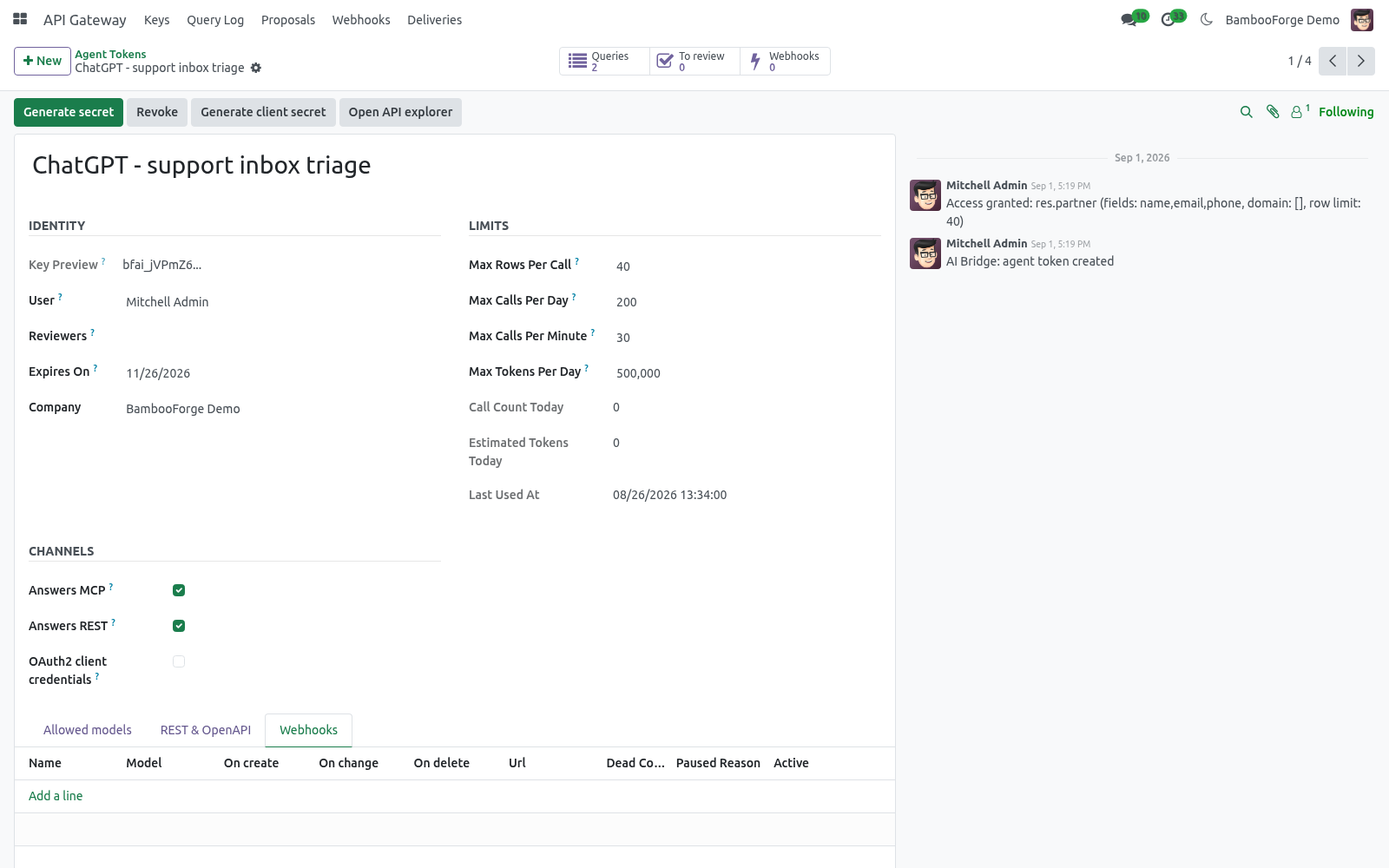
Webhooks on create, change and delete, signed, retried on a schedule, with a deliveries log and replay.
OAuth2 client credentials with short-lived access tokens.
/api/mcp is the MCP endpoint's address (the old address /bf_ai/mcp still answers), and /api/echo as a test receiver for webhooks.
Rules gained Write directly, May delete and Callable actions; keys gained per-door switches; the query log gained the channel, path, HTTP status and user agent.
What changed in 1.2
Proposals: odoo_propose_create, odoo_propose_write and odoo_proposal_status. Nothing is written until a reviewer applies it under their own rights.
Reviewers on the token; a To review counter on its form.
What changed in 1.1
A real cost ceiling: cap the estimated LLM tokens per rolling day, not only the number of calls. Plus a per-minute rate limit for runaway agent loops.
Grants are audited too: every change to a token's allowlist lands in the token's chatter, next to the queries it produced.
The query log expires (180 days by default, tunable with the bf_ai_bridge.log_retention_days system parameter).
Tokens, rules and logs are isolated per company, and the query log is readable by AI Bridge managers only.
How we make sure it works
Before every release, 115 automated checks run against this app on Odoo 16, 17, 18, 19 and 20. Among them:
A read only rule cannot propose.
A model without a rule is forbidden not described.
Rule domain cannot be widened by the agent.
A bystander cannot apply or refuse.
A bystander cannot even read it.
Tested for real against n8n 2.34.6, Node-RED 5.0.6, Postman (newman), HTTPie and openapi-python-client: a contact created through REST fired a signed webhook into an n8n workflow that wrote a phone number back through REST; an order confirmed through a REST action reached a Node-RED flow with a verifiable signature; a 15-request Postman collection passed 24 of 24 assertions; the OpenAPI document validated with openapi-spec-validator and Redocly and generated a typed Python client that listed the orders - 0 errors.
The complete list is in the source you receive.
Support
support@bambooforge.dev - questions, bug reports and feature requests are answered by the developers who wrote the module.