 BambooForge Labs
Activity Menu Performance Fix
Fixes the slow and timing-out activity menu on databases with hundreds of thousands of activities: same numbers, one fast query.
Available for Odoo 16.0. Technical name bambooforge_activity_perf.
Key facts
- What it is
- Fixes the slow and timing-out activity menu on databases with hundreds of thousands of activities: same numbers, one fast query.
- For
- Extra Tools
- Odoo versions
- 16.0 - Community and Enterprise
- Runs on
- Odoo.sh or Odoo you host yourself - not Odoo Online, which accepts no third-party apps
- Price
- 99 EUR, one-time, on the Odoo Apps Store
- Technical name
- bambooforge_activity_perf
- Live demo
- https://demo20.bambooforge.dev/odoo
- Manual last updated
- 2026-09-06
Activity Menu Performance Fix
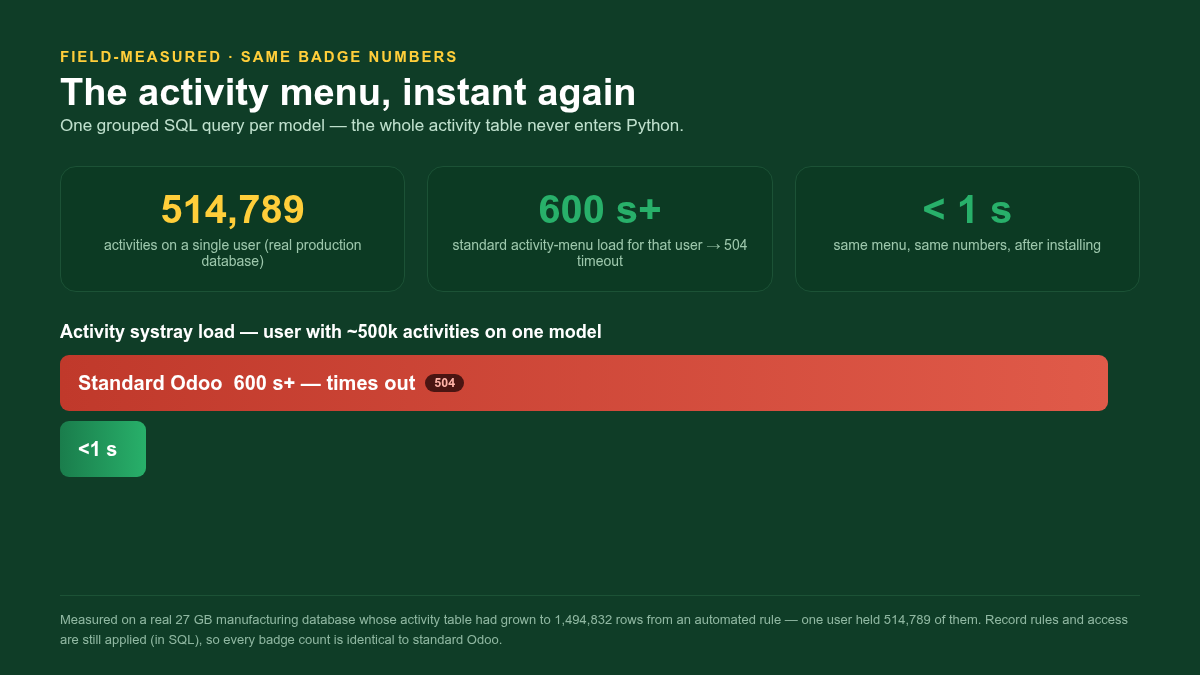
The clock icon in the top bar loads on every page and, on databases with a very large mail.activity table, it can take minutes or return 504 Gateway Timeout for the affected users. This module replaces the counting logic with a single fast SQL query per model that returns the exact same badge numbers — no upgrade, no data migration, no configuration.
This page is the complete manual. Read it top to bottom and you can install, verify the fix and understand exactly what changed without contacting support.
The problem
The activity systray (the clock in the top bar) calls res.users.systray_get_activities on every page load. Standard Odoo 16:
search() all of the current user's scheduled activities into memory;
builds a dictionary keyed by each activity's record;
filters the records the user may see with record not in allowed_records — an O(n²) membership test on a recordset.
For most users this is instant. But a common failure mode on aged databases is an automated action or server action that has quietly created activities on records that never close — piling hundreds of thousands of activities onto a single user. On a real production database one user had 514,789 activities on Manufacturing Orders. For that user the activity menu materialised the whole set in Python on every page load, took 600+ seconds, pinned a worker process and returned a 504 timeout — degrading the whole instance.
Upgrading Odoo is not a fix you can schedule around a live timeout, and it does not address the accumulated data. This module fixes the algorithm in place.
What this module does
It overrides res.users.systray_get_activities to count the badges with one grouped SQL query per model instead of loading the activity table into Python:
COUNT(*) FILTER (...) computes the overdue / today / planned buckets in a single indexed aggregate;
each model's record rules are compiled to SQL (via _apply_ir_rules) and pushed into the WHERE clause, so the badge counts only the activities on records the user is actually allowed to read;
a model-level check_access_rights gate skips models the user cannot read.
The returned data structure is identical to standard Odoo — same keys, same per-model dictionaries, including the actions entry the systray JavaScript expects — so the menu renders exactly as before, just instantly.
Why the numbers stay identical
This is a performance change, not a behaviour change:
Same permissions. Record rules and model access are applied in SQL exactly as the standard membership test applied them. A user who cannot read a model still sees zero for it; records hidden by a record rule (for example the multi-company rule) are not counted.
Same buckets. Overdue / today / planned are computed from date_deadline against the user's today, the same classification the standard menu uses.
Same shape. The result is the same list of per-model dictionaries with the same keys.
The bundled automated tests assert this directly: exact per-bucket counts on a mixed dataset, correct filtering through the standard multi-company record rule, and no entry for models with no activities.
Installation
Copy bambooforge_activity_perf into your addons path.
Update the apps list and install BambooForge Activity Menu Performance.
There is nothing to configure. The override is active immediately.
Dependencies: mail (standard). No Enterprise modules are needed. There is no schema change and no new stored column, so the module is uninstall-clean.
Verifying the fix
Before installing, you can confirm whether you are affected. Run (read-only):
SELECT u.login, a.res_model, count(*)
FROM mail_activity a JOIN res_users u ON u.id = a.user_id
GROUP BY u.login, a.res_model
ORDER BY count(*) DESC
LIMIT 10;
If any single user has tens or hundreds of thousands of activities on one model, that user's activity menu is the bottleneck this module fixes. After installing, open that user's session — the clock menu opens immediately, with the same badge numbers.
You should also investigate why those activities were created (usually an automated action) and clean up the stale ones; this module makes the menu fast regardless, but a runaway rule will keep growing the table.
Frequently asked questions
- Will my badge numbers change?
No. See Why the numbers stay identical — permissions, buckets and shape are all preserved.
- Is it safe on multi-company databases?
Yes. The multi-company record rule is compiled into the SQL, so counts are correct per company, exactly as before.
- Do I need to upgrade Odoo or delete data?
No. The module is an in-place algorithmic fix. Cleaning up the source of the activity pile-up is recommended but independent of this module.
- What happens on uninstall?
The override is removed and standard behaviour returns. There is no schema change to reverse.
How we make sure it works
Before every release, 8 automated checks run against this app on Odoo 16. Among them:
It is one query per call not one per model.
An activity for somebody else is not counted.
A user with nothing scheduled sees nothing.
No activities no entry.
The shape matches what the web client expects.
The complete list is in the source you receive.
Questions people ask
- Which Odoo versions does it run on?
Odoo 16.0, on the series you buy it for; each series is its own listing.
- Community or Enterprise?
Both. It needs no Enterprise app.
- What does it need?
The standard Discuss app. No extra Python package.
- Does anything leave my server?
No. It makes no call outside your Odoo server: no telemetry, no licence check, no third-party service.
- What happens if I uninstall it?
Odoo drops the app's own tables and fields; the standard records it worked on (contacts, orders, products) stay as they are.
Support
BambooForge Labs — support@bambooforge.dev