 BambooForge Labs
Access Rights All in One with an Audit Trail
Access reviews with the evidence attached: SoD conflicts, time-boxed grants and every rights change since the last snapshot, on one line.
Available for Odoo 16.0, Odoo 17.0, Odoo 18.0, Odoo 19.0, Odoo 20.0. Technical name bambooforge_access_audit_bridge.
Transcript of the walkthrough (Odoo 20)
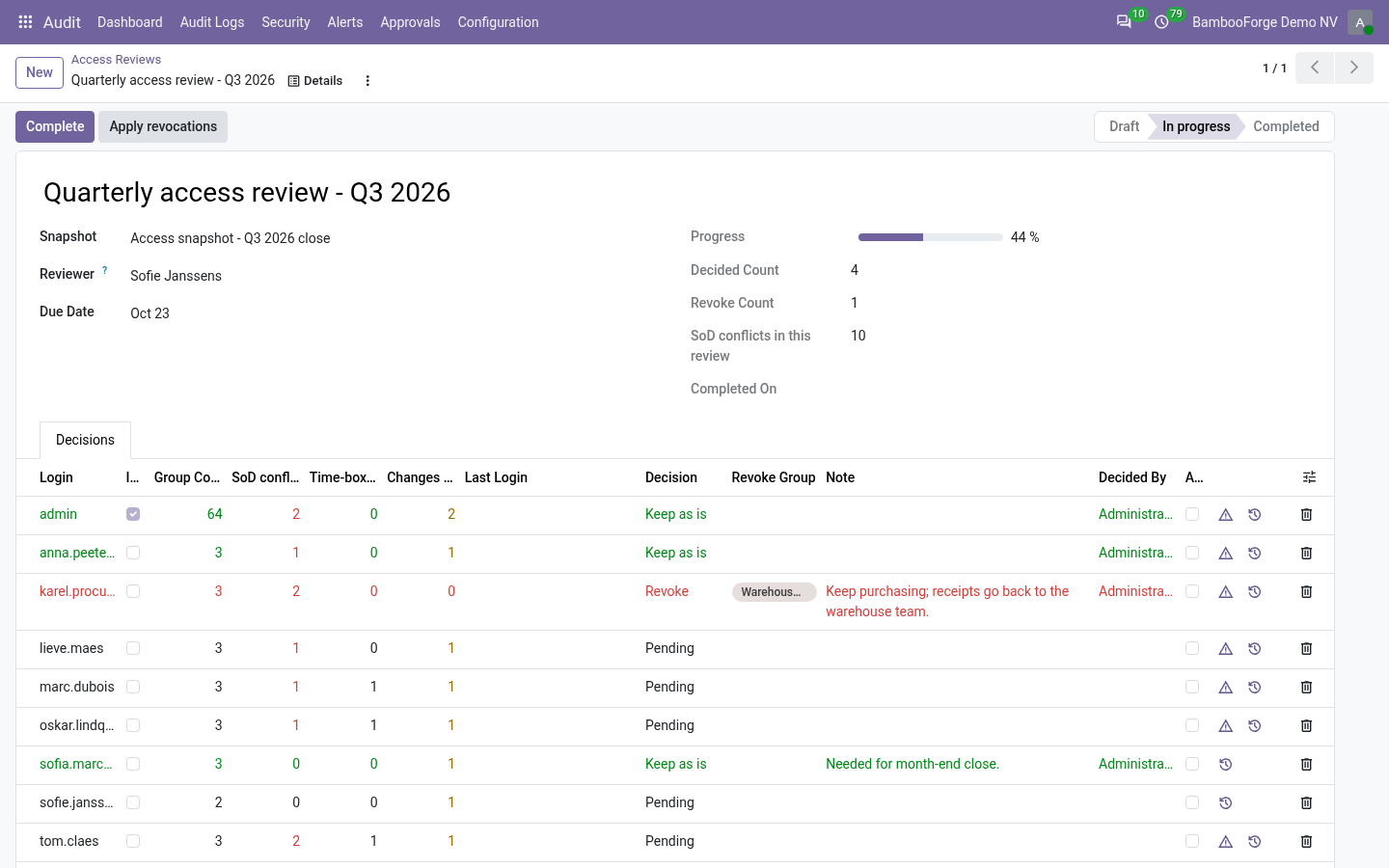
Access Rights All in One with an Audit Trail. Access reviews with the evidence attached: SoD conflicts, time-boxed grants and every rights change since the last snapshot, on one line. Audit Pro runs the access review campaign: a snapshot of who holds what, a named reviewer, a decision per user, and revocations that are actually applied. Access Manager knows the story behind those rights: which grants were only ever meant to last a fortnight, which combinations break segregation of duties, and every change since the last campaign.
In the next few minutes: on every review line, then when revocations are applied, then design, then how we make sure it works, then questions people ask. Then what this app deliberately does not do, so you can tell before you buy whether it fits. 1. Copy bambooforge_access_audit_bridge into your addons path and update the app list, or install the ZIP from the Odoo Apps Store.
2. Install Access Rights & Audit Suite. On every review line SoD conflicts - how many segregation-of-duties violations stand against this user right now, in red when there are any, with a button that opens them. Time-boxed grants - how many grants are still running and the date the first one ends.
Access somebody already agreed should stop is not a reason to keep it. Changes since the snapshot - how many rights changes landed after the snapshot was frozen. A reviewer signing a stale list should know that is what they are doing; one button opens the full history. When revocations are applied.
Applying a campaign's revocations writes into Access Manager's change log with the source Access review decision. Without this bridge the same removals are filed as "edited outside the wizards" - the entry an auditor cannot reconcile with the campaign that ordered it. Design. Nothing is duplicated and neither module is patched: the campaign stays in Audit Pro, the history stays in Access Manager.
This addon only reads from one side and adds context to the other, so both keep shipping and upgrading on their own. It installs itself automatically once both are present. How we make sure it works. Before every release, 8 automated checks run against this app on Odoo 16, 17, 18, 19 and 20.
Among them: Finished grant is not counted. Clean user shows nothing. Revocation is logged as a review decision. Changes after the snapshot are flagged.
History action targets the user. The complete list is in the source you receive. Questions people ask. Which Odoo versions does it run on?
Odoo 16.0, 17.0, 18.0, 19.0, 20.0, on the series you buy it for; each series is its own listing. Community or Enterprise? Both. It needs no Enterprise app.
Support. support@bambooforge.dev - answered within two business days. This module is licensed OPL-1; one purchase covers one production database plus its staging copies. The complete manual is at docs dot bambooforge dot dev, the demo database is linked from the store page, and support answers within twenty-four hours.
Links are in the description.
Transcript of the walkthrough (Odoo 19)
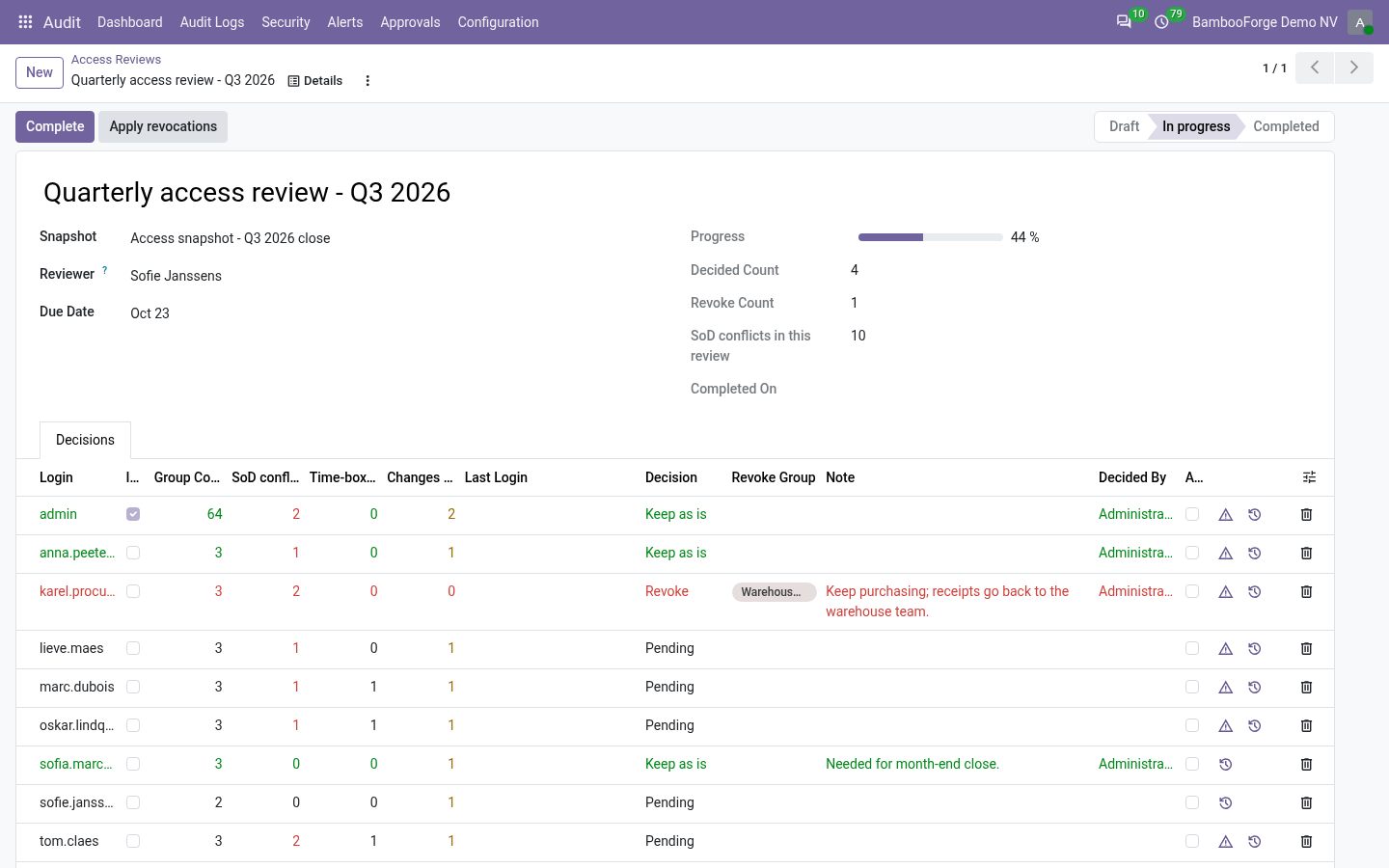
Access Rights & Audit Suite. Access reviews with the evidence attached: SoD conflicts, time-boxed grants and every rights change since the last snapshot, on one line. Audit Pro runs the access review campaign: a snapshot of who holds what, a named reviewer, a decision per user, and revocations that are actually applied. Access Manager knows the story behind those rights: which grants were only ever meant to last a fortnight, which combinations break segregation of duties, and every change since the last campaign.
In the next few minutes: on every review line, then when revocations are applied, then design, then support. Then what this app deliberately does not do, so you can tell before you buy whether it fits. On every review line SoD conflicts - how many segregation-of-duties violations stand against this user right now, in red when there are any, with a button that opens them. Time-boxed grants - how many grants are still running and the date the first one ends.
Access somebody already agreed should stop is not a reason to keep it. Changes since the snapshot - how many rights changes landed after the snapshot was frozen. A reviewer signing a stale list should know that is what they are doing; one button opens the full history. When revocations are applied.
Applying a campaign's revocations writes into Access Manager's change log with the source Access review decision. Without this bridge the same removals are filed as "edited outside the wizards" - the entry an auditor cannot reconcile with the campaign that ordered it. Design. Nothing is duplicated and neither module is patched: the campaign stays in Audit Pro, the history stays in Access Manager.
This addon only reads from one side and adds context to the other, so both keep shipping and upgrading on their own. It installs itself automatically once both are present. Support. support@bambooforge.dev - answered within two business days.
This module is licensed OPL-1; one purchase covers one production database plus its staging copies. The complete manual is at docs dot bambooforge dot dev, the demo database is linked from the store page, and support answers within twenty-four hours. Links are in the description.
Transcript of the walkthrough (Odoo 18)
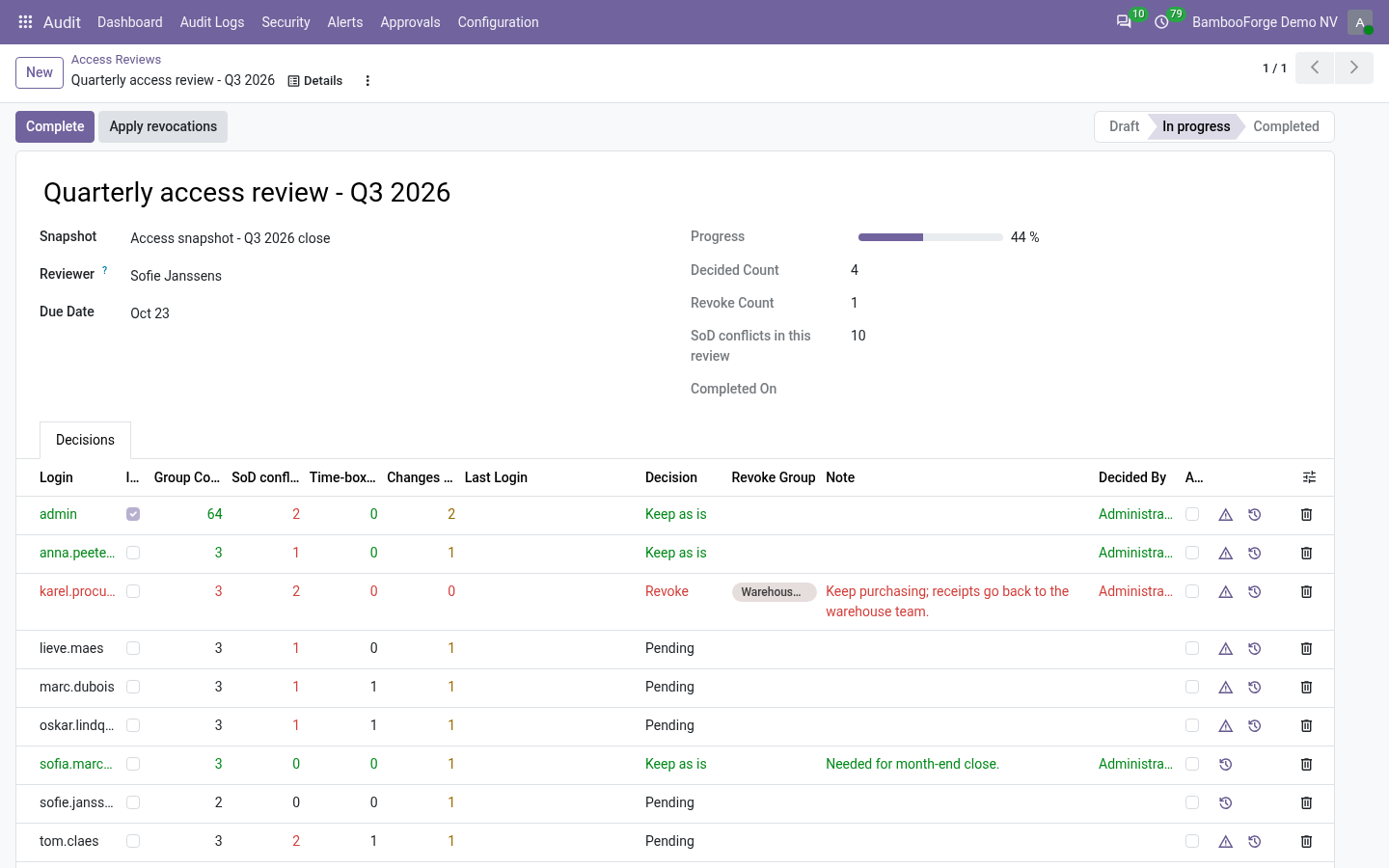
Access Rights & Audit Suite. Access reviews with the evidence attached: SoD conflicts, time-boxed grants and every rights change since the last snapshot, on one line. Audit Pro runs the access review campaign: a snapshot of who holds what, a named reviewer, a decision per user, and revocations that are actually applied. Access Manager knows the story behind those rights: which grants were only ever meant to last a fortnight, which combinations break segregation of duties, and every change since the last campaign.
In the next few minutes: on every review line, then when revocations are applied, then design, then support. Then what this app deliberately does not do, so you can tell before you buy whether it fits. On every review line SoD conflicts - how many segregation-of-duties violations stand against this user right now, in red when there are any, with a button that opens them. Time-boxed grants - how many grants are still running and the date the first one ends.
Access somebody already agreed should stop is not a reason to keep it. Changes since the snapshot - how many rights changes landed after the snapshot was frozen. A reviewer signing a stale list should know that is what they are doing; one button opens the full history. When revocations are applied.
Applying a campaign's revocations writes into Access Manager's change log with the source Access review decision. Without this bridge the same removals are filed as "edited outside the wizards" - the entry an auditor cannot reconcile with the campaign that ordered it. Design. Nothing is duplicated and neither module is patched: the campaign stays in Audit Pro, the history stays in Access Manager.
This addon only reads from one side and adds context to the other, so both keep shipping and upgrading on their own. It installs itself automatically once both are present. Support. support@bambooforge.dev - answered within two business days.
This module is licensed OPL-1; one purchase covers one production database plus its staging copies. The complete manual is at docs dot bambooforge dot dev, the demo database is linked from the store page, and support answers within twenty-four hours. Links are in the description.
Transcript of the walkthrough (Odoo 17)
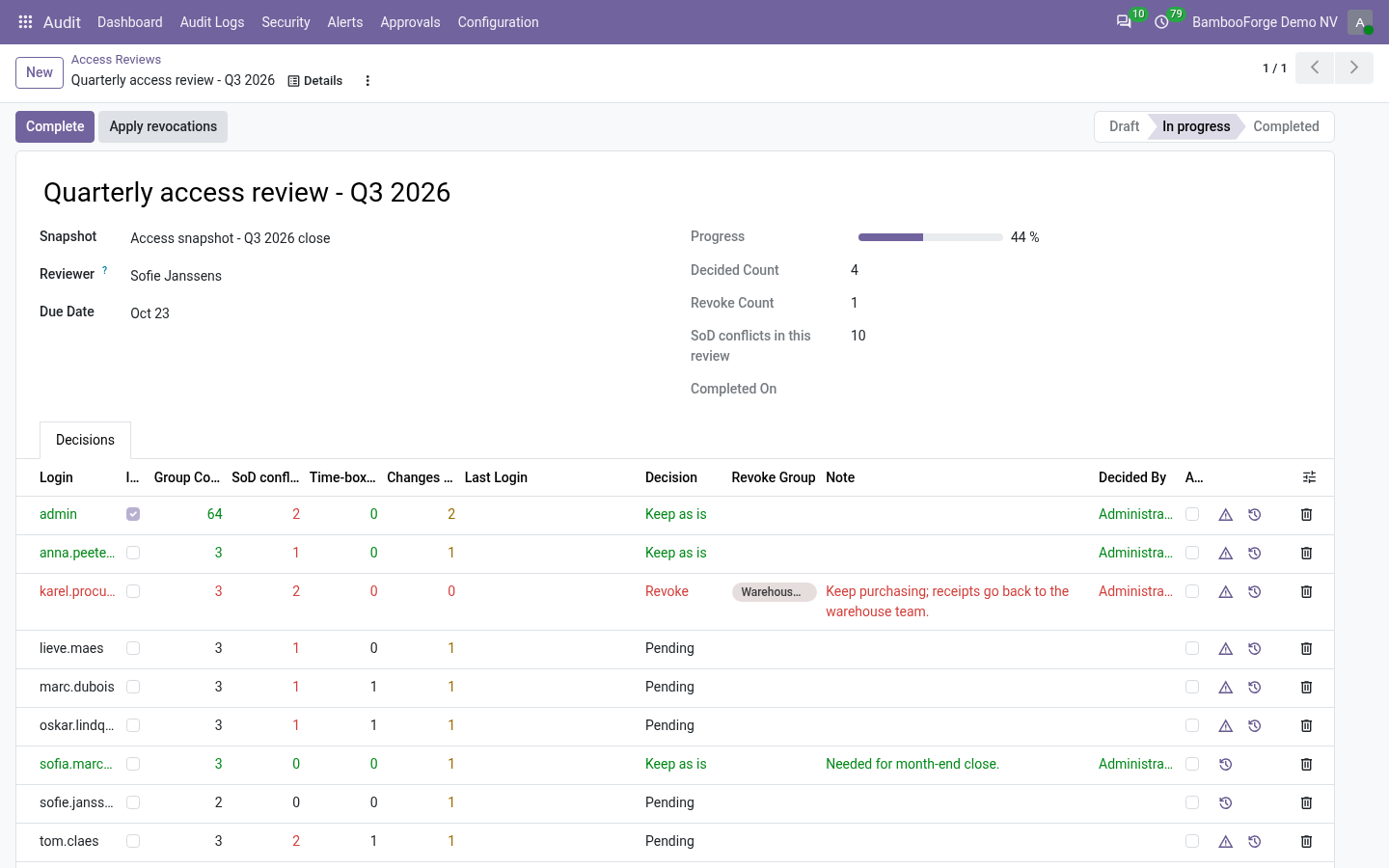
Access Rights & Audit Suite. Access reviews with the evidence attached: SoD conflicts, time-boxed grants and every rights change since the last snapshot, on one line. Audit Pro runs the access review campaign: a snapshot of who holds what, a named reviewer, a decision per user, and revocations that are actually applied. Access Manager knows the story behind those rights: which grants were only ever meant to last a fortnight, which combinations break segregation of duties, and every change since the last campaign.
In the next few minutes: on every review line, then when revocations are applied, then design, then support. Then what this app deliberately does not do, so you can tell before you buy whether it fits. On every review line SoD conflicts - how many segregation-of-duties violations stand against this user right now, in red when there are any, with a button that opens them. Time-boxed grants - how many grants are still running and the date the first one ends.
Access somebody already agreed should stop is not a reason to keep it. Changes since the snapshot - how many rights changes landed after the snapshot was frozen. A reviewer signing a stale list should know that is what they are doing; one button opens the full history. When revocations are applied.
Applying a campaign's revocations writes into Access Manager's change log with the source Access review decision. Without this bridge the same removals are filed as "edited outside the wizards" - the entry an auditor cannot reconcile with the campaign that ordered it. Design. Nothing is duplicated and neither module is patched: the campaign stays in Audit Pro, the history stays in Access Manager.
This addon only reads from one side and adds context to the other, so both keep shipping and upgrading on their own. It installs itself automatically once both are present. Support. support@bambooforge.dev - answered within two business days.
This module is licensed OPL-1; one purchase covers one production database plus its staging copies. The complete manual is at docs dot bambooforge dot dev, the demo database is linked from the store page, and support answers within twenty-four hours. Links are in the description.
Transcript of the walkthrough (Odoo 16)
Access Rights & Audit Suite. Access reviews with the evidence attached: SoD conflicts, time-boxed grants and every rights change since the last snapshot, on one line. Audit Pro runs the access review campaign: a snapshot of who holds what, a named reviewer, a decision per user, and revocations that are actually applied. Access Manager knows the story behind those rights: which grants were only ever meant to last a fortnight, which combinations break segregation of duties, and every change since the last campaign.
In the next few minutes: on every review line, then when revocations are applied, then design, then support. Then what this app deliberately does not do, so you can tell before you buy whether it fits. On every review line SoD conflicts - how many segregation-of-duties violations stand against this user right now, in red when there are any, with a button that opens them. Time-boxed grants - how many grants are still running and the date the first one ends.
Access somebody already agreed should stop is not a reason to keep it. Changes since the snapshot - how many rights changes landed after the snapshot was frozen. A reviewer signing a stale list should know that is what they are doing; one button opens the full history. When revocations are applied.
Applying a campaign's revocations writes into Access Manager's change log with the source Access review decision. Without this bridge the same removals are filed as "edited outside the wizards" - the entry an auditor cannot reconcile with the campaign that ordered it. Design. Nothing is duplicated and neither module is patched: the campaign stays in Audit Pro, the history stays in Access Manager.
This addon only reads from one side and adds context to the other, so both keep shipping and upgrading on their own. It installs itself automatically once both are present. Support. support@bambooforge.dev - answered within two business days.
This module is licensed OPL-1; one purchase covers one production database plus its staging copies. The complete manual is at docs dot bambooforge dot dev, the demo database is linked from the store page, and support answers within twenty-four hours. Links are in the description.
Key facts
- What it is
- Access reviews with the evidence attached: SoD conflicts, time-boxed grants and every rights change since the last snapshot, on one line.
- For
- Extra Tools
- Odoo versions
- 16.0, 17.0, 18.0, 19.0, 20.0 - Community and Enterprise
- Runs on
- Odoo.sh or Odoo you host yourself - not Odoo Online, which accepts no third-party apps
- Price
- 458 EUR, one-time, on the Odoo Apps Store
- Technical name
- bambooforge_access_audit_bridge
- Manual last updated
- 2026-10-15
Access Rights All in One with an Audit Trail
What it does
Audit Pro runs the access review campaign: a snapshot of who holds what, a named reviewer, a decision per user, and revocations that are actually applied. Access Manager knows the story behind those rights: which grants were only ever meant to last a fortnight, which combinations break segregation of duties, and every change since the last campaign.
Install both and this module puts one in front of the other.
On every review line
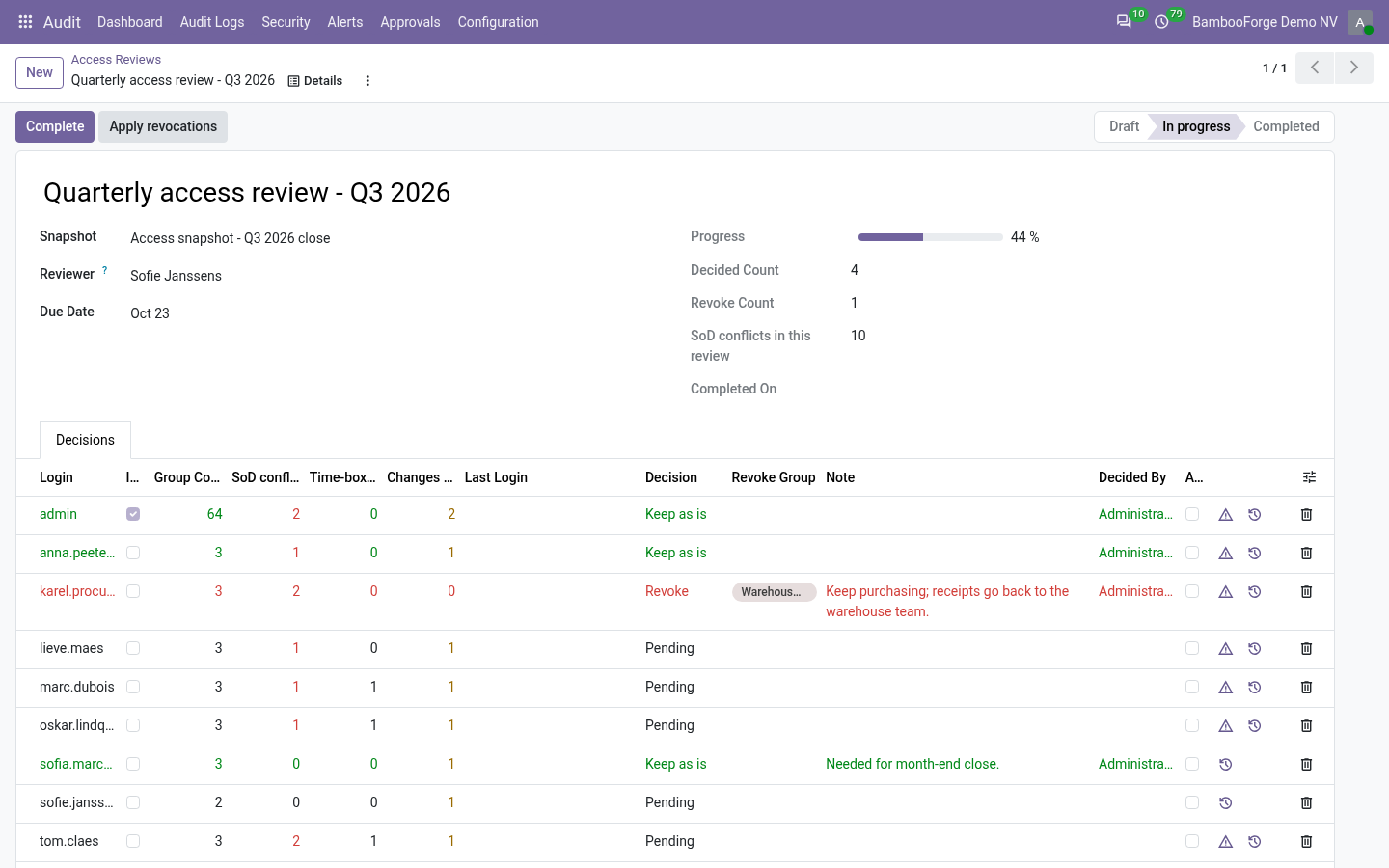
SoD conflicts - how many segregation-of-duties violations stand against this user right now, in red when there are any, with a button that opens them.
Time-boxed grants - how many grants are still running and the date the first one ends. Access somebody already agreed should stop is not a reason to keep it.
Changes since the snapshot - how many rights changes landed after the snapshot was frozen. A reviewer signing a stale list should know that is what they are doing; one button opens the full history.
When revocations are applied
Applying a campaign's revocations writes into Access Manager's change log with the source Access review decision. Without this bridge the same removals are filed as "edited outside the wizards" - the entry an auditor cannot reconcile with the campaign that ordered it.
Design
Nothing is duplicated and neither module is patched: the campaign stays in Audit Pro, the history stays in Access Manager. This addon only reads from one side and adds context to the other, so both keep shipping and upgrading on their own. It installs itself automatically once both are present.
How we make sure it works
Before every release, 8 automated checks run against this app on Odoo 16, 17, 18, 19 and 20. Among them:
Finished grant is not counted.
Clean user shows nothing.
Revocation is logged as a review decision.
Changes after the snapshot are flagged.
History action targets the user.
The complete list is in the source you receive.
Install
Copy bambooforge_access_audit_bridge into your addons path and update the app list, or install the ZIP from the Odoo Apps Store.
Install Access Rights & Audit Suite.
Questions people ask
- Which Odoo versions does it run on?
Odoo 16.0, 17.0, 18.0, 19.0, 20.0, on the series you buy it for; each series is its own listing.
- Community or Enterprise?
Both. It needs no Enterprise app.
- What does it need?
The standard Web; access manager, audit pro (BambooForge) must be installed first app. No extra Python package.
- Does anything leave my server?
No. It makes no call outside your Odoo server: no telemetry, no licence check, no third-party service.
- What happens if I uninstall it?
Odoo drops the app's own tables and fields; the standard records it worked on (contacts, orders, products) stay as they are.
Support
support@bambooforge.dev - answered within two business days. This module is licensed OPL-1; one purchase covers one production database plus its staging copies.